

Page 1
Page 2
•
•
•
•
•
•
•
•
•
•
2
Page 3
1.
2.
3.
4.
5.
6.
a.
b.
c.
d.
7.
8.
9.
10.
11.
12.
13.
14.
15.
16.
17.
3
Page 4
4
Page 5
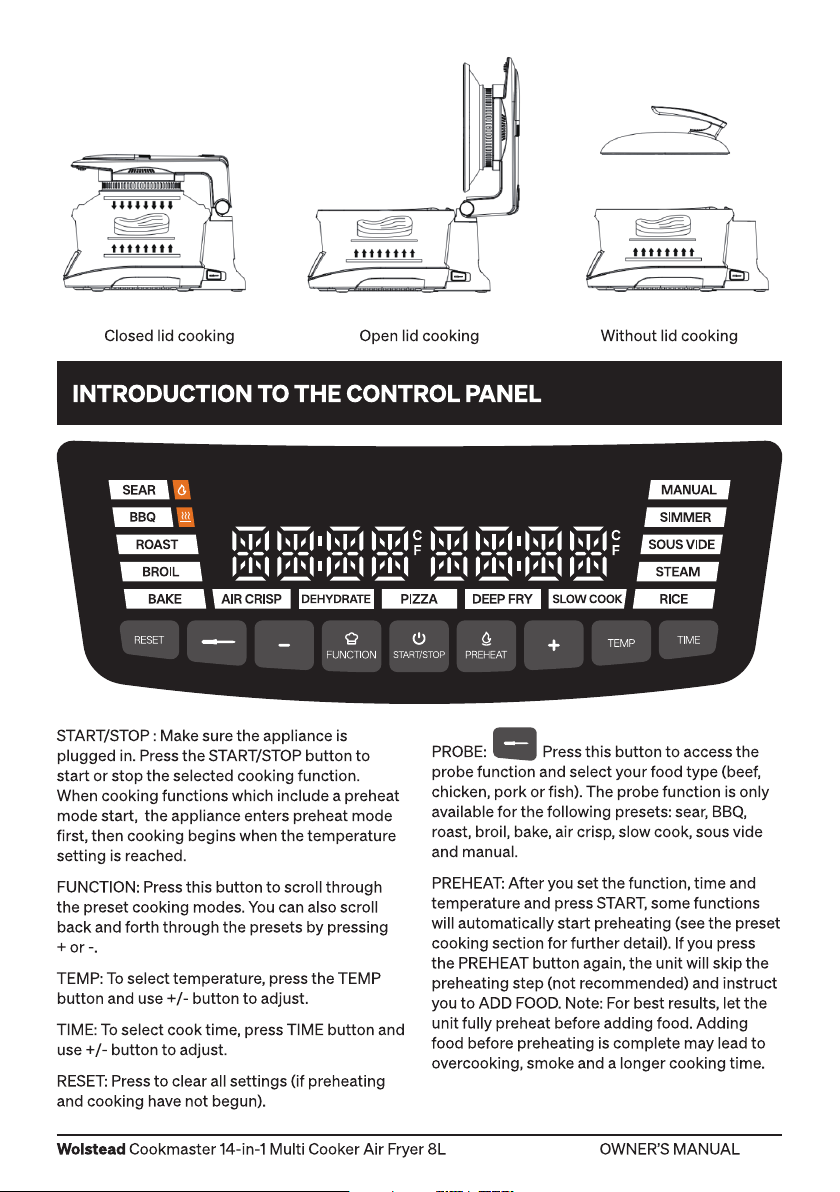
5
Page 6
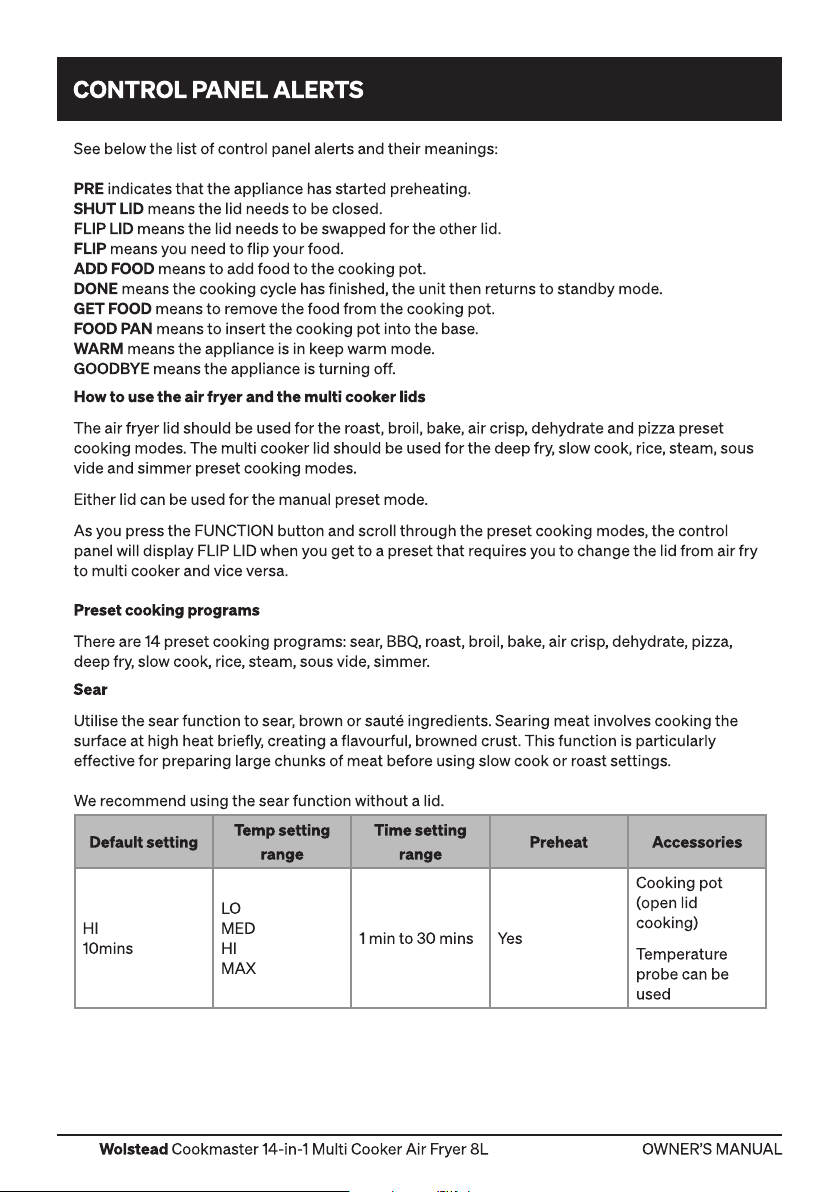
See below the list of control panel alerts and their meanings:
PRE indicates that the appliance has started preheating.
SHUT LID means the lid needs to be closed.
FLIP LID means the lid needs to be swapped for the other lid.
FLIP means you need to flip your food.
ADD FOOD means to add food to the cooking pot.
DONE means the cooking cycle has finished, the unit then returns to standby mode.
GET FOOD means to remove the food from the cooking pot.
FOOD PAN means to insert the cooking pot into the base.
WARM means the appliance is in keep warm mode.
GOODBYE means the appliance is turning off.
How to use the air fryer and the multi cooker lids
The air fryer lid should be used for the roast, broil, bake, air crisp, dehydrate and pizza preset
cooking modes. The multi cooker lid should be used for the deep fry, slow cook, rice, steam, sous
vide and simmer preset cooking modes.
Either lid can be used for the manual preset mode.
As you press the FUNCTION button and scroll through the preset cooking modes, the control
panel will display FLIP LID when you get to a preset that requires you to change the lid from air fry
to multi cooker and vice versa.
Preset cooking programs
There are 14 preset cooking programs: sear, BBQ, roast, broil, bake, air crisp, dehydrate, pizza,
deep fry, slow cook, rice, steam, sous vide, simmer.
Sear
Utilise the sear function to sear, brown or sauté ingredients. Searing meat involves cooking the
surface at high heat briefly, creating a flavourful, browned crust. This function is particularly
effective for preparing large chunks of meat before using slow cook or roast settings.
We recommend using the sear function without a lid.
Default setting
HI
10mins
6
Temp setting
range
LO
MED
HI
MAX
Time setting
1 min to 30 mins Yes
range
Preheat Accessories
Cooking pot
(open lid
cooking)
Temperature
probe can be
used
Page 7
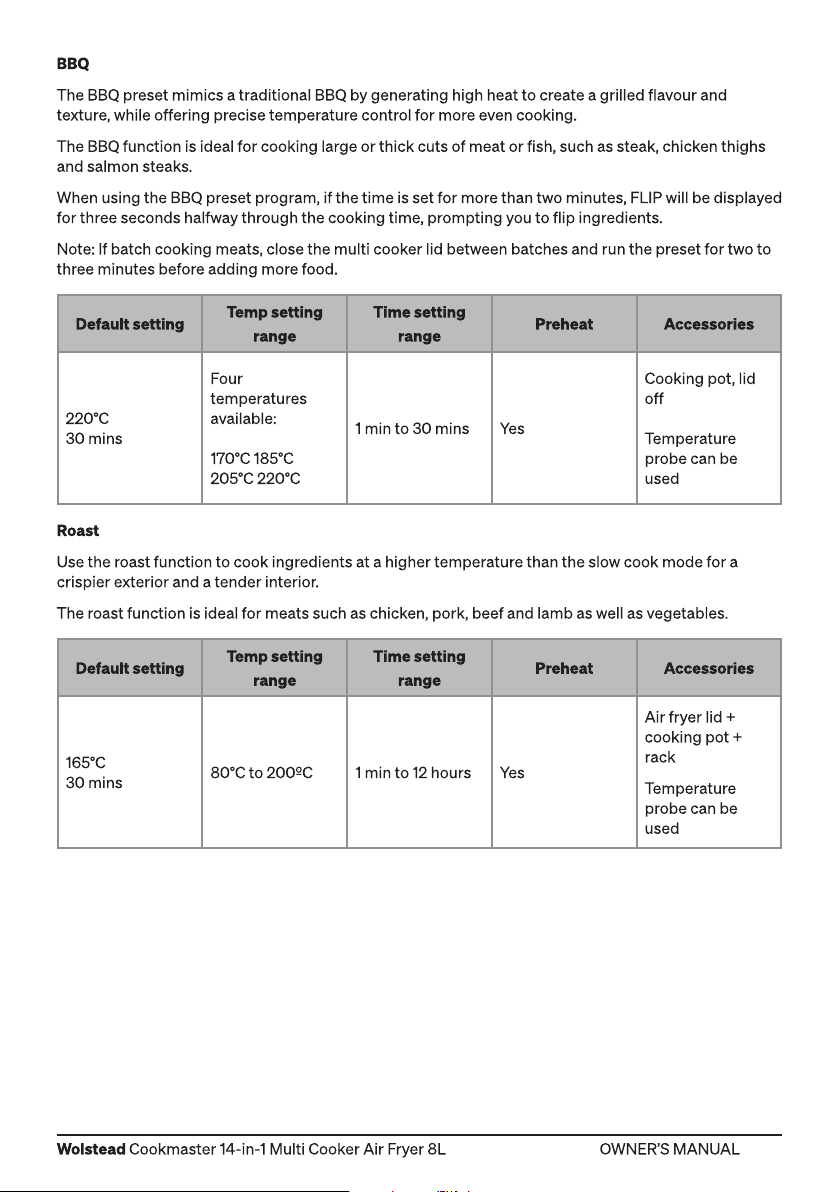
BBQ
The BBQ preset mimics a traditional BBQ by generating high heat to create a grilled flavour and
texture, while offering precise temperature control for more even cooking.
The BBQ function is ideal for cooking large or thick cuts of meat or fish, such as steak, chicken thighs
and salmon steaks.
When using the BBQ preset program, if the time is set for more than two minutes, FLIP will be displayed
for three seconds halfway through the cooking time, prompting you to flip ingredients.
Note: If batch cooking meats, close the multi cooker lid between batches and run the preset for two to
three minutes before adding more food.
Default setting
220°C
30 mins
Roast
Use the roast function to cook ingredients at a higher temperature than the slow cook mode for a
crispier exterior and a tender interior.
The roast function is ideal for meats such as chicken, pork, beef and lamb as well as vegetables.
Default setting
165°C
30 mins
Temp setting
range
Four
temperatures
available:
170°C 185°C
205°C 220°C
Temp setting
range
80°C to 200ºC 1 min to 12 hours Ye s
Time setting
range
1 min to 30 mins Yes
Time setting
range
Preheat Accessories
Cooking pot, lid
off
Temperature
probe can be
used
Preheat Accessories
Air fryer lid +
cooking pot +
rack
Temperature
probe can be
used
7
Page 8
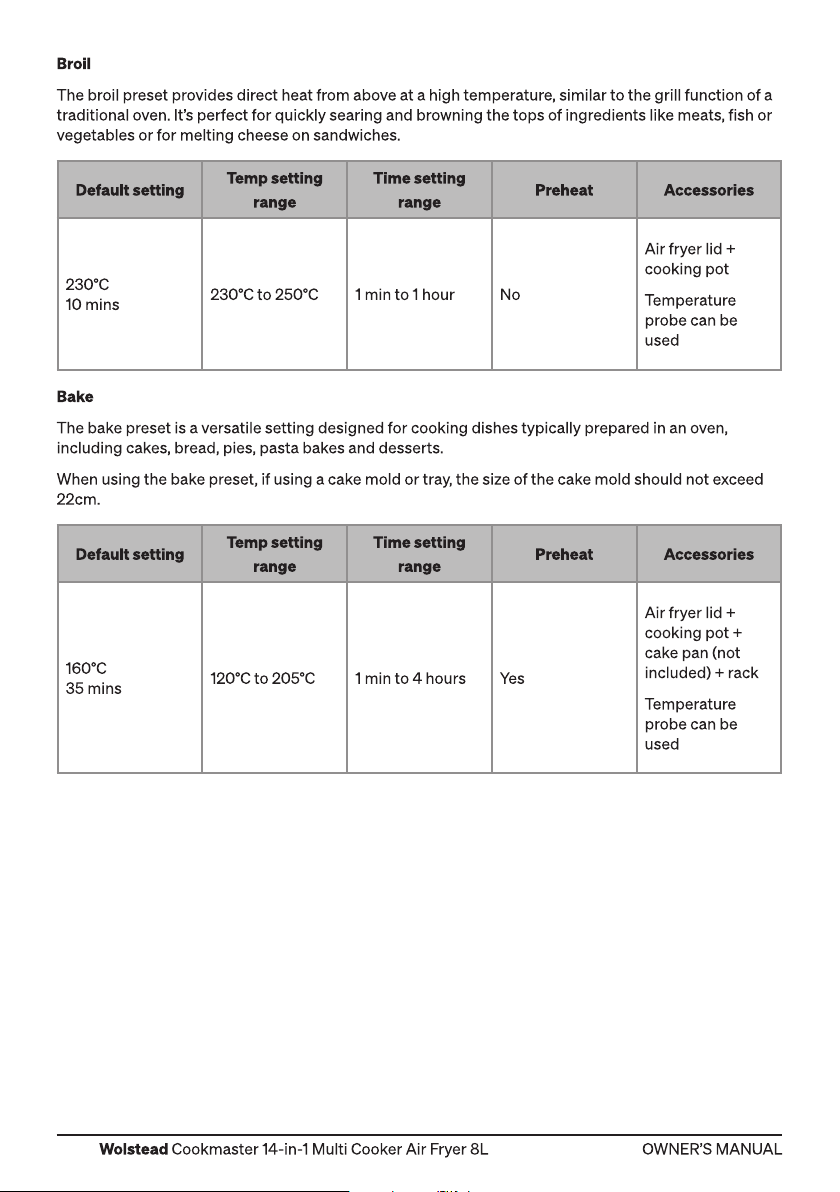
Broil
The broil preset provides direct heat from above at a high temperature, similar to the grill function of a
traditional oven. It’s perfect for quickly searing and browning the tops of ingredients like meats, fish or
vegetables or for melting cheese on sandwiches.
Default setting
230°C
10 mins
Bake
The bake preset is a versatile setting designed for cooking dishes typically prepared in an oven,
including cakes, bread, pies, pasta bakes and desserts.
When using the bake preset, if using a cake mold or tray, the size of the cake mold should not exceed
22cm.
Default setting
160°C
35 mins
Temp setting
range
230°C to 250°C 1 min to 1 hour No
Temp setting
range
120°C to 205°C 1 min to 4 hours Yes
Time setting
range
Time setting
range
Preheat Accessories
Air fryer lid +
cooking pot
Temperature
probe can be
used
Preheat Accessories
Air fryer lid +
cooking pot +
cake pan (not
included) + rack
Temperature
probe can be
used
8
Page 9
Air crisp
Use the air crisp function for air frying anything from chips to steak, chicken, fish or vegetables.
The air crisp preset crisps ingredients using hot air from the top down and requires minimal fat and oil.
We recommend using the deep fryer basket to enable air to circulate around ingredients for a
crunchier finish.
Default setting
200°C
20 mins
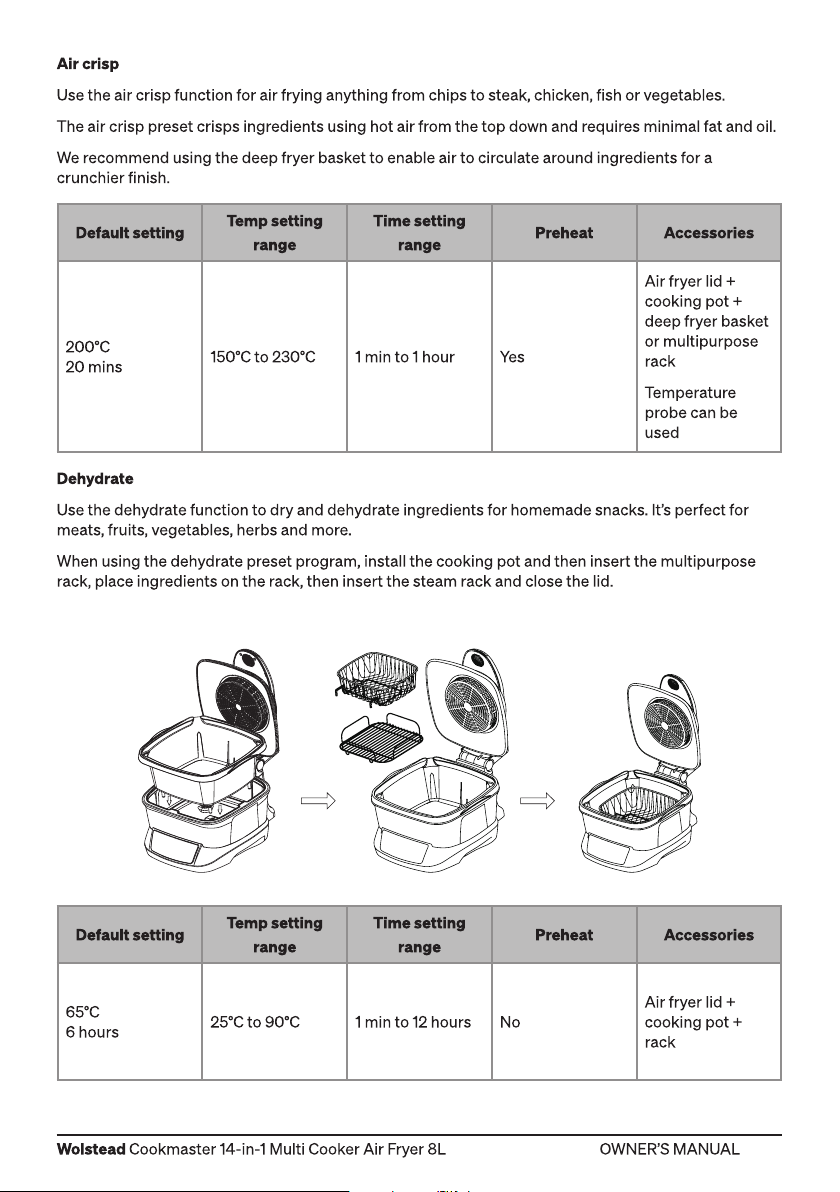
Dehydrate
Use the dehydrate function to dry and dehydrate ingredients for homemade snacks. It’s perfect for
meats, fruits, vegetables, herbs and more.
When using the dehydrate preset program, install the cooking pot and then insert the multipurpose
rack, place ingredients on the rack, then insert the steam rack and close the lid.
Temp setting
range
150°C to 230°C 1 min to 1 hour Yes
Time setting
range
Preheat Accessories
Air fryer lid +
cooking pot +
deep fryer basket
or multipurpose
rack
Temperature
probe can be
used
Default setting
65°C
6 hours
Temp setting
range
25°C to 90°C 1 min to 12 hours No
Time setting
range
Preheat Accessories
Air fryer lid +
cooking pot +
rack
9
Page 10
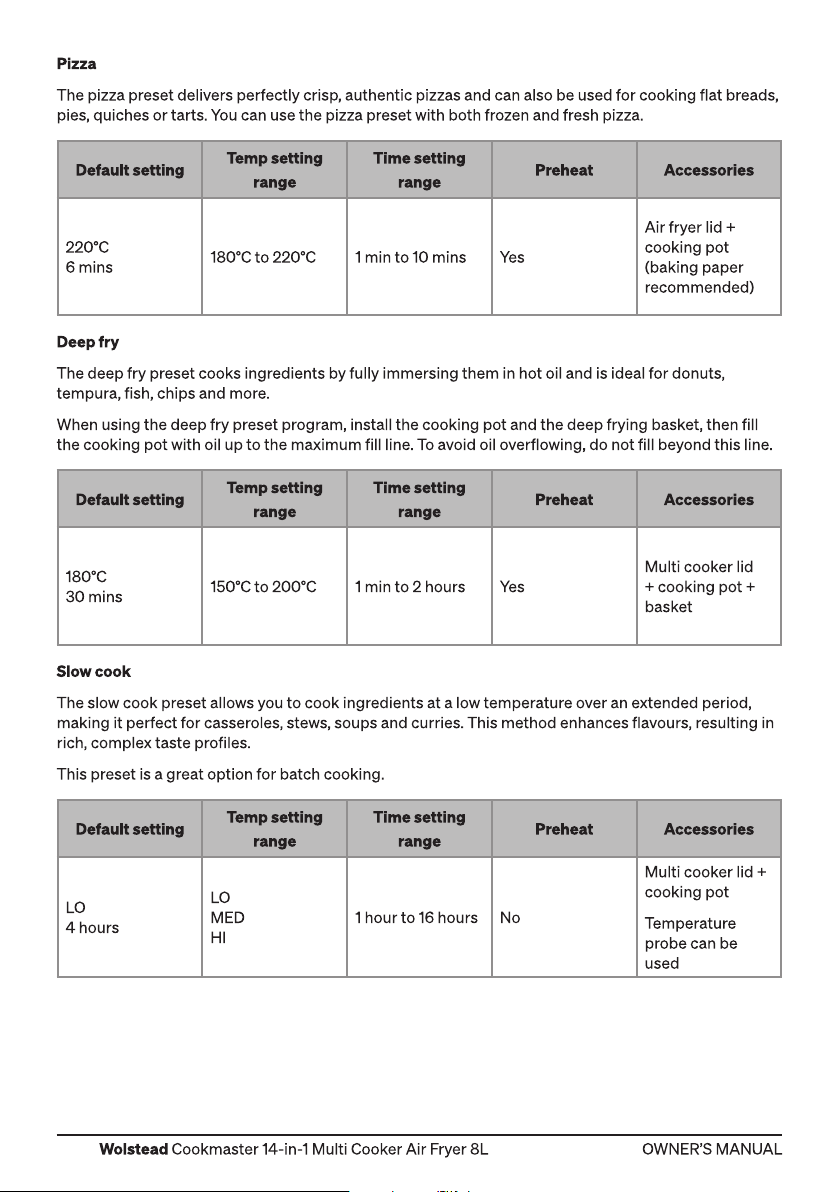
Pizza
The pizza preset delivers perfectly crisp, authentic pizzas and can also be used for cooking flat breads,
pies, quiches or tarts. You can use the pizza preset with both frozen and fresh pizza.
Default setting
220°C
6 mins
Deep fry
The deep fry preset cooks ingredients by fully immersing them in hot oil and is ideal for donuts,
tempura, fish, chips and more.
When using the deep fry preset program, install the cooking pot and the deep frying basket, then fill
the cooking pot with oil up to the maximum fill line. To avoid oil overflowing, do not fill beyond this line.
Default setting
180°C
30 mins
Slow cook
The slow cook preset allows you to cook ingredients at a low temperature over an extended period,
making it perfect for casseroles, stews, soups and curries. This method enhances flavours, resulting in
rich, complex taste profiles.
This preset is a great option for batch cooking.
Temp setting
range
180°C to 220°C 1 min to 10 mins Yes
Temp setting
range
150°C to 200°C 1 min to 2 hours Ye s
Time setting
range
Time setting
range
Preheat Accessories
Air fryer lid +
cooking pot
(baking paper
recommended)
Preheat Accessories
Multi cooker lid
+ cooking pot +
basket
Default setting
LO
4 hours
10
Temp setting
range
LO
MED
HI
Time setting
range
1 hour to 16 hours No
Preheat Accessories
Multi cooker lid +
cooking pot
Temperature
probe can be
used
Page 11
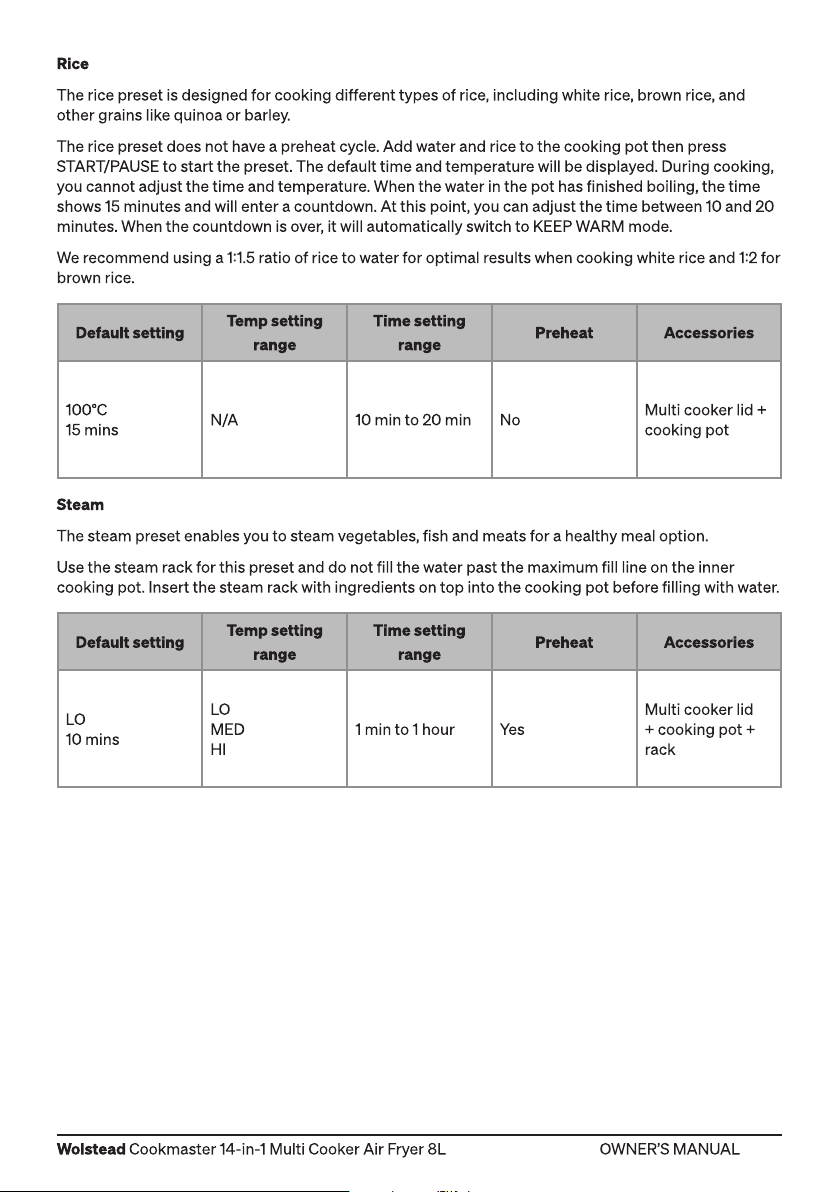
Rice
The rice preset is designed for cooking different types of rice, including white rice, brown rice, and
other grains like quinoa or barley.
The rice preset does not have a preheat cycle. Add water and rice to the cooking pot then press
START/PAUSE to start the preset. The default time and temperature will be displayed. During cooking,
you cannot adjust the time and temperature. When the water in the pot has finished boiling, the time
shows 15 minutes and will enter a countdown. At this point, you can adjust the time between 10 and 20
minutes. When the countdown is over, it will automatically switch to KEEP WARM mode.
We recommend using a 11.5 ratio of rice to water for optimal results when cooking white rice and 12 for
brown rice.
Default setting
100°C
15 mins
Steam
The steam preset enables you to steam vegetables, fish and meats for a healthy meal option.
Use the steam rack for this preset and do not fill the water past the maximum fill line on the inner
cooking pot. Insert the steam rack with ingredients on top into the cooking pot before filling with water.
Default setting
LO
10 mins
Temp setting
range
N/A 10 min to 20 min No
Temp setting
range
LO
MED
HI
Time setting
range
Time setting
range
1 min to 1 hour Ye s
Preheat Accessories
Multi cooker lid +
cooking pot
Preheat Accessories
Multi cooker lid
+ cooking pot +
rack
11
Page 12
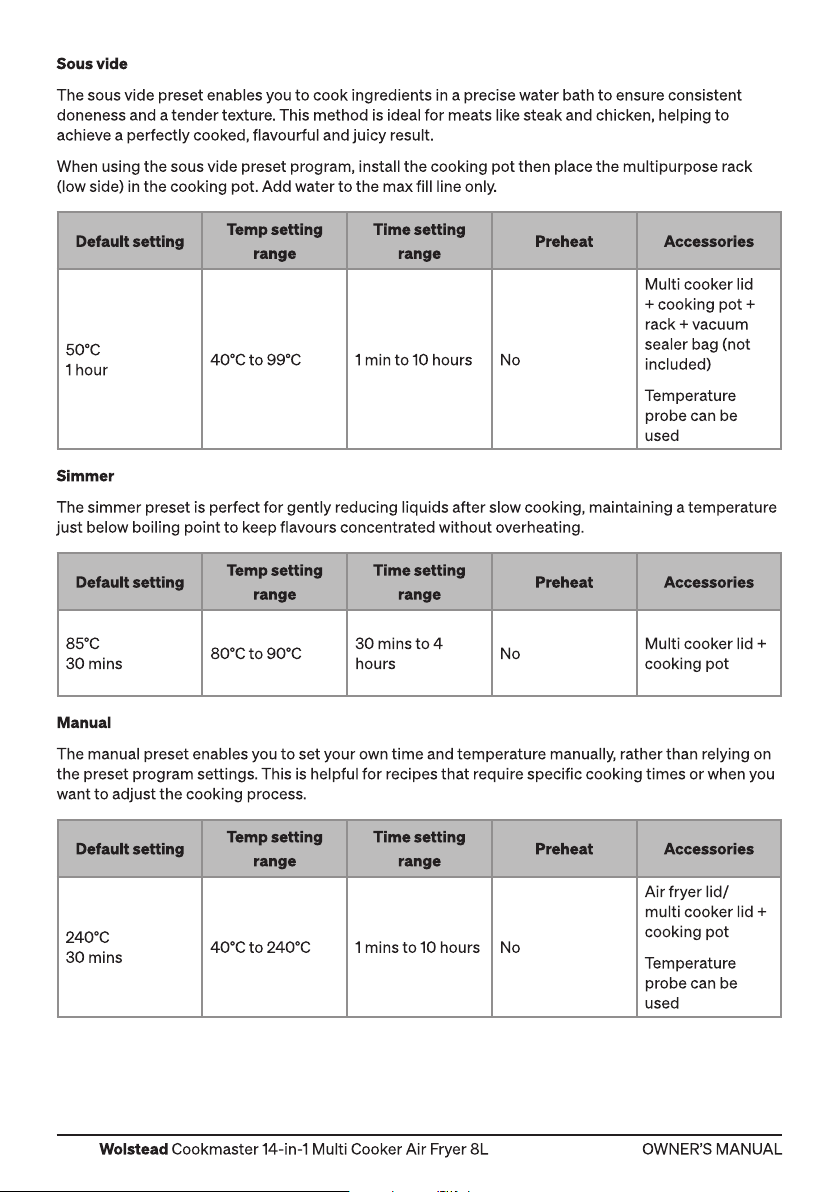
Sous vide
The sous vide preset enables you to cook ingredients in a precise water bath to ensure consistent
doneness and a tender texture. This method is ideal for meats like steak and chicken, helping to
achieve a perfectly cooked, flavourful and juicy result.
When using the sous vide preset program, install the cooking pot then place the multipurpose rack
(low side) in the cooking pot. Add water to the max fill line only.
Default setting
50°C
1 hour
Simmer
The simmer preset is perfect for gently reducing liquids after slow cooking, maintaining a temperature
just below boiling point to keep flavours concentrated without overheating.
Default setting
85°C
30 mins
Manual
The manual preset enables you to set your own time and temperature manually, rather than relying on
the preset program settings. This is helpful for recipes that require specific cooking times or when you
want to adjust the cooking process.
Temp setting
range
40°C to 99°C 1 min to 10 hours No
Temp setting
range
80°C to 90°C
Time setting
range
Time setting
range
30 mins to 4
hours
Preheat Accessories
Multi cooker lid
+ cooking pot +
rack + vacuum
sealer bag (not
included)
Temperature
probe can be
used
Preheat Accessories
No
Multi cooker lid +
cooking pot
Default setting
240°C
30 mins
12
Temp setting
range
40°C to 240°C 1 mins to 10 hours No
Time setting
range
Preheat Accessories
Air fryer lid/
multi cooker lid +
cooking pot
Temperature
probe can be
used
Page 13
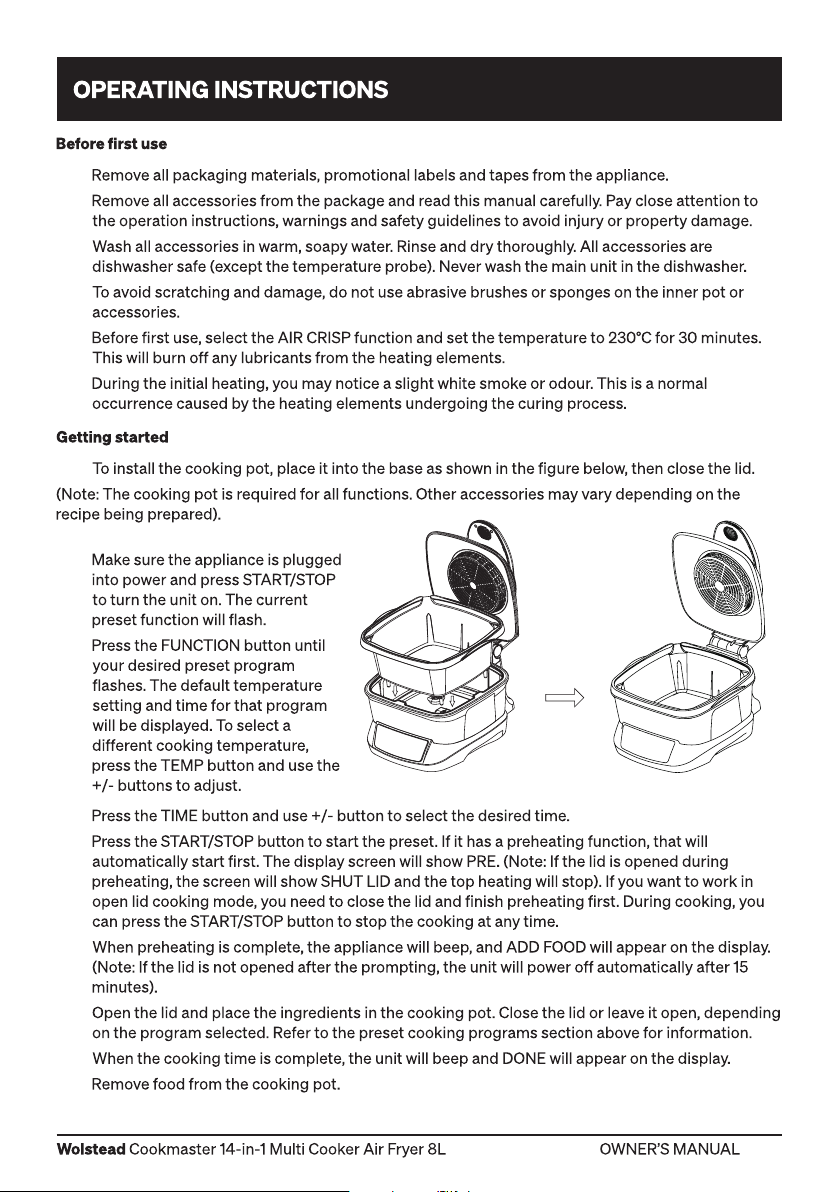
1.
2.
3.
4.
5.
6.
1.
2.
3.
4.
5.
6.
7.
8.
9.
13
Page 14
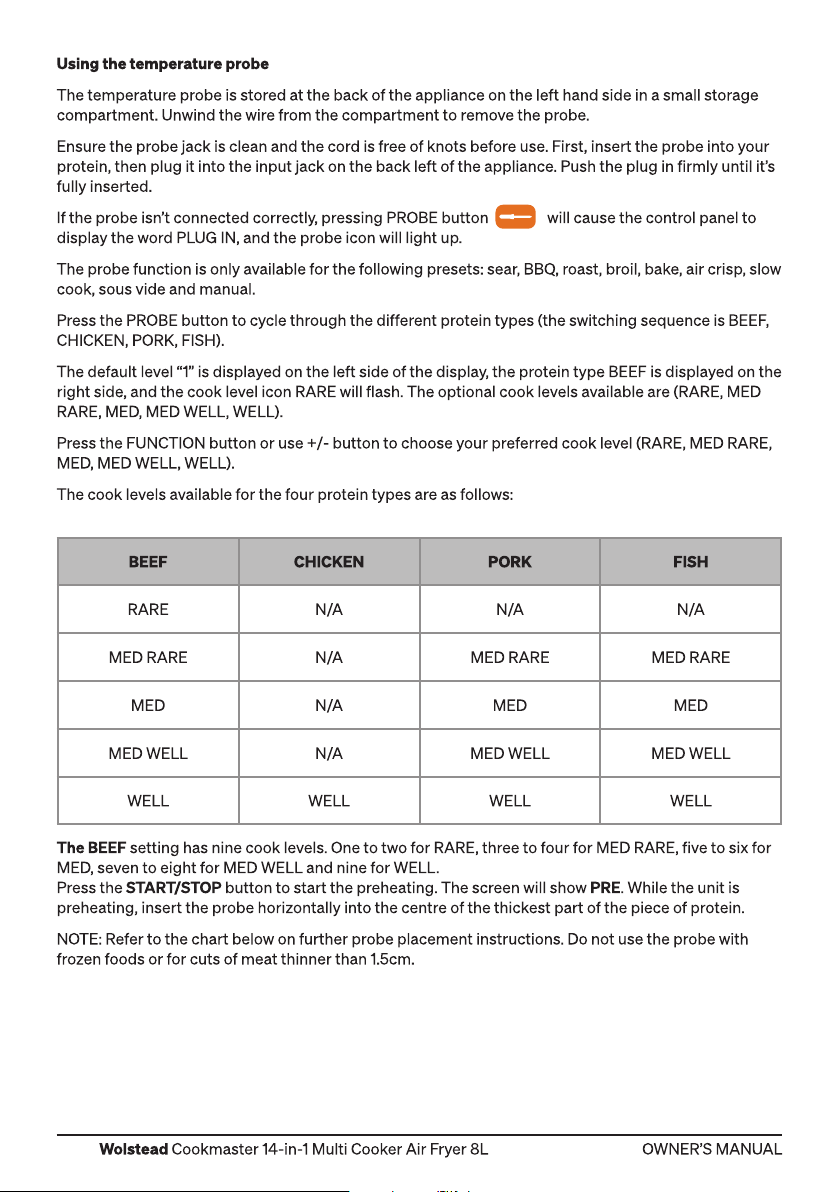
BEEF CHICKEN PORK FISH
RARE N/A N/A N/A
MED RARE N /A MED RARE MED RARE
MED N/A MED MED
MED WELL N /A MED WELL MED WELL
WELL WELL WELL WELL
14
Page 15
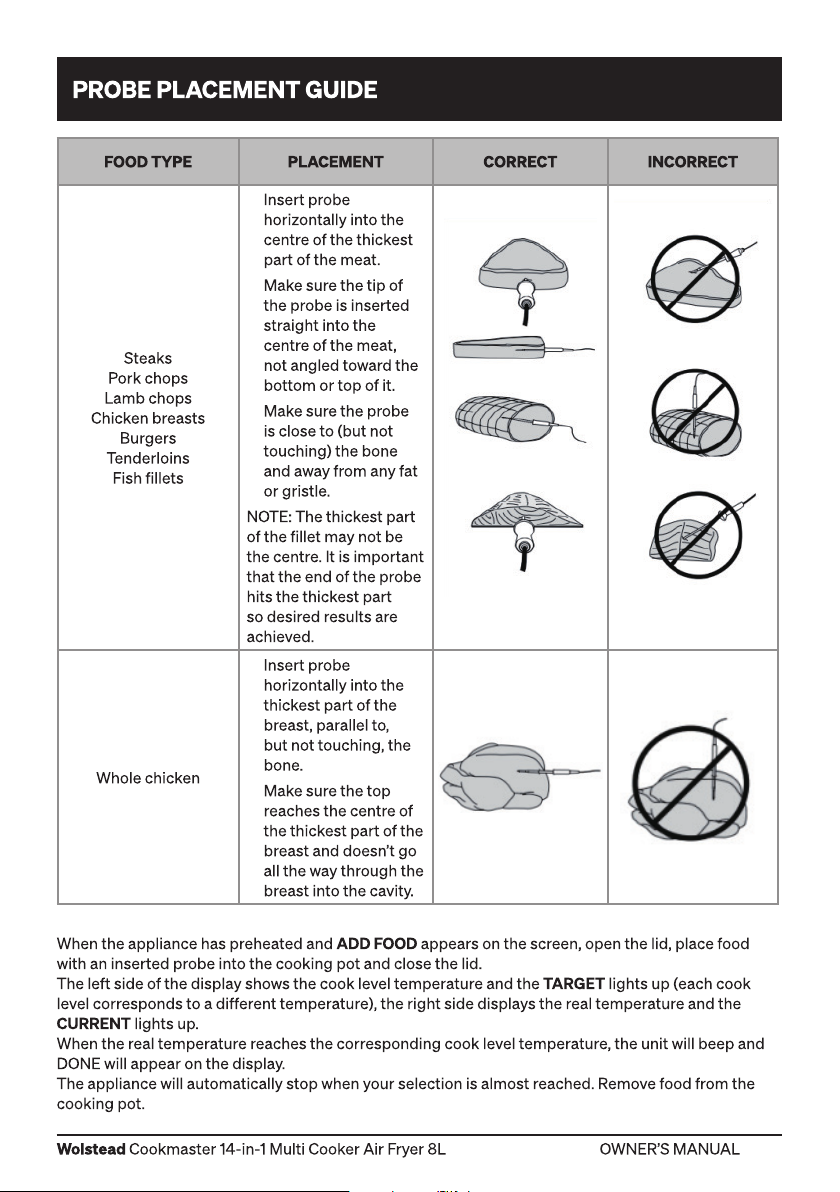
FOOD TYPE PLACEMENT CORRECT INCORRECT
• Insert probe
horizontally into the
centre of the thickest
part of the meat.
• Make sure the tip of
the probe is inserted
straight into the
Steaks
Pork chops
Lamb chops
Chicken breasts
Burgers
Tenderloins
Fish fillets
Whole chicken
centre of the meat,
not angled toward the
bottom or top of it.
• Make sure the probe
is close to (but not
touching) the bone
and away from any fat
or gristle.
NOTE: The thickest part
of the fillet may not be
the centre. It is important
that the end of the probe
hits the thickest part
so desired results are
achieved.
• Insert probe
horizontally into the
thickest part of the
breast, parallel to,
but not touching, the
bone.
• Make sure the top
reaches the centre of
the thickest part of the
breast and doesn’t go
all the way through the
breast into the cavity.
15
Page 16
1.
2.
3.
4.
5.
6.
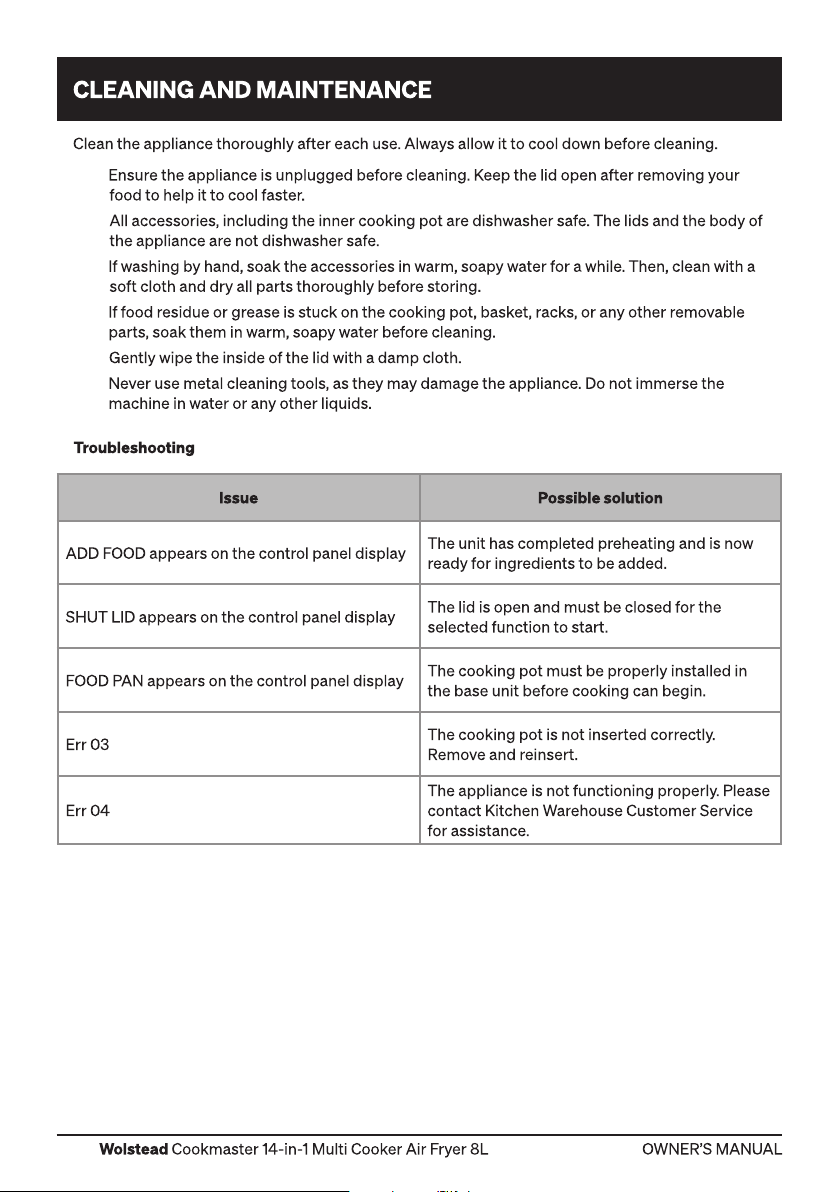
Issue Possible solution
ADD FOOD appears on the control panel display
SHUT LID appears on the control panel display
FOOD PAN appears on the control panel display
Err 03
Err 04
The unit has completed preheating and is now
ready for ingredients to be added.
The lid is open and must be closed for the
selected function to start.
The cooking pot must be properly installed in
the base unit before cooking can begin.
The cooking pot is not inserted correctly.
Remove and reinsert.
The appliance is not functioning properly. Please
contact Kitchen Warehouse Customer Service
for assistance.
16
Page 17
17
Page 18

Distributed by Kitchen Warehouse.
Wolstead is a registered trademark of Kitchen Warehouse Pty
Ltd. The printed material appearing in this document and related
packaging is protected by copyright.
Kitchen Warehouse Pty Ltd
1 Pensioner Guard Road
North Fremantle, WA, 6159
www.kitchenwarehouse.com.au
1800 332 934
 Loading...