

Page 1
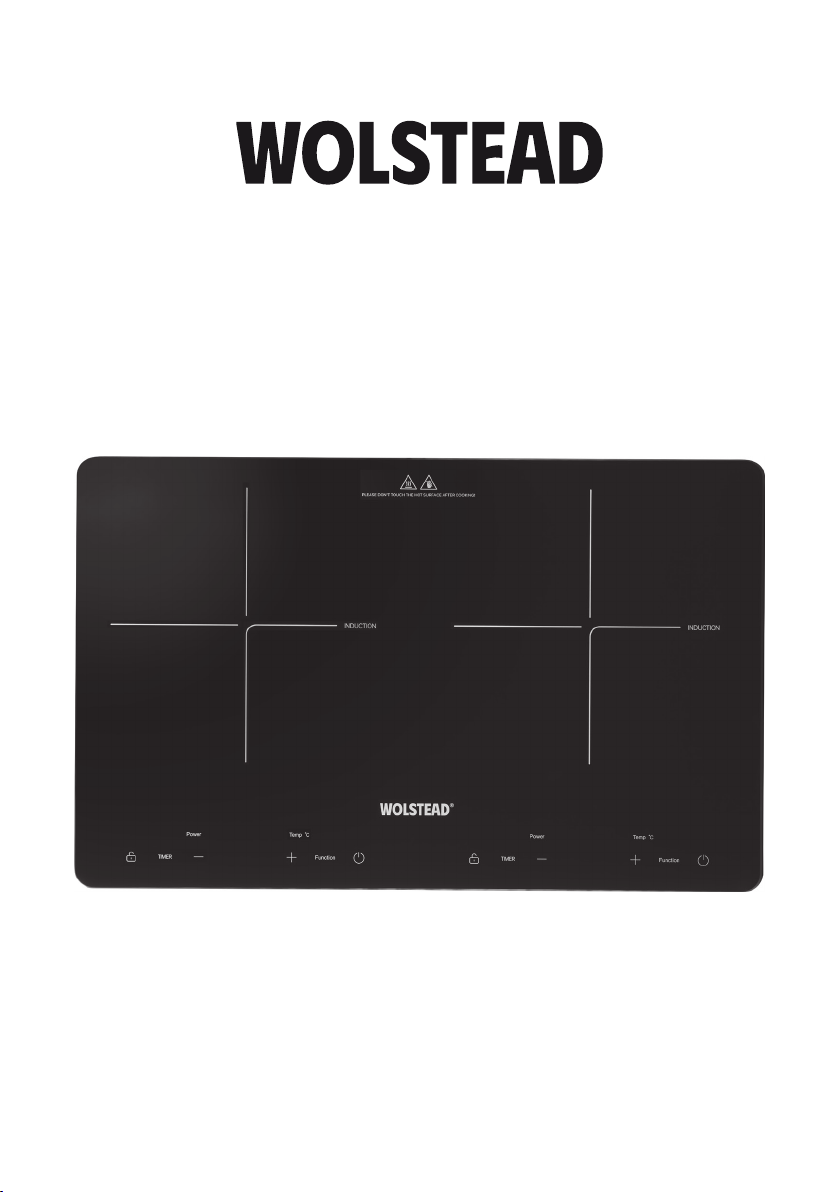
Slim
Twin Induction Cooktop
Owner’s Manual
IMPORTANT:
Read and follow all warnings and instructions before assembling and using the appliance. Keep this
manual for future reference.
WOLSTEAD Twin Induction Cooktop 657152
Page 2

SPECIFICATIONS
Model: 657152
Voltage: 220V-240V/50-60HZ
Power consumption: 2300W
Temperature adjustment: 60°C to 240°C
PRODUCT FEATURES
Create effortless home cooked meals anywhere with this sleek, slimline, portable induction
cooktop—fast, efficient, and powerful, perfect for kitchens of all sizes.
• Easy to use timer, power and temperature functions
• 2300 Watts of power
• Quiet operation
• Automatic cookware detection and safety shut-off feature
• Digital display and child lock
• Super slim 4cm design
• Nine power levels
• Anti-slip feet
SAFETY PRECAUTIONS
When using this electrical appliance, basic safety precautions should always be followed to
reduce the risk of fire, electric shock, and/or injury, including the following:
1. Read all instructions before using.
2. Ensure the voltage is compliant with the voltage range stated on the rating label.
3. If the electrical cord is damaged, it must be replaced by the manufacturer or its service agent
or a similarly qualified person in order to avoid a hazard.
4. Never touch the cooktop or power plug with wet hands.
5. Do not connect the cooktop to the same outlet as other appliances.
6. Always turn off the cooktop before you unplug it.
7. This cooktop is not intended for use by persons (including children) with reduced physical,
sensory or mental capabilities, or lack of experience and knowledge, unless they have been
given supervision or instruction concerning use of the appliance by a person responsible for
their safety.
8. Children should be supervised to ensure that they do not play with the cooktop.
9. Do not leave the cooktop unattended during operation. Keep children and untrained persons
away from the cooktop.
10. Do not submerge the cooktop in water or other liquids. Do not wash it in a dishwasher.
11. Never clean with scouring powders or hard implements as this will scratch the surface.
Wolstead Slim Twin Induction Cooktop OWNER’S MANUAL2
Page 3

12. This cooktop is intended to be used in household and similar applications such as:
a. Staff kitchen areas in shops, offices and other working environments.
b. Farmhouses.
c. By clients in hotels, motels and other residential type environments.
d. By bed and breakfast type environments.
13. To protect against risk of electric shock, do not immerse the cord or plug in water or any other
liquid.
14. Unplug the cooktop after using, before cleaning and storing.
15. Keep the cooktop at least 5cm to 10cm from other objects and the wall to ensure heat is easily
released and use in a well ventilated area.
16. Do not operate the cooktop on top of other electric appliances, such as a ceramic stovetop or
electric oven.
17. Do not use outdoors.
18. Do not move the cooktop while cooking or with hot cookware on top of it.
19. Do not place empty cookware on the device. This will result in an error message.
20. Do not place metallic objects such as knives, forks, spoons, or lids on the cooktop, as they can
become hot.
21. The temperature of the cooktop surface will be high when the appliance is operating. Do not
touch the cooking surface when it is on.
22. If the glass surface is cracked, switch off the cooktop to prevent electric shock.
23. This cooktop is suitable for use with cookware with a diameter of 16cm to 22cm.
24. Do not operate the cooktop on thin or easily deformed metallic surfaces.
25. Never use the cooktop if it is malfunctioning, damaged, or has been dropped.
26. Make sure the power cable does not come into contact with sharp edges or hot surfaces.
27. Do not place magnetic objects, such as credit cards or cassette tapes, on the glass surface while
the cooktop is in use.
28. Do not insert objects like wires or tools into the ventilation slots as this can cause electric shock.
29. Do not heat unopened cans on the induction cooktop, as they may explode when heated. Always
remove the lid first.
30. Individuals with pacemakers should maintain a minimum distance of 60cm from the device while
it is in operation.
Wolstead Slim Twin Induction Cooktop OWNER’S MANUAL 3
Page 4
GET TO KNOW THE WOLSTEAD SLIM TWIN INDUCTION
COOKTOP
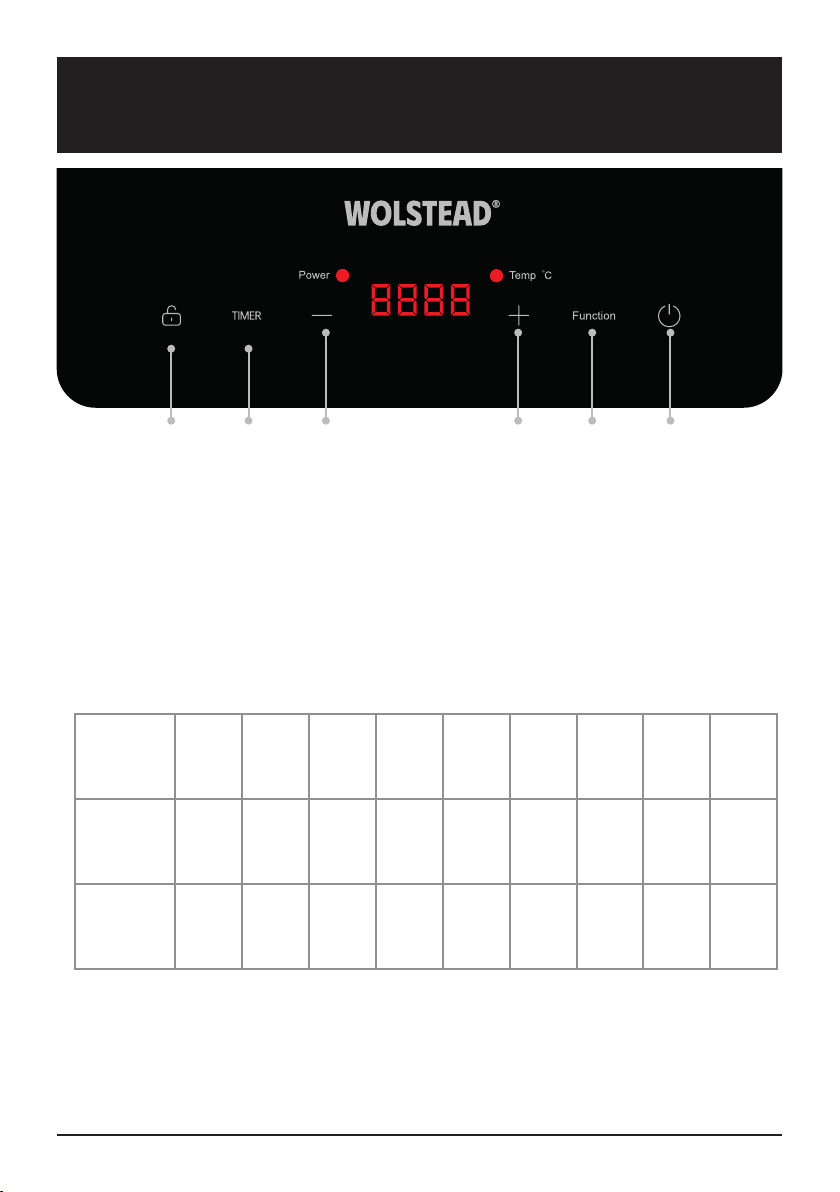
A B C D E F
Induction cooktop components
a. Child-lock button
b. Timer button
c. Down button (for adjusting power and temperature)
d. Up button (for adjusting power and temperature)
e. Function button
f. Power on/off button
Power levels
Display P1 P2 P3 P4 P5 P6 P7 P8 P9
Left Power
(W)
Right
Power (W)
Note: The twin induction cooktop has a built-in safety feature that limits the total power to 2300
Watts. This means when you use both cooktops at the same time, their combined power cannot
exceed 2300 Watts. For example, if one cooktop is set to 2000 Watts, the other can only go up to
300 Watts. The safety system automatically adjusts to prevent exceeding the limit.
Wolstead Slim Twin Induction Cooktop OWNER’S MANUAL4
300 500 800 1000 1200 1400 1600 1800 2000
300 500 800 1000 1200 1400 1600 1800 2000
Page 5

BEFORE FIRST USE
• Place the induction cooktop on a stable, flat surface.
• Never place the induction cooktop on a flammable surface (e.g. tablecloth, carpet).
• Do not cover the ventilation slots, as this can cause overheating. Always position the
induction cooktop at least 5cm to 10 cm from walls or other items.
• Do not place the induction cooker near devices or objects sensitive to magnetic fields (e.g.
radios, TVs, cassette players).
• Keep the induction cooker away from open flames, heaters, or other heat sources.
• Ensure the power cable is not damaged or pinched beneath the device.
Choosing the right cookware for the Wolstead Slim Twin Induction Cooktop
• Only use cookware with a base that is compatible for use on induction
stovetops. Look for the induction symbol on the packaging or on the
bottom of the pan to ensure suitability.
• You can check if your cookware is suitable for induction by performing a
magnet test. Move a magnet toward the base of the pan; if it sticks, the
pan is compatible with induction cooking.
• If you do not have a magnet:
a. Fill the pan with some water.
b. Turn on the device for three minutes and check if the water heats up.
• Unsuitable cookware materials: pure stainless steel, aluminium, or copper without a
magnetic base, glass, wood, porcelain, ceramic, and earthenware.
• Avoid using cookware with jagged edges or a curved base. Make sure the base of your pan
is smooth and sits flat against the glass surface. Always center the pan on the cooking zone.
The pan’s diameter should be at least 16cm to ensure the energy field is effective. Do not use
pans with a diameter exceeding 22cm.
• Always lift the pans off the induction cooktop – do not slide as this may scratch the glass.
Wolstead Slim Twin Induction Cooktop OWNER’S MANUAL 5
Page 6

OPERATING INSTRUCTIONS
1. On/Off
After connecting the power plug to the wall socket, the device will emit a beep sound. The
LED display will light up for two seconds, indicating that the device has entered power-on
mode. At this point, an induction compatible pot or pan can be placed on the heating area of
the surface plate. Press the ‘On/Off’ key once, and the LED display will show ‘-on-’ to indicate
that the device is in standby mode. Press the ‘On/Off’ key again to turn the device off.
In standby mode, if there is no operation for 30 seconds, the device will shut down
automatically.
Note: The cooktop fan will continue to operate for a period of two minutes after the cooktop
has been switched off to cool the internal components. It’s important that the cooktop is
left plugged in and allowed to complete the cooling cycle in order to ensure a long life of the
components.
2. Power
When you are ready to start cooking, place your chosen cookware on the cooktop. Make
sure the cookware is not empty. An error message will appear if you do not put your
cookware in place first before selecting the power level. Press the ‘Function’ button to select
your desired power level. The indicator light will turn on, and the machine will operate with
the default power setting of P5 (160°C). Adjust the power level by pressing the ‘+’ or ‘-’
buttons. The display will show the current setting.
The twin induction cooktop has a built-in safety feature that limits the total power to 2300
Watts. This means when you use both cooktops at the same time, their combined power
cannot exceed 2300 Watts. For example, if one cooktop is set to 2000 Watts, the other can
only go up to 300 Watts. The safety system automatically adjusts to prevent exceeding the
limit.
3. Temperature
Press the ‘Function’ button again to select ‘Temp’. The indicator light will turn on, and the
machine will operate with the default temperature setting of 160°C. Adjust the temperature
by pressing the ‘+’ or ‘-’ buttons. The display will show the current setting.
4. Timer
The timer can only be set while the cooktop is in operation, with a range from 1 to 180
minutes. While the cooktop is working, press the ‘Timer’ key, and the LED display will show
‘000’ and begin flashing. Adjust the time by pressing the ‘+’ or ‘-’ buttons. The countdown
will begin automatically after 5 seconds. Press the ‘Timer’ key again to cancel the timer
function.
5. Child lock
To prevent unauthorised use (e.g. by children accidentally operating the device), you can
lock the control panel. Press the ‘Lock’ button to activate the lock mode. The LED display will
show ‘Loc’, and the control panel will be locked. To exit lock mode, press and hold the ‘Lock’
key for 2 seconds.
Wolstead Slim Twin Induction Cooktop OWNER’S MANUAL6
Page 7

TROUBLESHOOTING
Malfunction Possible causes Solution
The device cannot be turned
on.
No power.
• Check if the plug is
connected properly.
• Check the power cord for
any issues.
• Verify the power supply.
• Ensure the voltage is not
too low.
If the issue persists after
checking everything, contact
Kitchen Warehouse Customer
Service.
The function keys are
unresponsive.
The device makes clicking
noises.
A slight humming noise can be
heard when operating at high
power.
Fan noise.
The cookware is not heating.
The control panel is locked.
This may be caused by the
construction of your cookware
(layers of different metals
vibrate differently).
This can be caused by
induction technology.
A cooling fan integrated in the
device prevents the electronics
from overheating. If necessary,
it continues to run even after
the cooktop is switched off.
The cookware you are using is
not induction compatible or is
not being detected.
Unlock the control panel. See
‘Child lock’ section.
This is normal and harmless.
This is normal. The noise
decreases or disappears
completely by reducing the
power level.
This is normal and necessary
for proper operation. Do not
disconnect the appliance from
the power supply while the fan
is running.
Use induction compatible
cookware of the appropriate
size for the desired cooking
zone and ensure it is positioned
correctly. See the ‘choosing the
right cookware’ section.
Wolstead Slim Twin Induction Cooktop OWNER’S MANUAL 7
Page 8

ERROR CODES AND SAFETY PROTECTION
If the cooktop detects unsuitable cookware, operations or other issues, it will stop functioning and
display relevant error codes on the screen. These codes are designed to protect the cooktop and
provide guidance for resolving the issue.
Error code Meaning What to do
Place suitable cookware in the
E0
No suitable cookware was
identified
middle of the corresponding
cooking zone (see ‘choosing
the right cookware’ section).
E1
E2
E3
E4
E5 Overheating of the cooktop
Voltage is too low (less than
85V)
Voltage is too high (greater
than 285V)
Error message of the cooktop
sensor / short circuit
Error message of the IGBT
sensor / short circuit
Check the power supply. If it is
normal, turn the cooktop back
on.
Check the power supply. If it is
normal, turn the cooktop back
on.
Contact Kitchen Warehouse
Customer Service or a qualified
electrician.
Contact Kitchen Warehouse
Customer Service or a qualified
electrician.
Ensure that the ventilation
paths are not blocked and that
the ambient temperature is not
too high.
Make sure that the cookware
does not protrude over the
cooking zone markings in the
direction of the control panel to
prevent overheating.
Ensure that the fan is running.
Wolstead Slim Twin Induction Cooktop OWNER’S MANUAL8
Page 9

Error code Meaning What to do
Ensure that the ventilation
paths are not blocked and that
the ambient temperature is not
too high.
Make sure that the cookware
E6 Overheating of IGBT
does not protrude over the
cooking zone markings in the
direction of the control panel to
prevent overheating.
Ensure that the fan is running.
Contact Kitchen Warehouse
Customer Service or a qualified
electrician.
Contact Kitchen Warehouse
Customer Service or a qualified
electrician.
E7
EC
Malfunction of the cooktop
sensor
Communication failure between
display and mainboard
CLEANING AND MAINTENANCE
1. Unplug the cooktop and allow it to cool before cleaning. Do not use any caustic cleaning
agents, and ensure no water penetrates the device.
2. To protect yourself from electric shock, never immerse the device, its cables, or the plug in
water or other liquids.
3. Clean the glass surface with a damp cloth or use a mild, non-abrasive soap solution.
4. Clean the casing and the operating panel with a soft cloth or mild detergent.
5. Avoid using petrol-based products to prevent damage to the plastic parts, casing, or
operating panel.
6. Do not use any flammable, acidic, or alkaline materials or substances near the device, as they
may reduce its service life and pose a risk of deflagration when the device is turned on.
7. Ensure that the bottom of the cookware does not scrape across the glass surface. While a
scratched surface does not affect the functionality of the device, it is best to avoid it.
8. Be sure the device is properly cleaned before storing it in a dry place.
Wolstead Slim Twin Induction Cooktop OWNER’S MANUAL 9
Page 10

WARRANTY
Get in touch with Customer Service
If you experience any issues with your Wolstead
Slim Twin Induction Cooktop, get in touch
with our Customer Service team by email at
[email protected].
au or by phone on 1800 332 934 between the
hours of 9am and 7pm (AEST) Monday to Friday.
Alternatively you can use the Live Chat function
on our website by visiting
www.kitchenwarehouse.com.au/contact-us
90 day money back guarantee
We promise you a full refund within 90 days
if your Wolstead product does not fulfil your
expectations. This guarantee applies to qualified
purchases of all Wolstead branded products
from participating stockists online and in-store
from eligible delivery locations. The qualified
product must be returned within 90 days from
the date of purchase. We shall issue a full refund
when the customer presents proof of purchase.
We shall issue a store credit when proof of
purchase is unavailable. The product packaging
is not required to avail of the refund. The amount
refunded will be the price of the products in the
currency shown on the proof of purchase.
Exclusions
This warranty does not apply if proper care
and/or usage instructions are not followed.
This warranty does not cover scratches, stains,
discoloration or damage caused by misuse.
How to claim
If a fault/defect is identified cease using the
Product immediately. To make a claim on this
guarantee, take the Product, proof of purchase
and full details of the alleged defect to any
Kitchen Warehouse store.
Limitations
We make no express warranties or
representations other than as set out in this
guarantee. The replacement of the Product or the
refund of the purchase price is the absolute limit
of our liability under this guarantee.
Warranty
Our goods come with guarantees that cannot
be excluded under the Australian Consumer
Law. You are entitled to a replacement or refund
for a major failure and for compensation for any
other reasonably foreseeable loss or damage.
You are also entitled to have the goods repaired
or replaced if the goods fail to be of acceptable
quality and the failure does not amount to a major
failure.
The benefits of this warranty are in addition to
any rights and remedies imposed by Australian
State and Federal legislation that cannot be
excluded. Nothing in this warranty excludes,
restricts or modifies any State or Federal
legislation applicable to the supply of goods
which cannot be so excluded, restricted or
modified.
Guarantee
We warrant that, subject to the exclusions and
limitations below, the Product will be free from
defects in materials and workmanship under
normal domestic household use for the 12
month warranty period. The warranty period
commences on the date of sale by the original
retailer to the original purchaser. The warranty
applies only while the Product is owned by the
original purchaser.
Use of the Product in a commercial capacity
will void this warranty. If a defect appears in the
Product before the end of the warranty period
and we find the Product to be defective in
materials or workmanship, we will replace the
Product with a product comparable in quality and
value.
We reserve the right to change or discontinue our
product ranges at any time without notice and
without liability.
Wolstead Slim Twin Induction Cooktop OWNER’S MANUAL10
Page 11

Wolstead Slim Twin Induction Cooktop OWNER’S MANUAL 11
Page 12

Distributed by Kitchen Warehouse.
Wolstead is a registered trademark of Kitchen Warehouse Pty
Ltd. The printed material appearing in this document and related
packaging is protected by copyright.
Kitchen Warehouse Pty Ltd
1 Pensioner Guard Road
North Fremantle, WA, 6159
www.kitchenwarehouse.com.au
1800 332 934
 Loading...