

Page 1
INSTRUCTIONS
VZ-5B
R
English
Page 2

PRECAUTIONS
Caution:
To reduce the risk of electric shock, do not open the unit.
No userserviceable parts inside. Refer servicing to qualified
service personal only.
Warning:
To reduce the risk of fire or electric shock, do not expose
this appliance to rain or moisture.
Manufacturer / Hersteller:
Wolfvision GmbH & Co KG, Vlbg. Wirtschaftspark, A-6840 Götzis, Austria
Tel. ++43 / (0)5523 / 52 250-0, Fax ++43 / (0)5523 / 52249
Made in EC (Austria)
Design and specifications subject to change!
Printed in Austria, Jannuary 1996
Page 3
7
2
11
33
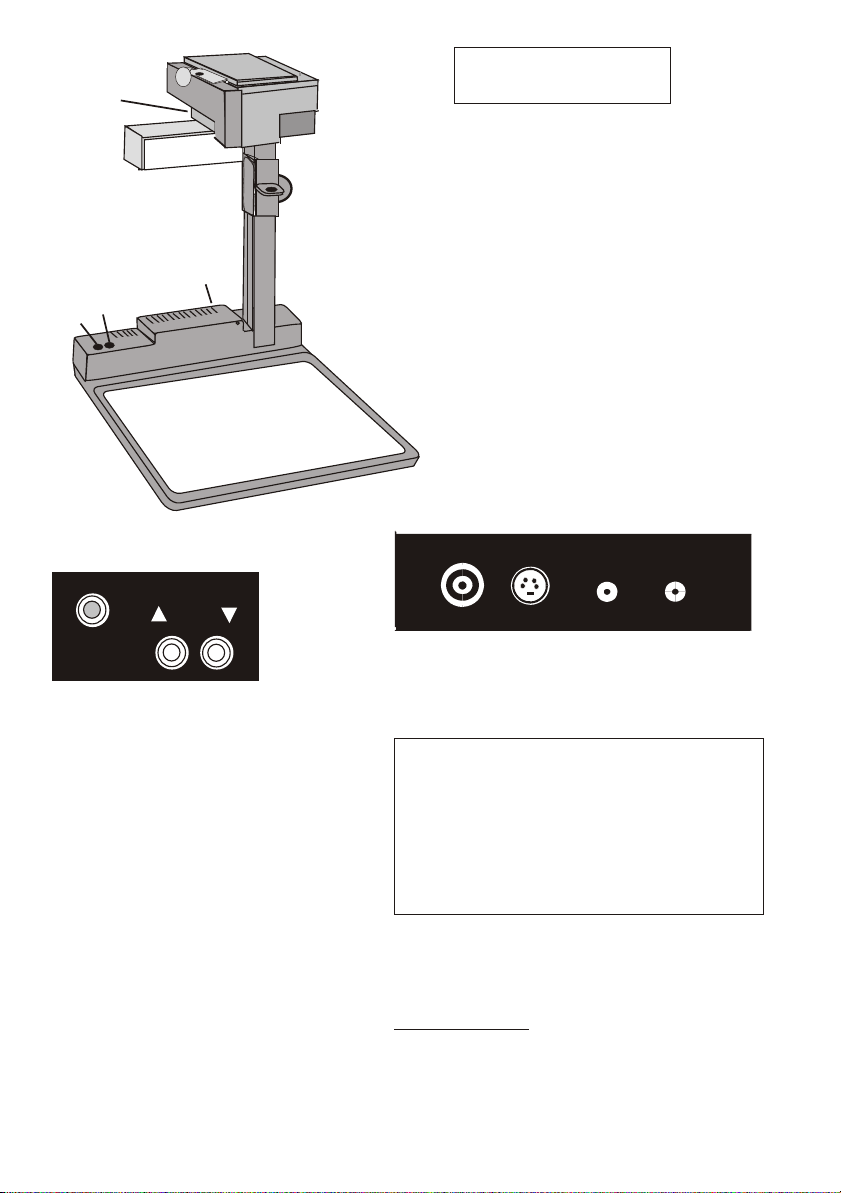
VZ-5b:
ENGLISH
8
9
6
5
4
Camera controls (3):
1818
AUTO
AUTO
FOCUS
FOCUS
16 Zoom out button
17 Zoom in button
18 Auto focus on/off button
(the auto focus is continuously
operating when the red light is on)
1616
ZOOMZOOM
1717
Autofocus:
When switching on the unit the
autofocus is automatically switched
on too. The correct focus is
continuously adjusted at a very high
speed.
o
When the autofocus is switched on
the red light on the autofocus on/off
switch (18) is on.
o
Please note that objects with a very
low contrast (like a blank sheet of
paper) are difficult to focus. If the
autofocus does not work just move
the object slightly.
1 Video camera head
2 Light
3 Camera controls
(as shown below)
4 Working surface
5 Power on/off switch
6 Light switch
7 Close up lens for camera
8 Knurled wheel
9 Connectors (on back,
Connectors (9):
POWER LIGHTS-VHSVIDEO
1212
12 Composite video output (VBS)
13 Y/C (S-VHS) output
14 DC input (12 V)
15 DC output for light box
1313
1414
1515
Lightbox Handy (optional):
Connect the power cord to the light box
connector (15) on the back side of the
VZ-5b.
The light switch (6) of the VZ-5b can
now be used to switch between the light
of the VZ-5b and the light of the lightbox.
For special applications the autofocus can also
be switched off using the on/off switch (18).
Manual focusing:
1. Place an object at the level you whish to
focus - The autofocus is focusing the object.
2. Switch off the autofocus with the on/off
switch (18) - The focus remains unchanged
Page 4
Setting up
White balance:
Please note that the white balance adjustment may not be correct, when switching on the unit.
In this case just move any object in the picture. Then it will work correctly.
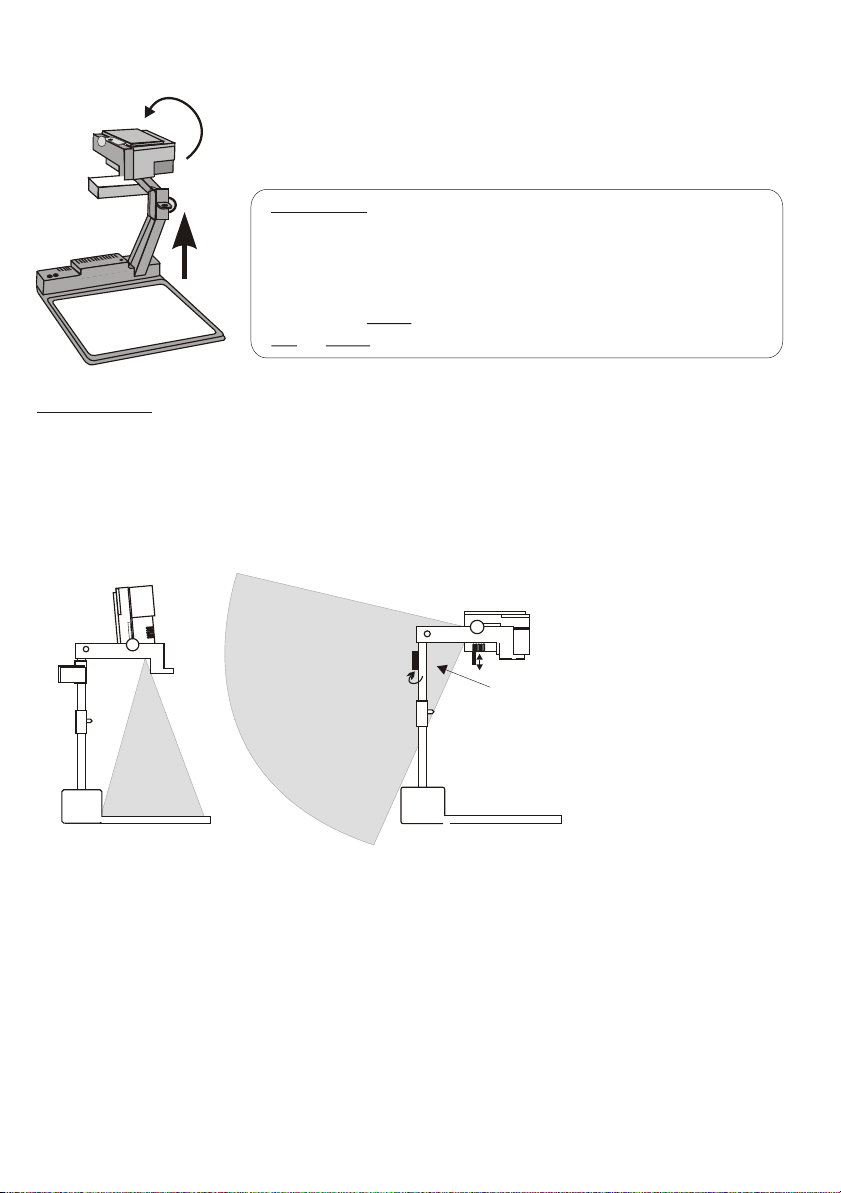
1. Loosen the knurled wheel (8) and pull the arm upwards
(Do not pull up on the light unit or camera!)
2. Turn the video camera head (1) and point it at the working surface
3. Connect the power adaptor to the DC-input (14) and plug it in
4. Connect a TV-monitor, a video projector or a video recorder to
the video output (12) or the Y/C-output (13)
Please note:
The picture quality is much better if you use the Y/C
(S-VHS) output (13) rather then the composite video output
(12). Especially with typed material in black and white.
When using the composite video output please make sure that
a dedicated video cable (75 with RCA plugs is used, and
not an audio cable with RCA plugs !!!
5. Switch on the camera with the power switch (5)
W)
Shooting area on
the working surface:
to infinity
Eliminating reflections
In order to eliminate reflections
(on high gloss photographs etc.)
just turn the light backwards
slightly.
Please note that reflections can
also be caused by the room light.
Shooting area outside
of the working surface:
Turning the light backwards
In order to enable recordings with
illumination outside of the working
surface, the light of the VZ-5b can
be horizontally turned an angle of
up to 240 degrees.
Close-up adaptor lens
For shooting an object outside the working surface,
in a further distance to the unit, the close up lens (7)
has to be adjusted.
In this case just pull the lens away from the main
optic of the camera until it reaches the locked position.
It is impossible to remove the lens completely from
the unit, therefore it can not get lost.
x
x.
Before turning back the camera into the standard
working position, push the close up lens back in
Page 5
Technical data:
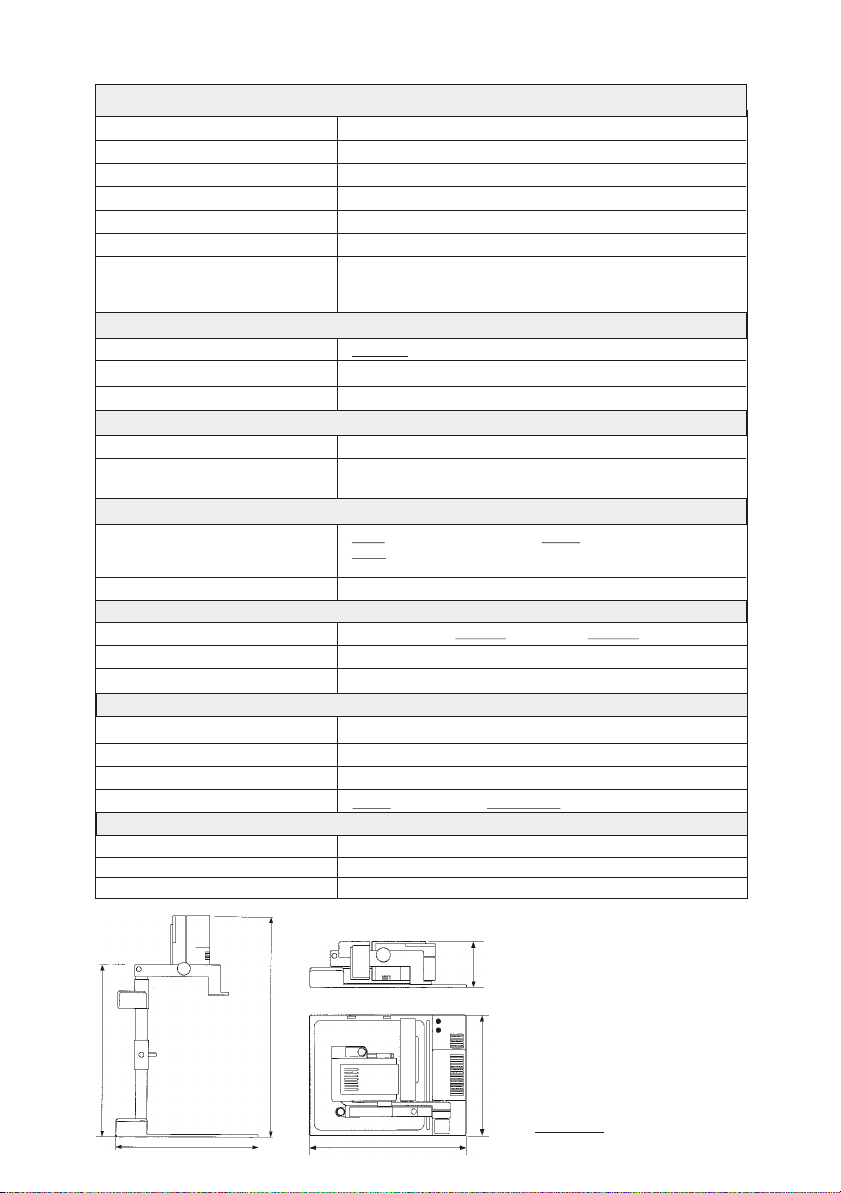
Pick-up element / video VZ-5b
Built-in camera system 1 CCD unit - 1/3" interline transfer
Effective pixels: 752 x 582 = PAL (VZ-5b E), 768 x 494 = NTSC (VZ-5b U/UE/N)
Horizontal resolution:
White balance / Iris / Gain control: automatic
Autofocus: continuously working with high speed, on/off switch
Optics: 12 x telezoom, 5.4 - 64.8mm, f =1.8~2.7, with wide macro
Depth of focus: 14mm (0.6") on smallest picture, size: 31 x 23mm (1,2" x 0.9")
Operation
Camera control panel:
Power and Light controls: power on/off, light on / off or light on lightbox (external)
Power-on preset:
Lighting element
Light source:
Light system:
Scanning area
Objects on working surface:
Objects in a room:
Connections
Y/C (S-VHS) output:
Composite video output:
DC power plug dimensions:
General specifications
Power consumption:
Power source: 12 V DC
Made in:
Weight:
Standard accesories:
Mains power pack:
Carrying case (imitation leather):
S-VHS (Y/C) cable:
> 450 TV lines
18mm (0.7") on small picture, size: 42 x 33mm (1.7" x 1.3")
200mm (8") on largest picture, size: 360x270mm (14,4"x10.8")
functions: zoom in, zoom out, autofocus on/off
autofocus on,
high frequency neon light
light either on working surface or in front of the unit, back side
covered to avoid blinding of audience, low stray light
width: 23-270mm (0.9"-10.8"), length: 31-360mm (1.2"-14.4"),
height: up to 110mm (4.4") in tele position (smallest picture)
up to 400mm (16") in wide position (largest picture)
length, width and height to infinity
4-pin connector, Y-signal: 1 Vpp 75 C-signal: 0.3 Vpp 75W, W,
RCA-connector, VBS 1.0 Vpp 75W
DC in (2,1mm/5,5mm), Lightbox (2,5mm/5,5mm)
13 W
European Community (Austria)
VZ-5b: 4.6kg (10lbs), Power pack: 0.7kg (1.5lbs)
100 V, 110 V or 230 V AC / 12 V DC, 1.5 A
450x350x132mm (17.7"x13.8"x5.2"), black, with side pocket
4pin to 4pin
Specifications and availability subject to change.
466mm (18.3")
405mm (15.9")
Changing the lamp of the VZ-5b:
0
1. Remove the power cord of
130mm
(5.2")
the VZ-5b
2. Remove the philips screw on the
bottom of the lamp housing glass
3. Loosen the philips screw on
580mm (22.8")
405mm (15.9")
the lamp holder
4. Change the lamp
CAUTION: Hot when used!
0
308mm (12.1")
Lamp type: Osram Dulux S/E
9W/21 or equivalent
 Loading...