

Page 1

Technical Service Manual
© WOLF APPLIANCE COMPANY, LLC 2005 ALL RIGHTS RESERVED JOB AID #806372 • (Revision B - 2005)
WWaallll OOvveenn SSeerriieess
WWaallll OOvveenn SSeerriieess
Wall Oven-2 & Wall Oven-3
Page 2

Page 3
General Information
WWaallll OOvveenn SSeerriieess
WWaallll OOvveenn SSeerriieess
1-1
SECTION 1
GENERAL INFORMATION
Page 4
General Information
WWaallll OOvveenn SSeerriieess
WWaallll OOvveenn SSeerriieess
1-2
INTRODUCTION
This Wolf Wall Oven Series Technical Service Manual, Part #806372, has been compiled to provide the most recent
technical service information about the Wolf Wall Ovens produced after serial number 11100847. This information
will enable the service technician to troubleshoot and diagnose malfunctions, perform necessary repairs and return a
Wolf Wall Oven Series to proper operational condition.
The service technician should read the complete instructions contained in this service manual before initiating any
repairs on a Wolf Appliance.
NOTE: Refer to the Wall Oven-2 Series Service Parts Manual #806373 for part numbers and exploded views for
units produced prior to serial number 16000000 and Wall Oven-3 Series Service Parts Manual #807041 for units
produced after serial number 16000000 .
IMPORTANT SAFETY INFORMATION
Below are the Product Safety Labels used in this manual. The "Signal Words" used are WARNING and
CAUTION.
Please note that these safety labels are placed in areas
where awareness of personal safety and product safety
should be taken and lists the precautions to be taken
when the signal word is observed.
TECHNICAL ASSISTANCE
If you should have any questions regarding a Wolf
appliance and/or this manual, please contact:
Wolf Appliance Company, LLC
ATTN: Service Department
P.O. Box 44988
Madison, WI 53744-4988
Customer Service
Phone #: (800) 332 - 9513
Technical Assistance
Phone #: (800) 919 - 8324
Parts / Warranty Claims
Phone #: (800) 332 - 9513
Customer Service E-Mail Address
customerservice@wolfappliance.com
Customer Service & Technical Assistance
Facsimile #: (608) 441 - 5887
Parts / Warranty Claims
Facsimile #: (608) 441 - 5886
Office Hours:
7:00 AM to 7:00 PM Central Standard Time
Monday through Friday
This manual is designed to be used by Authorized Service Personnel only. Wolf Appliance Company, LLC.
assumes no responsibility for any repairs made to Wolf appliances by anyone other than Authorized
Service Technicians.
INDICATES THAT HAZARDOUS OR UNSAFE PRACTICES COULD RESULT IN SEVERE PERSONAL
INJURY OR DEATH
Indicates that hazardous or unsafe practices could
result in minor personal injury or product and/or
property damage
In addition, please pay attention to the signal word
“NOTE”, which highlights especially important information within each section.
The information and images are the copyright property of Wolf Appliance Company, LLC, an affiliate of Sub-Zero
Freezer Company, Inc. Neither this manual nor any information or images contained herein may be copied or used
in whole or in part without the express written permission of Wolf Appliance Company, LLC, an affiliate of Sub-Zero
Freezer Company, Inc. © Wolf Appliance Company, LLC all rights reserved.
Page 5
1-3
General Information
WWaallll OOvveenn SSeerriieess
WWaallll OOvveenn SSeerriieess
TABLE OF CONTENTS
Page #
Section 1 - General Information
Introduction......................................................................... 1-2
Important Safety Information.............................................. 1-2
Technical Assistance.......................................................... 1-2
Table of Contents............................................................... 1-3
Table of Contents.............................................................. 1-4
Warranty Information......................................................... 1-5
Serial Tag Location............................................................ 1-5
Model Number Key.. ......................................................... 1-6
Model Configurations......................................................... 1-7
Model Configurations......................................................... 1-8
Oven Features................................................................... 1-9
Section 2 -Inst
allation Information
Electrical Requirements..................................................... 2-2
Minimum Wire Size............................................................ 2-2
Oven Installation................................................................ 2-3
Trim Installation.................................................................. 2-3
Wall Oven Dimensions....................................................... 2-4
Cabinet Cutout Dimensions............................................... 2-5
SO30........................................................................... 2-5
SO36........................................................................... 2-6
DO30........................................................................... 2-7
Side-by-Side................................................................ 2-8
Section 3 - Electronic Control System
Electronic Control Terminology and Component
Descriptions........................................................................ 3-2
Unique Electronic Control Input Operations....................... 3-3
Field Option Mode........................................................... 3-3
User Preference Offset................................................... 3-3
Temperature Display Preference.................................... 3-3
Clock Display Preference.................................................3-3
Sabbath Feature............................................................. 3-4
Time Cook Feature......................................................... 3-5
Delayed Start Feature..................................................... 3-6
Temperature Probe Mode............................................... 3-7
USDA Internal Temperature
Recommendations Chart................................................ 3-7
Self-Clean Mode............................................................. 3-8
Electronic Control Input Operations................................... 3-9
Bake Mode..................................................................... 3-9
Convection Mode...........................................................3-10
Convection Bake Mode................................................. 3-11
Broil Mode..................................................................... 3-12
Convection Broil Mode................................................. 3-13
Roast Mode.................................................................. 3-14
Convection Roast Mode................................................ 3-15
Bake Stone Mode.......................................................... 3-16
Dehydrate Feature.........................................................3-17
Proof Feature.......................................................... 3-18
Panel Lock..................................................................... 3-19
Time of Day Clock......................................................... 3-19
Diagnostics Mode............................................................. 3-19
Double Wall Oven Keyboard......................................... 3-19
Single Wall Oven Keyboard...........................................3-19
Page #
Section 3 - Electronic Control System (Continued)
Initiating Diagnostic Mode..............................................3-20
Possible Error Indicators............................................... 3-21
Testing The Oven Relay Board..................................... 3-24
Element Testing............................................................. 3-24
Fan and Motor Testing................................................. 3-25
RTD Testing................................................................... 3-25
Temperature Probe Testing............................................3-25
Section 4 - Component
Access and Removal
Important Warnings............................................................ 4-2
Control Panel Components................................................ 4-3
Control Panel Assembly ................................................ 4-3
Control Panel Drive Motor............................................... 4-3
C-Channel Top and Bottom............................................ 4-4
Switch Actuator and Plunger........................................... 4-4
Components Behind the Control Panel.............................. 4-5
Latch Cover..................................................................... 4-5
Motor Door Lock............................................................. 4-5
Limit Switch.................................................................... 4-5
Oven Control Board........................................................ 4-6
Stepper Motor Control Board......................................... 4-6
Relay Board.................................................................... 4-7
Light Transformer............................................................ 4-7
Light Fuse....................................................................... 4-7
Upper Cooling Fan......................................................... 4-8
Terminal Block................................................................ 4-8
Oven Cavity Components.................................................. 4-9
Left and Right Rack Guide.............................................. 4-9
Oven Lights..................................................................... 4-9
Convection Baffle Plate.................................................. 4-9
Probe Cover and Probe Switch......................................4-10
Temperature Sensor.......................................................4-10
Convection Fan..............................................................4-11
Broil Element and Broil Pan...........................................4-11
Smoke Catalyst.............................................................. 4-11
Bake Stone ....................................................................4-12
Oven Door Components....................................................4-13
Oven Door......................................................................4-13
Door Adjustments...........................................................4-13
Door Gasket...................................................................4-13
Outer Door Skin.............................................................4-13
Glass Pack.....................................................................4-14
Hinge..............................................................................4-14
Hydraulic Hinge............................................................. 4-14
Components Behind the Back Panel............................... 4-15
Back Panel.................................................................... 4-15
Divider Channels........................................................... 4-15
Lower Cooling Fan........................................................ 4-15
Bake Element................................................................ 4-15
Oven Side Components................................................... 4-16
Channel Venting............................................................ 4-16
Hinge Pocket................................................................. 4-16
Enclosure.......................................................................4-16
Insulation........................................................................4-16
Page 6
General Information
WWaallll OOvveenn SSeerriieess
WWaallll OOvveenn SSeerriieess
1-4
Section 5 -Troubleshooting Guide
General Troubleshooting Guide Layout................................5-2
Troubleshooting Guide Table of Contents............................5-2
Initiating Diagnostic Mode.....................................................5-3
Error Code Chart..................................................................5-4
Testing The Oven Relay Board............................................5-5
Element Testing....................................................................5-5
Ohm Testing Elements at the Relay Board.......................5-5
Fans and Motors...............................................................5-6
RTD Testing..........................................................................5-6
Probe Testing........................................................................5-6
Troubleshooting Guides........................................................5-7
Troubleshooting Flow Chart..................................................5-9
Head Assembly Doesn’t Rotate Flow Chart.......................5-10
Section 6 -T
echnical Data
Technical Data Chart............................................................6-2
Operation Time Chart...........................................................6-3
Section 7 -Wiring Diagrams
DO30 Wiring Diagram...........................................................7-2
DO30 Schematic...................................................................7-3
SO30 - SO36 Wiring Diagram..............................................7-4
SO30 - SO36 Schematic......................................................7-5
SO30 Schematic (SWS 16000000)......................................7-6
DO30 Schematic (SWS 16000000)......................................7-7
Page 7
1-5
General Information
WWaallll OOvveenn SSeerriieess
WWaallll OOvveenn SSeerriieess
WARRANTY INFORMATION
This page contains a summary of the 2 & 5 Year Warranty that is supplied with every Wolf product, followed by
details and notes about the warranties.
TWO & FIVE YEAR Warranty Summary
• Two year TOTAL PRODUCT warranty, *parts and labor.
• Limited Parts Only Warranty for the 3rd through 5th year on the following parts only:
Electric heating elements
Electronic Control Boards
Warranty Details:
The warranty applies only to products installed for normal residential use. The warranty applies only to product
installed in the United States or Canada.
Warranty Notes:
• All warranties begin at the time of the unit’s initial installation.
• All Warranty and Service information collected by Wolf Appliance Company, LLC. is arranged and
stored under the unit serial number and/or the customer’s name. Please note that Wolf Appliance
Company LLC. requests that you have the model serial number available whenever contacting the
factory or parts distributor.
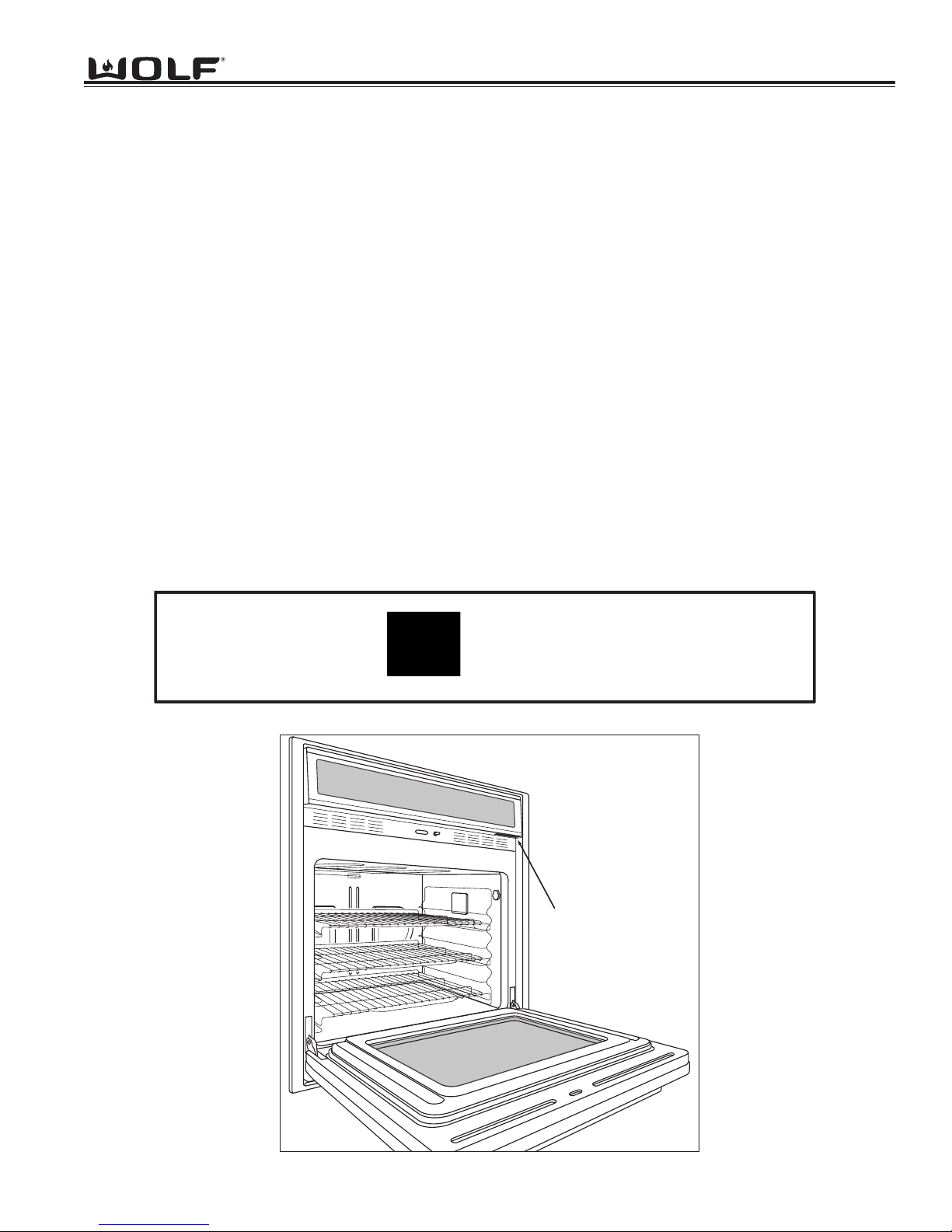
• See Figure 1-1 for serial tag layout.
• See Figure 1-2 for serial tag location.
Figure 1-1. Typical Serial Tag Layout
Figure 1-2. The serial tag is located underneath the control panel.
Wolf Appliance Company, LLC
FITCHBURG, WI
WALL OVEN
FOR HOUSEHOLD USE ONLY
X.X
VOLTS :
Hz :
60
MODEL# : XXXXXX-X
"DO NOT IMMERSE IN WATER" "NE PAS PLONGE DANS L'EAU"
KW :
120/208
120/240
Serial Tag Location
X.X
3 WIRE
SERIAL# : XXXXXXXX
-2
Page 8
General Information
WWaallll OOvveenn SSeerriieess
WWaallll OOvveenn SSeerriieess
1-6
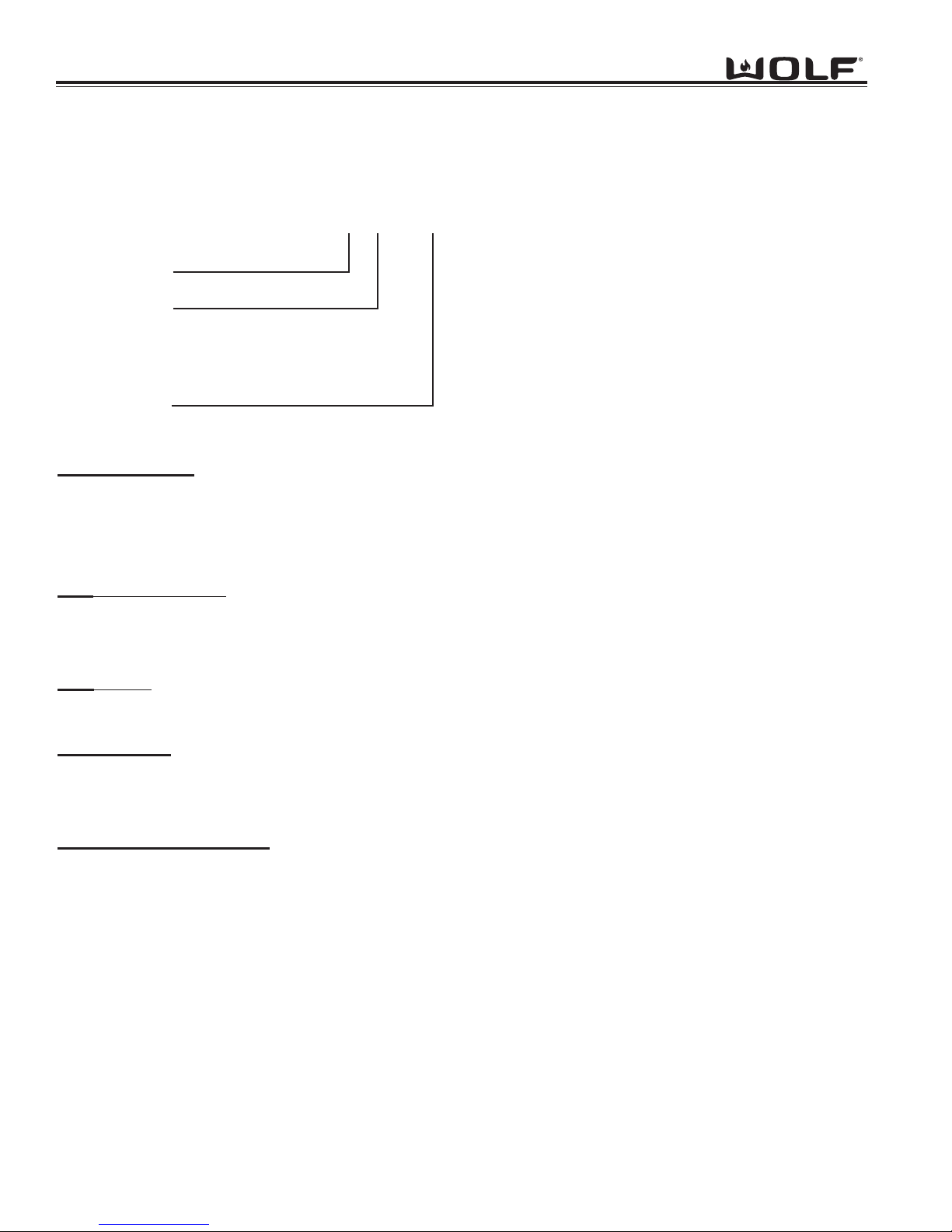
MODEL NUMBER KEY
Refer to this key for an example of the model numbers.
Model: SO 30 F / S
Product Type
Size
Fuel
Feature (If Applicable)
Finish
Product T
ype
SO Single Oven
DO Double Oven
CT Cooktop
Size
30 30 - inch wide unit
36 36 - inch wide unit
Fuel
E Electric
Oven Door
F Framed
U Unframed
Finish
S Classic Stainless Steel
P Platinum Stainless Steel
B Carbon Stainless Steel
Page 9
1-7
General Information
WWaallll OOvveenn SSeerriieess
WWaallll OOvveenn SSeerriieess
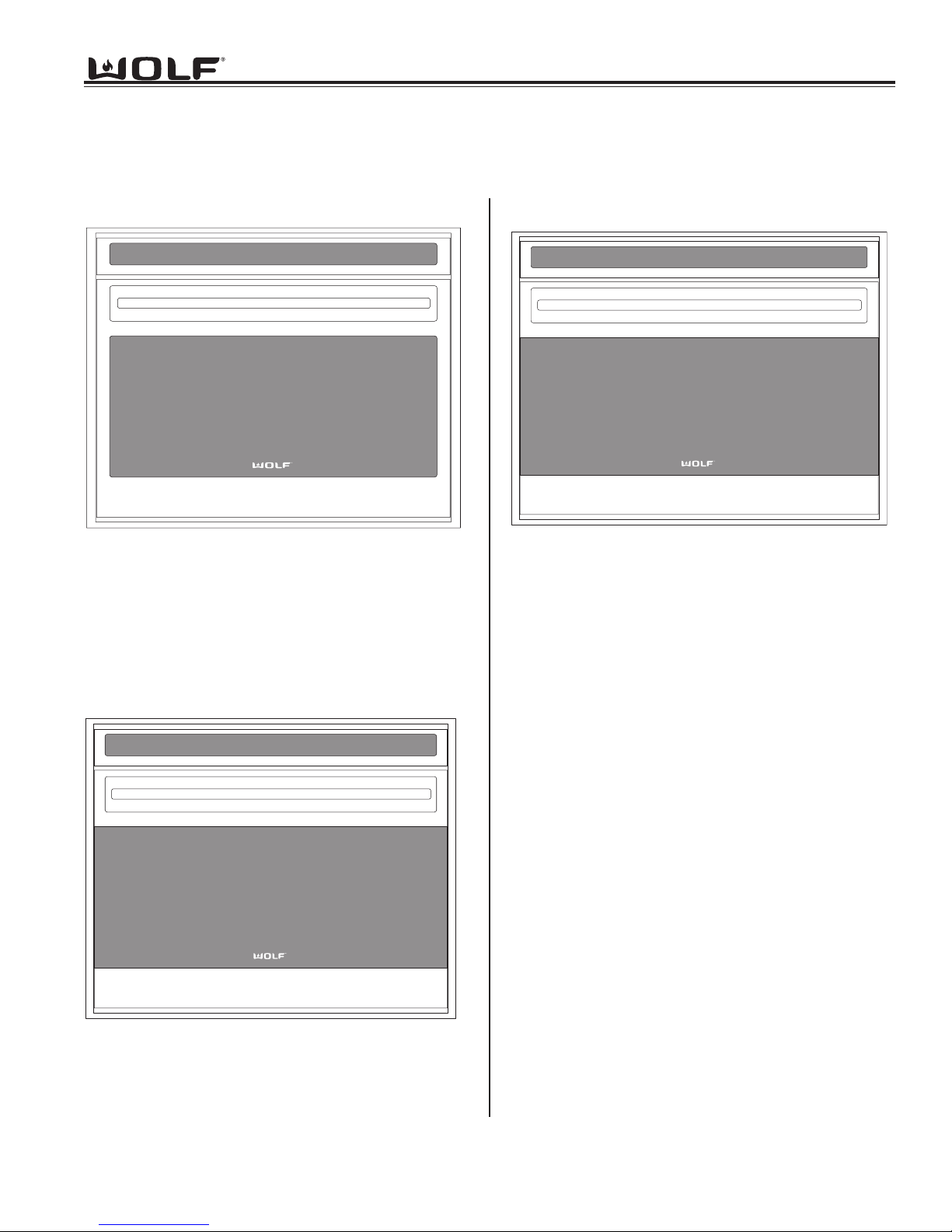
MODEL CONFIGURATIONS
30” Single Oven Framed
Model Number Description
SO30F/S Single Oven 30” Framed Stainless
Model Number Description
SO30U/S Single Oven 30” Unframed Stainless
SO30U/P Single Oven 30” Unframed Platinum
SO30U/B Single Oven 30” Unframed Carbon
Single Ovens
36” Single Oven Unframed
Model Number Description
SO36U/S Single Oven 36” Unframed Stainless
SO36U/P Single Oven 36” Unframed Platinum
SO36U/B Single Oven 36” Unframed Carbon
Page 10
General Information
WWaallll OOvveenn SSeerriieess
WWaallll OOvveenn SSeerriieess
1-8
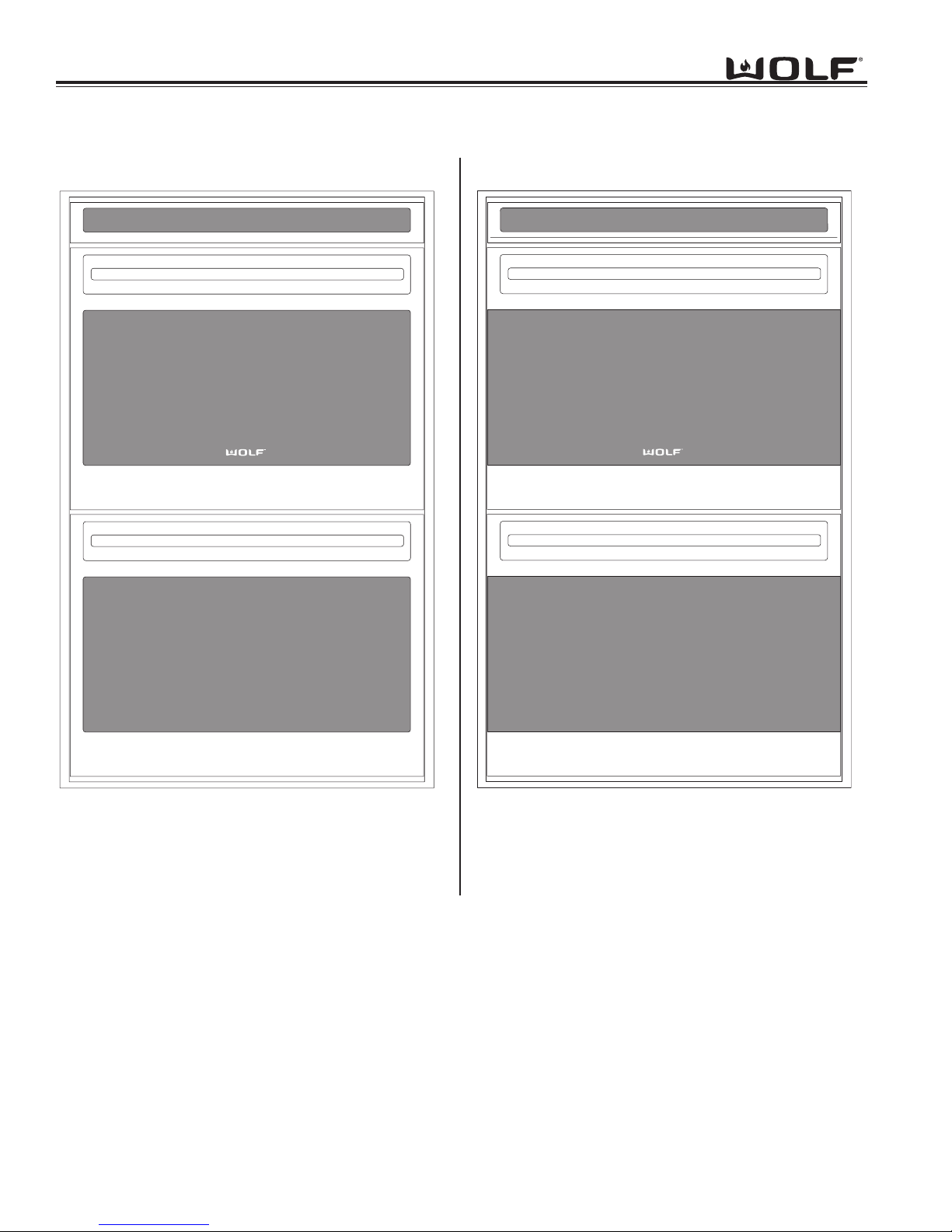
30” Double Oven Framed
Double Ovens
30” Double Oven Unframed
Model Number Description
DO30F/S Double Oven 30” Framed Stainless
Model Number Description
DO30U/S Double Oven 30” Unframed Stainless
DO30U/P Double Oven 30” Unframed Platinum
DO30U/B Double Oven 30” Unframed Carbon
Page 11
1-9
General Information
WWaallll OOvveenn SSeerriieess
WWaallll OOvveenn SSeerriieess
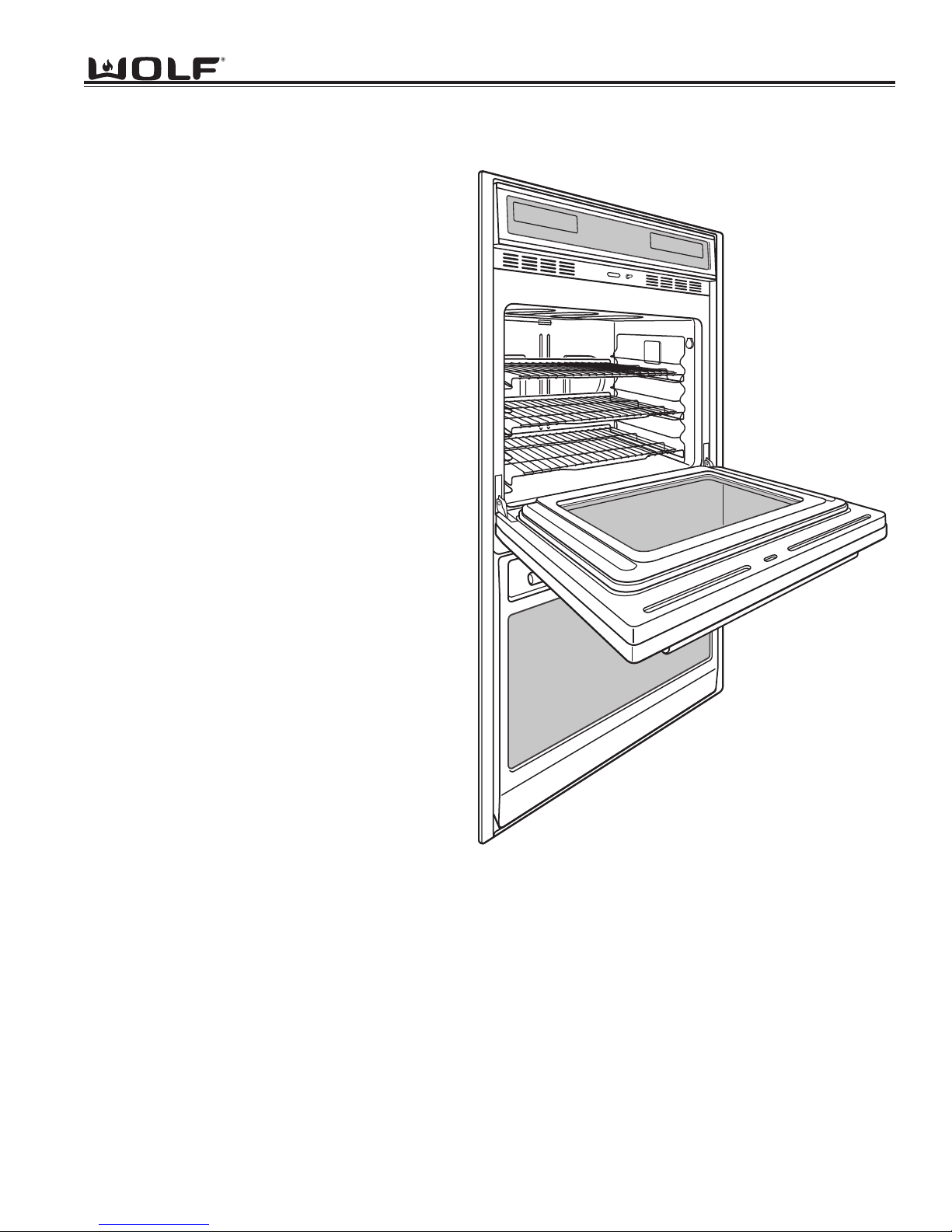
• Two door styles
Traditional Framed (30”)
Contemporary Unframed (30” & 36”)
• Framed door finish
Classic Stainless Steel
• Unframed door finishes
Classic Stainless Steel
Platinum Stainless Steel
Carbon Stainless Steel
• Dual Convection Logic Control System
• Rotating Control Panel
• Touch Control Panel
• Door Hinge with Hydraulic Damper System
• Large Viewing Window
• Triple Pane Window
• Dual Halogen Lighting
• Temperature Probe and Receptacle
• Six Level Rack Guide
• Full Extension Bottom Rack
• Hidden Bake Element
• Broil Element
• Bake Mode
• Convection Mode
• Convection Bake Mode
• Broil Mode
• Convection Broil Mode
• Roast Mode
• Convection Roast Mode
• Bake Stone Mode (Bake Stone Optional)
• Dehydrate Feature (Dehydrate Kit Optional)
• Proof Feature
• Self-Clean Mode
• Sabbath Mode
OVEN FEATURES
Page 12

General Information
WWaallll OOvveenn SSeerriieess
WWaallll OOvveenn SSeerriieess
1-10
Page 13

WWaallll OOvveenn SSeerriieess
WWaallll OOvveenn SSeerriieess
Installation Information
2-1
SECTION 2
INSTALLATION
INFORMATION
Page 14
WWaallll OOvveenn SSeerriieess
WWaallll OOvveenn SSeerriieess
Installation Information
2-2
INSTALLATION INFORMATON
This section of the manual covers some of the installation issues a service technician may need to know when servicing a Wolf Wall Oven. If additional information is needed after reviewing this section of the manual, please refer to
the Installation Guide or contact the Wolf Appliance Customer Service Department.
Electrical Requirements:
Single Oven
• 208/220-240 volts AC, 60 Hertz, 30 Ampere fused electrical supply.
Double Oven
• 208/220-240 volts AC, 60 Hertz, 50 Ampere fused electrical supply.
Minimum Wire Size:
• L1, L2 and Ground: 10 AWG
• Neutral: 12 AWG
This appliance must be properly grounded. This appliance is equipped with a 60” conduit consisting of two insulated
hot lead copper conductors, one insulated neutral copper conductor and one uninsulated ground copper conductor.
THIS APPLIANCE MUST BE PROPERLY GROUNDED AT ALL TIMES WHEN ELECTRICAL POWER IS
APPLIED.
DO NOT GROUND THE APPLIANCE WITH THE NEUTRAL (WHITE) HOUSE SUPPLY WIRE. A SEPERATE
GROUND WIRE MUST BE UTILIZED.
IF ALUMINUM HOUSE SUPPLY WIRING IS UTILIZED, SPLICE THE APPLIANCE COPPER WIRE TO THE ALUMINUM HOUSE WIRING USING SPECIAL CONNECTORS DESIGNED AND CERTIFIED FOR JOINING COPPER
AND ALUMINUM. FOLLOW THE CONNECTORS MANUFACTURERS RECOMMENDED PROCEDURE CAREFULLY. IMPROPER CONNECTION CAN RESULT IN A FIRE HAZARD.
Page 15
2-3
WWaallll OOvveenn SSeerriieess
WWaallll OOvveenn SSeerriieess
Installation Information
s
"
8-32
ew
Sc
"-18x
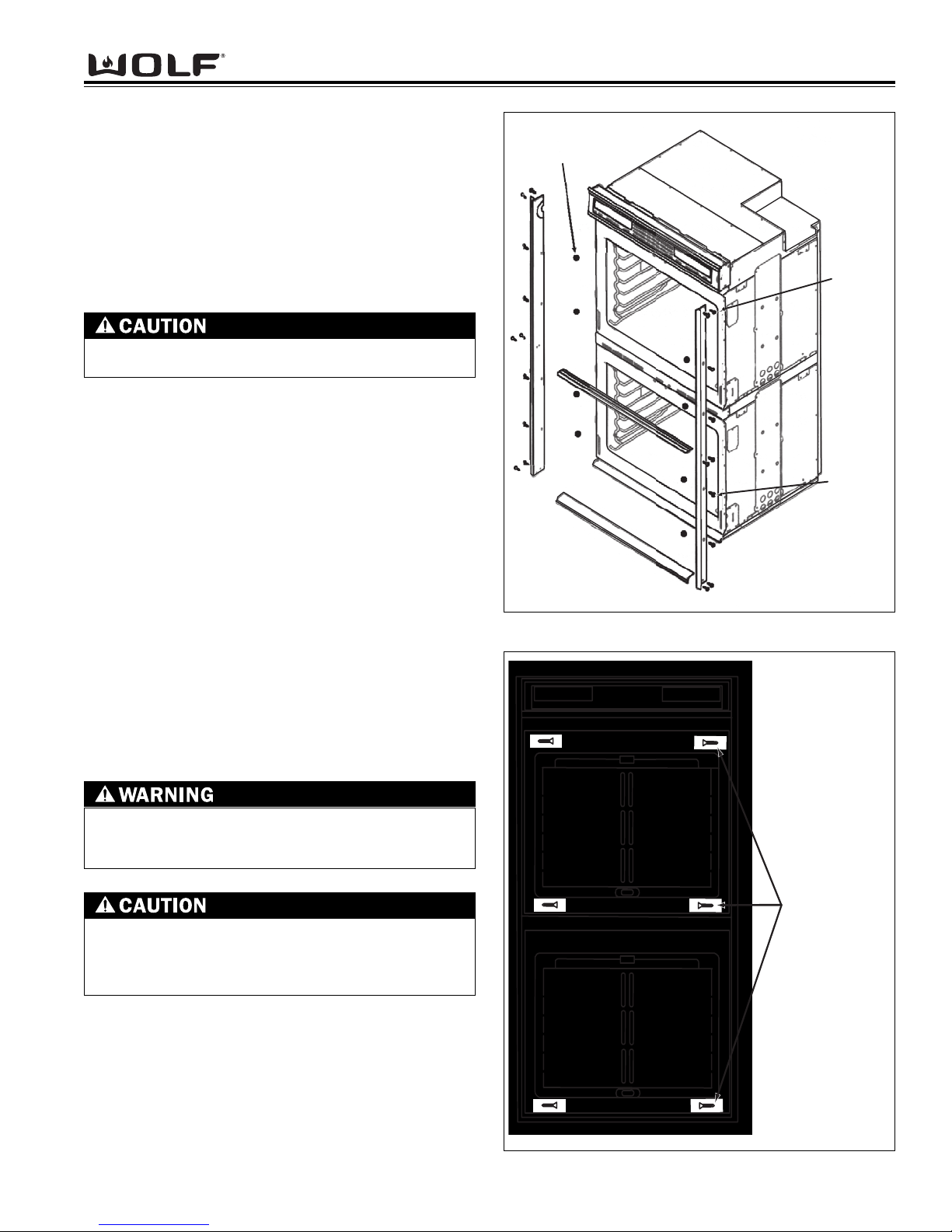
Figure 2-1. Trim Installation
Figure 2-2. Cabinet Mounting Screws
Oven Installation
Use the upper edge of the cavity opening and the bottom of the oven chassis side as gripping points to lift
the oven into the cabinet cutout. Slide the oven into the
recessed area until the unit is approximately six inches
from being fully installed. This will allow for installation
of the oven trim kit.
NOTE: The oven door(s) may be removed to reduce
the weight of the oven when lifting into cabinet opening.
Trim Installation
Attach the left and right side trim to the bottom and middle trim prior to installing on the oven.
(See Figure 2-1).
NOTE: The middle trim is for double ovens only.
Peel off the adhesive backing on the flat washers.
Attach the flat washers centered over the holes of the
raised sides of the oven cavity frame.
NOTE: Four washers for single oven and eight washers for double oven.
Install the trim to the oven using the screws provided in
the trim kit. Now, locate the mounting holes found on
the sides of the oven trim. Then, use a drill with a 1/16”
drill bit and drill four pilot holes for the cabinet mounting
screws. Install the mounting screws through the oven
side trim and into the cabinet. (See figure 2-2).
NOTE: Do not overtighten the mounting screws.
FAILURE TO INSTALL THE MOUNTING SCREWS
MAY RESULT IN MOVEMENT OR TIPPING OF THE
OVEN DURING USE.
Do not block the oven air exhaust located at the
bottom of the oven. Blocking the exhaust may
result in cabinet damage and poor baking performance.
Do not lift or carry the oven door(s) by the door
handle.
Flat Washer
x3/4
r
1/2
Mounting Screw
6-18x1"
Page 16
WWaallll OOvveenn SSeerriieess
WWaallll OOvveenn SSeerriieess
Installation Information
2-4
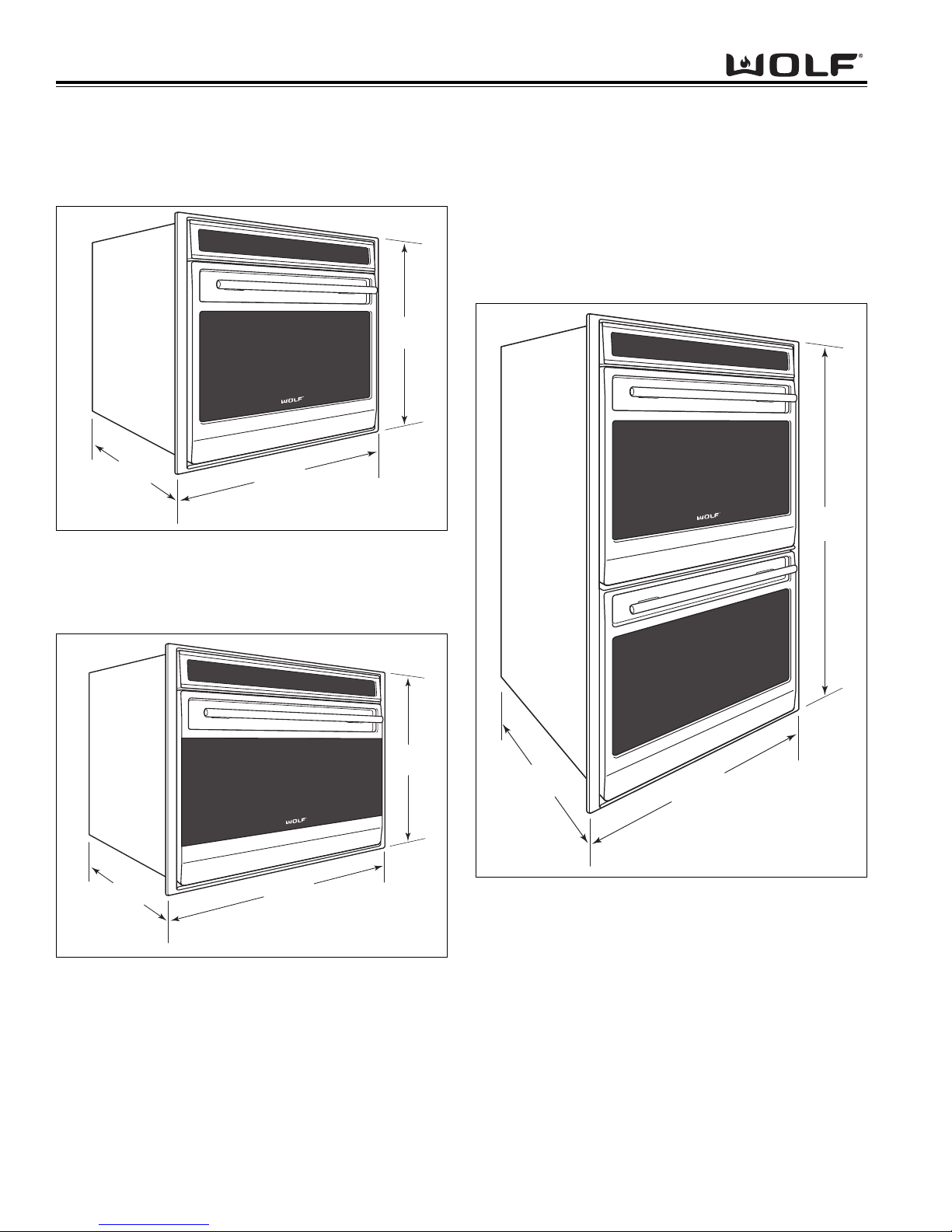
Figure 2-5. 30” Double Oven Overall Dimensions
Figure 2-3. 30” Single Oven Overall Dimensions
Figure 2-4. 36” Single Oven Overall Dimensions
WALL OVEN DIMENSIONS
271/2"
(699mm)
24"
(610
mm)
24"
mm)
(610
297/8"
mm)
(759
355/8"
(905mm)
243/8"
(619mm)
50"
(1269mm)
24"
(610
mm)
297/8"
mm)
(759
Page 17
2-5
WWaallll OOvveenn SSeerriieess
WWaallll OOvveenn SSeerriieess
Installation Information
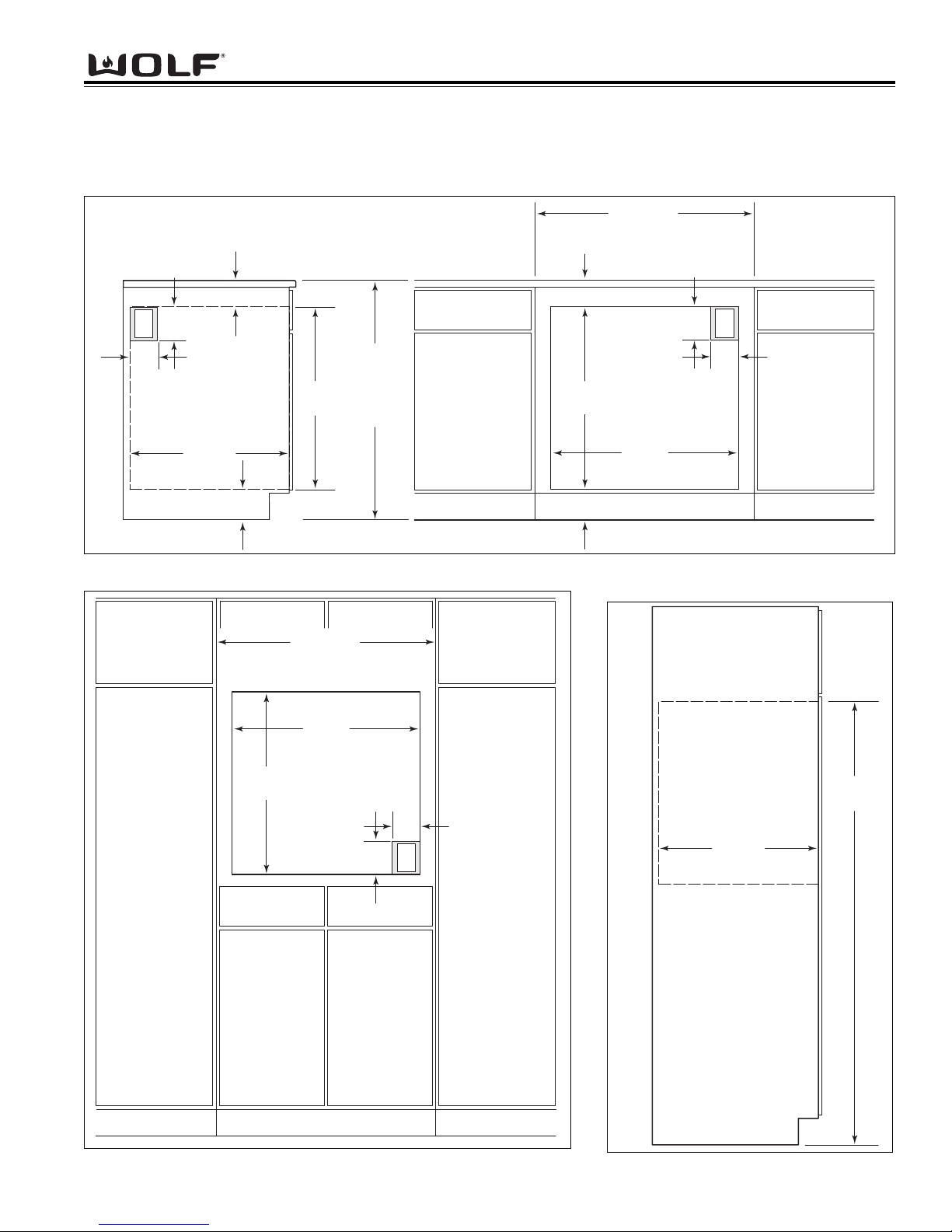
CABINET CUTOUT DIMENSIONS
Single 30 Inch Wall Oven
Figure 2-6. Undercounter Cutout Dimensions and Electrical Placement
Figure 2-7. Front Cutout Dimensions and Electrical Placement Figure 2-8. Side View
NOTE: Dimensions in parentheses are in millimeters.
33/4" min
(95)
5"
E
(127)
(691)
36" (914)
STANDARD
FLOOR T O
COUNTER
HEIGHT
4"
(102
)
ELECTRICAL
LOCATION IN
ADJACENT RIGHT
SIDE CABINET
24" min
(610)
43/4" min (121)
273/16"
RECOMMENDED CABINET WIDTH
33" (838)
30" min (762)
RECOMMENDED CABINET WIDTH
273/16"
43/4" min (121)
30" min (762)
33/4" min (95)
(691)
33" (838)
(102)
281/2"
(724)
5"
E
(127)
4"
NOTE: Dimensions in
parentheses are in
millimeters.
281/2"
(724)
273/16"
(691)
4"
(102)
5"
(127)
E
RIGHT SIDE
CABINET VIEW
24" min
(610)
67" max
(1702)
Page 18
WWaallll OOvveenn SSeerriieess
WWaallll OOvveenn SSeerriieess
Installation Information
2-6
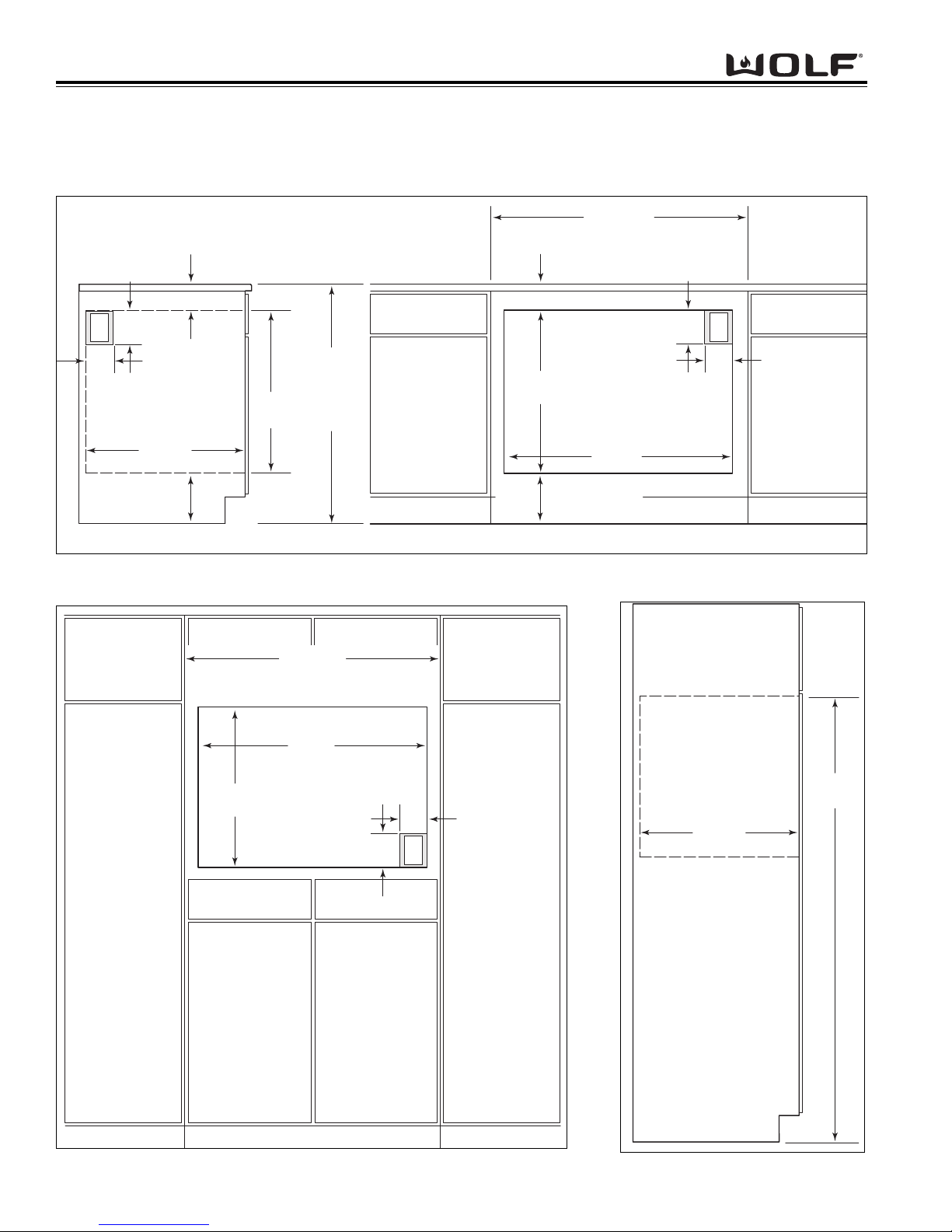
CABINET CUTOUT DIMENSIONS
Single 36 Inch Wall Oven
Figure 2-9. Undercounter Cutout Dimensions and Electrical Placement
Figure 2-10. Front Cutout Dimensions and Electrical Placement Figure 2-11. Side View
NOTE: Dimensions in parentheses are in millimeters.
33/4" min
(95)
5"
E
(127)
(611)
36" (914)
STANDARD
FLOOR T O
COUNTER
HEIGHT
4"
(102
)
ADJACENT RIGHT
73/4" (197) rec
(121) min
43/4"
ELECTRICAL
LOCATION IN
SIDE CABINET
24" min
(610)
241/16"
RECOMMENDED CABINET WIDTH
39" (991)
36" min (914)
RECOMMENDED CABINET WIDTH
241/16"
(611)
39" (991)
36" min (914)
33/4"
min (95)
341/2"
(876 )
73/4" (197) rec
43/4" (121) min
5"
(127)
4"
(102)
Dimensions in
NOTE:
parentheses are in
millimeters.
E
341/2"
(876 )
241/16"
(611)
4"
(102)
5"
(127)
24" min
E
RIGHT SIDE
CABINET VIEW
(610)
67" max
(1702)
Page 19
2-7
WWaallll OOvveenn SSeerriieess
WWaallll OOvveenn SSeerriieess
Installation Information
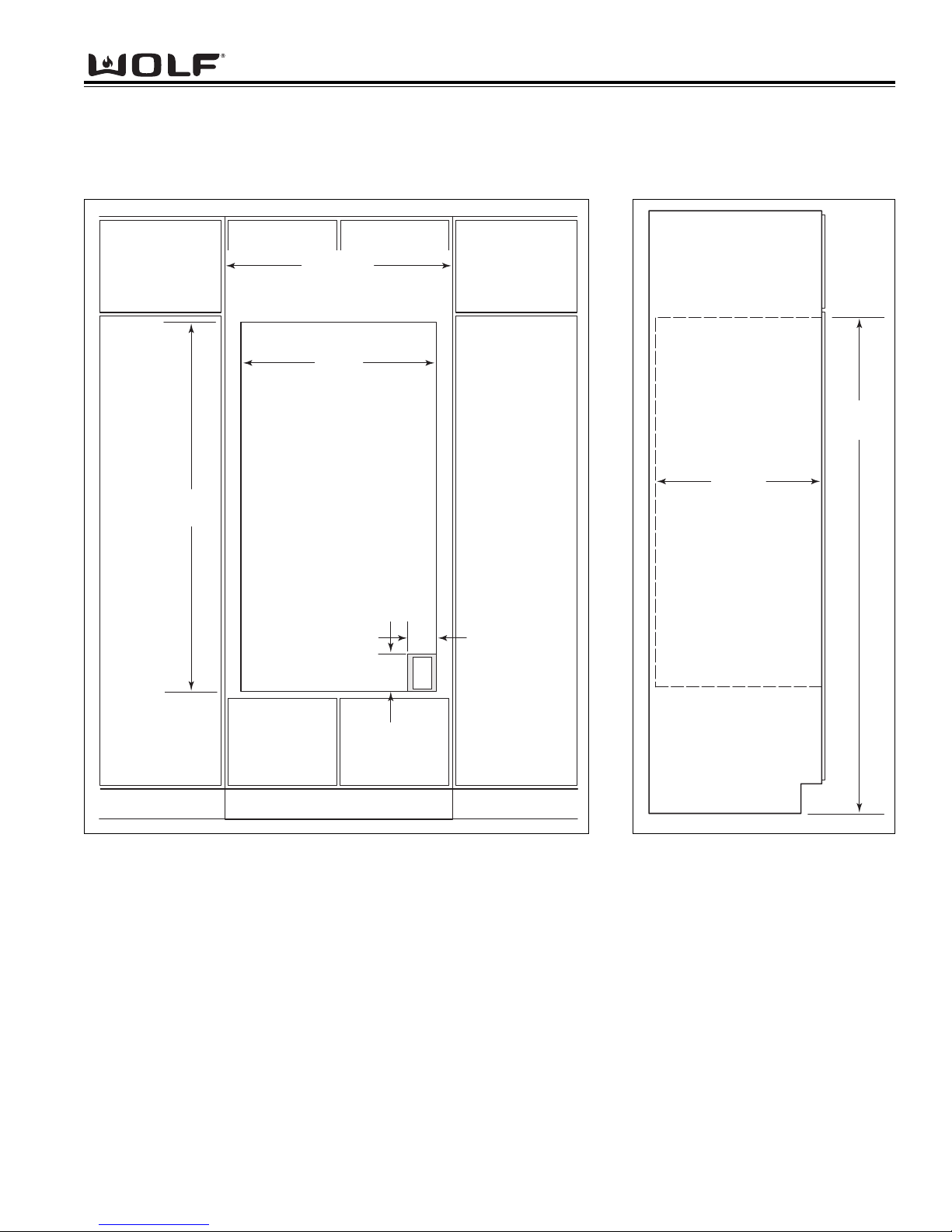
CABINET CUTOUT DIMENSIONS
Double 30 Inch Wall Oven
Figure 2-12. Front Cutout Dimensions and Electrical Placement
Figure 2-13. Side View
33" (838)
RECOMMENDED CABINET WIDTH
30" min (762)
281/2"
(724)
495/8"
(1260)
NOTE: Dimensions in
parentheses are in
millimeters.
67" max
(1702)
24" min
(610)
4"
(102)
5"
E
(127)
RIGHT SIDE
CABINET VIEW
Page 20
WWaallll OOvveenn SSeerriieess
WWaallll OOvveenn SSeerriieess
Installation Information
2-8
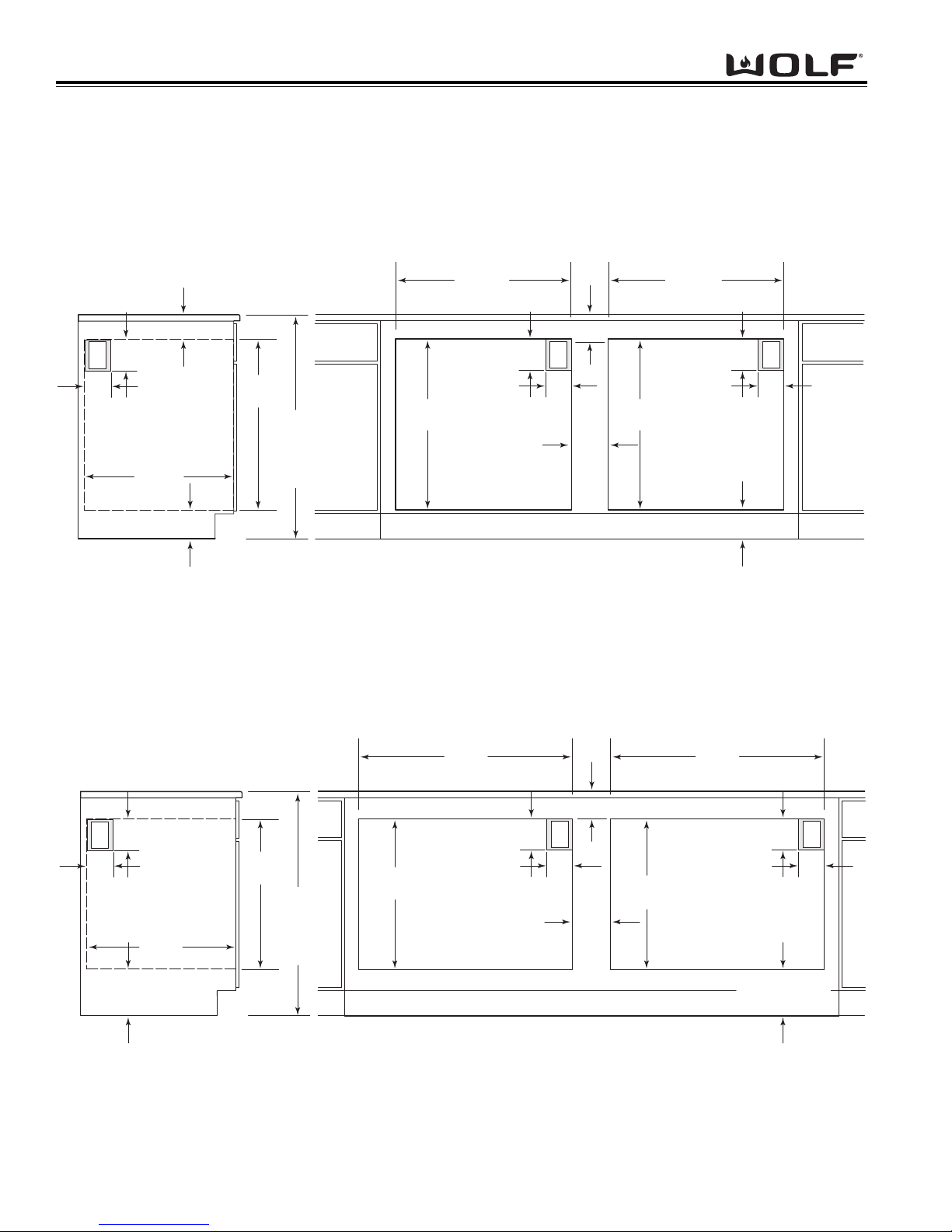
CABINET CUTOUT DIMENSIONS
Side-by-Side Wall Oven
Figure 2-14. Undercounter Cutout Dimensions and Electrical Placement for SO30
Figure 2-15. Undercounter Cutout Dimensions and Electrical Placement for SO36
NOTE: Dimensions in parentheses are in millimeters.
33/4" min
(95)
5"
E
(127)
4"
(102
)
ELECTRICAL
LOCATION IN
ADJACENT RIGHT
SIDE CABINET
24" min
(610)
43/4" min (121)
273/16"
(691)
STANDARD
FLOOR TO
COUNTER
36" (914)
HEIGHT
281/2"
(724)
30" OVEN CUT-OUT
273/16"
(691)
4"
(102)
5"
(127)
33/4"
E
min (95)
71/2"
(191)
281/2"
(724)
30" OVEN CUT-OUT
273/16"
(691)
4"
(102)
43/4"
5"
(127)
min (121)
E
NOTE: Dimensions in parentheses are in millimeters.
min (95)
5"
E
(127)
4"
(102
73/4" (197) rec
43/4" (121) min
ELECTRICAL
LOCATION IN
)
ADJACENT RIGHT
SIDE CABINET
24" min
(610)
241/16"
(611)
STANDARD
FLOOR TO
COUNTER
36" (914)
HEIGHT
241/16"
(611)
341/2"
(876)
36" OVEN CUT
-OUT
4"
(102)
5"
(127)
341/2"
(876)
36" OVEN CUT-OUT
33/4" min (95)33/4"
5"
E
4"
(102)
73/4" (197) rec
43/4"
71/2"
(191)
241/16"
(611)
(127)
(121) min
E
Page 21

WWaallll OOvveenn SSeerriieess
WWaallll OOvveenn SSeerriieess
Electronic Control System
3-1
SECTION 3
ELECTRONIC CONTROL
SYSTEM
Page 22
WWaallll OOvveenn SSeerriieess
WWaallll OOvveenn SSeerriieess
Electronic Control System
3-2
ELECTRONIC CONTROL TERMINOLOGY & COMPONENT DESCRIPTIONS
All Wolf wall ovens utilize an electronic control system. The electronic control system monitors, regulates and controls a variety of functions. The control system also displays error codes to identify possible problems with the unit.
The table below defines some of the basic electronic control system terminology and describes some of the electronic system components. An understanding of the following information is needed in order to comprehend the
input operations and functions of the electronic control system.
T
erm / Component Definition / Description
Oven Controller.......................................The printed circuit board containing the microprocessor and logic inputs
which communicates with the oven display, keyboard, stepper motor control
board.
Relay Board............................................The printed circuit board containing the microprocessor, relays and electrical
connections which control and monitor functions and operations of the unit.
Oven Display...........................................A vacuum fluorescent display which shows oven temperature, cooking
modes, error codes, cook times and stop time.
Stepper Motor Control Board..................The printed circuit board containing a transformer and logic control to drive
the stepper motor.
Control Panel Assembly..........................The head assembly containing the oven display(s) and keyboard.
Relays.....................................................The electrical components on the relay board that switch other components
in the unit ON and OFF when instructed to do so by the microprocessor.
Microprocessor........................................An electrical component on the control board which receives electrical sig-
nals from other components, processes that information, then sends an
electrical signal to the relays on the board to open or close, and other components in the unit to switch on or off.
Keyboard.................................................An assembly of glass and mylar which connects into the upper oven display.
Error Codes.............................................Number or word description which appears on the oven display if the unit
experiences specific problems related to electrical signals supplied by the
electrical components.
MDL.........................................................Motor door latch assembly which incorporates the latch motor drive, unlatch
switch, latch switch and door switch.
RTD.........................................................The oven(s) temperature sensing device.
DLB...........................................................A component on the relay board which is a relay that connects and discon-
nects the L2 line to the elements when energized by logic from the oven
controller.
Page 23
WWaallll OOvveenn SSeerriieess
WWaallll OOvveenn SSeerriieess
Electronic Control System
3-3
UNIQUE ELECTRONIC CONTROL INPUT OPERATIONS
The following few pages illustrate electronic control input operations that you would not expect a customer to perform everyday.
The input operations described are: Field Option Mode, Sabbath Mode, Delayed Start Mode, Probe Mode and Self-Clean Mode.
Field Option Mode
Field option mode allows for the user to adjust specific options of the oven controller, such as User Preference Offset (adjusting
temperature ± 35°), Temperature Display Preference (choosing between °F, Fahrenheit or °C, Celsius) and Clock Display
Preference (12 Hour Clock or 24 Hour Clock).
NOTE: Field Option Mode must be entered with the oven(s) turned OFF.
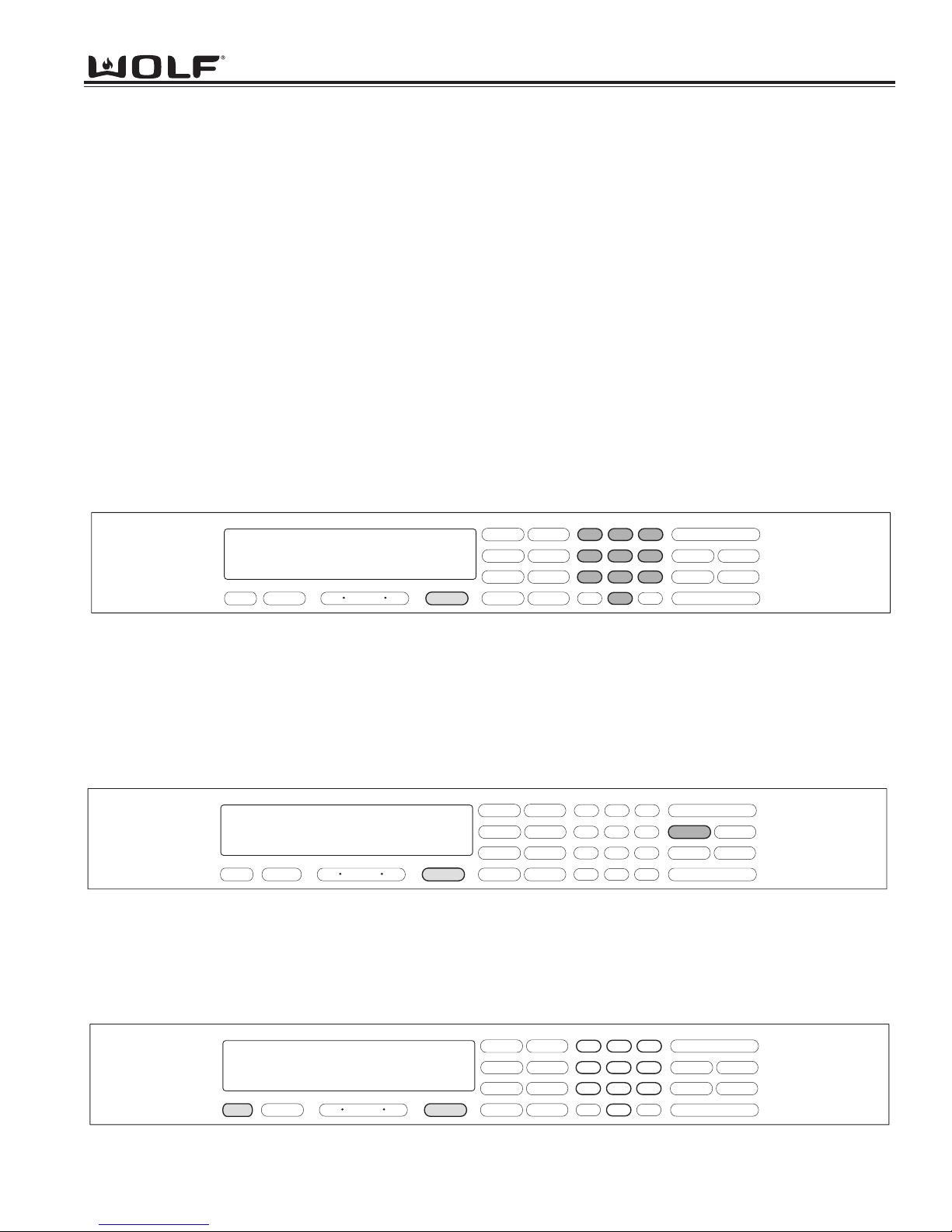
To initiate Field Option Mode, Press and hold the TEMPERATURE key for five seconds.
NOTE: Pressing the CLEAR key will cancel the Field Option Mode.
User Preference Offset
This option allows the user to offset a specific oven temperature ±35° in 1°F (Fahrenheit) increments. Once in Field Option
Mode, press the number keys to input the numeric value of the offset and press the TEMPERATURE key to toggle between ±.
The new offset is accepted ten seconds after the last key stroke or by pressing the ENTER key. (See Figure 3-1). Pressing the
CLEAR key will cancel the Field Option Mode.
NOTE: Entering a positive number will increase oven temperature.
NOTE: User Preference Offset will only work for °F (Fahrenheit).
f
Figure 3-1. User Preference Offset. Press and HOLD the TEMPERATURE key for five seconds. Then, press the number
keys to enter a new numeric value up to 35. Now, press the TEMPERATURE key to toggle between ±.
Figure 3-2. Temperature Display Preference. Must be in Field Option Mode. Now, press the COOK TIME key to toggle
between °C and °F.
Temperature Display Preference
This option allows the user to choose how the temperature is displayed, °F (Fahrenheit) or °C (Celsius), and/or back again.
Once in Field Option Mode, press the COOK TIME key to toggle between °C and °F. The new display, °C or °F is accepted ten
seconds after the last key stroke or by pressing the ENTER key. See Figure 3-2. Pressing the CLEAR key will cancel the Field
Option Mode.
c
Figure 3-2.1. Clock Display Preference. Must be in Field Option Mode. Now, press the CLOCK key to toggle between 12
hour and 24 hour clock.
Clock Display Preference
This option allows the user to choose how the clock is displayed, 12 hour or 24 hour, and/or back again. Once in Field Option
Mode, press the CLOCK key to toggle between 12 hour or 24 hour clock. The new display is accepted ten seconds after the last
key stroke or by pressing the ENTER key. See Figure 3-2.1. Pressing the CLEAR key will cancel the Field Option Mode.
f
ON/OFF
CLEAR
LIGHT
3
COOK TIME
STOP TIME
PANEL LOCK
SELF CLEAN
ON/OFF
PROBE
3 00
CLOCK
CONV. BAKE
BAKE
.
.
12 hr clock
OFF ON
TIMER
OVEN
0
set upo
TEMPERATURE
°
ROAST
CONV. ROAST
BROIL
CONV. BROIL
BAKE STONE
CONVECTION
1
4
7
ENTER
2
56
89
0
ON/OFF
CLEAR
LIGHT
3
COOK TIME
STOP TIME
PANEL LOCK
SELF CLEAN
ON/OFF
PROBE
3 00
CLOCK
CONV. BAKE
BAKE
.
.
TIMER
12 hr clock
OFF
OVEN
ON
TEMPERATURE
°
ROAST
CONV. ROAST
BROIL
CONV. BROIL
BAKE STONE
CONVECTION
1
4
7
ENTER
2
56
89
0
.
.
3 00
CLOCK
TIMER
24 hr clock
OFF ON
OVEN
CONV. BAKE
BAKE
°
ROAST
BROIL
BAKE STONE
CONV. ROAST
CONV. BROIL
CONVECTION
0
set upo
TEMPERATURE
1
4
7
ENTER
2
3
56
89
CLEAR
0
LIGHT
COOK TIME
SELF CLEAN
PROBE
ON/OFF
STOP TIME
PANEL LOCK
ON/OFF
Page 24
WWaallll OOvveenn SSeerriieess
WWaallll OOvveenn SSeerriieess
Electronic Control System
3-4
Sabbath Feature
Sabbath Feature was incorporated into the electronic control system for the observance of certain religious holidays.
Once Sabbath Mode has been entered, all of the oven functions have been disabled except the OFF key.
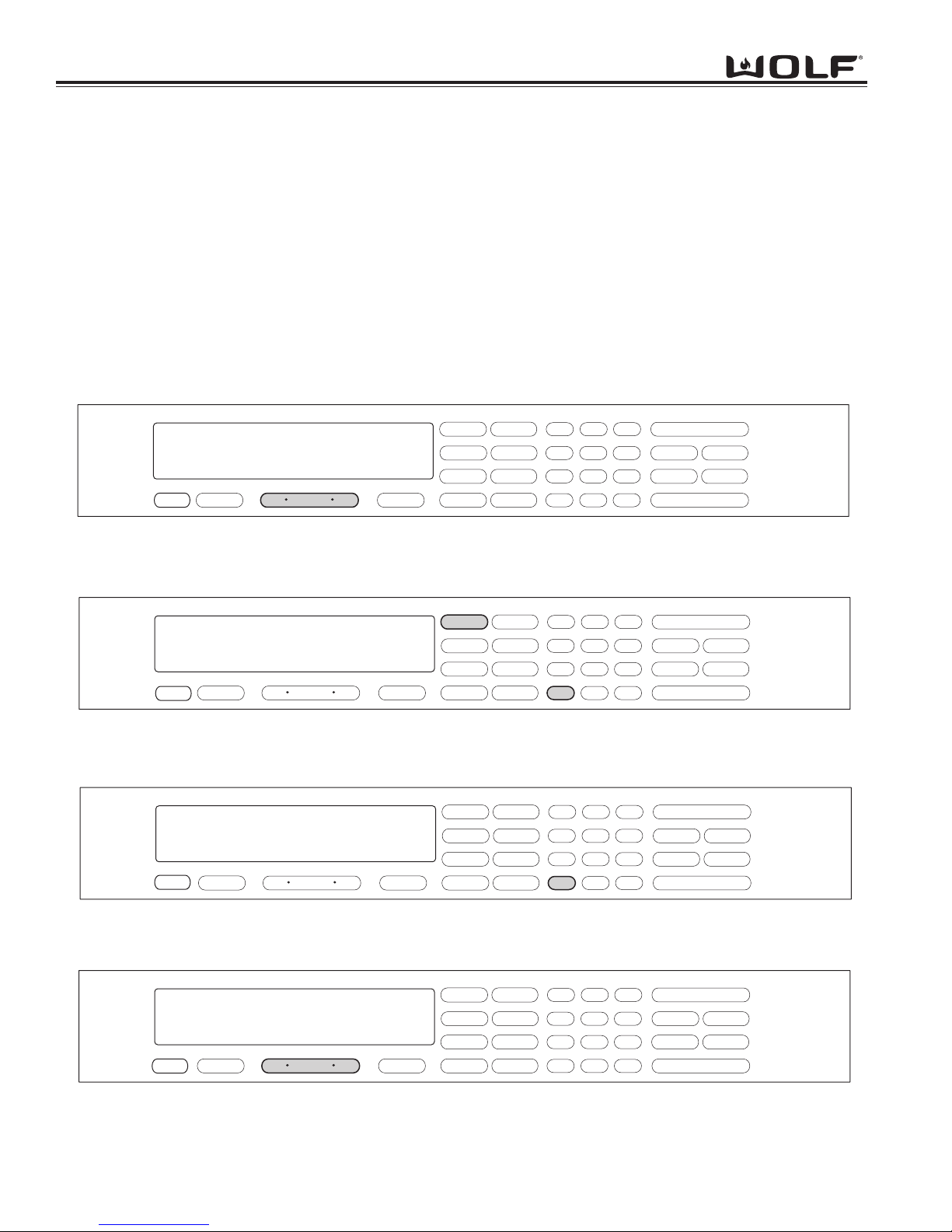
To initiate Sabbath feature, the oven must be OFF. Press UPPER or LOWER OVEN ON key for a double oven or
OVEN ON key for a single oven. (See Figure 3-3). Turn on the interior oven lights by pressing the OVEN LIGHT
ON key (Optional). Press the BAKE or ROAST key. A preset temperature of 350° will be shown in the display. To
change temperature, immediately enter another temperature using the number keys, then press ENTER. (See
Figure 3-4). Now, press and hold the ENTER key for five seconds. The oven will chime twice and the word SABBATH appears in the display window. (See Figure 3-5). Repeat these steps above for each oven(s).
To exit the Sabbath Mode, press the UPPER or LOWER OVEN OFF key or the OVEN OFF key, depending on the
model. (See Figure 3-6).
NOTE: The oven(s) will remain on until the Sabbath Mode is cancelled.
Figure 3-4. Press the BAKE key. A preset temperature of 350°F will be shown in the display.
To change temperature, immediately enter another temperature using the number keys. Then, press ENTER.
Figure 3-6. To exit Sabbath Mode. Press the Oven OFF key.
For Double Ovens select either Upper Oven OFF key or Lower Oven OFF key.
Figure 3-3. To initiate Sabbath Mode, the oven must be OFF. Press Oven ON key.
For Double Ovens select either Upper Oven ON key or Lower Oven ON key.
f
f
f
f
f
Figure 3-5. Now, press and HOLD THE ENTER key for 5 seconds.
The oven will chime twice and the word Sabbath appears in the display.
ON/OFF
STOP TIME
PANEL LOCK
ON/OFF
3 00
CLOCK
CONV. BAKE
BAKE
.
.
select mode
TIMER
OFF ON
OVEN
TEMPERATURE
ROAST
BROIL
BAKE STONE
CONV. ROAST
CONV. BROIL
CONVECTION
1
4
7
ENTER
2
56
89
CLEAR
0
LIGHT
3
COOK TIME
SELF CLEAN
PROBE
ON/OFF
STOP TIME
PANEL LOCK
ON/OFF
3 00
OVEN ON
CLOCK
CONV. BAKE
.
.
bake
OFF ON
TIMER
OVEN
TEMPERATURE
350
setpoint
TEMPERATURE
°
BAKE
ROAST
BROIL
BAKE STONE
CONV. ROAST
CONV. BROIL
CONVECTION
1
4
7
ENTER
2
56
89
CLEAR
0
LIGHT
3
COOK TIME
SELF CLEAN
PROBE
ON/OFF
STOP TIME
PANEL LOCK
ON/OFF
3 00
CLOCK
.
.
OVEN ON
TIMER
sabbath setpoint
OFF ON
OVEN
350
TEMPERATURE
TEMPERATURE
CONV. BAKE
BAKE
°
ROAST
CONV. ROAST
BROIL
CONV. BROIL
BAKE STONE
CONVECTION
1
4
7
ENTER
2
56
89
CLEAR
0
LIGHT
3
COOK TIME
SELF CLEAN
PROBE
.
.
3 00
OFF ON
CLOCK
TIMER
OVEN
TEMPERATURE
BAKE STONE
BAKE
ROAST
BROIL
CONV. BAKE
CONV. ROAST
CONV. BROIL
CONVECTION
1
4
7
ENTER
2
56
89
CLEAR
0
LIGHT
3
COOK TIME
SELF CLEAN
PROBE
ON/OFF
STOP TIME
PANEL LOCK
ON/OFF
Page 25
WWaallll OOvveenn SSeerriieess
WWaallll OOvveenn SSeerriieess
Electronic Control System
3-5
Time Cook Feature
Time Cook Feature controls the automatic timing of the oven(s) ON and OFF function by setting the cooking time to
start immediately and turn off when the desired cooking is complete. To accomplish time cook, the time of day clock
is used and therefore the correct time must be displayed prior to programming.
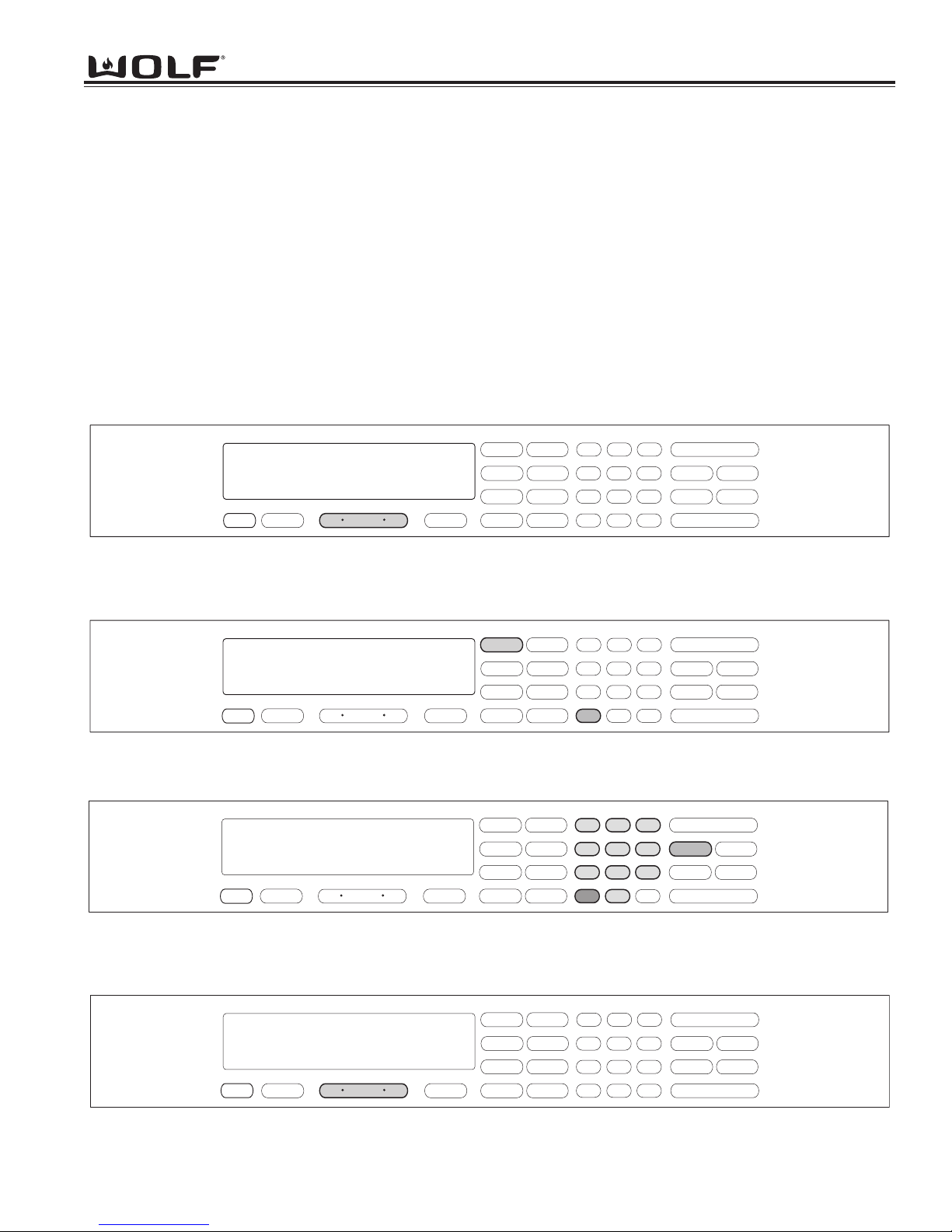
To initiate Time Cook, the oven must be OFF. First press the Oven ON key. (See Figure 3-7). For Double Ovens
press the Upper Oven ON key or the Lower Oven ON key. Now, press a desired cooking mode (example Bake
Mode). A preset temperature of 350°F is shown in the display. To change the temperature from 350°F, immediately
enter another temperature using the number keys. (See Figure 3-8). Then, press the COOK TIME key. Then, enter
the hours/minutes desired for cooking. The oven(s) will start heating after a five second delay or by pressing the
ENTER key. (See Figure 3-9). To exit TIME COOK feature, press the Oven OFF key. (See Figure 3-10). For the
Double Oven, press the Upper Oven OFF key or the Lower Oven Off key.
NOTE: The oven should always be preheated in this mode. The oven will chime after the oven reaches preheat
temperature.
Figure 3-8. Press a desired Cooking Mode. (Example: Bake Mode). A preset temperature of 350°F will be shown in the
display
. To change temperature, immediately enter another temperature using the number keys.
Figure 3-10. To exit the Cook Time Feature. Press the Oven OFF key.
For Double Ovens select either Upper Oven OFF key or Lower Oven OFF key.
Figure 3-7. To initiate Time Cook Feature, the oven must be OFF. Press Oven ON key.
For Double Ovens select either Upper Oven ON key or Lower Oven ON key.
f
f
f
f
f
Figure 3-9. Now, press the Cook Time key. Now, enter the hours/minutes desired for cooking. The Stop Time will auto-
matically be entered in the display. Then, press the ENTER key. The oven(s) will now start heating and then turn off
when the cooking times has completed.
ON/OFF
CLEAR
LIGHT
3
COOK TIME
STOP TIME
PANEL LOCK
SELF CLEAN
ON/OFF
PROBE
.
.
3 00
CLOCK
TIMER
select mode
OFF ON
OVEN
TEMPERATURE
BAKE
ROAST
BROIL
BAKE STONE
CONV. BAKE
CONV. ROAST
CONV. BROIL
CONVECTION
1
4
7
ENTER
2
56
89
0
ON/OFF
CLOCK
3:00
OVEN ON
TIMER
Bake
OFF ON
OVEN
TEMPERATURE
350
SETPOINT
TEMPERATURE
°
BAKE
ROAST
BROIL
BAKE STONE
CONV. BAKE
CONV. ROAST
CONV. BROIL
CONVECTION
1
4
7
ENTER
2
56
89
0
CLEAR
LIGHT
3
COOK TIME
STOP TIME
PANEL LOCK
SELF CLEAN
ON/OFF
PROBE
ON/OFF
CLOCK
3:00
OVEN ON
TIMER
COOK TIME
MINUTES
HOURS
2:30
bake
OFF ON
OVEN
STOP TIME
HOURS
5:30
MINUTES
TEMPERATURE
350
SETPOINT
TEMPERATURE
°
BAKE
ROAST
BROIL
BAKE STONE
CONV. BAKE
CONV. ROAST
CONV. BROIL
CONVECTION
1
4
7
ENTER
2
56
89
0
CLEAR
LIGHT
3
COOK TIME
STOP TIME
PANEL LOCK
SELF CLEAN
ON/OFF
PROBE
3:00
CLOCK
TIMER
OFF ON
OVEN
TEMPERATURE
BAKE
ROAST
BROIL
BAKE STONE
CONV. BAKE
CONV. ROAST
CONV. BROIL
CONVECTION
1
4
7
ENTER
2
3
56
89
CLEAR
0
COOK TIME
SELF CLEAN
LIGHT
PROBE
ON/OFF
STOP TIME
PANEL LOCK
ON/OFF
Page 26

WWaallll OOvveenn SSeerriieess
WWaallll OOvveenn SSeerriieess
Electronic Control System
3-6
Delayed Start Feature
This feature controls the automatic timing of the oven(s) ON and OFF function by setting the cooking mode to start later
in the day and turn off when the cooking is complete. It can also be set to turn off at a preset time. To accomplish
delayed start and/or stop, the time of day clock is used and therefore the correct time must be displayed prior to programming.
NOTE: This mode will work for all cooking modes except Broil, Convection Broil and Bake Stone Mode.
To initiate Delayed Start Mode, the oven must be OFF. Press the Upper or Lower Oven ON key or the Oven ON key,
depending on the model. (See Figure 3-11). Press the desired cooking mode key. (See Figure 3-12). To change preset temperature, immediately enter another temperature using the number keys. Next, press Stop Time. Then, using
the number keys, enter the time for which the oven needs to turns off. Example: Set 6:00 for the time of day the oven
turns off. (See Figure 3-13). Then, enter the Cook Time using the number keys to set the hours/minutes the oven will
stay on. Example: Set 3:30 for the oven to remain on for 3-1/2 hours. Now, press the ENTER key. (See Figure 3-14).
The display appears as if the oven is on. To exit Delayed Start Mode, press Upper or Lower Oven OFF or Oven OFF
key. (See Figure 3-15).
NOTE: With the example used above, heating will not start for 3-1/2 hours prior to 6 o’clock which will be 2:30 on the time
of day clock.
Figure 3-11. To initiate Delayed Start Mode, Press Oven ON key.
For Double Ovens select either Upper Oven ON key or Lower Oven ON key.
f
Figure 3-12. Press desired Cooking Mode. Bake, Roast, Convection Bake, Convection Roast or Convection.
NOTE: Broil, Convection Broil and Bake Stone will not work in this mode.
f
f
Figure 3-13. Press Stop Time. Then, using number keys, enter time of day to turn oven off. Example 6:00
f
f
f
Figure 3-14. Press Cook Time. Then, using number keys, enter hours/minutes the oven will stay on.
Example 3:30. Now, press ENTER.
f
f
f
f
Figure 3-15. Display appears as if oven is on.
ON/OFF
CLEAR
LIGHT
3
COOK TIME
STOP TIME
PANEL LOCK
SELF CLEAN
ON/OFF
PROBE
8 00
CLOCK
CONV. BAKE
BAKE
.
.
select mode
TIMER
OFF ON
OVEN
TEMPERATURE
ROAST
BROIL
BAKE STONE
CONV. ROAST
CONV. BROIL
CONVECTION
1
4
7
ENTER
2
56
89
0
ON/OFF
CLEAR
LIGHT
3
COOK TIME
STOP TIME
PANEL LOCK
SELF CLEAN
ON/OFF
PROBE
8 00
CLOCK
CONV. BAKE
BAKE
°
ROAST
CONV. ROAST
BROIL
CONV. BROIL
BAKE STONE
CONVECTION
TEMPERATURE
350
setpoint
TEMPERATURE
.
.
bake
OFF ON
TIMER
OVEN
1
4
7
ENTER
2
56
89
0
ON/OFF
CLEAR
LIGHT
3
COOK TIME
STOP TIME
PANEL LOCK
SELF CLEAN
ON/OFF
PROBE
8 00
CLOCK
CONV. BAKE
STOP TIME
.
.
TIMER
HOURS
:
6 00
set stop time
OFF ON
OVEN
MINUTES
TEMPERATURE
350
setpoint
TEMPERATURE
BAKE
°
ROAST
CONV. ROAST
BROIL
CONV. BROIL
BAKE STONE
CONVECTION
1
4
7
ENTER
2
5 6
89
0
ON/OFF
CLEAR
LIGHT
3
COOK TIME
STOP TIME
PANEL LOCK
SELF CLEAN
ON/OFF
PROBE
CONV. BAKE
COOK TIME
.
.
8 00
CLOCK
TIMER
3 30
:
6 00
set cook time
OFF ON
:
OVEN
STOP TIME
MINUTES
HOURS
HOURS
MINUTES
TEMPERATURE
350
setpoint
°
TEMPERATURE
BAKE
ROAST
BROIL
BAKE STONE
CONV. ROAST
CONV. BROIL
CONVECTION
1
4
7
ENTER
2
56
89
0
COOK TIME
STOP TIME
MINUTES
HOURS
HOURS
.
.
8 00
CLOCK
TIMER
:
3 30
6 00
bake
OFF ON
:
OVEN
MINUTES
TEMPERATURE
350
setpoint
°
TEMPERATURE
BAKE STONE
BAKE
ROAST
BROIL
CONV. BAKE
CONV. ROAST
CONV. BROIL
CONVECTION
1
4
7
ENTER
2
3
56
89
CLEAR
0
LIGHT
COOK TIME
SELF CLEAN
PROBE
ON/OFF
STOP TIME
PANEL LOCK
ON/OFF
Page 27

WWaallll OOvveenn SSeerriieess
WWaallll OOvveenn SSeerriieess
Electronic Control System
3-7
Temperature Probe Feature
The Temperature Probe Feature is used to measure internal temperatures of the food being cooked. It is an accurate way to achieve the perfect doneness regardless of the type, cut or weight of food. When using the Temperature
Probe Mode, program the recommended internal carving temperature, as found in the Use and Care Information
Guide. (See Figure 3-16). The temperature should be reduced by five degrees when setting the Temperature
Probe Mode.
145°F Medium Rare 170°F Breast
160°F Medium 180°F Thigh
170°F Well Done 165°F Stuffing
USDA Internal Temperature Recommendations
Beef, Lamb, Pork and Veal Poultry
Figure 3-16. USDA Internal Temperature Recommendations
To initiate Temperature Probe Mode, first preheat the oven. Now, the probe should be inserted into the thickest part
of the product being cooked. Plug the probe connector into the oven receptacle (located on the top right side of the
oven cavity), all the way until it snaps into place. Next, press the PROBE key. (See Figure 3-17). Now, using the
number keys enter the recommended internal cooking temperature minus five degrees. (See Figure 3-18). Then,
press ENTER. The word “Lo” appears in the display as the probe temperature, until the probe registers 100°F.
(See Figure 3-19). Once the probe has registered 100°F, the display will start showing the degrees rising up to the
programmed setting for the probe temperature. Once the probe temperature has been reached the oven will chime
three times signaling the item being cooked is done. Now, unplug the probe connector from the oven receptacle. To
exit the Temperature Probe Mode, press the Oven OFF key. For the double oven, press the Upper Oven OFF key
or Lower Oven OFF key.
NOTE: The oven will continue to chime every thirty seconds until the probe has been removed from the oven
receptacle.
NOTE: Oven temperature remains on even when temperature probe is unplugged.
f
f
f
f
f
f
Figure 3-17. To initiate Temperature Probe Mode, press PROBE key.
Figure 3-18. Using number keys, enter internal cooking temperature minus five degrees.
Figure 3-19. Press ENTER, the word Lo appears in the oven display.
3
CLEAR
LIGHT
COOK TIME
SELF CLEAN
PROBE
STOP TIME
PANEL LOCK
ON/OFF
3 00
OVEN ON
CLOCK
CONV. BAKE
.
.
BAKE
OFF ON
TIMER
OVEN
TEMPERATURE
350
probe
TEMPERATURE
BAKE
°
ROAST
CONV. ROAST
BROIL
CONV. BROIL
BAKE STONE
CONVECTION
1
4
7
ENTER
2
56
89
0
ON/OFF
ON/OFF
3
CLEAR
LIGHT
COOK TIME
SELF CLEAN
PROBE
STOP TIME
PANEL LOCK
ON/OFF
3 00
OVEN ON
CLOCK
CONV. BAKE
.
.
BAKE
OFF ON
TIMER
OVEN
TEMPERATURE
888
probe
TEMPERATURE
BAKE
°
ROAST
CONV. ROAST
BROIL
CONV. BROIL
BAKE STONE
CONVECTION
1
4
7
ENTER
2
56
89
0
3 00
OVEN ON
CLOCK
.
.
BAKE
OFF ON
TIMER
OVEN
TEMPERATURE
lo
probe
TEMPERATURE
°
BAKE
ROAST
BROIL
BAKE STONE
CONV. BAKE
CONV. ROAST
CONV. BROIL
CONVECTION
1
4
7
ENTER
2
3
56
89
CLEAR
0
COOK TIME
SELF CLEAN
LIGHT
PROBE
ON/OFF
STOP TIME
PANEL LOCK
ON/OFF
Page 28

WWaallll OOvveenn SSeerriieess
WWaallll OOvveenn SSeerriieess
Electronic Control System
3-8
Self-Clean Mode
In Self-Clean Mode, the oven is heated in graduated stages to a preset high temperature. The cycling of the bake
and broil elements in Stage One last for the first twelve minutes. In Stage Two, the bake element cycles for 0 - 12
seconds and the broil element cycles for 12 - 60 seconds. The cycling of the elements in Stage Two continues until
the high preset temperature of 850°F is obtained. During this process, food soil is burned off leaving some white
ash residue.
Once the Self-Clean Mode has been initiated the oven door locks, unless the Self-Clean Mode is used with the
Delayed Start Mode. The oven door will remain locked until the oven temperature drops below 300°F.
NOTE: If the Self-Clean Mode is stopped once it has been started, the door will remain locked until the temperature
inside has cooled below 300°F.
NOTE: The average time for the Self-Clean Mode is three hours plus one hour to cool down.
NOTE: For model DO30 only one cavity can be self-clean at a time.
NOTE: For Model DO30, when self-cleaning one cavity the other cavity is non-functional until self-clean is finished.
To initiate Self-Clean Mode, first the oven must be OFF. Press the Oven ON key. (See Figure 3-20). For Double
Ovens, press the Upper Oven ON key or Lower Oven ON key. Next, press the SELF-CLEAN key. Follow instructions in display, if applicable, then press the ENTER key. (See Figure 3-21). Press ENTER key again to activate
SELF-CLEAN. To exit the Self-Clean Mode, press the Oven OFF key. (See Figure 3-22). For Double Oven press
the Upper Oven OFF key or the Lower Oven OFF key.
NOTE: To use Self-Clean Mode with Delayed Start Mode, follow the instruction for Delayed Start Mode.
To change the Self-Clean time for 3 to 4 hours. Press the Oven ON key. Next, press the SELF-CLEAN key. Then,
press the COOKTIME key. Now, using the number keys enter the desired self-cleaning time. (Example: 3 hours 15
minutes). As long as the self-clean time is between 3 to 4 hours, the time can be entered. Then, press ENTER.
Figure 3-21. Press the SELF-CLEAN key. Scrolling display will instruct to remove racks, press the “ENTER” key to
initiate SELF-CLEAN. Starting with serial #16000000 rack guides must also be removed.
Figure 3-20. To initiate Self-Clean Mode, Press the Oven ON key.
For Double Oven, press the Upper Oven ON key or the Lower Oven ON key.
Figure 3-22. Press ENTER again to activate SELF-CLEAN.
To exit the Self-Clean Mode, press the Oven OFF key.
For Double oven, press the Upper Oven OFF key or the Lower Oven OFF key.
ON/OFF
CLOCK
CONV. BAKE
.
.
3
00
TIMER
select mode
OFF ON
OVEN
TEMPERATURE
BAKE
ROAST
BROIL
BAKE STONE
CONV. ROAST
CONV. BROIL
CONVECTION
1
4
7
ENTER
2
56
89
0
CLEAR
LIGHT
3
COOK TIME
STOP TIME
PANEL LOCK
SELF CLEAN
ON/OFF
PROBE
3
CLEAR
LIGHT
COOK TIME
SELF CLEAN
PROBE
STOP TIME
PANEL LOCK
ON/OFF
CLOCK
CONV. BAKE
.
.
3
00
Please remove all.....
TIMER
OFF ON
OVEN
TEMPERATURE
BAKE
ROAST
BROIL
BAKE STONE
CONV. ROAST
CONV. BROIL
CONVECTION
1
4
7
ENTER
2
56
89
0
ON/OFF
MINUTES
HOURS
.
.
00
TIMER
4:00
SElf clean
OFF ON
3
CLOCK
OVEN
TEMPERATURE
BAKE STONE
BAKE
ROAST
BROIL
CONV. BAKE
CONV. ROAST
CONV. BROIL
CONVECTION
1
4
7
ENTER
2
3
56
89
CLEAR
0
LIGHT
COOK TIME
SELF CLEAN
PROBE
ON/OFF
STOP TIME
PANEL LOCK
ON/OFF
Page 29

WWaallll OOvveenn SSeerriieess
WWaallll OOvveenn SSeerriieess
Electronic Control System
3-9
ELECTRONIC CONTROL INPUT OPERATIONS
The following few pages illustrate electronic control input operations that you might expect a customer to perform
everyday. The input operations described are: Bake, Convection, Convection Bake, Broil, Convection Broil, Roast,
Convection Roast and Bake Stone Mode.
Bake Mode
In Bake Mode both the hidden bake element and the broil element are used to heat the air and cycle to maintain
temperature. The hidden bake element operates approximently 80 percent of the time and the broil element operates approximently 10 percent of the time. The oven(s) should always be preheated when using Bake Mode.
To initiate Bake Mode, the oven must be OFF. First press the Oven ON key. (See Figure 3-23). For Double Ovens
press the Upper Oven ON key or the Lower Oven ON key. Now, press the BAKE key. A preset temperature of
350°F is shown in the display. The oven begins to heat after 5 seconds or by pressing the ENTER key.
(See Figure 3-24). To change the temperature from 350°F, immediately enter another temperature using the number
keys. Then, press the ENTER key. (See Figure 3-25). To exit the Bake Mode, press the Oven OFF key.
(See Figure 3-26). For the Double Oven, press the Upper Oven OFF key or the Lower Oven Off key.
NOTE: The oven should always be preheated in this mode. The oven will chime after the oven reaches preheat
temperature.
Figure 3-23. To initiate Bake Mode, Press the Oven ON key.
For Double Oven, press the Upper Oven ON key or the Lower Oven ON key.
f
Figure 3-24. Press the BAKE key. A preset temperature of 350°F will be shown in the display.
The oven begins to heat after 5 seconds or by pressing the ENTER key.
f
f
Figure 3-25. To change the preset temperature, immediately press the number keys to enter a new temperature.
Then, press the ENTER key.
f
f
Figure 3-26. To exit the Bake Mode, press the Oven OFF key.
For Double oven, press the Upper Oven OFF key or the Lower Oven OFF key.
ON/OFF
STOP TIME
PANEL LOCK
ON/OFF
.
.
3 00
CLOCK
TIMER
select mode
OFF ON
OVEN
TEMPERATURE
BAKE
ROAST
BROIL
BAKE STONE
CONV. BAKE
CONV. ROAST
CONV. BROIL
CONVECTION
1
4
7
ENTER
2
3
56
89
CLEAR
0
LIGHT
COOK TIME
SELF CLEAN
PROBE
ON/OFF
STOP TIME
PANEL LOCK
ON/OFF
CLOCK
3:00
OVEN ON
TIMER
bake
OFF ON
OVEN
TEMPERATURE
350
SETPOINT
TEMPERATURE
°
BAKE
ROAST
BROIL
BAKE STONE
CONV. BAKE
CONV. ROAST
CONV. BROIL
CONVECTION
1
4
7
ENTER
2
3
56
89
CLEAR
0
LIGHT
COOK TIME
SELF CLEAN
PROBE
ON/OFF
STOP TIME
PANEL LOCK
ON/OFF
CLOCK
3:00
OVEN ON
TIMER
bake
OFF ON
OVEN
TEMPERATURE
375
SETPOINT
TEMPERATURE
°
BAKE
ROAST
BROIL
BAKE STONE
CONV. BAKE
CONV. ROAST
CONV. BROIL
CONVECTION
1
4
7
ENTER
2
3
56
89
CLEAR
0
LIGHT
COOK TIME
SELF CLEAN
PROBE
3:00
CLOCK
TIMER
OFF ON
OVEN
CONV. BAKE
BAKE
ROAST
CONV. ROAST
BROIL
CONV. BROIL
TEMPERATURE
BAKE STONE
CONVECTION
1
4
7
ENTER
2
3
56
89
CLEAR
0
LIGHT
COOK TIME
SELF CLEAN
PROBE
ON/OFF
STOP TIME
PANEL LOCK
ON/OFF
Page 30

WWaallll OOvveenn SSeerriieess
WWaallll OOvveenn SSeerriieess
Electronic Control System
3-10
Convection Mode
The Convection Mode uses dual convection fans, each with heating elements mounted on the back wall of the oven
cavity. The convection fans move air sequential, throughout the entire oven cavity creating uniform air movement.
This air movement makes it possible to cook on all six levels of the cooking racks simultaneously. The heating elements and convection fans are cycled sequentially (on and off), resulting in even browning.
NOTE: In Convection Mode, standard recipe temperature should be reduced by 25°F.
NOTE: The oven should always be preheated in this mode. The oven will chime after the oven reaches preheat
temperature.
To initiate Convection Mode, the oven must be OFF. First, press the Oven ON key. (See Figure 3-27). For the
Double Ovens, press the Upper Oven ON key or the Lower Oven ON key. Now, press the CONVECTION key. A
preset temperature of 325°F will appear in the display. The oven begins to heat after 5 seconds or by pressing the
ENTER key. (See Figure 3-28). To change the temperature from the preset 325°F, immediately enter another temperature using the number keys. Then, press the ENTER key. (See Figure 3-29). To exit the Convection Mode,
press the Oven OFF key. (See Figure 3-30). For Double Ovens press the Upper Oven OFF key or the Lower Oven
OFF key.
Figure 3-27. To initiate Convection Mode, Press the Oven ON key.
For Double Oven, press the Upper Oven ON key or the Lower Oven ON key.
f
Figure 3-28. Press the CONVECTION key. A preset temperature of 325°F will be shown in the display.
The oven begins to heat after 5 seconds or by pressing the ENTER key.
f
f
Figure 3-29. To change the preset temperature, immediately press the number keys to enter a new temperature.
Then, press the ENTER key.
f
f
Figure 3-30. To exit the Convection Mode, press the Oven OFF key.
For Double oven, press the Upper Oven OFF key or the Lower Oven OFF key.
ON/OFF
STOP TIME
PANEL LOCK
ON/OFF
.
.
3 00
CLOCK
TIMER
select mode
OFF ON
OVEN
TEMPERATURE
BAKE
ROAST
BROIL
BAKE STONE
CONV. BAKE
CONV. ROAST
CONV. BROIL
CONVECTION
1
4
7
ENTER
2
3
56
89
CLEAR
0
LIGHT
COOK TIME
SELF CLEAN
PROBE
ON/OFF
STOP TIME
PANEL LOCK
ON/OFF
.
.
3 00
OVEN ON
CLOCK
TIMER
TEMPERATURE
convection setpoint
OFF ON
OVEN
325
TEMPERATURE
CONV. BAKE
BAKE
°
ROAST
BROIL
BAKE STONE
CONV. ROAST
CONV. BROIL
CONVECTION
1
4
7
ENTER
2
56
89
CLEAR
0
LIGHT
3
COOK TIME
SELF CLEAN
PROBE
.
.
3 00
OVEN ON
CLOCK
TIMER
TEMPERATURE
ON
400
TEMPERATURE
convection setpoint
OFF
OVEN
CONV. BAKE
BAKE
°
ROAST
BROIL
BAKE STONE
CONV. ROAST
CONV. BROIL
CONVECTION
1
4
7
ENTER
2
56
89
CLEAR
0
LIGHT
3
COOK TIME
SELF CLEAN
PROBE
ON/OFF
STOP TIME
PANEL LOCK
ON/OFF
.
.
3 00
OFF ON
CLOCK
TIMER
OVEN
ROAST
BROIL
TEMPERATURE
BAKE STONE
BAKE
CONV. BAKE
CONV. ROAST
CONV. BROIL
CONVECTION
1
4
7
ENTER
2
3
56
89
CLEAR
0
LIGHT
COOK TIME
SELF CLEAN
PROBE
ON/OFF
STOP TIME
PANEL LOCK
ON/OFF
Page 31

WWaallll OOvveenn SSeerriieess
WWaallll OOvveenn SSeerriieess
Electronic Control System
3-11
Convection Bake Mode
Convection Bake Mode combines heat from two convection heating elements with some heat from the hidden bake
element. The two convection fans and convection elements operate sequentially (on and off), to circulate the heat
within the oven cavity. The added heat from the hidden bake element make this an ideal cooking mode for pie baking. In this mode the convection elements are on 45 percent of the time and the hidden bake element is on 90 percent of the time.
NOTE: In Convection Bake Mode, standard recipe temperature should be reduced by 25°F.
NOTE: The oven should always be preheated in this mode. The oven will chime after the oven reaches preheat
temperature.
To initiate Convection Bake Mode, the oven must be OFF. First, press the Oven ON key. (See Figure 3-31). For
the Double Ovens, press the Upper Oven ON key or the Lower Oven ON key. Now, press the CONVECTION BAKE
key. A preset temperature of 375°F will appear in the display. The oven begins to heat after 5 seconds or by pressing the ENTER key. (See Figure 3-32). To change the temperature from the preset 375°F, immediately enter another temperature using the number keys. Then, press the ENTER key. (See Figure 3-33). To exit the Convection
Mode, press the Oven OFF key. (See Figure 3-34). For Double Ovens press the Upper Oven OFF key or the
Lower Oven OFF key.
Figure 3-31. To initiate Convection Bake Mode, Press the Oven ON key.
For Double Oven, press the Upper Oven ON key or the Lower Oven ON key.
f
Figure 3-32. Press the CONVECTION BAKE key. A preset temperature of 375°F will be shown in the display.
The oven begins to heat after 5 seconds or by pressing the ENTER key.
f
f
Figure 3-33. To change the preset temperature, immediately press the number keys to enter a new temperature.
Then, press the ENTER key.
f
f
Figure 3-34. To exit the Convection Bake Mode, press the Oven OFF key.
For Double oven, press the Upper Oven OFF key or the Lower Oven OFF key.
ON/OFF
STOP TIME
PANEL LOCK
ON/OFF
.
.
3 00
CLOCK
TIMER
select mode
OFF ON
OVEN
TEMPERATURE
BAKE
ROAST
BROIL
BAKE STONE
CONV. BAKE
CONV. ROAST
CONV. BROIL
CONVECTION
1
4
7
ENTER
2
3
56
89
CLEAR
0
LIGHT
COOK TIME
SELF CLEAN
PROBE
ON/OFF
LIGHT
3
COOK TIME
SELF CLEAN
PROBE
STOP TIME
PANEL LOCK
ON/OFF
.
.
3 00
OVEN ON
CLOCK
TIMER
TEMPERATURE
convection bake setpoint
OFF ON
OVEN
375
TEMPERATURE
CONV. BAKE
BAKE
°
ROAST
BROIL
BAKE STONE
CONV. ROAST
CONV. BROIL
CONVECTION
1
4
7
ENTER
2
56
89
CLEAR
0
.
.
3 00
OVEN ON
CLOCK
TIMER
TEMPERATURE
ON
400
TEMPERATURE
convection bake setpoint
OFF
OVEN
CONV. BAKE
BAKE
°
ROAST
BROIL
BAKE STONE
CONV. ROAST
CONV. BROIL
CONVECTION
1
4
7
ENTER
2
3
56
89
CLEAR
0
COOK TIME
SELF CLEAN
PROBE
LIGHT
ON/OFF
STOP TIME
PANEL LOCK
ON/OFF
.
.
3 00
CLOCK
TIMER
OFF ON
CONV. BAKE
BAKE
ROAST
CONV. ROAST
BROIL
CONV. BROIL
OVEN
TEMPERATURE
BAKE STONE
CONVECTION
1
4
7
ENTER
2
56
89
CLEAR
0
LIGHT
3
COOK TIME
SELF CLEAN
PROBE
ON/OFF
STOP TIME
PANEL LOCK
ON/OFF
Page 32

WWaallll OOvveenn SSeerriieess
WWaallll OOvveenn SSeerriieess
Electronic Control System
3-12
Broil Mode
In Broil Mode the top broil element is used to conduct an intense radiant heat which browns one side of the food
being cooked. Food cooked in any of the Broil Modes must be turned to finish cooking and browning the other side.
There are three Broil Level temperatures that can be used in this mode, Hi Broil, Medium Broil and Lo Broil.
NOTE: Preheat is never used in Broil Mode.
NOTE: The oven door MUST be closed during this mode.
To initiate Broil Mode, the oven must be OFF. First, press the Oven ON key. (See Figure 3-35). For the Double
Ovens, press the Upper Oven ON key or the Lower Oven ON key. Now, press the BROIL key. A preset temperature of 550° and the number “1” and the word HI will appear in the display. The broiler begins to heat after 5 seconds or by pressing the ENTER key. (See Figure 3-36). To change the preset temperature, immediately press the
“2” key for Medium Broil at 450° or press the “3” key for Lo Broil at 350°F. Then, press the ENTER key.
(See Figure 3-37). To exit the Broil Mode, press the Oven OFF key. (See Figure 3-38). For Double Ovens press
the Upper Oven OFF key or the Lower Oven OFF key.
Figure 3-35. To initiate Broil Mode, Press the Oven ON key.
For Double Oven, press the Upper Oven ON key or the Lower Oven ON key.
Figure 3-36. Press the BROIL key. A preset temperature of 550°F is selected and the number “1” and HI will be shown
in the display. The oven begins to heat after 5 seconds or by pressing the ENTER key.
Figure 3-37. To change the preset temperature, immediately press the “2” key for Medium Broil at 450°F.
Press the “3” key for Low Broil at 350°F Then, press the ENTER key.
Figure 3-38. To exit the Broil Mode, press the Oven OFF key.
For Double oven, press the Upper Oven OFF key or the Lower Oven OFF key.
ON/OFF
STOP TIME
PANEL LOCK
ON/OFF
.
.
3 00
CLOCK
TIMER
select mode
OFF ON
OVEN
TEMPERATURE
BAKE
ROAST
BROIL
BAKE STONE
CONV. BAKE
CONV. ROAST
CONV. BROIL
CONVECTION
1
4
7
ENTER
2
3
56
89
CLEAR
0
LIGHT
COOK TIME
SELF CLEAN
PROBE
ON/OFF
STOP TIME
PANEL LOCK
ON/OFF
.
.
3 00
OVEN ON
CLOCK
TIMER
broil hi
OFF ON
OVEN
TEMPERATURE
TEMPERATURE
CONV. BAKE
BAKE
ROAST
BROIL
CONV. ROAST
CONV. BROIL
CONVECTION
1
BAKE STONE
1
4
7
ENTER
2
56
89
CLEAR
0
LIGHT
3
COOK TIME
SELF CLEAN
PROBE
ON/OFF
STOP TIME
PANEL LOCK
ON/OFF
.
.
3 00
OVEN ON
CLOCK
TIMER
broil
OFF ON
OVEN
TEMPERATURE
3
lo
TEMPERATURE
BAKE
ROAST
BROIL
BAKE STONE
CONV. BAKE
CONV. ROAST
CONV. BROIL
CONVECTION
1
4
7
ENTER
2
3
56
89
CLEAR
0
LIGHT
COOK TIME
SELF CLEAN
PROBE
.
.
3 00
OFF ON
CLOCK
TIMER
OVEN
TEMPERATURE
BAKE
ROAST
BROIL
BAKE STONE
CONV. BAKE
CONV. ROAST
CONV. BROIL
CONVECTION
1
4
7
ENTER
2
3
56
89
CLEAR
0
LIGHT
COOK TIME
SELF CLEAN
PROBE
ON/OFF
STOP TIME
PANEL LOCK
ON/OFF
Page 33

WWaallll OOvveenn SSeerriieess
WWaallll OOvveenn SSeerriieess
Electronic Control System
3-13
Convection Broil Mode
Convection Broil Mode uses intense radiant heat from the top broil element. The convection fans also operate continuously to maintain air movement. Convection Broil Mode shortens broiling times for thicker cuts of meat. The
intense radiant heat browns and sears the surface of the meat, while the convection fans keep the interior of the
meat moist.
NOTE: Preheat is never used in Convection Broil Mode.
NOTE: The oven door MUST be closed during this mode.
To initiate Convection Broil Mode, the oven must be OFF. First, press the Oven ON key. (See Figure 3-39). For the
Double Ovens, press the Upper Oven ON key or the Lower Oven ON key. Now, press the CONVECTION BROIL
key. A preset temperature of 550° and the number “1” and the word HI will appear in the display. The broiler
begins to heat after 5 seconds or by pressing the ENTER key. (See Figure 3-40). To change the preset temperature, immediately press the “2” key for Medium Broil at 450° or press the “3” key for Lo Broil at 350°F. Then, press
the ENTER key. (See Figure 3-41). To exit the Convection Broil Mode, press the Oven OFF key.
(See Figure 3-42). For Double Ovens press the Upper Oven OFF key or the Lower Oven OFF key.
Figure 3-39. To initiate Convection Broil Mode, Press the Oven ON key.
For Double Oven, press the Upper Oven ON key or the Lower Oven ON key.
Figure 3-42. To exit the Convection Bake Mode, press the Oven OFF key.
For Double oven, press the Upper Oven OFF key or the Lower Oven OFF key.
Figure 3-40. Press the CONVECTION BROIL key. A preset temperature of 550°F is selected and the number “1” and HI
will be shown in the display. The oven begins to heat after 5 seconds or by pressing the ENTER key.
Figure 3-41. To change the preset temperature, immediately press the “2” key for Medium Broil at 450°F.
Press the “3” key for Low Broil at 350°F Then, press the ENTER key.
ON/OFF
STOP TIME
PANEL LOCK
ON/OFF
.
.
3 00
CLOCK
TIMER
select mode
OFF ON
OVEN
TEMPERATURE
BAKE
ROAST
BROIL
BAKE STONE
CONV. BAKE
CONV. ROAST
CONV. BROIL
CONVECTION
1
4
7
ENTER
2
3
56
89
CLEAR
0
LIGHT
COOK TIME
SELF CLEAN
PROBE
ON/OFF
STOP TIME
PANEL LOCK
ON/OFF
.
.
3 00
OVEN ON
CLOCK
TIMER
TEMPERATURE
broil hi
OFF ON
OVEN
1
TEMPERATURE
BAKE
ROAST
BROIL
BAKE STONE
CONV. BAKE
CONV. ROAST
CONV. BROIL
CONVECTION
1
4
7
ENTER
2
3
56
89
CLEAR
0
LIGHT
COOK TIME
SELF CLEAN
PROBE
ON/OFF
STOP TIME
PANEL LOCK
ON/OFF
.
.
3 00
OVEN ON
CLOCK
TIMER
broil
OFF ON
OVEN
TEMPERATURE
3
lo
TEMPERATURE
BAKE
ROAST
BROIL
BAKE STONE
CONV. BAKE
CONV. ROAST
CONV. BROIL
CONVECTION
1
4
7
ENTER
2
3
56
89
CLEAR
0
LIGHT
COOK TIME
SELF CLEAN
PROBE
.
.
3 00
CLOCK
TIMER
OFF ON
OVEN
TEMPERATURE
BAKE
ROAST
BROIL
BAKE STONE
CONV. BAKE
CONV. ROAST
CONV. BROIL
CONVECTION
1
4
7
ENTER
2
3
56
89
CLEAR
0
LIGHT
COOK TIME
SELF CLEAN
PROBE
ON/OFF
STOP TIME
PANEL LOCK
ON/OFF
Page 34

WWaallll OOvveenn SSeerriieess
WWaallll OOvveenn SSeerriieess
Electronic Control System
3-14
Roast Mode
In Roast Mode both the hidden bake element and the broil element are cycled to maintain the desired temperature.
The hidden bake element operates 75 percent of the time and the broil element operates 25 percent of the time.
This mode is especially designed for roasting tender cuts of meat that need to be covered.
NOTE: The oven should always be preheated in this mode. The oven will chime after the oven reaches preheat
temperature.
To initiate Roast Mode, the oven must be OFF. First press the Oven ON key. (See Figure 3-43). For Double Ovens
press the Upper Oven ON key or the Lower Oven ON key. Now, press the ROAST key. A preset temperature of
350°F is shown in the display. The oven begins to heat after 5 seconds or by pressing the ENTER key.
(See Figure 3-44). To change the temperature from 350°F, immediately enter another temperature using the number
keys. Then, press the ENTER key. (See Figure 3-45). To exit the Roast Mode, press the Oven OFF key.
(See Figure 3-46). For the Double Oven, press the Upper Oven OFF key or the Lower Oven Off key.
f
f
f
f
f
Figure 3-43. To initiate Roast Mode, Press the Oven ON key.
For Double Oven, press the Upper Oven ON key or the Lower Oven ON key.
Figure 3-46. To exit the Roast Mode, press the Oven OFF key.
For Double oven, press the Upper Oven OFF key or the Lower Oven OFF key.
Figure 3-44. Press the ROAST key. A preset temperature of 350°F will be shown in the display.
The oven begins to heat after 5 seconds or by pressing the ENTER key.
Figure 3-45. To change the preset temperature, immediately press the number keys to enter a new temperature.
Then, press the ENTER key.
ON/OFF
STOP TIME
PANEL LOCK
ON/OFF
3 00
CLOCK
CONV. BAKE
BAKE
.
.
select mode
TIMER
OFF ON
OVEN
TEMPERATURE
ROAST
BROIL
BAKE STONE
CONV. ROAST
CONV. BROIL
CONVECTION
1
4
7
ENTER
2
56
89
CLEAR
0
LIGHT
3
COOK TIME
SELF CLEAN
PROBE
ON/OFF
STOP TIME
PANEL LOCK
ON/OFF
3 00
OVEN ON
CLOCK
CONV. BAKE
.
.
roast setpoint
OFF ON
TIMER
OVEN
TEMPERATURE
350
TEMPERATURE
°
BAKE
ROAST
BROIL
BAKE STONE
CONV. ROAST
CONV. BROIL
CONVECTION
1
4
7
ENTER
2
56
89
CLEAR
0
LIGHT
3
COOK TIME
SELF CLEAN
PROBE
ON/OFF
STOP TIME
PANEL LOCK
ON/OFF
3 00
CLOCK
.
.
OVEN ON
TIMER
roast
OVEN
OFF ON
TEMPERATURE
425
setpoint
TEMPERATURE
CONV. BAKE
BAKE
°
ROAST
BROIL
BAKE STONE
CONV. ROAST
CONV. BROIL
CONVECTION
1
4
7
ENTER
2
56
89
CLEAR
0
LIGHT
3
COOK TIME
SELF CLEAN
PROBE
.
.
3 00
OFF ON
CLOCK
TIMER
OVEN
TEMPERATURE
BAKE STONE
BAKE
ROAST
BROIL
CONV. BAKE
CONV. ROAST
CONV. BROIL
CONVECTION
1
4
7
ENTER
2
3
56
89
CLEAR
0
LIGHT
COOK TIME
SELF CLEAN
PROBE
ON/OFF
STOP TIME
PANEL LOCK
ON/OFF
Page 35

WWaallll OOvveenn SSeerriieess
WWaallll OOvveenn SSeerriieess
Electronic Control System
3-15
Convection Roast Mode
In Convection Roast Mode the dual convection fans with each convection element operate sequentially (on and off),
along with the cycling of the top broil element. The convection elements are on 46 percent of the time and the broil
element is on 16 percent of the time. The convection fans are on 100 percent of the time. This mode intensifies the
convective and radiant heating. This combination gently browns the exterior and seals in juices making it perfect for
roasting tender cuts of meat.
NOTE: The oven should always be preheated in this mode. The oven will chime after the oven reaches preheat
temperature.
To initiate Convection Roast Mode, the oven must be OFF. First press the Oven ON key. (See Figure 3-47). For
Double Ovens press the Upper Oven ON key or the Lower Oven ON key. Now, press the CONVECTION ROAST
key. A preset temperature of 325°F is shown in the display. The oven begins to heat after 5 seconds or by pressing the ENTER key. (See Figure 3-48). To change the temperature from 325°F, immediately enter another temperature using the number keys. Then, press the ENTER key. (See Figure 3-49). To exit the Convection Roast Mode,
press the Oven OFF key. (See Figure 3-50). For the Double Oven, press the Upper Oven OFF key or the Lower
Oven Off key.
f
f
f
f
f
Figure 3-47. To initiate Convection Roast Mode, Press the Oven ON key.
For Double Oven, press the Upper Oven ON key or the Lower Oven ON key.
Figure 3-48. Press the CONVECTION ROAST key. A preset temperature of 325°F will be shown in the display.
The oven begins to heat after 5 seconds or by pressing the ENTER key.
Figure 3-49. To change the preset temperature, immediately press the number keys to enter a new temperature.
Then, press the ENTER key.
Figure 3-50. To exit the CONVECTION Roast Mode, press the Oven OFF key.
For Double oven, press the Upper Oven OFF key or the Lower Oven OFF key.
ON/OFF
STOP TIME
PANEL LOCK
ON/OFF
3 00
CLOCK
CONV. BAKE
BAKE
.
.
select mode
TIMER
OFF ON
OVEN
TEMPERATURE
ROAST
BROIL
BAKE STONE
CONV. ROAST
CONV. BROIL
CONVECTION
1
4
7
ENTER
2
56
89
CLEAR
0
LIGHT
3
COOK TIME
SELF CLEAN
PROBE
ON/OFF
STOP TIME
PANEL LOCK
ON/OFF
3 00
OVEN ON
CLOCK
CONV. BAKE
.
.
convection roast
OFF ON
TIMER
OVEN
TEMPERATURE
325
setpoint
TEMPERATURE
°
BAKE
ROAST
BROIL
BAKE STONE
CONV. ROAST
CONV. BROIL
CONVECTION
1
4
7
ENTER
2
56
89
CLEAR
0
LIGHT
3
COOK TIME
SELF CLEAN
PROBE
ON/OFF
STOP TIME
PANEL LOCK
ON/OFF
3 00
CLOCK
.
.
OVEN ON
TIMER
convection roast
OFF ON
OVEN
TEMPERATURE
400
setpoint
TEMPERATURE
CONV. BAKE
BAKE
°
ROAST
BROIL
BAKE STONE
CONV. ROAST
CONV. BROIL
CONVECTION
1
4
7
ENTER
2
56
89
CLEAR
0
LIGHT
3
COOK TIME
SELF CLEAN
PROBE
.
.
3 00
CLOCK
TIMER
OFF ON
OVEN
CONV. BAKE
BAKE
ROAST
CONV. ROAST
BROIL
CONV. BROIL
TEMPERATURE
BAKE STONE
CONVECTION
1
4
7
ENTER
2
3
56
89
CLEAR
0
LIGHT
COOK TIME
SELF CLEAN
PROBE
ON/OFF
STOP TIME
PANEL LOCK
ON/OFF
Page 36

WWaallll OOvveenn SSeerriieess
WWaallll OOvveenn SSeerriieess
Electronic Control System
3-16
Bake Stone Mode
In the Bake Stone Mode a specially designed oven rack and heating element are used along with a ceramic stone.
Mounted directly underneath the ceramic bake stone is a heating element. This bake stone element along with the
convection fans and the broil element help produce a hot enough environment necessary to cook on the ceramic
stone.
In this mode the bake stone element is on 58 percent of the time and the broil element is on 42 percent of the time.
The convection fans are on 42 percent of the time, sequential in this mode. To use the Bake Stone, remove all oven
racks from the oven. Remove the bake stone element plug, located on the back wall of the oven cavity and just
below the convection fan baffle plate. Insert the bake stone element into the receptacle. Slide the bake stone rack
onto the rack guide number one position. Place the bake stone on the rack with its lip hanging over the front edge
of the rack.
NOTE: The oven should always be preheated in this mode. The oven will chime after the oven reaches preheat
temperature.
NOTE: On units Starting with serial #16000000, the heating element and recepticle have been eliminated.
To initiate Bake Stone Mode, the oven must be OFF. First press the Oven ON key. (See Figure 3-51). For Double
Ovens press the Upper Oven ON key or the Lower Oven ON key. Now, press the BAKE STONE key. A preset temperature of 400°F is shown in the display. The oven begins to heat after 5 seconds or by pressing the ENTER key.
(See Figure 3-52). To change the temperature from 400°F, immediately enter another temperature using the number
keys. Then, press the ENTER key. (See Figure 3-53). To exit the Bake Stone Mode, press the Oven OFF key.
(See Figure 3-54). For the Double Oven, press the Upper Oven OFF key or the Lower Oven Off key.
f
f
f
f
Figure 3-51. To initiate Bake Stone Mode, Press the Oven ON key.
For Double Oven, press the Upper Oven ON key or the Lower Oven ON key.
Figure 3-52. Press the BAKE STONE key. A preset temperature of 400°F will be shown in the display.
The oven begins to heat after 5 seconds or by pressing the ENTER key.
Figure 3-53. To change the preset temperature, immediately press the number keys to enter a new temperature.
Then, press the ENTER key.
Figure 3-54. To exit the BAKE STONE Mode, press the Oven OFF key.
For Double oven, press the Upper Oven OFF key or the Lower Oven OFF key.
f
ON/OFF
STOP TIME
PANEL LOCK
ON/OFF
3 00
CLOCK
CONV. BAKE
BAKE
.
.
select mode
TIMER
OFF ON
OVEN
TEMPERATURE
ROAST
BROIL
BAKE STONE
CONV. ROAST
CONV. BROIL
CONVECTION
1
4
7
ENTER
2
56
89
CLEAR
0
LIGHT
3
COOK TIME
SELF CLEAN
PROBE
ON/OFF
STOP TIME
PANEL LOCK
ON/OFF
3 00
OVEN ON
CLOCK
CONV. BAKE
.
.
bake stone setpoint
OFF ON
TIMER
OVEN
TEMPERATURE
400
TEMPERATURE
°
BAKE
ROAST
BROIL
BAKE STONE
CONV. ROAST
CONV. BROIL
CONVECTION
1
4
7
ENTER
2
56
89
CLEAR
0
LIGHT
3
COOK TIME
SELF CLEAN
PROBE
ON/OFF
STOP TIME
PANEL LOCK
ON/OFF
3 00
OVEN ON
CLOCK
CLEAR
LIGHT
3
COOK TIME
SELF CLEAN
PROBE
CONV. BAKE
.
.
bake stone
OFF ON
TIMER
OVEN
TEMPERATURE
350
setpoint
TEMPERATURE
°
BAKE
ROAST
BROIL
BAKE STONE
CONV. ROAST
CONV. BROIL
CONVECTION
1
4
7
ENTER
2
56
89
0
ON/OFF
STOP TIME
PANEL LOCK
ON/OFF
3 00
CLOCK
CONV. BAKE
BAKE
.
.
TIMER
OFF ON
OVEN
TEMPERATURE
ROAST
BROIL
BAKE STONE
CONV. ROAST
CONV. BROIL
CONVECTION
1
4
7
ENTER
2
56
89
CLEAR
0
LIGHT
3
COOK TIME
SELF CLEAN
PROBE
Page 37

WWaallll OOvveenn SSeerriieess
WWaallll OOvveenn SSeerriieess
Electronic Control System
3-17
Dehydration Feature
This feature allows for slowly drying out food for preservation and other cooking uses. This requires an optional
accessory package.
To initiate the Dehydration Feature, the oven must be OFF. First press the Oven ON key. (See Figure 3-55). For
Double Ovens press the Upper Oven ON key or the Lower Oven ON key. Now, press and hold the CONVECTION
key for 3 seconds. A preset temperature of 160°F is shown in the display. The oven begins to heat after 5 seconds
or by pressing the ENTER key. (See Figure 3-56). To change the temperature from 160°F, immediately enter
another temperature using the number keys. Then, press the ENTER key. (See Figure 3-57). To exit the
Dehydration Mode, press the Oven OFF key. (See Figure 3-58). For the Double Oven, press the Upper Oven OFF
key or the Lower Oven Off key. Dehydration is between 110°F - 160°F (43.3°C - 71.1°C).
NOTE: Never preheat for Dehydration Feature.
NOTE: Optional accessory package, not supplied with unit must be used.
f
f
f
f
Figure 3-55. To initiate Dehydration Feature, Press the Oven ON key.
For Double Oven, press the Upper Oven ON key or the Lower Oven ON key.
Figure 3-56. Press and Hold the CONVECTION key for 3 seconds or press CONVECTION and enter a temperature within
range. A preset temperature of 160°F will be shown in the display. The oven begins to heat after 5 seconds or by
pressing the ENTER key.
Figure 3-57. To change the preset temperature, immediately press the number keys to enter a new temperature.
Then, press the ENTER key.
Figure 3-58. To exit the Dehydration Feature, press the Oven OFF key.
For Double oven, press the Upper Oven OFF key or the Lower Oven OFF key.
f
ON/OFF
STOP TIME
PANEL LOCK
ON/OFF
3 00
CLOCK
CONV. BAKE
BAKE
.
.
select mode
TIMER
OFF ON
OVEN
TEMPERATURE
ROAST
BROIL
BAKE STONE
CONV. ROAST
CONV. BROIL
CONVECTION
1
4
7
ENTER
2
56
89
CLEAR
0
LIGHT
3
COOK TIME
SELF CLEAN
PROBE
ON/OFF
STOP TIME
PANEL LOCK
ON/OFF
3 00
OVEN ON
CLOCK
CONV. BAKE
.
.
DEHYDRATE setpoint
OFF ON
TIMER
OVEN
TEMPERATURE
135
TEMPERATURE
°
BAKE
ROAST
BROIL
BAKE STONE
CONV. ROAST
CONV. BROIL
CONVECTION
1
4
7
ENTER
2
56
89
CLEAR
0
LIGHT
3
COOK TIME
SELF CLEAN
PROBE
ON/OFF
STOP TIME
PANEL LOCK
ON/OFF
3 00
OVEN ON
CLOCK
CONV. BAKE
.
.
DEHYDRATE
OFF ON
TIMER
OVEN
TEMPERATURE
160
setpoint
TEMPERATURE
°
BAKE
ROAST
BROIL
BAKE STONE
CONV. ROAST
CONV. BROIL
CONVECTION
1
4
7
ENTER
2
56
89
CLEAR
0
LIGHT
3
COOK TIME
SELF CLEAN
PROBE
.
.
3 00
CLOCK
TIMER
OFF ON
OVEN
CONV. BAKE
BAKE
ROAST
CONV. ROAST
BROIL
CONV. BROIL
TEMPERATURE
BAKE STONE
CONVECTION
1
4
7
ENTER
2
3
56
89
CLEAR
0
LIGHT
COOK TIME
SELF CLEAN
PROBE
ON/OFF
STOP TIME
PANEL LOCK
ON/OFF
Page 38

WWaallll OOvveenn SSeerriieess
WWaallll OOvveenn SSeerriieess
Electronic Control System
3-18
Proof Feature
How PROOF feature works: A combination of Broil, Convection and Bake elements are used to heat and balance
the air to maintain temperature. This feature is ideal for proofing bread dough. The oven does not allow the temperature to be set above 110°F (43.3°C). If the oven temperature is above 130°F(55°C), “HOT” will be indicated on the
control panel. The user should open the oven door to allow the oven to cool down below 120°F(50°C) to prevent
from destroying the yeast.
To initiate PROOF Feature, the oven must be OFF. First press the Oven ON key. (See Figure 3-59). For Double
Ovens press the Upper Oven ON key or the Lower Oven ON key. Now, press and hold the BAKE key for 3 seconds. A preset temperature of 85°F (29.4°C) is shown in the display. The oven begins to heat after 5 seconds or by
pressing the ENTER key. (See Figure 3-60). To change the temperature from 85°F, immediately enter another temperature using the number keys. Then, press the ENTER key. (See Figure 3-61). To exit the PROOF Feature,
press the Oven OFF key. (See Figure 3-62). For the Double Oven, press the Upper Oven OFF key or the Lower
Oven Off key. PROOF is between 85°F - 110°F (29.4°C - 43.3°C).
f
f
f
f
Figure 3-59. To initiate Proof Mode, Press the Oven ON key.
For Double Oven, press the Upper Oven ON key or the Lower Oven ON key.
Figure 3-60. Press and Hold the CONVECTION key for 3 seconds or press CONVECTION and enter a temperature within
range. A preset temperature of 85°F will be shown in the display. The oven begins to heat after 5 seconds or by press-
ing the ENTER key.
Figure 3-61. To change the preset temperature, immediately press the number keys to enter a new temperature.
Then, press the ENTER key.
Figure 3-62. To exit the Proof Mode, press the Oven OFF key.
For Double oven, press the Upper Oven OFF key or the Lower Oven OFF key.
f
ON/OFF
STOP TIME
PANEL LOCK
ON/OFF
3 00
CLOCK
CONV. BAKE
BAKE
.
.
select mode
TIMER
OFF ON
OVEN
TEMPERATURE
ROAST
BROIL
BAKE STONE
CONV. ROAST
CONV. BROIL
CONVECTION
1
4
7
ENTER
2
56
89
CLEAR
0
LIGHT
3
COOK TIME
SELF CLEAN
PROBE
ON/OFF
STOP TIME
PANEL LOCK
ON/OFF
3 00
OVEN ON
CLOCK
CONV. BAKE
.
.
PROOFING setpoint
OFF ON
TIMER
OVEN
TEMPERATURE
85
TEMPERATURE
°
BAKE
ROAST
BROIL
BAKE STONE
CONV. ROAST
CONV. BROIL
CONVECTION
1
4
7
ENTER
2
56
89
CLEAR
0
LIGHT
3
COOK TIME
SELF CLEAN
PROBE
ON/OFF
STOP TIME
PANEL LOCK
ON/OFF
3 00
OVEN ON
CLOCK
CONV. BAKE
BAKE
ROAST
BROIL
BAKE STONE
CONV. ROAST
CONV. BROIL
CONVECTION
TEMPERATURE
110
setpoint
TEMPERATURE
°
.
.
PROOFING
OFF ON
TIMER
OVEN
1
4
7
ENTER
2
56
89
CLEAR
0
LIGHT
3
COOK TIME
SELF CLEAN
PROBE
.
.
3 00
OFF ON
CLOCK
TIMER
OVEN
BAKE
TEMPERATURE
ROAST
BROIL
BAKE STONE
CONV. BAKE
CONV. ROAST
CONV. BROIL
CONVECTION
1
4
7
ENTER
2
3
56
89
CLEAR
0
LIGHT
COOK TIME
SELF CLEAN
PROBE
ON/OFF
STOP TIME
PANEL LOCK
ON/OFF
Page 39

WWaallll OOvveenn SSeerriieess
WWaallll OOvveenn SSeerriieess
Electronic Control System
3-19
Figure 3-63. Double Wall Oven Keyboard
Figure 3-64. Single Wall Oven Keyboard
DIAGNOSTIC MODE
Diagnostic Mode allows the Service Technician to inspect the functionality of the Oven Controller and Relay boards.
Entering a key combination on the oven touch pad will allow the Service Technician to enter Diagnostic Mode. In
Diagnostic Mode the last seven
errors that have occurred to the oven controlling all the relays on the relay board and
controller feedback of temperature and switches will be displayed.
NOTE: The Double Oven stores a total of fourteen errors. Seven errors for the Upper Oven and seven errors for
the Lower Oven.
NOTE: Diagnostic Mode will end two minutes after last key stroke or by pressing the CLEAR key.
Double Wall Oven Keyboard:
The Double Wall Oven controls consist of 1 double oven controller, 2 relay boards, 1 upper oven display, 1 lower oven
display, 1 double wall oven keyboard, 1 stepper motor control board, 1 MRCP Drive Plate.
Single Wall Oven Keyboard:
The Single Wall Oven controls consist of 1 single oven controller, 1 relay board, 1 upper oven display, 1 single wall
oven keyboard, 1 stepper motor control board, 1 MRCP Drive Plate.
Panel Lock
When the electronic control panel is visible, the oven is operational. When initiating the panel lock feature all modes
and key pads will be non functional except oven OFF touch pad and PANEL LOCK touch pad. This keeps it child
safe and prevents oven from accidentally being turned on.
Setting Panel Lock:
• Press and hold Panel Lock touch pad for 3 seconds. Two beeps will be heard and oven display will show
PANEL LOCKED for 5 seconds.
• To exit Panel Lock, press and hold Panel Lock touch pad for 3 seconds. A beep will be heard and oven display
will read PANEL UNLOCKED for 5 seconds.
Time of Day Clock
Immediately after the oven is powered up, set the 12-hour clock to the current time of day. It must be reset after a
power failure. The clock is visible on the panel during all modes. If the timer is set, the clock will not be visible in
the display window.
Setting the time of day:
• Touch Clock pad.
• Touch Number pads to set current time of day.
• Touch Clock or Enter to start clock.
UPPER
COOK TIME
SELF CLEAN
UPPER
LIGHT LOWER
STOP TIME
PANEL LOCK
PROBE
LOWER
TEMPERATURE
OFFONLOWER OVEN
TIMER
CLOCK
.
.
3 00
TIMER
0
None
OFF ON
UPPER OVEN
75
1.07
TEMPERATURE
CONV. BAKE
°
BAKE
ROAST
BROIL
BAKE STONE
CONV. ROAST
CONV. BROIL
CONVECTION
1
4
7
ENTER
2
3
56
89
CLEAR
0
.
.
3 00
CLOCK
TIMER
CONV. BAKE
0
None
OFF ON
OVEN
75
1.07
TEMPERATURE
BAKE
°
ROAST
CONV. ROAST
BROIL
CONV. BROIL
BAKE STONE
CONVECTION
1
4
7
ENTER
2
3
56
89
CLEAR
0
LIGHT
COOK TIME
SELF CLEAN
PROBE
ON/OFF
STOP TIME
PANEL LOCK
ON/OFF
Page 40

WWaallll OOvveenn SSeerriieess
WWaallll OOvveenn SSeerriieess
Electronic Control System
3-20
Figure 3-65. Initiate Diagnostic Mode Upper Oven - Press and hold the TEMPERATURE key and the “0” key.
Figure 3-66. Initiate Diagnostic Mode Lower Oven - Press and hold the TEMPERATURE key and the “0” key.
Figure 3-67. Initiate Diagnostic Mode Single Oven - Press and hold the TEMPERATURE key and the “0” key.
INITIATING DIAGNOSTIC MODE
UPPER OVEN
To initiate Diagnostic Mode for the Upper Oven, the oven must be OFF. Then press and hold the TEMPERATURE
key and the 0 “ZERO” key for 3 seconds, then release both keys. (See Figure 3-65).
NOTE: Diagnostic Mode will end 2 minutes after last key stroke or when the CLEAR key is pressed.
LOWER OVEN
To initiate Diagnostic Mode for the Lower Oven, the oven must be OFF. Then press and hold the TEMPERATURE
key and the 0 “ZERO” key for 3 seconds, then release both keys. (See Figure 3-66).
NOTE: Diagnostic Mode will end 2 minutes after last key stroke or when the CLEAR key is pressed.
SINGLE OVEN
To initiate Diagnostic Mode for the Single Oven, the oven must be OFF. Then press and hold the TEMPERATURE
key and the 0 “ZERO” key for 3 seconds, then release both keys. (See Figure 3-67).
NOTE: Diagnostic Mode will end 2 minutes after last key stroke or when the CLEAR key is pressed.
To clear any error codes, the oven must be in diagnostic mode. Pressing the COOK TIME and STOP TIME key, at the
same time will clear the error codes recorded. This must be performed after the unit is serviced.
To toggle from one error code to another, the ENTER key must be pressed. The ENTER key will need to be pressed
seven times to make sure there are no other codes.
UPPER
COOK TIME
SELF CLEAN
UPPER
LIGHT LOWER
STOP TIME
PANEL LOCK
PROBE
LOWER
TEMPERATURE
OFFONLOWER OVEN
TIMER
CLOCK
.
.
3 00
TIMER
0
None
OFF ON
UPPER OVEN
75
1.07
TEMPERATURE
CONV. BAKE
°
BAKE
ROAST
BROIL
BAKE STONE
CONV. ROAST
CONV. BROIL
CONVECTION
1
4
7
ENTER
2
3
56
89
CLEAR
0
CLOCK
.
.
3 00
TIMER
OFF
UPPER OVEN
CONV. BAKE
BAKE
ROAST
CONV. ROAST
BROIL
CONV. BROIL
ON
TEMPERATURE
BAKE STONE
CONVECTION
1
4
7
ENTER
2
3
56
89
CLEAR
0
UPPER
COOK TIME
SELF CLEAN
UPPER
LIGHT LOWER
STOP TIME
PANEL LOCK
PROBE
LOWER
75
1.07
TEMPERATURE
°
0
None
OFFONLOWER OVEN
TIMER
.
CLOCK
.
3 00
TIMER
0
None
OFF ON
OVEN
75
1.07
TEMPERATURE
°
ROAST
BAKE STONE
BAKE
BROIL
CONV. BAKE
CONV. ROAST
CONV. BROIL
CONVECTION
1
4
7
ENTER
2
3
56
89
CLEAR
0
LIGHT
COOK TIME
SELF CLEAN
PROBE
ON/OFF
STOP TIME
PANEL LOCK
ON/OFF
Page 41

WWaallll OOvveenn SSeerriieess
WWaallll OOvveenn SSeerriieess
Electronic Control System
3-21
POSSIBLE ERROR INDICATORS
The last occurring error will be shown in the text area of the Display board. Pressing the ENTER key will cycle through
the last occurring seven errors for the oven. The Double Wall Oven stores a total of 14 errors, seven for the upper
oven and seven for the lower oven. Pressing the COOK TIME and STOP TIME keys will clear the last seven errors
for the oven.
°
Figure 3-68. F1 - Door lock or unlock switches not sensed within 60 seconds while driving the door lock motor.
This error indicates a motor door lock (MDL) failure.
°
Figure 3-69. Over Temperature Alarm - Over temperature occurs when the oven reaches a temperature of 630°F
for an unlocked door and 930°F for a locked door. This error indicates a runaway temperature.
°
Figure 3-70. Open Circuit Detected on RTD Oven Sensor - This error may indicate an RTD failure.
°
Figure 3-71. Shorted Circuit Detected on RTD Oven Sensor - This error may indicate an RTD failure.
°
Figure 3-72. Key Communications Error - This error is reported by display board.
ON/OFF
CLEAR
CLEAR
LIGHT
3
COOK TIME
STOP TIME
PANEL LOCK
SELF CLEAN
ON/OFF
PROBE
ON/OFF
LIGHT
3
COOK TIME
STOP TIME
PANEL LOCK
SELF CLEAN
ON/OFF
PROBE
CONV. BAKE
:
3 00
CLOCK
TIMER
0
f1
OFF ON
OVEN
75
1.07
TEMPERATURE
BAKE
ROAST
BROIL
BAKE STONE
CONV. ROAST
CONV. BROIL
CONVECTION
1
4
7
ENTER
2
56
89
0
CONV. BAKE
3 00
CLOCK
BAKE
ROAST
BROIL
BAKE STONE
CONV. ROAST
CONV. BROIL
CONVECTION
:
TIMER
0
over temp
OFF ON
OVEN
75
1.07
TEMPERATURE
1
4
7
ENTER
2
56
89
0
ON/OFF
CLEAR
LIGHT
3
COOK TIME
STOP TIME
PANEL LOCK
SELF CLEAN
ON/OFF
PROBE
:
3 00
CLOCK
TIMER
0
rtd open
OFF ON
OVEN
75
1.07
TEMPERATURE
BAKE
ROAST
BROIL
BAKE STONE
CONV. BAKE
CONV. ROAST
CONV. BROIL
CONVECTION
1
4
7
ENTER
2
56
89
0
ON/OFF
CLEAR
LIGHT
3
COOK TIME
STOP TIME
PANEL LOCK
SELF CLEAN
ON/OFF
PROBE
:
3 00
CLOCK
TIMER
0
rtd shorted
OFF ON
OVEN
75
1.07
TEMPERATURE
BAKE
ROAST
BROIL
BAKE STONE
CONV. BAKE
CONV. ROAST
CONV. BROIL
CONVECTION
1
4
7
ENTER
2
56
89
0
ON/OFF
CLEAR
LIGHT
3
COOK TIME
STOP TIME
PANEL LOCK
SELF CLEAN
ON/OFF
PROBE
:
3 00
CLOCK
TIMER
0
keyboard error
OFF ON
OVEN
75
1.07
TEMPERATURE
BAKE
ROAST
BROIL
BAKE STONE
CONV. BAKE
CONV. ROAST
CONV. BROIL
CONVECTION
1
4
7
ENTER
2
56
89
0
Page 42

WWaallll OOvveenn SSeerriieess
WWaallll OOvveenn SSeerriieess
Electronic Control System
3-22
°
Figure 3-73. Keyboard Reporting Errors on Key(s) - This error indicates a failure between the Oven Controller and
the Head Assembly. (Reported by Display)
°
Figure 3-74. Communication Lost with the Oven Controller Board - This error indicates a Head Assembly failure
or connecting cable fault. (Reported by Oven Controller)
°
Figure 3-75. Eeprom Checksum is incorrect - Checked at power up, and when OVEN OFF key is pressed.
This error indicates an Oven Controller failure.
°
Figure 3-76. Meat Probe Sensed as being Shorted - This error occurs if the meat probe is not inserted all of the
way. This error may indicate a meat probe failure.
°
Figure 3-77. Cannot Read or Write to the Eeprom - This error indicates an Oven Controller failure.
:
3 00
CLOCK
TIMER
0
key comm
OFF ON
OVEN
75
1.07
TEMPERATURE
CLEAR
LIGHT
3
COOK TIME
SELF CLEAN
PROBE
BAKE
ROAST
BROIL
BAKE STONE
CONV. BAKE
CONV. ROAST
CONV. BROIL
CONVECTION
1
4
7
ENTER
2
56
89
0
ON/OFF
STOP TIME
PANEL LOCK
ON/OFF
ON/OFF
CLEAR
LIGHT
3
COOK TIME
STOP TIME
PANEL LOCK
SELF CLEAN
ON/OFF
PROBE
:
3 00
CLOCK
TIMER
0
comm err
OFF ON
OVEN
75
1.07
TEMPERATURE
BAKE
ROAST
BROIL
BAKE STONE
CONV. BAKE
CONV. ROAST
CONV. BROIL
CONVECTION
1
4
7
ENTER
2
56
89
0
ON/OFF
CLEAR
LIGHT
3
COOK TIME
STOP TIME
PROBE
PANEL LOCK
ON/OFF
SELF CLEAN
:
3 00
CLOCK
TIMER
0
checksum
OFF ON
OVEN
75
1.07
TEMPERATURE
BAKE
ROAST
BROIL
BAKE STONE
CONV. BAKE
CONV. ROAST
CONV. BROIL
CONVECTION
1
4
7
ENTER
2
56
89
0
ON/OFF
CLEAR
LIGHT
3
COOK TIME
STOP TIME
PANEL LOCK
SELF CLEAN
ON/OFF
PROBE
:
3 00
CLOCK
TIMER
0
probe shorted
OFF ON
OVEN
75
1.07
TEMPERATURE
BAKE
ROAST
BROIL
BAKE STONE
CONV. BAKE
CONV. ROAST
CONV. BROIL
CONVECTION
1
4
7
ENTER
2
56
89
0
ON/OFF
CLEAR
LIGHT
3
COOK TIME
STOP TIME
PROBE
PANEL LOCK
ON/OFF
SELF CLEAN
:
3 00
CLOCK
TIMER
0
eeprom
OFF ON
OVEN
75
1.07
TEMPERATURE
BAKE
ROAST
BROIL
BAKE STONE
CONV. BAKE
CONV. ROAST
CONV. BROIL
CONVECTION
1
4
7
ENTER
2
56
89
0
Page 43

WWaallll OOvveenn SSeerriieess
WWaallll OOvveenn SSeerriieess
Electronic Control System
3-23
°
Figure 3-78. Analog to Digital Error during Calibration Phase - This error indicates an Oven Controller failure.
°
Figure 3-82. Cooling Fan failure. Error indicates a failure of the cooling fan or circuit.
°
Figure 3-79. Communication Lost with the Oven Control Board - This error indicates a Oven Controller failure.
(Reported by the Display)
°
Figure 3-80. Relay Phase Calibration Failed - This error indicates a relay timing problem with the relay board.
°
Figure 3-81. Power Relay Shorted - Sensed as being closed when it should be open by current sensor on the
oven controller. This error indicates a failure of a Relay Board.
:
3 00
CLOCK
TIMER
0
sensor cal
OFF ON
OVEN
75
1.07
TEMPERATURE
BAKE
ROAST
BROIL
BAKE STONE
CONV. BAKE
CONV. ROAST
CONV. BROIL
CONVECTION
1
4
7
ENTER
2
56
89
0
ON/OFF
LIGHT
3
COOK TIME
STOP TIME
PANEL LOCK
SELF CLEAN
CLEAR
PROBE
ON/OFF
ON/OFF
CLEAR
LIGHT
3
COOK TIME
STOP TIME
PANEL LOCK
SELF CLEAN
ON/OFF
PROBE
:
3 00
CLOCK
TIMER
0
control com
OFF ON
OVEN
75
1.07
TEMPERATURE
BAKE
ROAST
BROIL
BAKE STONE
CONV. BAKE
CONV. ROAST
CONV. BROIL
CONVECTION
1
4
7
ENTER
2
56
89
0
ON/OFF
CLEAR
LIGHT
3
COOK TIME
STOP TIME
PANEL LOCK
SELF CLEAN
ON/OFF
PROBE
:
3 00
CLOCK
TIMER
0
relay cal
OFF ON
OVEN
75
1.07
TEMPERATURE
BAKE
ROAST
BROIL
BAKE STONE
CONV. BAKE
CONV. ROAST
CONV. BROIL
CONVECTION
1
4
7
ENTER
2
56
89
0
ON/OFF
CLEAR
LIGHT
3
COOK TIME
STOP TIME
PANEL LOCK
SELF CLEAN
ON/OFF
PROBE
:
3 00
CLOCK
TIMER
0
relay stuck
OFF ON
OVEN
75
1.07
TEMPERATURE
BAKE
ROAST
BROIL
BAKE STONE
CONV. BAKE
CONV. ROAST
CONV. BROIL
CONVECTION
1
4
7
ENTER
2
56
89
0
ON/OFF
CLEAR
LIGHT
3
COOK TIME
STOP TIME
PANEL LOCK
SELF CLEAN
ON/OFF
PROBE
:
3 00
CLOCK
TIMER
0
cool fan
OFF ON
OVEN
75
1.07
TEMPERATURE
BAKE
ROAST
BROIL
BAKE STONE
CONV. BAKE
CONV. ROAST
CONV. BROIL
CONVECTION
1
4
7
ENTER
2
56
89
0
Page 44

WWaallll OOvveenn SSeerriieess
WWaallll OOvveenn SSeerriieess
Electronic Control System
3-24
TESTING THE OVEN RELAY BOARD
Element Testing
First access Diagnostic Mode. Once in Diagnostic Mode, the Technician can press a key to activate an element. The
element relay and the double line breaker(dlb) will close to complete a 240/208 VAC circuit through a specific element.
If the Oven Controller detects the current running through the closed circuit, OVEN ON will be illuminated on the corresponding display.
NOTE: Diagnostic Mode will end 2 minutes after last key stroke or when the CLEAR key is pressed.
Bake Inner Bake Element Oven On Illuminated
Broil Broil Element Oven On Illuminated
Bake Stone Bake Stone Element Oven On Illuminated
Convection Bake Outer Bake Element and Oven On Illuminated
Convection Broil Right Convection Element Oven On Illuminated
Convection Left Convection Element Oven On Illuminated
Key Pressed Relay(s) activated Display Response
Figure 3-84. Element Testing Chart
°
Figure 3-83. Controller configurations settings incorrect or code protection is disabled. “OFF” clears error. If
error will not clear, replace main controller.
°
Figure 3-83. SPI communication lost with main controller reported by the display head, indicating the control
head cannot find the main controller. This error would indicate a bad main controller.
:
3 00
CLOCK
TIMER
0
SPI COM ERR
OFF ON
OVEN
75
1.07
TEMPERATURE
CLEAR
LIGHT
3
COOK TIME
SELF CLEAN
PROBE
BAKE
ROAST
BROIL
BAKE STONE
CONV. BAKE
CONV. ROAST
CONV. BROIL
CONVECTION
1
4
7
ENTER
2
56
89
0
ON/OFF
STOP TIME
PANEL LOCK
ON/OFF
ON/OFF
CLEAR
LIGHT
3
COOK TIME
STOP TIME
PANEL LOCK
SELF CLEAN
ON/OFF
PROBE
:
3 00
CLOCK
TIMER
0
FUSES WRONG
OFF ON
OVEN
75
1.07
TEMPERATURE
BAKE
ROAST
BROIL
BAKE STONE
CONV. BAKE
CONV. ROAST
CONV. BROIL
CONVECTION
1
4
7
ENTER
2
56
89
0
Page 45

WWaallll OOvveenn SSeerriieess
WWaallll OOvveenn SSeerriieess
Electronic Control System
3-25
RTD Testing
First access Diagnostic Mode. Once in Diagnostic Mode, the RTD temperature as read by the Oven Controller is
shown in the corresponding display.
NOTE: Diagnostic Mode will end 2 minutes after last key stroke or when the CLEAR key is pressed.
Probe Testing
First access Diagnostic Mode. Once in Diagnostic Mode, the Probe temperature as read by the Oven Controller is
shown in the Stop Cook digits in the corresponding display. If the Probe has not been inserted, “0” will be shown as
the Probe temperature. If the Probe has not been completely inserted creating a short circuit of the Probe, “998” will
be shown as the Probe temperature.
NOTE: Diagnostic Mode will end 2 minutes after last key stroke or when the CLEAR key is pressed.
Fans and Motors
First access Diagnostic Mode. Once in Diagnostic Mode, the technician can press a key to activate a fan or a
motor. The fan and motor relays will close to complete a 120 VAC circuit through a specific fan or motor. If the
Oven Controller detects the functionality through switches, an indicator will be illuminated on the corresponding display.
NOTE: Diagnostic Mode will end 2 minutes after last key stroke or when the CLEAR key is pressed.
Key Pressed Relay(s) activated Action Display Response
Roast Motor Door Lock (MDL) MDL switch in open position Degree Icon (°) Illuminated
MDL in transition Degree and Centigrade
Icon Off
MDL switch in closed position Centigrade Icon (°C)
Illuminated
Convection Roast Oven Light Light turns on Not applicable
Self Clean Cool Fan Low Cool Fan Low COOL FAN LO
0 Cool Fan High Cool Fan High COOL FAN HI
Key 7 Left Convection Fan Left Convection Fan L CONV ON
Key 9 Right Convection Fan Right Convection Fan R CONV ON
Panel Lock Fan Apparency logging Used on units prior to serial “L” = Fan apparency switch
number 11100847 which used Note: No display means no
fan apparency switches.
Figure 3-85. Fans and Motors Testing Chart
Page 46

3-26
WWaallll OOvveenn SSeerriieess
WWaallll OOvveenn SSeerriieess
Electronic Control System
Page 47

WWaallll OOvveenn SSeerriieess
WWaallll OOvveenn SSeerriieess
Component Access & Removal
4-1
SECTION 4
COMPONENT ACCESS
AND REMOVAL
Page 48

WWaallll OOvveenn SSeerriieess
WWaallll OOvveenn SSeerriieess
Component Access & Removal
4-2
COMPONENT ACCESS AND REMOVAL
This section explains how to access and remove components from a Wolf wall oven. Depending on which component you are going to access or remove in the following sections, you may have to remove other components first.
Refer to the appropriate section in this manual that explains how to access and remove those various components.
When reassembling, just reverse the steps that were used to access and remove the components.
NOTE: Before attempting to access or remove any components from a Wolf appliance, take note of the WARNINGS and CAUTIONS below.
TO AVOID ELECTRIC SHOCK, POWER TO THE UNIT MUST BE DISCONNECTED WHENEVER SERVICING
AND/OR ACCESSING COMPONENTS.
KEEP IN MIND THAT OVEN SURFACES AND COMPONENTS GET HOT DURING USE OF THE APPLIANCE.
IF IT IS NECESSARY TO REMOVE A UNIT FROM ITS INSTALLATION, REMEMBER THAT THE UNIT COULD
TIP FORWARD WHEN PULLED BEYOND ITS INSTALLATION, RESULTING IN SERIOUS INJURY OR DEATH.
PULLING A UNIT FROM ITS INSTALLATION SHOULD ONLY BE PERFORMED BY AN AUTHORIZED SERVICE
TECHNICIAN OR INSTALLER.
When working on the oven and components, be careful when handling sheet metal parts. There may be
sharp edges present.
If removing or disconnecting the door hinges, remember it could recoil quickly when released.
Page 49

4-3
WWaallll OOvveenn SSeerriieess
WWaallll OOvveenn SSeerriieess
Component Access & Removal
CONTROL PANEL COMPONENTS:
Control Panel Assembly Removal
Unplug the control panel flex strip from the oven controller. Extract the screws that secure the right side
control panel mounting plate and remove the plate.
(See Figure 4-1).
Now, slide the control panel assembly with flex strip out
from the c-channels. (See Figure 4-2).
NOTE: Make sure you don’t loose the plastic flange
bearings located on each end of the control panel
assembly.
Control Panel Drive Motor Assembly Removal
Unplug the wire harness connector for the drive motor
from the stepper motor control board. Now, extract the
screws that secure the drive motor assembly to the
c-channels. (See Figure 4-3). Now, slide the drive
motor assembly from the unit. (See Figure 4-4).
TURN OFF THE ELECTRICAL POWER GOING TO
THE OVEN BEFORE SERVICING.
IN ORDER TO REMOVE THE CONTROL PANEL
AND COMPONENTS BEHIND IT, THE OVEN WILL
HAVE TO BE PULLED OUT APPROXIMATELY 12
INCHES FROM ITS INSTALLATION AND THE
FRONT OVEN TOP PANEL WILL NEED TO BE
REMOVED.
Figure 4-1. Control Panel Removal.
Figure 4-2. Control Panel Removal.
Figure 4-3. Control Panel Drive Motor Removal.
Figure 4-4. Control Panel Drive Motor Removal.
Page 50

WWaallll OOvveenn SSeerriieess
WWaallll OOvveenn SSeerriieess
Component Access & Removal
4-4
C-Channel Top and Bottom Removal
Unplug the switch actuator wire harness connector from
the stepper motor control board and pull the wire harness out from its routing. Next, extract the screws that
secure the c-channels to the mounting bracket.
(See Figure 4-5). Now, tilt the c-channels down slightly
and lift off the mounting pins and remove from the unit.
(See Figure 4-6). Now, you can separate the top and
bottom c-channel by sliding the two apart.
Switch Actuator and Plunger Removal
The switch actuator and plunger is mounted to the bottom c-channel. Once the c-channels have been
removed, extract the two screws from the switch actuator bracket and remove. (See Figure 4-7). Now, slide
the plunger out from the c-channel. (See Figure 4-8).
Figure 4-5. C-Channel Top and Bottom Removal.
Figure 4-6. C-Channel Top and Bottom Removal.
Figure 4-7. Switch Actuator Removal.
Figure 4-8. Switch Actuator Plunger Removal.
Page 51

WWaallll OOvveenn SSeerriieess
WWaallll OOvveenn SSeerriieess
Component Access & Removal
4-5
COMPONENTS BEHIND CONTROL PANEL:
Latch Cover Removal
Extract the two screws that mount the latch cover to the
mounting plate. (See Figure 4-9). Now, lift latch cover
from unit.
Motorized Door Latch Assembly Removal
Begin by opening the oven door. Extract the screws
and remove the face plate. Now, extract the two
screws that secure the latch assembly to the mounting
bracket (located just below the control panel). (See
Figure 4-10). Now, lift the rear of the latch assembly up
from the mounting slots. Then, slide the latch assembly
out so you can unplug the wires from the micro switches and lock motor. (See Figure 4-11).
Thermal Limiter Removal
NOTE: Double Oven lower
To remove the limit switch you need to remove the center trim and latch assembly. Extract the two screws that
secure the limit switch. Lift the limit switch out and disconnect the wires.
NOTE: Access and removal of limit switch can also be
gained from the rear of the unit by removing the lower
cooling fan assembly. This is the recommended procedure.
Thermo Limiter Removal
NOTE: Single Oven & Double oven upper cavity
The thermo limiter is mounted on the back panel above
the left convection fan. To remove the thermo limit,
remove unit from its installation, Then disconnect the
wiring to the limit and remove. (See Figure 4-12)
NOTE: The thermo limiter can be reset if it trips. If the
thermo limiter has been tripped, you can reset it by
removing the left convection baffle and convection fan
from the oven cavity in a single oven or upper cavity in
a double oven. Reach through the left convection fan
opening. Limiter is located directly above the opening
and to the right. You can now reset the limit.
TURN OFF THE ELECTRICAL POWER GOING TO
THE OVEN BEFORE SERVICING.
IN ORDER TO REMOVE THE CONTROL PANEL
AND COMPONENTS BEHIND IT, THE OVEN WILL
HAVE TO BE PULLED OUT APPROXIMATELY 12
INCHES FROM ITS INSTALLATION AND THE
FRONT OVEN TOP PANEL WILL NEED TO BE
REMOVED.
Figure 4-9. Latch Cover Removal.
Figure 4-12. Limit Switch Removal.
Figure 4-11. Motorized Door Latch Removal.
Figure 4-10. Motorized Door Latch Removal.
Page 52

WWaallll OOvveenn SSeerriieess
WWaallll OOvveenn SSeerriieess
Component Access & Removal
4-6
Oven Controller Removal
The oven control board is located next to the control
panel drive motor assembly. Remove all wire connectors mounted to the control board.
NOTE: You may want to mark the wire connectors to
ensure their proper location when reattaching to the
board.
Now, extract the four screws that secure the control
board and lift out. (See Figure 4-13).
Stepper Motor Control Board Removal
Extract the screws that secure the oven control board to
the mounting plate. (See Figure 4-14). Now, lift the
board up slightly (where the screw was located) and
slide the board towards the center unit. Doing this will
release the board mounting tabs from the mounting
plate. Next, remove all of the wire connectors from the
board and remove. (See Figure 4-15).
NOTE: You may want to mark the location of the wiring
to ensure proper placement when reassembling.
Figure 4-13. Oven Control Board Removal.
Figure 4-14. Stepper Motor Screw Removal>
Figure 4-15. Stepper Motor Removal.
Page 53

WWaallll OOvveenn SSeerriieess
WWaallll OOvveenn SSeerriieess
Component Access & Removal
4-7
Relay Board Removal
Extract the screw located at the front of the relay board.
(See Figure 4-16). Then, lift the front of the relay board
up slightly and slide the relay board towards the front of
the unit. This will disengage the tabs of the relay mounting bracket from the mounting plate. (See Figure 4-17).
NOTE: If working on a double oven, you may have to
remove both relay boards to have enough room to disconnect the wiring.
Now, disconnect the wiring from the relay board and
remove.
NOTE: The rear top oven panel will also need to be
removed for access to the following components.
Light Transformer Removal
Disconnect the wiring for the transformer at the molex
connectors. Now, extract the two screws that secure
the transformer to the mounting plate and lift out from
unit. (See Figure 4-18).
Light Fuse Removal
The light fuse is located just behind the molex connector for the light transformer. To remove, push and turn
the fuse holder together and separate the two halves of
the fuse holder. Now, remove the fuse from the fuse
holder. (See Figure 4-19).
IN ORDER TO REMOVE THE FOLLOWING COMPONENTS, THE ENTIRE OVEN WILL HAVE TO BE
REMOVED FROM ITS INSTALLATION.
Figure 4-16. Relay Board Removal.
Figure 4-17. Relay Board Removal.
Figure 4-18. Light Transformer Removal.
Figure 4-19. Light Fuse Removal.
Page 54

WWaallll OOvveenn SSeerriieess
WWaallll OOvveenn SSeerriieess
Component Access & Removal
4-8
Upper Cooling Fan Removal
First, remove the air diverter bracket located in front of
the cooling fan. (See Figure 4-20). Next, extract the
three screws at the rear of the unit which secures the
cooling fan to the unit. (See Figure 4-21). Now, lift the
cooling fan up and disconnect the wiring from the fan
motor terminals and remove. (See Figure 4-22).
Terminal Block Removal
NOTE: You may want to mark the location of the wiring
to ensure proper placement when reassembling.
Disconnect the wires from the power cord at the terminal block. Now, disconnect the wiring from the terminal
connectors on the block. Next, extract the two screws
which secure the terminal block to the mounting plate
and remove. (See Figure 4-23).
Figure 4-20. Air Diverter Removal.
Figure 4-21. Upper Cooling Fan Removal.
Figure 4-22. Disconnecting Wires from Cooling Fan.
Figure 4-23. Terminal Block Removal .
Page 55

WWaallll OOvveenn SSeerriieess
WWaallll OOvveenn SSeerriieess
Component Access & Removal
4-9
OVEN CAVITY COMPONENTS:
Left and Right Rack Guide Removal
First, remove oven racks. Then, extract the screws in
each corner, top and bottom of the rack guide and lift
guide out. (See Figure 4-24).
NOTE: On units starting with serial #16000000 the
oven rack guides remove without extracting any screws.
Simply lift upwards on the rack to disengage the shoulder screw from the keyhole slot on the rack guide and
remove. (See Figure 4-24A)
Oven Lights Removal
To remove the oven lights you will need to remove the
oven racks and guides. Next, the light cover will need
to be removed by gently pulling the light cover off the
light housing. (See Figure 4-25). Now, to remove the
light bulb, lift the bulb straight up and out of the light
bulb socket.
NOTE: When replacing the light bulb with a new one,
wrap a clean cloth around the new bulb so fingerprints
are not left on the new bulb. The greasy residue from
fingerprints may cause the new bulb to burn out prematurely.
Convection Baffle Plate Removal
First, the racks and rack guides will need to be
removed. Now, extract the screws in each corner, the
top and bottom of the convection baffle plate and
remove. (See Figure 4-26).
TURN OFF THE ELECTRICAL POWER GOING TO
THE OVEN BEFORE SERVICING.
Figure 4-24. Rack Guide Removal.
Figure 4-25. Oven Light Removal.
Figure 4-26. Convection Baffle Removal.
Figure 4-24A. Removable Rack Guides.
Page 56

WWaallll OOvveenn SSeerriieess
WWaallll OOvveenn SSeerriieess
Component Access & Removal
4-10
Probe Cover and Probe Switch Removal
To remove the probe cover, first you will need to raise
the probe cover up. Now, using a wrench, loosen and
remove the nut. Now, the cover can be removed.
(See Figure 4-27).
NOTE: To remove the probe switch the unit will need
to be pulled from its installation approximately 8 inches.
Next, extract the screw and remove the access panel
for the probe switch. Now, pull the switch from the
oven cavity and disconnect the wires from the switch
terminals. (See Figure 4-28).
Temperature Sensor Removal
Extract the two screws which secure the sensor to the
oven cavity. (See Figure 4-29). Next, carefully pull the
sensor with wire leads straight out from the oven cavity,
until the molex connector is inside the oven cavity.
(See Figure 4-30). Now, unplug the molex connector
and remove the temperature sensor.
NOTE: When the molex connector is disconnected,
make sure the male end of the connector doesn’t fall
back into the hole. If it does, the unit may have to be
pulled out from its installation in order to reconnect the
molex connectors for the sensor.
Figure 4-27. Probe Cover Removal.
Figure 4-28. Probe Switch Removal.
Figure 4-29. Temperature Sensor Removal.
Page 57

WWaallll OOvveenn SSeerriieess
WWaallll OOvveenn SSeerriieess
Component Access & Removal
4-11
Convection Fan Assembly Removal
The racks, rack guides and convection baffle plate will
need to be removed first. Then, extract the seven
screws around the convection fan and the top screw
located between the element (where the element goes
through the oven cavity). (See Figure 4-31). Now, pull
fan assembly into oven cavity and disconnect wiring
and remove.
Broil Element and Broil Pan Removal
To have more room when removing the broil element,
remove the racks from the unit. Next, extract the four
screws that secure the element and broil pan to the
ceiling of the oven cavity. (See Figure 4-32). Now,
extract the two screws that secure the element leads
through the oven cavity. Then, pull the element forward
and down into the oven cavity until the terminals and
wires are exposed. (See Figure 4-33). Now, disconnect the wires and remove the element and broil pan.
Smoke Catalyst Removal
The catalyst is located in the rear ceiling of the oven
cavity. To remove, extract the two screws and pull catalyst straight down and remove. (See Figure 4-34).
Figure 4-31. Convection Fan Removal.
Figure 4-34. Smoke Catalyst Removal.
Figure 4-32. Broil Element Removal.
Figure 4-33. Broil Element Removal.
Page 58

WWaallll OOvveenn SSeerriieess
WWaallll OOvveenn SSeerriieess
Component Access & Removal
4-12
Bake Stone Receptacle Removal
First remove the ceramic receptacle plug from inside
the oven cavity. Now, from the rear of the oven, extract
the two nuts which secure the receptacle to the cavity
and remove. (See Figure 4-35). The retainer plate can
now be removed from the inside oven cavity.
IN ORDER TO REMOVE THE FOLLOWING COMPONENTS, THE ENTIRE OVEN WILL HAVE TO BE
REMOVED FROM ITS INSTALLATION.
Figure 4-35. Bake Stone Receptacle Removal.
Page 59

WWaallll OOvveenn SSeerriieess
WWaallll OOvveenn SSeerriieess
Component Access & Removal
4-13
OVEN DOOR COMPONENTS:
Oven Door Removal
First, open the door to its fully opened position. Next,
extract the screw and remove the plate from each side
of the door hinges. Now, install the pin (this pin is ini-
tially shipped with the unit and taped to the inside of the
oven door) through the hole in the left hinge arm. 9See
figure 4-36).
Lift the oven door to about a 60 degree angle from the
horizontal. Now, pull the door away from the oven while
continuing to lift and remove.
To reinstall oven door(s), grasp the oven door on opposite sides and lift the door until the hinges are aligned
with the openings in the oven frame. Hold the door at
about a 30 degree angle from the vertical. Slide the
hinges into the openings until the bottom hinge arms
drop fully into the hinge receptacles. Lower the door to
the fully opened position and remove the pin from the
left hinge arm. Open and close the door completely to
ensure it is properly installed.
Door Adjustments
To adjust doors for height. Loosen the screws on the
hinge pocket. Now, raise or lower the oven door to the
desired height. Next, retighten the hinge pocket
screws. Do this procedure for each side of the oven
door until the desired height is obtained.
Door Gasket Removal
First, open the oven door. Now, locate the small clips
attached to the underside of the gasket and gently pull
the clips from the mounting holes. Next, pull the ends
of the gasket out from the bottom of the door liner and
remove. (See Figure 3-37).
NOTE: On units starting with serial #16000000 the
gasket will be mounted to the front collor of the cavity.
Removal procedure is the same. (See Figure 3-37A).
Outer Door Skin Assembly Removal
First, remove the oven door assembly and lay on front.
Extract the two screws on the inside top of the door
liner. Next, extract the three screws at the bottom of
the outer door skin. Then, remove the outer door skin
with handle and lay on front. Now, extract the four
screws from the door handle assembly and remove.
Remove the heat shield and insulation from the outer
door skin. (See Figure 4-38).
If the pin devise is too long, it will rub against the
inner door liner and chip the porcelain.
Figure 4-36. Hinge Pin Installation.
Figure 4-37. Door Gasket Removal.
Figure 4-38. Outer Door Skin Removal.
Figure 4-37A. Door Gasket Removal.
Plate
Screw
Hinge pin
Page 60

WWaallll OOvveenn SSeerriieess
WWaallll OOvveenn SSeerriieess
Component Access & Removal
4-14
Glass Pack Removal
NOTE: There are different screws sizes. Make sure
the proper length screws are in the correct places when
reassembling.
To begin, remove oven door assembly and outer door
skin assembly. Now, extract the screw at the bottom
center of the door liner. Next, extract the seven screws
at the top of the heat shield and remove. (See Figure
4-39). Now, carefully remove insulation from around
glass pack. Then, extract the screws from the top of
the inner heat shield and remove. (See Figure 4-40).
Now, lift the top of the glass pack up slightly while
pulling it out from under the bottom tabs and remove.
(See Figure 4-41).
Hinge Removal
To begin, remove the oven door assembly and outer
door skin assembly. Next, extract the two screws at the
bottom corner of the door liner. (See Figure 4-42).
Raise the bottom of the door hinge assembly from the
door liner. Then, using a small flat bladed screwdriver,
carefully raise the tab at the top of the hinge and slide
the hinge out from under tab and remove. (See Figure
4-43).
Hydraulic Hinge Removal
To begin, remove the oven door assembly and outer
door skin assembly. Next, extract the two screws at the
bottom corner of the door liner. (See Figure 4-42).
Now, raise the bottom of the hydraulic hinge assembly
from the door liner. Then, using a small flat bladed
screwdriver carefully raise the tab at the top of the
hydraulic hinge and slide the hinge out from under tab
and remove. (See Figure 4-43).
When removing or disconnecting the door hinge,
remember it could recoil quickly when released.
Figure 4-39. Extracting Screws from Heat Shield.
Figure 4-42. Extracting Screws for Hinge Removal.
Figure 4-40. Removing Inner Heat Shield.
Figure 4-41. Removing Glass Pack Assembly.
Figure 4-43. Raising Tab for Hinge Removal.
Page 61

WWaallll OOvveenn SSeerriieess
WWaallll OOvveenn SSeerriieess
Component Access & Removal
4-15
COMPONENTS BEHIND BACK PANEL:
Back Panel Removal
Extract all the screws that secure the back panel to the
unit and remove. (See Figure 4-44).
Divider Channels
Disconnect and remove any wiring which is routed
through the channels. Now, extract the screws which
secure the channels to the unit and remove.
(See Figure 4-45).
NOTE: When disconnecting the wiring, make sure to
mark the wire locations. This will ensure proper placement when reinstalling.
Lower Cooling Fan and Cover Removal
The back panel will need to be removed. Now, extract
the screws from the left and right side off the cooling
fan cover. Then, extract the screw from inside the fan
cover which is secured to the divider channel and
remove fan and cover together. (See Figure 4-46). To
remove the cover, extract the screws which secure the
cover to the fan and separate the fan from the cover.
Bake Element Removal
Remove the back panel. Now, disconnect the wiring
which is routed through the divider channels and disconnect the bake element harness connector. Extract
the screws from the bake pan assembly. Then, pull the
bake element from the unit. (See Figure 4-47).
NOTE: The wiring may have to be routed around the
bake element to fully remove it from the unit.
NOTE: When disconnecting the wiring, make sure to
mark the wire locations. This will ensure proper placement when reinstalling.
NOTE: It may also be necessary to cut some of the
wire ties from the electrical wiring in order to gain more
space for the bake element to be pulled out.
IT IS NECESSARY TO REMOVE THE UNIT FROM
ITS INSTALLATION, REMEMBER THAT THE UNIT
COULD TIP FORWARD WHEN PULLED BEYOND
ITS INSTALLATION.
TO AVOID ELECTRIC SHOCK, POWER TO THE
UNIT MUST BE DISCONNECTED WHENEVER SER-
VICING AND/OR ACCESSING COMPONENTS.
The insulation is around the hidden bake element
is very fragile. Removal of the bake element
should be done with great care.
Figure 4-44. Back Panel Removal.
Figure 4-47. Hidden Bake Element Removal.
Figure 4-45. Divider Channel Removal.
Figure 4-46. Lower Cooling Fan and Cover Removal.
Page 62

WWaallll OOvveenn SSeerriieess
WWaallll OOvveenn SSeerriieess
Component Access & Removal
4-16
OVEN SIDE COMPONENTS:
Channel Venting Removal
The channel is held in place by tabs at the rear and
screws at the front. To remove, extract the screws
around the channel. Now, lift the front of the channel
out slightly while disengaging the tabs on the channel
from the side enclosure. (See Figure 4-48).
Hinge Pocket Removal
The oven door will need to be removed first. Now,
extract the screw from below the hinge slot at the front
bottom of the oven cavity. Extract the screws around
the hinge pocket and remove. (See Figure 4-49).
Enclosure Removal
First remove the channel venting and the hinge pocket.
Now, extract the screws from the hold down brackets
and remove. Then, extract the screws from around the
enclosure. Next, slide the enclosure towards the rear,
so that the front of the enclosure is out from behind the
oven cavity. Now, pull the top of the enclosure out from
under the pan module. Then, lift the enclosure from the
side of the unit. (See Figure 4-50).
Insulation Removal
First, the channel venting, hinge pocket and enclosure
need to be removed. Now the hinge cavity insulation,
light insulation and cavity side insulation can be
removed. (See Figure 4-51).
IT IS NECESSARY TO REMOVE THE UNIT FROM
ITS INSTALLATION, REMEMBER THAT THE UNIT
COULD TIP FORWARD WHEN PULLED BEYOND
ITS INSTALLATION.
TO AVOID ELECTRIC SHOCK, POWER TO THE
UNIT MUST BE DISCONNECTED WHENEVER SERVICING AND/OR ACCESSING COMPONENTS.
Figure 4-48. Channel Venting Removal.
Figure 4-51. Insulation Removal.
Figure 4-49. Hinge Pocket Removal.
Figure 4-50. Enclosure Removal.
Page 63

WWaallll OOvveenn SSeerriieess
WWaallll OOvveenn SSeerriieess
Troubleshooting Guide
5-1
SECTION 5
TROUBLESHOOTING
GUIDE
Page 64

WWaallll OOvveenn SSeerriieess
WWaallll OOvveenn SSeerriieess
Troubleshooting Guide
5-2
TROUBLESHOOTING GUIDE
This section of the manual contains the General Troubleshooting Guide which will help the Service Technician troubleshoot a Wolf Wall Oven.
How to Use the Troubleshooting Guide
The troubleshooting guide table of contents shows how the troubleshooting guide is laid out. The troubleshooting
guide is organized into component areas with the most common problems listed first.
On the table of contents below, identify the description of the problem that the unit is experiencing. To the left of the
problem description is a letter. Locate that letter in the left column of the Troubleshooting Guide. The center column of the troubleshooting guide will identify the possible causes for the problem. The information to the right of the
possible causes will explain what tests to perform in order to determine if what you are checking is the cause, and/or
what action to take to correct the problem.
Troubleshooting Guide Table of Contents
page #
Diagnostic Mode
Initiating Diagnostic Mode................................................... 5-3
Possible Error Codes.......................................................... 5-4
Testing the Oven Relay Boards
Element Testing........................................................... 5-5
Element Testing at the Relay Board........................... 5-5
Fans and Motors......................................................... 5-6
RTD Testing........................................................................ 5-6
Probe Testing..................................................................... 5-6
Problems
Associated with the Control Panel
A. Oven Display NOT Working........................................ 5-7
B. Unresponsive Key Pad................................................ 5-7
C. Control Panel Does NOT Rotate................................. 5-7
Problems
Associated with Temperature
D. Long Preheat Time...................................................... 5-7
E. No Preheat................................................................... 5-7
F. Oven Temperatures Too High or Too Low................... 5-7
G. Temperature Probe NOT Working............................... 5-7
Problems
Associated with the Door Lock
H. Door Will NOT Lock In Self-Clean Mode..................... 5-8
page #
Problems
Associated with the Cooling Fan
I. Cooling Fan Does NOT Work...................................... 5-8
J. Cooling Fan Noisy........................................................ 5-8
Problems
Associated with the Convection Fan
K. Convection Fan Does NOT Work................................ 5-8
L. Noisy Convection Fan................................................. 5-8
M. Convection Fan Does NOT Shut Off
When Door Open......................................................... 5-8
Problems
Associated with the Oven Light
N. Oven Light Does NOT Work........................................ 5-8
Problems
Associated with the Beeping
O. Random beeping.......................................................... 5-8
P. Random beeping occurs when head
is in the closed position............................................... 5-8
No Display T
roubleshooting Flow Chart........................ 5-9
Head
Assembly Doesn’t Rotate
Troubleshooting Flow Chart.......................................... 5-10
Page 65

WWaallll OOvveenn SSeerriieess
WWaallll OOvveenn SSeerriieess
Troubleshooting Guide
5-3
Figure 5-1. Initiate Diagnostic Mode Upper Oven - Press and hold the TEMPERATURE key and the “0” key.
Figure 5-2. Initiate Diagnostic Mode Lower Oven - Press and hold the TEMPERATURE key and the “0” key.
Figure 5-3. Initiate Diagnostic Mode Single Oven - Press and hold the TEMPERATURE key and the “0” key.
INITIATING DIAGNOSTIC MODE
Diagnostic Mode allows the Service Technician to inspect the functionality of the Oven Controller and Relay boards.
Entering a key combination on the oven touch pad will allow the Service Technician to enter Diagnostic Mode. In
Diagnostic Mode the last seven
errors that have occurred to the oven controlling all the relays on the relay board and
controller feedback of temperature and switches will be displayed.
NOTE: The Double Oven stores a total of fourteen errors. Seven errors for the Upper Oven and seven errors for
the Lower Oven.
NOTE: Diagnostic Mode will end two minutes after last key stroke or by pressing the CLEAR key.
Double Wall Oven Keyboard:
The Double Wall Oven controls consist of 1 double oven controller, 2 relay boards, 1 upper oven display, 1 lower oven
display, 1 double wall oven keyboard, 1 stepper motor control board, 1 MRCP Drive Plate.
To initiate Diagnostic Mode for the Upper Oven, the oven must be OFF. Then press and hold upper TEMPERATURE
key and the 0 “ZERO” key for 3 seconds, then release both keys. (See Figure 6-1).
NOTE: Diagnostic Mode will end 2 minutes after last key stroke or when the CLEAR key is pressed.
To initiate Diagnostic Mode for the Lower Oven, the oven must be OFF. Then press and hold lower TEMPERATURE
key and the 0 “ZERO” key for 3 seconds, then release both keys. (See Figure 6-2).
NOTE: Diagnostic Mode will end 2 minutes after last key stroke or when the CLEAR key is pressed.
To initiate Diagnostic Mode for the Single Oven, the oven must be OFF. Then press and hold the TEMPERATURE
key and the 0 “ZERO” key for 3 seconds, then release both keys. (See Figure 6-3).
NOTE: Diagnostic Mode will end 2 minutes after last key stroke or when the CLEAR key is pressed.
To toggle from one error code to another, the ENTER key must be pressed. The ENTER key will need to be pressed
seven times to make sure there are no other codes.
To clear any error codes, the oven must be in diagnostic mode. Pressing the COOK TIME and STOP TIME key, at the
same time will clear the error codes recorded. This must be performed after the unit is serviced.
UPPER
COOK TIME
SELF CLEAN
UPPER
LIGHT LOWER
STOP TIME
PANEL LOCK
PROBE
LOWER
TEMPERATURE
OFFONLOWER OVEN
TIMER
3 00
CLOCK
CONV. BAKE
BAKE
.
.
TIMER
0
None
OFF ON
UPPER OVEN
75
1.07
TEMPERATURE
°
ROAST
BROIL
BAKE STONE
CONV. ROAST
CONV. BROIL
CONVECTION
1
4
7
ENTER
2
3
56
89
CLEAR
0
CLOCK
.
.
3 00
TIMER
OFF
UPPER OVEN
CONV. BAKE
BAKE
ROAST
CONV. ROAST
BROIL
CONV. BROIL
ON
TEMPERATURE
BAKE STONE
CONVECTION
1
4
7
ENTER
2
3
56
89
CLEAR
0
UPPER
COOK TIME
SELF CLEAN
UPPER
LIGHT LOWER
STOP TIME
PANEL LOCK
PROBE
LOWER
75
1.07
TEMPERATURE
°
0
None
OFFONLOWER OVEN
TIMER
ON/OFF
CLOCK
.
.
3 00
TIMER
0
None
OFF ON
OVEN
75
1.07
TEMPERATURE
CONV. BAKE
BAKE
°
ROAST
CONV. ROAST
BROIL
CONV. BROIL
BAKE STONE
CONVECTION
1
4
7
ENTER
2
56
89
0
CLEAR
LIGHT
3
COOK TIME
STOP TIME
PANEL LOCK
SELF CLEAN
ON/OFF
PROBE
Page 66

WWaallll OOvveenn SSeerriieess
WWaallll OOvveenn SSeerriieess
Troubleshooting Guide
5-4
ERROR CODE POSSIBLE CAUSE TEST / ACTION
F1
OVER TEMP
RTD OPEN
RTD SHORTED
KEYBOARD ERROR
KEY COMM
COMM ERR
CHECKSUM
PROBE SHORTED
EEPROM
SENSOR CAL
CONTROL COM
RELAY CAL
RELAY STUCK
COOL FAN
SPI COMM
LOWER RELAY
FUSES WRONG
Door Lock or Unlock Switches not sensed
within 60 seconds while driving the door
lock motor
Over temperature occurs when the oven
reaches a temperature of 630 °F for an
unlocked door and 930°F for a locked door
Open circuit detected on RTD Oven Sensor
Shorted circuit detected on the RTD Sensor
Key communication error
Failure between the Oven Controller and
the Control Panel Assembly
Communication lost with the oven controller
Self check done at power up, and when the
oven off key is pressed.
Temperature probe failure
Cannot read or write to Eeprom
Analog to Digital error during calibration
phase
Communication lost with the oven controller
Relay phase calibration failed the timing
problem with the relay on the relay board
Power relay shorted - sensed as being
closed when it should be open by current
sensor on the oven controller
Cooling fan failure
Communication lost with the oven control
board
Lower oven shift register feedback has indicated a failure
Controller configuration settings incorrect or
code protection is disabled.
Ohm door lock switches. Replace MDL (Motor
Door Lock) Assembly
Ohm RTD sensor, replace if bad. If RTD good
replace Relay board.
Replace RTD Sensor
Replace RTD Sensor
Replace Control Panel Assembly
Check flat flex cable between control panel
assembly and oven controller for bad connection. Replace Oven Controller.
Replace Control Panel Assembly
Replace Oven Controller
Re-seat probe
Replace Temperature Probe
Replace Oven Controller
Replace Oven Controller
Check flat flex cable between control panel
assembly and oven controller for bad connection. Replace Oven Controller.
Replace relay board ONLY if the error is noted
four consecutive times when in diagnostic mode
Replace Relay Board
Ohm cooling fan, replace if defective.
Check flex ribbon cable from head assembly to
oven control board, unplug and replug.
Troubleshoot using flow chart and end of
Section 5
Perform troubleshooting using flow chart at end
of Section 5
“OFF” Clears error. If error will not clear, replace
main controler.
ERROR CODE CHART
Page 67

WWaallll OOvveenn SSeerriieess
WWaallll OOvveenn SSeerriieess
Troubleshooting Guide
5-5
TESTING THE OVEN RELAY BOARD
Element Testing
First access Diagnostic Mode. Once in Diagnostic Mode, the Technician can press a key to activate an element. The
element relay and the double line breaker(dlb) will close to complete a 240/208 VAC circuit through a specific element.
If the Oven Controller detects the current running through the closed circuit, OVEN ON will be illuminated on the corresponding display.
NOTE: Diagnostic Mode will end 2 minutes after last key stroke or when the CLEAR key is pressed.
Bake Inner Bake Element Oven On Illuminated
Broil Broil Element Oven On Illuminated
Bake Stone Bake Stone Element Oven On Illuminated
Convection Bake Outer Bake Element Oven On Illuminated
Convection Broil Right Convection Element Oven On Illuminated
Convection Left Convection Element Oven On Illuminated
Key Pressed Relay(s) activated Display Response
Figure 5-4. Element Testing Chart
Ohm Testing Elements at Relay Board
This procedure will allow the service technician to ohm any of the elements directly at the relay board.
At the relay board, pull the wire off of the terminal DLB/E11. This is done to keep from ohming the relay board. It
does not take the High Limit out of the equation, but if the technician DOES NOT get an ohm reading from the DLB
lead to all of the element leads, then, there is a problem with the High Limit.
To eliminate the High Limit when taking ohm readings, the MDL cover will need to be removed. Then, remove the
wire from High Limit switch that goes to the elements. Now, take the ohm reading from that wire at the High Limit to
the desired element wire at the relay board.
Right Convection Element: PR5/E5 to DLB/E11 wire
Left Convection Element: PR2/E5 to DLB/E11 wire
Outer Bake Element: PR4/E8 to DLB/E11 wire
Inner Bake Element: PR3/E6 to DLB/E11 wire
Bake Stone Element: PR6/E10 to DLB/E11 wire
Broil Element: PR1/E4 to DLB/E11 wire
Page 68

WWaallll OOvveenn SSeerriieess
WWaallll OOvveenn SSeerriieess
Troubleshooting Guide
5-6
RTD Testing
First access Diagnostic Mode. Once in Diagnostic Mode, the RTD temperature as read by the Oven Controller is
shown in the corresponding display.
NOTE: Diagnostic Mode will end 2 minutes after last key stroke or when the CLEAR key is pressed.
Probe Testing
First access Diagnostic Mode. Once in Diagnostic Mode, the Probe temperature as read by the Oven Controller is
shown in the Stop Cook digits in the corresponding display. If the Probe has not been inserted, “0” will be shown as
the Probe temperature. If the Probe has not been completely inserted creating a short circuit of the Probe, “998” will
be shown as the Probe temperature.
NOTE: Diagnostic Mode will end 2 minutes after last key stroke or when the CLEAR key is pressed.
Fans and Motors
First access Diagnostic Mode. Once in Diagnostic Mode, the technician can press a key to activate a fan or a
motor. The fan and motor relays will close to complete a 120 VAC circuit through a specific fan or motor. If the
Oven Controller detects the functionality through switches, an indicator will be illuminated on the corresponding display.
NOTE: Diagnostic Mode will end 2 minutes after last key stroke or when the CLEAR key is pressed.
Key Pressed Relay(s) activated Action Display Response
Roast Motor Door Lock (MDL) MDL switch in open position Degree Icon (°) Illuminated
MDL in transition Degree and Centigrade
Icon Off
MDL switch in closed position Centigrade Icon (°C)
Illuminated
Convection Roast Oven Light Light turns on Not applicable
Self Clean Cool Fan Low Cool Fan Low COOL FAN LO
0 Cool Fan High Cool Fan High COOL FAN HI
Key 7 Left Convection Fan Left Convection Fan L CONV ON
Key 9 Right Convection Fan Right Convection Fan R CONV ON
Panel Lock Fan Apparency logging Used on units prior to serial “L” = Fan apparency switch
number 11100847 which used Note: No display means no
Apperency Switches. fan apparency switches.
Figure 5-5. Fans and Motors Testing Chart
Page 69

WWaallll OOvveenn SSeerriieess
WWaallll OOvveenn SSeerriieess
Troubleshooting Guide
5-7
PROBLEM POSSIBLE CAUSE TEST / ACTION
A. OVEN DISPLAY NOT
WORKING
B. UNRESPONSIVE KEY
PAD(S)
C. CONTROL PANEL DOES
NOT ROTATE
D. LONG PREHEAT
(In all modes except broil)
E. NO HEAT
(In all modes)
F. OVEN TEMPERATURE TOO
HIGH OR TOO LOW
G. TEMPERATURE PROBE NOT
WORKING
No power, circuit breaker tripped
Loose or defective wire connection(s)
Defective relay board
Defective control board
Defective head assembly assembly
Key panel in locked mode
Oven in sabbath mode
Loose connection to flat flex cable from
control panel assembly to oven control
board
In Self-Clean Mode or cooking mode
Actuator Switch defective
Jumper wire between oven control and
stepper motor loose/defective
Defective stepper motor
Drive motor assembly defective
Defective hidden bake element
(About 90° offset)
Loose or defective wire connection(s)
Shorted or open element
Defective relay board
Hi limit tripped or open
Customer using wrong temperature
User Preference Offset miscalibrated
Defective RTD Sensor
Wrong cooking mode for probe
Probe not inserted all the way into the
receptacle
Reset circuit breaker. May have to call an electrician
Repair or replace wiring
Perform testing procedure located at end of
section 5
Perform testing procedure located at end of
section 5
Perform testing procedure located at end of
section 5
Press and hold lock key for three seconds to
unlock
Press Off key to exit sabbath mode
Check cable connections. Unplug and reseat.
Test key again, still not working replace head
assembly
Control panel will not rotate when in cooking
modes
Check continutiy of switch, replace if defective
Check continuity of wire. Repair or replace
jumper wire if defective
Perform testing procedure located at end of
section 5
Replace drive motor assembly
Check for error codes in diagnostic mode.
Perform element testing procedure. Replace if
defective
Repair or replace wiring
Check for error codes in diagnostic mode.
Perform element testing procedure. Replace if
defective
Check for error codes in diagnostic mode.
Perform testing procedure located at end of
section 5
Check temperature reading of limit, should be
350°F. If not, replace limit with correct part.
Reset
Refer to Use/Care Guide for operation
Check UPO setting. Refer to instructions on
page 3-3. Before making any temperature
changes to UPO, check oven temperature with
thermometer. UPO setting can be ±35°F.
Check ohms of RTD Sensor according to technical data. Replace if out of specification
Refer to Use/Care Guide for operation
Check for error codes in diagnostic mode.
Insert probe into receptacle first before initiating
diagnostic mode
Page 70

WWaallll OOvveenn SSeerriieess
WWaallll OOvveenn SSeerriieess
Troubleshooting Guide
5-8
PROBLEM POSSIBLE CAUSE TEST / ACTION
H. DOOR WILL NOT LOCK
IN SELF-CLEAN MODE
I. COOLING FAN DOES NOT
WORK
J. COOLING FAN NOISY
K. CONVECTION FAN DOES
NOT WORK
L. NOISY CONVECTION FAN
M. CONVECTION FAN DOES
NOT SHUT OFF WHEN
OVEN DOOR OPEN
N. OVEN LIGHT DOES NOT
WORK
O. RANDOM BEEPING
P. RANDOM BEEPING
OCCURS WHEN HEAD IS IN
THE CLOSED POSITION
Loose or defective wiring
Defective MDL (Motor Door Lock)
Loose or defective wiring
No power to cooling fan
Air diverter bracket loose
Defective cooling fan motor
Loose or defective wire connection
Defective convection motor
Fan blade out of balance
Loose fan blade
Loose mounting
Defective door switch
Defective bulb (if only one bulb out)
Loose or defective wiring
Defective fuse (if both bulbs out)
Defective door switch (if both bulbs out)
Defective key pad (if both bulbs out)
Defective transformer (if both bulbs out)
Defective relay board
Noisy Input Power
Display Case Plastic Bushing
Low Input Power
Bad VFD
Change of the Pal chip on the display
board.
Check for error codes in diagnostic mode.
Perform testing procedure. Repair or replace
wiring
Ohm switches and motor. Replace if defective
Repair or replace wiring
Check for power from J3 on relay board while
using diagnostic mode to toggle between
speeds.
Low speed, J3 - Pin 3 to Neutral (E3)
High speed, J3 - Pin 1 to Neutral (E3)
120VAC ± 10% should be present. If not,
replace relay board.
Tighten air diverter bracket screws or replace
rivots
Check for error codes in diagnostic mode.
Perform testing procedure. Ohm motor, replace
if out of specificatons according to technical
data.
Repair or replace wiring
Check for error codes in diagnostic mode.
Perform testing procedure. Replace convection
fan assembly
Replace convection motor assembly
Tighten nut for fan blade
Tighten screws for mounting
Check continutity of door switch. Replace if
defective
Replace bulb
Repair or replace wiring
Replace fuse
Check continutity of door switch. Replace if
defective
Replace control panel assembly
Replace transformer
Replace relay board
Check grounding wire. Install if missing
If plastic bushing is there, remove it
Replace relay board.
Replace the head assembly.
Replace the head assembly.
Page 71

WWaallll OOvveenn SSeerriieess
WWaallll OOvveenn SSeerriieess
Troubleshooting Guide
5-9
Troubleshooting Flow Chart
14
17
Step 1. Check Wire Connections (Disconnect power to unit)
Check wire connections J4 and J5 on oven controller to J1
connector of relay board. Unplug both ends and reseat.
Check flex ribbon cable at J11A connector on oven controller,
unplug at oven controller and reseat.
Check wire connections at E1 (L1) and E2 (N) connector on
relay board, unplug both ends and reseat.
Unplug ribbon cable, check for broken or bent pins.
If no broken or bent pins, reconnect ribbon cable.
Step 2. Testing Voltage to Relay Board (Power reconnected to unit)
Check for voltage at E1 (L1)
to E2 (N) on relay board.
Do you have 120 VAC ± 10%?
No
Check for voltage at L1 and N
on terminal Block.
Do you have 120 VAC ± 10%?
DISCONNECT POWER TO UNIT BEFORE
UNPLUGGING WIRE(S) AND CONNECTIONS
WHEN PERFORMING CONTINUITY CHECKS,
POWER TO THE UNIT MUST BE DISCONNECTED
Check for loose or defective wiring to unit
from terminal block to junction box/power
No
cord. May have to call an electrician.
Yes
Go to step 3
Step 3. Testing Communications
NOTE: Following checks are performed with cables connected unless otherwise noted.
Do you have 36 to 41 VDC
Pins 14 & 17 at J4 or J5
(Controller)? (See Figure 1)
Yes
Do you have 8 to 11 VAC
from pins 8 & 9 at J11A
(See Figure 2) ?
Yes
Go to Step 4
Step 4. Testing Oven Controller
Using a volt/ohm meter set to read DC voltage, at J2
Connector of the stepper motor control board, place
one meter probe to pin 1 and one meter probe to pin 2.
No
Do you have 4 to 8 VAC between
No
pins 8 & 9 at J11A
Replace Comm Cables
Yes
Unit has loose or defective wire(s) between L1 of
terminal block and E1(L1) on relay board or N of
terminal block and E2 (N) on relay board.
Repair/Replace wires.
Do you have 36 to 41 VDC
Pins 14 &17 at J1
(Relay Board)? (See Figure 2)
Yes
(See Figure 2)
Yes
?
Replace Control Head Assy.
No
No
1 3 5 7 9 11 13 15
Do you have 36 to 41 VDC
at J11A (See Figure 2) from
Pin 1 to pin 2?
Replace Relay Board
Yes
Replace Control Head Assy.
No
17
19 21
With harness connected and unit
turned "OFF", do you have
1 to 3 VDC at J2 from pin 1 to pin 2?
Yes
With harness disconnected and unit
turned "OFF", do you have
4 to 6 VDC between pin 1 & pin 2
of harness?
Yes
Replace Control Head assembly
No
Replace oven controller.
No
Replace oven controller.
2
64 8 10 12
Figure 1. J4 and J5 Configuration
16 18 20 22
2
12
10
9
11
8
Figure 2. J11a Configuration
4
3
5
67
1
Page 72

WWaallll OOvveenn SSeerriieess
WWaallll OOvveenn SSeerriieess
Troubleshooting Guide
5-10
Head Assembly Doesn’t Rotate Troubleshooting Flow Chart
WHEN PERFORMING CONTINUITY CHECKS, POWER TO THE UNIT MUST BE DISCONNECTED
Using a volt/ohm meter set to read AC voltage, at connector J1 on the Stepper Motor Control Board, place one meter probe to pin 1 and
one meter probe to pin 3.
Do you have 120 VAC ± 10%
from pin1 to pin 3?
No
Do you have 120 VAC ± 10%
from L1 to N?
No
Check for loose or defective wiring to unit
from terminal block to junction box/power
cord. May have to call an electrician
Yes
Using a volt/ohm meter set to read ohms. Unplug the J5 connector at stepper motor control board. Check continuity of the switch,
with your ohm meter, while depressing the switch.
Do you have continuity
of switch?
Yes
Using a volt/ohm meter set to read DC voltage, at the J2 connector of the stepper motor control board, place one meter probe to
pin 1 and one meter probe to pin 2.
With the wires connected,
do you have 2 VDC
from pin 1 and pin 2 ?
No
No
Yes
Unit has loose or defective wire(s) between L1 and
N of terminal block to J1 connector on stepper motor control board.
Repair/Replace wires.
Replace defective actuator switch
Replace oven controller
Yes
With the wires disconnected,
do you have 5 VDC
from pin 1 and pin 2 ?
Yes
At the J4 connector of the stepper motor control board, check from pin 6 to any of the first four pins, while depressing the switch.
11 VDC present while cycling.
No
Replace the stepper motor.
No
Replace oven controller
Page 73

WWaallll OOvveenn SSeerriieess
WWaallll OOvveenn SSeerriieess
Technical Data
6-1
SECTION 6
TECHNICAL DATA
Page 74

WWaallll OOvveenn SSeerriieess
WWaallll OOvveenn SSeerriieess
Technical Data
6-2
Technical Data Chart
Part Description
Voltage Ohms
Part Number
Motorized Latch
Temperature Sensor
Oven Light
Element, Convection
Element, Convection
Fan, Convection CCW
Fan, Convection CW
Element, Bake Outer
Element, Bake Inner
Element, Bake Outer
Element, Bake Inner
Upper Cooling Fan
Lower Cooling Fan
Temperature Probe
Element, Bake Stone
Element, Bake Stone
Transformer
Element, Broil 30”
Element, Broil 30”
Element, Broil 36”
Element, Broil 36”
120
12
240
208
120
120
240
240
208
208
120
120
240
208
120 to 12
240
208
240
208
2900
1091 @ 75°F
.6
22.80 to 26.39
22.80 to 26.39
8.8
8.8
33.16 to 36.64
29.58 to 32.69
33.16 to 36.64
29.58 to 32.69
HI 9.7 / LO 12.8
HI 7.8 / LO 10.0
34,000 @ 90°F
15.68 to 17.14
15.68 to 18.14
16
15.19 to 17.59
15.19 to 17.59
15.84 to 13.67
13.67 to 15.84
4
20
2182 to 2526
1638 to 1897
55
55
1572 to 1737
1762 to 1947
1180.75 to 1304.68
1323.46 to 1462.41
65
80
3174 to 3673
2384.03 to 2758.83
3600
3273 to 3790
2458.39 to 2846.71
3636 to 4211
2731.04 to 3162.93
800263
800306
800307
800341
800345
800350
800360
801143
800529
800717
800950
801120
Amperage Watts
9.09 to 10.52
7.87 to 9.12
6.55 to 7.23
7.34 to 8.11
5.67 to 6.27
6.36 to 7.03
13.22 to 15.30
11.46 to 13.26
13.63 to 15.79
11.81 to 13.68
15.15 to 17.54
13.13 to 15.20
Ohm Testing Elements at Relay Board
This procedure will allow the service technician to ohm any of the elements directly at the relay board.
At the relay board, pull the wire off of the terminal DLB/E11. This is done to keep from ohming the relay board. It
does not take the High Limit out of the equation, but if the technician DOES NOT get an ohm reading from the DLB
lead to all of the element leads, then, there is a problem with the High Limit.
To eliminate the High Limit when taking ohm readings, the MDL cover will need to be removed. Then, remove the
wire from High Limit switch that goes to the elements. Now, take the ohm reading from that wire at the High Limit to
the desired element wire at the relay board.
Right Convection Element: PR5/E5 to DLB/E11 wire
Left Convection Element: PR2/E5 to DLB/E11 wire
Outer Bake Element: PR4/E8 to DLB/E11 wire
Inner Bake Element: PR3/E6 to DLB/E11 wire
Bake Stone Element: PR6/E10 to DLB/E11 wire
Broil Element: PR1/E4 to DLB/E11 wire
Page 75

WWaallll OOvveenn SSeerriieess
WWaallll OOvveenn SSeerriieess
Technical Data
6-3
Operation Time Chart
Bake
Convection*
Convection Bake*
Broil
Convection Broil
Roast*
Convection Roast*
Bake Stone*
Hidden Bake
Broil
Convection (2)
Hidden Bake
Convection (2)
Broil
Broil
Hidden Bake
Broil
Convection (2)
Broil
Bake Stone
Broil
80%
10%
100%
Sequential
10%
90%
Sequential
100%
100%
75%
25%
48%
17%
58%
42%
100%
Sequential
100%
Sequential
100%
100%
42%
Sequential
Mode Element(s) Operation Time (Approx.)
(App
Convection Fan Approx.)
* Pre Heat Required
Operation Time Chart
Mode Elements Operation Time Duration
Self Clean
Stage 1
Hidden Bake
Broil
Stage 2
Hidden Bake
Broil
0 - 12 seconds
12 - 60 seconds
0 -12 seconds
12 - 60 seconds
12 minutes
Until Oven Reaches 850°F
NOTE: Door locks at start. Unlocks at 300°F.
Cooling Fan Operational Temperatures
Lo Speed - ON @ 180°F Lo Speed - OFF @ 140°F
High Speed - ON @ 430°F High Speed - OFF @ 380°F
NOTE: With unit “OFF” fan will turn “OFF” at 300°F.
Mode Temp. 240V 208V
DO30/SO30 DO30/SO30
Bake 350 °F 13 min. 16 min. NOTE: Preheat times are
Convection Bake 375 °F 15 min. 19 min. approximate.
Convection Roast 325 °F 13 ½ min. 16 min.
Convection 325 °F 13 min. 18 min.
Roast 350 °F 11 min. 14 1/2 min.
Bake Stone 400 °F 24 min. 36 min.
Temperatures higher than 375ºF need longer preheat time. 400ºF can take about 20 minutes.
Preheat Times
Page 76

WWaallll OOvveenn SSeerriieess
WWaallll OOvveenn SSeerriieess
Technical Data
6-4
Page 77

Wiring Diagrams
7-1
WWaa ll ll OO vvee nn SSeerriieess
WWaa ll ll OO vvee nn SSeerriieess
WIRING
DIAGRAMS
SECTIO
N 7
Page 78

Wiring Diagrams
WWaa ll ll OO vvee nn SSeerriieess
WWaa ll ll OO vvee nn SSeerriieess
7-2
DOUBLE MAIN HA RNE SS
Labels Name Wire Temperature
1-E1 upper Logic - L1 UL3321 14ga Blk 150 C
2-E1 lower Logic - L1 UL3321 14ga Blk 150 C
3-E2 upper Logic - N UL3321 14ga wht 150 C
4-E2 lower Logic - N UL3321 14ga w ht 150 C
5-E12 upper El. - L2 UL3321 14ga red 150 C
6-E12 lower El. - L2 UL3321 14ga red 150 C
7-E14 upper El. - L1 UL3321 14ga Blk 150 C
8-E14 lower El. - L1 UL3321 14ga Blk 150 C
9-E11 upper El. - DLB(L2) UL3321 14ga red 150 C
10-E11 lower El. - DLB(L2) UL3321 14ga red 150 C
11-E7 upper Relay Jumper UL3321 14ga Blk 150 C
12-E7 lower Relay Jumper UL3321 14ga Blk 150 C
13-PizzaPR6 upper Pizza El. UL3071 14ga Blk/Pur 200 C
14-PizzaPR6 lower Pizza El. UL3071 14ga Blk/Pur 200 C
15-RCvtEPR5 upper R. Convect El. UL3071 14ga Blk/Blu 200 C
16-RCvtEPR5 lower R. Convect El. UL3071 14ga Blk/Blu 200 C
17-ObakePR4upper OuterBake El. UL3071 14ga Blk/Grn 200 C
18-ObakePR4low er OuterBake El. UL3071 14ga Blk/Grn 200 C
19-InbakePR3upper InnerBake El. UL3071 14ga Blk/Yel 200 C
20-InbakePR3low er InnerBake El. UL3071 14ga Blk/Yel 200 C
21-LCvtEPR2 upper L. Convect El. UL3071 14ga Blk/Or 200 C
22-LCvtEPR2 lower L. Convec t El. UL3071 14ga Blk/Or 200 C
23-BroilPR1 upper Broil El. UL3071 14ga Blk/Red 200 C
24-BroilPR1 lower Broil El. UL3071 14ga Blk/Red 200 C
25-L2 upper L2 daisy chain UL3071 14ga Red 200 C
26-L2 upper L2 daisy chain UL3071 14ga Red 200 C
27-L2 upper L2 daisy chain UL3071 14ga Red 200 C
28-L2 upper L2 daisy chain UL3071 14ga Red 200 C
29-L2 upper L2 daisy chain UL3071 16GA RED 200 C
30-L2 upper L2 daisy chain UL3071 16GA RED 200 C
31-L2 lower L2 daisy chain UL3071 14ga Red 200 C
32-L2 lower L2 daisy chain UL3071 14ga Red 200 C
33-L2 lower L2 daisy chain UL3071 14ga Red 200 C
34-L2 lower L2 daisy chain UL3071 14ga Red 200 C
35-L2 lower L2 daisy chain UL3071 16GA RED 200 C
36-L2 lower L2 daisy chain UL3071 16GA RED 200 C
37-GND upper Pizza El. - GND UL3321 14ga grn 150 C
38-GND lower Pizza El. - GND UL3321 14ga grn 150 C
39-HF upper Hi Cooling Fan - L1 UL3321 18ga Blk 150 C
40-LF upper Low Cooling Fan - L1 UL3321 18ga Lt. Blue 150 C
41-Tns upper Light Transformer - L1 UL3321 18ga Blk 150 C
42-MDL upper MDL - L1 UL3321 18ga Blk 150 C
43 Relay Board Jumper UL3321 18ga Blk 150 C
44-LCF upper Lef t Convect Fan - L1 UL3321 18ga orange 150 C
45-RCF upper Right Convect Fan - L1 UL3321 18ga Blue 150 C
46-HF lower Hi Cooling Fan - L1 UL3321 18ga Blk 150 C
47-LF lower Low Cooling Fan - L1 UL3321 18ga Light Blue 150 C
48-Tns lower Light Transformer - L1 UL3321 18ga Blk 150 C
49-MDL lower MDL - L1 UL3321 18ga Blk 150 C
50 Relay Board Jumper UL3321 18ga Blk 150 C
51-LCF low er Left Convect Fan - L1 UL3321 18ga orange 150 C
52-RCF lower Right Convect Fan - L1 UL3321 18ga Blue 150 C
57-CFn low er Convect fan - N UL3321 18ga wht 150 C
58-CFn low er Convect fan - N UL3321 18ga wht 150 C
59-CFn low er Convect fan - N UL3321 18ga wht 150 C
60-CFn low er Convect fan - N UL3321 18ga wht 150 C
61-MDL upper MDL - N UL3321 18ga wht 150 C
62-MDL lower MDL - N UL3321 18ga wht 150 C
63-Cool upper Cooling Fan - N UL3321 18ga wht 150 C
63-Cool upper Cooling Fan - N UL3321 18ga wht 150 C
64-Cool lower Cooling Fan - N UL3321 18ga wht 150 C
65-MRCP Rotating Control Panel - L1 UL3321 18 ga Bl ac k 150 C
66-MRCP Rotating Control Panel - N UL3321 18 ga white 150 C
67-In Rot at i ng CP Inhibi t Signal UL1430 22ga black 105 C
68-MP upper Meat Probe UL3321 18ga whit e 150 C
69-MP upper Meat Probe UL3321 18ga whit e 150 C
70-Mn upper MDL Sw Common UL3321 18ga brn 150 C
71 upper MDL Sw Jumper UL3321 18ga pur 150 C
72-MU upper MDL Unlatched Sw UL3321 18ga brn 150 C
73-ML upper MDL Latc hed S w UL3321 18ga pur 150 C
74-RTD upper RTD UL3321 18ga wht 150 C
75-RTD upper RTD UL3321 18ga wht 150 C
76-DS upper Door Switc h UL3321 18ga y el 150 C
77-DS upper Door Switc h UL3321 18ga y el 150 C
78-MP lower Meat Probe UL3321 18ga orange 150 C
79-MP lower Meat Probe UL3321 18ga orange 150 C
80-Mn lower MDL Sw Comm on UL3321 18ga brown 150 C
81-MU lower MDL Unlatched UL3321 18ga brown 150 C
82-ML lower MDL Latc hed UL3321 18ga purple 150 C
83-DS lower Door Switc h UL3321 18ga yellow 150 C
84-RTD lower RTD UL3321 18ga wht 150 C
85-DS lower Door Switc h UL3321 18ga yellow 150 C
86-RTD lower RTD UL3321 18ga wht 150 C
87-In Rot at i ng CP Inhibi t Signal UL1430 22ga white 105 C
88-Lt l ower Light wi t h fus e UL3321 18ga Red 150 C
89-Lt l ower Light UL3321 18ga Blue 150 C
90-Lt upper Light UL3321 18ga Blue 150 C
91-Lt upper Light UL3321 18ga Blue 150 C
92-Lt upper Light with fuse UL3321 18ga Red 150 C
93-Lt upper Light UL3321 18ga Red 150 C
94-Tns upper Light Transformer - N UL3321 18ga White 150 C
95-Tns upper Light Transformer - N UL3321 18ga White 150 C
96 Upper RB to CB Ul1430 24 ga White 105 C
97 Lower RB to CB Ul1430 24 ga Black 105 C
MEAT PROBE EXT. HARNESS
Labels Name
Wire Tempe ratur e
1-MP Meat Probe Extens ion
UL5335 18GA WHITE 450 C
2-MP Meat Probe Extens ion
UL5335 18GA WHITE 450 C
DOUBLE FAN HA RNE SS
Labels Nam e
Wire Temper ature
1-LF l ower CoolingF an
UL3321 18ga yel 150 C
2-LF l ower Cooling F an
UL3321 18ga yel 150 C
3-UF upper Cooling Fan
UL3321 18ga blu 150 C
4-UF upper Cooling Fan
UL3321 18ga blu 150 C
DOUBLE POWE R CO RD CONDUIT
Labels
Connector
/ Terminal Wire Temperature
1 #10 RING 10 AWG 3173 BLACK 125 C
2 #10 RING 10 AWG 3173 RED 125 C
3 #10 RING 12 AWG 3173 WHITE 125 C
4 #10 RING 10 AWG 3173 BARE 125 C
DOUBLE MIDEXTENSION HARNE SS
Labels Name Wire Tempera ture
1-Lt lower Light
UL3321 18ga Red 150 C
2-Lt lower Light
UL3321 18ga Blue 150 C
3-Mn lower MDL Sw Comm on
UL3321 18ga Brn 150 C
4-Mu lower MDL Unlatched Sw
UL3321 18ga brn 150 C
5-ML lower MDL Latc hed Sw
UL3321 18ga pur 150 C
6-DS lo wer Doo r S witch
UL3321 18ga Yellow 150 C
7-MDL lower MDL - L1
UL3321 18ga Blk 150 C
8-MDL lower MDL - N
UL3321 18ga White 150 C
9-DS lo wer Doo r S witch
UL3321 18ga Yellow 150 C
10-Mn lower MDL Sw Jumper
UL3321 18ga pur 150 C
11-Lt lower Light
UL3321 18ga Red 150 C
12-Lt lower Light
UL3321 18ga Blue 150 C
1
1
1
12
2
3
3
3467
J4
J5
J2
J1
Lower Oven
Display
Upper Oven
Display
Flat Cable
Dis play Cabl e
Dis play Cabl e
Motor Cable
C
NO
13
Fuse
NL2
1611055
106
67-In
67-In
87-In
87-In
J2J3
Unlatched
Switch
123
123
2 pin
Connector
2 pin
Connector
2 pin
Connector
2 pin
Connector
4 pin
Connector
4 pin
Connector
234
321
1
Outer B ak e El ement
Inner Bak e E lement
Piz z a El ement
Recept acle
U pper C ooli ng F an
L ower Cool ing
Fan
Pizza Element
Receptacle
Outer Bake El ement
Inner Bake E lement
Right ConvectionEle ment
RightConvectionElement
Upper R igh t
Convection F an
Lower Right
Convection F an
Left Conve ction Ele ment
Left Conve ction E lement
Upper Left
Convection F an
Lower
Left
Convection F an
Upper Ove n
Br oil E l ement
Lower Oven
BroilElement
Upper R ight
Oven Light
Lower Right
Oven Light
Upper Left
Oven Light
Lower Left
Oven Light
9 pin
Connector
121
2
1
11
11
2
1
22
22
22
2
1
1
2 pin Connector
2 pin Connector
2 pin
Conn.
2 pin Conn.
Lower Motorized
Door
Lock
(MDL)
Latched
Switch
Unlatched
Switch
Door
Switch
9 pin
Connector
9
9663344557788
221
1
112
2
Latched
Switch
Door
Switch
Upper Motorized
Door L ock ( MDL )
L
o
w
e
r
L
i
g
h
t
T
r
a
n
s
f
o
r
m
e
r
U
p
p
e
r
L
i
g
h
t
T
r
a
n
s
f
o
r
m
e
r
1-E1
2-E1
3-E2
4-E2
4-E2
5-E12 6-E12
96
96
97
97
7-E14
8-E14
45-RCF
45-RCF
52-RCF
52-RCF
44-LCF
44-LCF
51-LCF
51-LCF
25-L2
25-L2
26-L2
27-L2
31-L2
31-L2
32-L2
33-L2
33-L2
35-L2
36-L2
34-L2
34-L2
34-L2
27-L2
28-L2
28-L2
29-L2
30-L2
43
50
53-F app
39-HF
39-HF
46-HF
40-LF
40-LF
47-LF
42-MDL
42-MDL
49-MDL
49-MDL
41-Tn s
41Tns
48-Tn s
13Pizza
Pr6
14-
PIZZA
Pr6
14-
PIZZA
Pr6
13Pizza
Pr6
15Rcvt
EPR5
16Rcvt
EPR5
16Rcvt
EPR5
15Rcvt
EPR5
17-O
bake
Pr4
17-Obak eP r 4
18-ObakePr4
19-In
bake
Pr3
20-In
Bake
PR3
20-InbakePr 3
19-I nbak eP r 3
21-L
CvtE
PR2
22-L
CvtE
PR2
22-LCvtE PR 2
21-LCvtE PR 2
23Broil
Pr1
24Broil
PR1
24-Broi l
Pr1
23-
Broil
Pr1
11-E7
12-E7
9-E11
9-E11
10-E11
10-E11
1122334
4
18-O
Bake
PR4
62-MDL
83-DS
85-DS
80-Mn
81-MU
82-ML
63-Cool
64-Cool
64-Cool
46-HF
47-LF
57-CFn
58-CFn
58CFn
59-CFn
60-CFn
60CFn
1
1
1
12
2
2
2
91-Lt91-Lt
93-Lt
93-Lt
90-Lt
92-Lt
94Tns
48-Tns
95-Tns
90-Lt
92-Lt
88-Lt
89-Lt
88-Lt
89-Lt
68-MP
68-MP
69-MP
69-MP
70-Mn70-Mn
72-MU
72-MU
73-ML73-ML
74-RT D
74-RTD
75-RT D
75-RTD
76-DS
76-DS
77-DS
77-DS
78-MP
78-MP
79-MP
79-MP
80-Mn
81-MU
82-ML
83-DS
84-RTD
84-RTD
85-DS
86-RTD
86-RTD
112
2
2-E1
7-E14
1-E1
6-E12
5-E12
57-Cfn
63-Cool
59-Cfn
95-Tns
94-Tns
62-MDL
61-MDL
11-Lt
12-Lt
1-Lt
2-Lt
1Lt
2Lt
9-DS
6-DS
3-Mn
4-MU
5-ML
7-MDL
8-MDL
10-Mn
Fuse
71
63-MRCP
63-MRCP
65-MRCP
65-MRCP
U pper R el ay B oard
(RB)
Lower Relay Board
(RB)
Oven Control B oard
(CB)
Rotating Control
Panel Motor
Stepper Motor
Control B oard
Control P anel
Activation Switch
Terminal Block
Upper T her mal
Limiter
L1
L2
N
GND
Power
S uppl y
Lower Thermal
Limiter
Wolf Appliance Company, LLC
30” Double W all Oven
Wiring Diagram
Models: DO30 F /S , DO30 U/S
DO30 U /P, D O30 U/B
P /N 804538
Revision A
1-MP
1-MP
2-MP
2-MP
Backview
of U pper
Oven
Backview
of L ower
Oven
Meat
Probe
RTD
Meat
Probe
RTD
Power Cord Conduit
J11A
J5
J4
J11B
J6
Page 79

Wiring Diagrams
7-3
L1
L2
Upper
Oven
Relay
Board
Lower
Oven
Relay
Board
K1K1
NONO
K2K2
NONO
K3K3K4K4 K5K5 K6K6
NONO NONO NONO NONO
K7K7
NONO
K9K9 K10K10 K11K11 K12K12 K13K13 K14K14
NONO NONO NONO NONO NONO
NONO
1
22122
1
22
11
11
22
22
33
33
44
44
55
55
66
66
77
77
88
88
99
99
J3J3
J
2
J2
11 222
11 22 33 44
113
3
Molex
Sabre
Connector
Molex
Sabr e
Connector
Pizza
El ement
Recept acle
Pizza
Element
Receptacle
Pizza El.
3500W
240V
Pizza El.
3500W
240V
Outer Bake E l.
1650W
240V
Outer Bake
El.1650
W240
V
Inner Bak e El.
1850W
240V
Inner Bak e El.
1850W
240V
Broil El.
3600W
240V
Broil El.
3600W
240V
R Cvt El.
2400W
240V
R Cvt El.
2400W
240V
L Cvt El
2400W
240V
L Cvt El
2400W
240V
Upper
Thermal
Limiter
Lower
Thermal
Limitor
1
4
2
Upper
Cooling
Fan Motor
1
4
2
Lower
Cooling
Fan Motor
L.Cvt
Fan
L.Cvt
Fan
R. Cvt
Fan
R. Cvt
Fan
MD
L
MDL
20W Oven
Light
20W Oven
Light
20W Oven
Light
20W Oven
Light
NEUT RAL
1121121121
12
123
4
6
1
1
11
22
22
22 22
11
33
13
1
3
1
2
J4
J1
St epper
Motor
J2 J5
Control Panel
Activation
Switch
119
9
1
2
3
4
5
6
7
8
9
1
22
1
2
3
4
5
6
8
9
7
G
GND
G
GND
1
2
3
4
5
6
8
9
10
1
2
3
4
5
6
8
9
10
1
2
3
4
5
6
8
9
10
1
2
3
4
5
6
8
9
10
1
1
10
6
10
4
2
9
5
8
2
3
5
6
8
4
9
1 12 2
Meat
Probe
Sensor
Meat
Probe
Sensor
Meat
Probe
Receptical
Meat
Probe
Recept ical
J2
J3
RTD
Sensor
RTD
Sensor
1 12 2
Molex
Connector
Molex
Connector
1 12 2
2 21 1
Amp
Connector
Amp
Connector
MDL
Unlatched
Switch
MDL
Unlatched
Switch
MDL
Latched
Switch
MDL
Latched
Switch
9 pin Amp Connector
Door
Switch
Door
Switch
11 22
11 22 8877
2 pin
Amp Conn.
9 pin
Amp Conn.
2 pin
Amp
Conn
9 pin
Amp
Conn
2 pin
Amp
Conn
11223
3
112
2
112
2
3 pin Molex
Sabe r Con n.
12341234
Lower
Oven
Sensors
Upper
Oven
Sensors
W olf Appl iance Compan y, L L C
30” Double Wall Oven
Schematic Diagram
Models: DO30 F /S, D O30 U/S
DO30 U/P, DO30 U/B
P /N 804538
Revision A
L1 L1 L1L1L2
L2
L1-BL1-B L1-AL1-A
Oven
Controller
U pper
Oven
Display
Lower
Oven
Display
Motor
Control
Logic
NEU DLB P r6 P r5 P r4 Pr3 Pr2 Pr1
NEU
DLB
Pr6 Pr5 Pr4 Pr3 Pr2 Pr1
J11A
J11B
J5
J4
J1 J1
NO
NONONO
NO
NO
S teppe r
Motor
Control
Board
4
2
1
WWaa ll ll OO vvee nn SSeerriieess
WWaa ll ll OO vvee nn SSeerriieess
Page 80

Wiring Diagrams
WWaa ll ll OO vvee nn SSeerriieess
WWaa ll ll OO vvee nn SSeerriieess
7-4
1
1
1
12
2
3
3
3467
J4
J5
J2
J1
Upper Ov en
Display
Flat Cable
Motor Cable
C
NO
13
Fuse
N
L
2
165
10
47-In
47-In
40-In
40-In
J2
Unlatched
Switch
2 pin
Connector
2 pin
Connector
4 pin
Connector
234
321
1
Outer Bake
Element
Inner Bake
El ement
Pizza Element
Recept acle
Cooli ng Fan
Right Conv ection Ele ment
Righ
t
Convection F an
Left Convecti on Element
Left
Convection F an
Oven
Br oil E l ement
Righ
tOven
Light
Left
Oven Light
11
2
1
22
2
1
2 pin
Conn.
2 pin Conn.
221
1
Latched
Switch
Door
Switch
Motorized Door
Lock (MDL)
L
i
g
h
t
T
r
a
n
s
f
o
r
m
e
r
1E1
2E2
3E12
56
50
12-E14
34-RCF
34-RCF
33-LCF
33-LCF
13-L2
13-L2
14-L2
15-L2
15-L2
16-L2
16-L2
17-L2
18-L2
29
28-HF
28-HF
30-LF
30-LF
32-MDL
32-MDL
31-T ns
31-T ns
6-
Pizza
Pr6
6Pizza
Pr6
7Rcvt
EPR5
7Rcvt
EPR5
8-O
bake
Pr4
8-Obak eP r 4
9-In
bake
Pr3
9-InbakePr 3
10-L
CvtE
PR2
10-LCvtE PR 2
11Broil
Pr1
11Broil
Pr1
5-E7
4-E11
4-E11
36-Cool
45-CFn
46-CFn
46-CFn
1
1
1
12
2
2
2
44-Lt
44-Lt
42-Lt
42-Lt
43-Lt
41-Lt
48-T ns
43-Lt
41-Lt
19-MP
19-MP
20-MP
20-MP
21-Mn21-Mn
22-MU
22-MU
23-ML23-ML
24-RT D
74-RTD
25-RT D
75-RTD
26-DS
26-DS
27-DS
27-DS
12E14
1-E1
3-E12
45-Cfn
36-Cool
48Tns
32-MDL
37
38-MRCP
38-
MRCP
39-MRCP
39-
MRCP
Relay Board
(RB)
Oven Control B oard
(CB)
Rotating Control
Panel Motor
St epper M otor
Control B oard
Control P anel
Activation Switch
Terminal Block
Thermal
Limiter
L1
L2
N
GND
Power
Supply
W olf Appl iance Compan y, L L C
30” and 36" S in gle W all Oven
Wiring Diagram
Models: SO30 F/S, SO30 U/S
SO30 U/P, SO30 U/B, SO36 U/P, SO36 U/B, SO36 U/S
P /N 804547
Revision A
1-MP
2-MP
Backview
of Ov en
Meat
Probe
RTD
P ower Cord Conduit
J11B
J11A
J2
J4
J6
1-E1 Relay B oard Logic - L1
UL3321 14ga Blk 150 C
2-E2 Relay B oard Logic - N
UL3321 14ga wht 150 C
3-E12 El em ent - L2
UL3321 14ga red 150 C
4-E11 El . DLB(L2)
UL3321 14ga red 150 C
5-E7 Relay B oard Jumper
UL3321 14ga Blk 150 C
6-PizzaP R6 Pizz a El.
UL3071 14ga Blk/Pur 200 C
7-RCvtEPR5 R. Convect El .
UL3071 14ga Blk/Blu 200 C
8-ObakePR4 OuterBake E l .
UL3071 14ga Blk/Grn 200 C
9-InbakePR3 InnerBake El.
UL3071 14ga Blk/Yel 200 C
10-LCvtPR2 L. Convect E l .
UL3071 14ga Blk/Or 200 C
11-BroilPR1 Broil El.
UL3071 14ga Blk/R ed 200 C
12-E14 Element - L1
UL3321 14ga Blk 150 C
13-L2 L2 daisy c hai n
UL3071 14ga Red 200 C
14-L2 L2 daisy c hai n
UL3071 14ga Red 200 C
15-L2 L2 daisy c hai n
UL3071 14ga Red 200 C
16-L2 L2 daisy c hai n
UL3071 14ga Red 200 C
17-L2 L2 daisy c hai n
UL3071 16 GA RE D 200 C
18-L2 L2 daisy c hai n
UL3071 16 GA RE D 200 C
19-MP Meat Probe
UL5335 18ga white 450 C
20-MP Meat Probe
UL5335 18ga white 450 C
21-Mn MDL Sw Common
UL3321 18ga brn 150 C
22-MU MDL Unlatched S w
UL3321 18ga brn 150 C
23-ML MDL Latched Sw
UL3321 18ga pur 150 C
24-RTD RTD
UL3321 18ga wht 150 C
25-RTD RTD
UL3321 18ga wht 150 C
26-DS Door Switch
UL3321 18ga yel 150 C
27-DS Door Switch
UL3321 18ga yel 150 C
28-HF Hi speed Cooling Fan - L1
UL3321 18ga Blk 150 C
29 Rel ay Board Jumper
UL3321 18ga Blk 150 C
30-LF Low speed Cooling Fan - L1
UL3321 18ga Lt. Blue 150 C
31-Tns Light Transformer - L1
UL3321 18ga Blk 150 C
32-MDL MDL - L1
UL3321 18ga Blk 150 C
33-LCF Left Convect Fan
UL3321 18ga Orange 150 C
34-RCF Right Convect Fan
UL3321 18ga Blue 150 C
35-MDL MDL - N
UL3321 18ga wht 150 C
36-Cool Cooling Fan - N
UL3321 18ga wht 150 C
37 M DL S w Jumper
UL3321 18ga pur 150 C
38-MRCP Rotating Cont rol P anel - L1
UL3321 18 ga Black 150 C
39-MRCP Rotating Cont rol P anel - N
UL3321 18 ga white 150 C
40-In Rotating CP Inhibit S ignal
UL1430 Black 105 C
41-Lt Light with fuse
UL3321 18ga Red 150 C
42-Lt Light
UL3321 18ga Red 150 C
43-Lt Light
UL3321 18ga Blue 150 C
44-Lt Light
UL3321 18ga Blue 150 C
45-CFn Convect fan - N
UL3321 18ga wht 150 C
46-CFn Convect fan - N
UL3321 18ga wht 150 C
47-In Rotating CP Inhibit S ignal
UL1430 White 105 C
48-Tns Light Transformer - N
UL3321 18ga White 150 C
49-Gnd Pizza Ground
UL3321 14ga grn 150 C
50 RB toOC
UL1430 24ga Black 105 C
SINGLE PO W ER CORD CONDUI
T
Labels Connector / Terminal W ire Temperature
1 #10 RING 10 AWG 3173 BLACK 125 C
2 #10 RING 10 AWG 3173 RED 125 C
3 #10 RING 12 AWG 3173 WHITE 125 C
4 #10 RING 10 AWG 3173 BARE 125 C
MEAT PROBE EXT. HARNESS
Labels Name
Wire Tem pe rature
1-MP Meat Probe Extensi on
UL5335 18GA WHITE 450 C
2-MP Meat Probe Extensi on
UL5335 18GA WHITE 450 C
Page 81

Wiring Diagrams
7-5
L1
L2
Oven
Relay
Board
K1NOK2NOK3K4K5K6
NONONONOK7NO
K14
1
22
1
22
12345678
9
1
1234
13
Molex
Sabre
Connector
Pizza
Element
Receptacle
Pizza El.
3500W
240V
Outer Bak e El.
1650W
240V
Inner Bake El.
1850W
240V
Broil El.
3600W-S O30
4000W-S O36
240V
R Cvt El.
2400W
240V
L Cvt El
2400W
240V
Thermal
Limiter
1
4
2
Coolin g
Fan Motor
L.Cvt
Fan
R. Cvt
Fan
MDL
20W Oven L ight
20W Oven L ight
NEUT R AL
123
46
1
1
22
22
11
33
13
1
3
12
J
4
J
1
S tepper
Motor
J
2
J
5
Control Panel
Activation
Switch
119
9
2
3
4
5
6
7
8
9
1
2
3
4
5
6
8
9
7
G
GND
1
2
3
4
4
5
6
8
9
10
1
2
3
4
5
6
8
9
10
1
6
10
2
9
5
8
12
Meat
Probe
Sensor
Meat
Probe
Re ceptical
J2
RTD
Sensor
12
Mole
x
Connector
1221Amp
Connector
MDL
Unlatched
Switch
MDL
Latched
Switch
Door
Switch
1 2
12
2 pin
Amp Conn.
2 pin
Amp
Conn
112
2
1234
Oven
Sensors
L1L1 L2 L1-B L1-A
Oven
Control ler
U pper
Oven
Display
Motor
Control
Logic
NEU
DLB
Pr6
Pr5
Pr4 Pr3 Pr2
Pr1
J11A
J11B
J4
J1
NON
O
N
O
S te pper
Motor
Control
Board
K9K10K11K12K13
NONONONONO
NO
123456789
J
3
J
2
2
3
1
W olf Appliance Company, LL C
30” and 36" S ingle Wall Oven
Schematic Diagram
Models: SO30 F/S, SO30 U/S
S O30 U/P , S O30 U/B , S O36 U/P ,
S O36 U/B , S O36 U/S
P /N 804547
Revision A
WWaa ll ll OO vvee nn SSeerriieess
WWaa ll ll OO vvee nn SSeerriieess
Page 82

Wiring Diagrams
WWaa ll ll OO vvee nn SSeerriieess
WWaa ll ll OO vvee nn SSeerriieess
7-6
1
1
1
12
2
3
3
3467
J4
J5 J2
J1
Upper Oven
Display
Flat Cable
Motor Cable
C
NO
13
Fuse
N
L2
165
10
47-In
47-In
40-In
40-In
J2
Unlatched
Switch
2 pin
Connector
2 pin
Connector
4 pin
Connector
234
321
1
Outer Bake E lement
Inner Bak e E lement
Cooling Fan
R
ight Convec tion E
lem ent
Right
Convection Fan
LeftConvec tion Elem ent
Left
Convection F an
Oven
Br oil El ement
Right
Oven
Light
Left
Oven Light
11
2
1
22
2
1
2 pin
Conn.
2 pin Conn.
Latched
Switch
Door
Switch
Motorized Door
Lock (MDL)
L
i
g
h
t
T
r
a
n
s
f
o
r
m
e
r
56
50
12-E14
34-RCF
34-RCF
33-LCF
33-LCF
13-L2
13-L2
14-L2
15-L2
15-L2
16-L2
16-L2
17-L2
18-L2
29
28-HF
28-HF
30-LF
30-LF
32-MDL
32-MDL
31-T ns
31-T ns
7-
Rcvt
EPR5
7Rcvt
EPR5
8-O
bake
Pr4
8-Obak eP r 4
9-In
bake
Pr3
9-I nbak eP r3
10-L
CvtE
PR2
10-LCvtE P R2
11-
Broil
Pr1
11-
Broil
Pr1
5
-
E7
4-E11
4-E11
36-Cool
45-CFn
46-CFn
46-CFn
1
1
1
12
2
2
2
44-Lt
44-Lt
42-Lt
42-Lt
43-Lt
41-Lt
48-T ns
43-Lt
41-Lt
19-MP
19-MP
20-MP
20-MP
21-Mn21-Mn
22-MU
22-MU
23-ML23-ML
24-RT D
74
-
RTD
25-RT D
75
-
RTD
26-DS
26-DS
27-DS
27-DS
12-E14
1-E1
3-E12
45-Cfn
36-Cool
48-T ns
32-MDL
37
38-MRCP
38-MRCP
39-MRCP
39-MRCP
Relay Board
(RB )
Oven Control B oard
(CB)
Rotating Control
Panel Motor
Stepper Motor
Control Boar d
Control Panel
Activation Switch
Terminal Block
Thermal
Limiter
L1
L2
N
GND
Power
Supply
Wolf Appliance Company, LLC
30” and 36" Single Wall Oven
Wiring Diagram
Models: SO30 F/S, SO30 U/S
SO30 U /P , SO30 U /B , SO36 U /P , SO36 U /B , SO36 U /S
P/N 807015
Revision A
1-MP
2-MP
Backview
of Oven
Meat
Probe
RTD
Power Cord Condui t
J11B
J11A
J2
J4
J6
87654321
J3
12
J2
J1
1-E1
2-E2
3-E12
L1
2-E2
PR5 PR4 PR3 PR2 PR1
221
1
221
1
Wall Oven Series starting with Serial #16000000
Page 83

Wiring Diagrams
7-7
L1
L2
Upper
Oven
Relay
Board
Lower
Oven
Relay
Board
K1K1
NONO
K2K2
NONO
K3K3K4K4 K5K5
NONO NONO NONO
K7K7
NONO
K9K9 K10K10 K11K11 K12K12 K13K13 K14K14
NONO NONO NONO NONO NONO
NONO
1
22122
1
22
11
11
22
22
33
33
44
44
55
55
66
66
77
77
88
88
99
99
J3J3 J2J2
11 222
11 22 33 44
Molex
Sabr e
Connector
Molex
Sabr e
Connector
Outer Bake E l.
1650W
240V
Outer Bake E l.
1650W
240V
Inner Bake El.
1850W
240V
Inner Bake El.
1850W
240V
Broil El.
3600W
240V
Broil El.
3600W
240V
R Cvt El.
2400W
240V
R Cvt El.
2400W
240V
L Cvt El
2400W
240V
L Cvt El
2400W
240V
Upper
Thermal
Limiter
Lower
Thermal
Limitor
1
4
2
Upper
Cooling
Fan Motor
1
4
2
Lower
Cooling
Fan Motor
L.Cvt
Fan
L.Cvt
Fan
R. Cvt
Fan
R. Cvt
Fan
MD
L
MDL
20W Oven
Light
20W Oven
Light
20W Oven
Light
20W Oven
Light
NE U T RAL
1121121121
12
123
4
6
1
1
1
1
22
22
22
22
1
1
3
3
13
1
3
1
2
J4
J1
St epper
Motor
J2 J5
Control P anel
Activation
Switch
119
9
1
2
3
4
5
6
7
8
9
1
22
1
2
3
4
5
6
8
9
7
1
2
3
4
5
6
8
9
10
1
2
3
4
5
6
8
9
10
1
2
3
4
5
6
8
9
10
1
2
3
4
5
6
8
9
10
1
6
10
4
2
9
5
8
112
2
Meat
Probe
Sensor
Meat
Probe
Sensor
Meat
Probe
Recept ical
Meat
Probe
Recept ical
J2
J3
RTD
Sensor
RTD
Sensor
112
2
Molex
Connector
Molex
Connector
1 12 2
2 21 1
Amp
Connector
Amp
Connector
MDL
Unlatched
Switch
MDL
Unlatched
Switch
MDL
Latched
Switch
MDL
Latched
Switch
9 pin A mp Connect or
Door
Switch
Door
Switch
112
2
11 22 8877
2 pin
Amp Conn.
9 pin
Amp Conn.
2 pin
Amp
Conn
9 pin
Amp
Conn
2 pin
Amp
Conn
11223
3
112
2
112
2
3 pin Molex
Sabe r Con n.
12341234
Lower
Oven
Sensors
U pper
Oven
Sensors
Wolf Appliance Company, LLC
30” Doub le Wall Ove n
Schematic Diagram
Models: DO30 F/S , DO30 U /S
DO30 U /P, DO30 U /B
P/N 807014
Revision A
L1
L1L2
L2
L1-B
L1-B L1-A
Oven
Controller
U pper
Oven
Display
Lower
Oven
Display
Motor
Control
Logic
NEU
DLB
Pr5Pr4Pr3Pr2Pr1
NEU DLB Pr5 Pr4 Pr3 Pr2 Pr1
J11A
J11B
J5
J4
J1 J1
NO
NONONO
NO
NO
S tepper
Motor
Control
Board
4
2
1
RELAY BOARD
LOGIC
RELAY BOARD
LOGIC
L1-A
L1L1
123
4
6
13
1
2
12
12
12
12
3
J6
3
1
6
10
4
2
9
5
8
3
1
3
WWaa ll ll OO vvee nn SSeerriieess
WWaa ll ll OO vvee nn SSeerriieess
Wall Oven Series starting with Serial #16000000
 Loading...