

Page 1

User Manual of V8
Page 2

Content
I Preface …………………………........................................2
II Guarantee ......................................................................2
III Operation of Alarm Clock...............................................4
1 Function features........................................................4
2 Function settings…………………………………………4
IV Instruction of Digital Video………………………………..8
V Operation of Digital Video..............................................8
1 Function features………………………………………..8
2 Store files and play………………………………………9
VI Technical Date of Digital
video.....................................10
VII Power Supple and Packing
list....................................11
VIII Notice........................................................................12
Page 3

I Preface
Thank you for choosing this product. This manual will guide you
how to use the product and provide particular information about
using and operation. Please read this manual carefully and
comprehensive understand. Also please keep this manual
well, we hope this product will help you and take
enjoyment to you.
II Guarantee
The product has passed FCC & CE certifications, which
takes safety and assurance while in using.
Page 4
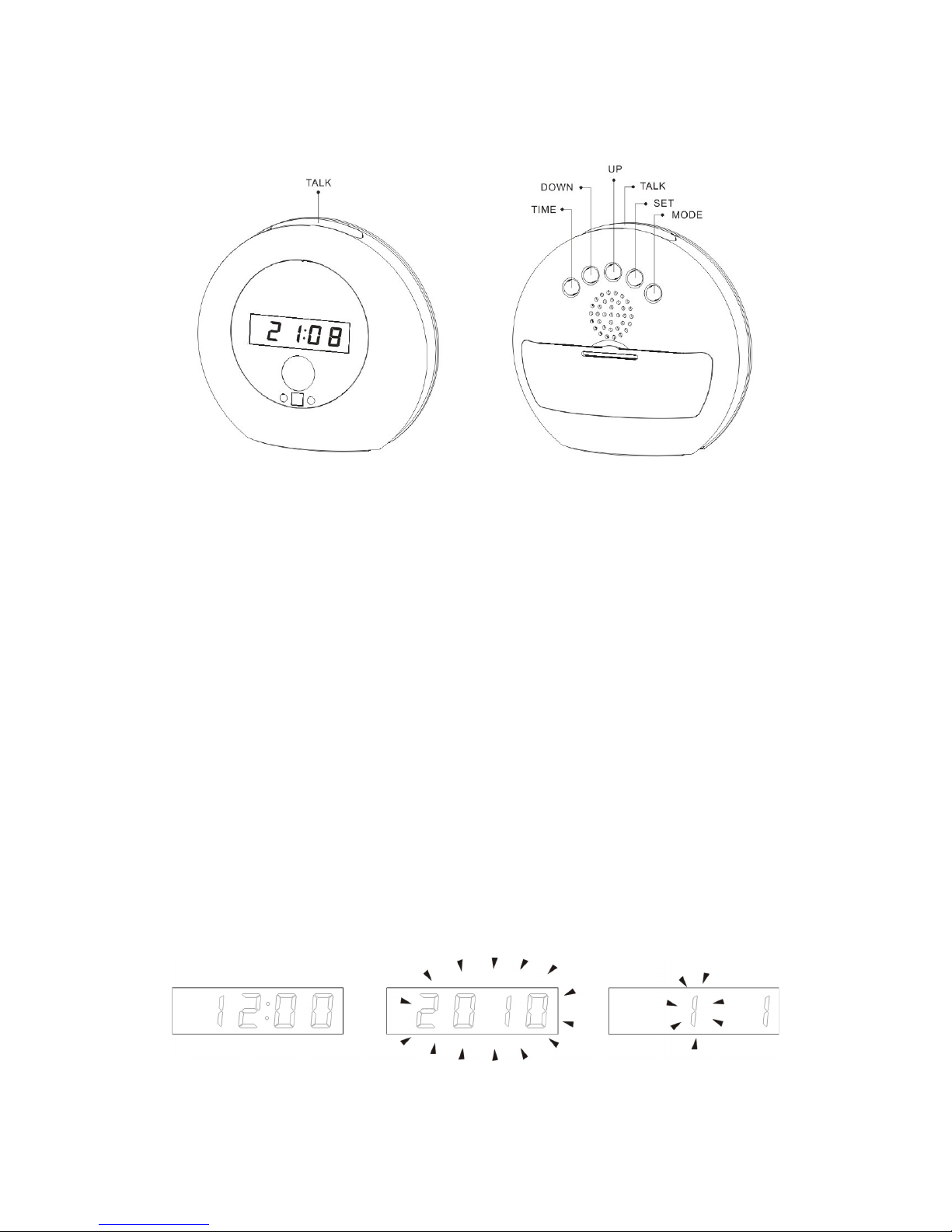
Alarm Clock Operation
一、
The functional description
:
◇ Time display shows the current time,year,month,day.
◇Alarm and snooze function ,you can set alarm and snooze intervals seal(160minutes).
◇ Voice broadcast,voice broadcast the current time.
Sound appreciation of the natural features that can appreciate the time(1060minutes).
二、
The feature set:
Current time setting
◇In the time display model,press"SET"key to enter the year,the screen displays
"2010" and flashing through the"UP". DOWN key to set the co-ordination.
◇
Press"SET" button in order to set the month →day
→hour→minute
,set the
corresponding location when the number of the flashes.
Time mode Setting the year Setting the month
Page 5
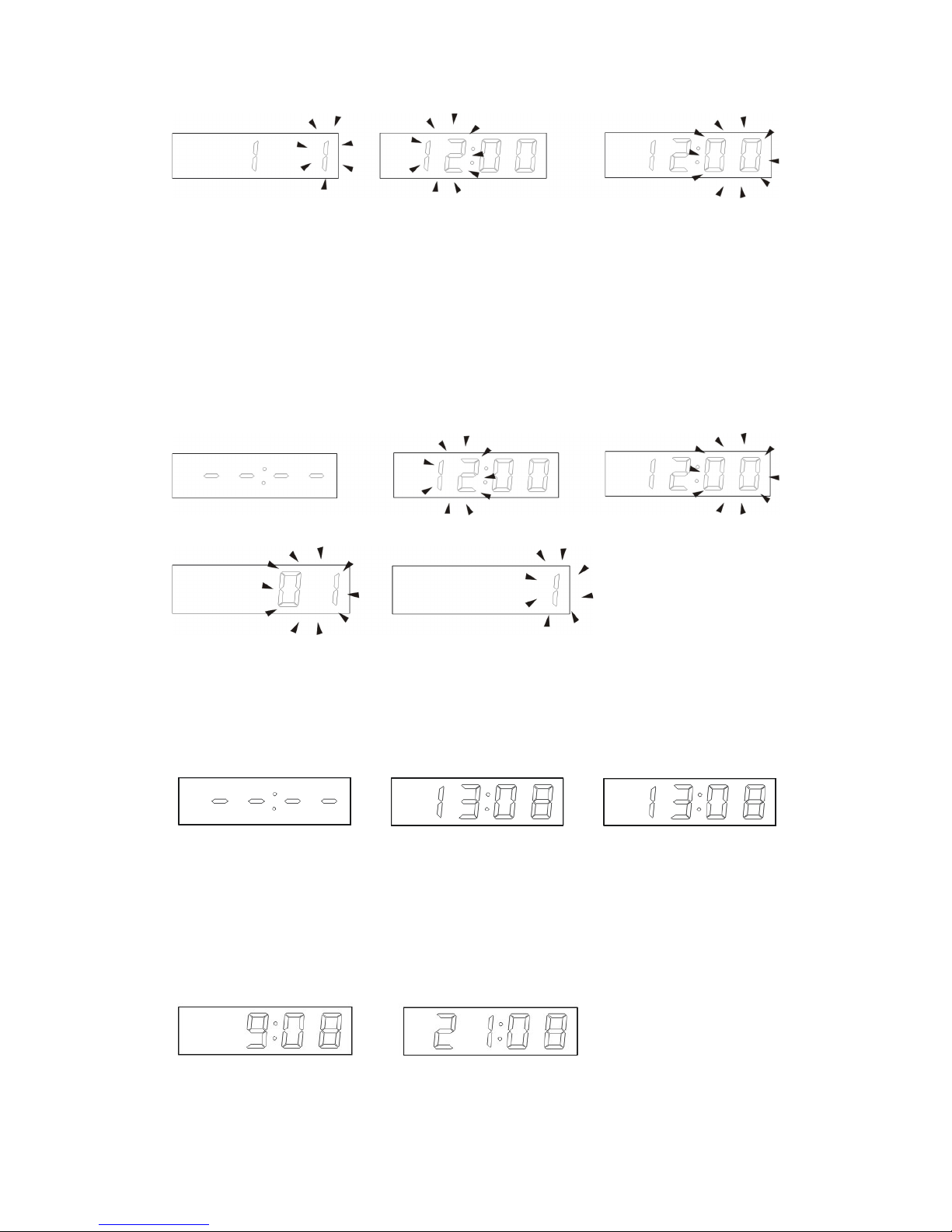
Set the date Set the hour Set the minutes
◇
press"MODE"key to exit the tine setting,that this has already set a good time.
2.Set alarm time
◇ In the current time mode press "MODE" to enter alarm setting mode, display "- -: - -"
◇ Press "SET" button first to set the alarm hour, according to the second set the alarm
minutes, according to the third set the Snooze time interval (1-60 minutes), according
to the fourth set the alarm sound, through the "UP" "DOWN" to choose
Alarm mode Set the alarm hour Set the alarm minutes
Set the Snooze time interval Set the alarm music
.
◇ Press "MODE" key to exit the alarm setting, display the current time mode.
◇ In alarm mode press "UP" key to open the alarm, display the set alarm time, and then
click to open the snooze function, press the third time, turn off the alarm.
Alarm off Alarm on Snooze on
◇ Press "MODE" key to return to time mode.
3. In the current time mode: Press "UP" key can be 12/24 hour conversion; press "DOWN"
key to the temperature: Celsius (℃) / Fahrenheit (℉) the degree of conversion.
12-hour 24-hour
Page 6
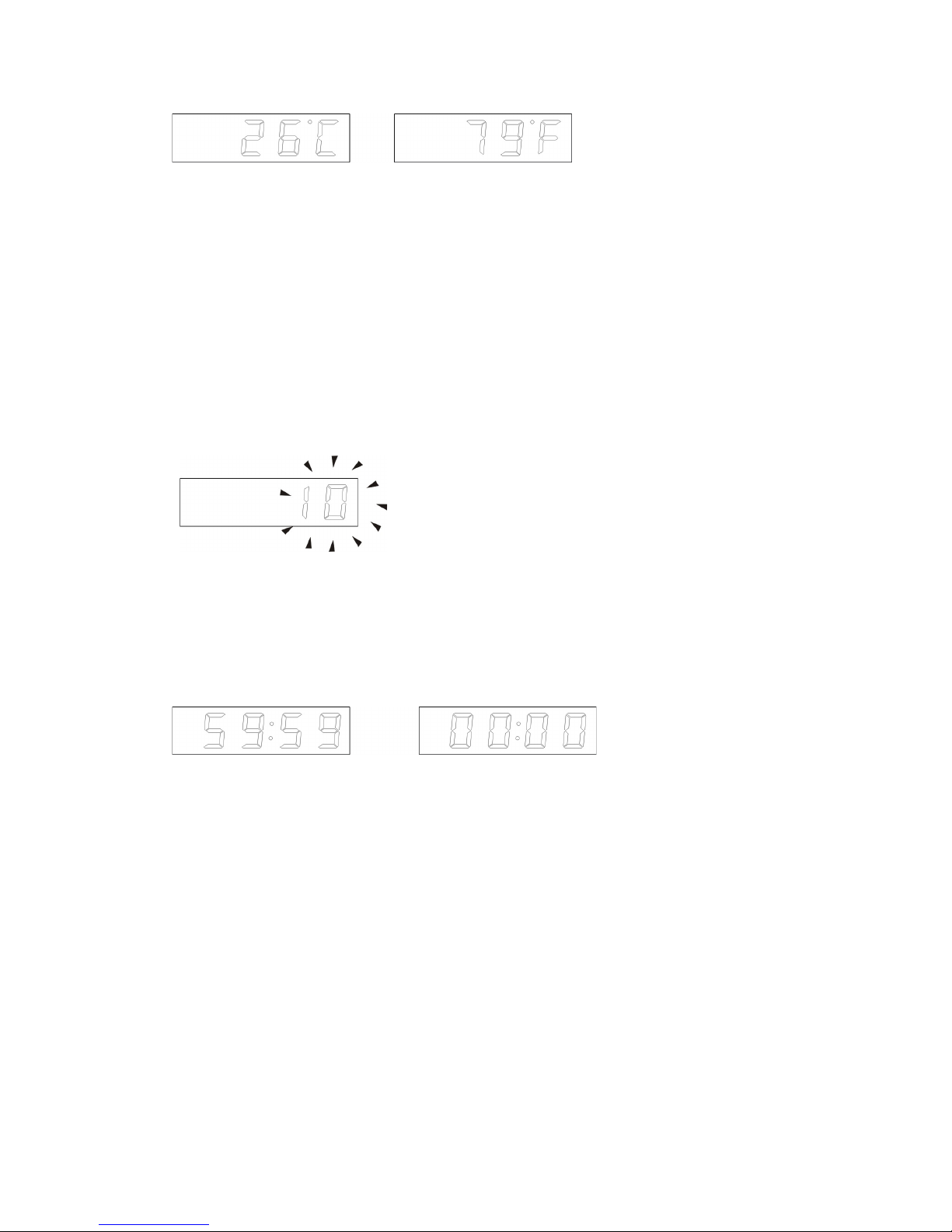
Celsius Fahrenheit
4. timekeeping, natural sound enjoy function:
◇ In the current time mode, press the "TALK" key, broadcast the current
time.
◇ In any mode, press the "TIME" key to make time to enjoy the natural sound
settings (10-60 minutes).
Set the time to enjoy the natural sound
◇In any mode, press "TALK" button for three seconds to enter the natural
sound of the listening mode, by setting a good time to countdown the time to
"00:00" natural sound to stop.
Sound appreciation Natural sound stop
of he natural mode
◇Sound appreciation of the natural mode, click the "TALK" key to pause,
click again and enjoy under a natural sound. Press "MODE" key to exit the
natural sound listening modes.
THE END
Page 7

IV Instruction of Digital Video
The product is a remote digital video timer which has external TF
storage, 30FPS (640x480) high definition camera and monitor
function. It concentrates digital video recording, voice recording,
self-video-shooting, web camera, electronic timer and storage
function together. It is configured a built-in high capacity battery
which can record 12 hours video and 25 hours voice continuously.
The camera is 2M pixels for high definition video recording. And
the product has multi-language talking and voice recording. The
storage supports up to 32GB TF memory card. It is also a hidden
security device with evidence record function as a good assistant.
(Self-video-shooting is automotive sensing video recording)
V Operation of Digital Video
1 Function features
1) Open the capping cover on the right side of the product. Plug in
TF memory card. The machine starts ON.
2) Press button “ ” on remote controller to start by aligning
toward the receiver. Then the blue LED indictor turns on, and
the machine goes into standby status.
3) Press button “ ” on remote controller to record video. The blue
LED indictor flickers three times to start recording, press button
Page 8

“ ” again to stop and blue LED indictor turns on.
4) Press button “ ” on remote controller to record voice. The blue
LED indictor flickers twice to start recording, press button “ ”
again to stop and blue LED indictor turns on.
5) Press button “ ” on remote controller for photo shooting, the
blue LED indictor flicker slowly.
6) Press button “ ” on remote controller to start self-video-
shooting standby status. Press the button again to quit and blue
LED indictor turns on.
7) Press button “ ” again to shut down and blue LED indictor off.
8) USB disk function: When the machine is in standby “ON” status,
plug in USB cable and then start by button “ ” on controller, it
will go to USB disk mode.
9) Web camera function: please install the driver in CD-ROM
before first using. When it is in standby “ON” status, press
button “ ” to start, then connect it to computer by USB cable,
then it will work as a web camera.
10) Charging: push the toggle switch to “OFF” terminal, plug into
USB charger, then red LED indictor turns on, when the battery
is full, the LED will turn off. PC USB port also can charge the
battery.
11) Reset: when the machine is no response by invalid operation
Page 9

or other unknown reasons, please push the toggle switch to
“OFF” terminal, and then turn back to “ON” terminal, it will reset.
12) Low-power warning: when the battery is low power, the blue
LED indictor will flicker continuously that means the battery
should be charged. When the battery is out of power, it can
store the data automatically.
13) If the program is lost, please install the driver in CD-ROM
firstly. After click the STK02NU program update tool, and then
click “update” to upgrade. Select 0x35 after DRAM Timing and①
select 8M after DRAM Size, press button ② “OK” to burn new
program in a couple of minutes.
2 Store files and play
After finishing video recording, put the toggle switch to ON
terminal, and plug USB cable to computer. Start the machine by
pressing button “ ” on controller, it will work as USB disk. Copy
the files inside to computer disk and play. Also you can take the
TF memory card out, and read the data by card reader. Suggest
using “Media Player / KM Player” to play.
Page 10

VI Technical Data of Digital Video
Pixels 5M pix CMOS
Resolution 1280x960
Video format AVI
FPS 30fps
View 140°
Sensing distance 6m
Min illumination 1Lux
Battery capacity 2400mAh
Video record time >12h
Remote distance 8m
Voice record area 40m
2
Power consumption 130ma/3.7V
Page 11
Storage temp. -20℃~+80
℃
Operate temp. -10℃~+60
℃
Operate humidity 15~85%RH
Support memory card TF memory card
Memory card up to 32GB
Play software Media player / KM Player
USB port USB1.1/2.0
Support OS Win 2000/XP/Vista32
Storage consumption 1GB/40min
Charging time ~ 8 hours
VII Power Supply and Packing list
Packing list
CD-ROM
Power supply
USB cable
User manual
Page 12

VIII Notice
Using occasion: please strictly abide the national relevant laws.
The product can not be used for other illegal purposes, or peril.
Update: for better performance and serve to customers, we will
improve the product software constantly. To customer’s
continence, it is very easy to update, please contact the local
distributor to get the latest version and updating ways.
Working temperature: the product should work understand
natural temperature. Please do not work at where human being
is not suitable.
Working humidity: the product is not waterproof; please do not
work at wet environment.
Shoot illumination: the camera should work in the sufficient light
environment, please do not shoot the lens to the ultra strong
light, such as sun, to avoid damaging the lens.
Cleaning: please do not use in the environment that dust
density is too large to avoid the lens dirty by dust. The lens can
be cleaned by lens cleaning paper or glasses cloth gently.
Other items: the product is sophisticated electronic product,
please keep it well from strong attack, vibration; And please do
not use it under strong magnetic filed or electric filed.
Thank you for using this product, please enjoy it!
 Loading...