

Page 1
GEIGER COUNTER PRO
QUICK START GUIDE
Thank you for purchasing a Geiger Counter Pro. Its yellow exterior holds within it millions
of ways to process and distort your guitar, bass, synth, or drum machine. The GCP offers
the bit-crushing and waveshaping of the original Geiger Counter, but with higher resolution
processing power, more wavetables, presets, MIDI, two channels of CV and/or expression, a
powerful low pass filter, and wet/dry control.
To begin, plug your favorite instrument into the Geiger Counter Pro’s INPUT, and its OUTPUT
into your mixer or amp. Apply power to the unit (9VDC, center negative) and hit ACTIVATE!
Once you’ve explored the built-in presets, it’ll be time to make your own noise.
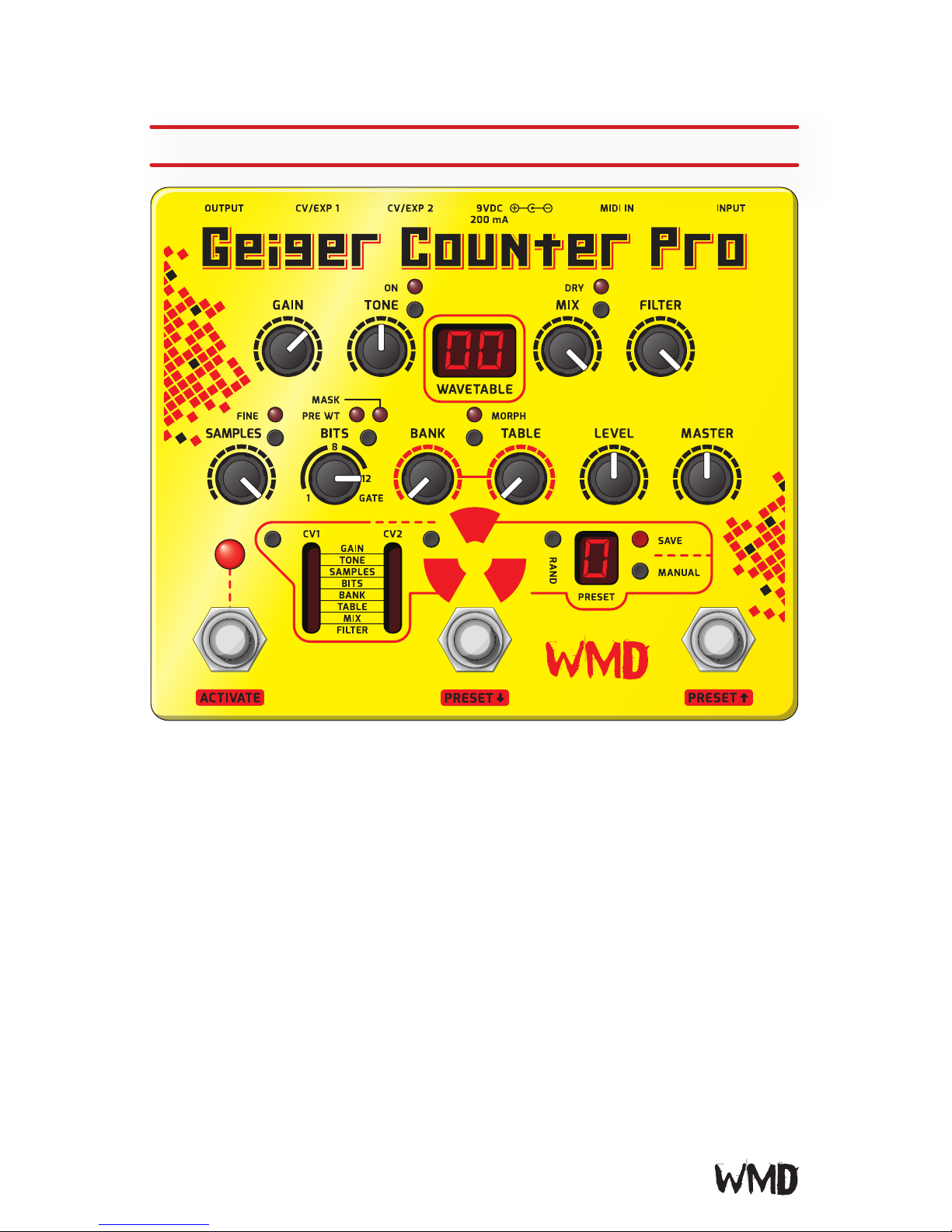
Here’s a good place to start: press the MANUAL button to make sure all parameters are
reflected by the front panel. Place the knobs and buttons in the positions indicated in the
image above, with all the buttons in the off position. Next, use the BANK and TABLE knobs
to change the waveshaping function. Adjust the GAIN to control the character of the waveshaping. Activate the TONE control to change timbre, and use the FILTER knob to attenuate
high frequencies. Roll the SAMPLES control down to achieve classic digital aliasing, or use
BITS to produce spluttering fuzz and digital distortion. To activate the built-in noise gate,
illuminate PRE WT and turn the BITS control past 12 to enter gate mode. To control a pa-
rameter using CV (TS cable) or an expression pedal (TRS cable), select the desired routing
for CV1 or CV2. Note that your expression source must pass the parameter’s saved position
before becoming active. Use LEVEL to set the preset’s volume. To save your preset, press
SAVE; while the PRESET display blinks, select the preset destination using
the footswitches and press SAV E again (or press any other button to cancel).
Page 2
0
1
2
3
4
5
6
7
8
9
A
B
C
D
E
F
8.
9.
A.
B.
C.
D.
E.
F.
0.
1.
2.
3.
4.
5.
6.
7.
WHAT IS WAVESHAPING?
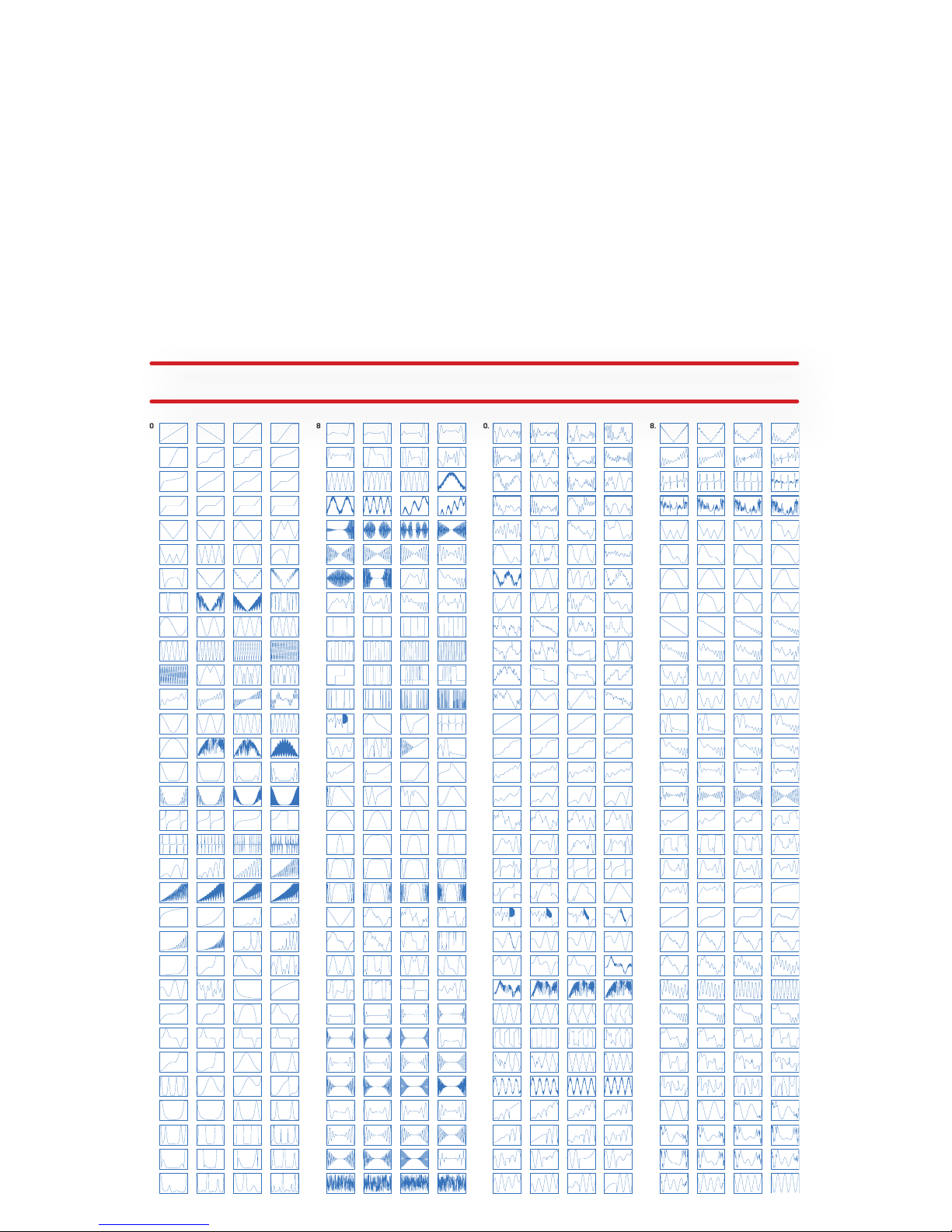
A waveshaper changes the incoming signal by mapping it to a mathematically derived shaping function. The Geiger Counter Pro contains 512 shaping functions called WAVETABLES
(shown below). As an example of how waveshaping works, imagine a string on your guitar
vibrating up and down. For every vibration, the wavetable is read back and forth, and the
resulting signal is delivered to the output. Since wavetable 00 is linear, the waveshaper out-
put is the same as the input. When you change wavetable, the output is altered drastically
as your signal is translated. For instance, wavetable 22 produces a pseudo-octave effect
by tripling the harmonics of the input signal. Waveshaping turns simple signals into complex textures, but sometimes the process creates harsh (and awesome) high frequency
harmonics. A low-pass filter can cut down the high frequencies and restore musicality to a
waveshaped signal. Hence our inclusion of a powerful filter in the Geiger Counter Pro. With
its many shaping tools, the GCP lets you turn your instrument into something totally new.
WAVETABLES
Visit WMDEVICES.COM for the full manual
 Loading...