

Page 1
2
7"TFT LCD
12V OUTPUT
TVI2.0/AHD2.0/CVBS/
18650 Li-ion Battery
1. Dur ing tra nspor t shoul d be hand led wit h care to a void th e rolli ng coll ision ,
drop ping.
2. Sho uld be st ored in g ood and d ry envi ronme nt.
3. Avoi d use in ha rsh env ironm ents an d high te mpera ture ,d irect s unlig ht.
4. The TF T LCD is fr agile , pleas e note th e caref ul use.
5. Do no t place t he fron t and rea r winds hield i n order t o avoid d irect s unlig ht
caus ed by hig h tempe ratur e and lit hium ba ttery e xplos ion.
6. ple ase not e that th e local e lectr ical us age rul es.
7. The m achin e break s down, p lease t o maint enanc e personn el consul tation.
Do not r emove , machi nes and n o users c an self m ainte nance p arts.
8. Upo n remov al shal l be deem ed to giv e up the wa rrant y right s, resp onsib le
for al l conse quenc es by the c ustom er.
Important safety and warning information
Features
7”TFT LCD Monitor
PAL/NTSC AUTO
OSD MENU
12V/2A output
Colour bar CVBS outpu t
Hikvision coax ial control protocol
CVBS input
Multi-func tional combination in terface
VGA/HDMI INPUT
18650 Li-ion batte ry x3
HD-TVI2.0/ 720P/1080P
Coaxial control button
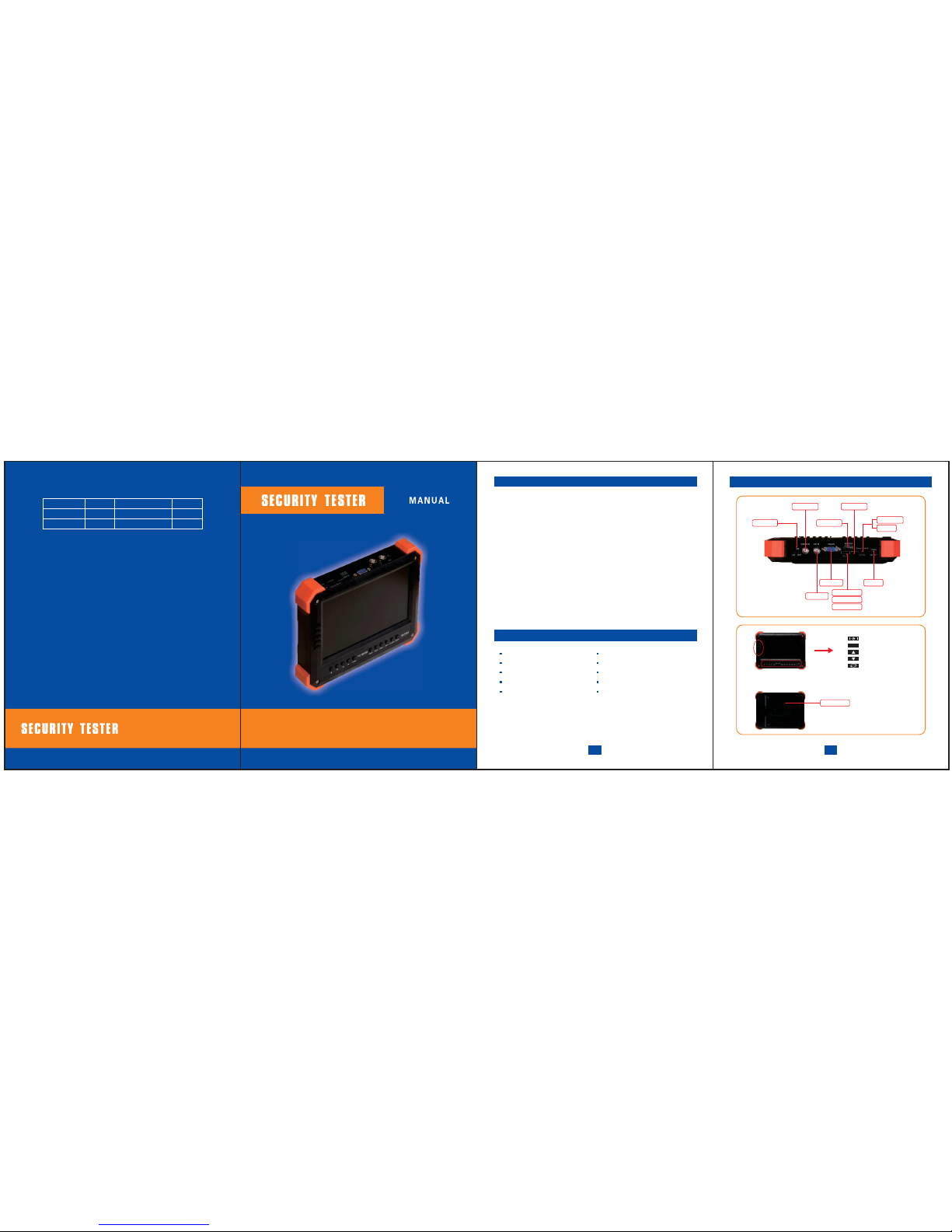
Product appearance
HD POWER
12.6V Charger
DC Cable
BNC Ada pter
1 PCS
BNC Cab le
USB- A/V+D C Cable
1 PCS
1 PCS
1 PCS
1 PCS
2 PCS
MANUA L
MENU
Sleep
MENU
UP
DOWN
Video switch
Battery cover
3
Colour Bar OUTPUT
HDMI INPUT
ACTIVATION
12V OUTPUT
CHARGE
CVBS INPUT
POWERVGA INPUT
HD INPUT
HD INPUT/OUTPUT
12V OUTPUT
PACKAGE CONTENT
HDMI/VGA INPUT
AHD2.0/720P/1080P
Page 2
567
VGA / HDMI input
HD-VIDEO
input
Hikvision coaxial control
Analog Video Input
12V outputFast operation
1. Pow er ON: sw itch po wer to ON d irect ly, the sc reen po wer lig hts, no v ideo
scre en disp lays a bl ue back groun d.
The powe r indicat or lights re d and blue simu ltaneo usly. Access si gnal sourc e,
and swit ch to the corr espondi ng input mod e: AV1- HD - VGA-HDMI, 4 kinds
of sig nals mo de.
Ope n HD mo des : HD swi tch to ON , it w ill a uto mat ical ly s witc h to H D
inte rface , no HD signa l will be d ispla yed Col or bars .
2. No si gnal in put, au toma tica lly t rans ferr ed to t he pow er sav ing m ode, t he
LCD scre en will be tur ned off under sa ving mode , the chip int o Standby st atus,
acces s the corres ponding s ource can be aw ake. Wake button can also be used .
3. Cal l Menu: P rogra ms set me nu prot ect mod e, the in put sou rce can c all up
the me nu.
4. The key i s real ly no t shut d own, just g o to sl eep, t he de vice a s wel l as
stan dby cur rent, i f do not us e for lon g tiem, p lease t urn off mai n power swit ch
dire ctly.
5.12 V outpu t using a D C adapt er cabl e, inse rt the co rresp ondin g 12V out put
port , indic ator li ghts me ans Out put wor k well.
DC sea t requi red sup porti ng DC he ad siz e is 1. 3MMx 3.6M M. Whe n usi ng a
shor t-cir cuit, o vercu rrent , under volta ge cond ition ,Lithi um batter y protecti on
board wi ll be discon nected th e battery, you ca n use the ACT butto n to activat e.
If the bat tery is exha usted and ca n not open devi ce, this fea ture does no t work,
it nee ds to be ch arged a fter ac tivat ion.
6. shu tdown , direc tly to th e main po wer swi tch to OF F.
7. Cha rging , use 12. 6V lith ium matc hed batte ry charger, ot her non-m atching
charger can not be used , 12V normal tra nsform er is not feasi ble, it will seriou sly
dama ge the ba ttery, g reatl y short en batt ery lif e.
8. Re pla ce th e bat ter y, gen era lly d o no t rec omm end u ser s to r epla ce t he
batt ery, and m ay caus e burn da mage ot her unp redic table c hance . If you ar e
forc ed to rep lace th e batte ry, we will not pe rform war ranty obli gation s device.
If you g ive up th is warr anty, yo u can uns crew the ba ck cover 2 scre ws direct ly
to the r ear cov er remo ved, yo u can see a one co nsistin g of the three ba tteries
pack . Batte ry prot ectio n board e ncaps ulate d withi n the bat tery pa ck.
9. Hi kvis ion co axia l cont rol f unct ions u sin g the con trol but tons , th e who le
syst em supp orts Hi kvisi on dome c amera s and ord inary T VI call M enu (Pa rts
of TVI H ikvis ion cam era doe s not sup port th e built -in men u).
1. Acc ess TV I came ras, turn O N, the scre en wil l aut omat ical ly swi tch to
ana log HD-T VI s ourc e. U nder no TV I vid eo s ourc e st atus , th e def aul t
disp lay col or bars , VIDEO OUT si multane ous outpu t analog vid eo color bar
(VID EO OUT li ne usin g a combi natio n of yell ow head ).
2. Acce ss the ca mera si gnal TV I, TVI IN co mbina tion of l ines and red he ad
is a loop- through , you can use any on e of the input in terface . A com binatio n
which ca n be accesse d online red h ead TVI camco rder, DC head ca n output
12V po wer sup ply to th e camer a. Acces s TVI cam eras, TV I video i mages
can be d ispla yed on th e scree n. Supp ort TVI 2.0, th at's 72 0P25/ 30/50 /60,
1080 P25/3 0,6 kin ds TVI vi deo mod e.
Coax itron f uncti on. Cur rentl y only su pport s Hikvi sion Co axitr on prot ocol,
acce ss Hikv ision T VI came ra or dom e camer a, pres s MENU ke y to call u p
the TV I camer a or TVI d ome ca mera buil t-in m enu. p art o f Hikv isio n TVI
cam era I wit h no b uil t-in men u, it is im pos sibl e to ca ll, p leas e read the
inst ructi ons car efull y to conf irm whe ther ca mera su pport s built -in men u.
TVI Ca mera me nu use th e arrow k eys and the Men u button to com plete the
menu c hange s. The wa y to modi fy TVI dom e menu is s imila r norma l dome
came ra, nee ds to use i ris and f ocus fu ncti on ke ys. TV I dome came ra can
achi eve dom e movem ent and l ens zoo m throu gh func tion ke ys.
Ple ase ke ep TVI swit ch to th e OFF p osit ion. A cce ss th e cor res pon ding
sign al sour ce is swi tched t o the corr espondi ng source mo de, the maxi mum
reso lutio n can sup port up t o 1920 * 14 40.
Plea se keep HD sw itch to t he OFF po sitio n. Sour ce swit ching t o AV1, the
sou rce inte rfa ce VI DEO IN. I nse rt to dis pla y th e im age of a n or din ary
anal og came ra.
12V ou tput ma ximum s uppor t 2A, the m aximu m power o utput i s 24W. You
can us e the cha rging p ort multip lexing 12 V DC output and c ombinat ion line
outp ut port .
1. Whe n not usi ng HD mode, c lose HD swit ch.
2. Afte r use, tu rn off th e main po wer swi tch.
3. Und er afte r use or tu rned of f, 12V ou tput lo ad do not t ake cam eras an d
othe r equip ment.
4. Do not u se ot her 12.6 V li thiu m ba tter y ch arge r, pl eas e onl y use the
orig inal ch arger.
The ab ove poi nts can e xtend b atter y life.
Spe cial at tenti on to the f ollow ing poi nts:
4
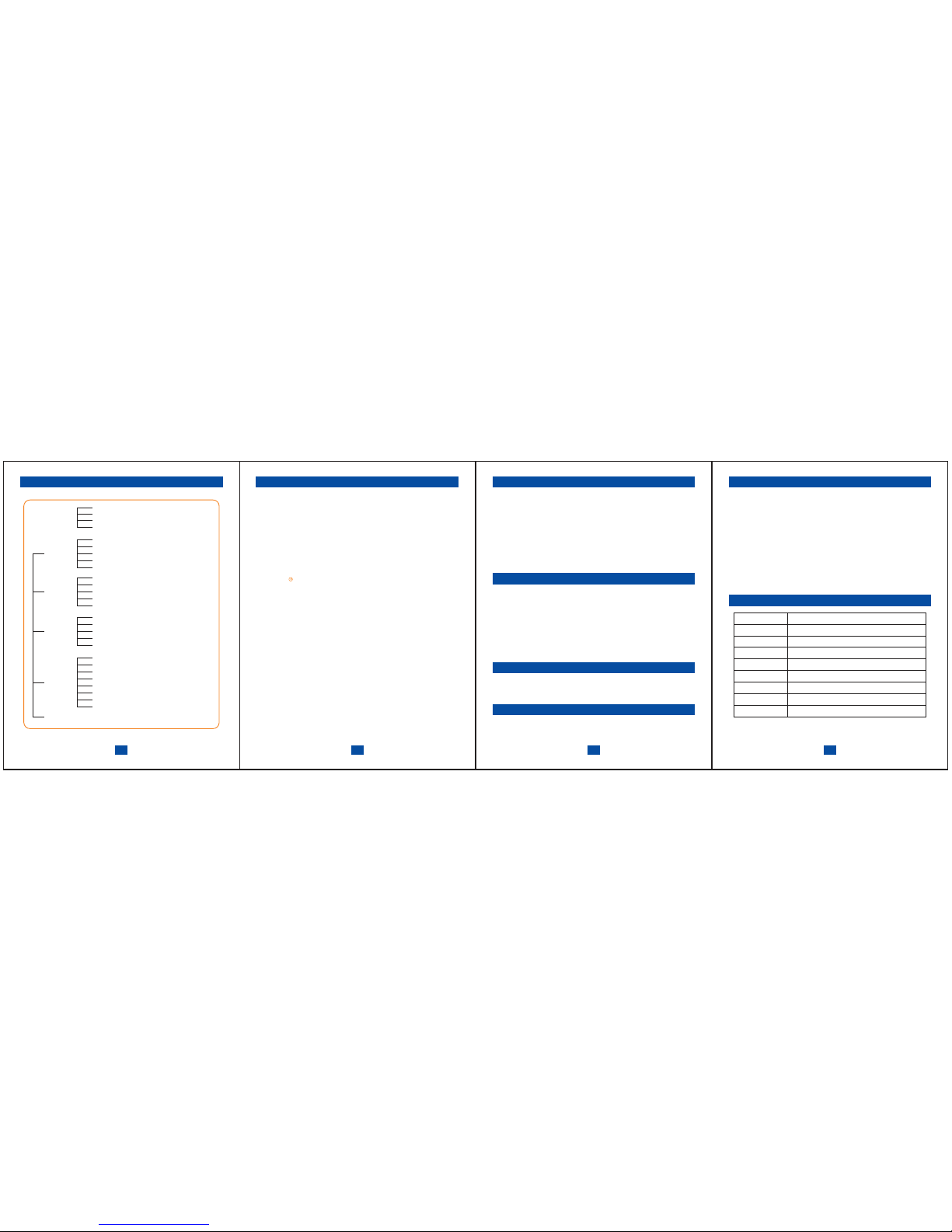
OSD MENU
EXIT
INPUT
AV
HD
VGA
HDMI
Brightness
Contrast
Hue
Saturation
Color Temp
Auto Config
Phase
Clock
H Position
V Position
Color
Adjust
(VGA/HDMI)
Function
Reset
Display Ratio
Sleep
Blue Screen
Shar pness
Mode
Power Saving
Burnin
Language
H Position
V Position
OSD Time out
Transparent
OSD
12V output
Items
Scree n
Shell ma terials
Batter y
Machi ne power
consu mption
Ch ar ger
Video
Size
Performance parameters
≤6W
AC 110 -2 20V 12 .6 V/1 A
TV I2 .0/AHD2.0/C VB S/ VGA /H DM I
12 V/ 2A
206x15 5x39mm
Speci fication
AB S+ PC
7" TF T LC D 80 0X 480
18 65 0 Li -io n b att er y DC 12 .6 V
3.Optional:AHD2.0 720P25/30 720P50/60 1080P25/30
 Loading...