

Page 1

flinkey
INSTALLATION MANUAL
FLINKEY BOX AND FLINKEY IQ
Page 2

For questions, information or ordering user
instructions, please contact the manufacturer:
WITTE Digital
WITTE Velbert GmbH & Co. KG
Höferstraße 3-15
42551 Velbert
Germany
T: 00 800 99 0000 33
www.witte.digital
service@inkey.de
www.inkey.de
Page 3

Installation Manual
inkey Box and inkey IQ
Page 4

Table of Contents
1 Introduction 6
1.1 Intended use and reasonably foreseeable misuse 7
1.2 Safety symbols used in this manual 8
2 Product Descriptions 9
2.1 Denitions 9
2.2 General description of the inkey System 10
2.3 Technical data 11
2.4 Product elements 13
2.5 Visual signals 13
2.5.1 Visual signals charging LED 13
2.5.2 Visual signals battery indicator 14
3 Safety Information 15
3.1 Important safety warnings 15
4 Installation 18
4.1 How to install the inkey App 18
4.2 Checking the Packaging Contents 19
4.3 Installing the inkey Box 19
4.4 Ax the inkey Box (optional) 23
Page 5

5 Using the flinkey System 25
5.1 How to start and stop using a vehicle 25
5.1.1. Locking and unlocking a vehicle 25
5.1.1.1 How to perform a safety check 25
5.1.1.2 Unlock a vehicle 26
5.1.1.3 Locking a vehicle 27
5.2 How to charge the battery 29
5.2.1 How to check the battery level 29
5.2.2 How to charge the inkey Box in the vehicle 30
5.2.3 How to charge the inkey Box outside the vehicle
using a micro-USB cable (slow charging) 31
5.3 How to use the inkey IQ 33
5.3.1 Important Safety Information and Limitations of Use 33
5.3.2 How to install the inkey IQ 34
6 Maintenance 37
7 Troubleshooting 38
8 Storage and Transportation 41
9 Disposal of the Product 42
10 Privacy Statement 43
11 Declaration of Conformity and Compliance 44
Page 6

1 Introduction
Congratulations on the purchase of the inkey Box and/or inkey IQ. This manual is
intended for both the private and business users of the inkey Box and contains all
information on how to install and use the product. Please familiarize yourself with all
the included information before installing or using your product. Private users need
to familiarize themselves with all information on how to use the inkey Box and the
App. Business users can additionally use our inkey IQ and have access to the WITTE
Digital portal. See General description of the inkey system for more information. The
product must only be used as described in this manual and for the specied application
scenarios.
6 | FLINKEY BOX AND FLINKEY IQ
Page 7

1.1 Intended use and reasonably foreseeable misuse
The inkey Box is intended to be used as a product to access passenger vehicles,
commercial vehicles and transporters. The product is intended to be used together
with the inkey App, that needs to be installed on a mobile device. The Box shall be
used in all supported vehicles only (see www.inkey.de or portal.witte.digital) for
supported vehicles.
The inkey IQ is intended to be used as a device to collect telematics data. The inkey IQ
is intended for business users only.
The products should not be used in vehicles where they cannot be stored in a closed
and safe location where they could be subject to weather inuences or theft. The
products are not intended to be used for other purposes than those described above.
The products must only be used with the following original accessories, software and
components:
inkey App (in Apple App store or Google Play store)
Hook-and-loop fastener (strips)
12V vehicle adapter (1,8m)
WITTE Digital portal (for business users)
The products may only be used according to the instructions as described in this
manual. All use other than described in this manual is seen as unintended use.
FLINKEY BOX AND FLINKEY IQ | 7
Page 8
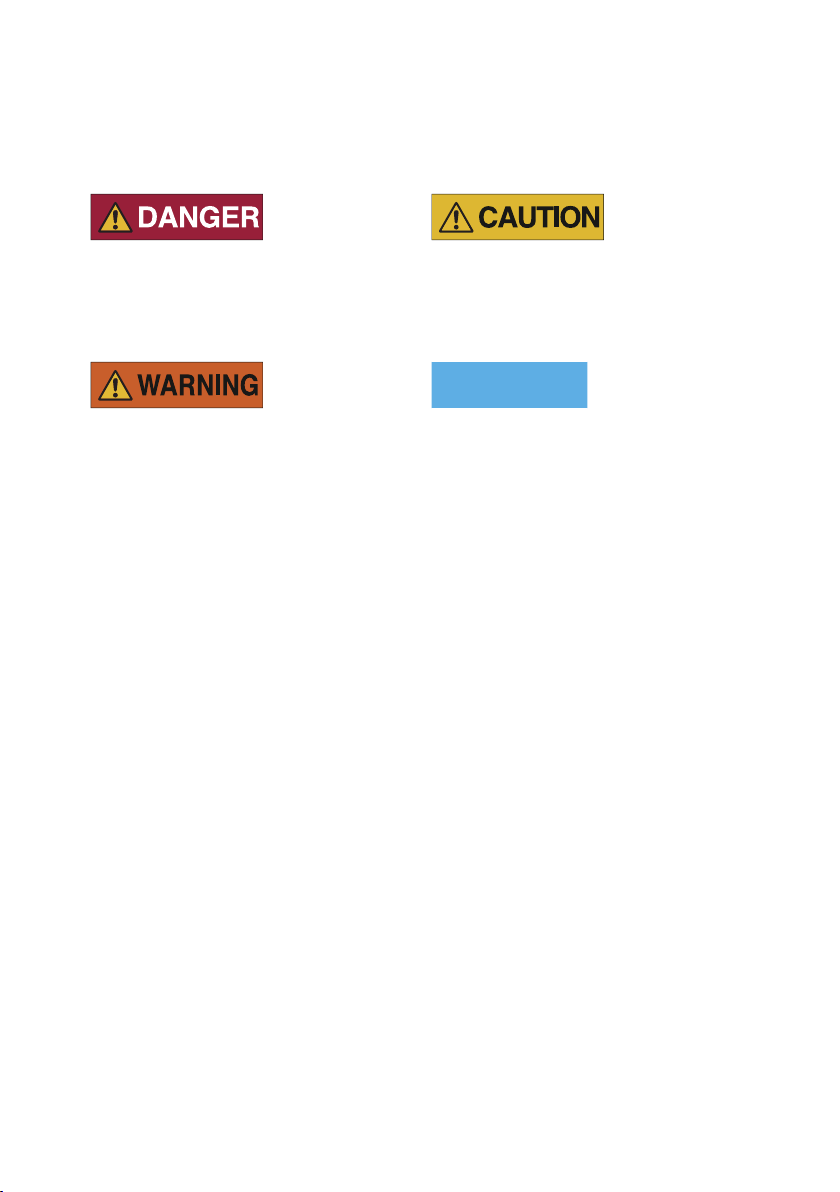
1.2 Safety symbols used in this manual
NOTICE
Danger indicates an imminently
hazardous situation which, if not avoided,
will result in death or serious injury.
Warning indicates a potentially hazardous
situation which, if not avoided, could
result in death or serious injury.
Caution indicates a potentially hazardous
situation which, if not avoided, could
result in minor or moderate injury.
Notice indicates a situation which, if not
avoided, could result in property damage.
8 | FLINKEY BOX AND FLINKEY IQ
Page 9

2 Product descriptions
2.1 Denitions
Private user
Business user
inkey Box
inkey App
WITTE Digital portal
inkey IQ
All users of the inkey Box that use the product
privately, for example for accessing a private vehicle
via the inkey App.
All users of the inkey Box that use the product
commercially, such as car rental companies, vehicle
eets, car dealerships, car sharing, overnight
deliveries and CEP service providers and all other
eet managers who want to ease their workload.
Locks and unlocks the vehicle, stores the keyfob of
the vehicle.
Gives access to the keyfob. Through the inkey App
you interact with the inkey Box, lock and unlock the
vehicle and gives access to the keyfob.
Manages access rights. Intended for business users
only (portal.witte.digital).
Collect telematics data. The data will be shown on the
portal Intended for business users only.
FLINKEY BOX AND FLINKEY IQ | 9
Page 10

2.2 General description of the inkey System
inkey Box
The inkey Box needs to be positioned safely, out of view and not in direct sunlight, in
the vehicle. The product needs to be connected to any 12V socket in the vehicle if it is
in use for more than 21 days (after full charge). The keyfob will be placed in the keyfob
drawer of the inkey Box. For more information about the inkey Box and ordering the
product, see www.inkey.de.
inkey App
The user needs to install the inkey App and create an account. By means of the inkey
App, a vehicle can be locked or unlocked: mechanical components in the inkey Box
push the button on the keyfob in order to locked or unlock the vehicle. The section How
to Start and Stop Using a Vehicle describes how to use the inkey App. The owner of the
inkey Box can also grant access to other users or Service Partners via the App.
WITTE Digital portal (for business users only)
Access rights of the cars can be managed by the business user through the WITTE Digital
portal. More information on how to use the WITTE Digital portal is available on
portal.witte.digital.
inkey IQ (optional for business users)
A vehicle can optionally be equipped with the inkey IQ. The inkey IQ is an ODB dongle
that collects telematics data. For more information on how to install and use the inkey
IQ, see the section How to Use the inkey IQ.
10 | FLINKEY BOX AND FLINKEY IQ
Page 11

2.3 Technical data
inkey Box
System name inkey
Type inkey Box
Design 2.4
Year 2018
Voltage 12V
Power (standby) 14mW (battery)
Power (operation) 20W max. (battery)
External power (battery charging) 22W max.
Expiry date batteries Up to 2000 times recharging/6 years
External power (battery charged) Approx. 220 mW
Radio technology BLE (Bluetooth Low Energy)
Radio frequency 2.4GHz ISMBand
Operating temperature range -20ºC to +60ºC
Max. relative humidity Max 50% at +60ºC
Protection class IP31
Weight 0.91kg
Dimensions 148 x 135 x 79.5 mm
FLINKEY BOX AND FLINKEY IQ | 11
Page 12

inkey IQ
System name inkey
Type inkey IQ
Voltage 12V and 24V
Operating mode 60-300mA
Operating mode +IOX Up to 2A
Sleep mode 2.5mA
12 | FLINKEY BOX AND FLINKEY IQ
Page 13
PWR
PWR
PWR
TEST
ON
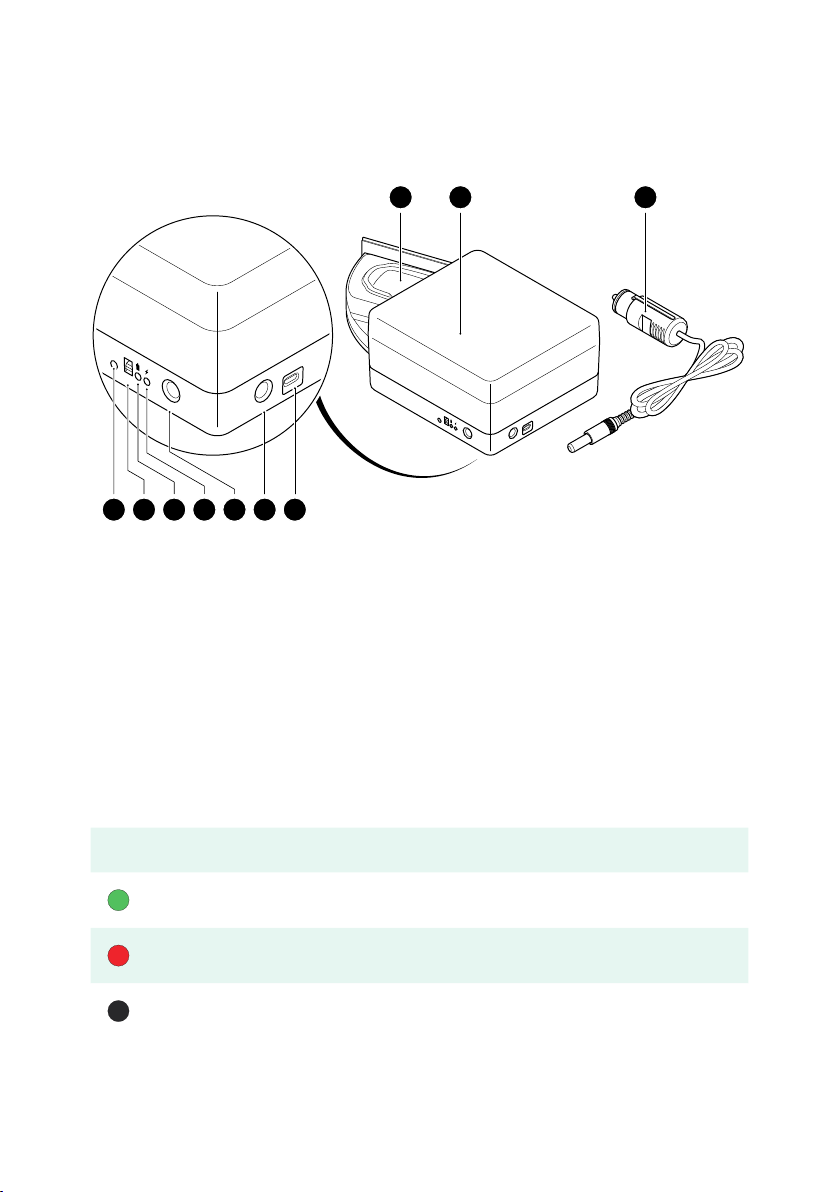
2.4 Product elements
1 2 3
VW1
BUTTON UPWORDS
45678910
1. Keyfob drawer
2. inkey Box
3. Vehicle adapter
4. Micro-USB port (5V)
5. Adapter port 1 (12V)
2.5 Visual signals
Charging LED Meaning
Battery is charging
Battery is slow charging
TEST
ON
PWR
PWR
PWR
6. Adapter port 2 (12V)
7. Charging LED
8. Battery indicator
9. On/o switch
10. TEST button
Battery is not charging
2.5.1 Visual signals charging LED
FLINKEY BOX AND FLINKEY IQ | 13
Page 14

Battery
Indicator
Battery level
(%)
Stand by
Normal
operation
Recommended
action
60 ÷ 100 % > 3 weeks 1 ÷ 2 weeks
30 ÷ 60 % 1 ÷ 2 weeks 3 ÷ 10 days
1 ÷ 30 % < 1 week max. 2 days Go for charging
< 1 %
2.5.2 Visual signals battery indicator
No operation
is possible
No operation
is possible
No action
needed
Watch the
battery's state,
good to go for
charging
Charging
needed! Even
for only storage
of the inkey
Box (protection
of batteries)
14 | FLINKEY BOX AND FLINKEY IQ
Page 15

3 Safety Information
3.1 Important safety warnings
Please take the time to read the general safety instructions. Follow all instructions.
This will avoid re, explosions, electric shocks or other hazards that may result in
damage to property and/or severe or fatal injuries.
Please read all safety information and instructions. The manufacturer is not liable for
cases of material damage or personal injury caused by incorrect handling or non-
compliance with the safety instructions. In such cases, the warranty will be voided.
Keep all safety information and instructions for future reference and pass them on to
subsequent users of the system.
The system is intended for use in supported vehicles only, see www.inkey.de.
This system is not intended for use by persons (including children) with restricted
physical, sensory or intellectual capability or lack of experience and/or knowledge,
unless they are supervised by a person who is responsible for their safety or provides
them with instructions on how to use the system. Children should be supervised in
order to ensure that they do not play with the system.
Use the system within the specied performance limits.
FLINKEY BOX AND FLINKEY IQ | 15
Page 16

Do not expose the system to re, explosions or other hazards.
Only a skilled person may carry out the installation and the initial activation.
All local regulations must be followed.
Always protect the inkey Box from direct sunlight and never place the inkey Box in
direct light.
Always make sure the inkey Box is positioned safely in the vehicle. Make sure that the
inkey Box does not cause any risks to the drivers or passengers. Without sucient
xing the inkey Box can cause hazards for the vehicle driver or passengers in case of a
full brake application (i.e. head injuries).
To avoid overheating, do not cover the device, do not use near heat sources or in direct
sunlight and only at ambient temperatures of between -20°C and +60°C.
Be vigilant at all times, and always be careful with what you are doing. Do not use
electrical equipment if you are lacking in concentration or awareness, or are under the
inuence of drugs, alcohol or medication. Even a moment of inattentiveness can lead to
serious accidents and injuries when using electrical equipment.
The key bed in the keyfob drawer is designed to match the intended keyfob only. Only
place the original and intended keyfob in the keyfob drawer and make sure to place it in
the correct position.
Be careful when closing the drawer of the inkey Box. Risk of crushing ngers!
Never touch the inkey Box or the components with wet hands.
Do not use the inkey Box until the battery is completely empty. Charge your inkey
Box on time! In the event of an empty battery, it will take while before the LEDs are
operating normally when charging the Box.
The system must be stored in a dry place between -20°C and +60°C.
16 | FLINKEY BOX AND FLINKEY IQ
Page 17

Do not attempt to open, modify or repair the inkey Box. Do not drop, puncture, break
NOTICE
or expose to high pressure. Do not attempt to replace the batteries. Beware, the risk of
explosion when replacing an incorrect type of battery.
Alterations to the products and technical modications are not permitted.
This product does not contain any user-serviceable parts. Conguration, servicing, and
repairs must only be made by an authorized reseller or installer.
Do not attempt to replace the batteries. Beware, the risk of explosion when replacing
an incorrect type of battery. Handle the used batteries according to the manufacturer's
instructions.
Page 18

4 Installation
NOTICE
NOTICE
Read all safety information in the chapter Safety Information before installing the
product.
4.1 How to install the inkey App
To install the inkey App:
1. Download and install the inkey App from the App Store or Google Play Store.
2. Open the inkey App.
3. Tap on create new account.
4. Follow the instructions and complete the registration process.
5. Check your email. You will receive a conrmation email.
If you still haven't received an email after some time, please check your spam folder and
junk mail.
6. Tap on the link in the email to conrm the registration.
7. Log in to the inkey App.
More information on how to use the inkey App is available on www.inkey.de
18 | FLINKEY BOX AND FLINKEY IQ
Page 19

4.2 Checking the Packaging Contents
Make sure the packaging contains the following items:
Vehicle adapter
inkey Box
Hook-and-loop fastener (2x3 strips)
Quick Start Guide
Options:
inkey IQ (for business users only)
4.3 Installing the inkey Box
Check the product for any heavy damage before installation. If there is any visible
damage, a strong odor, or excessive overheating of components, unplug all the
connections immediately and stop using the system. The inkey Box should be installed
in passenger vehicles, commercial vehicles or transporters only.
FLINKEY BOX AND FLINKEY IQ | 19
Page 20

PWR
PWR
PWR
TEST
ON
To install and test the correct functioning of the inkey Box:
NOTICE
1. Put the on/o switch 10 to the “ON” position. Press the TEST button 11.
The battery indicator 9 should light green.
PRESS
2. Make sure that you have access right to lock/unlock the car.
3. Unlock the vehicle with the keyfob.
4. Place the inkey Box safely in the vehicle close to a 12V port and at an easily
accessible location for passengers (for example in the trunk, glove department
or feet area) where the inkey Box does not cause any risks to the driver or
passengers.
Do not install the inkey Box in a location with direct sunlight or where the inkey Box is
in direct sight.
20 | FLINKEY BOX AND FLINKEY IQ
Page 21
5. If you want you can ax the inkey Box to your vehicle (see Ax the inkey Box).
NOTICE
PWR
PWR
PWR
TEST
ON
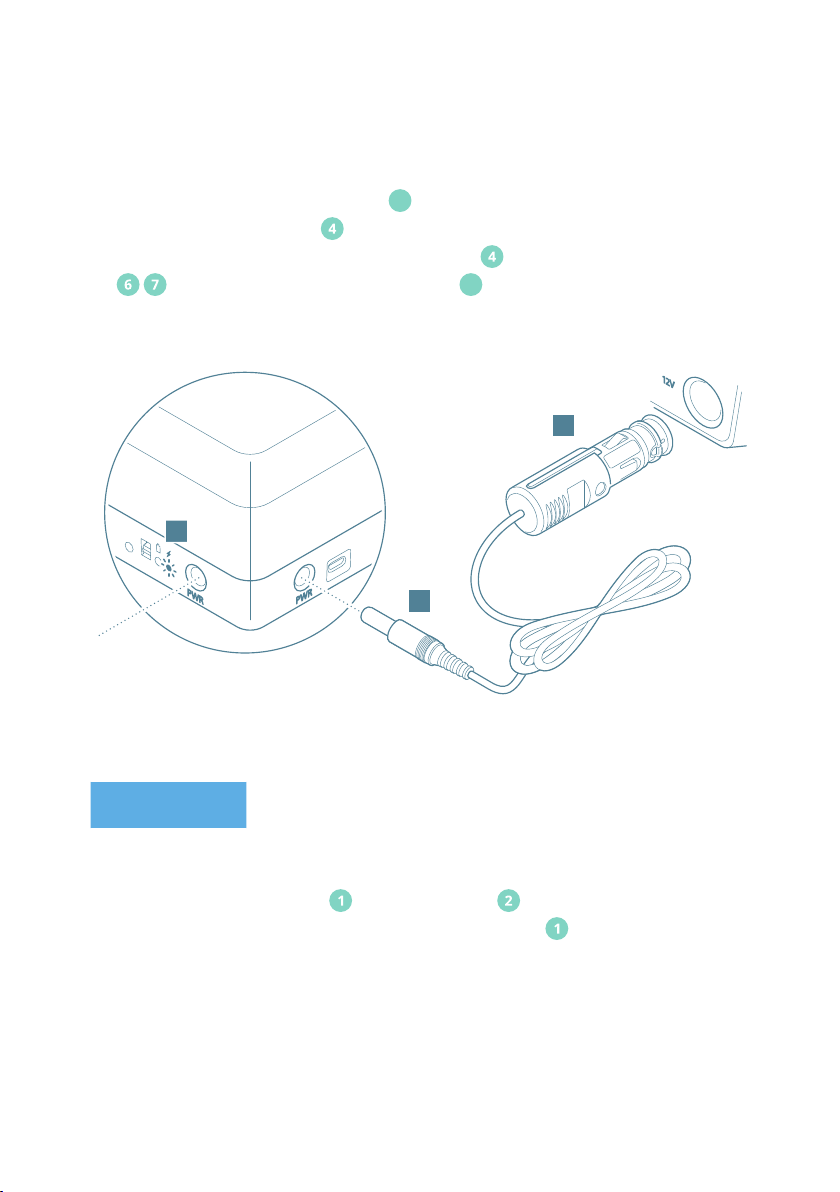
6. Test the correct functioning of the inkey Box:
a. Make sure that the on/o switch 10 is on the “ON” position.
b. Put the vehicle adapter in any available 12V port in your vehicle.
c. Connect the other end of the vehicle adapter to one of the adapter ports
on the inkey Box. The charging LED 10 should light green.
12V
B
A
C
Dependent on the vehicle it might be necessary to start the ignition of the vehicle.
d. Open the keyfob drawer of the inkey Box .
e. Place the keyfob in the key bed of the keyfob drawer .
FLINKEY BOX AND FLINKEY IQ | 21
Page 22
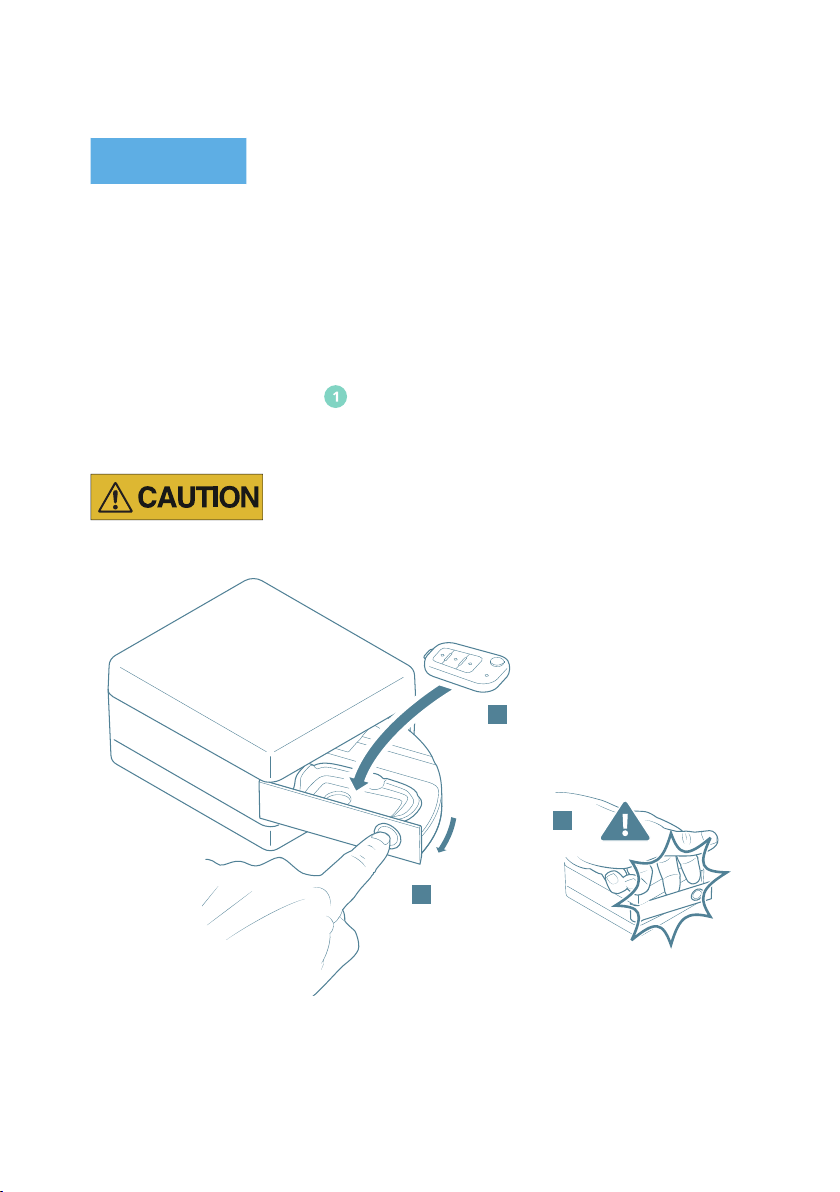
NOTICE
The key bed in the keyfob drawer is designed to match the intended keyfob only. Only
place the original and intended keyfob in the keyfob drawer and make sure to place it
in the correct position. Do not place any remakes of the car-fob in the keyfob drawer to
prevent the risk of malfunctioning or jamming of the key. Regularly check if the battery
of the keyfob is charged. Replace the battery according to the instructions of the original
keyfob.
f. Close the keyfob drawer .
Be careful when closing the drawer of the inkey Box. Risk of crushing ngers!
E
BUTTON UPWARDS
g. Use the inkey App to test lock and unlock the vehicle.
7. Lock the car with the inkey App and make sure that the vehicle is properly locked.
The inkey Box is now ready to use.
22 | FLINKEY BOX AND FLINKEY IQ
F
D
Page 23
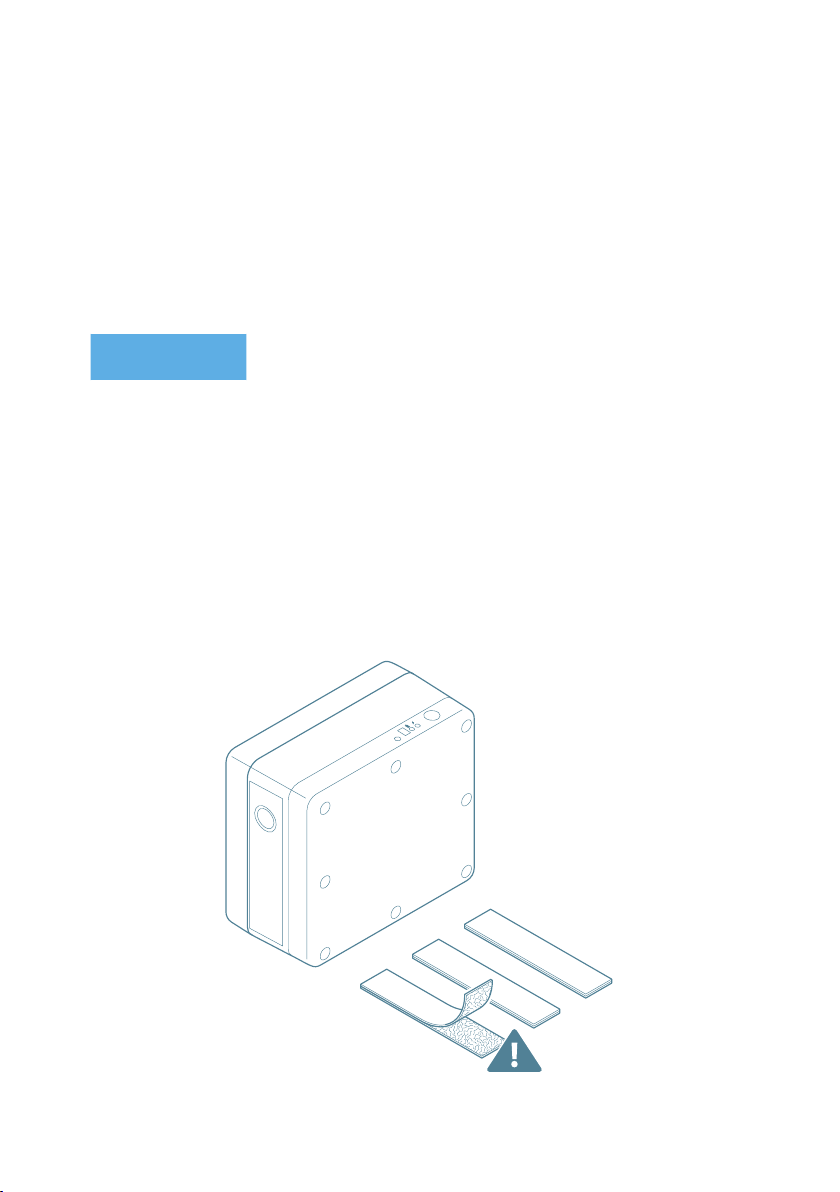
4.4 Ax the inkey Box (optional)
NOTICE
The inkey Box can be axed in the car with the hook-and-loop fasteners, to protect the
inkey Box from moving when the car is being driven. The steps below describe how
to ax both the loop and hook strips. Optionally, you can also use the vehicle oor as
loops. In that case, remove the loop strip.
Make sure to place the hook-and-loop strips at room temperature. Make sure that the
surface is clean and dry.
To ax the inkey Box:
1. Clean the surface of the inkey Box with a soft, clean, lint-free cloth dampened with
a mild detergent solution or water.
2. Make sure the hook-and-loop strips are attached to each other.
3. Remove the liners from the hook strips.
4. Place the hook strips at an equal distance on the bottom of the inkey Box.
FLINKEY BOX AND FLINKEY IQ | 23
Page 24
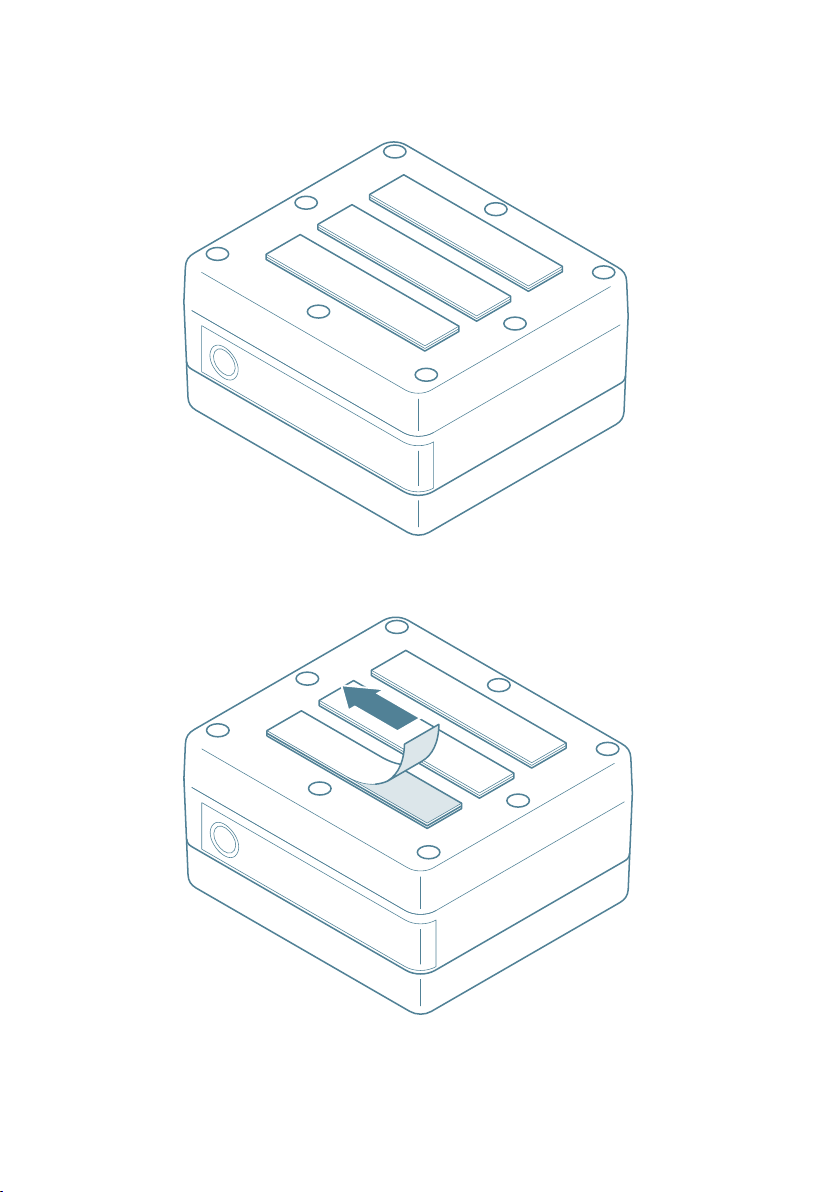
5. Remove the liners from the loop strips.
6. Place the inkey Box on the surface of the car where you want to ax the inkey
Box (e.g. carpet, eece or oor). Press well to make sure the strips stick to the surface.
24 | FLINKEY BOX AND FLINKEY IQ
Page 25

5 Using the inkey System
Read all safety information in the section Safety Information before using the product.
Check the product for any damage before use. If there is any visible damage, a strong
odor, or excessive overheating of components, unplug all the connections immediately
and stop using the system.
5.1 How to start and stop using a vehicle
5.1.1. Locking and unlocking a vehicle
Always perform a safety check before you start using the vehicle.
5.1.1.1 How to perform a safety check
To perform a safety check:
1. Make sure that the inkey Box has been placed safely in the vehicle. The inkey
Box has been placed safely when it is at an easily accessible location (for example in
the trunk, feet area or glove department) where the inkey Box does not cause any
risks to the driver(s) or passenger(s).
2. Make sure that the inkey Box is not on a location in direct sunlight or where the
inkey Box is in direct sight.
FLINKEY BOX AND FLINKEY IQ | 25
Page 26

5.1.1.2 Unlock a vehicle
NOTICE
To unlock a vehicle:
1. Make sure you have enabled Bluetooth on your mobile device.
2. Make sure you have downloaded and installed the inkey App (see How to install the
inkey App).
3. Make sure you are a registered user and that you are logged in.
4. Make sure you have received access rights to the vehicle (if not your own).
5. Make sure you have created an account.
6. Make sure to be within a distance of 0-15 meters of the vehicle.
The distance within which the inkey Box can be controlled is strongly dependent on
factors like the shielding of the car, type of smartphone or Bluetooth trac.
7. Open the inkey App.
8. Tap the unlock button to unlock the vehicle selected. The inkey Box will unlock
the vehicle and will release the drawer so it can to be opened.
9. Access the vehicle.
10. In case there is no automatic start/stop button in the vehicle, do the following:
• Locate the inkey Box in the vehicle.
• Open the keyfob drawer of the inkey Box.
• Take out the key. Close the keyfob drawer .
26 | FLINKEY BOX AND FLINKEY IQ
E
BUTTON UPWARDS
F
D
Page 27

Be careful when closing the drawer of the inkey Box. Risk of crushing ngers!
NOTICE
11. Make sure that the inkey Box is connected to any 12V socket in the vehicle to
enable charging while driving.
12. You are ready to use the vehicle.
5.1.1.3 Locking a vehicle
To lock a vehicle:
1. Make sure you have stopped the engine of the vehicle.
2. Open the keyfob drawer of the inkey Box.
3. Position the keyfob in the keyfob drawer .
The key bed in the keyfob drawer is designed to match the intended keyfob only. Only
place the original and intended keyfob in the keyfob drawer and make sure to place it
in the correct position. Do not place any remakes of the keyfob in the keyfob drawer to
prevent the risk of malfunctioning or jamming of the keyfob.
• Close the keyfob drawer .
FLINKEY BOX AND FLINKEY IQ | 27
Page 28

Be careful when closing the drawer of the inkey Box. Risk of crushing ngers!
3. Make sure that the inkey Box is connected to any 12V socket in the vehicle.
4. Make sure that the on/o switch 10 is in the “ON” position.
5. Get out of the vehicle.
6. Close all doors.
7. Open the inkey App.
8. Tap lock button to lock both the vehicle selected and the keyfob drawer of the
inkey Box.
9. Make sure that the vehicle is properly locked.
28 | FLINKEY BOX AND FLINKEY IQ
Page 29
5.2 How to charge the battery
NOTICE
PWR
PWR
PWR
TEST
ON
Do not use the inkey Box until the battery is completely empty. Charge your inkey
Box on time! In the event of an empty battery, it will take while before the LEDs are
operating normally when charging the Box.
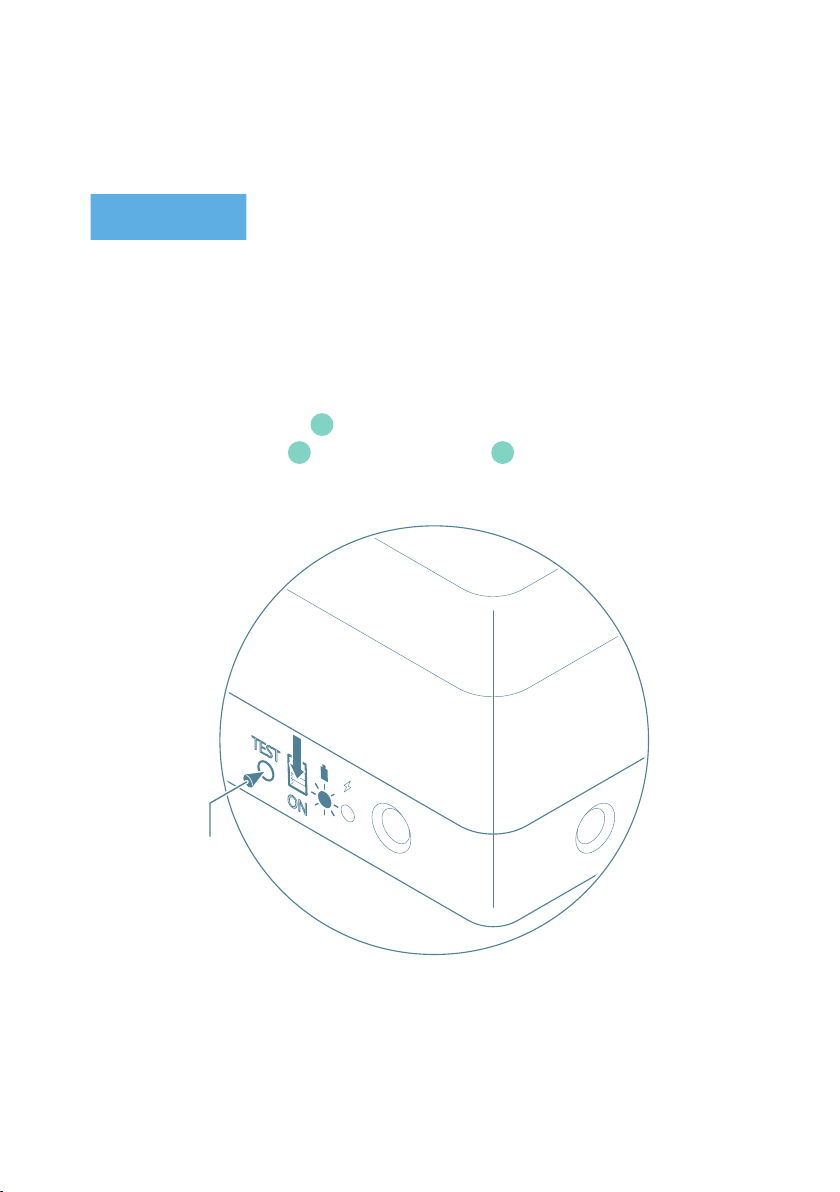
5.2.1 How to check the battery level
To check the battery level:
1. Make sure on/o switch 10 is in the “ON” position.
2. Push the TEST button 11. The battery indicator 9 lights up.
PRESS
FLINKEY BOX AND FLINKEY IQ | 29
Page 30

Battery
Indicator
Battery level
(%)
Stand by
Normal
operation
Recommended
action
60 ÷ 100 % > 3 weeks 1 ÷ 2 weeks
30 ÷ 60 % 1 ÷ 2 weeks 3 ÷ 10 days
1 ÷ 30 % < 1 week max. 2 days Go for charging
< 1 %
No operation
is possible
No operation
is possible
No action
needed
Watch the
battery's state,
good to go for
charging
Charging
needed! Even
for only storage
of the inkey
Box (protection
of batteries)
5.2.2 How to charge the inkey Box in the vehicle
Use only the supplied adapter with the product. Other adapters may damage the
product.
Do not use the supplied adapter with other devices.
Use the vehicle adapter in a suitable and easily accessible 12 V socket. Make sure the
vehicle adapter can be disconnected from the 12 V socket at all times.
Make sure that the 12V adapter is not exposed to risk of damaging (high forces, risk of
cutting, exposed places or abnormal wear) which can lead to re, explosions, electric
shocks or other hazards that may result in damage to property or vehicle and/or severe
or fatal injuries.
30 | FLINKEY BOX AND FLINKEY IQ
Page 31

To charge the inkey Box in the vehicle:
NOTICE
PWR
PWR
PWR
TEST
ON
1. Put the vehicle adapter in any 12V socket in your vehicle.
2. Connect the other end of the vehicle adapter to one of the adapter ports
on the inkey Box. The charging LED should light green during the charging
process.
Dependent on the vehicle it might be necessary to start the ignition of vehicle.
3. After approx. 2 hours the battery is fully charged.
12V
B
A
5.2.3 How to charge the inkey Box outside the vehicle using a micro-USB cable
To charge the inkey Box outside the vehicle with a micro-USB cable:
1. Connect a micro-USB <-> USB cable to the micro-USB port of the inkey Box.
2. Connect the other end of the micro-USB<-> USB cable to a computer. The charging
LED should light red during the slow-charging process.
(slow charging)
C
FLINKEY BOX AND FLINKEY IQ | 31
Page 32
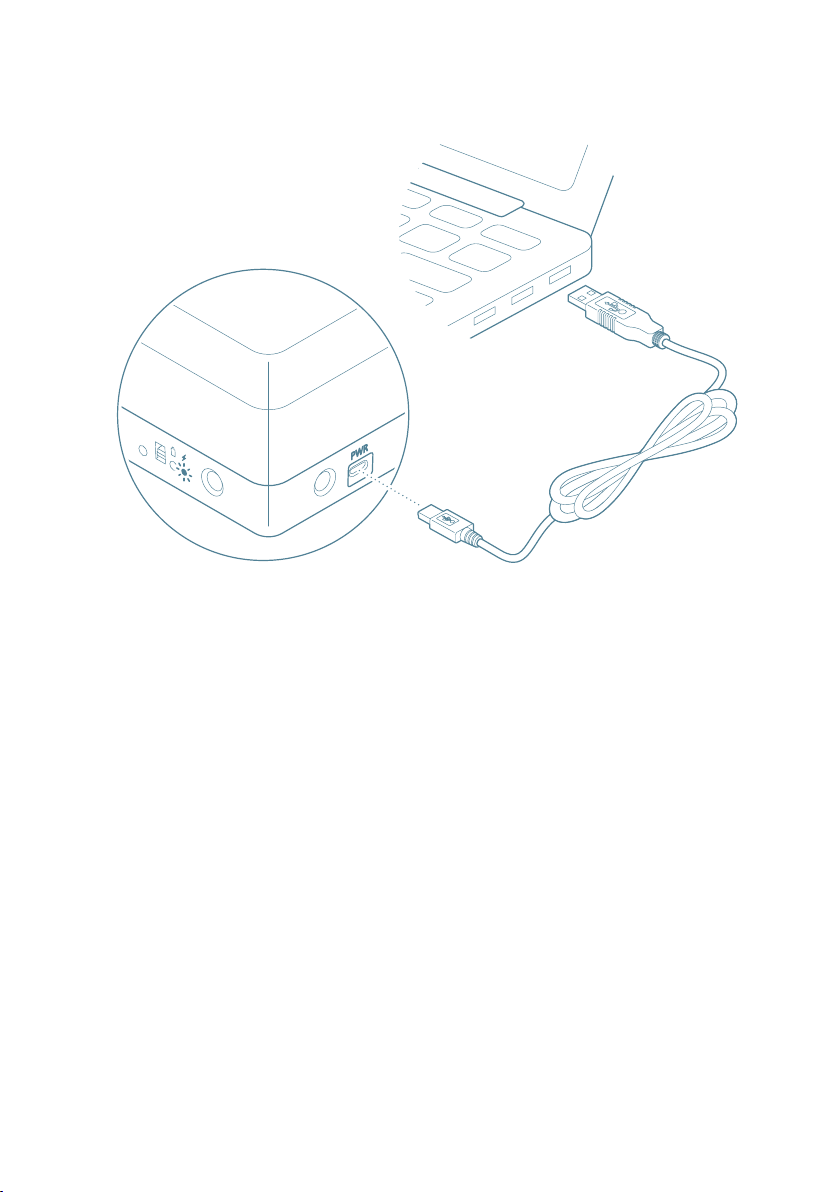
3. After approx. 3 hours the charging process is electronically stopped (security
PWR
PWR
PWR
TEST
ON
protection). To fully charge batteries you may need to repeat the charging process
several times.
4. Remove the micro-USB <-> USB cable.
32 | FLINKEY BOX AND FLINKEY IQ
Page 33

5.3 How to use the inkey IQ
NOTICE
This section is for business users only that have purchased the inkey IQ. The inkey IQ
is an ODB dongle that collects telematics data.
5.3.1 Important safety information and limitations of use
Read this safety information and limitations of use following these installation
instructions. Read and follow all instructions and warnings to prevent serious injury
and/or vehicle damage. For the latest version of the Limitations of Use, please
visit: goo.gl/k6Fp0w.
Your in-vehicle devices must be kept clear of debris, water and other environmental
contaminants. Failure to do so may result in units malfunctioning or short-circuiting,
that can lead to a re hazard and cause loss or serious injury.
Do not attempt to remove the devices from the vehicle in which they are originally
installed for installation in another vehicle. Not all vehicles share compatibility, and
doing so may result in unexpected interactions with your vehicle, including sudden loss
of power or shutdown of the vehicle’s engine while in operation or cause your vehicle to
operate poorly or erratically and cause serious injury and/or vehicle damage.
This product does not contain any user-serviceable parts. Conguration, servicing, and
repairs must only be made by an authorized reseller or installer. Unauthorized servicing
of these products will void your product warranty.
Some installations are not straightforward and must be completed by a professional
inkey IQ Installer to ensure a secure installation. An unsecure device installation can
cause poor electric and/or data connection that can lead to short circuits and res
or cause malfunctions of vehicle controls that can result in serious personal injury or
FLINKEY BOX AND FLINKEY IQ | 33
Page 34

signicant damage to your vehicle. Some examples requiring professional installation
from an Authorized inkey IQ Installer are:
The OBD port location is such that the device protrudes and interferes with entering
or exiting the vehicle, or located where it could be inadvertently kicked or bumped
during vehicle operation
The device isn't fully secured and so may come loose with vibrations or accidental
contact
Depending on your situation, an electrical harness or additional wiring is required
Depending on your situation, vehicle mounting modications are required to secure
the device, i.e. removing of panels; deformed/damaged OBD connector; or physical
damage to the electrical wiring
When the device is connected to power for the rst time, the device beeps six times
The installer questions their ability to complete a secure installation according to
these instructions
Do not attempt to install, recongure, or remove any product from a vehicle while the
vehicle is in motion or otherwise in operation. All installation, conguration, or removal
must be done only in stationary vehicles which are securely parked. Attempting to
service devices while the vehicle is in motion could result in malfunctions or accidents,
leading to death or serious personal injury.
5.3.2 How to install the inkey IQ
To install the inkey IQ:
1. Locate the vehicle’s engine diagnostic port, typically found in the driver’s area at or
below knee level. NOTICE Heavy-duty vehicles use a dierent connector system.
34 | FLINKEY BOX AND FLINKEY IQ
Page 35
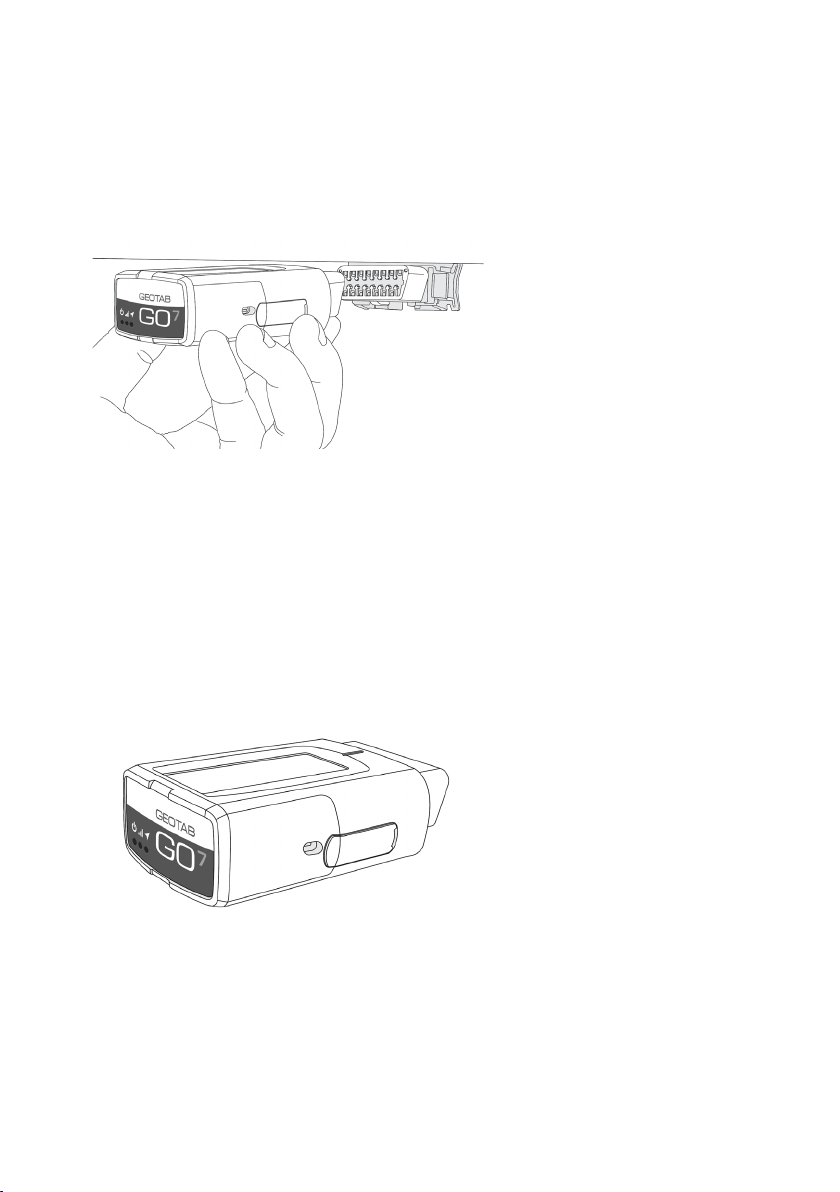
2. Align the receiver end of the inkey IQ with the engine diagnostic port. Push the
inkey IQ in place, ensuring that the device is well connected to the diagnostic port.
You will hear 6 quick beeps and all three lights on the device will ash briey.
3. With the vehicle parked outdoors to locate satellites and vent exhaust fumes, start
the vehicle and allow it to run for approximately 3 minutes. During this period
you will notice the red LED power on and glow on the face of the device. Shortly
afterwards the green LED and blue LEDs will light up when the device connects
with the cellular and GPS networks. This initial startup may take several minutes to
complete.
FLINKEY BOX AND FLINKEY IQ | 35
Page 36
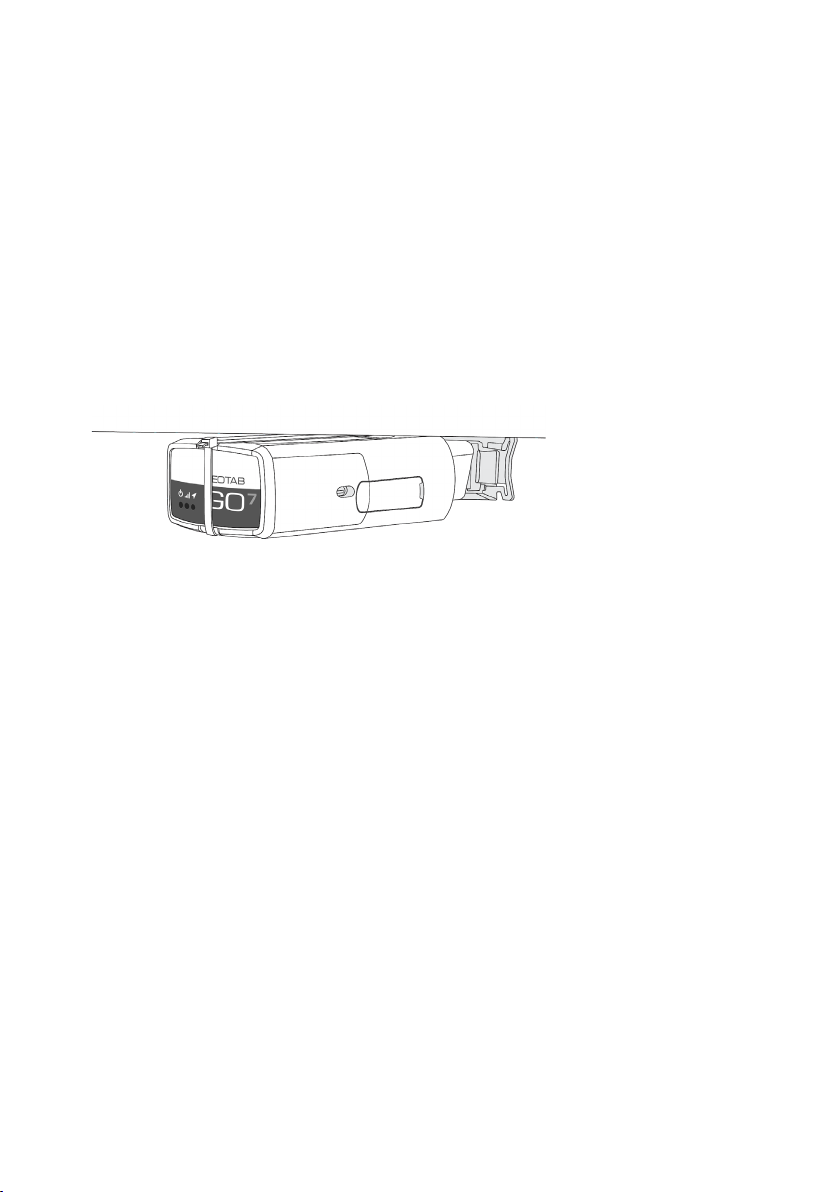
4. Once all three LED lights have lit up, secure the inkey IQ using the supplied cable
tie. WARNING! All in-vehicle devices and related cabling must be securely fastened
and kept clear of all vehicle controls, including gas, brake and clutch pedals. This
requires the use of a cable tie when securing the device or any extension harness
to the OBD connector, securing both sides of the harness. If you do not use a cable
tie, vibration in the vehicle can lead to a loose connection which could indirectly
cause the vehicle’s engine computer to fail, loss of vehicle control and cause serious
injury. Inspect devices and cabling regularly to ensure all devices and cables remain
securely attached.
5. When performing under-dash installations with an extension harness, make sure
the antenna side is always pointing upwards towards the sky for faster GPS latch
times. The GPS antenna in a inkey IQ is located on the bottom side of the device.
6. Verify that the device is communicating correctly. You will now see a screen that
displays the current status of the device. If the device is communicating correctly,
you will see GREEN lettering with the last valid GPS record. If the text appears in
RED, the device is unable to communicate and you must verify the installation.
WARNING! If at any point after an in-vehicle device is installed a warning lights up
on the vehicle dash or the vehicle stalls or has a marked drop in performance, shut
o the engine, remove the device, and contact your reseller. Continuing to operate a
vehicle with these symptoms can cause loss of vehicle control, and serious injury.
36 | FLINKEY BOX AND FLINKEY IQ
Page 37

6 Maintenance
Do not use alcohols (e.g. spirits) or chemical cleansers and solvents as these can
damage the plastic components.
Always use a soft, clean, lint-free cloth. Clean the box using a cloth dampened with a
mild detergent solution or water.
Task Frequency
Clean the inkey Box After the vehicle has
Check the battery
level of the inkey
Box
Check the battery
level of the inkey
Box
been returned
Before using the
vehicle
After the vehicle has
been returned
FLINKEY BOX AND FLINKEY IQ | 37
Page 38

7 Troubleshooting
NOTICE
In case of any errors or malfunctioning of the system, contact:
WITTE Digital
WITTE Velbert GmbH & Co. KG
Höferstraße 3-15
42551 Velbert
Germany
T: 00 800 99 0000 33
www.witte.digital
service@inkey.de
www.inkey.de
38 | FLINKEY BOX AND FLINKEY IQ
Page 39

Problem Cause Solution
Check if Bluetooth at your
The vehicle cannot
be opened/closed
No bluetooth connectivity
smartphone is switched on.
Switch bluetooth on and
try again
Disable bluetooth at
your smartphone, enable
bluetooth and try again
Switch your smartphone
o and restart your
smartphone. Make sure
bluetooth is enabled and
try again
Vehicle is not visible in the
inkey App
No valid permission
Try to open the wrong car
Keyfob of the vehicle may
not be working or battery of
keyfob might be empty
Battery of inkey Box not
suciently charged
Contact the owner to get
the right permission for the
requested car
Make sure you have GSM
connectivity to receive the
permission
Contact the owner to
receive the permission to
use the car
Make sure you try to open
the right car (check license
plate) or contact the owner
Contact the owner
Check battery status and
charge inkey Box or
contact the owner
FLINKEY BOX AND FLINKEY IQ | 39
Page 40

Unknown issue Contact the owner
The keyfob drawer cannot
be closed
The keyfob drawer cannot
be opened
The charging process is
interrupted
Keyfob not positioned
correctly
Wrong object in the key bed
Keyfob is in the wrong
position and is blocking the
drawer
In exceptional cases and
only with certain types of
cars, the charging process
will be interrupted in case
the temperature of inkey
Box increases
Check if the keyfob is
positioned correctly and
try again
Check if a wrong object is
in the key bed, remove the
object and place the keyfob
correctly in the key bed
Carefully shake the box to
move the keyfob in the right
position and try again
Disconnect the vehicle
adapter from the adapter
port. Connect the vehicle
adapter with the adapter
port again
40 | FLINKEY BOX AND FLINKEY IQ
Page 41

8 Storage and Transportation
NOTICE
The inkey Box must always be transported in the packaging it was delivered in to
ensure safe transport.
To store the inkey Box:
1. Make sure the inkey Box is in the original packaging.
2. Make sure the on/o switch 10 is in the “OFF” position.
FLINKEY BOX AND FLINKEY IQ | 41
Page 42

9 Disposal of the Product
The symbol on the product, the accessories or packaging indicates that
this device must not be treated as unsorted municipal waste, but must
be collected separately! Dispose of the device via a collection point for
the recycling of waste of electrical and electronic equipment if you live
within the EU and in other European countries that operate separate
collection systems for waste of electrical and electronic equipment.
By disposing of the device in the proper manner, you help to avoid possible hazards
to the environment and public health that could otherwise be caused by improper
treatment of waste equipment. The recycling of materials contributes to the
conservation of natural resources. Therefore do not dispose of your old electrical and
electronic equipment with the unsorted municipal waste.
The product contains a rechargeable battery. Batteries may not be disposed of with the
usual domestic waste. They may contain toxic heavy metals and are subject to hazard
our waste regulations. For this reason, dispose of used rechargeable batteries at a local
collection point.
The outer packaging is made of environmentally friendly materials, which may be
disposed through your local recycling facilities. By disposing of the packaging and
packaging waste in the proper manner, you help to avoid possible hazards for the
environment and public health. The symbol on the outer packaging indicates that the
packaging is made of PAP.
42 | FLINKEY BOX AND FLINKEY IQ
Page 43

10 Privacy Statement
The inkey products are secured with SSL certication. Each user has a unique user
name and private password associated with their own account. Data will only be shared
with the user‘s explicit permission. See also www.inkey.de/privacy and
www.witte.digital/privacy for more details.
FLINKEY BOX AND FLINKEY IQ | 43
Page 44

11 Declaration of
Conformity and Compliance
Hereby, WITTE Automotive GmbH declares that the inkey Box is in compliance with the
Directives 2014/30/EU and 2011/65/EU. The full text of the EU declaration of conformity
is available at the following internet address: www.witte.digital
The inkey Box has an ECE Approval regard to Regulation No. 10 issued by the SNCH
(Approval N° E13*10R00*10R05*14342*00).
44 | FLINKEY BOX AND FLINKEY IQ
Page 45

Copyright © 2018 by WITTE Digital
All rights reserved. No part of this publication may be
reproduced, distributed, or transmitted in any form
or by any means, including photocopying, recording,
or other electronic or mechanical methods, without
the prior written permission of the publisher.
For permission requests, write to the publisher,
addressed “Attention: Permissions Coordinator,”
at the address below.
WITTE Digital
WITTE Velbert GmbH & Co. KG
Höferstraße 3-15
42551 Velbert
Germany
T: 00 800 99 0000 33
www.witte.digital
service@inkey.de
www.inkey.de
Manual Version 1.0
Publication date: September 2018
 Loading...