

Page 1
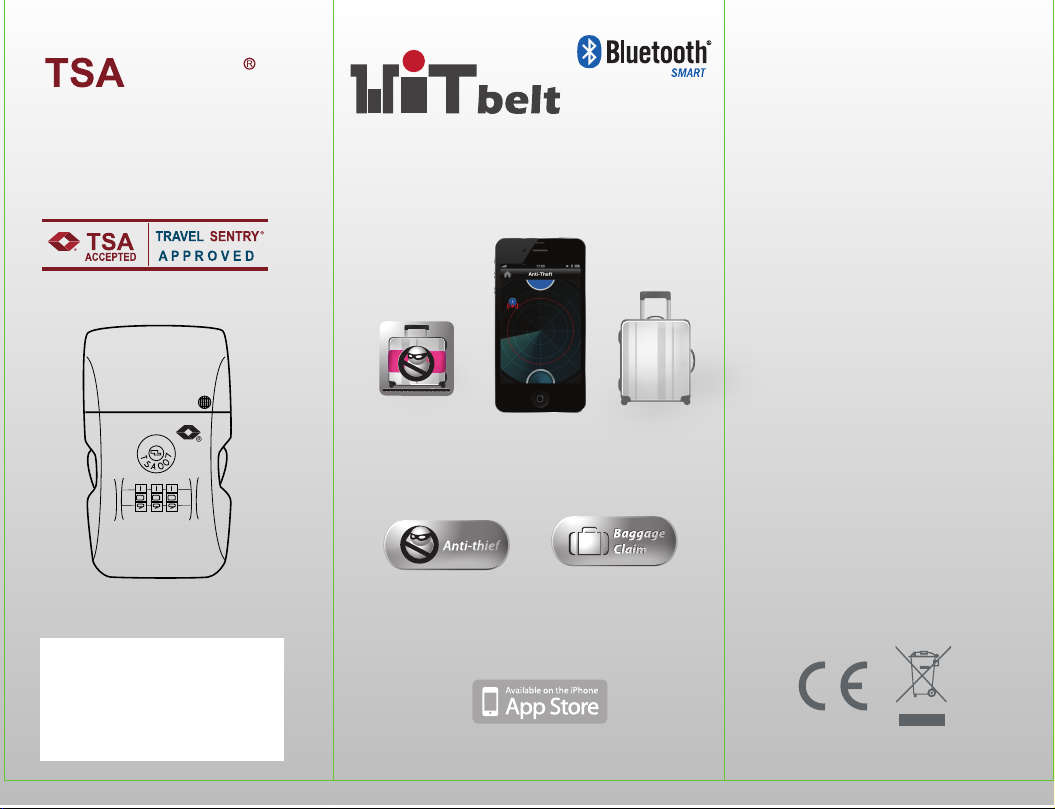
LOCK
- Accepted and recognized by TSA
(The Transportation Security Adminishtration
of the United States)
- Solutions to the luggage security problem at the airports
- Allows airport screeners to unlock baggage and
relock it without damaging the lock
- For more information please visit www.travelsentry.org
Bluetooth 4.0 Electronic Luggage Belt
Model: K200
WiTbelt
Anti-thief
Anti-theft
Baggage Claim
Features:
* Direct connect to iPhone4S/5,
the new iPad
* TSA accepted
* 3 Dial Combination Lock
* Anti-theft alarm with adjustable
distance
* Baggage claim alert
* Buzzer alarm
* LED indicator
* On/ Off switch
Specifications:
* Bluetooth 4.0 LE
* Operation range up to 30m
* Product weight: 200g
* Belt length: 100-170cm
Distributed by Conrad Electronic SE
Klaus Conrad-Str. 1, D-92240 Hirschau
Free Apps available for download on App Store
Designed by Wittech Company Ltd.
Page 2
LOCK INSTRUCTION
WARNING!
When checking in
your luggage at
airport, please
make sure you have
turn your device
into aeroplane
mode.
Press to enter
Aeroplane Mode
QUICK START GUIDE
BACK
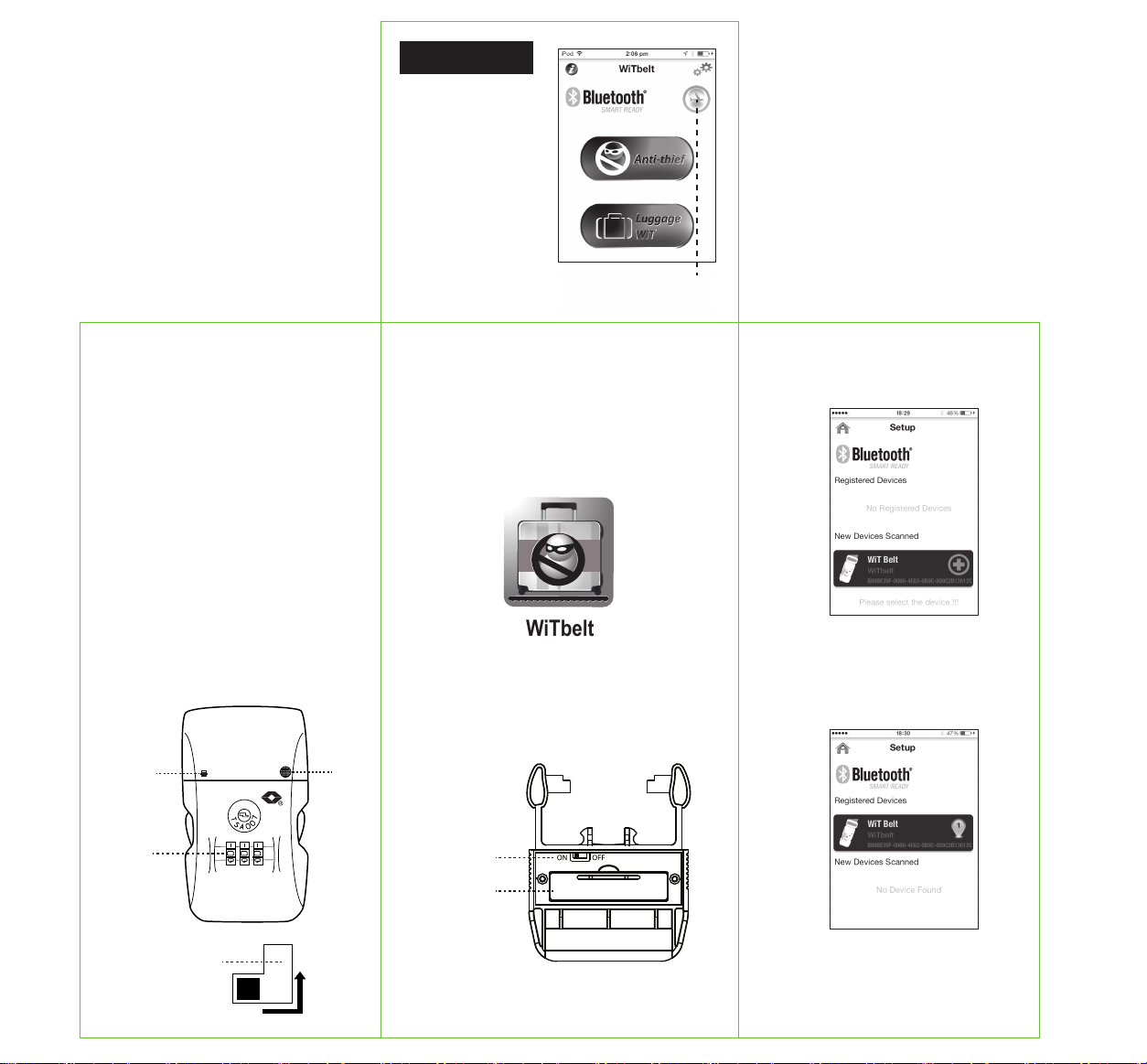
3. Launch the App and go to SETTING to add
new device. You should able to see the new
device is found.
The original number is 0-0-0.
1. Open the lock with original number
2. Push the resettable button to B. Set
your own cipher by turning the dials
3. Push the resettable button back to A.
Then the setting is completed.
Remember your new combination.
If you want to reset the cipher, just
repeat above steps
Buzzer
Dial
Resettable
Button
LED
B
A
1. Download the App WiTbelt with your smart
phone or tablet from App Store.
WiTbelt
2. Power on the WiTbelt by sliding the ON/OFF
switch to ON position. You will hear 2 beep
sound.
ON/OFF Switch
Battery
compartment
4. To register the new device, press on the
device icon and then Save after input the
device name and photo if necessary. After
that you should see the new device is
registered.
5. Return to Home screen and select
Anti-thief or Baggage Claim function. For
detail operations of individual function,
please refer to the Help section of the App.
Page 3
IMPORTANT NOTES
Version 05/14
Distributed by Conrad Electronic SE, Klaus-Conrad-Str. 1, D-92240 Hirschau
Safety instructions
Read the operating instructions carefully and especially observe the safety information. If you do
not follow the safety instructions and information on proper handling in this manual, we assume
no liability for any resulting personal injury or damage to property. Such cases will invalidate the
warranty/guarantee.
• The device is not a toy. Keep it out of the reach of children and pets.
• Do not leave packaging material lying around carelessly. These may become dangerous playing material
for children.
• Protect the product from extreme temperatures, direct sunlight, strong jolts, high humidity, moisture,
ammable gases, vapours and solvents.
• Do not place the product under any mechanical stress.
• If it is no longer possible to operate the product safely, take it out of operation and protect it from any
accidental use. Safe operation can no longer be guaranteed if the product:
- is visibly damaged,
- is no longer working properly,
- has been stored for extended periods in poor ambient conditions or
- has been subjected to any serious transport-related stresses.
• Please handle the product carefully. Jolts, impacts or a fall even from a low height can damage the product.
• Also observe the safety and operating instructions of any other devices which are connected to the product.
• It is intended for indoor use only. Do not use it outdoors. Contact with moisture, e.g. in bathrooms, must
be avoided under all circumstances.
• Maintenance, modications and repairs are to be performed exclusively by an expert or at a qualied shop.
• Correct polarity must be observed while inserting the (rechargeable) battery.
• (Rechargeable) batteries must be kept out of reach of children. Do not leave (rechargeable) batteries lying
around, as there is risk, that children or pets swallow them.
• (Rechargeable) batteries must not be dismantled, short-circuited or thrown into re. Never recharge non-
rechargeable batteries. There is a risk of explosion!
• The (rechargeable) battery should be removed from the device if it is not used for a long period of time
to avoid damage through leaking. Leaking or damaged (rechargeable) batteries might cause acid burns
when in contact with skin, therefore use suitable protective gloves to handle corrupted (rechargeable)
batteries.
• High volume damages your hearing.
Declaration of Conformity (DOC)
We, Conrad Electronic SE, Klaus-Conrad-Straße 1, D-92240 Hirschau, hereby declare that this product
conforms to the fundamental requirements and the other relevant regulations of the directive 1999/5/EC.
The Declaration of Conformity for this product can be found at www.conrad.com.
Disposal
a) Product
Electronic devices are recyclable waste and must not be disposed of in the household waste. At
the end of its service life, dispose of the product according to the relevant statutory regulations.
Remove any inserted (rechargeable) batteries and dispose of them separately from the product.
b) (Rechargeable) batteries
You as the end user are required by law (Battery Ordinance) to return all used batteries/
rechargeable batteries. Disposing of them in the household waste is prohibited. Contaminated
(rechargeable) batteries are labelled with this symbol to indicate that disposal in the domestic
waste is forbidden. The designations for the heavy metals involved are: Cd = Cadmium, Hg =
Mercury, Pb = Lead (name on (rechargeable) batteries, e.g. below the trash icon on the left).
Used (rechargeable) batteries can be returned to collection points in your municipality, our stores or wherever
(rechargeable) batteries are sold.
You thus full your statutory obligations and contribute to the protection of the environment.
 Loading...