

Page 1
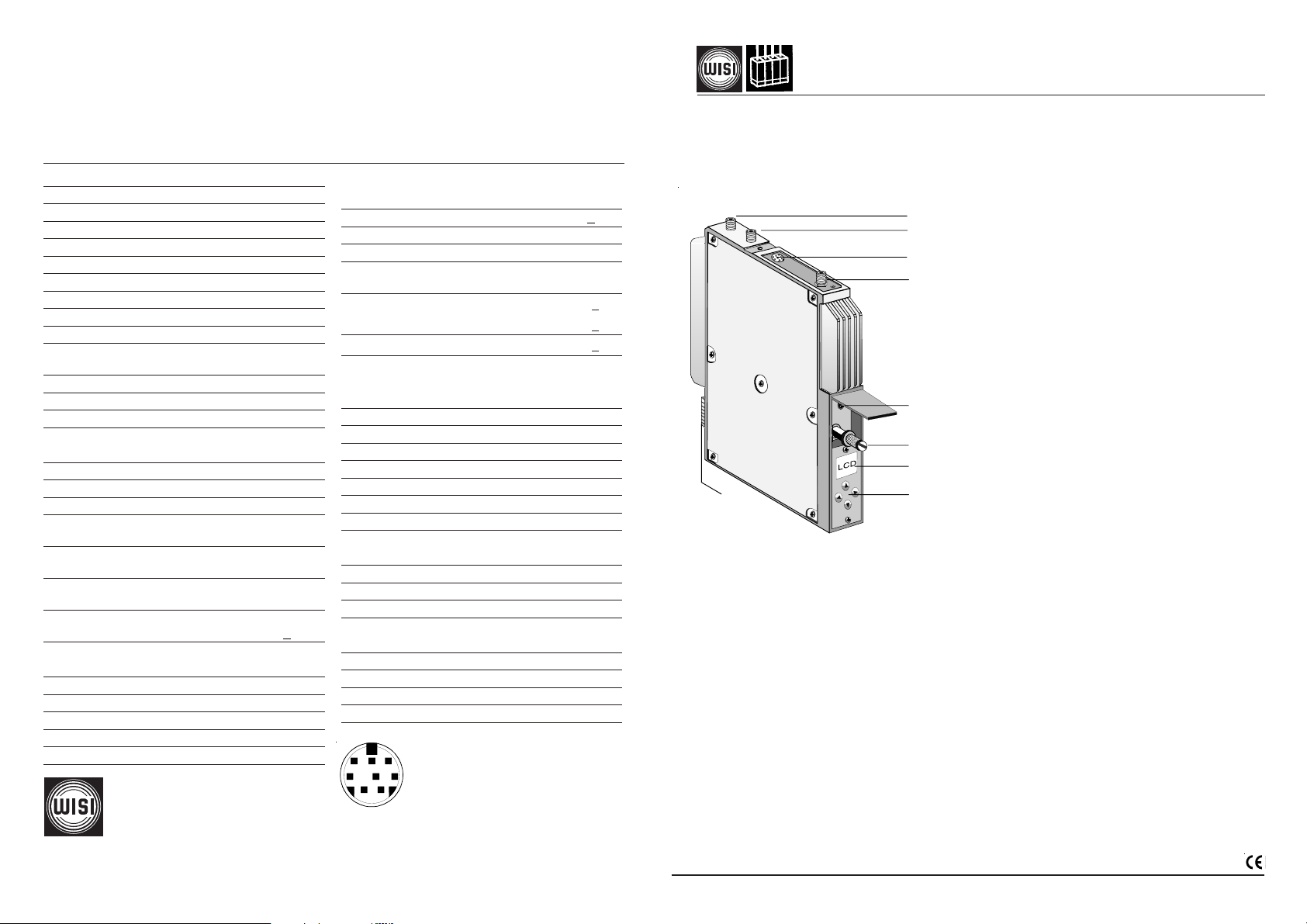
Pid-Informationen die eingeblendet werden können:
Sid 0...65535 Service id
Vid-Pid 0...8192 Video-Pid
Pcr-Pid 0...8192 Pcr-Pid
Aud-Pid 0...8192 Audio-Pid
Ttx-Pid 0...8192 Teletext-Pid (nicht in jedem Programm enthalten)
Technische Daten
Eingang
Frequenzbereich 950 - 2150 MHz
Frequenzabstimmschritte 1 MHz
Eingangsimpedanz 75 Ω
Eingangspegel 47 - 70 dBµV
AFC ± 5 MHz
Modulationsart QPSK
Symbolrate (einstellbar) 2 - 45 MS/s
Filterung Nyquist √ cos
Roll-Off 35 %
FEC inner code
Conv.,K=7,R=1/2,2/3,3/4,4/5,6/7,7/8
Spektrale Invertierung C- / KU-Band
Interleaving Conv.,I=12
FEC outer code RS(204,188,8)
Video Decoder ISO 13818-2
MPEG 2 (MP@ML)
Video-Format 4:3 / 16:9
Video Norm (umschaltbar)
PAL / SECAM / NTSC-M
Videopegel 1 Vpp / 75 Ω
Audio-Decoder ISO 13818-3
MPEG (L1/ L2)
Audio-Format OV 76 Mono
OV 76 S Mono / Stereo / 2-Ton
Audio-Format Umschaltung Manuell / Auto
wenn vom Programmanbieter unterstützt wird
Audiopegel 0,2 Veff an 10 kΩ
FM-Hub 25 kHz + 3 kHz
Ausgang
Frequenz 45 – 862 MHz
Frequenzabstimmschritte 250 kHz
Frequenzstabilität ±30 kHz
Ausgangsimpedanz 75 Ω
Kanalbandbreite (umschaltbar) 7/8 MHz
WILHELM SIHN JR. GmbH & Co. KG
Empfangs- und Verteiltechnik
Wilhelm-Sihn-Straße 5-7, D-75223 Niefern-Öschelbronn
Tel . 07233 / 66-292, Fax. 66-320, http://www.wisi.de
Pegel (loop) 74 - 84 dBµV
Ausganspegelstabilität + 1 dB
TV-Normen B/G, D/K, I, L, M
Restträger B/ G / M / L 10,0 %
Standard D / K 12,5 %
Pegelabstand Bt-Tt
1
Standard
Pegelabstand Bt-Tt2 Standard
Abstand Nebenaussendungen
in AM-TV-Kanälen > 60 dB
ausserhalb des TV-Kanals > 60 dB
Differentielle Verstärkung < 5%
Differentielle Phase < 5°
Gruppenlaufzeit (-0,5 .. 4,43 MHz) < 80ns
Statische Nichtlinearität < 3%
S/N Video (CCIR-rec.567-1) typ.56 dB, min.53 dB
S/N Audio
(mit Farbbalkentestbild )
Klirrfaktor 1%
Allgemeine Daten
Gehäuse Zinkdruckguß
Abmessungen 30 x 260 x 200 mm
HF-Ein-/Ausgänge F
Betriebsspannung 12 VDC 600 mA
Leistungsaufnahme < 10 W
Betriebstemperaturbereich -20°C ... +55°C
Datenhaltigkeit im Temperaturbereich
EMV EN 50083-2
1 Audio L Eingang
8
5
6
7
2 Audio L Ausgang
4
3 Audio R Eingang
3
4 Video-Ausgang
12
... a link to the future
(single) 84 - 94 dBµV
I 20,0 %
B / G 13 dB +2 dB
D/K/I/M/N/L
10 dB +2 dB
B/G/D/K 20 dB +2 dB
typ.50 dB, min.47 dB
5 VDC 530 mA
+5°C ... +55°C
5 Audio R Ausgang
6 Masse
7 Video-Eingang
8 Nicam-Eingang
Technische Änderungen vorbehalten
Technical modifications reserved
09/05
Betriebsanleitung
WISI TOPLINE HEADEND
OV 76 DVB-S — PAL "Free-To-Air" (Mono)
Kanalaufbereitung
OV 76S DVB-S — PAL "Free-To-Air" (Stereo) Kanalaufbereitung
1
2
3
4
5
6
7
9
8
Empfang eines QPSK-SAT-Signales und Aufbereitung in einen PAL / SECAM / NTSC-M TV- Kanal
Eingangs- /Ausgangsfrequenz 950-2150 /45-862 MHz
Demultiplex und Decodierung von MPEG-2 Signalen
Einfügen von Teletext-Daten
Einfache Menüführung mit 4 Tasten und alphanumerischer LCD-Anzeige
OV 50A-Überwachung mit OV 51A HEADEND Controller oder OV 52 Remote-Interface
Displayanzeigen
Signal? = Kein DVB-S-Signal,
Eingangsfrequenz
Display nach dem Einschalten
OV 76 / S = Gerätebezeichnung
V 1.0 = Software-Version
Mod-No. = Modulnummer
0
Signal?... = Die Bit Error Rate wird zyklisch gemessen
6.3 e-3 ... <1.0 e-4 und aktuell dargestellt.
busy = Keine Eingabe möglich, da Speicher- oder
nach 5 Sek. umschalten auf:
OV 76 / S = Gerätebezeichnung
1240 MHz = Eingangsfrequenz
<1.0 e-4 = Bit Error Rate
ZDF = Programmname
Prog? = Kein Programm eingestellt oder
!TPGEN = Testbildgenerator eingeschaltet
1. Durchschleifeingang (F-Buchse)
2. Durchschleifausgang (F-Buchse) /
Einzelausgang
3. Mini-DIN-Buchse 8 polig
4. SAT-ZF Eingang (F-Buchse)
5. Programmier-Schnittstelle Mini-DIN
6. Befestigungsschraube
7. Anzeige
8. Bedienfeld
9. DC-Versorgungsstecker
Einstellvorgang noch nicht beendet sind.
Programm nicht vorhanden
043 234
Page 2
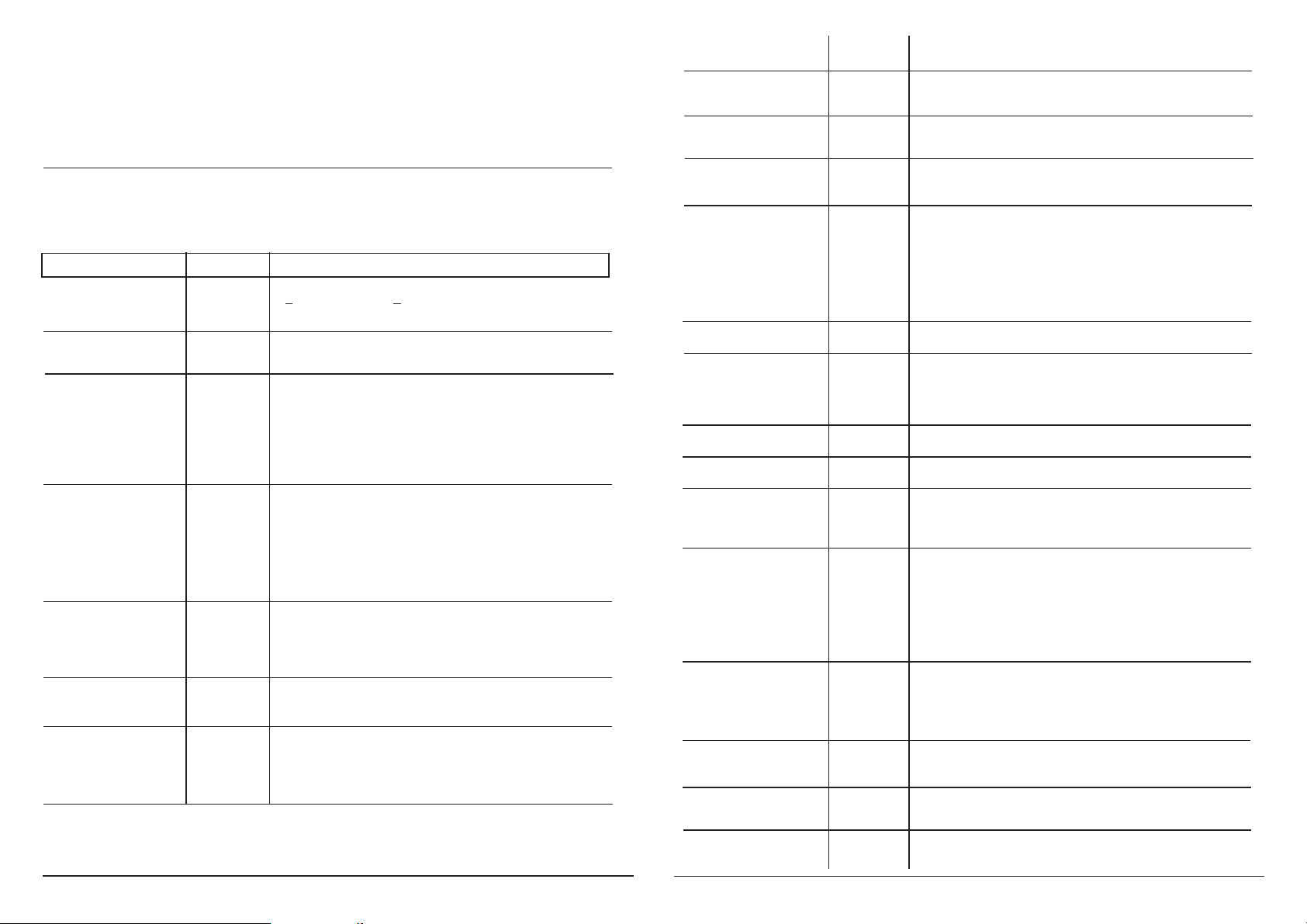
Werkseitige Einstellungen
Eingangsfrequenz= 1237 MHz
Symbolrate = 27500
Program = Das Erste
Languag = deu
Subtitle 1 = off
Subtitle 2 = off
Subpage = 0
Bedienung
Auswahl des Menüpunktes und Einstellen der Ziffern in entsprechender Menüzeile mit den UP/DOWN-Tasten
F-Out = 471,25 MHz
Out-Att = 0 dB
OutConf = loop
VidNorm = PAL
Picture = 4:3
TV-Std = B/G
SCRatio = 13 dB
A-Mode (OV 76) = mono
A-Mode (OV 76S)= stereo
A-Att = +0 dB
TP-Gen = off
Pid's = disable
Mod-No = 0
ST.
Eingabe der Werte und Ein- Ausstieg in die Menüzeile
Speichern: Automatisch nach dem Einstellen. Nach einem Netzausfall bleiben alle Daten erhalten.
WX
Bedienschritt Display Einstelungen
Eingangsfrequenz Sat-IF 1237 MHz Cursor mit L/R-Taste auf Dezimalstelle
950-2150 MHz
Symbol-Rate SymRate 2000...45000 MS/s Mit UP/DOWN-Tasten einstellen.
Bit Error Rate BerRate <1.0 e-4 Die BER ist ein Mass für die Übertragungs-
wird angezeigt, fehler und damit für die Signalqualität.
nicht einstellbar <1.0 e-4 = sehr geringe Fehler
1-MHz-Schritte
schieben und mit UP/DOWN-Tasten einstellen.
1.0 e-3 = geringe Anzahl von Fehler
1.0 e-2 = Schaltschwelle für Anzeige:
Signal?
Teletext-Seite Subpage 000...999 Gewählte Teletextseite wird angezeigt.
0 Ausgeschaltet
Ausgangsfrequenz F-OUT 471,25 MHz 250-kHz-Schritte
(45...862 MHz)
Dämpfung Out-Att 0...10 dB Dämpfen des Ausgangssignals.
Ausgangs-
Konfiguration
OutConf loop Durchschleifbetrieb.
loop / single single Einzelausgang.
Decoder Decoder Off Werkseitig eingestellt.
Nicam Einfügen eines Nicam-Signals. 2TT aus.
Mono 2.TonTräger (2TT) aus
Stereo Betriebsartenkennung Stereo
Dual Betriebsartenkennung Dual
Bei Mono, Stereo und Dual — Einfügen
externer AV-Signale
Videonorm VidNorm PAL Einstellen der Farbnorm PAL,
Bildformat Picture 4:3 16:9 Sendungen: Anzeige im
SECAM, NTSC-M
Letterboxformat.
16:9 4:3 Sendungen: keine Wirkung
16:9 Sendungen: Anzeige im Vollbildmodus
für 16:9 Fernsehgeräte.
TV-Standard TV-Std B/G, D/K, I, L, M, N
Tonträgerabsenkung SCRatio 11-18 dB
Programmauswahl Program Das Erste Zeigt den Inhalt des Programmpaketes an,
das Sie über die Eingangsfrequenz ausge-
wählt haben. Aus diesem Paket können Sie
ein Programm wählen. Parameter wie Vi-
deo-PID, PCR-PID, Audio-PID und Teletext
werden automatisch übernommen.
* Vid-Pid
1)
Wird im Menu der Bedienschritt: Pid's enable
gewählt, werden die Pid's wie Sid, Vid, PCR
usw. eingeblendet. Bei Pid's disable bleibt
dieses Feld leer.
Sprachauswahl
2)
Languag deu Einige Programme werden mehrsprachig
ita ausgestrahlt. Wählen Sie Ihre Sprache.
2)
Untertitel
(werden nur angezeigt, wenn SubTit2 Untertitel 2 werden ersatzweise für Unter-
sie gesendet werden und aus titel 1 angezeigt.
der Tabelle gewählt wurden). off Untertitel ausgeschaltet.
Aktuelle gesendete Sprachen / Untertitel werden im Display mit present markiert. Grundsätzlich können alle Sprachen/
Untertitel aus der Tabelle eingestellt werden. Bevorzugt werden die unter SubTit1 gewählten Untertitel angezeigt.
2)
Tabelle Untertitel / Spra-
che
(aus Tabelle) SubTit1 eng Untertitel 1 werden angezeigt (bevorzugt).
eng
ger/deu
fra/fre
swe/sve
den/dan
fin/suo
nor
ita
spa
dut/net
rus
chi/mdr
cze/tr2
hun
rum/rom
pol
por
jpn/jap
gre
lit
lat
est
kor
ara
Audiomode (OV 76) A-Mode Mono (R + L) / 2
Mono-L Linke-Kanal
Mono-R Rechter-Kanal
Audiomode (OV 76S) A-Mode Stereo Stereo
Betriebsartenkennung Dual Dual
Auto-A
(2.Tonträger)
wird entsprechend dem Audio-Header gesetzt.
Auto-V wird entsprechend den VPS-Daten gesetzt.
Mono 2. Tonträger ausgeschaltet.
Mono-L Dual
Mono-R Dual
Testbildgenerator TP-Gen off
Color Farbbalkentestbild
B/W Schwarzweißbalkentestbild S/W
autom. S/W einblenden bei Anzeige "Signal?"
1)
Pid's-Anzeige
Auto
1)
Pid's enable Pid-Informationen werden eingeblendet.
disable Pid-Informationen werden ausgeblendet.
Modulnummer Mod-No 1...10 Lokaler Betrieb (keine Überwachung)
Überwachung mit OV 51 oder OV 52.
Version Version 1.00 Anzeige der Baugruppenversion und der
MPEG-Decoder-Version.
Page 3
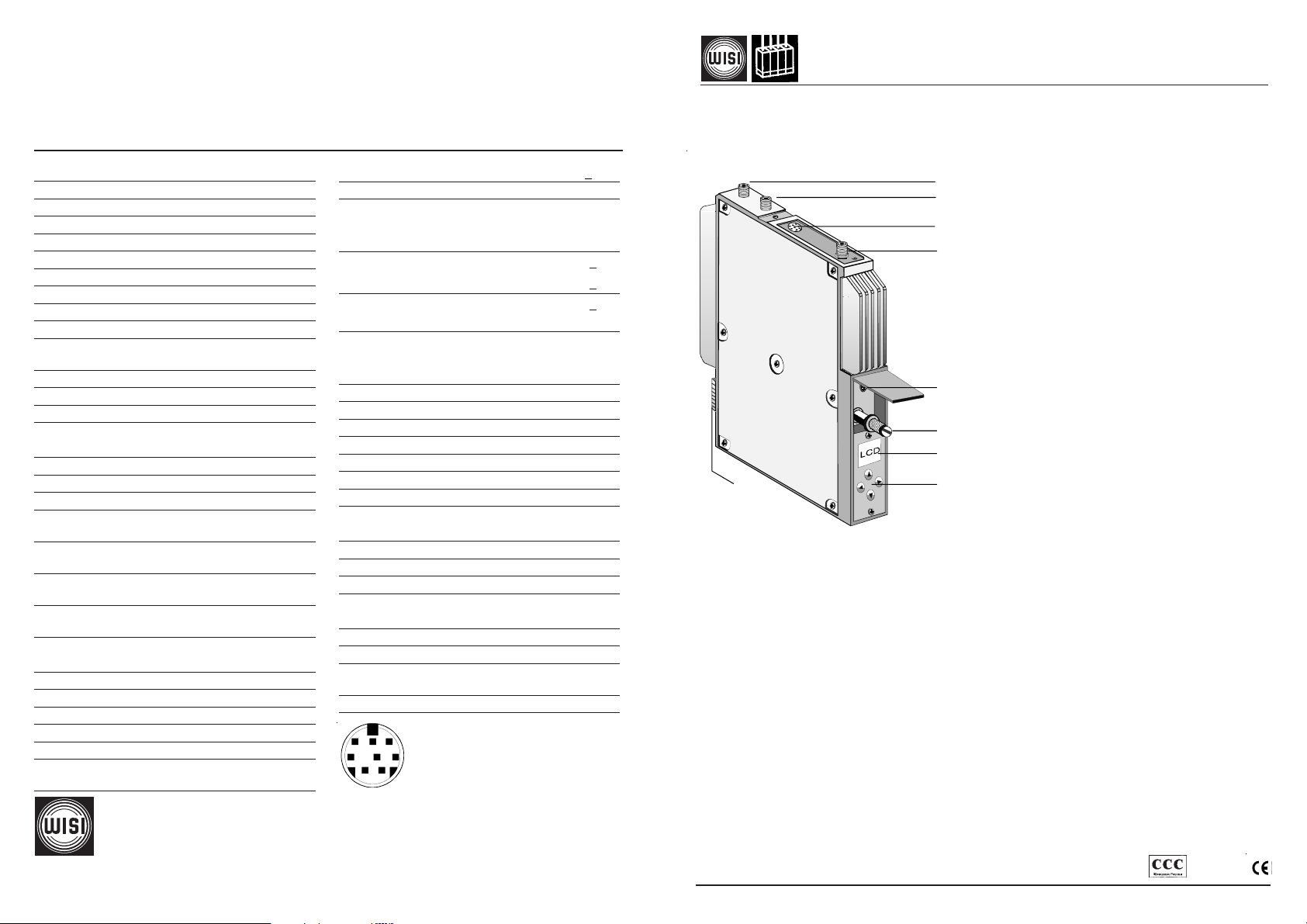
Pid informations
Sid 0...65535 Service id
Vid-Pid 0...8192 Video pid
Pcr-Pid 0...8192 Pcr pid
Aud-Pid 0...8192 Audio pid
Ttx-Pid 0...8192 Teletext pid (not available on all programmes)
Specifications
Operating instructions
OV 76 DVB-S to PAL "Free-To-Air" (Mono) channel processor
OV 76S DVB-S to PAL "Free-To-Air" (Stereo) channel processor
Input
Frequency range 950 - 2150 MHz
Frequency tuning steps 1 MHz
Input impedance 75 Ω
Input level 47 - 70 dBµV
AFC ± 5 MHz
Type of modulation QPSK
Symbol rate (adjustable) 2 - 45 MS/s
Filtering Nyquist √ cos
Roll-Off 35 %
FEC inner code
Conv.,K=7,R=1/2,2/3,3/4,4/5,6/7,7/8
Spectral inverting C- / KU-Band
Interleaving Conv.,I=12
FEC outer code RS(204,188,8)
Video decoder ISO 13818-2
MPEG 2 (MP@ML)
Video format 4:3 / 16:9
Video standard (selectable) PAL / SECAM / NTSC-M
Video level 1 Vp-p / 75 Ω
Audio decoder ISO 13818-3
MPEG (L1/L2)
Audio format OV 76 Mono
OV 76 S Mono / Stereo / 2-Ton
Audio format switch over Manuell / Auto
(if provider supports)
Audio level 0,2 Veff @ 10 kΩ
FM deviation 25 kHz + 3 KHz
Output
Frequency range 45 - 862 MHz
Frequency tuning steps 250 kHz
Frequency stability ±30 kHz
Output impedance 75 Ω
Channel bandwidth (selectable) 7/8 MHz
Level (loop) 74 - 84 dBµV
(single) 84 - 94 dBµV
WILHELM SIHN JR. GmbH & Co. KG
Empfangs- und Verteiltechnik
P.O. BOX 1220, 75219 Niefern-Oeschelbronn, Germany
Phone +49 7233 66 280, Fax - 66 350, http://www.wisi.de
... a link to the future
Output level stability + 1 dB
TV standards B/G, D/K, I, L, M
Vestigial sideband
B/ G / M / L 10,0 %
Standard D /K 12,5 %
I 20,0 %
Level spacingpc-sc1B / G 13 dB +2 dB
Standard D/ K/I/M/N /L 10 dB +2 dB
Level spacing B/G/D/K 20 dB +2 dB
pc-sc2 standard
Spurious emissions
within AM TV channels > 60 dB
out of TV channel > 60 dB
Differential gain < 5%
Differential phase < 5°
Group delay (-0,5 .. 4,43 MHz) < 80ns
Static non-linearity < 3%
S/N video (CCIR-rec.567-1)
S/N audio (with color test pattern)
typ.56 dB, min.53 dB
typ.50 dB, min.47 dB
Distorsion 1%
General specifications
Housing Zinc die-cast
Dimensions 30 x 260 x 200 mm
RF inputs and outputs F-type connectors
Operating voltage 12 VDC 600 mA
5 VDC 530 mA
Power consumption < 10 W
Operating temperature -20°C ... +55°C
Data retainment within +5°C ... +55°C
temperature range
EMV EN 50083-2
1 Audio L input
8
5
6
7
2 Audio L output
4
3
3 Audio R input
4 Video output
12
Technische Änderungen vorbehalten
Technical modifications reserved
5 Audio R output
6 Ground
7 Video input
8 Nicam input
1
2
3
4
1. Loop-through input (F socket)
2. Loop-through output (F socket) / Single output
3. Mini-DIN socket 8pin
4. SAT IF input (F socket)
5. Programming interface Mini-DIN
6. Fixing screw
7. Display
5
8. Control panel
6
7
9
8
9. DC connector
Reception of a QPSK satellite signal and processing in an PAL / SECAM / NTSC-M - TV channel
Input- /output frequency 950-2150 /45-862 MHz
Demultiplexing and decoding of MPEG-2 signals
Insert of Teletext datas
Simple menu operation via four-key panel and LCD
OV 50A controlling via
OV 51A HEADEND Controller or OV 52 Remote-Interface
Display
Signal? = No DVB-S signal.
Incorrect input freq.
Display after switching on
OV 76 = Unit designation
OV 76S = Unit designation
V 1.0 = Software version
Mod-No. = Modul number
0
Signal?... = The Bit Error Rate (BER) is measured cyclically
6.3 e-3 ... <1.0 e-4 and the current value is displayed.
busy = No inputs are possible while this is displayed.
After 5 seconds, the display change to:
OV 76 / S = Unit designation
1240 MHz = Input frequency
<1.0 e-4 = Bit Error Rate (BER)
ZDF = Program name
Prog? = No program
!TPGEN = Test pattern generator: on
OC/1-OT-595
Page 4

Factory settings
Input frequency = 1237 MHz
Symbol rate = 27500
Program = Das Erste
Languag = deu
Subtitle 1 = off
Subtitle 2 = off
Subpage = 0
F-Out = 471,25 MHz
Out-Att = 0 dB
OutConf = loop
VidNorm = PAL
Picture = 4:3
TV-Std = B/G
SCRatio = 13 dB
A-Mode (OV 76) = mono
A-Mode (OV 76S)= stereo
A-Att = + 0 dB
TP-Gen = off
Pid's = disable
Mod-No = 0
Teletext page Subpage 000...999 Teletext page is enabled.
0 off
Output frequency F-Out 471,25 MHz 250 kHz steps
(45-862 MHz)
Attenuation Out-Att 0...10 dB Output signal attenuation.
Operation
Select the menu item and adjust the values in a menu line with the UP/DOWN keys ST.
Enter values and enter and exit from menu lines with the LEFT/RIGHT keys
Saving: Data are saved automatically. Data are retained in the case of a power failure.
WX.
Operation Display Settings
Input frequency Sat-IF 1237 MHz Move cursor with L/R keys to digit to be
950-2150 MHz
1 MHz steps
Symbol rate SymRate 27500 MS/s Adjust with UP/DOWN keys.
2000...45000 MS/s
Bit Error Rate BerRate <1.0 e-4 The BER is an indication of the number
is displayed, but of transmission errors and thus of the
cannot be changed signal quality.
Selection of program Program Das Erste Shows the content of the programme
* Vid-Pid
Language
2)
1)
Languag deu Some programmes are transmitted in
ita several languages. In such cases, you can
Subtitle
(are displayed when trans- SubTit2 Subtitle 2 is displayed instead of subtitle 1.
mitted and selected
out of table).
Actually transmitted language/subtitles are marked with present. SubTit1 are preferred displayed.
2)
(refer to table) SubTit1 eng Subtitle 1 is displayed (preferred).
off Subtitle disabled.
changed and adjusted with UP/DOWN keys.
<1.0 e-4 = very low numbers of errors
1.0 e-3 = low number of errors
1.0 e-2 = threshold for display:
Signal?
package. You can select one programme
from this package. The programme parameters
like Video-PID, PCR-PID, Audio-PID and Teletext
are transferred automatically.
Setting the operation mode: Pid's enable
the Pid's like Sid, Vid, PCR are displayed.
Setting Pid's disable they are not displayed.
select the desired language here.
Output c
onfiguration
OutConf loop Looped-through mode.
single Single output.
Decoder Decoder Off Factory settings.
Nicam Inserting a Nicam signal. 2nd Sc off.
Mono 2.Sound carrier (2nd Sc) off.
Stereo Mode Stereo.
Dual Mode Dual.
At Mono, Stereo and Dual mode — insert of
external AV signals
Videonorm VidNorm PAL PAL,
SECAM, NTSC-M video norm.
Screen format Picture 4:3 16:9 setting: format is shown
16:9 4:3 setting: none action.
16:9 setting: This setting is shown in full
screen format.
TV standard TV-Std B/G, D/K, I, L, M, N
Sound carrier ratio SCRatio 11-18 dB
Audio mode (OV 76) A-Mode Mono (R + L) / 2
Mono-L Left channel
Mono-R Right channel
Audio mode (OV 76S) A-Mode Stereo Mode: Stereo
Dual Mode: Dual
Auto-A Header information
Auto-V VPS information.
Mono Dual mode: switched off
Mono-L Mode: Dual
Mono-R Mode: Dual
Test pattern generator TP-Gen off
Color Color test pattern
B/W b/w test pattern
Auto Poor signal quality, b/w test pattern is
autom. displayed
1)
Pid's
1)
Pid's enable Pid informations are enabled.
disable Pid informations are disabled.
Modul number Mod-No 1...10 Local mode
as letterbox
2)
Table subtitle / language
eng
ger/deu
fra/fre
swe/sve
den/dan
fin/suo
nor
ita
spa
dut/net
rus
chi/mdr
cze/tr2
hun
rum/rom
pol
por
jpn/jap
gre
lit
lat
est
kor
ara
Version Version 1.00 Displays the device number and the MPEG
Controlling via OV 51 or OV 52.
decoder version.
 Loading...