

Page 1
©WISI Communications GmbH & Co. KG
www.wisi.de
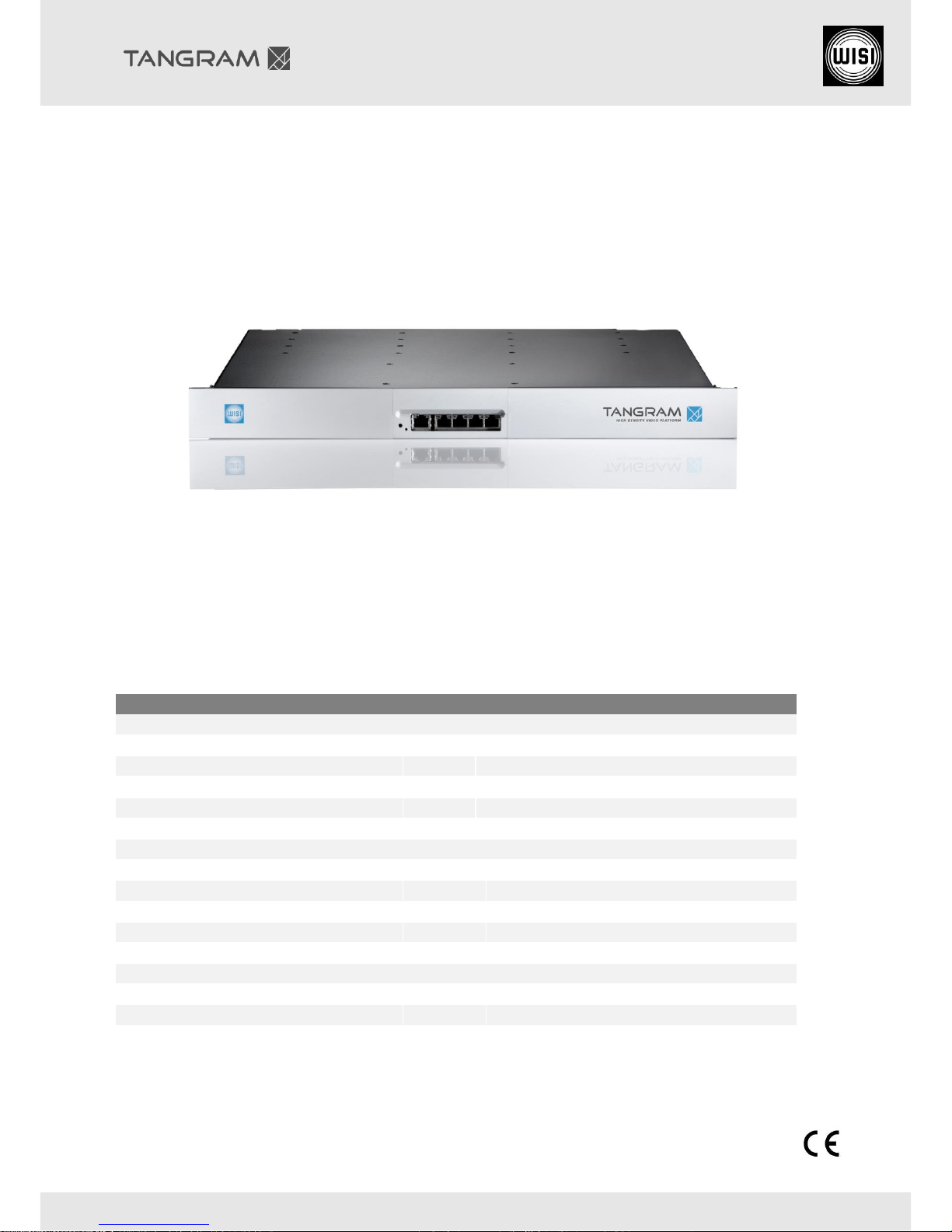
Quick Guide for GT01W Basic unit
GT01W0230, GT01W0048 TANGRAM Basic Unit
NOTE:
This Quick Guide is used primarily for commissioning the unit at start-up by providing the parameters
necessary to start operation. Details for mechanical information, safety information, configuration
and handling of these products are provided in the manual and configuration guide.
Basic unit for the modules
Edge Modules
GT21
Edge PAL
GT22
Edge FM
GT23
Edge QAM
GT24
Edge COFDM
GT26
Edge ISDB-T
Reception Modules
GT31
DVB-S/S2/C/T/T2/ISDB-T – IP Gateway
GT32
ASI - IP
GT33
ATSC – IP Gateway
Transcoder Modules
GT37
Linear Transcoder
Scrambler and Descrambler Module
GT41
IP Processing Module
GT42
CI Descrambler
Page 2
©WISI Communications GmbH & Co. KG
2 - 8
www.wisi.de
Content
1 Safety and Agency Approvals ............................................................................................................... 3
1.1 Legal Reference and Safety Standards ......................................................................................... 3
1.2 Electrical Safety ............................................................................................................................ 3
1.3 ESD Protection .............................................................................................................................. 3
2 Assembling chassis and modules.......................................................................................................... 4
2.1 Assembling the GT-modules ......................................................................................................... 4
2.2 Assembling the redundant Power-Supply .................................................................................... 4
3 Fitting and connecting the cables ......................................................................................................... 5
3.1 Rack fitting with montage set ....................................................................................................... 5
3.2 Backside ........................................................................................................................................ 6
3.3 Frontside ....................................................................................................................................... 6
4 Connecting to the TANGRAM Web UI .................................................................................................. 6
4.1 Default IP address ......................................................................................................................... 6
4.2 Changing IP address ...................................................................................................................... 6
5 Important information and maintenance ............................................................................................ 7
5.1 Operating System notes ............................................................................................................... 7
5.2 Changing the Fan-unit (a) ............................................................................................................. 7
5.3 Changing the power supply – GT55W (b) ..................................................................................... 8
5.4 Article Numbers – Spare Parts ...................................................................................................... 8
6 Service and Support .............................................................................................................................. 8
Page 3
©WISI Communications GmbH & Co. KG
3 - 8
www.wisi.de
1 Safety and Agency Approvals
1.1 Legal Reference and Safety Standards
Operation of optical communication systems is subject to national and/or international safety
regulations (GT12W with optical SFPs).
We refer to:
European directive 2006/25/EC on the minimum health and safety requirements regarding the
exposure of workers to risks arising from physical agents (artificial optical radiation),
International standard IEC 60825-1 (2007-03): Safety of laser products - Part 1: Equipment
classification and requirements, and
International standard IEC 60825-2 (2010-12): Safety of laser products - Part 2: Safety of optical
fiber communication systems (OFCs).
Generally, the operator of a communication system is responsible for its safe operation. Some
important points to respect are e.g.
Assessment of hazard levels at accessible locations,
Care for the proper installation and maintenance,
Measures for the safe operation, like access control and adequate staff training.
1.2 Electrical Safety
The TANGRAM equipment must be grounded in accordance with local and national electrical standards.
Risk of bodily injury from electric shock! Failure to adhere to these instructions could result in personal
injury and/or damage to electrical components.
Each power supply unit must be switched on or off using a circuit breaker which have to be
implemented as part of the building wiring.
Each shelf and the rack must be properly grounded before power is applied by turning on the
respective circuit breaker.
1.3 ESD Protection
This product contains electrostatic sensitive devices. These devices can be damaged or effectively
destroyed by electrostatic discharge (ESD) during unpacking, installation, removal, storage, or shipment
if incorrectly handled.
Please note that discharge might go unnoticed by a user. Always take normal
static precautions when handling the equipment!
Page 4
©WISI Communications GmbH & Co. KG
4 - 8
www.wisi.de
2 Assembling chassis and modules
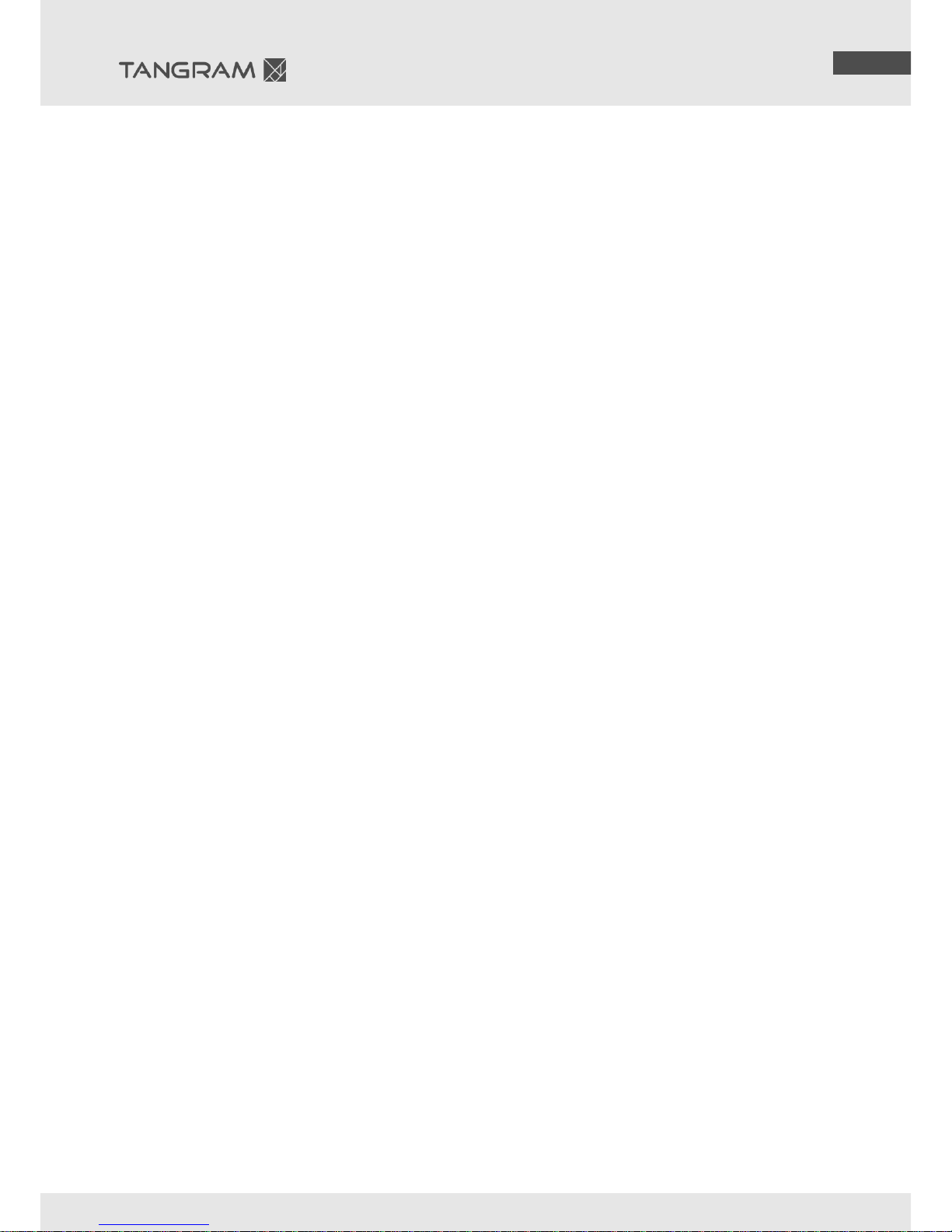
2.1 Assembling the GT-modules
Turn the GT01W on the backside and insert the GT-modules.
Fix the GT-modules with delivered screws.
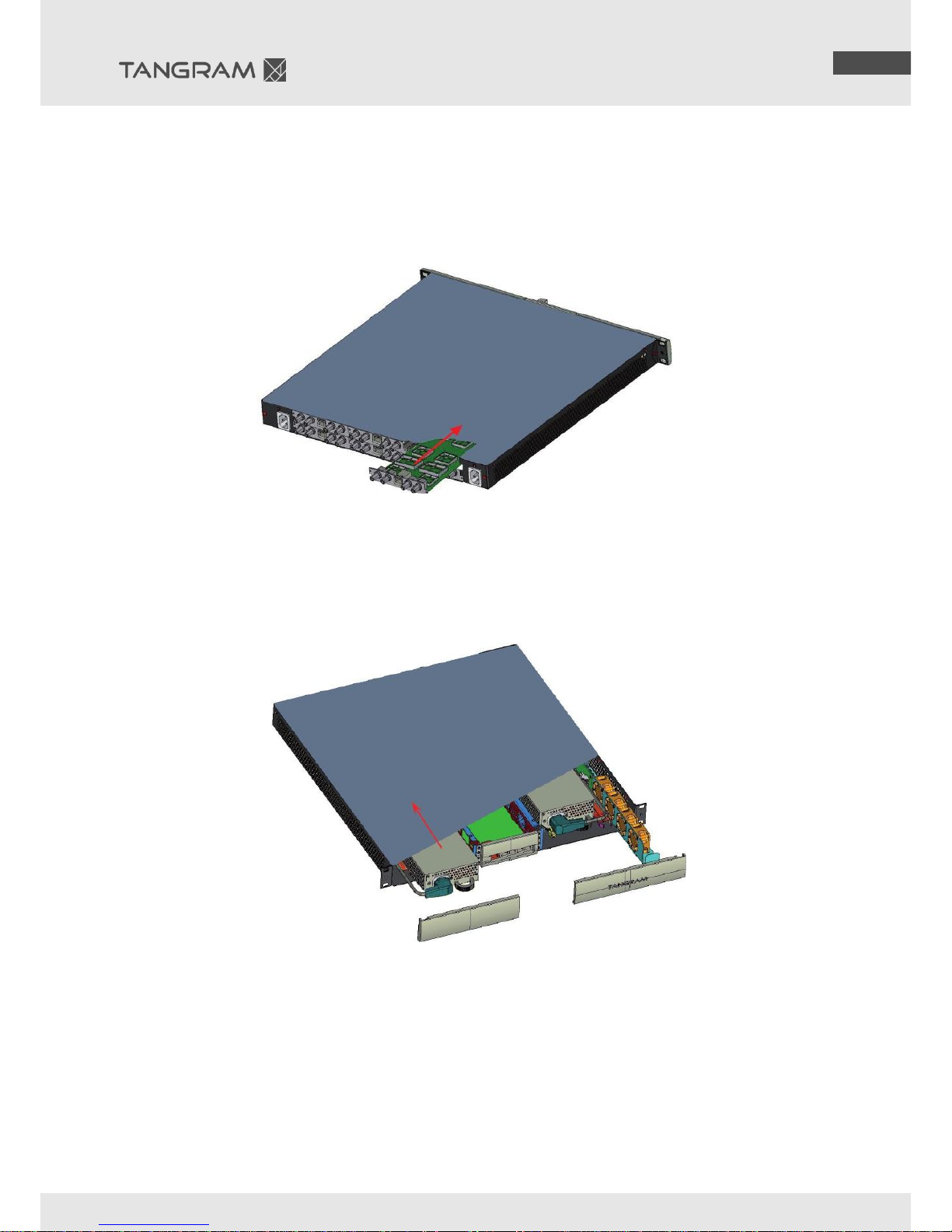
2.2 Assembling the redundant Power-Supply
Remove the cover plate from TANGRAM (a).
Insert redundant power unit (b).
Connect the redundant Power-Supply unit with an AC or DC power cable (c).
(Please note for DC PSUs, you need a cable montage set GT98)
(a)
(b)
(c)
Page 5
©WISI Communications GmbH & Co. KG
5 - 8
www.wisi.de
3 Fitting and connecting the cables
3.1 Rack fitting with montage set
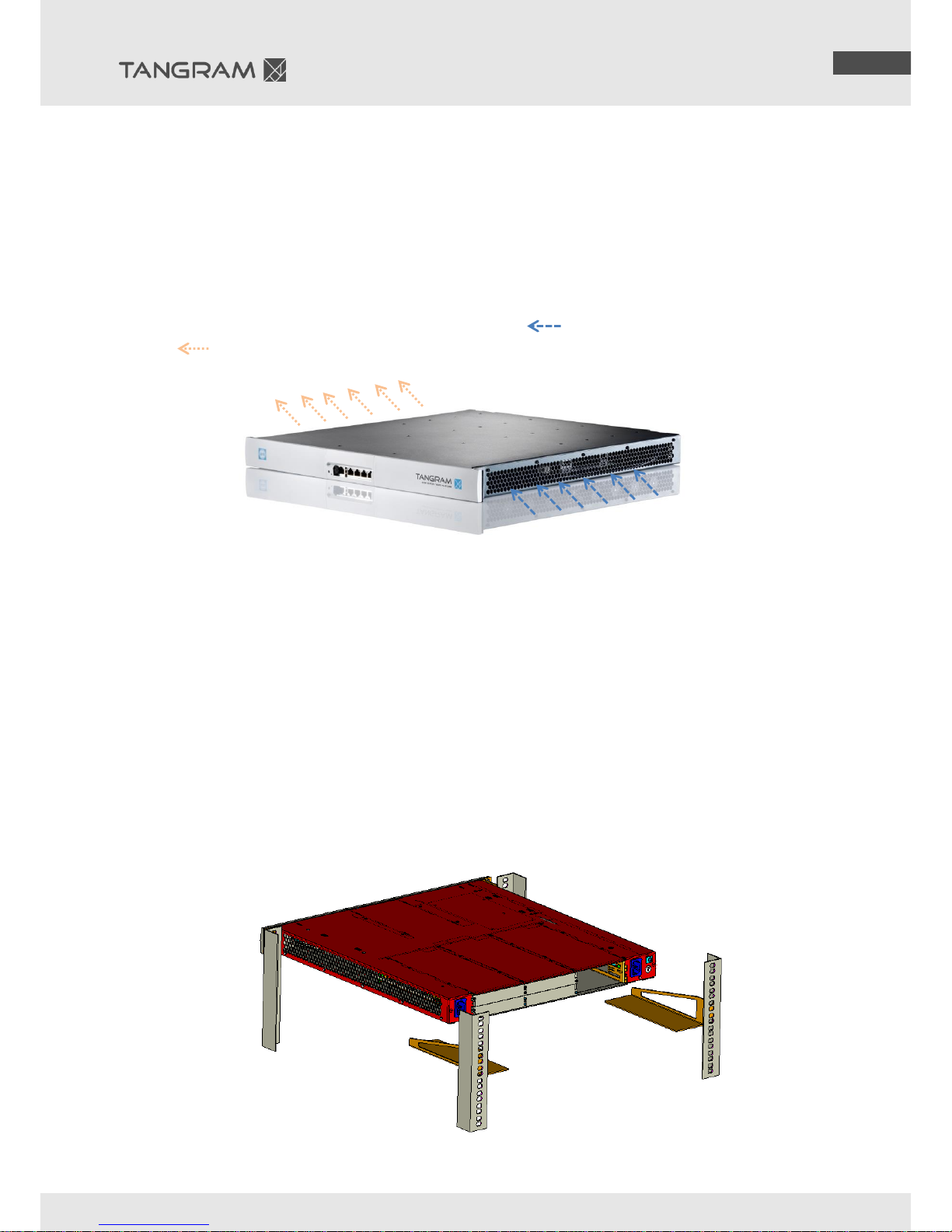
Tangram is a high-density device, so it is very important for stable operation that there is sufficient
ventilation and cooling.
Ensure that air flow is not blocked at the side vent holes.
Ensure that the guide rail do not cover the ventilation ways.
The air flow is shown in the following figure. The blue arrows [ ] show the incoming (cold) air, red
arrows [ ] – the outgoing.
The Tangram platform is mounted into a standard 19-inch rack using rack mount brackets for both the
front and rear of the system. Do not mount into any rack that obstructs clean air flow. Generally, an
aisle of at least 5 cm to all sides is the minimum distance to ensure proper air flow.
While Tangram does not require spacing above and below it, it is generally recommended that 1 rack
unit of spacing is left above and below, especially if non Tangram devices will be mounted above or
below it.
It is recommended in the top rack to install block ventilation to remove heated air. It is
mandatory if a fully closed rack is used.
For the installation it must be taken into account that the front brackets are not designed to
hold the chassis without additional support. Therefore, to ensure structural rigidity while
maintaining the free path for the passage of air it is recommended to use a back support.
Page 6
©WISI Communications GmbH & Co. KG
6 - 8
www.wisi.de
3.2 Backside
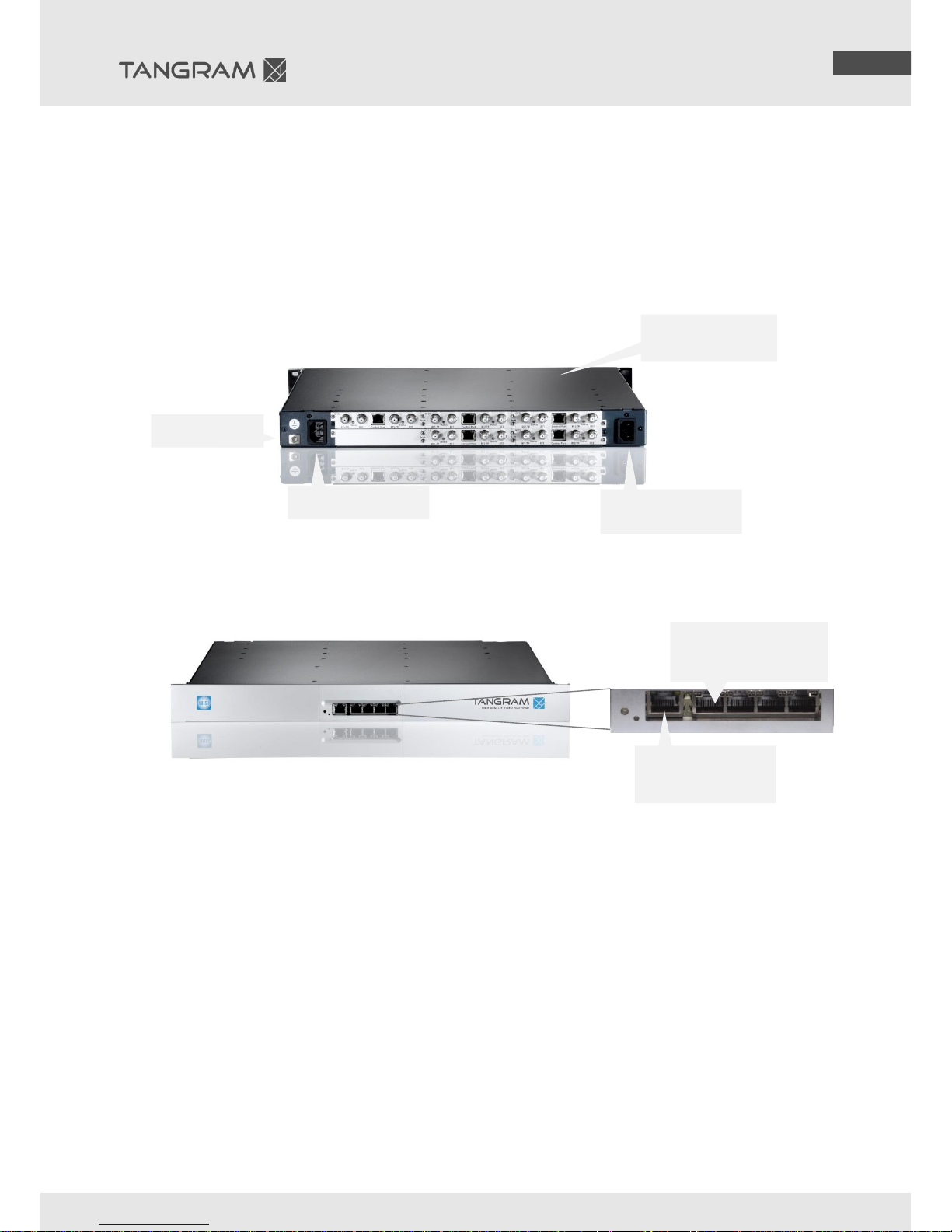
Connect the GT01 chassis with grounding (a).
Connect the GT01 Power-Supply with AC (b) or DC power; it is depending of the ordered article
number.
Connect the Input-Signals (for example GT31 DVB-C/S/S2/T) or Output-Signals (for example
GT23 QAM) to each module.
The control port of each module is only for a local management (default IP address:
192.168.1.20).
3.3 Frontside
Connect a network cable on the Management Port for GT11
Connect a network cable on the streaming ports
4 Connecting to the TANGRAM Web UI
4.1 Default IP address
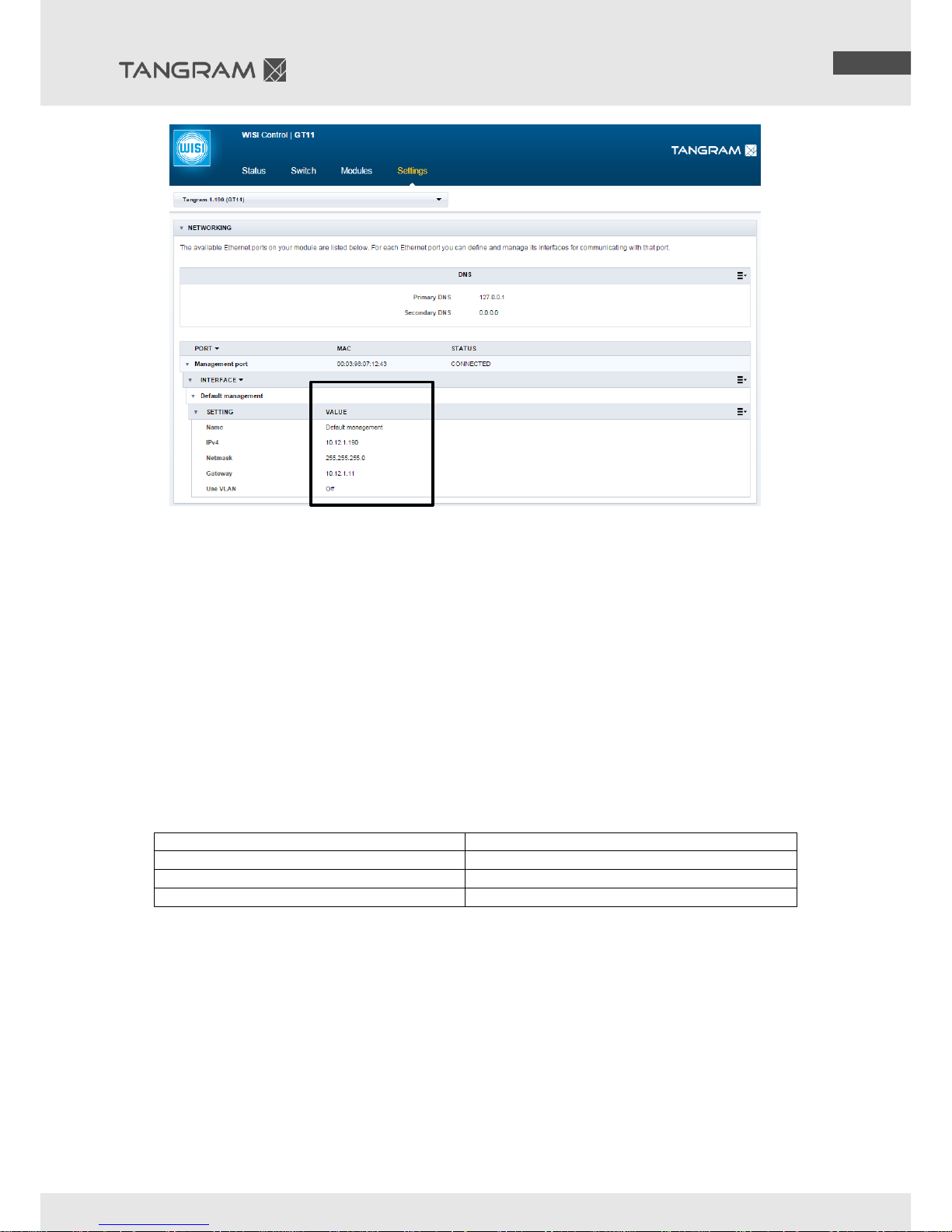
Connecting to the default IP address: 192.168.0.11
The default IP address of the TANGRAM GT11 (internal Switch) on the Management port is
192.168.0.11. Set the IP address on your computer or for your network adaptor to an address in the
same address range. Use a standard web browser to connect by typing the IP address of the TANGRAM
in the address field.
4.2 Changing IP address
It is recommended to change to a unique IP address in your network. You can change the IP address
under WISI Control GT11 Settings Networking Edit Settings
(a) grounding
(b) AC power cable
(b) AC power cable
redundant PSU
Control Port for local
Management
1x RJ45 port for
manage the GT11 and
all modules
4x RJ45 ports (internal
switch) for input/output
transport streams
Page 7
©WISI Communications GmbH & Co. KG
7 - 8
www.wisi.de
5 Important information and maintenance
5.1 Operating System notes
The ventilation is important to prevent the overheating of the Tangram.
Ensure that the ventilation-ways are free.
Ensure that there is free space at the rear side.
Ensure that the guide rail not cover the ventilation ways.
Operation of the Tangram is only allowed while the fans are running.
The Tangram module includes a temperature-sensor, so if it is too hot for the Tangram module,
it stops running without a warning signal.
If the fan-unit is running, the DC-power unit works correctly
Condition
Limits
Permissible operating temperature inside
-5…+45 °C (ETSI EN 300 019-1-3 Class 3.1)
Recommend operation range of
+15…+35 °C
Humidty
Up to 95%, non-condensing
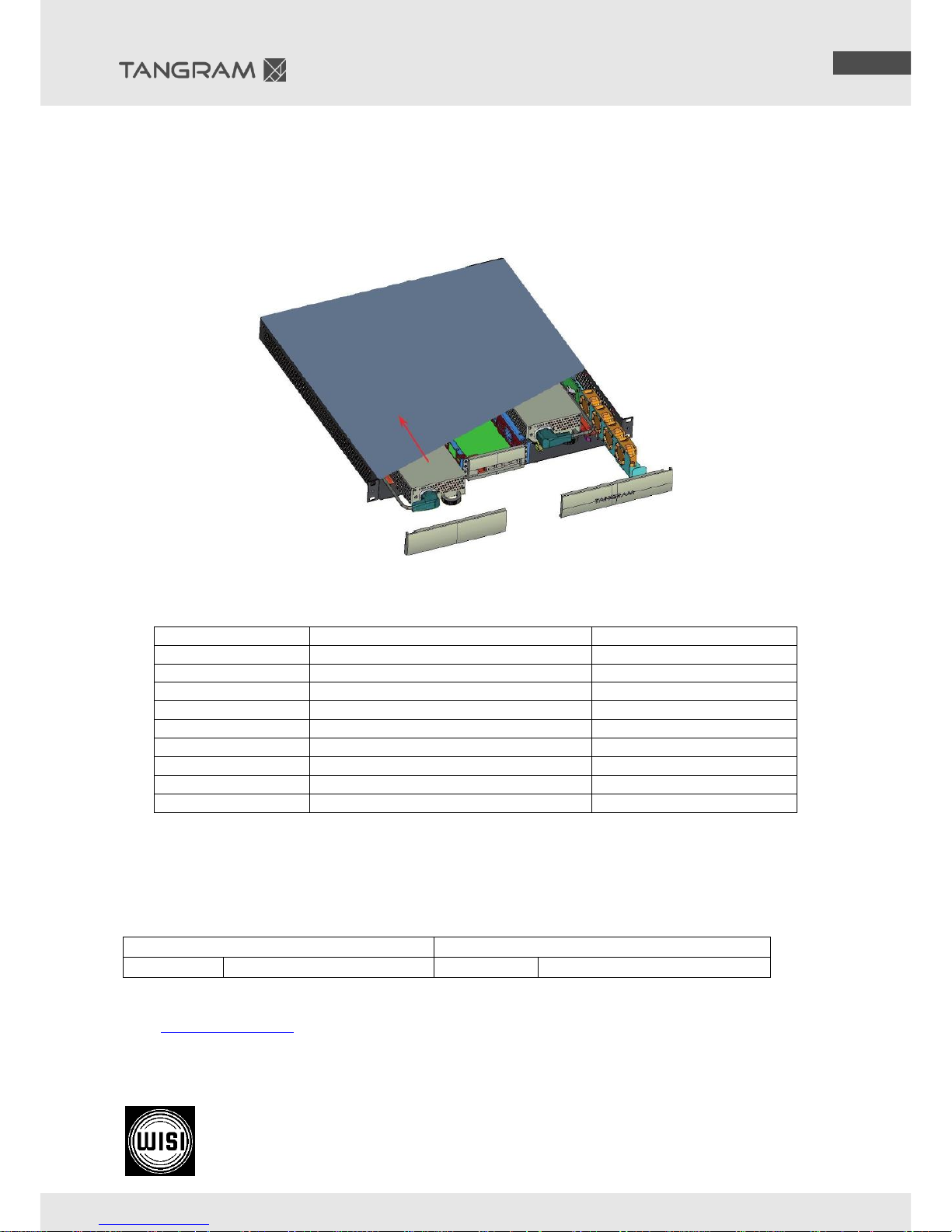
5.2 Changing the Fan-unit (a)
Changing the fan unit is possible while device is running
Remove the front cover plate
Pull on the handholds and pull out the fan unit
Insert the new fan unit
Page 8
©WISI Communications GmbH & Co. KG
8 - 8
www.wisi.de
5.3 Changing the power supply – GT55W (b)
If there is a redundant power supply unit inside and working, it is possible to change 1 power
unit while device is running.
Disconnect the AC or DC Power cables and remove the power-supply-unit.
Insert the new power-supply-unit and connect the power card.
5.4 Article Numbers – Spare Parts
HW Name
Description
Number
GT01W0048
Tangram chassis, 48V DC
72235
GT01W0110
Tangram chassis, 110V AC
73597
GT01W0230
Tangram chassis, 230V AC
71161
GT55W0048
Redundant PSU, 48V DC
71265
GT55W0110
Redundant PSU, 110V AC
71265
GT55W0230
Redundant PSU, 230V AC
71234
GT11
GT11 Switch unit
71156
GT98
Cable montage set for 48V DC
73344
Fan unit
27245
6 Service and Support
For support information and help, please contact our support organisations by submit a ticket via
wisiconnect.tv portal. Support requested by email will be not processed.
WISI Communications
WISI Norden AB
Telephone:
+49 7233 66-621
Telephone:
+46 13 21 09 15
Visit www.wisiconnect.tv for more information about configuration, Software, Entitlements and
Product information.
Technical Modifications reserved. WISI cannot be held liable for any printing error. 412919d/ 04.15
WISI Communications GmbH & Co. KG
Empfangs- und Verteiltechnik
Wilhelm-Sihn-Strasse 5-7 Inland: Phone +49 7233-66-0 Fax -320
75223 Niefern-Öschelbronn Export: Phone +49 7233-66-280 Fax -320
(a)
(b)
 Loading...