

Page 1
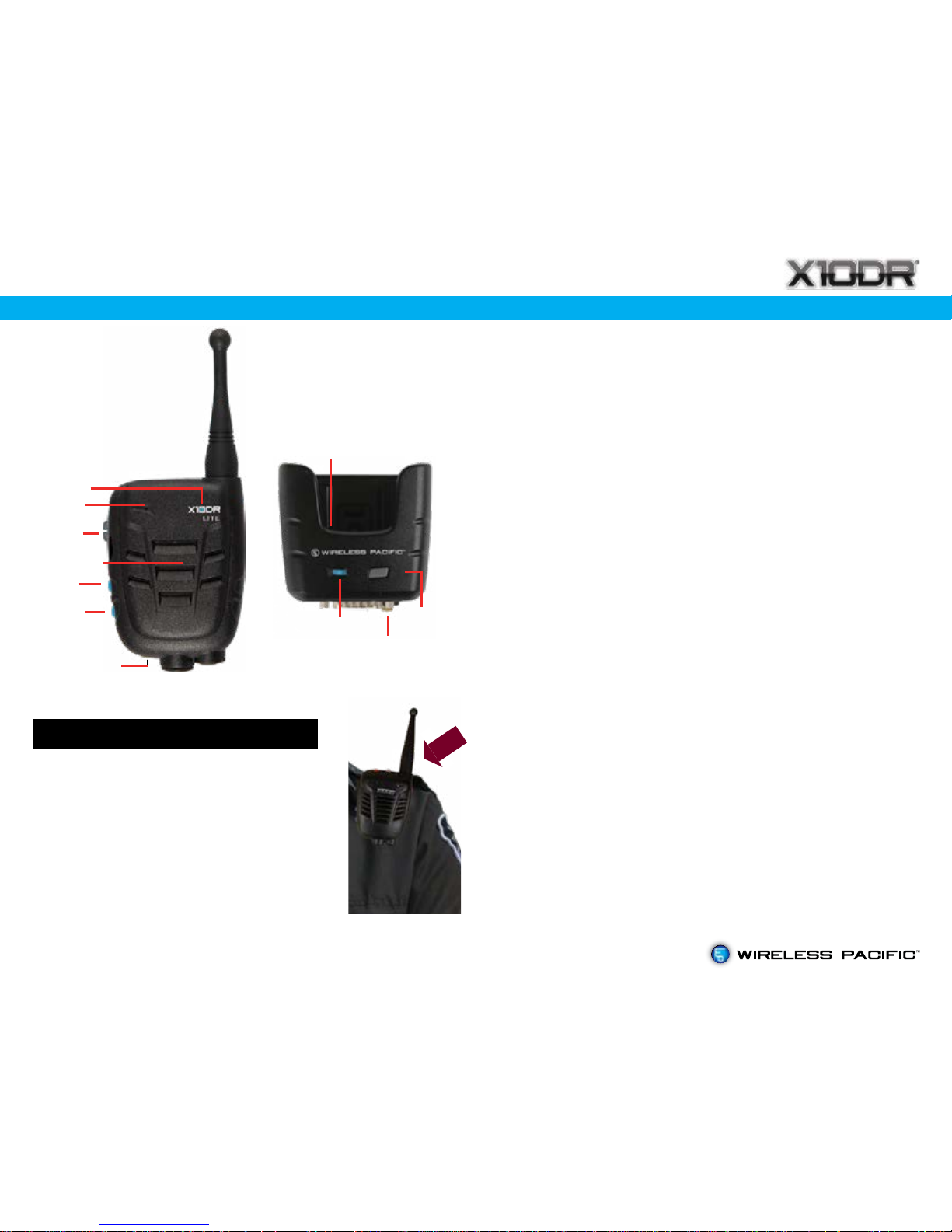
Handset
Wireless
Microphone
Gateway
Mobile
Charger
Antenna
PTT
Charging
Mic
Speaker
Status
light
Status light
Charging
contacts
Lite User Card
Gateway Off/On: press for 1 second, gateway and
blue LED turns on. Press again for 1 second and
gateway and blue LED turn off.
Handset Off/On: Put handset in powered gateway
to turn on handset. Start up tones will sound. To turn
off, press PTT, Vol + & Vol - buttons simultaneously for
2 seconds until handset and blue LED turn off.
Volume + : adjusts speaker volume louder.
Volume - : adjusts speaker volume softer.
Microphone: Speak 2 to 3cm from Mic port with a
normal strength voice. Do not yell.
PTT: press to talk - release to listen.#
DC charging: Handset beeps to notify correct
seating when rst placed in gateway. The blue
status LED momentarily blinks every 10 seconds to
indicate charging mode. Constant blue means
battery is fully charged.
Speaker: Delivers received speaker audio. Normally
mutes when inserted into gateway.
Status light: glows blue when fully operational.
Flashes when “out of range” or when its paired unit
is turned off.
Antenna Connector: Allows connection of longer
range external antenna or replacement of the
short range internal type.
# When out of range the unit will slowly beep when
PTT is pressed.
Manual
Off/On
Antenna
Connector
Vol +
Vol -
Wearing the X10DR Handset
Note: Your X10DR will provide
longer range when worn with the
antenna protruding above your
shoulder.
Always wear on your shoulder
for best performance
Download & Read Lite User Manual:
www.x10dr.com/X10DR_Lite_user_manual.pdf
Operation
Page 2
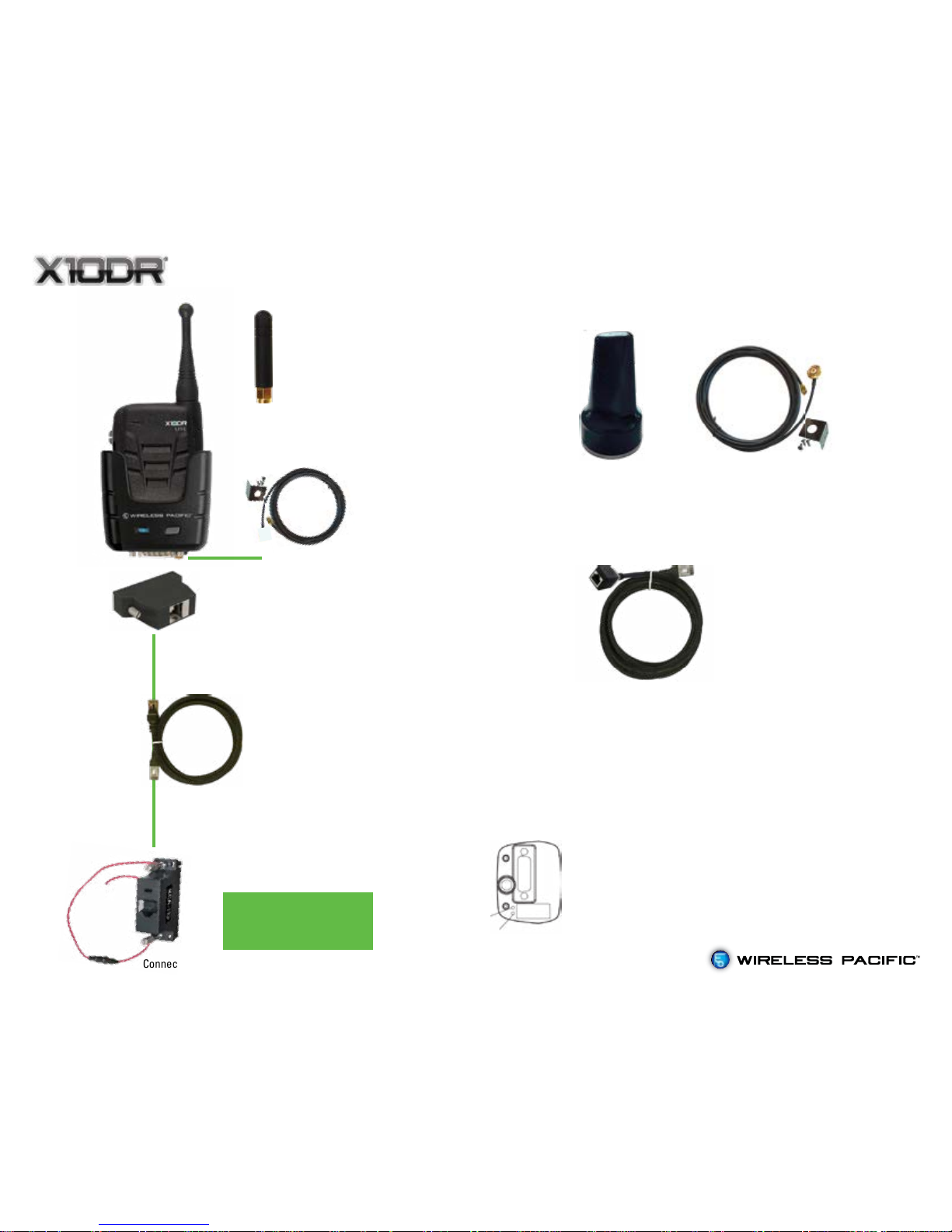
Lite basic installation
XIC-1.5 interface cable
(included in package)
XMPA “Sharkfin” multi-polarity antenna roof or rack
mount includes 5.2 meters of low loss LMR200 type coax
and terminated RP SMA male connector. Provides improved
coverage especially non-line of sight. (order separately)
Mount on a vehicle roof rack
etc - clear of obstructions
in the direction you wish to
predominately communicate.
If less than maximum range
is required,you can choose
to not fit coax cable kit
and instead attach XMCA
antenna directly to the base
of X10DR Lite gateway.
Connects to the rear
interface connector
on your mobile radio
Connect RED wire to vehicle’s permanent battery supply.
Radio specific XCA adaptor
-specify type when purchasing
(included in package)
XMC-RJ45 adaptor
(included in package)
Alternate installation accessories
XEC-4.5
4.5m extension cable
Use when radio is mounted
remotely in vehicle trunk.
(order separately)
Installation Notes
Please refer to www.x10dr.com/lite
Some radio types need minor programming or internal
reconfiguration to ensure correct X10DR operation. Please
review the installation instructions available from the X10DR
website for model specific details.
The two trimpots on the base of the gateway have been
factory set to suit a great variety of popular mobile radios.
These can be adjusted, carefully, by a trained technician so
as to increase/decrease the audio levels to better suit your
particular model radio. See the X10DR Lite user manual for
adjustment details. Download at: www.x10dr.com/Lite
XMCA Antenna
XMCAK Antenna cable kit
(included in package)
VR1 Tx
VR2 - Rx
 Loading...