

Page 1

Sub-1GHz into The Internet
P-900 IoT Stations.
Operation Manual
[Beta Version]
No GSM Module inside
No SIM card inside
No Telecom service charge
https://youtu.be/afCf-qECu3o
Page 2

1
Table of Contents
1. Introduction ............................................................................................................... 2
2.. Appearance of P-900 IoT station ............................................................................... 5
3. Top case view and LED's function ............................................................................. 6
4. Bottom case view and serial account number ........................................................... 7
5. Rear case view .......................................................................................................... 8
6. Installation IoTStations APP for your system ........................................................... 9
7. Connect to internet .................................................................................................. 12
8. Addition the new IoT stations on line ....................................................................... 13
9. Addition alarm devices on line ................................................................................. 15
10. Reading alarm message, and aleart sound setting…. ............................................ 18
11. System reset…. ...................................................................................................... 19
12. Specification …. ..................................................................................................... 20
Page 3

2
1. Introduction
Before,
The POCSAG Transmitter can only call to pagers directly.
Page 4

3
NOW !
The POCSAG Transmitter can still call to pagers directly and
At the same time via the P-900 IoTStation sends alarm message to your smart
phone .
Page 5

4
How it works? The P-900
IoT
system !
a. Sub-1GHz POCSAG transmitter (148,315,433,426,457,868,915...MHz)
such as our products Pendent TX, Watch TX, Alarm TX, Nurse call systems
etc.
(Items from WDIT : M-810,M-820,M-840,WD2,M-838,M-909K,M-916,
NP-14, EM-898.....)
b. P-900 IoTStation: When receives the POCSAG code, which will be
transferred to internet through the Wi-Fi AP.
c. Via Wi-Fi AP connect with the PSTN Internet
e. Via internet sending the alarm message to your smart phones...
Page 6

5
2. Appearance of the P-900 IoTStation.
Page 7

6
3. Top view of the case and LED functions.
Power ON Indication
Indicate the power status: light would be on when power is on.
ON the Internet Indication
Indicate the Wi-Fi status: light would be on when connected to a Wi-Fi.
Wireless Communication indication
Indicate the sub-1GHz contact and system reset status:
Fast flash means the ready to make the system pairing; light for pairing accept.
Page 8
7
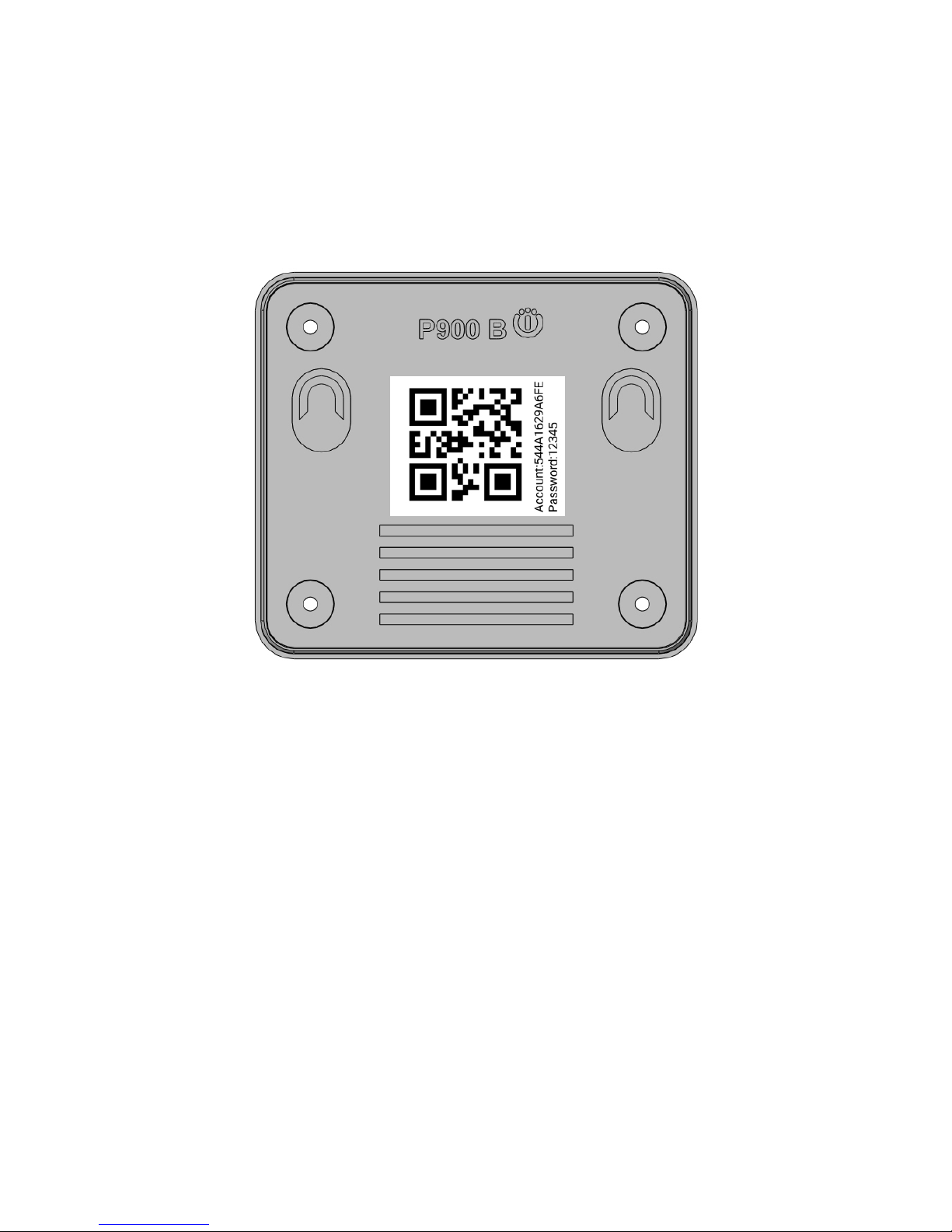
4. Bottom view of the case and serial number etc…
QR code icon
The QR code stickers on the rear case shows the account number for system registration
and to help adding additional IoTStation into IoT APP of system.
Page 9

8
5. Rear side view of the case:
LAN RJ-45 Jack
The RJ-45 jack is for WAN Ethernet cable use only. The Wi-Fi version do not use this port.
12V1A
The system power supply DC in connection: DC12V >0.5A
Micro USB Jack
For the firmware upgrade purpose and also for the dealers software programming.
Match/Reset button
To match the assigned transmitter devices pairing and for the system reset.
Page 10
9
6. Installation of IoTStations App for system
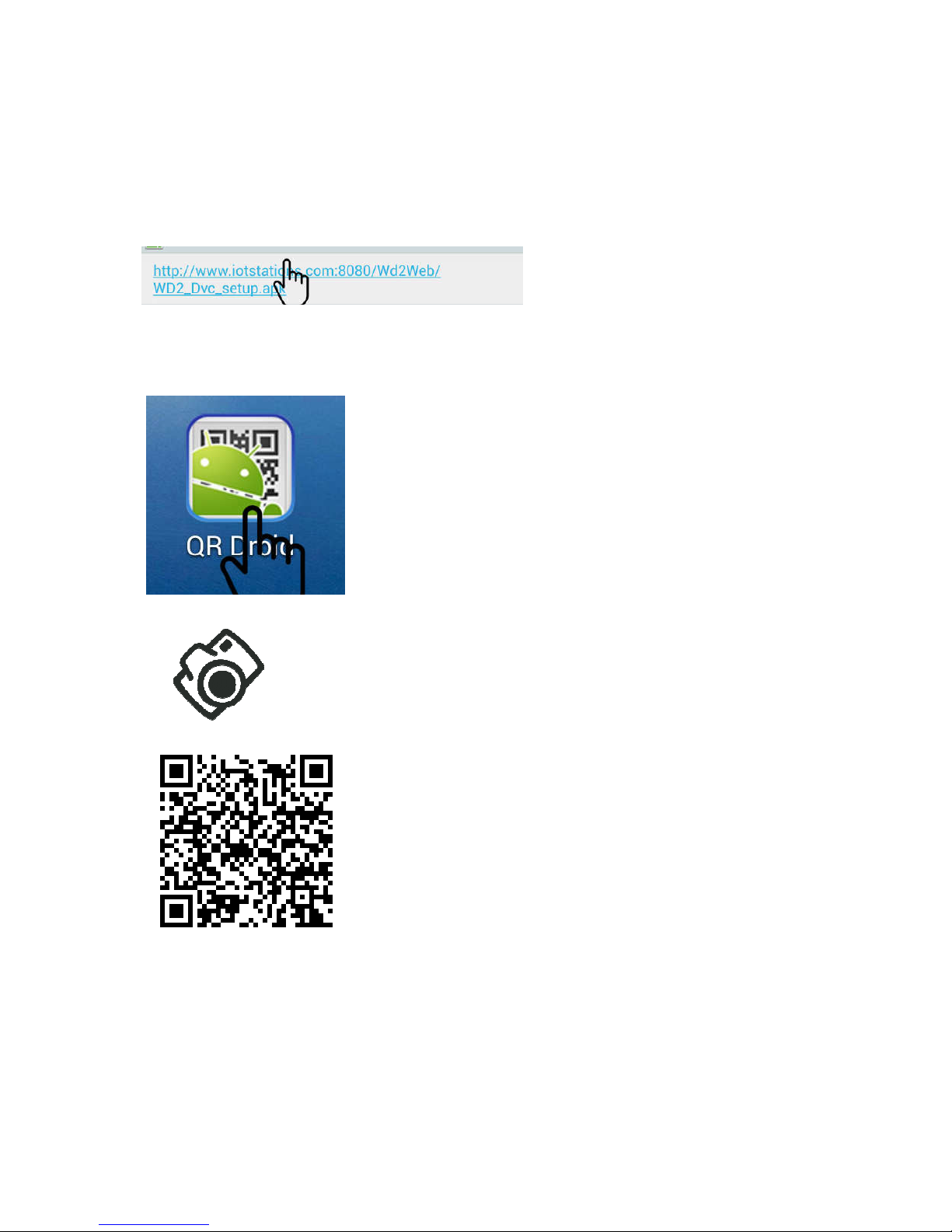
6-1 Step1: Download APP from Internet
http://www.iotstations.com:8080/wd2web/WD2_Dvc_SetupRingTone.apk
Click for download.....
Or
Use QR code reader to scan the QR code of the following via your smart phones
Page 11
10
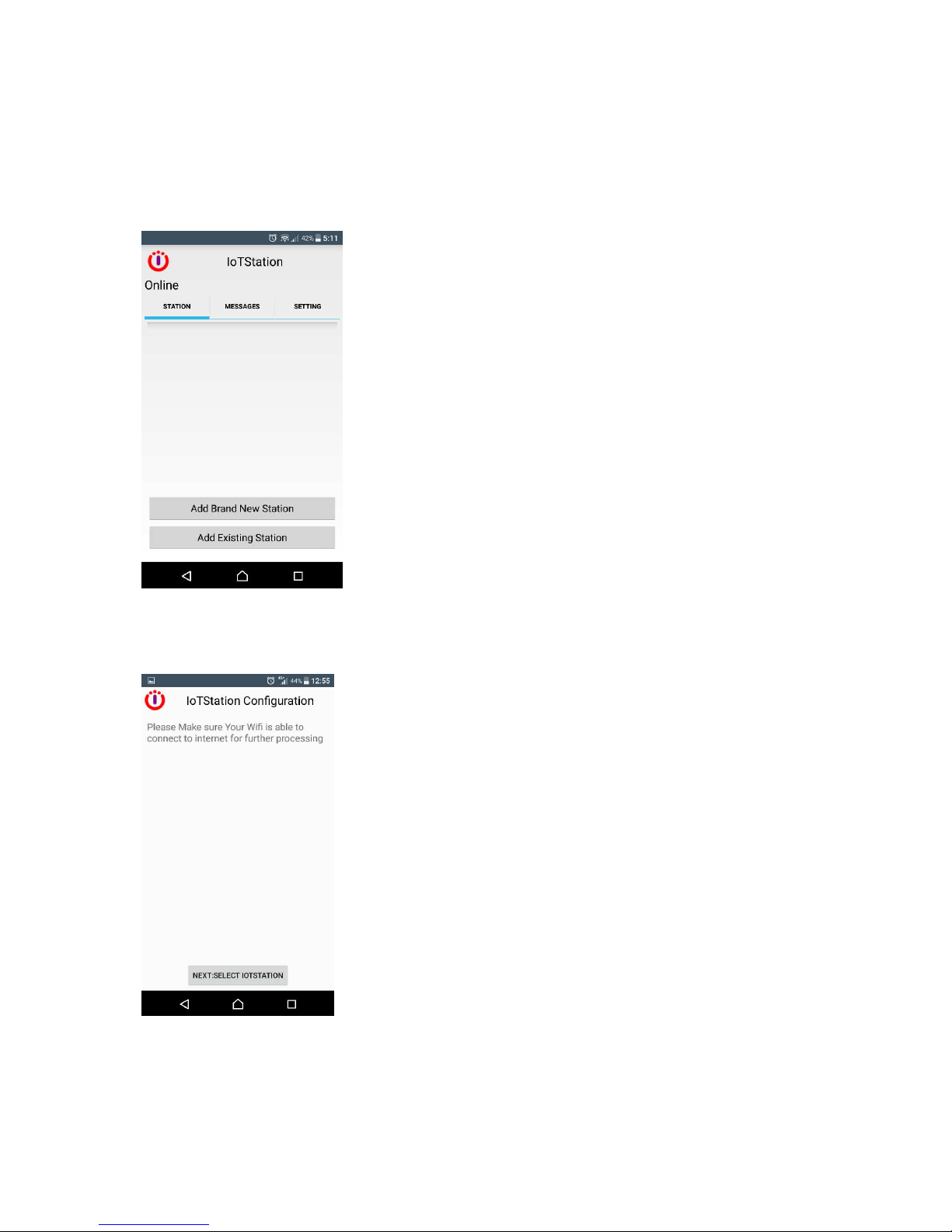
6-3. Step2: After completing download IoTStations APP. Then install the IoTStation app.
Then Open the IoTstation App
also click on "Add Brand New Station"
Please make sure your mobile device is connected to a WiFi, the same WiFi will be used
to connect to IoTstation.
Page 12

11
6-4. Step4: Click on "NEXT:SELECT IOTSTATION"
6-5. Step5: Select the IoTStation to add, and click on "NEXT:INPUT IOTSTATION
PASSWORD".
Page 13

12
6-6. Step6: Please Set the Password for the IoTStation
Please Enter the Password for your WiFi.
Password can be set within 4-7 digits English and Number combined.
Then click on the "SAVE,NEXT:CONNECT TO WIFI".
6-7 Step7 Then click on "CONNECT TO INTERNET".
After successfully setting the IoTStation, you should see a new IoTStation added here.
Page 14

13
7. Add on additional IoTStation.
7-1. Click on “Add Existing Station”
7-2. Use your smart phone to scan the QR code on the bottom side of IoTStation.
Page 15

14
7-3. key-in the password into your screen...
7-4. click [Save]..
Successfully added the new IoTStation..
Page 16

15
8. Add the alarm devices to the IoTStation.
8-1. Press the Match/Reset button on the side of IoTStation for one second, and the
Sub-1Ghz led light will be blinking.
8-2. Press the transmitter's TX button and make transmitter devices an activity within 10
sec. If added successfully, the led light blinking will be stop.
Page 17

16
8-3. Test the peripheral and just add to activate the peripheral again. If added successfully, the
mobile device should be getting a message.
Page 18

17
8-4. Rename the alarm messages, click on rename icon.
9-5. key-in the name of new alarm devices and then click [OK]
or
Page 19

18
9. smart phone side setting
9-1. Click STATION for select your IoTStation,
Example: [My house],[Office],[warehouse],[daddy at home]...
9-2. Click Message to view all alarm messages....
9-3. Click SETTING to set alarm Sound or/and Vibration...
Page 20

19
10. System reset.
10-1: When you are confused or missing of the system setup,
You can press Match/Reset button over 10 Seconds to reset the factory setting, and
try again.
(When reset is activated, IoTStation would go back to default setting)
Page 21

20
P-900 IoT Stations Specification
General
Operation temperature -25°C ~ 70°C
Power Supply DC 12V 1A
Case size: 80(L) x 70(W) 27(H) mm
Weight: 220g with AC adapter.
Wi-Fi Section
Wi-Fi Standard 802.11 b/g/n
Network Mode AP / Station
Transmission Rate
802.11b: 11Mbps
802.11g: 54Mbps
802.11n: 54Mbps
Transmitter Power
17.0 dbm @ 1 DSSS
17.25 dbm @ 11CCK
13.5 dbm @ 54 OFDM
Receiver Sensitivity
-94 dbm @ 1DSSS
-87 dbm@ 11 CCK
-73 dbm @ 54 OFDM
Frequency 2.412 - 2.484 GHz
Security Mechanism
Security: WEP-A/WPA-PSK/WPA2-PSK
Encryption:WEP64/WEP128/TKIP/AES
Antenna Internal on-board antenna
Sub 1 GHz POCSAG Section
Data Format POCSAG CCIR #1
Frequency (Synthesized).
can be programming by dealers
138-174MHz
430-470MHz
868-915MHz
Modulation 2FSK NRZ
Data Rate 512 bps/1200bps/2400bps
Receiver Sensitivity
-115dbm via loop antenna at 138-174MHz
-113dbm via loop antenna at 430-450MHz
-105dbm via loop antenna at 868-915MHz
Antenna Internal Loop antenna
Document Number:WP900ANDMN164641E
Version:3.07
Release Date:Dec.27..2016
 Loading...