

Page 1

Operating instructions
FLS 2000
FLS:
The intelligent,
natural
window ventilation
system
Page 2

Page 3

Version 2.0
FLS 2000 Operating Instructions
Page 4
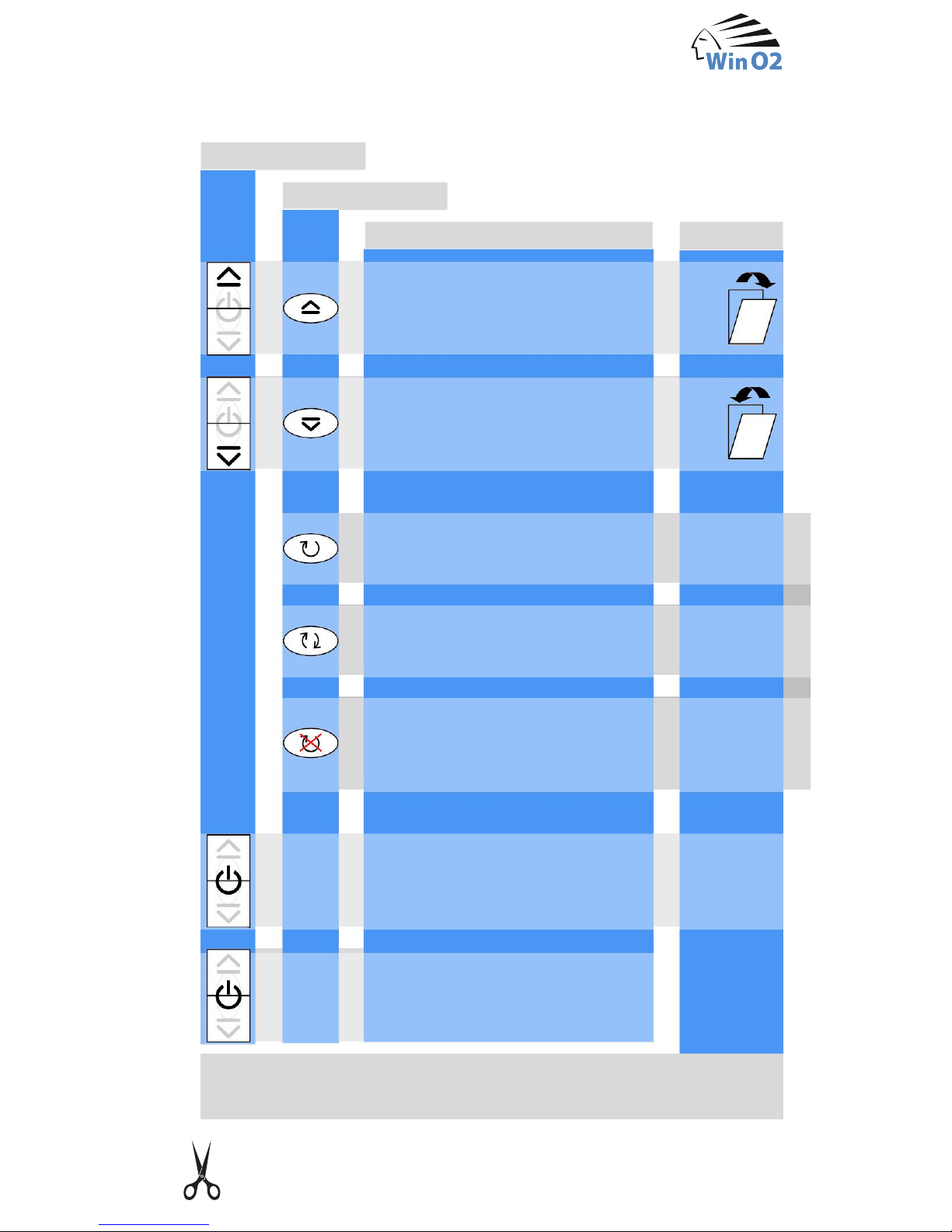
Brief instructions for FLS 2000
Close window
3s
off
off
flashing
continu-
ously lit
Manual switch
Remote control
Open window
green
Activate
Day programme
Switch off programme*
(window closes;
no programme active)
Switch off system
(remote control unit switched off)
Switch on system
3s
*OPENING/CLOSING possible, without display or time limitation.
Caution: Display switched off with system!
only FLS 2000 automatic
Function
Display
red
Page 5
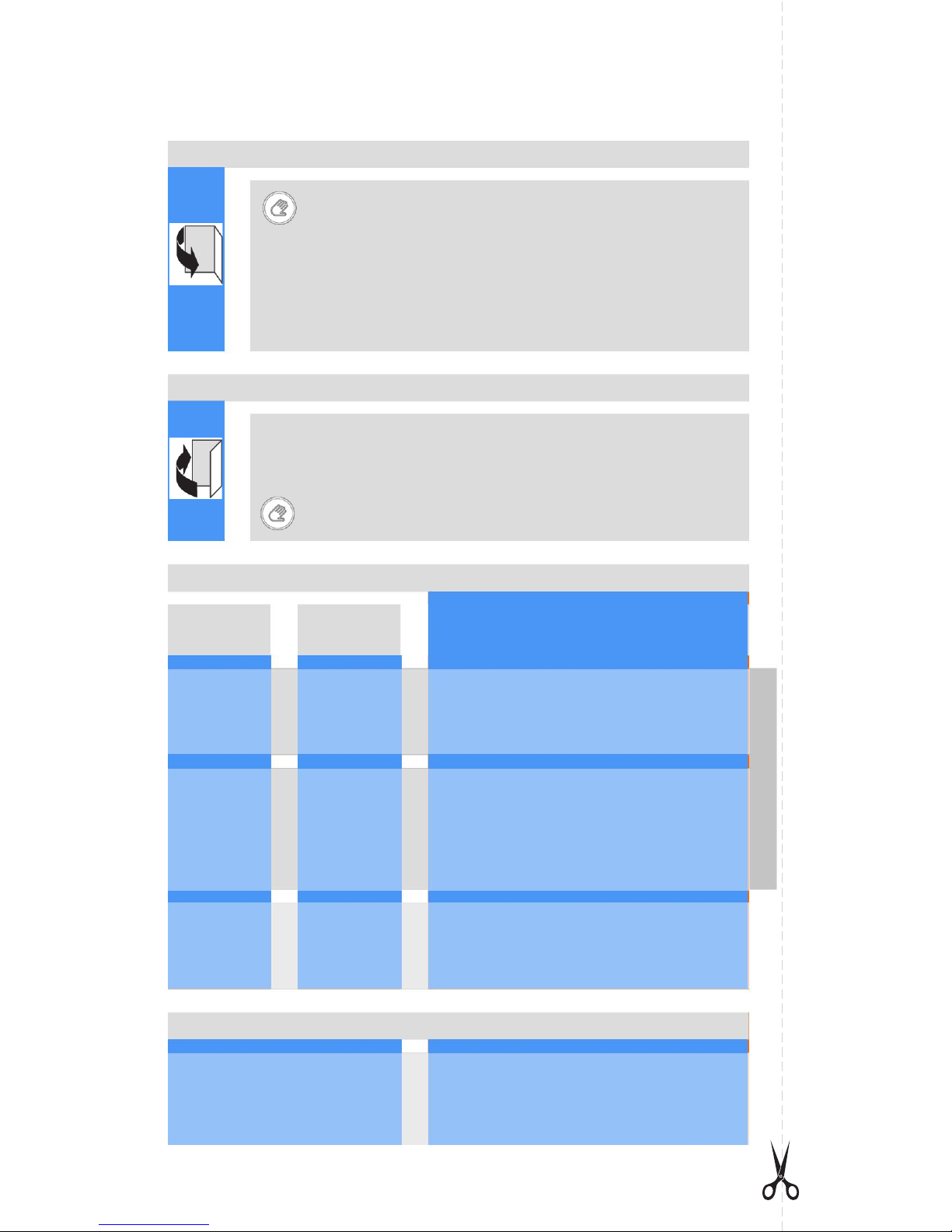
Brief instructions for FLS 2000
Opening the window completely See chapter 5
Press for three seconds until the display... off
Press the window shut and secure the linkage
Press the locking knob (carriage goes upwards)
Actuator moves to release position
Wait until display… ((flashes))
Pull
release lever downwards
and open window
Closing the window again See chapter 5
Press for three seconds until the display... reacts
What does the display mean?
State
Week
programme
Day
programme
lights
up Week programme active
((f
lashes)) Day programme active
off Programme off
only FLS 2000 automatic
Error See chapter 7
*When the state [open / closed] has been achieved; the display
lights
up red or green while the position is being approached
lights
up ((flashes)) Closed or closing
lights
up ((flashes)) Open or opening
((flashes)) Window is released
off System off or open/close system*
((((f
lashes fast)))) Actuator blocks upon opening
((((f
lashes fast)))) Actuator blocks upon closing
Page 6

1
. . . . . . . . . . . . . . . . . 13
Technical data . . . . . . . . . . . . . . . . . . . . . . . . . . . . . 19
1 Safety notes . . . . . . . . . . . . . . . . . . . . . . . . . . . . . . . . 2
2 Components of the FLS . . . . . . . . . . . . . . . . . . . . . . . 3
2.1 What does the FLS consist of?. . . . . . . . . . . . . . . . . . . . . . . . 3
3 The FLS 2000 automatic . . . . . . . . . . . . . . . . . . . . . . 6
3.1 The automatic ventilation . . . . . . . . . . . . . . . . . . . . . . . . . . . . 6
3.2 Adjustment of the ventilation intensity. . . . . . . . . . . . . . . . . . . 7
3.3 Unblocking the remote control . . . . . . . . . . . . . . . . . . . . . . . . 8
3.4 Programme changes. . . . . . . . . . . . . . . . . . . . . . . . . . . . . . . . 8
4 The operation of the FLS . . . . . . . . . . . . . . . . . . . . . . 9
4.1 Switching on the system . . . . . . . . . . . . . . . . . . . . . . . . . . . . . 9
4.2 Selecting the week programme. . . . . . . . . . . . . . . . . . . . . . . . 9
4.3 Changing the ventilation programme . . . . . . . . . . . . . . . . . . 10
4.4 Switching off the ventilation programme. . . . . . . . . . . . . . . . 10
4.5 Manual opening of the window . . . . . . . . . . . . . . . . . . . . . . . 11
4.6 Manual closing of the window. . . . . . . . . . . . . . . . . . . . . . . . 11
4.7 Switching off the system . . . . . . . . . . . . . . . . . . . . . . . . . . . . 12
5 Opening and closing windows
5.1 Complete opening of the window
. . . . . . . . . . . . . . . . . . . . . 13
5.2 Closing the window . . . . . . . . . . . . . . . . . . . . . . . . . . . . . . . . 14
6 What is my FLS trying to tell me? . . . . . . . . . . . . . . 15
7 Why is that not possible? . . . . . . . . . . . . . . . . . . . . . 17
7.1 Display of malfunctions . . . . . . . . . . . . . . . . . . . . . . . . . . . . . 17
7.2 Changing the batteries of the remote control unit. . . . . . . . . 18
8 Cleaning the FLS . . . . . . . . . . . . . . . . . . . . . . . . . . . . 19
9
Page 7

2
The window ventilation system is only used to open and close windows
in residential and work rooms. Its field of application ranges from office
and commercial buildings, storerooms and schools, through hotels and
hospitals up to houses and flats, winter gardens and holiday flats.
Recommendation: windows located on the ground floor should be
equipped with an FLS that opens in tilt position.
The FLS is operated with 24 V low voltage. The low voltage is generated
from the 230 V AC voltage in a plug-in power supply or a flush-mounted
power supply unit. The plug-in power supply must not be operated or
touched if its housing is defective, and it must not come into contact with
water either.
The window is opened and closed slowly.
It is nevertheless important to make sure that nothing can be caught
between a closing window and the window frame. When they are open, tilt
windows in particular are dangerous traps for children at play and for pets
such as cats and dogs.
Do not leave children or pets unattended near tilt windows.
FLS 2000 operating instructions
1 Safety notes
The window ventilation system uses the locking mechanism of the original
window. If the window is opened by the FLS in the ventilation position, it
cannot be unlocked from outside. Nevertheless, windows that are easily
accessible from outside should be additionally protected by lowering the
Venetian blinds.
Page 8
3
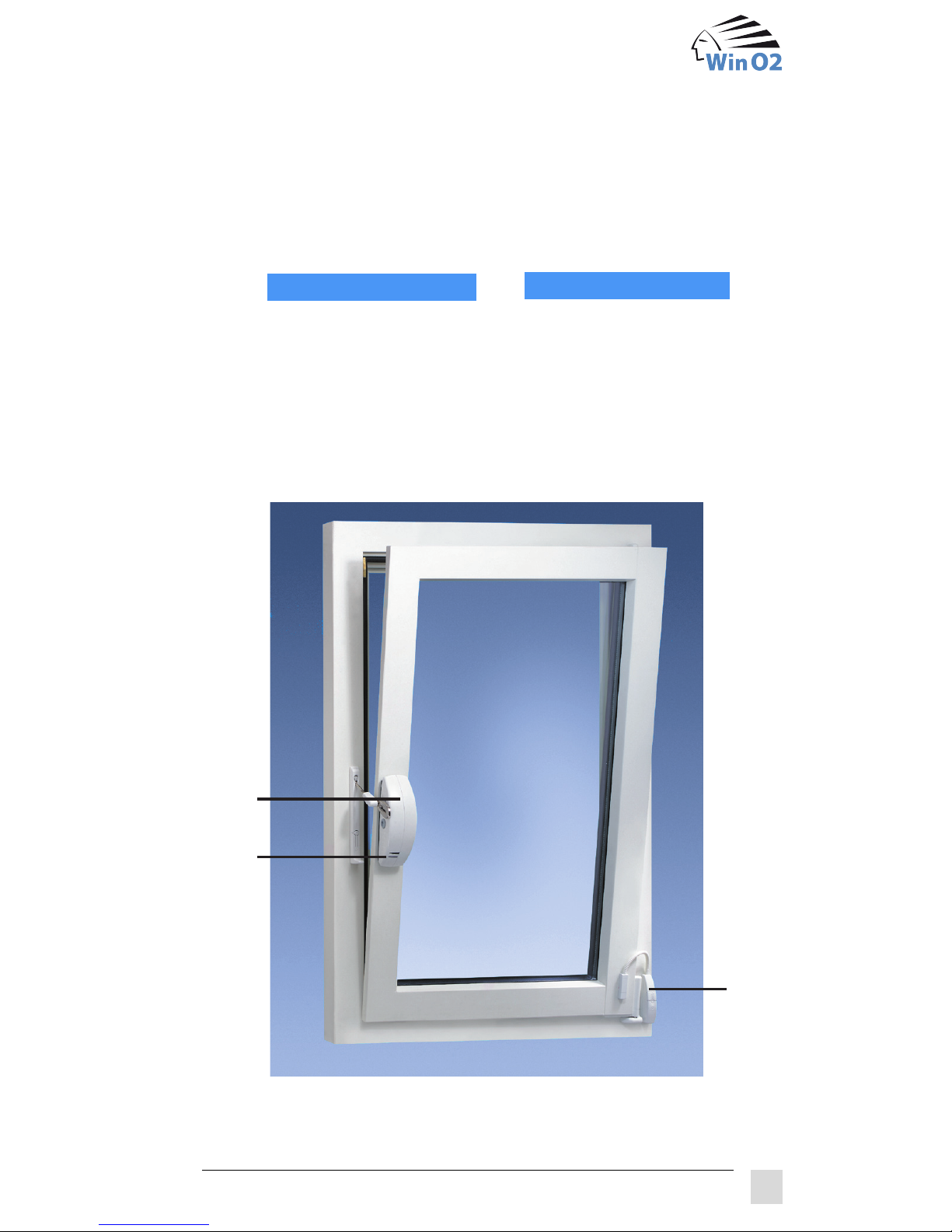
The FLS 2000 window ventilation system comes in two product types:
FLS 2000 automatic
and
In addition, the FLS 2000 automatic has automatic ventilation integrated
in the actuator and is connected to a weather sensor (C). The window
ventilation system can also be operated with a manual switch (D) and
a remote control unit (E1/E2). A plug-in power supply (F) or a flush-
mounted power supply unit supplies the voltage required to operate the FLS.
A
B
D
2 Components of the FLS
2.1 What does the FLS consist of?
FLS 2000 open / close
The FLS consists of a window actuator (A) with a status display (B).
Page 9
4
The window actuator (A) is mounted where the window handle is
normally located. It unlocks the window via the fitting and then opens it in
tilt or turn position.
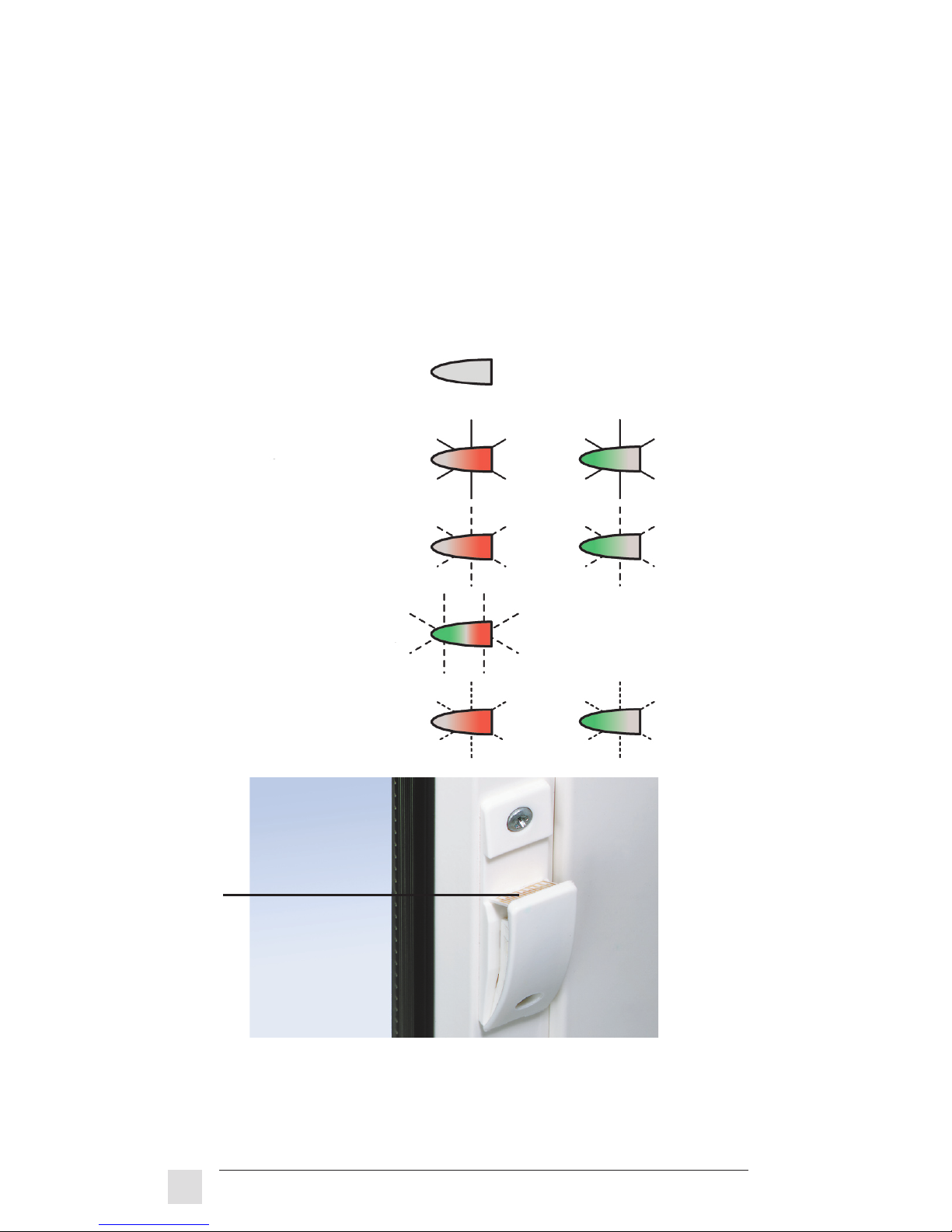
A status display (B) tells you in which state the FLS is. If desired,
the LEDs can be set to dark when the FLS 2000 automatic system is
configured.
The status display consists of a red and a green LED.
The following displays can appear:
The weather sensor (C) is mounted on the outside of the window. This
detects rain and snow as well as the temperature and wind force at the
window, and it closes the window if necessary.
C
off
lights up OR
flashing OR
alternately
flashing
Error OR
fast flashing
FLS 2000 operating instructions
Page 10
5
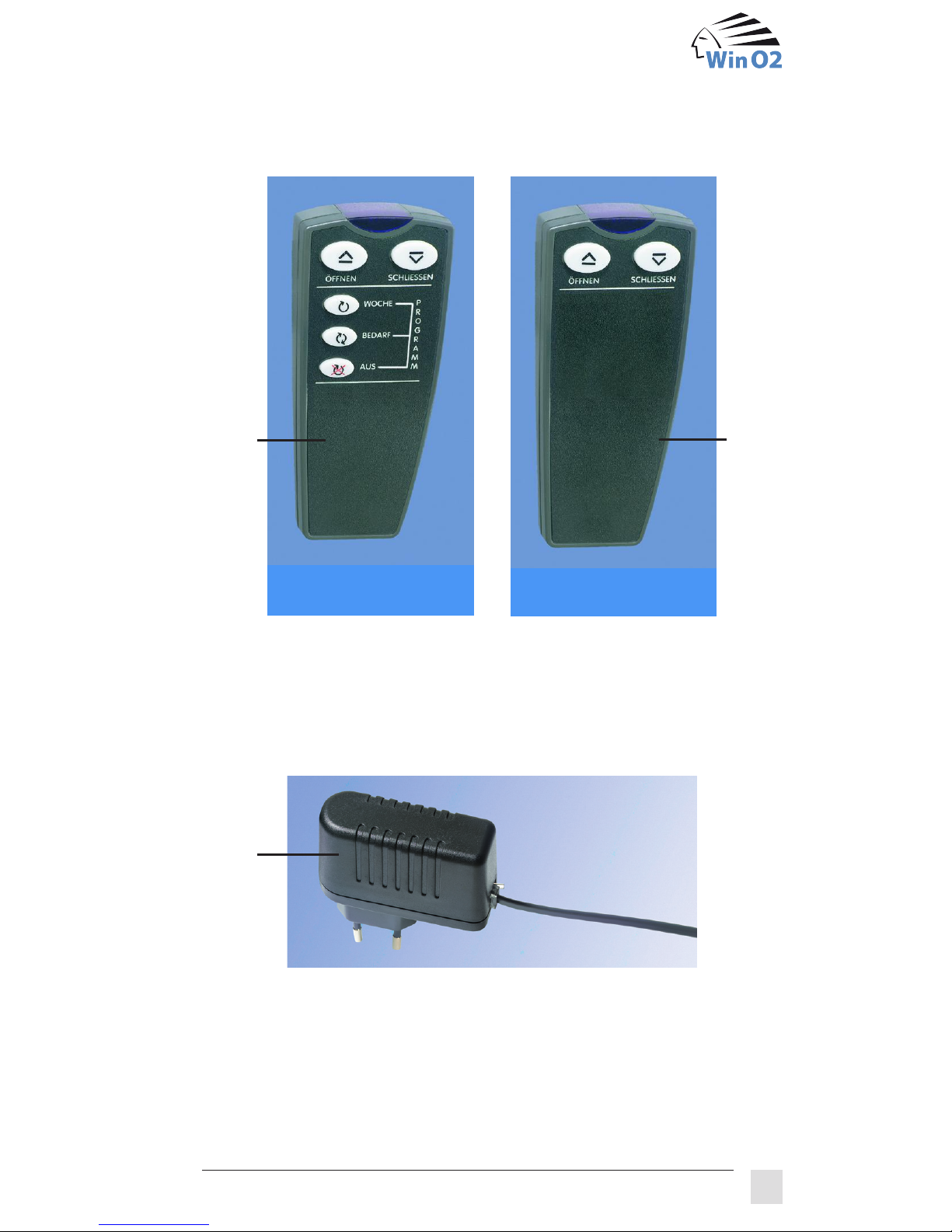
The manual switch (D) is for manual opening and closing of the window
or for switching the system on and off. It is normally located on the hinge
side of the window.
Opening and closing commands can be conveniently sent from a
workplace or chair with the remote control unit (E1/E2). This can also
be used to select the ventilation programmes “week programme” and “day
programme“ of the automatic ventilation (only with E1).
The plug-in power supply (F) provides the 24 V DC voltage needed for
the supply and must be plugged into a socket near the window.
F
E1
E2
automatic
open / close
Page 11

6
Automatic ventilation is integrated in the window actuator of the FLS 2000
automatic system and gives the command to open or close. There are two
ventilation programmes available that are adapted to your needs.
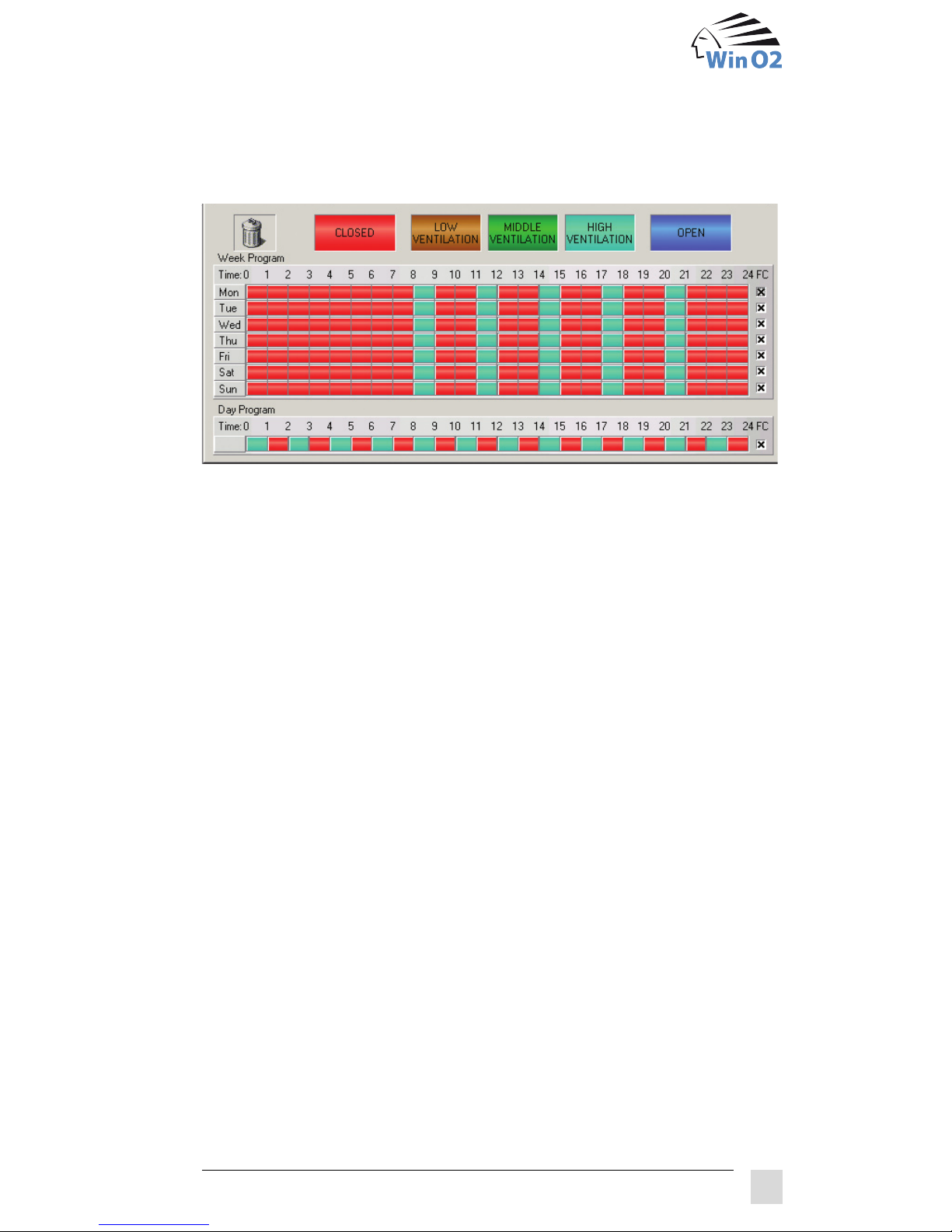
The week programme allows you to save the ventilation behaviour of an
entire week (Monday – Sunday). Each day of the week can be organized
individually. You define when the window should be open or closed. You
can also specify the ventilation intensities (high – medium – low) for a
period of time, and the FLS will ventilate independently and as much
as necessary. The ventilation time depends on the prevailing difference
between the inside and outside temperature.
If the threshold values specified in the system are exceeded because
the ventilation creates too much draught, the wind blows too strongly, or
the inside or outside temperatures are too low, the window will be closed
slowly. If safety is endangered because it is raining against the window,
however, the window will be closed quickly.
The FLS can also be configured to open the windows every night during
the summer months to cool off the rooms (night cooling).
Especially for winter gardens, the window can be opened automatically if
an upper temperature threshold is exceeded.
It is also possible to specify times when the remote control unit is blocked
and the window can only be operated via the manual switch.
3 FLS 2000 automatic
3.1 The automatic ventilation
FLS 2000 operating instructions
Page 12
7
The day programme saves the ventilation behaviour of a single day. This
can be used when there is an increased demand for ventilation or if you
want to ventilate your holiday flat regularly even when you are not there
(minimum ventilation).
Manual opening and closing is always possible even when neither of the
two ventilation programmes is active. If you enter a manual command
even though the automatic ventilation is running, this command will be
valid for a defined period of time (manual operation time) and the FLS
will subsequently return to automatic ventilation. Safety criteria (weather
conditions at the window) are always considered, however, unless you
want to force the window to open (see chapter 4.5).
It is also possible to open the window completely (see chapter 5).
If the FLS window ventilation system ventilates too much or too little, you
can adjust the ventilation intensity of the FLS yourself.
If you want to ventilate more, press the two buttons of the manual switch
and the “Open” button of the remote control unit at the same time. This
increases the ventilation unit intensity by 1 stage.
If you want to ventilate less, press the two buttons of the manual switch
and the “Close” button of the remote control unit at the same time. This
decreases the ventilation unit intensity by 1 stage.
A range of ± 3 stages is available for adjustment. Adjustments that have
been performed are not displayed, however.
3.2 Adjustment of the ventilation intensity
Page 13

8
Your remote control unit can be blocked in programme mode. If you would
like to select another programme, the remote control unit first has to be
released. To do this, briefly press both buttons of the manual switch at the
same time. You can then select the desired programme with the remote
control unit. Please note that the remote control unit may also be blocked
in the newly selected programme.
If you would like a different configuration for the week or day programme,
please contact our sales partner for reprogramming.
You can also buy a programming interface and software for the FLS.
Our sales partner is also responsible for repairing, replacing and disposing
of the device.
3.3 Unblocking the remote control unit
3.4 Programme changes
FLS 2000 operating instructions
Page 14
9
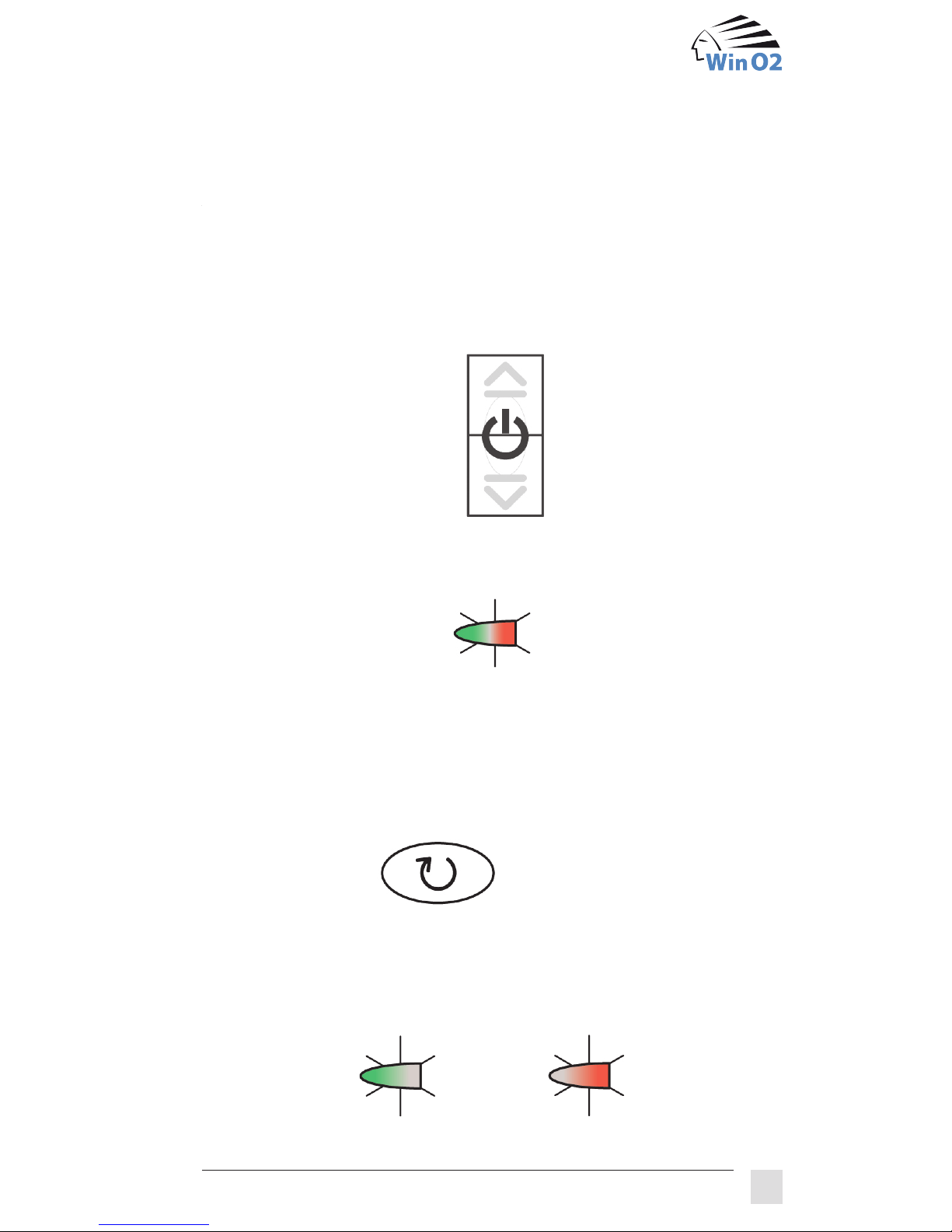
When the FLS is switched off, it does not react either to commands from
the remote control unit or to buttons pressed on the manual switch.
To switch on the system, press the “On” symbol on the manual switch, in
other words both buttons at the same time, for 3 seconds
The FLS always answers registered commands by simultaneously lighting
the red and green LED for a short time.
It subsequently returns to the last state that was selected.
Point your remote control unit in the direction of the window actuator and
press the „Week“ button:
The week programme is now activated. One of the two LEDs is now
constantly lit. If the green LED is lit, the window is closed or closing. If the
red LED is lit, the window is open or opening.
*only FLS 2000 automatic
Manual switch 3 seconds
Week
OR
4 The operation of the FLS
4.1 Switching on the system
4.2 Selecting the week programme*
Page 15
10
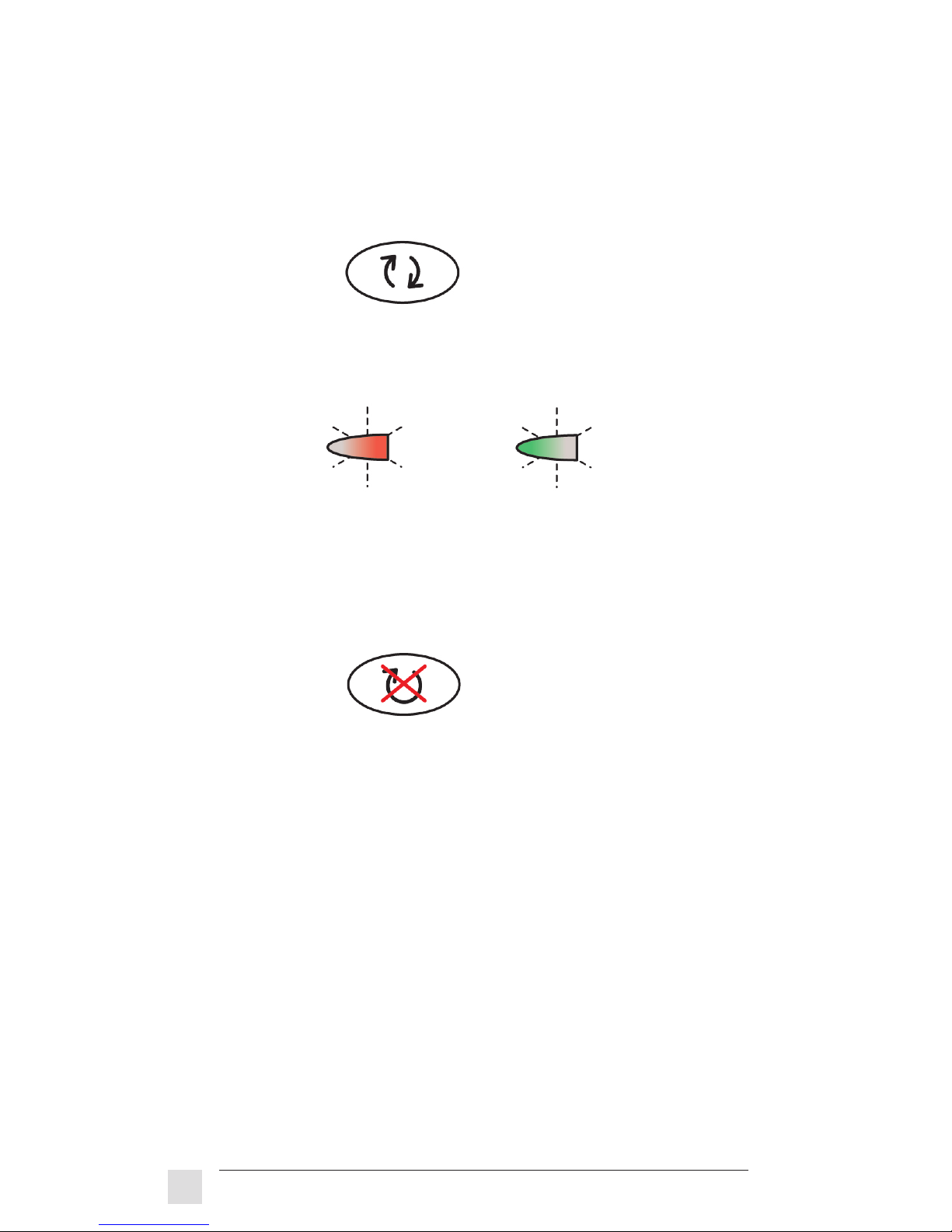
The FLS 2000 automatic system provides you with a second ventilation
programme, the day programme. To switch from the week programme to
the day programme, point your remote control unit to the window actuator
and press the “Day” button:
The FLS is now in the day programme and indicates this with a slowly
flashing red display when the window is open or opening, and a flashing
green display when the window is closed or closing.
If you do not want the FLS 2000 automatic system to execute a ventilation
programme, then switch the ventilation programme off. To do this, press
the “Programme off” button of your remote control unit:
The window will be closed if it is open, and the LEDs of the status display
will go out. In this state, you can manually open and close the window with
the remote control unit or the manual switch, but without any time limit or
display. The safety criteria of the weather sensor remain active, however.
*only FLS 2000 automatic
Day
OR
OFF
FLS 2000 operating instructions
4.3 Changing the ventilation programme*
4.4 Switching off the ventilation programme*
Page 16
11
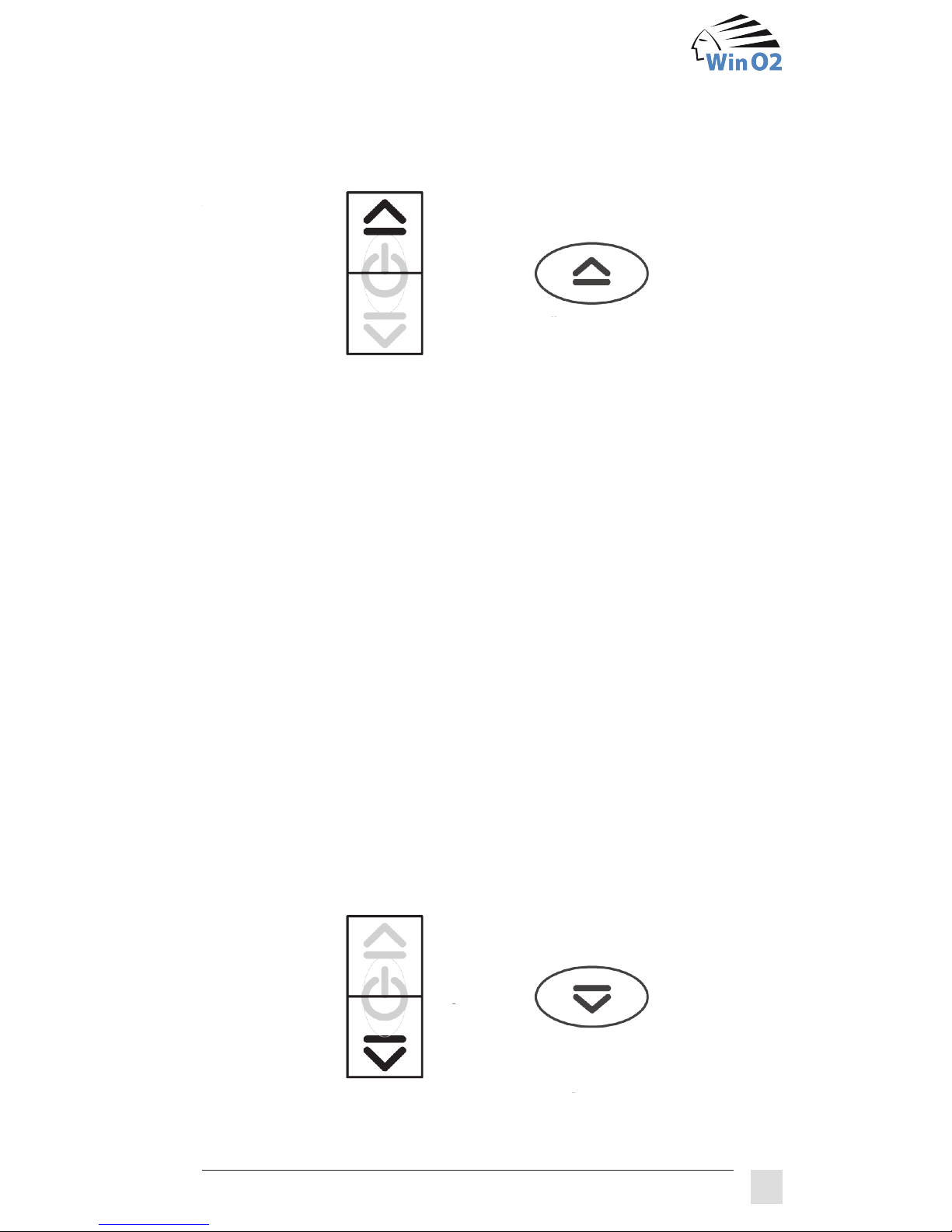
If you want to open the window, press the “Open” button of the manual
switch or the remote control unit:
The FLS executes the command when the red LED is lit or flashing (except
with the FLS 2000 automatic system in the state “Programme off”). When
the window is open, the display only goes out in the case of the open/close
system.
Overriding the automatic ventilation in the case of the FLS 2000
automatic:
If a programme of the automatic ventilation is in operation, the “Open”
command will override the programme for a defined period of time
(manual operation time). You can double or triple the manual operation time by pressing the “Open” button several times (up to 3x).
Safety is still taken into account, however. If you want to open a
window even though it is raining there, for example, you have to
press the “Open” button for 3 seconds to override the safety system.
If you want to close the window, you can make it close at any time by
pressing the “Close” button of the manual switch or on the remote control
nit.
Manual switch
Remote control unit
OR
OPEN
Manual switch
Remote control unit
OR
CLOSE
4.5 Manual opening of the window
4.6 Manual closing of the window
Page 17
12
The FLS executes the command when the green LED is lit or flashing
(except with the FLS 2000 automatic system in the state “Programme off”).
When the window is closed, the display will only go out in the case of the
open/close system.
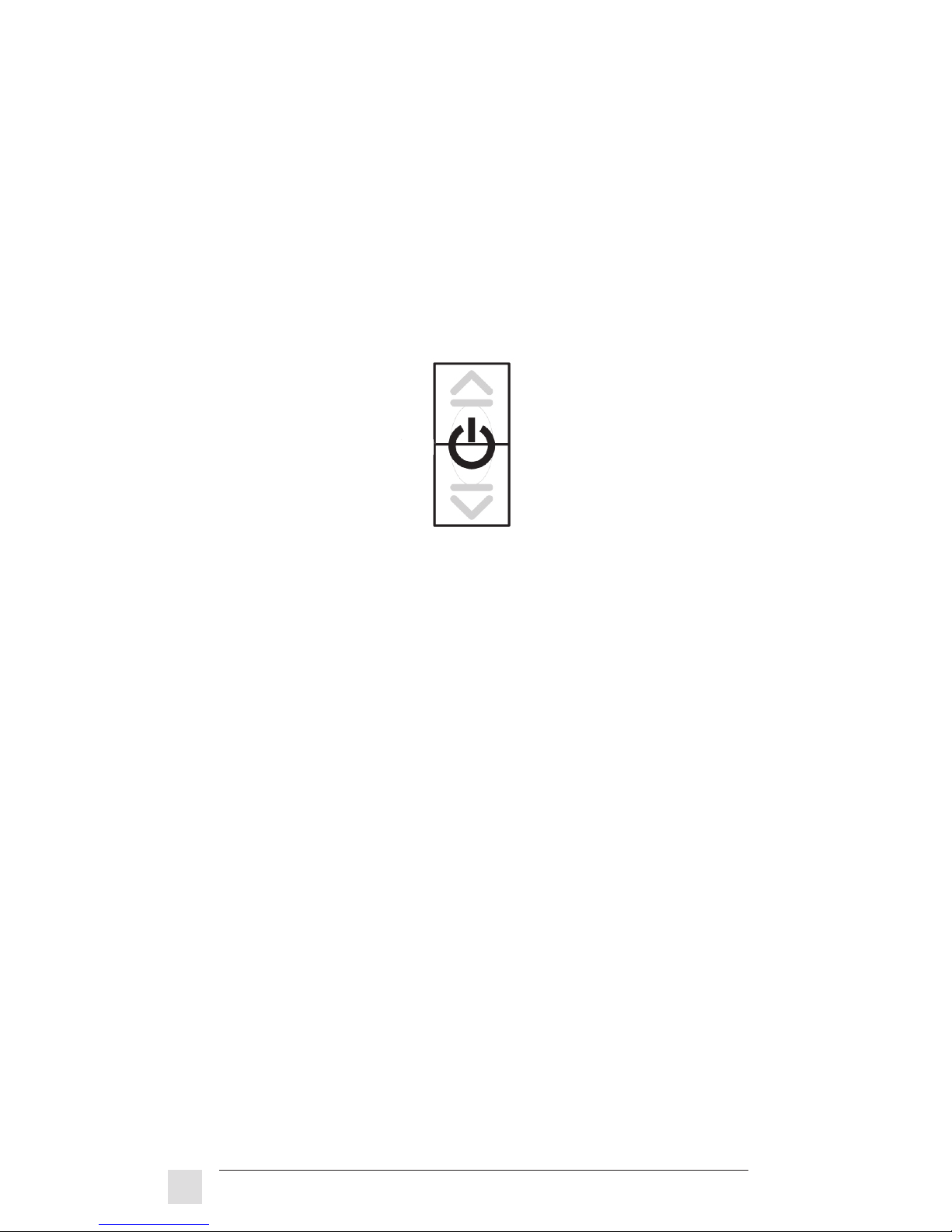
If you want to switch off the system because you will be away for a few
days and do not want any ventilation during this time, for example, then
press both buttons on the manual switch for 3 seconds.
In this state, the system is completely switched off and does not react any
more to commands from the remote control unit or the manual switch. The
display is dark. The window can only be opened completely in this state
(see chapter 5).
To switch the system back on again, see chapter 4.1 “Switching on the
system”.
Manual switch 3 seconds
FLS 2000 operating instructions
4.7 Switching off the system
Page 18
13
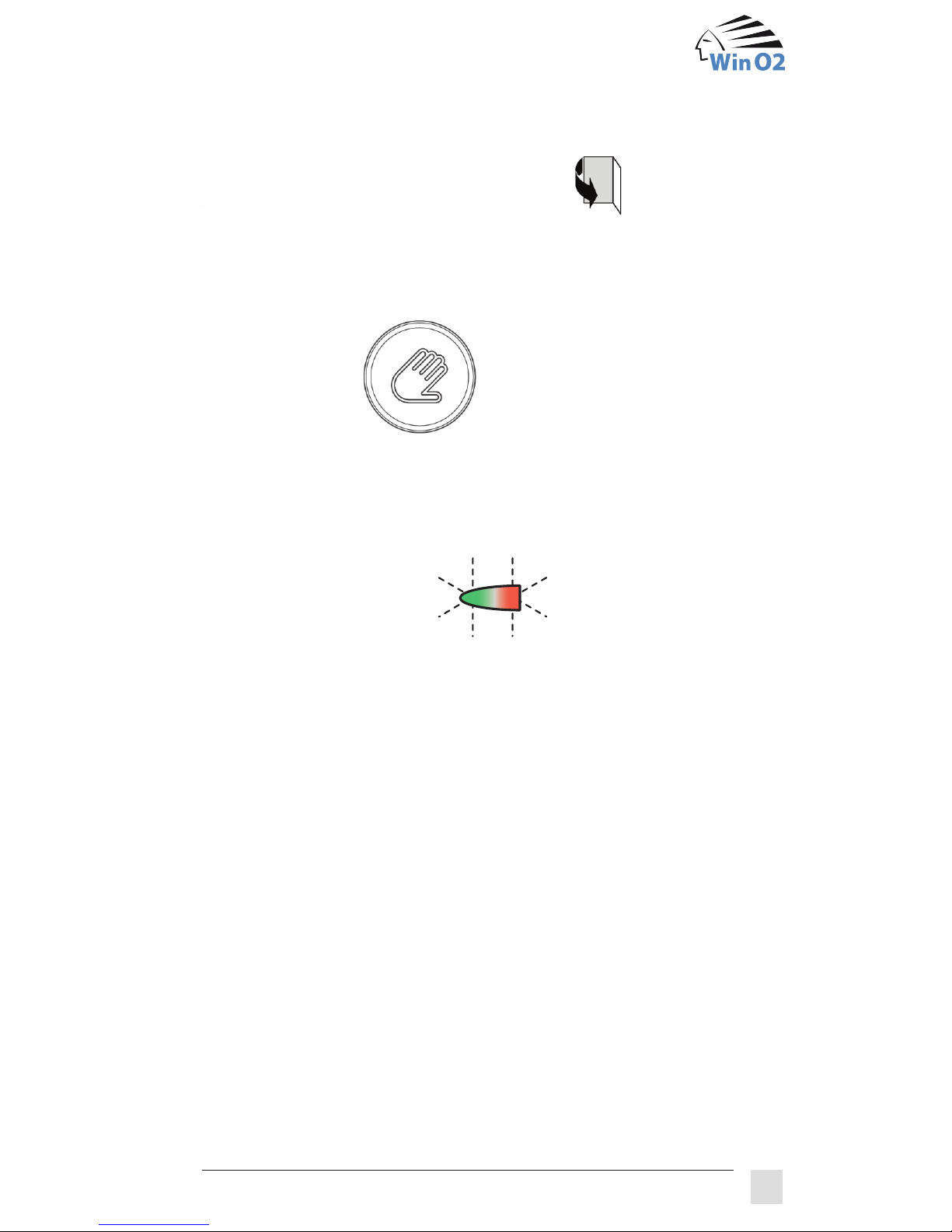
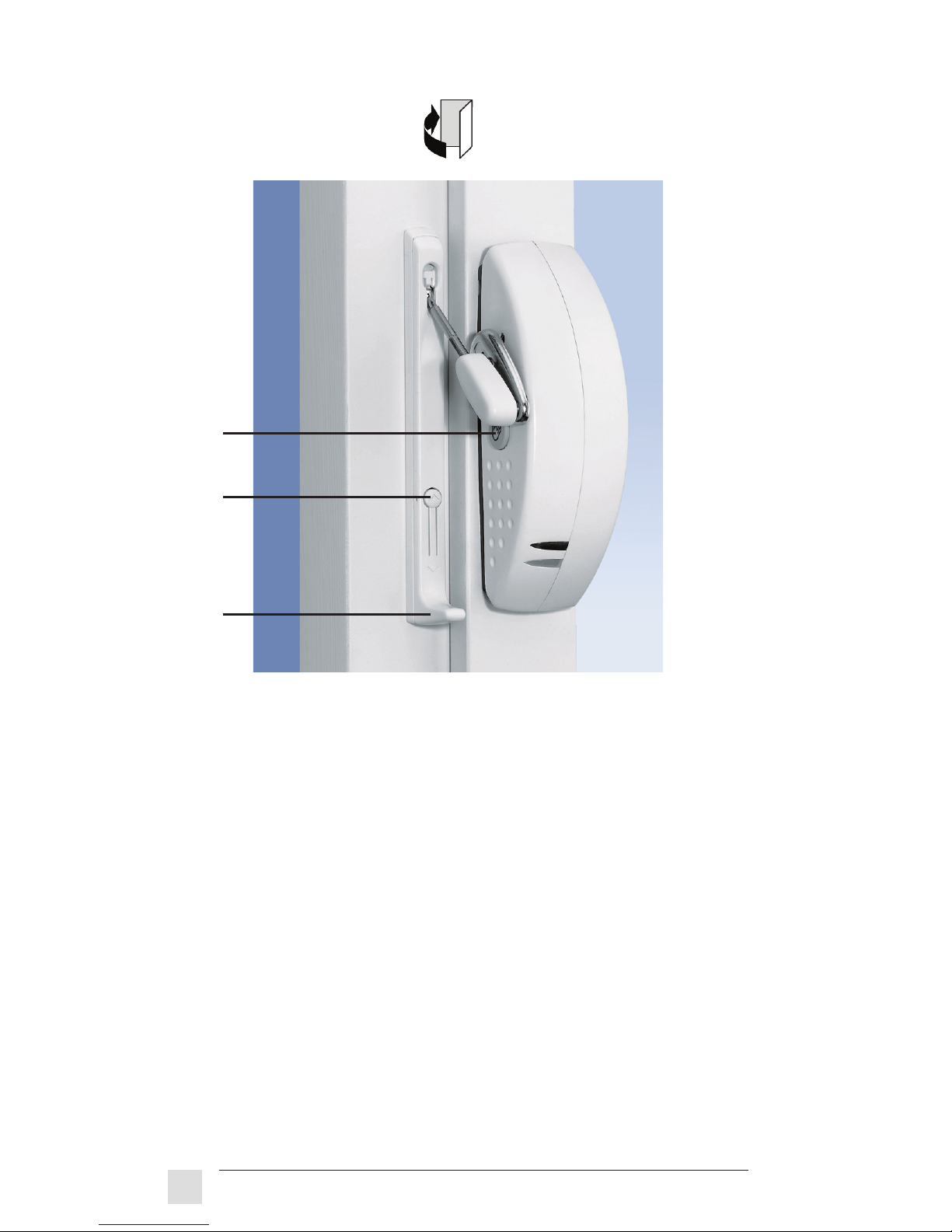
If you want to completely open your window, for example to clean it,
you have to press the service button (1) on the window actuator for 3
seconds.
The display on the window actuator goes out and the FLS window
ventilation system will not react to any other commands. The actuator now
moves to the release position. When both LEDs alternately flash red and
green, the window is unlocked.
Now pull the release lever (2) on the linkage holder all the way down. The
window can now be completely opened.
Please note: Only pull down the release lever when the LEDs are alternately flashing red and green.
** Only possible when a linkage has been mounted as shown above to
allow the window to be unlocked.
3 seconds
5
Opening and closing windows
5.1 Completely opening the window**
Page 19
14
To close the window, correctly place the linkage in the holder again and
press the locking knob (3). The release lever (2) snaps up and fixes the
linkage in the holder. Make sure that the linkage sits correctly in the
holder! You might have to pull the release lever further up a little if a red
area is still visible at the top of the holder.
Next, press the service button (1) on the window actuator for 3 seconds
until the display reacts.
The FLS returns to the original state.
1
3
2
FLS 2000 operating instructions
5.2 Closing the window
Page 20
15
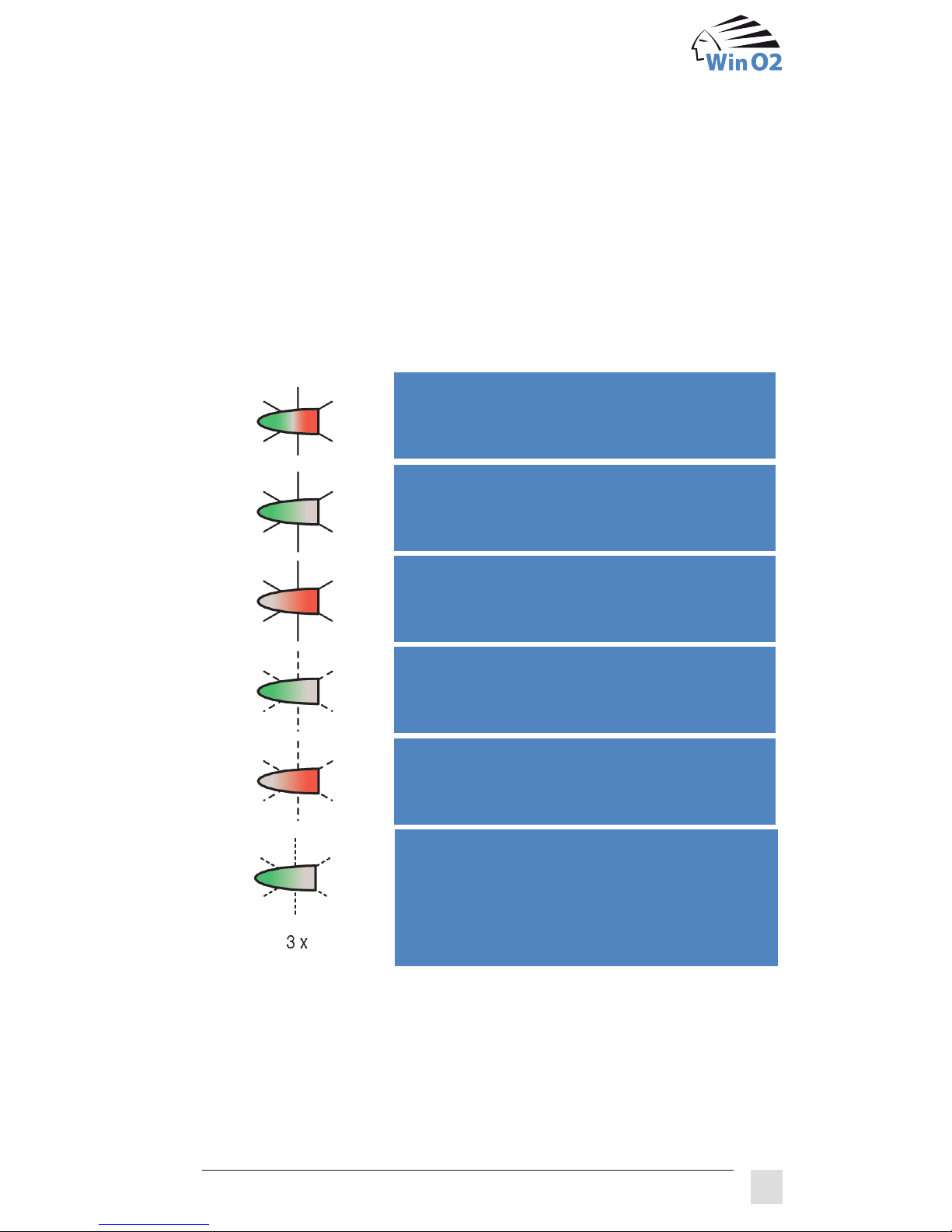
Your FLS window ventilation system has a green and a red LED that tell
you the state, actions and any errors (see description of status displays in
chapter 2). The possible signals are summarised in the following table:
Display
Meaning
Week programme* is active; the window is
currently in a closed state.
Week programme* is active; the window is
currently in an opened state.
Day programme* is active; the window is
currently in a closed state.
Day programme* is active; the window is
currently in an opened state.
Safety criteria* active; the command to
open was not executed for this reason.
Window only opens when the “Open“ button
is pressed for at least 3 seconds.
*only FLS 2000 automatic
6 What is my FLS trying to tell me?
Command acknowledgment (both LEDs
briefly light up): The FLS shows that it has
registered a command.
Page 21
16
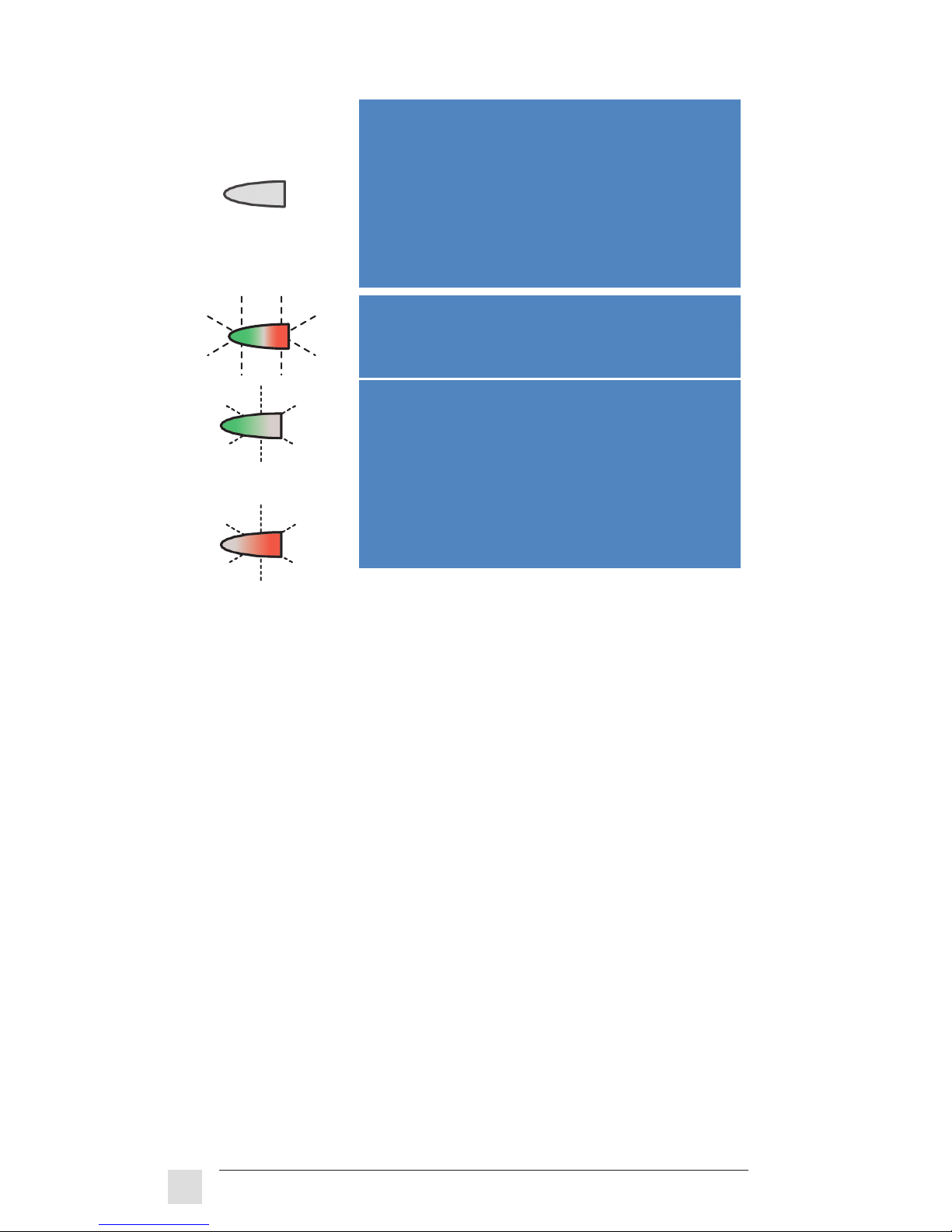
The following states are possible:
– Programme off*
– System off
– LEDs are set to dark*
– No power supply
– With open/close system
when state [open / closed] is attained
Window unlocking: (see chapter 5)
– The FLS is in an unlocked state
Error: (see chapter 7)
– Blockage during closing
– Blockage during opening
A different signalisation is possible when an FLS is overridden if manual
operation is not permitted during this time. In this case, both LEDs will
flash at the same time.
*only FLS 2000 automatic
OR
FLS 2000 operating instructions
Page 22
17
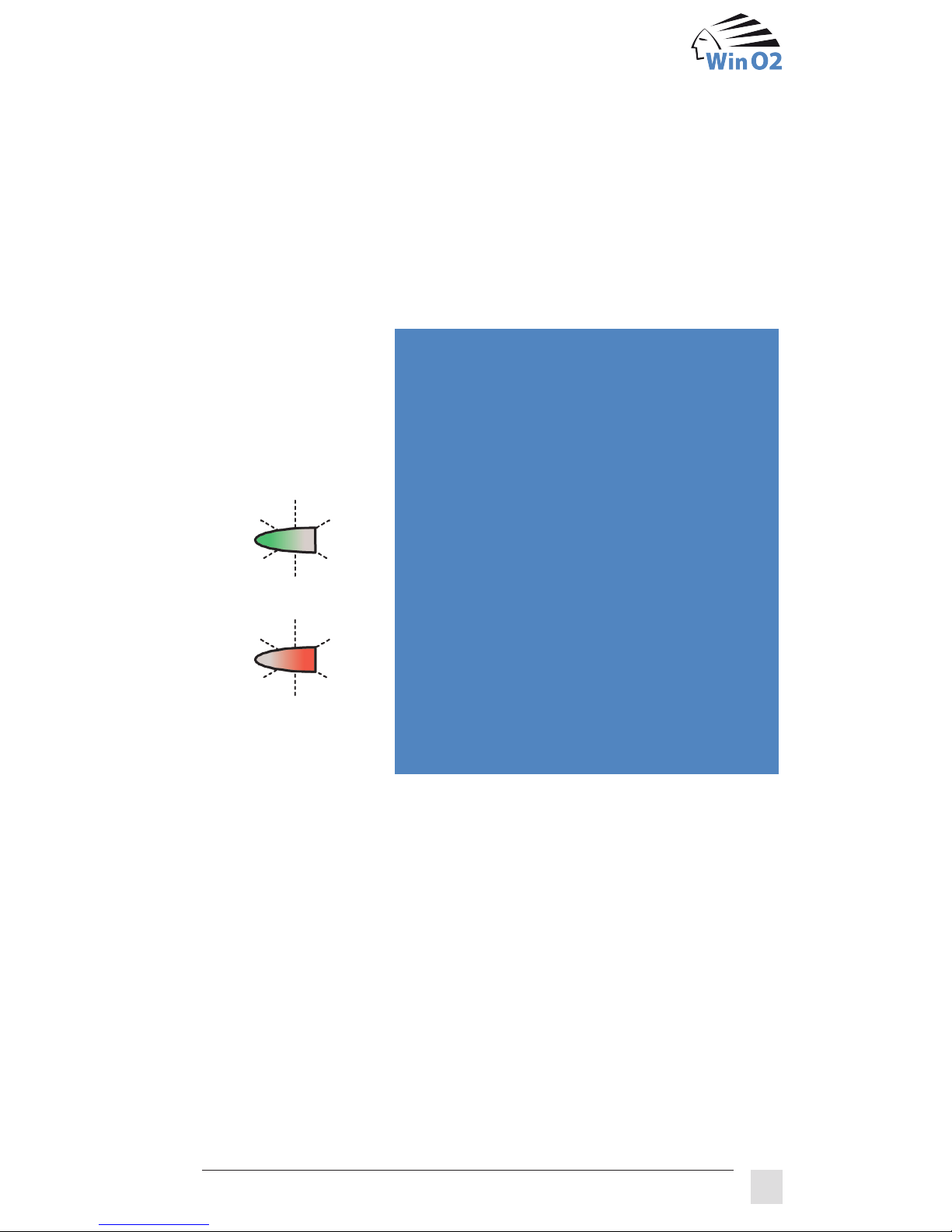
Display
State – cause – remedy
Window is wide open
In the unlocked state, it was acknowledged
that the linkage was correctly fixed in the
holder, but this was not the case.
Press the service button for 3 seconds until the
display goes out (window unlocking); push the
window shut; when both LEDs are alternately
flashing, fit the linkage correctly in the holder
and press the service button for 3 seconds
until the display reacts.
Blockage while opening or closing the window
1. Window fitting is stuck or
2. Mechanism of the FLS is defective
In both cases, our sales partner must be
contacted.
OR
7 Why is that not possible?
7.1 Display of malfunctions
Malfunctions of the FLS are displayed as follows:
Page 23
18
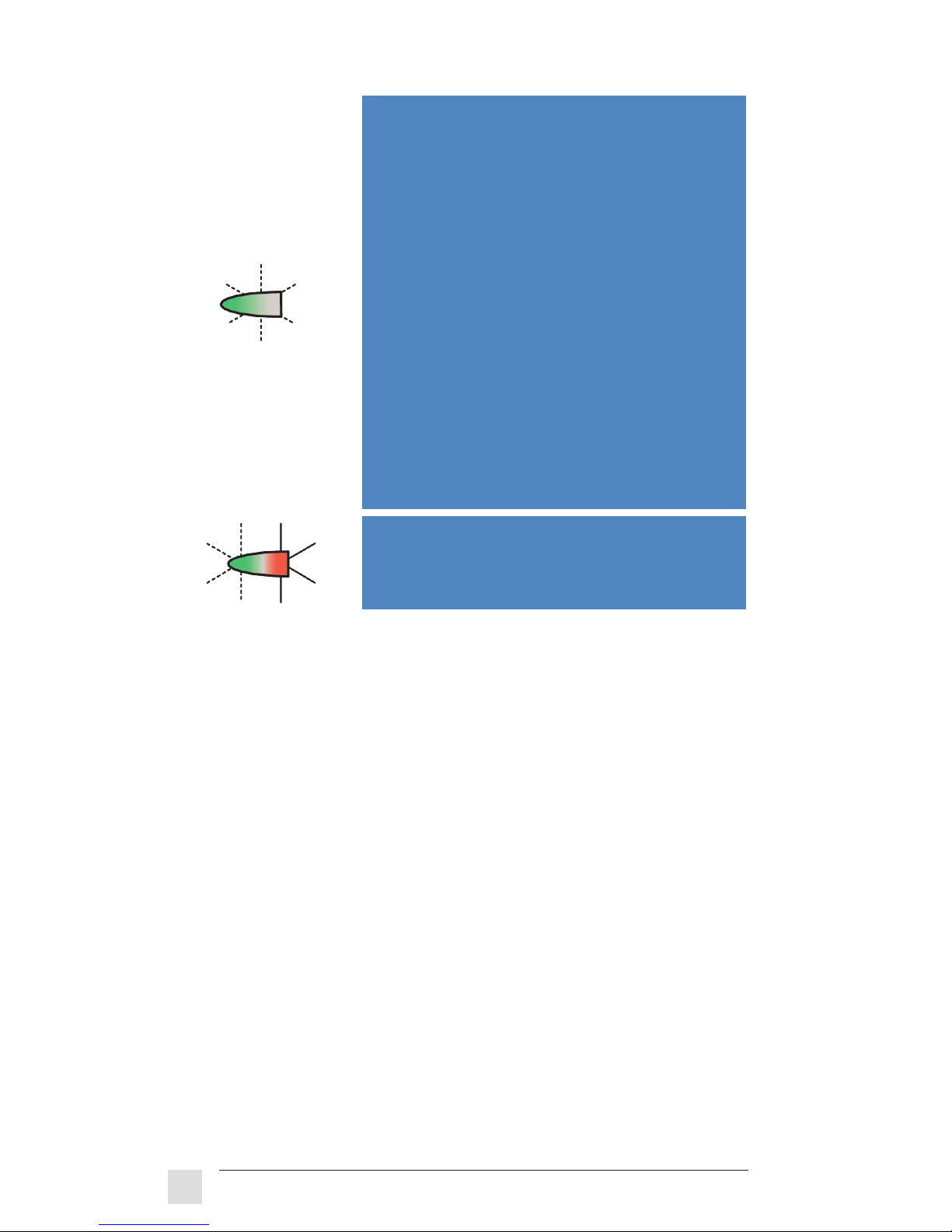
Window in tilt position,linkage is free
The release lever was pulled down during
automatic operation (window unlocking).
Press the “Open“ button and push the win
dow shut; actuator now moves to ventilation
position! Please note: Linkage must be able
to move freely!
When the position has been reached, press
the service button until the display goes out.
When the display alternately lights up red and
green, the linkage can be locked in place as
described in chapter 5.2.
FLS no longer reacts
Inform sales partner for replacement of the
FLS.
Note: The FLS requires a perfect window mechanism. If the turning fitting
becomes more sluggish or the window becomes distorted over time, this
can block the mechanism of the FLS. As a preventive measure, please
observe the instructions for greasing the window fitting.
If your status display no longer reacts when you press buttons on your
remote control unit and your FLS is not switched off (caution: the remote
control unit must not be blocked; see chapter 3.3), you should replace the
batteries in the remote control unit. Replace the two batteries with two
new alkaline batteries of the type AAA, Micro or LR03. Make sure that the
poles are correctly aligned upon insertion.
Red LED
is continuously lit
Green LED
flashes very fast
FLS 2000 operating instructions
7.2 Changing the batteries of the remote control unit
Page 24

19
The window actuator, the manual switch and the junction box can be
cleaned with a moist cloth soaked in soapy water or with a cloth sprayed
with a window cleaning agent containing spirits.
The remote control unit and the plug-in power supply can be cleaned with
a moist cloth soaked in soapy water.
The weather sensor can be cleaned in the same way as the window
actuator. It must not be subjected to any knocks, however. Avoid scraping
and scratching it as well.
Weight of the window actuator 600 g
Locking torque max. 4.5 Nm
Operating voltage DC 24 V
Energy consumption in standard operation approx. CHF 0.01/day
Range of the remote control unit approx. 8 m
Certification
CE
8 Cleaning the FLS
9 Technische Daten
Page 25

Your serivce partner:
Pdf - October 2013
 Loading...