

Page 1
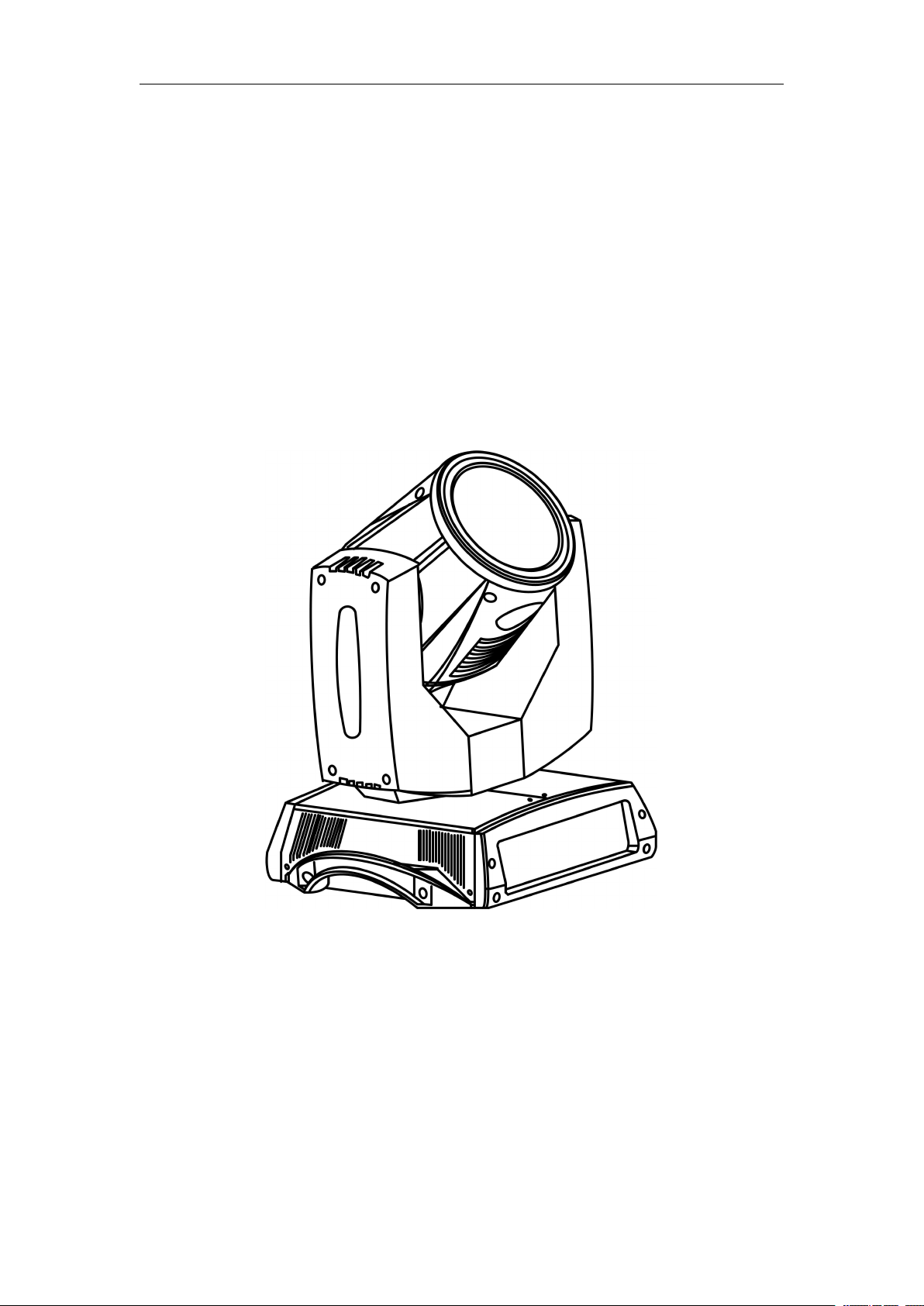
7R BEAM MOVE HEAD LIGHT
Please read over this manual before operation the light
USER MANUAL
Page 2

7R BEAM USER MANUAL
1. Product Instruction
lamp: YODN /7R
Channel mode:16 DMX512 Channel
Pan scan:540°(16bit) Electric correction
Tilt scan:270° (16bit) Electric correction
Dispay:TFT LCD,supports 180° turning show
Color wheel: one color wheel, 14 kinds of color chips in one
color wheel
Gobo: 17 gobos
Effect Wheel: Rotation eight prism, effect move , frost
0-100% mechanical dimming, mechanical dimming and free
dimming available.
strobe macro control available.
Over heat protection
Power Input: 100-240V,50/60Hz
Power Dissipation:350W
IP level :IP20
1
Page
Page 3
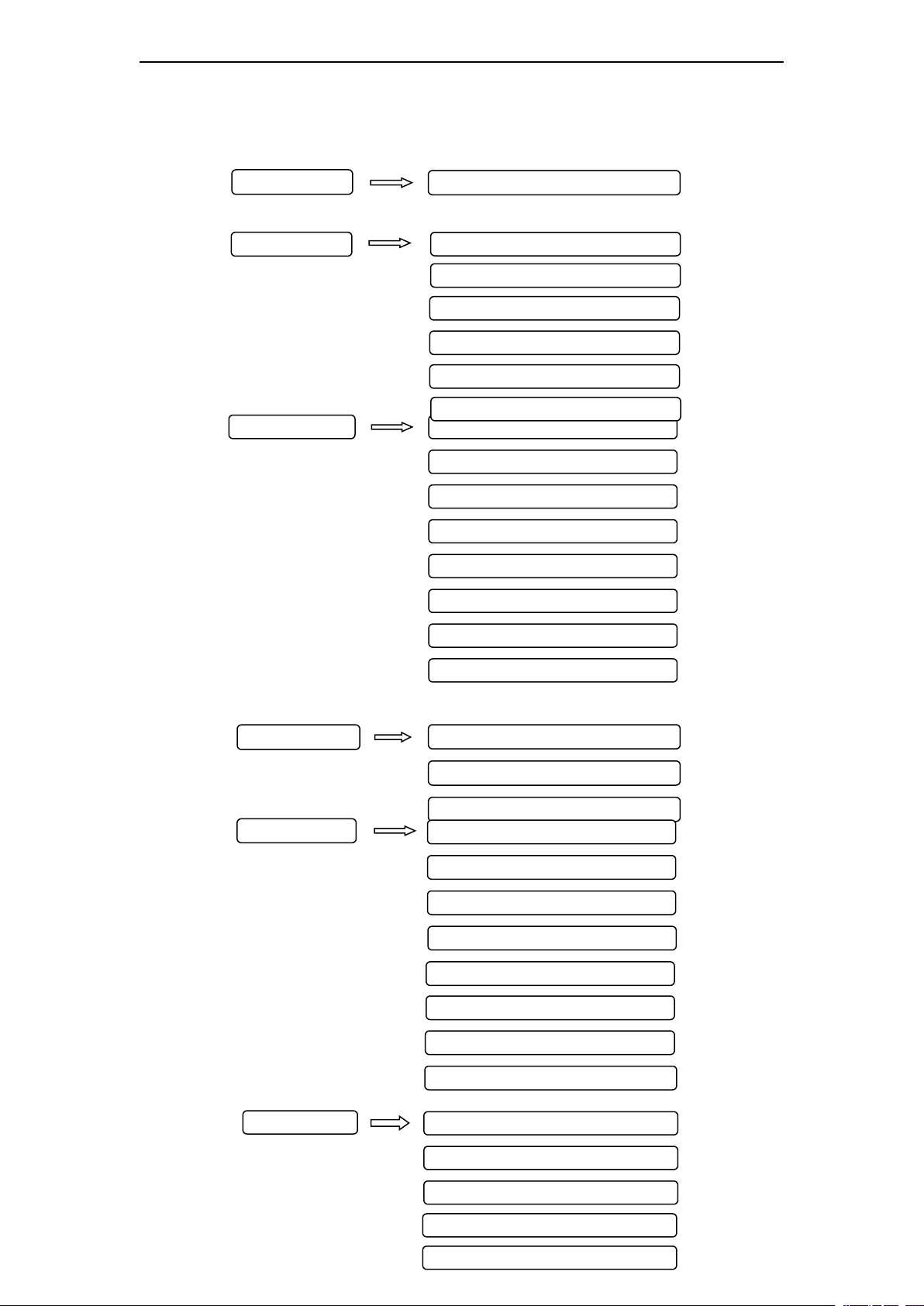
2. Menu Structure
Set DMX Address (001-512)
Address
TestMode
PAN(0-255)
TILT(0-255)
FOCUS(0-255)
COLOR(0-255)
GOBO(0-255)
PRISM(0-255)
FROST(0-255)
STROBE(0-255)
Display
Language
Screen Saver
Screen Rotate
Work Mode
SysInfo
Address
Version
Elapse
Tatol
RunMode
DMX Ctrl
Auto Run
Sound Ctrl
M/S Choose
Light Swich
Channel Qty
Advanced
Pan Invert
Tilt Invert
P/T Rectify
Pan Offset
Tilt Offset
Lamp when
Factory Setting
Data hold
Main Menu Sub-menu
7R BEAM USER MANUAL
Page
2
Page 4

7R BEAM USER MANUAL
3. Operation Settings
1) Address: Set DMX Address: 001-255.
2) RunMode---->Work Mode: Set working mode:
◆
DMX Ctrl: DMX Mode,
◆
Auto Run: Auto Mode,
◆ Sound Ctrl: Sound Mode,
◆
M/S Choose: ON -- Master;
OFF -- Slave; -(Default)
◆ Light Switch: ON -- Turn on the light,
OFF -- Turn off the light.
◆
Channel Qty Simple -- 16CH;-(Default)
Expand-- 20CH(or null)
◆
PAN: range for 0 to 255;
◆
TILT: range for 0 to 255;
◆
FOCUS: range for 0 to 255;
◆
COLOR: range for 0 to 255;
◆
GOBO: range for 0 to 255;
◆
PRISM: range for 0 to 255;
◆
FROST: range for 0 to 255;
;
◆
STROBE: range for 0 to 255;
4) Display: Set display parameter
◆
Language: English /
中文
◆
Screen Saver: OFF -- No screen saver
Mode1 -- Power-saving mode, turn off
the display
Mode2 -- Displays the current address
Mode3 --Displays the icon and the
current working mode-(Default)
◆
Screen Rotion: ON -- Normal display--(Default)
OFF -- 180° turning display.
5) Advanced: Advanced parameter settings:
◆
Pan Invert: OFF -- Pan Normal move-(Default)
ON -- Reverse PAN move
◆
Tilt Invert: OFF -- Tilt Normal move-(Default)
ON -- Reverse Tilt move
◆
P/T Rectify: OFF -- Close P/T rectify
ON -- Start P/T rectify-(Default)
◆
Pan Offset: Set PAN original position. Default: 10
◆
Tilt Offset: Set TILT original position. Default: 10
◆
Lamp when: PowerON -- Turn on the lamp when power
on-(Default)
RstDone -- Turn on the lamp after reset
Manual -- Manually turn on the lamp
3) TestMode-->Test: Used for test light, modify DMX
channel data to test function.
3
Page
Page 5
7R BEAM USER MANUAL
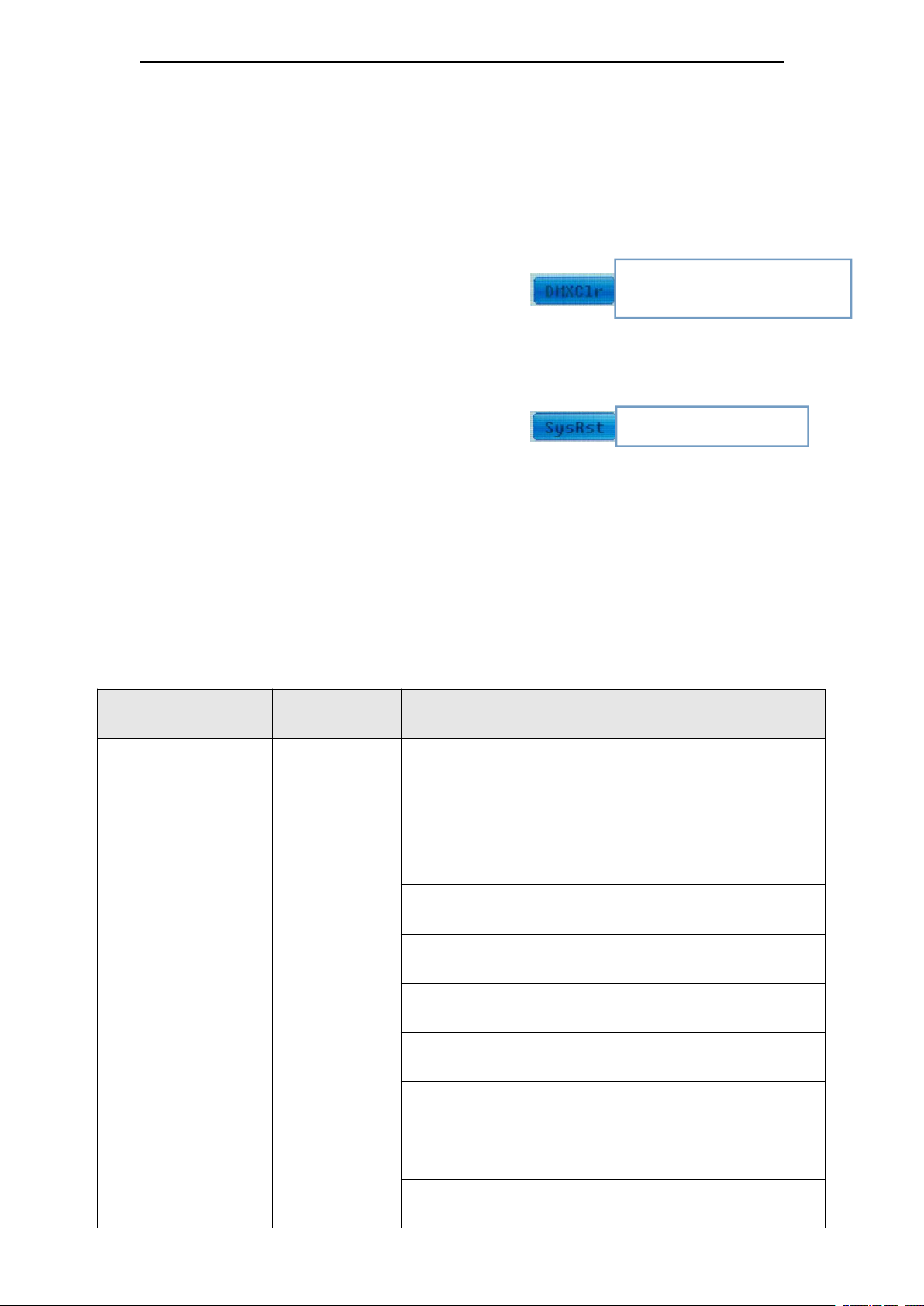
◆ Data hold: OFF -- When no DMX signal,return to the
middle position-(Default)
ON -- When no DMX signal,stop in the final position.
◆ Factory Setting: Restore all parameter to factory setting.
6) SysInfo-->Status: Show the current status and version
of the lamp.
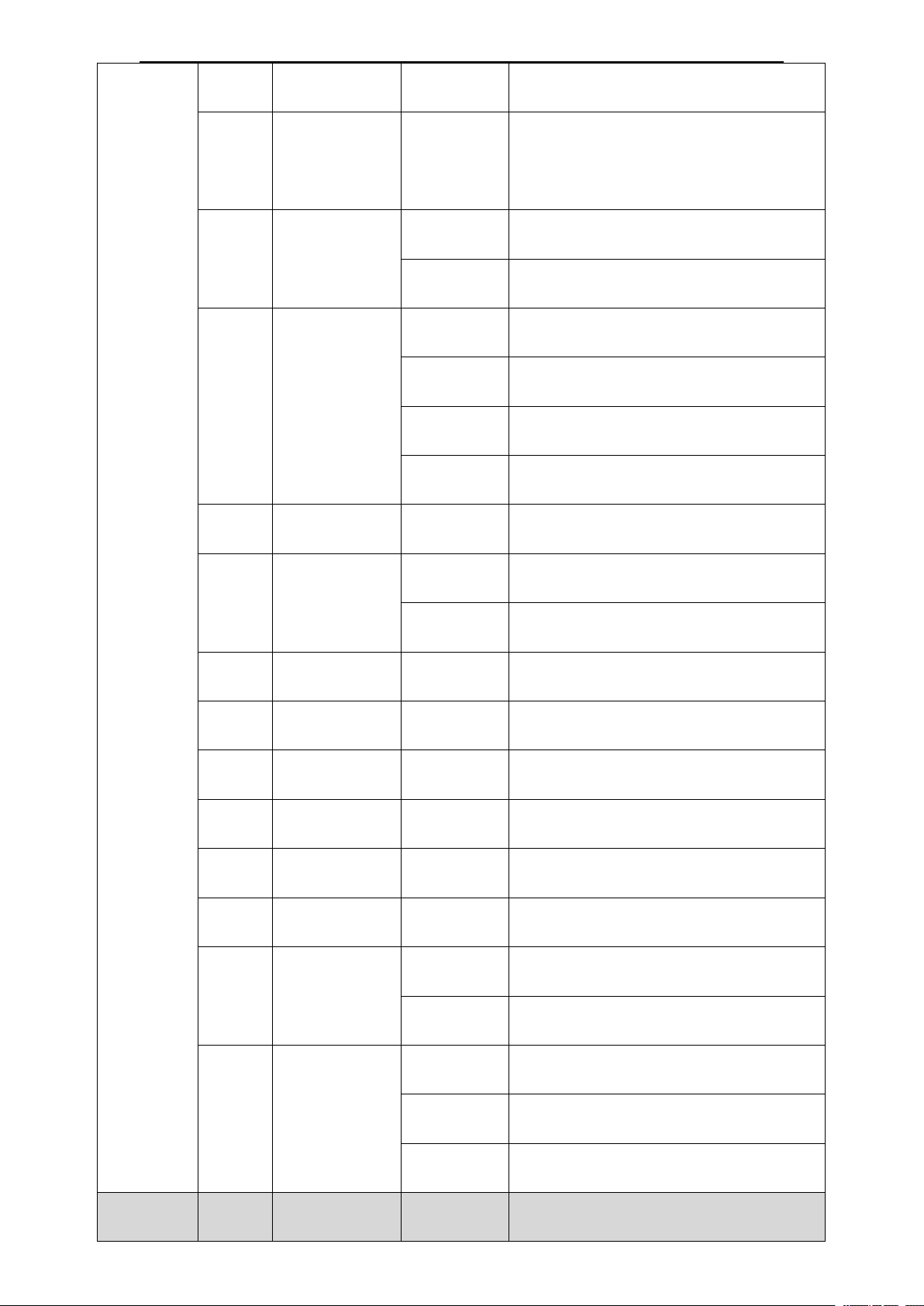
4. Channel table
MODE
CH
NAME
Value
BRIEF
Simple
channel
16CH
CH1
COLOR
Select color or mode--(See
details: 4-2. COLOR)
CH2
STROBE
0~3
Turn off
4~103
Strobe from slow to fast
104~107
Turn on
108~207
Pulse strobe from slow to fast
208~212
Turn on
213~251
Random strobe from slow to
fast
252~255
Turn on
When <Data hold> set <ON>,click to
clear DMX data, and make the lamp
return to themiddle position.
Click to reset.
◆ Work Mode: Show the current working mode.
◆ Address: Show the current address.
◆ Version: Show the version of the lamp.
◆ Elapse: Working hours after turn on.
◆ Tatol: Cumulative hours of operation
16/20 Channels
Page
4
Page 6
7R BEAM USER MANUAL
CH3
DIMMING
000-255
dimming 0~100%
CH4
GOBO
Select gobo--(See details: 4-3.
GOBO)
CH5
PRISM
0~127
Remove prism
128~255
Insert prism
CH6
ROTATE
PRISM
0~127
Rotate Angle 0~400 degree
128~190
Rotate forward(Fast -- slow
)
191~192
Stop
193~255
Rotate reverse(Slow -- fast)
CH7
No
CH8
FROST
0~127
No frost
128~255
Insert frost
CH9
FOCUS
000-255
From far to near
CH10
PAN
000-255
0~540° pan position
CH11
PAN FINE
000-255
Fine-adjust pan position
CH12
TILT
000-255
0~270° tilt position
CH13
TILT FINE
000-255
Fine-adjust tilt position
CH14
No
CH15
RESET
0~127
No
128~255
Reset
(
stay over 3 second
)
CH16
LAMP
0~25
No
26~100
Turn off(stay over 3 second)
101~255
Turn on(stay over 3 second)
Extend
CH17
P/T SPEED
0~255
PAN & TILT SCAN SPEED
Page
5
Page 7
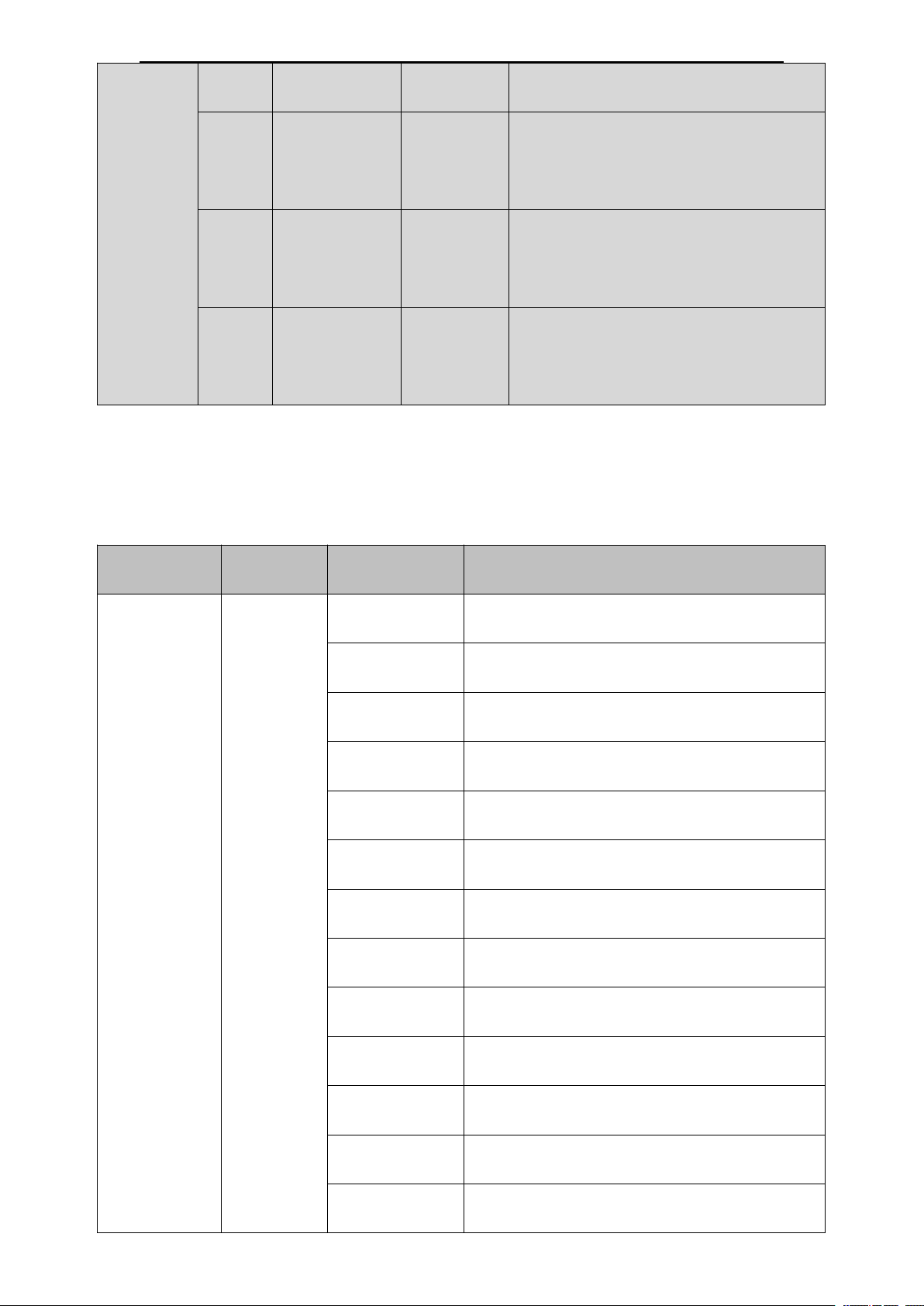
20CH
FAST TO SLOW
CH18
COLOR
SPEED
0~255
COLOR SPEED FAST TO
SLOW
CH19
FOCUS
SPEED
0~255
FOCUS SPEED FAST TO
SLOW
CH20
GOBO
SPEED
0~255
GOBO SPEED FAST TO
SLOW
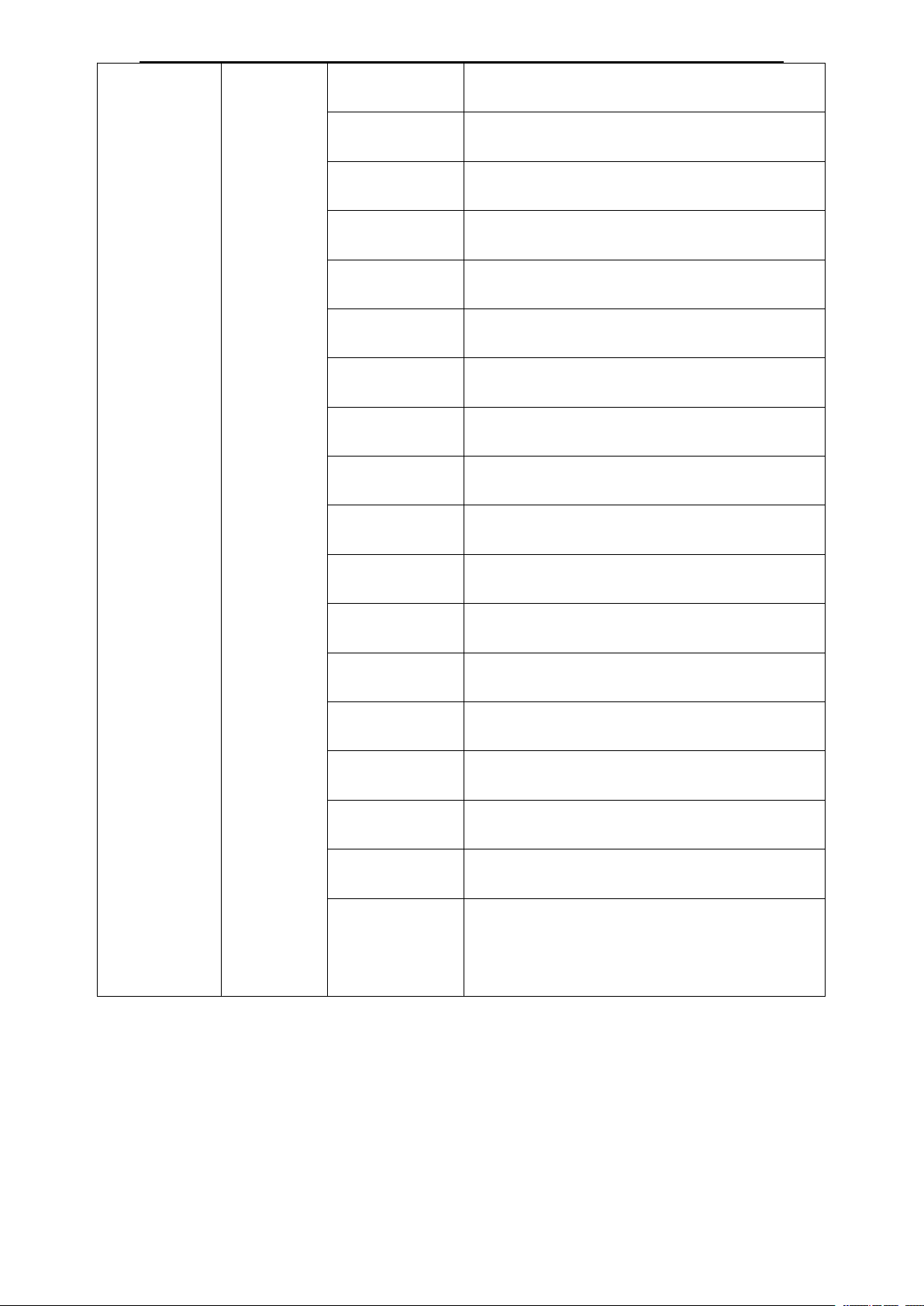
4-2. COLOR
CH NO.
NAME
VALUE
FUNCTION
CH1
COLOR
0-4
WHITE
5-8
WHITE+ RED
9-12
RED
13-17
RED + ORANGE
18-21
ORANGE
22-25
ORANGE+ Aquamarine blue
26-29
Aquamarine blue
30-34
Aquamarine blue + Brown
35-38
Brown
39-42
Brown + Cool color
43-46
Cool color
47-51
Cool color+ Rosy
52-55
Rosy
7R BEAM USER MANUAL
Page
6
Page 8
7R BEAM USER MANUAL
56-59
Rosy + Yellowgreen
60-63
Yellowgreen
64-68
Yellowgreen + Blue
69-72
Blue
73-76
Blue + Fluorescence color
77-81
Fluorescence color
82-85
Fluorescence color + Yellow
86-89
Yellow
90-93
Yellow + Green
94-98
Green
99-102
Green + Light Blue
103-106
Light Blue
107-110
Light Blue+ Claybank
111-115
Claybank
116-119
Claybank + Mauve
120-123
Mauve
124-127
Mauve + WHITE
128-255
Rotate forward
(
Fast -- slow
)
Page
7
Page 9
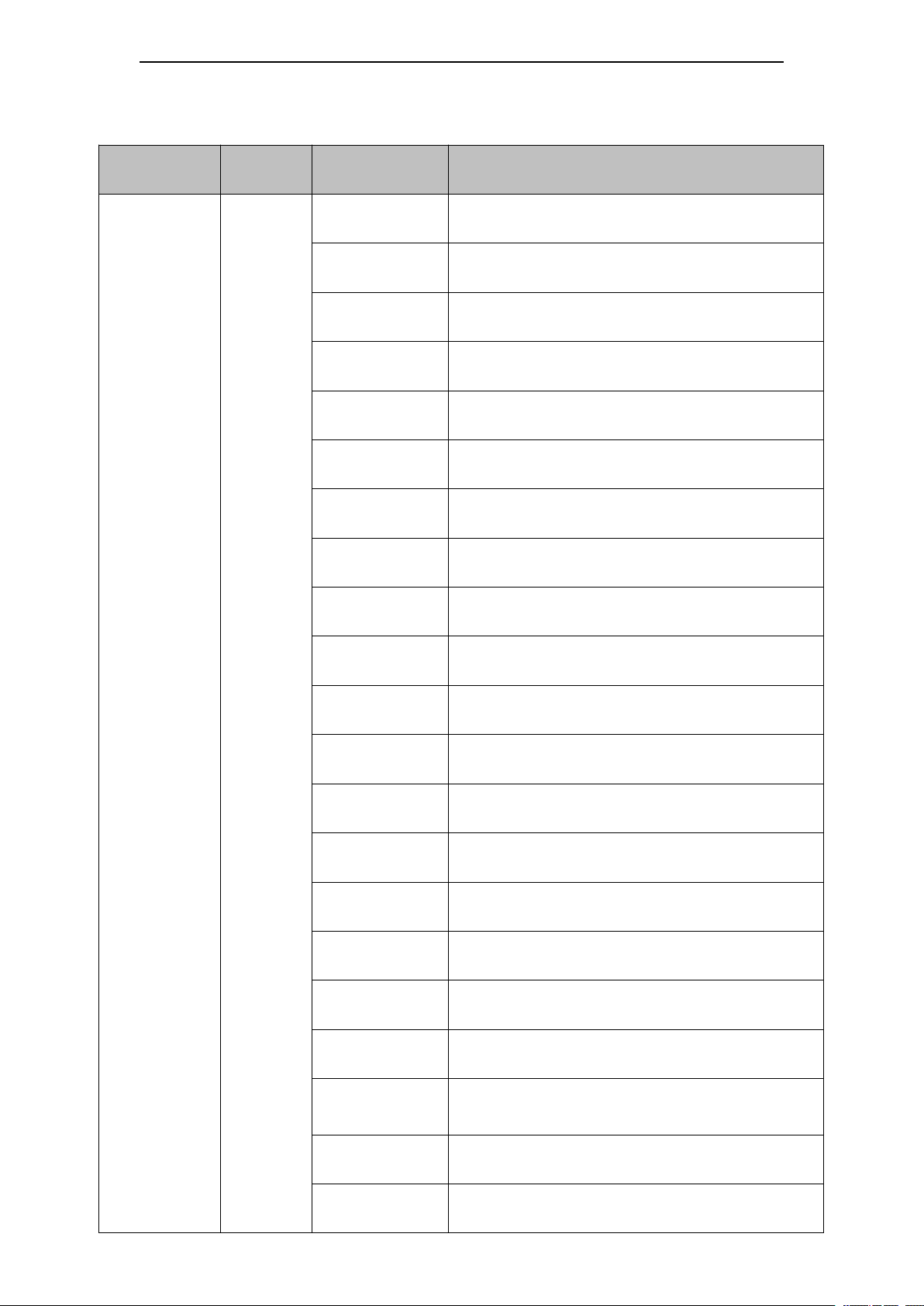
4-3. GOBO
CH NO.
NAME
VALUE
FUNCTION
CH4
GOBO
0~3
WHITE
4~7
Gobo1
8~11
Gobo2
12~15
Gobo3
16~19
Gobo4
20~23
Gobo5
24~27
Gobo6
28~31
Gobo7
32~35
Gobo8
36~39
Gobo9
40~43
Gobo10
44~47
Gobo11
48~51
Gobo12
52~55
Gobo13
56~59
Gobo14
60~63
Gobo15
64~67
Gobo16
68~71
Gobo17
72~113
Rotate forward(Fast -- slow)
114~117
stop
(
white
)
118~159
Rotate reverse(Slow -- fast
)
7R BEAM USER MANUAL
Page
8
Page 10
7R BEAM USER MANUAL
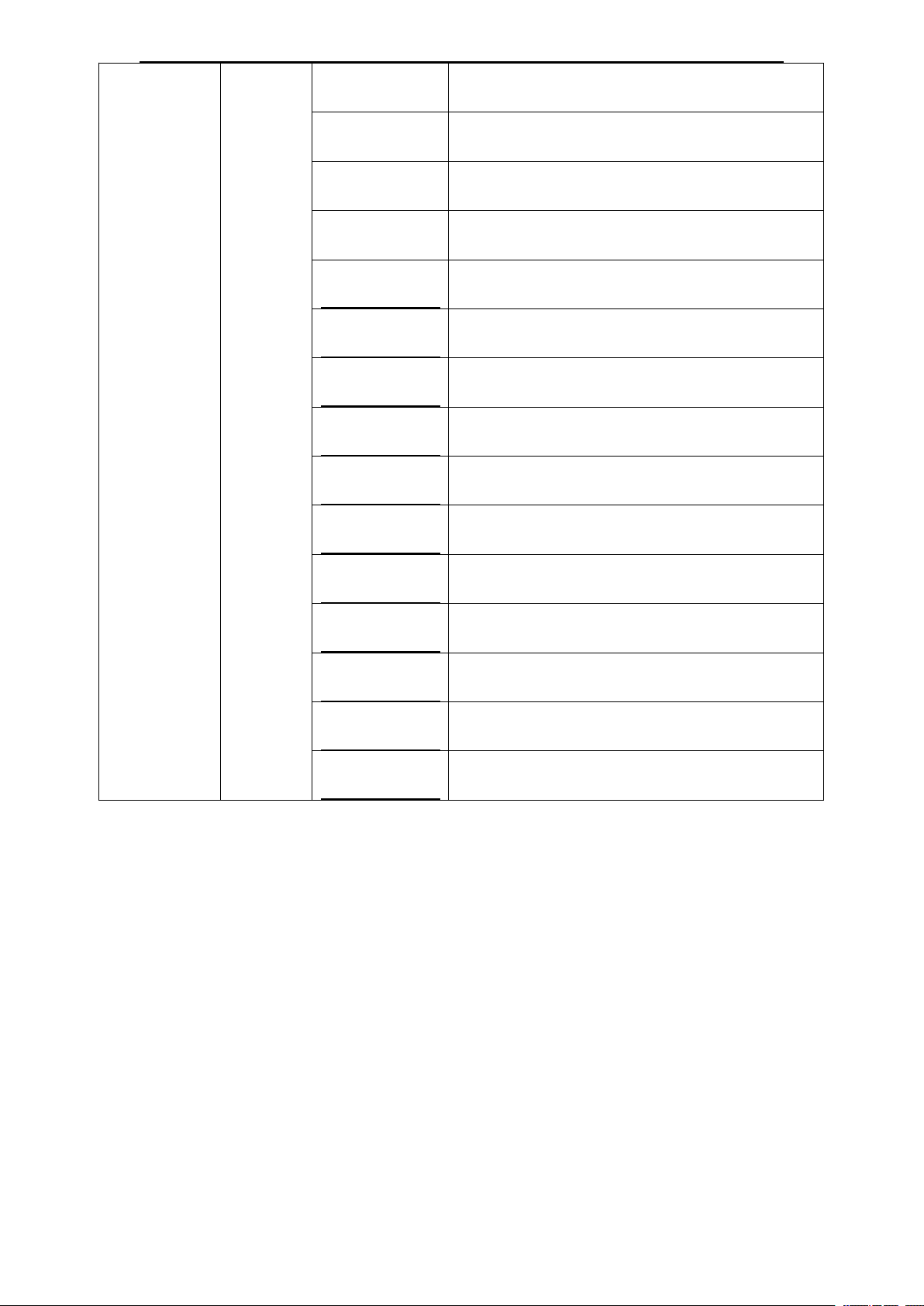
160~166
Gobo2,shaking slow to fast
167~172
Gobo3,shaking slow to fast
173~179
Gobo4,shaking slow to fast
180~185
Gobo5,shaking slow to fast
186~191
Gobo6,shaking slow to fast
192~198
Gobo7,shaking slow to fast
199~204
Gobo8,shaking slow to fast
205~211
Gobo9,shaking slow to fast
212~217
Gobo10,shaking slow to fast
218~223
Gobo11,shaking slow to fast
223~230
Gobo12,shaking slow to fast
231~236
Gobo13,shaking slow to fast
237~243
Gobo14,shaking slow to fast
243~249
Gobo15,shaking slow to fast
250~255
Gobo16,shaking slow to fast
Page
9
 Loading...