

Page 1

WinBook 7” Tablet
Quick Start Guide
TW700
Page 2
1
Federal Communication Commission Interference Statement
This equipment has been tested and found to comply with the
limits for a Class B digital device, pursuant to Part 15 of the FCC
Rules. These limits are designed to provide reasonable
protection against harmful interference in a residential
installation. This equipment generates, uses and can radiate
radio frequency energy and, if not installed and used in
accordance with the instructions, may cause harmful
interference to radio communications. However, there is no
guarantee that interference will not occur in a particular
installation. If this equipment does cause harmful interference to
radio or television reception, which can be determined by turning
the equipment off and on, the user is encouraged to try to
correct the interference by one of the following measures:
- Reorient or relocate the receiving antenna.
- Increase the separation between the equipment and receiver.
- Connect the equipment into an outlet on a circuit different
from that to which the receiver is connected.
- Consult the dealer or an experienced radio/TV technician for
help.
Caution:
Any changes or modifications not expressly approved by the
party responsible for compliance could void the user's authority
to operate this equipment.
This device complies with Part 15 of the FCC Rules. Operation
is subject to the following two conditions:
(1) This device may not cause harmful interference, and
(2) This device must accept any interference received, including
interference that may cause undesired operation
Page 3
2
RF Exposure Information (SAR)
This device meets the government’s requirements for exposure
to radio waves. This device is designed and manufactured not to
exceed the emission limits for exposure to radio frequency (RF)
energy set by the Federal Communications Commission of the
U.S. Government.
The exposure standard employs a unit of measurement known
as the Specific Absorption Rate, or SAR. The SAR limit set by
the FCC is 1.6 W/kg. Tests for SAR are conducted using
standard operating positions accepted by the FCC with the EUT
transmitting at the specified power level in different channels.
The highest SAR value for the device as reported to the FCC is
1.04 W/kg when placed next to the body.
CAUTION
Risk of explosion if battery is replaced by an incorrect type.
Dispose of used batteries according to the instructions.
ATTENTION
RISQUE D'EXPLOSION SI LA BATTERIE EST REMPLACÉE PAR UN
TYPE INCORRECT. RECYCLEZ LES BATTERIES USAGÉES SELON LES
INSTRUCTIONS.
Page 4

3
Package contents
If any of the items is missing or damaged, please contact
your dealer immediately:
• One Tablet • One AC adapter
• One USB cable • This guide
• Microsoft Office 365 Keycard
Page 5
4
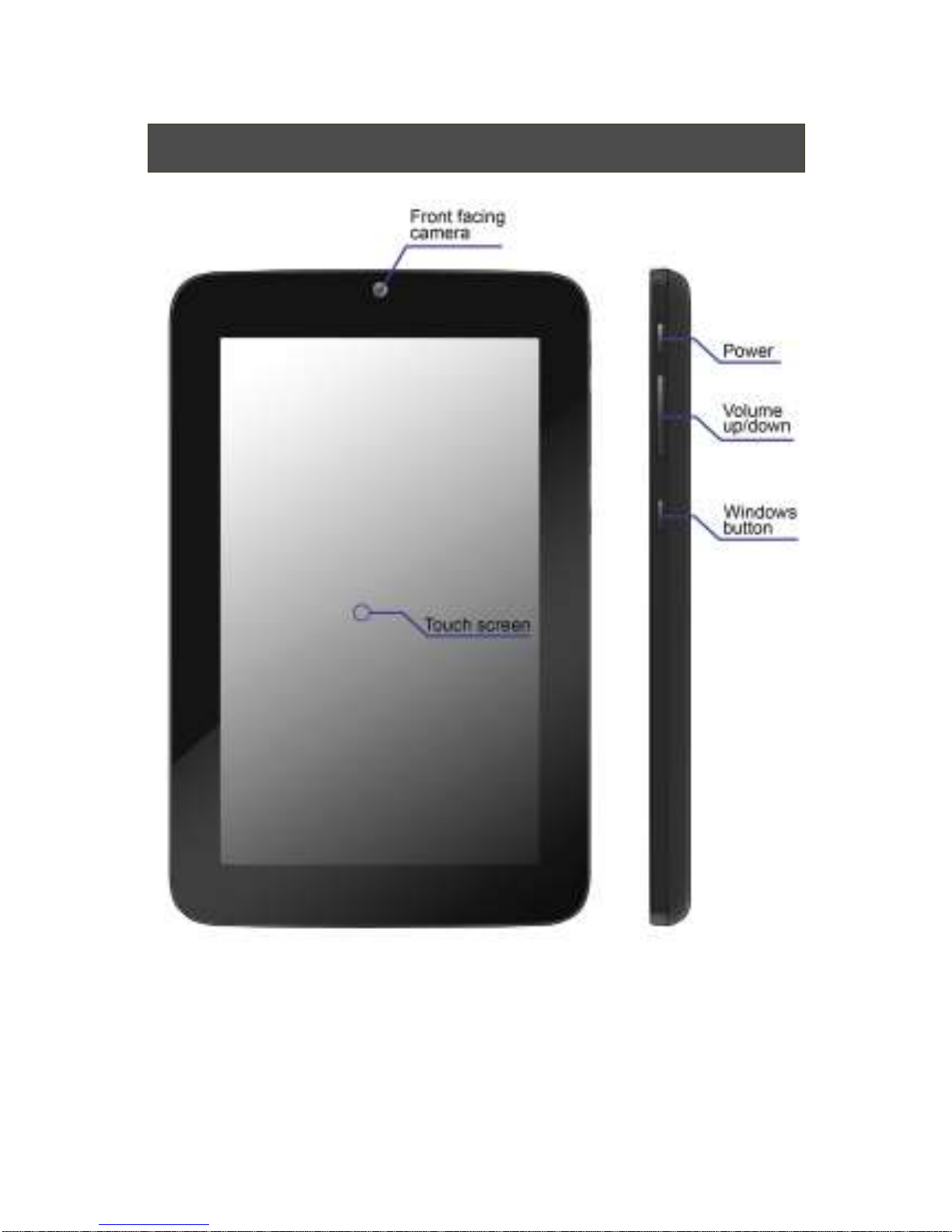
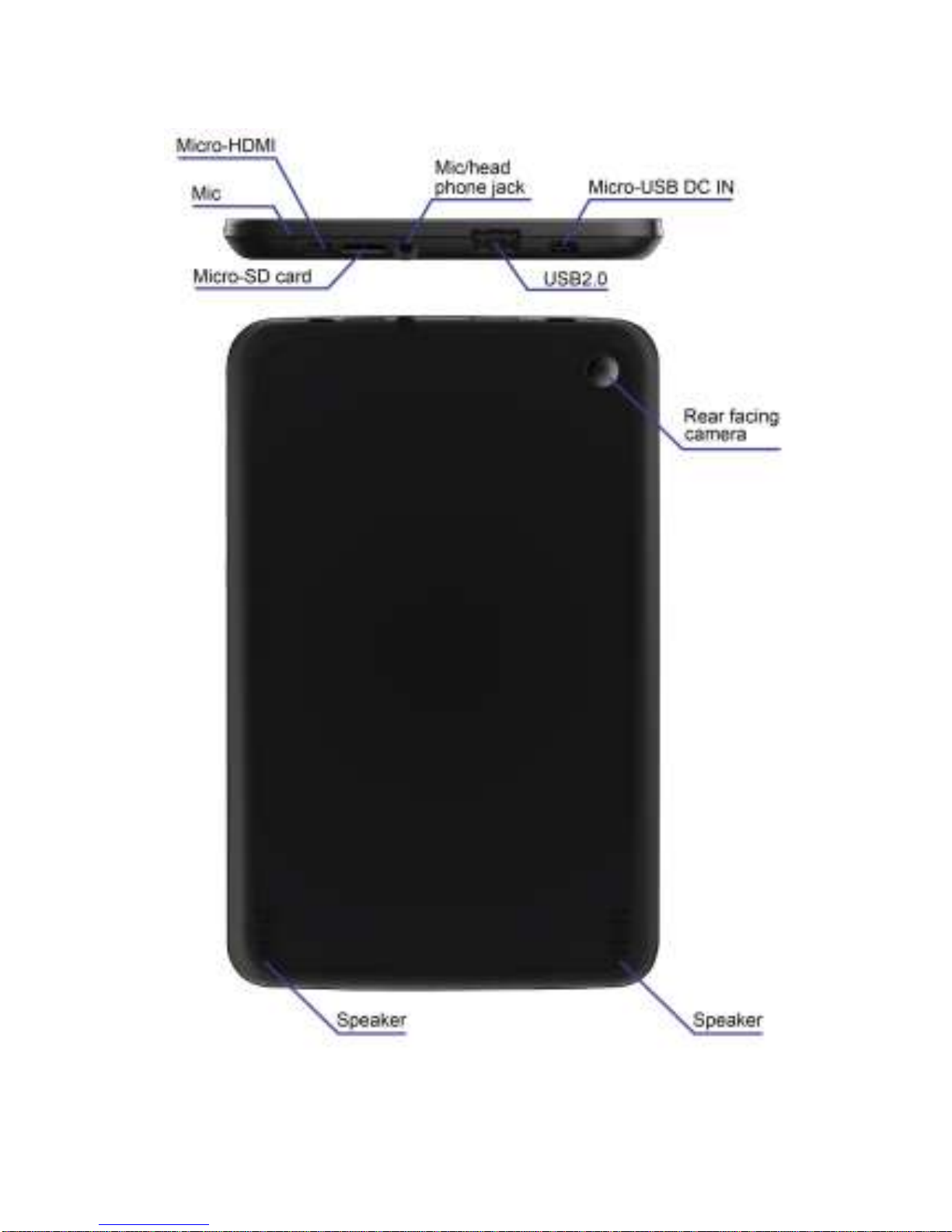
Tablet layout
Page 6
5
Page 7
6
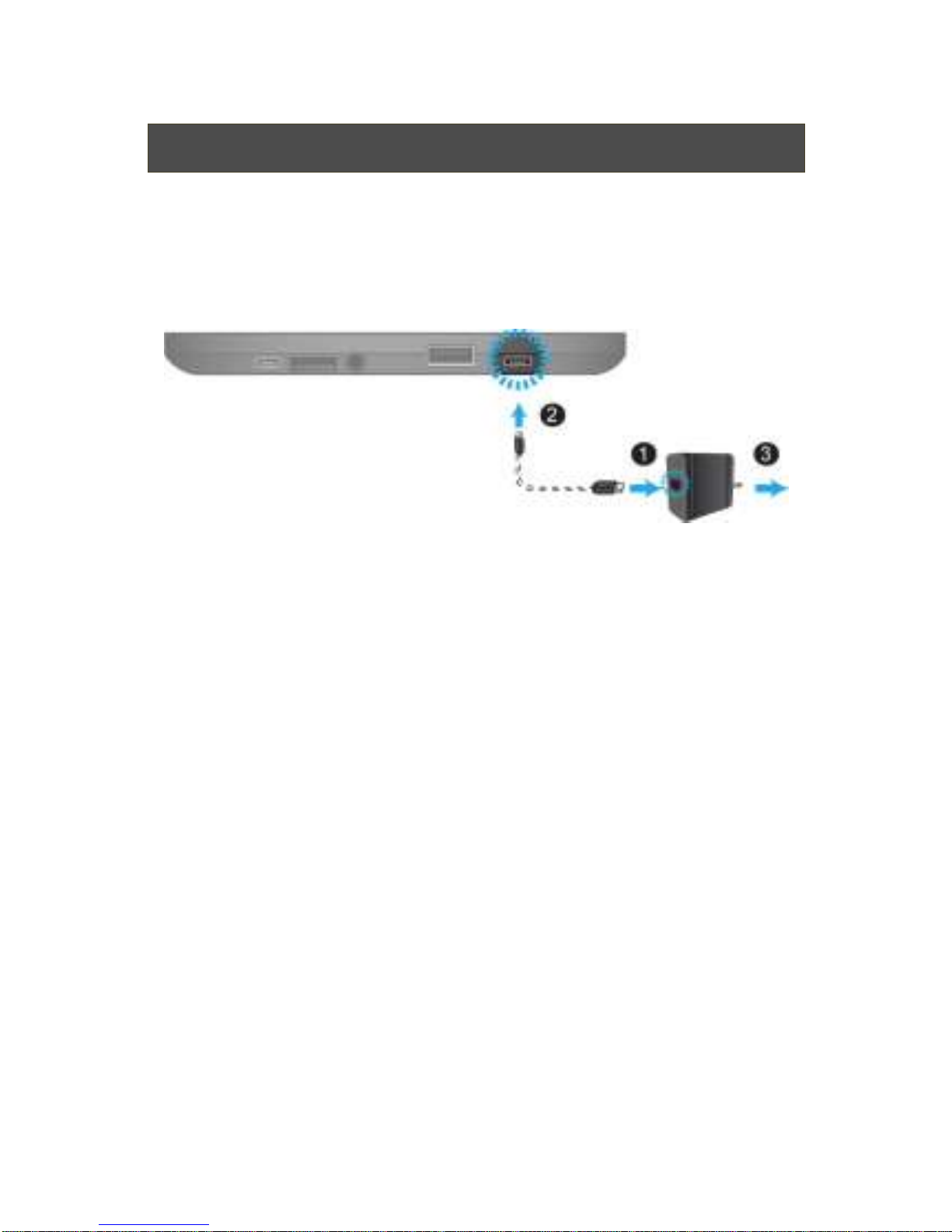
Charging your tablet
If your tablet is just being unpacked from the box, you need
to charge the tablet first. It will take around 3 to 5 hours to be
fully charged.
1. Plug the USB head of the cable into the adapter.
2. Plug the micro-USB head of the cable into the
micro-USB port on your tablet.
3. Plug the adapter into a wall-socket.
Page 8
7
Powering ON/OFF your tablet
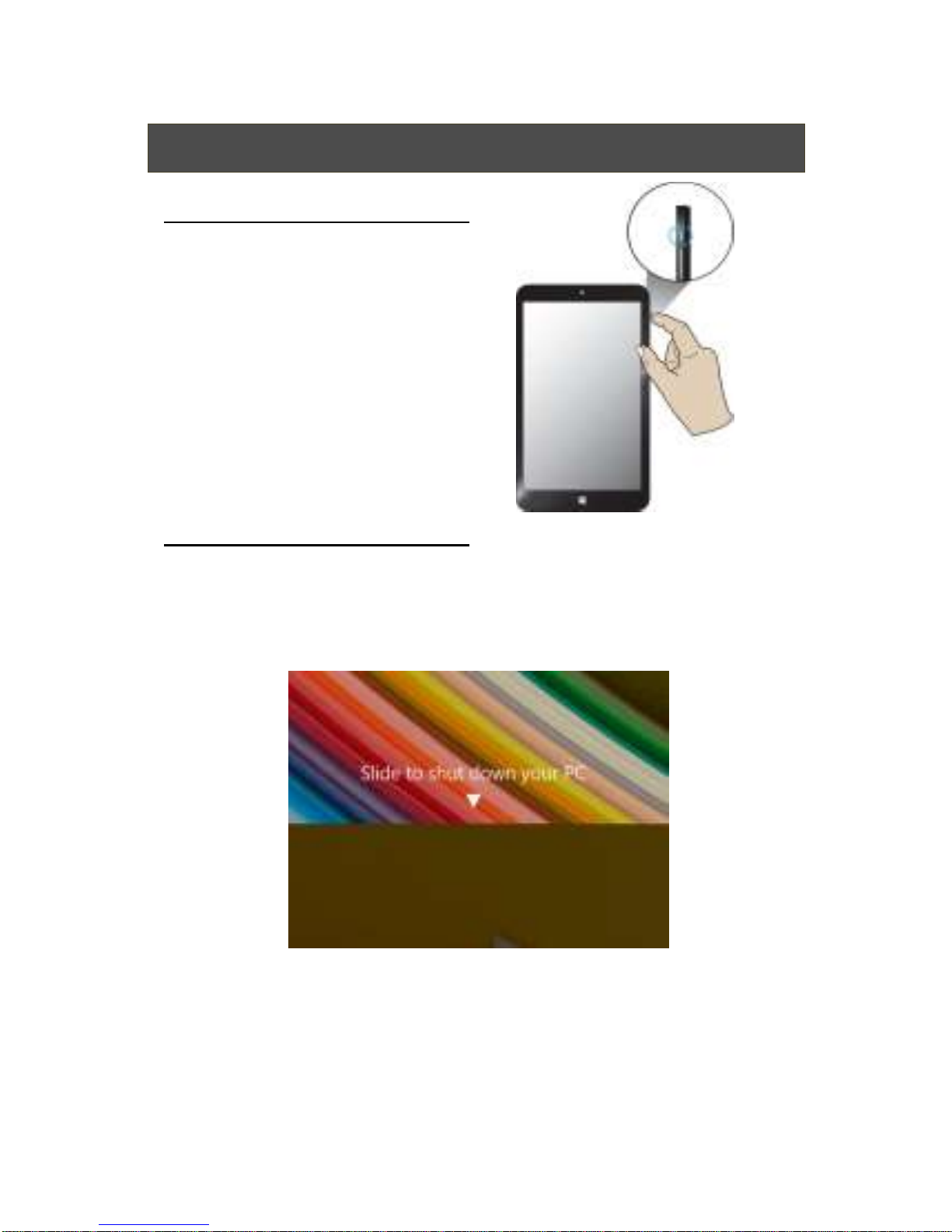
To power on your tablet
Press and hold the power button down
until the screen turn on.
To power off your tablet
Press and hold the power button for at least four seconds,
and you will see an instruction appears in the middle of the
screen, which is as shown below.
Slide your finger on the screen downward, and the system
will power off itself.
Page 9
8
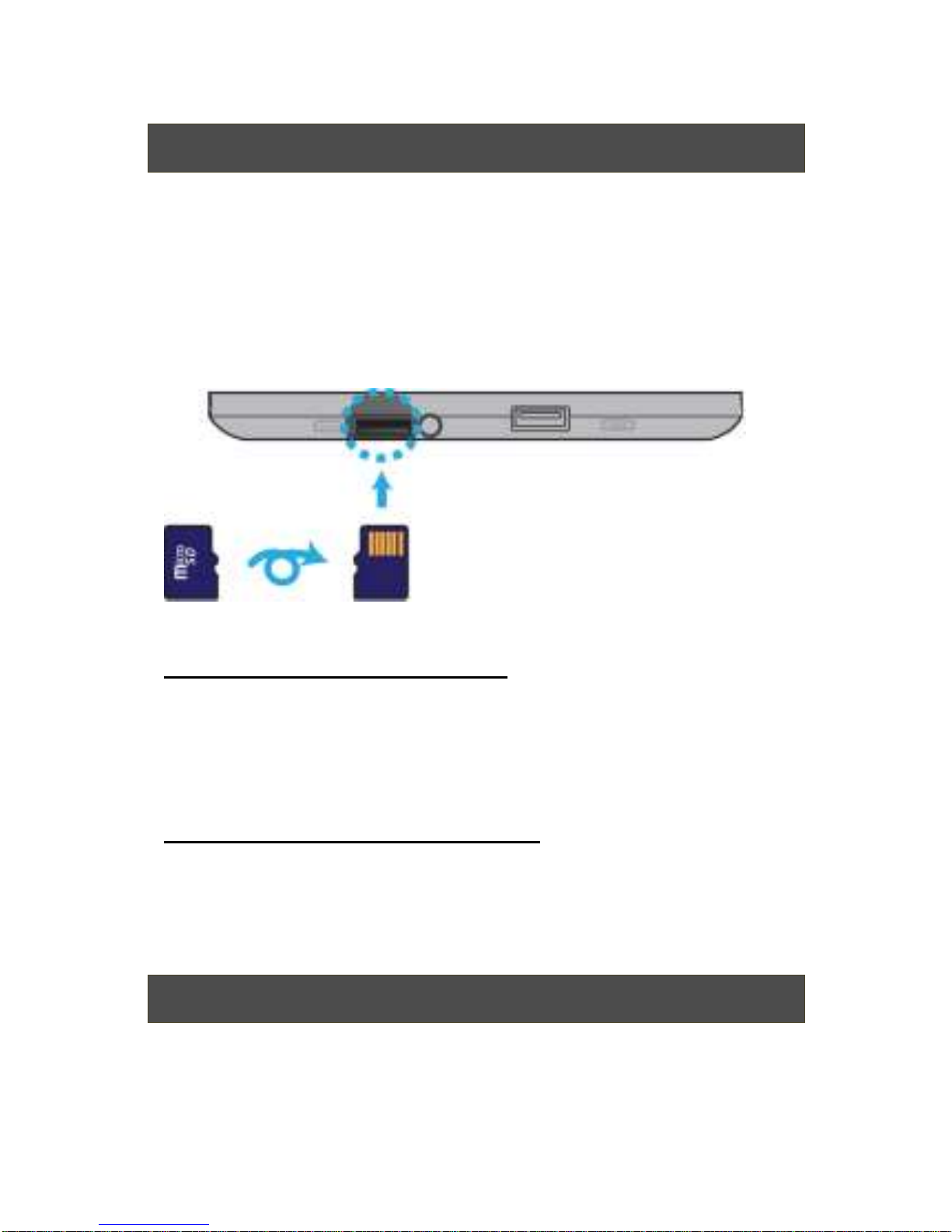
Inserting a storage card
Your tablet supports micro-SD cards with storage space
64G (Max). You can insert the micro SD card and pull it out
without powering down the tablet. To do so, follow the steps
below.
Install your Micro SD Card
1. Hold your tablet with front side up.
2. Insert your micro SD card in the direction as shown.
Remove your Micro SD Card
1. Push and release the micro SD card. This will
unlock the card.
2. Pull out the micro SD card.
Specifications
Page 10
9
Processor
Intel Bay Trail-T CR Z3735G
Quad core (4C/4T)
1.33 GHz (Burst to 1.83GHz)
2MB L2 Cache
Memory
DDR3L-1333
1 GB
Storage
Single eMMC up to v4.5.1
16GB
Wireless
Wi-Fi 802.11 b/g/n +BT4.0
Touchscreen
7-inch 800 x 1280 IPS LCD
Support 5-points multi-touch
Cameras
Front HD camera:2.0 M
Rear HD camera: 2.0 M
Battery
1Cell, 1S1P
Li-polymer
3000mAh
Input/Output
1 x Micro-USB 2.0 port (Type B)
1 x USB 2.0 port (Type A)
1 x Mic/head phone jack combo
1 x Micro-HDMI
1 x Micro-SD card slot
Page 11
10
Speaker &
Mic
Build-in Speaker x 2
Internal Analog MIC x 1
AC-Adapter
DC Output: 5V/2A/10 Watt
Input Voltage: 100 ~ 240VAC
Input Frequency: 47 ~ 63Hz
Dimension
(mm)
120.99(W) x 188.9(H) x10.98(D)
Net Weight
< 350 g (w/o adapter & cable)
 Loading...