

Page 1

r
Wireless Stereo Receive
User Guide
Revision 1.0
www.wimenow.com
Page 2

WiMe Kurve Wireless Stereo Receiver User Guide
PLEASE NOTE
The Kurve Wireless Receiver is an audio device featuring Bluetooth® wireless technology that
will play back stereo music wirelessly from a compatible music device (mobile phone,
notebook PC, or MP3 player), through a hi-fi system or speaker system.
The Kurve will only receive audio from a music device that supports Bluetooth Stereo
features. This is also referred to as A2DP (Advanced Audio Distribution Profile). Please check
that your music device supports this feature. Future references to the term “music device” or
“audio device” in this document will imply a device that supports Bluetooth Stereo features.
To control the playback volume of music being streamed by your music device to the Kurve,
your music device must support the Bluetooth Remote Control feature. This feature is also
referred to as AVRCP (Audio Video Remote Control Profile). Your music device should
support the AVRCP Controller role in order to control the playback volume.
If your music device does not support the Bluetooth
adjust the playback volume, using the volume control of your hi-fi or speaker system.
Page 2 of 18
Remote Control feature, you will have to
Copyright © 2007 WiMe Pte Ltd
Page 3

WiMe Kurve Wireless Stereo Receiver User Guide
About Bluetooth® Wireless Technology
Bluetooth technology is a wireless technology that can be found in devices such as mobile
phones, computers, personal digital assistants (PDAs), allowing them to be wirelessly
connected to one another, for transfer of information or music.
If you have a device that uses Bluetooth wireless technology, you can:
• Connect to handsfree devices.
• Connect to stereo hi-fi systems or headphones.
• Connect to computers and access the Internet.
• Synchronise information with computers.
• Use remote control applications.
• Use media viewer accessories.
• Exchange items and play multiplayer games.
Copyright © 2007 WiMe Pte Ltd
Page 3 of 18
Page 4
WiMe Kurve Wireless Stereo Receiver User Guide
1 WHAT’S IN THE BOX
Thank you for purchasing the Kurve Wireless Stereo Receiver.
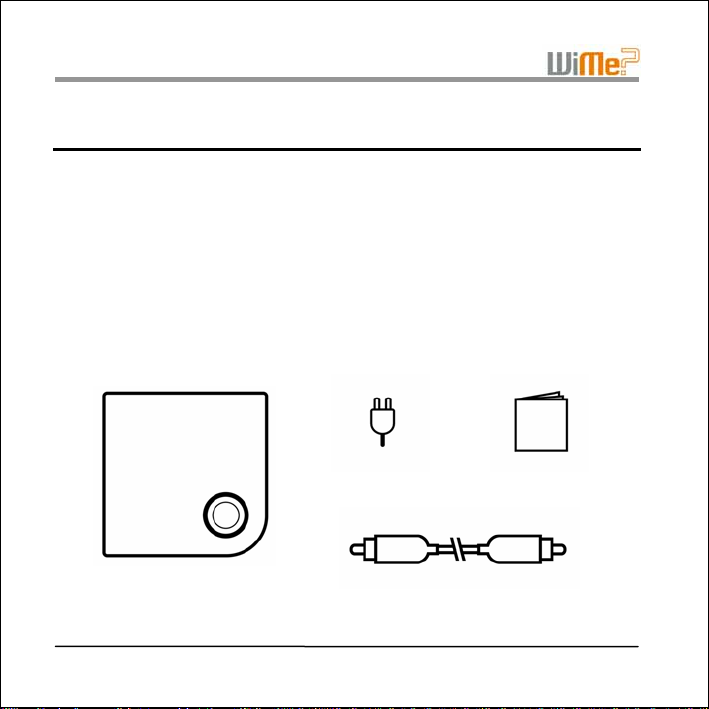
The package should contain the following items:
1. the Kurve Wireless Stereo Receiver
2. AC Adapter
3. RCA Cable
4. User Guide (this document)
Page 4 of 18
1 2
4
3
Copyright © 2007 WiMe Pte Ltd
Page 5
2 SETTING UP FOR USE
Copyright © 2007 WiMe Pte Ltd
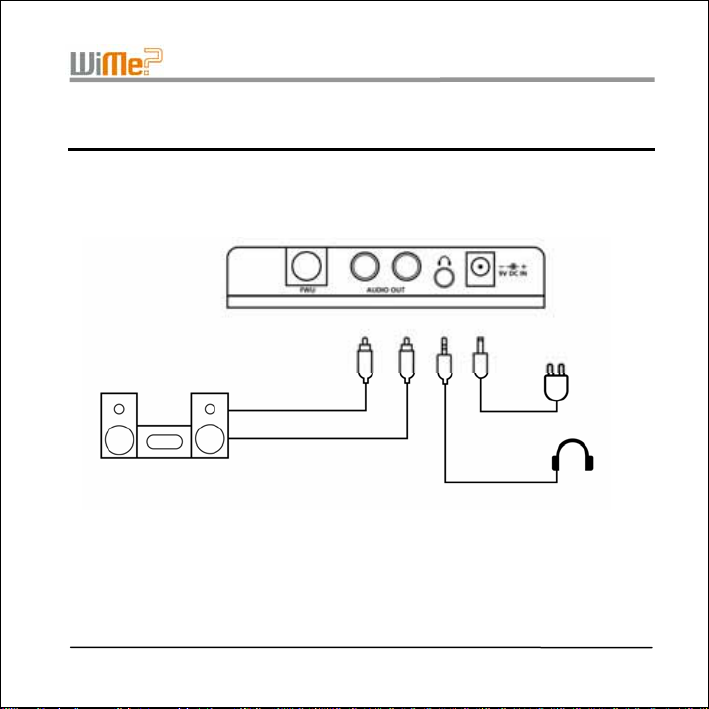
RCA Cable
WiMe Kurve Wireless Stereo Receiver User Guide
Back panel of the Kurve
AC~
AC Adapter
Page 5 of 18
Page 6
WiMe Kurve Wireless Stereo Receiver User Guide
2.1 Power
• Connect the included 9V AC power adapter to the Kurve's back panel connector
marked
• The blue light ring on the top of the Kurve should be on if the power connections are
correct and working properly.
2.2 Audio
• Refer to the user manual of your hi-fi system or amplifier for instructions on how to
connect a line input.
• Connect the Kurve into your hi-fi system or audio amplifier using the included RCA
cable.
• If your hi-fi system or audio amplifier only has a single 3.5mm input connector, you can
connect it to the Kurve using the output on the back panel of the Kurve marked
• The Kurve can also be used with stereo headphones. Connect your headphones to the
output on the back panel of the Kurve marked
The stereo headphones used MUST come with volume-control feature and
SHOULD be adjusted to the lowest volume before connecting it to the Kurve.
Page 6 of 18
.
.
.
IMPORTANT NOTE
Copyright © 2007 WiMe Pte Ltd
Page 7

WiMe Kurve Wireless Stereo Receiver User Guide
3 BLUETOOTH® PAIRING
“Pairing” is a process of linking two devices using Bluetooth wireless technology so that they
are able to communicate with each other within a secured environment. Before the Kurve can
receive streamed audio from your music device (mobile phone, notebook PC or MP3 player),
the Kurve and your music device must first be paired. Before proceeding with the Pairing
process, please refer to the user guide of your music device and familiarize yourself with your
device’s Bluetooth Pairing process.
3.1 To Pair Devices
• Press the button on the top of the Kurve and hold it down for 2 seconds until the Kurve’s
blue light ring starts flashing rapidly. This indicates that the Kurve unit is in Pairing
mode. The Kurve remains in Pairing mode for 60 seconds,
• Within this 60 seconds period, you should use your music device to search for and pair
with the Kurve,
• The Kurve will be identified on your music device as “WiMe Kurve”
• When you are prompted to enter a passcode on your music device, please enter the
code “0000”,
• Once paired, the blue light ring will stop flashing, indicating that the Pairing process has
been completed.
Copyright © 2007 WiMe Pte Ltd
Page 7 of 18
Page 8
WiMe Kurve Wireless Stereo Receiver User Guide
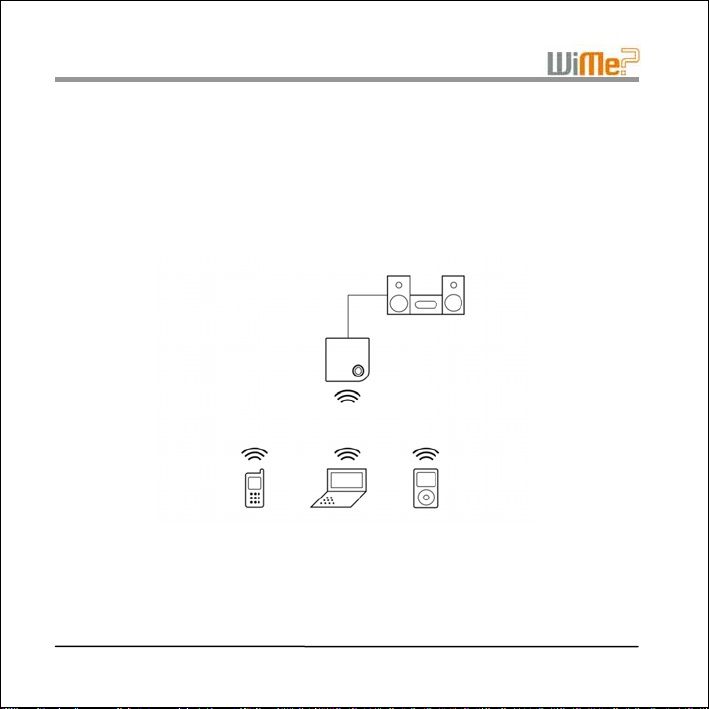
• If for some reason the Pairing process fails, please repeat the steps above. To pair the
Kurve with another music device, follow the same procedure as above. You can pair
with up to 5 devices.
• You will only need to pair the Kurve with your music device once. Once paired with the
Kurve, you do not need to pair it again before playing music.
For more information on pairing of Bluetooth devices, please visit the Bluetooth
www.bluetooth.com.
Page 8 of 18
Copyright © 2007 WiMe Pte Ltd
website at
Page 9

WiMe Kurve Wireless Stereo Receiver User Guide
4 PLAYING MUSIC
This section shows you how to play music from your music device to the WiMe Kurve. Please
ensure that your music device has been paired with the Kurve before continuing (refer to
Section 3 Bluetooth® Pairing for this). The music playback process is controlled entirely
from your music device.
4.1 Connect & Play
• Before you can play music, you need to make a connection between the Kurve and
your music device. The procedure for connecting your music device varies from device
to device. Please check the user guide for your music device for instructions on how to
start playing music over a Bluetooth
• Once you have established a connection between the Kurve and your music device, the
blue light ring on the Kurve will start a slow flash, indicating that the Kurve is ready to
start playing music.
• To start playing music, press the “play” button on your music device.
• Only one paired music device can play music at a time through the Kurve.
• To play music from another paired music device, disconnect the Bluetooth
between the first music device and the Kurve, and then establish a connection between
the next music device and the Kurve.
Copyright © 2007 WiMe Pte Ltd
connection.
connection
Page 9 of 18
Page 10

WiMe Kurve Wireless Stereo Receiver User Guide
4.2 Pause
• While playing is in progress, you may pause the music by pressing the “pause” button
on your music device.
4.3 Stop
• While playing is in progress, you may stop the music by pressing the “stop” button on
your music device.
4.4 Other Playback Functions
The following playback functions may be available on your music device. If so, they will also
work with the Kurve.
• fast forward, reverse, next track, previous track, track number select.
• equalizer function (this is a feature on your music device that adjusts the frequency
response, for example, “Rock”; “Classical”).
Page 10 of 18
Copyright © 2007 WiMe Pte Ltd
Page 11

WiMe Kurve Wireless Stereo Receiver User Guide
4.5 Changing the Volume
There are two ways to adjust the playback volume:
• If your music device supports the Bluetooth
playback volume using the volume controls on your music device. Please check your
music device’s user guide for more information.
• You can also adjust the playback volume using the control(s) on the hi-fi system or
speakers directly.
Copyright © 2007 WiMe Pte Ltd
Remote Control feature, you can adjust the
Page 11 of 18
Page 12

WiMe Kurve Wireless Stereo Receiver User Guide
5 POSITIONING YOUR KURVE
The Kurve is designed to receive streaming audio within a range of 10 metres from your
music device. However, the actual operational range is highly dependent on the environment,
such as transmitting range of your music device, and any obstructions in the way, such as
walls and metal parts.
If you experience problems when streaming audio from your music device, you may want to
try moving it closer to the Kurve.
Page 12 of 18
Copyright © 2007 WiMe Pte Ltd
Page 13

WiMe Kurve Wireless Stereo Receiver User Guide
6 INFORMATION AND SUPPORT
Please visit WiMe’s website at www.wimenow.com for the latest information related to your
Kurve Wireless Stereo Receiver. Technical support, knowledge base, and a list of compatible
devices can also be obtained at this site.
Copyright © 2007 WiMe Pte Ltd
Page 13 of 18
Page 14

WiMe Kurve Wireless Stereo Receiver User Guide
7 SPECIFICATIONS
Standard
Support Profiles A2DP Sink and AVRCP Target
Supported Audio Codecs SBC
Interface 3.5mm line-out jack, RCA Stereo Output
Sampling Frequency 44.1kHz / 48kHz
RF
Specifications
Consumption
Button(s) Pairing
Multi-Pairing Supports up to 5 Pairing records
Audio
Specifications
Power Supply DC 9V, 500mA
Dimensions 131mm (L) x 125mm (W) x 31mm (H)
Weight 180g
RF Frequency Range 2,402MHz to 2,480MHz
Spectrum FHSS (Frequency Hopping Spread Spectrum)
Modulation GFSK
Output Power 4dBm (max.)
Receiving Sensitivity < 0.1% BER at -80dBm
Power Class
Range 10m (Outdoor operating space)
Active Bluetooth Streaming
Connection
Standby Mode 5mA (ave.)
Frequency 20 Hz to 20 kHz
SNR (A-weighted) 95 dB or higher
THD+N < 0.06% (-65dB)
Operating 0° to +70°C Temperature
Storage -20° to +85°C
Bluetooth Specification 1.2
Bluetooth Class 2
150mA (ave.) Current
Page 14 of 18
Copyright © 2007 WiMe Pte Ltd
Page 15

WiMe Kurve Wireless Stereo Receiver User Guide
FCC Statement
This equipment has been tested and found to comply with Part 15 of the FCC rules.
Operation is subject to the condition that this device does not cause harmful interference.
This equipment generates, uses, and can radiate radio frequency energy and, if not installed
and used in accordance with this User Guide, may cause harmful interference to radio
communications. There is no guarantee that interference will not occur in a particular
installation. If this equipment does cause harmful interference to radio or television reception,
the user is encouraged to consult the dealer or an experienced radio/TV technician for help.
This equipment complies with Part 15 of the FCC Rules. Operation is subject to the following
two conditions:
1) this equipment may not cause harmful interference, and
2) this equipment must accept any interference received, including interference that
may cause undesired operation.
Any changes or modifications made without the approval of the party responsible for
compliance could void the user’s authority to operate this equipment.
Note: The manufacturer is not responsible for any radio or TV interference caused by
unauthorized modifications made by the user to this equipment. Such modifications could
void the user’s authority to operate the equipment.
Copyright © 2007 WiMe Pte Ltd
Page 15 of 18
Page 16

WiMe Kurve Wireless Stereo Receiver User Guide
RF Exposure Guidelines
The antenna(s) used for this transmitter must be installed to provide a separation distance of
at least 20 cm from all persons and must not be co-located or operating in conjunction with
any other antenna or transmitter.
Page 16 of 18
Copyright © 2007 WiMe Pte Ltd
Page 17

WiMe Kurve Wireless Stereo Receiver User Guide
Limited Warranty Statement
WiMe warrants that this product is new or has been re-manufactured to meet new standards
using new or serviceable used parts. WiMe makes no other warranty, either expressed or
implied, with respect to this product. WiMe specifically disclaims the implied warranties of
merchantability and fitness for a particular purpose. Some states or provinces do not allow
limitations on how long an implied warranty lasts, so the above limitation or exclusion may not
apply to you.
The remedies provided herein are customer's sole and exclusive remedies. In no event shall
WiMe be liable for any lost profits, direct, indirect, special, incidental, or consequential
damages, whether based on contract, tort, or any other legal theory.
Copyright © 2007 WiMe Pte Ltd
Page 17 of 18
Page 18

WiMe Kurve Wireless Stereo Receiver User Guide
Copyright © 2007 WiMe Pte Ltd
All Rights Reserved.
Information contained within this document is part of the intellectual propert y of WiMe
Pte Ltd (“WiMe”). No part of this document may be copied or reproduced in any form
or by any means without the prior written consent of WiMe.
WiMe makes no warranties with respect to this document and disclaims any implied
warranties of merchantability and fitness for a particular purpose. Information in this
document is subject to change without notice. While every attempt is made to ensure
accuracy, WiMe shall not be liable for any errors or omissions that may appear in this
document.
The following are trademarks of their respective companies:
The Bluetooth® word mark and logos are owned by the Bluetooth SIG, Inc. and any use of
such marks by WiMe Pte Ltd is under license.
Other trademarks and trade names are those of their respective owners.
P/N: MDMA01796
Page 18 of 18
Copyright © 2007 WiMe Pte Ltd
 Loading...