

Page 1

Antenna
Installation
Guide
Cellular
Cradle
Plus™
Contents:
Cell Phone Cradle Plus ...........................1
Multiple Mounting Options .........................1
Air Vent Bracket . . . . . . . . . . . . . . . . . . . . . . . . . . . . . . 1
Adhesive Bracket . . . . . . . . . . . . . . . . . . . . . . . . . . . . . 1
Gooseneck Suction Mount ......................2
Adhesive/Screw Swivel Bracket . . . . . . . . . . . . . . . . . . . . 2
Attaching the Cradle . . . . . . . . . . . . . . . . . . . . .Back Cover
Adjusting the Cradle’s Arms . . . . . . . . . . . . . . .Back Cover
Guarantee and Warranty ..................Back Cover
Wilson
®
Electronics, Inc.
Note: This manual contains important safety and operating information.
Please read and follow the instructions in this manual. Failure to do
so could be hazardous and result in damage to your Signal Booster.
Disclaimer: The information provided by Wilson Electronics, Inc. is believed
to be complete and accurate. However, no responsibility is assumed by
Wilson Electronics, Inc. for any business or personal losses arising from its
use, or for any infringements of patents or other rights of third parties that
may result from its use. Copyright © 2011 Wilson Electronics, Inc. All rights
reserved.
Page 2

1
Contact Wilson Electronics Technical Support Team with any questions at 866-294-1660
or email: [email protected]. Hours: 7 am to 6 pm MST.
2
Installation Instructions for the Following Wilson Electronics Antenna
Cellular Cradle Plus™
Inside this Package
Included in the 301146 Kit
Cellular Cradle Plus™
Wilson Electronics’ Cellular Cradle Plus offers a built-in cell phone signal antenna/coupler.
Used in conjunction with one of Wilson Electronics Cellular Signal Boosters, the Cradle
Plus can improve your cellular signal up to 20 times and help you stay connected in places
you never could before!
Multiple Mounting Options
Multiple mounting options allow for a custom installation in virtually any vehicle. Before
mounting, determine the desired location of the cradle in your vehicle. Hold the cradle in the
intended position and be sure it does not obstruct your view or block access to any controls
or gauges necessary for safe driving.
Adhesive Bracket
Adhesive/Screw
Swivel Bracket
Adapter
(For use with your MobilePro)
(359909)
Plug one end into the Cradle Plus
Antenna, and the other end into your
MobilePro (sold separately).
Cellular
Cradle Plus™
3 Sets of arms
(1 set small, 1
set medium, 1
set large)
Cell Phone Cradle and Cell Phone Cradle Plus
Installation Guide
Cell Phone Cradle
(Part # 859942)
Cell Phone Cradle Plus
(Part # 301146)
®
product. Doing so lets
Wilson Electronics’ Cell Phone Cradle Plus offers all the
convenience features of the standard cradle with the added
benefit of a built-in cell phone signal antenna/coupler. Used in
conjunction with one of Wilson’s cellular amplifiers, the Cradle
Plus can improve your cellular signal up to 10 times and help
you stay connected in places you never could before!
Here’s how the amplifier/Cradle Plus system works: A Wilson
antenna mounted on the outside of your vehicle communicates
with the cell site, and the built-in cradle antenna/coupler
communicates with your cell phone. The outside antenna
collects weak cellular signals and sends them to the amplifier.
The amplifier boosts those signals and sends transmits them
through the cradle antenna/coupler, significantly improving the
performance of your cell phone or laptop data card. The Cradle
Plus works with Wilson’s SignalBoost
amplifiers.
Included With Some Kits:Included Contents:
Slide the bracket clips into the chosen vent 1.
location until they snap into place. If necessary,
use a thin-bladed screwdriver to gently pry the
clips apart as they slide into the vent.
Position the moveable arm at the base of the 2.
bracket to achieve the desired angle and to
provide additional stability for the bracket.
See “Attaching the Cradle” on the back page.3.
Air Vent Bracket
Adhesive Bracket
Adhesive/Screw
Swivel Bracket
Gooseneck Suction
Bracket
(available on some kits)
Air Vent Bracket
Air Vent
Bracket
Clean the area where the bracket is to be 1.
mounted with an alcohol wipe (included).
Allow to dry.
Peel the backing to expose the adhesive and 2.
press the bracket onto the desired location
in the vehicle. Note: Be sure the bracket is
positioned vertically, not horizontally.
Adhesive Bracket
Adhesive Bracket
Adhesive/Screw
Swivel Bracket
Gooseneck Suction
Bracket
(available on some kits)
Gooseneck Suction
Cup Mount
(For mounting the cradle
to the windshield)
(901120)
Page 3
2
Contact Wilson Electronics Technical Support Team with any questions at 866-294-1660
or email: [email protected]. Hours: 7 am to 6 pm MST.
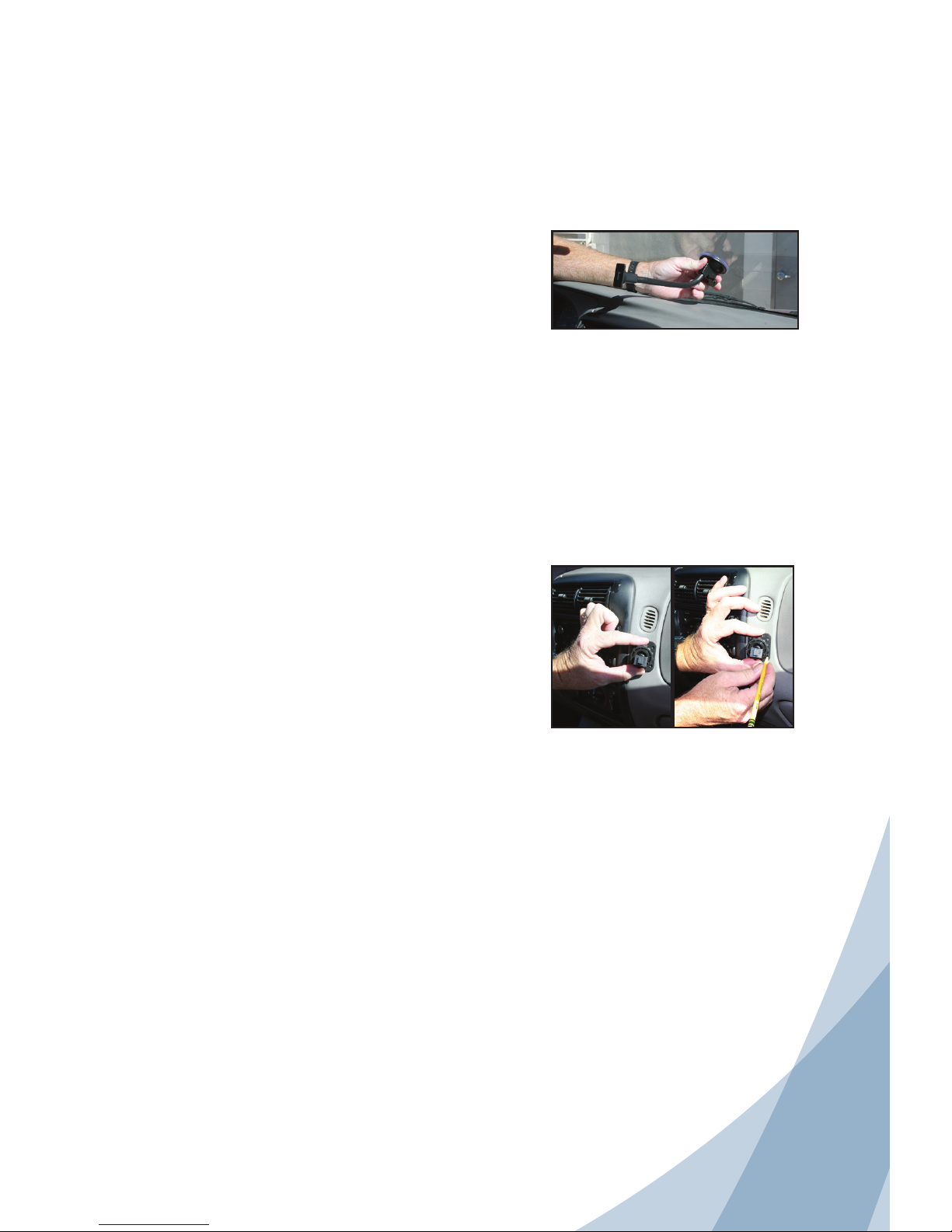
Clean the area of the windshield in the location 1.
you would like to attach the suction cup with an
alcohol wipe (included). Allow to dry.
Press the suction cup at the base of the mount 2.
onto the windshield with even pressure. Depress
the lever above the suction cup to pump the
remaining air out of the area and to achieve a
strong suction mount.
Bend the gooseneck to the location where you 3.
would like to attach the cradle. For best performance, adjust the gooseneck so that the cradle
is allowed to rest on the dashboard.
See “Attaching the Cradle” on the back page.4.
Gooseneck Suction Mount
(available on some kits)
Note: State law prohibits drivers in
some states from using suction mounts
on their windshields when operating
motor vehicles. In such cases, other
Wilson Electronics dashboard or console mounting options should be used.
Wilson Electronics does not take any
responsibility for any nes, penalties,
or damages that may be incurred as a
result of disregarding this notice.
Adhesive/Screw
Swivel Bracket
Gooseneck Suction
Bracket
(available on some kits)
For best mounting results and long-term performance,
we suggest that you choose a flat, smooth surface like
the console area of your vehicle between the two front
seats. If this is not available in your vehicle, you may
mount the cradle on the front of the dashboard.
If mounting the cradle on a sloped area of the dashboard in your vehicle, please note that gravity may
affect the adhesive over time. Use the screw mount for
a more permanent attachment.
Clean the area where the bracket is to be mounted with an alcohol wipe (included). 1.
Allow to dry.
2. For an adhesive mount, peel the backing to expose the adhesive and press the
bracket onto the desired location in the vehicle. Note: The swivel feature allows the
bracket to be positioned vertically or horizontally. Allow the adhesive to cure for 24
hours before you attach the cradle.
For a screw mount, use an ice pick or an awl to punch through the adhesive and
expose the four screw holes in the bracket. You must provide the screws of an appropriate size for your particular application. Using the bracket as a template, mark the
locations for the screws, drill holes, attach the bracket with adhesive, and tighten all
screws.
See “Attaching the Cradle” on the back page. 3. Note: Once the cradle is attached, you
can loosen the knurled wheel and swivel the hook to the desired angle, then re-tighten
the wheel.
Adhesive/Screw Swivel Bracket
Allow the adhesive to cure for 24 hours before you attach the cradle.3.
See “Attaching Cradle” on the back page. 4. Note: Once the cradle is attached, you can
adjust the angle of the adhesive bracket by applying gentle pressure to the top or
bottom of the cradle.
Page 4
103071_Rev1_061311
Attaching the Cradle
Once you have installed your selected mount in the desired location, attach the cradle by
aligning the rectangular hole on its back with the hook on the mount. Grasping the sides of
the cradle, slide it downward approximately 1/4 inch into place.
3301 East Deseret Drive, St. George, UT 84790
For additional Technical Support visit www.WilsonElectronics.com
or email: [email protected]
Phone: 866-294-1660 Local: 435-673-5021 Fax: 435-656-2432
www.twitter.com/WilsonCellular www.facebook.com/WilsonCellular
30-Day Money-Back Guarantee
All Wilson Electronics products are protected by Wilson Electronics 30-day money-back
guarantee. If for any reason the performance of any product is not acceptable, simply return the
product directly to the reseller with a dated proof of purchase.
1-Year Warranty
Wilson Electronics Antennas are warranted for one (1) year against defects in workmanship
and/or materials. Warranty cases may be resolved by returning the product directly to the reseller
with a dated proof of purchase.
Antennas may also be returned directly to the manufacturer at the consumer’s expense, with a
dated proof of purchase and a Returned Material Authorization (RMA) number supplied by Wilson
Electronics. Wilson Electronics shall, at its option, either repair or replace the product. Wilson
Electronics will pay for delivery of the repaired or replaced product back to the original consumer
if located within the continental U.S.
This warranty does not apply to any antennas determined by Wilson Electronics to have been
subjected to misuse, abuse, neglect, or mishandling that alters or damages physical or electronic
properties.
RMA numbers may be obtained by phoning Technical Support at 866-294-1660.
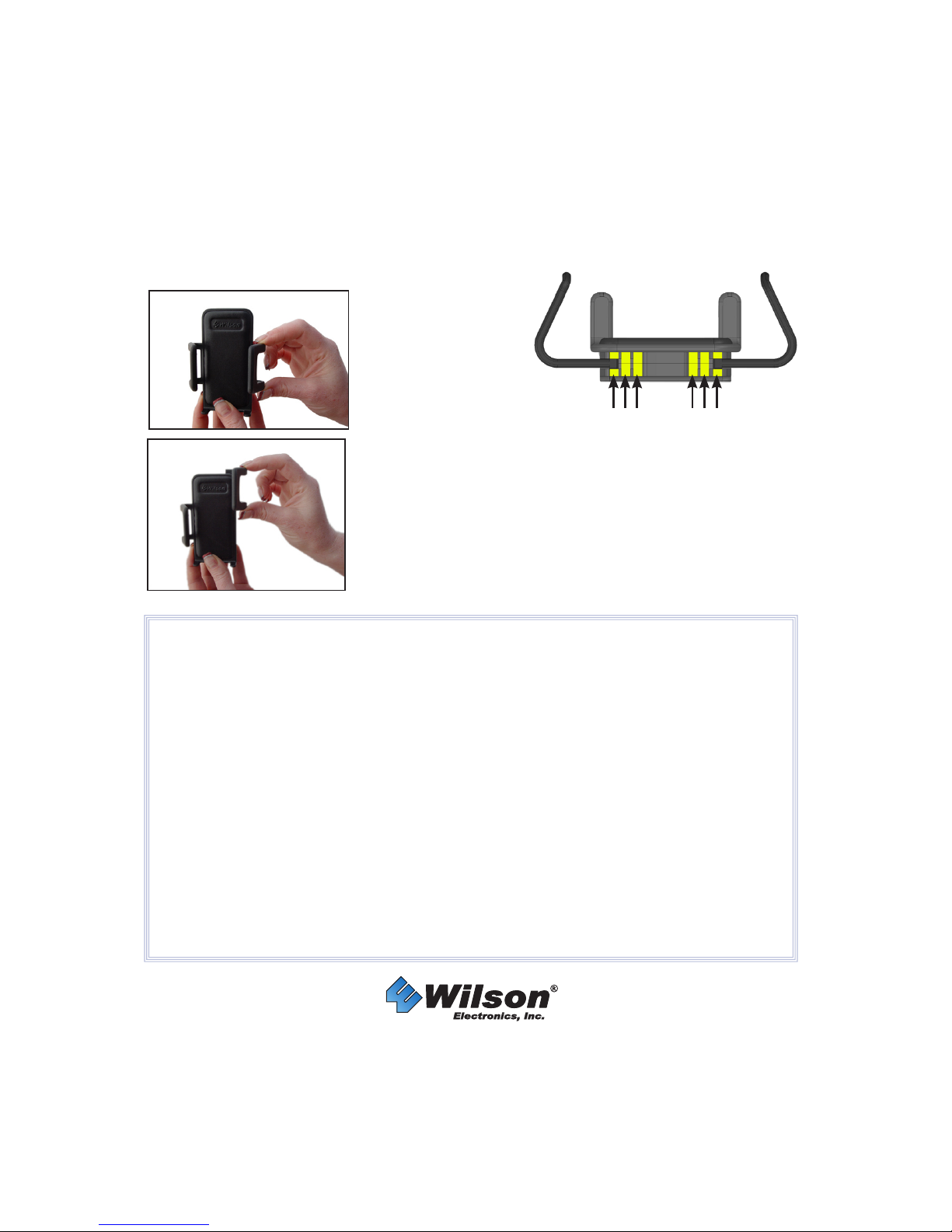
Adjusting the Cradle’s Arms
Included with your Cradle are various sized arms, which will provide you with multiple
options to customize the Cradle to fit your phone.
1. Change arms
Gently grab the arm
and lift upward until
the arm slides free
from the Cradle.
2. Reposition arms
Position the arm above a different slot on the Cradle (indicated
by arrows in the drawing). Gently slide the arm down until the
arm is firmly in place.
NOTE: The cell phone must be placed in the Cradle to work
properly. Use a Bluetooth or wired hands free device.
Slots Slots
 Loading...