

Page 1
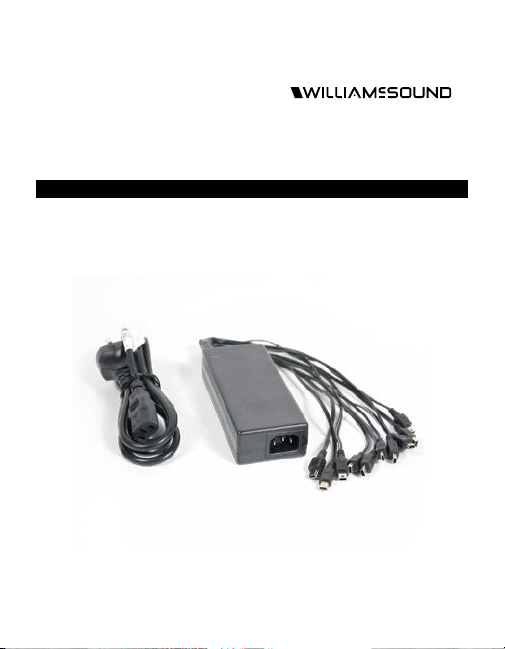
CHG 863
863 MHz 10-unit Pigtail Charger - Europe
USER MANUAL
Page 2
Safety Information
HEARING SAFETY
CAUTION!
This product is designed to amplify sounds to a high volume. To protect
your hearing and the hearing of others: (1) Make sure the unit is OFF or
the volume is turned down before putting on the earphones, and (2)
set volume level at the minimum setting you need to hear and (3) do not
allow children or other unauthorized persons to have access to this
product.
BATTERY SAFETY
CAUTION!
Do not attempt to recharge alkaline or other non-rechargeable
batteries, which may explode, release dangerous chemicals, cause
burns, or cause other serious harm to the user or product. To reduce
the risk of fire or burns, do not crush, puncture, short contacts, or
expose to temperatures above 140F (60C). Replace only with battery
types designated for this product. Recycle or dispose of properly.
MEDICAL DEVICE SAFETY
CAUTION!
Before using this product with a pacemaker or other implantable
medical device, consultant your physician or the manufacturer of the
device to make sure that you are using this product in accordance with
their safety guidelines.
Recycling Instructions
Help Williams AV protect the environment!
Please do not dispose of equipment or used batteries in the household
trash. Take the equipment to an electronics recycling center or return to
the factory. Take batteries to a retail or community recycling location.
Page 3
Recharging Instructions
CHARGING
CONTACTS
BATTERY DOOR
BATTERY
COMPARTMENT
DOOR
(PRESS ON ARROW
AND SLIDE
IN DIRECTION
OF ARROW)
CHARGING
INDICATOR
BATTERY
OFF ON
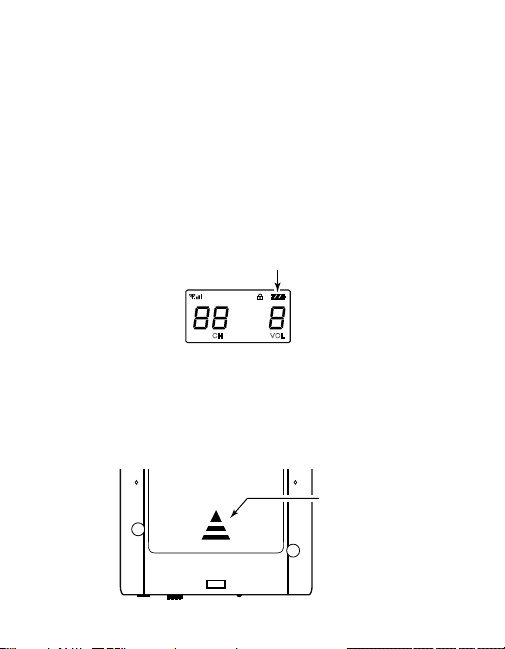
This unit will charge any combination of T2 863 transmitters and/or R2
863 receivers, up to 10 at a time, when using NiMH batteries. When the
batteries are nearly depleted, the battery life symbol will have no bars
(Figure A) and the display backlight will flash. NiMH batteries do not
have a memory so you may keep using the unit until it stops operating,
or recharge it as needed.
FIG. A: Battery symbol location on T2863, R2863
To recharge the unit(s):
1. Ensure that the unit(s) to be charged contain rechargeable NiMH
batteries. Open the battery compartment by pressing and sliding the
compartment door in the direction of the arrow (Figure B).
FIG. B: Battery compartment location on T2863, R2863
CH
BATTERY
LIFE
VOL
COMPARTMENT
DOOR
(PRESS ON ARROW
AND SLIDE
IN DIRECTION
OF ARROW)
Page 4
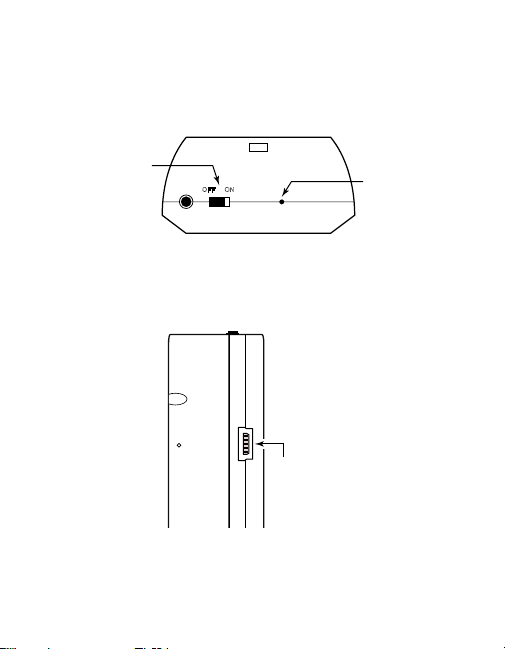
2. Turn the unit(s) o using the power switch located on the top of the
CHARGING
INDICATOR
POWER SWITCH
BATTERY
COMPARTMENT
DOOR
OFF ON
unit(s). The units need to be o before charging. (Figure C)
FIG.C: Power switch and charging indicator on T2863, R2863
POWER SWITCH
OFF ON
CHARGING
INDICATOR
3. Plug one of the pigtail Mini-B ends into the charging port located on
the side of the unit(s). (Figure D)
FIG.D: Charging port location on T2863, R2863
USB
MINI-B
CHARGING
PORT
Page 5

4. Charging indicator (Figure C):
When the unit begins charging the charging indicator on the unit will
flash once per second.
If the indicator flashes fast, an incorrect battery type is in the unit.
When the unit is finished charging, the charging indicator will stay on.
5. When the unit has finished charging, keep the unit powered o and
remove the plug from the charging port.
6. Turn the unit on and verify that the battery life indicator is full (shown
by the inside of the battery symbol having three diagonal lines).
7. If the charging indicator does not behave as described, or the unit
does not have full battery life when it indicates it is finished charging,
or the unit operates for a short time then indicates low battery, the
batteries may need to be replaced.
8. When not operating the units for a long period of time (greater than
one month) remove the batteries from the unit(s). Failing to do
this can cause corrosion of the internal battery contacts and may
damage the unit(s).
Page 6

System Specifications
CHG 863
Dimensions: Power Supply: 14 cm L x 5.7 cm W x 3.18
Shipping Weight: 1.1 lbs (0.5 kg)
Enclosure: Black, ABS plastic
Power Supply: Input: 100-240VAC, 1.8A, 50-60Hz.
Capacity: Up to 10 Units can charge simultaneously.
Charging Time: Up to 5 hours per unit
Indicators: Power Supply: 1 Red LED indicates
Warranty: 2 years
Approvals: UL, CE, GS, FCC, IC, RoHS
cm H (5-1/2”L x 2-1/4”W x 1-1/4”H)
Pigtail Cable Length: Approximately 33
cm (13”).
Output: 5VDC, 8A total. Pigtail with 10
USB, Mini-B style ends.
incoming AC power.
T2863 or R2863: Charging light on top
of unit
Flashes once per second (Slow) =
Charging,
Flashes Fast = Incorrect Battery Type,
On Steady = Charged
Page 7

2 Year Warranty
Williams Sound, a brand owned by Williams AV, products are
engineered, designed, and manufactured under carefully controlled
conditions to provide you with many years of reliable service.
Williams AV warrants the CHG 863 against defects in materials and
workmanship under normal use and conditions for up to 2 years from
the date of purchase*.
Microphones, earphones, headphones, batteries, chargers, cables,
carry cases, and most other accessory products carry a 90-day
warranty.
This warranty does not cover reimbursement for your costs of removing
and transporting the product for warranty service evaluation or
installation of any replacement product provided under this warranty.
*For a Complete Warranty Statement go to: www.williamsv.com/
warranty-statement
NOTICE: Williams Sound products are NOT designed for use in extreme
temperature, humidity or chemical environments. The introduction of
chemicals such as chlorine, salt water or human sweat into the product
will cause damage to the circuitry. Damage due to these causes is NOT
covered under the Product Warranty.
Page 8

Customer Service
If you experience diculty with your system, call Customer Assistance:
1-800-843-3544 (U.S.A.) or
+1 952 943 2252 (Outside the U.S.A.)
If it is necessary to return the system for service, your Customer Service
Representative will give you a Return Authorization Number (RA) and
shipping instructions.
[email protected] / www.williamsav.com
800-843-3544 / INTL: +1-952-943-2252
©2019 Williams AV, LLC • All Rights Reserved MAN 190B
 Loading...