

Page 1
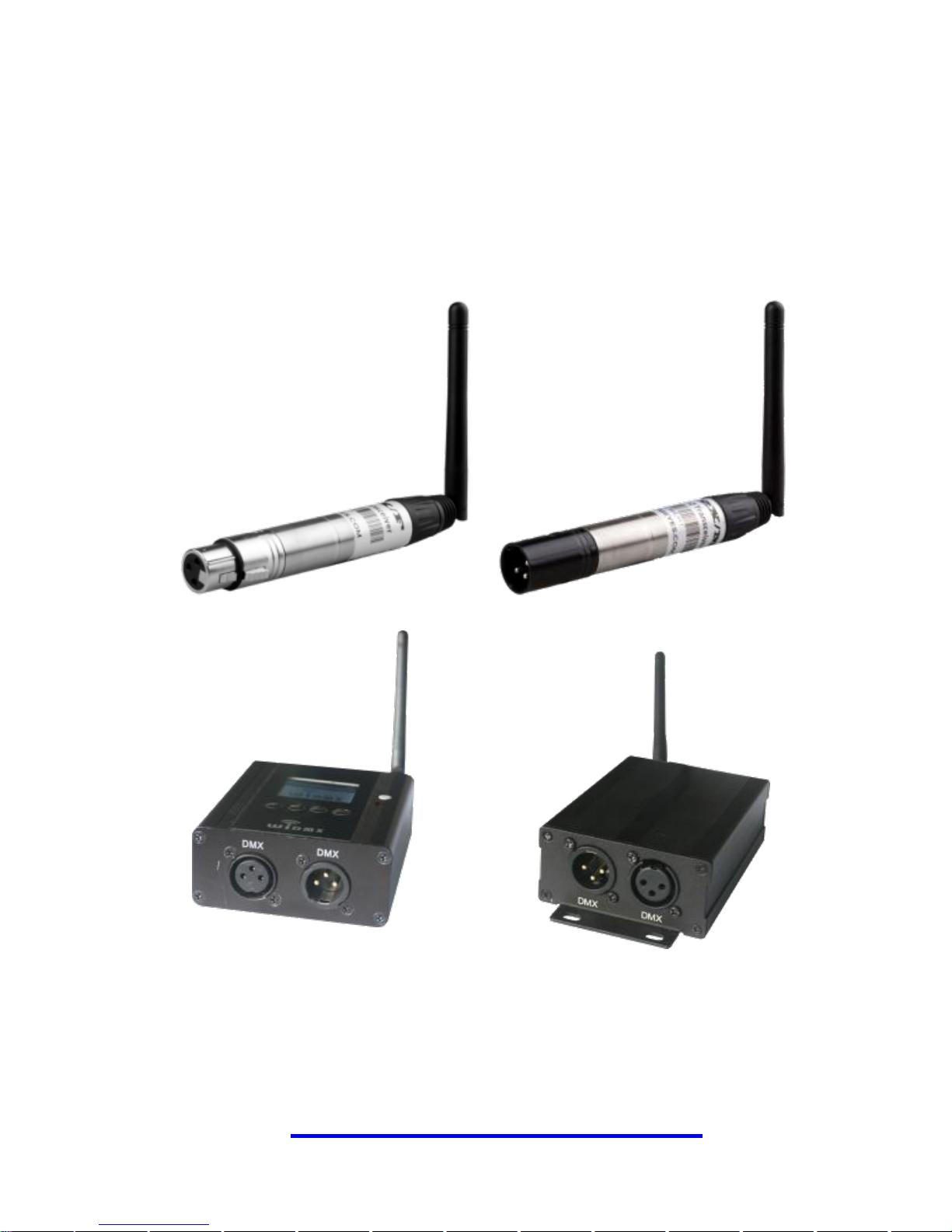
Wireless DMX Transceiver
LC-512 Series User Manual
Version 2.0
www.widmx.com
Page 2

Thank you for choosing WIDMX LC-512 Series Wireless DMX
Transceiver. WIDMX LC-512 Series is unique in its use of
advance radio technologies that are also used in military
communication and mobile phones. Its user-friendly operation
that simplifies all the complex communication protocols makes
it possible for the users to plug and play.
WIDMX LC-512 Series uses 2.4GHz global open ISM band
with license-free use. The Gaussian Frequency Shift Keying
(GFSK) modulation, Frequency Hopping Spread Spectrum
(FHSS) with 79 channels interference-free operation. WIDMX
LC-512 Series is continually considered as a reliable wireless
DMX product for lighting installations over large distances and
in any environment.
There are no upgrading troubles. Because ours is now
compatible with the world's leading wireless communication
protocols like the Sweden’s protocol or the GZ protocols.
Complete instructions and product features, please read this
manual or visit our website at www.widmx.com .
Page 3

Content
SAFETY INFORMATION .............................................2
STATEMENT ..................................................................3
1 INTRODUCTION ................................ ........................ 4
1.1 FEATURES ..............................................................4
1.2 SPECIFICATIONS .....................................................5
1.3 PACKING LIS ..........................................................5
1.4 INTERFACE .............................................................6
2 OPERATING GUIDE .................................................7
2.1 OPERATING MODE ..................................................7
2.2 DESCRIPTION OF STATUS INDICATOR .....................9
2.3 SELECT WIRELESS GROUP ................................... 11
2.4 RESTORE FACTORY SETTINGS ...............................13
2.5 CONNECTION AND DELETE CONNECTION ............13
3 APPLICATIONS .......................................................15
3.1 ONE TRANSMITTER TO ONE RECEIVER .................15
3.2 ONE TRANSMITTER TO MANY RECEIVERS.............16
3.3 PARALLEL TRANSMISSION ...................................17
3.4 REPEATER OR AMPLIFIER .....................................17
4 MAINTENANCE .......................................................18
Page 4

Safety Information
Please keep the product far away from the heat. It
should be away from the heater, radiator or any other
heat source. Heat will damage and break the product,
even worse it may start a fire.
Please shutdown the product where there are slogans
like “Explosion Zone”, “May Burst Area” and “Turn off
the wireless transceiver” or somewhere such as
Hospital, Gas Station and Airport.
It may bring trouble for some medical electronic
equipment like hearing-aid and cardiac pacemaker
and so on. Please follow the warning notes and safety
instructions.
Please use the attached power adapter. It might
damage the device if using unapproved power
adapter.
Page 5

Statement
We will keep improving and developing our products.
We reserve the right to modify and to improve the
described item in this document without notice in
advance.
Unless otherwise provided by applicable laws, we do
not make any type or implied warranties to the
accuracy, reliability and content of it, including but not
limited to the warranties of merchantability and the
purposes of specific application.
In any case, we do not take responsibility on the loss
of data, property and revenue, or any special,
incidental, consequential or indirect damages, whether
the loss caused by any reason.
The availability of particular products may vary by
region. Please contact with your local dealer.
Page 6

www.widmx.com LC-512 Series User Manual
4
1 Introduction
1.1 Features
WIDMX LC-512 Series is unique in its use of advance radio
technologies that are also used in military communication
and mobile phones. Its user-friendly operation that simplifies
all the complex communication protocols makes it possible
for the users to plug and play.
2.4GHz ISM Band, license-free worldwide
FHSS with 79 Channels, interference-free operation
32-bit ARM processor, DMA transfer without delay
Standard DMX512 3-pin XLR, 5-pin XLR, transceiver
Built-in Wireless Solution compatibility mode
Group Mode, easy plug-and-play operation; Pairing
Mode, supports more transmitter universes
Page 7

www.widmx.com LC-512 Series User Manual
5
1.2 Specifications
Band: 2.402GHz – 2.480GHz, ISM, 79 channels
Spread spectrum: FHSS, 1100 hops / sec
Modulation: GFSK
Maximum Transmit Power: 23dBm
Receiver Sensitivity: -94dBm
Power: DC 5V ± 10%
Size:212 x 18 x 18 mm
1.3 Packing Lis
Delivery includes:
1) Wireless DMX Transceiver 1pcs
2) Power Adapter 1pcs
3) User Manual 1pcs
Page 8
www.widmx.com LC-512 Series User Manual
6
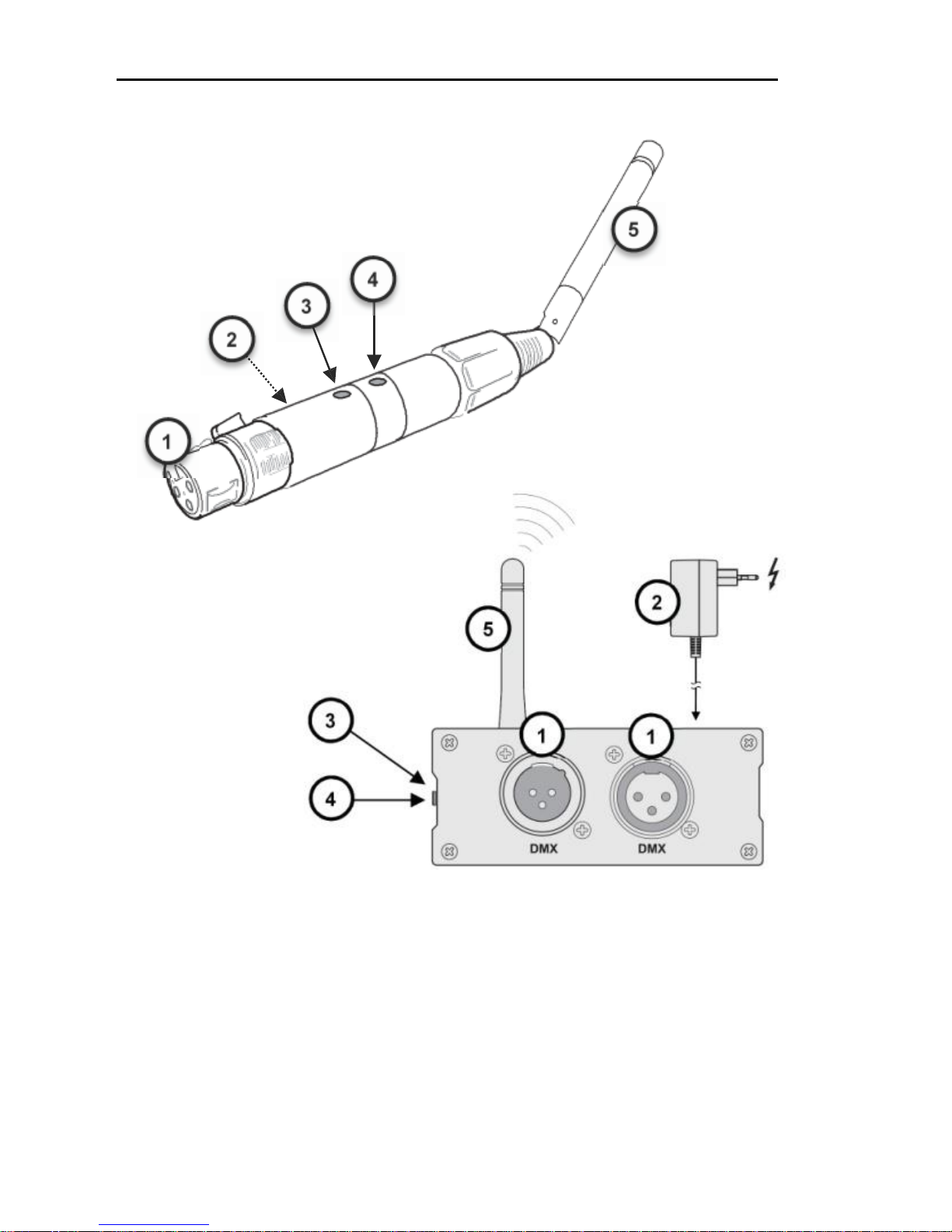
1.4 Interface
1, DMX512 3-pin or 5-pin male or female XLR
2, External power supply input
3, Status indicator
4, Button
5, Antenna
Page 9

www.widmx.com LC-512 Series User Manual
7
2 Operating Guide
2.1 Operating mode
Wireless transceiver has two operating modes: set-up
mode and use mode
1, Set-up mode: Press and hold the button before you
power up. When you see status indicator turns into the white
light, release the button to enter the Set-up mode. In this
mode you can select different transmission protocols. Each
time you press the button, you would see the status indicator
changes in follow order: red, green, blue and yellow. In the
Set-up mode, different colors mean different communication
protocols which are listed on the following table. Choose one
of the protocols and press and hold the button (> 1S), when
you see the white light, release it to enter the use mode.
Page 10

www.widmx.com LC-512 Series User Manual
8
Note: The wireless transceiver will remember the chosen
protocol even after you disconnecting the power supply.
There is no need for repeated setting.
Color
Protocol
Red
WIDMX
Green
W-DMX Receive
Blue
W-DMX G3 Transmit
Yellow
GZ Protocol
Purple
W-DMX G4 Transmit
2、Use mode:
a) Powered up and enter the use mode;
b) If it is in set up mode, press and hold the button (> 1S)
until you see the white light, then release it to enter the use
mode.
Page 11

www.widmx.com LC-512 Series User Manual
9
2.2 Description of Status
Indicator
Protocol
Action
Status Description
WIDMX
or
GZ
Protocol
Red, Green, Blue,
Yellow, Cyan,
Purple (, White)
6 / 7 Different Wireless
Groups
Red Flashing
Transmitting DMX
Green Flashing
Receiving DMX Signal
W-DMX
Receive
White
Connection is not
Established
Red
Deleting Connection
Page 12

www.widmx.com LC-512 Series User Manual
10
Red(Fast-Flash)
Connection is Lost
Green(Fast-Flash)
Connecting to
Transmitter
Green(Slow-Flash)
Connected, Without
DMX Signal
Green
Connected, Receiving
DMX Signal
W-DMX
Transmit
Red
Deleting all Receivers’
Connection
Blue(Fast-Flash)
Connecting with the
Receiver(s)
Blue(Slow-Flash)
No DMX Signal Input
Blue
Transmitting DMX
Page 13

www.widmx.com LC-512 Series User Manual
11
Note:
1. Flashing: > 20ms ON + <180ms OFF (Depending on the
refresh rate of the DMX signal)
2. Fast-Flash: 100ms ON + 100ms OFF
3. Slow-Flash: 900ms ON + 100ms OFF
2.3 Select Wireless Group
Each time you press the button, the status indicator will
change different colors. In this case different colors mean
different groups. Only when the indicators of the transmitter
and receiver show the same color they can communicate
with each other.
When the transmitter connects to the controller, the status
indicator of the transmitter would flash red. If the receiver
gets the DMX signal, the indicator would flash green.
NOTE: The first time when you press the button, it will not
change the color but show you the group that you are in. If
you press it again it will switch to other group.
Page 14

www.widmx.com LC-512 Series User Manual
12
WIDMX mode supports 6 groups
(FHSS, 1100 hops / sec)
1: RED ---------------------------- Red
2: GREEN ------------------------ Green
3: BLUE --------------------------- Blue
4: RED + GREED --------------- Yellow
5: GREEN + BLUE -------------- Cyan
6: RED + BLUE ------------------ Purple
GZ protocol supports 7 groups
(Frequency Agile)
1: RED ----------------------------- Red
2: GREEN ------------------------- Green
3: RED + GREED --------------- Yellow
4: BLUE ---------------------------- Blue
5: RED + BLUE ------------------ Purple
6: GREEN + BLUE -------------- Cyan
7: RED+GREED+BLUE ------- White
Page 15

www.widmx.com LC-512 Series User Manual
13
2.4 Restore factory settings
By pressing and holding the button (> 1S), When see the
BLUE flashing, Then release the button, the devices would
flash "RED-GREEN-BLUE" quickly, and then turns red. It
indicates that the device has restored to factory settings
successfully. The default group is red.
2.5 Connection and Delete
Connection
In the W-DMX G3 or G4 Transmit Mode, by pressing the
button, the transmitter can be connected to all powered but
not connected receivers within the coverage area; Press and
hold (> 3S) the transmitter’s button until the indicator turns
red. The device will disconnect with all receivers within the
coverage range.
Page 16

www.widmx.com LC-512 Series User Manual
14
In the W-DMX Receive Mode, Press and hold (> 3S) the
receiver’s button until the indicator turns white. The device
would disconnect with the transmitter.
Note: Receiver could only be connected to the new
transmitter after the old connection is deleted.
Page 17
www.widmx.com LC-512 Series User Manual
15
3 Applications
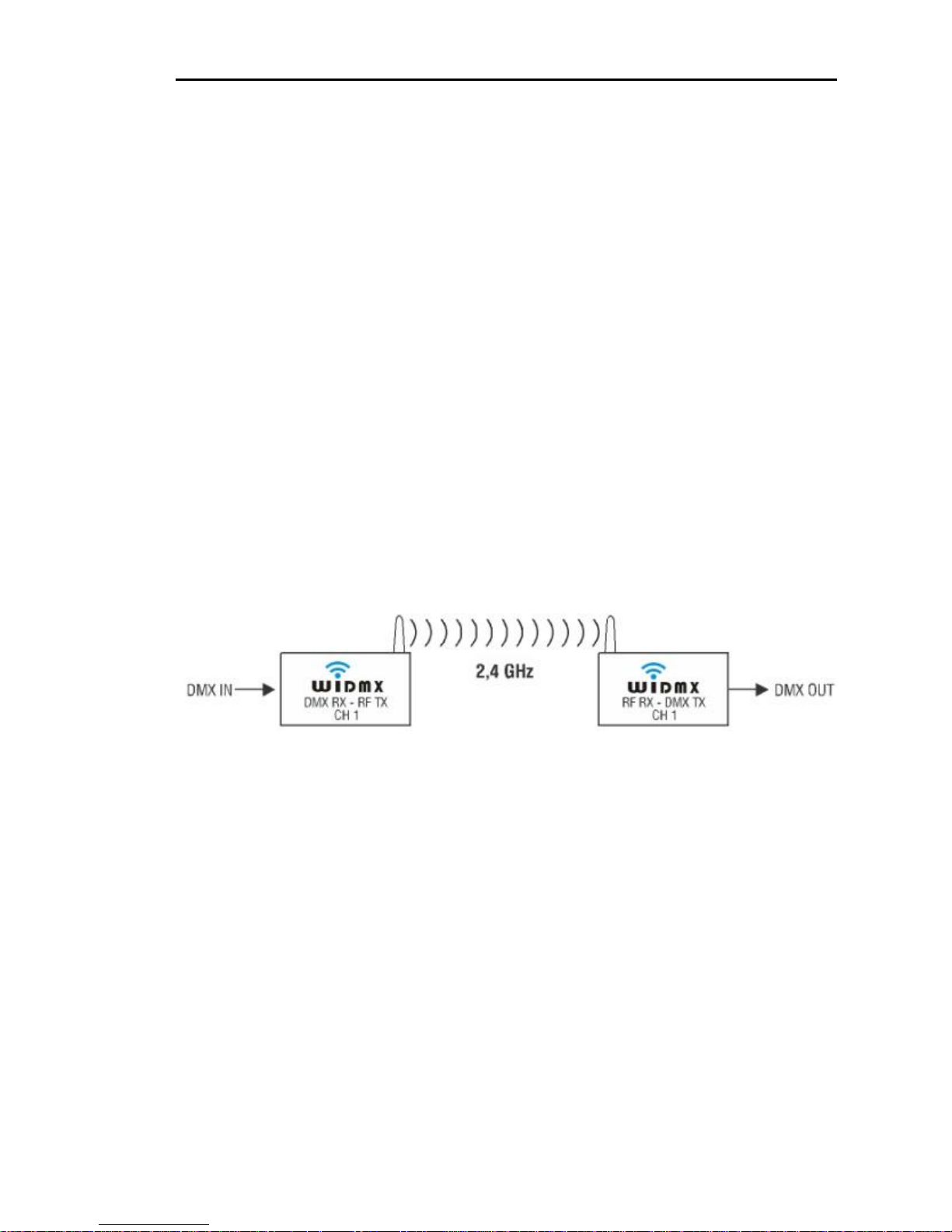
3.1 One transmitter to one
receiver
Controller inputs DMX signal onto a wireless transmitter, and
the latter would send DMX signal via Radio to the receiver
with the same group or to the receiver connected.
Page 18
www.widmx.com LC-512 Series User Manual
16
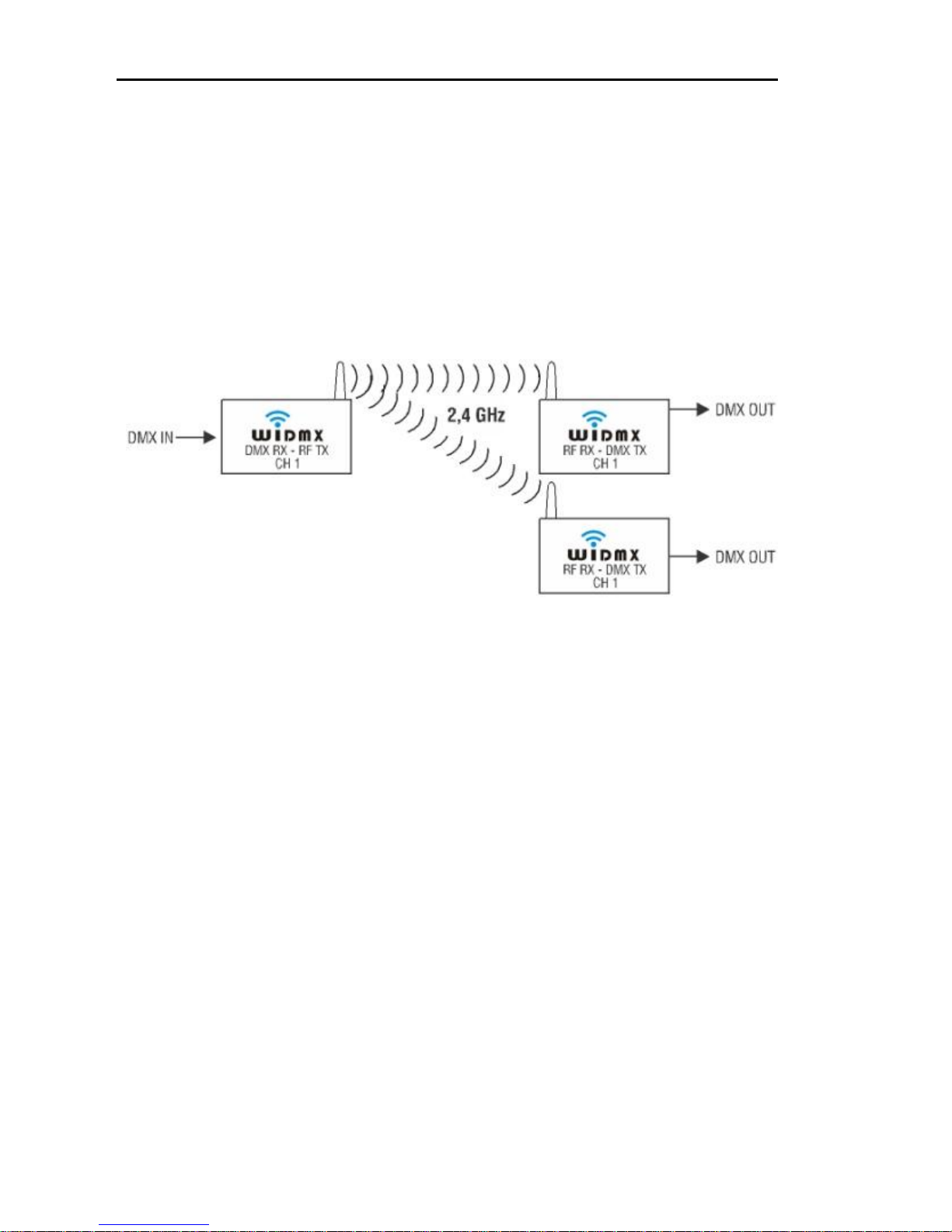
3.2 One transmitter to many
receivers
Controller inputs DMX signal onto a wireless transmitter, and
the latter would send DMX signal via Radio to the receivers
with the same group or the other receiver connected.
Page 19
www.widmx.com LC-512 Series User Manual
17
3.3 Parallel Transmission
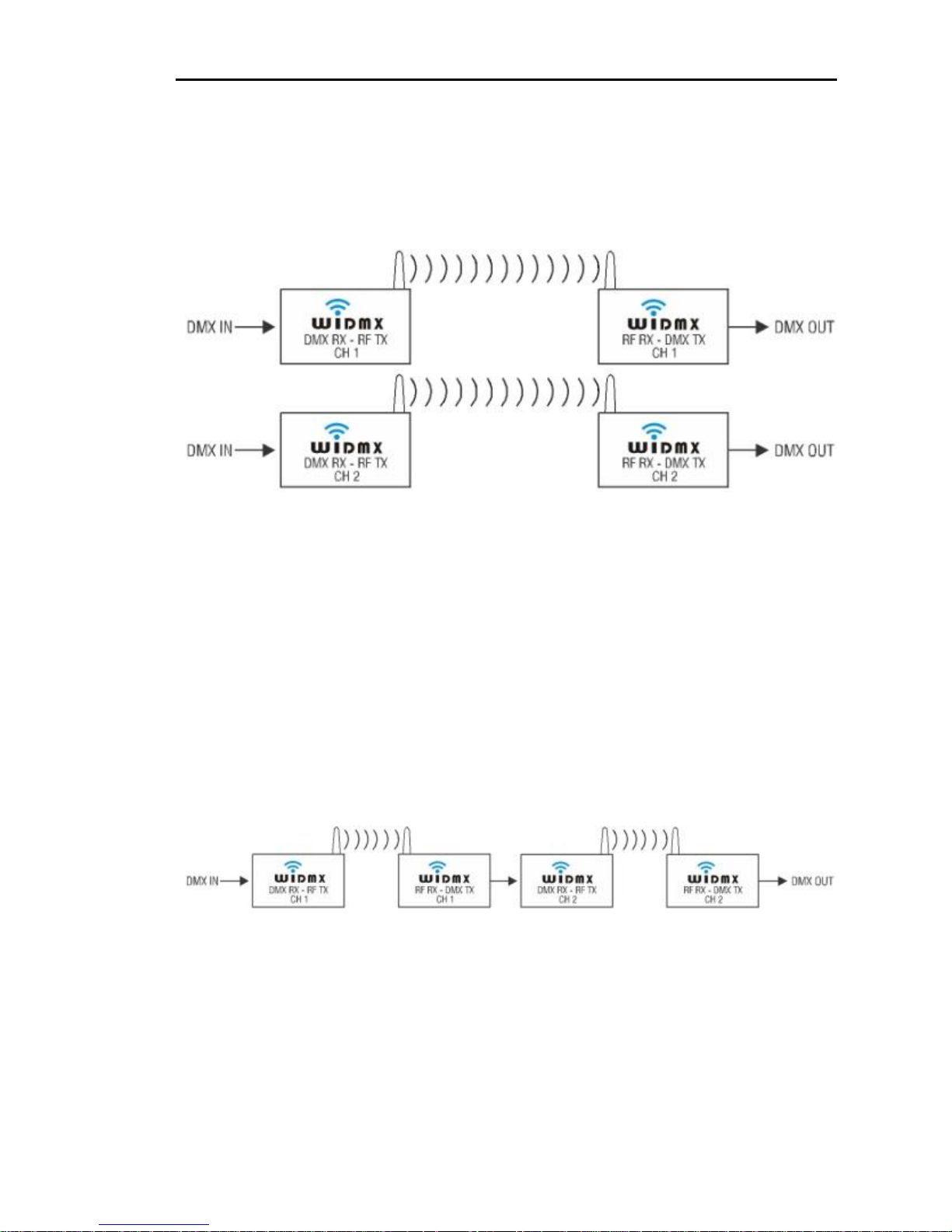
Many sets of radio transmitters can be operated
simultaneously, without mutual interference.
3.4 Repeater or Amplifier
If directly connect a receiver to a transmitter (both the
receiver and transmitter work in different groups or in
different sets), it would become a repeater or amplifier. In
this way, the working distance increases.
Page 20

www.widmx.com LC-512 Series User Manual
18
4 Maintenance
Please storage and use the device within required
temperature. Device may damage if the temperature is
too high or too low.
The device is not water-proof. Please keep the item
and its accessories dry. Please do not use it in
bathroom or other place with high humidity. Do not let
water or other liquid seep into the device, or it may be
damaged.
Do not place and use the device in dusty place.
Please use a soft, slightly moist cloth to clean the outer
case. Never use alcohol, acetone or other similar
solvent to clean it.
Please do not attempt to take apart the device and
repair it by yourself. If the device is detected, please
contact with the dealer as soon as possible
Page 21

www.widmx.com LC-512 Series User Manual
19
Federal Communications Commission (FCC) Statement
This device complies with part 15 of the FCC Rules.
Operation is subject to the following two conditions: (1) This
device may not cause harmful interference, and (2) this
device must accept any interference received, including
interference that may cause undesired operation.
Warning: Changes or modifications made to this device not
expressly approved by Shenzhen 3Geyes Technology Co.,
Ltd. may void the FCC authorization to operate this device.
Note: The manufacturer is not responsible for any radio or tv
interference caused by unauthorized modifications to this
equipment. Such modifications could void the user’s
authority to operate the equipment.
 Loading...