

Page 1

QUICK GUIDE
Page 2

GETTING STARTED WITH
WIRELESS FITTING
Over the years, hearing aid manufacturers have introduced
more cables to the clinic with the launch of new hearing aids.
For dispensers, this has become a hassle. It can be a real
challenge to remember what goes with what.
With nEARcom it is possible to fit hearing aids with wireless
technology without the use of cables.
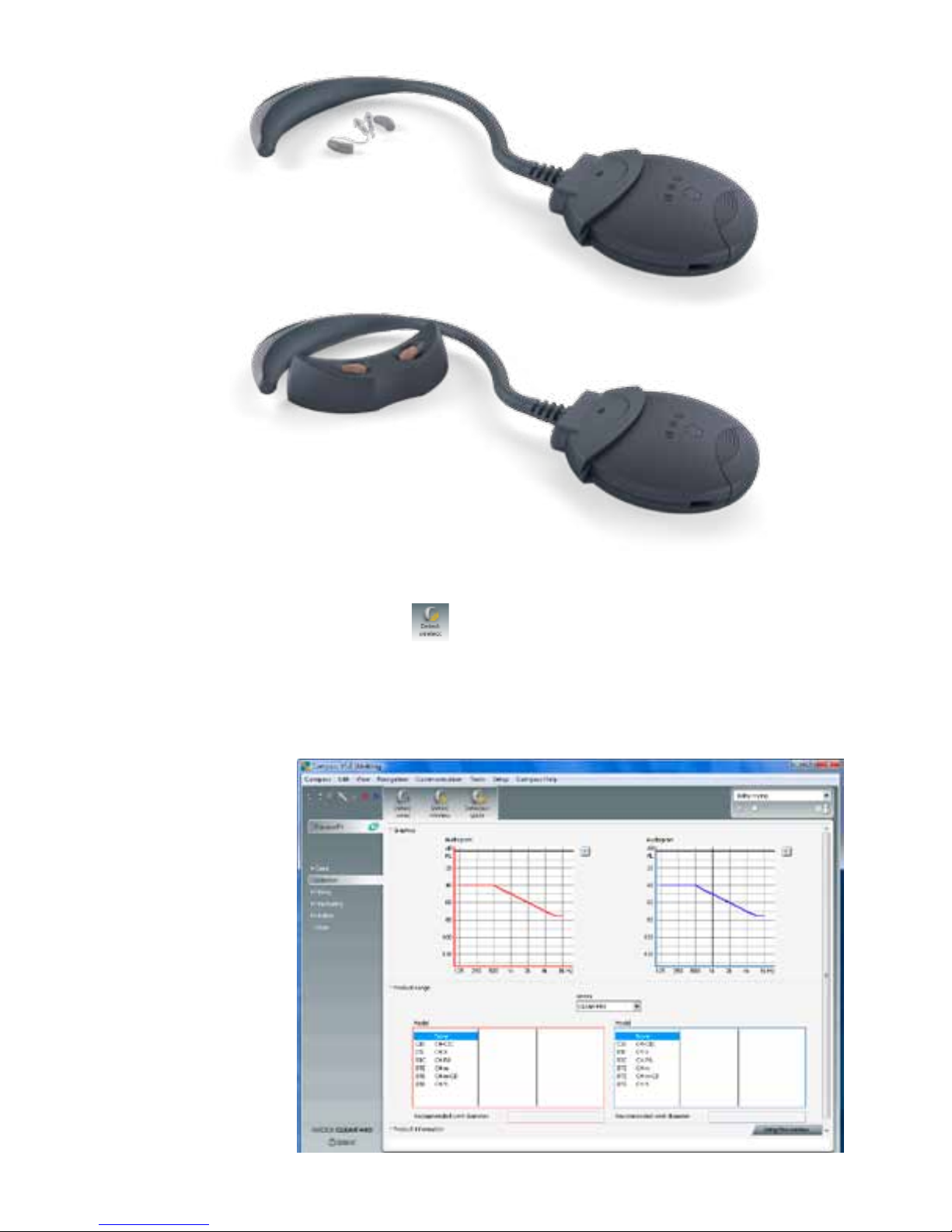
ASSEMBLE THE nEARcom UNIT
• Remove the neck string from the NOAHlink.
• Snap the nEARcom neck loop onto NOAHlink so
the connectors engage.
For further details, see the nEARcom User Manual.*
USING nEARcom
DETECT THE HEARING AIDS
1. Insert fresh batteries in the hearing aids and turn on the hearing aids. Identify left
and right by means of the colour marking.
2. Lay the nEARcom on the table and place the hearing aids in the middle of the neck
loop.
• Place BTE hearing aids directly on the table.
• Insert ITE/CIC in the holes in the instrument fixture included with the
nEARcom, with the face plate facing up.
* If your nEARcom was supplied by another manufacturer,
you must insert a Widex Tech Module. See the nEARcom User Manual.
Page 3
3. Switch on the NOAHlink with the nEARcom attached.
4. Click the Detect wireless icon
for wireless fitting in Compass.
Page 4

FITTING THE HEARING AIDS
Hearing aids which have never been fitted must be assigned to the correct side in
Compass – left and right.
Detect hearing aids as follows:
1. To identify hearing aids, make sure they are placed in the middle of the nEARcom
neck loop and then use the Play buttons under Identify HA. When you select a
Play button, the relevant hearing aid plays a sound for 6 seconds and in some
models a light-emitting diode lights
1
.
2. While this is happening, remove the hearing aid from nEARcom and listen to it.
3. In Compass, select whether the hearing aid is for the left or right ear.
4. Repeat the procedure if you are fitting two hearing aids.
5. Click Next to connect the hearing aids.
1
Only applicable to CLEAR440 PA and m-models
Page 5
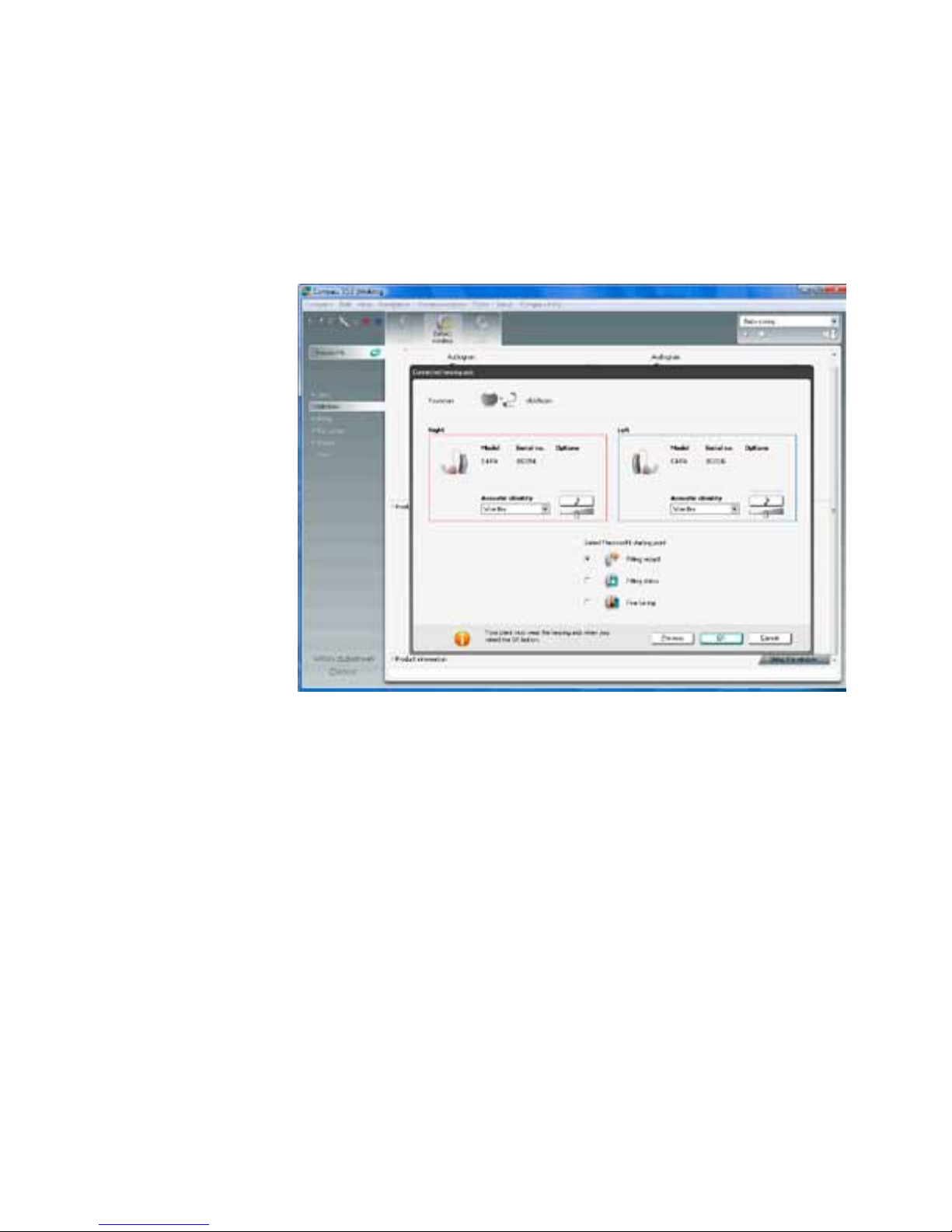
6. Select a PrecisionFit starting point and make sure the acoustic identity is correct.
7. Position the hearing aids in the client’s ears and the nEARcom around the neck of
the client.
Click OK and proceed with the fitting.
Page 6
FOLLOW-UP FITTING
WITH THE CLIENT
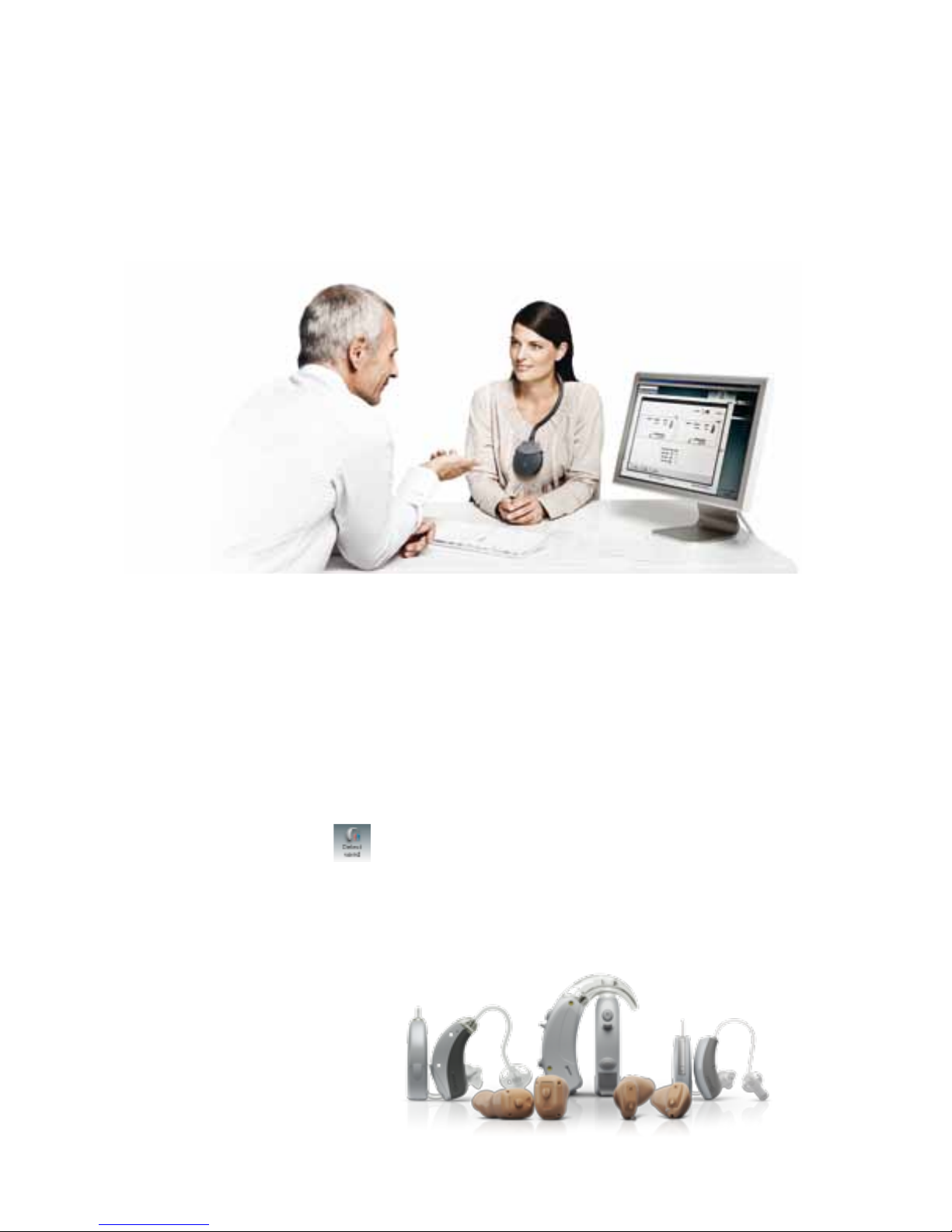
Let the client wear the hearing aids and the nEARcom. In the fitting screen, click
Detect wireless for wireless fitting.
WHICH HEARING AIDS CAN BE PROGRAMMED
WIRELESSLY WITH
nEARcom?
All CLEAR440 and newer hearing aids with wireless technology from Widex are fitted wirelessly. Use Compass V5.0 or a later version.
nEARcom also supports fitting with cables for models where cable fitting is an option. Connect the usual cables to the pass-through connectors on the nEARcom.
Click the Detect wired icon
to fit with cables.
Page 7

TIPS AND WARNINGS
1. Clean the nEARcom with a soft cloth. Never wash your nEARcom with water,
cleaning solutions or other liquids.
2. Never try to open or repair the nEARcom yourself. (This should only be done by
authorised personnel.)
3. nEARcom parts and batteries can be dangerous if swallowed or used improperly.
Swallowing or improper use can result in severe injury or even fatalities. In case of
ingestion, contact a physician immediately.
4. nEARcom comes with parts that are small enough to be swallowed. Keep the
nEARcom and its parts, accessories and batteries out of reach of children and
anyone else who might swallow such items or otherwise cause injury to themselves.
5. Do not disconnect the nEARcom during use.
6. Do not use defective units together with hearing aids.
7. Although your nEARcom has been designed to comply with the most stringent
international electromagnetic compatibility standards, the possibility cannot be
excluded that it may cause interference with other equipment, such as medical
devices.
Page 8

TROUBLESHOOTING
Problem Possible cause Solution
NOAHlink LED
indicator does not flash
NOAHlink battery low Check NOAHlink LED and
recharge battery if necessary
NOAHlink is switched o Turn NOAHlink power on
Wireless programming
not working
No Tech Module inserted Check that a Tech Module is
plugged in
Incorrect Tech Module
inserted
Check that a Tech Module
appropriate to the manufacturer and hearing aid is
inserted
nEARcom not securely
plugged into NOAHlink
Check that nEARcom is
plugged into NOAHlink all
the way
NOAHlink battery low Check NOAHlink LED
(flashes orange if battery is
low) and recharge battery if
necessary
Controller error Turn NOAHlink power o,
then on again and retry
Hearing aids not within
nEARcom range
Place the hearing aids
(CIC/ITE in the fixture) in
the middle of the nEARcom
neck loop on the table
Page 9
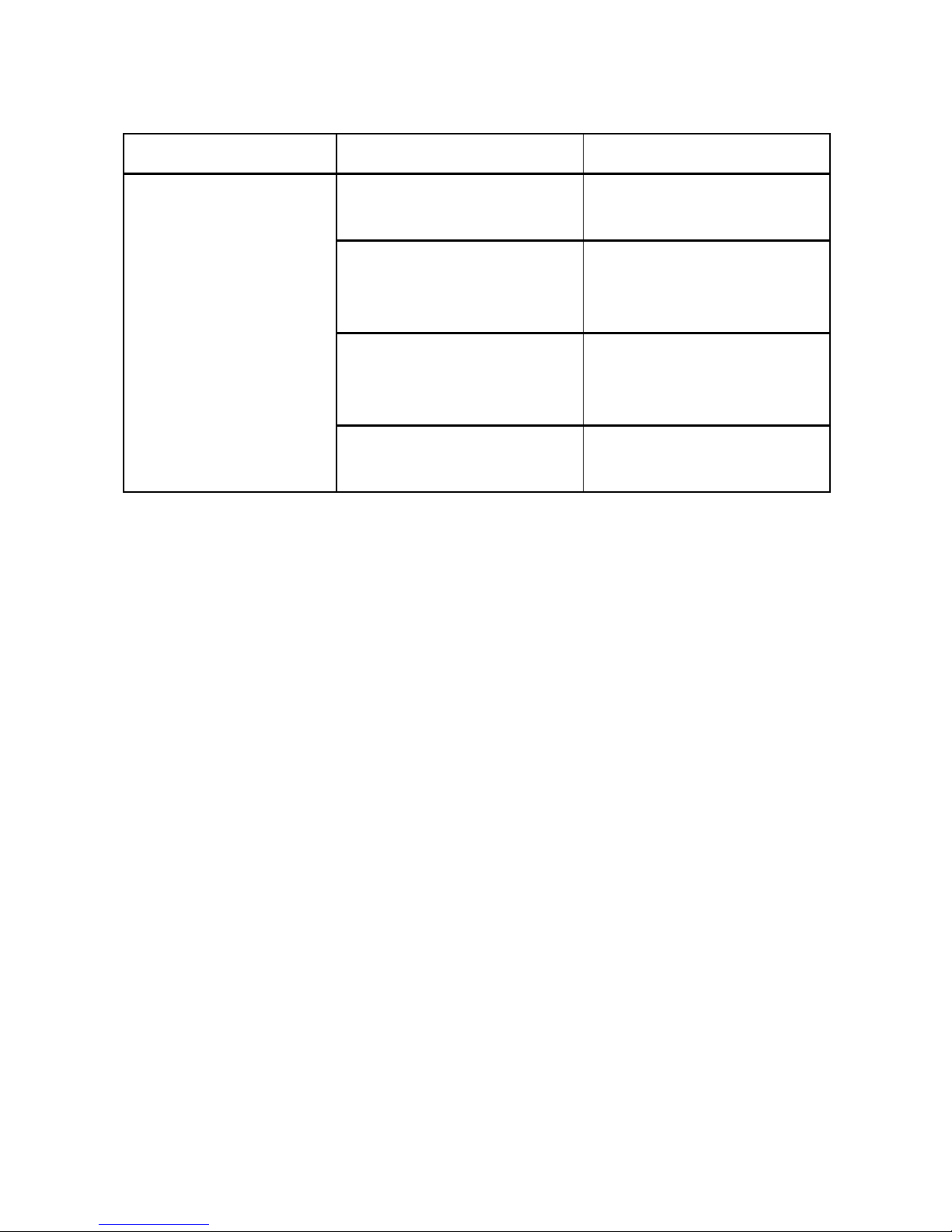
Problem Possible cause Solution
Wired programming
not working
Defective programming
cable
Replace programming
cable
nEARcom not securely
plugged into NOAHlink
Check that nEARcom is
plugged into NOAHlink all
the way
NOAHlink battery low Check NOAHlink LED and
recharge battery if necessary
Controller error Turn NOAHlink power o,
then on again and retry
Page 10
REGULATORY INFORMATION
Hearing aids, accessories and batteries should not be disposed of with normal
household waste. Please consult your national Widex distributor for advice on how
to dispose of these items.
Hereby, Widex A/S declares that this TM#2 is in compliance with the essential requirements and other relevant provisions of Directive 1999/5/EC.
A copy of the Declaration of Conformity can be found at: http://www.widex.com
N26346
FEDERAL COMMUNICATIONS COMMISSION AND INDUSTRY CANADA
STATEMENT
FCC ID: TTY-TM2
IC: 5676B-TM2
This device complies with part 15 of the FCC Rules and with RSS-210 of Industry
Canada. Operation is subject to the following two conditions:
(1) This device may not cause harmful interference, and (2) this device must accept
any interference received, including interference that may cause undesired operation.
WIDEX
•
3540 Lynge
Denmark
•
www.widex.com
Page 11

NOTE:
This equipment has been tested and found to comply with the limits for a Class B
digital device, pursuant to part 15 of the FCC Rules. These limits are designed to
provide reasonable protection against harmful interference in a residential installation. This equipment generates, uses and can radiate radio frequency energy and,
if not installed and used in accordance with the instructions, may cause harmful
interference to radio communications. However, there is no guarantee that interference will not occur in a particular installation. If this equipment does cause harmful
interference to radio or television reception, which can be determined by turning the
equipment o and on, the user is encouraged to try to correct the interference by
one or more of the following measures:
— Reorient or relocate the receiving antenna.
— Increase the separation between the equipment and receiver.
— Connect the equipment into an outlet on a circuit dierent from that to which the
receiver is connected.
— Consult the dealer or an experienced radio/TV technician for help.
NOTE:
This equipment complies with FCC radiation exposure limits set forth for an uncontrolled environment. This transmitter must not be co-located or operating in
conjunction with any other antenna or transmitter.
This equipment complies with the Industry Canada RF radiation exposure limits set
forth for an uncontrolled environment as per IC RSS-102 Issue 3.
Changes or modifications to the equipment not expressly approved by Widex could
void the user’s authority to operate the equipment.
Page 12

Page 13

Page 14

Page 15

Page 16

It Is our mIssIon, through
originality, perseverance and reliability,
to develop high quality hearing aids
that gIve people wIth a hearIng loss the same
opportunities for communIcatIon as those
wIth normal hearIng.
wIdex, clear440, WidexLink and compass
are trademarks of wIdex a/s
Printed by FB / 03-10
9 502 1808 001 #01
WIDEX
•
3540 Lynge
Denmark
•
www.widex.com
 Loading...