

Page 1

User’s instructions
The AIKIA Series
AK-19
Behind-the-ear
Page 2

2
3
The hearing aid, earmold and accessories shown
in these user’s instructions may not look the same
as the ones you have. We furthermore reserve the
right to make any changes considered necessary.
Hearing aids and their accessories
should not be disposed of with normal
household waste. Please consult your
national Widex distributor for advice on
how to dispose of your hearing aid.
Contents
Your new AIKIA hearing aid . . . . . . . . . . . . . . . . . . . . . . . . . . . . . . 4
AIKIA (AK-19) . . . . . . . . . . . . . . . . . . . . . . . . . . . . . . . . . . . . . . . . . 5
The battery . . . . . . . . . . . . . . . . . . . . . . . . . . . . . . . . . . . . . . . . . . . . 6
Battery type. . . . . . . . . . . . . . . . . . . . . . . . . . . . . . . . . . . . . . . . . 6
Inserting the battery. . . . . . . . . . . . . . . . . . . . . . . . . . . . . . . . . . 7
Changing the battery . . . . . . . . . . . . . . . . . . . . . . . . . . . . . . . . .9
Turning the hearing aid on and off . . . . . . . . . . . . . . . . . . . . . . .11
Left/right identification. . . . . . . . . . . . . . . . . . . . . . . . . . . . . . . . . 12
Placing AIKIA on/in the ear . . . . . . . . . . . . . . . . . . . . . . . . . . . . .13
Possible settings when turning on your hearing aid . . . . . . . .14
Removing AIKIA. . . . . . . . . . . . . . . . . . . . . . . . . . . . . . . . . . . . . . . 15
Automatic adjustment of loudness . . . . . . . . . . . . . . . . . . . . . . . 16
Fine tuning loudness. . . . . . . . . . . . . . . . . . . . . . . . . . . . . . . . . . . 17
Listening programs . . . . . . . . . . . . . . . . . . . . . . . . . . . . . . . . . . . .18
Switching between the listening programs . . . . . . . . . . . . . 21
Keeping AIKIA clean . . . . . . . . . . . . . . . . . . . . . . . . . . . . . . . . . . . 23
Cleaning accessories. . . . . . . . . . . . . . . . . . . . . . . . . . . . . . . . 23
The hearing aid. . . . . . . . . . . . . . . . . . . . . . . . . . . . . . . . . . . . . 24
The earmold . . . . . . . . . . . . . . . . . . . . . . . . . . . . . . . . . . . . . . . 25
Caring for your hearing aid . . . . . . . . . . . . . . . . . . . . . . . . . . . . . 27
Good advice . . . . . . . . . . . . . . . . . . . . . . . . . . . . . . . . . . . . . . . . . . 29
Accessories . . . . . . . . . . . . . . . . . . . . . . . . . . . . . . . . . . . . . . . . . . 31
Audio input . . . . . . . . . . . . . . . . . . . . . . . . . . . . . . . . . . . . . . . .31
FM systems . . . . . . . . . . . . . . . . . . . . . . . . . . . . . . . . . . . . . . . . 34
Remote control . . . . . . . . . . . . . . . . . . . . . . . . . . . . . . . . . . . . . 35
In case of malfunction . . . . . . . . . . . . . . . . . . . . . . . . . . . . . . . . . . 36
Page 3

4
5
Your new AIKIA hearing aid
Thank you for choosing a Widex hearing aid. AIKIA
is a hearing aid that allows you to be part of the
process of tailoring the sound to your individual
hearing loss and lifestyle requirements.
We recommend that you read the entire booklet to
get full satisfaction from your new AIKIA hearing
aid.
We hope you will be pleased with your new Widex hearing aid.
AIKIA (AK-19)
1. Microphone openings, where the sound
enters the hearing aid.
2. Volume control
is available in some AIKIA
models. It makes it possible to fine tune the
automatically adjusted loudness.
3. Program button
, which allows you to choose
between different listening programs.
4. On/off switch
.
5. Battery drawer
with a nail grip for easy
opening.
6. Earhook
– non-detachable.
7. Plastic tubing
.
8. Earmold
.
9. Sound outlet
.
10. Relief vent
for
aeration of the
ear canal.
1.
2.
3.
4.
5.
6.
7.
8.
9.
10.
Page 4

6
7
The battery
Battery type
The recommended battery type for your AIKIA
hearing aid is:
Zinc Air battery type 13
To obtain replacement batteries, please consult
your hearing care professional. Please note the expiration date and the recommendations regarding
disposal of used batteries on the battery pack. To
ensure proper battery function, do not use batteries past the expiration date. Because they are Zinc
Air type batteries, they need air to work. Therefore, do not remove the adhesive tab until just before inserting the battery in the hearing aid. Once
the tab has been removed, the battery will start
functioning after a few seconds. The battery life
will depend on a number of factors, such as the
setting of your hearing aid, how many hours you
use it daily and the listening environments in which
you use it.
Inserting the battery
Before inserting a new battery in
your hearing aid, remember to remove the adhesive tab. Do not use
batteries on which there is a sticky
residue from the tab or other unwanted substance.
Page 5

8
9
Push the nail grip downwards to
swing open the battery drawer.
The nail grip is located on the
opposite side of the on/off switch
at the bottom of the hearing aid.
The plus (+) sign of the battery must face upwards.
If the battery drawer does not close easily, the battery is incorrectly inserted.
Changing the battery
If you hear four rapid beep-tones while wearing
your hearing aid, it is an indication that the battery
is nearly exhausted. Once the battery is totally exhausted, the hearing aid will be completely silent.
Exactly how long the hearing aid will function after
the beep-tones varies from one case to another.
We recommend that you always have a spare battery with you.
For adjustment of the beep-tone level or disabling
of the function, please consult your hearing care
professional.
Never leave an exhausted battery in the hearing
aid. Exhausted batteries may leak, which could
damage the hearing aid. When changing batteries,
it is a good idea to hold the hearing aid over a table
or a carpet, in case you drop the hearing aid or battery.
Page 6
10
11
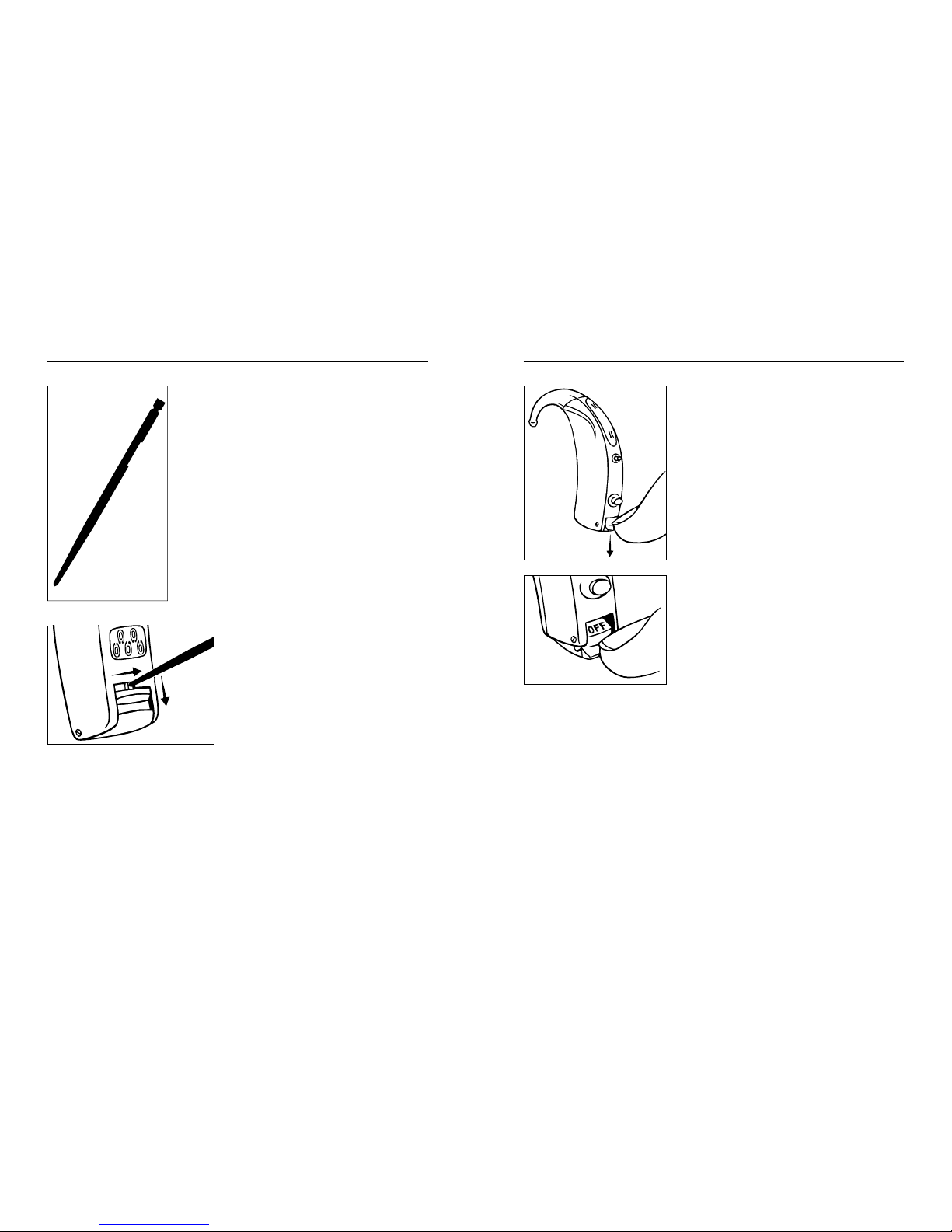
The hearing aid can be provided
with a battery drawer lock, if required. This is a particularly
good idea if the hearing aid is
worn by a child. A special tool
for opening the lock will be included when ordering the lock
(see the drawing).
You open the lock by pushing it to the right and then
downward with the tool in
one movement as illustrated.
Turning the hearing aid on and off
The battery drawer is placed
at the bottom of the hearing
aid. The battery drawer also
functions as the on/off
switch.
The hearing aid is turned on
when the switch is pushed
upwards, and off when the
switch is pushed downwards.
The word “OFF” is clearly visible on the switch when the
hearing aid is turned off.
Please remember to switch the hearing aid off
when it is not in use. Remove the battery if the
hearing aid will not be used for several days.
Page 7

12
13
Left/right identification
If you wear hearing aids on
both ears, your hearing care
professional can put color
marks on your hearing aids
so you can easily see which
is for the left ear and which is
for the right ear (red mark =
right and blue mark = left).
Placing AIKIA on/in the ear
Insert a battery in your hearing aid. First insert the
earmold in the ear canal while holding the lower
part of the tubing. It may also help to pull the outer
ear backwards and upwards with the opposite
hand.
Once the earmold has been inserted, you place the
hearing aid behind the ear, so that the hook rests
comfortably on the ear, close to your head.
Page 8

14
15
Possible settings when turning
on your hearing aid
Your hearing aid can be set to start up in two different ways. In the standard start-up setting your
hearing aid may whistle slightly while you insert
the earmold in the ear. An alternative is a setting
where the hearing aid actively suppresses whistling while the earmold is being inserted in the ear.
Together with your hearing care professional you
can choose the start-up setting that suits your
needs best.
Removing AIKIA
Turn off your hearing aid before removing it. First
remove the hearing aid from its position behind
the ear. Carefully pull the earmold out of the ear canal, while holding the lower part of the tubing. If it
is difficult, it may help to try to move the earmold
carefully from side to side while pulling it out. It
may also help to pull the outer ear backwards and
upwards with the opposite hand.
Page 9

16
17
Automatic adjustment of
loudness
AIKIA adjusts loudness automatically in accordance with your sound environment. Several thousand times per second, AIKIA analyzes the surroundings and tailors its sound accordingly. With
AIKIA you do not have to think about adjusting the
volume – it happens quite automatically.
Important: If the volume in your hearing aid is too
loud or too weak, or if the reproduced sounds are
distorted, or you would like any further information, consult your hearing care professional.
Fine tuning loudness
Your hearing aid may be provided with a volume control,
shaped like a small lever. Push
the lever upwards to raise the
automatically set volume.
Push the lever downwards to
lower the volume. Use short
touches for minor corrections
of the volume. Faster adjustments are obtained by
keeping the lever pressed for some seconds.
Each time you operate the volume control, you will
hear a beep-tone. For modification of the beeptones or disabling of the beep-tone function or volume control, please consult your hearing care professional.
Any adjustment of the volume setting will be cancelled when your hearing aid is turned off.
Page 10

18
19
Listening programs
Your AIKIA hearing aid may be provided with up to
four listening programs optimized for different listening situations. Your hearing care professional
can help you select the programs that are of use to
you. If your needs change over time, the combination of listening programs can be changed. In these
user’s instructions, the hearing care professional
can list the listening programs that are available in
your hearing aid (see page 20). You can choose
from the following programs:
AIKIA Master: This listening program is AIKIA’s
standard program. In the Master program all the
automatic functions of the hearing aid work to ensure audibility, speech intelligibility and comfort in
all listening situations.
Acclimatization program: This listening program
has the same features as the Master program, but
provides slightly less amplification. The listening
program is ideal if this is your first hearing aid and
you want to become used to all the new sounds
gradually.
Music: This listening program is ideal for listening
to music.
TV: This listening program is ideal for listening to
the TV.
M+T: In this listening program you listen via the
hearing aid microphone (M) and the telecoil (T).
This listening program allows you to listen to a
specific sound source and still hear surrounding
sounds.
T: In this listening program you listen via the telecoil (T) and not via the microphone (M) in the
hearing aid. The telecoil is used where a loop system or specially adapted telephone system is installed. Activating this program allows you to listen to a specific sound source and shut out surrounding sounds.
Page 11

20
21
Listening program form
Program Chosen
programs:
Application:
1.
2.
3.
4.
Switching between the
listening programs
You can switch between
the programs by using the
program button on the
back of the hearing aid. If
you do not want to use the
program button, you can
consult your hearing care
professional to have it
disabled.
Each time you switch to another program, you will
hear beep-tones. The beeps tell you which program you have chosen;
Program 1: One brief beep
Program 2: Two brief beeps
Program 3: Three brief beeps
Program 4: One long and one brief beep
Page 12

22
23
The number of different beeps depends on how
many programs you - together with your hearing
care professional - have chosen to have in your
hearing aid. The selected listening programs are
numbered 1-4.
If you – in consultation with your hearing care professional – decide on other combinations of programs later, these can be written on the blank form
found at the back of these instructions.
Keeping AIKIA clean
Cleaning accessories
The following accessories are available for your
hearing aid:
1. Battery magnet to facilitate insertion of the
battery into the battery drawer.
2.
Wax removing tool for cleaning the relief
vent opening and the earmold sound bore.
3.
Soft cloth for drying and cleaning the hearing
aid.
Contact your hearing care professional if you need
additional supplies of accessories.
1.
2.
3.
Page 13

24
25
The hearing aid
Never wash your hearing
aid with water, cleaning
solutions or other liquids.
Instead, clean your hearing aid with a dry soft cloth
after use.
When the hearing aid is not in use, it is a good idea
to leave the battery drawer open, so as to ventilate
the hearing aid and allow it to dry.
The earmold
Make sure that your earmold is clean and free of
earwax and moisture. If
it is plugged, clear the
openings with a wax removing tool (see illustration).
Disconnect the earmold and
tubing from the hearing aid at
least once a week and wash the
earmold in lukewarm water.
Rinse the earmold thoroughly
and allow it to dry overnight.
Page 14

26
27
If there is still moisture
in the earmold the next
time you want to use the
hearing aid, use a small
blower or the like to blow
it dry. Never use alcohol or other cleaning solutions to clean your earmold.
If your earmold tubing becomes slack, stiff, yellow
or cracked, it should be replaced. For further supplies of tubing consult your hearing care professional.
Caring for your hearing aid
With proper care, your hearing aid will give you
years of reliable service. Here are some things you
can do to prolong the life of your hearing aid:
Switch your hearing aid off when it is not in
use. Should you not use it for several days, take
out the battery to avoid battery leakage.
Treat your hearing aid as the valuable object it
is: with care. When your hearing aid is not in
use, keep it in its case in a cool, dry location
where it cannot be reached by children or
pets.
When not in use, do not expose your hearing
aid to extreme temperatures or high humidity.
In environments with high humidity (including
that created by heavy perspiration), a drying kit
may be used daily to reduce the amount of
moisture inside the hearing aid. See the instructions enclosed with the drying kit.
•
•
•
•
Page 15

28
29
Do not wear your hearing aid in the shower or
swimming, or when using a hair dryer, hair
spray, or other sprays and creams (e.g. suntaning oils).
Never try to open or repair the hearing aid yourself.
Do not wear your hearing aid during x-ray, MR
scans, CT scans, short-wave diathermy, or similar radiation treatments and never place your
hearing aid in a microwave oven. These are
some of the types of radiation that can damage
your hearing aid. Radiation from, for example,
room surveillance equipment, burglar alarms
and cellular telephones, is weaker and will not
damage your hearing aid; however, you may
hear interference noise.
Widex hearing aids are not certified for use in
mines or other areas with explosive gases.
•
•
•
•
Good advice
You may notice increased accumulation of earwax with hearing aid usage. Contact your physician/ENT doctor if you suspect that a plug of
earwax has accumulated in your ear. Earwax
may not only reduce your own hearing but also
the effect of the hearing aid considerably. It is a
good idea to ask your physician to clean your
ears a couple of times a year.
Please be sure to keep your hearing aid and its
accessories out of the reach of children, who
might place them in their mouths. Also keep
batteries out of children’s reach and discard
used batteries carefully. Do not change batteries in front of children and do not let them see
where you keep your supply.
Never put a battery in your mouth for any reason as you may risk swallowing it. In case of ingestion, contact your physician immediately
and the 24 Hour National Button Battery In-
gestion Hotline at (202)625-3333.
•
•
•
Page 16

30
31
The hearing aid is made of modern non-allergenic materials. Still, in rare cases skin irritation can occur. If you notice skin irritation in or
around your ear or ear canal, contact your hearing care professional.
Please be aware that the use of any type of
hearing aid/earmold may involve a slightly increased risk of infection in the ear canal. An infection can arise as a result of inadequate ventilation of the ear. Therefore, we recommend
that you take out your hearing aid/earmold at
night to allow the ear canal to be ventilated.
Make sure that you clean and inspect your
hearing aid/earmold as required. If an infection
occurs, you should disinfect your hearing aid/
earmold and seek medical advice. Contact your
hearing care professional for further advice on
methods of disinfection. Do not under any circumstances use alcohol, chlorine or similar
substances to clean your hearing aid/earmold.
•
•
Accessories
Audio input
Your AIKIA hearing aid can be furnished with an audio shoe. This allows direct connection to different
kinds of accessories (FM and CROS/Bi-CROS systems), as well as external audio equipment (radio,
TV, etc.). In this way the sound from, for example, a
radio or a speaker provided with an FM microphone
can be sent directly into your hearing aid.
With an audio shoe connected to the hearing aid,
one or more of your standard listening programs
are replaced by dedicated audio programs.
In the form on the next page, your hearing care
professional can make a note of the audio programs you have access to and where they are located. When you attach the audio shoe, the hearing aid automatically switches to an audio program
(see page 32). If you then wish to switch to one of
the other programs, you must use the program
button on the hearing aid. As soon as you remove
the audio shoe, the usual program order is re-established (see page 20).
Page 17

32
33
Program Program order with audio shoe
1.
2.
3.
4.
Important: If your hearing aid is connected to an
accessory requiring use of a power outlet, the accessory unit must conform to requirements stated
in IEC (international) or UL safety standards.
Do not connect the hearing aid to sockets that are
labelled with one or more of the following symbols:
For more information on the use of audio input
consult your hearing care professional.
Page 18

34
35
FM systems
An FM system is an assistive listening device that
can be used as an accessory for AIKIA. The FM
system makes it easier to understand speech in
difficult listening situations. The FM system consists of a small radio transmitter with a microphone
placed near the speaker and a small radio receiver
clicked onto AIKIA via an FM shoe. The operating
range is approx. 49 feet depending on the surroundings. For help to determine whether you
could benefit from an FM system, please consult
your hearing care professional.
Remote control
- an alternative way of operating your hearing
aid
A remote control is an accessory for your hearing
aid. It allows you to adjust the volume or switch
between the listening programs in your hearing
aid.
You can choose between two different remote
control models: A basic model and an advanced
model. For help to determine whether you could
benefit from one of these remote control models,
please consult your hearing care professional.
Page 19

36
37
In case of malfunction
The following pages include some quick advice to
follow if you experience problems. Before contacting your hearing care professional, please follow
the advice below:
If the hearing aid is dead, it could be because:
The instrument is not turned on. Make sure the
battery drawer, which functions as the on/off
switch, is pushed all the way upwards and that
the word “OFF” is not visible on the switch.
The battery is dead or does not work. Insert a
new battery. Make sure the battery is inserted
correctly and that the battery drawer is closed
correctly.
The sound outlet of the earmold is blocked.
Blockage of the sound outlet of an earmold is
often caused by earwax. Clean the blocked
sound outlet.
•
•
•
If the hearing aid volume is not powerful
enough, it could be because:
The battery is nearly exhausted. Insert a new
battery. Make sure the battery is inserted correctly and that the battery drawer is closed correctly.
The sound outlet of the earmold is blocked.
Blockage of the sound outlet of an earmold is
often caused by earwax. Clean the blocked
sound outlet.
Your ear is blocked by earwax. Contact your
ENT doctor/physician.
Your hearing may have changed. Contact your
hearing care professional.
•
•
•
•
Page 20

38
39
If the hearing aid whistles continuously, it
could be because:
Your ear is blocked by earwax. Contact your
ENT doctor/physician.
The tubing is broken. Contact your hearing care
professional regarding tubing replacement.
The tubing is yellow and stiff. Contact your
hearing care professional regarding tubing replacement
The tubing often comes off the earmold or hearing aid hook. Contact your hearing care profes-
sional regarding tubing replacement.
The hook or elbow is cracked. Contact your
hearing care professional regarding replacement
The earmold is not correctly placed in your ear
canal. Take the earmold out and reinsert it. It is
important that the earmold is placed correctly
in your ear canal.
The earmold fit is too loose. Contact your hearing care professional.
•
•
•
•
•
•
•
If the hearing aid performs intermittently, it
could be because:
The on/off switch is dirty. Push the switch back
and forth a couple of times.
•
Page 21

40
41
Listening program form
Program Chosen
programs:
Application:
1.
2.
3.
4.
Listening program form
Program Chosen
programs:
Application:
1.
2.
3.
4.
Page 22

42
43
Listening program form
Program Chosen
programs:
Application:
1.
2.
3.
4.
Page 23

Widex,
DK-3500 Vaerloese
Denmark
•
www.widexusa.com
¡9 514 0081 041;¤
Printed by FB / 10-06
9 514 0081 041 #01
¡#01v¤
Reorder # CIB108
 Loading...