

Page 1
August, 2008
se Of This Document
Mobile Broadband ExpressCard®
EC400
HSPA/UMTS/EDGE/GPRS
EC400g
HSPA/UMTS/EDGE/GPRS and GPS
Page 2

EC400, EC400g
White Paper, August 2008
2
Contents
Contents................................................................................................................................................................2
Preface..................................................................................................................................................................3
Product Overview..................................................................................................................................................3
EC400 Communications Summary...................................................................................................................4
Functions and Features for Productivity and Fun..............................................................................................5
Application Summary........................................................................................................................................6
EC400 Hardware Overview...................................................................................................................................7
SIM Card...........................................................................................................................................................7
Status LEDs......................................................................................................................................................7
Radio Power......................................................................................................................................................7
Antenna.............................................................................................................................................................7
Flash Memory Drive for AutoInstall ...................................................................................................................8
About ExpressCard technology.........................................................................................................................9
Wireless Manager...............................................................................................................................................10
Status Display.................................................................................................................................................10
Settings...........................................................................................................................................................11
Phone Book.....................................................................................................................................................12
SMS ................................................................................................................................................................13
PlayNow..........................................................................................................................................................13
Performance and Statistics .............................................................................................................................13
Wireless Manager Information...................................... ...................................................................................14
IT Manager Customization..............................................................................................................................14
SIM-ME Lock...................................................................................................................................................15
Documentation................................................................................................................................................15
GPS.....................................................................................................................................................................15
The GPS System.............................................................................................................................................15
GPS Features in Wireless Manager................................................................................................................16
NMEA Data Stream for Third Party Applications.............................................................................................19
Further Enhancements ....................................................................................................................................19
PC Software Architecture....................................................................................................................................20
Windows Drivers.............................................................................................................................................20
Installation Procedure......................................................................................................................................21
Connection Configuration................................................................................................................................21
Connection Operation.....................................................................................................................................21
TCP/IP Optimization........................................................................................................................................22
Apple Macintosh Support....................................................................................................................................22
Description and Comparison of CSD, GPRS/EDGE, UMTS and HSPA..............................................................23
GSM Circuit Switched Data (CSD)..................................................................................................................23
GPRS..............................................................................................................................................................24
EDGE..............................................................................................................................................................26
UMTS..............................................................................................................................................................27
Characteristics of Mobile IP Connections........................................................................................................30
IP Number Allocation.......................................................................................................................................30
Data Compression...........................................................................................................................................30
Sony Ericsson Update Service............................................................................................................................32
Customization......................................................................................................................................................33
Terminology and Abbreviations...........................................................................................................................34
Related Information.............................................................................................................................................38
Links................................................................................................................................................................38
Trademarks and Acknowledgements..............................................................................................................38
Technical Specifications......................................................................................................................................39
Environmental Declaration..................................................................................................................................46
EC400 Material Declaration................................................................................................................................46
Page 3
EC400, EC400g
White Paper, August 2008
3
Preface
The EC400 White Paper is designed to give the
reader a deeper technical understanding of the
features and applications of the EC400/EC400g
and how it is configured and used. A simplified
technical explanation of GSM/GPRS/EDGE
and UMTS/HSPA data services is included.
This document will make it easier to integrate
the EC400 with the IT and communications
solutions of a company or organization.
People who can benefit from this document
include:
• Consumers
• Corporate buyers
• IT Professionals
• Software developers
• Support engineers
• Business decision-makers
• Mobile Operators
More information and customer support can be
found on the World Wide Web at
http://www.sonyericsson.com/
Product Overview
The EC400 is an HSPA Mobile Broadband
ExpressCard module which en ab les PC an d
Mac users to have mobile access to the
internet or corporate network with flexibility
and high speed, including ‘always online’
capability. It supports data services:
HSDPA, HSUPA UMTS, EDGE, GPRS,
SMS and UMTS/CSD. The EC400g also has
a GPS receiver.
The EC400 is user-upgradeable. New
versions of the PC application software may
be downloaded from the Sony Ericsson
Support website, whilst firmware upgrades
can be performed by the end user vi a the
secure Sony Ericsson Update Service.
This White Paper is published by :
Sony Ericsson Mobile Communications
(USA) Inc
PO Box 13969,
RTP, North Carolina 27709, USA
Telephone + 1 919-472-7000
www.sonyericsson.com
August 2008
Publication No: 1209-1327, Rev. 2
This document is published by
Sony Ericsson Mobile Communications
(USA) Inc without any warranty
Improvements and changes to this text
necessitated by typographical errors,
inaccuracies of current information or
improvements to programs and/or
equipment, may be made by Sony Ericsson
Mobile Communications (USA) Inc at any
time and without notice. Such changes will,
however, be incorporated in to new editions
of this document. Any hard copies of this
document are to be regarded as temporary
reference copies only.
Page 4

EC400, EC400g
White Paper, August 2008
4
EC400 Communications
Summary
The EC400 Mobile Broadband ExpressCard
keeps you in touch, enabling you to use the
best available mobile service wherever you
are. It supports tri-band (850/1900/2100MHz)
UMTS and quad-band
(850/900/1800/1900MHz) GSM/GPRS/EDGE.
High Speed Packet Access
(HSPA)
HSPA is an enhancement to UMTS networks.
HSDPA (High Speed Downlink Packet
Access) enables the dow n link s p ee d to be
dramatically increased; up to 7.2Mb/s using
the EC400. File downloads will be faster,
whilst applications such as video streaming
may operate at higher quality and greater
reliability. The maximum speed available
depends on the configuration of the mobile
network and local conditions such as distance
to the base station.
HSUPA (High Speed Uplink Packet Access)
enables the EC400 to upload data at
speeds up to 2.0Mb/s.
UMTS
In simple terms, 3G (third-generation)
services combine high-speed radio access
with IP (Internet Protocol)-based se rvices.
This does not just mean fast mobile
connection to the Web, it means totally new
ways to communicate, access informat ion ,
conduct business, learn and be entertained.
Compared with 2G mobile networks, 3G
significantly boosts network capacity, much
needed in densely populated areas – thus
operators will be able to support more users,
as well as offer more sophisticated services.
3G networks based on UMTS and working in
the 850MHz, 1900MHz and 2100MHz bands
are now in operation in many countries.
The EC400 is a dual mode device, able to
connect via GSM/GPRS/EDGE and
UMTS/HSPA. Thus the user will remain
connected without having to think about which
system is being used – the handover between
the two systems is automatically managed by
the EC400 working together with the two
network technologies.
UMTS without HSPA provides internet or
corporate network access at data rates up to
384kb/s, uplink and downlink. A circuitswitched connection at 64kb/s can also be
made. This is suitable for use with a separate
videotelephony client.
EDGE
EDGE (Enhanced Data rates for Global
Evolution) is an integral part of the GSM
family of open mobile standards. EDGE
networks exist, and are being expanded in
North America, Asia, Latin America and
Europe.
EDGE improves GPRS by increasing data
throughput by a factor of 3. GPRS networks
enhanced with EDGE are often referred to as
E-GPRS (Enhanced GPRS) networks. The
end user enjoys the ‘always on’ capability of
GPRS but with greater speed. The technolo gy
is transparent – the user simply makes GPRS
connections as usual and benefits from the
increase in speed where EDGE is available in
the network. The EC400 can achieve
communication speeds up to a theoretical
maximum of 247.4kb/s dow n link an d
123.7kb/s uplink (MCS-9). Multislot
configuration is the same as for GPRS below.
An explanation of these speeds is given later
in this document. Typical end-user speeds are
in the range of 120kb/s under average
conditions, with bursts around 200kb/s in
strong signal conditions.
The Network Operator benefits from greater
network capacity.
GPRS
GSM/GPRS coverage is available almost
everywhere. GSM is the fastest growing
communications technology of all time. The
billionth GSM user was connected in 2004 –
just 12 years after the commercial launches of
the first GSM networks. The GSM Association
currently has operator members in more than
205 countries and territories. Sony Ericsson,
and its range of wireless offerings are present
in all of these markets.
Page 5

EC400, EC400g
White Paper, August 2008
5
GPRS is an enhancement to existing GSM
networks which provides packet data
transmission, enabling "always on" mobility.
The connection set-up is fast and, once
connected, applications may send and
receive data whenever required. In today’s
GPRS networks, the EC400 receives data at
speeds up to 53.6kb/s and transmits at
speeds of up to 26.8kb/s. The EC400 is a
multislot class 10 device supporting 4+1 and
3+2 configurations. It supports Codin g
Schemes CS-1 to CS-4, enabling receive
speeds up to 85.6kb/s and transmission up to
42.8kb/s where CS-4 is available in the
network. These terms are explained later in
the paper.
Short Message Service
The PC may send and receive SMS text
messages. Using PC facilities such as copy
and paste makes it fast and easy to send
information via SMS. Concatenation is
supported, meaning that messages larger
than 160 characters may be sent and
received.
Functions and Features
for Productivity and Fun
Flexible
The EC400 will automatically choose the best
data service available in a particular location
whether it is HSPA, UMTS, EDGE or GPRS.
Global
As a quad band device, the EC400 can
operate on any GSM system in the world.
Therefore users can communicate wirelessly
from their laptops on all five continents, in
over 205 countries.
The EC400 automatically switches to a UMTS
850, 1900 or 2100 network where one is
available.
Convenient
Users no longer need to worry about carrying
cables, telephone jack converters, chargers
and batteries when out of the office.
Always available
Just plug the EC400 into an ExpressCard slot,
start Wireless Manager and connect! The
user will typically have a separate mobile
phone, which is kept free for telephone calls.
To provide maximum data network
availability, the EC400 does not support voice
calls. Voice Over IP may be used to provide
multimedia connectivity.
Simple to use
Connection settings are automatically crea ted
based on the MCC and MNC (country code
and network code) from the SIM card. The
user may simply click the ‘Conne ct’ button to
make an internet connection. Parameters for
many networks are included to facilitate
manual configuration where required. A status
screen and an icon in the notification area
enable users to check status information such
as signal strength, perform common functions
and also to access help.
Wide Desktop and Laptop Compatibility
The EC400 can be directly plugged in to a
free ExpressCard slot.
Support for Microsoft Windows
®
2000, XP and
Vista.
Auto Install
The Wireless Manager (or third-party
application) installer is held in memory inside
the EC400 so that installation can take place
automatically just by inserting the product in
to a laptop.
PlayNow
TM
PlayNow provides music and content
download services.
Apple
®
Macintosh® Compatible
Apple Macintosh users can make
GPRS/EDGE/UMTS/HSPA connections via
the separate free software download “launch
2 net – Sony Ericsson Edition.” The EC400
can be used with MacBook Pro machines.
Open for Developers
Application developers may utilise the EC400
via the standard AT command interface.
GPS
The EC400g includes a GPS receiver.
Page 6

EC400, EC400g
White Paper, August 2008
6
Application Summary
The EC400 provides a standard internet
connection using an NDIS “Mobile Broadband
Network Adaptor.” VPN (Virtual Private
Network) software may be used for
connection to corporate networks. In this
respect, the EC400 places no special
requirements upon applications. Typical
applications include:
E-Mail
Access to internet and corporate e-mail u sing
clients such as Microsoft Outlook Express,
Thunderbird
TM
, Netscape Communicator,
Microsoft Outlook
®
and Lotus® Notes®. Using
the EC400, the server can be automatically
polled to retrieve mail. Mobile working
features such as Remote Mail in Outlook
optimize the use of the wireless connection.
Browsing
Web browsing on the internet or intranet using
a browser such as Microsoft Internet
Explorer
®
or Firefox®. A common e-mail
solution is to use an internet connection and
TLS security to browse corporate e-mail via a
web interface such as Microsoft Exch ange
OWA (Outlook Web Access) facility.
Multimedia
Stream high quality audio and video content
to your PC.
Information Services
Information (stock prices, news etc) delivered
to the PC in real time.
Information Sharing
Access to files, databases, discussion groups
CRM
Customer Relationship Management
applications – field sales, customer support
etc.
Community
Instant Messaging, Chat, Conferencing
VPN
EC400 works with all popular corporate
Virtual Private Networking solutions.
SMS
Send SMS messages with the convenience of
a full keyboard and copy/paste functions.
GPS
The EC400g also contains a GPS (Global
Positioning System) receiver which can be
used with web-based servi ces and GPSenabled application software to provide
location-based services such as navigation
and security. Wireless Manager is preintegrated with Google Maps™.
Page 7
EC400, EC400g
White Paper, August 2008
7
EC400 Hardware
Overview
The EC400 is supplied in a consumer
package containing:
• Mobile Broadband ExpressCard
EC400 or EC400g
• Quick Start Guide
SIM Card
The SIM card is inserted into a slot in the
plastic extension part of the EC400.
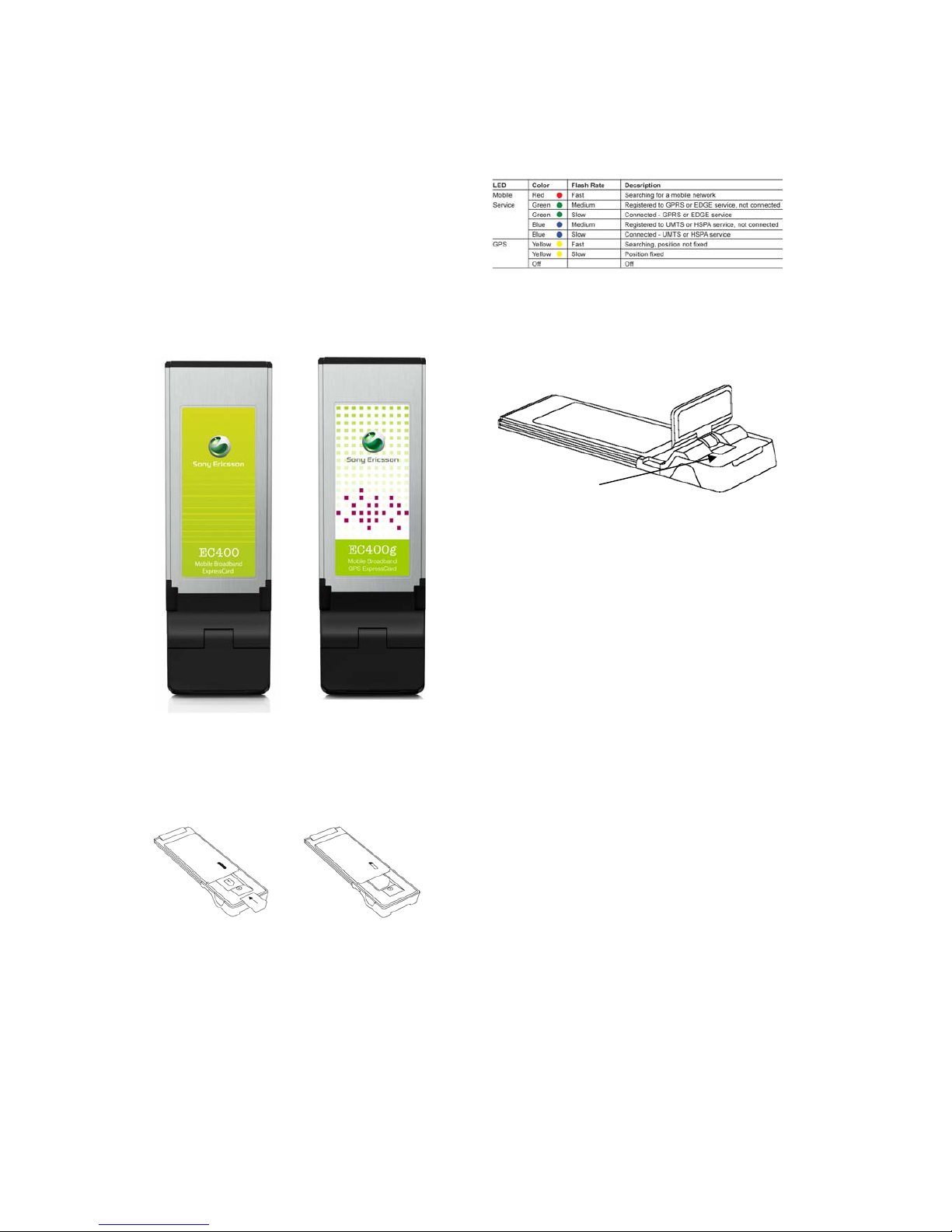
Status LEDs
The EC400 has one status LED for the mobile
service status. The EC400g has an additional
LED which shows the GPS status. The LEDs
are located underneath the diversity antenna
Radio Power
The EC400 has the same radio power output
as most mobile phones:
GSM 850 Class 4 2W
GSM 900 Class 4 2W
GSM 1800 Class 1 1W
GSM 1900 Class 1 1W
UMTS 850 Class 3 0.25W
UMTS 1900 Class 3 0.25W
UMTS 2100 Class 3 0.25W
The EC400 can be turned off under software
control from the Wireless Manager application
or the signal strength icon in the notification
area. It is recommended that the user
removes the EC400 when not in use to
prevent damage to the modem or the laptop..
The EC400 draws cu rrent from the
ExpressCard slot and therefore the laptop
battery when mobile. The amount used is
dependent upon a number of factors including
status, frequency-band, and distance to the
base station.
Antenna
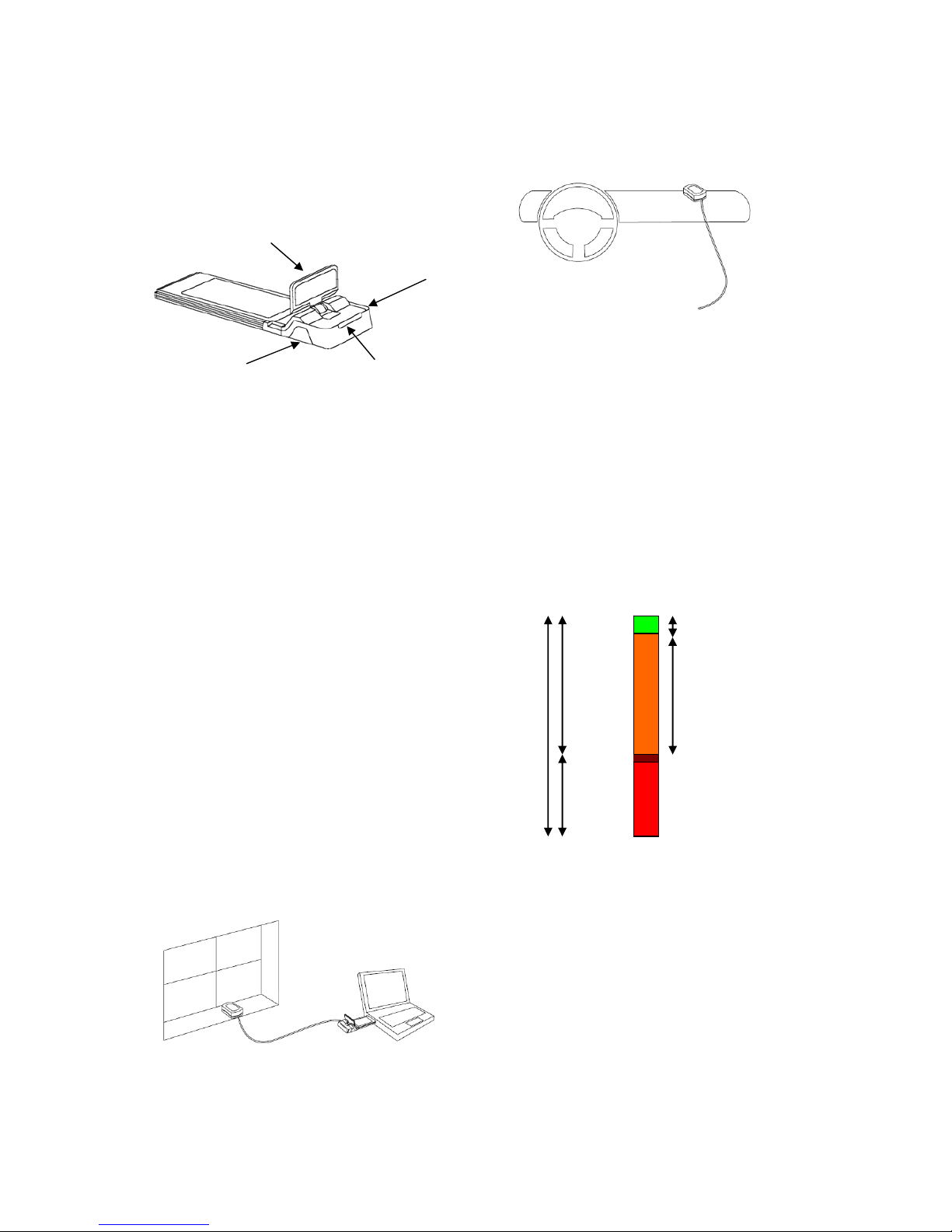
The EC400 has a built in diversity mode
antenna. The main antenna is in the fixed part
of the plastic extension. The diversity antenna
is in the hinged opening part. The hinged part
Status LEDs
Page 8
EC400, EC400g
White Paper, August 2008
8
also functions as the GPS antenna in the
EC400g. The antenna must be opened for
optimal efficiency.
The built-in GPS antenna is useful where
there is a good view to the sky. Please note,
however, that GPS signals are very weak and
can sometimes be blocked out by radio
frequency noise from the laptop itself.
Two antenna connectors are provided behind
removable covers:
Connector A is for an alternate GSM/UMTS
antenna. When connected, the built-in main
antenna is used as a Diversity antenna. The
main performance boost is in HSPA.
Connector B (EC400): External HSPA
Diversity antenna. Works in conjunction with
the other external (GSM) Diversity antenna.
When connected, the internal Diversity/GPS
antenna is disabled.
Connector B (EC400g): External GPS and
HSPA Diversity antenna. When connected,
the built-in Diversity/GPS antenna is disabled.
External GPS antenna
An external GPS antenna is supplied with the
EC400g. This antenna can be positioned in a
suitable place to get maximum view of the
sky.
Please note that the laptop must be operated
by a passenger when used in a car.
Flash Memory Drive for
AutoInstall
The EC400 contains a flash memory drive.
The Wireless Manager application and drivers
are written to this drive during manufacture,
so that the installation can be fully automatic.
The drive is only available prior to installation
of Wireless Manager.
The physical (hardware) capacity is
256Mbytes, however some of this capacity is
used internally by the EC400’s firmware.
* value approximate and depends on firmware
The filing system type is FAT (File Allocation
Table). The drive may not be reformatted to
other formats. Files and folders may be set to
read-only in the normal way.
The drive has volume label Sony Ericsson
EC400. The Wireless Manager installer files
are placed on the flash memory drive during
manufacture.
256 MB
Physical
87 MB*
File System
+ Firmware
169 MB*
available
Software Installer
~ 144 MB
Free Space
~ 25 MB
B
A
Main antenna
Diversity/GPS antenna
Page 9
EC400, EC400g
White Paper, August 2008
9
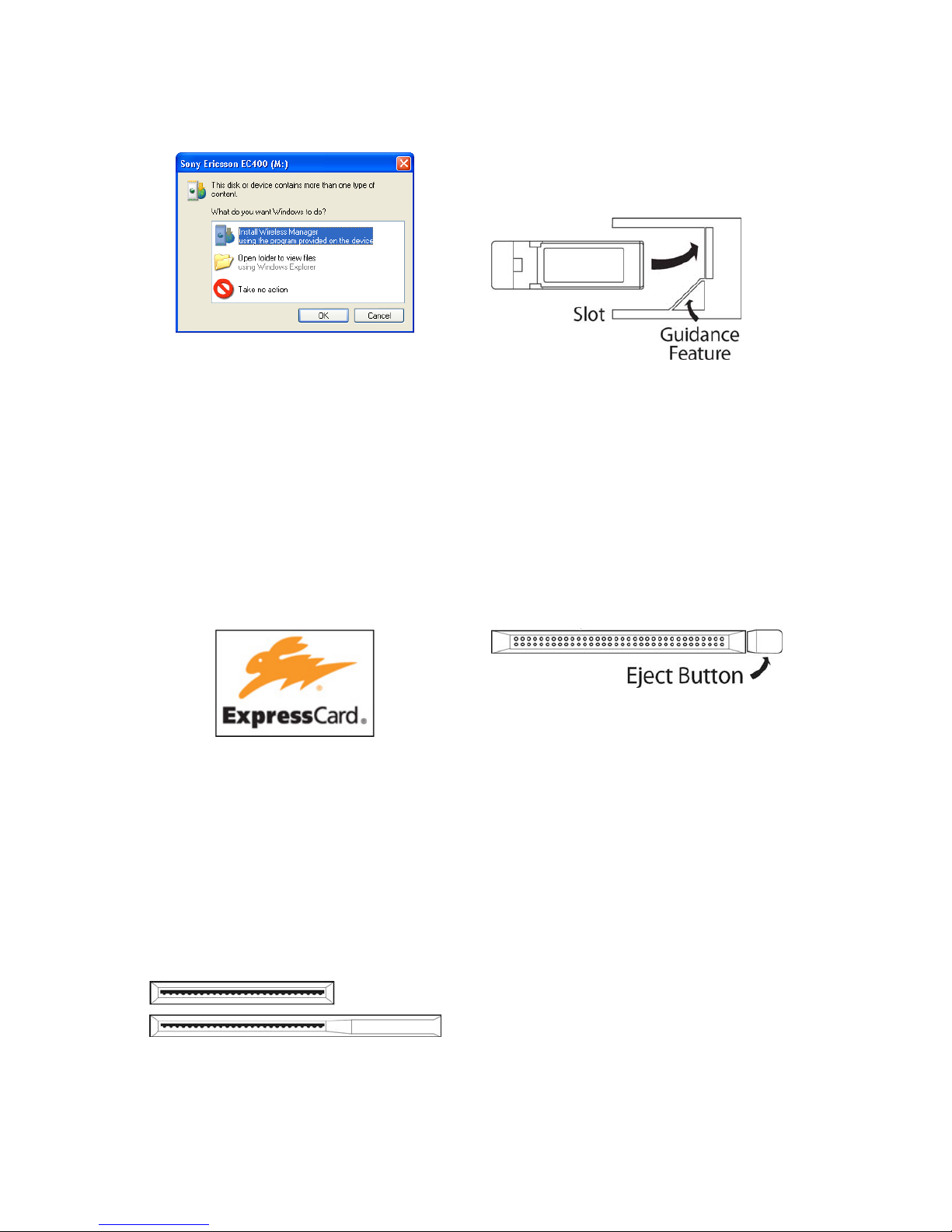
Windows AutoPlay detects the drive so that
the installation can be initiated by the user.
EC400 can be easily installed on another PC
using the Autoinstall feature.
About ExpressCard
technology
ExpressCard technology was developed by
the PCMCIA (Personal Computer Memory
Card International Association) and effectively
replaces the PC Card, though some models
of laptop have both types of slot incorporated
at the present time.
ExpressCard slots first appeared in quantity in
2006, in machines such as the Sony VAIO
SZ1 and Apple MacBook Pro.
ExpressCard modules are available in two
sizes: 34mm and 54mm wide. The EC400
uses the smaller 34mm wide format. The
connector is a single row of 26 pins. There is
normally no eject button; ExpressCards are
designed to have a press-to-inert and pressto-release operation. Gently press the card in
and a spring in the slot will then eject it.
34mm cards can be inserted in to a 54mm
slot. A guidance feature ensures that the
connector is correctly aligned.
ExpressCard modules have the following
advantages over PC Cards:
• Smaller size
• USB and PCI connectivity options
• Faster throughput
• Easier to implement in a laptop
• Less complex card implementation.
PC Cards can be identified from the following
characteristics:
• 54mm wide
• Two rows of 34 pins
• Eject button or lever
PCI connectivity provides bandwidth up to
2.5Gb/s and is ideal for ExpressC ard mo dule
disk-drive and video adaptors. USB
connectivity provides bandwidth up to
480Mb/s to the USB 2.0 standard. The EC400
is a USB type Express Card module.
USB type ExpressCard modules can be used
in PC Card slots via an inexpensive (~$40)
third-party adaptor card.
USB to ExpressCard adaptors are also
available. These enable a USB type
ExpressCard module to be connected to a
USB 2.0 port. This is es pecially useful for
desktop solutions and to locate the
EC400/EC400g in a more optimal position, for
example, the car windshield.
Sony Ericsson cannot guarantee
interoperability or performance with these
adaptor products.
Page 10
EC400, EC400g
White Paper, August 2008
10
Wireless Manager
Wireless Manager is the software application which is used with Sony Ericsson’s range of Mobile
Broadband Modem products such as the EC400 Mobile Broadband ExpressCard and the PC300 PC
Card.
The EC400 contains a flash memory drive that is pre-loaded with Wireless Manager and the
necessary drivers for the EC400. Installation starts automatically when the EC400 is first plugged in.
Supported platforms are Windows 2000, XP and Vista. Installation takes less than 5 minutes. Should
manual or customised installation be required, the Wireless Manager software can be downloaded
from www.sonyericsson.com/support
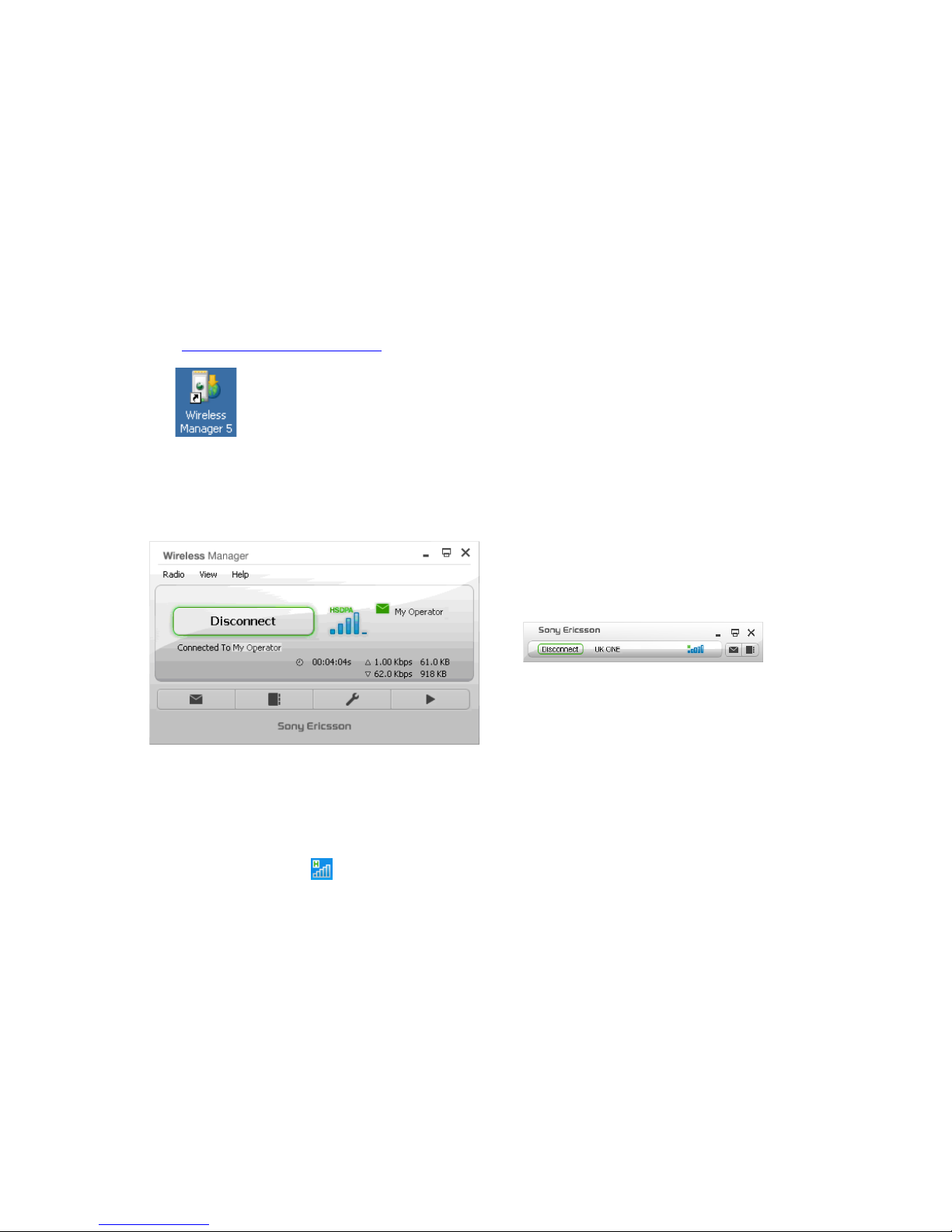
The Wireless Manager is accessed from the Windows Desktop or via Start |
Programs | Sony Ericsson | Wireless Manager 5. Preferences can be set to
automatically switch on the transmitter and make a connection.
Status Display
Wireless Manager opens to a status window which provides network and connection information.
Please note that these screenshots are subject to change.
A ‘mini’ mode can be selected to show the essential information without getting in the way of other
applications.
Additional buttons can be customised by the operator, IT Manager or user to launch E-Mail, Web
pages or VPN. Wireless Manager is pre-configured with a button for PlayNow.
A Wireless Manager icon
is also placed in the Windows notification area at the bottom right of
the screen. If ‘minimise to notification area’ preference is set in the Wireless Manager, then
minimising the status window clears away the Wireless Manager application, leaving just the icon as
a reminder that the EC400 is active.
Page 11
EC400, EC400g
White Paper, August 2008
11
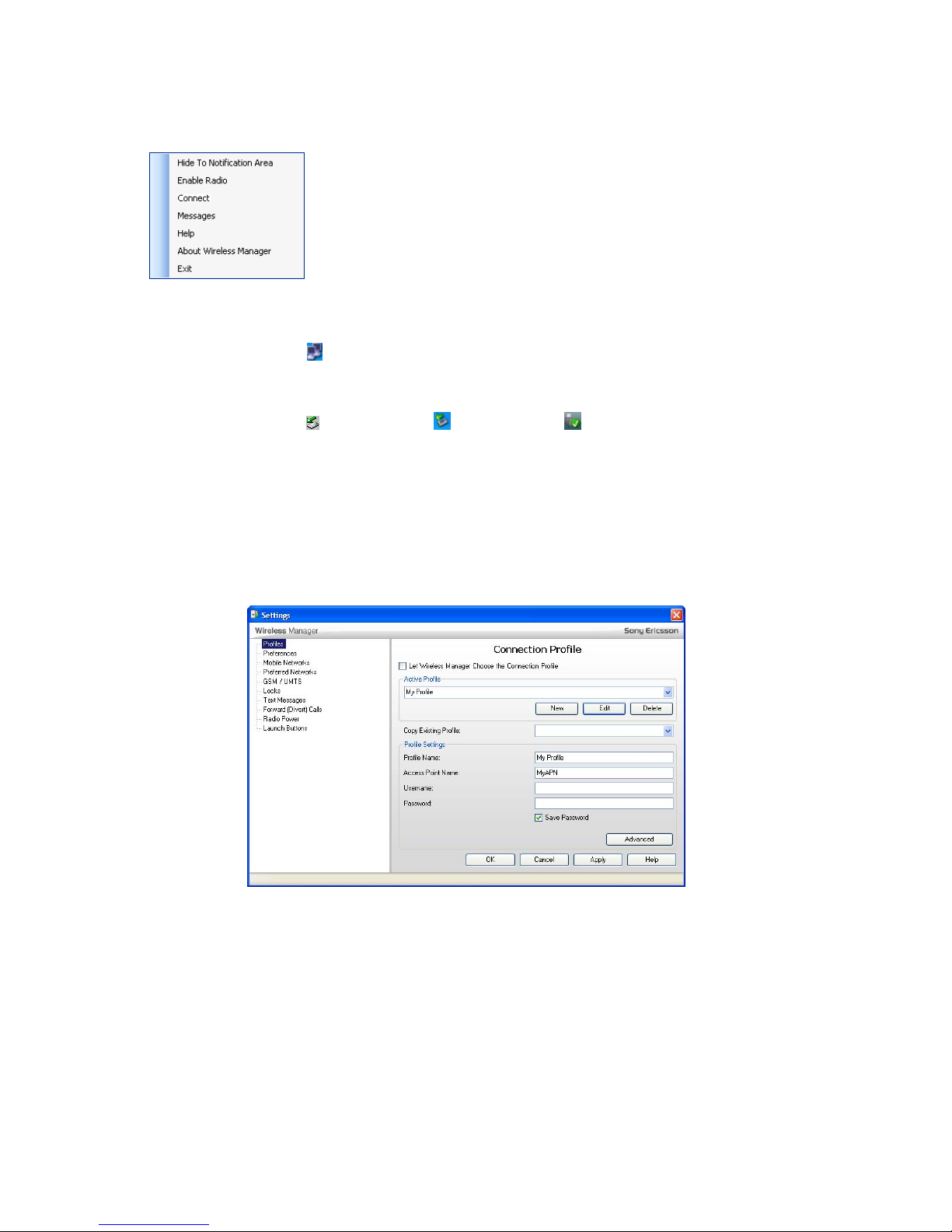
Right-click the Wireless Manager icon to access a useful menu.
Hide to Notification Area closes the Wireless Manager window, but keeps
the EC400 in operation, as shown by the icon in the notification area.
About provides information on the Wireless Manager version and also the
firmware version in the EC400.
An IT Manager can set up connection profiles so that all installations automatically get the
connection (private APN) defined with no need for further user interaction.
The Windows NDIS icon
indicates a connection and data flow as usual. The connection time and
transmit/receive byte count is also shown in the Wireless Manager.
The EC400 may be removed by exiting the Wireless Manager and stopping the card via the “Safely
Remove Hardware” icon
(Windows 2000), (Windows XP) or (Windows Vista)
Older Sony Ericsson PC Cards such as the GC86 continue to use Wireless Manager Version 4. It is
possible to install both Wireless Manager 4 and Wireless Manager 5 so that GPRS/EDGE PC Cards
(such as the GC86 and GC89) and Mobile Broadband Modems PC300, MD300 and EC400 can be
used in the same laptop without needing to change softw are or drivers.
Settings
Settings are presented in logical groups. Simply click on the required set ting in the list and the
details will be displayed.
Connection settings are automatically set up each time a new SIM is inserted in to the EC400.
Wireless Manager contains a list of many operator settings. The home operator from the SIM is
matched in this list and a connection profile is automatically created and made default.
These settings may be viewed and edited. Alternative settings can be manually entered or selected
from a database covering many mobile operators. This database can be customised to contain only
relevant operator settings.
Page 12
EC400, EC400g
White Paper, August 2008
12
It is also possible for an IT Manager to configure company-specific settings into Wireless Manager
so that these are automatically installed in place of the operator default internet service.
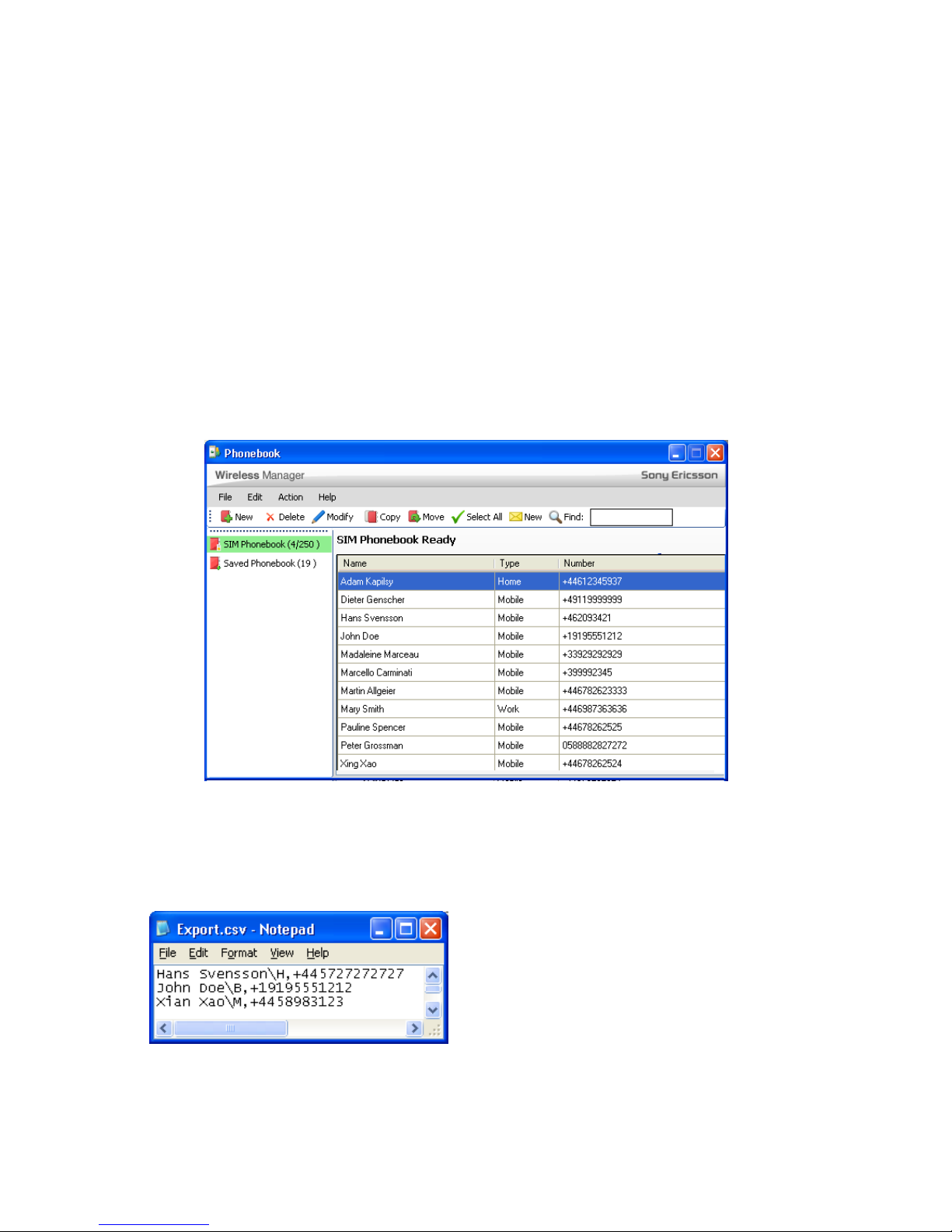
Phone Book
Click the Phone Book button to work with contact names and phone numbers.
The phone book listing from the SIM card is shown. Items can be added, edited or deleted. It is also
possible to copy and move entries to or from a Saved Phonebook, which uses PC storage rather
than the SIM card.
The SIM Phonebook is represented as one folder. A ‘Saved Phonebook’ folder is located on the PC
hard-drive. Functions are provided to copy and move entries between the folders.
The phone book can be used to add recipients when composing an SMS. It is also possible to send
an SMS directly from the phone book.
.
The address book can be exported or imported. The format is a two-column comma-separated text
file. An example is shown below. When importing, the user can choose whether to add the new
entries to the phonebook leaving the old entries there, or to delete the old entries so that the
phonebook just contains those in the imported file.
Page 13
EC400, EC400g
White Paper, August 2008
13
SMS
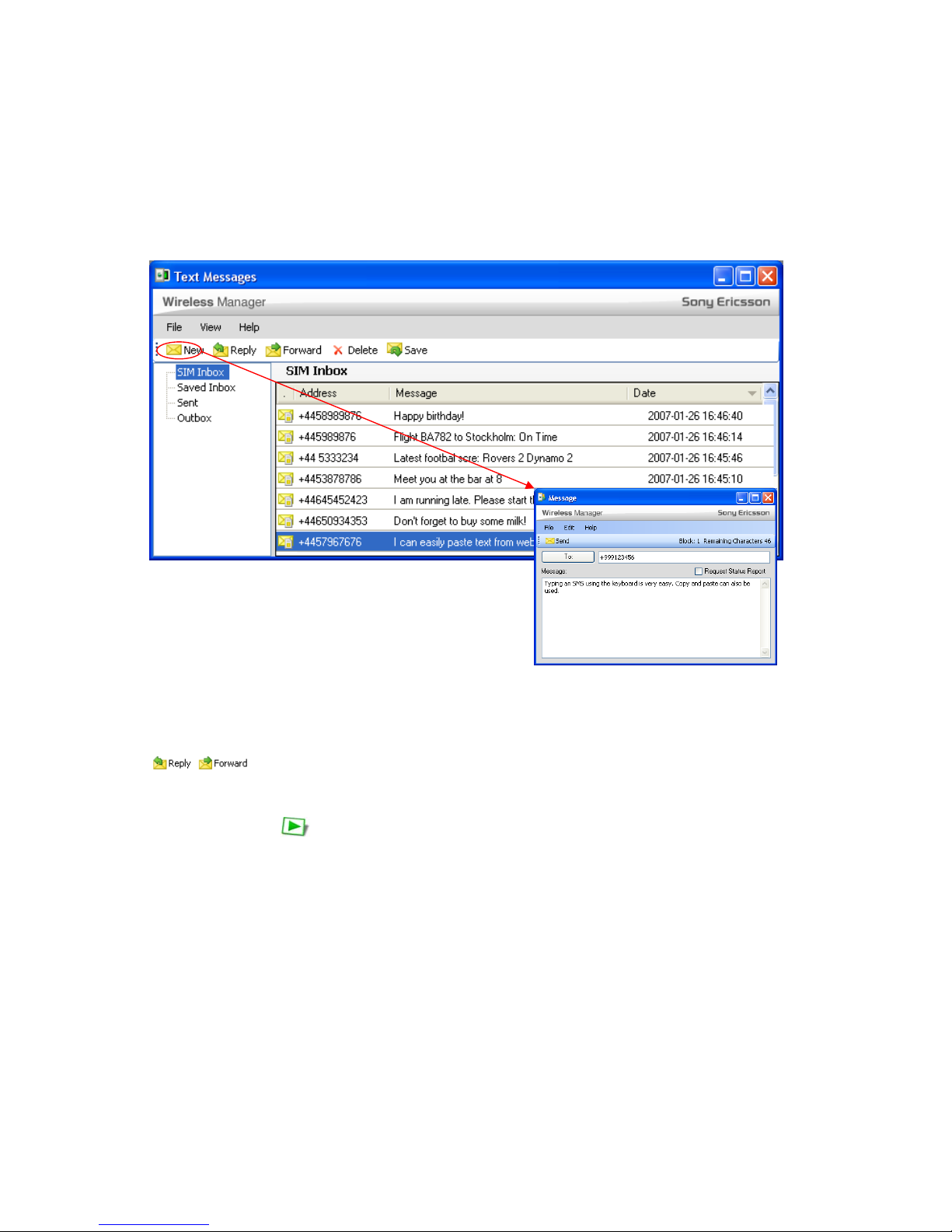
Text messages can be sent and received. Concatenation is supported so that messages longer than
160 characters can be sent (the receiving end must also support concatenation for the message to
be displayed correctly, however such support is widespread).
The SIM Inbox is the inbox on the SIM card itself. This is the main inbox so that text messages are
not accidentally lost when moving the SIM between the EC400 and a mobile phone. Text messages
can be moved or copied to the Saved Messages folder, where any number can be stored on the PC.
A warning indication is provided when the SIM is full.
Users can Reply to or Forward SMS messages with a single click.
PlayNow
The PlayNow button opens the default web browser at the home page of PlayNow. Here the
user can access music downloads and other content. The PlayNow service is being rolled out to
regions and countries and the user can view status and make selection from the home page.
Performance and Statistics
Connection duration, volume of data and an indication of upload/download speed are provided in the
Wireless Manager window whilst a connection is in progress. View | Usage Summary provides
cumulative upload and download volumes. The counters can be reset when required. The figures
could be used to provide an approximate check of the data volumes billed. Please note that the
information shown here is not guaranteed to match the mobile operator’s bill.
Page 14
EC400, EC400g
White Paper, August 2008
14
Wireless Manager Information
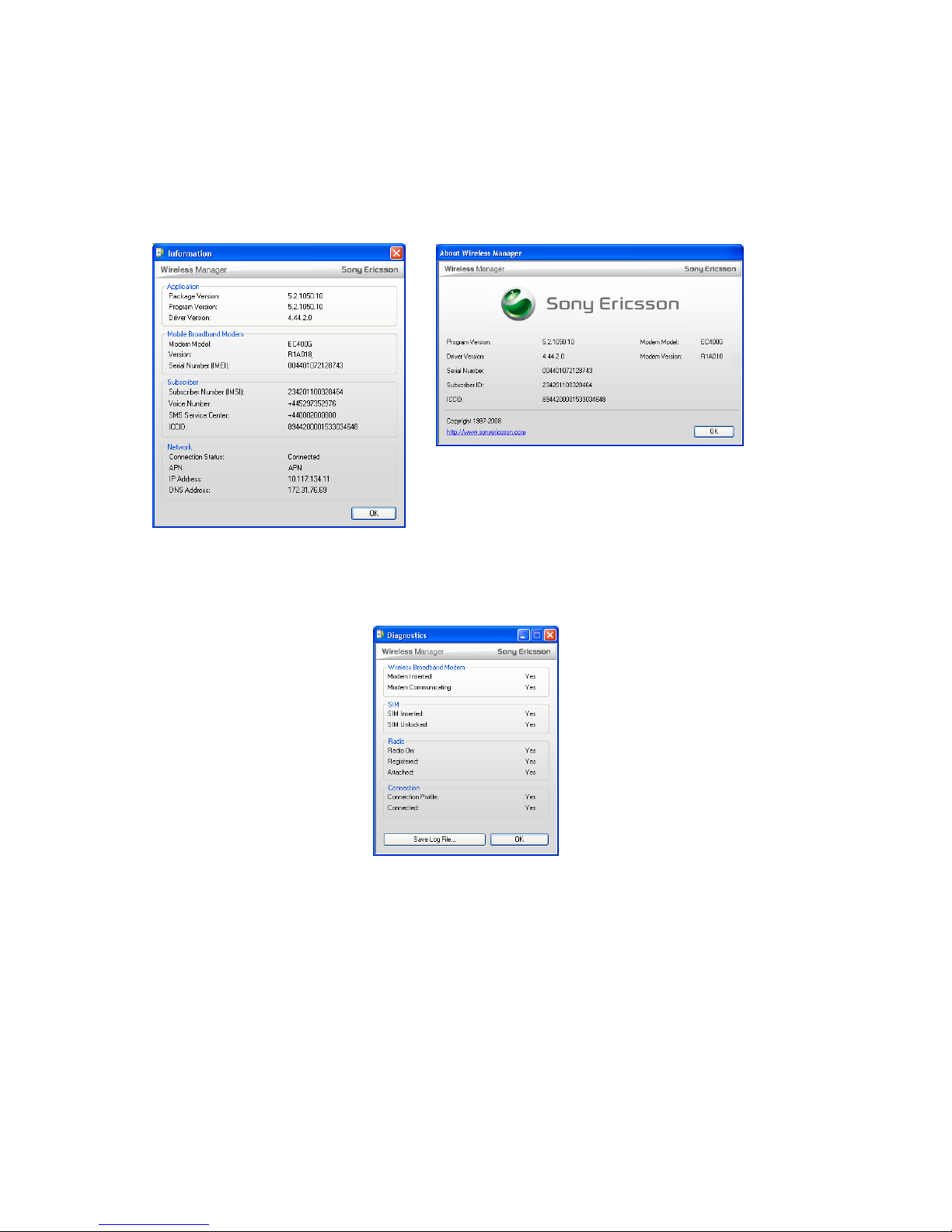
Connection and software/firmware version information is available from the View | Information
menu. This dialog box brings together in one place the information that might be required for a
problem to be diagnosed. A standard Help | About dialog is provided also.
Help | Diagnostics runs a quick self-test and displays essential system status suc h as Modem
present, Modem communicating, SIM inserted, SIM unlocked, Radio on, Circuit-switch registered,
Packet-switch registered, Connection Profile configured. A log file can be saved for remote
troubleshooting. This log file is limited to 2Mbytes and is a first-in, first-out type buffer.
IT Manager Customization
The Wireless Manager may be customized prior to deployment in a large organisation. Settings data
is maintained in a file called UserSettings.bin. You can define the following settings, which are
automatically saved to the file:
• Connection Profiles
• Preferences
• Radio Power
• Launch Buttons
Your customised UserSettings.bin file can then be included in the installation package so that target
laptops are preconfigured with your settings.
Page 15

EC400, EC400g
White Paper, August 2008
15
SIM-ME Lock
SIM-ME lock can be specified as a customisation to the EC400. When a ‘foreign’ SIM is inserted,
Wireless Manager will detect it and present a warning message and enabl e the user to enter the
unlock code. If no unlock is possible (zero unlock attempts), Wireless Manager informs the user that
no unlock is possible.
Documentation
One or more multilingual printed Quick Start Guides are included in the package. Since it is not
possible to include all languages on a single sheet, the guides are broken in to four variants. These
are listed in the Specification – Supported Languages section. PDF versions of these guides may be
downloaded from the support website.
A PDF EC400 User Guide describes the EC400 Mobile Broadband ExpressCard and provides a
specification, safe usage and warranty information. It is installed with Wireless Manager and
accessed via Start | All Programs | Sony Ericsson | Wireless Manager 5 and can also be
downloaded from the support website.
Wireless Manager includes comprehensive built-in online help, available from the Help menu or by
pressing F1.
A PDF Wireless Manager 5 User Guide provides the same information as the online help, but in a
conventional printable PDF format. This document is available for download only.
A PDF AT-Command Reference Manual is available on the web. This is in English only.
GPS
The GPS System
GPS (Global Positioning System) is a network of satellites in orbit around the earth. They circle the
earth at a height of about 12,000 miles (19,300 km) and make two rotations every day. The satellites
are placed in predetermined orbital planes designed to give full global coverage.
The GPS network was developed and implemented by the U.S. Department of Defense as a military
navigation system, but soon became available for civilian use as well.
Each satellite contains an atomic clock and continuously sends out time-stamped mess ages . The
satellites are synchronized so that the position messages that they send out are transmitted at
effectively the same instant. The messages travel at the speed of light and therefore arrive at the
GPS receiver at different times depending on distance from each visible satellite.
The GPS receiver calculates its position based on the time of arrival of these messages. The
principle is that if you know your distance from several known locations, you can calculate your own
location.
Theoretically, a direct view of three satellites is sufficient to locate a position on the earth, however
four are necessary in practice to get an accurate latitude, longitude and height.
They send out signals which enable a GPS receiver to determine its position in three dimensions
(latitude, longitude and height, normally expressed as ‘above sea level’).
When a GPS receiver is first turned on, it takes around 50 seconds in good conditions to decode the
data stream from visible satellites and compute the position. Poor conditions, such as a limited view
of the sky, extend the time-to-fix to several minutes, if the position can be found at all.
Page 16
EC400, EC400g
White Paper, August 2008
16
If the GPS receiver is moving, time-to-fix can be longer; the receiver must re-start the decoding
sequence if the data stream is interrup ted.
A Cold Start takes place when the receiver has no information at all regarding the location of the
satellites.
When the receiver decodes messages from a satellite, it also receives the preci se orbital parameters
for that satellite. These are valid for about two hours. This data is stored if the receiver is turned off.
If the data is still valid when the receiver is turned back on, a faster positional computation is
possible; around 10 seconds. This is known as a Warm Start.
GPS Features in Wireless Manager
The position data is made available in three forms:
• Basic position display in the GPS window
• Open Google Maps
TM
at the current location
• NMEA data stream for third party applications
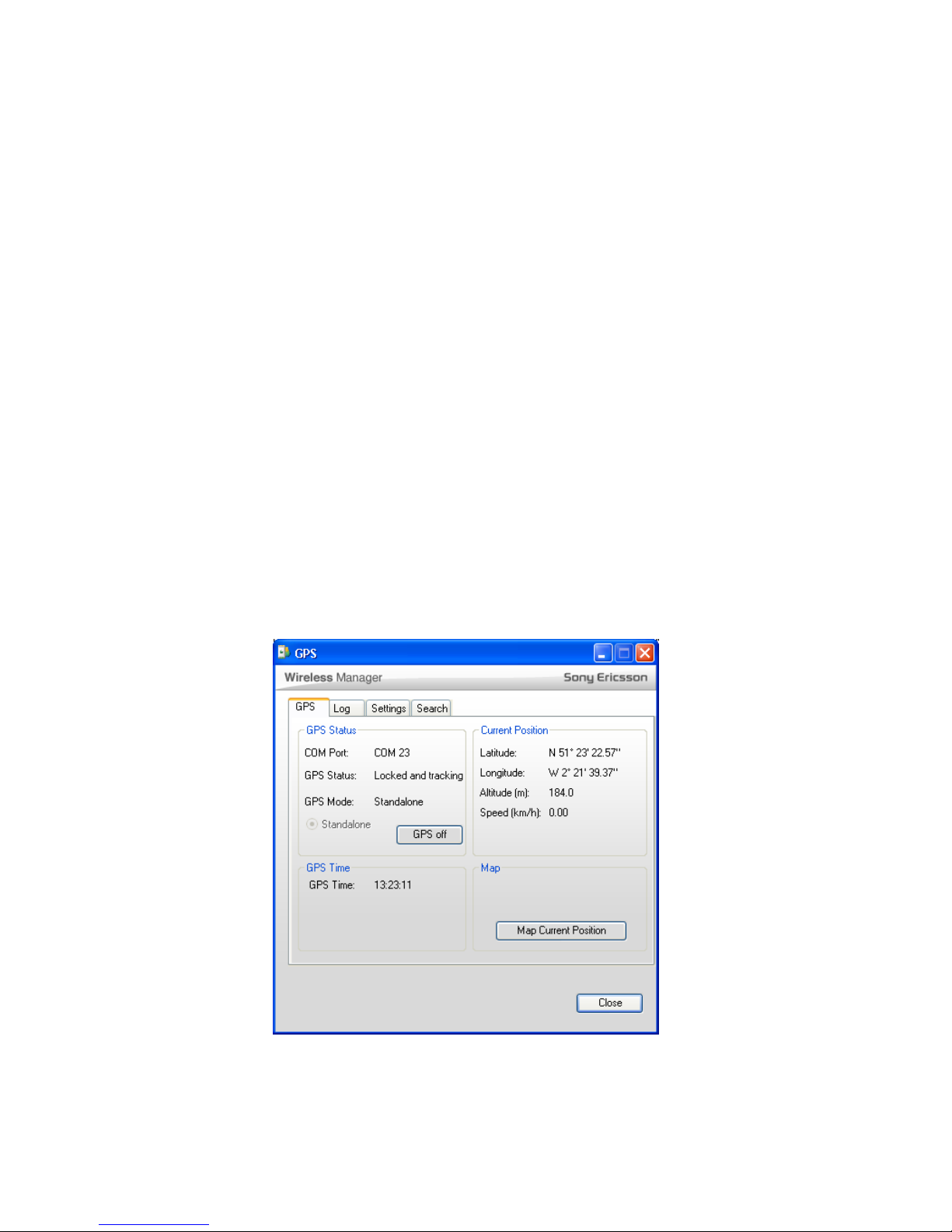
In Wireless Manager, select View | GPS to access the GPS feature. In the main GPS tab, GPS can
be turned on and off, and status information is displayed. The GPS mode is standalone; there is no
assistance from the mobile network.
GPS time is an accurate display of time that is derived from the GPS data. It is shown as GMT
(Greenwich Mean Time). To translate to local time, it is necessary to factor in time zone and
Summer Time.
The Map Current Position button opens the default browser to show the present location in Google
Maps.
Page 17
EC400, EC400g
White Paper, August 2008
17
The Log tab displays the raw NMEA data strings and allows them to be saved to file.
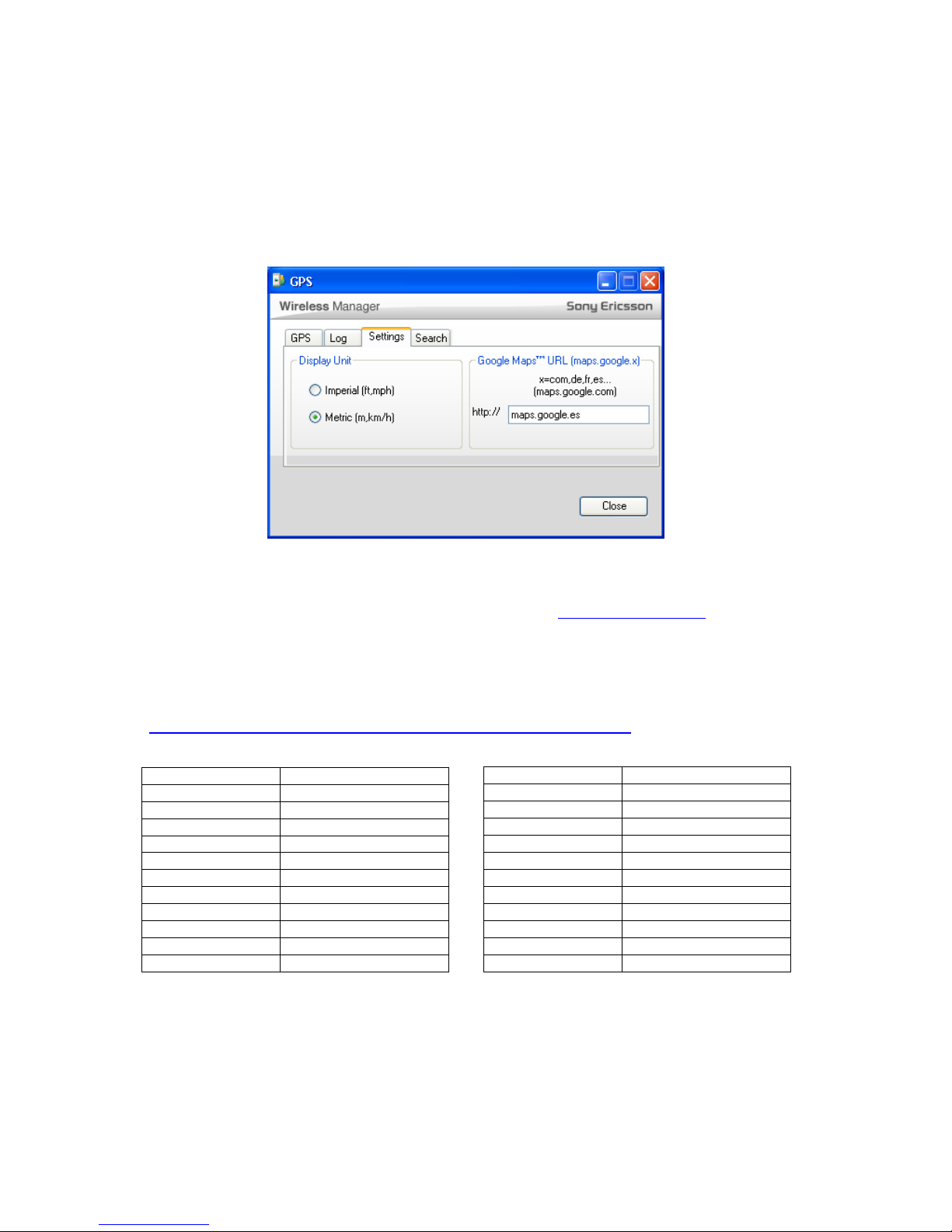
The Settings tab allows GPS settings to be configured. Units of distance are displayed in metric
(metres and kilometres per hour) by default, but can be switched to Imperial (feet and miles per
hour) where required.
By default (URL field left blank), Google Maps is accessed usin g http://maps.google.com
. If an
alternative country-specific URL (e.g. maps.google.es) is entered, it is used instead. Please note that
the feature is specific to Google Maps; entering the URL of an alternative service such as Yahoo
does not work.
Here is a table of localized Google Maps URLs at the time of writing. Some of these are beta state.
For further information, see:
http://gmaps-samples.googlecode.com/svn/trunk/mapcoverage_filtered.html/
Australia maps.google.co.au
Austria maps.google.at
Belgium maps.google.be
Brazil maps.google.com.br
Canada maps.google.ca
China ditu.google.cn
Czech Republic maps.google.cz
Denmark maps.google.dk
Finland maps.google.fi
France maps.google.fr
Germany maps.google.de
Italy maps.google.it
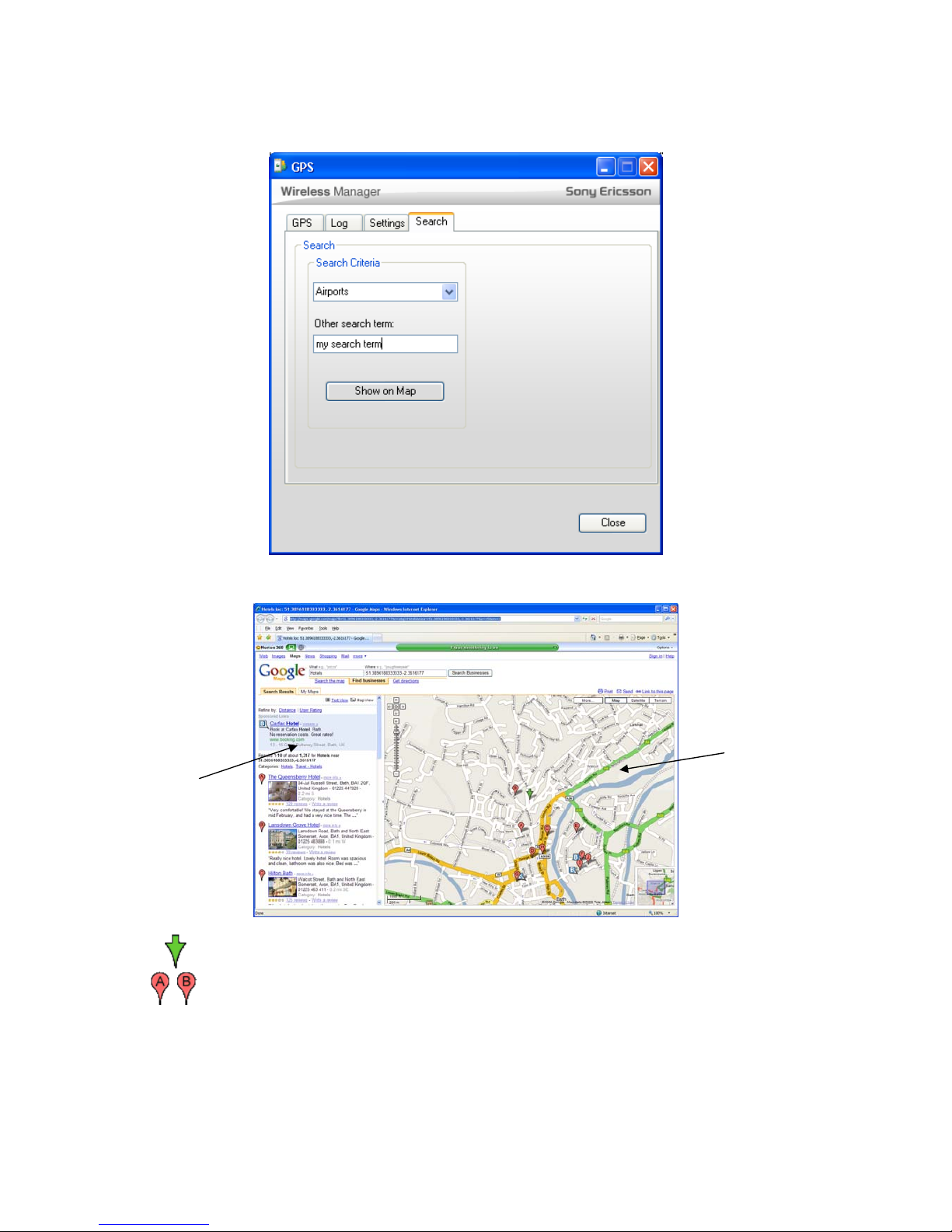
The Search tab provides a search facility based on Google Maps. A drop-down selection provides
common search terms such as A irports, hotels etc. Any other search term can be entered in the
Other search term box. (Clear this box to use the pre-set terms)
Japan maps.google.co.jp
Netherlands maps.google.nl
New Zealand maps.google.co.nz
Norway maps.google.no
Poland maps.google.po
Russia maps.google.ru
Spain maps.google.es
Sweden maps.google.se
Switzerland maps.google.ch
Taiwan maps.google.com.tw
United Kingdom maps.google.co.uk
United States maps.google.com
Page 18
EC400, EC400g
White Paper, August 2008
18
A typical Google Maps page looks like this:
Indicates current position
Indicate the location of each item in the search results
Search
Results
Panel
Map
Panel
Page 19

EC400, EC400g
White Paper, August 2008
19
NMEA Data Stream for Third Party Applications
The GPS receiver provides standard NMEA data over a COM port. More than one application can
read the data at the same time.
Many third-party applications are able to read and use the NMEA data. NMEA data is to NMEA 2.0
standard. The following four N MEA sentences are output:
$GPGGA
$GPGSA
$GPGSV
$GPRMC
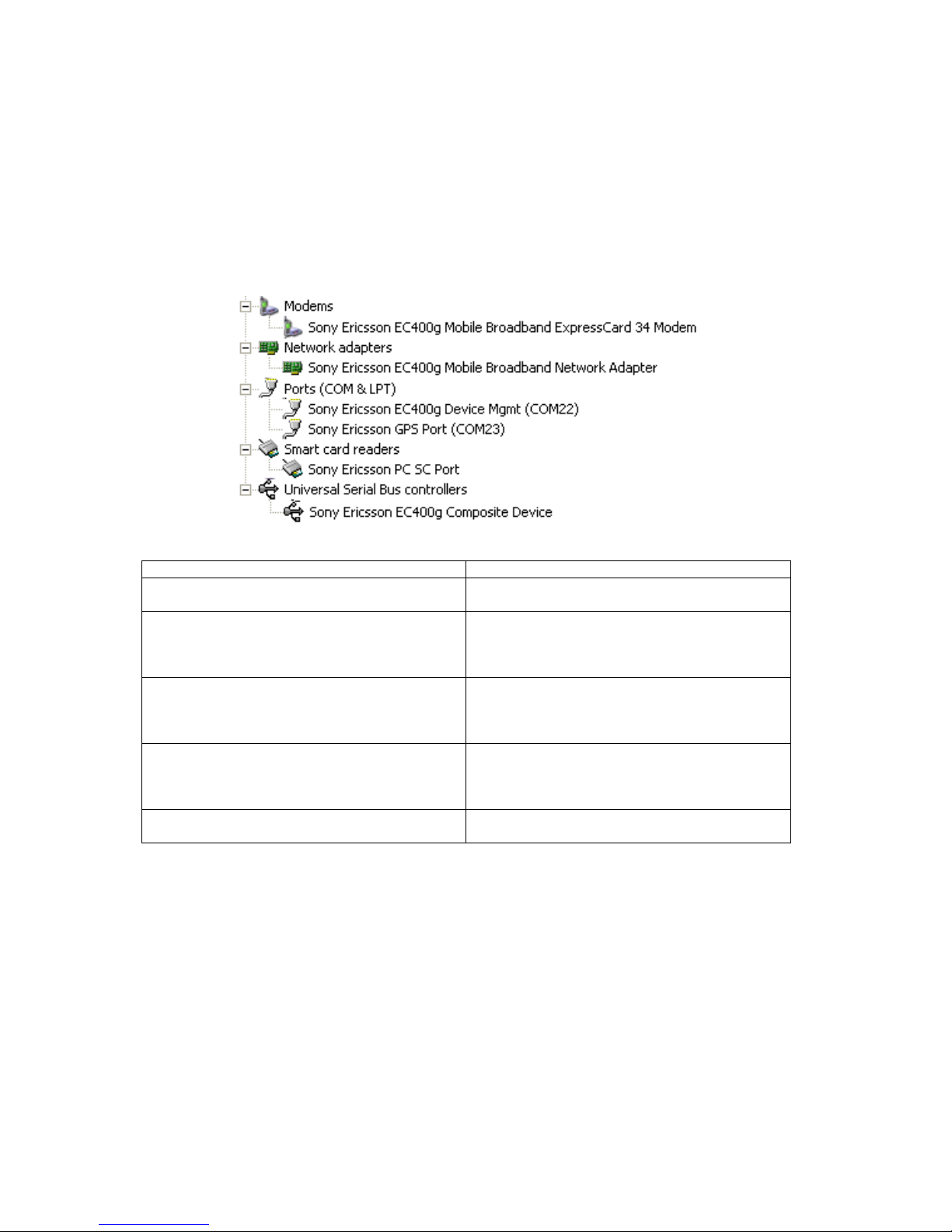
The NMEA data is output over the Sony Ericsson GPS Port. This is a Windows COM Port. To link a
third-party GPS-enabled application to your EC400g's GPS receiver, it may be necessary to access
the application settings and select the COM port number that Windows has allocated. This is
indicated in the GPS tab in Wireless Manager and is also displayed in the Windows Device
Manager:
To use an external application with GPS:
• Turn on the GPS receiver
• Start the GPS-enabled application
• Connect it to the Sony Ericsson GPS Port
When finished:
• Disconnect the application from the Sony Ericsson GPS Port
• Close the application
• Switch off the GPS receiver
Further Enhancements
Future releases of Wireless Manager will add additional GPS features:
• Support for Yahoo!
®
Maps
• Integration with Google Earth
• Save position as a waypoint
• Waypoint lists
• Personalized search lists
Page 20
EC400, EC400g
White Paper, August 2008
20
PC Software Architecture
Windows Drivers
The EC400 drivers are based on standard USB functionality. The EC400 is presented as a
multifunction device providing USB, modem, network and COM-port interfaces.
The EC400 appears as the following devices when examined in Windows Device Manager:
Device Name Function
Sony Ericsson EC400 Mobile Broadband
ExpressCard/34 Modem
Modem device which may be used with Dial-Up
Networking
Sony Ericsson EC400 Mobile Broadband
Network Adaptor
NDIS interface over which Wireless Manager or
third party applications establish communication.
Appears to Windows as a LAN adaptor having
maximum speed 7.2Mb/s
Sony Ericsson EC400
Mobile Broadband Device Management
This is a COM Port which is used by the
controlling application (normally Wireless
Manager) to control and obtain stat us from the
EC400.
Sony Ericsson PC SC Port Placeholder (non-working dummy device) for a
PC-Smartcard interface for EAP-SIM
authentication. Working functionality may be
introduced at a later date.
Sony Ericsson GPS port COM port which outputs NMEA da ta to one or
more applications.
Page 21
EC400, EC400g
White Paper, August 2008
21
Installation Procedure
The Wireless Manager application and drivers
are stored on a flash memory drive in the
EC400. When it is first plugged in, Windows
automatically recognises it as a flash drive and
loads the Windows standard driver to make it
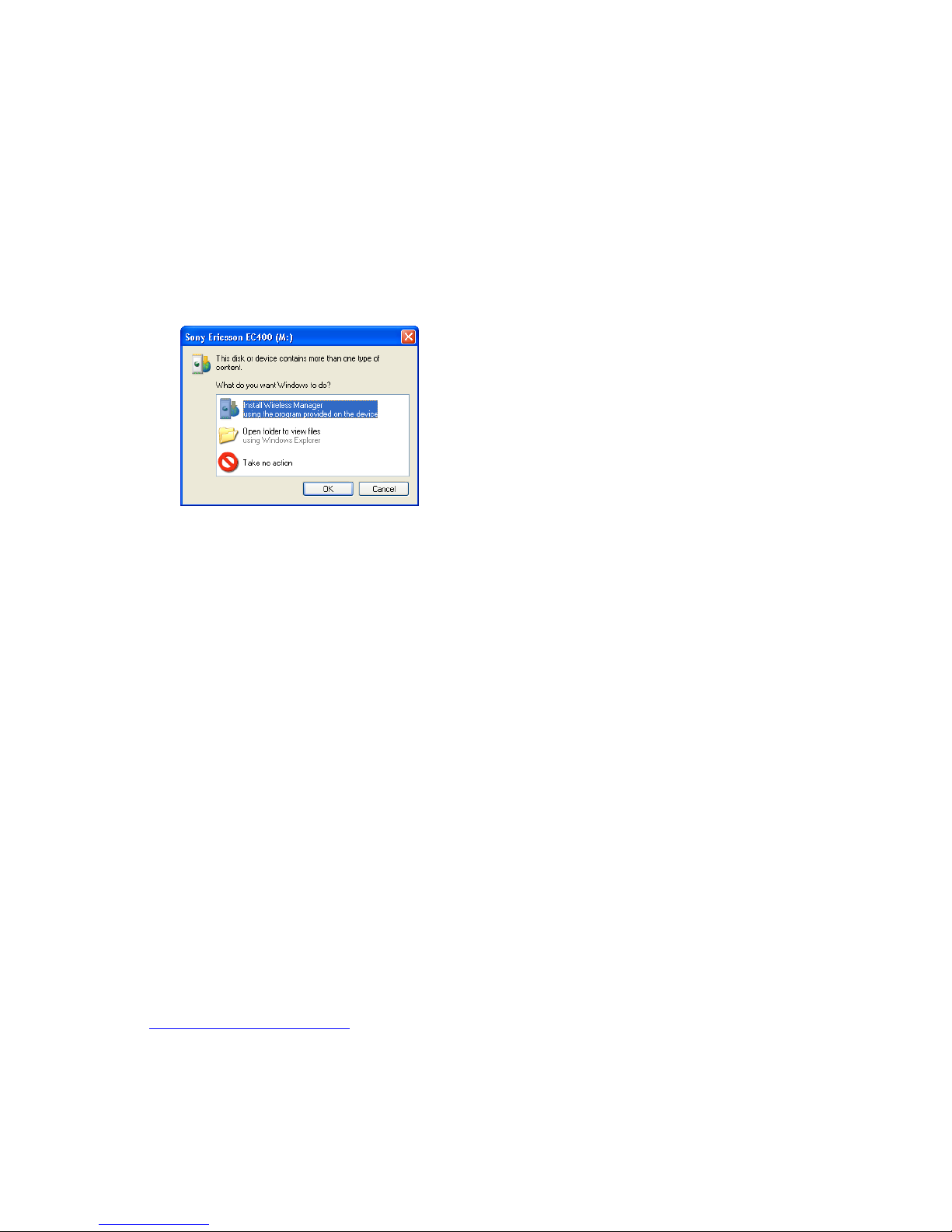
appear as a disk drive. Windows AutoPlay
detects the new drive:
The volume name is Sony Ericsson EC400.
The installer master file is setup.exe and is
selected as the default option by Windows. The
user may simply select Install Wireless
Manager.
Installation follows normal Windows
®
practice
and is very simple. Advanced users may
choose an alternative location to install the
software.
Wireless Manager is installed in the same
language as Windows, or in English if the
Windows language is not supported by
Wireless Manager.
As a customization, a language-select dialog
can be displayed. This is the first thing that is
displayed to the user. The language list is
presented in the same language as Windows.
The rest of the installation proceeds in the
language selected by the user.
If Microsoft® .NET
TM
2.0 or later is not installed
on the PC, it is automatically installed before
the Wireless Manager installation starts. 32 and
64-bit versions are included on the flash drive.
The software install package is available as a
zip file download from
www.sonyericsson.com/support
in case a
manual install is required. Typical cases for
manual install are:
• to customise in specific settings
• to update Wireless Manager to a
later version
• where flash drives are disabled in
Windows as a security measure.
In addition to the EC400 package, y ou will
require a SIM card activated with the
services you wish to use (check with your
Mobile Operator for subscription
requirements). Even though you may have
UMTS service at 384kb/s, some m obile
operators require you to explicitly request
HSPA to be enabled. You will also need the
account details of any corporate services
that you wish to access.
Connection Configuration
When a new SIM is detected in the EC400,
Wireless Manager identifies the home
network and automatically creates a
connection profile from a built-in list of
operator settings. A match is made using the
MCC and MNC codes from the SIM Card.
This becomes the default profile and is
immediately available. Therefore, the user
needs to do nothing other than click the
Connect button to make a connection.
If the operator settings are not available or a
personalised (company-specific) APN is in
use, the information may be entered
manually.
An IT Manager may pre-configure Wireless
Manager to automatically install with
company-personalised settings.
Any number of profiles (including Access
Point Name, Username, Password etc) may
be defined. Quality of Service parameters
are set to ‘network default’.
Connection Operation
No user interaction is required to set the
speed of a connection. It will be
automatically set by the network depending
on available network resources and the
user’s subscription.
If HSDPA/HSUPA is available in the UMTS
network, the higher download/upload
Page 22

EC400, EC400g
White Paper, August 2008
22
speeds will be automatically available provided
they are allowed by your subscription.
In some networks, it is not possible to detect
HSDPA until a connection is made.
Where UMTS is available, the EC400 will
automatically use the UMTS network by
preference and automatically switch over to
GPRS/EDGE in the case of no UMTS
coverage, where the opera tor has an integrated
UMTS/GSM network. When UMTS coverage
returns, the connection will return to the UMTS
network. In some networks, data flow must
pause so that the EC400 goes back to idle
state before a return to UMTS can take place.
This is network-specific.
Where EDGE is present in the GSM network,
the connection will automatically take
advantage of the faster speeds and improved
error correction features.
Slot management in EDGE and GPRS is
automatic. For example if a download is
performed at 4+1 slots using GPRS and then
an upload is commenced, the EC400 will
automatically request the network for 2 uplink
slots. If granted by the network, the EC400 will
then operate at up to 3 slots receive and 2 slots
transmit (3+2).
TCP/IP Optimization
Because of the high bandwidth of the EC400, it
benefits from careful tuning of TCP/IP
Parameters. Appropriate parameters are set
during installation.
Tools such as Dr. TCP and Tweakmaster
enable settings to be viewed and changed
without needing to access the registry.
Where a VPN is in use, there may be a conflict
between the NDIS adaptor presented by the
VPN client and the Wireless WAN adaptor.
Poor data throughput with VPN enabled is the
symptom. In this case, it is recommended that
TCPWindowSize is set globally.
TCP/IP Configuration
As part of installation, the following settings are
made in order to optimise the throughput:
[HKEY_LOCAL_MACHINE\SYSTEM\CurrentCo
ntrolSet\Services\Tcpip\Parameters]
"TcpWindowSize"=dword:0000ffff
"SackOpts"=dword:00000001
"TcpMaxDupAcks"=dword:00000002
"Tcp1323Opts"=dword:00000001
Apple Macintosh
Support
The EC400 may be used with Apple
Macintosh machines. A separate
application, “launch2net – Sony Ericsson
Edition” is available as a free download. A
leaflet in the EC400 package tells the user
about the Mac support and where to get the
software. The latest version is always
available at:
www.novamedia.de/sonyericsson
When used with the EC400g, Launch2Net
has the following support for GPS:
• GPS on/off control
• GPS port for use with a third-party
GPS-enabled application.
System requirements
Apple PowerBookwith ExpressCard slot
Mac OS
®
X 10.4.3 or later; 10.5.x
Languages
English, French, German, Spanish (Latin
American), Brazilian Portuguese, Italian.
Principal Limitations
launch2net sets up and makes HSPA,
UMTS, EDGE and GPRS connections via
the EC400. It does not provide any other
functionality. For example, SMS and SIM
Address Book are not supported.
Page 23
EC400, EC400g
White Paper, August 2008
23
Description and
Comparison of
CSD, GPRS/EDGE,
UMTS and HSPA
This section provides an overview of the way
data communication works in a GSM and
UMTS network environment. This will help you
to understand the characteristics of the different
solutions supported by Sony Ericsson Mobile
broadband Modems and the parameters which
govern the data transmission speeds available.
GSM Circuit Switched Data
(CSD)
A modem and landline is the most basic way to
connect to the internet and company networks.
The modem establishes a telephone call to the
remote server which is ‘circuit-switched’,
meaning that a telephone circuit is maintained
for the duration of the connection, irrespective
of whether data flows or not. The connection
has a fixed bandwidth and is normally charged
on a connected-time basis.
In GSM networks, this facility is widely
available and is called Circuit Switched Data
It is very similar to usin g a modem, but is
subject to lower data transmission speeds
due to the connection taking place over the
GSM wireless network. The standard speed
of operation for CSD is 9.6kb/s transmit and
receive. Because this speed is so slow
compared to UMTS and HSPA, the EC400
does not support CSD. Older products such
as the GC86 support CSD.
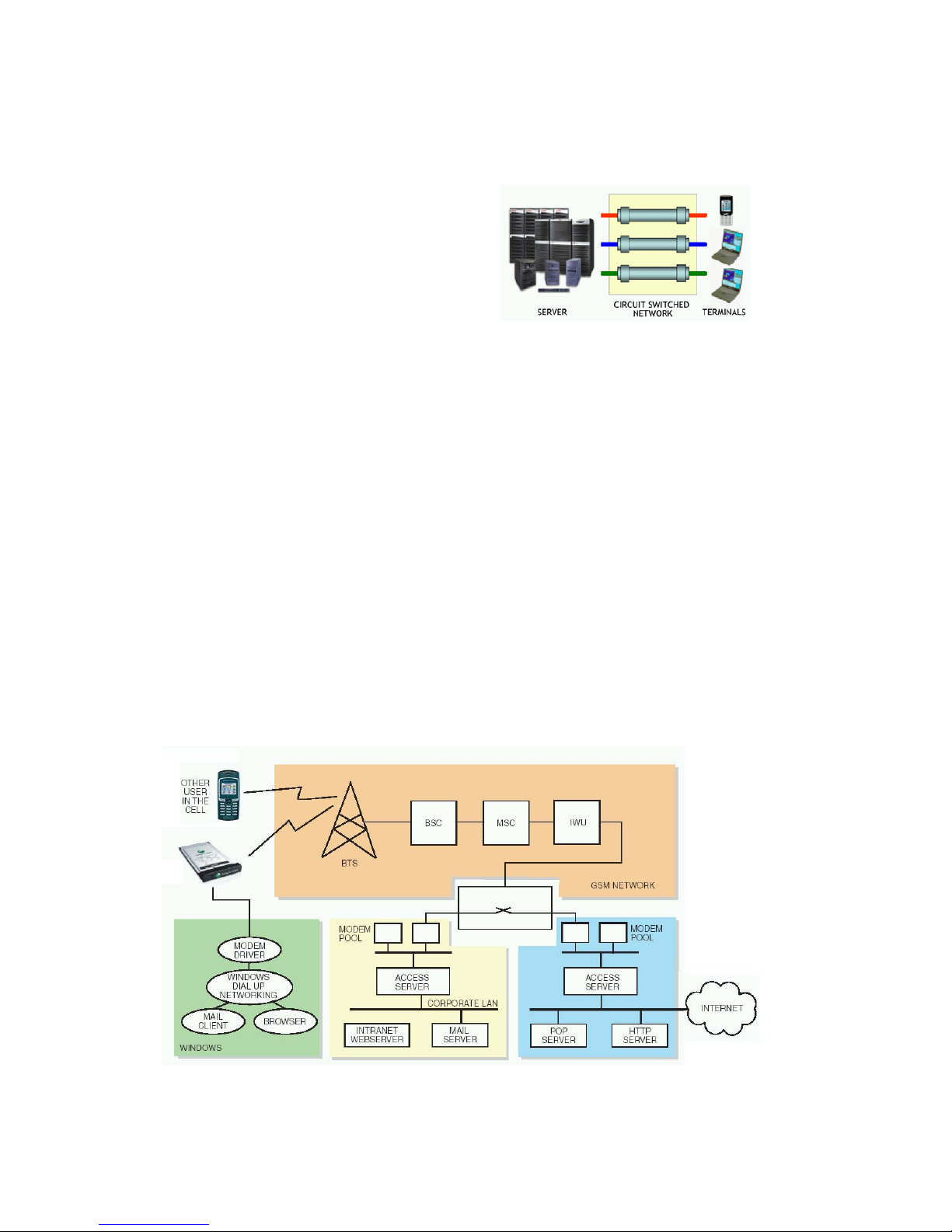
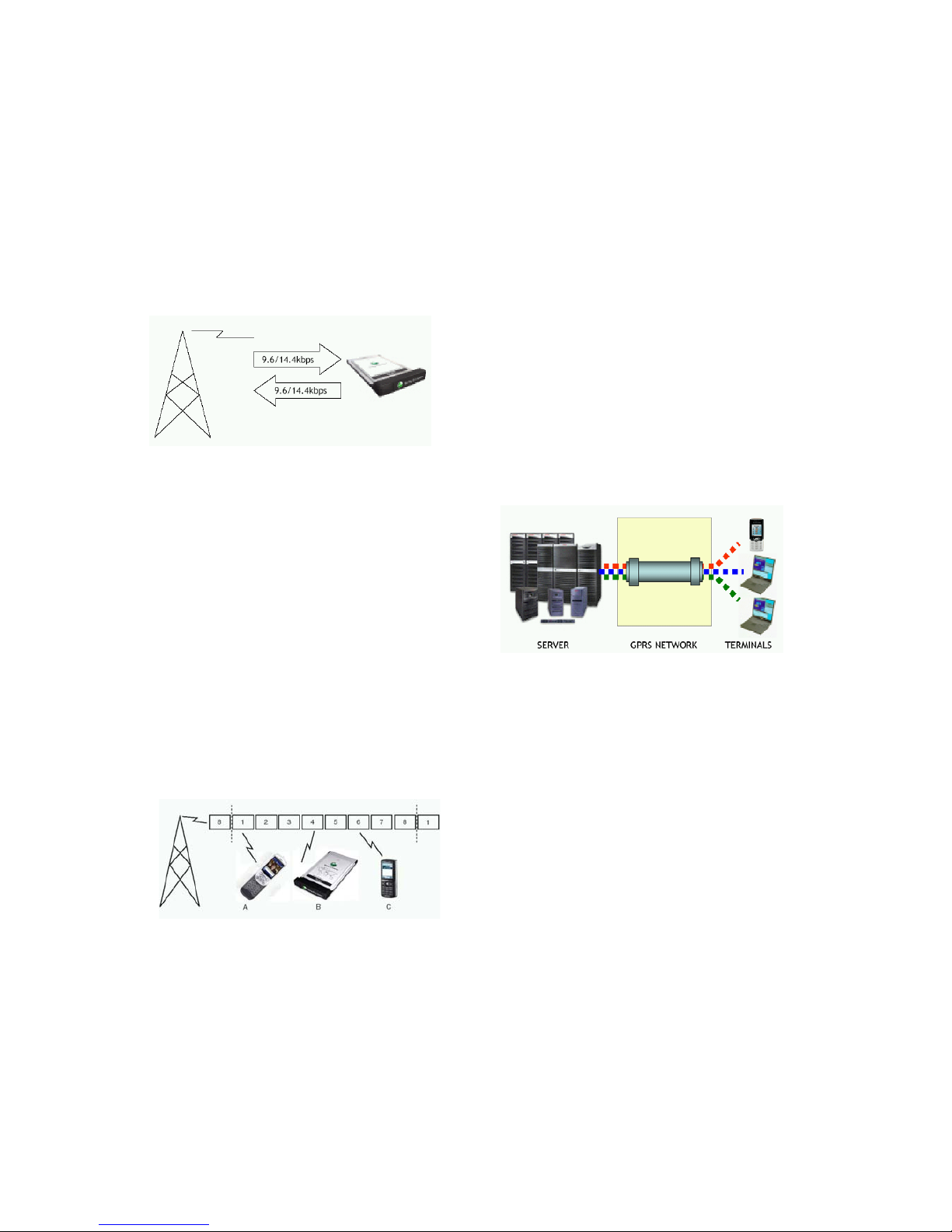
The diagram below shows an end-to-end
overview of a circuit switched data call via
the GSM network. The GC86 Modem
appears to Windows
®
like a normal modem.
When establishing a data call, the GC86 will
be connected via the GSM network to what
you may think of as a ‘modem’ within the
network, rather like the GSM network is
acting as a wireless RS232 cable. The
modem makes a PSTN or ISDN call to the
Point Of Presence telephone number of the
required resource, for example your Internet
Service Provider or company modem pool
for intranet access.
GC86
Page 24
EC400, EC400g
White Paper, August 2008
24
Since the modem in the GSM network operates
to common standards, no special configuration
is required at the ISP or company remote
access servers.
The limitation on transmission speed (9.6kb/s
or 14.4kb/s) is due to the lower bandwidth of
the wireless connection from the Mobile
Broadband Modem to the modem.
Explanation of Timeslots
A GSM mobile phone making a voice call will
digitise the speech into a very efficient
compressed data stream. One radio channel
has enough capacity to carry 8 of these data
streams, so the channel is divided into 8
repeating timeslots. The phone is allocated a
radio channel and timeslot and will send the
data stream in bursts over that channel. Other
phones in the cell may make use of the other
timeslots in the channel. A separate receive
channel and timeslot is allocated and works in
the same way.
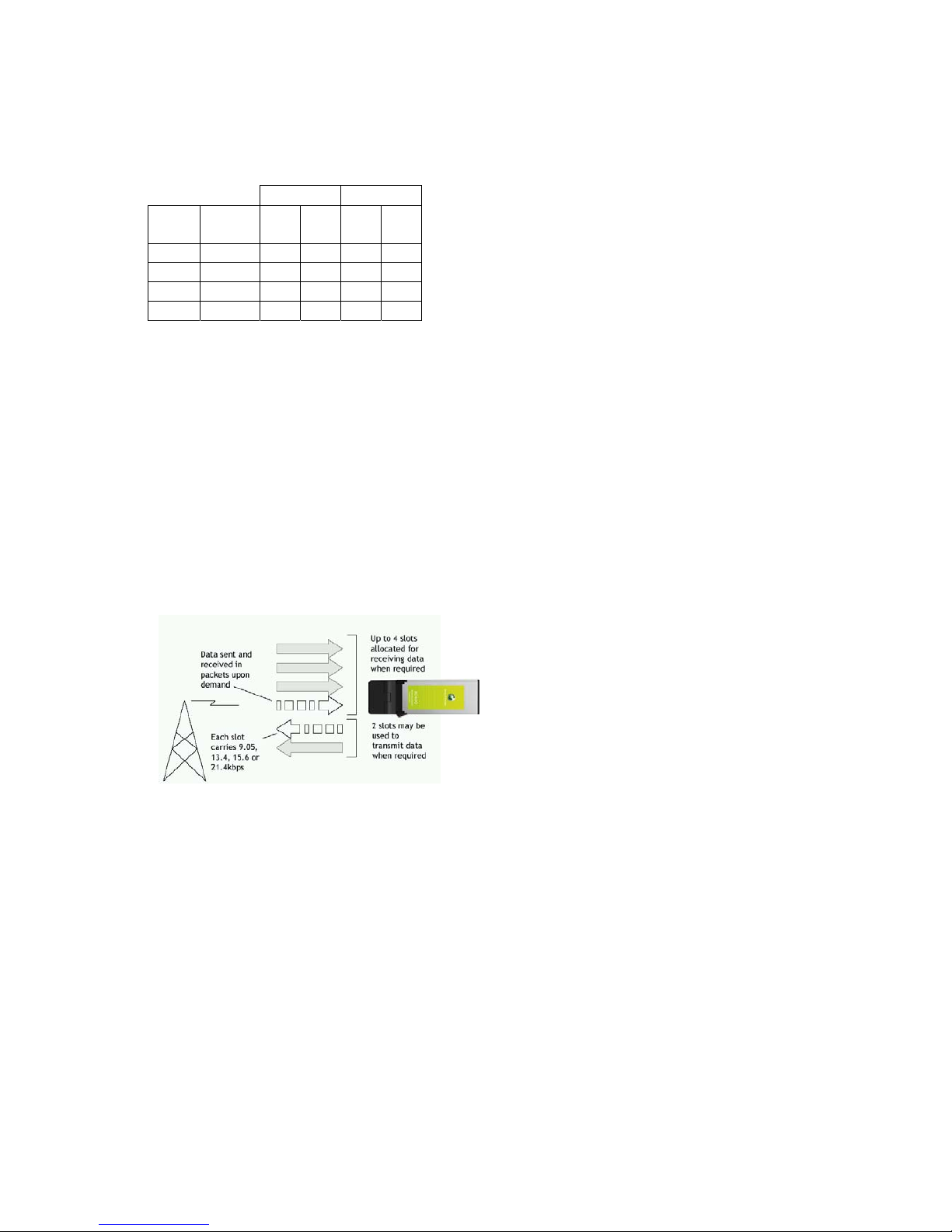
When making a CSD call, the data is similarly
sent in bursts over one of the 8 timeslots in the
transmit channel. The basic data rate of this
transmission is 9.6kb/s.
In the above example, terminal A is a phone
using one timeslot for a voice call, terminal B is
a USB Modem using one timeslot for a CSD
data call and terminal C is a phone using one
timeslot for a CSD WAP session. In each case,
the timeslot is allocated whether data is
transmitted or not.
GPRS
GPRS mode combines the speed
advantages of multi-timeslot working with
packet data efficiency. Instead of utilizing a
constant stream of timeslots in a circuitswitched call, GPRS mode sends/receives
data in small packets, as needed, much like
IP on the internet. Capacity is only used
when data is being sent or received, which
means that it is possible to be “constantly”
connected so that applications have
immediate access to netw orked servers.
The radio resources are shared between
users in a much more efficient way than is
possible using circuit-switched methods –
timeslots are dynamically allocate d to thos e
users who are transmitting and receiving
data. The service is typically charged by the
amount of data transferred.
Connection set-up is fast and the PC will
normally be left connected for the whole
time it is in use. When applications need to
transfer large amounts of data such as files,
images etc, it is possible to increase
bandwidth by using more timeslots for the
duration of the transfer. The EC400 supports
up to 4+1 or 3+2 timeslots receive + transmit
(GPRS Class 10). The GSM network will
dynamically allocate timeslot resources
depending on current network conditions.
The capacity of each timeslot depends on
the network and four coding schemes are
defined, CS-1 to CS-4. GPRS networks
typically use CS-2 only, limiting maximum
speeds to those shown in bold below. The
EC400 also supports CS-3 and CS-4 and
will operate at the higher speeds where
introduced by mobile operators. The higher
speeds are obtained by reducing the amount
of error correction.
Page 25
EC400, EC400g
White Paper, August 2008
25
4 + 1 3 + 2
Coding
Scheme
Data Rate
per slot
Rx Tx Rx Tx
CS-1 9.05 36.2 9.05 27.15 18.1
CS-2 13.4 53.6 13.4 40.2 26.8
CS-3 15.6 62.4 15.6 46.8 31.2
CS-4 21.4 85.6 21.4 64.2 42.8
The figures quoted above relate to the data
payload as transmitted over the air. The net
user data rate is lower because various
headers (e.g. TCP headers) must be
transmitted as part of the payload. For
example, the CS-2 maximum payload data rate
of 13.4 per slot reduces to 12.0kb/s per slot
user data rate.
The diagram below shows how the EC400 in
GPRS mode will send data in packets,
combining timeslots when extra bandwidth is
required, up to a maximum of 4 for received
data and 2 for transmitted data. A maximum of
5 slots may be used at one time, hence the 4+1
and 3+2 are maximum configurations available.
A GPRS connection is manually or
automatically initiated from the Wireless
Manager. The connection information including
APN, Username and Password is passed to the
NDIS adaptor, which makes the connection.
Alternatively, a Windows
®
DUN connection
can be configured for GPRS, either explicitly
within the DUN folder or implicitly via the
usual way that Windows enables
applications to request connections.
The required server reso ur c e is de fine d by
an Access Point Name (APN) rather than a
telephone number. Separate APNs may
therefore be defined for WAP, internet and
MMS services.
Many operators also provide a VPN service
for access to corporate networks. In this
case, a customised APN is allocated.
The Access Server in the GSM/GPRS
network will make the connection to the
requested resource. Access control and
security is performed using standard
components such as Radius servers.
Once connected, the user may simply leave
the connection in place and access the
remote resources as and when required.
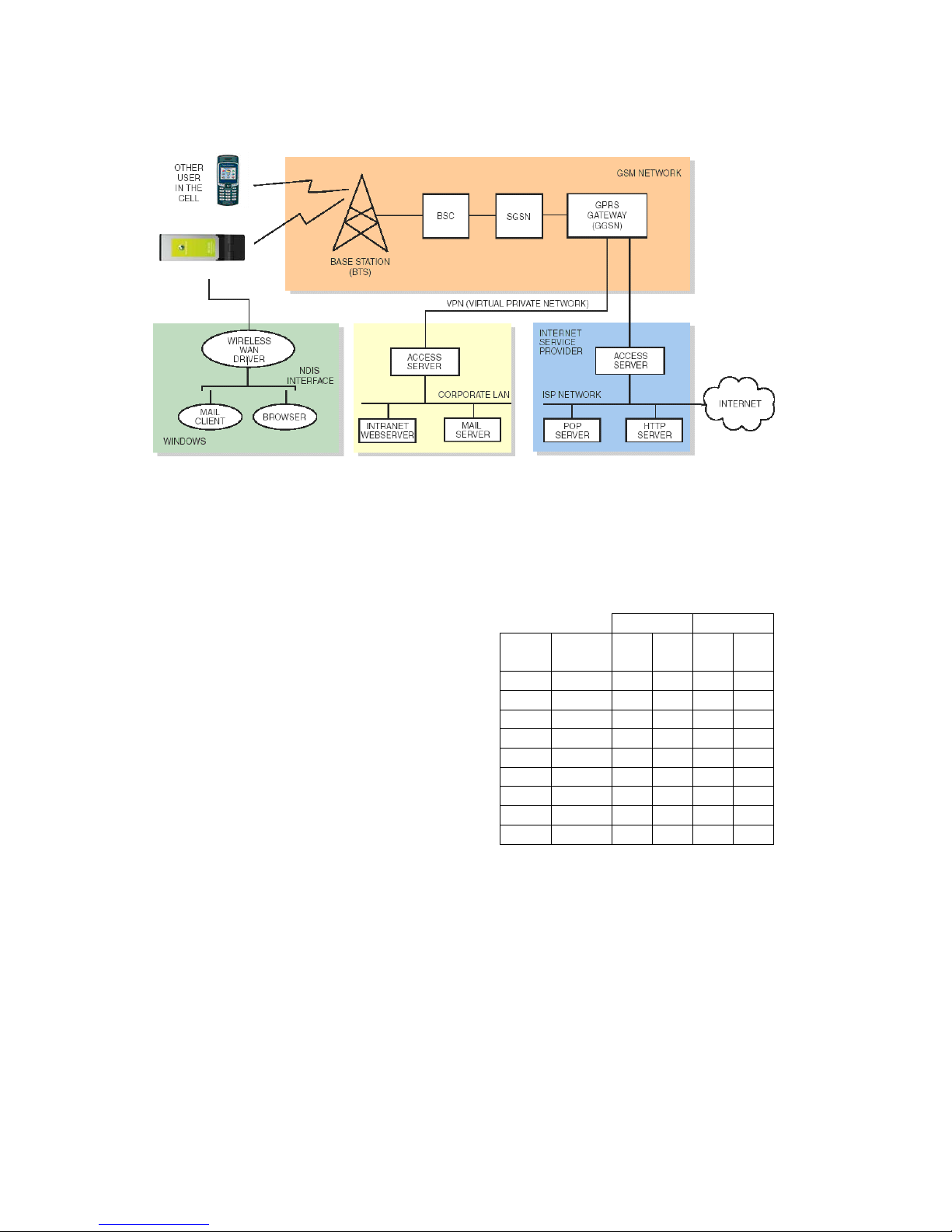
The diagram below shows the end-end
connection route for a GPRS connection.
The GPRS connection is established via the
Wireless WAN adaptor. Data packets are
sent through the air and routed through the
base-station (BTS), Base-Station Controller
(BSC), Serving GPRS Support Node
(SGSN) and on to the Gateway GPRS
Support Node from which access to the
internet or a VPN is managed.
By establishing a suitable Virtual Private
Network (VPN) connection to the corporate
network, it is possible for the mobile user to
access corporate intranet facilities. Your
mobile operator will be able to advise you on
the available VPN options. Typical methods
are IPsec tunnelling over the internet, leased
line and frame relay.
Page 26
EC400, EC400g
White Paper, August 2008
26
EDGE
EDGE (Enhanced Data Rates for Global
Evolution) is an evolution of GPRS with an
enhanced radio interface. It enables a GPRS
network to operate up to three times faster. EGPRS (Enhanced GPRS) is a term sometimes
used for such networks. The speed increase is
achieved by introducing more advanced
modulation techniques so that more data bits
can be conveyed in each timeslot.
Ordinary GPRS uses a modulation technique
called Gaussian Minimum Shift Keying (GMSK)
providing a maximum of 21.4kb/s per slot (CS-
4)
EDGE introduces a different modulation
technique called 8-Phase Shift Keying (8-PSK),
which increases the speed per slot to a
maximum of 61.85kb/s (MCS-9).
There are 9 Modulation Coding Schemes in
EDGE, denoted MCS-1 to MCS-9. MCS-1 to 4
use GMSK whilst MCS-5 to 9 use 8-PSK. As
with the GPRS coding schemes CS-1 to CS-4,
the 9 coding schemes in EDGE offer different
trade-offs of data speed and error correction.
The figures quoted below relate to the data
payload as transmitted over the air. The net
user data rate is lower because various
headers (e.g. TCP headers) must be
transmitted as part of the payload. For
example, the MCS-9 maximum payload data
rate of 61.85kb/s per slot reduces to
56.49kb/s per slot user data rate.
In real use situations, such as Web and FTP
downloads, speeds of up to 200kb/s can be
expected.
EC400 EDGE Maximum Data Rates (kb/s)
4 + 1 3 + 2
Coding
Scheme
Data Rate
per slot Rx Tx Rx Tx
MCS-1 10.60 42.40 10.60 31.80 21.20
MCS-2 13.00 52.00 13.00 39.00 26.00
MCS-3 16.60 66.40 16.60 49.80 33.20
MCS-4 19.40 77.60 19.40 58.20 38.80
MCS-5 24.05 96.20 24.05 72.15 48.10
MCS-6 31.25 125.00 31.25 93.75 62.50
MCS-7 47.45 189.80 47.45 142.35 94.90
MCS-8 57.05 228.20 57.05 171.15 114.10
MCS-9 61.85 247.40 61.85 185.55 123.70
EDGE introduces refined procedures for
selecting the channel coding. The channel
coder/decoder is selected as a function of
the current radio conditions, providing
maximum throughput at any instant. Data
blocks may be retransmitted using a
different channel coder in order to increase
the chances of them being received. For
example, in good coverage data may be
transmitted at high speed using MCS-9. If
the user walks into a steel-frame building
then the radio conditions may suddenly
EC400
Page 27
EC400, EC400g
White Paper, August 2008
27
become worse. Instead of trying to retransmit
failed data blocks using MCS-9, the data is
recoded using a more resilient MCS (more
error correction added) so that it stands a better
chance of being received and decoded
correctly. This feature is known as Link
Adaptation.
Incremental Redundancy, enables the EC400
to ‘soft combine’ data from multiple failed
packets. By combining the latest received
packet with previously received information, the
probability of correctly decoding the data
packet is increased.
Another feature introduced with EDGE is
Network Assisted Cell Change (NACC).This is
a feature where the network provides the
terminal with additional information so that a
cell re-select can take place more quickly.
No fundamental changes in the GPRS core
network are required in order for EDGE to be
implemented in the mobile network.
UMTS
The Universal Mobile Telecommunications
System (UMTS) is the most deployed of the
third generation mobile networks collectively
known as 3G.
UMTS operates in the following frequency
ranges:
Uplink
(Modem to
base-station)
850: 824 - 849 MHz
1900: 1850 - 1910 MHz
2100: 1920 - 1980 MHz
Downlink
(Base-station to
Modem)
850: 869 - 894 MHz
1900: 1930 - 1990 MHz
2100: 2110 - 2170 MHz
In GSM, the transmissions from each terminal
are separated by frequency in 200kHz
channels and in time via allocation of one or
more of 8 timeslots within a channel.
UMTS uses Wideband Code Division Multiple
Access methods. The bandwidth of a channel
is 5MHz, some 25 times greater than in GSM.
There are 12 channels each way, which are
typically divided between the operators in each
territory.
Transmissions are broken into bursts of 10ms
each (timeslots). All terminals transmit over the
whole of the 5MHz channel and use every
burst. In order to make sense of all these
concurrent transmissions, each terminal is
assigned a Spreading Code.
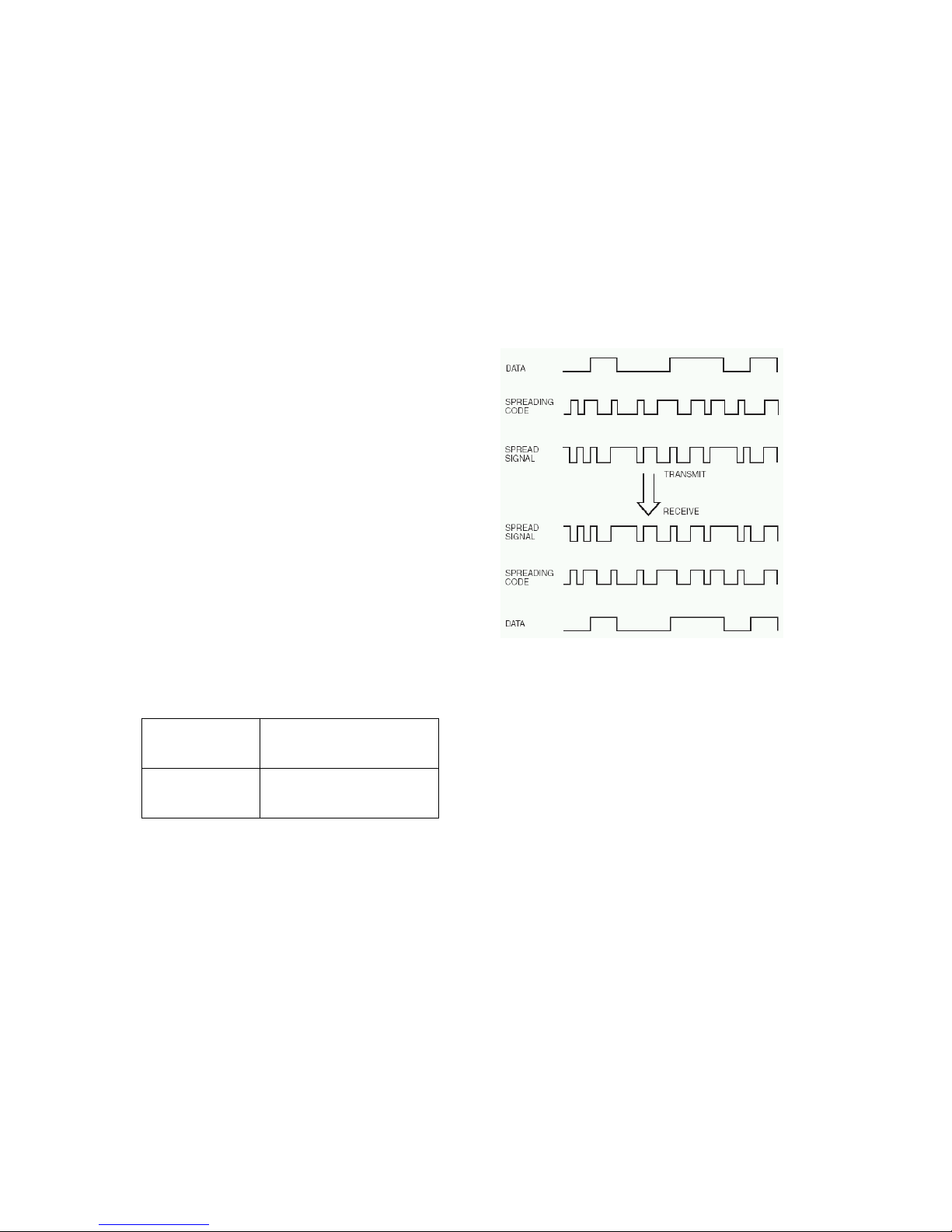
The data signal to be transmitted is
multiplied with the Spreading Code at a
‘Chip Rate’ of 3.84Mchip/second, increasing
its bandwidth and providing it with a unique
or highly pseudo-random ‘signature’ that will
enable it to be decoded at the receiving end.
In GSM, a mobile terminal communicates
with one base-station at a time, on its
allocated channel and timeslot(s). Upon a
handover to a new base-station, the terminal
will be given a new channel and timeslot
allocation, since channels are divided across
base-stations so that adjacent ones never
use the same channels.
In UMTS, adjacent base-stations can and do
work on the same RF channel, since mobile
operators will be typically assigned 2 or 3
channels for uplink and downlink. The
UMTS system supports ‘soft’ handovers
where the transmission from the mobile
terminal is received by more than one basestation. The received signals are combined,
improving the quality and therefor e redu c ing
bit errors.
A GSM operator wishing t o implement a
UMTS system must build a new UM TS
Radio Access Network (UTRAN). Basestations are known as ‘Node B’ and are
connected to Radio Network Controllers
Page 28
EC400, EC400g
White Paper, August 2008
28
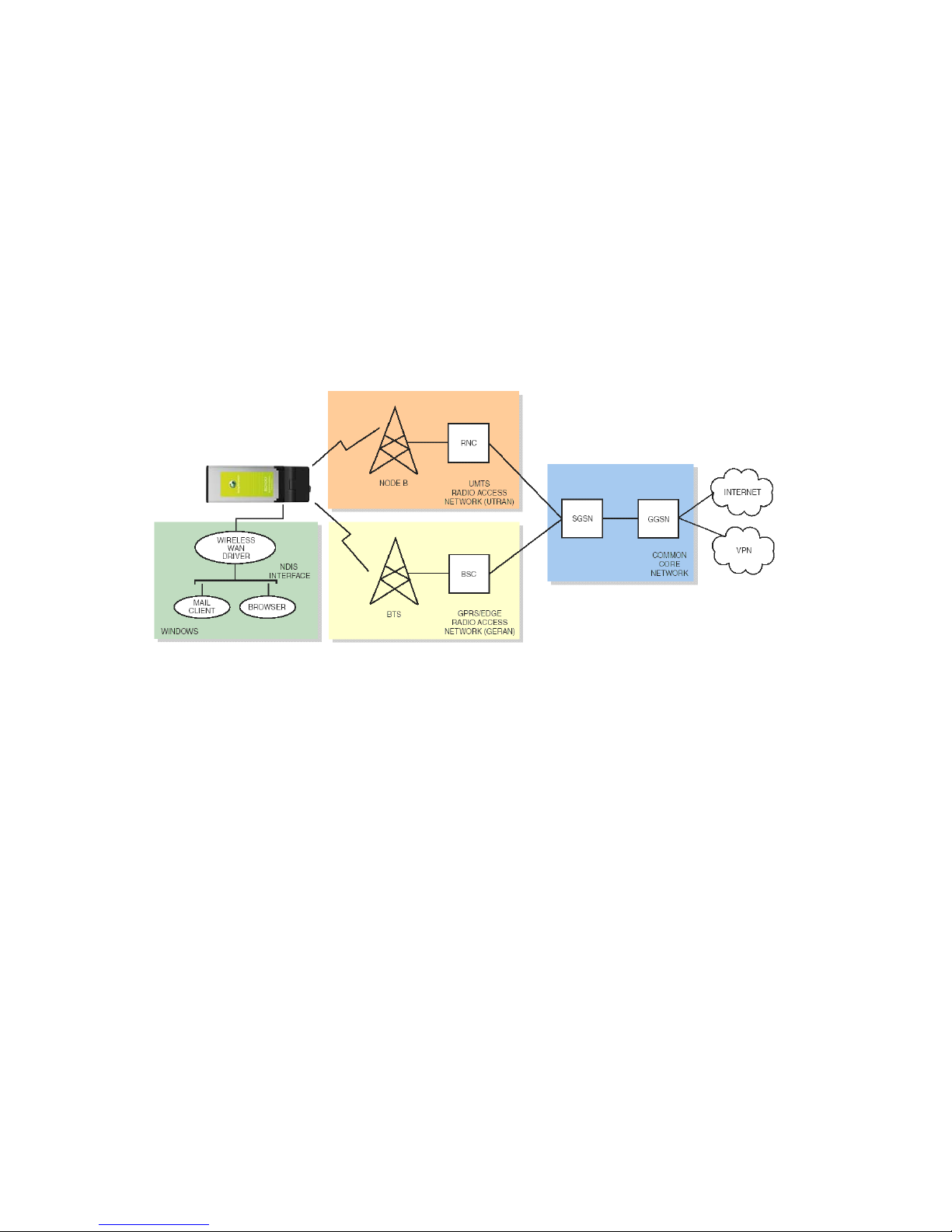
(RNC), which are analogous to the Base
Station Controller (BSC) in GSM.
RNCs may be connected in to the same core
network as GSM BSCs, thereby protecting core
network investment and enabling GSM/UMTS
interworking.
By preference, the EC400 will operat e vi a the
UMTS network. A packet data connection will
therefore be routed via the base-station (Node
B) through the RNC, SGSN and GGSN to the
internet or other network via VPN.
If UMTS service deteriorates due to lack of
coverage, the EC400 will check for
acceptable GSM coverage and switch over
to GPRS/EDGE operation. The radio
measurement and handover procedure is
complex and can take up to 10 seconds.
This can cause more significant delay at
application level, especially where the
change from UMTS to GPRS makes the
connection much slower.
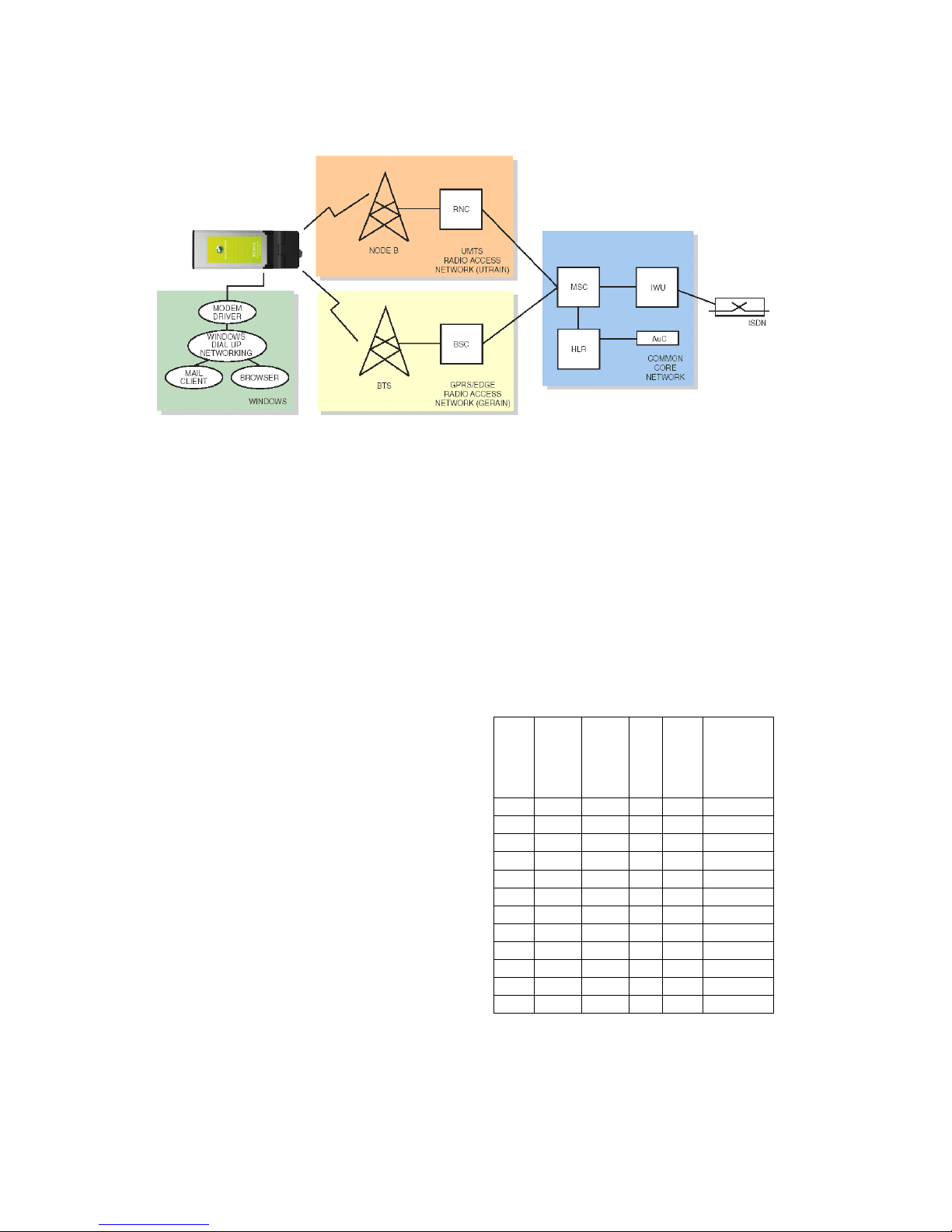
UMTS/CSD
Circuit-Switched connections can also be made
under UMTS. The EC400 can make a CSD
connection at 64kb/s for videotelephony.
The connection route is similar to GSM – via
the Node B, RNC and in to the Mobile
Switching Centre (MSC). Since UMTS is a
packet based system, the CSD connection
is simulated by allocating appropriate
Quality of Service characteristics
(‘Conversational’ class). This ensures that,
like a traditional CSD connection, a cert ain
bandwidth is guaranteed and delay is kept to
a minimum.
EC400
Page 29
EC400, EC400g
White Paper, August 2008
29
UMTS/HSDPA
HSDPA (High Speed Downlink Packet Access)
is an extension to UMTS specified in 3GPP
Release 5. It provides extra transport and
control channels, notably HS-DSCH (High
Speed Downlink Shared Channel) which
enable a much higher downlink speed to be
achieved, ultimately up to 14.4Mb/s. System
capacity is increased by a factor of 3 to 4 times
compared to standard UMTS. Reduced delays
(Round Trip Time) mean that interactive
services such as web browsing have improved
usability.
Use of AMC (adaptive modulation and coding)
provides greater speed since forward error
correction can be changed dynamically
depending on the rapid feedback of signal
quality from the mobile. Modulation can be
changed between 16QAM and QPSK.
Many layer 2 functions such as MA C are
moved to the Node B (base station) ,
supporting very short TTI intervals and high
speed.
Maximum speed is defined by three basic
factors. For simplicity, these are expressed as
categories.
HS-DSCH Codes
The HS-DSCH channel may be split into 15
sub-channels. These are allocated in real time
up to the maximum the mobile device can
manage. The first HSDPA devices are limited
to 5. The network may dynamically change the
allocation depending on the number of users
and loading.
TTI
Instead of the 10ms frame time in basic
UMTS, a 2ms frame is employed in the HSDSCH channel. This is called the
Transmission Time Interval (TTI). Basic
HSDPA devices require an inter-TTI interval
of 3, whilst full speed is obtained with
interval 1.
Modulation
16-QAM modulation in good radio conditions
provides fastest throughput.
Category
Max HS-
DCH
Inter-TTI
Interval
QPSK
16-QAM
Max
Rate
(Mb/s)
153
√ √
1.2
253
√ √
1.2
352
√ √
1.8
452
√ √
1.8
551
√ √
3.6
651
√ √
3.6
710 1
√ √
7.3
810 1
√ √
7.3
915 1
√ √
10.2
10 15 1
√ √
14.4
11 5 2
√
0.9
12 5 1
√
1.8
The EC400 supports download rates up to
7.2Mb/s.
EC400
Page 30

EC400, EC400g
White Paper, August 2008
30
Uplink speed remains at 384kb/s when only
HDSPA is present in the network.
UMTS/HSUPA
HSUPA (High Speed Packet Uplink Access),
also known as Enhanced Uplink, is introduced
in 3GPP Release 6 and provides upload
speeds up to 5.76Mb/s. The. EC400 supports
HSUPA up to 2.0Mb/s.
HSUPA uses techniques similar to HSDPA, for
example shorter TTI, however the uplink
channel is not shared. UEs that have data to
transmit request access and a fast sche du ling
mechanism allocates the channel between
them; the channel is dedicated to a single user
at once. Up to four codes (spreading factor)
can be used to increase the uplink data rate.
There are six HSUPA categories:
Uplink Speed (Mb/s)
Cate-
gory
Codes x
spreading
TTI=10ms TTI=2ms
1 1 x SF4 0.73 2 2 x SF4 1.46 1.46
3 2 x SF4 1.46 4 2 x SF2 2.0 2.92
5 2 x SF2 2.0 6 2 x SF2 +
2 x SF4
2.0 5.76
Characteristics of Mobile IP
Connections
A mobile connection introduces extra
considerations that applications must take into
account in order to operate at peak efficiency:
Loss of communication
For example, due to physical obs ta cl e s suc h
as tunnels, or areas without coverage
applications must be designed and
configured in such a way that they can
recover from a loss of communication
Higher latency
Latency may be measured as the ‘Round
Trip Time’ (RTT) for a request from the
mobile terminal to be sent to a machine on
the network and a response returned.
The Ping utility performs such a test. For
example, pinging www.sonyericsson.com
via an ADSL connection to the internet
takes an RTT of around 20ms. The same
test performed over a GPRS wireless link
has an RTT measured in hundreds of
milliseconds (e.g. 750ms) depending on
network traffic.
EDGE implements Extended Uplink to
reduce the RTT.
UMTS and HSDPA implement further
features such as the short 2ms TTI in
order to reduce RTT. Tests performed by
Ericsson in commercial networks using
Ericsson infrastructure show latency of
around 70ms where HSDPA is deployed;
this will be reduced further where
HSUPA is available.
Packet Loss
Lost packets are generally corrected by
error correction procedures within the
wireless network, however this results in
increased latency because time is taken
to identify and correct the loss .
Transmission Control Protocol (TCP)
interprets packet loss and high latency as
congestion in the network and therefore
reduces the rate of data transmission. Whilst
this is appropriate in fixed networks, it will
result in slower transmission in wireless
networks even though the capacity is there.
IP Number Allocation
The EC400 enables you to work within your
corporate and/or ISP-assigned IP numbering
scheme. It supports both static and dynamic
IP allocation. Dynamic IP allocation is
normally used by both ISPs and corporate
networks.
Data Compression
Data compression is often used in modems
to increase the data throughput. The EC400
supports the V42bis compression standard,
which is common in landline modems. The
Page 31

EC400, EC400g
White Paper, August 2008
31
increase in speed is dependent upon the type
of data being transferred. The degree of
compression and hence speed increase that is
actually achieved depends very much on the
type of data being transmitted. For exa mple,
plain text compresses well but JPEG image
files are already compressed and so cannot be
transferred any faster.
TCP/IP Header compression is supported
according to RFC1144 and RFC2507.
Data compression requires support in the GSM
network and the EC400 supports it for
GPRS/EDGE only.
Page 32
EC400, EC400g
White Paper, August 2008
32
Sony Ericsson
Update Service
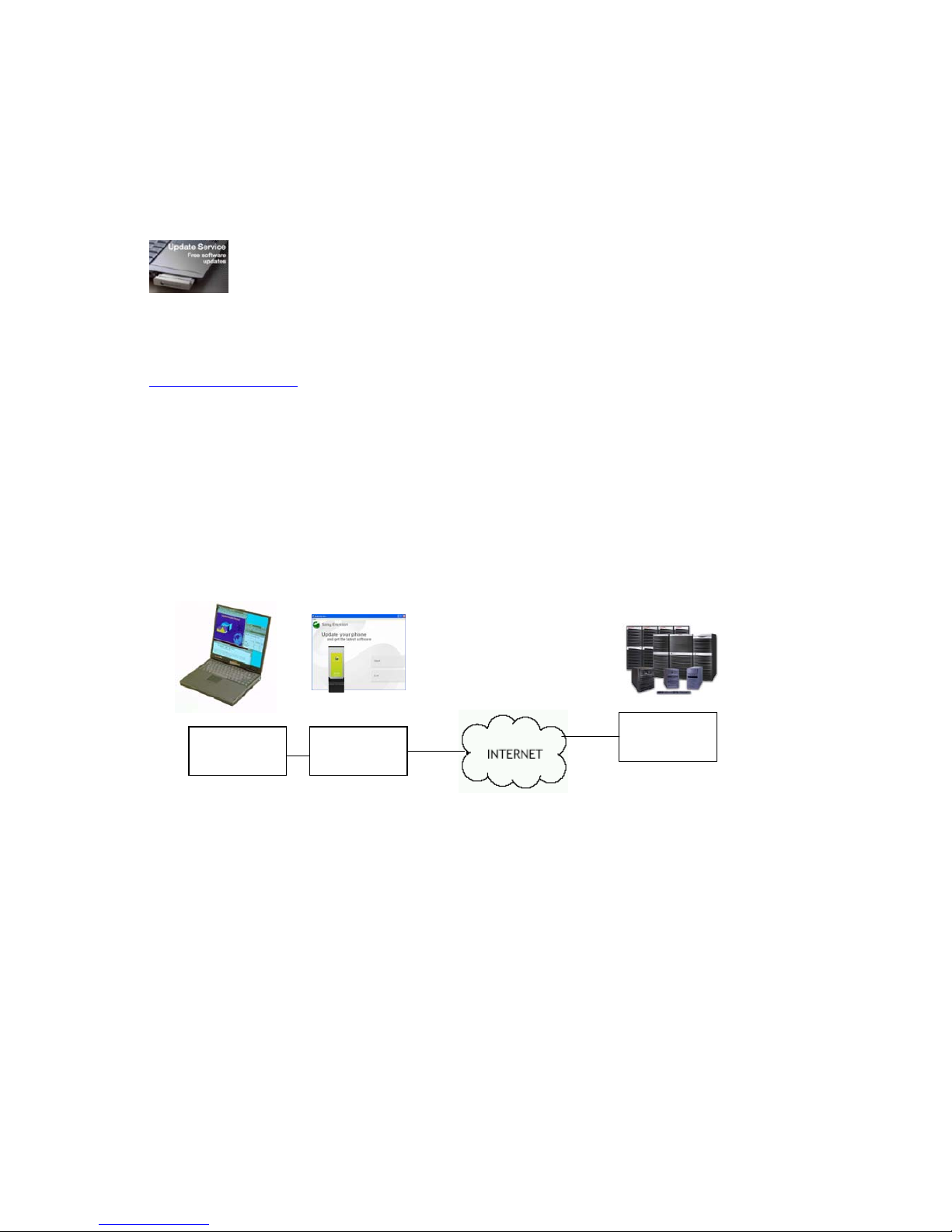
With Sony Ericsson Update
Service, it is possible for an
end user to upgrade the
EC400 card firmware via the
Internet.
Update Service is an application which may be
downloaded from the
www.sonyericsson.com
/support website
support pages.
Via a simple Wizard-like interface, the user can
check to see if the EC400 software is up-todate and obtain information on newer versions.
The Secure Flash Server automatically detects
the current firmware version and any
customized operator ID. A firmware update is
selected based on the model of card and, if
configured, the latest verified firmware
version for the mobile operator who provided
the card.
The user is given clear instructions and
opportunity to confirm or cancel the
download.
To use the service, the user must connect to
the Internet via another means than the
EC400. An ordinary analogue modem or a
corporate LAN/Firewall connection will
suffice. The connection need only be
maintained for long enough to unlock the
file, download it and upload it into the
EC400. The upload phase typically takes
less than 10 minutes. The downloaded file is
verified using a checksum mechanism in
order to protect against corruption of the
data.
Sony Ericsson Update Service is an
additional feature offered by Sony Ericsson.
Conventional upgrades are also possible by
the mobile operator and at Sony Ericsson
service points.
.
Update
Service
A
pp
lication
Terminal
EC400
Secure
Flash Server
Page 33

EC400, EC400g
White Paper, August 2008
33
Customization
It is possible for the EC400 to be customized at
the factory. Customization possibilities include:
• Packaging
• Labelling
• ME-SIM Lock
• Enhanced Co-operative Network List
• Predefined PDP Contexts
• Printed materials in the box
• Wireless Manager software
• Mobile Operator “Dashboard”
application
Customization requires a stipulated sales
volume and a contract. Please contact your
Sony Ericsson representative for more
information.
.
Page 34

EC400, EC400g
White Paper, August 2008
34
Terminology and Abbreviations
1G
Term for the first generation of analogue
cellular networks such as AMPS and TACS
16-QAM
Quadrature Amplitude Modulation. A technique
where 16 states can be coded in to one
symbol.
2G
Generic term for the second generation of
cellular networks, when digital technology was
used. GSM is a 2G network.
2.5G
Term sometimes used to denote a 2G network
with the addition of a packet-based data
service. GSM networks with GPRS or E-GPRS
fall in to this category.
3G
Generic term for the third generation of cellular
networks such as UMTS.
8-PSK
8-Phase Shift Keying. Used in EDGE, 8-PSK
enables more data to be sent in each timeslot
over the radio interface.
AAA Server
A network server providing authentication,
authorization, and accounting services.
ADSL
Asymmetric Digital Subscriber Line. Type of
line commonly used to provide broadband
internet access in the wired network.
AMPS
Advanced Mobile Phone System. An example
of a 1G analogue mobile network.
APN
Access Point Name. Used in GPRS to define
services to which the terminal can connect, for
example, Internet, WAP, MyCompany
AuC
Authentication Centre
Bearer
Path over which data flows. Specifically in
CSD, the type of telephony link from the
GSM network to the server – PSTN or ISDN.
bps
Bits per second – rate of data flow.
COM Port
Defines a serial/RS-232 port within the
Windows
®
environment. May be physical
(COM1 port on the rear of the PC) or virtual
(COM5 port communicating with a USB
Modem)
CPHS
Common PCN Handset Specification.
Defines (amongst other thin gs) a voicemail
indicator.
CS
Circuit Switched. Connection from A to B
which has a fixed bandwidth and is
maintained over a period of time, for
example a voice telephone call.
CS-1 to CS-4
Coding Scheme. Determines the data rate
per timeslot in GPRS.
CSD
Circuit Switched Data. CSD is a GSM
service providing a CS data connection at a
rate of 9.6 or 14.4kb/s.
DUN
Dial-Up Networking.
E-GPRS
Enhanced GPRS. A GPRS network
enhanced with EDGE technology to provide
greater speed and capacity.
e-GSM
Extended GSM. New frequencies specified
by the European Radio Communications
Committee (ERC) for GSM use when
additional spectrum is needed (Networkdependent). It allows operators to transmit
and receive just outside GSM’s core 900
frequency band. This extension gives
increased network capabili ty .
Page 35

EC400, EC400g
White Paper, August 2008
35
EAP
Extensible Authentication Protocol.
EDGE
Enhanced Data Rates for Global Evolution.
Technology which improves the throughput of a
GPRS network by a factor of 3.
ETSI
European Telecommunications Standards
Institute. www.etsi.org
Extended Uplink TBF
EDGE feature which reduces the TCP/IP
round-trip time.
GGSN
Gateway GPRS Support Node.
GMSK
Gaussian Minimum Shift Keying. A method of
modulating data, used in GPRS and EDGE.
GPRS
General Packet Radio Services.
GPS
Global Positioning System.
GSM
Global System for Mobile Communicati o ns .
GSM is the world’s most widely-used digital
mobile phone system. At the end of Jan 2004
there were over 1 billion GSM subscribers
across more than 205 countries of the world.
GSM850
GSM network operating in the 850MHz band.
Used in the USA.
GSM 900
GSM network operating in the 900MHz band.
Used mainly in Europe, Australia and South
Africa.
GSM 1800
Also known as DCS 1800 or PCN, this is a
GSM digital network working in the 1800 MHz
band. It is used in Europe and Asia-Pacific.
GSM 1900
Also known as PCS. R efers to a GSM system
running in the 1900MHz band. Used in the USA
and Canada, for instance.
GUI
Graphical User Interfac e
HLR
Home Location Register
HSDPA
High Speed Downlink Packet Access
HSUPA
High Speed Uplink Packet Access
ISDN
Integrated Services Digital Network. Can
provide circuit-switched data connections in
multiples of 64 kb/s.
ISP
Internet Service Provider.
kb/s
Kilobits per second – rate of data flow.
LAN
Local Area Network.
LTO
Long Term Orbits. A technology patented by
Broadcom Corporation which provides faster
time to first fix.
MCC
Mobile Country Code
MCS
Modulation Coding Scheme. MCS-1 to
MCS-9 are used in EDGE.
ME
Mobile Equipment.
MO
Mobile Origination. For example, an SMS
message sent from a mobile terminal.
MMI
Man-Machine Interface.
MNC
Mobile Network Code
MS
Mobile Station.
Page 36

EC400, EC400g
White Paper, August 2008
36
MSC
Mobile Switching Centre
MT
Mobile Termination.
NACC
Network Assisted Cell Change. Feature which
reduces the time taken to perform a cell
reselection.
NDIS
Network Driver Interface Specification. A
Windows Device Driver specification, used for
Ethernet cards, ISDN Adaptors, GPRS WAN
adaptors etc.
NMEA
Nautical Marine Electronics Association
Node B
UMTS Base Station
PC
Personal Computer.
PCS
Personal Communications Services, often used
to describe GSM1900 networks.
PC Card
A card having physical and electrical
characteristics specified by PCMCIA providing
extra functionality when inserted into a laptop
PC. Typical examples are modem s, ne t work
cards..
PCMCIA
Personal Computer Memory Card International
Association – defines specifications for PC
Cards. www.pcmcia.org
PDF
Portable Document Format. A common format
for the electronic distribution of documents.
PDP
Packet Data Protocol.
Phone book
A memory in the SIM card where phone
numbers can be stored and accessed by name
or position.
PSTN
Public Switched Telephone Network, for
example ordinary analogue phone line for
speech and/or computer modem.
QPSK
Quadrature Phase-Shift Keying. A
modulation technique enabling 4 states (2
bits) to be coded in to each symbol. Also
known as 4-PSK.
RADIUS
Remote Access Dial-In Service. Facility at
the ISP or corporation to manage remote
data connections .
RAS
Remote Access Service.
RNC
Radio Network Controller. Manages Node
B’s in a UMTS network.
RoHS
Restriction of use of certain Hazardous
Substances
RTT
Round-Trip Time. Time for a small packet of
data to be sent from A to B and be returned
back to A. This is normally done using the
‘ping’ utility.
Rx
Receive
SC
Service Centre (for SMS).
SGSN
Serving GPRS Support Node
Service Provider
A company that provides services and
subscriptions to mobile phone users.
Page 37

EC400, EC400g
White Paper, August 2008
37
SIM card
Subscriber Identity Module card – a card that
must be inserted in any GSM-based mobile
terminal. It contains subscriber details, security
information and memory for a personal
directory of numbers. The card can be a small
plug-in type or credit card-sized, but both types
have the same functions. The EC400 uses the
small plug-in card.
SMS
Short Message Service. Allows messages of up
to 160 characters to be sent and received via
the network operator's message centre to a
mobile phone.
SMS-C
SMS Message Centre. A GSM network
component responsible for routing text
messages.
SS7
Signaling System 7. Protocol for
interconnecting telecommunications equipment.
TBF
Temporary Block Flow
TCP/IP
Transmission Control Protocol/Internet
Protocol.
TCP/IPv4
TCP/IP Version 4. Most widely implemented
form of TCP/IP today having a 4 by t e address
format such as 212.161.127.136.
TE
Terminal Equipment. Generic term for GSM
terminals such as phones and Modems.
Terminal Adaptor
Generic term for the equipment terminating a
digital comms line such as an ISDN2 line. The
EC400 is a Terminal Adaptor since it interfaces
to GSM digital data services.
TLS
Transport Layer Security. Used by Web
browsers, for example.
TTFF
Time To First Fix. Time takes for the GPS
receiver to determine location.
Tx
Transmit
Type II
Refers to thickness of a USB Modem as
defined in the specification from PCMCIA.
UE
User Equipment
UICC
UMTS Integrated Circuit Card
UMTS
Universal Mobile Telecommunications
System. 3G network technology using
WCDMA methods
URL
Uniform Resource Locator.
USB
Universal Serial Bus
USIM
UMTS Subscriber Identity Module
USSD
Unstructured Supplementary Services Data.
Narrow-band GSM data service. For
example entering *79*1234# might return
the stock price for stock 1234.
UTRAN
UMTS Radio Access Network
VPN
Virtual Private Network.
WAP
Wireless Application Protocol. A global
standard specified in order to make internet
services available for mobile users.
WCDMA
Wideband Code Division Multiple Access.
This is a modulation technique using a wide
bandwidth (5MHz in the case of UMTS). All
terminals transmit in the entire bandwidth
and the signals from each are differentiated
via the use of unique codes assigned to
each.
WEEE
Waste Electrical and Electronic Equipment
Directive
Page 38

EC400, EC400g
White Paper, August 2008
38
WHQL
Windows Hardware Quality Labs. A Microsoft
test and approval process. The Device Drivers
for Sony Ericsson Mobile Broadband Modems
are signed by WHQL so that the Windows
operating system does not warn the user of
unknown/untested software.
WWW
World Wide Web.
XML
Extensible Markup Language
Related Infor m ation
Links
http://www.sonyericsson.com/ Product information
http://www.sonyericsson.com/support
Product support and application downloads.
http://www.ericsson.com/ Information on mobile network infrastructure
http://www.gsmworld.com/ General information on GSM, GPRS, EDGE
http://www.nmea.org/ National Marine Electronics Association
http://www.umts-forum.org/ General information on UMTS
http://www.expresscard.org/ Information and specification for ExpressCard
technology
Trademarks and Acknowledgements
Microsoft, Windows, Windows Vista, Internet Explorer, .NET and Outlook are registered trademarks
or trademarks of Microsoft Corporation in the United States and/or other countries. Screen shots
reprinted by permission from Microsoft Corporation.
Lotus Notes is a registered trademark of Lotus Development Corporation and/or IBM Corporation.
Apple, Macintosh, Mac OS and PowerBook are trademarks of Apple Computer, Inc., registered in
the U.S. and other countries.
The marble logo is a trademark of Sony Ericsson Mobile Communications AB.
Sony is a trademark of Sony Corporation.
Ericsson is a trademark of Telefonaktiebolaget LM Ericsson.
Google Maps™ is a trademark or a registered trademark of Google, Inc.
The ExpressCard word mark and logos are owned by the PCMCIA and any use of such marks by
Sony Ericsson is under license.
All other product or service names mentioned in this paper are trademarks of their respective
companies.
Page 39

EC400, EC400g
White Paper, August 2008
39
Technical Specifications
General
Product name EC400 / EC400g
Interface ExpressCard/34 (USB-based)
System GSM 850
E-GSM 900
GSM 1800
GSM 1900
UMTS 850
UMTS 1900
UMTS 2100
GPS (EC400g only)
Services supported GSM: GPRS/EDGE, SMS, USSD
UMTS: Packet-Switched, HSPA, Circuit-Switched, SMS, USSD
Speech services are not supported
GPS Positioning (EC400g only)
SIM Card Small plug-in card, 3V and 1.8V type
USIM, GPRS-aware and Regular (non-GPRS-aware) supported
Certification CE
R&TTE
FCC
Microsoft WHQL
Type Approval GCF
PTCRB
Type Number EC400: FAD-3232012-BV
EC400g: FAD-3232013-BV
FCC ID EC400: PY7F3232012
EC400g: PY7F3232013
IC EC400: 4170B-F3232012
EC400g: 4170B-F3232013
Exterior Description
Size 108mm long x 34mm wide x 12mm high (antenna closed)
Weight 33.8g, excluding SIM card
Battery Powered via the ExpressCard slot.
Antenna (built-in) Main antenna: GSM/UMTS (EC400 and EC400g)
Receive diversity antenna (EC400)
Receive diversity and GPS antenna (EC400g)
External Antenna 1 Alternate GSM/UMTS antenna. When connected, the built-in
main antenna is used as a Diversity antenna.
External Antenna 2 (EC400) External HSPA Diversity antenna. Works in conjunction with the
other external (GSM) Diversity antenna. When connected, the
internal Diversity/GPS antenna is disabled.
External Antenna 2 (EC400g) External GPS and HSPA Diversity antenna. When connected,
the built-in Diversity/GPS antenna is disabled.
Page 40

EC400, EC400g
White Paper, August 2008
40
Environment
Ambient Temperature:
Operating
-10 to +55 degrees C
Ambient Temperature:
Storage
-20 to +65 degrees C
Compliant with: WEEE (Waste Electrical and Electronic Equipment Directive)
RoHS (Restriction of use of certain Hazardous Substances)
Electrical Characteristics
Nominal Operating Voltage 3.3V
Average Idle Power
(Attached to network)
< 250mW
Data Transfer Power
(Worst case)
< 3.3W
Operating System Support
Supported PC
Operating Systems
Microsoft Windows
®
2000 (SP4)
Microsoft Windows
®
XP (SP2) (32-bit and 64-bit)
(Home, Professional, Tablet PC and Professional x64 editions)
Microsoft Windows Vista
TM
(32-bit and 64-bit) (All editions)
Minimum PC
Specification
CPU & Memory as recommended by Microsoft for Windows
®
Free ExpressCard slot
110 MB free disk space
Apple Macintosh Mac OS X 10.4.3; 10.5.x
“launch 2 net – Sony Ericsson Edition”
available as a free download.
Supplied Software
Wireless Manager PC drivers (Microsoft WHQL approved) and software
Documentation Quick Start Guide (printed)
EC400 User Guide (PDF)
Online help built in to Wireless Manager
Wireless Manager User Guide (PDF; web download only)
Readme.txt release notes
EC400 AT Command Reference (PDF, web download only)
Page 41

EC400, EC400g
White Paper, August 2008
41
GSM Performance and technical characteristics
Parameter GSM 850 E-GSM 900 GSM 1800 GSM 1900
Frequency range
(MHz)
TX: 824 – 849
RX: 869 – 894
TX: 880 – 914
RX: 925 – 959
TX: 1710 – 1785
RX: 1805 – 1880
TX: 1850 – 1910
RX: 1930 – 1990
Duplex spacing 45MHz 45MHz 95MHz 80 MHz
Channel Spacing 200kHz
Number of
channels
123 Carriers x 8
(TDMA)
175 Carriers x 8
(TDMA)
374 Carriers x 8
(TDMA)
299 Carriers x 8
(TDMA)
Modulation GMSK
8-PSK
Power Class
GSM/GPRS;
EGPRS
MCS1-4 (GMSK)
Class 4
2W
33dBm
Class 1
1W
30dBm
Power Class
EGPRS
MCS5-9
(8-PSK)
Class E2
0.5W
27dBm
Class E2
0.4W
26dBm
GSM Features Supported
ME SIM Lock Network
Network Subset
Service Provider
Corporate
SIM Application Toolkit
USIM Application Toolkit
Supported (R99)
Support is provided via AT commands; No MMI is provided.
USSD Phase 2+
Support is provided via AT commands; No MMI is provided.
Speech Coding Not applicable (EC400 does not support speech services)
GSM Supplementary Services Supported
Service Name AT-Command
Support
Wireless Manager
Support
CFU Call Forwarding Unconditional
9 9
CFB Call Forwarding on Mobile Subscriber Busy
9 9
CFNRy Call Forwarding on No Reply
9 9
CFNRc Call Forwarding on Mobile Subscriber Not
Reachable
9 9
Page 42

EC400, EC400g
White Paper, August 2008
42
GPRS technical data
GPRS Release R99
Data Rates Multislot class 10 supported (See table below)
GPRS Coding Schemes: CS-1, CS-2, CS-3, CS-4
Mode of Operation Class B (att aches to both GSM and GPRS at the same time.
Attach Modes GPRS Attach
GPRS detach
Combined attach (CS+GPRS) (CCCH)
Combined detach (CCCH)
Combined attach (CS+GPRS) (PCCCH)
Combined detach (PCCCH)
Network Modes Network Mode 1
Network Mode 2
Network Mode 3
R Reference Point Physical layer: RS232 virtual COM port
Authentication mechanisms PAP and CHAP supported
IP Connectivity PDP type IP is supported
IPv4
SMS over GPRS Mobile Originated and Mobile Terminated
QoS Support for all 4 classes (AT Command level)
QoS Negotiation
PDP Context PDP Context description edited via supplied Wizard or AT-
command
PDP Context modification (e.g. QoS renegotiation)
Network initiated PDP Context deactivation.
SIM Support for GPRS aware as well as non-GPRS-aware SIMs
Compression TCP/IP Header Compression (RFC1144 and RFC 2507)
V42bis
GPRS Encryption GEA1
GEA2
GPRS Frequency Hopping Supported
GPRS IP allocation Dynamic
Static
GPRS Maximum Data Rates
4 + 1 3 + 2
Coding
Scheme
Data Rate
per slot Rx Tx Rx Tx
CS-1 9.05 36.2 9.05 27.15 18.1
CS-2 13.4 53.6 13.4 40.2 26.8
CS-3 15.6 62.4 15.6 46.8 31.2
CS-4 21.4 85.6 21.4 64.2 42.8
Speed achieved depends on the Coding Scheme supported by the GSM Network.
Data rate is the payload per slot, headers plus data.
Page 43

EC400, EC400g
White Paper, August 2008
43
EDGE technical data
Device Class EDGE Class 10
(4 slot uplink, 2 slot downlink, maximum 5 concurrent)
Modulation Coding
Schemes
MCS-1 to MCS-9
EDGE features Link Adaptation
Incremental Redundancy
Extended Uplink TBF
Network Assisted Cell Change (NACC)
EDGE Maximum Data Rates
4 + 1 3 + 2
Coding
Scheme
Type o
f
coding
Data Rate
per slot
Rx Tx Rx Tx
MCS-1
GMS
K
10.60 42.40 10.60 31.80 21.20
MCS-2
GMS
K
13.00 52.00 13.00 39.00 26.00
MCS-3
GMS
K
16.60 66.40 16.60 49.80 33.20
MCS-4
GMS
K
19.40 77.60 19.40 58.20 38.80
MCS-5
8-PS
K
24.05 96.20 24.05 72.15 48.10
MCS-6
8-PS
K
31.25 125.00 31.25 93.75 62.50
MCS-7
8-PS
K
47.45 189.80 47.45 142.35 94.90
MCS-8
8-PS
K
57.05 228.20 57.05 171.15 114.10
MCS-9
8-PS
K
61.85 247.40 61.85 185.55 123.70
Speed achieved depends on the Coding Schemes supported by the GSM/EDGE Network
.
Data rate is the payload per slot, headers plus data.
UMTS technical data
Power Class Class 3 (0.25W, 24dBm)
Maximum Downlink speed 384kb/s (Packet-Switched)
64kb/s (Circuit-Switched)
Maximum Uplink speed 384kb/s (Packet-Switched)
64kb/s (Circuit-Switched)
Features Inter-Mode Handover (UMTS/EDGE/GPRS)
Inter-Mode Reselection (UMTS/EDGE/GPRS)
Quality Of Service UMTS classes supported via AT Command
(Wireless Manager selects default)
Modes PDP type IP is supported
IPv4
IP Allocation Static
Dynamic
R4 Enhancements Extended TBF Uplink
Network Assisted Cell Change (NACC)
Page 44

EC400, EC400g
White Paper, August 2008
44
HSDPA technical data
Maximum Downlink Speed 7.2Mb/s
HSDPA Categories 1-8, 11, 12
HSUPA technical data
Maximum Uplink Speed 2.0Mb/s
HSDPA Categories 4 (10ms) and 5
SMS Technical Data
Concatenated SMS Supported in Wireless Manager or via third party software
Maximum 10 SMS blocks
Character set 7-bit, Unicode
SMS Cell Broadcast Supported by AT Command
SMS Immediate Display Supported in Wireless Manager and by AT Command
SMS interface Wireless Manager
AT-Command
Software Upgrade
EC400/EC400g Modem
software upgrade
Via secure internet download (Sony Ericsson Update Service)
At Sony Ericsson Service Points
Wireless Manager
Upgrade
Internet download
GPS (EC400g only)
Interface USB virtual COM port
Protocol NMEA 2.0
Port access Simultaneous port open for multiple GPS applications.
Channels 8 hardware channels Up to 20 satellite tracking via software
channels
Receiver mode Standalone (Autonomous)
Performance Cold start TTFF < 50 seconds @ -130dBm
Warm start TTFF < 10s @ -130dBm
Antenna Built-in Diversity/GPS This antenna must be in the up position
during operation.
External GPS and HSPA Diversity antenna connector. When
connected, the built-in Diversity/GPS antenna is disabled.
External GPS antenna supplied in standard kit
Page 45

EC400, EC400g
White Paper, August 2008
45
Supported Languages
Quick Start Guide (QSG)
(Printed in language
groups)
EC400 Mobile Broadband
ExpressCard User Guide
(PDF)
Online Help
Wireless Manager
User Guide (PDF)
PC Software
Software in the EC400
flash drive contains all
languages.
Downloads from the
support website may be
split into subsets to make
the download smaller.
English QSG1, QSG3, QSG4
Croatian (HR) QSG2
Czech (CZ) QSG2
Danish (DA) QSG1
Dutch (NL) QSG1
Finnish (FI) QSG1
French (FR) QSG1, QSG3
German (DE) QSG1
Greek (EL) QSG3
Hungarian (HU) QSG2
Italian (IT) QSG3
Norwegian (NO) QSG1
Polish (PL) QSG2
Portuguese (PT) QSG3
Portuguese (Brazil) QSG3
Romanian (RO) QSG2
Russian (RU) QSG2, QSG6
Slovakian (SK) QSG2
Spanish (ES) QSG3
Swedish (SV) QSG1
Thai (TH) QSG4
Turkish (TR) QSG2
Ukranian (UK) QSG6 (QSG only)
Chinese Simplified (ZS) QSG4
Chinese Traditional (ZT) QSG4
AT Command Reference
(PDF)
English
Page 46

EC400, EC400g
White Paper, August 2008
46
Environmental
Declaration
Sony Ericsson has a responsibility to the
community to provide products which are
safe to use and which have minimal
impact upon the environment. The Sony
Ericsson Environmental Quality Policy is
designed to meet legislative and market
requirements in the countries where we
sell the EC400.
The Sony Ericsson Environmental Quality
Policy lists chemical substances that are
banned or restricted for use in Sony
Ericsson’s products and manufacturing
operations. Sony Ericsson works with its
suppliers to eliminate such substances in
procured material.
Substances are split in to two categories,
namely banned substances and restricted
substances.
• Banned substances are prohibited
from being added to Sony Ericsson
products, even in low concentrations,
• Restricted substances may be used
only under very limited conditions and
are targeted for elimination and shall
be phased out as soon as possible
and replaced with technically and
economically acceptable alternatives.
The ban or restriction does not apply in any
case where such a presence deriv es fro m
natural impurities, that is, an undesired
presence in very small concentrations.
EC400 Material
Declaration
Laboratory reports indicated the content of
substances banned and restricted by Sony
Ericsson, by weight, in the EC400 product.
Banned Substances
Substance Allowed EC400
Cadmium Figures will be
Mercury made available
in due course
Lead Zero
This product is leadfree
Restricted Substances
Substance Allowed EC400
Antimony Figures will be
Beryllium made available
Bismuth in due course
Chromium (VI) compounds
Organo-tin compounds
Phthalates
Chlorinated polymers
The EC400 is RoHS (Restrictions on
Hazardous Substances) compliant.
A full report can be obtained from Sony
Ericsson upon request.
Disposal
The EC400 is compliant with WEEE (Waste
Electrical and Electronic Equipment Directive)
 Loading...