

Page 1

Control panel description
Installation menu selection
How to select a wash cycle
The “Info button”
Programmes
Options
Some tips for...
Best results
Loading the dishwashing machine
Troubleshooting
Instruction for use
Page 2

Page 3

“Intelligent Dialogue” is
the new programme for
free-standing appliances
from Bauknecht. New
intelligent and practical
functions allow more free
time for the things that
are really important in
life.
The new “Intelligent
Dialogue” dishwasher from
Bauknecht, with its direct
dialogue between man and
machine, represent a whole
new approach to operating
appliances. The new
“Intelligent Dialogue”
dishwasher from Bauknecht
speaks a completely new
appliance language. The
electronic LCD display guide
you in a focused and userfriendly manner through all
the wash cycles and wash
functions and even actively
assist should problems arise.
Due to an innovative
interval-based washing
system, the new dishwashers
achieve better performance
with decreased consumption
of water and power. Stated
clearly: only 13 litres of water
for a cycle length that has
been reduced to 110
minutes.
The new LCD display willingly
provides information: it
“tells” how to correctly
programme the appliance,
continuously indicates cycle
lengths and time remaining,
and monitors the wash
process from start to finish.
In addition, the dishwasher’s
memory function
immediately saves, for the
next time, the most recent
wash cycle selected. And that
is not all Intelligent Dialogue
is capable of: the appliance
provides hints and tips on
how to remove stubborn
grime from kitchenware plus
a “help programme” and
suggestions on how to fix
faults. In case it should be
required, the LCD display,
also provides the telephone
number of the customer
service contact.
Thanks to proven, patented
Dynamic Sense Technology,
“senses” all on its own, just
how much water, time and
energy the dishwasher
requires in order to produce
a spotless result each time. In
this way water and energy
consumption can be reduced
by up to 30%. The
environment and your purse
will thank you for it.
You are sure to enjoy your
quality Bauknecht purchase
for a long time to come!
Dear Customer,
Page 4
Welcome!
Please wait while checking systems...
me!
ecking systems...
come!
e checking systems.
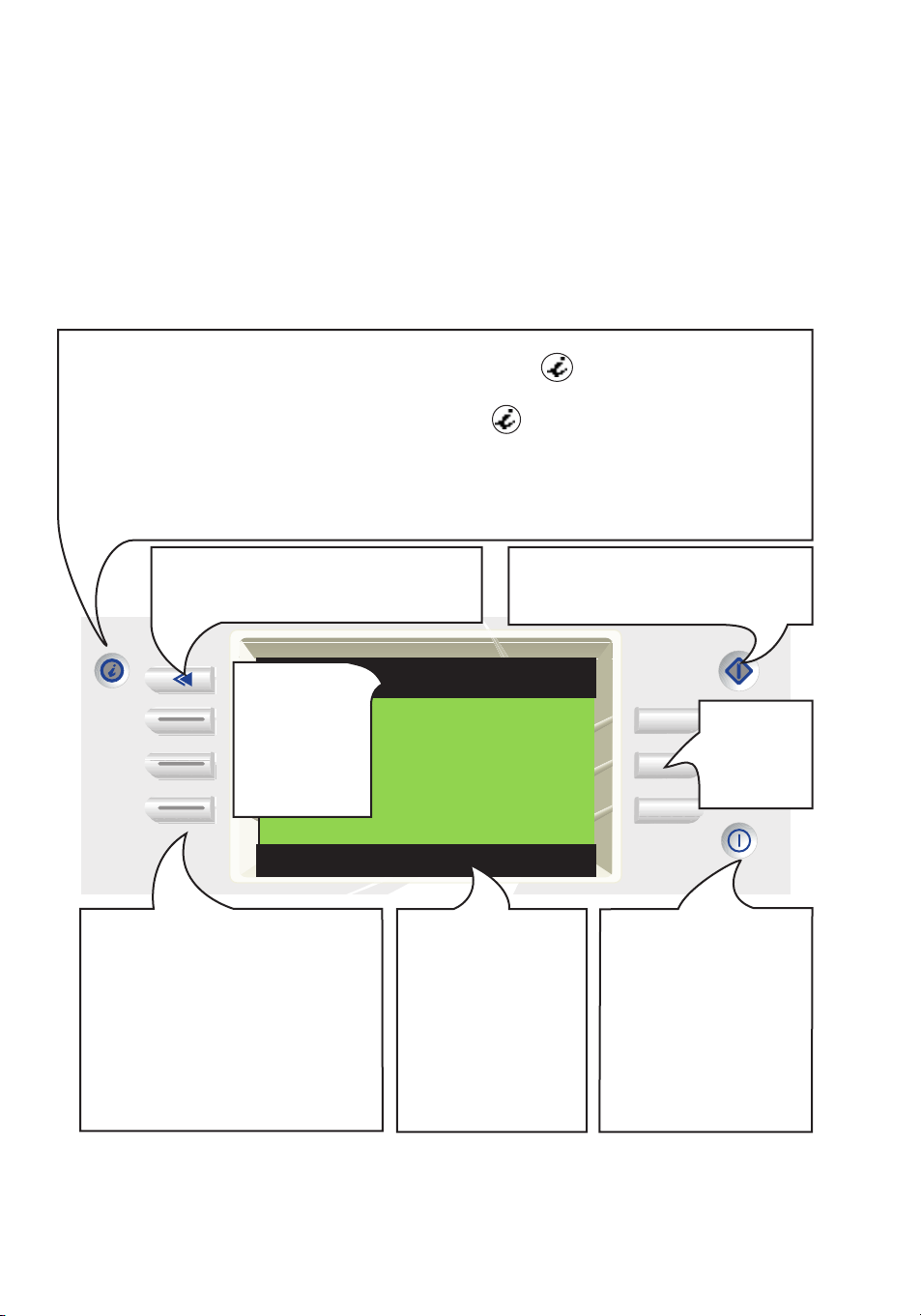
Title bar
Help bar
Window
Settings
Control panel description
Selection buttons
Press these buttons to select
programme, options or to access
information, which appear in the
window settings.
When you select a special cycle or
an option, the button lights up (i.e.
Start delay).
ON/OFF button
Turns on/off the
appliance.
The “Info button”
provides useful information concerning:
• instruction for use
• hints & tips
• troubleshooting guide
• maintenance instructions
• service information
You can access the info menu at any time,
by pressing . When the green light is on:
the button is activated.
Press again to exit.
The “Back button”
takes you to the previous selection
The “Start button”
Press this button to start a cycle.
Selection
buttons
Provides you
with
immediate
feedback on
your
selections.
Informs you on the
status of the
dishwasher and
prompts you for
certain actions.
Page 5

Set Water Hardness
For water hardness settings
Water hardness Sensor
Press to confirm settings
Automatic hardness adjustment
during each cycle
OR:
for some models you have to set the water
hardness level manually.
Please refer to the instruction for use booklet,
chapter on “How to fill the salt container”.
The machine will show you some important
messages. Follow these and select to proceed.
The machines is now ready. Select a cycle.
The machine will automatically set the water
hardness level in order to give you directions on
salt filling,
0
These screens will appear only the first time you switch on the machine.
To change your settings: enter the button.
Installation menu selection
Set display
Select contrast and brighness
Contrast Brightness
You may need to adjust the contrast and the
brightness depending on the lightning in your
room.
Select the arrows to lighten or darken the
display.
4 9
Welcome
Select desired language
English
Français Deutsch
Nederlands Italiano
1. Press the ON/OFF button.
2. Select the desired language.
3. Confirm.
N.B.:
an audible beep sounds each time a button is
pressed.
see instruction for use booklet
Page 6

How to select a wash cycle
AutoIntensive 1:50
Set time for Start delay
Special cycles
Half-load
00:00
AutoNormal 1:50
Press to start the selected cycle
Special cycles
Start delay
Half-load
AutoIntensive
AutoNormal
Anti-bacterial
Start delay:
You can choose to delay the start of the cycle up
to 24 hours.
Once a Start delay has been selected, the
machine will display the countdown before it
starts.
Turn on the tap and close the dishwasher.
Select the recommended wash cycle for the type of dishes and the degree of soiling. You can
view other cycles by pressing the "Special cycles" selection button.
AutoNormal 1:50
Press to start the selected cycle
Start delay
Half-load
Gentle 40°
Express 30°
Eco 50°
AutoIntensive 1:50
Press to start the selected cycle
Special cycles
Start delay
Half-load
[Auto Intensive]
Auto Normal
Anti-bacterial
Start delay
AutoIntensive 1:50
Press to start the program
Special cycles
Start delay
Upper only
Lower only
Off
Half-load
Example: Auto Intensive
The last cycle selected and the duration followed
by the remaining time are displayed.
You may press button to begin washing or
choose one or both options available:
Special cycles
Half-load:
Select the upper or lower basket. The screen will
show the rack selected.
Press ... to start wash cycle.
All options selected will be automatically
displayed.
Page 7

AutoIntensive 1:30
The dishwasher ir operating correctly
WASHING
Interrupt
Once you have finalised your selections,
press to begin the cycle.
The display will show the selected programme,
the remaining time, the programme status and
any options selected.
When an automatic cycle is selected, the cycle
duration displayed immediately is only approximate. After 10 minutes, the sensor will calculate
the exact time remaining.
You can interrupt the cycle in order to cancel or
to modify it.
Half load
-
Programme sequence indicators
PREWASH WASH RINSE DRY
Page 8

Page 9

The “Info button”
Use & care
• Best Results
• Maintenance
• Help & Settings
Best results
• Golden rules
• Loading guide
• Tips
Maintenance
How to take care of
your dishwasher.
Help & Settings
• Settings
• Troubleshooting
• After-Sales Service
This button can be pressed at any time, even during a wash cycle.
Navigation system:
Page 10
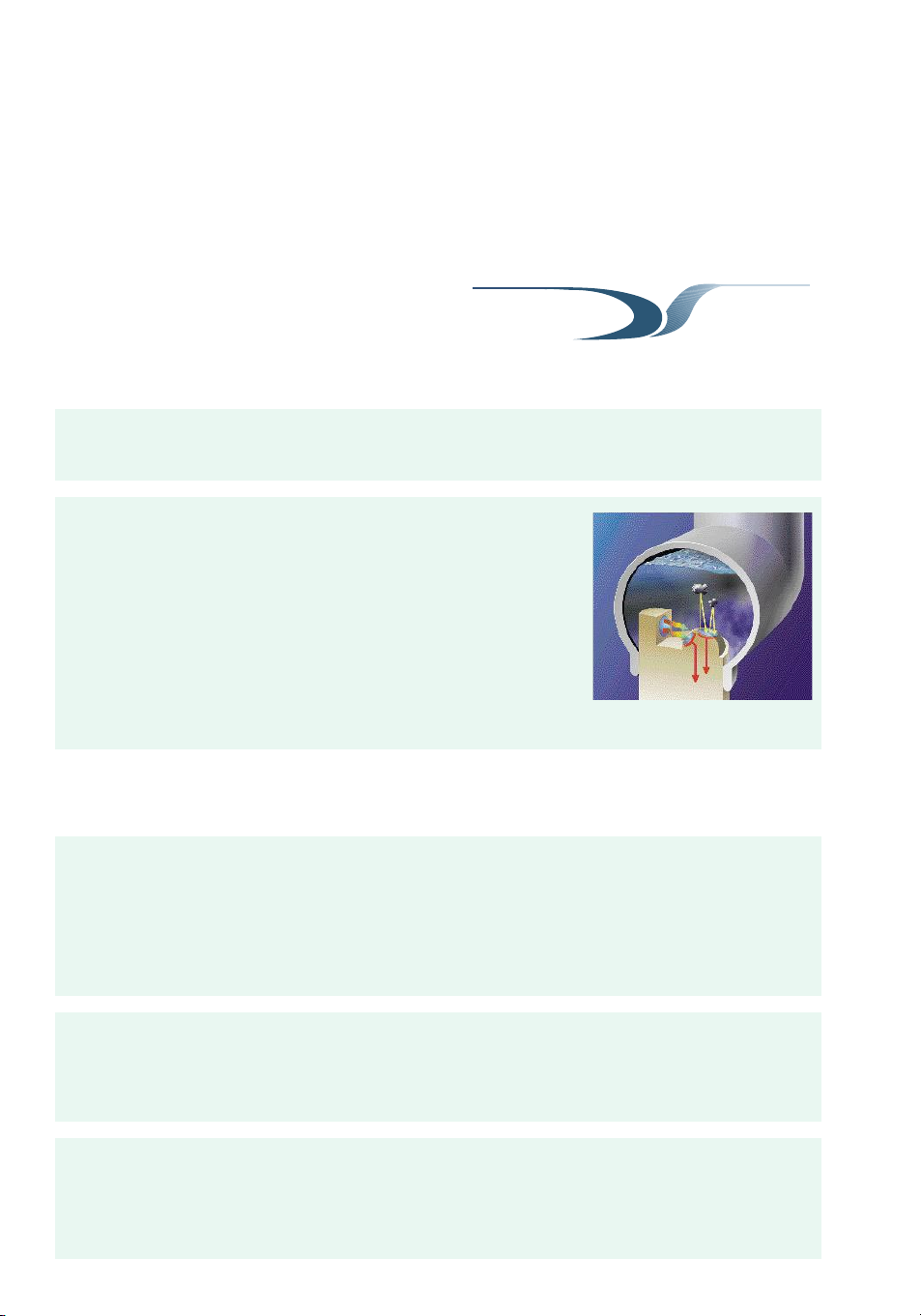
An advanced dual sensor technology optimising all resources while guaranteeing best
washing results.
DYNAMIC
SENSE
The dual sensor technology:
Real evaluation of water dirtiness
- Transmission signal measures liquid dirt
- Reflection signal measures solid dirt
Continuous sensing:
- Every 10 seconds, a new measurement is taken
- The machine continuously adapts the program according to
the level of dirtiness in the water.
Easy to use No risk in selecting the wrong program:
Your machine will decide on the washing parameters by
itself.
No more need to clean by
hand
Even your dirtiest pots and pans (burnt on and dried on)
will come out perfectly clean with the sensor Intensive
programme.
Maximum savings The dual sensor system will detect when your load is
perfectly clean and stop the programme. You will use only
the amount of water, energy and time that is necessary.
Benefits
Page 11
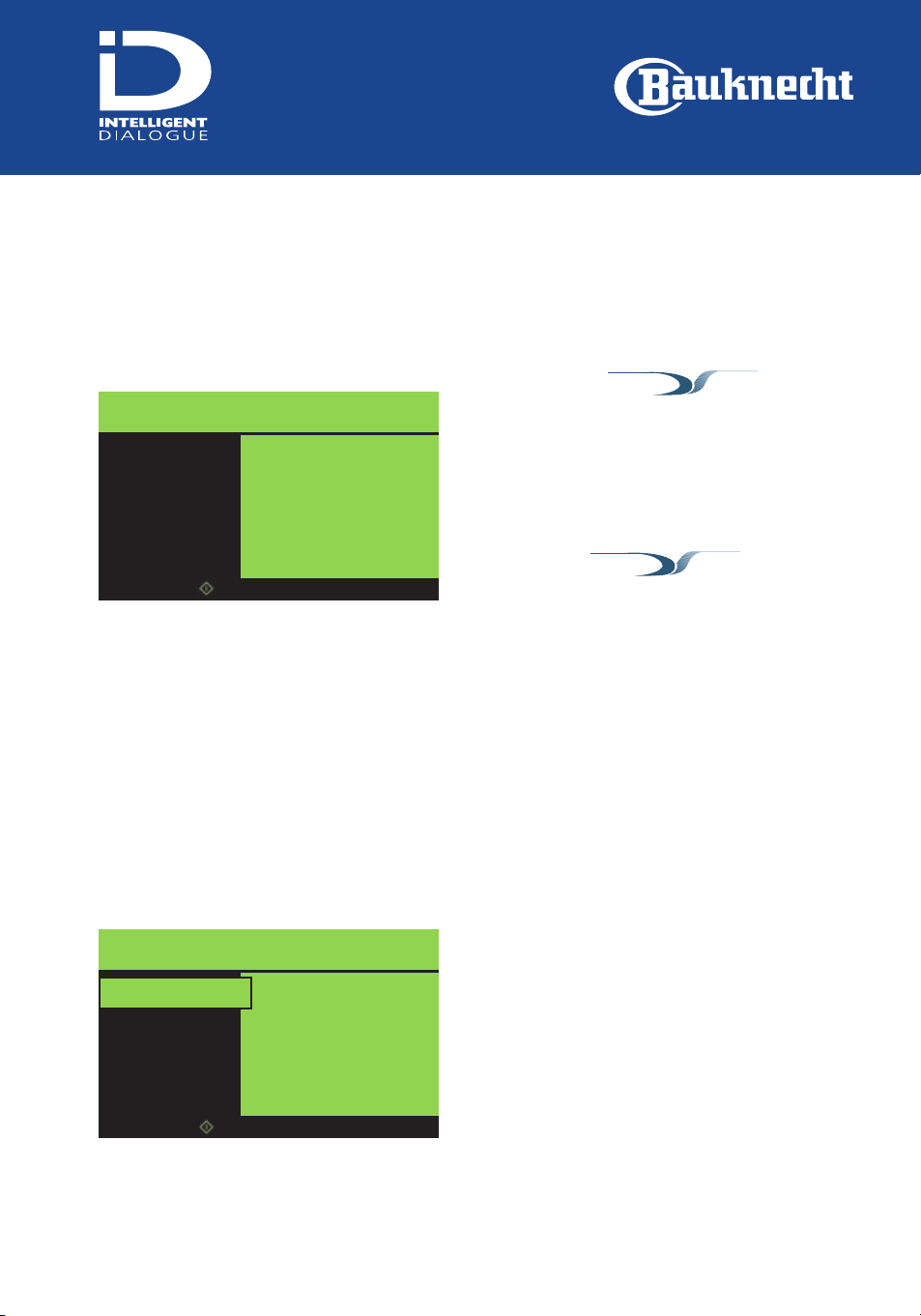
Programmes
AutoIntensive 60°-70°
This programme is highly recommended for your
most heavily soiled items (no more need to clean
them by hand)
It is especially adapted to all types of burnt on
and encrusted pots & pans. It should be also used
in case of dried on loads.
Anti-bacterial
Recommended for normally or heavily soiled
crockery, this programme features an additional
antibacterial action. For maximum antibacterial
effectiveness the programme must not be
interrupted (e.g. by opening the appliance door).
Gentle 40°
Use this programme for delicate items sensitive to
high temperatures, for example crystal.
Eco 50°
This programme includes an extra rinse cycle, and
is therefore recommended for heavily soiled
dishes. We recommend use of enzymatic
detergents.
AutoNormal 40°-55°
This programme is highly recommended for your
daily use. It’s especially adapted to your normally
soiled loads.
Express 30’ - 40°
Use this 30 minute programme for lightly soiled
dishes with no dried-on food or grease (butter, oil,
lard).
Main cycles
Special cycles
DYNAMIC
SENSE
DYNAMIC
SENSE
AutoNormal 1:50
Press to start the selected cycle
Special cycles
Start delay
Half-load
AutoIntensive
AutoNormal
Anti-bacterial
AutoNormal 1:50
Press to start the selected cycle
Start delay
Half-load
Gentle 40°
Express 30’
Eco 50°
Special cycles
Page 12
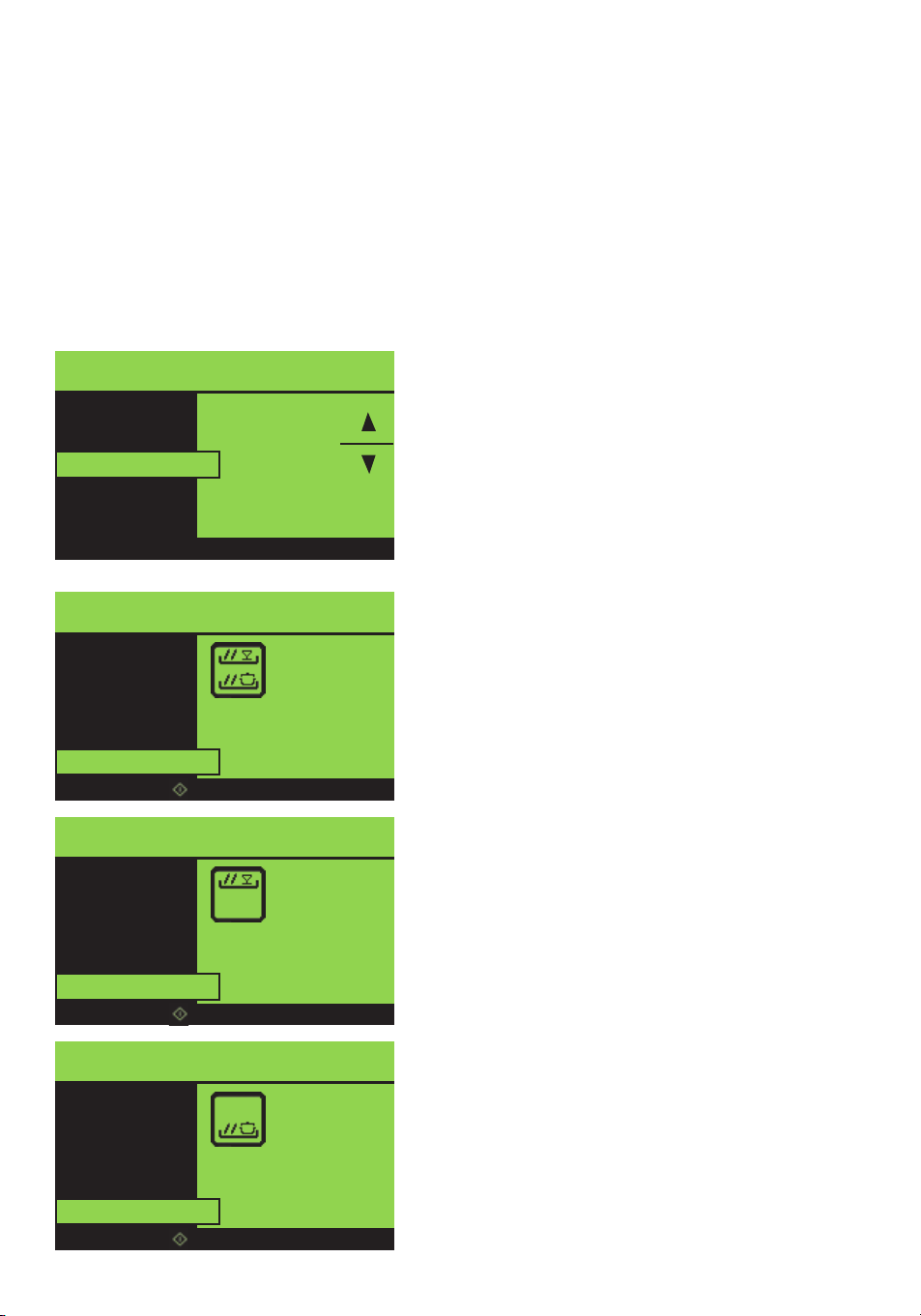
Half load
The “Half load” wash option allows complete
load flexibility.
Half load in the upper rack only
Recommended for a daily load of 6 place settings
Benefits:
Good wash results and reduced energy and water
consumption.
Intensive wash using lower rack only
Recommended for heavily soiled dishes and for
pans and saucepans with greasy, stubborn or
burnt-on food. The high-pressure delivery of
water from the lower spray arm ensures
maximum washing capacity for dishes.
Benefits:
excellent wash results, especially during the
"AutoIntensive" programme.
Start Delay
This option can be used to delay the start of the
wash cycle until a set time.
The timer can be programmed from 1 to 24
hours.
This function makes it possible to obtain further
energy savings (see chapter on “Energy-saving
hints”).
Options
AutoIntensive 1:50
Set time for Start delay
Special cycles
Half-load
Start In
00:00
Start delay
AutoIntensive 1:50
Press to start the program
Special cycles
Start delay
Upper only
Lower only
Off
Half-load
AutoIntensive 1:50
Press to start the program
Special cycles
Start delay
Upper only
Lower only
Off
Half-load
AutoIntensive 1:50
Press to start the program
Special cycles
Start delay
Upper only
Lower only
Off
Half-load
Page 13

Tips for obtaining best results
To ensure best results and
avoid any damage, it is
essential to load your
dishwasher properly.
Your dishwasher requires
periodical (but regular) care;
this will ensure dishes are
always perfectly clean and
will avoid any damage to the
appliance.
Ensure items of dishes do not
rub against each other and
that ceramic products do not
touch other dishes.
Detergents/Rinse aid
Only use detergents and
rinse aids specially
recommended for use in
domestic dishwashers.
Use only the recommended
amount of detergent and
rinse aid. The amount
depends on the type and
degree of soiling and on the
level of water hardness (as a
general rule, use more
detergent for heavily soiled
loads and for very hard
water). Follow the detergent
manufacturer’s directions.
If using a phosphate-free
detergent set the water
hardness selector to a higher
position than indicated in the
user instructions.
The detergent packaging
must be kept closed and
stored in a cool, dry place: if
exposed to humidity for a
prolonged period of time,
the detergent deteriorates
and can no longer be used.
Regularly check the level of
rinse aid in the dispenser in
order to obtain sparkling
clean dishes. The rinse aid
gives dishes an added shine
during the drying cycle and
prevents the formation of
unsightly spots and streaks.
Salt
Regularly check there is
sufficient regeneration salt in
the container to ensure wash
water is softened. Only use
additive-free regeneration
salt for domestic
dishwashers.
Manufacturer’s
instructions
Always read the dishes
manufacturer’s instructions
before washing. Some types
of crystal may become dull
with repeated washing.
Labels
Remove any adhesive labels
from dishes since these might
detach during the wash cycle
and cause clogging. Labels
and glue might also be
deposited on the spray arm
or pump, reducing the
performance of your
dishwasher.
Filterig system
For perfect operation, ensure
the dishwasher filter is
always clean. Clean the filter
regularly.
Page 14

Energy-saving tips
The sensor programmes
continuously measure the
water dirtiness and adapt the
temperature, water and
program duration
accordingly, using only the
resource amount that is
really necessary to leave the
dishes clean.
If you have a reduced tariff
for electricity at night and
would like to save money,
avoid costly use of the
appliance during the day,
preferring to switch on at
night. Use the Start Delay
option.
Avoid allowing food to dry
onto dishes: this will allow
you to use a wash
programme with a lower
temperature.
If possible, always wash with
a full load. Bear in mind that
water consumption for a half
load is the same, except
when you use the Half-Load
Option and Dynamic Sense
programmes.
DYNAMIC
SENSE
Page 15

Preparing and loading dishes
Remove any food leftovers
such as bones, or toothpicks
and any other objects. It is
not necessary to rinse plates
before placing them in the
dishwasher.
Arrange dishes in such a way
that will allow for uniform
water distribution.
Bowls, soup plates and other
concave items (e.g. cups,
glasses etc.) must be loaded
downwards so that the
surface to be washed faces
the spray arms.
Make sure that lids, handles,
pans and trays do not block
the spray arm rotation The
upper rack can be raised to
avoid this happening.
If loading heavy pans or
saucepans in your
dishwasher, take care not to
drop them since this could
damage the steel of the door
or the plate holders.
If you do not have a full load,
you can avoid the formation
of unpleasant odours by
running a cold pre-wash. Do
not use detergent in this
case.
To avoid damage or
breakages, arrange china,
crystal and other delicate
items so that they do not
touch.
When loading the
dishwasher, ensure any sharp
objects cannot damage the
door seal. To obtain the best
wash results, arrange cutlery
and knives too if possible
with handles positioned
downwards. Take
precautions, however, to
ensure that children cannot
touch them.
Page 16
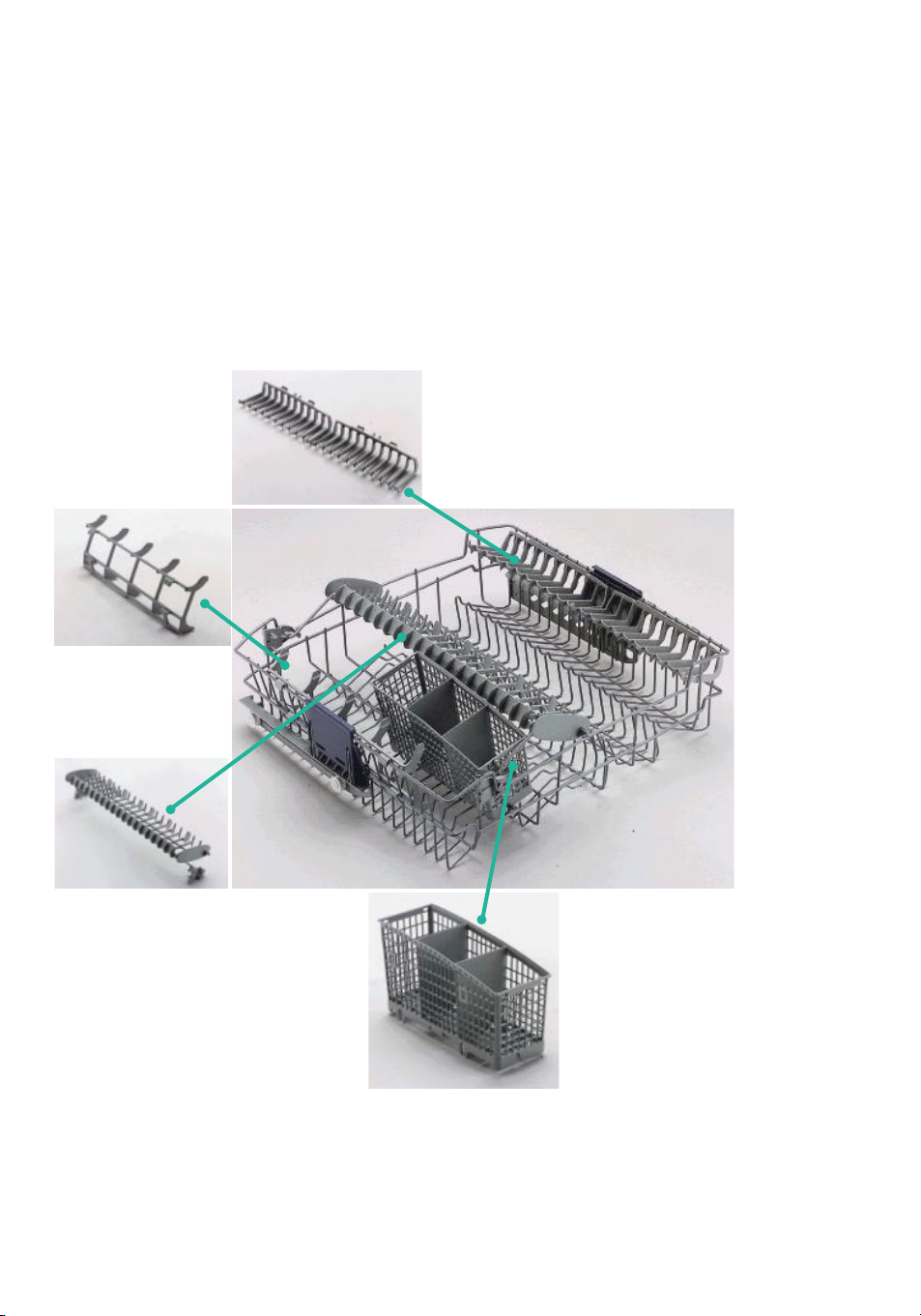
Accessories
Cutlery basket
•
Use this basket only with
the Half-load option
Plate holder
•
Horizontal position:
cups, long-stemmed glasses
•
Vertical position:
plates
“Vario-Organiser”
•
The “Vario-Organiser” shelf is a
useful accessory able to hold long
utensils and tea or coffee cups.
•
You can use it in 3 different
positions:
1
a
on the left hand-side of the rack
2
a
positioned in the middle of the
rack
3
a
from the middle of the rack
towards the left hand-side
Upper
rack
Glass Holder
Page 17
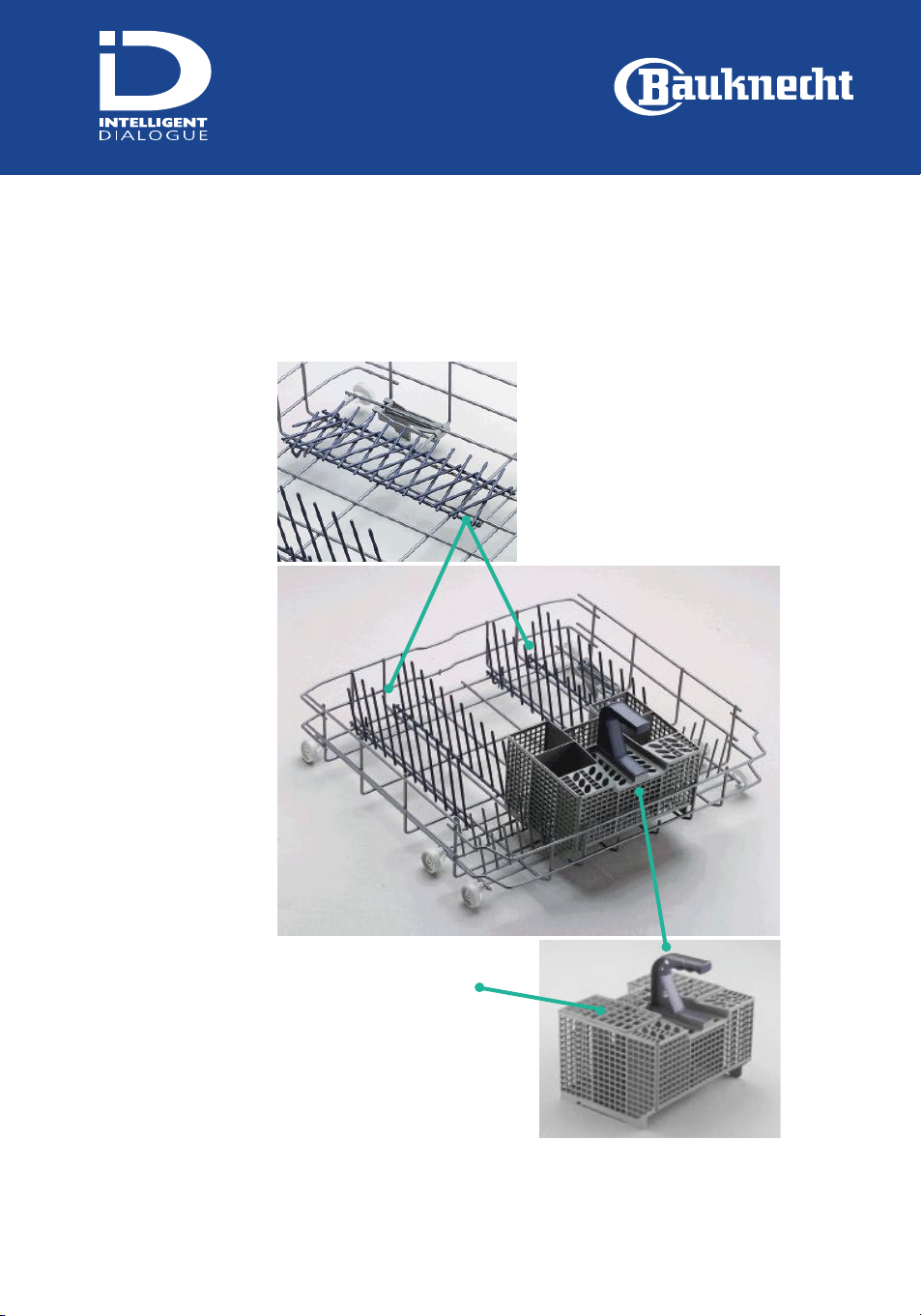
Plate holders
•
The 2 plate holders can be
folded down to position pots
and pans
Cutlery basket
•
Can be removed to
increase available space
Lower
rack
Page 18
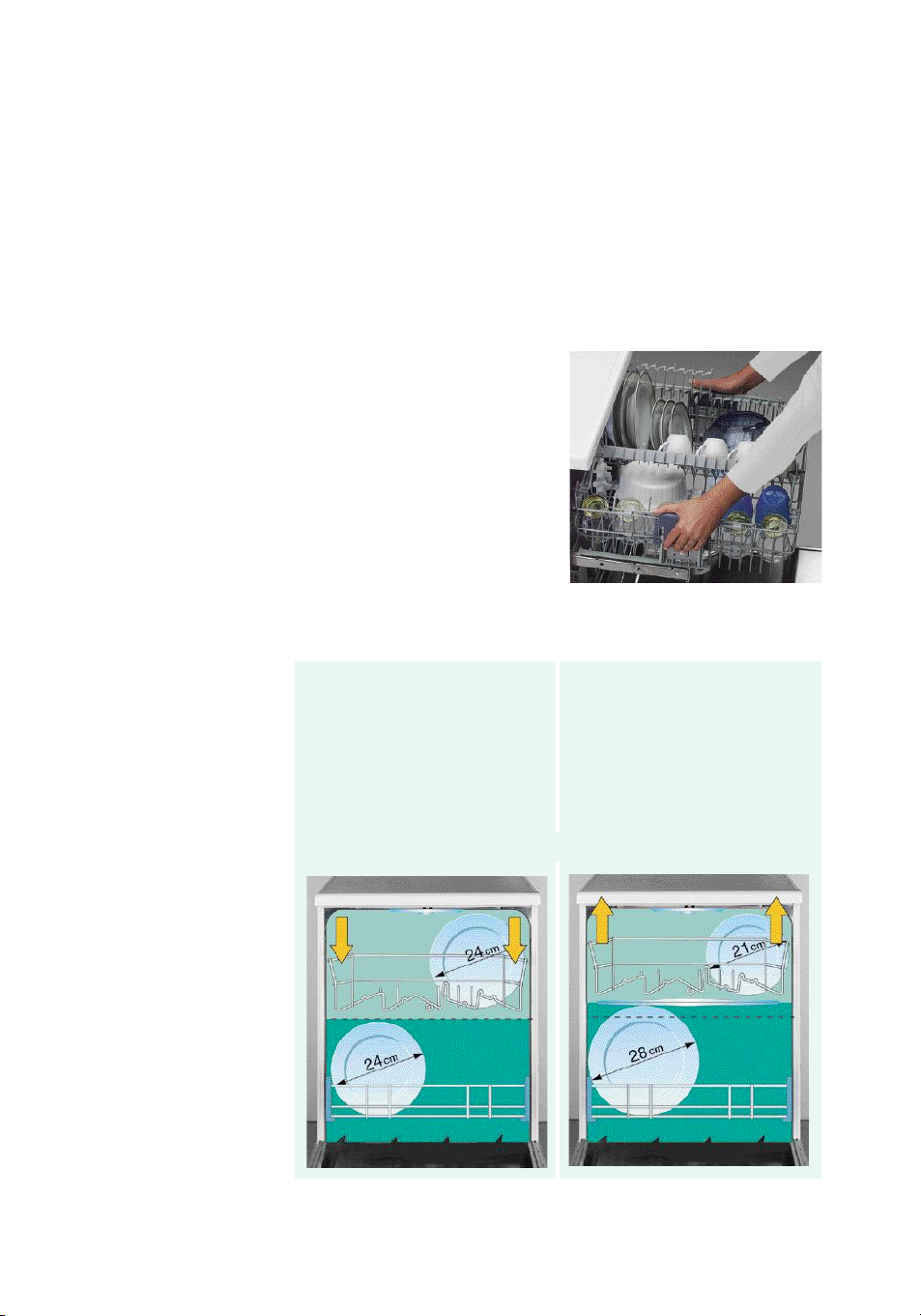
Upper rack height adjustment
The height can be adjusted
even with the rack loaded.
The dishwasher is
delivered with the upper
rack in the top position.
To lower:
pull out the two side handles
and gently lower the rack.
To raise:
pull up the two side handles
until the rack clicks into
place.
The rack must be level on both sides
The indicated dimensions may vary according to the inclination,
shape and depth of the plates.
Page 19

Tips for washing special materials
Dishwashersuitable materials
Always check the dishes
manufacturer’s
instructions before
washing in a dishwasher.
Aluminium
High wash temperatures and
concentrated detergent can
damage the finish of some
types of aluminium.
China/Earthenware
Antique decorations, handpainted details and gold rims
can fade or disappear.
Crystal
Some types of lead crystal
can become dull with
repeated washing in a
dishwasher. You can minimise
this effect by selecting low
temperature wash cycles.
Glass
Opaline glass yellows with
repeated washing.
Plastic materials
Different plastics react
differently to high
temperatures and
detergents. We recommend
you place plastic items in the
upper rack.
Materials not
suitable for your
dishwasher
Cast iron
The iron rusts and the
coating detaches.
Knives with hollow
handles
Some knives have glued-on
handles, which can detach
during washing in a
dishwasher.
Tin, copper, silver
High temperatures and
detergents can result in
tarnishing and damaging to
the surface of tin, copper and
silver.
Disposable plastic cutlery
Does not withstand high
temperatures and detergents.
Tin plate
May rust.
Wooden utensils
We recommend you wash
these by hand. Read the
utensil manufacturer’s
instructions before washing
in the dishwasher. Untreated
wood may buckle, break or
deteriorate.
Bottles and cans
Must be washed by hand.
Page 20

Full load
Upper rack Lower rack
Temperatures of programs (°C)
lightly soiled heavily soiled
Glassware x* 40 or AutoNormal 50 or AutoNormal
Coffee crockery (cups...) x 50 or AutoNormal 50 or AutoIntensive
Crockery (plates, bowls...) x x 50 or AutoNormal 50 or AutoIntensive
Pots & Pans x** x 50 or AutoNormal AutoIntensive
Half load
(if available)
Glassware x* 40 or AutoNormal 50 or AutoNormal
Coffee crockery (cups...) x 50 or AutoNormal 50 or AutoIntensive
Crockery (plates, bowls...) x x 50 or AutoNormal 50 or AutoIntensive
Pots & Pans x** x 50 or AutoNormal AutoIntensive
How to select the best programme for
your type of loads:
* Crystalware needs to be washed using the Gentle 40 °C, (use Half load option)
** If only lightly soiled, pots & pans may also be placed in the upper rack
Overview of consumption data
Programme
Water Energy Program duration
lt. kWh min.
AutoNormal 40-55°C 10-13 0,80-1,05 50-110
AutoIntensive 60-70°C 13-20 1,10-2,00 90-140
Anti-bacterial 13,0 1,50 105
Gentle 40°C 10 0,80 55
Express 30’ - 40°C 10 0,65 30
Eco 50°C * 13 1,05 110
*Reference programme for energy label in compliance with EN 50242 regulations;
Values may vary in relation to usage, e.g.: different loads, water temperatures - above or
below 15° C - as well as water hardness and power supply voltage, etc.*
Page 21
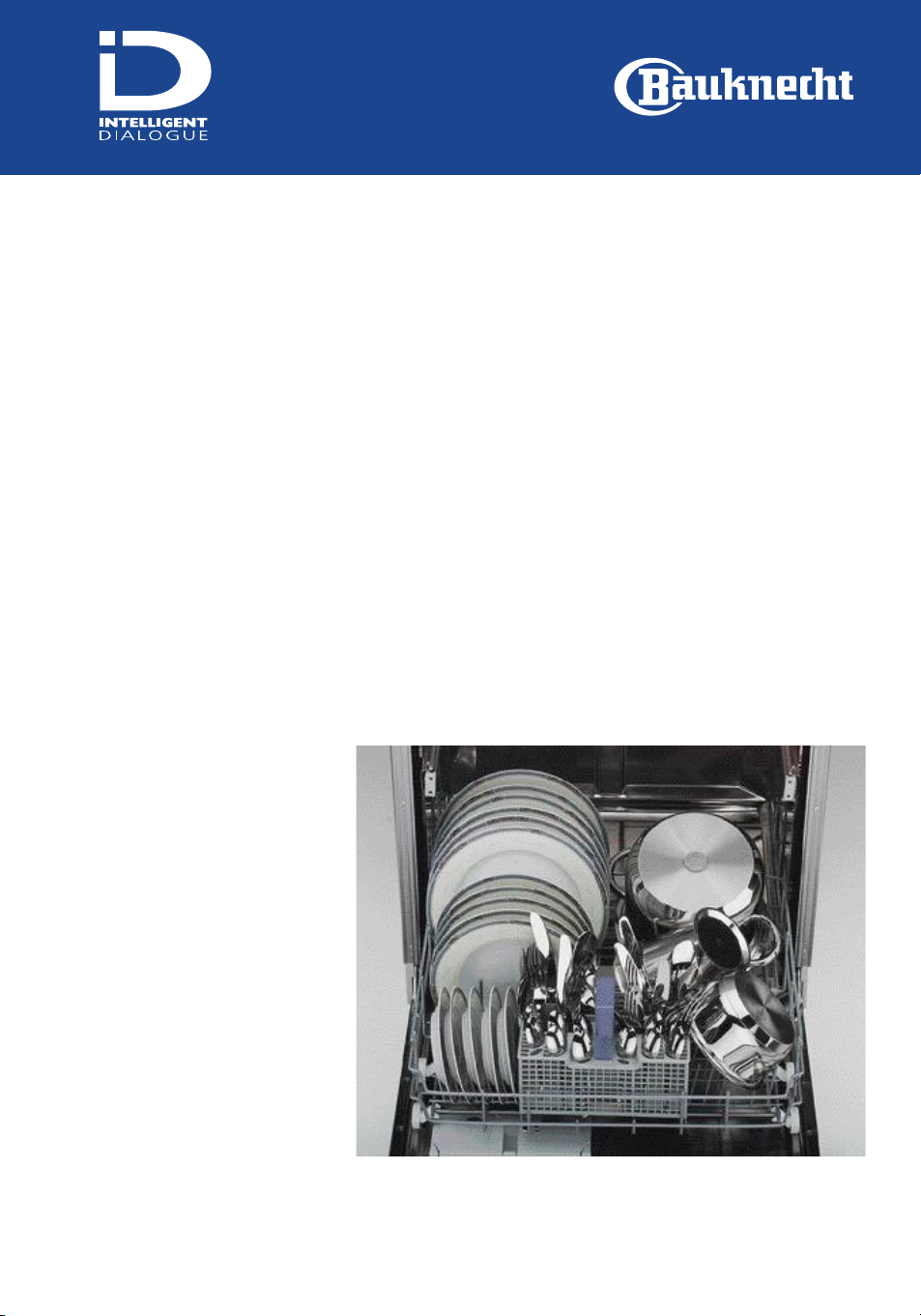
Plates, pots and pans in lower rack
Lower rack
Fold down one of the two
plate holders to make space
for the pots and pans.
To accommodate large plates
(up to 28 cm in diameter)
adjust the upper rack height.
Page 22
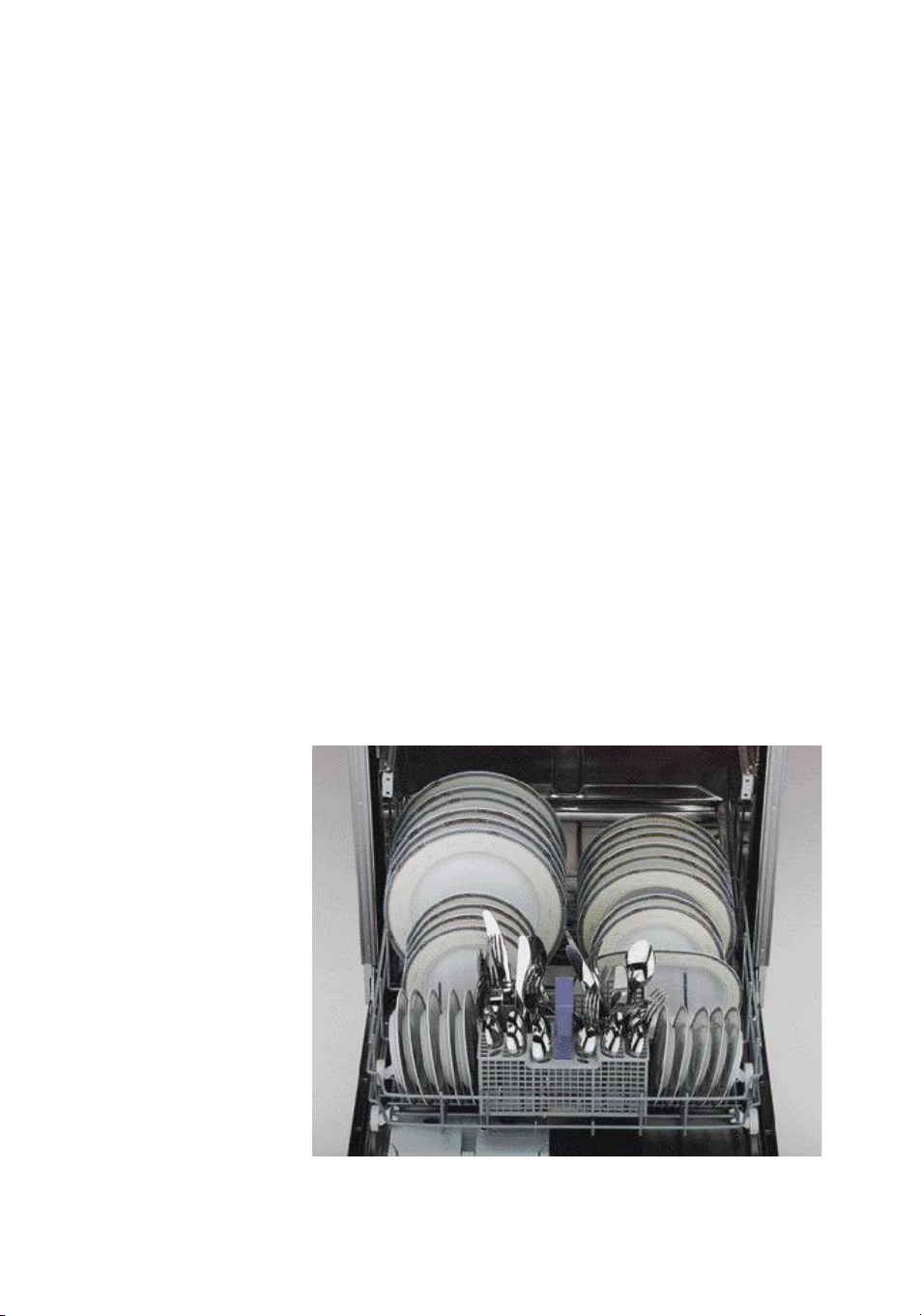
Plates in the lower rack
Lower rack
The dishes have to be
positioned in the 3 available
plate holders (smaller plates
in the fix frontal one).
Serving dishes can be fixed
between or inside the plate
holders depending on the
size.
To accommodate large plates
(up to 28 cm) adjust the
upper rack height.
Page 23
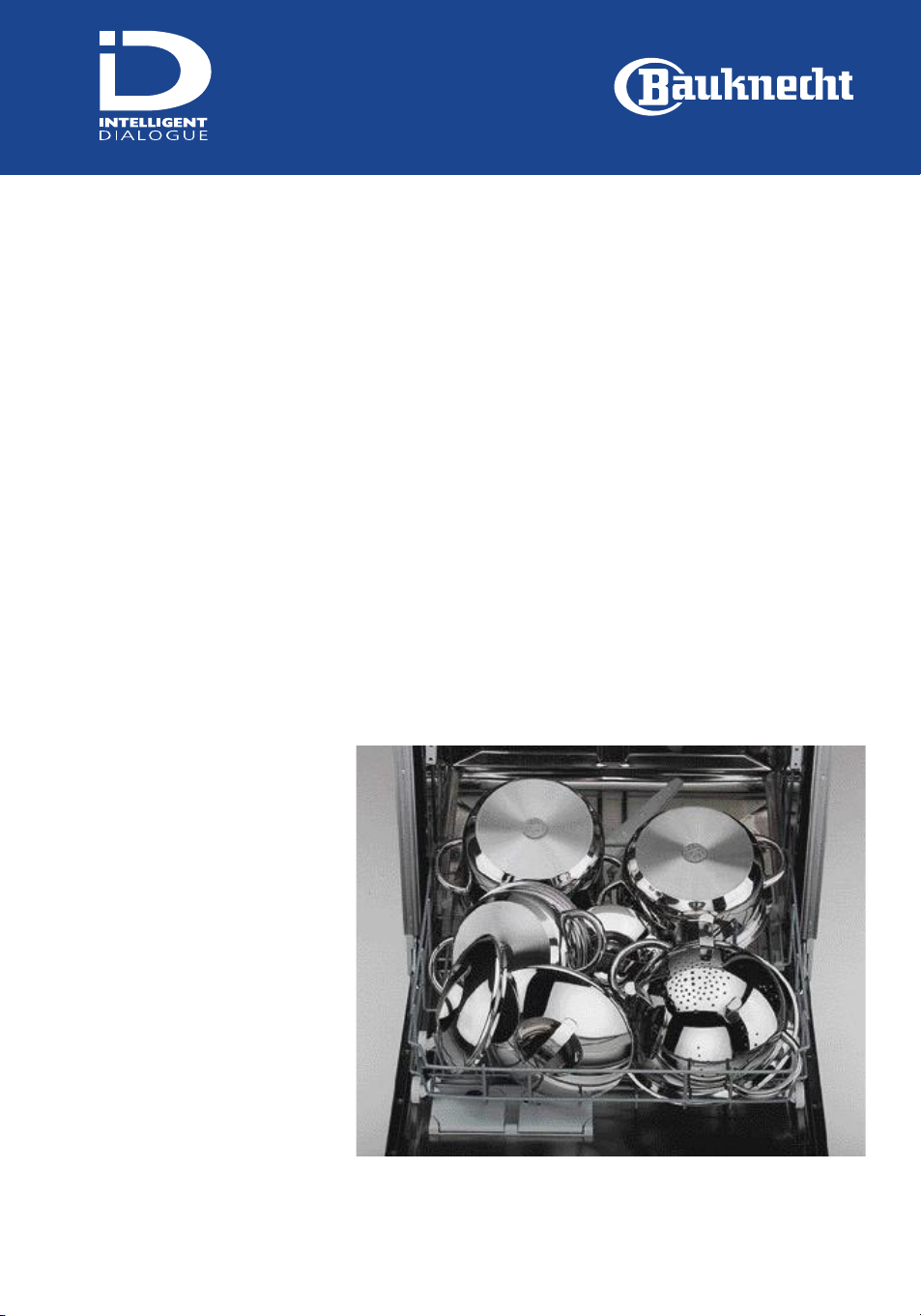
Pots and pans in the lower rack
Lower rack
Fold down the two plate
holders in order to make
space for the pots and pans.
Page 24
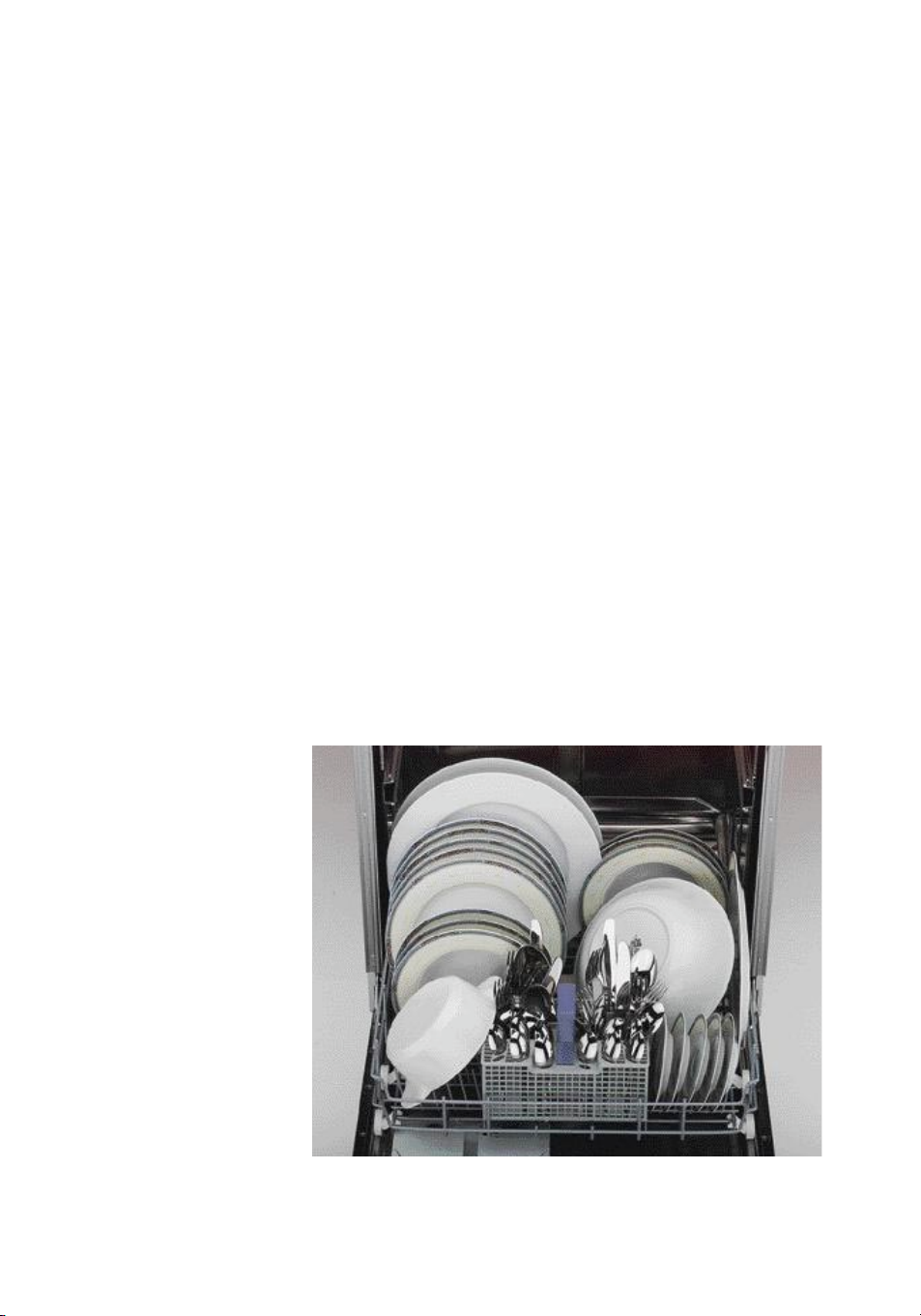
Mixed load including special items
Lower rack
Thanks to its generous space
and flexibility, the lower rack
can be used to wash crockery
with non-standard shapes
and sizes.
You can place large plates
(up to 28 cm in diameter) in
the lower rack by adjusting
the height of the upper rack.
Page 25
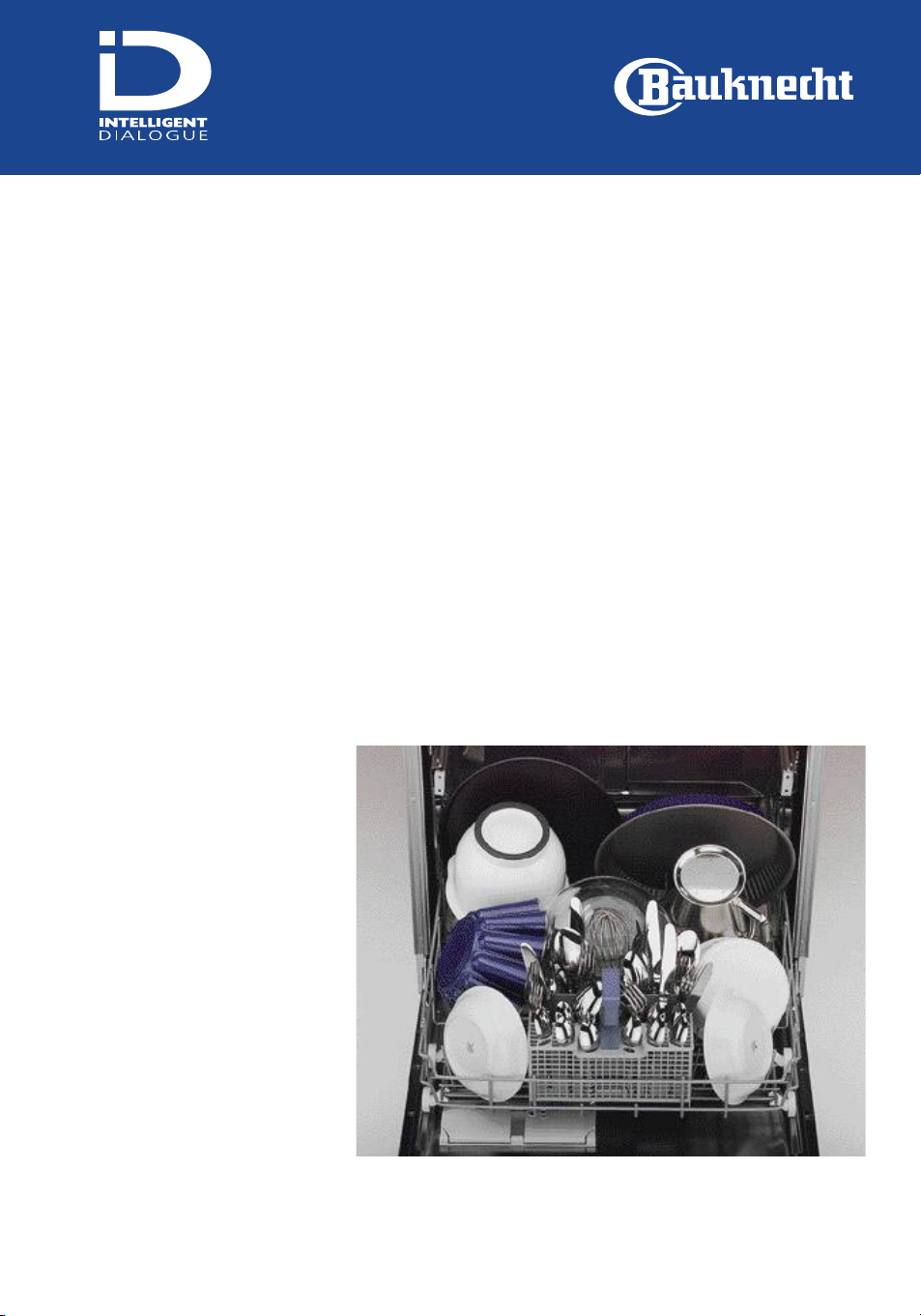
Non-standard crockery in the lower rack
Lower rack
You can use the plate holders
when washing cake tins in
the lower rack.
Put big cake plates (up to 28
cm in diameter) in the lower
rack by adjusting the height
of the upper rack.
Serving dishes can be fixed
between or inside the plate
holders depending on the
size.
Food mixer beaters can be
placed in the cutlery basket
as long as they do not
interfere with the spray arm
rotation.
Page 26
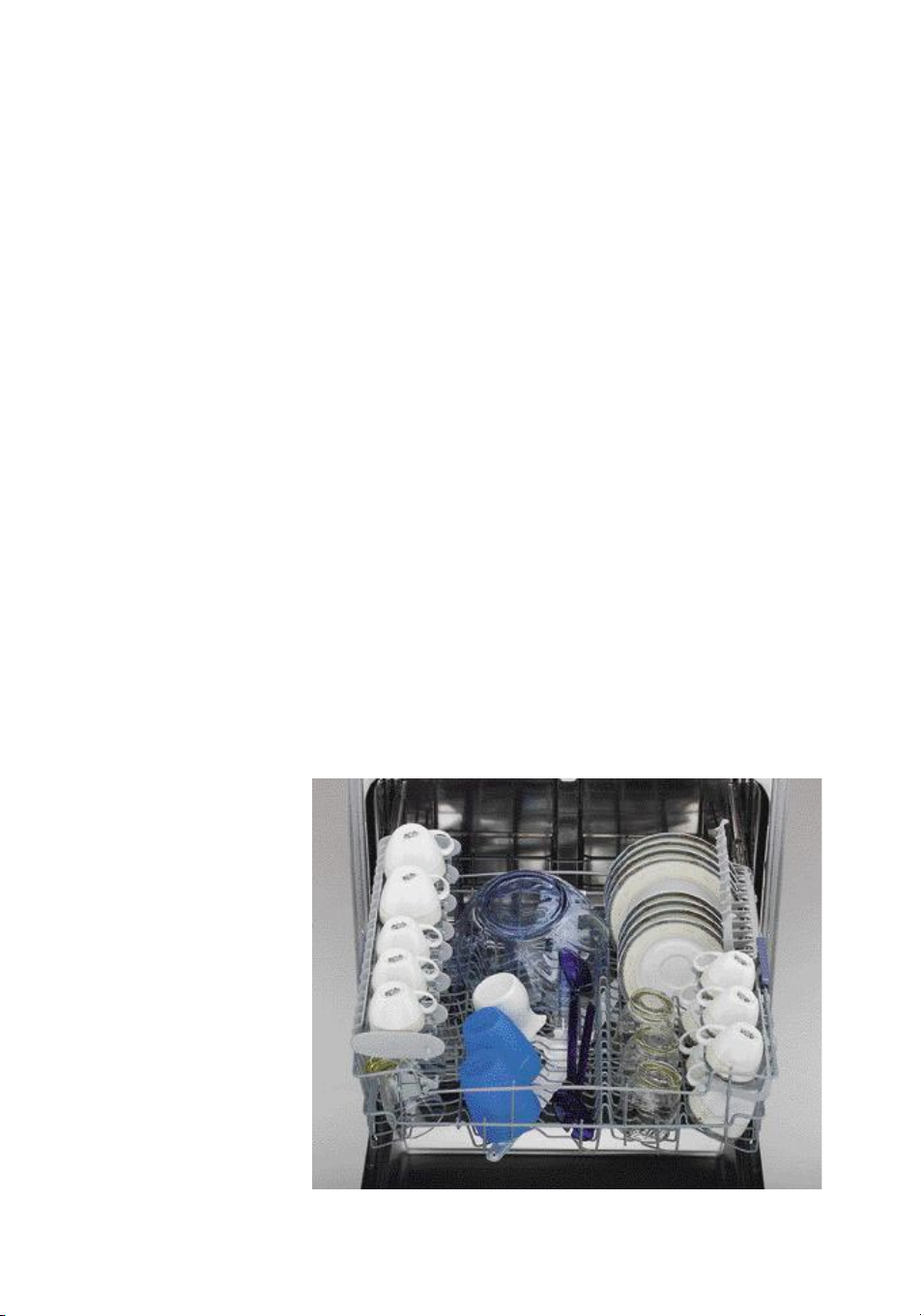
Normal load in the upper rack
Upper rack
The “Vario-Organiser” shelf
in the upper left position can
be used to store cups or long
utensils like kitchen knives
and carving forks. The
remaining space below can
be used to store glasses.
Use the crockery holder
positioned vertically to hold
plates, and horizontally, to
position coffee and teacups.
Page 27
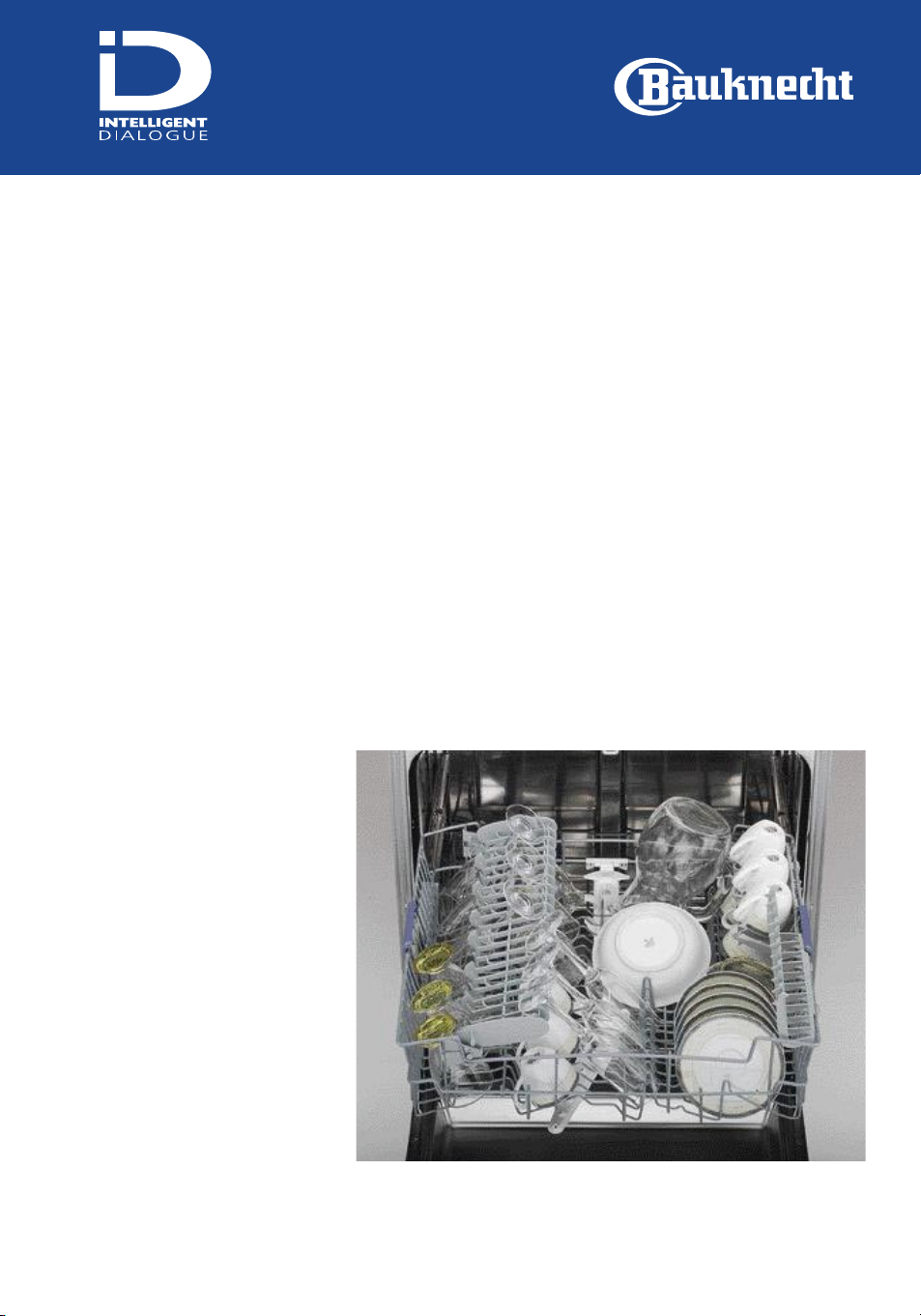
Glasses and cups in the upper rack
Upper rack
The “Vario-Organiser” shelf
can be used to support
long-stemmed glasses in a
very safe position.
Use the crockery holder
positioned vertically to hold
plates, and horizontally to
position coffee and teacups.
Page 28
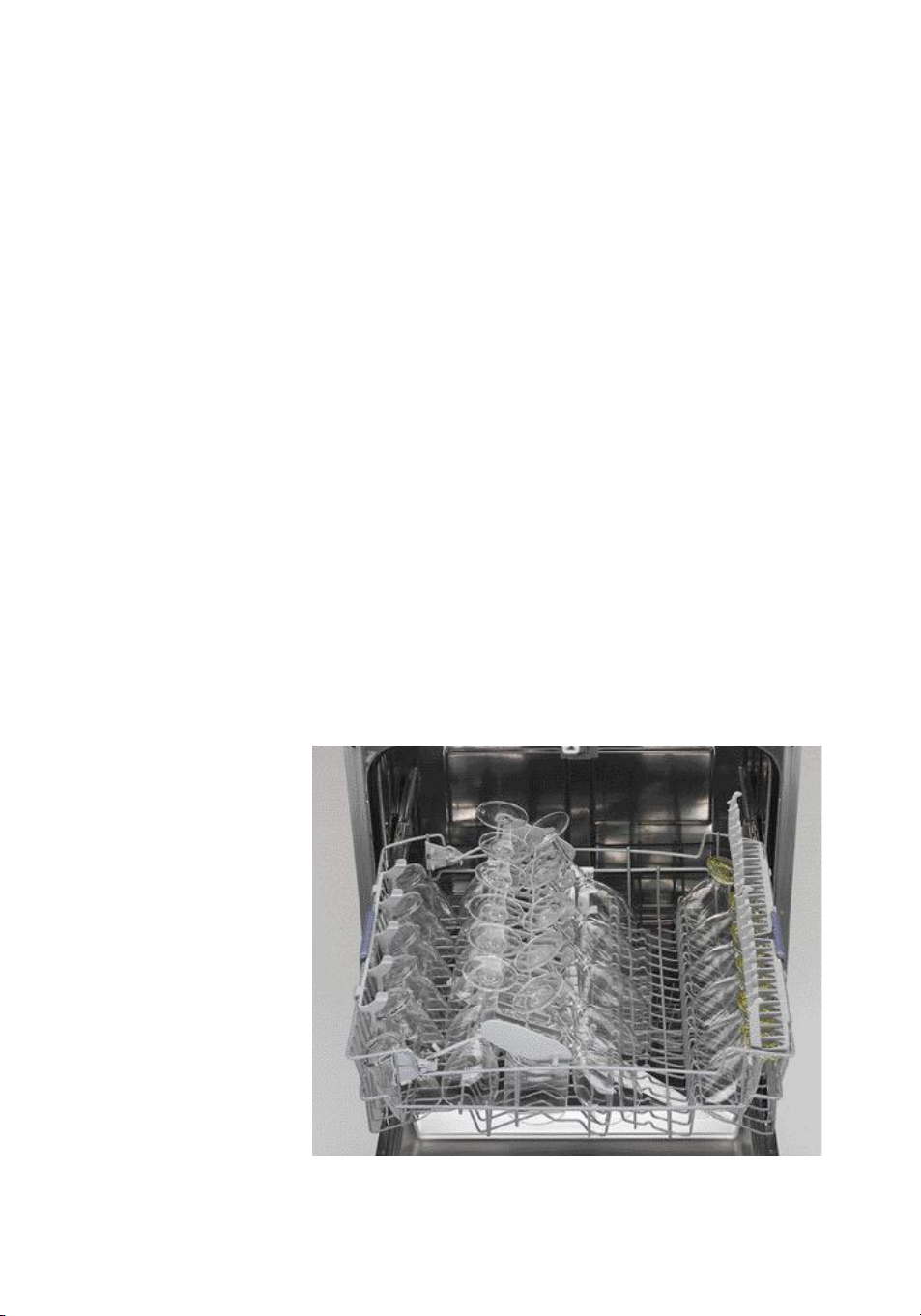
Long stemmed glasses in the upper rack
Upper rack
The “Vario-Organiser” shelf
in the middle position is used
to hold long stemmed glasses
in a very safe position. You
can position long-stemmed
glasses either on the left or
to the right side.
Under the “Vario-Organiser”
shelf there is space to load
cups.
Use the crockery holders
vertically in order to store
more glasses below.
Page 29
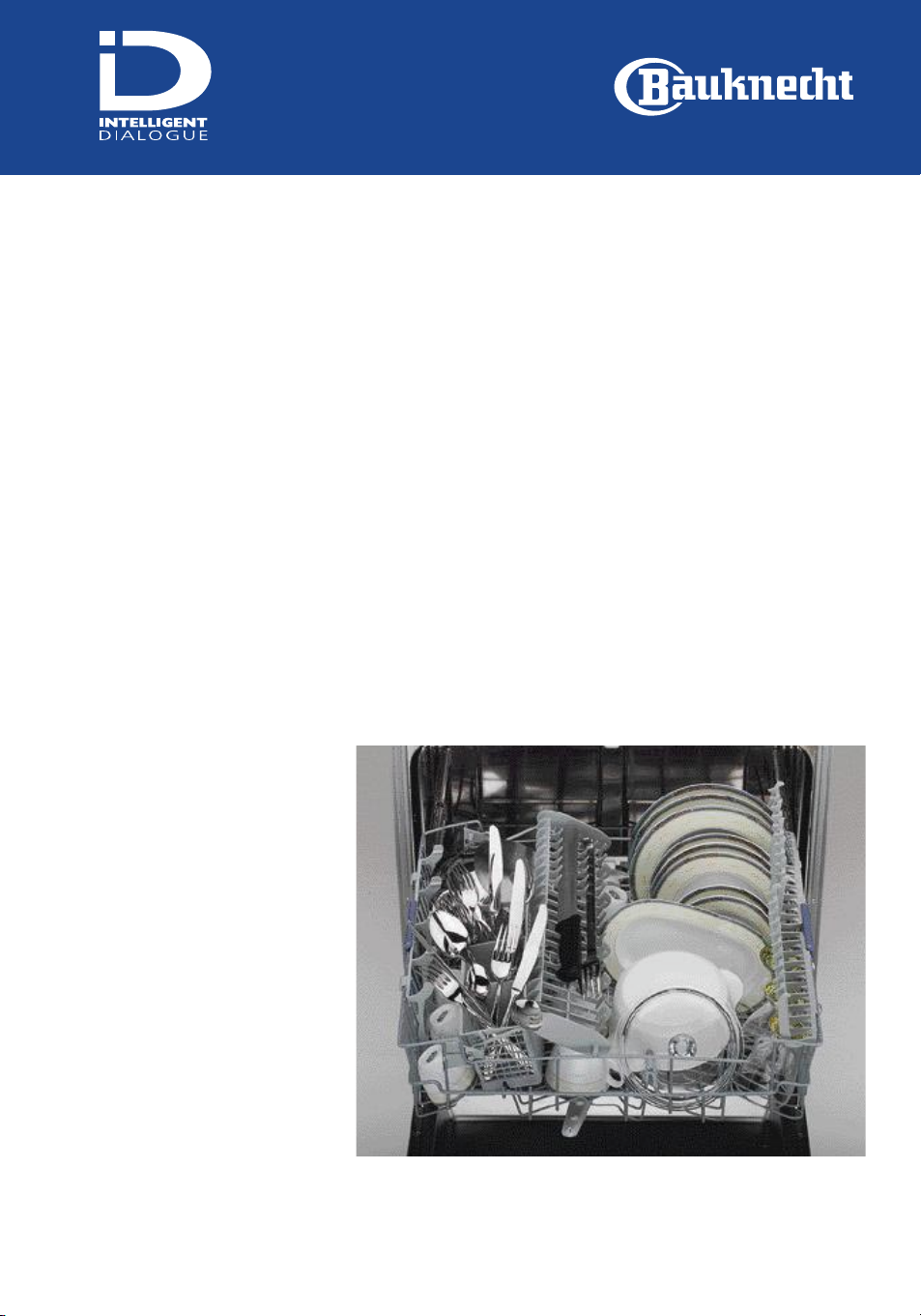
Typical half load in the upper rack
Upper rack
The “Vario-Organiser” shelf
in the middle position can
store long utensils like
kitchen knives and carving
forks or cups. The remaining
space below can be used to
store more cups or glasses.
While using the half load
option , lightly soiled pots
and pans can be placed in
the upper rack.
The cutlery basket needs to
be placed on the left of the
“Vario-Organiser” shelf.
Use the crockery holders
positioned vertically to hold
plates and horizontally to
hold cups.
Page 30
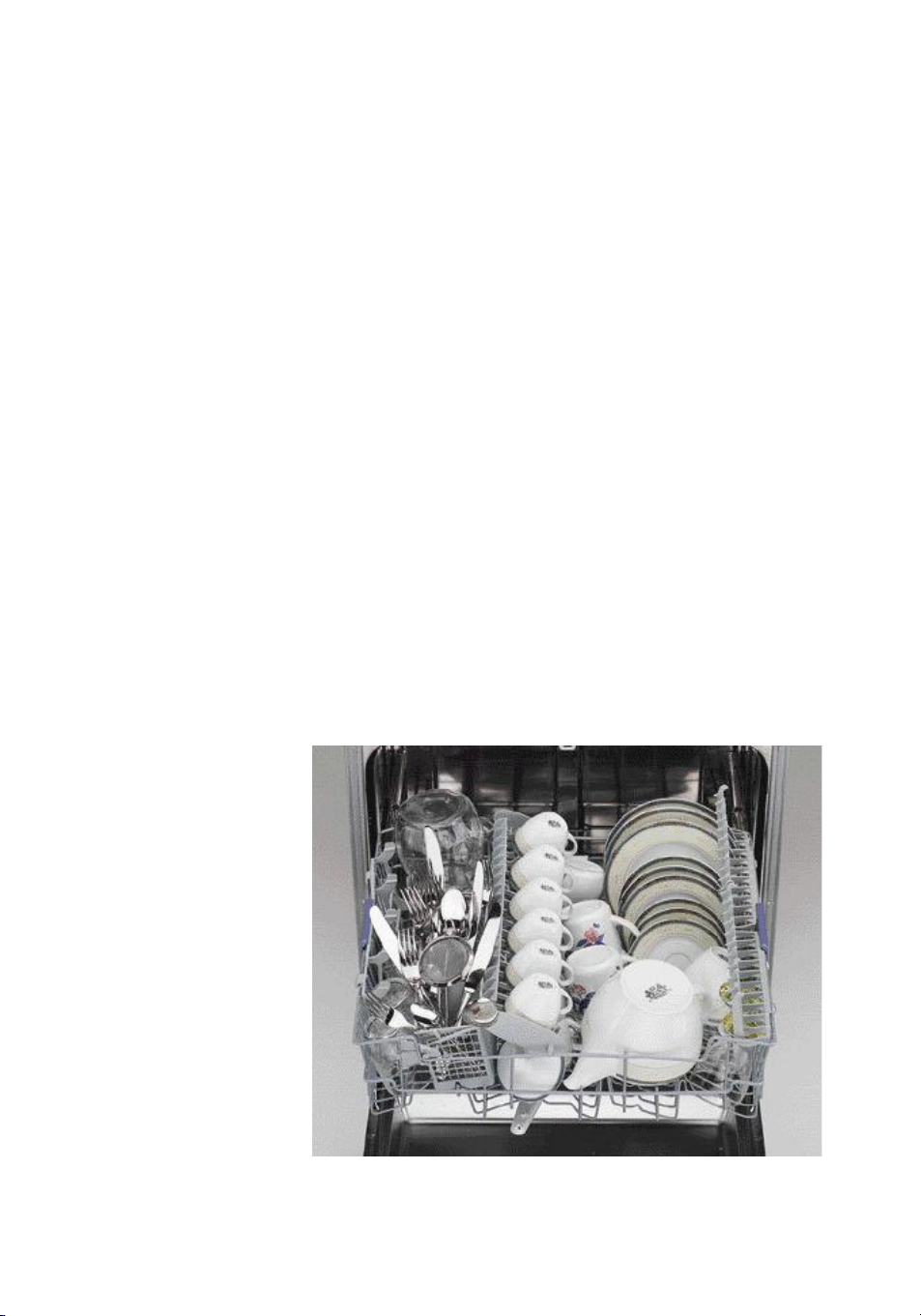
Half load-Breakfast dishes in the upper rack
Upper rack
The “Vario-Organiser” shelf
in the middle position can
store long utensils like
kitchen knives and carving
forks or cups. The remaining
space below can be used to
store more cups or glasses.
A cutlery basket can be
placed on the left of the
“Vario-Organiser” shelf.
Place cups used for tea,
coffee, milk or fruit jars and
carafes with the opening
downwards.
Use the crockery holders
positioned vertically to hold
plates and positioned
horizontally to hold tea and
coffee cups.
Page 31

Troubleshooting
Dishes not dry or
sparkling
Fill the rinse aid dispenser
and check the setting is
correct. For better drying
results, adjust the rinse aid
setting to a higher level. If
dishes are streaked or dull,
adjust the rinse aid setting to
a lower value . Check the
level is correct.
Deep/soup plates must be
angled as much as possible to
facilitate correct washing.
Warning: some plastic dishes
must be dried by hand.
Grey marks on plates
caused by aluminium
items
Marks caused by aluminium
can be removed using a
slightly abrasive product. This
problem is often the result of
an unsuitable load.
Remember to load
aluminium items so that they
do not touch plates. Do not
wash disposable aluminium
containers in the dishwasher;
these might move during
washing and leave marks on
plates and dishes.
Marked or dull dishes
This is mainly caused by
calcium deposits on dishes.
To remedy this problem, use
vinegar or proceed as
follows:
• Load the dishwasher,
ensuring there are no silver
or metal objects.
• Place 2 cups (500 ml) of
vinegar in a container and
place this in the lower rack
• Run a full wash cycle. The
vinegar will mix with the
wash water.
Important: this procedure
may only be carried out
occasionally. Vinegar is an
acidic substance: excessive
use may damage your
dishwasher.
Alternatively, substitute the
vinegar with 2 tablespoons
of citric acid.
Page 32

Troubleshooting
Iridescence caused by
silicate and streaking
To fully remedy this problem
you must wash the dishes by
hand,
There is no way of reversing
changes caused by the use of
silicate, since these are
permanent. To slow down
the reaction process, use
silicate-free detergents.
In the majority of cases the
problem manifests itself with
a mother-of-pearl effect,
produced by silicate-rich
layers which accumulate with
repeated washing.
Even today it is still not clear
whether the silicate comes
from the glasses themselves,
or from detergents, or
indeed from both sources.
Years of experience indicate
that this effect appears only
with the use of low-alkaline
detergents with a high
silicate content. The same
effect does not appear when
a high or low alkaline
detergent without silicate is
used.
Streaked glass (Dulling)
This problem cannot simply
be eliminated by decreasing
the dosage of detergent
used, but the process can be
slowed down by selecting a
lower temperature
programme. You can also
open the dishwasher door as
soon as the wash cycle
finishes in order to allow
heat to escape.
Rust formation on cutlery
Make sure there is no
damage to the plastic
covering on racks.
Only wash stainless steel
cutlery in the dishwasher.
Cutlery which has been used
for food containing
hydrogen sulphide or salt
and which you cannot wash
immediately in the
dishwasher must be rinsed by
hand.
Discolouring of silver
To remove tarnishing on
cutlery, use a product
specifically for cleaning
silverware.
Prolonged contact with
dried-on food containing
sulphurous substances such
as (egg yoke, mayonnaise,
fish) can result in this type of
discolouring.
Use the rinse cycle only when
cutlery is not to be washed
immediately after use.
Printed in Italy
1/0203
Ecological Paper
5019 108 00746
GB
 Loading...