

Page 1

GB
GSF 4055
Quick Reference Guide
Further indications are given in the pages to follow and in the user instructions.
Salt level indicator
Add regeneration salt; only add regeneration
salt immediately before starting a wash
programme.
Programme Symbol
and Temperature
Pre-wash
Bio-Eco 50° C
Bio-Normal 50° C
Normal 65° C
Intensive 70° C
1) Values may vary in relation to usage, e.g.: different loads, water
temperatures - above or below 15° C, water hardness and power supply voltage etc.
2) Programme recommended when using detergents of type B (enzyme-based detergents).
Reference programme on the energy data plate.
3) Programme recommended when using detergents of type A (non enzyme-based detergents).
3)
Crockery to be washed later.
Normally soiled crockery.
2)
Normally or heavily soiled crockery with dried-on food.
Normally or heavily soiled crockery with dried-on food.
Heavily soiled pans and saucepans.
Programme selection and
recommended load type
Start button
Indicator lamp lit while the
dishwasher is operating.
Flashes when a fault occurs.
Switches off at the end of the
programme.
On / Off Button
Place the detergent in the:
small large
compartment compartment
(Litres)
- - 5.0 0.02 9
- X 12.5 1.30 73
X X 16.0 1.40 86
X X 16.0 1.60 86
X X 21.5 1.70 170
Water
Consumption
Normal load
Energy
(kWh)
5019 100 90333
(We reserve the right to make technical modifications)
1)
Time
(Min.)
Page 2
C
C
How to use the dishwasher
1. After loading the dishwasher, cl ose the
door properly and open the water
supply tap.
2. Press the On/Off button to switch the
dishwasher on.
indicator lamps will switch on.
3. Select the desired programme by
pressing the corresponding button.
The corresponding indicator lamp
lights up.
supplied).
4. Press the Start button to start the
selected programme.
indicator lamp will light up.
the programmed data cannot be
altered by pressing the programme
selector buttons.
once the Start button has been
Note:
pressed, the dishwasher memorises the
last programme selected. This
information remains in the memory even
during interruption of the power supply.
To change the selected
programme, press the Start button
for about 5 seconds
indicator lamp switches off.
Select a new programme using the
programme selector knob and
press the Start button.
if the dishwasher is switched off
Note:
during a wash programme, when
switched on again it will resume the
wash cycle from where it was
interrupted.
Only open the dishwasher door if
strictly necessary during a wash cycle
and exercise maximum caution.
Danger of scalding from steam.
5. To indicate the end of the programme,
the Start indicator lamp switches off
and
the End indicator lamp (if fitted)
lights up
One of the programme
If required, select options (if
The Start
Once set,
, until the Start
(for about 30 min.)
.
6. Once the Start indicator lamp has
switched off press the On/Off bu tton to
switch the dishwasher off.
indicator lamps switch off.
7. Open the door (warning: beware of hot
steam). Unload the lower rack before
the upper one. Close the water tap.
All the
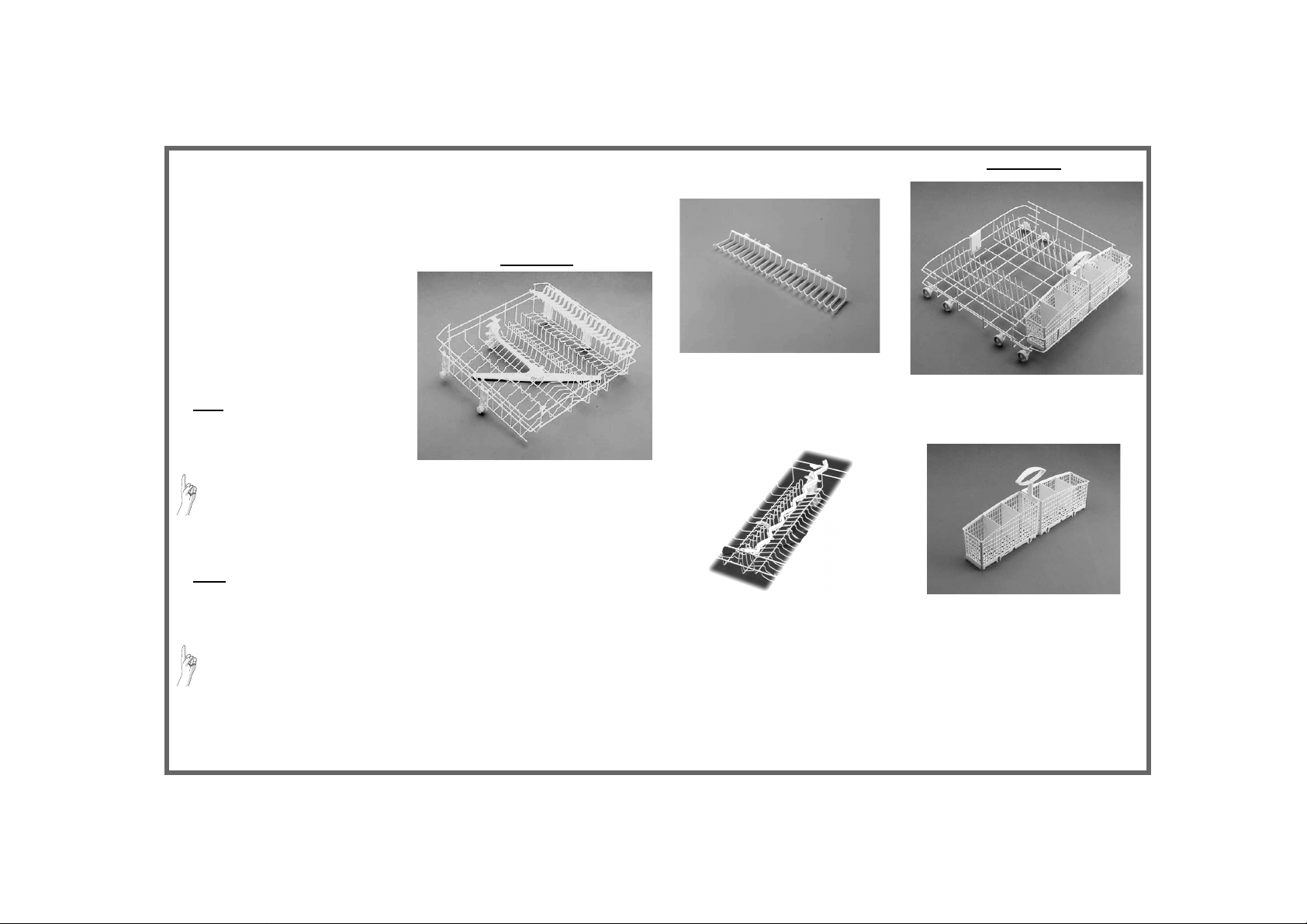
Upper rack
Please read the user instructions carefully.
Upper and lower rack
Crockery holders:
• Down: cups and long-stemmed glasses.
•
Up: plates.
Glass holder:
Lower rack
Cutlery basket:
• The cutlery basket can be removed
to increase (C) available space.
Page 3
Tips and advice
• Arrange crockery so that items do not
touch each other. Arrange large
crockery in the lower rack and smaller
crockery in the upper rack.
• Load cups at an angle to facilitate
water drainage.
• Generally speaking, place cutlery in the
basket with the handles positioned
downwards, but ensure that any sharp
knives and forks that might cause
injury are placed in the basket with the
handles positioned upwards.
• Make sure the water jet can reach all
loaded items and that the spray arms
turn freely.
Important
• Fill the detergent dispenser and check
the salt and rinse aid level.
• Do not use the appliance for items not
suitable for washing in a dishwasher,
for example: wooden items, aluminium,
plastic utensils, tin, hand-decorated
crockery (unglazed), silver cutlery.
• Do not put liquid fat in the dishwasher
(e.g. oil used for frying) or candle wax.
• If a fault occurs or you wish to change
the current programme, press the
“START” button for about 5 seconds until
the Start indicator lamp switches off.
• If regeneration salt is to be added,
immediately
in order to eliminate any residual salt
(rinsing alone is not sufficient).
• Sometimes even though the
regeneration salt container has been
filled, the corresponding indicator lamp
(if fitted) will light up during the first
wash cycle after filling with salt.
start a wash programme
• Before starting a wash programme,
make sure that the spray arms can turn
freely and are not impeded by crockery
or cutlery.
• Switch off the dishwasher once the
“Start” indicator lamp has switched off.
If you switch off the dishwasher during
a wash cycle, when switched on again
the dishwasher resumes the cycle from
where it was interrupted without h aving
to start it again.
If a fault occurs, before contacting our
After-Sales Service, make the following
checks to try and remedy the problem:
The dishwasher is not working:
• Is the plug properly inserted in the wall
socket?
• Is there a power failure?
• Is the dishwasher switched on?
• Has the Start button been pressed?
• Has the delayed start timer been set (if
fitted)?
• Is the water supply tap on?
• Is the flow of water obstructed by
impurities? If so, close the water supply tap,
detach the water hose and clean the filter.
Then re-connect the water hose to the tap
and open the water tap once again.
• Are the filters clogged? (See “Care and
maintenance” chapter in the user
instructions).
• Is the door closed properly?
• Is a fault indicated?
(The Start indicator lamp flashes).
Start the programme again from the
beginning: press the Start button for
about 5 seconds, until the Start indicator
lamp switches off.
Select a new programme and press the
Start button.
Troubleshooting Guide
Crockery still dirty after washing:
• Was the crockery loaded properly?
• Crockery must be loaded facing
downwards; this is important, especially
for large items of crockery.
• The water jets must spray the entire
surface of all items.
• Make sure that crockery and cutlery are
arranged properly.
• Have you selected the correct programme?
• Did you use too much or too little detergent?
(The use of poor quality detergents may
result in less effective washing).
• Are the filters clogged or incorrectly
assembled? (See “Care and Mainte nance”
chapter in the user instructions).
• Are the spray arms blocked or the nozzles
clogged? (See “Care and Maintenance”
chapter in the user instructions).
• Is the lower spray arm correctly fitted?
• Is the salt container cap (water softening
system) screwed down?
Marked crockery:
• Is the water hardness level selector not
properly adjusted? See (“Filling the salt
container” in the user instructions).
• Is the salt container empty? (See “Filling the
salt container” in the user instructions).
• Was insufficient detergent used? (See
“Filling the detergent dispenser” in the
user instructions).
Marked glasses and cutlery:
• Was too much rinse aid used? (See
“Filling the rinse aid dispenser” in the user
instructions).
Note:
with some models, when the Start button
is pressed a pre-wash cycle precedes the
actual wash programme; this regenerates the
water softening system.
AFTER-SALES
SERVICE
If after carrying out the above checks
the malfunction persists or appears
again, turn the appliance off and turn
off the water supply tap, then call our
After-Sales Service (see guarantee).
Please specify:
• The nature of the fault.
• The appliance type and model.
• The service code (the number after
the word Service on the adhesive
rating plate) inside the door
on the right-hand side.
Your full address and telephone
•
number.
Please read the user instructions carefully.
Page 4
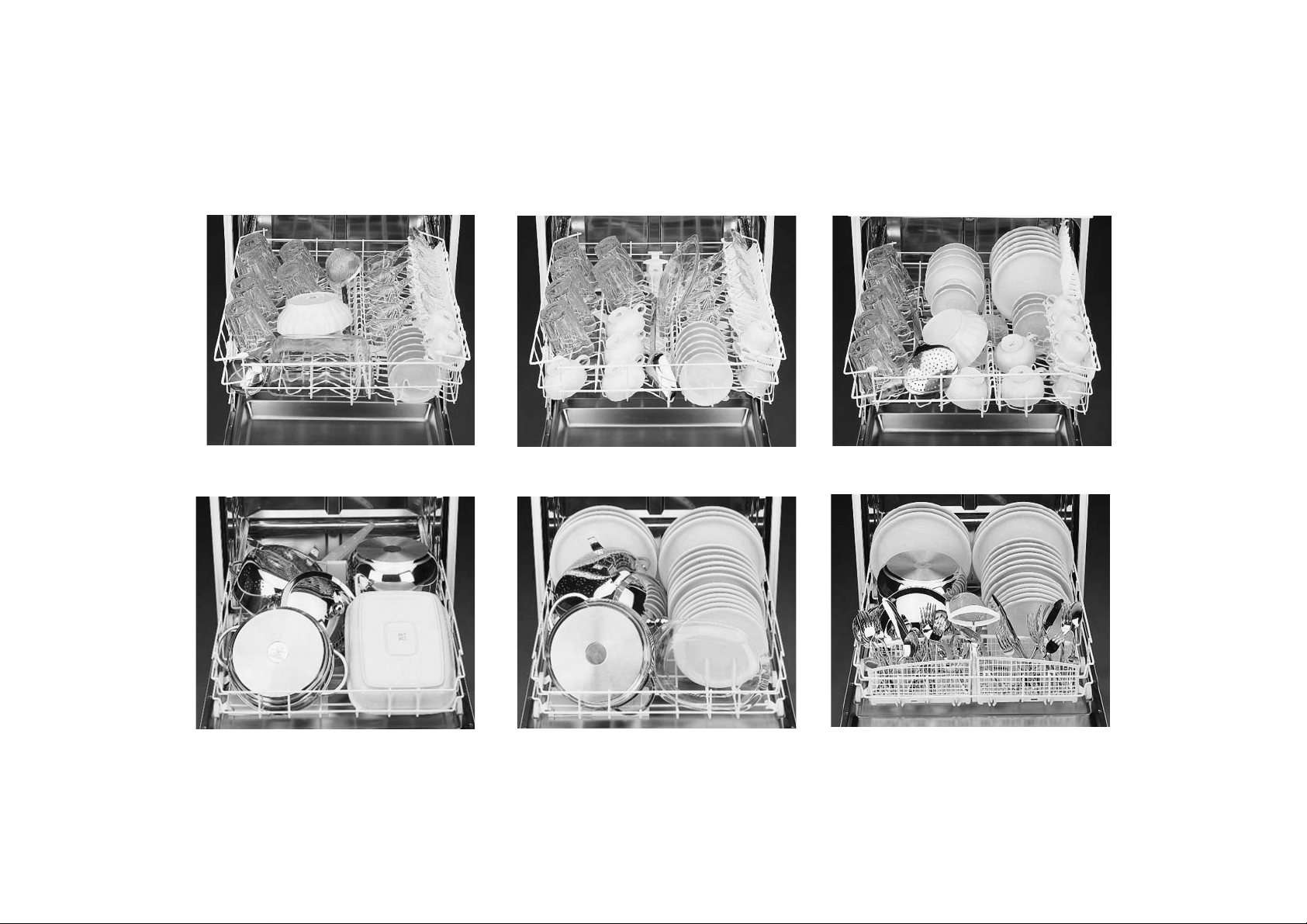
Dishwasher loading instructions
UPPER RACK
LOWER RACK
Depending on the model, rack features may vary (see “Upper and lower rack” description).
 Loading...