

Page 1
1
EN
PRODUCT DESCRIPTION
Before using the appliance, carefully
read the Health and Safety guide.
DAILY REFERENCE
GUIDE
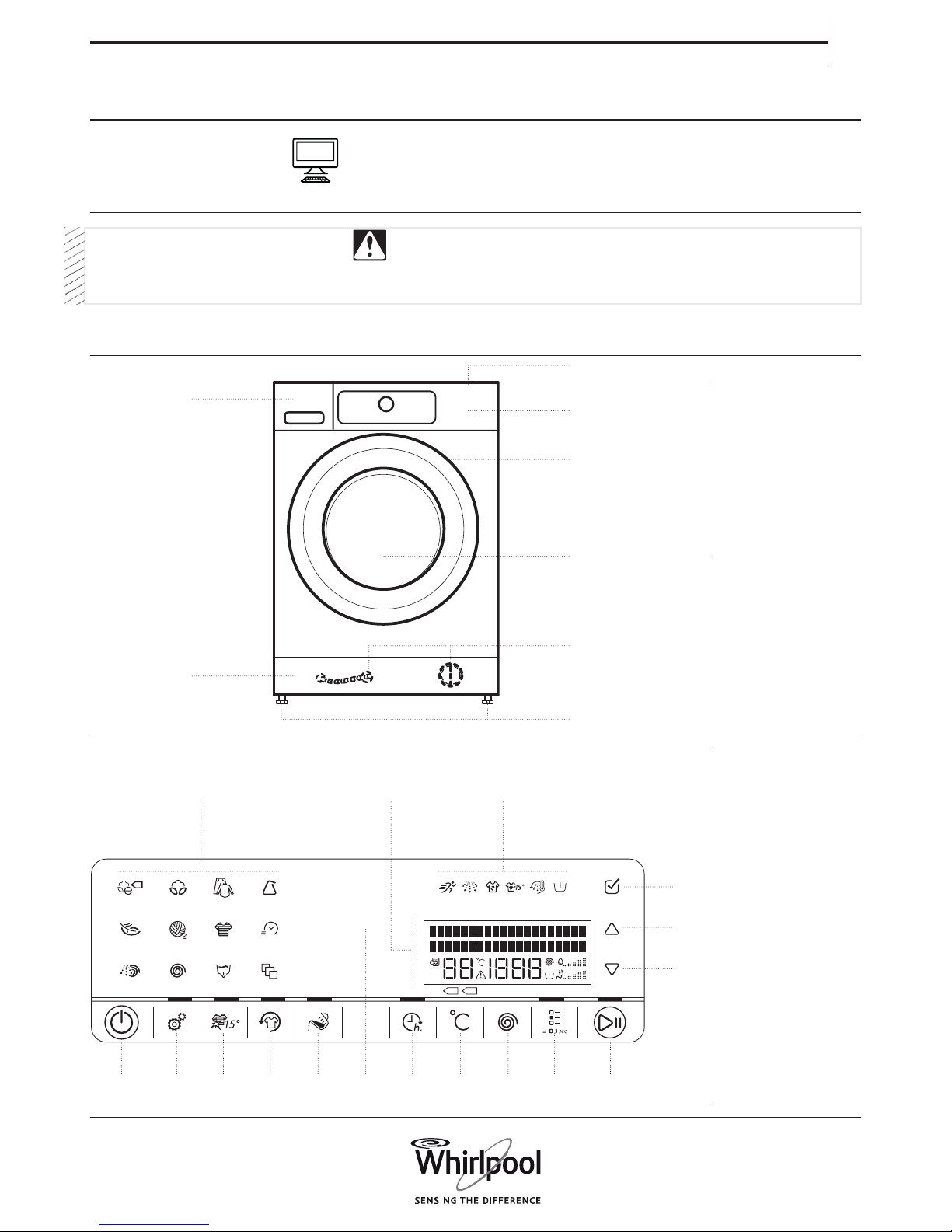
CONTROL PANEL
1. Worktop
2. Detergent dispenser
3. Control panel
4. Door handle
5. Door
6. Water lter/emergency
drain hose
(if available) - behind
plinth -
7. Plinth (removable)
8. Adjustable feet (4)
APPLIANCE
Before using the machine, the
transport bolts must be removed.
For more detailed instructions on how to
remove them, see the Installation Guide.
1. On/O button
(Reset/Drain if pressed
and held down)
2. Settings button
3. Colours 15° button
4. Fresh Care button
5. Dosing Aid button
6. Sensing indicator
7. Finish in button
8. Temperature button
9. Spin Speed button
10. Options button
(Key lock if pressed and
held down)
11. Start / Pause button
12. OK key (to conrm)
13. UP key
14. DOWN key
15. Display
16. Option indicators
17. Programme keys
THANK YOU FOR BUYING A WHIRLPOOL PRODUCT.
In order to receive comprehensive service and support,
please register your appliance at www.whirlpool.eu/register
1.
3.
2.
5.
4.
7.
6.
8.
30’
40° 60°
kg
17.
1.
2. 8.3. 9.4. 5. 6. 10. 11.
16.15.
12.
13.
14.
7.
Page 2
2
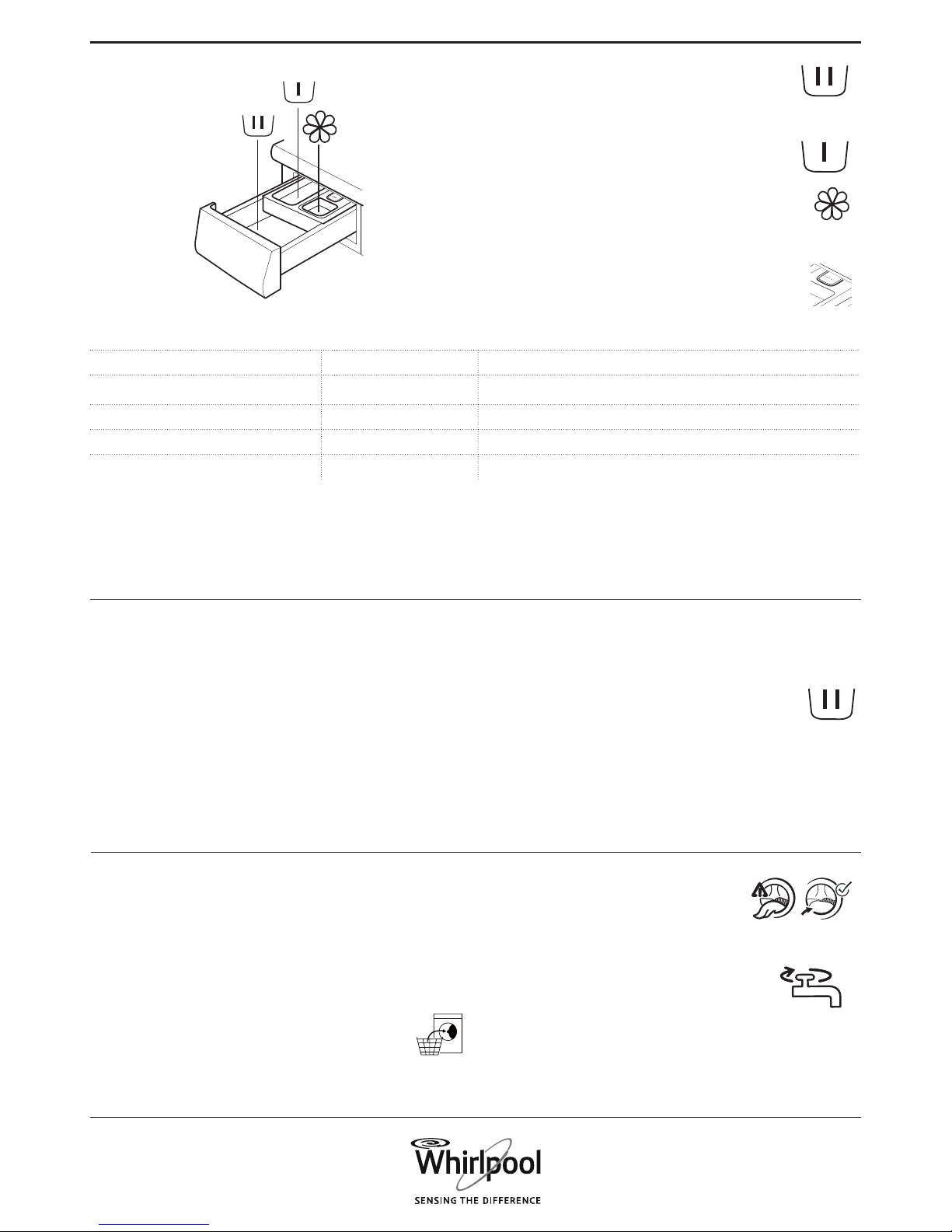
1. Main wash compartment
• Detergent for the main wash
• Stain remover
• Water softener *
2. Prewash compartment
• Detergent for the prewash.
3. Softener compartment
• Fabric softener
• Liquid starch
Pour in softener or starch solution only up to the “max” mark.
4. Release button
(Press to remove the detergent dispenser for cleaning).
DETERGENT DISPENSER
Detergent recommenDations for various types of launDry
White robust laundry (cold-95°C) Heavy duty detergents
White delicate laundry (cold-40°C) Mild detergents containing whitener and/or optical brighteners
Light/pastel colours (cold-60°C) Detergents containing whitener and/or optical brighteners
Intensive colours (cold-60°C) Colour detergents without whitener/optical brighteners
Black/dark colours (cold-60°C) Special detergents for black/dark laundry
See the section on DAILY USE for information on how to select and start
a programme.
FIRST CYCLE
If you plug in the washing machine, it will switch on automatically.
You will be asked to set the desired display language.
Press the UP or DOWN key to select the desired language,
afterwards conrm by pressing the OK key.
Afterwards you can adapt the water hardness setting of your
washing machine to your regional water hardness. This is
recommended in order to optimize the Dosing Aid function.
Choose between soft / medium / hard and conrm by pressing the
OK key.
To remove any residues from the manufacturing process:
• Select the “Cotton” programme at a temperature of 95 °C
• Add a small amount of heavy duty detergent to the
main wash compartment of the detergent dispenser
(maximum 1/3 of the quantity recommended by the
detergent manufacturer for lightly soiled laundry)
• Start the programme without adding any laundry.
See Use and Care Guide for more details on functions / see last page for
information on how to obtain the Use and Care Guide
1. LOAD LAUNDRY
• Prepare your laundry according to the recommendations in
section “HINTS AND TIPS”.
• Make sure that fasteners are closed and ribbons tied together,
fasteners closed and ribbons tied together.
• Open the door and load the laundry.
Observe the maximum load sizes given in the
programme chart
2. CLOSE DOOR
• Make sure that no laundry gets stuck
between door glass and rubber seal.
• Close the door so that you can hear it click shut.
3. OPEN THE WATER TAP
• Make sure that the washing machine is connected
to the mains.
• Open the water tap
FIRST TIME USE
DAILY USE
* Find water softener appropriate for your washing machine under
www.whirlpool.eu.
Page 3
3
EN
4. SWITCH ON WASHING MACHINE
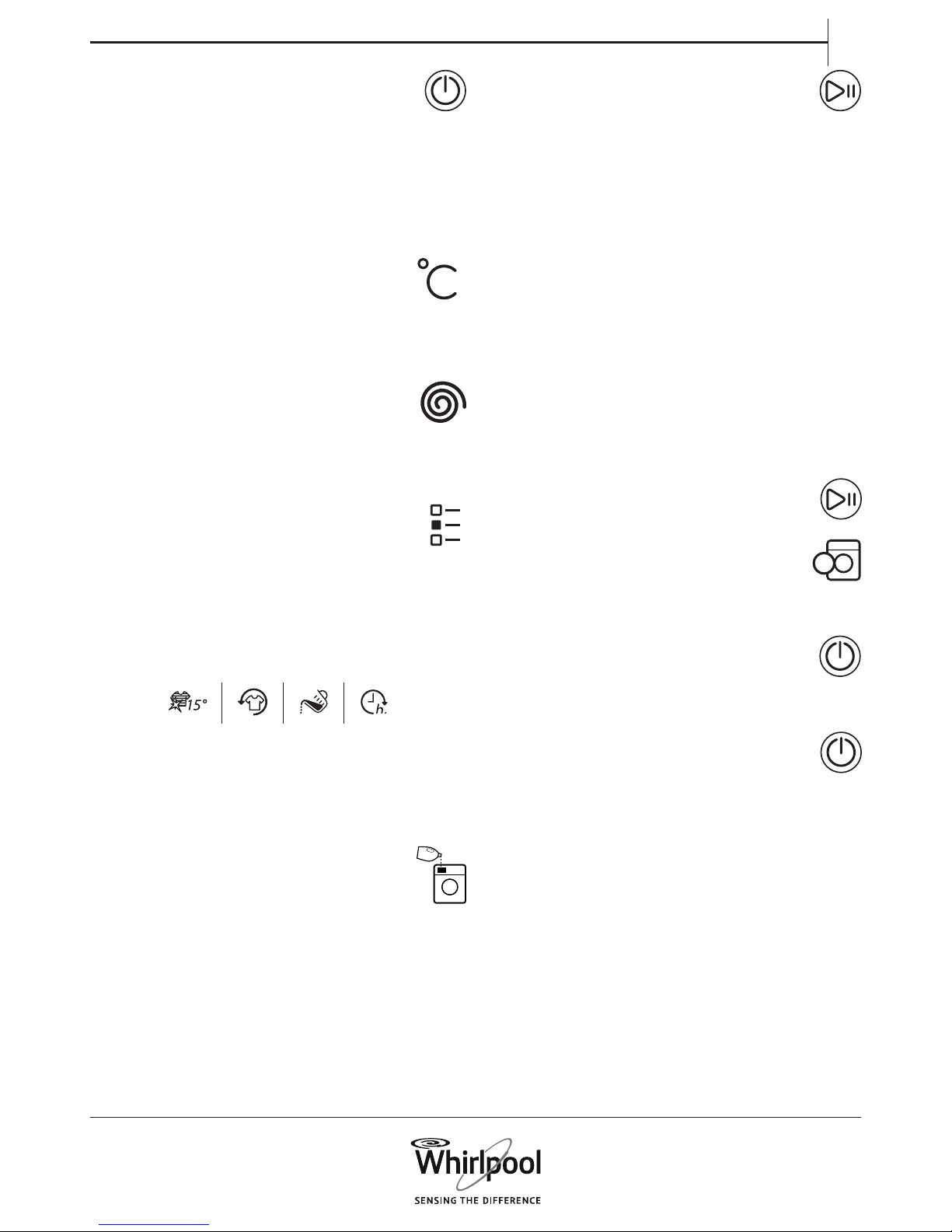
• Press the On/O button. An animation appears, and there
is a sound. The programme which was used last lights up.
Afterwards the washing machine is ready to be operated.
5. SET THE DESIRED PROGRAMME
• Select programme:
Press the programme symbol on the control panel. Programme
name, default duration, temperature and spin speed as well as
maximum laundry load appear on the display.
• Change temperature, if needed
Press the temperature button; the display indicates that the
temperature can be set.
• Press the temperature button repeatedly
OR
• press the UP or DOWN key
until the needed temperature appears on the display.
• Change spin speed, if needed
Press the Spin button; the display indicates that the spin
speed can be set.
• Press the Spin button repeatedly
OR
• press the UP or DOWN key
until the needed spin speed, or Rinse hold, appears on the display.
• Select options, if needed
Press the options button. The options which are selectable
for the programme appear on the display.
Press the UP or DOWN key to navigate through the list of options.
Press the OK key to select an option; the option symbol lights up on
the control panel.
To deselect a selected option, press the OK key again.
Some options / functions can be selected by directly pressing the
button:
If such an option is not selectable for the programme, it switches o
automatically when the button is pressed.
Refer to section OPTIONS, FUNCTIONS AND INDICATORS for more
information.
6. ADD DETERGENT
• If you do not use the Dosing Aid function, pull out the
detergent dispenser and add detergent (and additives/
softener) now, as indicated in section DETERGENT
DISPENSER.
Observe the dosing recommendations on the detergent pack. If
you have selected PREWASH or FINISH IN, observe the
recommendations in section OPTIONS, FUNCTIONS AND
INDICATORS. Afterwards carefully close the detergent dispenser.
• If you use the “Dosing Aid” function, add detergent later, after
you have started the programme. Refer to section OPTIONS,
FUNCTIONS AND INDICATORS.
• After having added detergent /additives, do not open the
detergent dispenser anymore, to avoid overow.
7. START PROGRAMME
• Press and hold “Start/Pause” until the button lights up
solidly; the programme starts.
• If you have selected “Dosing Aid”, the washing machine will
indicate you the recommended detergent amount for your
laundry load after programme start. Follow the instructions as
indicated in section OPTIONS, FUNCTIONS AND INDICATORS /
Dosing Aid.
8. CHANGE A RUNNING PROGRAMME, IF NEEDED
You can still change the settings while a programme is running. The
changes will be applied, provided the respective programme phase
has not nished yet.
• Press the relevant button (for example the “Spin speed” button to
change the spin speed). The display indicates that the value can
be set.
• Press the UP or DOWN key to adjust the value. For options
selectable with the options button: press UP or DOWN key to
select an option; afterwards press the OK key to conrm or
deselect the option.
The programme will continue automatically.
To change the settings of a running programme, you can also
• Press “Start/Pause” to pause the running programme
• Change your settings
• Press “Start/Pause” again to continue the programme.
9. PAUSE A RUNNING PROGRAMME AND OPEN
THE DOOR, IF NEEDED
• Press and hold “Start/Pause” to pause a running
programme.
• Provided water level is not too high, or laundry is not
too hot, the door indicator lights up. You can open the
door, for example to add/remove laundry.
• Close the door again and press “Start/Pause” to proceed
with the programme.
10. RESET A RUNNING PROGRAMME, IF NEEDED
• Press and hold the “On/O” button until the display
indicates that the programme is cancelled.
The water drains, the programme ends and the door
unlocks.
11. SWITCH OFF THE WASHING MACHINE AFTER
PROGRAMME END
• The display indicates that the cycle has ended, and the
“Door open” indicator lights up – you can take out your
laundry
• Press “On/O” to switch o the washing machine. If you do not
switch it o, the washing machine will switch o automatically
after about a quarter of an hour after programme end, to save
energy.
• Leave the door ajar, so that the inside of the washing machine can
dry.
Page 4
4
SORT YOUR LAUNDRY ACCORDING TO
• Type of fabric / care label (cotton, mixed bres, synthetics, wool,
handwash items)
• Colour (separate coloured and white items, wash new coloured
articles separately)
• Size (wash items of dierent sizes in the same wash load to
improve washing eciency and distribution in the drum)
• Delicates (wash small items – like nylon stockings – and items with
hooks – like bras – in a cloth bag or pillow case with zip.
EMPTY ALL POCKETS
• Objects like coins or safety pins can damage your laundry as well
as the drum.
WASH CARE LABELS
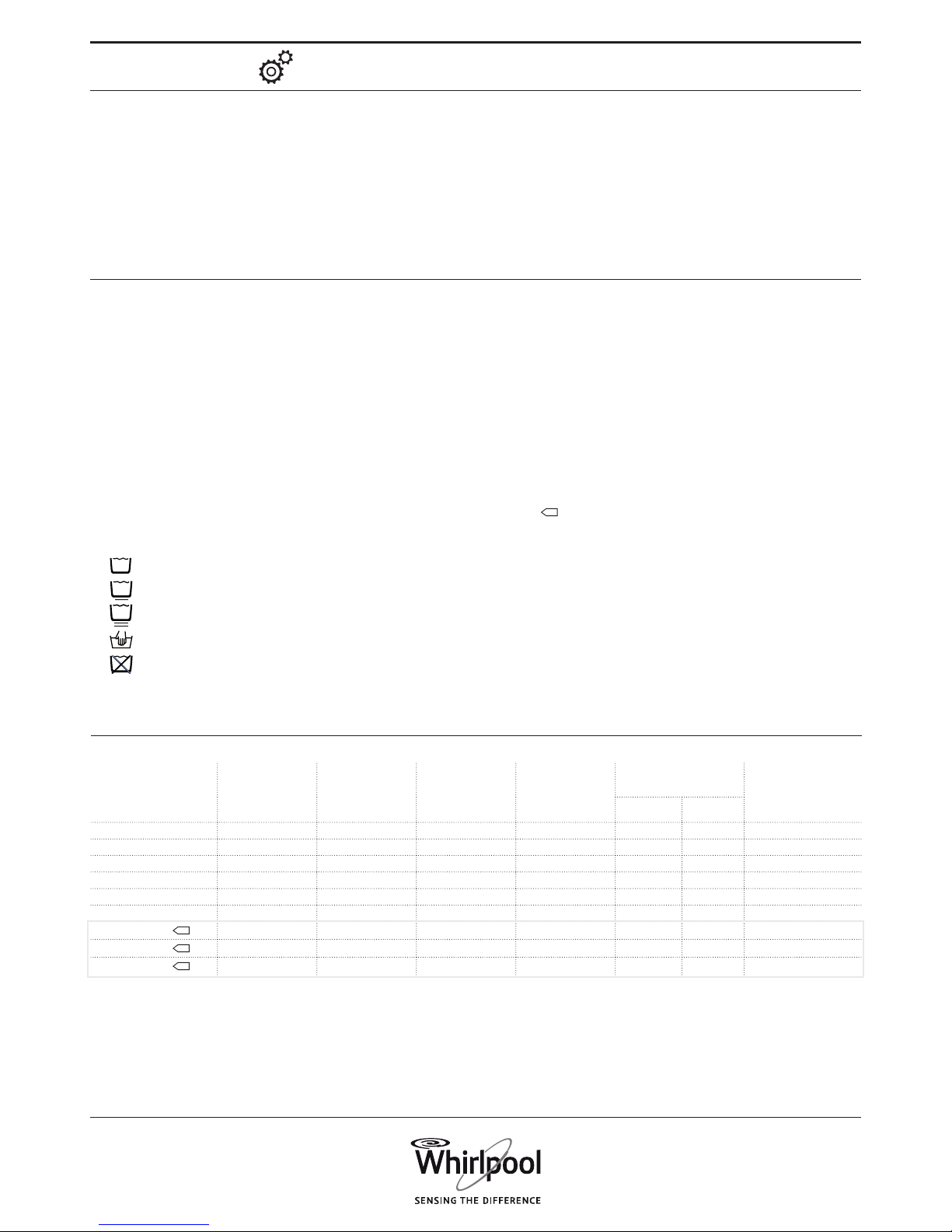
The temperature in the washtub symbol indicates the maximum
possible temperature for washing the item.
Normal mechanical action
Reduced mechanical action
Much reduced mechanical action
Hand wash only
Do not wash
CLEAN THE WATER FILTER REGULARLY
• Helps to avoid that it can get clogged and that the drain water
cannot be pumped out anymore. Refer to section CARE AND
MAINTENANCE / “Cleaning the water lter” in the Use and Care
guide.
SAVINGS AND ENVIRONMENT
• Achieve the best use of energy, water, detergent and time by
using the recommended maximum load size for the programmes,
as indicated in the programme chart.
• Do not exceed the detergent dosages indicated in the detergent
manufacturer’s instructions. Use the Dosing Aid function.
• Save energy by using a 60 °C instead of a 95 °C wash programme
or a 40 °C instead of a 60 °C wash programme. For cottons, the Eco
Cotton
programme at 40 °C or 60 °C is recommended.
• Save energy and time by selecting a high spin speed to reduce the
water content in the laundry before using a tumble dryer.
HINTS AND TIPS
SETTINGS
The following settings can be changed / selected:
Display language / key tones / cycle end alert/ display contrast /
water hardness / dosing aid (adjust dosing amounts for the
detergents you use) / eco mode (automatic switch-o function after
programme end) / return to factory settings.
• Press and hold the Settings button for at least 3 seconds.
• Select the setting which you want to change by pressing the UP or
DOWN key. Afterwards press the OK key.
• Press the UP or DOWN key to select the setting, afterwards
conrm it by pressing the OK key.
• To exit the Settings mode, either press UP or DOWN key until the
display indicates that you can exit – then conrm by pressing the
OK key. Or wait for a few seconds until the Settings mode will be
ended automatically.
PROGRAMME
TEMPERATURE
(°C)
LOAD
(KG)
WATER
(L)
ENERGY
(KWH)
APPROXIMATE
PROGRAMME
DURATION (H:MIN)
APPROXIMATE
REMAINING
MOISTURE
CONTENT (%)
WITHOUT
RAPID
WITH RAPID
Mixed 40 7.0 67 0.50 01:00 00:55 55
Cotton 95 12.0 (max) 126 3.50 03:15 -- 55
Cotton 60 12.0 (max) 120 2.00 02:35 01:55 55
Cotton 40 12.0 (max) 94 1.70 03:30 02:10 55
Synthetics 60 4.0 58 1.20 02:20 01:20 35
Synthetics 40 4.0 55 0.80 02:20 01:20 35
ECO COTTON
60 12.0 (max) 63 0.51 06:00 04:00 53
ECO COTTON
60 6.0 43 0.46 04:00 * 53
ECO COTTON
40 6.0 43 0.43 04:00 * 53
CONSUMPTION DATA
This data may dier in your home due to changing conditions in inlet water temperature, water pressure etc.
Values measured in normal conditions in accordance with IEC/EN
60456. Water, energy and remaining moisture content values refer
to the default setting of the programmes, without options.
max = maximum load capacity of the washing machine
Acoustic values on declaration label refer to appliance after
complete installation, with adhesive pads xed on bottom of
washing machine according to separate instructions.
* Duration indicated after load sensing
Eco Cotton is the standard programme for washing normally soiled
cottons, and it is the most ecient programme in terms of
combined water and energy consumption. For reasons of energy
saving,the real water temperature may deviate from the specied
cycle temperature.
Power consumption in o-mode is 0.25 W/in left-on mode 0.25 W.
Page 5
5
EN
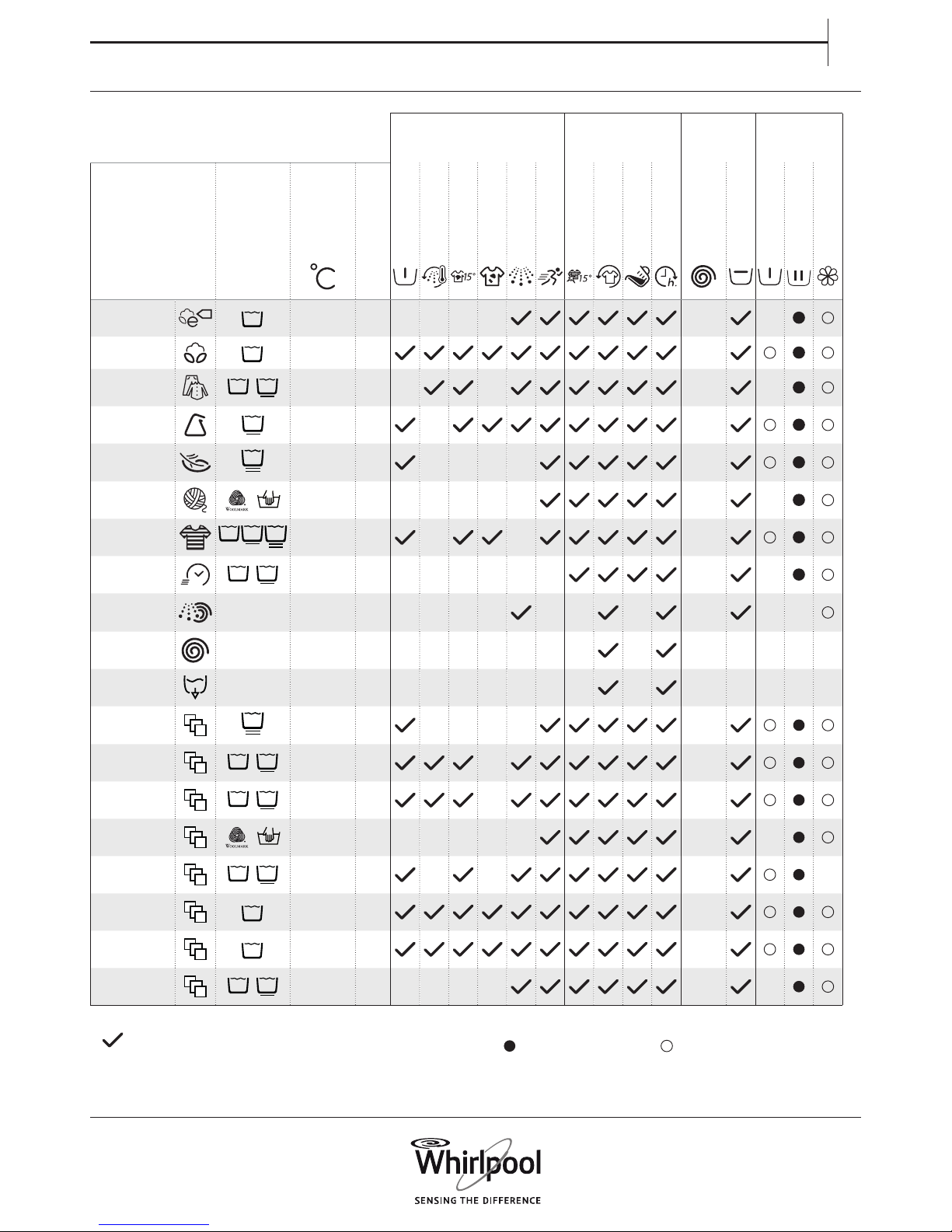
PROGRAMME CHART
Selectable using the Options
button
Selectable directly Spin Detergent and
additives
Programme
Care labels
Temperature
Max load (Kg)
Prewash
Hot Finish
Bio Stain 15
Heavy Soil
Intensive Rinse
Rapid
Colours 15°
Fresh Care
Dosing Aid
Finish in
Max. spin
speed (rpm)
Rinse hold
Prewash
Main Wash
Softener
ECO COTTON Cold/60°C max — — — — max
—
COTTON Cold/95°C max max
MIXED Cold/60°C 7.0 — — max
—
SYNTHETICS Cold/60°C 4.0 — max
DELICATES Cold/40°C 3.0 — — — — 1000
WOOL Cold/40°C 2.0 — — — — — 1000
—
COLOURS Cold/60°C 7.0 — — 1000
RAPID 30’
30’
Cold/30°C 3.0 — — — — — — max
—
RINSE&SPIN — max — — — — — — — max
— —
SPIN — max — — — — — — — — max —
— — —
DRAIN — max — — — — — — — — — —
— — —
SHIRTS Cold/40°C 3.0 — — — — 1000
DUVET Cold/60°C 3.5 — 1000
BED LINEN Cold/60°C 3.5 — max
CASHMERE Cold/30°C 2.0 — — — — — 400
—
SPORT Cold/40°C 4.0 — — max
—
JEANS Cold/60°C 6.0 1000
BABY ITEMS Cold/60°C 6.0 1000
MINI LOAD Cold/40°C 1.0 — — — — max
—
Selectable/optional
—
Not selectable/applicable Dosing required Dosing optional
Page 6
6
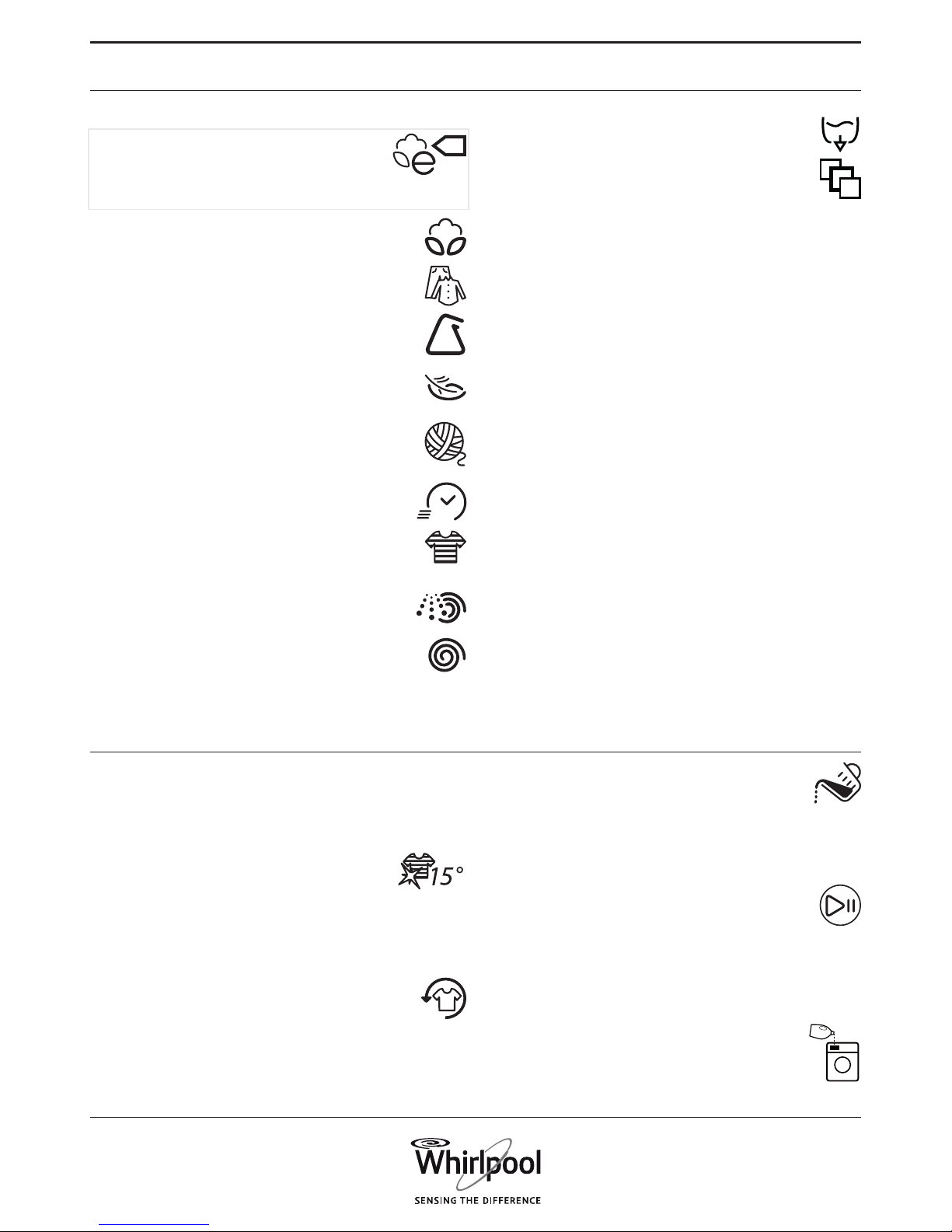
Refer to the Programme Chart to check if options are available for the
selected programme
OPTIONS which are directly selectable by pressing the
dedicated button
Colours 15°
Helps to preserve the colours of your laundry by
washing it with cold water (15°C). Saves energy for
water heating, while keeping a good wash result.
Suitable for lightly soiled coloured laundry without stains.
• Make sure that your detergent is suitable for cold wash
temperatures (15 or 20 °C).
• Not selectable for Cotton 95 °.
Fresh Care
Helps to keep your laundry fresh if you cannot unload it
soon after programme end.
The washing machine will start to tumble the laundry
periodically a short time after programme end. This tumbling will
last up to approximately 6 hours after end of your wash programme.
You can stop it at any time by pressing any button; the door unlocks
and you can take out your laundry.
Dosing Aid
Helps to dose the right amount of detergent for your
laundry load.
Prepare the option as described in DOSING AID / FIRST USE
in the Use and Care Guide.
• After you have loaded the laundry, closed the door and selected
programme and options, press the Dosing Aid button. The button
lights up.
• Start the programme by pressing “Start/Pause”. – The
drum rotates to detect the laundry load; the display
indicates the load sensing phase. On the control panel, an
animation occurs. Afterwards the recommended
detergent amount for the main wash compartment in ml appears
on the display.
If you have selected “Prewash” option, the display alternately
shows the amount for prewash (I) and main wash (II)
compartment.
• Pull out the detergent dispenser and pour the
recommended detergent quantity into the main wash (II)
and, if Prewash is selected, also into the prewash (I)
compartment of the detergent dispenser.
• Close the detergent dispenser and press “Start/Pause” to
continue the programme.
Observe the recommendations on the care labels of your laundry.
ECO COTTON
Normally soiled cotton laundry. At 40°C and 60°C
standard cotton programme and most favourable
programme in terms of combined water and energy
consumption for washing cotton laundry.
The values on the Energy label are based on this
programme
COTTON
Normally to heavily soiled and robust cotton and linen
laundry, such as towels, underwear, table linen etc.
MIXED
Lightly to normally soiled robust laundry made of cotton,
linen, articial bres and their blends. 1-hour programme.
SYNTHETICS
Normally soiled laundry made of articial bres (like
polyester, polyacryle, viscose etc.) or their blends with
cotton.
DE LIC ATES
Fine laundry made of delicate fabrics, which needs gentle
treatment.
WOOL
Woolens, labeled with the Woolmark and identied as
machine washable, as well as textiles made of silk, linen,
wool and viscose marked as handwashable.
RAPID 30’
Lightly soiled laundry made of cotton, synthetics and their
blends. Refresh programme for laundry without stains.
COLOURS
Lightly to normally soiled laundry made of cotton,
synthetics or their blends; also delicates. Helps preserving
colours.
RINSE AND SPIN
Separate rinse and intensive spin programme. For robust
laundry.
SPIN
Separate intensive spin programme. For robust laundry.
30’
DRAIN
Separate programme to drain the water, without spinning.
SPECIAL PROGRAMMES
To set one of the following programmes, select the
special programmes position. Press the DOWN and UP
keys to select one of the programmes mentioned below.
The selected programme is marked with “ > “.
Press the OK key to conrm the selected programme.
SHIRTS
Shirts, blouses and ne business clothes made of cotton, synthetics
or their blends.
DUVET
Big items such as sleeping bags, washable blankets, bathmats,
pillows and duvets lled with feathers or synthetic material.
BED LINEN
White or coloured bed linen made of cotton and synthetic bers, or
blends of both.
CASHMERE
High-quality cashmere garments identied as machine washable or
hand washable.
SPORT
Normally soiled and sweaty sportswear made of cotton jersey or
microbers.
Includes a prewash cycle – you can add detergent also to the
prewash chamber. Do not use softener.
JEANS
Normally soiled cotton jeans-wear and garments made of robust
jeans-like material, such as trousers and jackets.
BABY ITEMS
Normally soiled baby clothes made of cotton and/or linen.
The suds are rinsed out even more thoroughly, which helps to
protect sensitive baby skin.
MINI LOAD
Cotton and/or synthetic laundry made of stable fabric types.
Ideal programme for washing a small laundry load in an economic
way.
PROGRAMMES
OPTIONS, FUNCTIONS AND INDICATORS
Page 7
7
EN
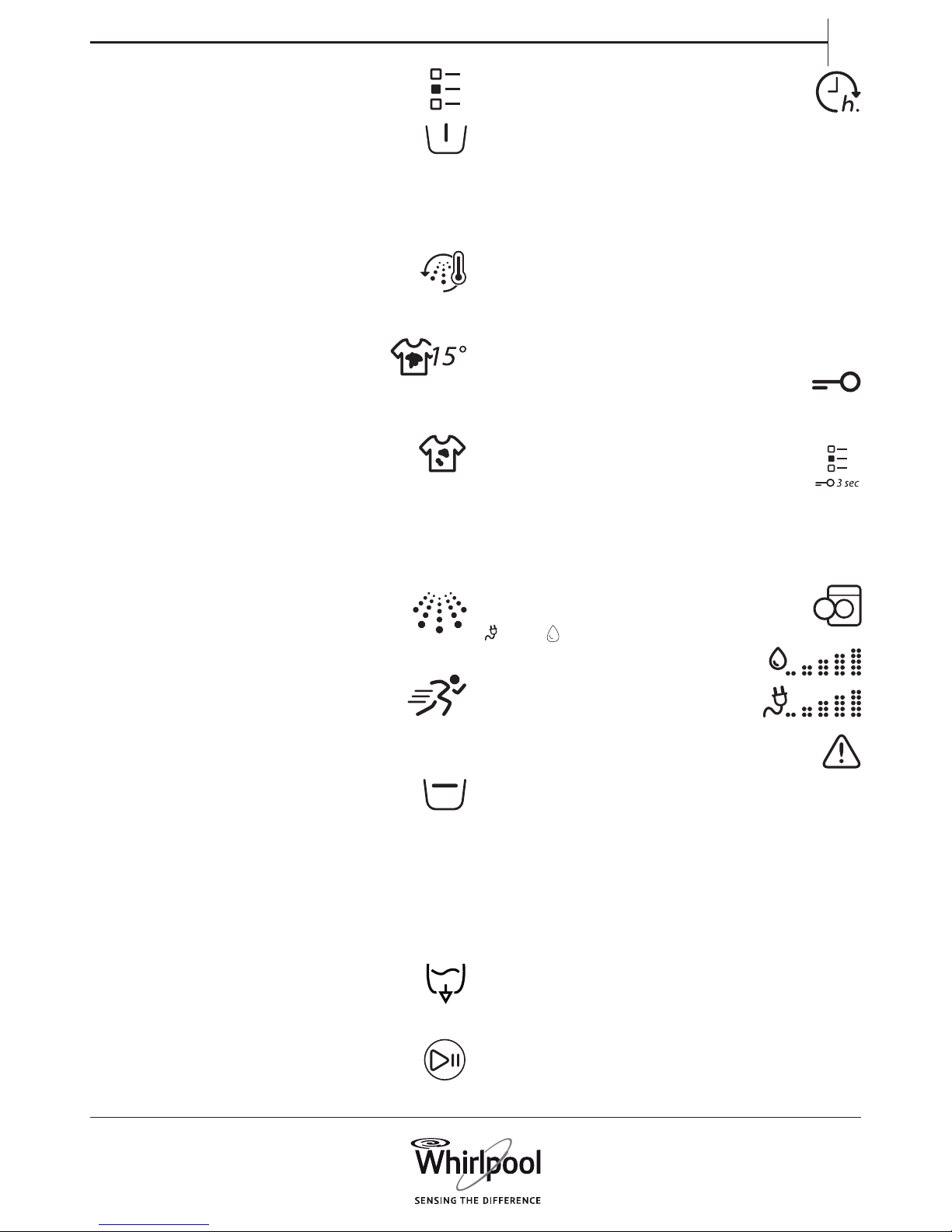
OPTIONS which are selectable by pressing the Options
button
Prewash
Helps to clean heavily soiled laundry by adding a prewash
phase to the wash programme selected.
Extends the programme by about 20 minutes.
Add detergent to the prewash compartment of the detergent
dispenser as well, or directly into the drum. Use powder detergent
for the main wash in order to ensure that the detergent stays in the
detergent dispenser until the start of the main wash phase.
Hot Finish
The programme ends with a warm rinse phase. This relaxes
the bres of your laundry, and the laundry feels
comfortably warm when taking it out a short time after
programme end.
Bio Stains 15°
Helps to remove all kinds of stains, except grease/oil.
The programme begins with a cold water wash phase.
Extends the programme by about 10 minutes.
Pre-treatment recommended for stubborn stains.
Not selectable for Cotton 95°C.
Heavy Soil
Helps to clean heavily soiled, stained laundry by optimising
the eciency of additives for stain removal.
Add an appropriate amount of in-wash additive for stain
removal (powder) to the main wash compartment, together with
your detergent (powder only). May extend the programme by up to
15 minutes.
Appropriate for use with oxygen-based stain removers and
bleaching agents.
Chlorine or perborate bleaches must not be used!
Intensive Rinse
Helps to avoid detergent residues in the laundry by
extending the rinse phase.
Particularly suitable for washing baby laundry, for people
suering from allergies and for areas with soft water.
Rapid
Enables quicker washing.
Recommendable for only lightly soiled laundry.
Not selectable for Cotton 95 °C.
FUNCTIONS
Rinse hold (selectable with Spin button)
Avoids automatic spinning of the laundry at the end of the
programme. The laundry remains in the last rinse water, the
display indicates the rinse hold and the programme does not
continue.
Suitable for delicate laundry which is not appropriate for spinning,
or which should be spun with a low spin speed. Not suitable for silk.
To select “Rinse hold”:
• Press the spin button; select Rinse hold. The Rinse hold symbol on
the display lights up.
The display indicates when the programme has reached the Rinse
hold. Choose to:
• drain the water, no spin:
press the Spin button, or the UP or DOWN key, to select
spin speed “0”. Or select programme Drain. Afterwards
press Start/Pause: the water will be drained and the
programme ended
• spin the laundry:
the default spin speed blinks - start the spin cycle by
pressing Start/Pause. Or select a dierent spin speed by
pressing the Spin button and the UP or DOWN key, and
press Start/Pause.
Finish in
Enables to have the laundry ready at a particular time by
setting a delay until end of the programme.
Choose a delay up to 23:30 hours. Do not use liquid
detergent with this function.
• Select programme, temperature and options.
• Press the “Finish in” button – the button lights up.
• Press UP or DOWN key to select a delay up to 23:30 hours.
• Press “Start / Pause” - the countdown of the delay starts. The
display indicates the Finish in period (= time until end of
programme), as well as the default programme duration.
• The programme starts automatically, in time to be nished at the
end of the delay period. On programme start, the delay on the
display is replaced by the current programme status.
To cancel the delay
• either press Start/Pause to cancel the delay; to start the selected
programme immediately, press Start/Pause again
• or press and hold On/O to cancel the complete programme
setting.
Key lock
To lock the buttons and keys of the control panel against
unwanted operation.
To lock:
• The washing machine must be switched on.
• Press and hold the option button until the display indicates
that the keys are locked. The buttons and keys are locked
now; only On/O works.
If you switch the washing machine o and on again, the key
lock remains active until you unlock it.
To unlock: press and hold the option button again for at least 3
seconds, until the display indicates that the keys are unlocked.
INDICATORS
Door can be opened
Energy / Water monitor
Gives feedback about the energy and water
consumption of your programme setting.
The less indicators light up, the more economic
is your programme setting. Can still adapt after
sensing phase of laundry load.
Failure: Observe the display message.
For any failures , refer to section Troubleshooting in the
“Use and Care Guide”.
Descaling
A display message will remind you regularly to descale the washing
machine. Find descaler appropriate for the washing machine on
www.whirlpool.eu.
To cancel the display reminder, press the OK key.
Page 8

8
Whirlpool® is a registered trademark of Whirlpool, USA
EN
400010821502
001
n
MAINTENANCE AND CLEANING
AND TROUBLESHOOTING
For maintenance and cleaning, and for
troubleshooting, see the
Use and Care Guide.
The Use and Care Guide can be obtained as
follows:
• After-Sales Service; using the phone
number in the warranty booklet
• Download from the Whirlpool Website
http://docs.whirlpool.eu
CONTACTING AFTER-SALES SERVICE
Provide both numbers shown on the service sticker inside the door
when contacting the After-Sales Service team.
http://www.whirlpool.eu
The phone number can be found in the warranty booklet.
 Loading...