

Page 1
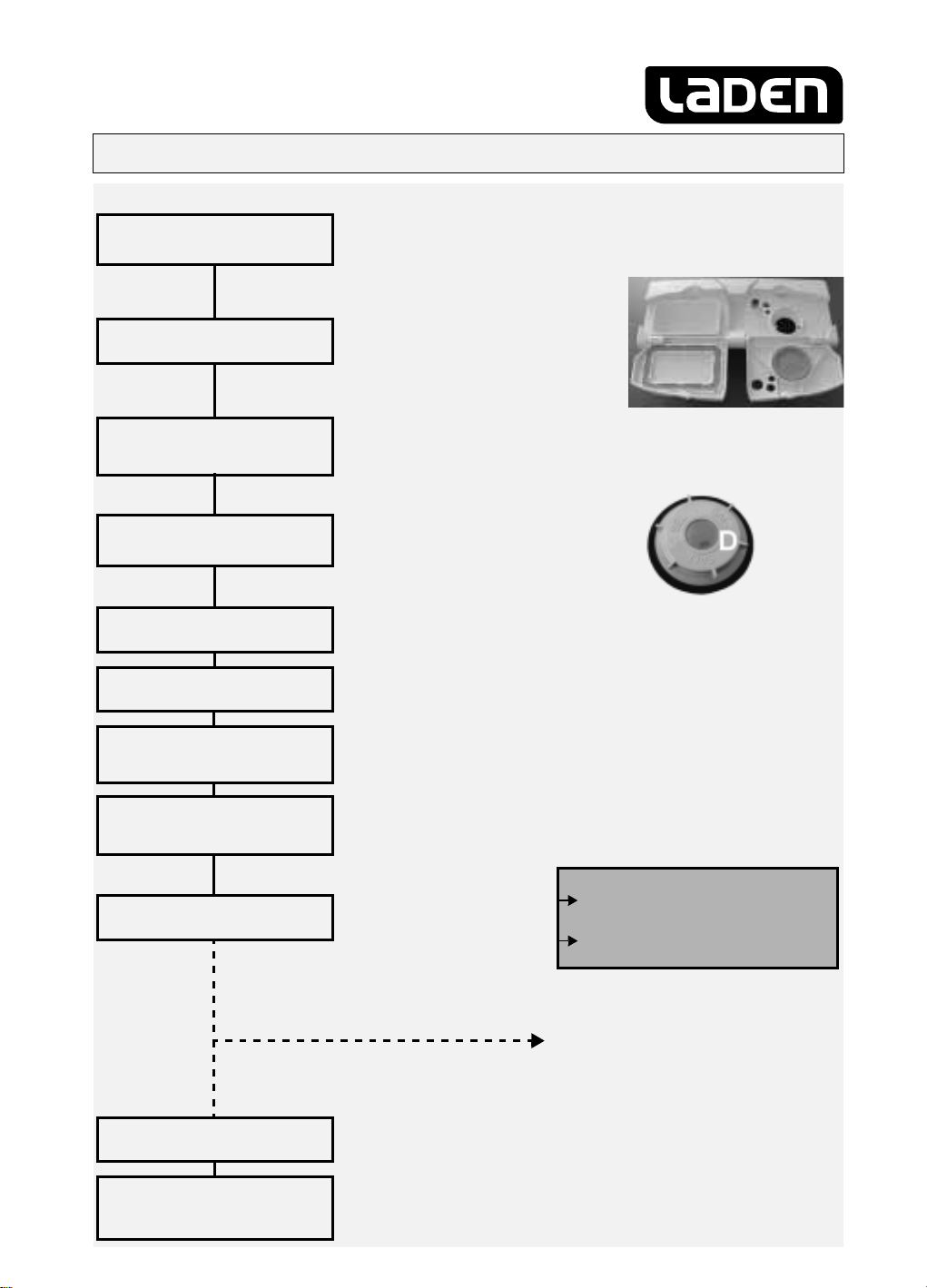
How to use the appliance
Further indications are given in the single chapters and in the user instructions.
Switch on the appliance
How to fill the
detergent dispenser
Check the rinse aid level
Check the regeneration
salt level
Load the racks
Close the dishwasher door,
turn on the water tap
Select a programme
Press the ON/OFF button.
Compartment
With each wash cycle.
Compartment
For programmes with pre-wash
only.
If using combined action dishwasher
tabs, follow the user instructions!
Mechanical indicator C.
Electric indicator on control panel (if provided).
On models with water softener
system only.
Mechanical indicator D. Electric
indicator on control panel (if provided).
Refer to the dishwasher loading instructions.
The last programme selected will light up.
Select the desired programme (using the specific button or knob).
The corresponding indicator lamp lights up.
A:
B:
ABC
Select options
Press the Start button
Wash cycle
Switch off the appliance
Turn off the water tap,
unload the racks
If necessary (and if provided) the corresponding indicator lamp lights up.
The selected programme is
then memorised (even in the
event of power failure).
Only after the START button has switched off: Press the ON/
All the indicator lamps switch off.
Warning: when the door is opened steam comes out!
Unload the appliance, starting from the lower rack.
“Change programme in progress”
Press the ST ART button for 2 sec. until
the Start indicator lamp switches off;
Select another programme and
press the START button again.
- Only open the dishwasher if necessary
(Warning: beware of hot steam).
- If the appliance is switched off during a
wash cycle, when switched on again it
will resume the cycle from where it was
interrupted.
button.
OFF
Page 2
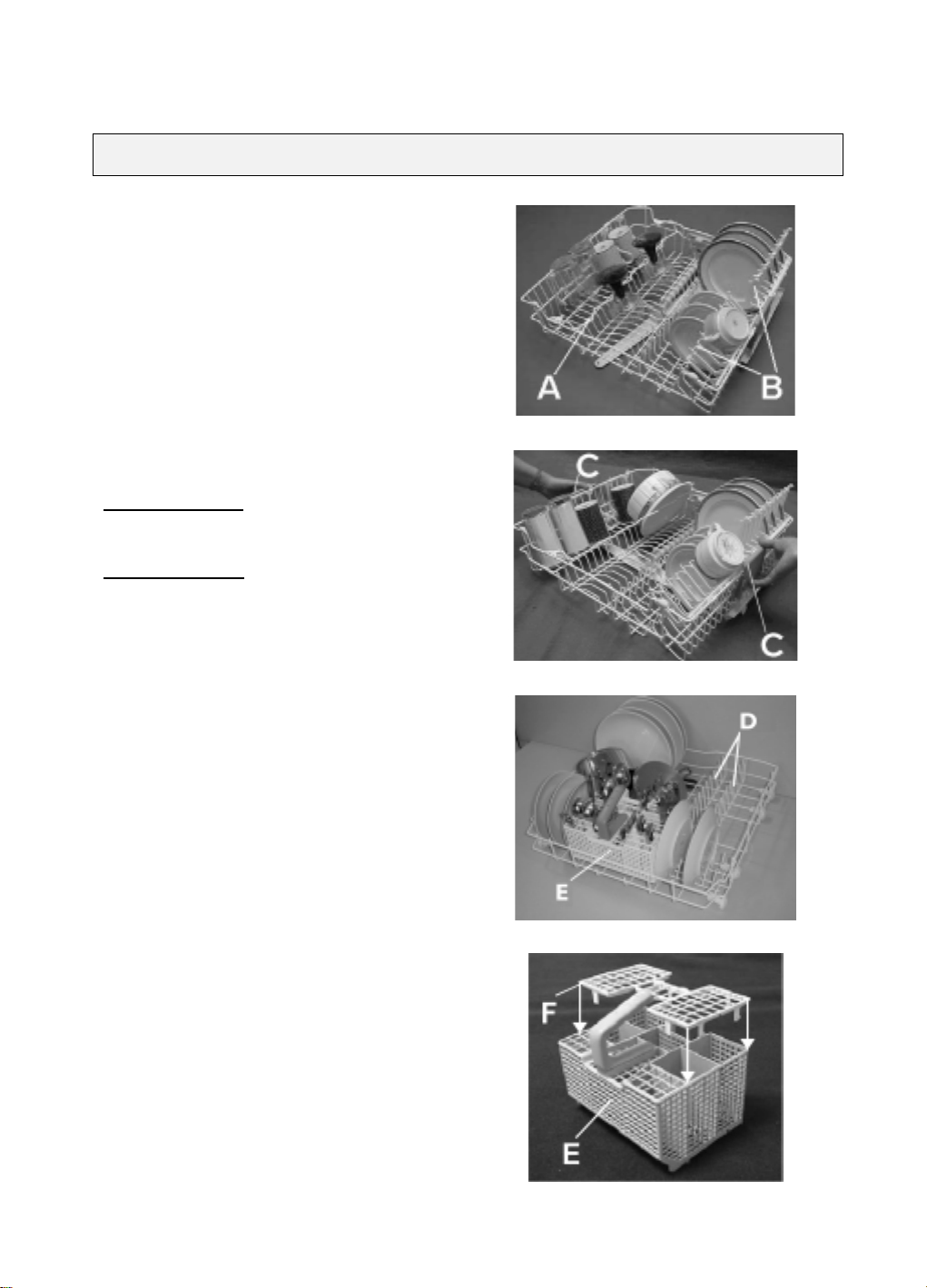
Dishwasher loading instructions and racks provided
Upper rack:
Fold down glass holder (A):
Depending on the position, for example small or
long-stemmed glasses.
Crockery holders (B):
Depending on the position, for example plates, cups
and long-stemmed glasses.
Long-handled utensils (e.g. carving forks, knives)
must be arranged with the sharp end facing in
towards the appliance.
Rack height adjustment (also when loaded):
Pull the
Lower adjustment:
Upper adjustment:
The rack must be level on both sides.
outwards and lower
(C)
the rack.
Pull the
upwards until the rack
(C)
clicks into place (factory
setting).
rack handles
two
rack handles
two
Lower rack:
Plate holders
(D)
.
Cutlery basket (E)
The grid
keep items separated.
Sharp knives and forks that might cause injury
must be placed in the cutlery basket with the
sharp end facing downwards.
Only use dishwasher-proof crockery and dishes. Do not use the appliance for items not suitable for
washing in a dishwasher, for example wooden items, aluminium, plastic utensils, tin, hand-decorated
crockery (unglazed), silver cutlery.
can be fitted onto the cutlery basket to
(F)
Page 3

What to do if...
If a fault occurs, before contacting our After-Sales Service, make the following checks to try and remedy the problem
(* see also the corresponding chapter in the user instructions).
Problem Cause Remedy
The appliance is not
• No water supply. • Open the tap.
working
If crockery is not
• The appliance does not load
sufficient water.
• There is a power failure. • Insert the plug into the mains socket.
• Starting the selected programme. • The programme can be set to “0” to start.
• Insufficient rinse aid. •Increase dosage *.
• Clean the water supply tap filter.
• Ensure there are no kinks in the water hose.
• Press the Start button.
• Close the door.
• Check the domestic circuit fuse.
perfectly dry
• Residual water in cavities. • Load crockery at an angle.
If crockery is not
perfectly clean
Sandy or grainy residues
Colour of plastic parts
faded
• The water jet does not reach
the crockery.
• Insufficient detergent. • Follow recommended detergent dosage.
• Unsuitable programme. • Select a more intense wash cycle.
• Spray arms blocked. • The spray arms must be able to turn freely.
• Spray arm nozzles clogged. • Remove any impurities obstructing the water flow *.
• Incorrect detergent/detergent too old. • Use a good quality detergent.
• Clogged filters. • Check filters regularly/if necessary clean *.
• Filters incorrectly assembled. • Insert the filter correctly *.
• Tomato/carrot juice,... • Depending on the material, if necessary use a
• Arrange crockery so that items do not touch each
other. Load crockery upside down.
detergent with a greater whitening power.
Deposits on crockery
•removable • Streaks on the crockery/glasses. • Increase the rinse aid dosage *.
• Streaks on glasses. • Reduce the rinse aid dosage *.
• Layer of salt on crockery/glasses. • Close the salt container lid properly *.
• not removable • Insufficient water softenin g,
calcium deposits.
• Change water hardness setting, if necessary add
salt *.
Opaque glasses/ glasses
• Cannot be washed in the dishwasher. • Use suitable glasses.
not sparkling
Rust on cutlery
Identifying appliance
faults
If after carrying out the above checks the malfunction persists or appears again, turn the appliance off and turn off the water
supply tap, then call our After-Sales Service (see guarantee).
Before contacting our After-Sales Service, take note of the following:
• The nature of the fault.
• The appliance type and model.
• The service code (the number indicated on the adhesive rating plate)
inside the door on the right-hand side.
• Not made of stainless steel. •Use suitable cutlery.
• The START indicator lamp flashes.
• Indicator F... (if provided).
• Ensure the filter assembly is not clogged and that
there is no interruption to the water supply
(if necessary, clean the filters *). Start the programme
again. Press the START button for 2 seconds, until the
START indicator lamp switches off. Select a new
programme and press the Start button again.
Page 4
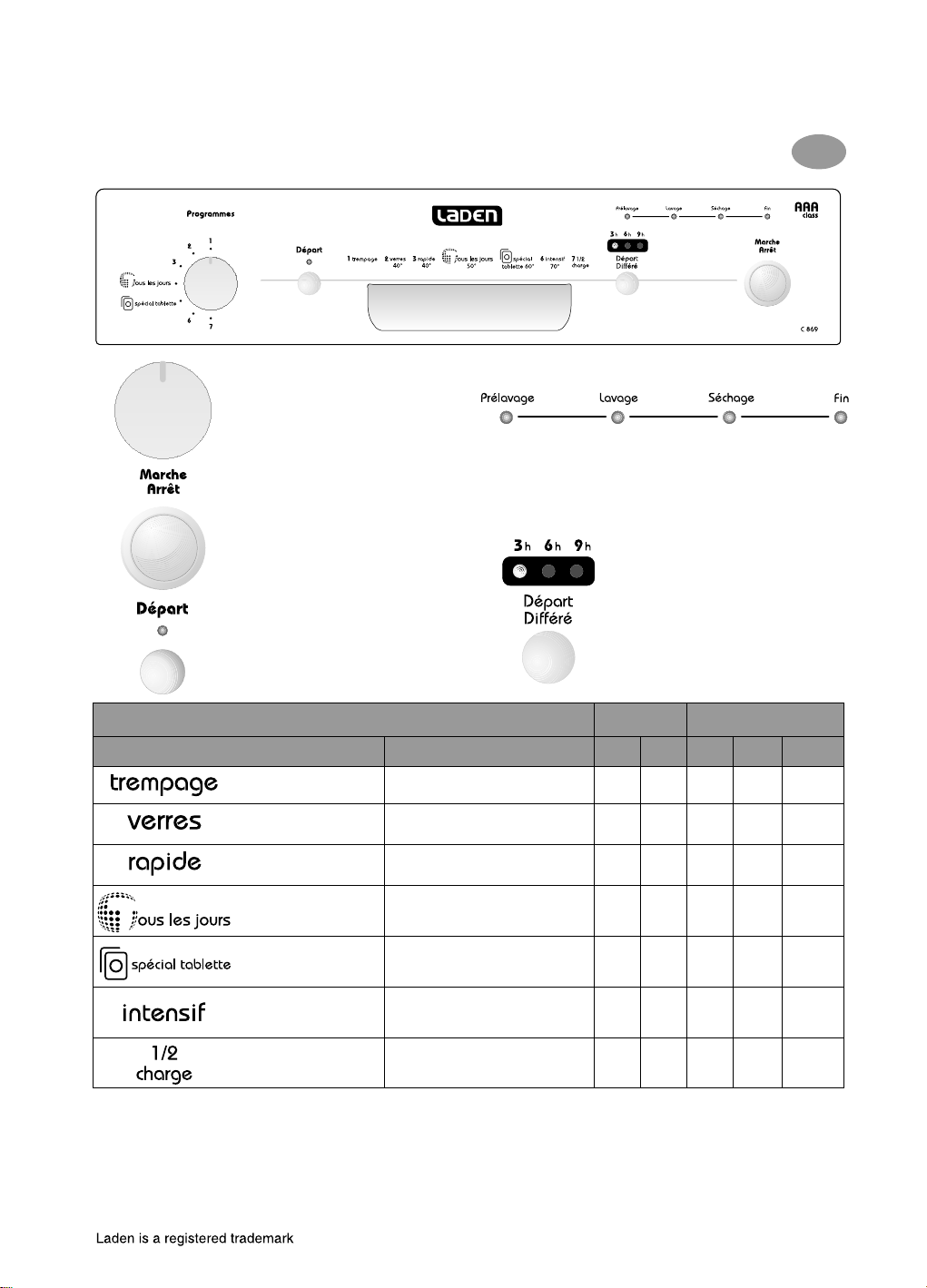
Before using the dishwasher, read the user instructions!
C 869
Quick Reference Guide
Programme selector knob
On / Off button
Start button
Switches “on” when the dishwasher is
operating. Flashes when a fault occurs.
Switches off at the end of the programme.
GB
Wash cycle
Pre-Rinse Washing Drying Programme
end
Options
3)
“Delayed start” button
The wash cycle can be programmed
to start after 3-6-9 hours. Then
press the Start button. The wash
programme will start at the set time.
Programme chart
Programmes Loading instructions A B
Pre-Rinse cold
Party Glass 40°C
Quickwash 40°C
1)
Eco
4in1 / 3in1 60°C
Intensive 70°C
Half load 50°C
1) Reference programme for energy label in compliance
with EN 50242 regulations;
2) Refer to “User instructions”;
Important information for Test Laboratories:
For detailed information on the EN comparison test and other tests, contact the following address:
“[email protected]”.
Crockery to be washed later. - - 5.0 0.02 10
Light soiling, for example glasses
and cups.
Lightly soiled crockery with no
dried-on food.
Normally soiled crockery. X X 16.0 1.05 170
50°C
Recommended programme for
normally or heavily soiled
crockery for tablet usage.
Recommended programme for
heavily soiled crockery, especially
suitable for pans and saucepans.
Ideal for washing a half load of
lightly or normally soiled crockery.
3) The data relevant to programmes are values obtained
in the laboratory in conformity with Standard EN
50242. In practical use there may be time variations
or leaps depending on different loads, function
options, water temperatures or hardness and
different power supply voltages.
Detergent
X - 13.0 0.90 97
X - 13.0 0.70 30
X - 16.0 1.35 170
X X 17.0 1.65 145
X X 13.0 1.00 130
2)
5019 696 98056
(We reserve the right to make technical modifications)
Consumption
Litres kWh Minutes
3)
 Loading...