

Page 1

3gb66032.fm5 Page 1 Friday, March 15, 2002 3:45 PM
PROGRAMMER
1
Page 2
3gb66032.fm5 Page 2 Friday, March 15, 2002 3:45 PM
PROGRAMMER
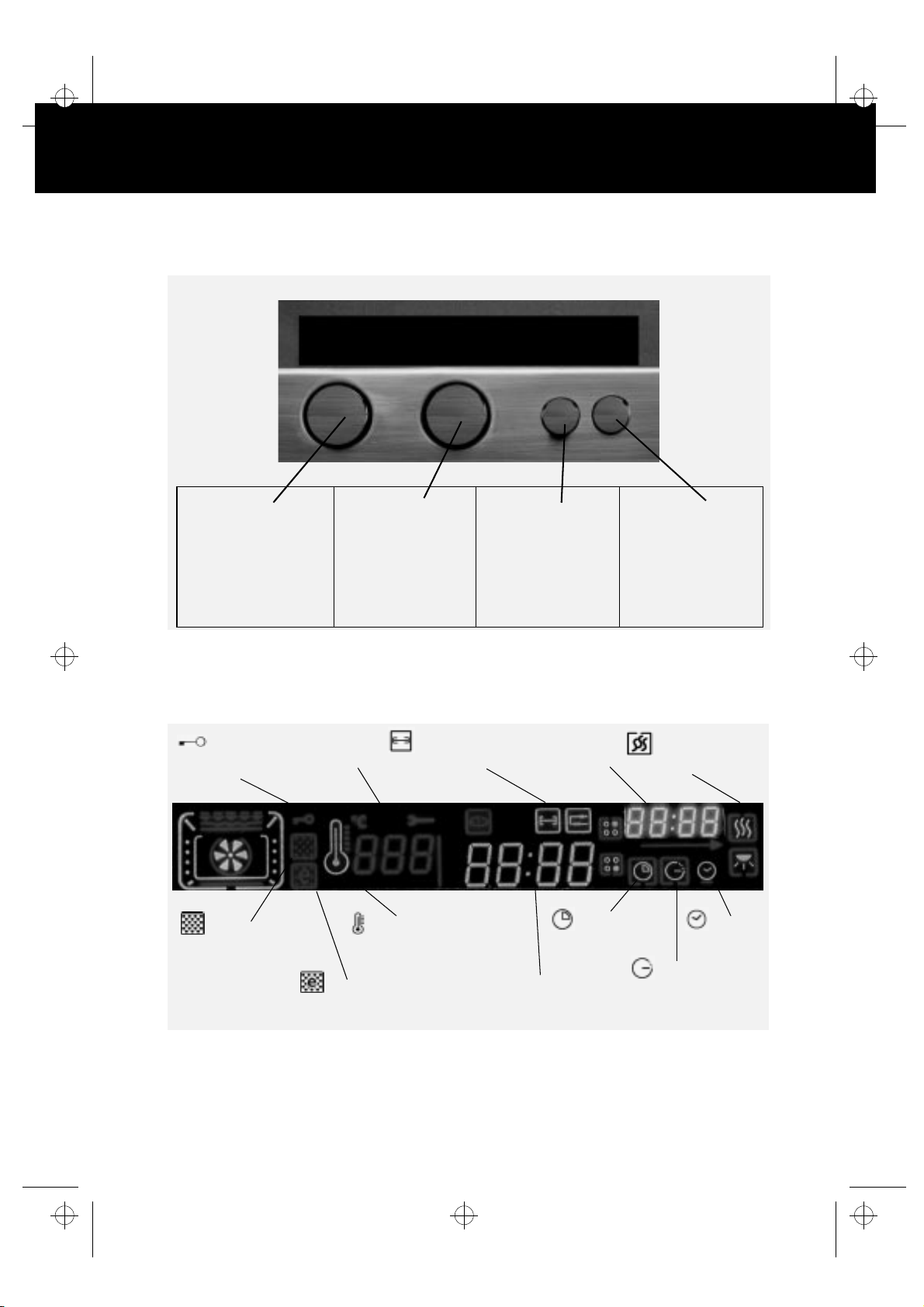
Display
Knob 1
is a selector which allows
you to select the oven
function required to cook
your meals.
Knob 2
allows you to programme:
the actual time, the
cooking time, the end of
cooking time, the
temperatures and the
power levels.
Knob 3
is used to select and
confirm the different
operations
DESCRIPTION OF THE DISPLAY
Flashing surround:
Fixed surround:
Door
lock symbol
Self-clean
function
functions that can be set or modified.
functions already activated.
Figures showing
temperature and
grill level
Turnspit
(depending on the
model)
Thermometer showing
the temperature
Figures showing
the current time
Cooking time
Knob 4
allows you to select the
Keep Hot special
function
Keep Hot
Special function
Current
time
Economic
self-clean function
2
Figures showing
Cooking Time and Timer
time
Switch-off
Page 3
3gb66032.fm5 Page 3 Friday, March 15, 2002 3:45 PM
QUICK GUIDE TO OVEN OPERATION
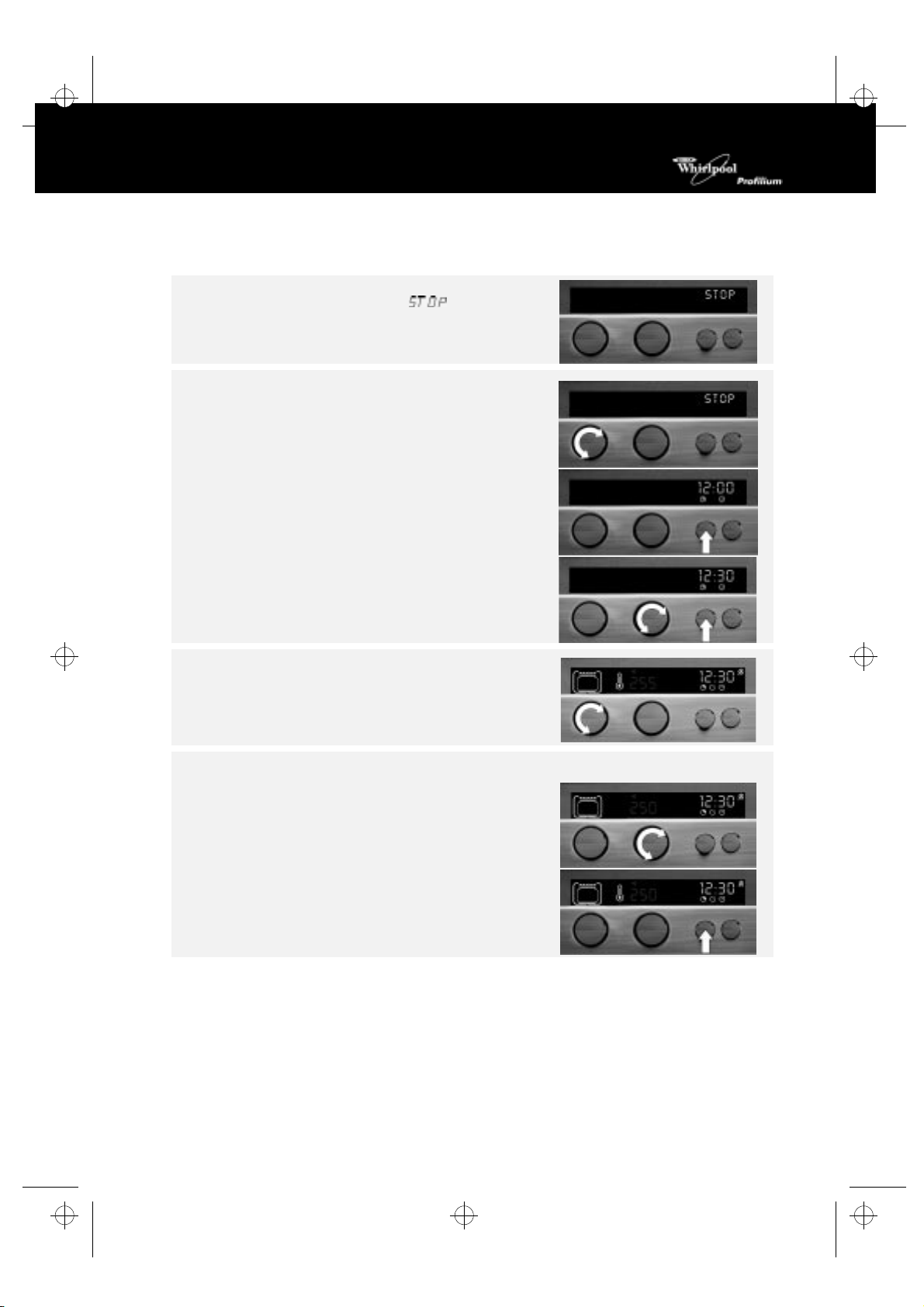
After connecting the oven to the power supply for the first time,
or after a power cut, the display shows
To operate the oven:
1.
Turn
knob 1
, the index on the top.
.
2.
3.
4.
Selecting the cooking functions
1.
To change temperature or grill level:
1.
2.
button 3,
Press
knob 2
Turn
the automatic confirmation of the data or press button 3.
Select the cooking function.
Turn knob 1 to the required function: the display indicates
the temperature or the grill level proposed.
If this value is correct, wait a few seconds to have the value
accepted automatically.
knob 2:
Turn
level while flashing.
button 3
Press
data confirmed automatically.
3 times.
to set the current time. Wait a few seconds for
the display shows the temperature or the grill
to confirm or wait a few seconds to have the
3
Page 4
3gb66032.fm5 Page 4 Friday, March 15, 2002 3:45 PM
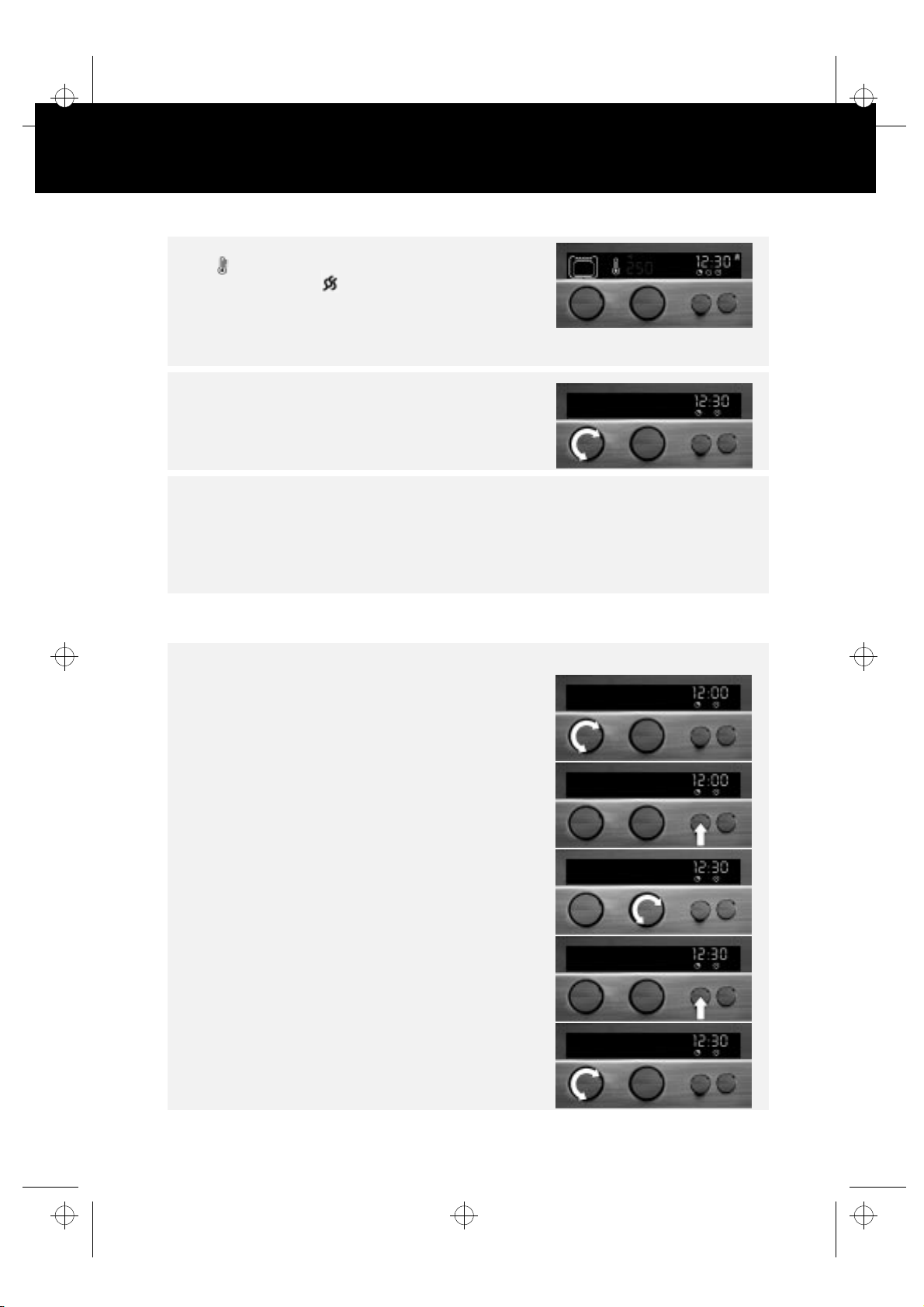
The oven starts: on the display, the indicators next to the
symbol light up progressively, indicating that the
temperature is rising. The symbol also lights up.
N.B.
A few seconds after the function is selected, the oven starts
cooking: the temperature or the level of the grill can still be set
or changed.
Once the food is cooked:
Switch the oven off by turning
General remarks:
Remember that to cancel any selection, all you need to do is to turn
If you change the position of
cancelled.
For safety reasons, the oven switches off automatically after 4 hours 30 minutes of continuous
operation.
knob 1
, the index to the top.
knob 1
while cooking is in progress, all values previously set are
knob 1
to
0
.
OPERATING THE OVEN WITH THE PROGRAMMER
Selecting the current time if it is not already set:
1.
2.
3.
4.
To modify the time:
Turn
described above.
knob 1
Turn
Press
Turn
the time flashes on the display.
Press
confirmed automatically.
knob 1
with the index to the top.
button 3
knob 2
button 3
twice.
to set the current time:
or wait a few seconds to have the data
, the index to the top and repeat the operations
4
Page 5
3gb66032.fm5 Page 5 Friday, March 15, 2002 3:45 PM
OPERATING THE OVEN WITH THE PROGRAMMER
Selecting the cooking time
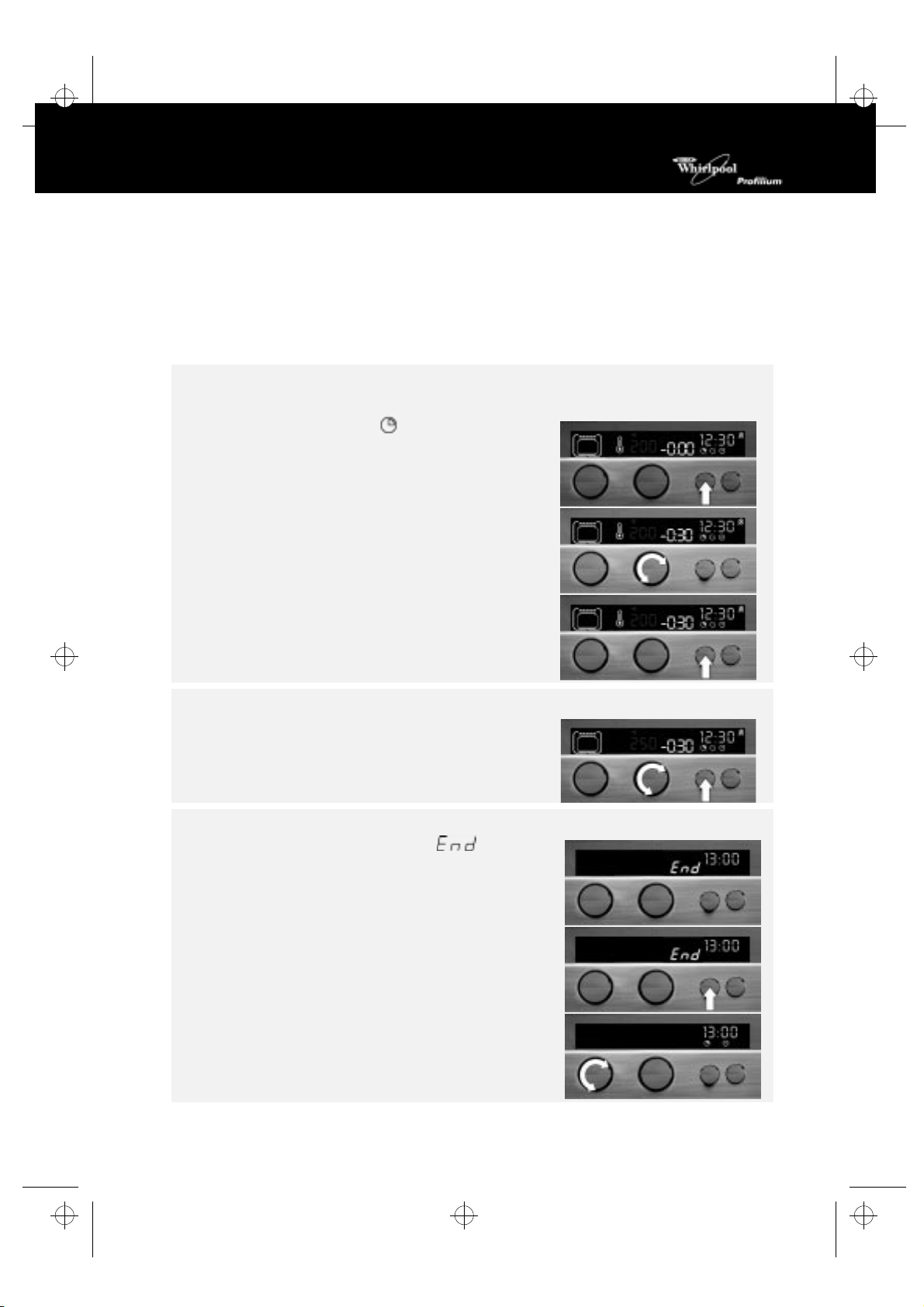
The cooking time allows you to operate the oven (with any function) for a specified time, at the end of
which the oven switches off automatically.
The maximum programmable cooking time is 4 hours for all functions, including the self-cleaning function;
however, for the defrosting function it is 10 hours.
1.
After setting the function and the temperature or the level of the grill:
Quick guide to oven operation - Selecting the cooking function
See
2.
3.
4.
To change the temperature or the level of the grill set:
1.
Once the food is cooked:
An audible signal begins, the display shows
and the oven switches off automatically. The oven light stays on
for a while.
button 3
Press
the display.
knob 2
Turn
flashes on the display. The message - in front of the
selected value indicates that the time will start to count
down to 0.
Wait a few seconds for the automatic confirmation of the
data or press
The oven will start to operate.
knob 2
Turn
seconds to have the data confirmed automatically.
until the symbol
in a clockwise direction: the time selected
button 3
and confirm by pressing
.
and -0:00 appear on
button 3
or wait a few
(End)
1.
2.
Press
Turn
button 3
knob 1
to stop the audible signal.
back, the index to the top.
5
Page 6
3gb66032.fm5 Page 6 Friday, March 15, 2002 3:45 PM
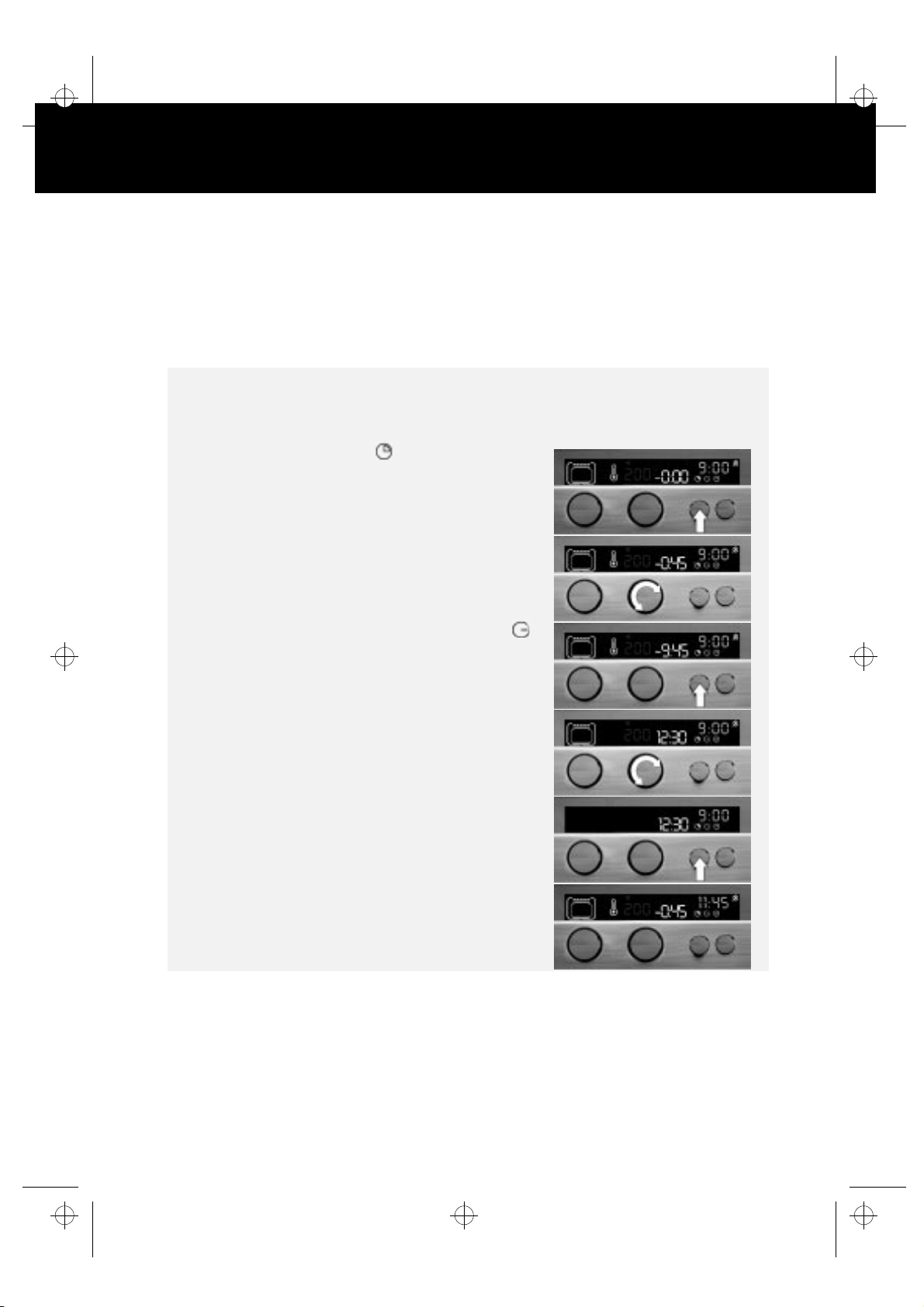
SELECTING THE SWITCH-OFF TIME
Using this operation it is possible to schedule the oven to start at a specified time and to set the time at
which you want to finish cooking, by programming it to switch off automatically.
Example: if the time is now 9:00, it is possible to schedule the operation of the oven for a period of 45
minutes, in such a way that the cooking ends at 12:30; the maximum time that can be programmed is 23
hours and 59 minutes.
1.
After setting the function and the temperature or the level of the grill:
Quick guide to oven operation - Selecting the cooking function
See
2.
Press
the display.
button 3
until the symbol and -0:00 appear on
.
3.
Set the cooking time by turning
(e.g. 45 minutes) flashes on the display.
4.
5.
6.
7.
button 3
Press
appears and the display shows the current time and the
cooking time (e.g. 9.00 o'clock + 45 minutes = 9:45).
Select the time at which you want the cooking to end, by
turning
button 3
Press
seconds to have the data confirmed automatically.
The oven starts at the pre-set time (the switch-off time less
the cooking time: for example.: 11:4).
to confirm the data selection: the symbol
knob 2
(for example, 12:30)
to confirm the data selection, or wait a few
knob 2:
the time selected
6
Page 7
3gb66032.fm5 Page 7 Friday, March 15, 2002 3:45 PM
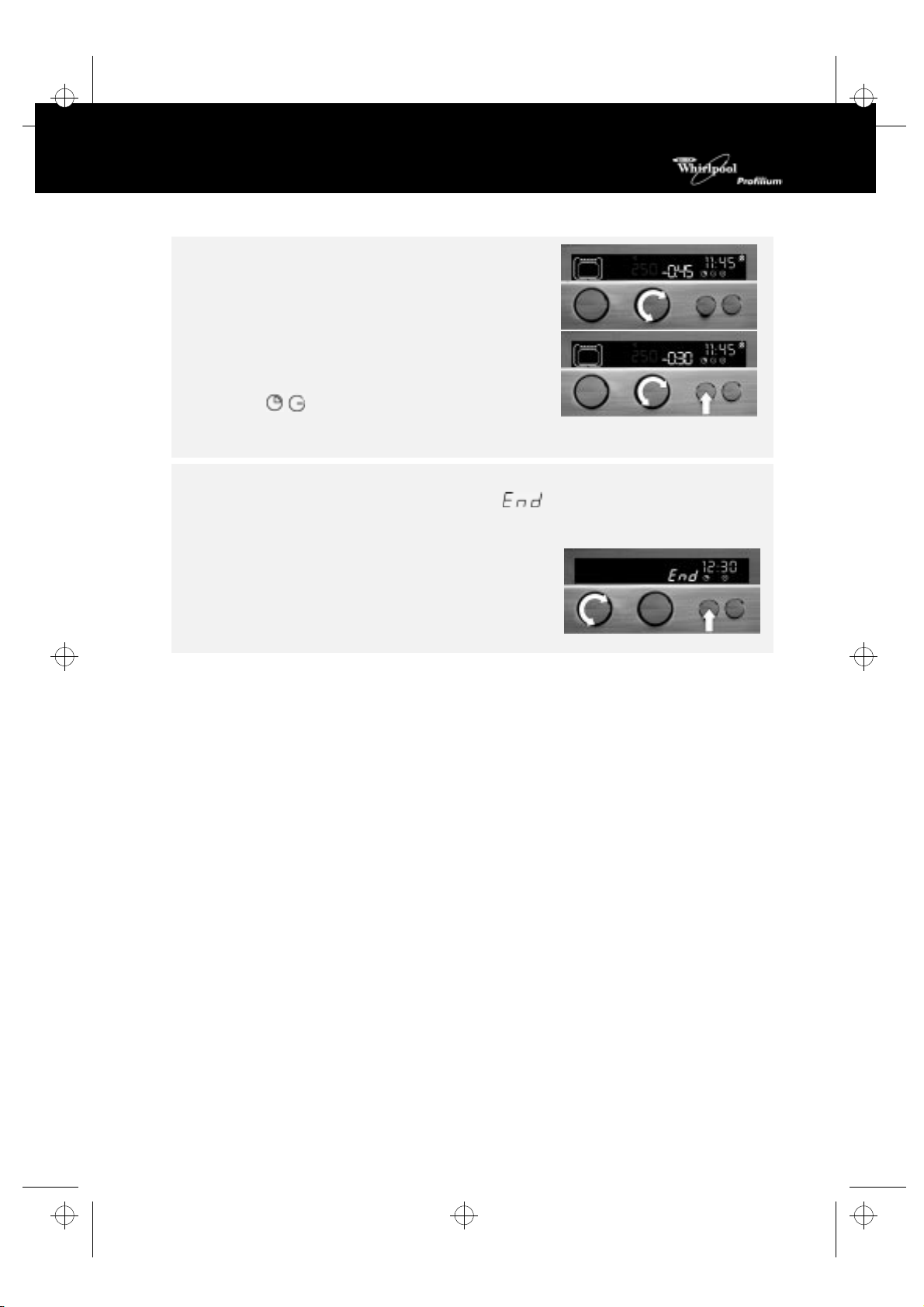
To change the temperature or the level of the grill set, turn
knob 2 one notch.
To verify or modify the cooking time (45 minutes) or the
switch-off time (12:30), press button 3, while turning knob 2.
When the oven starts.
The symbols and the cooking time set are shown on
the display.
Once the food is cooked:
An audio signal begins. The display shows the message , and the oven switches off
automatically.
The internal light stays on for a moment.
1. Press button 3 to stop the audible signal and turn the light out.
2. Turn knob 1 back with the index to the top.
7
Page 8
3gb66032.fm5 Page 8 Friday, March 15, 2002 3:45 PM
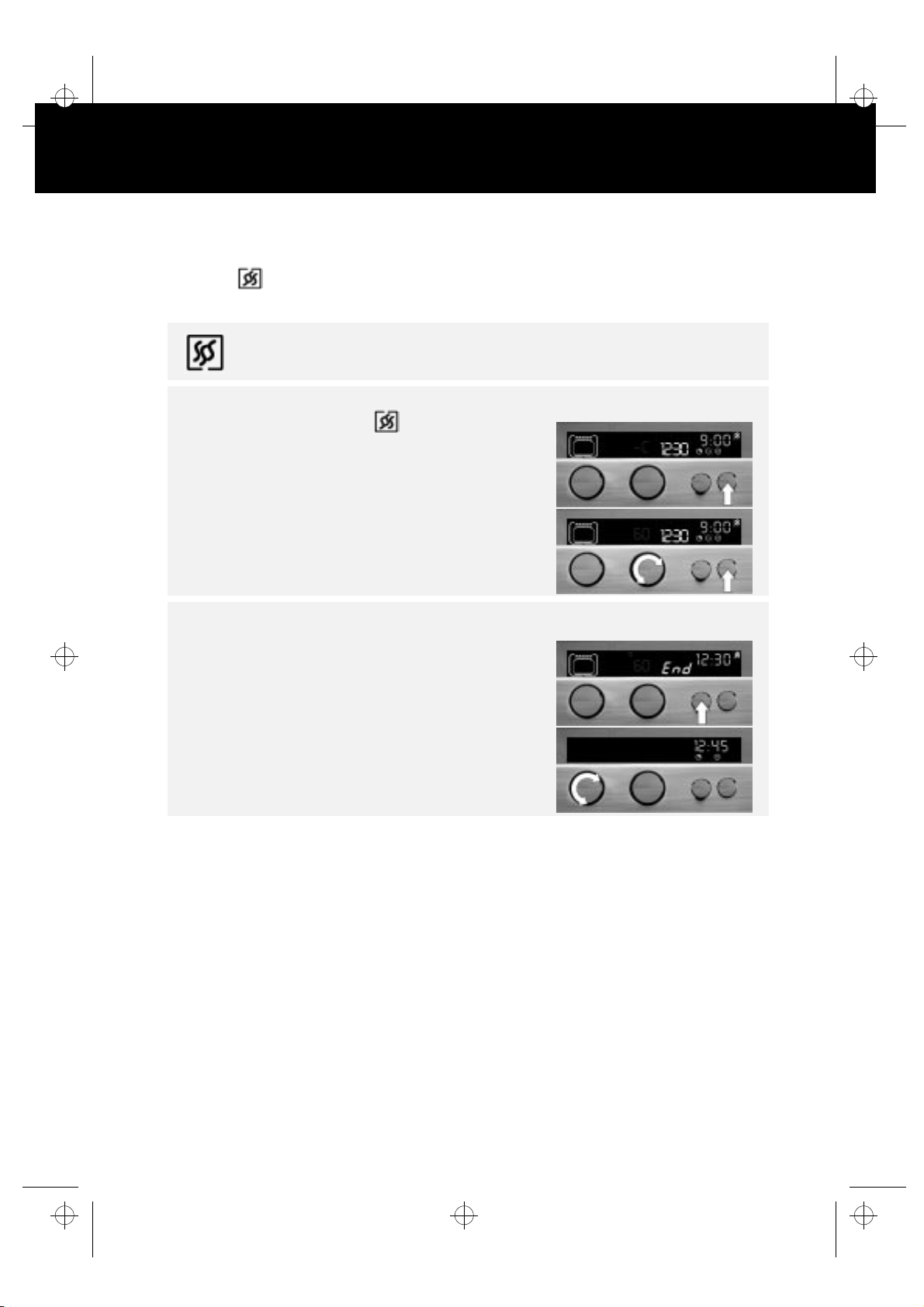
SPECIAL FUNCTION
KEEP HOT
This function is only available when programming the cooking time or switch-off time.
This function keeps the temperature in the oven at
To cancel the function, turn
After setting the function, the temperature, the cooking time or the switch-off time:
knob 1
, to bring the index to the top.
60°C
at the end of the cooking cycle.
1.
2.
At the end:
An audio signal starts and the display shows 60°C.
1.
2.
button 4
Press
appear on the display.
knob 2
Turn
button 4
Press
confirmed automatically.
button 3
Press
The oven will maintain a temperature of 60°C as long as
knob 1
until the symbol
to select 60C.
or wait a few seconds to have the data
to stop the audible signal.
is not turned back with the index to the top.
and the message --C
8
Page 9
3gb66032.fm5 Page 9 Friday, March 15, 2002 3:45 PM
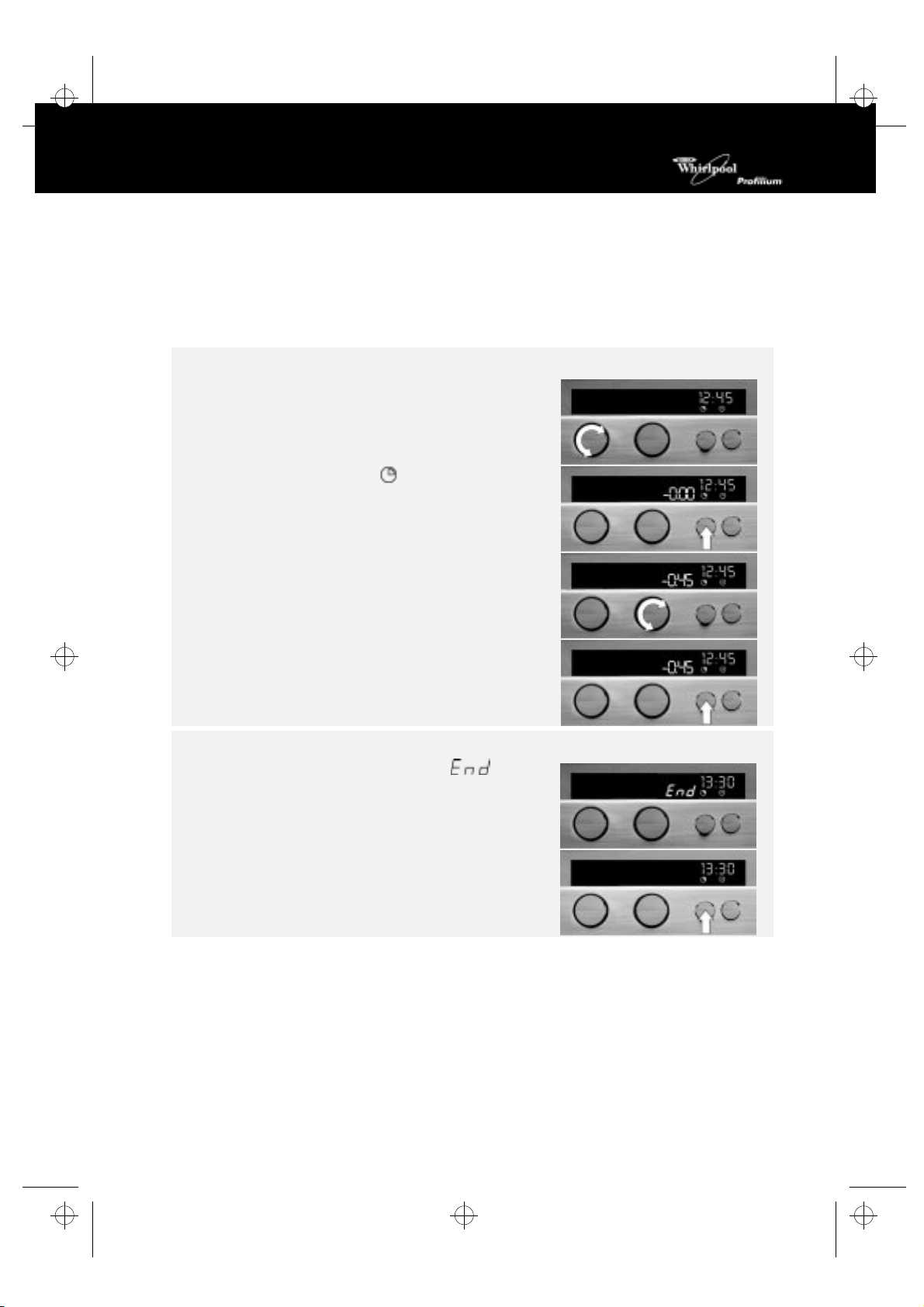
SELECTING THE TIMER
The oven has a timer which can be used to control the length of cooking processes carried out using
appliances other than the oven (for example: microwaves, built-in hobs, toasters). (The maximum time
which can be set is
4 hours - regardless of the oven function).
To set the time:
1.
knob 1
Keep
shows the current time.
, the index at the top as in Fig. 1. The display
2.
3.
4.
When the set time has elapsed:
An audible signal begins and the display shows
Press
button 3
Press
knob 2
Turn
flashes on the display. The message - in front of the
selected value indicates that the time will start to count down
to 0.
button 3
Press
confirmed automatically.
button 3:
until the symbol appears on the display.
in a clockwise direction. The time selected
or wait a few seconds to have the data
the audible signal stops.
.
9
Page 10
3gb66032.fm5 Page 10 Friday, March 15, 2002 3:45 PM
NOTES
5019 310 66032
10
GB
Ecological Paper
Printed in Italy
1/0302
 Loading...