

Page 1

Wheatfield AudioWheatfield Audio
HA-4 Headphone Amplifier
Users Manual
DRAFT 2/17/00
Wheatfield Audio LLC
Andale, Kansas USA
www.headphoneamp.com
Page 2

Contents
Contents....................................................................................................... 2
Important Information................................................................................ 3
Power requirement: .......................................................................................... 3
Fuse type: ........................................................................................................... 3
HA-4 Headphone Amplifier - Front Panel ............................................... 4
HA-4 Headphone Amplifier - Front panel controls ................................ 5
HA-4 Headphone Amplifier - Rear Panel ................................................ 6
The HA-4 Headphone Amplifier ............................................................... 7
Wheatfield Audio's Warranty .................................................................... 7
Connecting your HA-4 ............................................................................... 8
Power .................................................................................................................. 8
Audio Inputs ....................................................................................................... 8
Headphones ...................................................................................................... 8
Using with your HA-4................................................................................... 9
The HA-4 controls in detail....................................................................... 10
The Volume Control ........................................................................................ 10
The EQ controls................................................................................................ 10
The Crossfeed Selector................................................................................... 10
The Bypass switch ............................................................................................ 10
Specifications ............................................................................................ 11
EQ response plot ............................................................................................. 11
Crossfeed response plot................................................................................. 11
Wheatfield Audio Wheatfield Audio HA-4 Users Manual
- 2 -
Page 3
Important Information
! CAUTION:
For protection against electric shock, do not open covers. No user-serviceable
parts inside. Refer servicing to qualified personnel. Replace fuse only with same
type and rating.
Before connecting AC power, ensure that the voltage selector switch is set
correctly for your local power.
Power requirement:
100-135 -or- 200-250 VAC, 50-60 Hz
Fuse type:
IEC 127/III 250V 0.20 A
Buss GDC or S506
Littlefuse 218
Wickman 195
Schurter FSF
Wheatfield Audio Wheatfield Audio HA-4 Users Manual
- 3 -
Page 4
HA-4 Headphone Amplifier - Front Panel
+8dB
+4dB +12dB
+8dB
+12dB
+4dB
+8dB
+4dB +12dB
Wheatfield Audio HA-4
Wheatfield Audio Wheatfield Audio HA-4 Users Manual
- 4 -
Page 5
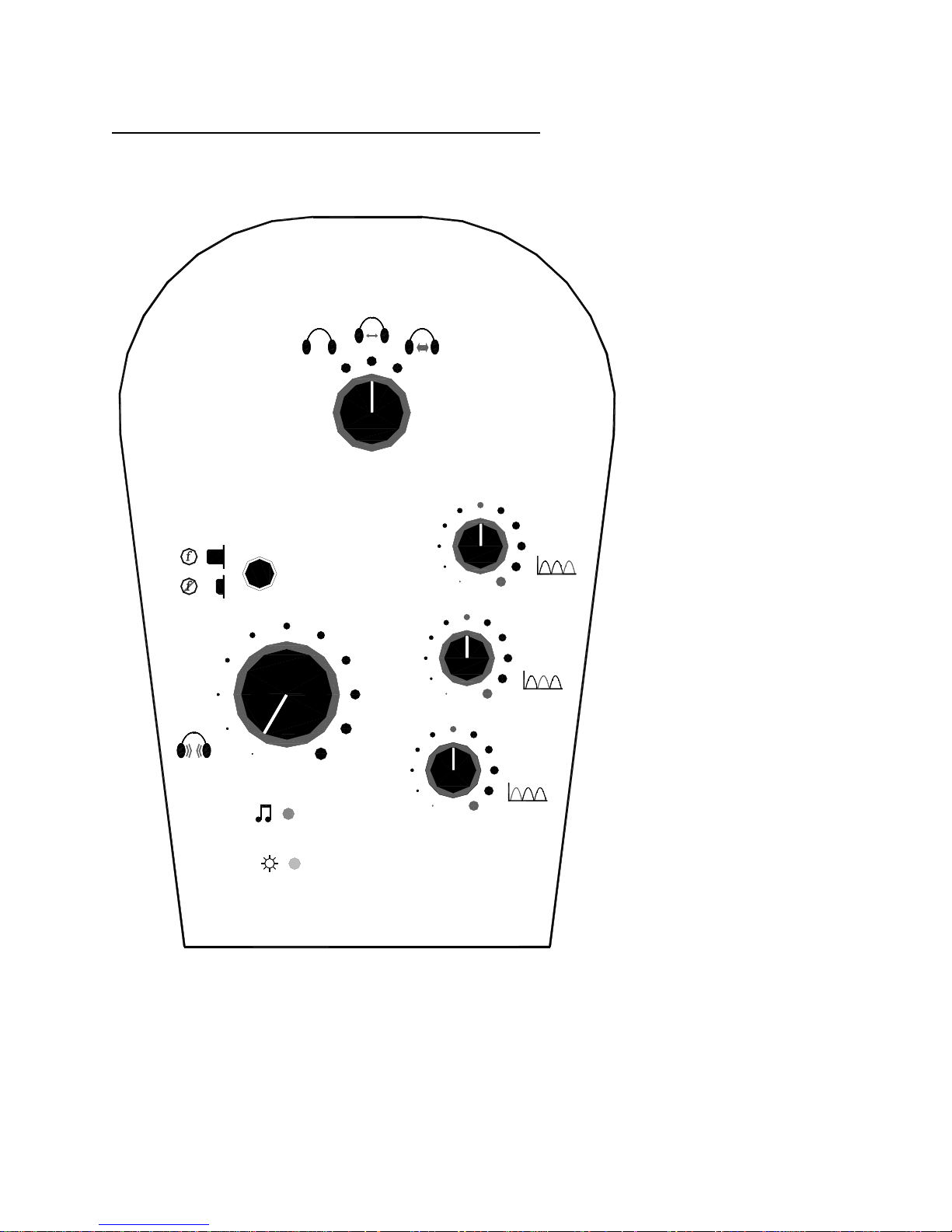
HA-4 Headphone Amplifier - Front panel controls
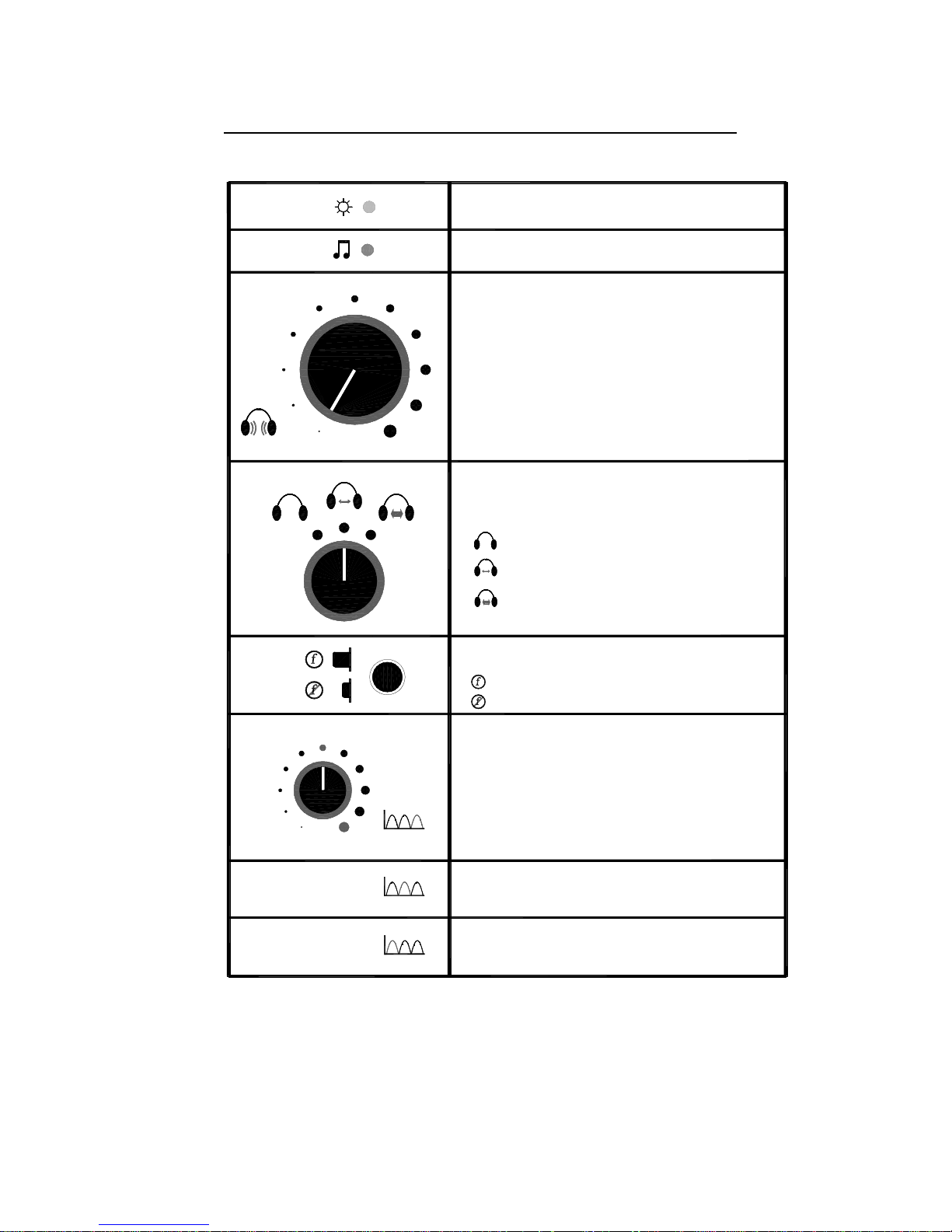
POWER ON LED
This YELLOW LED is on whenever AC power is applied
OUTPUT ON LED
This GREEN LED is lit when the output is turned on
VOLUME CONTROL
Controls the gain of the amplifier, and hence the loudness
of the sound heard in the headphones
CROSSFEED SWITCH
Selects the amount of inter-channel crossfeed between the
Left and Right channels as follows:
+8dB
No crossfeed - full stereo
Light crossfeed - a small amount of signal is
fed between channels
Medium crossfeed - more signal is fed between
channels
BYPASS SWITCH
Enables or disables the EQ and crossfeed circuits
EQ and crossfeed enabled (button out)
EQ and crossfeed disabled (button in)
EQ CONTROL - 20kHz
Adjusts the boost to the frequency reponse curve at 20kHz
Fully counterclockwise corresponds to no boost (0 dB)
Fully clockwise corresponds to +12 dB
+12dB+4dB
EQ CONTROL - 2.5kHz
Adjusts the boost to the frequency reponse curve at 2.5kHz
See description above
EQ CONTROL - 90Hz
Adjusts the boost to the frequency reponse curve at 90Hz
See description above
Wheatfield Audio Wheatfield Audio HA-4 Users Manual
- 5 -
Page 6
COVERS - NO USER-SERVICEABLE PARTS INSIDE.
TO PREVENT ELECTRIC SHOCK, DO NOT OPEN
REPLACE FUSE WITH SAME TYPE AND RATING.
CORRECTLY BEFORE CONNECTING POWER.
HA-4 Headphone Amplifier - Rear Panel
IN
OUT
WHEATFIELD AUDIO LLC
www.headphoneamp.com
MODEL HA-4 HEADPHONE AMPLIFIER
MADE IN USA
VOLTAGE SELECT
90-135V = 115V
200-250V = 230V
ON
POWER
OFF
AC INPUT
90-135V
200-250V
50-60
10 W
L
FUSE
0.2 A 250 V S
IEC 127-2/III
R
I
O
ENSURE VOLTAGE SELECT SWITCH IS SET
CAUTION:
!
115V
Wheatfield Audio Wheatfield Audio HA-4 Users Manual
- 6 -
Page 7

The HA-4 Headphone Amplifier
The Wheatfield Audio HA-4 is a audiophile-quality solid-state headphone
amplifier, designed to solve a number of the issues faced by the home
headphone listener.
The HA-4 combines a number of unique features:
• High voltage and current drive capabilities, to provide massive headroom for
all headphones, regardless of impedance
• Adjustable equalization designed to compensate for the headphone-ear
frequency response, to make headphones sound more like speakers
• Selectable crossfeed, which introduces filtered and delayed signals from one
channel into the other, again to simulate the sound of speakers
• A powerful, built-in, AC-operated power supply, using a toroidal power
transformer - no batteries or cheap AC adapter
• High-quality components, like Wima polypropylene capacitors, Burr-Brown
ultra-low-distortion amplifiers, and mil-spec resistors
• A unique design that provides safe storage for your valuable headphones
and their cord
In Wheatfield Audio's tradition, all this is provided without superfluous cosmetic
"fluff" that only adds to the cost of the product.
Wheatfield Audio's Warranty
Your HA-4 is warranted to be free of defects for two years from the time you
purchase it. Damage due to abuse, lighting, or improper use are not covered.
If your HA-4 has a problem, call or take the unit to the retailer where you
purchased it. They will help you get your problem resolved.
Wheatfield Audio Wheatfield Audio HA-4 Users Manual
- 7 -
Page 8

Connecting your HA-4
Power
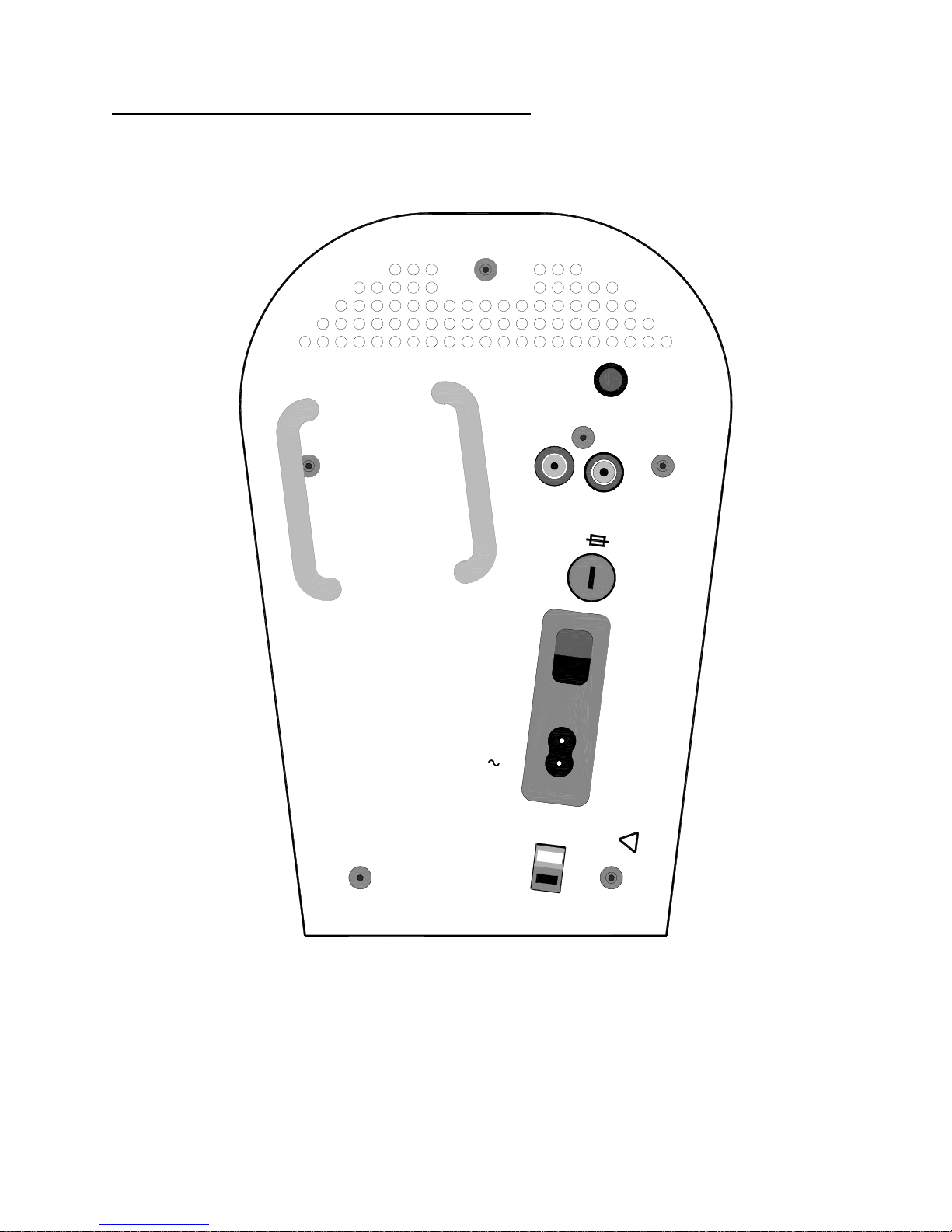
IMPORTANT: Before you connect the power cord to the HA-4, make sure that the
voltage selector switch is set correctly for your local power. If you are in North
America, Japan, or anywhere else that your line voltage is between 100V and
135V, set the voltage selector to "115". If you are in Europe, or anywhere else
where the voltage is 200-250V, set the voltage selector to "230".
If you set the voltage selector incorrectly, one of two things will happen. If you set
it to "230" when it should be "115", the amplifier will not work correctly, but no
damage will be done. If you set it to "115" when it should be "230", you will cause
the fuse to blow. Correct the switch setting and replace the fuse (fuse types are
listed at the beginning of this manual) and you should be OK.
Audio Inputs
Connect the Left and Right inputs of the HA-4 to your audio source with a decent
pair of RCA interconnect cables. Any normal line output (between about 1V RMS
and 3V RMS) can drive the HA-4. CD players, pre-amps, tuners, and computer
sound cards are all compatible with the HA-4 input.
The input impedance of the HA-4 is 100k ohms. Since it is so high you can
connect the HA-4 input in parallel with another component (like a power
amplifier) using "Y" cables, if you so desire.
Headphones
Plug your headphones into the standard 1/4" stereo headphone jack on the rear
of the HA-4.
The HA-4 can drive any stereo headphones, from 8 ohms up to 600 ohms. It has a
low output impedance (about 2.5 ohms), and can drive up to 250 mA and/or +/18V, which provides plenty of headroom for any headphones.
Wheatfield Audio Wheatfield Audio HA-4 Users Manual
- 8 -
Page 9

Using your HA-4
After connecting your HA-4, you're ready to listen.
Start with the volume control all the way down (counterclockwise), and the EQ
controls and crossfeed selector all at mid-range.
When you turn on the power (with the power switch, located on the back next to
the cord), the yellow POWER ON LED will illuminate. After a delay of about 5
seconds, the green OUTPUT ON LED will illuminate, at which time a relay will
energize that connects the headphones to the amplifier, and the amplifier will be
operating.
Adjust the volume up to your liking.
Play around with the EQ and crossfeed controls until you are happy with the
sound. The next section discusses in more detail what the controls do.
If you desire to listen without any of the EQ and crossfeed, or for comparisons,
push the BYPASS switch in and the amplifier will operate as a completely flat and
linear amplifier.
When you are done listening, you can place your headphones safely on the HA4's specially designed surface. A holder is provided on the back of the HA-4 for
you to store the headphone cord. Simply wrap the cord around the holder to
keep it out of the way.
Wheatfield Audio Wheatfield Audio HA-4 Users Manual
- 9 -
Page 10

The HA-4 controls in detail
The Volume Control
The volume control adjusts the listening level by attenuating the signal before the
main power amplifier. By doing so it controls the overall gain of the amplifier.
The EQ controls
The three EQ controls adjust how much the level of the audio signals in each of
the three frequency ranges is boosted. The three center frequencies - 90 Hz, 2.5
kHz, and 20 kHz - were chosen to provide compensation for the frequency
response of the ear coupled to headphones, as compared to the ear listening to
speakers at a distance.
When the control is turned fully counter-clockwise, the frequency band is boosted
4 dB relative to 1 kHz. At mid-range, 8 dB of boost is provided, and fully clockwise,
12 dB. The overall gain is dropped 5 dB when the EQ is enabled, to provide
loudness equal to the bypass setting.
We suggest starting with all three controls at mid-range (8 dB), and after listening,
adjust the controls as you desire. Everyone has different ears, tastes, and
headphones, so this is purely a subjective adjustment.
The Crossfeed Selector
The crossfeed selector lets you allow some of the audio from the left and right
channels to be intermingled. This circuit attempts to duplicate the natural
crossfeed that occurs when you listen to a pair of speakers. Obviously, when
listening to speakers, your right ear can hear the left speaker (and vice versa).
To try and duplicate this effect, the signals that are crossfed are passed though
passive RC filters that provide some equalization and delay in the signal path
from one channel to the other. The equalization helps mimic the fact that
hearing is much less directional at lower frequencies than at high frequencies.
The delay simulates the time difference that it takes sound to reach the "far" ear
relative to the "near" ear.
Crossfeed can be disabled, or enabled at one of two levels, by adjusting the
crossfeed selector switch. Again, we recommend starting in the mid-range
setting, and adjusting up or off to your liking. The exception to this is for true
binaural recordings, and for digitally processed surround sound or computer
generated 3-D audio, where crossfeed should be disabled.
The Bypass switch
Pressing in the bypass switch physically routes the signals around the entire EQ
and crossfeed circuit. When in bypass mode, the amplifier is completely flat and
linear throughout the audio frequencies, and the left and right channels are
completely isolated from one another.
Wheatfield Audio Wheatfield Audio HA-4 Users Manual
- 10 -
Page 11
Specifications
Frequency Response (filters bypassed): 10Hz - 30kHz +/- 3 dB
THD (1kHz, 1V RMS out, filters bypassed): <.01%
Noise: < 10mV RMS
Maximum output voltage: 35V P-P (12V RMS)
Maximum output current: 250 mA Peak
Maximum continuous output power: 1W @ 32 ohm load; 0.5W @ 600 ohm load
Output impedance: 2.5 ohms
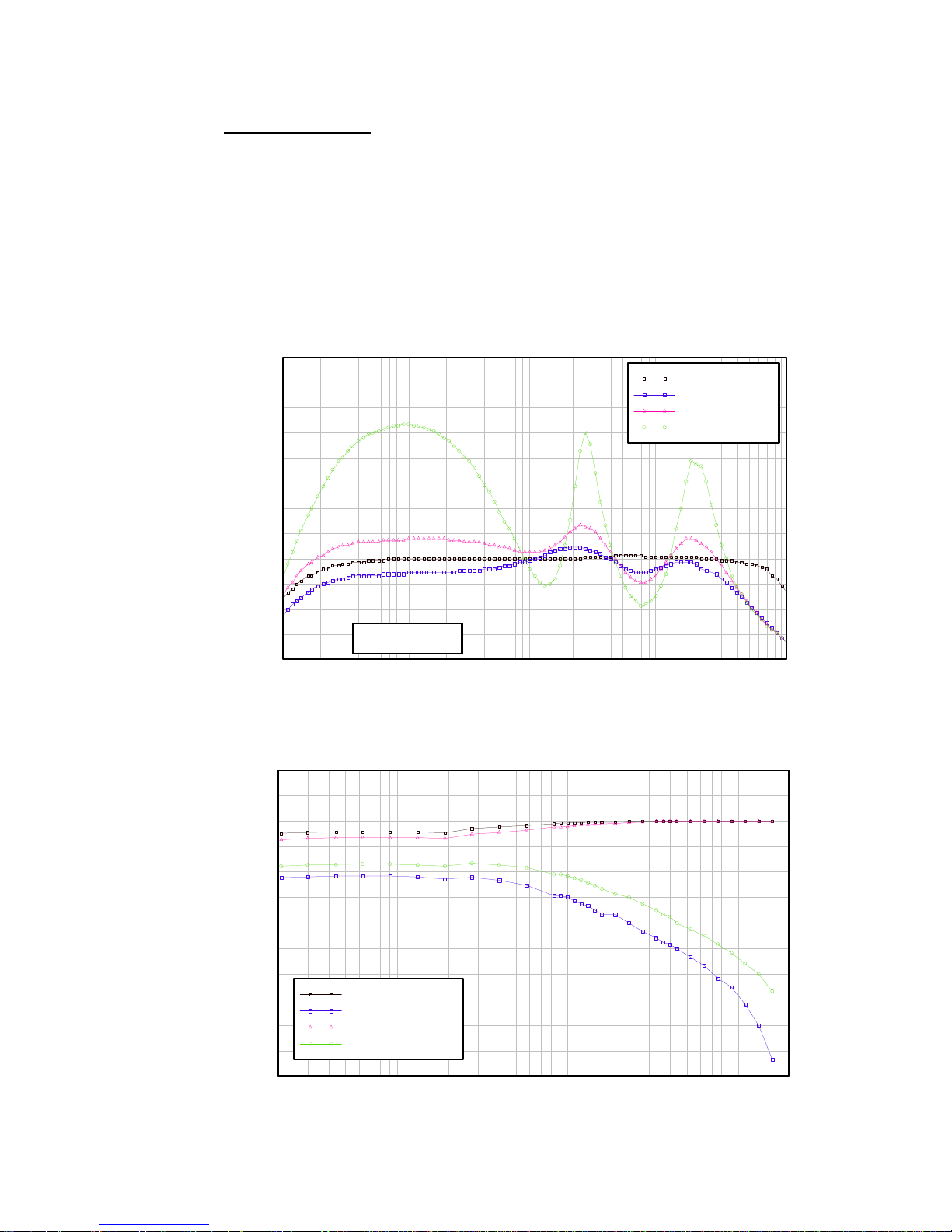
EQ response plot
12
10.5
9
7.5
6
4.5
3
1.5
Response dB
0
-1.5
-3
-4.5
-6
10 100 1,000 10,000 100,000
Crossfeed OFF
Frequency Hz
Bypass
EQ Min (CCW)
EQ Mid
EQ Max (CW)
Crossfeed response plot
12
6
0
-6
-12
-18
-24
-30
Response dB
-36
-42
-48
-54
-60
20 50 100 500 1,000 5,000 10,000 20,000
In-Channel I
Cross-Channel I
In-Channel II
Cross-Channel II
Frequency Hz
Page 12

Serial Number ____________________________________
Purchase date____________________________________
DRAFT
Printed in USA
2/17/00
Wheatfield Audio LLC
Andale, Kansas USA
www.headphoneamp.com
 Loading...