

Page 1

58kHz DOUBLE CHECKER
MANUAL
WG SECURITY PRODUCT INC.
161 San Lazaro Ave. Sunnyvale, CA 94086 USA
Tel: 1-877-494-2288 (Toll Free) 1-408-530-8070 Fax: 1-408-530-8074
Website: www.wgspi.com E-mail:[email protected]
Page: 1
Page 2

TABLE OF CONTENTS
SECTION ONE
SYSTEM DESCRIPTION..…………….…………………….…………………..………..………..P1
SECIFICATIONS ……………..………..………………………………………..……………….....P2
PARTS LIST …..…………………..…………………………………………..……………….…....P4
SECTION TWO
INPUT POWER NOTICES………….……………………….……...……….…............................P5
QUICK START INSTRUCTIONS ..…………………………………………………………….…..P6
PROBLEMS …………..…………..…………………………………………………..…….……....P8
SECTION THREE
IMPORTANT SAFEGUARDS AND REGULATORY NOTICES………………………….…….P9
Page: 2
Page 3

Overview
SYSTEM DESCRIPTION
Double checker is a compact size Electronic Article Surveillance detector that works
with any 58kHz accousto-magnetic tags and labels. This device is plug and play,
which eliminates the need for expensive technicians in installation.
Double checker has the latest signal processing technology that constantly checks
the environment and can operate at a higher level of sensitivity, resulting in an
excellent detection height of 15cm above the device surface.
Technical Data Europe United States
Length 32mm 13.4"
Width 24mm 9.5"
Thickness 2.5mm 1"
Weight 0.7Kg 0.3lbs
Power 220-240vac 110-120vac
Operating Frequency 58kHz 58kHz
Maximum Detection Height 15 cm 6 inches
Page: 1
Page 4
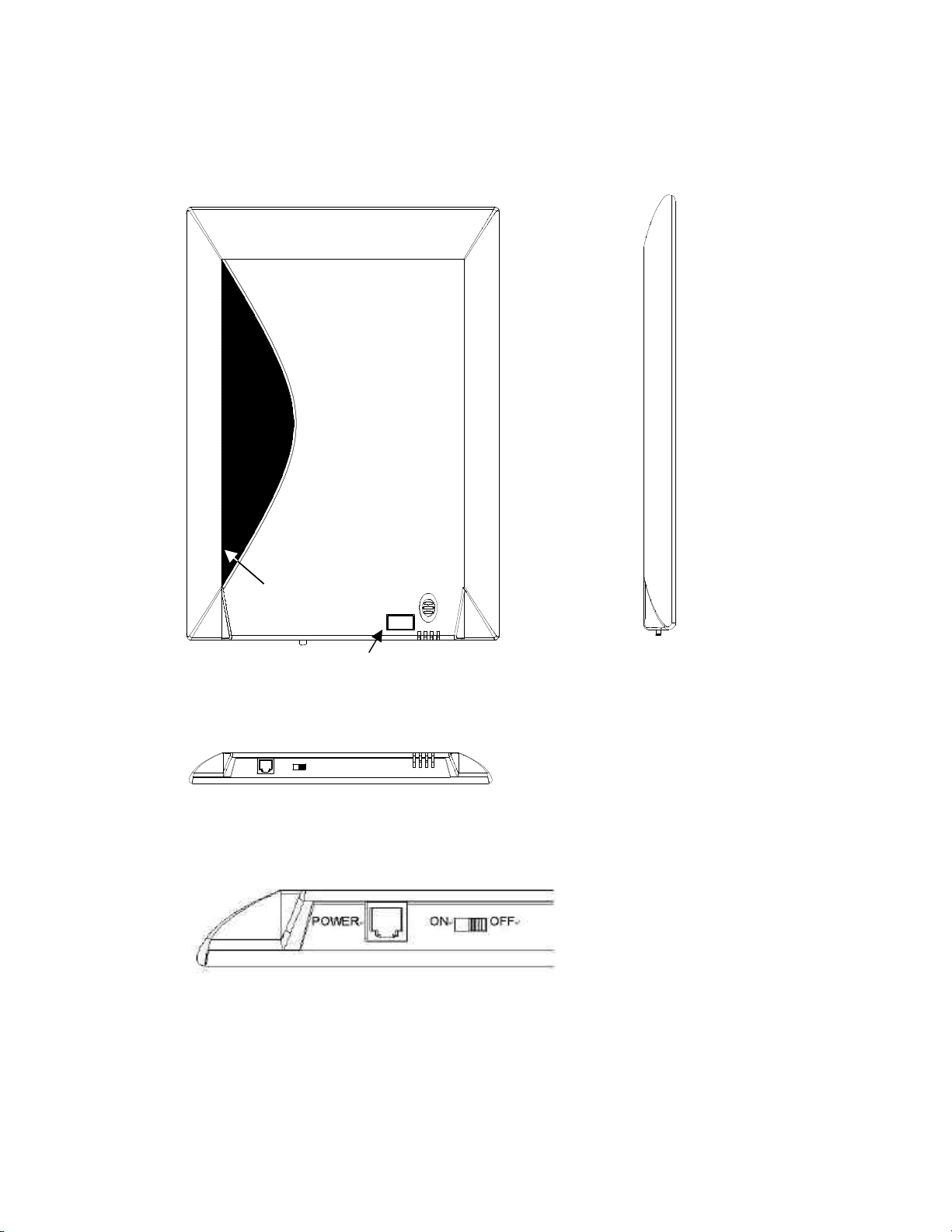
SPECIFICATIONS
Deactivation Pad
Alarm Indicator
Page: 2
Page 5

Mechanical
Dimensions (L x W x H)
Double checker box …………….. 34 x 24 x 2.5 cm (13.4 x 9.5 x 1 in)
Unit weight ……………………….. 0.70 kg ( 0.3 lbs)
Power supplier……………………. 65 x 51 x 8 cm (25.6x20x3.1 in)
Unit weight ………………………... 0.3 kg ( 0.14 lbs)
Electrical
AC Voltage for power supply.………100-120VAC
220-240VAC @ 50-60Hz
Current Draw ……………………..… 0.027Arms
Input Power ……………………….… < 6 watts
AC Voltage for double checker.…… 10VAC x 2
Current Draw ……………………..… 0.1Arms
Input Power ……………………….… < 3 watts
Environmental
Operating Temperature …………….. 0 to 50 °C (32 to 122 °F)
Relative Humidity…………………..… 0 to 90% (non-condensing)
Regulatory
Safety ……………………………..….. CE ****
EMC ……………………………….. FCC P9I WGDC58K
Page: 3
Page 6

PARTS LIST
1 OF 2 PC
CHECK THE TYPE WITH
WGDC58K …………………………. Double checker box 1 PC
WGDCPS110 ………………………. Double checker power supplier
110VAC (USA)
WGDCPS220 ………………………. Double checker power supplier
220VAC (Europe)
WGDC58K Manual 1 PC
Power Supply (1 of 2 types)
LOCAL POWER VOLTAGE
l WGDCPS110
110VAC input for US
l WGDCPS220
220VAC input for Europe
Double checker requires two of 10VAC 0.1Arms power. Customer can use transformer
provided within the package.
INPUT POWER
NOTICES
Page: 4
Page 7
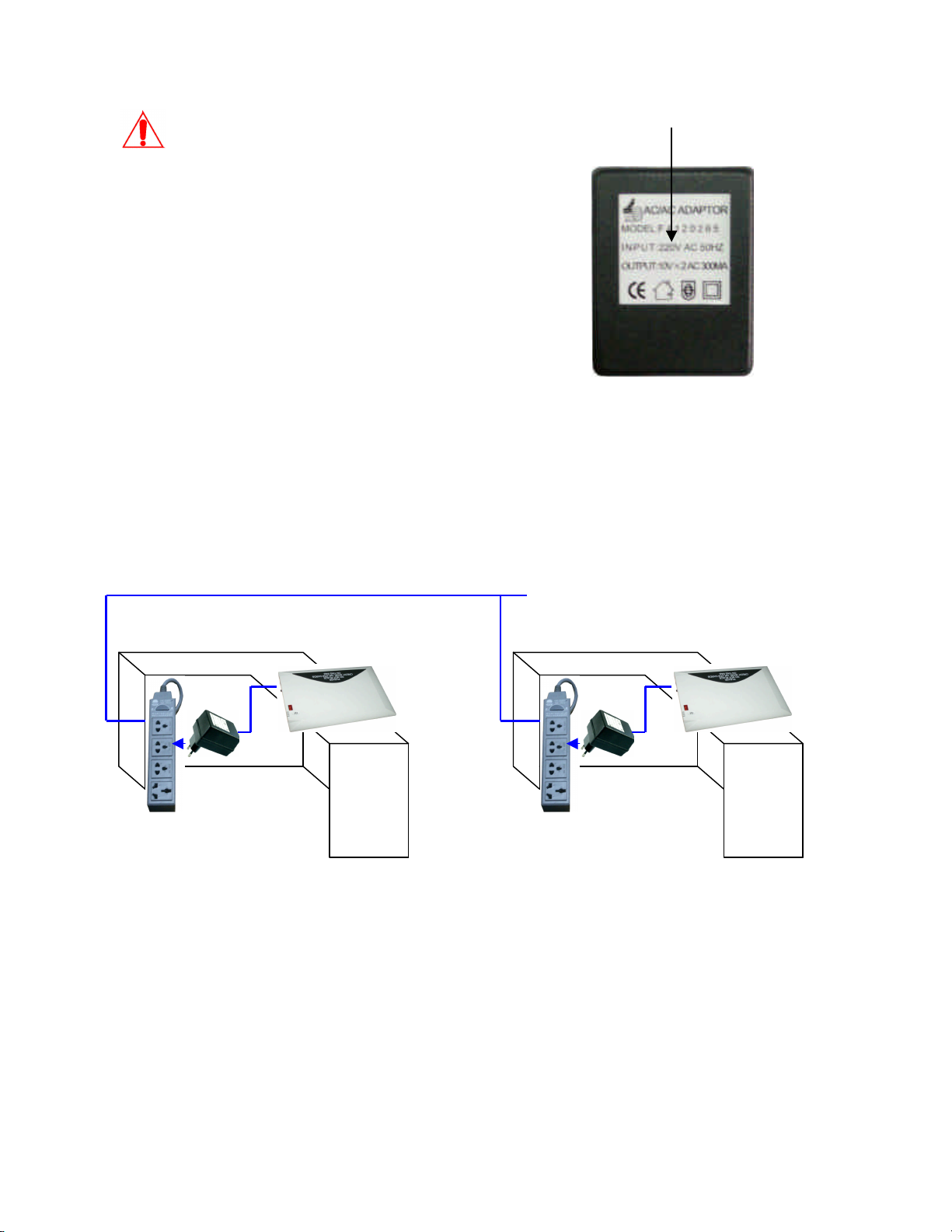
PLEASE CHECK THE TYPE OF TRANSFORMER WITH LOCAL POWER VOLTAGE
BEFORE APPLYING AC TO DOUBLE CHECKER
AC Voltage for power supply.………100-120VAC @ 60Hz
220-240VAC @ 50Hz
Current Draw ……………………..… 0.027Arms
Input Power ……………………….… < 6 watts
AC Voltage for double checker.…… 10VAC x 2
Current Draw ……………………..… 0.1Arms
Input Power ……………………….… < 3 watts
No dedicated power line is needed and neither is special grounding necessary, but if
there are multiple devices used, PLEASE PLUG THE DEVICE ONTO THE SOCKETS
FROM SAME POWER LINE, otherwise please adjust phase switch to place multiple
devices of double checker into the same working phase.
Same power line with same phase
QUICK START INSTRUCTIONS
Page: 5
Page 8

Before You Install
Congratulations on your purchase of one of the finest EAS devices on the market. This is
the Installation Instructions manual.
Receiving Inspection
Inspect all shipping containers for any signs of damage. If any is found, notify the
shipping company. If there is no obvious damage, continue with the unpacking
instructions.
Unpacking Instructions
Carefully remove the contents of container and place on a flat level surface. Compare
the contents with the Part List to ensure that there no missing items. Make a note of any
discrepancies.
Equipment Inspection
Inspect all equipment for damage. Items to specifically check, and damage to look for,
are listed below:
l Connectors for bent or broken pins
l Cables for crimped or broken wires
l Plastic housing for any obvious signs of damage
If any damage is found, contact Customer Service at the telephone number in the front of
this manual. If any item is damaged, DO NOT make any power or signal connections to
the unit unless otherwise advised to do so by Customer Service.
If there are any discrepancies between the Manual Set Inventory sheet and the manuals
received, or between the Packing List and items received, contact Customer Service at
the telephone number at the front of this manual. If there are no discrepancies and either
no damage, or GVG-advised correction action is made, continue with this manual.
OPEERATION INSTRUCTION
Page: 6
Page 9

How to deactivate labels
l Label alive
Place label with merchandise within detection range (vertical detection is preferred)
of double checker to make sure it’s not yet deactivated.
l Deactivate
Secondly, place label onto the deactivation area, making sure that label fully lies on
the surface of the area. Wait 1 second.
l Double check
Then lift label to proper detection range again (vertical detection is preferred) to
make sure that the label is fully deactivated.
Detection Range
Vertical detection
Horizontal detection
LE labels
Vertical Detection ……… 10cm (4 in)
Horizontal ……….. 6cm (2.4 in)
DR labels
Vertical Detection …….. 15cm (5.9 in)
Horizontal ………. 10cm (4 in)
(Note: Detection range may vary upon different working environment, the above spec is
the performance under normal circumstances)
Horizontal detection
PROBLEMS
If you have ensured that every step in installation is correct and all connections are ok,
Page: 7
Page 10

and the system still malfunctions, our technicians will help with phone support. For Tech
Support In Your Country Please Visit Our Web Site www.wgspi.com.
IMPORTANT SAFEGUARDS AND REGULATORY NOTICES
Federal Communications Commission statement:
This device complies with part 15 of the FCC Rules. Operation is subject to the following
two conditions: (1) This device may not cause harmful interference, and (2) this device
must accept any interference received, including interference that may cause undesired
operation.
CAUTION: Changes or modifications not expressly approved by the manufacturer
responsible for compliance could void the user’s authority to operate the equipment
Page: 8
 Loading...