

Page 1

Cable and Connector
Product and Installation Manual
Product Manual
West Penn Wire
PM-2000-WP
10/11
Page 2

Cable and Connector
Product and Installation Manual
Table of Contents:
Miniature RGB Cables and Connectors ......................................
Crimp BNC for Miniature RGB ....................................................
Compression BNC for Miniature RGB ........................................
SDI-Digital Coaxial Cables and Connectors ...............................
Crimp for RG59/U Plenum .........................................................
BNC Crimp Connectors for RG59/U and RG6/U .......................
Compression BNC for RG59/U Plenum .....................................
Compression RCA for RG59/U ..................................................
CATV RG6/U Coaxial Cables and Connectors ...........................
Line Level Audio Cable and Connectors ....................................
Speaker Level Audio Cables and Connectors ............................
LAN- Networking Cables and Connectors ..................................
RJ45 Plug Termination ................................................................
RJ45 Jack Termination .................................................................
Low Skew Cables .........................................................................
Media Control Cables (Cresnet and AXlink) ................................
Reference Pictures- CN-BM74-19 ...............................................
Reference Pictures- CN-BNCP-RGB ..........................................
Reference Pictures- CN-BM73-30 ..............................................
Reference- Compression Tools
1
2
3
4
5
6
7
8
9
10
11
12
13
14
15
15
A
B
C
D
i
Page 3
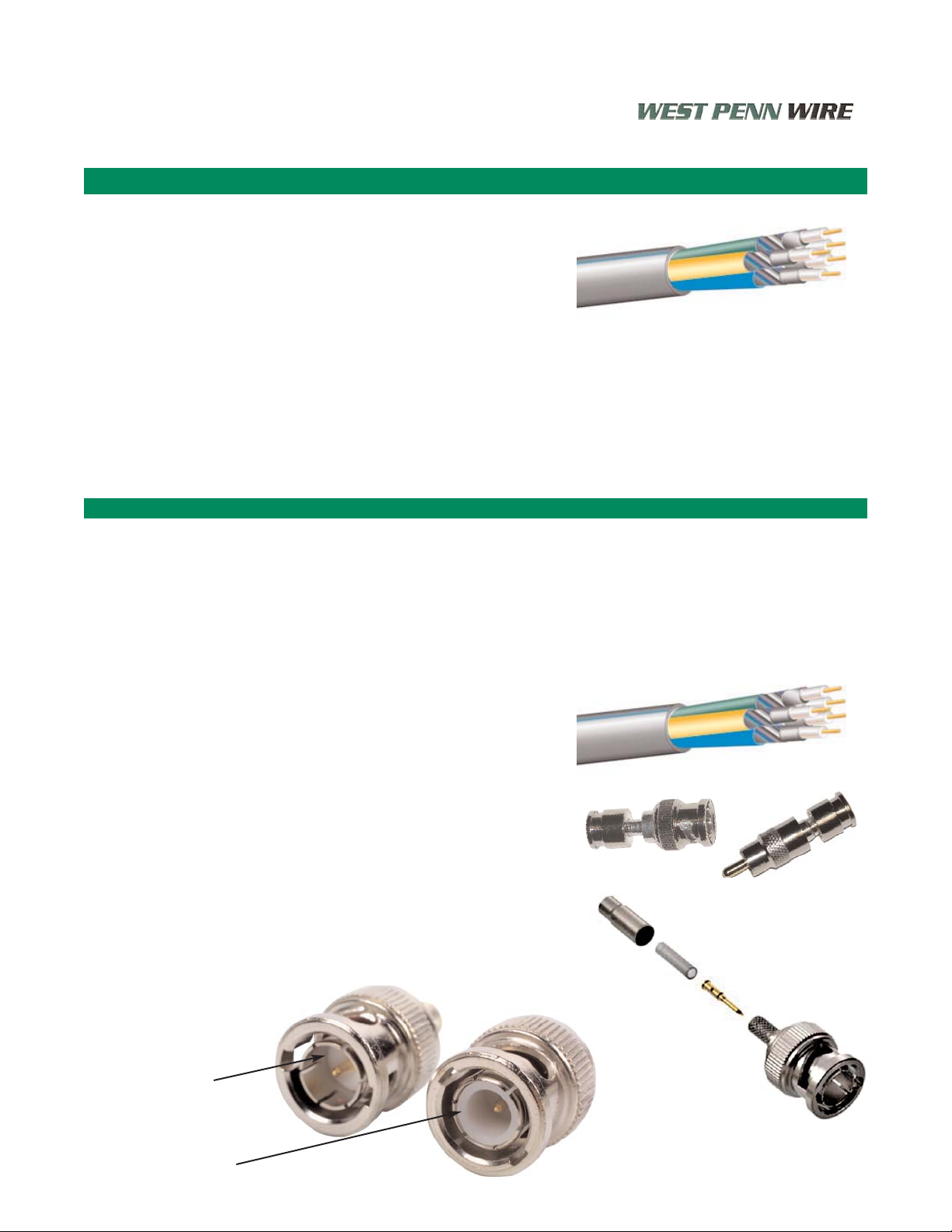
5 Wire RGB Most Popular Cable and Connectors
Products- Miniature High Resolution- 25 Awg. Solid
Miniature- 25 Awg. Solid Bare Copper- 100% Aluminum Foil +
95% Spiral Tinned Coverage
Bulk Cables: West Penn Wire
Non-Plenum
3CRGB Non-Plenum - 3 Miniature Coaxial Cables- RGB
5CRGB Non-Plenum - 5 Miniature Coaxial Cables- RGBHV
6CRGB2P Non-Plenum - 6 Miniature Coaxial Cables
RGBHV + Composite Video + 2 Pair (Audio)
6CRGB4P Non-Plenum - 6 Miniature Coaxial Cables
RGBHV + Composite Video + 4 Pair Cat 5E
Plenum
253CRGB Plenum - 3 Miniature Coaxial Cables- RGB
255CRGB Plenum - 5 Miniature Coaxial Cables- RGBHV
256CRGB2P Plenum - 6 Miniature Coaxial Cables
RGBHV + Composite Video + 2 Pair (Audio)
Connectors: West Penn Wire
CN-BNCP-RGB Compression 75 Ohm BNC Connector
CN-BM74-19 Crimp 75 Ohm BNC Connector
CN-RCP-RGB Compression RCA Connectors
All connectors are 75 ohm
Differences between 75 ohm and 50 ohm connectors
Features:
• Miniature sized
• Optimum Electrical Characteristics
• 1 Piece Compression RCA and BNC
• Flexible Plenum Design
• Custom Cable Assemblies available
• Designed for Digital Applications
West Penn Wire- Product Manual
255CRGB is the standard 5 wire RGBHV cable utilized for
TI video applications.
• 75 Ohm BNC Crimp Connector:
• West Penn Wire: CN-BM74-19
• Extron: 100-250-01
Tools: West Penn Wire
• Strip Tool: 24-7371P (T-Strip)
• Crimp Tool: TL-105 or TL-803
• 75 Ohm BNC Compression Connector:
• CN-BNCP-RGB
Tools:
• Strip Tool: 24--7371P (T-Strip)
• Compression Tool: TL-SNSA
75 ohm: Dielectric
inside connector
body - Teflon
50 ohm: Dielectric
to the face of the
connector
Miniature RGBHV Coaxial Cables
1
Page 4
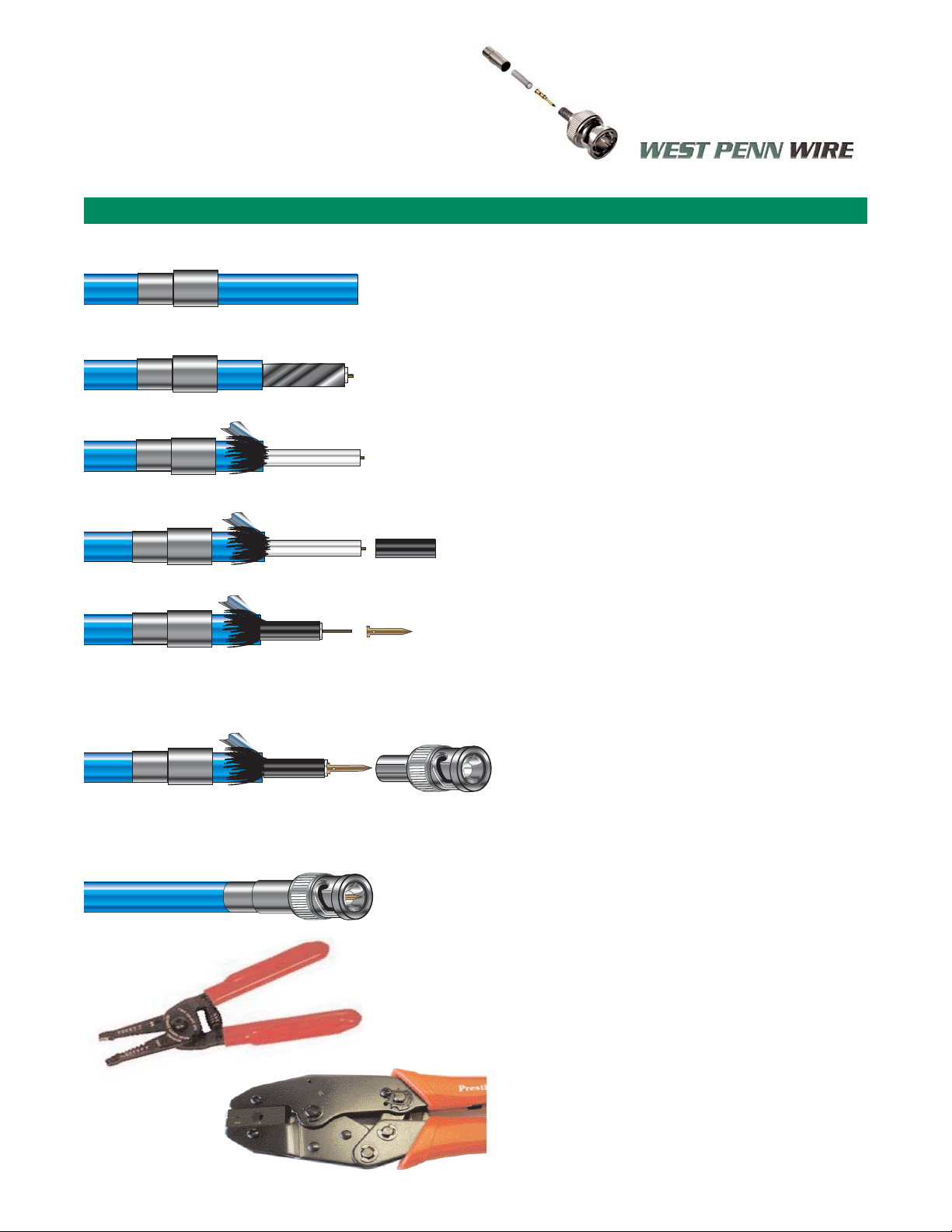
Crimp Termination- 5 Wire RGB- 255CRGB and 5CRGB
West Penn Wire- Product Manual
Stripping of 255CRGB for Crimp Connectors:
1. Feed Crimp Sleeve ferrule - small end
first onto the cable jacket.
2. Strip Cable - using TL-KLEIN or hand held
T-strips (wire strip tool)
• Jacket- Approximately .500”
• Leaving exposed braid and dielectric
3. Flair braid and shield back and trim.
• Trim .250”
• Tear foil off
4. Feed strengthening plastic sleeve over the
dielectric.
• Dielectric that is exposed needs to be
trimmed flush with plastic sleeve.
• Trim center conductor to 5/32” -.1563”
5. Feed center pin crimp sleeve over the center
conductor, until it butts against the plastic
sleeve. Crimp using .068” crimp die on TL-105
or TL-803.
Note: if the crimp sleeve is not fitting
snug against the plastic sleeve
you will need to trim the center
conductor.
6. Feed Connector body on to the cable.
• Connector body will “Snap” into place
when seated properly.
7. Flair exposed braid evenly over the connector
body.
8. Feed Crimp Ferrule flush against the connector
body.
• Crimp using- .178” crimp die on TL-105
or TL-803
CN-BM74-19 - 4 Piece BNC Crimp
TL-KLEIN
TL-105 - Crimp Tool for Miniature (25 Awg.),
MiniMax (25 Awg)
•Crimp Dies: .068” and .178”
TL-803- Crimp Tool for Miniature (25 Awg.),
MiniMax (25 Awg) and RG59/U
• Crimp Dies- .065”, .068”, .178”, .213”, .255”
Crimp BNC for Miniature RGB
2
Step 1
Step 2
Step 3
Step 4
Step 5
Step 6
Step 7 and 8
Stripping Pictures
See Reference Page. A
Page 5
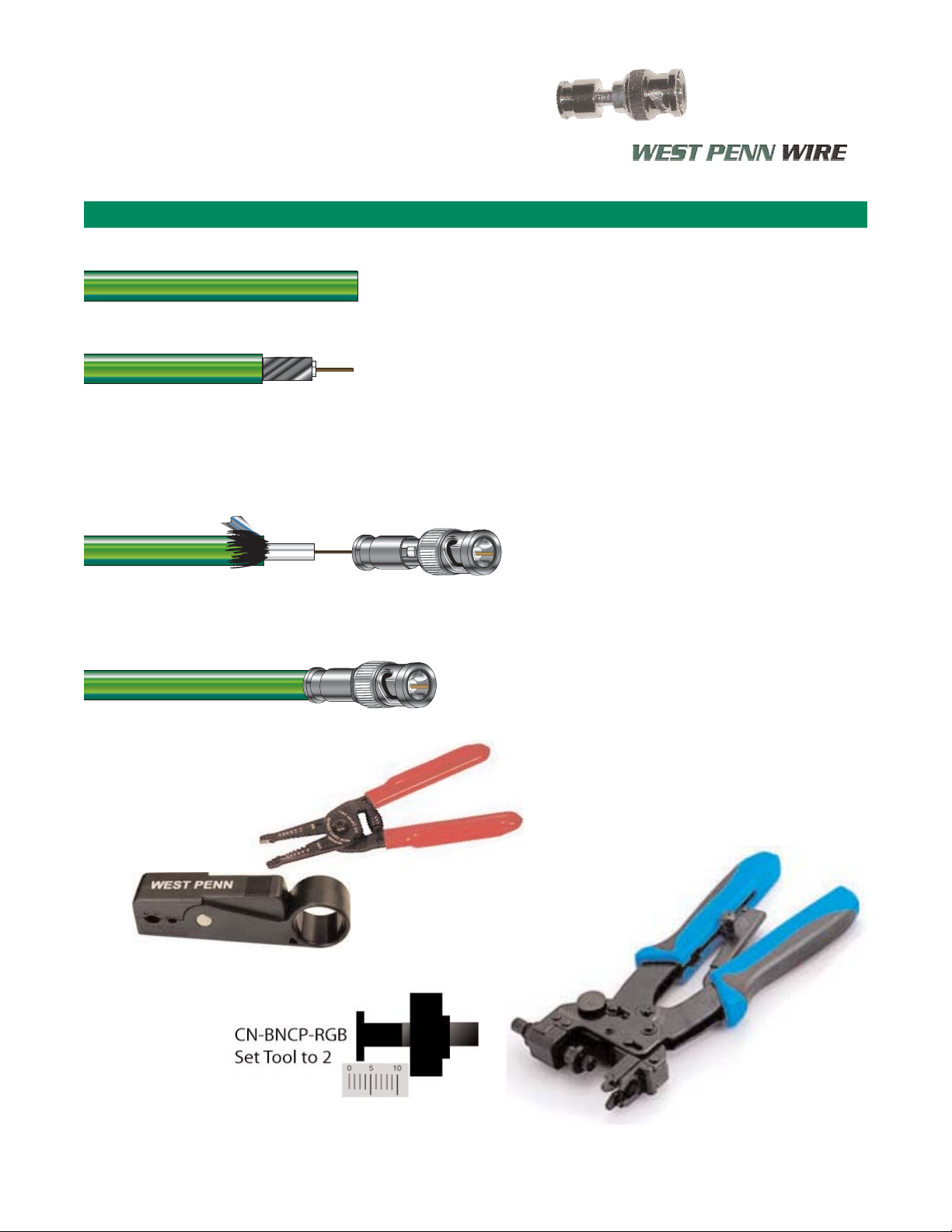
Compression Termination- 5 Wire RGB- 255CRGB and 5CRGB
West Penn Wire - Product Manual
Stripping of 255CRGB for Compression
Connectors:
1. Strip Cable - using TL-KLEIN or TL-CSST
TL-KLEIN
• Jacket- Approximately .500”
• Leaving exposed braid and dielectric
• Peel back braid and trim to .250”
• Strip .250” of Insulation (Dielectric)
• .250” of exposed center Conductor
TL-CSST
• Place cable into tool
• Turn tool clockwise 2-3 turns
• Turn tool counter-clockwise 2-3 turns
• Release the cable from the tool
• Peel stripped material from the cable
2. Push the connector onto the cable
• Window will help visually guide the
cable into place.
NOTE: CN-BNCP-RGB
Internal cable guide is a necked down
cylinder to ensure proper seating of the
center conductor
3. Compress connector using a TL-SNSA
• For the Window Compression
Connectors, set TL-SNSA tool
at 2.
CN-BNCP-RGB - Compression Connector
TL-KLEIN
TL-SNSA
Compression BNC for Miniature RGB
3
Step 2
Step 1
Step 3
Stripping Pictures
See Reference Page. B
TL-CSST
2 Blade Strip Tool
Page 6
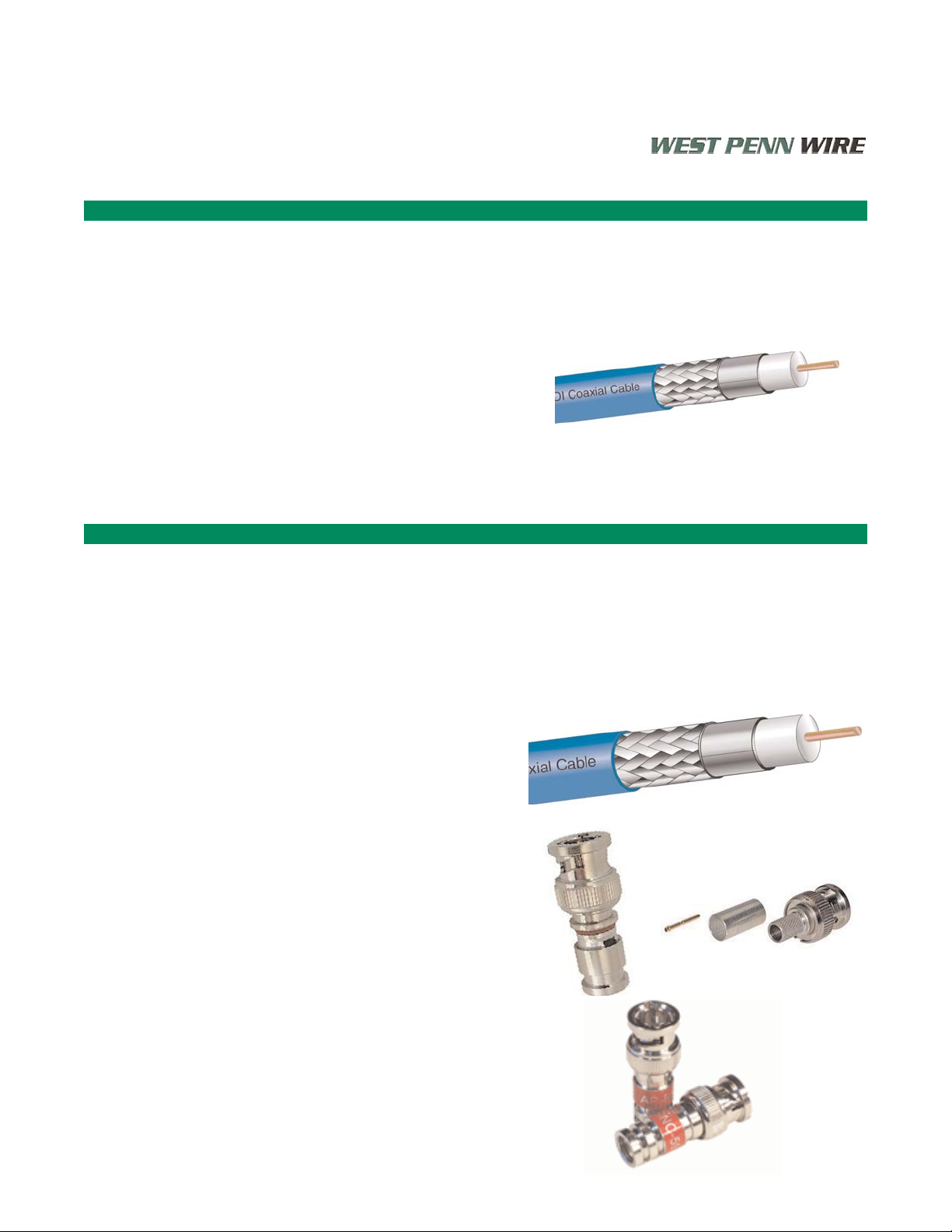
Products- SDI- Digital Coaxial Cables
Products- SDI- Digital Coaxial Cable Products
High Resolution- RG59/U and Super High Resolution RG6/U
Bulk Cables:
819 Non-Plenum - RG59/U SDI Coaxial Cables
25819 Plenum - RG59/U SDI Coaxial Cables
6350 Non-Plenum - RG6/U SDI Coaxial Cables
256350 Plenum - RG6/U SDI Coaxial Cables
Connectors: RG59/U SDI
CN-FS59BNCPL4 Compression 75 Ohm BNC 25819
CN-DB59BNCHD HD Compression 75 Ohm BNC 819
CN-BM73-30 Crimp 75 Ohm BNC 25819
CN-BM73-2 Crimp 75 Ohm BNC 819
CN-BM74-32 Crimp 75 Ohm BNC 25819 and 819
CN-FS59RCAPL4 Compression RCA for 819 and 25819
Connectors: RG6/U SDI
CN-FS6BNCPL2 Compression 75 Ohm BNC 256350
CN-DB6BNCHD HDCompression 75 Ohm BNC 6350
CN-BM73-4 Crimp 75 Ohm BNC 256350
CN-BM73-5 Crimp 75 Ohm BNC 6350
25819 is the standard SDI- Digital Coaxial Cable
• 75 Ohm BNC Crimp Connector:
• West Penn Wire: CN-BM73-30
• Alternate- CN-BM74-32 - Plenum and Non-Plenum
Tools: West Penn Wire
• Strip Tool- TL-121
• Crimp Tool- TL-104 or TL-803
• 75 Ohm BNC Compression Connector:
• CN-FS59BNCPL4
Tools:
• Strip Tool- TL-CSST
• Compression Tool: TL-SNSA
West Penn Wire- Product Manual
SDI - Digital Coaxial Cables
4
Features:
• Optimum Electrical Characteristics
• 1 Piece Compression RCA and BNC
• Sweep Tested up to 3Ghz
• Custom Cable Assemblies available
• Designed for Digital Applications
Page 7
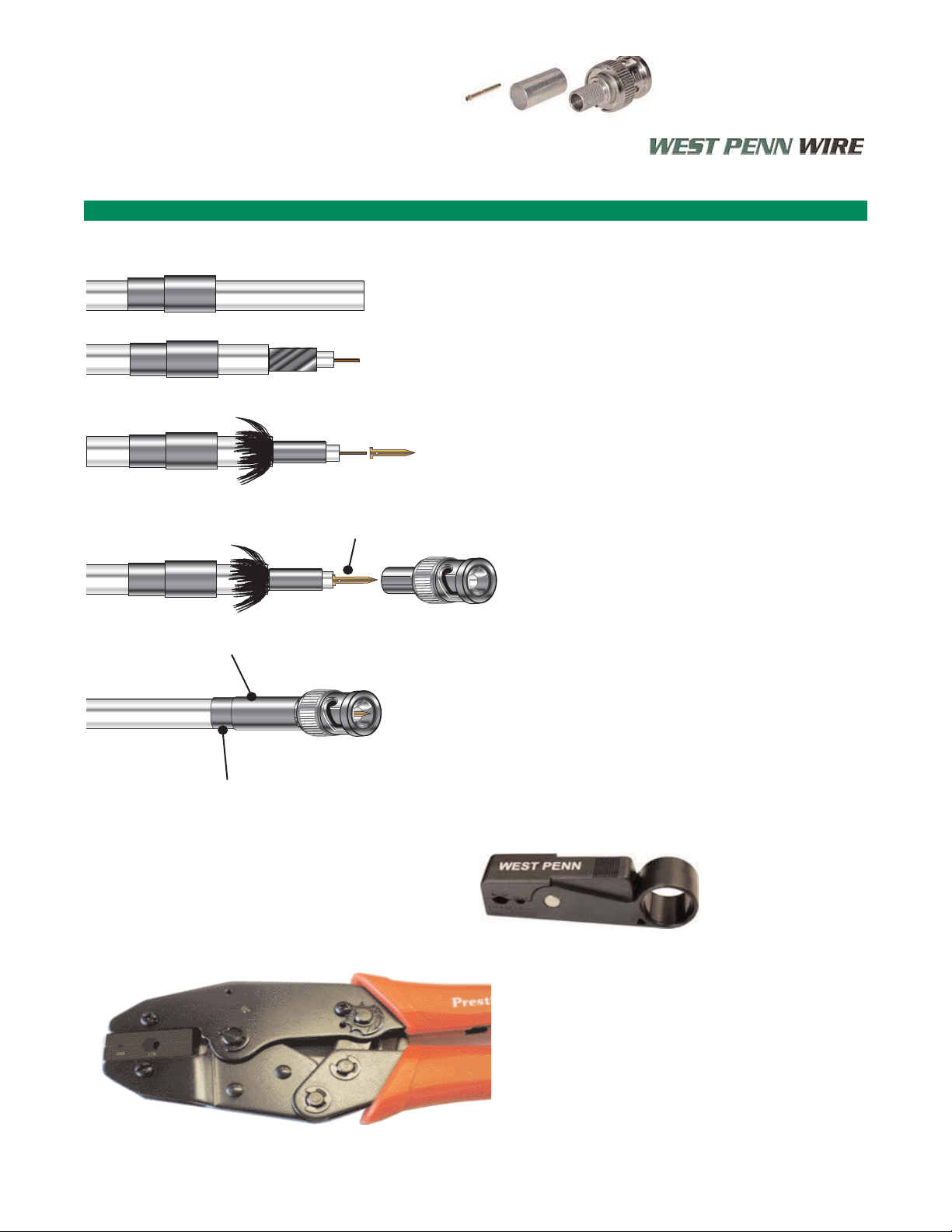
Crimp Termination- Plenum SDI RG59/U - 25819 and RGBHV WP258195
West Penn Wire - Product Manual
u
CN-BM73-30 or CN-BM74-32 Connectors
Stripping of 25819 for Crimp Connectors:
1. Feed crimp sleeve ferrule onto cable jacket.
2. Strip cable - using TL-121.
3. Flair braid back over the jacket
• Foil can stay bonded to the dielectric
or peel the foil off the cable.
4. Feed center pin crimp sleeve over the center
conductor, until it butts against the dielectric
Crimp using .068” crimp die on TL-104
or TL-803.
Note: if the crimp sleeve is not fitting
snug against the dielectric
you will need to trim the center
conductor.
5. Feed connector body on to the cable.
• Connector body will “Snap” into place
when seated properly.
6. Flair exposed braid evenly over the connector
body.
7. Feed crimp ferrule over the connector body
• Crimp using- .213 on Neck down and
.255 crimp die on Ferrule Bocy- TL-105
or TL-803.
TL-121
3 Blade Strip Tool
TL-104 - Crimp Tool for RG59/U Plenum and Non
Plenum
•Crimp Dies: .068” and .255”
TL-803- Crimp Tool for Miniature (25 Awg.),
MiniMax (25 Awg) and RG59/U
• Crimp Dies- .065”, .068”, .178”, .213”, .255”
Crimp BNC for RG59/U Plenum
5
Step 1
Step 2
Step 3
Step 4
Step 5
Step 6
Step 7
Stripping Pictures
See Reference Page. C
.255” Die - RG59/U PVC and Plenum, RG6/U Plen
.311 Die - RG6/U PVC(Non-Plenum)
.213” Die RG59/U Plenum
.068” Die
Page 8

Crimp Termination- RG59/U and RG6/U SDI Plenum and Non-Plenum Cables
West Penn Wire - Product Manual
Stripping For RG59/U and RG6/U for Crimp
Connectors: 75 ohm 3 piece.
1. Feed crimp sleeve ferrule onto cable jacket
2. Strip cable - using TL-121
3. Flair braid back over the jacket
• Foil can stay bonded to the dielectric
or peel the foil off the cable.
4. Feed center pin crimp sleeve over the center
conductor - until it butts against the dielectric
Crimp using appropriate center pin crimp die
Note: if the crimp sleeve is not fitting
snug against the dielectric
you will need to trim the center
conductor.
5. Feed connector body on to the cable.
• Connector body will “Snap” into place
when seated properly.
6. Flair exposed braid evenly over the connector
body
7. Feed crimp ferrule over the connector body
• Crimp Ferrule using appropriate
Crimp die.
• RG59/U - .255” .213” neck down
• RG6/U - .280”
Connectors: RG59/U SDI
Connector Description Strip Tool Crimp Tool
CN-BM73-30 Crimp 75 Ohm BNC 25819 TL-121 TL-104 , TL-803, TL-107
CN-BM73-2 Crimp 75 Ohm BNC 819 TL-121 TL-104 , TL-803, TL-107
CN-BM74-32 Crimp 75 Ohm BNC 25819 and 819 TL-121 TL-104 , TL-803, TL-107
Connectors: RG6/U SDI
CN-BM73-4 Crimp 75 Ohm BNC 256350 TL-121 TL-107
CN-BM73-5 Crimp 75 Ohm BNC 6350 TL-121 TL-107
CRIMP TOOL DIFFERENCES:
TL-105 - CABLES- MINIATURE RGB, AND MINIMAX 25 Awg. RACK CABLES
TL-104 - CABLES- RG59/U NON-PLENUM AND PLENUM
TL-803 - CABLES- MINIATURE RGB, MINIMAX 25 Awg., and RG59/U
TL-107 - CABLES- RG59/U AND RG6/U
BNC Crimp Connectors RG59/U and RG6/U
6
u
Step 1
Step 2
Step 3
Step 4
Step 5
Step 6
Step 7
.068” Die
.255” Die - RG59/U PVC and Plenum, RG6/U Plen
.311 Die - RG6/U PVC(Non-Plenum)
.213” Die RG59/U Plenum
Page 9
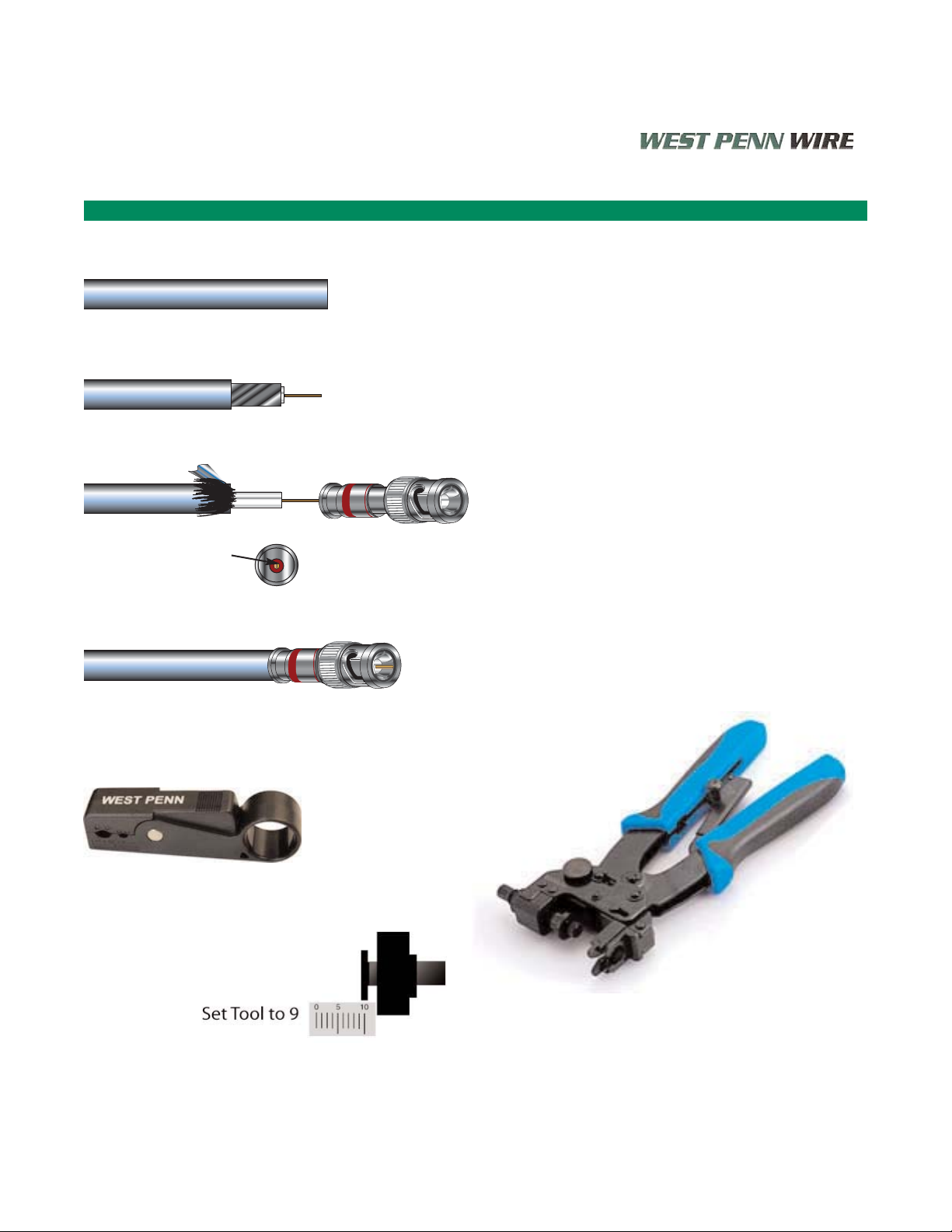
Compression Termination- RG59/U SDI Plenum 25819 and RGBHV WP258195
West Penn Wire - Product Manual
Stripping of RG59/U Plenum for Compression
Connectors
1. Strip cable - using TL-CCST
TL-CSST
• Place cable in tool rotate clockwise
for 3 turns, counter-clockwise for 3
turns.
• Release tool from the cable
• extract stripped material from the
cable
2. Feed center conductor into the internal
center pin of the connector
Push the connector onto the cable
• Push until center pin is seated
properly in the connector body.
3. Compress connector using a TL-SNSA
• For the CN-FS59BNCPL4
set the tool at 9
CN-FS59BNCPL4 Compression Connector
TL-CSST
2 Blade Strip Tool
TL-SNSA
CN-FS59BNCPL4
Compression BNC for RG59/U Plenum
7
Step 1
Step 2
Step 3
Feed center conductor
into internal center pin
Page 10
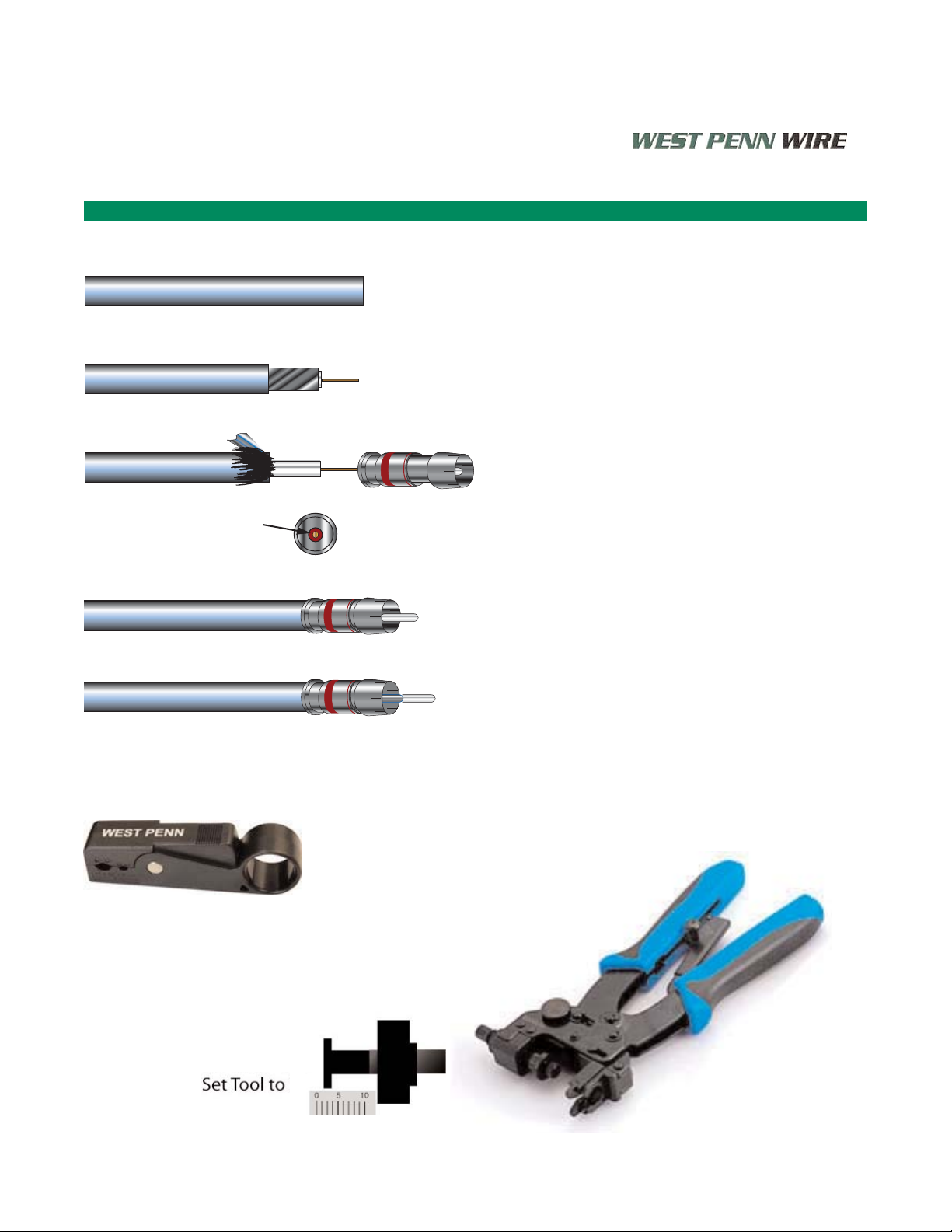
Compression Termination- RG59/U SDI Non-Plenum and Plenum
West Penn Wire - Product Manual
Stripping of RG59/U Plenum for Compression
Connectors-
RCA
1. Strip cable - using TL-CCST
TL-CSST
• Place cable in tool rotate clockwise
for 3 turns, counter-clockwise for 3
turns.
• Release tool from the cable
• extract stripped material from the
cable
2. Feed center conductor into the internal
center pin of the connector
Push the connector onto the cable
• Push until center pin is seated
properly in the connector body
3. Remove plastic pin guide.
4. Compress connector using a TL-SNSA
• For the CN-FS59RCAPL4
set the tool at 1
CN-FS59RCAPL4 Compression Connector
Feed Center conductor
into internal center pin
TL-CSST
2 Blade Strip Tool
TL-SNSA
CN-FS59RCAPL4
Compression RCA for RG59/U
1
8
Step 1
Step 2
Step 3
Step 4
Page 11

Crimp Termination- RG59/U and RG6/U SDI Plenum and Non-Plenum Cables
West Penn Wire - Product Manual
RG6/U CATV Cables
Bulk Cables:
Non-Plenum
841 Non-Plenum RG6/u CATV
25841 Plenum RG6/u CATV
HQ841 Non-Plenum RG6/u Quad Shielded CATV
25Q841 Plenum RG6/u Quad Shielded CATV
Connectors:
Connector Description Strip Tool Crimp Tool
CN-FCP-6 Compression “F” Type 841 TL-CSST TL-SNSA
CN-FCP-6QD Compression “F” Type HQ841 TL-CSST TL-SNSA
CN-FS6PL2 Compression “F” Type 25841 TL-CSST TL-SNSA
CN-DB6PL2 Compression “F” Type 25Q841 TL-CSST TL-CPLRBC
CN-F56ALM RG6/U Crimp “F” Type - 841 TL-59-6 TL-111
CN-F56ALX RG6/U Quad Shield “F” Type HQ841 TL-59-6 TL-111
CN-F56TFE RG6/U Plenum “F” Type 25841 TL-59-6 TL-111
CATV Coaxial Cables and Connectors
9
Features:
• Optimum Electrical Characteristics
• Dual and Quad-Shield Cables
• 1 Piece Compression Connectors
CN-FSPL2
Page 12

Products- Line Level Audio Cable Products
Low Loss - Line Level Audio Cables
Bulk Cables:
454 Non-Plenum 1 Pair 22 Awg. Shielded
D25454 Plenum 1 Pair 22 Awg. Shielded
455 Non-Plenum 1 Pair 22 Awg. Shielded- Conformable Rack
Features of West Penn Wire Line Level Audio:
• Offered in 12 Colors:
Put the number in front of 454 to get your color:
10454 - Black Jacket
1- Brown 2- Red 3- Orange 4-Yellow
5- Green 6- Blue 7- Violet 8-Gray
9- White 10- Black 11- Tan 12- Pink
• 454 Bonded foil shield for easy strip
• 455- Conformable Rack Cable
Connectors- Cable Mount
XLR: 3.5mm Audio Connectors:
CN-NC3MXB 3 Position XLR Male Bk/Gold CN-NYS231B 3.5mm Plug Bk/Nickel
CN-NC3MXBAG 3 Position XLR Male Bk/Nickel CN-NYS231 3.5mm Plug Nickel/Nickel
CN-NC3MX 3 Position XLR Male Nickel/Nickel CN-MX35M 3.5mm Term. Block Plug
CN-NC3FXB 3 Position XLR Female Bk/Gold
CN-NC3FXBAG 3 Position XLR Female Bk/Nickel
CN-NC3FX 3 Position XLR Female Nickel/Nickel
Connectors- Panel Mount
XLR:
CN-NC3FDLB 3 Position XLR Female Panel Mount Bk/Gold
CN-NC3FDS1B 3 Position XLR Female Solderless- Screw Terminal
CN-NC3MDS1B 3 Position XLR Male Solderless- Screw Terminal
3.5mm Audio Connectors:
CN-35FFSP 3.5mm Panel Mount
CN-MX35 3.5mm Panel Mount Screw Terminal
West Penn Wire - Product Manual
Line Level Audio Cables and Connectors
10
Features:
• Optimum Electrical Characteristics
• Low Loss Dielectric
• Bonded Bi-foil - Easy strip
• 454- 12 Colors Available
• XLR, 3.5mm and 1/4” Connectors
CN-NC3FDS1B
CN-MX35
Page 13

Products- Speaker Cable Products
Speaker Level Audio Cables
2 Conductor: Non-Plenum
224 Non-Plenum -2 Conductor 18 Awg. Unshielded
225 Non-Plenum -2 Conductor 16 Awg. Unshielded
226 Non-Plenum -2 Conductor 14 Awg. Unshielded
2 Conductor: Plenum
25224B Plenum -2 Conductor 18 Awg. Unshielded
25225B Plenum -2 Conductor 16 Awg. Unshielded
25226B Plenum -2 Conductor 14 Awg. Unshielded
Connectors- Cable Mount
SPEAKON:
CN-NL4FX 4 Pole- SPX Gray Back
CN-NL4FX2 4 Pole- SPX Red Back
CN-NL4FX4 4 Pole- SPX Yellow Back
CN-NL4FX5 4 Pole- SPX Green Back
CN-NL4FX9 4 Pole- SPX White
CN-NL4FC 4 Pole- Standard
West Penn Wire - Product Manual
Speaker Level Audio Cables and Connectors
AAWWGG
44ΩΩ SSppee aa kkeerr 88ΩΩ SSppee aa kkeerr 7700VV SSppee aakkeerr**
PPoowweerr ((%%)) //LLoossss (( ddBB))
1111%%
00.. 55
2211%%
11
5500%%
33
1111%%
00.. 55
2211%%
11
5500%%
33
1111%%
00.. 55
2211%%
11
5500%%
33
88
180 370 1250 360 740 2495 9780 18000 61000
11 00
115 235 795 230 470 1585 5590 11495 38870
11 22
70 150 500 145 295 1000 3520 7245 24500
11 44
45 95 315 90 185 630 2220 4565 15430
11 66
30 60 195 55 115 395 1385 2855 9650
11 88
20 35 125 35 75 250 875 1795 6070
22 00
10 25 80 25 45 155 555 1140 3850
22 22
5 15 50 15 30 100 345 705 2390
22 44
5 10 30 10 20 60 220 450 1515
11
Features:
• Electro Tough Pitch Copper
• 99.96% Conductivity
• Jacket Colors Available
• Speakon Connectors
Cable Lengths are Measured in Feet.
(ft)
Page 14

Products- Networking Cable Products
Network Cables
Category 5E Cables
4245 Non-Plenum -4 Pair 24 Awg. Category 5E
254245 Plenum -4 Pair 24 Awg. Category 5E
WP58762 Indoor/Outdoor CM- 4 Pair 24 Awg. Category 5E
Colors add - BL(Blue), GY (Gray), WH (White), YE (Yellow),
BK (Black), GN (Green), PK (Pink), OR (Orange).
Order example: 4245-BL
Connectors
Plugs: EZ Plugs
32-EZP Cat 5E EZ Plugs
TL-EZRJ45 Crimp Tool for EZ Plugs
Jacks: Category 5E
AX101315 Cat 5e Blue Jack
AX101314 Cat 5e Green Jack
AX101312 Cat 5e Red Jack
AX101309 Cat 5e White Jack
AX101308 Cat 5e Ivory Jack
Category 6 Cables
4246 Non-Plenum -4 Pair 23 Awg. Category 6
254246 Plenum -4 Pair 23 Awg. Category 6
Colors add - BL(Blue), GY (Gray), WH (White), YE (Yellow)
4246-GY
Connectors
32-6EZP Cat 6 EZ Plugs
TL-EZRJ45 Crimp Tool for EZ Plugs
Jacks: Category 6
AX101326 Cat 6 Blue Jack
AX101325 Cat 6 Green Jack
AX101323 Cat 6 Red Jack
AX101320 Cat 6 White Jack
other colored jacks are available
Category 6 F/UTP SHIELDED Cables
M58163 Non-Plenum -4 Pair 23 Awg. Category 6 F/UTP
M58183 Plenum -4 Pair 23 Awg. Category 6
Colors BLACK
Connectors
CN-111S90H34 Cat 6 EZ Plugs
Jacks: Category 6F/UTP
KJS458TL-C6C Cat 6 F/UTP Jack
West Penn Wire - Product Manual
LAN- Networking Cables and Connectors
12
Features:
• Optimum Electrical Characteristics
• Jacket Colors Available
• RJ45 Plugs and Jacks Available
Page 15
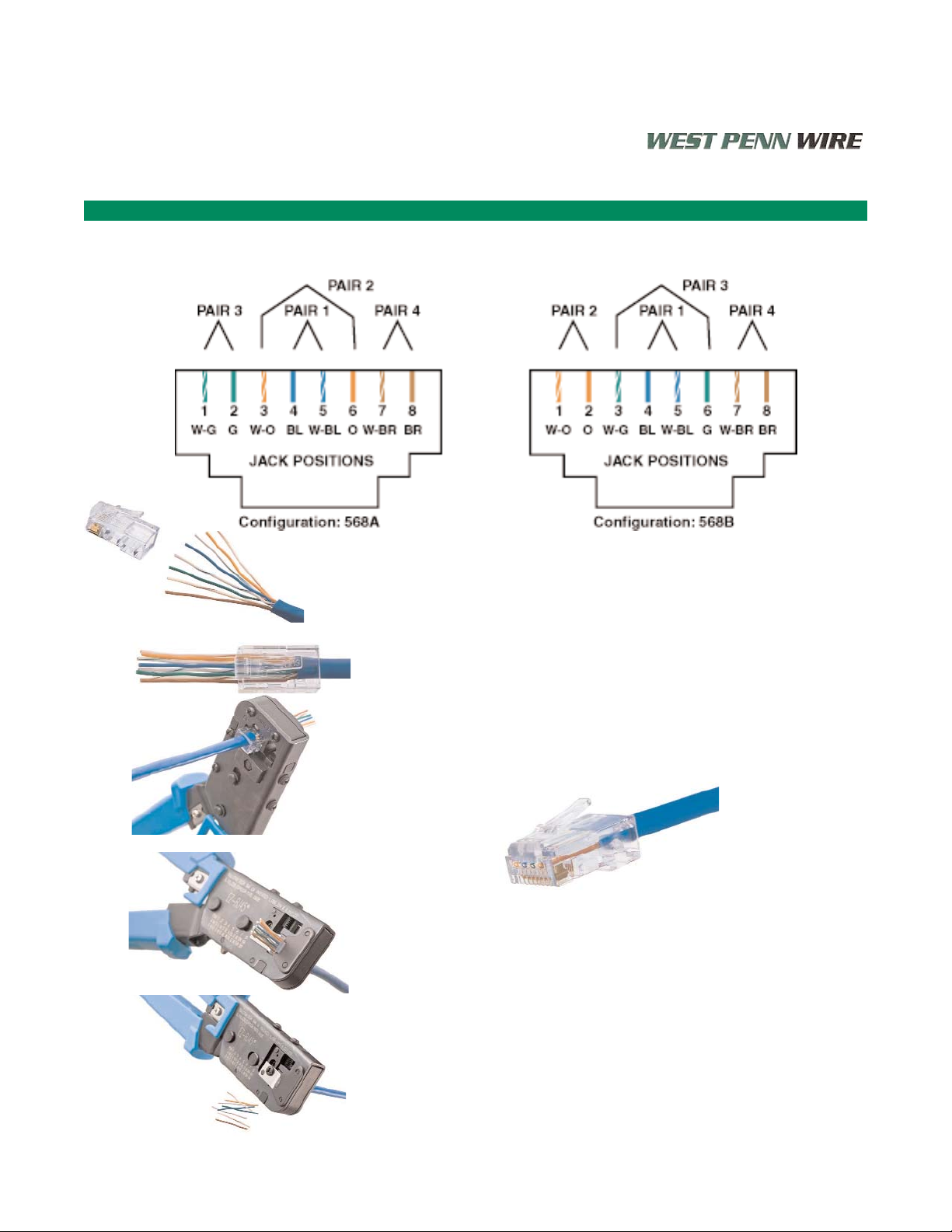
West Penn Wire - Product Manual
Plug Termination- RJ45
Terminating EZ Plugs
32-EZP Cat 5E and 32-6EZP Cat 6
Striping Instructions:
1. Strip off 2.00” of jacket
2. Straighten and align wires to T568B or T568A - Trim Pairs
3. Insert wires into connector body
4. Pull tight to ensure jacket is .250” inside connector body
5. Verify wire location and orientation
6. Insert 32-EZP connector into crimp tool- TL-EZRJ45
7. Verify connector is completely seated and cable is fully inserted
8. Squeeze handle of TL-EZRJ45
9. Remove excess wires
10. Check jacket strain relief
11. Check that contacts are all engaged
12. Check that contact dividers are not damaged
13. Check to see if both ends of the cable have been terminated
13
Page 16

Terminating Category 5E and Category 6 Jacks
West Penn Wire - Product Manual
RJ45 Jack Termination- Category 5E
Category Cable Jacks
IDC
All Jacks have IDC- Insulation Displacement Connections.
These connections are made with a punch down tool.
The Punch down tool displaces the insulation while the individual
cable is being pressed between two metal clips.
The metal clips make contact with the conductor.
Terminating RJ45 Jacks
1. Strip cable .750”- 1.00”- Do not damage conductors
2. Fan out the individual Pairs. Do not untwist the
individual pairs more than .500”
3. Place each wire into appropriate IDC slot color code
• Choose between T568A or T568B
4. Punch down the individual wire - Do not punch down
more than twice.
5. Place Protector Hood over the punched down wires
Cross-Compatibility:
TL-135
14
Page 17

Products- Video RGB- UTP Cable Products
Low Skew- No- Skew UTP Cables
Bulk Cables:
M58813 Non-Plenum 4 Pair 24 Awg. Low Skew
M58814 Plenum 4 Pair 24 Awg. Low Skew
M58854 Indoor/Outdoor 4 Pair 24 Awg. Low Skew CM
Difference between Low Skew UTP and Category Cables:
• Category 5E or 6 - Each pair is twisted at different rates
• This is done for electrical Cross-Talk between the pairs.
• Low Skew UTP- Each pair is twisted at the same rate
• This is done because of the skew (delay propagation)
You can not use a Low Skew cable in a high speed networking system.
You can not use a Category Cable in a Video System
Connectors:
See Network Cables and Connectors
West Penn Wire- Product Manual
Low-Skew UTP Cables
Products- Media Control Cables- Cresnet or AXlink
Media Control Cables
Cresnet- AXlink- Media Control Cables
Bulk Cables:
77350 Non-Plenum 1 Pair 22 Awg. Shielded +
2 Conductor 18 Awg.
D25350 Plenum 1 Pair 22 Awg. Shielded +
2 Conductor 18 Awg.
15
Page 18
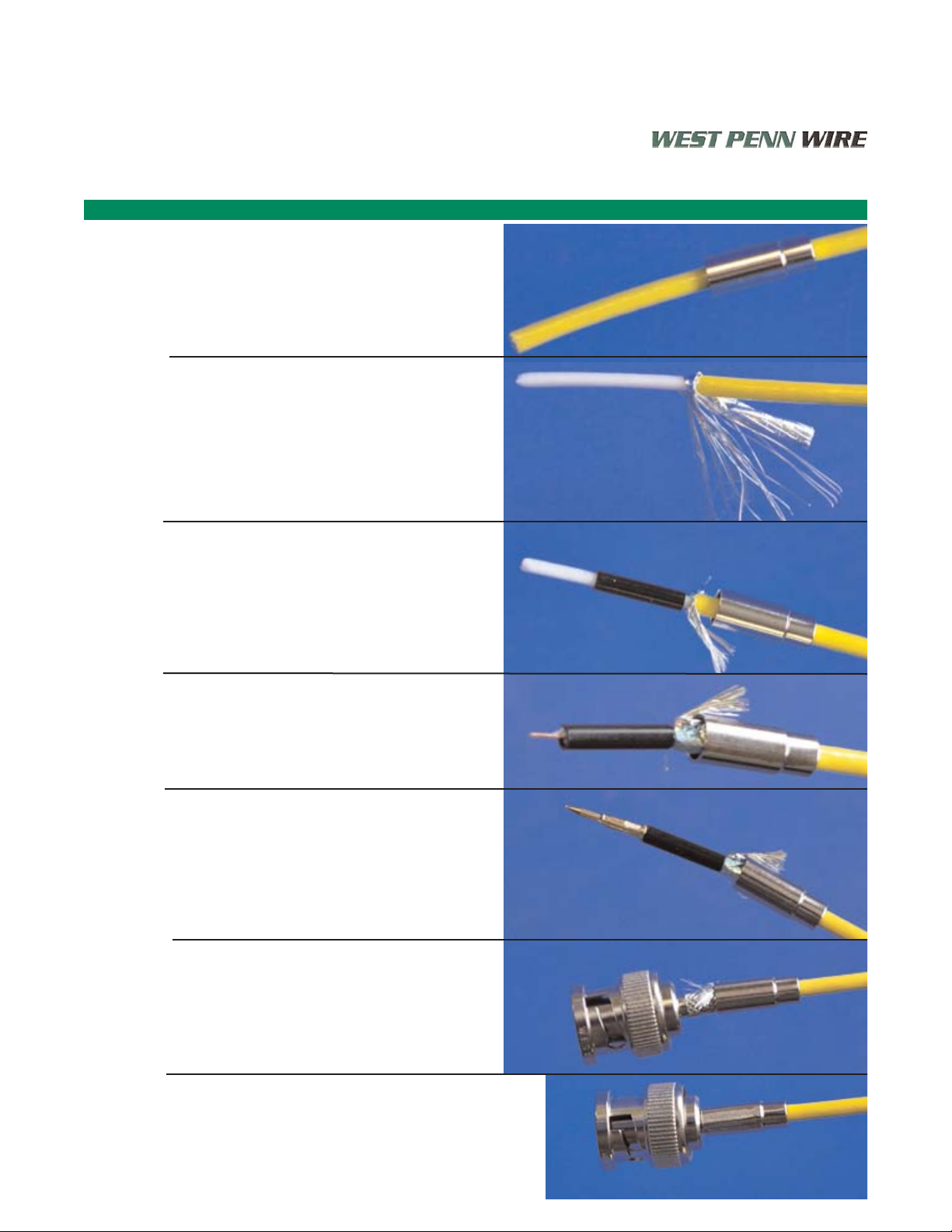
255CRGB - Reference Strip for CN-BM74-19 Crimp Connector
West Penn Wire - Product Manual
Reference Instruction CN-BM74-19
Feed crimp ferrule over the cable
jacket- small end first.
Strip cable- approximately .500”
using t-strippers 24-7371P or
TL-825.
Trim braid/shield .250”
Slide Strengthening Sleeve over
exposed dielectric - Black sleeve.
Trim insulation to expose center
conductor.
Trim Center Conductor to .1563”
Feed center pin onto center
conductor- Crimp die .068”
Using: TL-105 or TL-803.
Flair Braid evenly over the
connector body.
Feed connector body on the cable
until you hear a “Snap”.
Crimp ferrule- .178”
Using: TL-105 or TL-803.
A.
Page 19

255CRGB - Reference Strip for CN-BNCP-RGB
West Penn Wire- Product Manual
Reference Instruction CN-BNCP-RGB
Strip Cable- Jacket- .500”
.250” - Exposed Conductor
.250” - Exposed Dielectric/Shield
Using: 24-7371P or TL-CSST
Flair Braid/Shield back over the
Jacket. You may have to trim
braid/shield to .250”
Feed connector over the cable.
Compress connector onto cable.
Using TL-SNSA or TL-548G.
B.
Page 20

25819 - Reference Strip for CN-BM-73-30 Crimp Connector
West Penn Wire - Product Manual
Reference Instruction CN-BM73-30
Feed crimp ferrule and Strip
Using: TL-121 strip tool
Flair back braid and either leave
foil or tear foil off
Crimp center pin onto the center
conductor- .068”
Using TL-803 or TL-107
Feed connector body on the
cable until you hear a “Snap”.
Feed crimp ferrule over the
connector body- Crimp- .255”
Using TL-803 or TL-107
C.
Page 21

Compression Tools
West Penn Wire- Product Manual
Reference Compression Tools
TL-SNSA- Compression Tool
• Will do Miniature, MiniMax,
RG59/U, and RG6/U
• Will do BNC, RCA, and “F”
• Window BNC- set tool at 2.
• F-Conn BNC- set tool at 9.
TL-548G- Compression Tool
• Will do Miniature, MiniMax,
RG59/U, RG6/U, and RG11/U
• Will do BNC, RCA, and “F”
• Alternative for Window BNC
connectors.
• Will NOT do F-Conn BNC
connectors.
TL-CPLCCT-SLM
- Compression
Tool
• Will do Miniature, MiniMax,
RG59/U, and RG6/U
• Will do BNC, RCA, and “F”
• Alternative for F-Conn BNC
connectors.
• Will NOT do Window BNC
connectors.
D.
 Loading...