

Page 1

W
ADSL M
ODEM
(M
IRESPEED
ODEL
2000)
User Guide
©Copyright 2001 Westell, Inc. All rights reserved. 030-300187 Rev. A
Printed in the United States of America December 2001
Page 2
User Guide
WireSpeed ADSL Modem
CONTENTS
1. PRODUCT DESCRIPTION.......................................................................................................................................... 1
2. SAFETY .......................................................................................................................................................................... 1
3. INSTALLATION ........................................................................................................................................................... 3
4. TROUBLESHOOTING................................................................................................................................................. 6
5. TECHNICAL SUPPORT INFORMATION................................................................................................................ 7
6. PRODUCT SPECIFICATIONS ................................................................................................................................... 8
1. PRODUCT DESCRIPTION
The Westell WireSpeed ADSL Modem uses an existing phone line to provide reliable, high-speed Internet access for your
home or office. The Westell WireSpeed ADSL modem allows you to enjoy “always-on” high-speed Internet connection,
and receive voice calls over the same phone line.
The WireSpeed ADSL Modem can support downstream data rates of 8 Mbps and upstream rates of 800 Kpbs, which are
280 times faster than traditional analog 28.8 modems. Westell ADSL modem is a “plug and play” device, so setting up your
modem is as simple as connecting it to a PC with an installed Ethernet Adapter (NIC) and connecting the modem to your
wall phone jack that is DSL ready.
2. SAFETY
Follow these safety precautions when installing any electronic equipment:
• Never install any telephone wiring during a lightning storm.
• Never install telephone jacks in wet locations unless the jack is specifically designed for wet locations.
• Never touch non-insulated telephone wires or terminals unless the telephone line has been disconnected at the
network interface.
• Use caution when installing or modifying telephone lines.
WARNING
Risk of electric shock. Voltages up to 140 Vdc (with reference to ground) may be
present on telecommunications circuits.
030-300187 Rev. A
1
Page 3

User Guide
WireSpeed ADSL Modem
2.1 FCC Compliance Note
This equipment has been tested and found to comply with the limits for a Class B digital device, pursuant to Part 15 of the
FCC Rules. These limits are designed to provide reasonable protection against harmful interference in a residential
installation. This equipment generates, uses, and can radiate radio frequency energy, and if not installed and used in
accordance with the instructions, may cause harmful interference to radio communications. However, there is no guarantee
that interference will not occur in a particular installation. If this equipment does cause harmful interference to radio or
television reception, which can be determined by turning the equipment OFF and ON, the user is encouraged to try to
correct the interference by one or more of the following measures:
• Reorient or relocate the receiving antenna.
• Increase the separation between the equipment and the receiver.
• Connect the equipment to a different circuit from that to which the receiver is connected.
• Consult the dealer or an experienced radio/TV technician for help.
PART 68 – COMPLIANCE REGISTRATION
This equipment (ADSL modem) also complies with Part 68 of the FCC rules. A label on the bottom of this equipment
contains, among other information, the FCC registration number and ringer equivalence number (REN) for this equipment.
If requested, this information must be provided to the telephone company.
This equipment is designated to connect to the telephone network or premises wiring using a compatible modular jack that
is Part 68 compliant. An FCC compliant telephone cord and modular plug is provided with the equipment. See the
installation instructions for details.
If this terminal equipment (ADSL modem) causes harm to the telephone network, the telephone company may request that
you disconnect the equipment until the problem is resolved. The telephone company will notify you in advance if
temporary discontinuance of service is required. If advance notification is not practical, the telephone company will notify
the customer as soon as possible. You will be advised of your right to file a complaint with the FCC, if you believe such
action is necessary.
The telephone company may make changes to their facilities, equipment, operations, or procedures that could affect the
operation of this equipment. If this happens, the telephone company will provide advance notice in order for you to make
the modifications necessary to maintain uninterrupted service.
If you experience trouble with this equipment (ADSL modem), do not try to repair the equipment yourself. The equipment
cannot be repaired in the field and must be returned to the manufacturer. Contact Westell Customer Support at telephone
no. (630) 375-4500 for instructions on product return.
This equipment cannot be used on public coin phone service provided by the telephone company. Connection of this
equipment to party line service is subject to state tariffs.
2.2 Canada Certification Notice
The Industry Canada label identifies certified equipment. This certification means that the equipment meets certain
telecommunications network protective, operations and safety requirements as prescribed in the appropriate Terminal
Equipment Technical Requirements document(s). The department does not guarantee the equipment will operate to the
user’s satisfaction.
Before installing this equipment, users should ensure that it is permissible to be connected to the facilities of the local
Telecommunication Company. The equipment must also be installed using an acceptable method of connection. The
customer should be aware that compliance with the above conditions may not prevent degradation of service in some
situations.
030-300187 Rev. A
2
Page 4
User Guide
WireSpeed ADSL Modem
Repairs to certified equipment should be coordinated by a representative, and designated by the supplier. Any repairs or
alterations made by the user to this equipment, or equipment malfunctions may give the telecommunications company
cause to request the user to disconnect the equipment.
Users should ensure, for their own protection, that the electrical ground connections of the power utility, telephone lines,
and internal, metallic water pipe system, if present, are connected together. This precaution may be particularly important in
rural areas.
CAUTION
Users should not attempt to make such connections themselves, but should contact the appropriate
electrical inspection authority, or electrician, as appropriate.
3. INSTALLATION
3.1 Installation Requirements
To install the Westell ADSL modem, you will need the following:
1. An Ethernet adapter installed in your PC.
2. A DSL-ready phone line (provided by your Service Provider).
3.2 Package Contents
Your Westell modem kit should contain the items listed below. If anything is missing or damaged, please contact your DSL
Service Provider.
• WireSpeed ADSL Modem
• Power Supply
• RJ-11 DSL Phone Cable
• RJ-45 Ethernet Cable (straight-through)
• Westell CD-ROM containing a User Guide in .PDF format
• Quick Start Guide
3.3 Microfilters
ADSL signals must be blocked from reaching each telephone, answering machine, fax machine, computer modem or
similar conventional devices. Failure to do so may degrade telephone voice quality and ADSL performance. Install a
microfilter if you desire to use the DSL-equipped line jack for telephone, answering machine, fax machine or other
telephone device connections. Microfilter installation is simple and requires no tools or telephone rewiring. Just unplug the
telephone device from the baseboard or wall mount and snap in a microfilter, next snap in the telephone device. Contact
Westell to obtain a microfilter kit, which contains multiple microfilters for your installation.
030-300187 Rev. A
3
Page 5
User Guide
WireSpeed ADSL Modem
3.4 Connectors
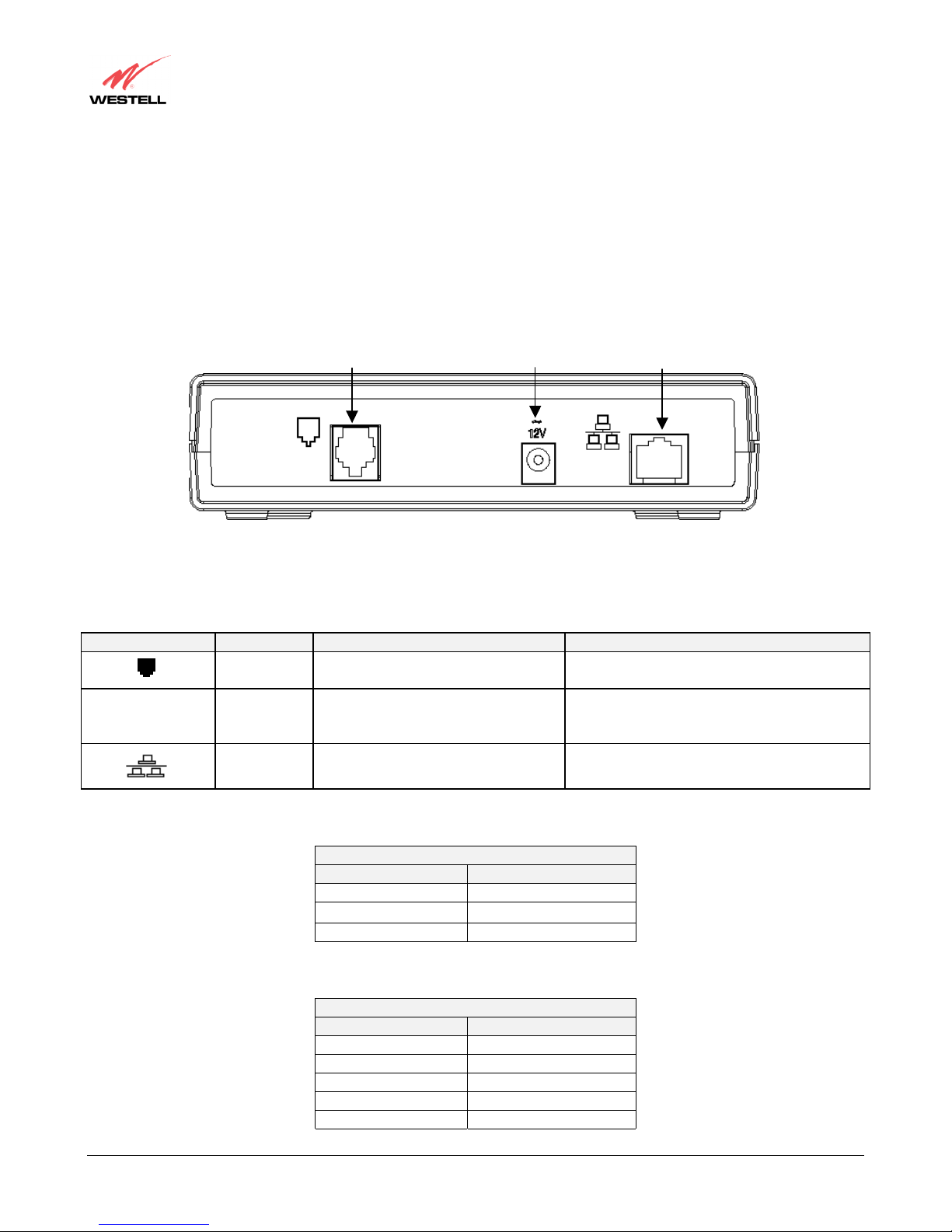
The following items are located on the rear panel of the ADSL Modem (see Figure 1). Tables 1 through 3 list the connector
types and pinout designations.
• DSL (LINE) connector (RJ-11)
• Power connector (Barrel)
• Ethernet connector (RJ-45)
DSL (LINE)
Connector
Power
Connector
Ethernet
Connector
SYMBOL
~
12V
N
Ethernet 8-pin (RJ-45) modular jack Connects to PC or 10/100 BaseT hub
Figure 1. ADSL Modem Rear Panel
Table 1. ADSL Modem Connectors
T
AME
LINE 6-pin RJ-11 modular jack
Power Barrel connector Power source from plug-top transformer
F
YPE
POTS/DSL is used to connect the telephone
jack with ADSL
UNCTION
Table 2. Line Connector Pinouts
LINE Pinout (RJ11)
PIN#
1, 2, 5, 6 Not Used
3 DSL Tip
4 DSL Ring
Table 3. Ethernet Connector Pinouts
Ethernet Pinouts (RJ45)
PIN#
1 Rx+
2 RX3 Tx+
4,5,7,8 Not Used
6 Tx-
030-300187 Rev. A
4
Page 6
User Guide
WireSpeed ADSL Modem
3.5 Installation Instructions
3.5.1 Getting Connected
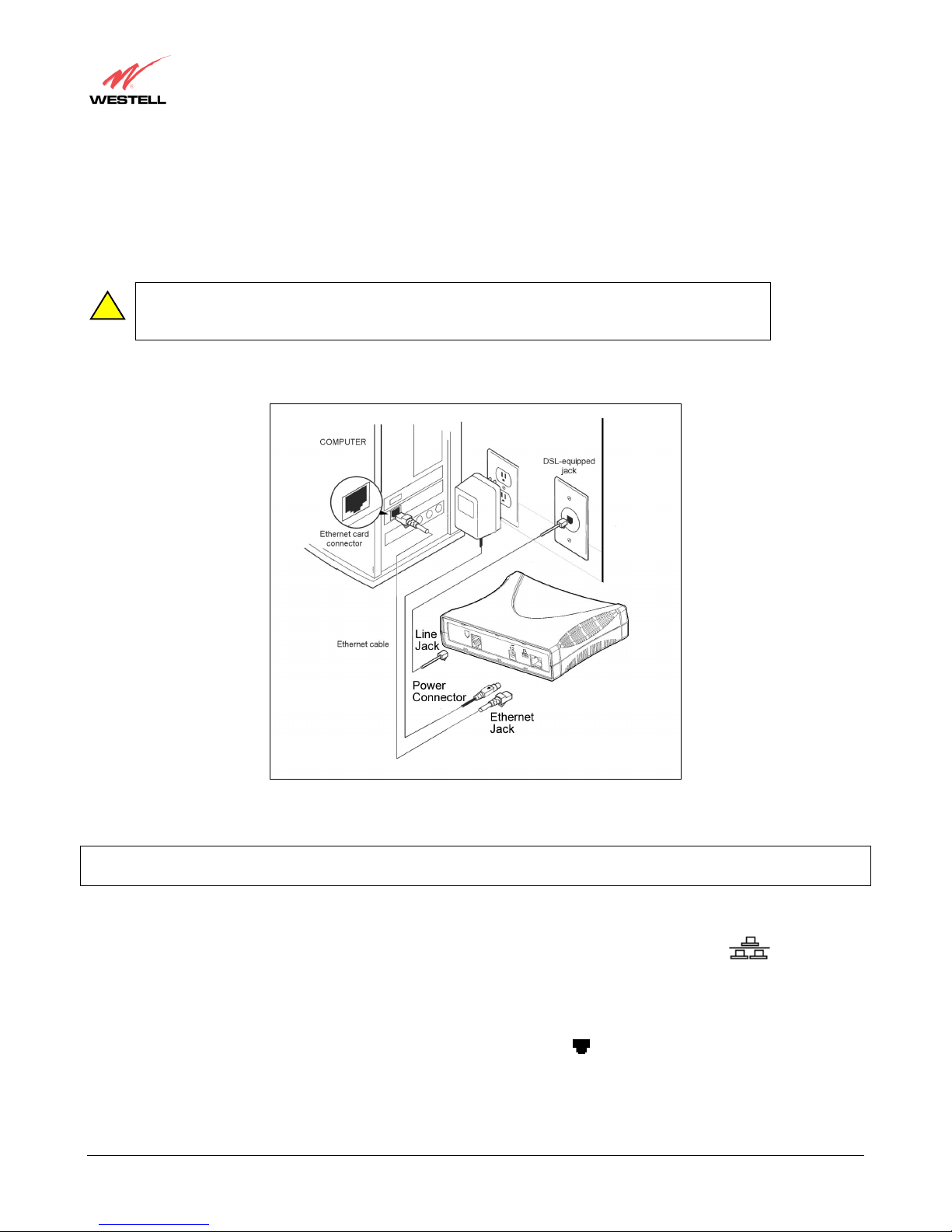
Refer to the diagram shown in Figure 2 and follow steps below to connect the ADSL modem.
Note: Before you connect the modem via 10/100Base-T, you must have an available Ethernet card
!
installed in your computer. If your card does not auto-negotiate, you must set it to half duplex. Refer
to the Ethernet card manufacturer’s instructions for installing and configuring your Ethernet card.
Note: Please wait until you have received notification from your Service Provider that your DSL line has been activated
before installing your modem.
1. Verify that you have an available Ethernet card. Note: See the above caution box.
2. Connect the Ethernet cable to the Ethernet port on your computer and to the Ethernet jack marked
on the rear panel of the modem.
3. Connect one end of the power supply cord to the connector marked
other end of the power supply cord into an AC wall socket.
4. Connect the DSL phone cable from the rear panel of the modem marked
on the wall. IMPORTANT: Do not use a DSL filter on this connection. Note: You must use the modem phone cord
that was provided with your modem kit.
5. Wait for the Ready, and Link LEDs to light steady green.
030-300187 Rev. A
5
Figure 2. ADSL Modem Connection
~
on the rear panel of the modem. Plug the
12V
to the DSL-equipped telephone line jack
Page 7
User Guide
WireSpeed ADSL Modem
3.5.2 Installing Your ISP Software
Follow the steps below to install the modem software.
1. Install the software that was provided by your Service Provider per their instructions.
2. Enter your user password and ID information that was provided by your Service Provider.
4. TROUBLESHOOTING
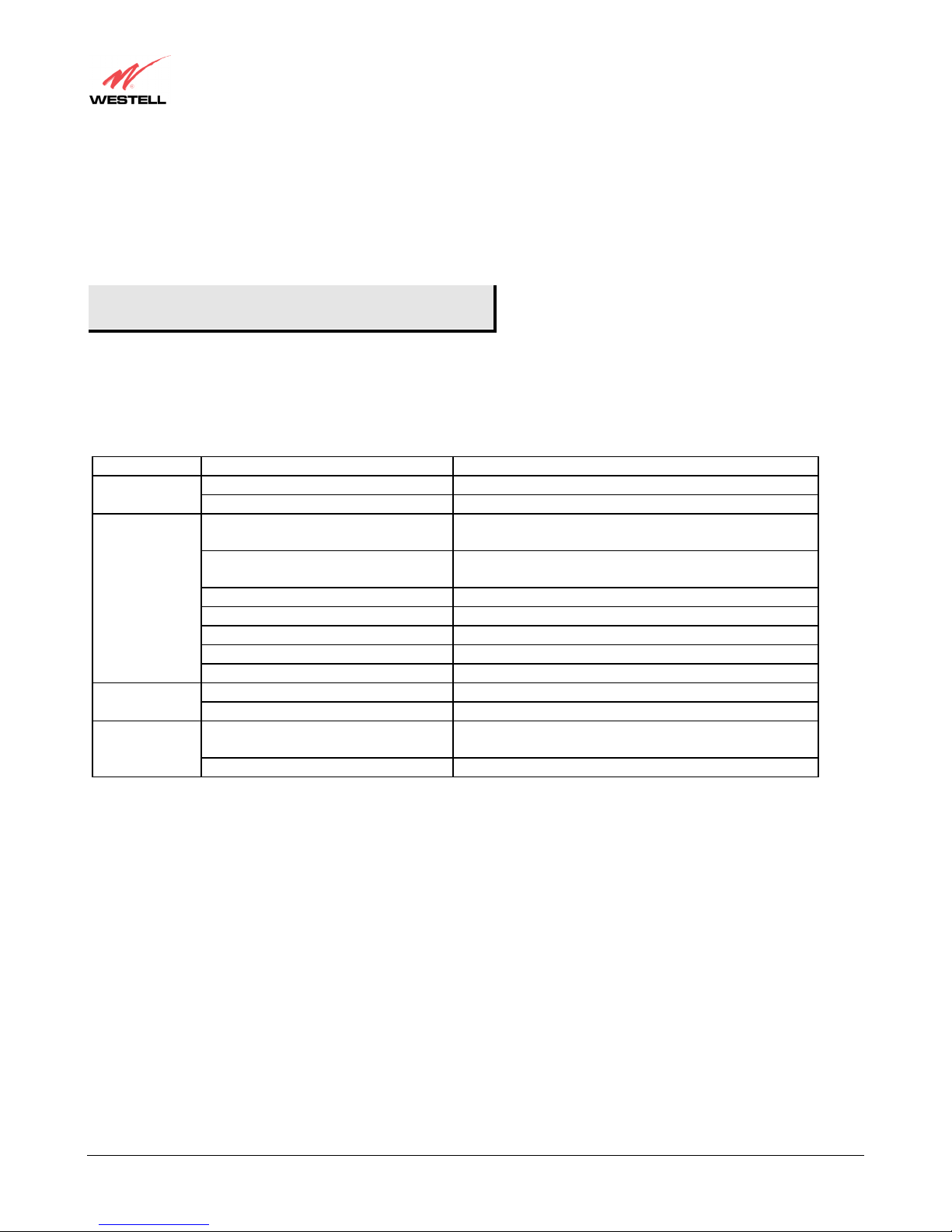
4.1 LED Indicators
The LED indicators are used to verify the unit’s operation and status. The LED states are described in Table 4.
Table 4. LED States and Descriptions
LED State Description
POWER
READY
LINK
ACTIVITY
Solid Green
No Light
Slow Flashing Green
Moderate Flashing Green
Steady Green
Steady RED (less than 20 sec.)
Blinking Red
Alternating Red/Green
No Light
Solid Green
No Light
Pulsing Green
No Light
Power ON
No power
Power ON and passed power-up diagnostics
(1 flash/sec)
Power ON and attempting synchronization
(2 flashes/sec)
Power ON and synchronized with the ADSL line card
Hardware power-up in progress
Unit failed power-up diagnostic
Modem diagnostic failed
No power
Link established
No 10/100 Base-T Link
Data being transmitted or received. Pulses should
match the reception or transmission of Ethernet data.
No data on Ethernet interface
4.2 Routers
If you are using a Westell ADSL modem in conjunction with a router, refer to the router manufacturer’s instructions for
proper installation and configuration.
030-300187 Rev. A
6
Page 8

User Guide
WireSpeed ADSL Modem
5. TECHNICAL SUPPORT INFORMATION
5.1 Westell Technical Support
If technical assistance is required, contact Westell by using one of the following options:
Phone: 1-630-375-4500
email: [email protected]
Visit Westell at www.westell.com
service requests.
5.2 Warranty and Repairs
5.2.1 Warranty
Westell warrants this product to be free from defects at the time of shipment. Westell also warrants this product to be fully
functional for the time period specified by the terms and conditions of the warranty. Any attempt to repair or modify the
equipment by anyone other than an authorized Westell representative will void the warranty.
to obtain additional information, view frequently asked questions, or enter on-line
5.2.2 Repairs
Westell will repair any defective Westell equipment without cost during the warranty period if the unit is defective for any
reason other than abuse, improper use, improper installation, or acts of nature. Before returning the defective equipment,
request a Return Material Authorization (RMA) number from Westell. Once an RMA number is obtained, return the
defective unit, freight prepaid, along with a brief description of the problem to:
Westell, Inc.
ATTN: R.G.M Department
750 N. Commons Drive
Aurora, IL 60504-7940
Westell will continue to repair or replace faulty equipment beyond the warranty period for a nominal charge. Contact a
Westell Technical Support Representative for details.
030-300187 Rev. A
7
Page 9

User Guide
WireSpeed ADSL Modem
6. PRODUCT SPECIFICATIONS
D
IMENSIONS
Width: 6.3 in. (16.0 cm)
Depth: 5.07 in. (12.8 cm)
Height: 1.6 in. (4.0 cm)
W
EIGHT
Approx. 2.0 lbs. (.90 kg)
E
NVIRONMENTAL
Ambient Operating Temperature: +32 to +104°F (0 to +40°C)
Relative Humidity: 5 to 95%, non-condensing
P
OWER SUPPLY
120 VAC (10%) to 12 VAC wall-mount power supply
P
OWER CONSUMPTION
Less than 8 watts typical, from 120 VAC
C
ONNECTORS
POWER: Barrel connector
LINE (DSL): 6-pin (RJ-11) modular jack
ETHERNET: 8-pin (RJ-45) modular jack
E
THERNET CONNECTOR PINOUT
An RJ-45 type that carries the Receive data on Pins 1 and 2, and the Transmit data on Pins 3 and 6
E
THERNET INTERFACE
Provides transmit and receive data paths for 10/100 Base-T Network Connection.
LINE (DSL) C
An RJ-11 type that carries combined ADSL and POTS signals on Pins 3 and 4.
DSL
DSL Line Code: Discrete MultiTone (DMT)
DSL Rates: 32 Kbps to 8 Mbps downstream and 32 Kbps to 800 Kbps upstream
Power Spectral Density: -40 dBm/Hz
DSL Impedance: 100 Ohms
DSL Performance: per Category 1 in ANSI T1.413
EMC
FCC, Part 15 Class B
S
AFETY
UL 1950
cUL, CAN/CSA-22.2 950-93
EN60950
R
EGULATORY APPROVAL
UL
CSA
FCC Part 68
Industry Canada CS03
ONNECTOR PINOUT
030-300187 Rev. A
8
Page 10

User Guide
WireSpeed ADSL Modem
PUBLICATION INFORMATION
WireSpeed ADSL Modem User Guide
Document Part No. 030-300187 Rev. A
Created December 2001
©2001, Westell, Inc.
All rights reserved. Printed in USA.
Westell, Inc.
750 North Commons Drive
Aurora, IL 60504 USA
Web site: www.westell.com
Trademarks
WireSpeed™ and WireSpeed Pro™ are trademarks of Westell, Inc.
All other trademarks are owned by the respective companies.
030-300187 Rev. A
9
 Loading...