

Page 1

26V
BATTERY
CHARGER
QUICK START GUIDE
Page 2
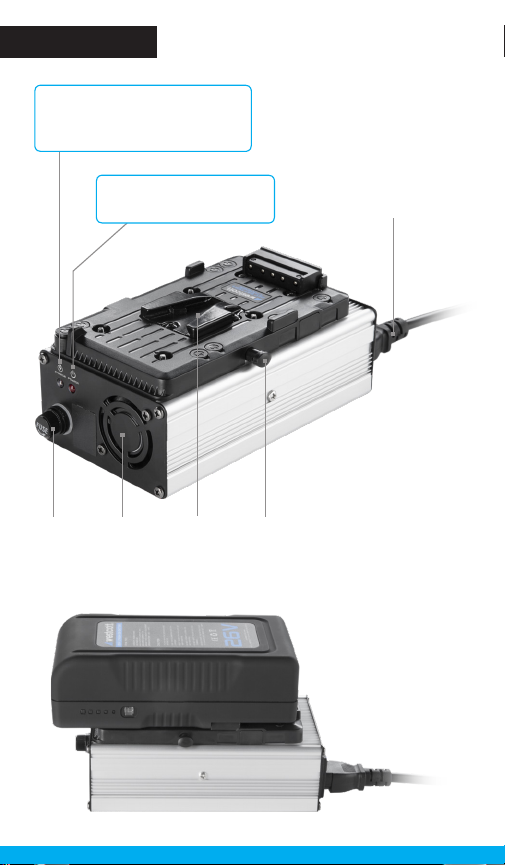
Overview
Charge Indicator LED
Red: Battery is charging.
Green: Battery is fully charged.
Glass
Tube
Fuse Cap
Power Indicator LED
Red: Charger is on.
Fan Battery
V-Mount
Release
Button
Power Cord
Page 3

Warning
• Only for use with Westcott 26V Lithium- Ion Bat tery
• Do not at tempt to open or alter
• Do not re move or change V-Mount plates
• Keep dr y and away from fire
• Do not submerge in water
• Never charge in temperatures above 60°C (140°F)
• Do not cove r or block vents when in use
• Always use in well ventilated area
Operation
Charging a 26V Lithium-Ion Battery
1. Plug the female end of the power cord into the end of the charger.
2. Plug the male end of the power cord into a Type-B wall outlet.
3. Ensure that the LED indicators located at both ends of the charger
are illuminated.
4. Align the V-Mount on the ba ck of the 26V Batter y to the docking
station located on the charger, ensuring that the point of the “V”
shape o n each are p ointed in the same direction.
5. Gently press the battery against the docking station and slide the
batter y into place until it clicks.
When connecte d, the internal cooling fan will spin to ensure
optimal cooling. Once charging is complete, the fan will stop.
Removing a 26V Lithium-Ion Battery
To remove the battery, hold the release button located alongside the
charger’s V-Mo unt plate while sliding the bat tery out of the docking
station. Then , release the button and store batter y when not in use.
Troubleshooting
Should the 26V Ch arger become inoperable, ensure that the outlet is
receiving power. If the outlet is operating properly, check the power
indicator for illumination. If it is not illuminated, the user-replaceable
fuse may n eed to be replaced .
Page 4

Fuse
Checking the Glass Tube Fuse (250V 10A)
1. Locate the fuse cap on the end of the charger.
2. Twist the fuse cap counterclockwise and remove it from
the charger.
3. Determin e if the fuse needs to be replaced, which is commonly
indicated by black residue on the glass inside the fuse.
If the fuse needs replace d, proceed with caution.
Replacing the Glass Tube Fuse (250V 10A)
1. Allow the fuse to cool for 2 minutes.
2. Carefully grasp the end of the fuse and gently wiggle from
side-to-side while pulling away from the fuse cap.
3. Once removed from the cap, discard the blown fuse.
4. Insert the new fuse into the charger cap.
5. Twist the cap back into place.
Page 5
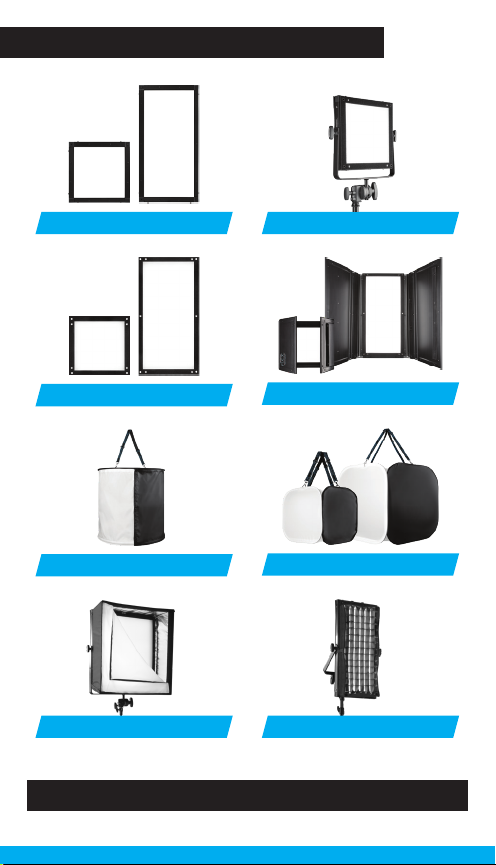
Flex Cine Mounts & Modifiers
YokesScrim Jim® Cine Frames
Hard Diusion Panels
Drum Softbox
Portable Softboxes
Learn more at FJWESTCOTT.COM/FLEX
Barndoors
China Cubes
Egg Crate Grids
Page 6

Warranty
Westcott’s warranty obligations for this product are limited to the following terms.
The F.J. Westcott Co. (“Westcott”) warrants this Westcott branded product against
defects in materials and workmanship under normal use for a period of ONE (1)
YEAR from the date of retail purchase from Westcott or an authorized retailer
by the original end-user purchaser (“Warranty Period”). If a defect arises and a
valid claim is received within the Warranty Period, at its option and to the extent
permitted by law, Westcott will either (1) repair the defect at no charge, using new
or refurbished replacement parts, or (2) exchange the product with a product that
is new or which has been manufactured from new or serviceable used parts and
is at least functionally equivalent to the original product. This Limited Warranty
applies only to products manufactured by or for Westcott that can be identified by
the Westcott trademark, trade name, or logo affixed to them.
This warranty does not apply to: (a) damage caused by accident, abuse, misuse,
flood, fire, earthquake, mold, or other external causes; (b) damage caused by
operating the product outside the permitted or intended uses described by
Westcott; (c) a product or part that has been modified to alter functionality or
capability without the written permission of Westcott; or (d) cosmetic damage,
including but not limited to scratches, dents and broken plastic.
Disclaimer: By purchasing, borrowing and/or using this product for any event,
both public or private, you, the customer, accepts all responsibility and releases
Westcott, and its associates, of any and all liability in the event of manufacturer’s
defect, malfunction or misuse of the product which may lead to further injuries or
complications unforeseen by the user. Westcott is not responsible for any potential
or incurred damage caused by failure to properly mount, hang, or store the product,
which includes, but is not limited to damage to cameras, electronics, electrical
equipment, buildings, building materials, personal injury, death, or disability, fire
damage, or any and all other damage not mentioned previously.
Please contact Westcott’s Repair Department for a Return Authorization Number
“RMA” prior to requesting warranty service. This RMA must be clearly written on
the outside of the box to the left of the shipping label. Items sent in without preauthorization or that do not fall under the limited warranty will be returned at the
expense of the sender.
Repair Department: 800-886-1689 / 419-243-7311 (International)
Email: [email protected]
Shipping: F.J. Westcott Co, 1425-B Holland Rd. Maumee, OH 43537
Register your new gear online at FJWESTCOTT.COM/REGISTER
Visit FJWESTCOTT.COM for videos, pro tips, inspiration, and more!
Westcott products are made to the company’s traditionally high standards of quality and
comply with all applicable government safety regulations and requirements. In an eort to
provide the best quality products possible, we periodically make product modifications.
Actual products may not be identical to items pictured. Made in China. ©F.J. Westcott Co.
All rights reserved. HW0918
 Loading...