

Page 1
http://www.wenshing.com.tw; http://www.rf.net.tw
RD232-H Instruction Manual P.1
WENSHING®©
Wireless Data Radio Modem
(RS485、TTL)
432~436MHz 500mW Multi-point Transceiver
Version History
Version Date Changes
V1.01 Sep.21, 2018 1
st.
Edition
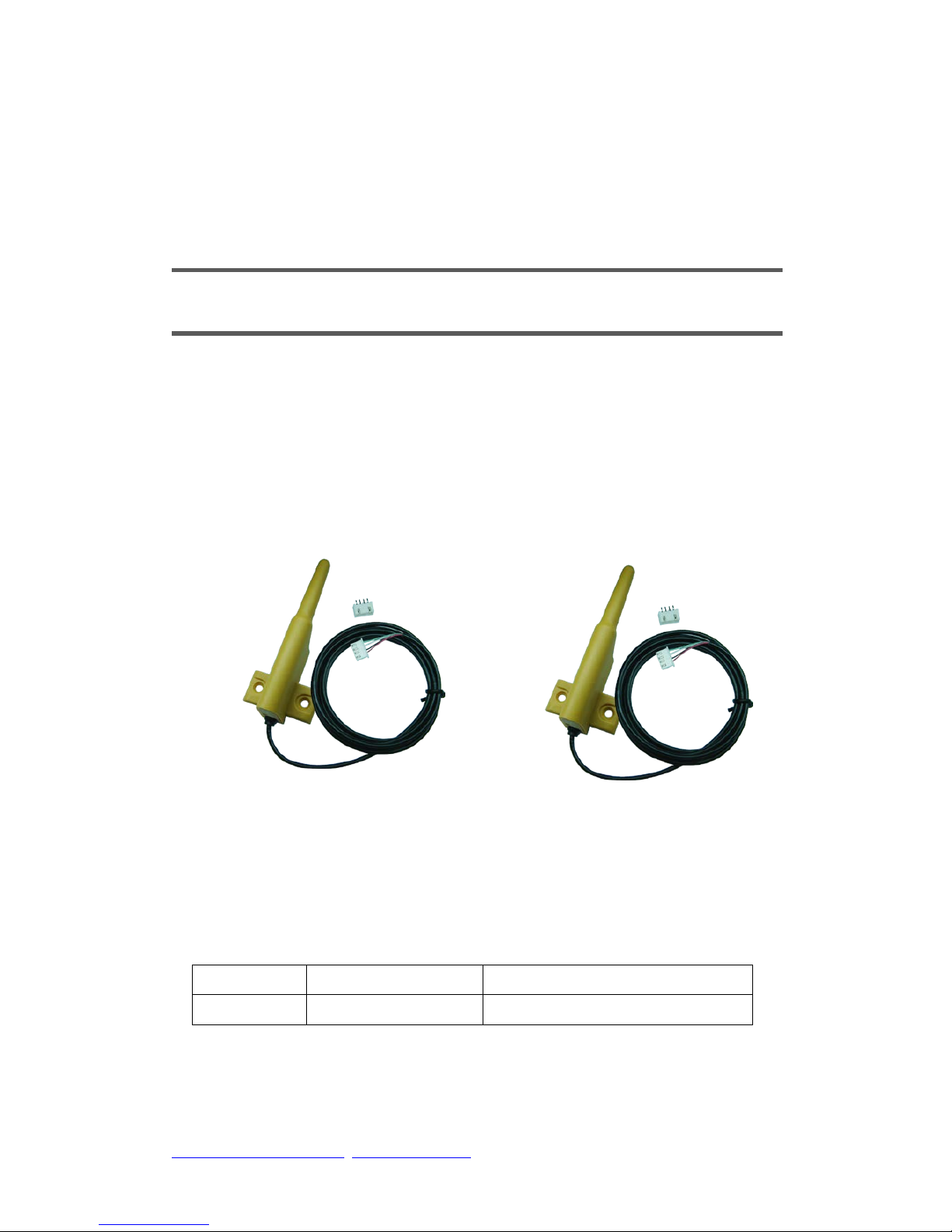
Model:RD232-H-RS485-434M
(RS485 Interface)
Model:RD232-H-TTL-434M
(TTL Interface)
Page 2

http://www.wenshing.com.tw; http://www.rf.net.tw
RD232-H Instruction Manual P.2
Content
Important Event................. ..... .. ..... ..............................................................3
Warranty…………………………...... ....………………………………………3
Un-warranty Scope Description…………... ...…………………………………3
Contact Us…………………………………...……………………………………3
Key Feature................ ..... . ……. ..... ... ..........................................................4
Application…………………………………………………………………………4
Electrical Characteristic…………………………………………………………4
Block Diagram………………………………………………………………………5
Dimension…………………………………………………………………………6
Pin Assignment ……………………………………………………………………7
Installation Instructions ………………………………….………………………8
Instruction Mode ………………………………………………………………13
Into Set Up Mode………………………………………………………………13
Exit Code Mode…………………………………………………………………13
Read In Product Name And Model……………………………………………13
Recover Parameter……………………………………………………………13
Read In Inside Parameter………………………………………………………13
Set Inside Parameter…………………………………………………………13
Page 3

http://www.wenshing.com.tw; http://www.rf.net.tw
RD232-H Instruction Manual P.3
Import ant Event
This product is in general use for the equipm ent on the premise of the development,
design, manufacture. Do not use that require high security purposes, such as
machinery or medical, aviation equipment, machinery and transport-related deaths
are directly or indirectly related to the system.
This product should be in this brochure by the instructions of the types and rated
voltage power under the current proper use. If violation of this statement by the
safety records of the supply operation, I am afraid our company cannot afford any
of the responsibility.
Do not self-decomposition, alteration, repair of the products also will cause fire,
electric shock, fault, and dangerous. In addition, their decomposition, alteration,
repair the product, failure is not within the scope of warranty.
The products are not waterproof, so please do not use and touch water. Take off
and on also please note. Rain, spray, drinks, steam, sweat may be a failure.
Use of this product, please be sure to use according to the statement recorded by
the use of methods to operate. Please do not violate particular attention to the
matter reminded to use.
Please respect this statement recorded by the note. When consumers in
contravention of this statement recorded note of the operation, I am afraid our
company could not shoulder any responsibility.
Products are defective, the Company will be responsible for free to amend the
flaws, or to the same flawless product or its equivalent products in exchange.
However, the Company does not assume based on the requirements of the flaw
and loss responsibility.
The Company reserves the right to retain w ithout notice to users of the cases, the
product of hardware / software (version upgrade) is with the right to edit.
Warranty
The periods of warranty are within one year from purchased date. The warranty scope
is used in normal situation and none vandalism. (Some function harmful out of
warranty scope and Vandalism are Un-warranty).
Un-warranty Sco pe Description
Because the natural disaster, accident or human factor to cause the bad damage.
Violate the product instruction manual to cause the damage of the products.
The improper assemble causes damage.
The products used the unsanctioned accessory to cause damaged.
Overstep the allowed used environment to cause the products damaged.
Contact Us
WENSHING ELECTRONICS CO., LTD.
No.82, Chong De St. 11054 Shin Yi Dist, Taipei, Taiwan
Tel: +886-2-27353055
Fax: +886-2-27328813
Page 4
http://www.wenshing.com.tw; http://www.rf.net.tw
RD232-H Instruction Manual P.4
Key Feature
UHF Band Wireless Data Transceiver
Frequency Range: 432~436MHz
RF Output Power: 500mW
Voltage: 7~ 24V
Sensitivity: -126dBm (2Kbps)
Interface: RS485, TTL (Optional)
Transceiver Data Rate: 1.6Kbps~128Kbps
Application
Wireless Network
Multi-Channel Home Automation
Wireless RS232
Active RFID Base Station Transceiver
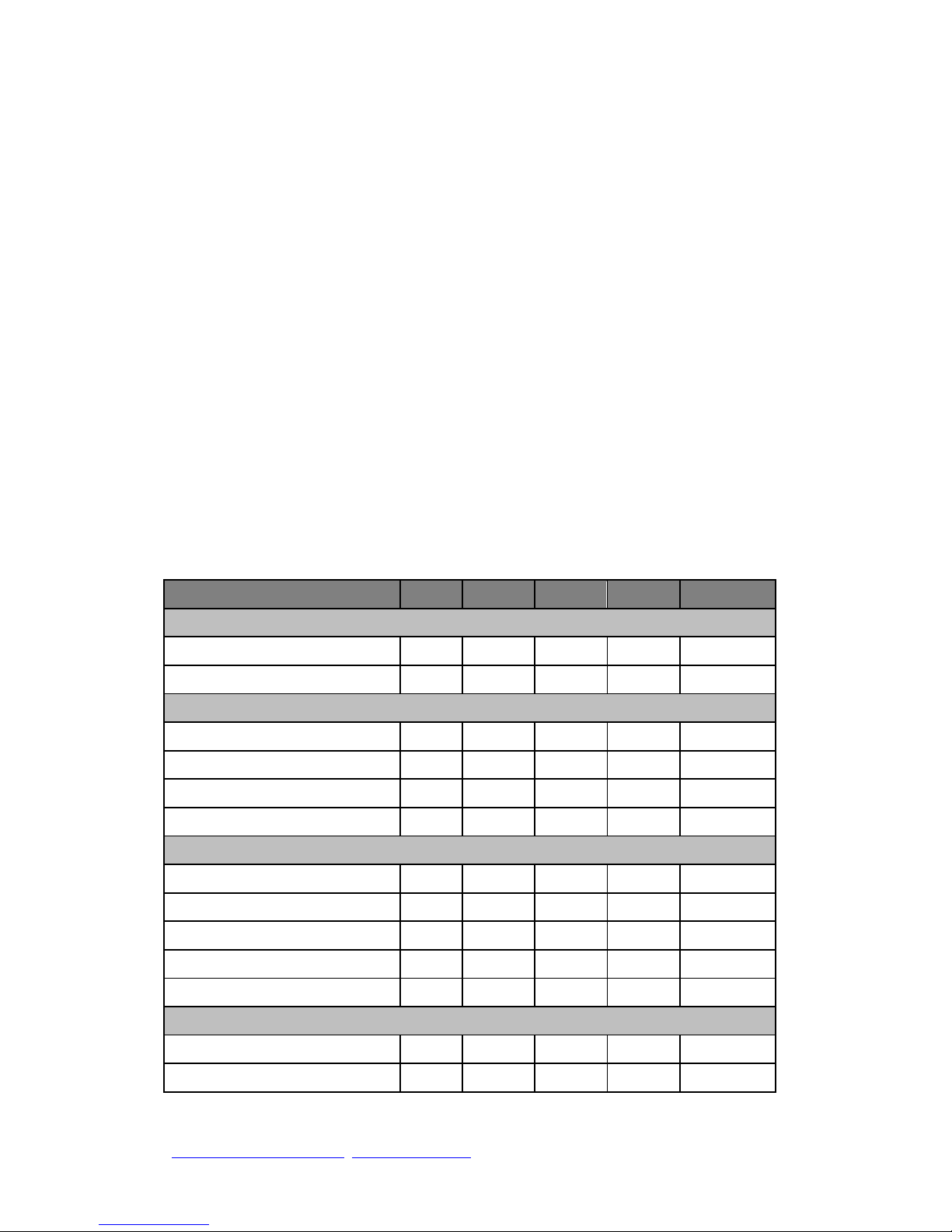
Electrical Characteristic
*7~24V Power Supply.
Parameter
Min.
Typ.
Max.
Unit
Condition
Operating Condition
Operating Temperature Range
-10 +70
℃
Operating Supply Voltage
7 24 V
Current Consumption
RX Mode (RS485)
34
40
mA
TX Mode (RS485)
600
mA
Peak
RX Mode (TTL 3V)
34
40
mA
TX Mode (TTL 3V)
600
mA
Peak
RF Characteristic
Frequency Range
432
434
436
MHz
Data Rate
1.6 128
Kbps
GFSK
TX Output Power
27
27.5
dBm
RX Sensitivity
-126
-125
dBm
Modulation
GFSK
Other
ESD
2000 V
Interface Data Rate
1.2 115.2
Kbps
Page 5
http://www.wenshing.com.tw; http://www.rf.net.tw
RD232-H Instruction Manual P.5
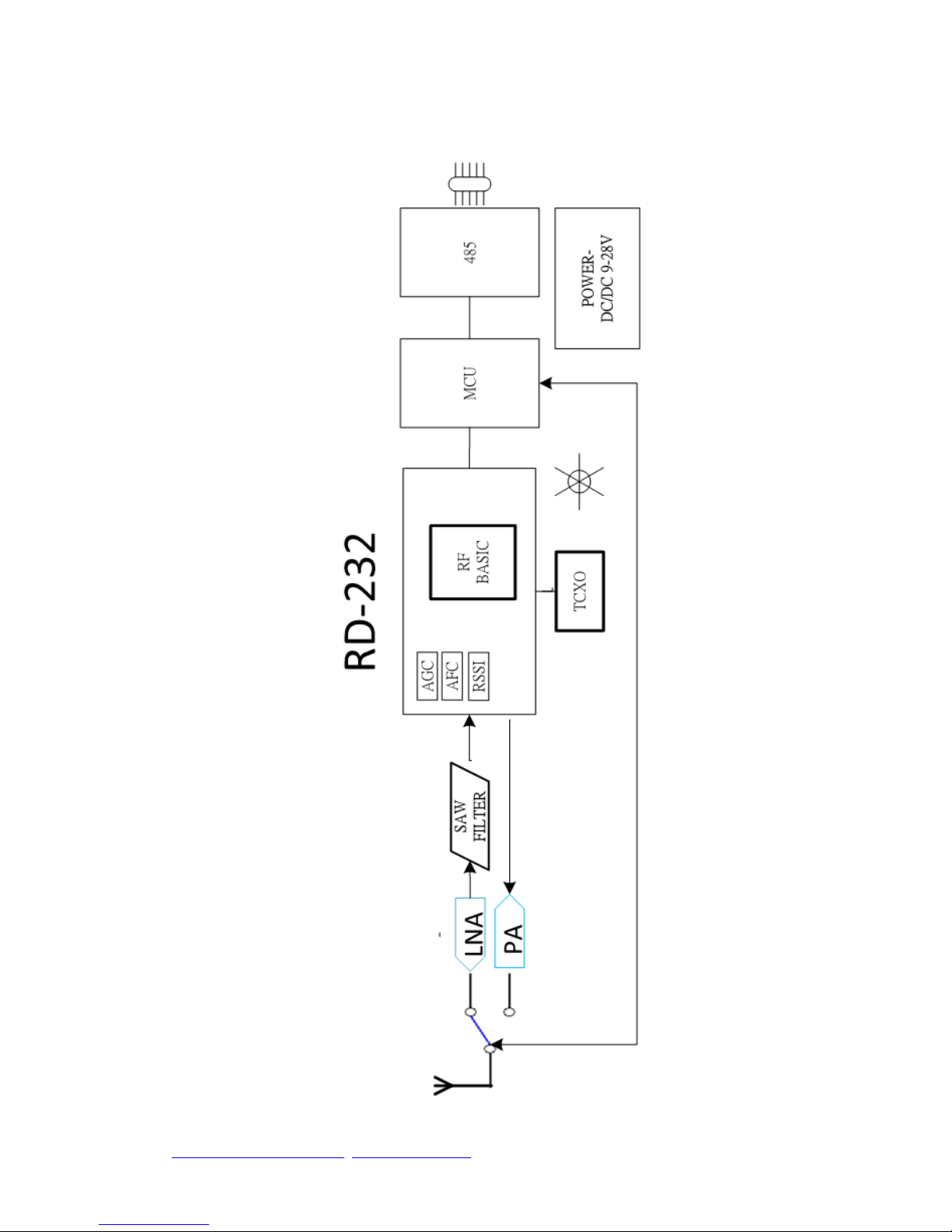
Block Diagram
Page 6
http://www.wenshing.com.tw; http://www.rf.net.tw
RD232-H Instruction Manual P.6
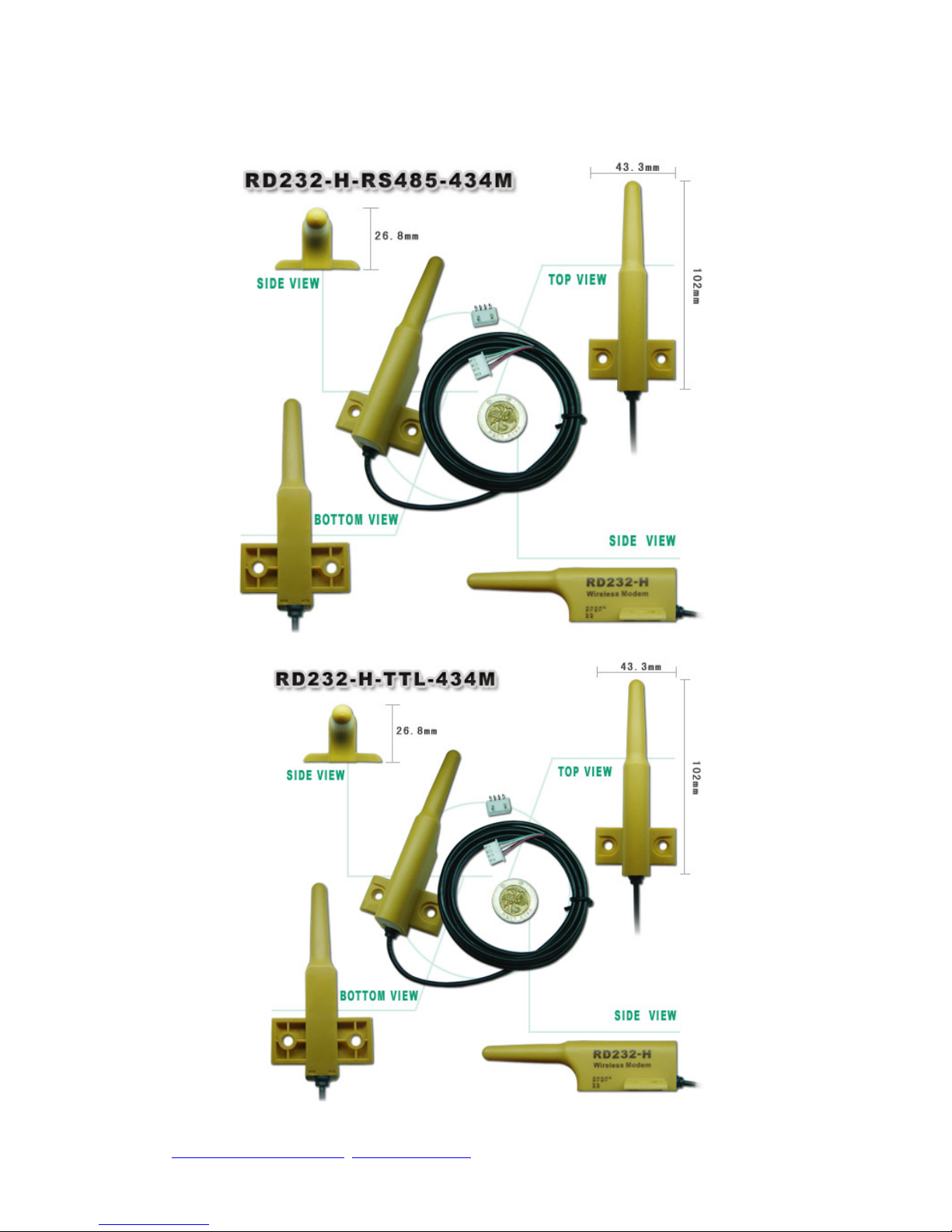
Dimension (Unit:mm)
Page 7
http://www.wenshing.com.tw; http://www.rf.net.tw
RD232-H Instruction Manual P.7
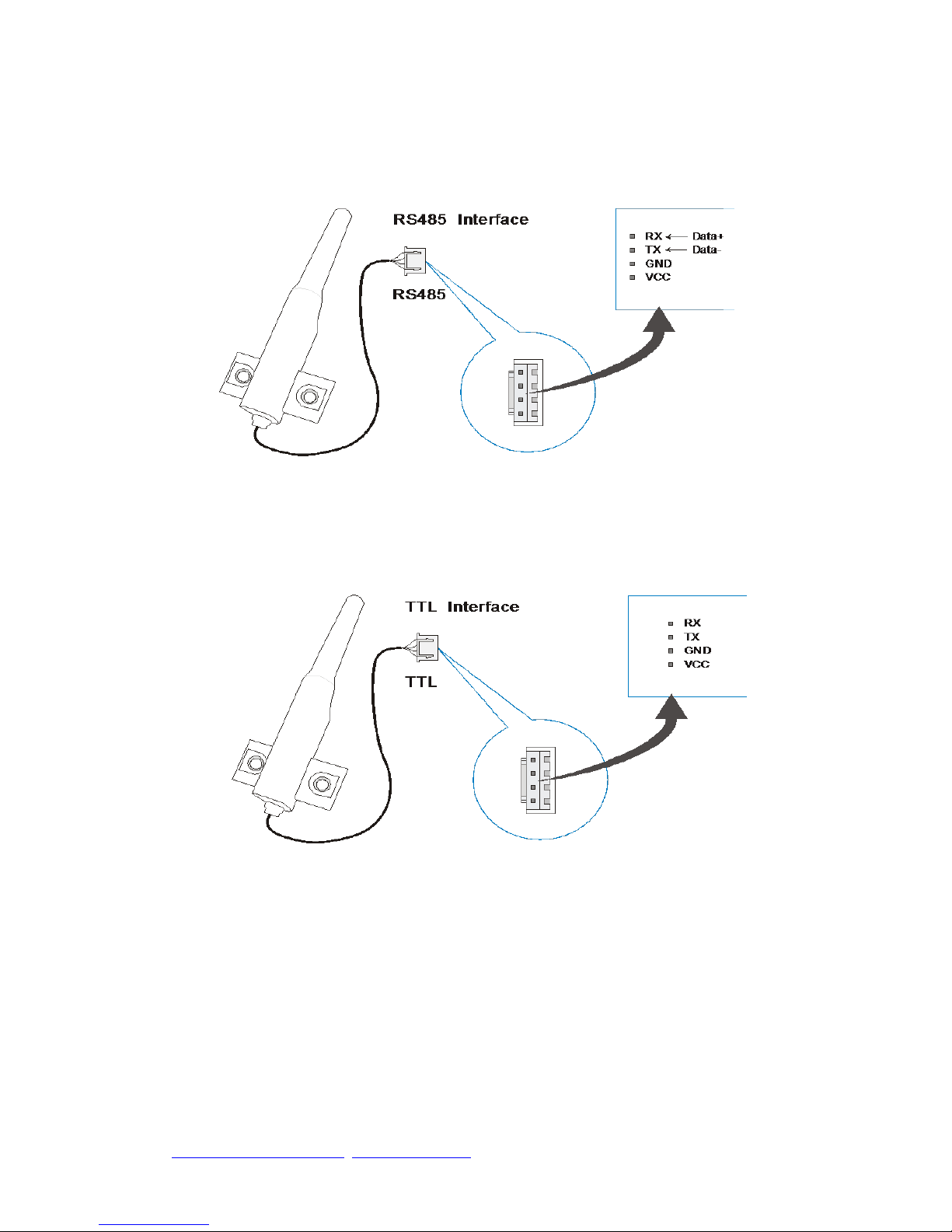
Pin Assignment
Page 8
http://www.wenshing.com.tw; http://www.rf.net.tw
RD232-H Instruction Manual P.8
Installation instructions
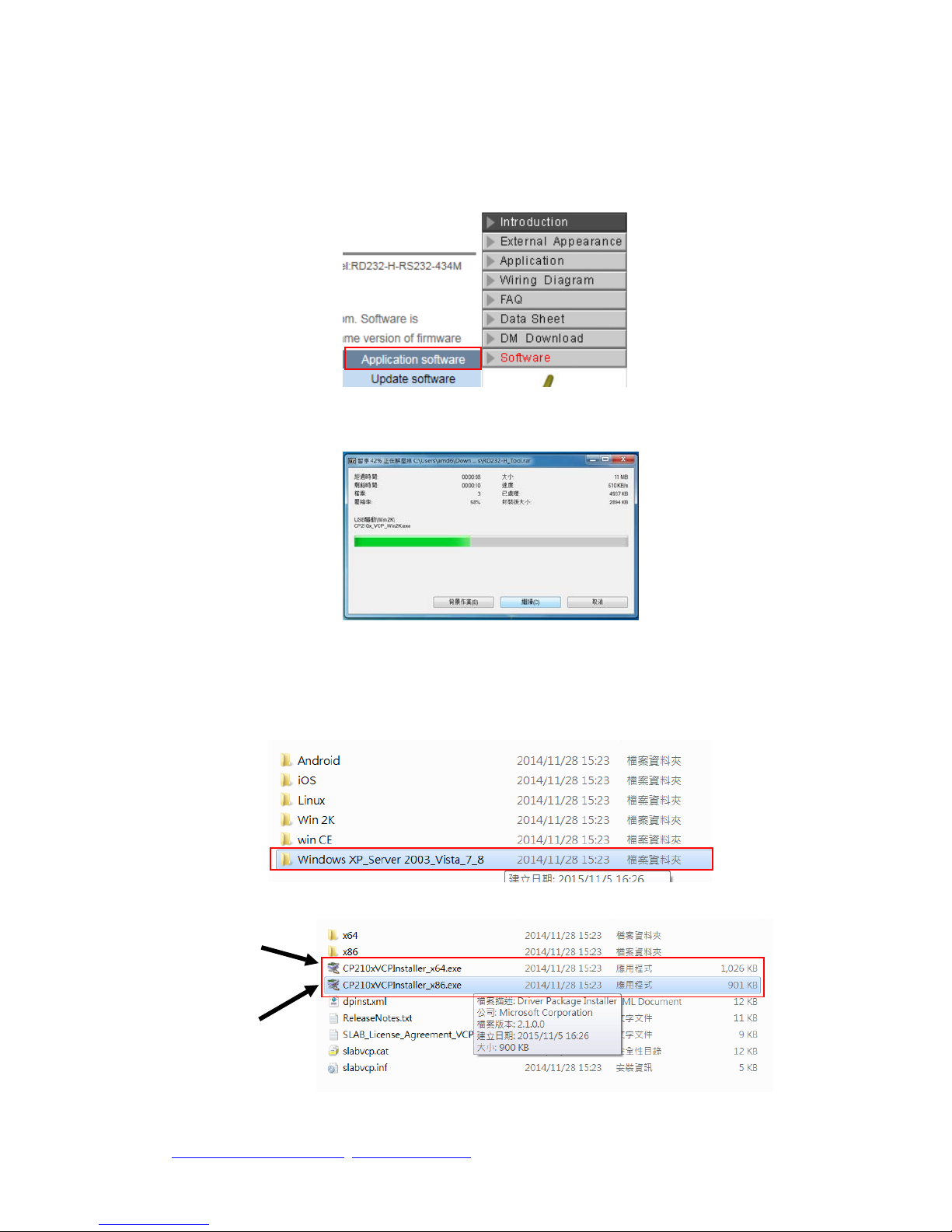
Click on the “Software”、“Application software” button on the product
information page to begin downloading product drivers.
Decompress the “Product driver” archive.
After decompression, find the “Windows XP_Server” archive, double click to
find the 32-bit or 64-bit system installation .exe file.
64 bit
32 bit
Page 9
http://www.wenshing.com.tw; http://www.rf.net.tw
RD232-H Instruction Manual P.9
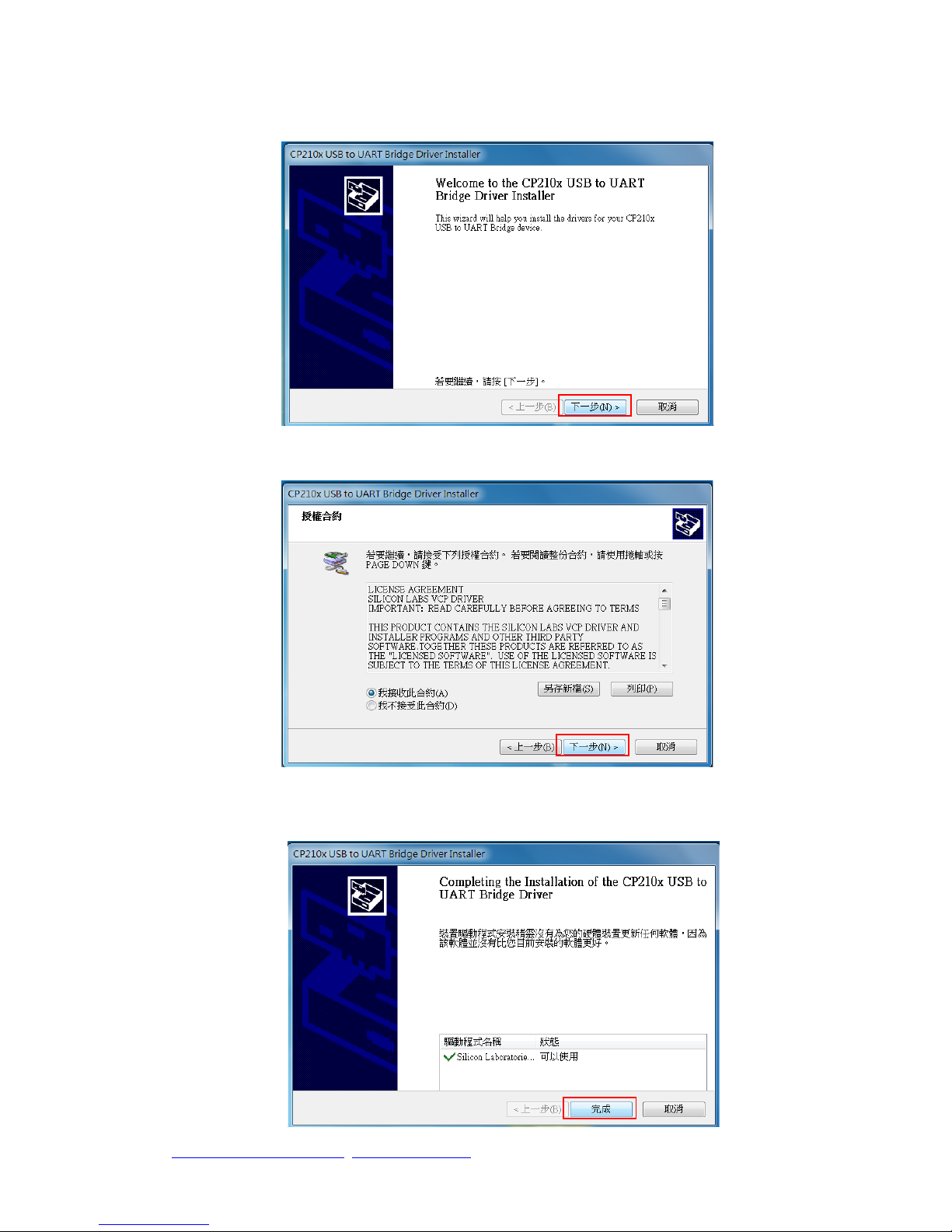
Left click on “Next”
Check on “I agree this contract”, and left click on “Next” to continue.
Right click on “Finish” to complete and quit.
Page 10
http://www.wenshing.com.tw; http://www.rf.net.tw
RD232-H Instruction Manual P.10
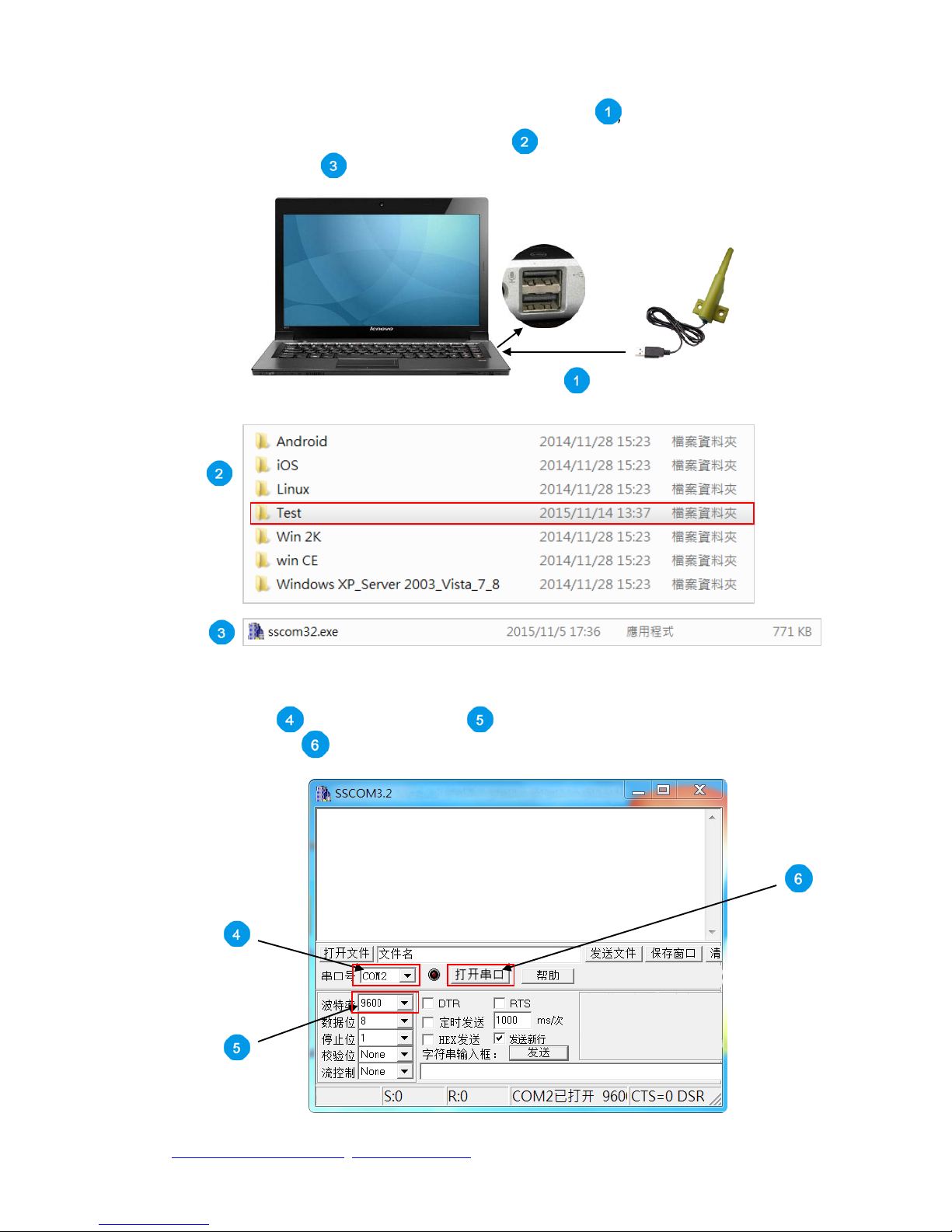
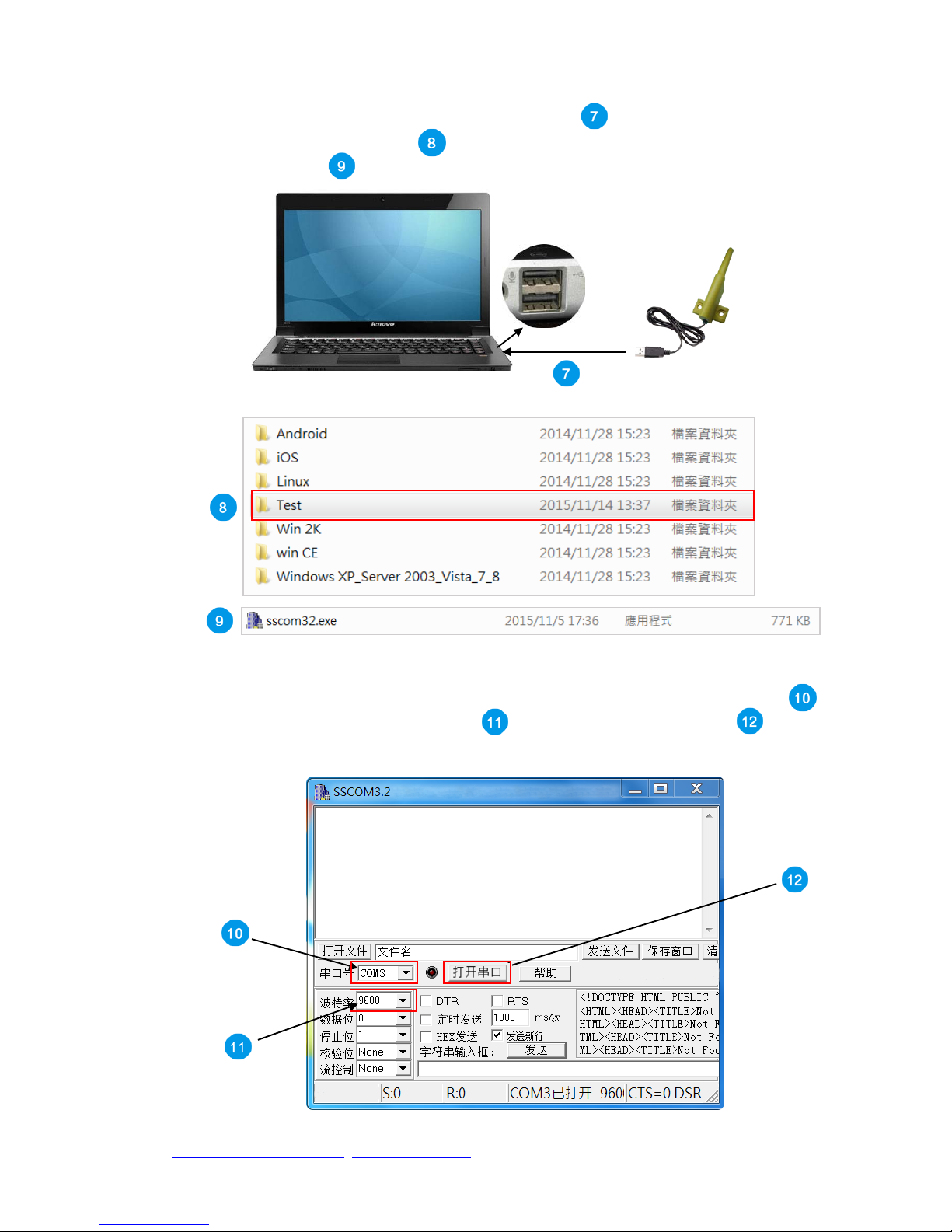
Open Computer A, insert RD232-H-USB into the USB hub , then open the software’s
archive, find and double click on the “Test” file , then find and click on the
“sscom32.exe.” file .
A.PC RD232-H-USB
Open the software, choose your “ComNum” (serial number, “COM2” for
example) , then choose “9600” for your baud rate, and then click on
“Open Com” to complete Computer A’s setup.
Page 11
http://www.wenshing.com.tw; http://www.rf.net.tw
RD232-H Instruction Manual P.11
Insert RD232-H-USB into Computer B’s USB hub . Open the software’s
file and find the “Test” file . In the “Test” file, find and double click on
“sscom32.exe” .
B.PC RD232-H-USB
Open the software, choose your “ComNum” (serial number, “COM3” for example),
then choose “9600” for your baud rate , and then click on “Open Com”
to complete Computer B’s setup.
Page 12
http://www.wenshing.com.tw; http://www.rf.net.tw
RD232-H Instruction Manual P.12
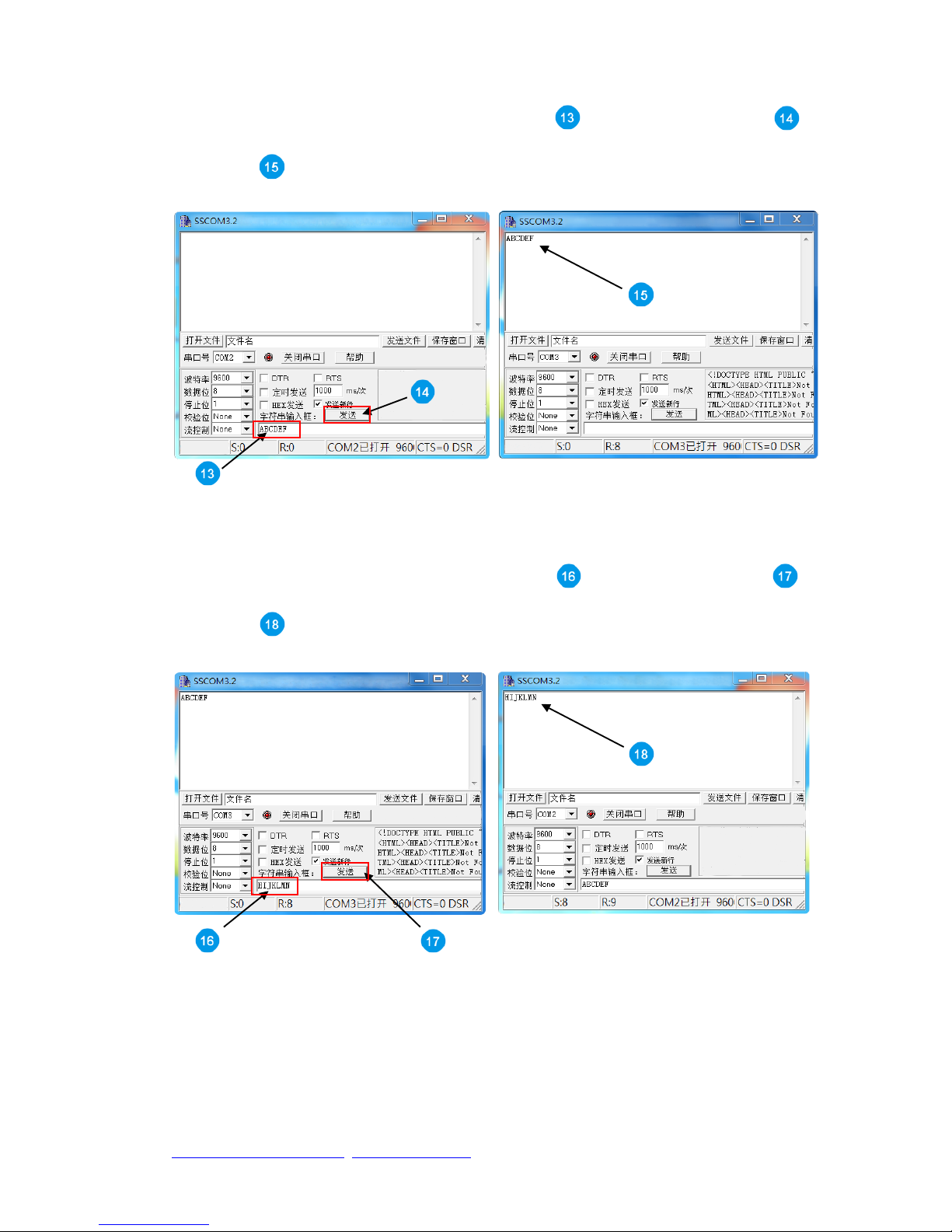
On Computer A’s screen, type “ABCDEF” under the “data input”
column. If pairing successful, you can find the same text on Computer B’s
screen .
A.PC B.PC
On Computer B’s screen, type “HIJKLMN” under the “data input”
column. If pairing successful, you can find the same text on Computer A’s
screen .
B.PC A.PC
Page 13

http://www.wenshing.com.tw; http://www.rf.net.tw
RD232-H Instruction Manual P.13
Instruction Mode
Into Set-up mode
Transmit value = 0x01+0x02+~+7E+0x7F, total=127 Bytes.
Receive value = 0x01+0x02+~+7E+0x7F, total=127 Bytes, and it transit 0x53
hint notes every second to tell user that it is on instruction mode.
It needs to be in the set-up mode to read or amend any parameter.
Exit Code mode
Transmit value = 0xFF FF FF 55 CC
Receive value = None, it stops transit back 0x53 hint notes every second.
It needs to be in the set-up mode.
Read in Product Name and Model
Transmit value = 0xFF FF FF 55 AA BB FD
Receive value (no character) =TRW-V8_V001
It has information total in 10 Bytes, the first 6 characters is product
name and last 4 characters are firmware.
Recover Parameter
Transmit value = 0xFF FF FF 55 AA BB FF
Receive value = None
Delete the original parameter, and recover back to the new set code
that is written in when it is out from factory.
Read in Inside Parameter
Transmit value = 0xFF FF FF 55 AA BB FE
Receive value = 0xFE03 00 00 00 00 05 06 9F 50 07 00 00 FF FF FF FF FF
FF FF FF FF FF FF FF FF FF FF FF FF FF FF (this is the out from factory
mode)
It has information that totals in 32 Bytes, it is set inside parameter at
present.
Set Inside Parameter
Transmit value = 0xFE 03 00 00 00 00 05 06 9F 50 07 00 00 FF FF FF FF FF
FF FF FF FF FF FF FF FF FF FF FF FF FF FF, it transits 32 Bytes in total.
Receive value = 0xFD 03 00 00 00 00 05 06 9F 50 07 00 00 FF FF FF FF FF
FF FF FF FF FF FF FF FF FF FF FF FF FF FF, it is 32 Bytes in total transit
back. It means it is same as the inside parameter if the 1st Byte shows FE,
after it finish the update.
It is 32 Bytes in total, change every parameter.
The 1st Byte: The starting parameter, fixed to 0xFE
The 2nd Byte: Checksum, stop bits, interface speed rate, set up range
00~07, the beginning rate is 9600bps.
Page 14
http://www.wenshing.com.tw; http://www.rf.net.tw
RD232-H Instruction Manual P.14
Bit7: 0~8-bit format (8,1,N/7,1,O/7,1,E/7,2,N)
1~9-bit format (8,1,O/8,1,E/8,1,S/8,2,N(8,1,M)
Note: N/O/E/M/S mean No check(None), Odd parity check(Odd), Even
parity check(Even), 1 check(Mark), 0 check(Space)
Bit6~5: 00 No check/Mark check
01 Odd parity check
10 Even parity check
11 Space check
Bit4~3: Fixed to 0
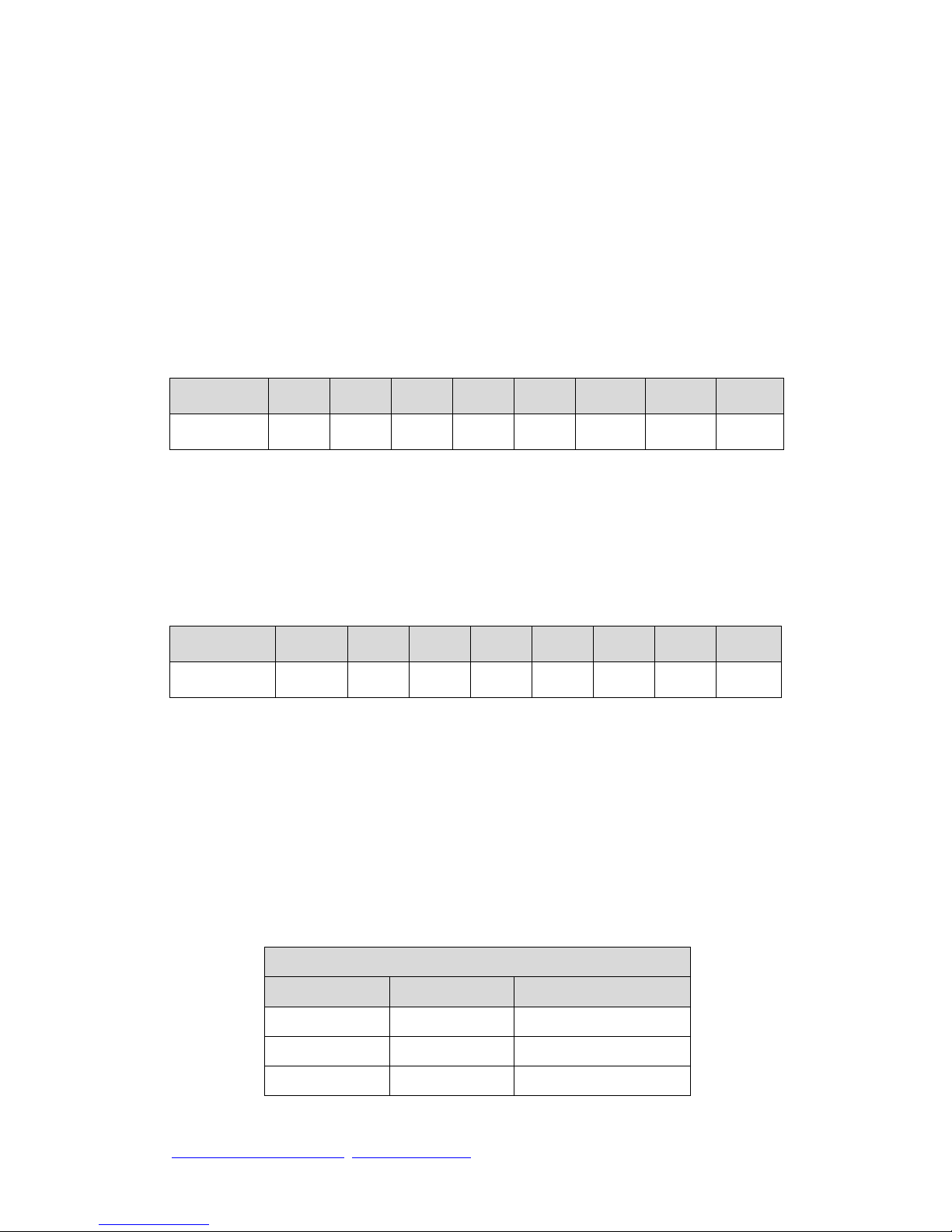
Bit2~0: Interface rate
3
rd
& 4
th
Byte: Group (GID), set up range 0000~FFFF
5th Byte: Instrument ID(SID), set up range 00~FF
6th Byte: Wrong parameter, fixed as 0x00
7th Byte: Transmit rate, set up range 00~07; Normally, the RF transmit rate
must greater than interface speed rate when setting up, it prevents having the
wrong information.
8th to 10th Byte: Working frequency, calculation:
MHz*1000=KHz, and tr ansfer to 16 Bytes.
For example: When it is at 434MHz working frequency,
434*1000=434000=0x06 9F 50 fill in 06 in the 8th Byte, fill in 9F in the 9th
Byte, fill in 50 in the 10th Byte.
When it is at 432.5MHz working frequency, 432.5*1000=432500=0x06 99
74; fill in 06 in the 8th Byte, fill in 99 in the 9th Byte, fill in 74 in the 10th Byte.
The 11th Byte:
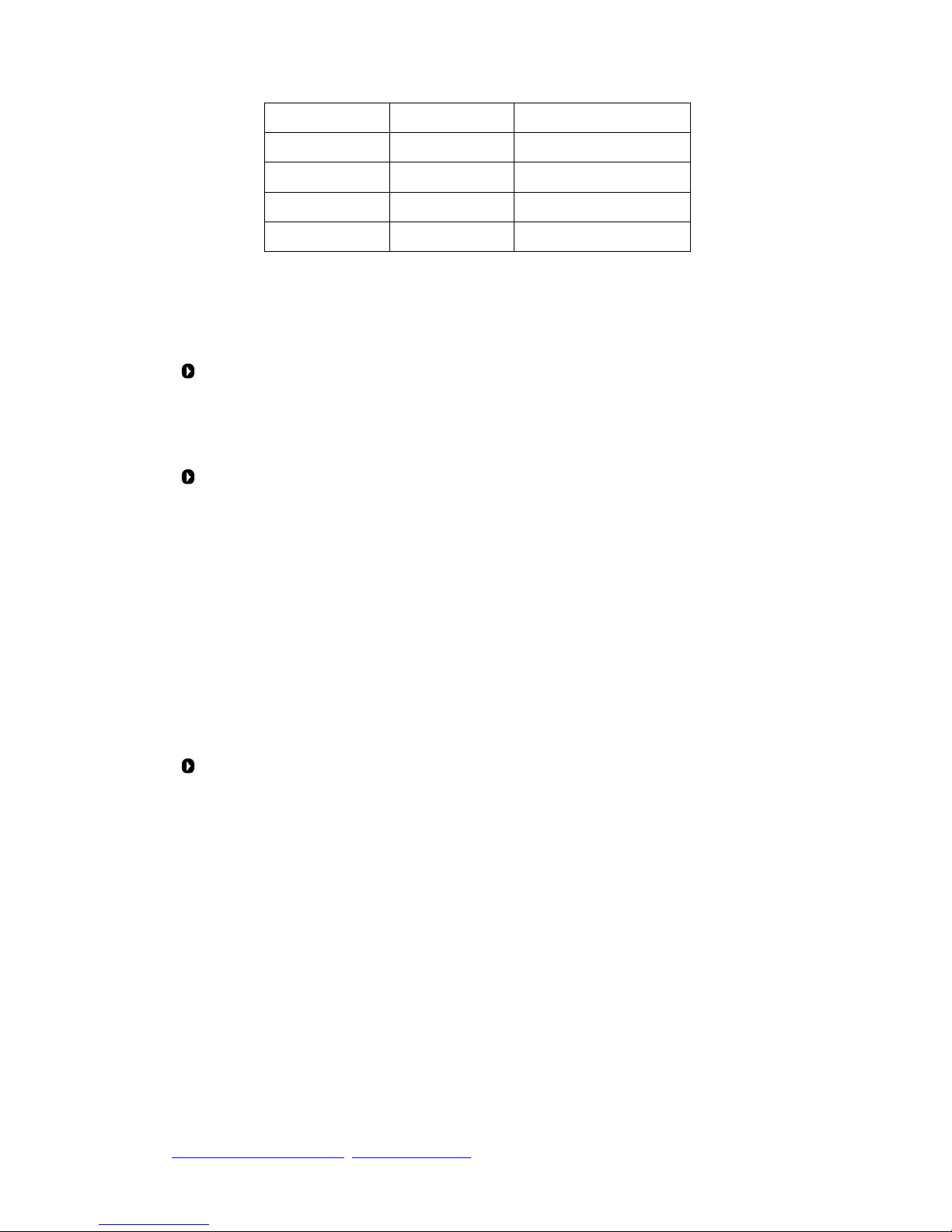
Bit0~Bit2: Shooting rate, set up range 0~7
Output Power
dBm
Set Value
Hex (Bit0~Bit2)
5 0 000
12 1 001
17 2 010
Value 0 1 2 3 4 5 6 7
Rate(bps) 1200 2400 4800 9600 19.2K 38.4K 57.6K 115.2K
Value 0 1 2 3 4 5 6 7
Rate(bps) 1600 3200 6400 12.8K 25.6K 51.2K 76.8K 128K
Page 15
http://www.wenshing.com.tw; http://www.rf.net.tw
RD232-H Instruction Manual P.15
21 3 011
24 4 100
25 5 101
26 6 110
27 7 111
Bit3~Bit5: Wrong parameter,fixed as 000
Bit6~Bit7: Instrument working mode,there are four mode:
Mode 1 (Long Data Mode: Set-up as 00)
GID of every instrument can receive info at this mode, and it can specifically
use on data info that is larger than 127 Bytes.
Mode 2 (ID Data Mode 1: Set-up as 01)
Once GID can transmit to particular SID instrument under this mode, it is
one to many; the single info must ≦127 Bytes.
Transmission: The 1st Byte is the SID of the receiver, and from the 2nd Byte,
it becomes data.
Example: The SID of device A is 55, the SID of device B is 88, and they have
the same GID. Under mode 2, device A is going to transmit data
0x1234567890, 5 Bytes in total, to B device, A then sends data
0x881234567890, 6 Bytes in total to B, B will receive 0x551234567890, 6
Bytes in total. The 1st Byte is the SID of the transmitter.
Mode 3 (ID Data Mode 2: Set-up as 10)
Once GID can transmit to particular SID instrument under this mode, it is
one to many; the single info must ≦127 Bytes.
Transmission: Data shall be transmitted under the same rule of the 13th to
32nd Byte.
Example: The GID of device A = AAAA, SID = 55; the GID of device B =
BBBB, SID = 88; the GID of device C = CCCC, SID = 99.
A is going to transmit 0x1234567890 to B, 5 Bytes in total. A then sends
0x04FFBBBB881234567890, 10Bytes in total, to B, B will receive
0x1234567890, 5 Bytes in total.
A is going to transmit 0x1234567890, 5 Bytes in total, to B via C. A then
sends 0x08FFBBBB88FFCCCC991234567890, 14 Bytes in total, C will
receive 0x1234567890, 5 Bytes in total, but B will not receive any data.
Page 16

http://www.wenshing.com.tw; http://www.rf.net.tw
RD232-H Instruction Manual P.16
Mode 4 (Memory ID data Mode: Set-up as 11)
It can set in advance to save particular GID and SID way, it will transmit it
back referring to the track it is saved. It can forward the track up to fourteen
times, the single info must ≦127 Bytes.
The 12th Byte: Wrong parameter, it fixed as 0 x00.
The 13th to 32nd Byte: The pre-saved track, it only works under mode 4
(Memory ID data mode).
The 13th Byte: It shows how much information in the 14th to 32nd Byte.
The 14th Byte to 32nd Byte routing formation:
Example 1: 04 FF 12 34 55 11 22 33 44~00
From 13th Byte, it can be seen that the effective 4 Bytes data are FF
12 34 55.
FF 12 34 55 represents GID=1234, SID=55. When this equipment
receives data via UR, it will automatically transmit the data to
GID=1234, SID=55.
Example 2: 05 FF 12 34 55 11 22 33 44~00
From 13th Byte, it can be seen that the effective 5 Bytes data are FF
12 34 55 11.
FF 12 34 55 11 represents GID=1234, SID=55 and 11. When this
equipment receives data via UR, it can automatically transmit the
data to GID=1234, SID=55 and then forward the data to GID=1234,
SID=11.
Example 3: 06 FF 12 34 55 11 22 33 44~00
From 13th Byte, it can be seen that the effective 6 Bytes data are FF
12 34 55 11 22.
FF 12 34 55 11 22 represents GID=1234, SID=55, 11 and 22.
When this equipment receives data via UR, it will automatically
transmit the data to GID=1234, SID=55, and forward the data to
GID=1234, SID=11, and again forward the data to GID=1234,
SID=22.
Example 4: 08 FF 12 34 55 FF 45 67 88 44~00
From 13th Byte, it can be seen that the 8 Bytes effective data are FF
12 34 55 FF 45 67 88.
FF 12 34 55 FF 45 67 88 represents GID=1234, SID=55 and
GID=4567, SID=88. When this equipment receives the data via
UR, it will automatically transmit the data to GID=1234, SID=55,
and then forward the data to GID=4567, SID=88.
 Loading...