

Page 1
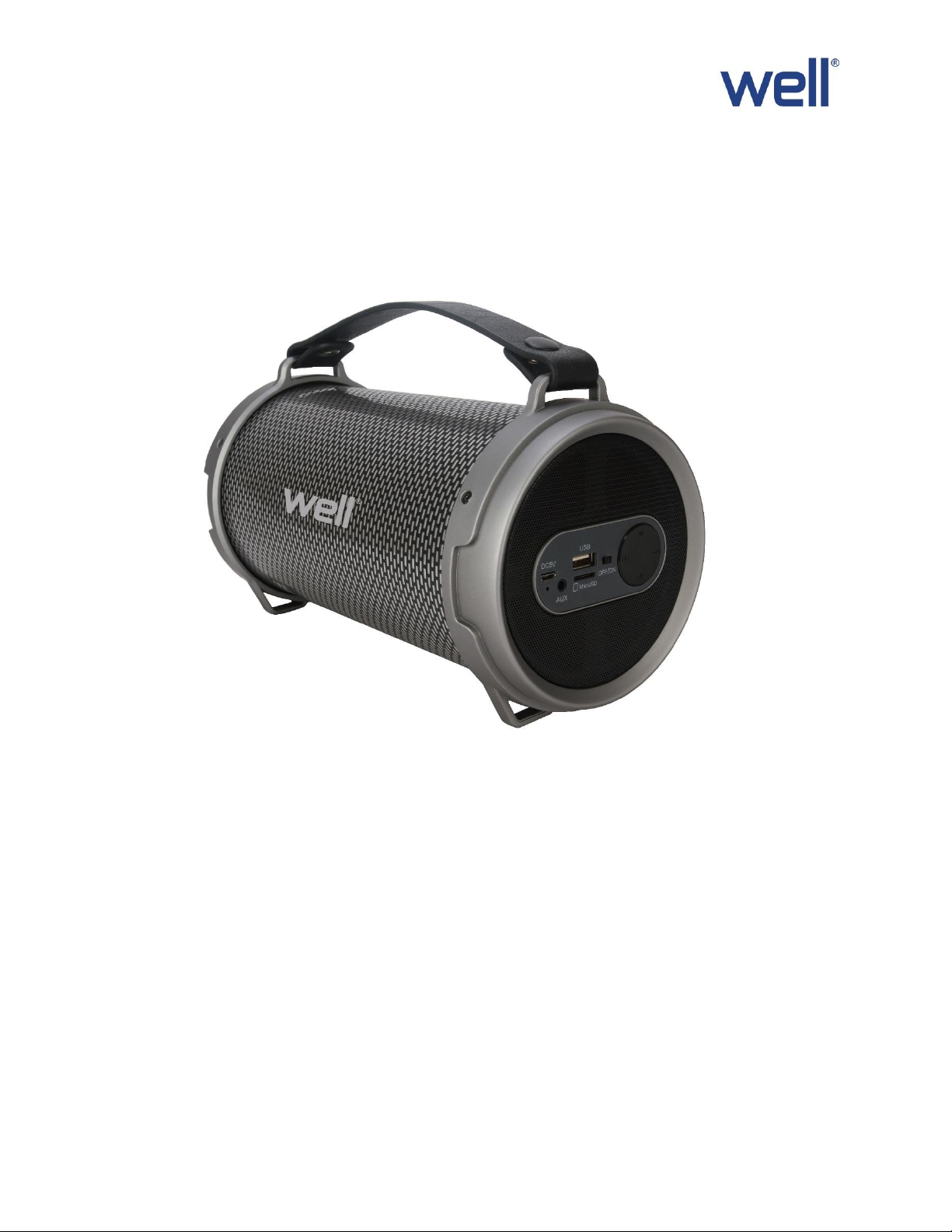
USER MANUAL
Model: PULSE
(Portable Bluetooth Speaker)
Thank you for choosing WELL. Please read carefully the following instructions and keep them within reach.
Reorder No: SPKR-BT-PULSE-WL
Page 2

FEATURES:
Outdoor HIFI Bluetooth speaker output very clear sound and dynamic sound effect;
With A2DP Bluetooth, wireless stream music from any Bluetooth-enabled device such as your mobile
phone, notebook, iPhone or iPad;
Secure simple pairing for user-friendly operating;
10 meters operating rang;
With Line-in function suitable for PC, MID, TV and other radio device;
With USB&TF card support;
Built-in lithium rechargeable battery 1800mAh;
With 7 color bright pulsating light;
With handle, easy to take out ;
ACCESSORIES:
Charging cable, Audio cable, User manual
SPECIFICATION:
Bluetooth version 2.1
Support A2DP and AVRCP profile
Bluetooth range up to 10 meters
Speakers: Horn Size: 4 inch
Horn output: 12W, 4Ω
Connections: USB/TF (reader) card supporting: Maximum: 32GB
Aux-in 3.5mm jack connection
Power supply: Built-in rechargeable lithium battery 1800mAh
(2 hours playtime with max volume)
Recharge power: DC 5V 1A
Product size: Ø136*254mm
Page 3
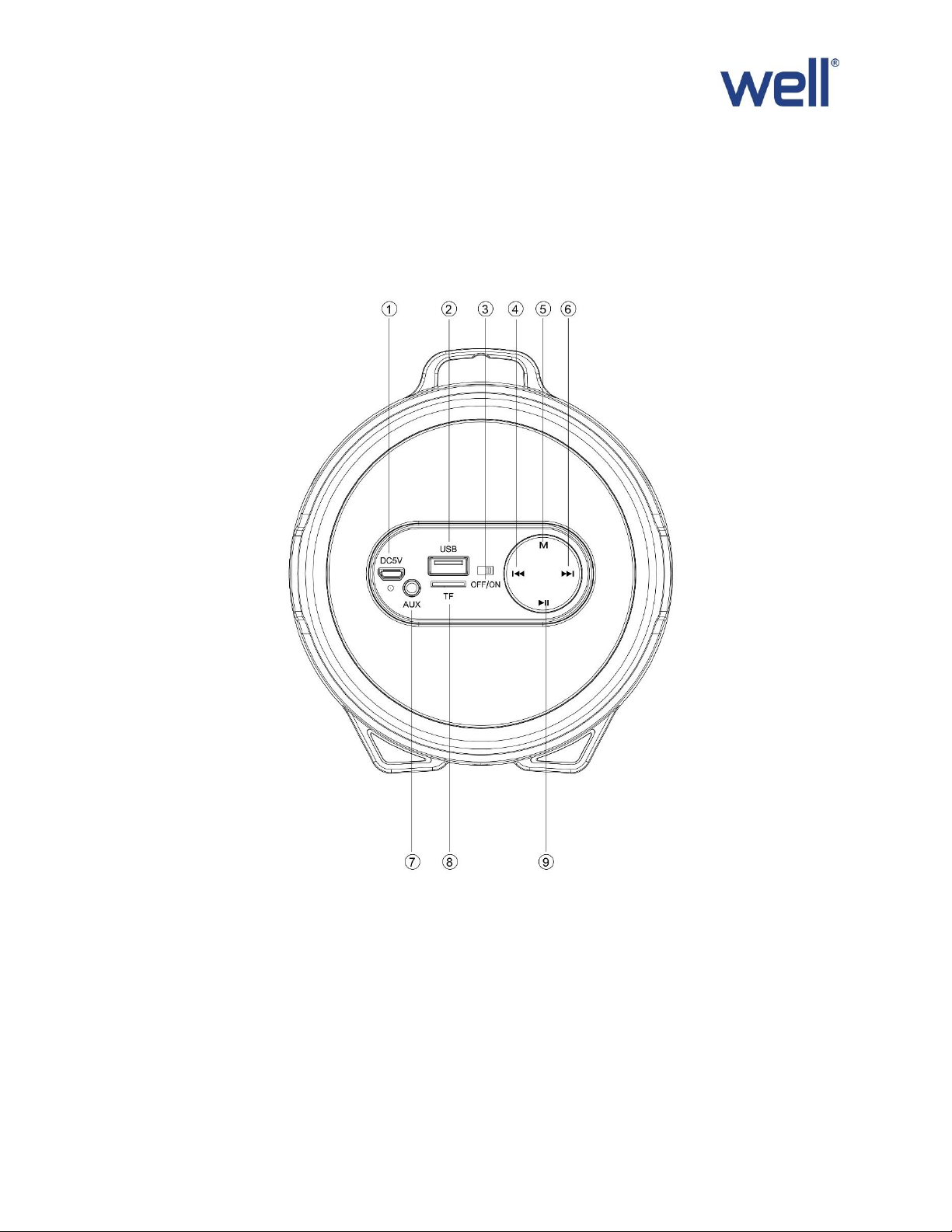
INSTRUNCTION FOR APPEARANCE AND KEY:
1. Charging jack 6. Forward /Volume up
2. USB port 7. Aux-in jack
3. ON/OFF button 8. Micro SD slot
4. Backward/Volume down 9. Play/Pause
5. Mode (Switch Bluetooth, USB disk, TF, FM and AUX-IN state)
Page 4

Bluetooth connection:
1. Turn the power button to “ON”, The LED light turn blue and twinkle quickly and beep twice
2. Activate Bluetooth of mobile phone and search for device name “PULSE ” then connect it. The blue
LED light twinkle slowly and beep third times once connected successfully
3. Play the music from your mobile phone and enjoy.
4. Press Forward or Backward button on the devices or on Mobile phones to select songs you like.
5. Press Play/Pause button on the devices or on Mobile phones to play/stop the music
6. Use the Bluetooth device to adjust volume up and down. Or long press to Forward or Backward button
to adjust volume up and down.
Playing music from USB disk & TF card:
1. Turn the Power button to “ON”.
2. Insert TF card or USB flash disk into slot, the music stored will be played automatically and blue LED
light always keep lighting.
3. Under playing mode, short press Forward or Backward to select songs you like, Or long press to
Forward or Backward button to adjust volume up and down.
4. PLAY/PAUSE to play or pause.
5. Please turn the Power button to “OFF” while without use.
Remark: Under Bluetooth playing mode, insert TF card or USB will disconnect the Bluetooth and switch the
playing from USB or TF card. You can press the MODE button to switch to Bluetooth mode again.
How to Use FM Radio:
1. Under FM radio state, the audio cable provided treat as antennal. Please Insert the audio cable to get
the best FM signal before using.
2. Turn the power button to “ON”, press the “MODE” button to switch to FM radio state.
3. Under playing mode, short press “Play/pause” button to auto search the FM Channel and store it
automatically.
4. Press Forward or Backward button to change the stored FM channel.
Colorful LED display and off:
This unit will display 7 color bright pulsating light when music is on. To turn light off, please push the
Play/Pause button for 5 seconds.
AUX-IN:
For other compatible music devices or your MP3/MP4 players, use the supplied audio line cable to connect
from the device’s “Line Out” to the “Aux In” of this devices. Then press the “MODE” button to switch to
AUX-IN state. Enjoy…
When using an external device, all functions will be controlled by the external devise except the
“Play/pause” button.
Page 5
Battery Charging:
Waste electrical and electronic equipment are a special waste category,
collection, storage, transport, treatment and recycling are important because
they can avoid environmental pollution and are harmful to health. Submitting
waste electrical and electronic equipment to special collection centers makes
the waste to be recycled properly and protecting the environment. Do not
forget! Each electric appliance that arrives at the landfill, the field, pollutes the
environment!
1. Power off the unit, put the provided charge cable into the charge slot of unit, connect the other end to
PC or other charger with DC5V output, the red charging indicator keep lighting.
2. Charge time should be 3-5 hours. When charging full, the indicator light will switch off.
3. In order to prolong the life of battery, please do not charge more than 8 hours.
Note:
1. The unit will operate without the wire connection using the lithium battery. The amount of battery life
depends on how hard the unit is working. Heavy, loud, bass music will use more energy to produce than
spoken word.
2. The built-in rechargeable battery is not replaceable. Do not remove or replace it, do not throw in the
trash or in the fire.
3. When cleaning the product, use a soft dry cloth. For more severe stains, please dampen the cloth with
water only. Anything else has the chance of dissolving the paint or damaging the plastic.
Importer & distributor:
SC VITACOM ELECTRONICS SRL
CIF: RO 214527
Tel. 0264-438401*
 Loading...