

Page 1
3130IF
3130IF
3130IF
---
VVV
oIP
oIP
oIP
User
User
User
Manual
Manual
Manual
V3.0
V3.0
V3.0
1
3130IF
3130IF
3130IF
User
User
User
Manual
Manual
Manual
This
This
This
Manual
Manual
Manual
provides
provides
provides
basic
basic
basic
information
information
information
ononon
how
how
how
tototo
install
install
install
and
and
and
connect
connect
connect
3130IF
3130IF
3130IF
IPIPIP
Phone
Phone
Phone
tototo
the
the
the
network.
network.
network.
ItItIt
also
also
also
includes
includes
includes
features
features
features
and
and
and
functions
functions
functions
ofofof
3130IF
3130IF
3130IF
IPIPIP
phone
phone
phone
components,
components,
components,
and
and
and
how
how
how
tototo
use
use
use
them.
them.
them.
Page 2

3130IF
3130IF
3130IF
---
VVV
oIP
oIP
oIP
User
User
User
Manual
Manual
Manual
V3.0
V3.0
V3.0
2
111
Before
Before
Before
Getting
Getting
Getting
Started
Started
Started
Before you can connect 3130IF to the network and use it, you must have a high-
speed Internet connection installed. A high-speed connection includes such
environments as DSL, cable modem, and a leased line. 3130IF IP phone is a
stand-alone device, which re quires no PC to make Internet calls. 3130IF IP is fully
compatible with SIP and IAX2 industry standard and can interoperate with many
other SIP or IAX2 compliant devices and software in market.
222
Check
Check
Check
List
List
List
1) One 3130IF IP phone
2) One Straight Ethernet cable
3) Adapter
4) User Manual
333
Features
Features
Features
and
and
and
SPEC
SPEC
SPEC
3.1
3.1
3.1
Network
Network
Network
and
and
and
Protocol
Protocol
Protocol
IAX2
TCP(RFC793)
IP(RFC791)
UDP(RFC768)
ICMP(RFC792)
ARP(RFC826)
SNTP(RFC2030)
DHCP(RFC2131)
TFTP (RFC1350)
Page 3

3130IF
3130IF
3130IF
---
VVV
oIP
oIP
oIP
User
User
User
Manual
Manual
Manual
V3.0
V3.0
V3.0
3
DNS(RFC1034,RFC1035)
SIP RFC3261, RFC3262, RFC3666, RFC2543
-IP (RFC0791), TCP (RFC0793), UDP (RFC0768), ARP (RFC0826)
-ICMP, ARP, RARP, SNTP
-SDP TFTP DNS
-SIP server: 2 IP account with password protection
-Pubic Server/ Private server: can connect to ISP and Private SIP server at same
time
-Authentication: none, HTTP 1.1 basic/digest authentication for Web setup, MD5
(RFC2069/ RFC 2617)
-NAT traversal: STUN, NAT ALG, NAPT, SIP Express router
- 1 RJ-45 auto-sensing 10/100Mbps 。
-DHCP client (RFC2131)
/
TFTP client
/
PPPoE client
-Static IP
/
DHCP
/
PPPoE
-DNS client with 2 servers IP
3.2
3.2
3.2
Audio
Audio
Audio
Codec
Codec
Codec
G.711 µ
/
A
G.723.1
G.726
G.729
Page 4

3130IF
3130IF
3130IF
---
VVV
oIP
oIP
oIP
User
User
User
Manual
Manual
Manual
V3.0
V3.0
V3.0
4
3.3
3.3
3.3
QoS
QoS
QoS
- Q oS Diffserv, 802.1p/q
-VAD, CNG, Packet Loss Compensation, adaptive Jitter Buffer; Echo cancellation
G.168
3.4
3.4
3.4
Dial
Dial
Dial
Tone
Tone
Tone
Signal
Signal
Signal
Generation
Generation
Generation
DTMF (out of Band RFC 2833
/
in band)
SIP Info interoperate with CISCO SIP device
3.5
3.5
3.5
Phone
Phone
Phone
features
features
features
8 Kinds of ringer able select by number of Phone Box.
Flexible Dial Map: Fix length; End with #; Dial Map Table; Dial with time out
Redial/Hold
100 Phone book with Speed dial process
Do Not Disturb
Block call (by number)
Blind transfer
Forward (Off, Always, busy, No answer)
3.6
3.6
3.6
Configuration
Configuration
Configuration
Support
Support
Support
Web, Telnet, TFTP
Page 5

3130IF
3130IF
3130IF
---
VVV
oIP
oIP
oIP
User
User
User
Manual
Manual
Manual
V3.0
V3.0
V3.0
5
-Password protection for configuration
3.7
3.7
3.7
Firmware
Firmware
Firmware
Upgrade
Upgrade
Upgrade
-TFTP; FTP,
-Security firmware upgrade, firmware digest check
3.8
3.8
3.8
Log
Log
Log
-Log level
-Telnet logs and CDR
-SysLog Logs and CDR
-FTP/TFTP CDR upload
3.9
3.9
3.9
Physical
Physical
Physical
&&&
Environmental
Environmental
Environmental
Desktop
/
Wall mounting
Dimensions: 190X155X78 mm
Weight: 600 g (main unit)
Life-span:3 year
Operating Temperature: 0 ° to +40 ° C (32 ° to +104 ° F)
Storage Temperature:-20 ° to +70 ° C (-40 ° to +158 ° F)
Humidity: 5% -95% non-condensing
Page 6
3130IF
3130IF
3130IF
---
VVV
oIP
oIP
oIP
User
User
User
Manual
Manual
Manual
V3.0
V3.0
V3.0
6
444
Installation
Installation
Installation
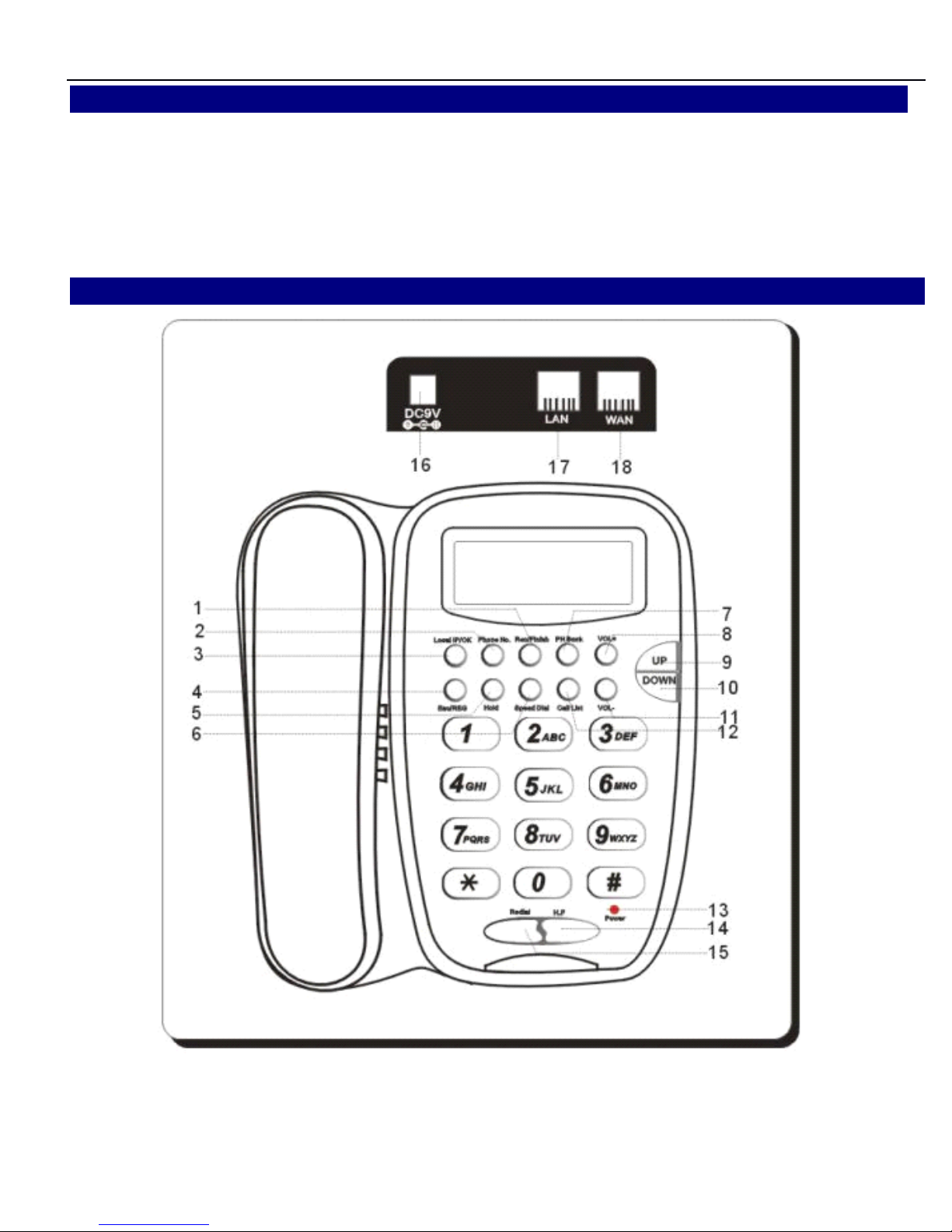
Remove the LAN cable for Internet connection from your PC and connect it to
‘
WAN
’
port of 3130IF Connect the power adapter in the box to
‘
Power
’
Find LAN cable in the box and connect between
‘
Lan
’
port and your PC (PC is not
required for set up or making a call.)
555
Product
Product
Product
Overview
Overview
Overview
Page 7

3130IF
3130IF
3130IF
---
VVV
oIP
oIP
oIP
User
User
User
Manual
Manual
Manual
V3.0
V3.0
V3.0
7
666
Basic
Basic
Basic
Operations
Operations
Operations
6.1
6.1
6.1
Make
Make
Make
Phone
Phone
Phone
Calls
Calls
Calls
There are some ways to make phone calls:
1. Pick up handset or press H.F button, and then enter the phone numbers
2. Press the Redial button directly to redial the number last called.
Key
Key
Key
Button
Button
Button
Key
Key
Key
Button
Button
Button
Definitions
Definitions
Definitions
000
---
9,9,9,
*,*,*,
###
Digit, star and pound keys are also used for setting and call
process.
Local
Local
Local
IP/OK
IP/OK
IP/OK
D isplay local IP address on LCD
/
enter key
PPP
HHH
NNN
o./Edit
o./Edit
o./Edit
Browse phone number of unit
/
Configuration Modify
Vol
Vol
Vol
+++
Increase handset
/
speakerphone volume
Vol
Vol
Vol
---
Reduce handset
/
speakerphone volume
UpUpUp
Moving in menu
Down
Down
Down
Moving in menu
ESC/REG
ESC/REG
ESC/REG
Exit
/
register
Hold
Hold
Hold
Hold the active call/Delete
Speed
Speed
Speed
Dial
Dial
Dial
Dial stored speed dial number
Call
Call
Call
List
List
List
Browse call logs
Redial
Redial
Redial
Dial a new number or Redial the number last dialed.
H.F
H.F
H.F
Enter hands-free mode
Rec/Finish
Rec/Finish
Rec/Finish
Enter record menu
PHPHPH
Book
Book
Book
Enter phonebook operation
Page 8

3130IF
3130IF
3130IF
---
VVV
oIP
oIP
oIP
User
User
User
Manual
Manual
Manual
V3.0
V3.0
V3.0
8
3. While browsing in LOG menu, browsing OUTGOING
/
INCOMING call, press #
button to dial out displayed number on LCD.
4. When the unit indicates Missed calls, press 【 Call
Call
Call
List
List
List
】
and 【 Down
Down
Down
】
butto n to
enter Miss call menu, then press 【 Local
Local
Local
IP/OK
IP/OK
IP/OK
】 button to review number. Pres s
【 # 】 button to dial out this number.
6. In ideal mode, enter the desired number to make pre-dial, Press 【 # 】 button
t
o
dial out this number, and press 【 Hold
Hold
Hold
】 delete and modify the number.
6.2
6.2
6.2
OGM
OGM
OGM
and
and
and
ICM
ICM
ICM
Unit can store 3 voice records which with max 80 seconds, so it can be configure
as 1 OGM and 2 ICM, while 2 ICM is full, unit will only play OGM while call
incoming till old ICM cleared.
To
play OGM and ICM recording, OGM shall be preset and “ Enable Voice Record
and Incoming Record Playing ” shall be set in menu. Then unit will play OGM after
5 ringings.
6.2.1
6.2.1
6.2.1
OGM
OGM
OGM
Record
Record
Record
and
and
and
playback:
playback:
playback:
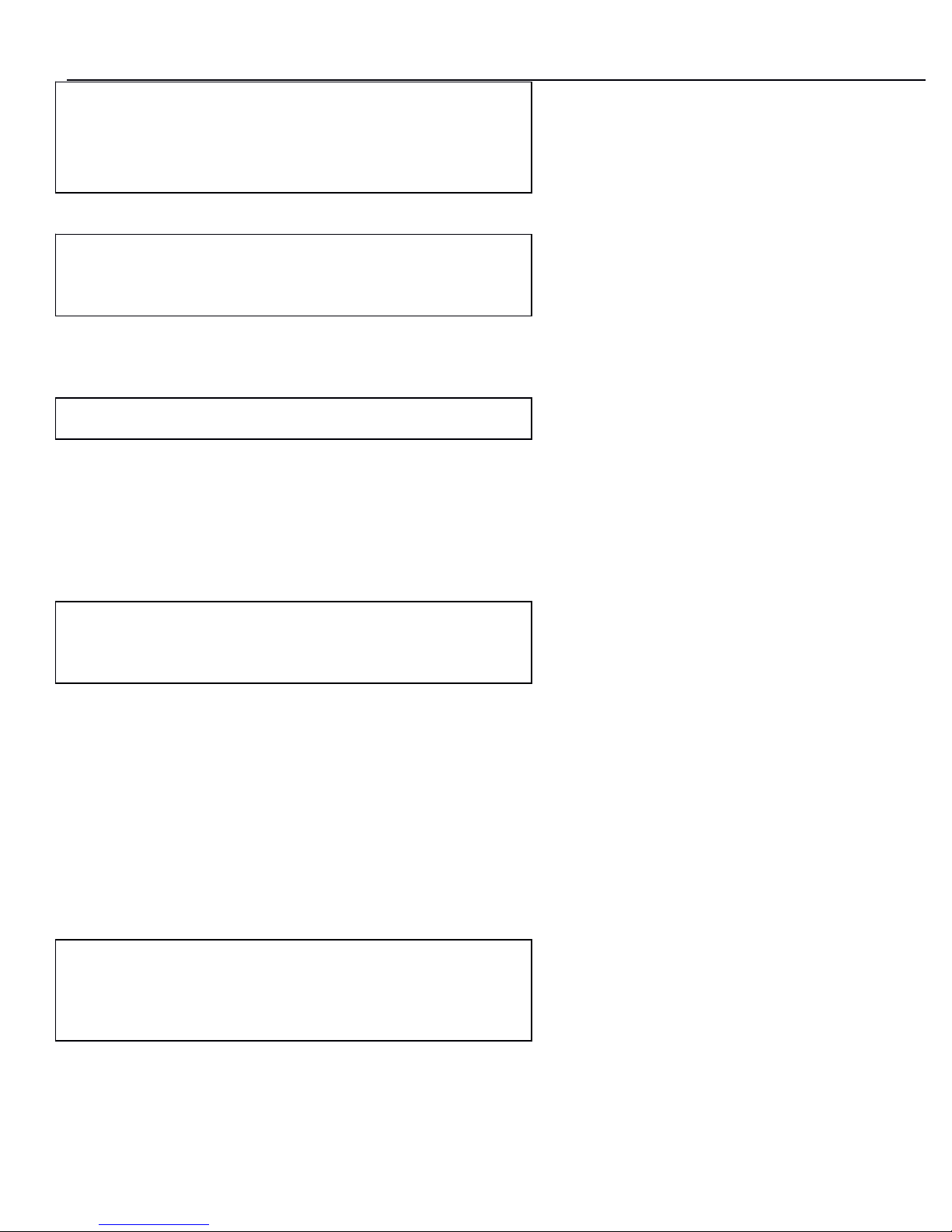
Press 【 Rec/Finish
Rec/Finish
Rec/Finish
】 key and LCD show:
Press 【 Down
Down
Down
】 or 【 UpUpUp
】 key and LCD show ”
---REC/FINISH record---
Received
Page 9
3130IF
3130IF
3130IF
---
VVV
oIP
oIP
oIP
User
User
User
Manual
Manual
Manual
V3.0
V3.0
V3.0
9
Press 【 Local
Local
Local
IP/OK
IP/OK
IP/OK
】 key and 【 UpUpUp
】 key and LCD show:
Press 【 Local
Local
Local
IP/OK
IP/OK
IP/OK
】 key and LCD show:
Press 【 Local
Local
Local
IP/OK
IP/OK
IP/OK
】 key again to begin record and press “ Rec/Finish ” to quite
recording.
And press 【 DOWN
DOWN
DOWN
】 or 【 UPUPUP
】 key and LCD show:
Press 【 Local
Local
Local
IP/OK
IP/OK
IP/OK
】 key to playback User-Defined recording.
6.2.2
6.2.2
6.2.2
ICM
ICM
ICM
check
check
check
Press 【 Rec/Finish
Rec/Finish
Rec/Finish
】 key and LCD show:
Press 【 Local
Local
Local
IP/OK
IP/OK
IP/OK
】 key and LCD show:
---REC/FINISH record---
User-Defined
--- User-Defined ---
Rec
Press OK to Rec
--- User-Defined ---
Play
---REC/FINISH record---
Received
Page 10
3130IF
3130IF
3130IF
---
VVV
oIP
oIP
oIP
User
User
User
Manual
Manual
Manual
V3.0
V3.0
V3.0
10
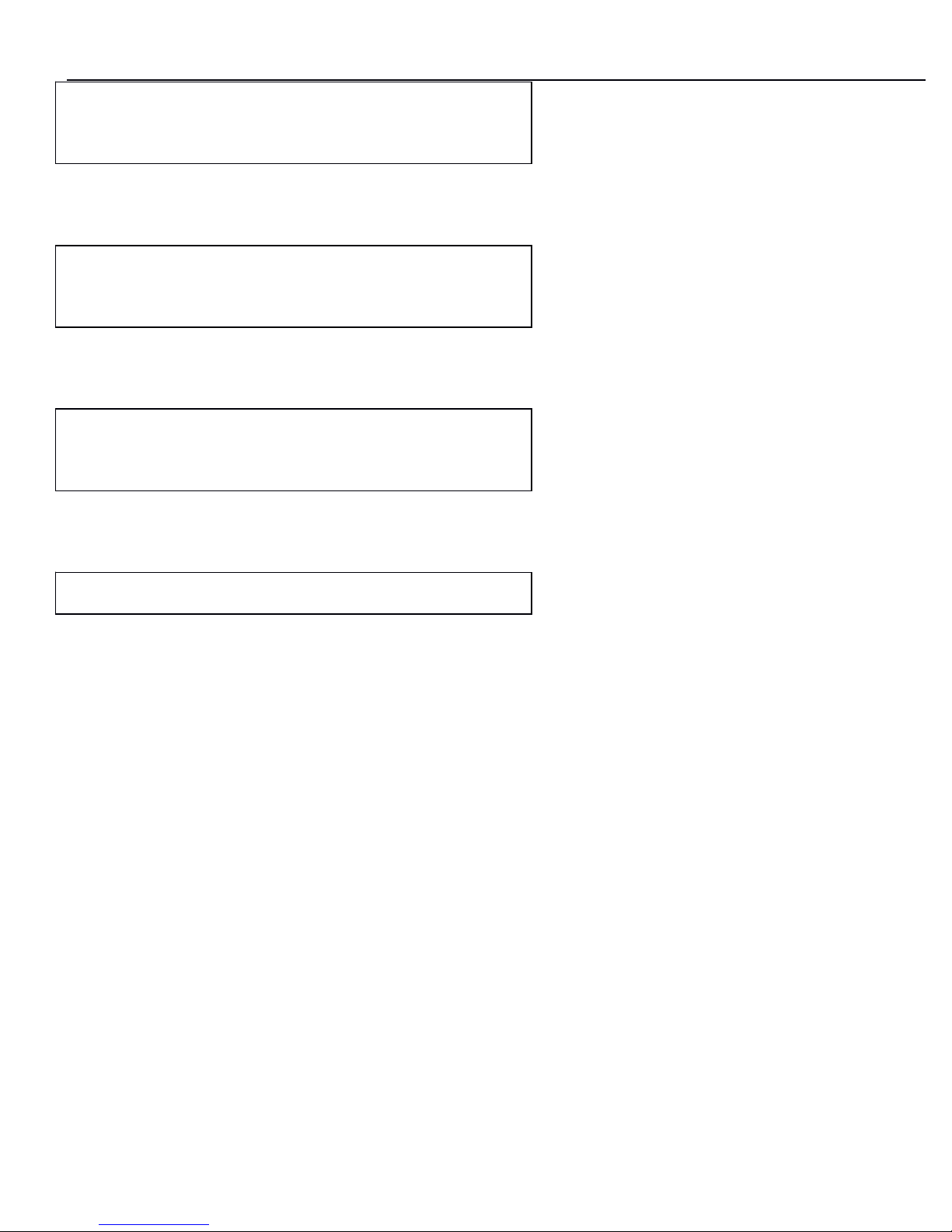
Press 【 Local
Local
Local
IP/OK
IP/OK
IP/OK
】 key and LCD SHOW:
Press 【 Local
Local
Local
IP/OK
IP/OK
IP/OK
】 key and LCD SHOW:
Press 【 Local
Local
Local
IP/OK
IP/OK
IP/OK
】 key and LCD SHOW:
Press 【 Local
Local
Local
IP/OK
IP/OK
IP/OK
】 key again to playback.
6.3
6.3
6.3
Phone
Phone
Phone
book
book
book
number
number
number
store
store
store
///
edit
edit
edit
///
delete
delete
delete
In standby, -press 【 Phone
Phone
Phone
Book
Book
Book
】 button, LCD display “ Phone Book Current ” -
press 【 OKOKOK
】 to check first record, press 【 UPUPUP
DOWN
DOWN
DOWN
】 to review others.
-press 【 UPUPUP
】 till LCD display ” ADD ”,then press 【 OKOKOK
】
,
input name, number,
position as LCD prompt. Press 【 HOLD
HOLD
HOLD
】 to delete wrong digit.
- press 【 UPUPUP
】
till LCD display ” DEL ”,then press 【 OKOKOK
】
,
input position of desire
d
number and press 【 OKOKOK
】 to delete.
6.4
6.4
6.4
Speed
Speed
Speed
dial
dial
dial
number
number
number
from
from
from
Phone
Phone
Phone
Book
Book
Book
In standby, press 【 Speed
Speed
Speed
dial
dial
dial】,
and input position number of phone book memo
ry,
press 【 ###
】 to dial out.
---Received---
New
--- New record ---
Record 1
--- Record 1---
Play
Press OK
To
Play
Page 11

3130IF
3130IF
3130IF
---
VVV
oIP
oIP
oIP
User
User
User
Manual
Manual
Manual
V3.0
V3.0
V3.0
11
6.5
6.5
6.5
call
call
call
list
list
list
check
check
check
///
delete
delete
delete
///
dial
dial
dial
out
out
out
In standby press button 【 Call
Call
Call
list
list
list
】
,
LCD display ” Call Record Dialed ”
,
-Press 【 OKOKOK
】
to check last dialed out number and conversation time, press 【 UUU
PPP
】
and
【 DOWN
DOWN
DOWN
】
to review other and press 【 ###
】
to dial out; press 【 HOLD
HOLD
HOLD
】
to delete.
- press 【 UPUPUP
】 till LCD display ” Received ”,then press 【 OKOKOK
】 to check latest
received call, press 【 UPUPUP
】
and 【 DOWN
DOWN
DOWN
】
to review other and press ” # ” to dial out;
press 【 HOLD
HOLD
HOLD
】 to delete.
- press 【 UPUPUP
】 till LCD display ” ” Call Record Dialed ”,then press 【 OKOKOK
】 to check
latest miss call, press 【 UPUPUP
】
and
【 DOW
DOW
DOW
N
】
to review other and press ” # ” to dial out;
press 【 HOLD
HOLD
HOLD
】 to delete.
6.6
6.6
6.6
hold
hold
hold
During conversation, press 【 Hold
Hold
Hold
】 to keep line and press again to release.
6.7
6.7
6.7
Volume
Volume
Volume
adjustment
adjustment
adjustment
ininin
conversation
conversation
conversation
During conversation, press 【
Vol
Vol
Vol
+/-
+/-
+/-
】 to adjust receiving volume.
6.8
6.8
6.8
Block
Block
Block
list
list
list
setting
setting
setting
///
edit
edit
edit
///
delete
delete
delete
Please refer to below setting menu and CALL SERVICE setting in web
configuration.
6.9
6.9
6.9
3-party
3-party
3-party
conference
conference
conference
During conversation, press 【 HOLD
HOLD
HOLD
】
,
then dial another number plus # button, wh ile
line connected, press 【 HOLD
HOLD
HOLD
】 and 【 * 】 to make conference call
6.10
6.10
6.10
call
call
call
forwarding
forwarding
forwarding
:::
During conversation, press 【 SPEED
SPEED
SPEED
DIAL
DIAL
DIAL
】
,
then dial another number plus #
button to forward it.
Page 12

3130IF
3130IF
3130IF
---
VVV
oIP
oIP
oIP
User
User
User
Manual
Manual
Manual
V3.0
V3.0
V3.0
12
777
Unit
Unit
Unit
Configuration
Configuration
Configuration
777
.1.1.1
IPIPIP
distribution
distribution
distribution
mode
mode
mode
selection:
selection:
selection:
Press and hold 【 111
】 button for 5s, the LCD displays “
STATIC
MODE ”
;
Press and hold 【 2 】 button for 5s, the LCD display “ DHCP MODE ”
;
Press and hold 【 3 】 button for 5s, the LCD display “ PPPOE MODE ”
.
777
.2.2.2
Configuration
Configuration
Configuration
with
with
with
keypad
keypad
keypad
and
and
and
LCD
LCD
LCD
display
display
display
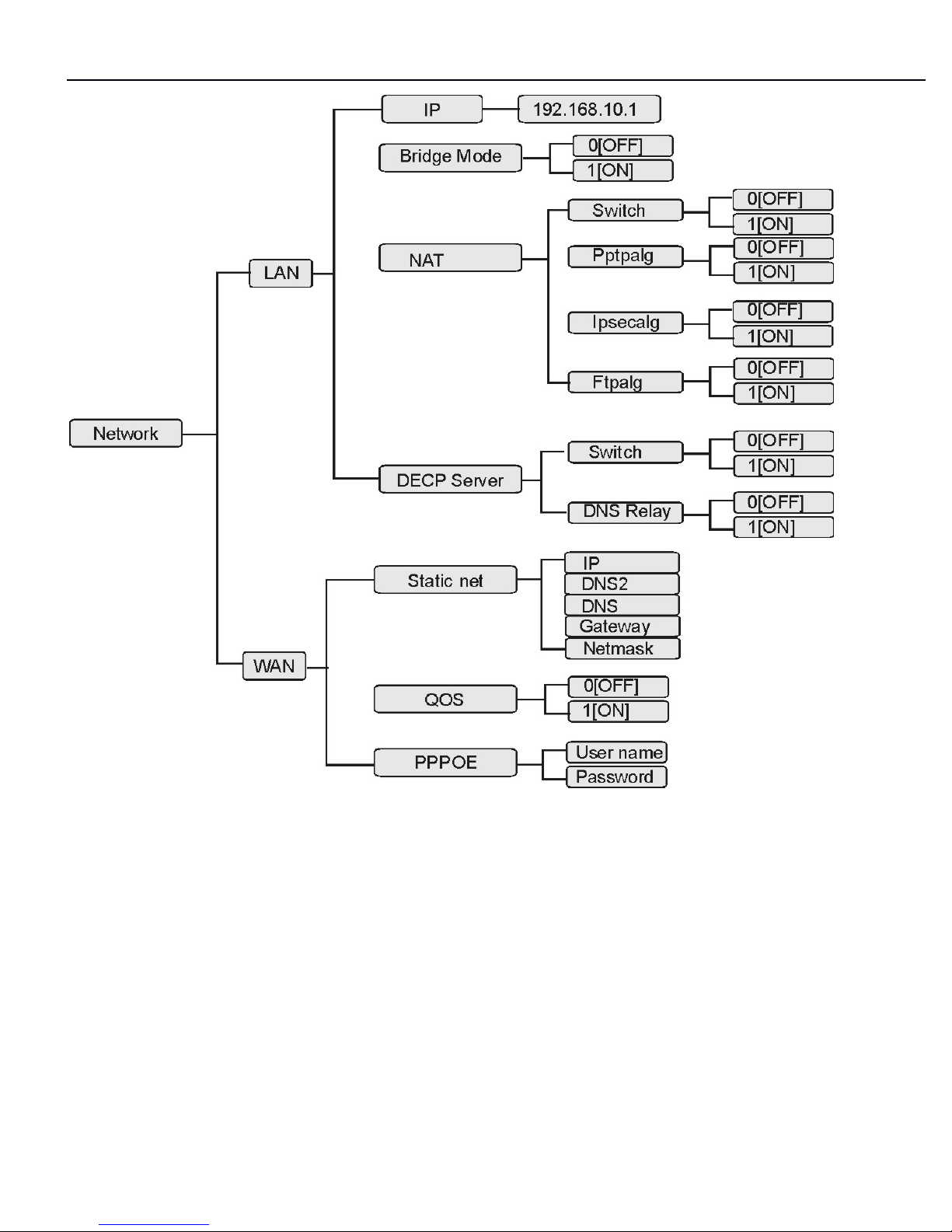
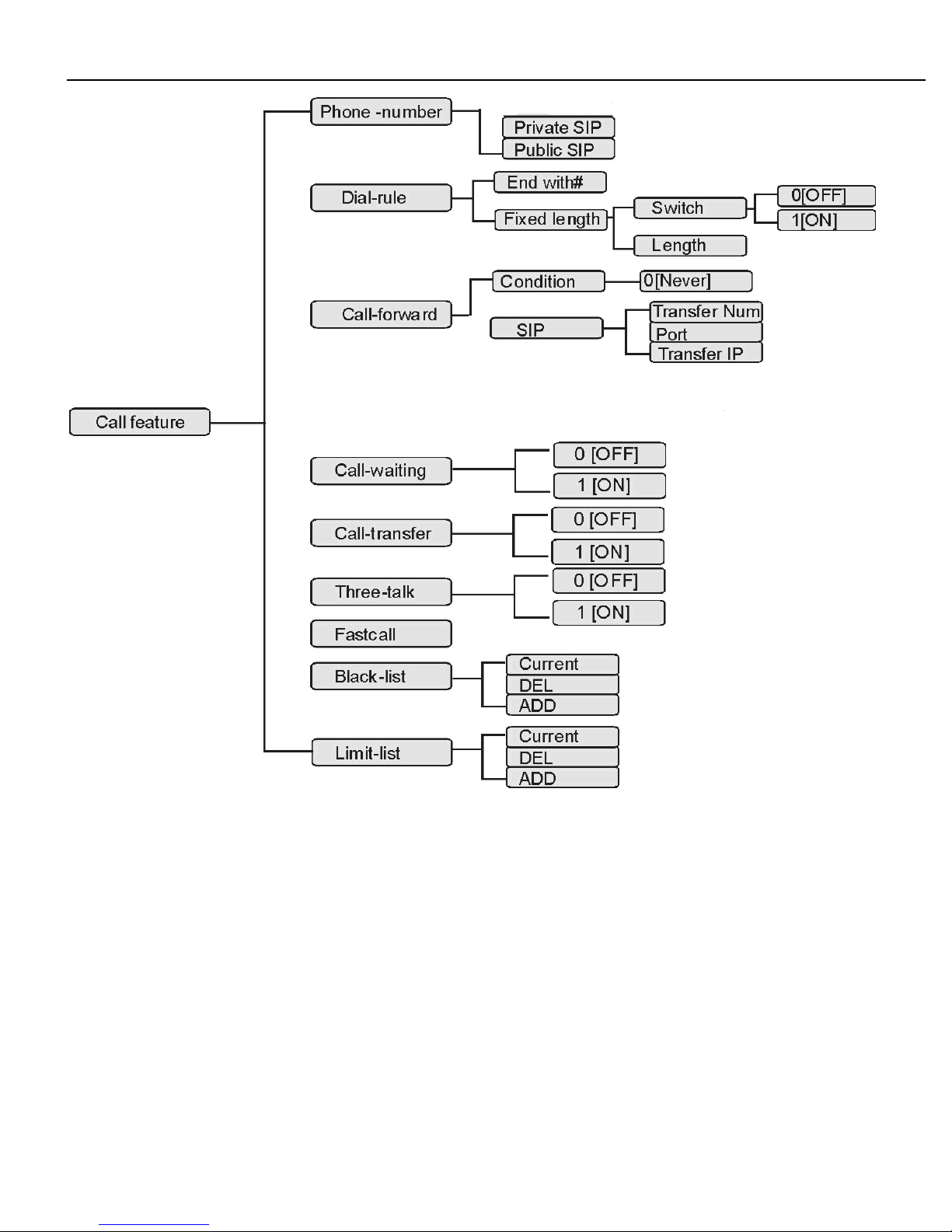
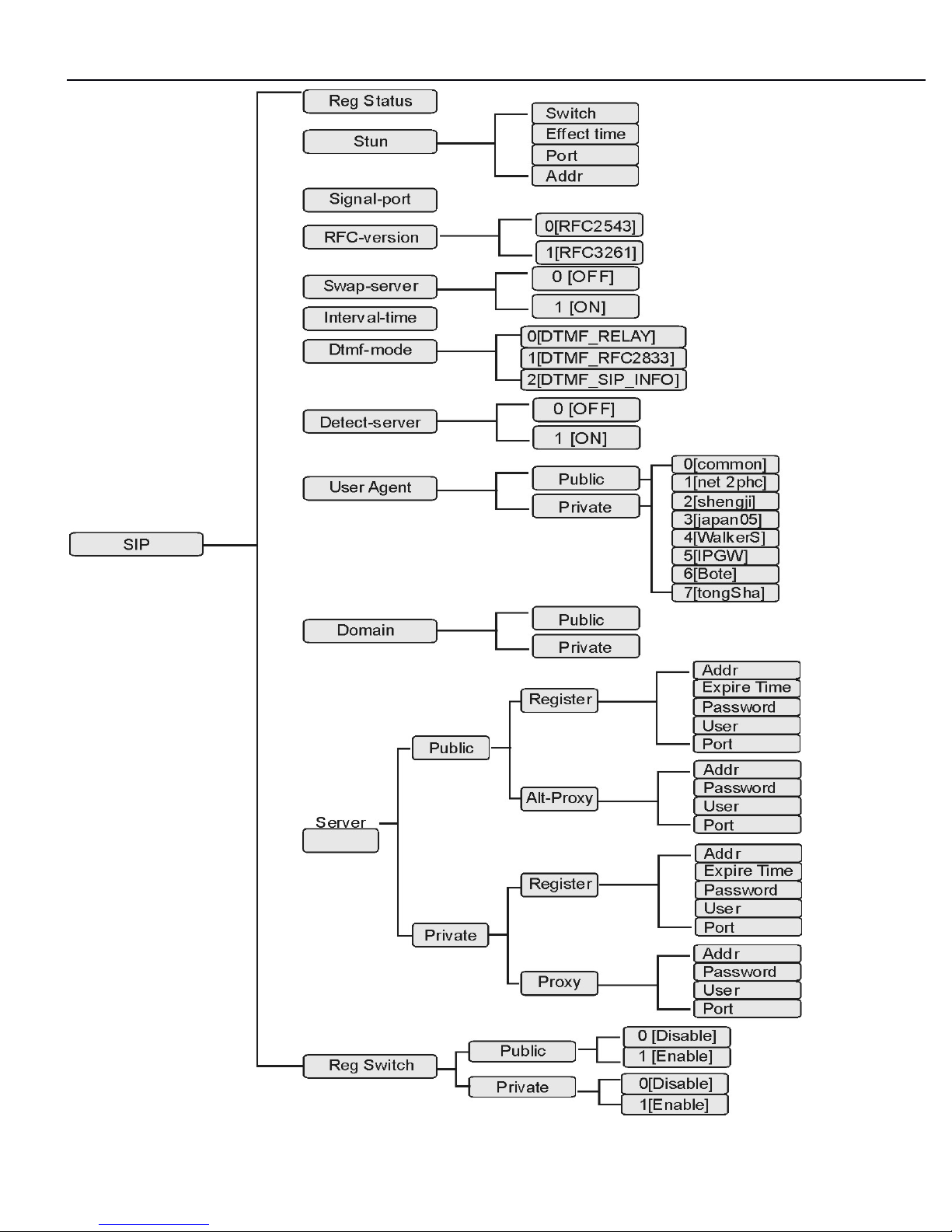
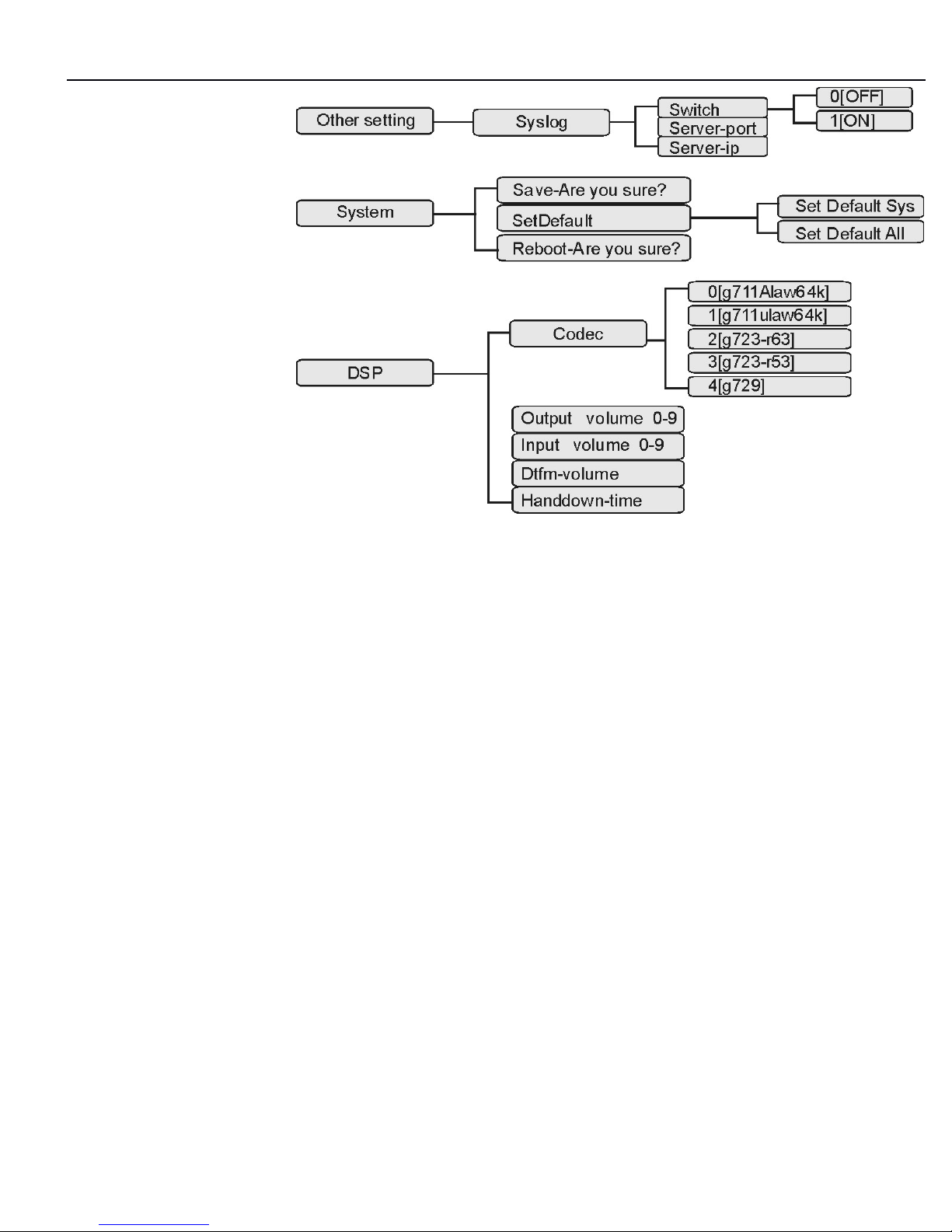
In standby, press and hold 【 # 】 button till LCD shows " Input Password: " input
correct password (default is 123), press 【 OKOKOK
】 key to enter the menu list. Then
follow below menu list to set parameters accordingly.
During configuration, operations as follows
-For browse and edit Configuration, press 【 UPUPUP
】
,
【 DOWN
DOWN
DOWN
】
;
-To change parameter, press 【 Phone
Phone
Phone
NoNoNo
】
firstly, then input desired digit, confir m
and save by press button 【 Local/OK
Local/OK
Local/OK
】
.
Page 13
3130IF
3130IF
3130IF
---
VVV
oIP
oIP
oIP
User
User
User
Manual
Manual
Manual
V3.0
V3.0
V3.0
13
Page 14
3130IF
3130IF
3130IF
---
VVV
oIP
oIP
oIP
User
User
User
Manual
Manual
Manual
V3.0
V3.0
V3.0
14
Page 15
3130IF
3130IF
3130IF
---
VVV
oIP
oIP
oIP
User
User
User
Manual
Manual
Manual
V3.0
V3.0
V3.0
15
Page 16
3130IF
3130IF
3130IF
---
VVV
oIP
oIP
oIP
User
User
User
Manual
Manual
Manual
V3.0
V3.0
V3.0
16
For
For
For
example:
example:
example:
Account below
login: xxxxxxxx
pw: yyyyyy
Sip server :aaa.bbb.ccc
Not stun
Page 17

3130IF
3130IF
3130IF
---
VVV
oIP
oIP
oIP
User
User
User
Manual
Manual
Manual
V3.0
V3.0
V3.0
17
Input Password
:
Congfig
Network
Congfig
SIP
SIP
Reg Status
Press and hold
“ # ”
key 3Sec
Input “123
”
Press “OK
”
Keep press
“
UP
”
Press “OK
”
Press “UP
”
SIP
Stun
Press “OK
”
Stun
Switch
Press “OK
”
Switch
0 [
OFF
]
Press “Phone No
”
Please select :
Input 1 or
0
Press “OK
”
Press “UP
”
Press “ESC
”
SIP
Signal-port
Press “OK
”
Signal-port
5060
Press “Phone No
”
Input Value
:
Input SIP port
Press “OK
”
Press “ESC
”
Press “UP
”
SIP
RFC-version
Press “UP
”
SIP
Swap-server
Press “OK
”
Swap-server
0 [
OFF
]
Press “Phone No
”
Please select :
Input 1 or
0
Press “OK
”
Press “ESC
”
Press “UP
”
SIP
Interval-time
Press “UP
”
SIP
Dtmf-mode
Press “OK
”
Dtmf-mode
0 [
DTMF_RELAY
]
Press “Phone No
”
Please select :
Input Dtmf-mode
Press “OK
”
Press “ESC
”
Press “UP
”
SIP
Detect-server
Press “OK
”
Detect-server
0 [
OFF
]
Press “Phone No
”
Please select :
Input
1
Press “OK
”
Press “ESC
”
Press “UP
”
SIP
User Agent
Press “UP
”
SIP
Domain
Press “OK
”
Domain
Public
Press “OK
”
Public
Press “Phone No
”
Input Domain
Press “OK
”
Input Value
Press “ESC”2
times
Press “UP
”
SIP
Server
Press “OK
”
4
times
Addr
Press “Phone No
”
Input Value
Page 18

3130IF
3130IF
3130IF
---
VVV
oIP
oIP
oIP
User
User
User
Manual
Manual
Manual
V3.0
V3.0
V3.0
18
Register
Expire Time
Register
Password
Password
Input SIP Server Addr
“
Aaa.bbb.ccc
”
K press “UP
”
Press “OK
”
Input Value
:
Press “OK
”
Press “OK
”
Phone-number
Public SIP
Press “OK
”
Press “OK
”
Press “ESC
”
Press “Phone No
”
Input Password
“
yyyyyy
”
Press “ESC
”
Press “UP
”
Register
User
Press “OK
”
Input Value
:
Input SIP User
“
xxxxxxxx
”
Press “ESC
”
4
times
Press “UP
”
SIP
Reg Switch
Register
0 [
OFF
]
Press “Phone No
”
Please select :
Input
“ 1 ”
Press “OK
”
Press “ESC
”
3
times
Press “OK
”
2
times
Config
SIP
Keep press “UP
”
Public SIP
Press “Phone No
”
Input number :
Input SIP User
“
xxxxxxxx
”
Press “OK
”
Press “ESC
”
5
times
Press “Down”2
times
User
Press “Phone No
”
Config
Call Feature
Press “UP
”
2
times
Phone-number
SIP
Press “OK
”
2
times
Config
System
Press “OK
”
Press “OK
”
System
Save
Press “OK
”
Are you sure
?
Press “OK
”
Press “ESC
”
Page 19
3130IF
3130IF
3130IF
---
VVV
oIP
oIP
oIP
User
User
User
Manual
Manual
Manual
V3.0
V3.0
V3.0
19
Note:
Note:
Note:
1.1.1.
Stun
Stun
Stun
Config
Config
Config
default
default
default
value
value
value
isisis
000
[OFF]
[OFF]
[OFF]
,,,
don
don
don
’’’
ttt
modify
modify
modify
normal.
normal.
normal.
2.2.2.
Signal-port
Signal-port
Signal-port
default
default
default
value
value
value
isisis
5060,
5060,
5060,
don
don
don
’’’
ttt
modify
modify
modify
normal.
normal.
normal.
3.3.3.
Interval-time
Interval-time
Interval-time
default
default
default
value
value
value
isisis
606060
sec,
sec,
sec,
don
don
don
’’’
ttt
modify
modify
modify
normal.
normal.
normal.
888
Configuration
Configuration
Configuration
via
via
via
WEB
WEB
WEB
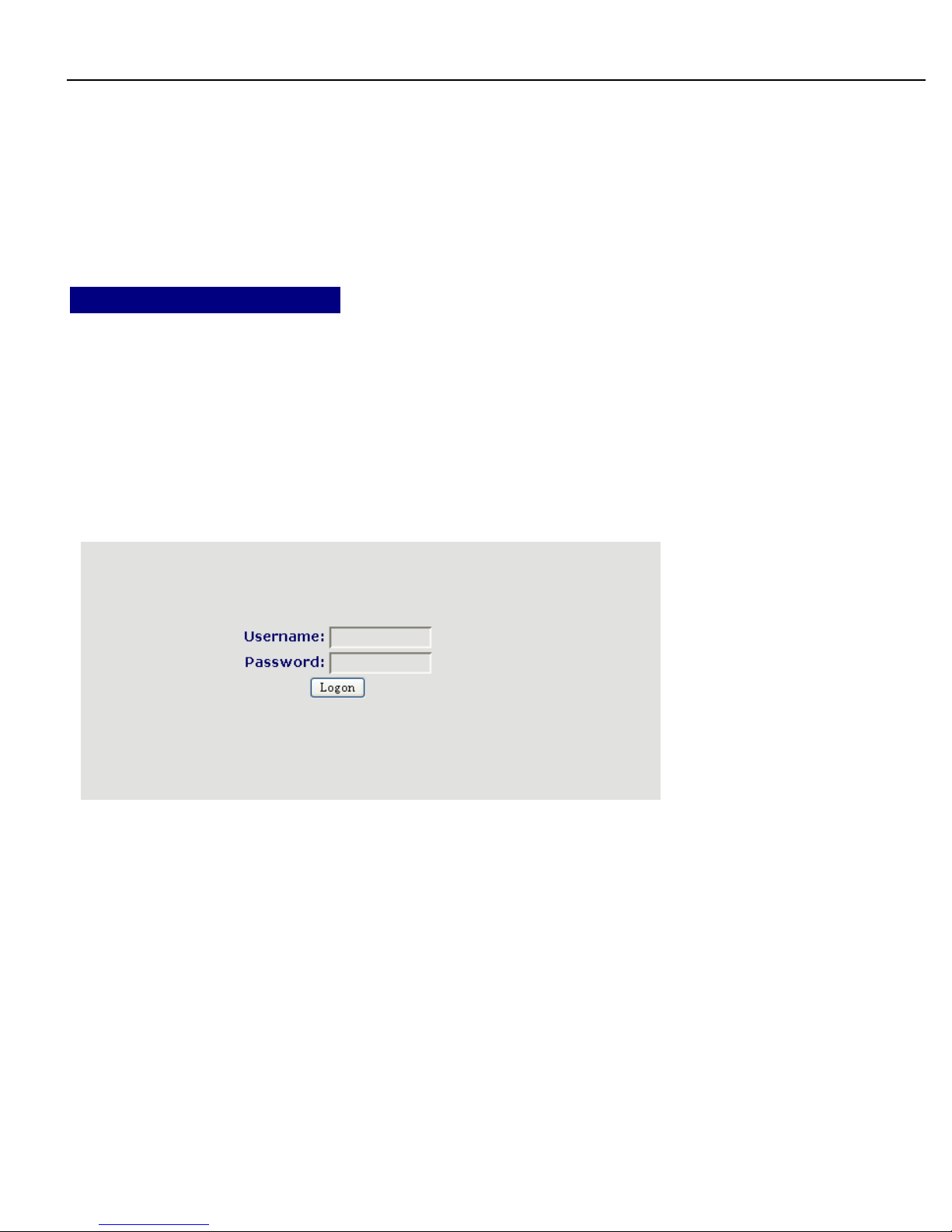
The IP Phone Web Configuration Menu can be accessed by the following URI:
Pick up handset and input “ # * 111# “,you will hear the “ IP address ”
888
.1.1.1
logon
logon
logon
Web
Web
Web
While input correct IP address as above, logon menu pop out as follows:
There are two level login as:
-Guest account: the default username and password is “ guest ”
,
user can have a
browse of system.
-Administrator account: the default username and password is “ admin ”
,
this user
can configure the system.
Note:
Note:
Note:
After
After
After
inputting
inputting
inputting
username
username
username
and
and
and
password,
password,
password,
user
user
user
press
press
press
carriage
carriage
carriage
return
return
return
directly
directly
directly
tototo
enter
enter
enter
the
the
the
page.
page.
page.
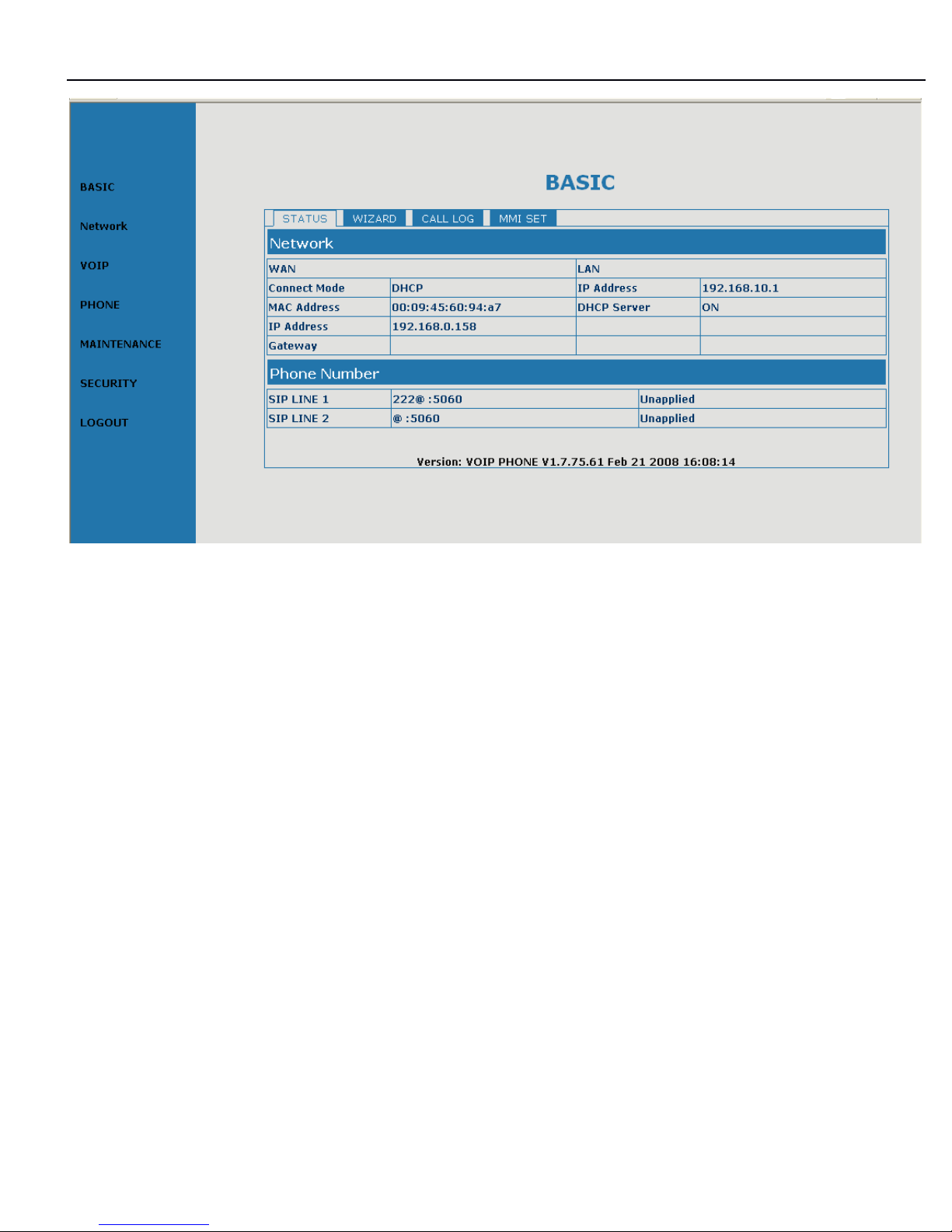
While successfully login, web shown as follows:
Page 20
3130IF
3130IF
3130IF
---
VVV
oIP
oIP
oIP
User
User
User
Manual
Manual
Manual
V3.0
V3.0
V3.0
20
888
.2.2.2
Current
Current
Current
state
state
state
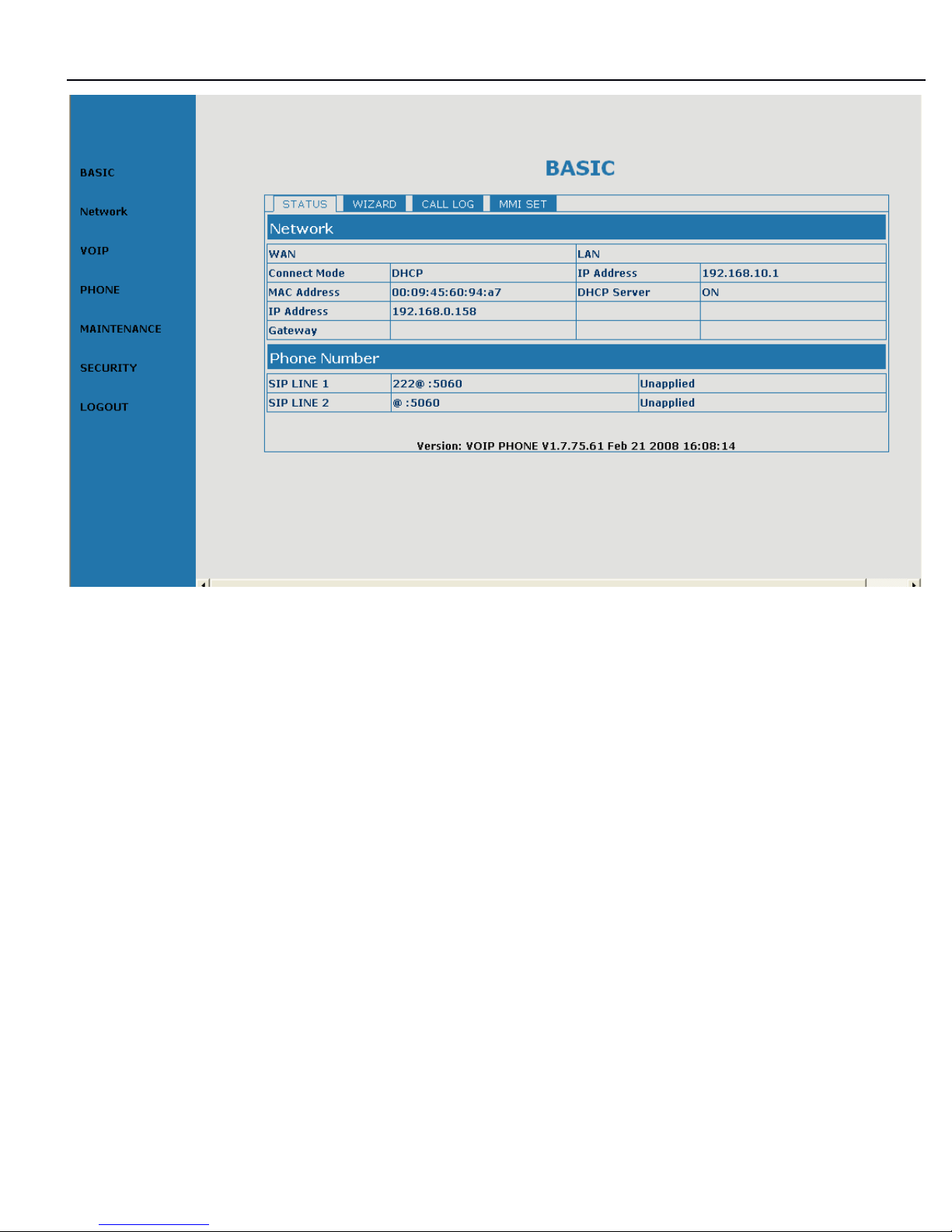
On this page user can gather information of each normal parameters, as:
-the network section shows the current WAN of the phone, including access way of
WAN IP and
IP
( static state,
DHCP,
PPPoE
)
,
MAC address, WAN IP address ofthe
phone
.
-
The VoIP section shows the current default signaling protocol, and server
parameter, whether enables register, whether has registered on GK; Register
server IP of
SIP,
proxy server
IP,
whether enables register, whether has registered
on register server, w hether enables outbound proxy, whether enables STUN server .
-The Phone Number section shows corresponding phone number of each protocol;
the version number and date of issue have been shown at the end of the page.
Page 21
3130IF
3130IF
3130IF
---
VVV
oIP
oIP
oIP
User
User
User
Manual
Manual
Manual
V3.0
V3.0
V3.0
21
888
.3.3.3
Network
Network
Network
configuration
configuration
configuration
8.3.1
8.3.1
8.3.1
Wide
Wide
Wide
area
area
area
network
network
network
(((
WAN
WAN
WAN
)))
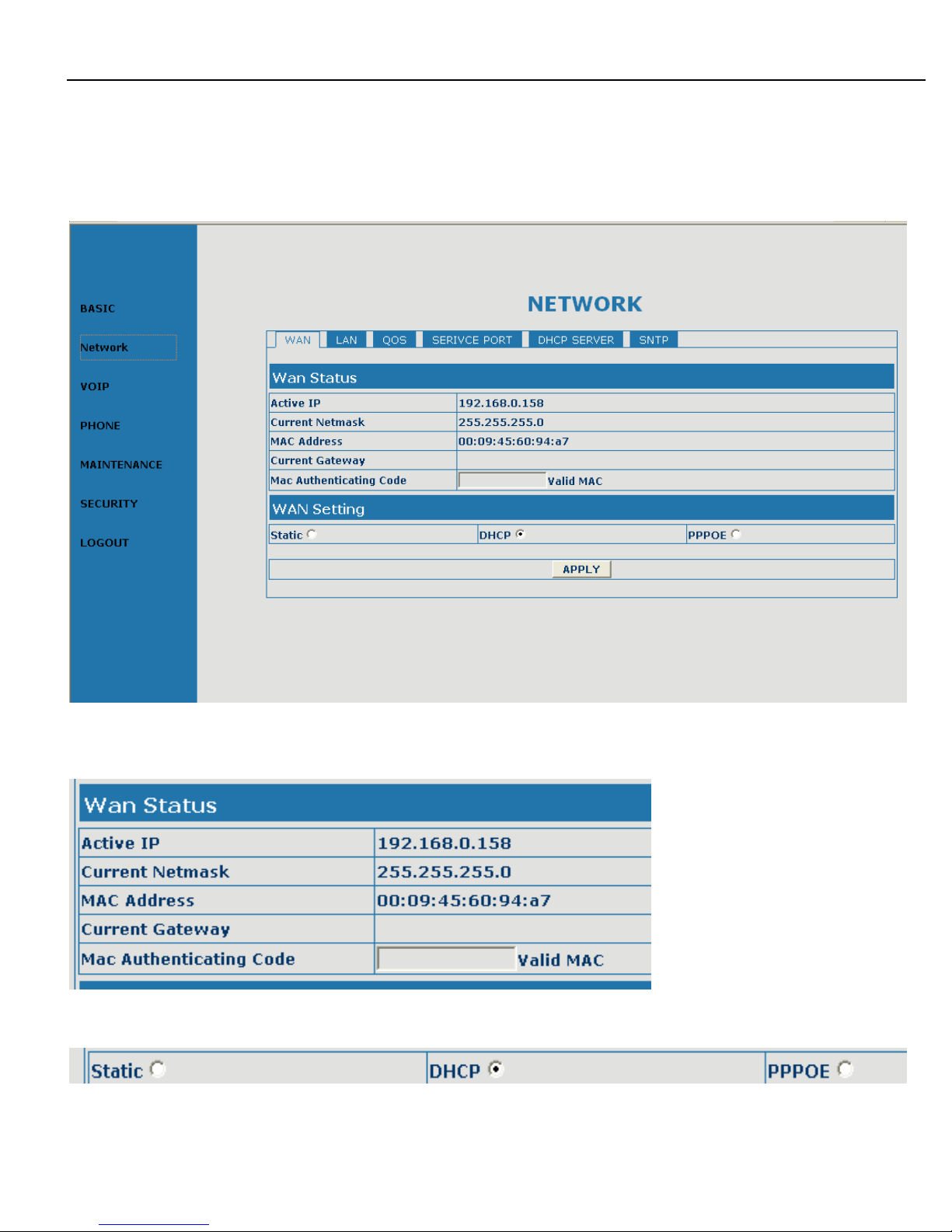
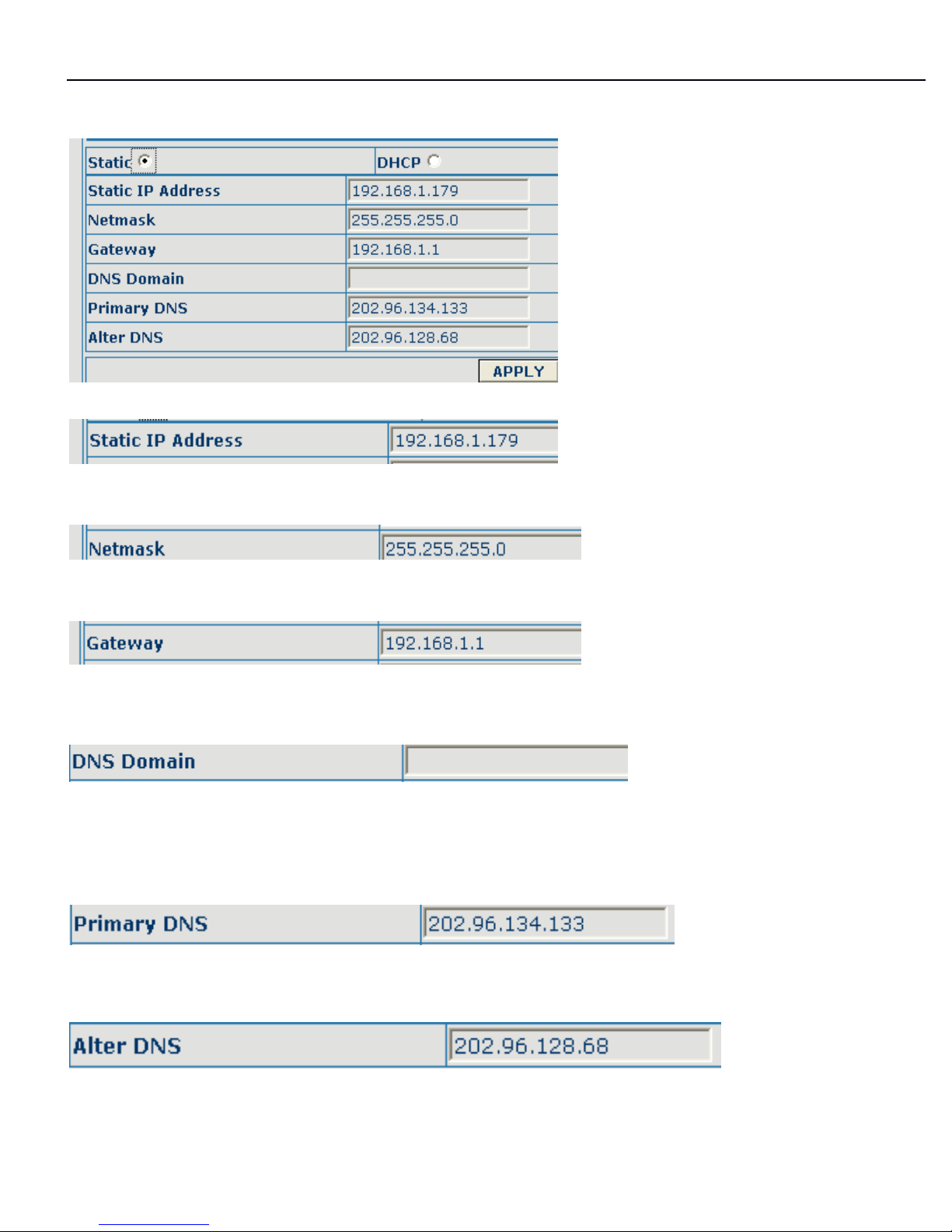
User can view the current network IP linking mode of the system on this page.
User will be authorized to set the network
IP,
Gateway and DNS if the system
adopts the static linking mode.
If the system selects DHCP service in the network which is using DHCP service, IP
address will be gained dynamically.
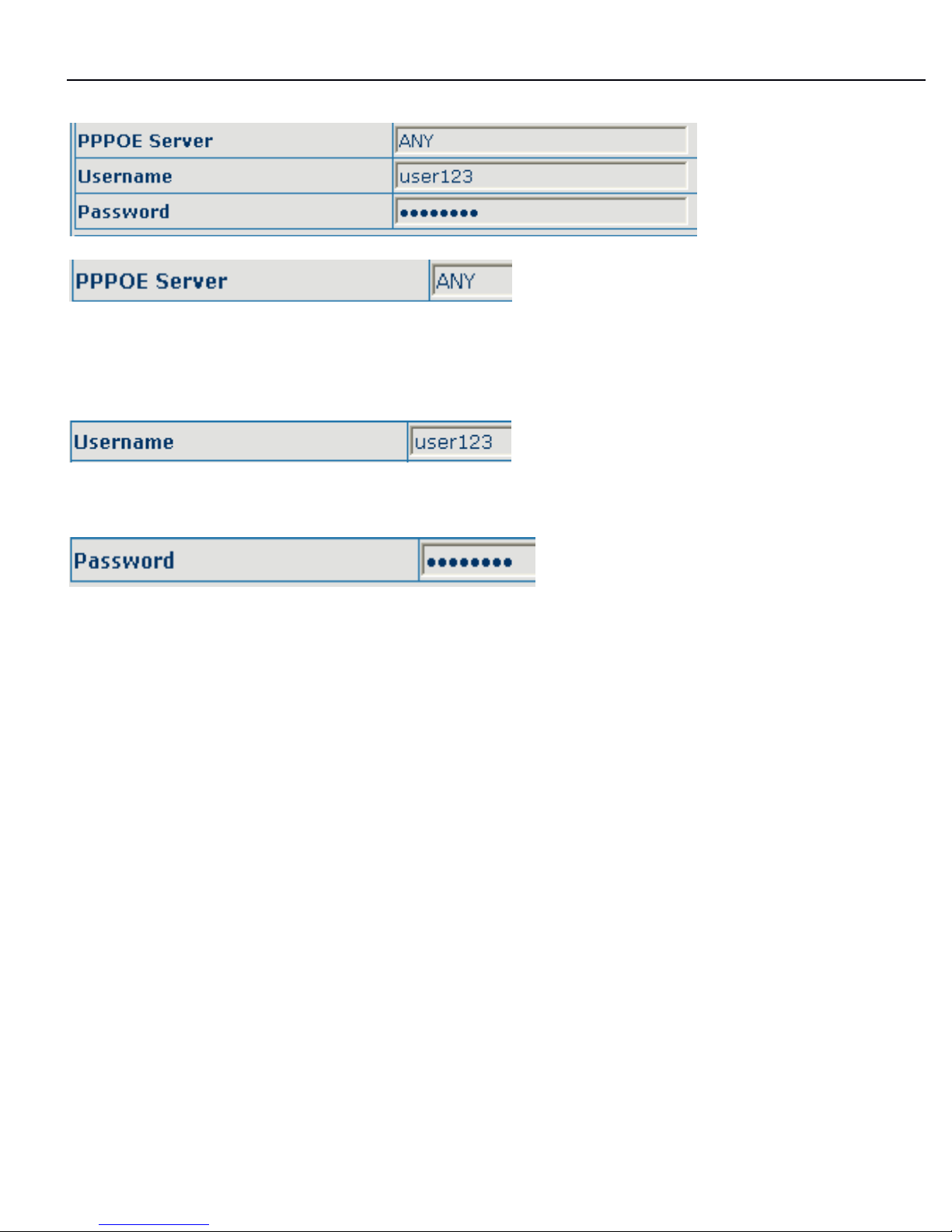
If the system selects PPPOE service in the network which is using the PPPOE
service, then the IP address will be gained by the set PPPOE ISP internet and
password of the account.
Page 22
3130IF
3130IF
3130IF
---
VVV
oIP
oIP
oIP
User
User
User
Manual
Manual
Manual
V3.0
V3.0
V3.0
22
Note:
Note:
Note:
IfIfIf
IPIPIP
address
address
address
has
has
has
been
been
been
modified,
modified,
modified,
the
the
the
web
web
web
page
page
page
will
will
will
nonono
longer
longer
longer
respond
respond
respond
owing
owing
owing
tototo
the
the
the
modification,
modification,
modification,
sososo
new
new
new
IPIPIP
address
address
address
should
should
should
bebebe
input
input
input
ininin
the
the
the
address
address
address
field
field
field
now.
now.
now.
Configuration Explanation:
Current phone
IP,
subnet mask, mac address and current phone IP;
,
Select acquisition way of IP for WAN; This is single option; Configure static IP
Page 23
3130IF
3130IF
3130IF
---
VVV
oIP
oIP
oIP
User
User
User
Manual
Manual
Manual
V3.0
V3.0
V3.0
23
parameter for WAN;
Configure static IP address;
Configure subnet mask;
Configure IP address of the phone;
Configure “ DNS domain ” suffix; if user input “ domain ” and it can
’ t
be resolved, then
the phone will add and resolve the “ domain ” after user has input;
Main DNS server IP address;
The second DNS server IP address;
Page 24
3130IF
3130IF
3130IF
---
VVV
oIP
oIP
oIP
User
User
User
Manual
Manual
Manual
V3.0
V3.0
V3.0
24
Configure PPPoE:
Service name, if PPPoE ISP has no special requirement for this name, generally is
the default;
PPPoE account;
PPPoE password;
Configure the parameter and then click “ apply ” to go into effect.
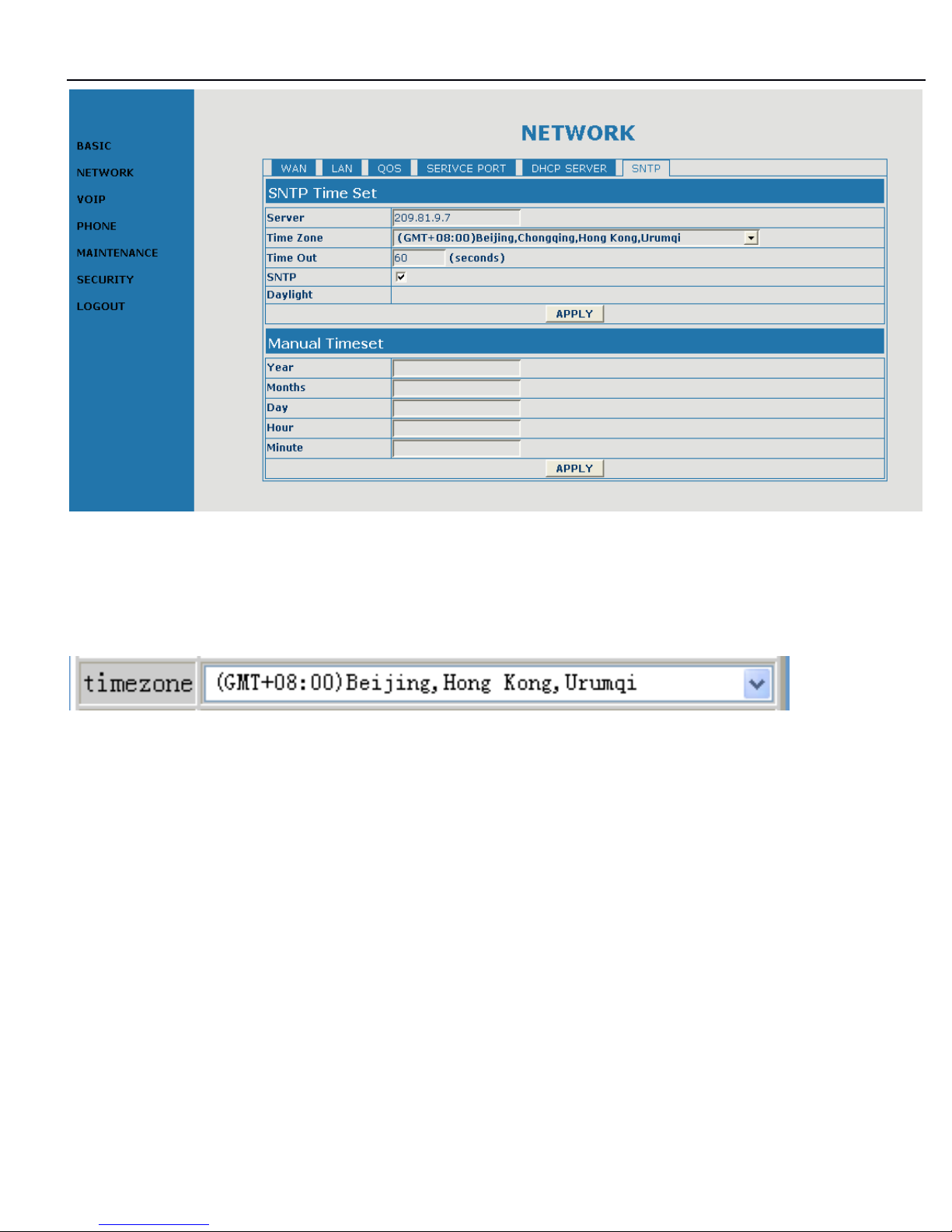
8.3.2SNTP
8.3.2SNTP
8.3.2SNTP
configuration.
configuration.
configuration.
On this page, user can save and configure time zone setting.
Page 25
3130IF
3130IF
3130IF
---
VVV
oIP
oIP
oIP
User
User
User
Manual
Manual
Manual
V3.0
V3.0
V3.0
25
Configure the desired time zone.
Page 26
3130IF
3130IF
3130IF
---
VVV
oIP
oIP
oIP
User
User
User
Manual
Manual
Manual
V3.0
V3.0
V3.0
26
8.4
8.4
8.4
VOIP
VOIP
VOIP
configuration
configuration
configuration
888
.4.1
.4.1
.4.1
SIP
SIP
SIP
configuration.
configuration.
configuration.
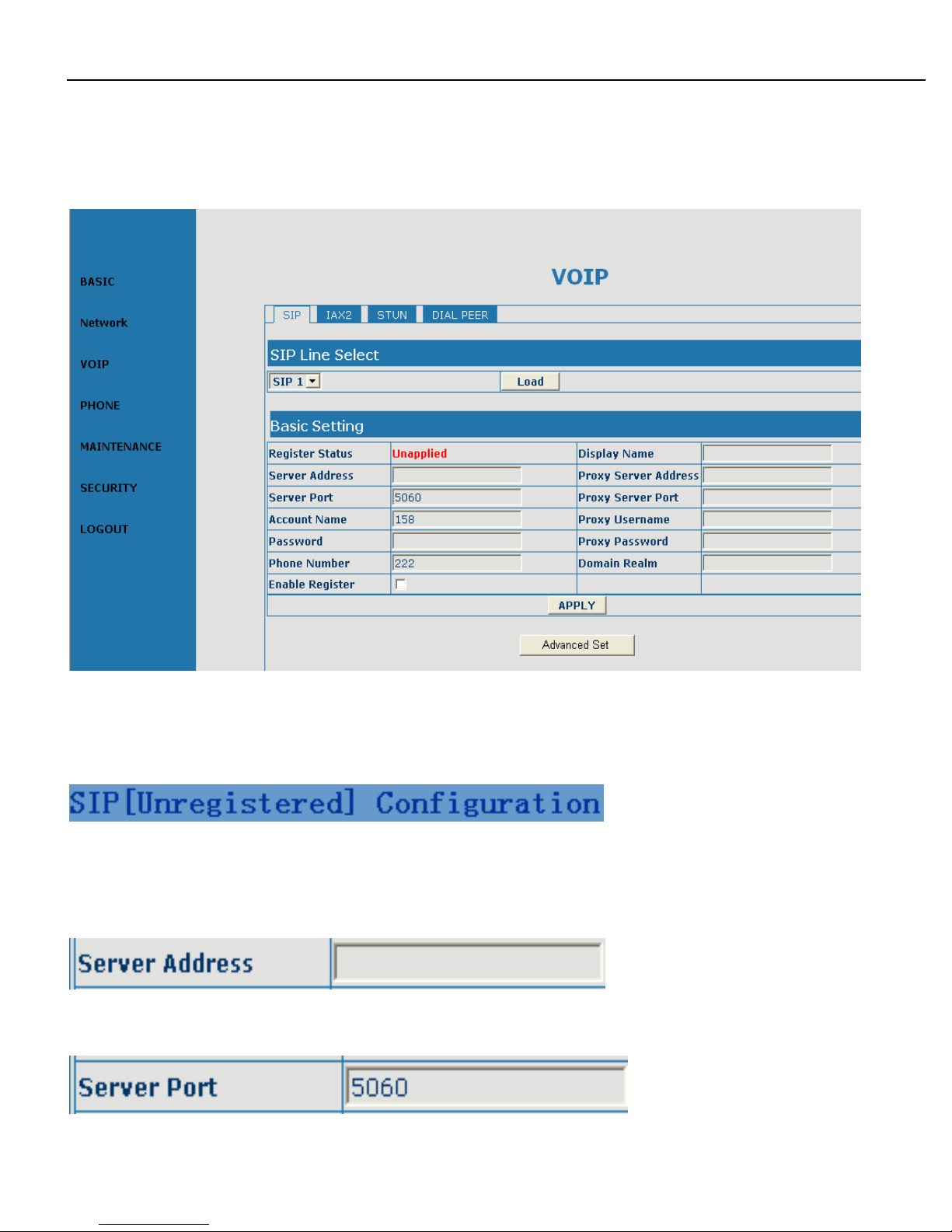
Configuration Explanation:
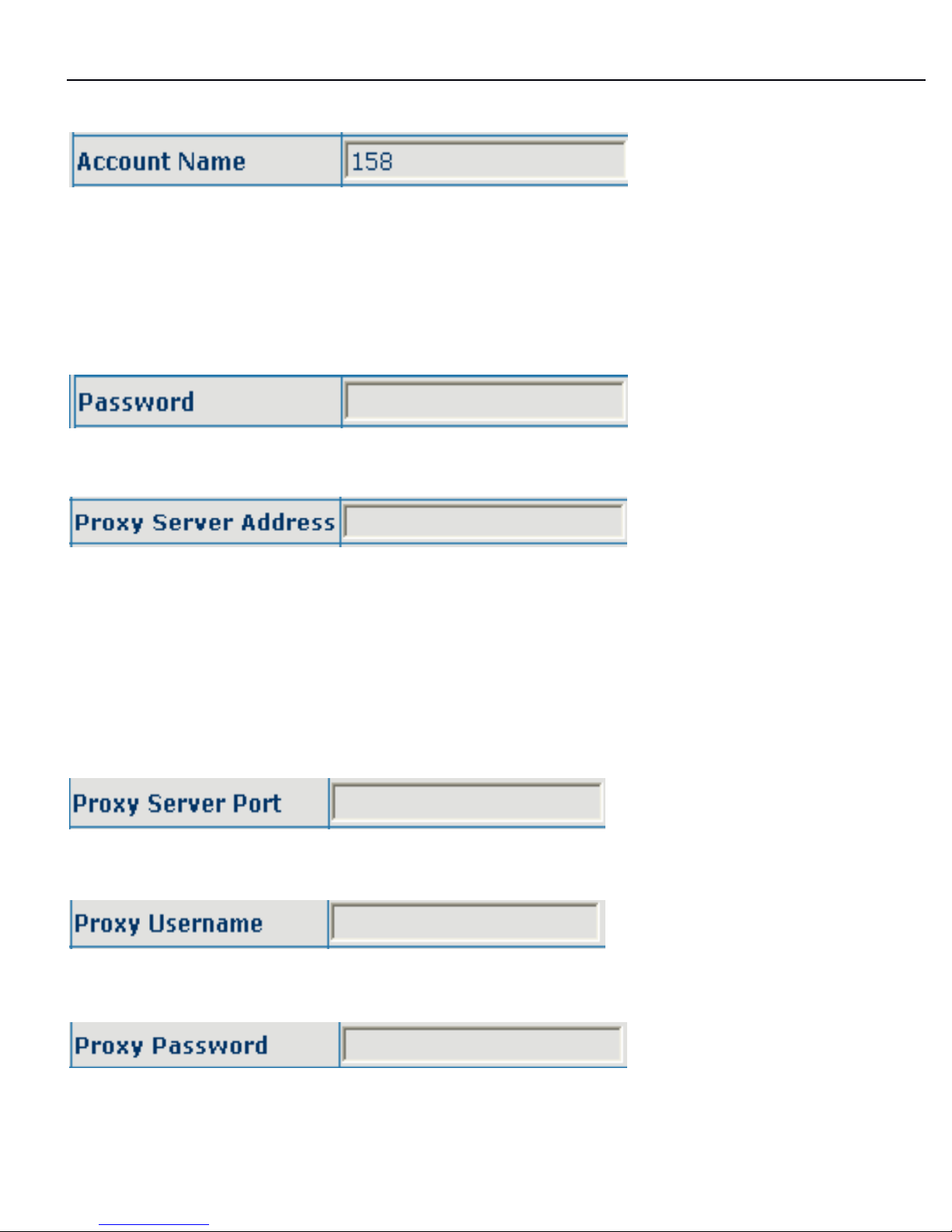
show SIP register state; if register successfully, there will show Registered in the
square bracket, otherwise show Unregistered;
Configure SIP register server IP address;
Page 27
3130IF
3130IF
3130IF
---
VVV
oIP
oIP
oIP
User
User
User
Manual
Manual
Manual
V3.0
V3.0
V3.0
27
Configure SIP register server signal port;
Configure SIP register account ( usually it is the same with the port number that
configured, some special SIP servers will have different port configurations, then
the port configuration needs to be configured to be numbers, here the configuration
account can be arbitrary character string )
;
Configure password of SIP register account;
Configure proxy server IP address ( usually SIP will provide user with service of
proxy server and register server which have the same configuration, so the
configuration of proxy server is usually the same with that of register server, but if
the configura tions of them are different(such as different IP addresses), then each
server's configuration should be modified separately )
;
Configure SIP proxy server signal port;
Configure proxy server account;
Configure proxy server password;
Page 28
3130IF
3130IF
3130IF
---
VVV
oIP
oIP
oIP
User
User
User
Manual
Manual
Manual
V3.0
V3.0
V3.0
28
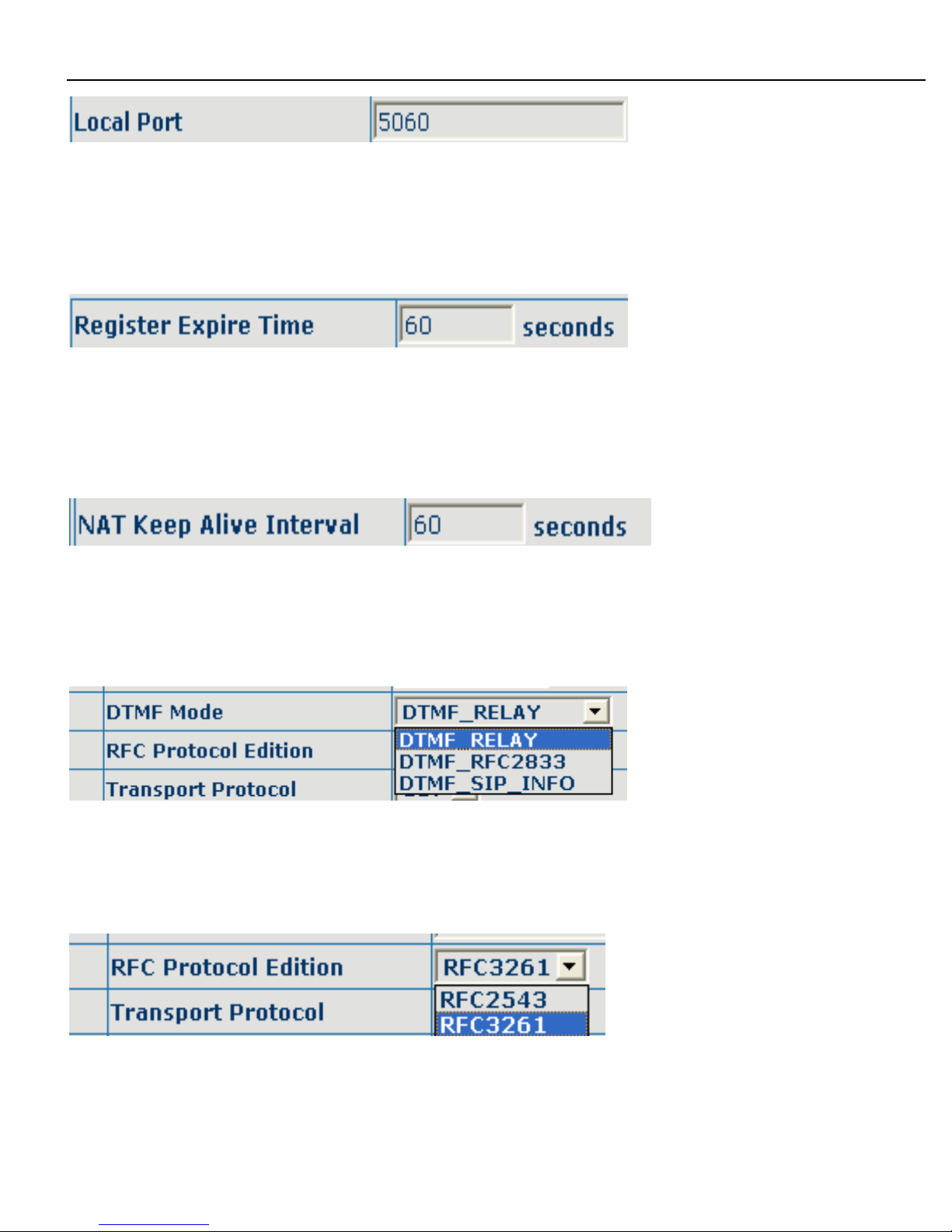
Configure local signal port, the default is 5060 ( this port will go into effect
immediately, the SIP call will use the modified port for communication after
modification )
;
Configure expire time of SIP server register, the default is 600 seconds. If the
expire time that server requires is more or less than that configured by the phone,
the phone can automatically modify it to the recommended time limit and register;
Configure detection interval time of the server, if the phone enables SIP detection
server function, the phone will detect once for whether the server has response
every other detection interval time;
DTMF sending mode configuration; three kinds: the above are basic configurations
of
SIP.
Configure SIP of the phone as default protocol;
Enable the phone to use protocol edition. When the phone need to communicate
with phones which is using SIP1.0 such as CISCO5300 and so on, then it should
Page 29

3130IF
3130IF
3130IF
---
VVV
oIP
oIP
oIP
User
User
User
Manual
Manual
Manual
V3.0
V3.0
V3.0
29
be configured into RFC2543 to communicate normally. the default is to enable
RFC3261;
Configure enable/disable register;
SOME ISP INTERNET MAY INHIBIT THE PHONE TO REGISTER AND CANCEL
THE REGISTER IN SUCCESSION, SO USER HAD BETTER NOT APPLY OR
REGISTER AND CANCEL SOON IN SUCCESSION AND SUBMIT
REGISTRATION
REPEATEDLY.
SERVER
MAY
STOP RESPONSE OF
DIALOGUE MACHINE, THEN THE PH ONE RECEIVES NO CERTIFICATION OF
REGISTER/CANCEL LOGIN REQUEST AND REGISTRATION
STATE
WILL
SHOW AS INCORRECT!
Page 30
3130IF
3130IF
3130IF
---
VVV
oIP
oIP
oIP
User
User
User
Manual
Manual
Manual
V3.0
V3.0
V3.0
30
888
.4.2
.4.2
.4.2
IAX2
IAX2
IAX2
Configuration
Configuration
Configuration
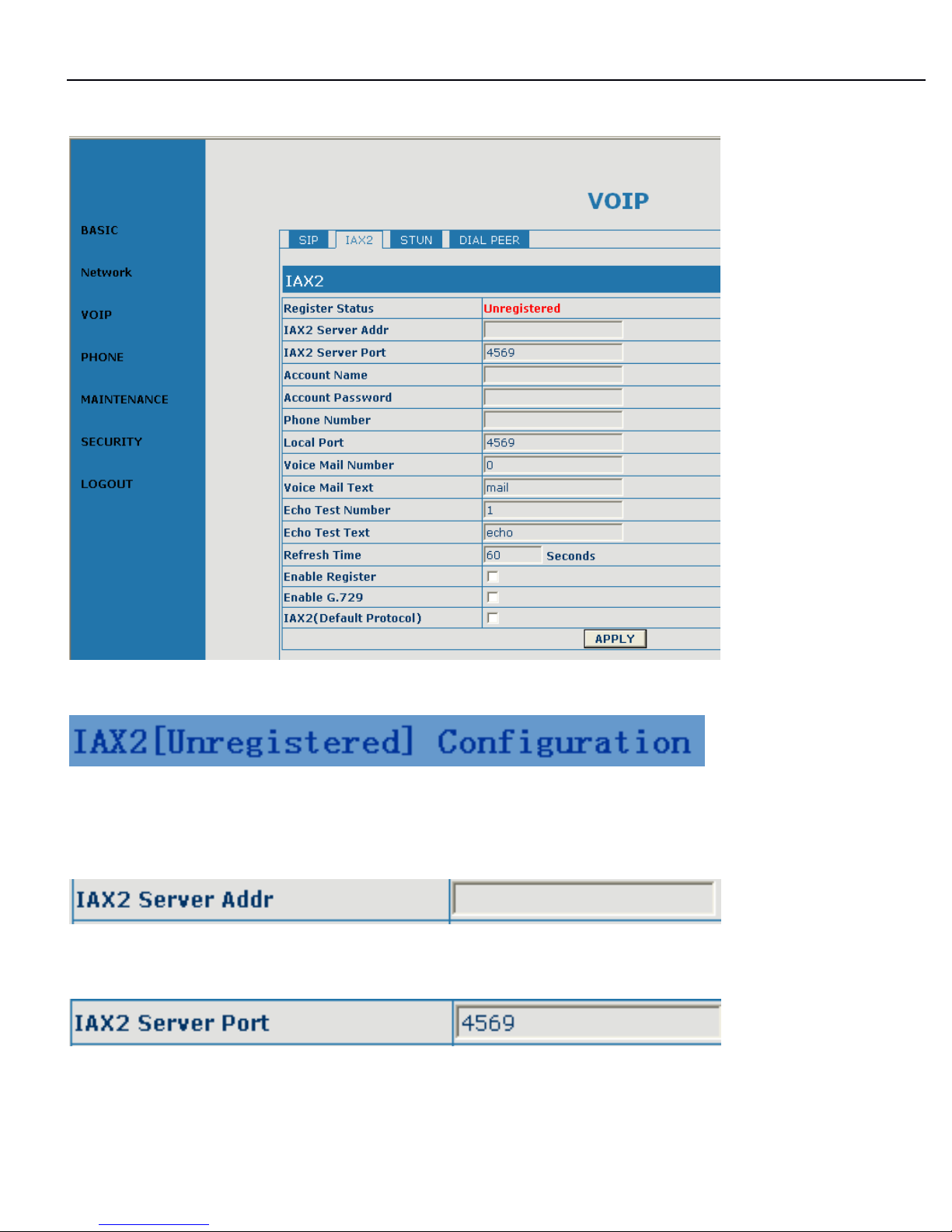
Configuration Explanation:
IAX2 registration
state display ; If register successfully, it will display [Registered], otherwise will
display [Unregistered];
Configuration iax2 the server address, also can use domain name form;
Configuration iax2 server port;
Page 31
3130IF
3130IF
3130IF
---
VVV
oIP
oIP
oIP
User
User
User
Manual
Manual
Manual
V3.0
V3.0
V3.0
31
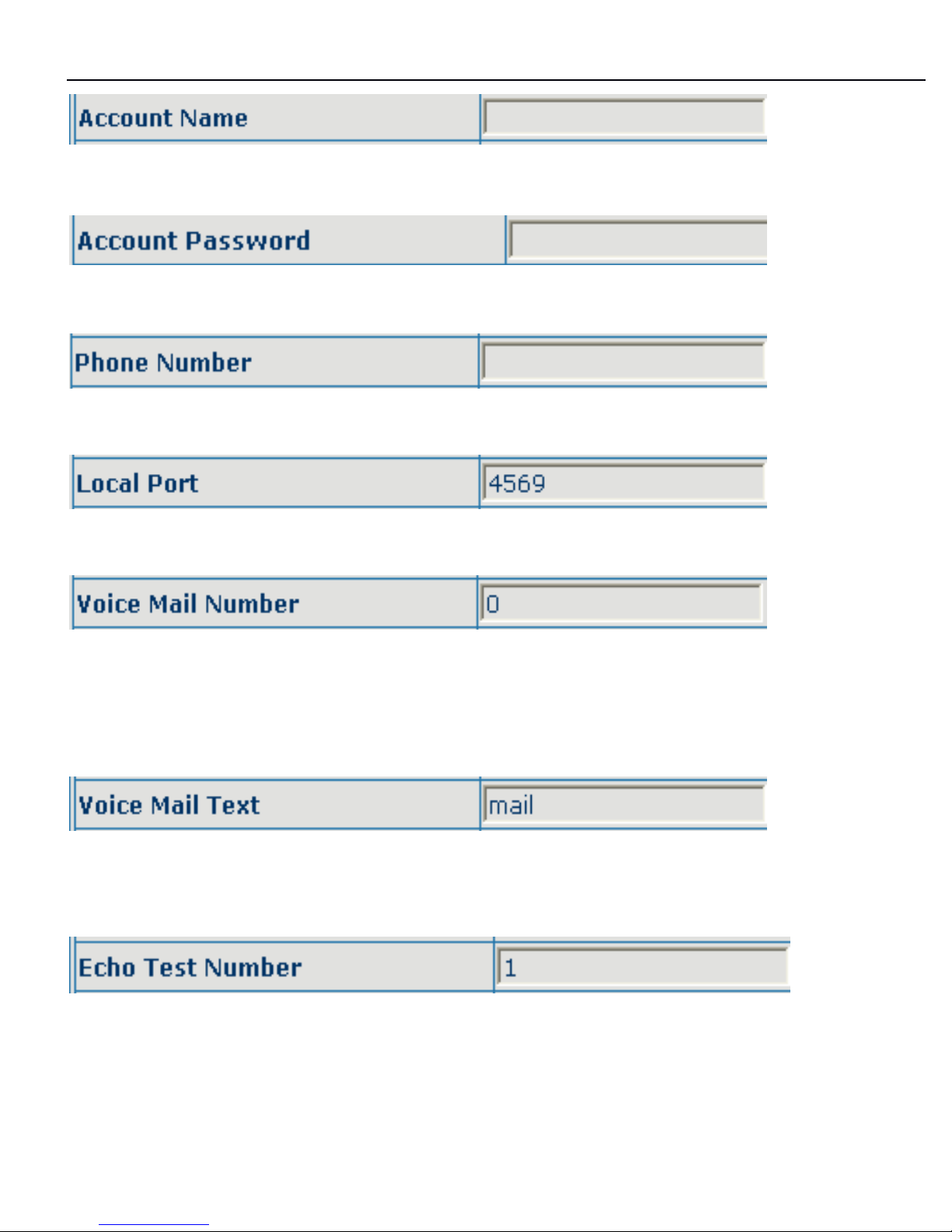
Configuration IAX2 account name ;
Configuration IAX2 account password ;
Configuration IAX2 phone number ;
Configuration equipment iax2 monitor port ;
Configuration voice mail number,If the iax support voice mailbox, the voice mailbo x
is the letter form, the gateway is unable to input the letter, uses this number to
replace voice mail the name ;
Configuration voice mailbox name; if the iax support voice mailbox, here to
configuration the voice mailbox the name ;
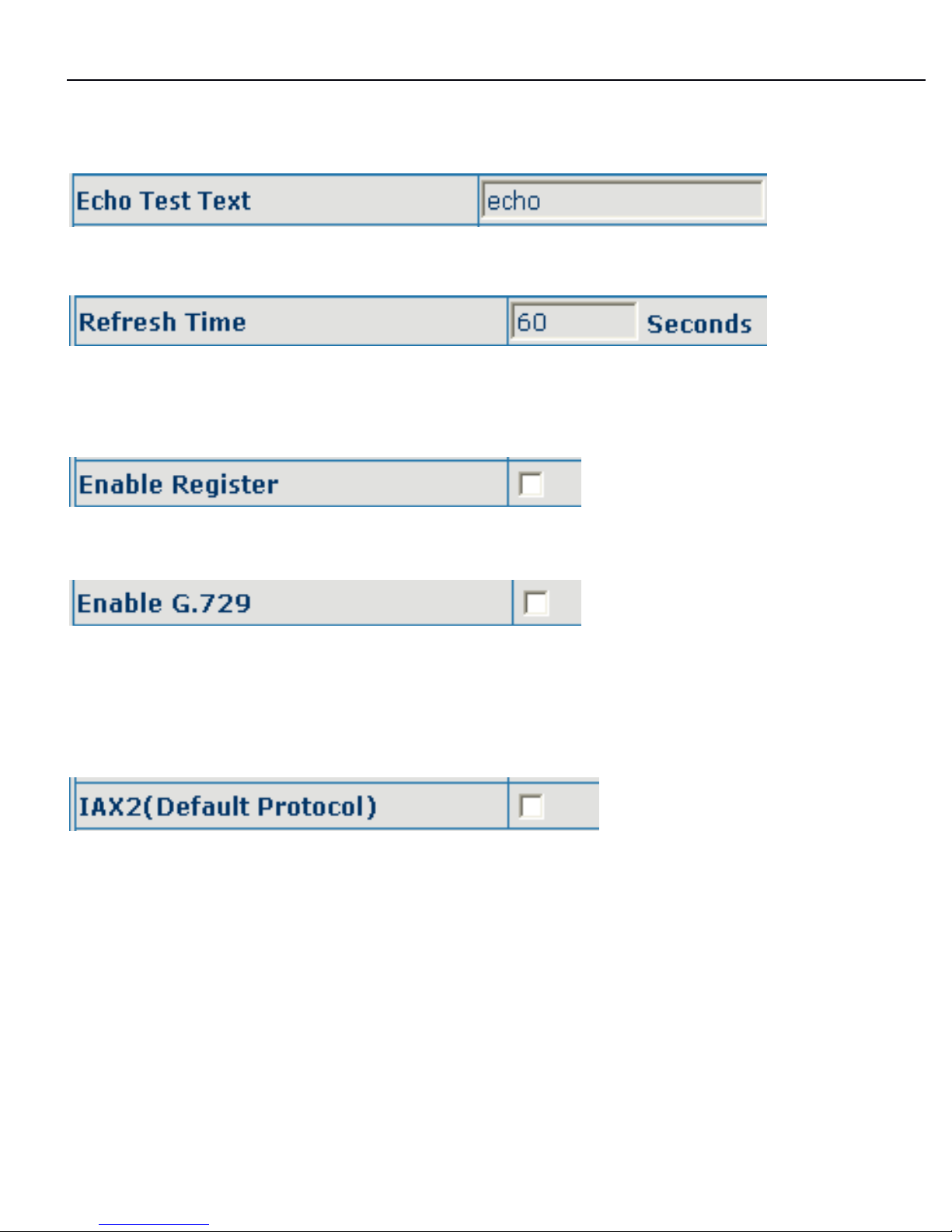
Configuration whether supports echo. If the platform support echo, (echo number is
the text format), then the telephone configuration this echo test number replace
echo actual text number. This function is refers through the platform, the terminal
Page 32
3130IF
3130IF
3130IF
---
VVV
oIP
oIP
oIP
User
User
User
Manual
Manual
Manual
V3.0
V3.0
V3.0
32
may carry on echo the call to test.
To
see the terminal to the platform converses on
the telephone whether normally;
Configurationecho test text ;
Configuration iax refresh time , The unit of time for the second, suggested the user
in makes the choice 60 to 3600 between ;
configuration the permission/prohibition registers the server ;
Configuration whether supports G.729, if the platform supports 729, the telephone
transmits codec supports 729, then calls idefisk to be able to cause idefisk as a
result of to cause pc to 729 support questions to shut down;
Configuration the iax2 protocol for the default call protocol. After chooses this, the
user picks the call which machine sends out to be able through the iax2 protocol to
carry on the correspondence. The gateway default is the SIP protocol, this
configura tion mainly aims at the host to call, is not called this influence. If after the
user configuration this item, but picked machine can use iax no longer is
SIP,
if the
user also wanted simultaneously SIP to send out the call, then might dispose dial
peer the prefix replace function to realize the SIP call;
Page 33
3130IF
3130IF
3130IF
---
VVV
oIP
oIP
oIP
User
User
User
Manual
Manual
Manual
V3.0
V3.0
V3.0
33
8.4.3
8.4.3
8.4.3
STUN
STUN
STUN
Configuration
Configuration
Configuration
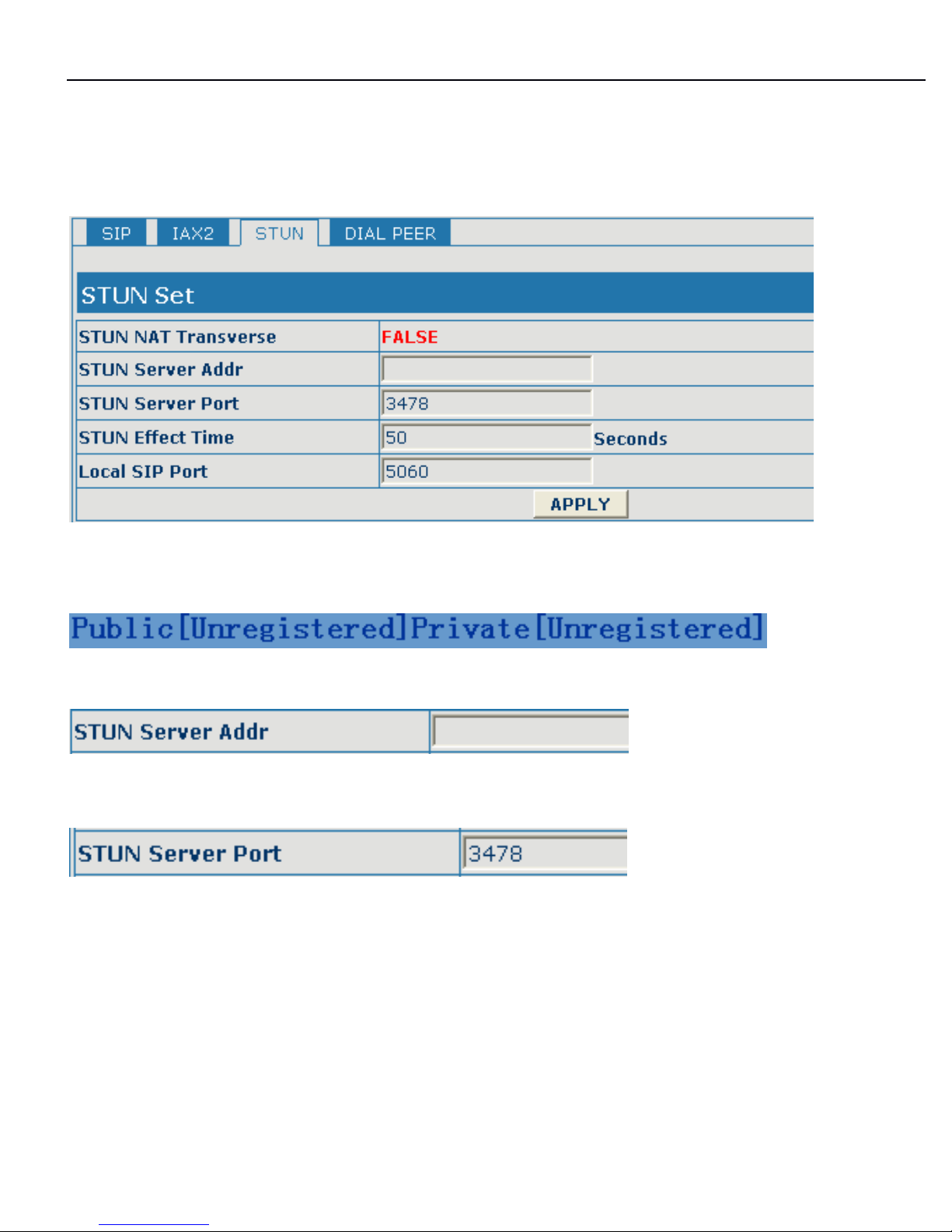
Configure explanation of private server;
To
show the phone whether has been registered on public server
or
private server;
Configure IP address of SIP STUN server;
Configure port of SIP STUN.
STUN can support SIP terminal's penetration to
NAT
in the inner-net. In this way,
as long as there is conventional SIP proxy and a STUN server placed in the public
net, it will do; but STUN only supports three
NAT
modes: FULL CONE, restricted,
port restri cted;
Page 34
3130IF
3130IF
3130IF
---
VVV
oIP
oIP
oIP
User
User
User
Manual
Manual
Manual
V3.0
V3.0
V3.0
34
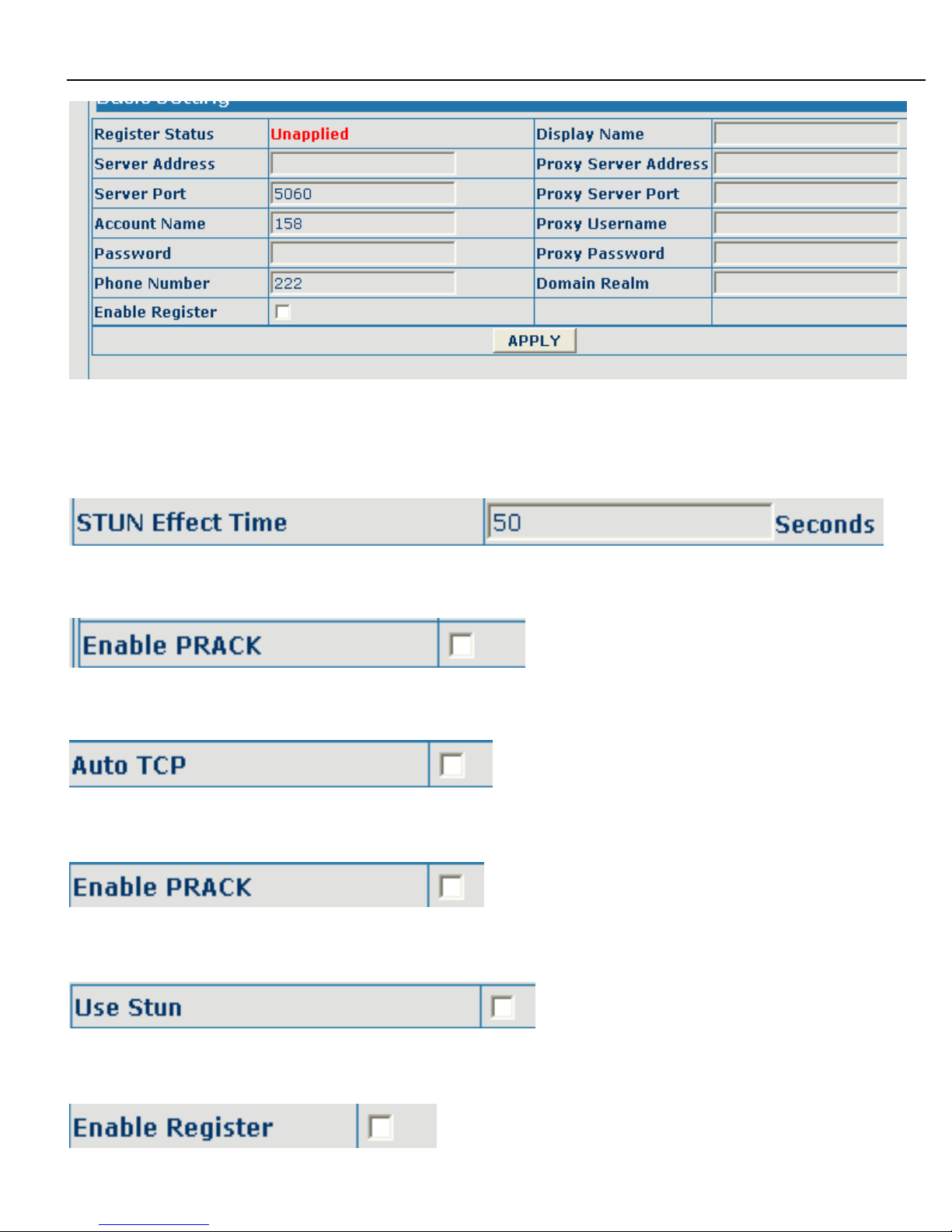
Private server configuration. specific configuration parameter has the same
meaning with public server;
Interval time for STUN's detection on
NAT
type, the unit is minute;
Configure enable/disable PRACK
Configure automatic detection server of the phone;
Configure enable/disable PRACK
Configure enable/disable SIP STUN;
Page 35

3130IF
3130IF
3130IF
---
VVV
oIP
oIP
oIP
User
User
User
Manual
Manual
Manual
V3.0
V3.0
V3.0
35
Configure permit/deny private server register;
Note:
Note:
Note:
IfIfIf
you
you
you
want
want
want
tototo
register
register
register
and
and
and
call
call
call
through
through
through
server,
server,
server,
you
you
you
must
must
must
configure
configure
configure
corresponding
corresponding
corresponding
numbers
numbers
numbers
( which
which
which
are
are
are
usually
usually
usually
SIP
SIP
SIP
accounts
accounts
accounts
) tototo
local
local
local
port,
port,
port,
Otherwise
Otherwise
Otherwise
the
the
the
phone
phone
phone
will
will
will
reject
reject
reject
for
for
for
sending
sending
sending
out
out
out
register
register
register
message
message
message
when
when
when
ititit
considers
considers
considers
that
that
that
there
there
there
isisis
nonono
number.
number.
number.
After the aforesaid network and VoIP configurations have been configurated on the
phone and internetwork communication has been implemented, the user can make
VoIP calls by the calling register and proxy.
8.4.4
8.4.4
8.4.4
Number
Number
Number
binding
binding
binding
configuration
configuration
configuration
Function of number IP table is one way to implement the phone's calling online, and
the calling of the phone will be more flexible by configuration the number IP table.
For example, user know the other party's number and IP and want to make direct
call
t o
the party by point-to-point mode: the other party's number is 1234,make a
configuration of 1234 directly ,then the phone will send the called number1234 to
the corresponding IP address; Or set numbers with prefix matching pattern, for
example, user want to make a call to a number in a certain region ( 010 ) ,user can
configure the corresponding number IP as 010T ― protocol ―
IP,
after that,
whenever user dial numbers with 010 prefix( such as 010 - 62201234),the call will
be made by this rule.
Bases on this configuration, we can also make the phone use different accounts
and run speed calling without swap.
When making deletion
or
modification, select the number first and click load, then
click Modify and complete the operation.
Page 36
3130IF
3130IF
3130IF
---
VVV
oIP
oIP
oIP
User
User
User
Manual
Manual
Manual
V3.0
V3.0
V3.0
36
8.4.5
8.4.5
8.4.5
DIAL
DIAL
DIAL
PEER
PEER
PEER
Configuration
Configuration
Configuration
Configuration
Configuration
Configuration
Explanation:
Explanation:
Explanation:
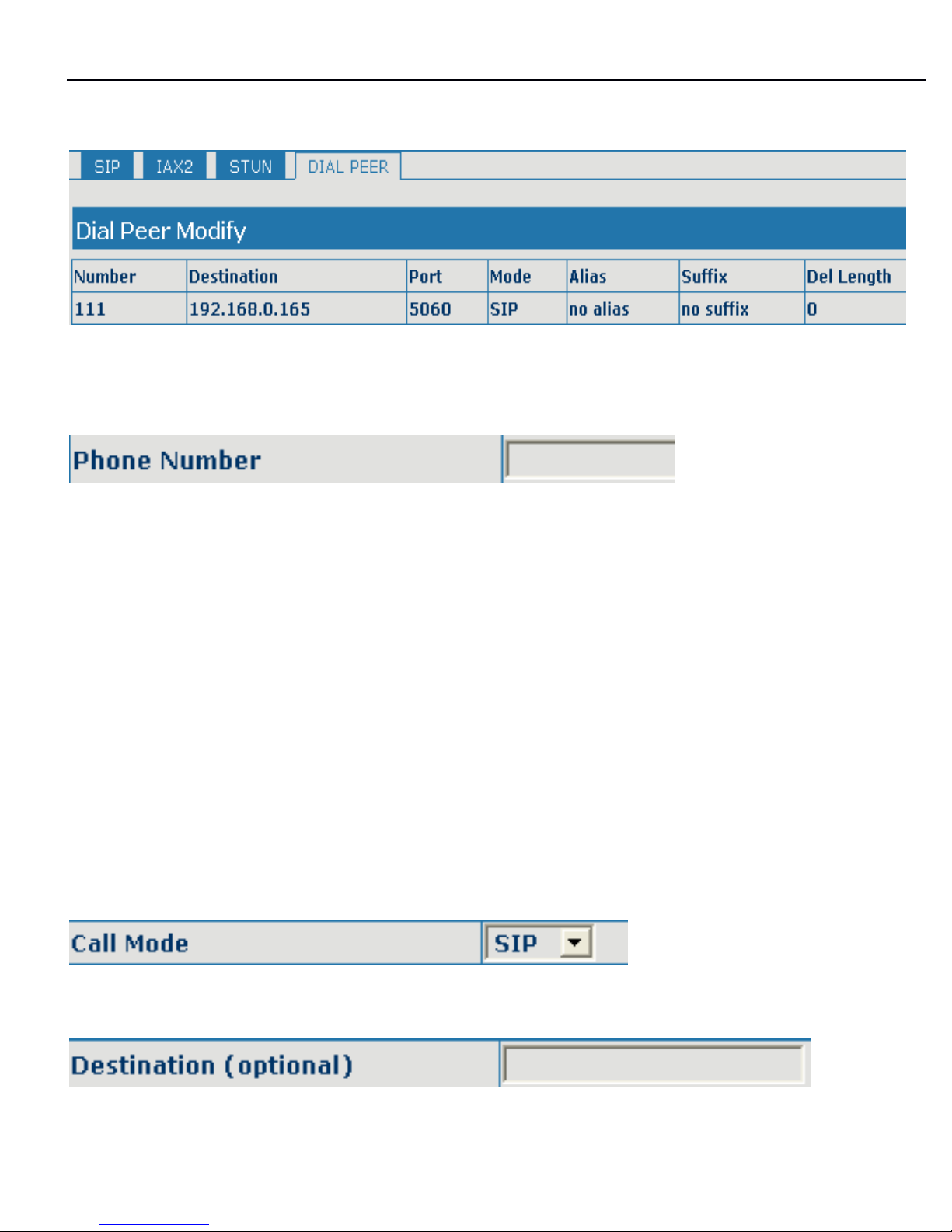
It is to add outgoing call number, there are two kinds of outgoing call number setup:
One is exactitude matching, after this configuration has been done, when the
number is totally the same with the user's calling number, the phone will make the
call with this number's IP address image
or
configuration; Another is prefix
matching ( be equivalent to PSTN's district number prefix function
)
,if the previou
s
A
bits of this number are the same with that of the user's calling number(the prefix
number length),then the phone will use this number's IP address image
or
configuration to make the call. When configuring the prefix matching, letter "T"
should be added b ehind the prefix number to be distinguished from the exactitude
matching; the longest length is 30 bits.
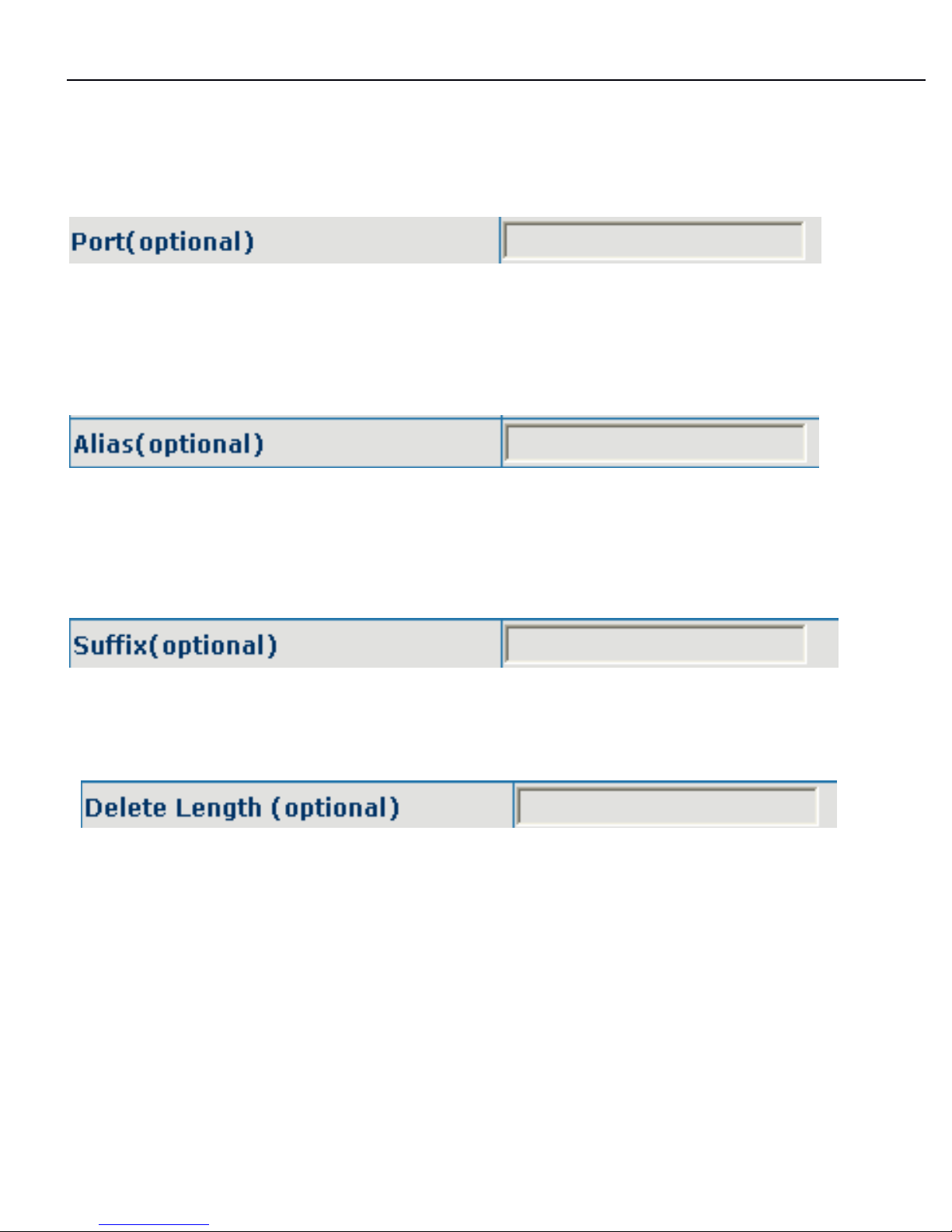
Configure the calling mode: SIP and IAX2
;
Configure destination address, if it is point-to-point call, then input the opposite
Page 37
3130IF
3130IF
3130IF
---
VVV
oIP
oIP
oIP
User
User
User
Manual
Manual
Manual
V3.0
V3.0
V3.0
37
terminal's IP address, it can also be set as domain name and resolved the specific
IP address by DNS server of the phone. If no configuration has been made, then
the IP will be considered as 0.0.0.0. This is an optional configuration item;
Configure the other party's protocol signal port, this is optional configuration item
:when nothing is input, then the default of h323 protocol is 1720,the default of sip
protocol is 5060;lifeline required no configuration of this item, shown as 0;
Configure alias, this is optional configuration item: it is the number to be used when
the other party's number has prefix; when no configuration has been made, shown
as no alias;
Configure suffix ,this is optional configuration item: it is the additive dial-out number
behind the number; when no configuration has been made, shown as no suffix;
Configure the replacing length, replace the number that user input according to this
length; this is optional configuration item.
Of which the alias can be divided into four types, it should be combined with
replacing length to make the setup:
Add: xxx, add xxx before number. in this way it can help user save the dialing
length;
All: xxx, the number is all replaced by xxx; speed dialing can be implemented, for
Page 38
3130IF
3130IF
3130IF
---
VVV
oIP
oIP
oIP
User
User
User
Manual
Manual
Manual
V3.0
V3.0
V3.0
38
example, user configure the dialing number as with the configuration "all"
,
the
actual calling number will be replaced;
Del: delete
n
bit in the front part of the number,
n
can be decided by the replacing
length; this configuration can decide the protocol for appointed number;
Rep: xxx,
n
bit in the front part of the number will be replaced.
n
is decided by the
replacing length. For example, user want to dial
PSTN
( 010 - 62281493
)
by VoIP'
s
Rec/Finish over service, while actually the called number should be 8610 -
62281493,then we ca
n
configure called number as 010T ,then rep:8610,and then
set the replacing length as 3. So that when user make a call with 010 prefix, the
number will be replaced as 8610 plus the number and then sent out. It is a
convenient thinking mode for user to mak
e
a call;
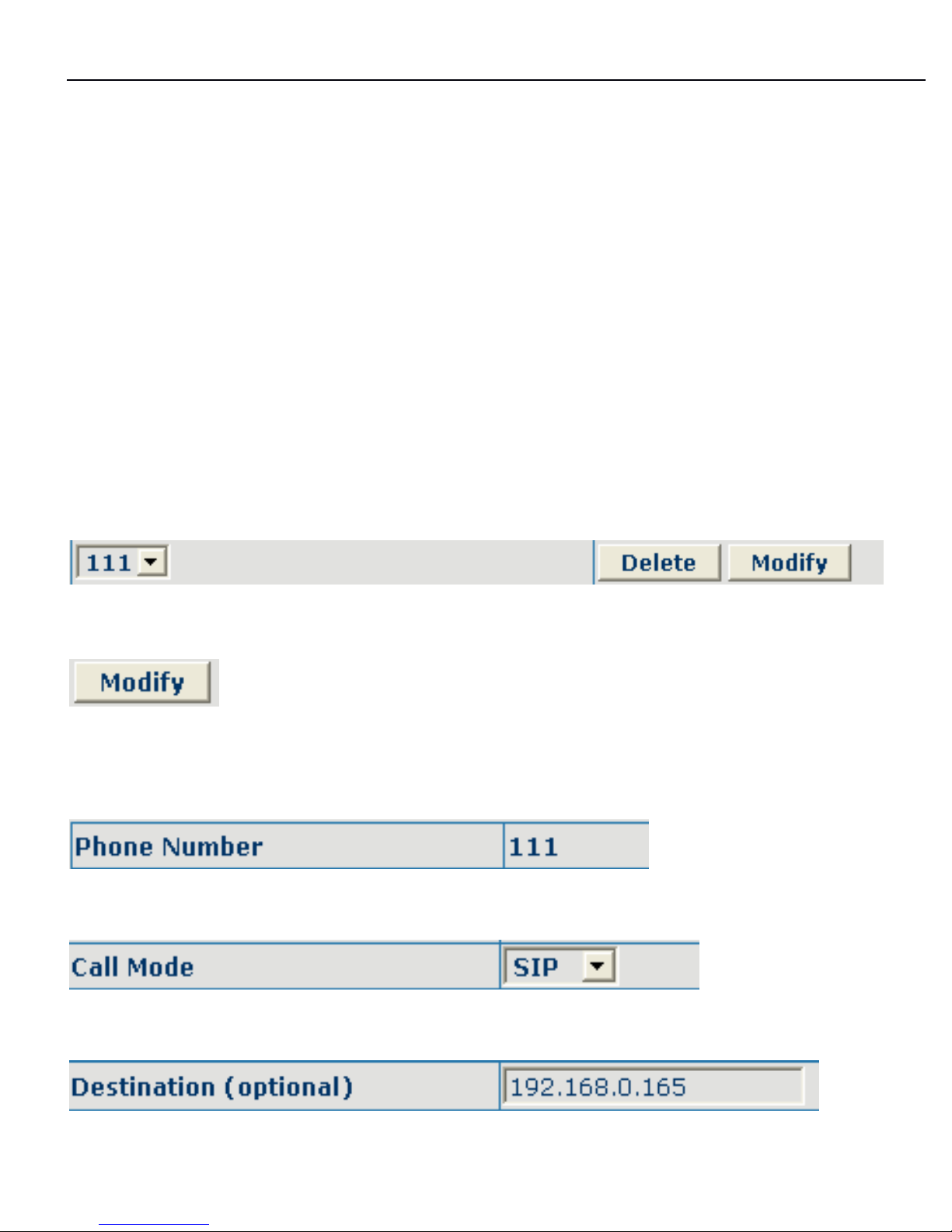
Delete selective number IP image;
If user want to modify a certain current number image, first select
in the drop-down menu and then load the image parameter of the said number, click
modify to make modification; of which:
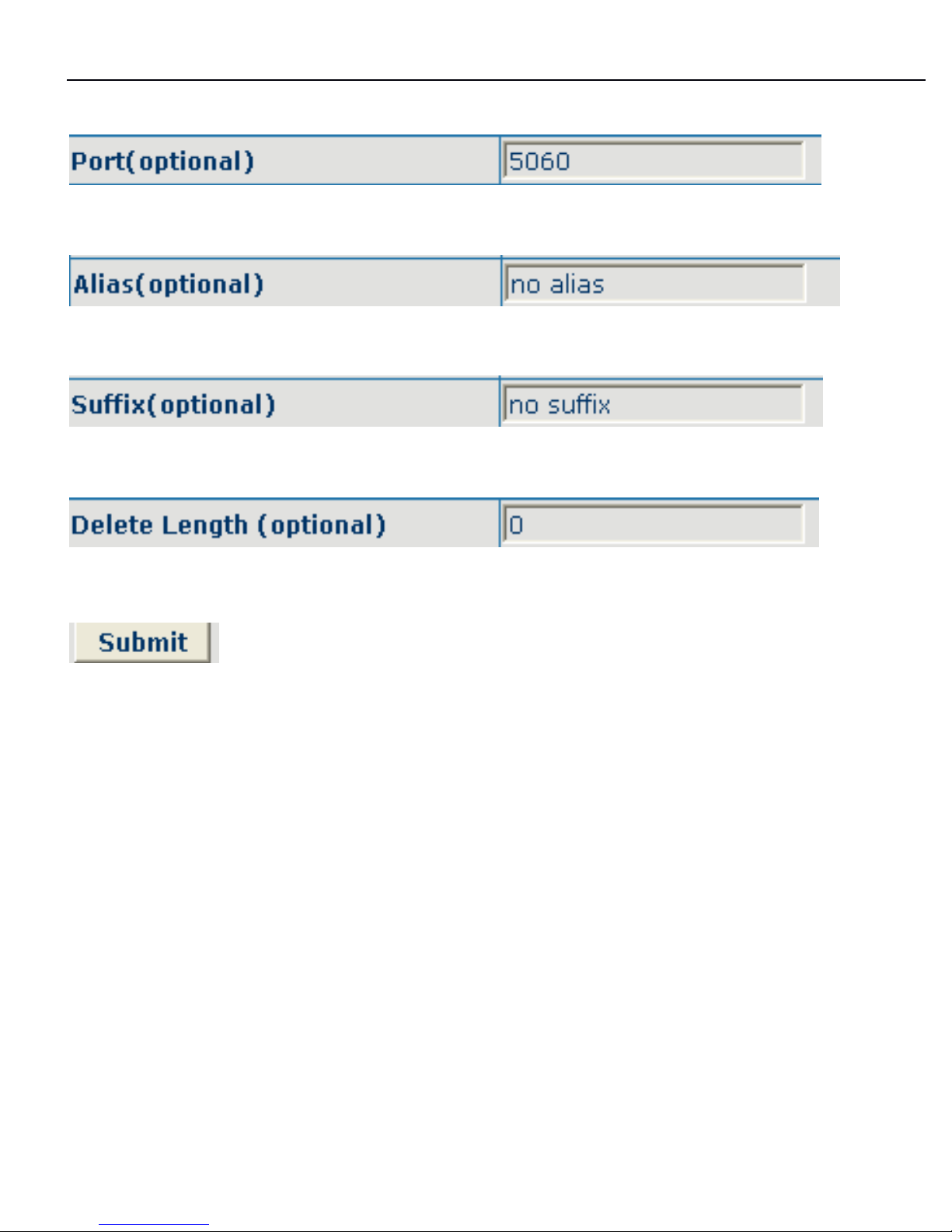
this is the modified number. read-only;
To
modify call mode;
Page 39
3130IF
3130IF
3130IF
---
VVV
oIP
oIP
oIP
User
User
User
Manual
Manual
Manual
V3.0
V3.0
V3.0
39
To
modify destination address; this is optional configuration item;
To
modify destination phone port;this is optional configuration item;
To
modify alias; this is optional configuration item;
To
modify suffix; this is optional configuration item;
To
modify replacing length ( if rep and del of alias have been configured )
;
Click submit to go into effect; The basic application of the number IP table has been
introduced, now let me introduce how to configure IP table of number to implement
configuration of using multi-accounts concurrently:
For example, now user has a H323 account and two SIP accounts, then under the
default condition, user can only make calls by the default protocol. Configure the
number IP table to select the call protocol, then user don
’ t
need to select default
protocol b efore making calls every time.
The configuration process will not be repeated, now
I
will mainly introduce what
kind of number IP image can implement this function.
By configuration, Image table as follows will be gained:
Page 40

3130IF
3130IF
3130IF
---
VVV
oIP
oIP
oIP
User
User
User
Manual
Manual
Manual
V3.0
V3.0
V3.0
40
Image of 9T means when user configure public SIP server and register, then user
just need to add a"9"before the calling number whenever making a call by public
SIP;
Image of 8T means when user configure private server and register, then user just
need to add a"8"before the calling number whenever making a call by private SIP;
Image of 7T means when user configure h323 server and register, then user just
need to add a"7"before the calling number whenever making a call by H323 GK.
888
.5.5.5
Phone
Phone
Phone
configuration
configuration
configuration
8.5.1
8.5.1
8.5.1
DSP
DSP
DSP
configuration
configuration
configuration
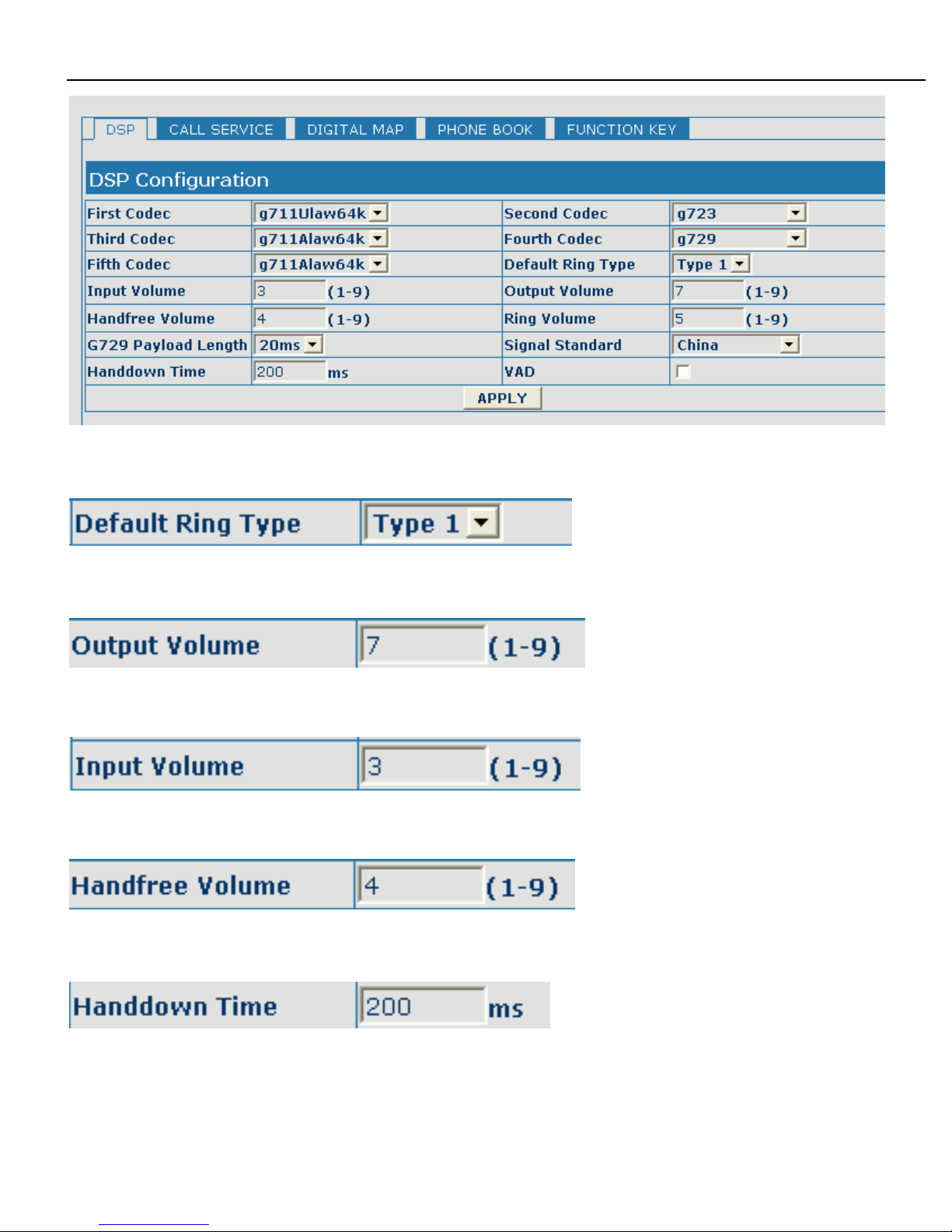
On this page, user can set speech coding, IO volume control, cue tone standard,
caller
ID
standard and so on.
Page 41
3130IF
3130IF
3130IF
---
VVV
oIP
oIP
oIP
User
User
User
Manual
Manual
Manual
V3.0
V3.0
V3.0
41
Configuration
Configuration
Configuration
Explanation:
Explanation:
Explanation:
Configure ring type
Configure output volume;
Configure input volume;
Configure handsfree volume;
Configure handdown time, that is, if the hooking time is shorter than this time, then
the gateway will not consider the user has handdown.
Page 42
3130IF
3130IF
3130IF
---
VVV
oIP
oIP
oIP
User
User
User
Manual
Manual
Manual
V3.0
V3.0
V3.0
42
8.5.2
8.5.2
8.5.2
Call
Call
Call
service
service
service
configuration
configuration
configuration
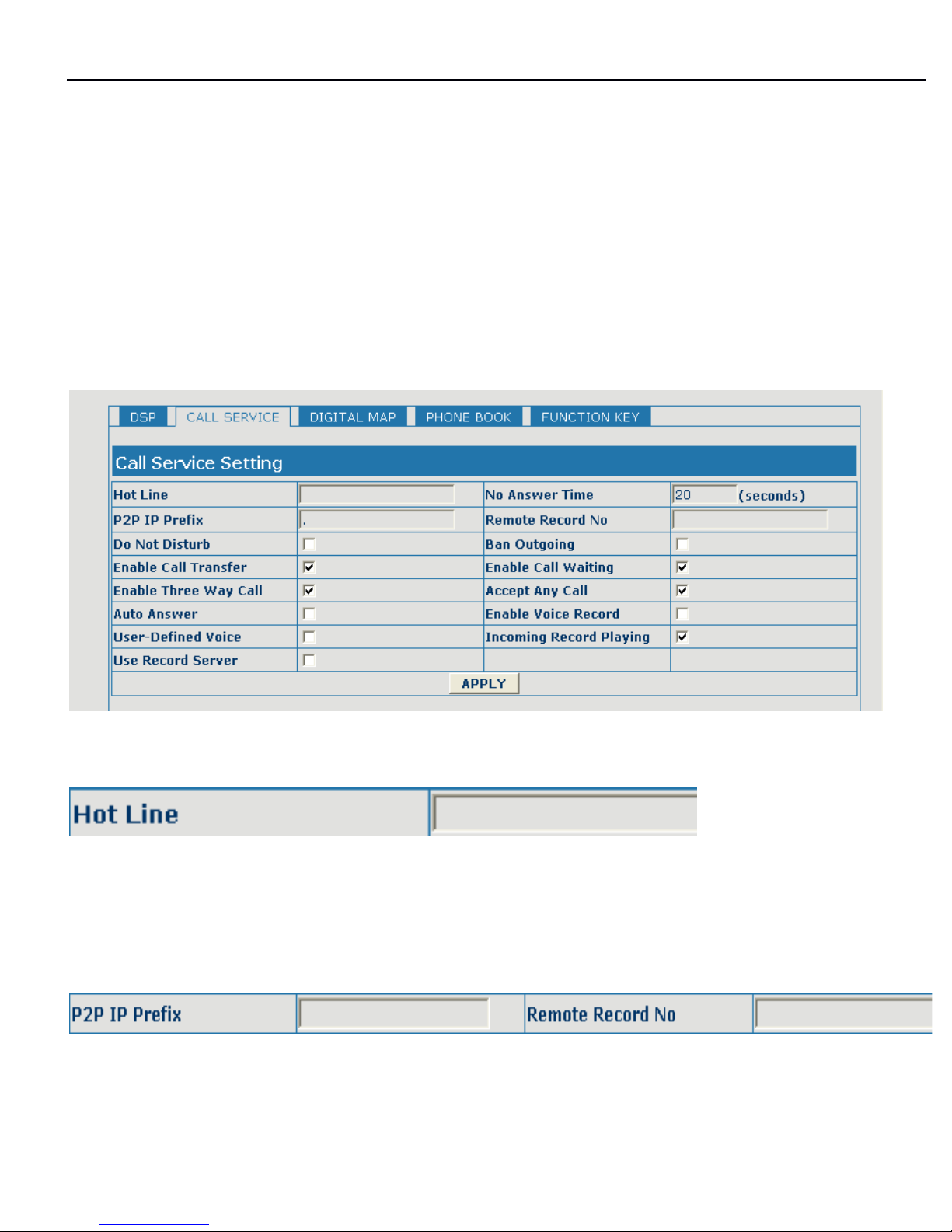
On this page, user can set value added services such as hot-line, call forwarding,
call transfer (CT), call-waiting service three way call, blacklist, out-limit list and so
on.
Configuration
Configuration
Configuration
Explanation:
Explanation:
Explanation:
Configure hot-line number of the port. With this number of the port, this hot-line
number will be dialed automatically as soon as off-hook and user can's dial any
other number;
number IP configuration of call transfer (CT);
Page 43
3130IF
3130IF
3130IF
---
VVV
oIP
oIP
oIP
User
User
User
Manual
Manual
Manual
V3.0
V3.0
V3.0
43
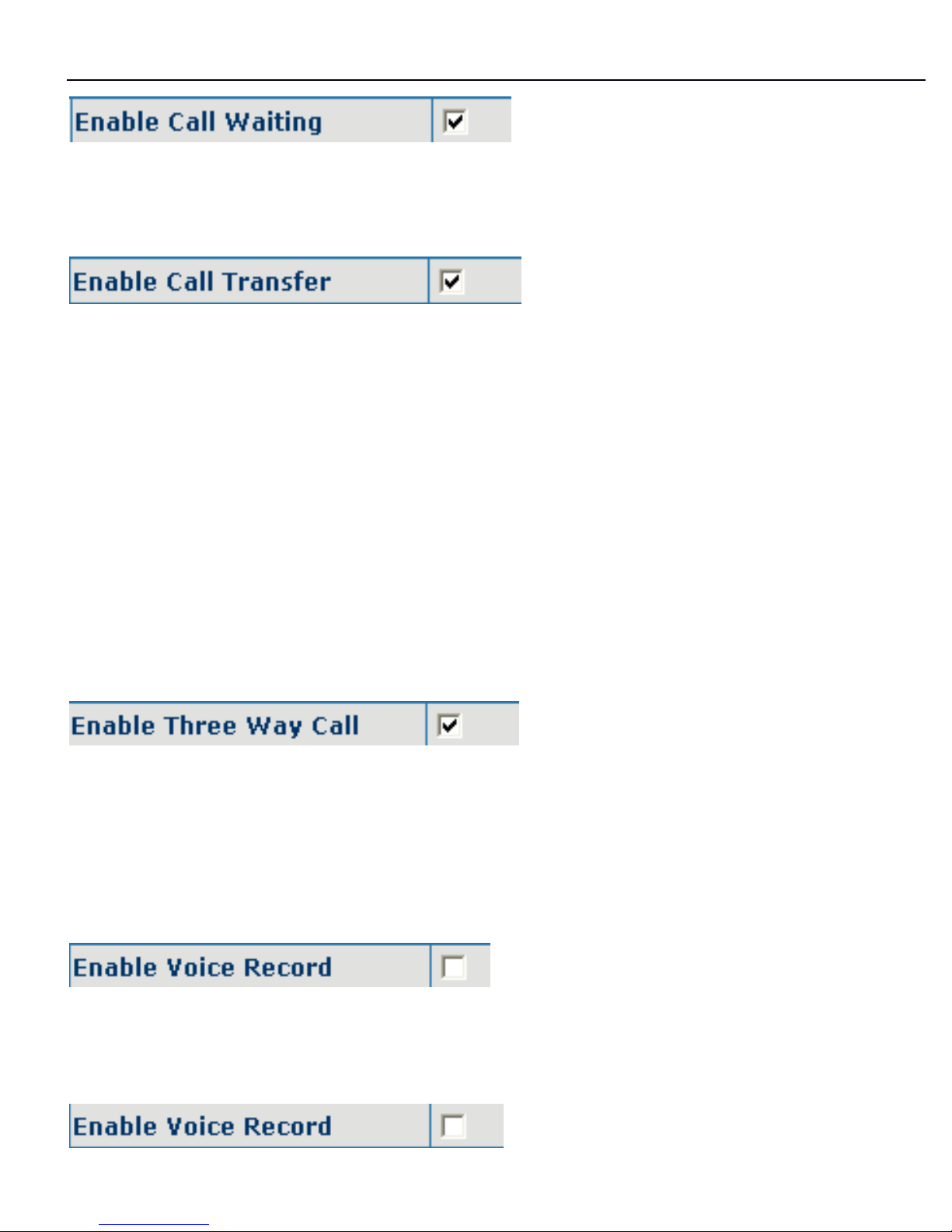
Configure enable/disable call waiting service; after it is enabled, user can hold
calls of the other party by hooking, with hooking again, the hold call can go on;
Configure enable/disable call transfer (CT); after it is enabled, there are two modes
call transfer as below:
UNATTENDED TRANSFER: During conversation, press 【 SPEED
SPEED
SPEED
DIAL
DIAL
DIAL
】 button
and input transferred number end with 【 ###
】 to transfer the phone to the third part
and hang up automatically
ATTENDED TRANSFER: During conversation, press 【 HOLD
HOLD
HOLD
】
button to hold thi
s
line, and input transferred number end with 【 # 】 to get through another line. After
conversation with third part, press 【 SPEED
SPEED
SPEED
DIAL
DIAL
DIAL
】
button to end conversation a nd
transfer the phone to the third part and hang up automatically.
Configure enable/disable three way call; user can call the other part as the call
origination, after talking, make hooking to hold this part and then press 【 *
】
key
t o
hear the dialing tone, after call completion to the third party, hooking again to
recover the talk with the second part, then the three way call concurrently;
Configure enable/disable Enable Rec/Finish Record, then no body answer the call,
the phone will into the answering function;
Page 44
3130IF
3130IF
3130IF
---
VVV
oIP
oIP
oIP
User
User
User
Manual
Manual
Manual
V3.0
V3.0
V3.0
44
Configure enable/disable User-Defined Rec/Finish, then enable Rec/Finish record,
the phone will auto request user leave message.
After the aforesaid configuration has been done, click apply to make them go into
effect.
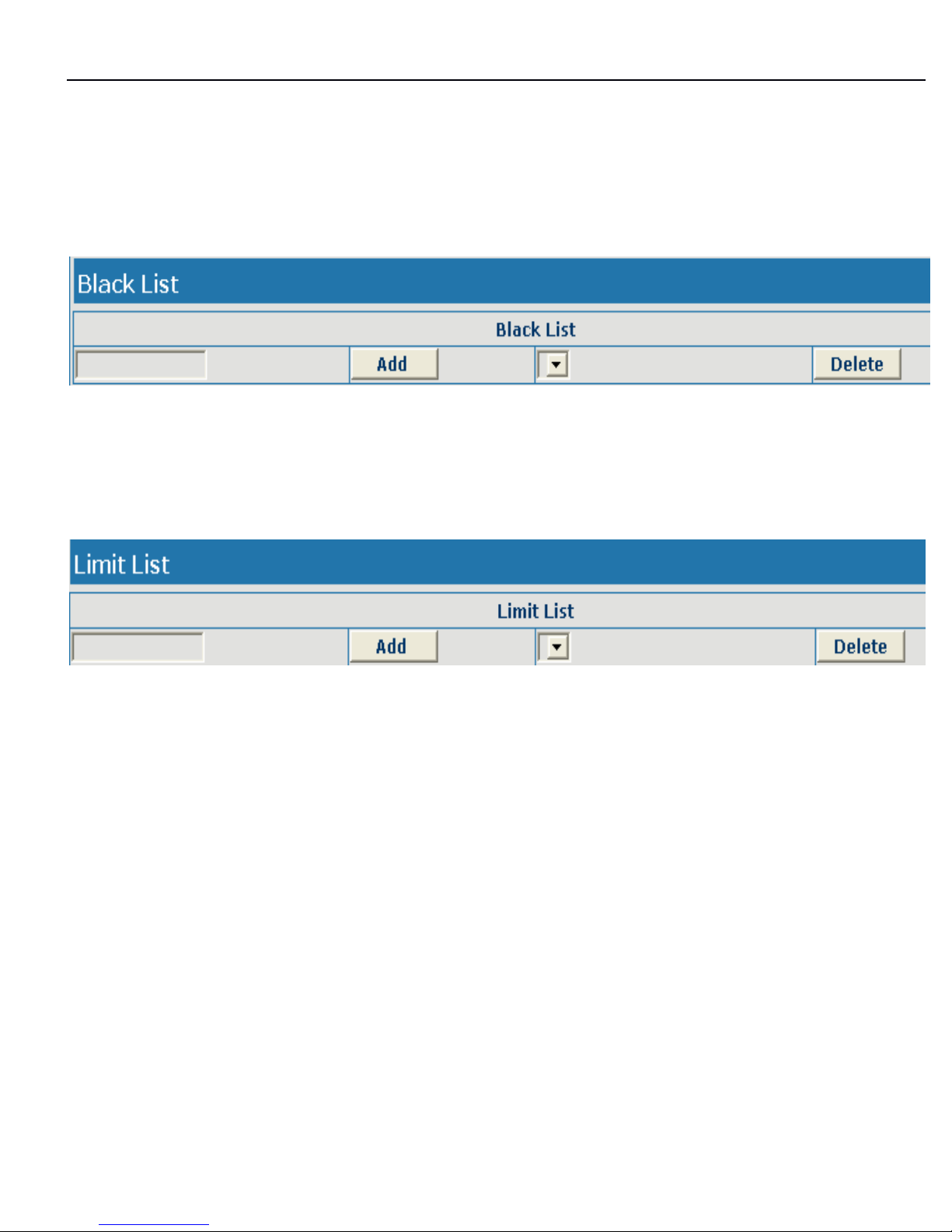
Configure add/delete blacklist. If user doesn't want to answer a certain number,
please add this number to the list, and then this number will be unable to get
through the phone.
Configure out-limit list; for example, if user don't want the phone to dial a certain
number, please add the number to this table, and the user will be unable to get
through this number.
8.5.3
8.5.3
8.5.3
Phone
Phone
Phone
book
book
book
configuration
configuration
configuration
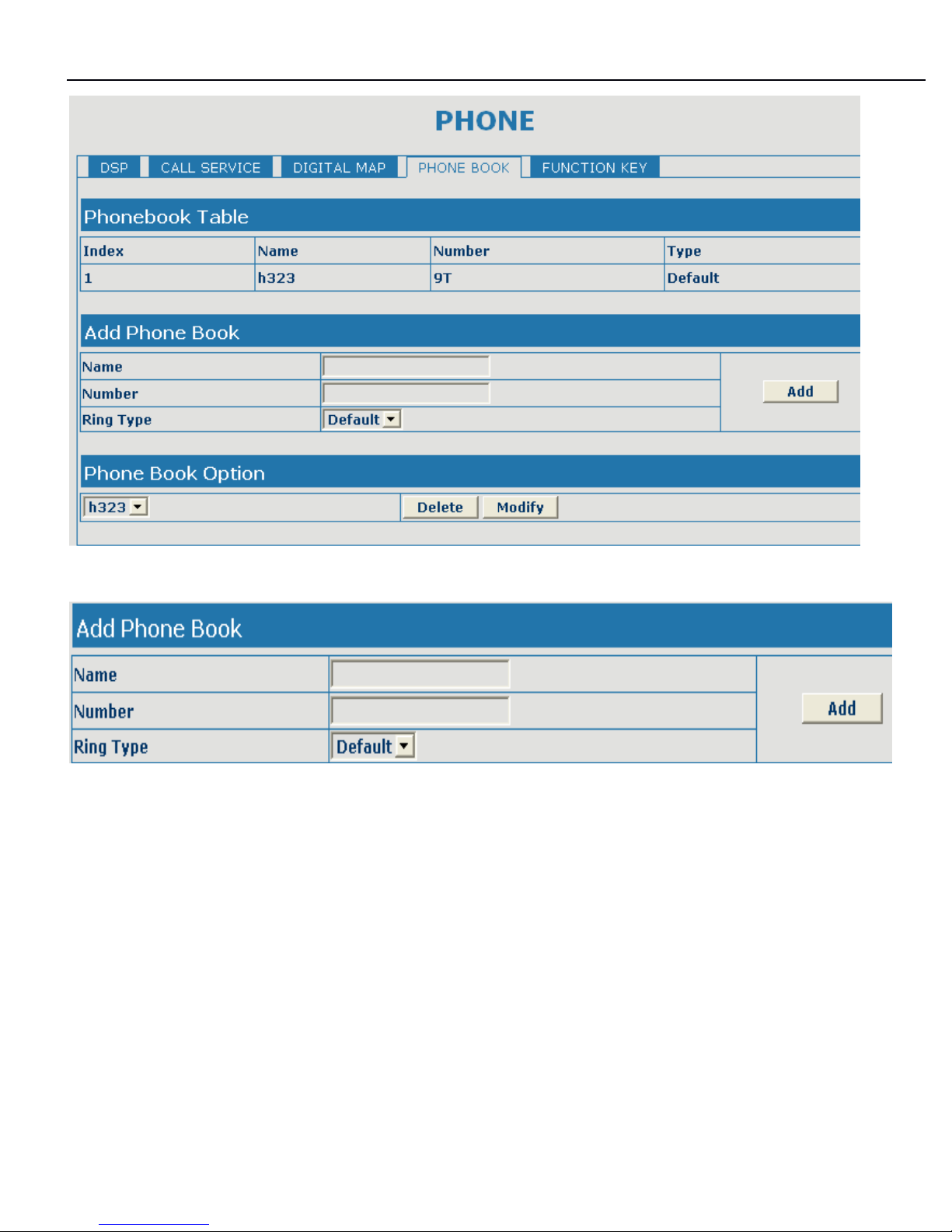
On this page, user can save and configure telephone book.
Page 45
3130IF
3130IF
3130IF
---
VVV
oIP
oIP
oIP
User
User
User
Manual
Manual
Manual
V3.0
V3.0
V3.0
45
Additional Phone book configure
Configure the Name
/
Number
/
Ring type of Phone Book.
Page 46
3130IF
3130IF
3130IF
---
VVV
oIP
oIP
oIP
User
User
User
Manual
Manual
Manual
V3.0
V3.0
V3.0
46
888
.6.6.6
MAINTENANCE
MAINTENANCE
MAINTENANCE
configuration
configuration
configuration
8.6.1
8.6.1
8.6.1
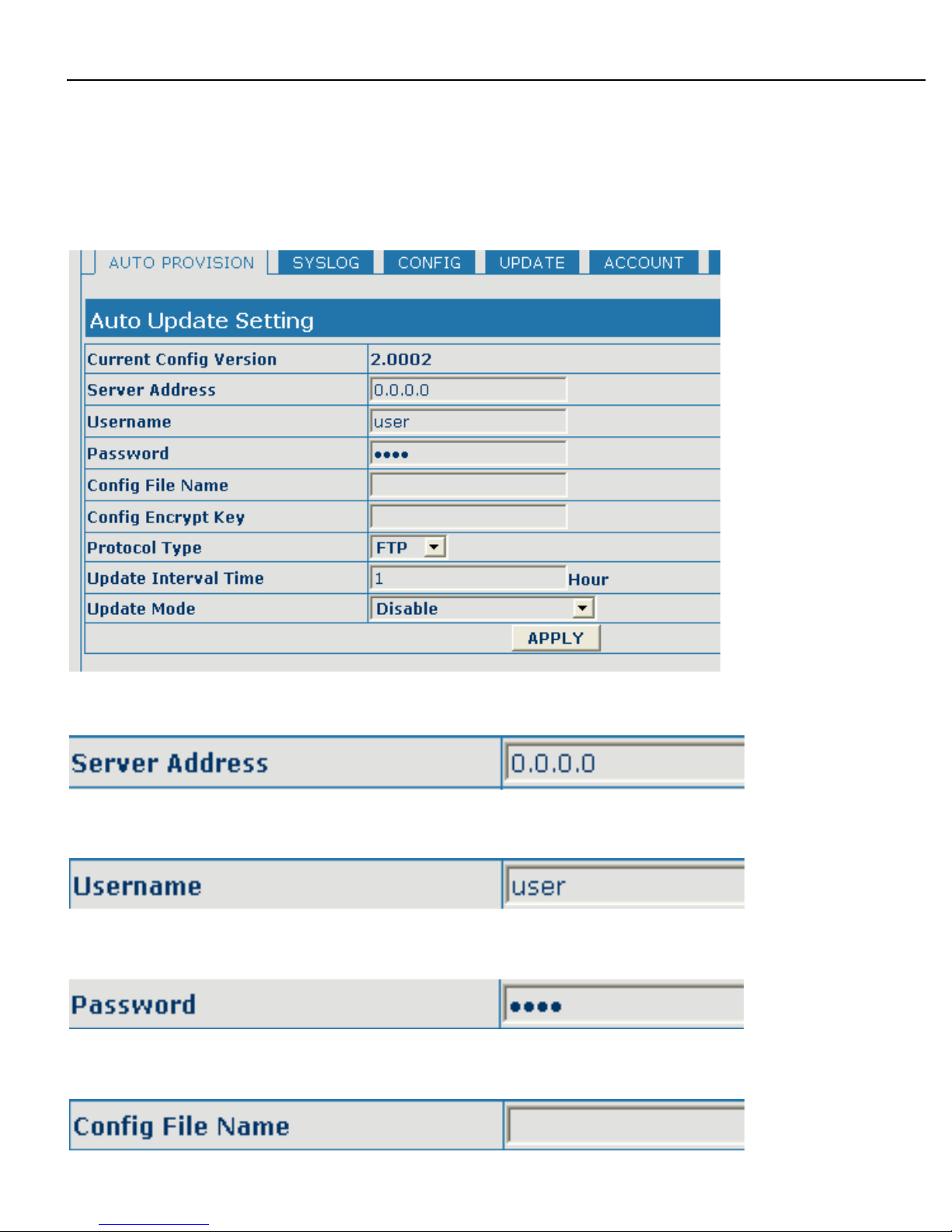
Auto
Auto
Auto
PROVISION
PROVISION
PROVISION
Unit can be set as automatically upgrade from desired FTP
or
TFTP server.
Configure unit as follow steps:
Input IP add. of desired FTP server.
Input user name of desired FTP server.
Input user password of desired FTP server.
Page 47
3130IF
3130IF
3130IF
---
VVV
oIP
oIP
oIP
User
User
User
Manual
Manual
Manual
V3.0
V3.0
V3.0
47
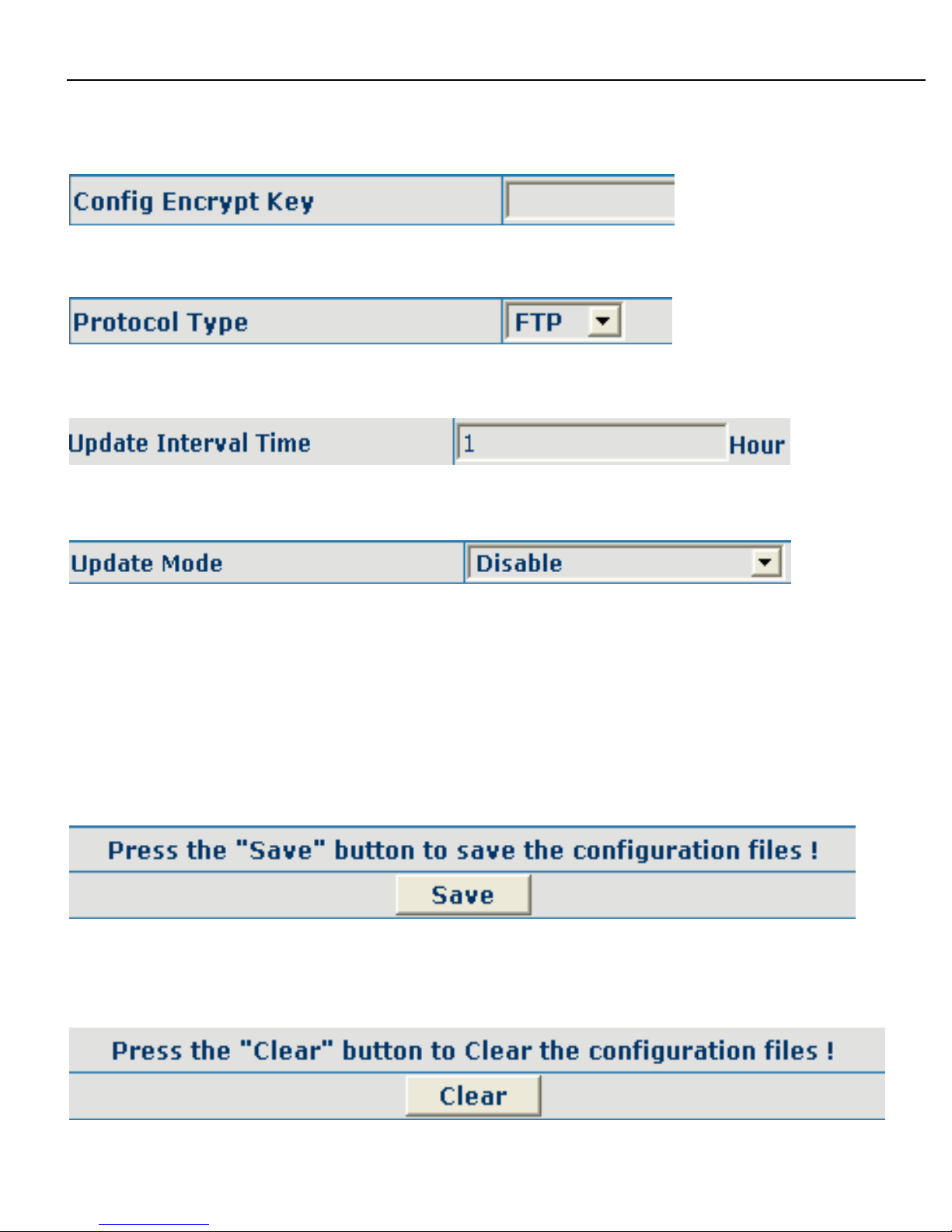
Input name configuration file. Software version must be different for each upgrade
file.
If configuration file is encrypted, password needed.
Chose server type as either FTP
or TFTP.
Set auto-upgrade interval duration.
Chose auto-upgrade type.
8.6.2
8.6.2
8.6.2
Save
Save
Save
and
and
and
Clear
Clear
Clear
configuration
configuration
configuration
User can save the current configuration on this page.
The system configuration can be set as factory default configuration on clear config
page and the phone will restart automatically.
Page 48
3130IF
3130IF
3130IF
---
VVV
oIP
oIP
oIP
User
User
User
Manual
Manual
Manual
V3.0
V3.0
V3.0
48
888
...
666
...
333
Upgrade
Upgrade
Upgrade
on-line
on-line
on-line
Upload
Upload
Upload
WEB
WEB
WEB
page
page
page
OnOnOn
this
this
this
page,
page,
page,
user
user
user
can
can
can
select
select
select
the
the
the
upgrade
upgrade
upgrade
document
document
document
(firmware
(firmware
(firmware
ororor
config
config
config
file)
file)
file)
ononon
hard
hard
hard
disk
disk
disk
ofofof
the
the
the
computer
computer
computer
directly
directly
directly
tototo
run
run
run
the
the
the
system
system
system
upgrade.
upgrade.
upgrade.
After
After
After
the
the
the
upgrade
upgrade
upgrade
has
has
has
been
been
been
completed,
completed,
completed,
restart
restart
restart
the
the
the
phone
phone
phone
and
and
and
ititit
will
will
will
bebebe
usable
usable
usable
atatat
once.
once.
once.
FTP
FTP
FTP
download
download
download
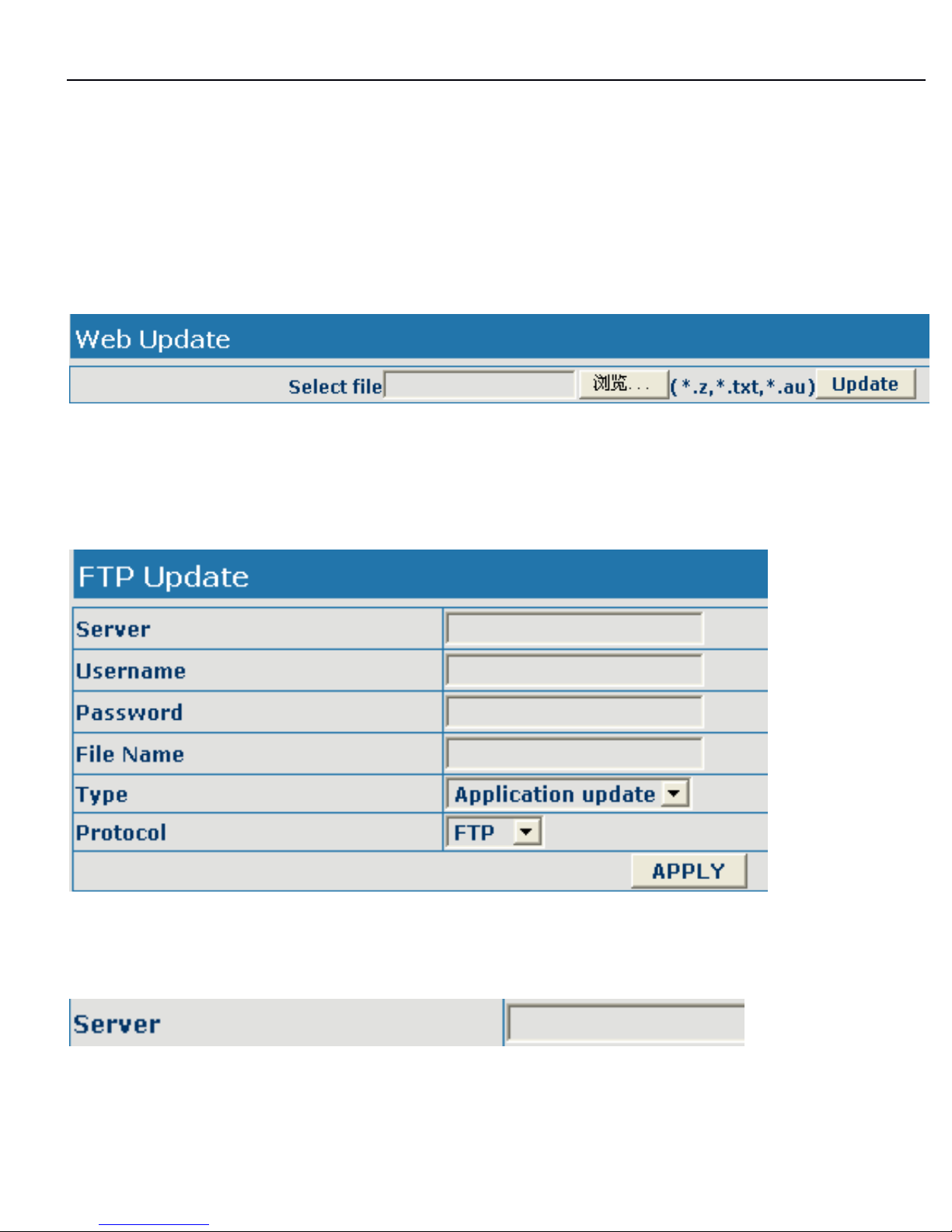
On this page, user can upgrade system and configure files by FTP
or
TFTP mode.
Configuration
Configuration
Configuration
Explanation:
Explanation:
Explanation:
Configure upload
or
download FTP/ TFTP server IP address;
Page 49
3130IF
3130IF
3130IF
---
VVV
oIP
oIP
oIP
User
User
User
Manual
Manual
Manual
V3.0
V3.0
V3.0
49
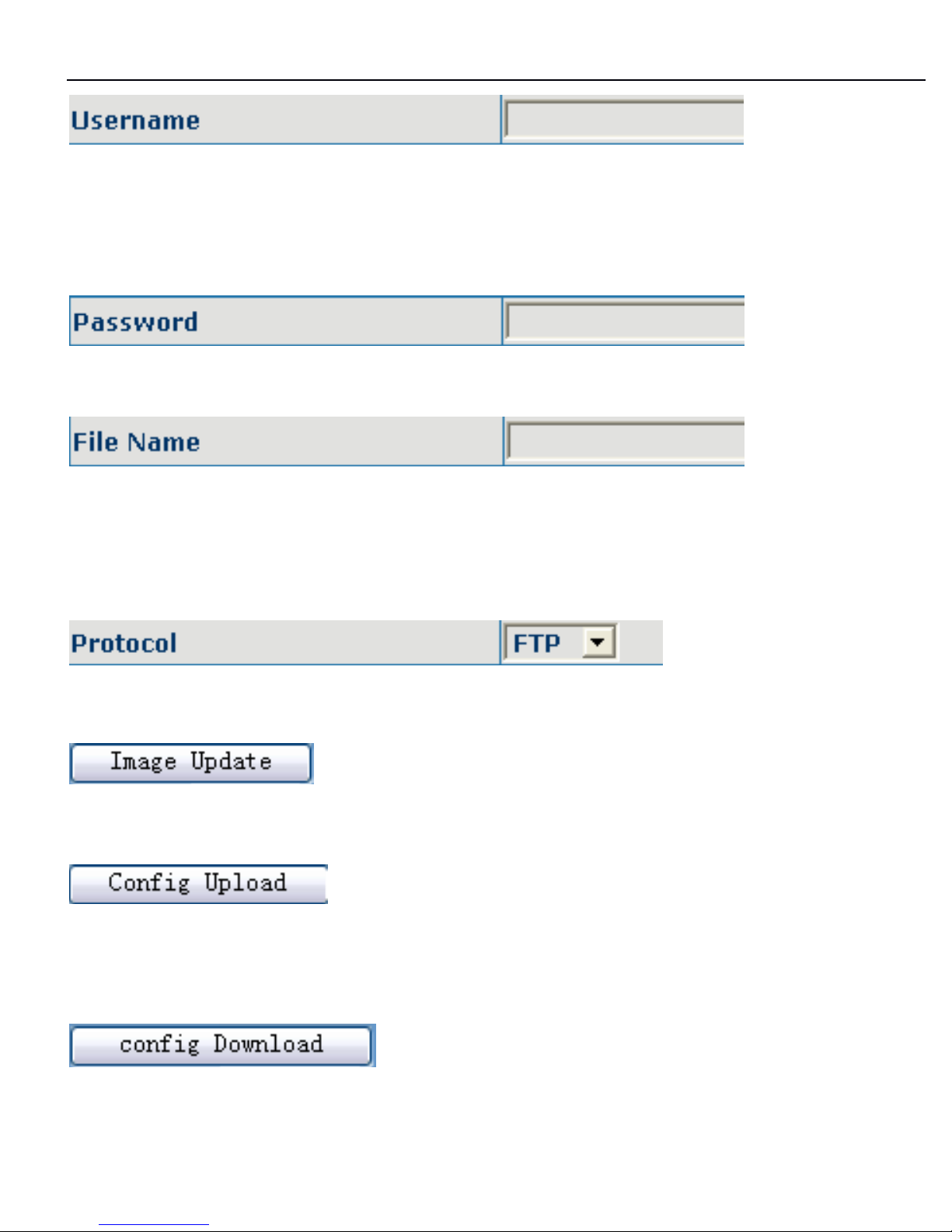
Configure username of the upload
or
download FTP server. If user select TFTP
mode, username and password are not required to be configured;
Configure upload
or
download of FTP server password;
Configure upload
or
download system upgrade document
or
system layout file
name. It should be noted that system file take .dlf as suffix, configuration files take
.cfg as suffix;
Select server type;
Click image update button, the phone will upgrade system file;
Click config upload button, the phone will upload its configuration files to FTP/TFTP
server and save with names of user-defined configuration files;
Click config
config
config
download
download
download
button, the phone will download configuration files of
Page 50

3130IF
3130IF
3130IF
---
VVV
oIP
oIP
oIP
User
User
User
Manual
Manual
Manual
V3.0
V3.0
V3.0
50
FTP/TFTP server to the phone and the configuration will go into effect after
restarting;
Output configure file can be edit, delete,
or
make comment starting by # on
each command. Unit support module upgrade, like if changes made to SIP
configure, others in configure file can be deleted and configuration in unit will not be
affected.
While upgrade unit with modified configure file, please make sure check each
parameter while finished upgrade. In case of anything wrong, please recover
configure under POST mode.
Configure
Configure
Configure
file
file
file
encryption
encryption
encryption
Configure file can be encryption with DOS command:
dsc.exe <key.txt> <e/d> <old configure> <new configure>.
Dsc.exe-encryption software tool
<key.txt>-user made encryption key file
<e/d> e ( encrypt )
, d
(decrypt)
< old configure >former configure file name and path,
< new configure >new configure file name, defined by user.
Configuration
Configuration
Configuration
files
files
files
WEB
WEB
WEB
download
download
download
On this page, user can directly select the configuration files on the hard disk of the
computer, and then make modification to the system configuration, after the
download, restart the phone and the configuration will go into effect.
8.6.4
8.6.4
8.6.4
Account
Account
Account
management
management
management
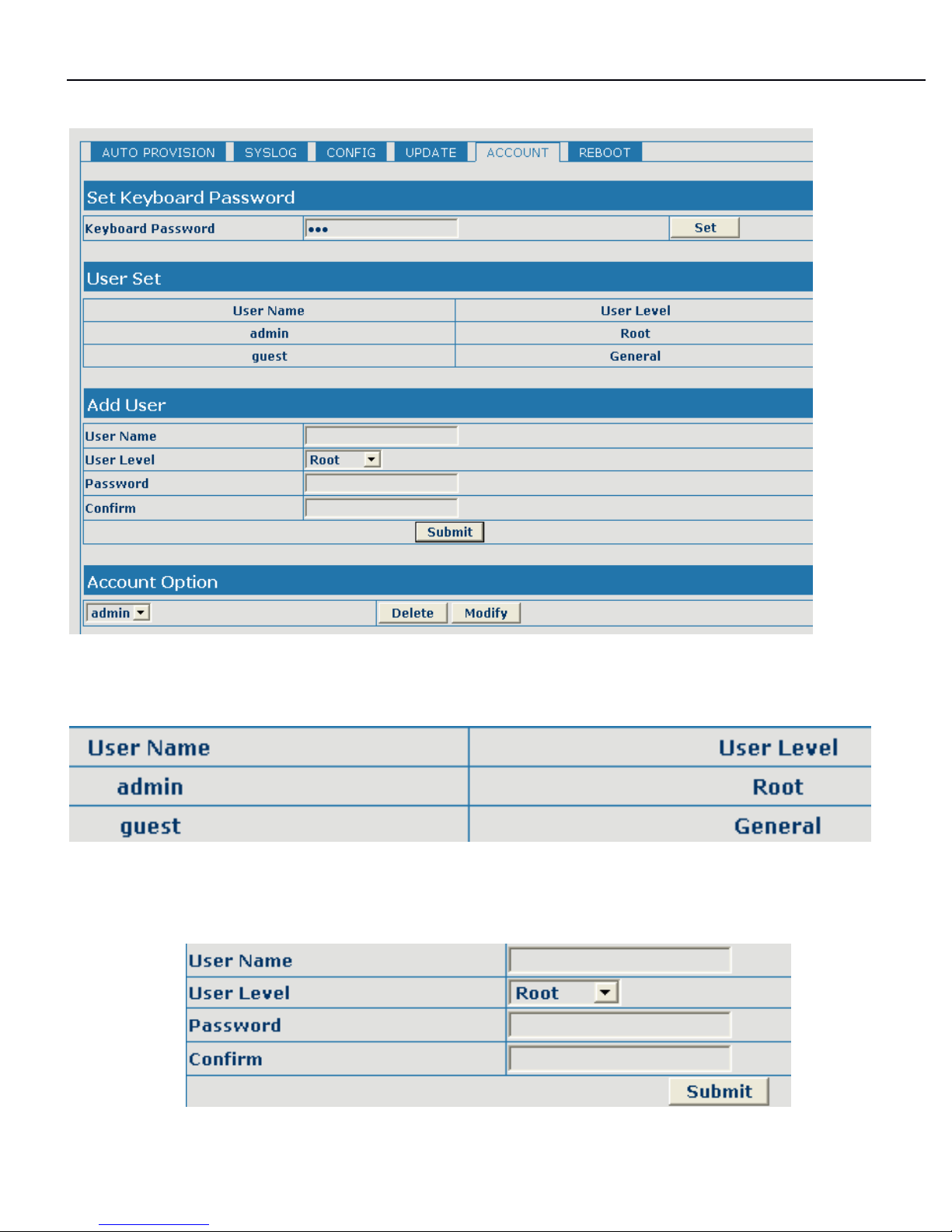
On this page, user can add and delete users according to own needs and can
Page 51
3130IF
3130IF
3130IF
---
VVV
oIP
oIP
oIP
User
User
User
Manual
Manual
Manual
V3.0
V3.0
V3.0
51
modify user's authorities there have been.
Configuration
Configuration
Configuration
Explanation:
Explanation:
Explanation:
display of phone user account list;
To
Add Phone Account:
Page 52
3130IF
3130IF
3130IF
---
VVV
oIP
oIP
oIP
User
User
User
Manual
Manual
Manual
V3.0
V3.0
V3.0
52
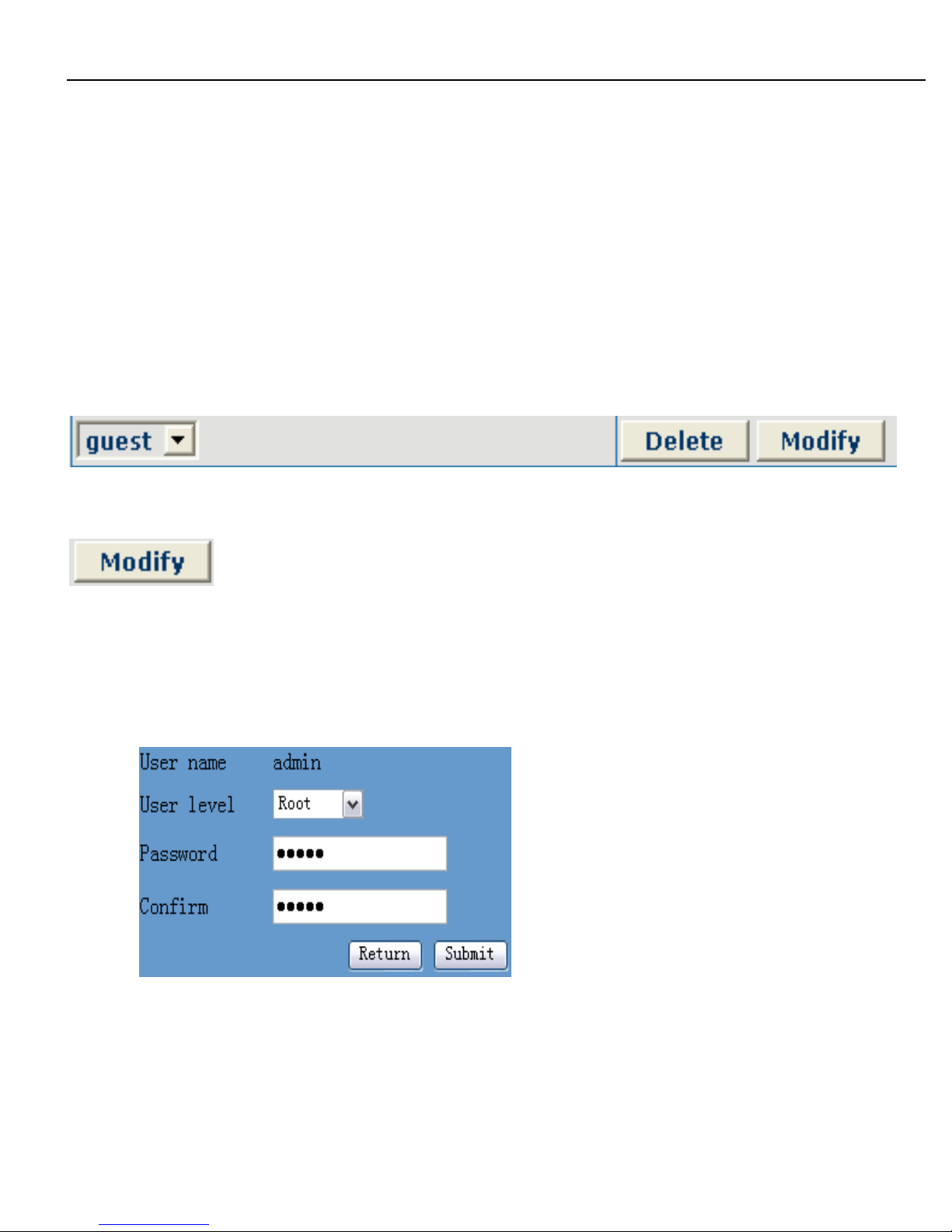
account level; root possesses
authorities to modify configuration,
general possesses read-only authority;
as corresponding password of the additive
account; As second confirmation of password, to ensure correct
setup of password;
Click submit to go into effect; click return to
cancel configuration and return.
Select users that you want to delete in the drop-down menu, click Delete.
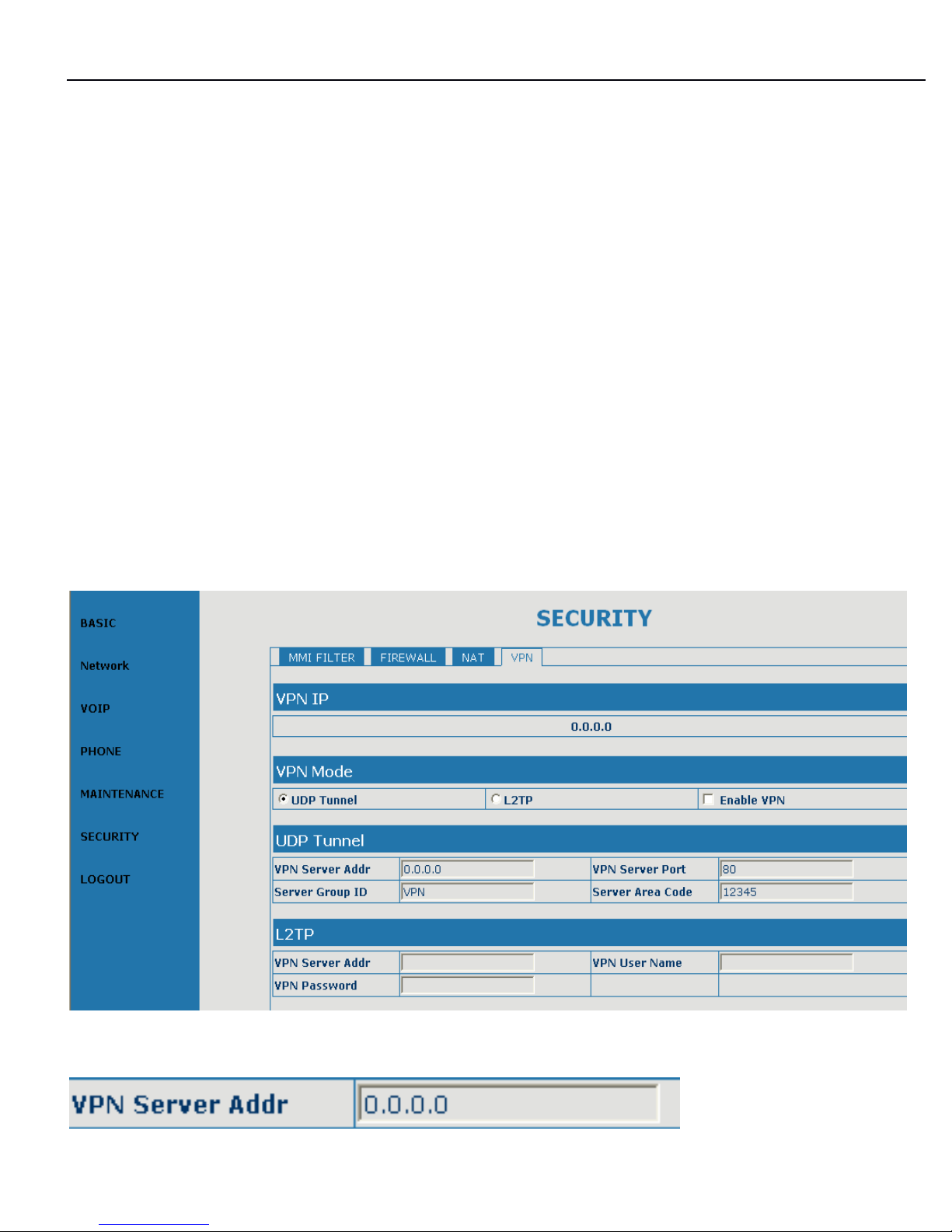
To
modify the chosen accounts, need to select account first, click load again and
then click modify, it will be shown at lower part of page as the following figure, of
which:
The modified username;
Modify user authorities;
Modify user password;
Make confirmation of the
modified user password;
Submit
or
cancel the modification;
Owing to the phone's default account: accounts of the administrator level-admin
and the ordinary level - guest are
all
weak account and weak password, the
Page 53
3130IF
3130IF
3130IF
---
VVV
oIP
oIP
oIP
User
User
User
Manual
Manual
Manual
V3.0
V3.0
V3.0
53
username and password will be easily to be guessed on public network, so the user
had better modify the administrator and ordinary user.
Enter with manager level when making modification, create a administrator account
and a browse account (you'd better not set the name as admin, administrator, guest ,
etc.),set password and then save configuration, entering with new manager
account, delete default manager and browse account and save configuration,
security will be enhanced!
888
...
777
System
System
System
management
management
management
VPN
VPN
VPN
configuration
configuration
configuration
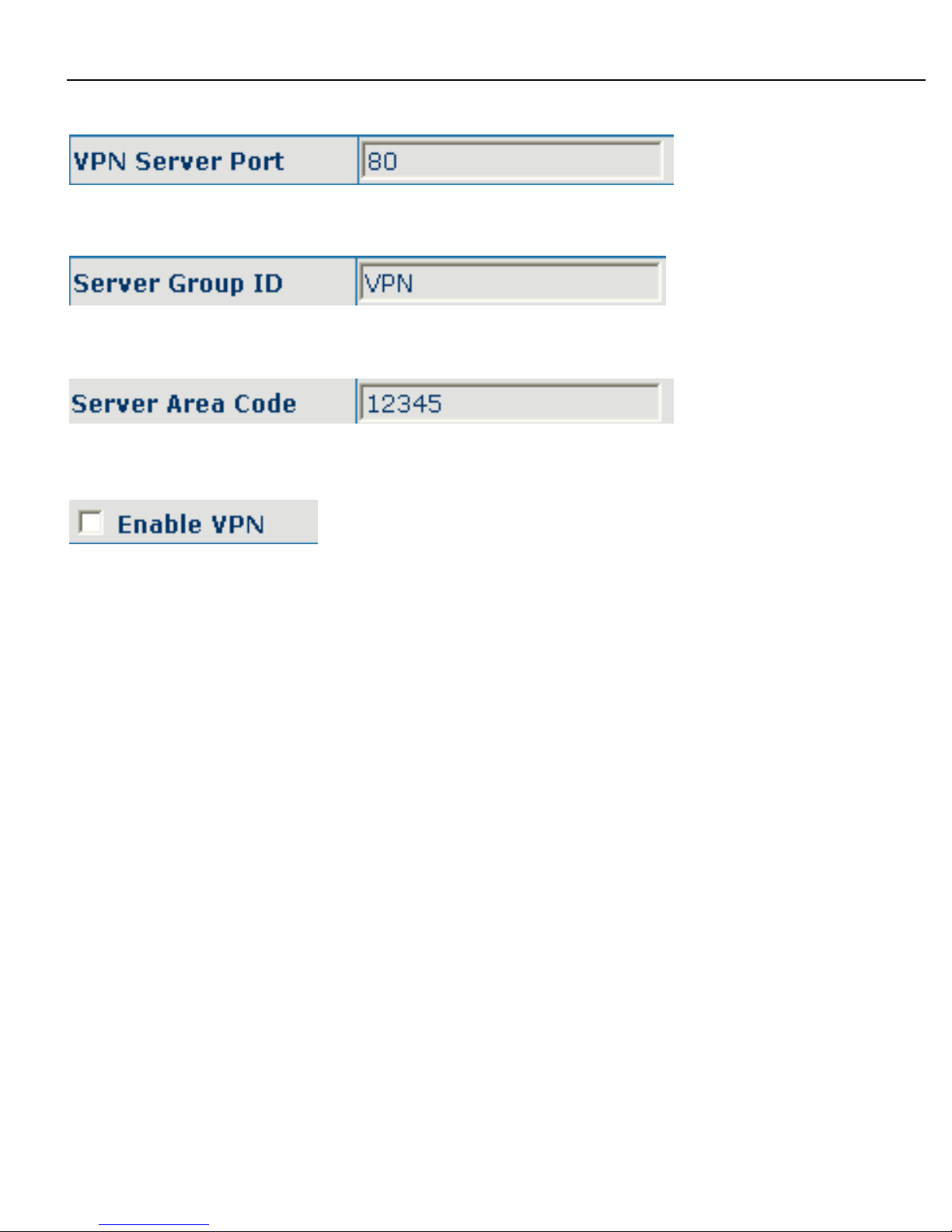
On this page, user can save and configure VPN setting.
Page 54
3130IF
3130IF
3130IF
---
VVV
oIP
oIP
oIP
User
User
User
Manual
Manual
Manual
V3.0
V3.0
V3.0
54
Configure VPN server address;
Configure VPN server port;
Configure VPN server group ID;
Configure VPN server area code;
Configure enable/disable VPN tunnel;
Page 55
3130IF
3130IF
3130IF
---
VVV
oIP
oIP
oIP
User
User
User
Manual
Manual
Manual
V3.0
V3.0
V3.0
55
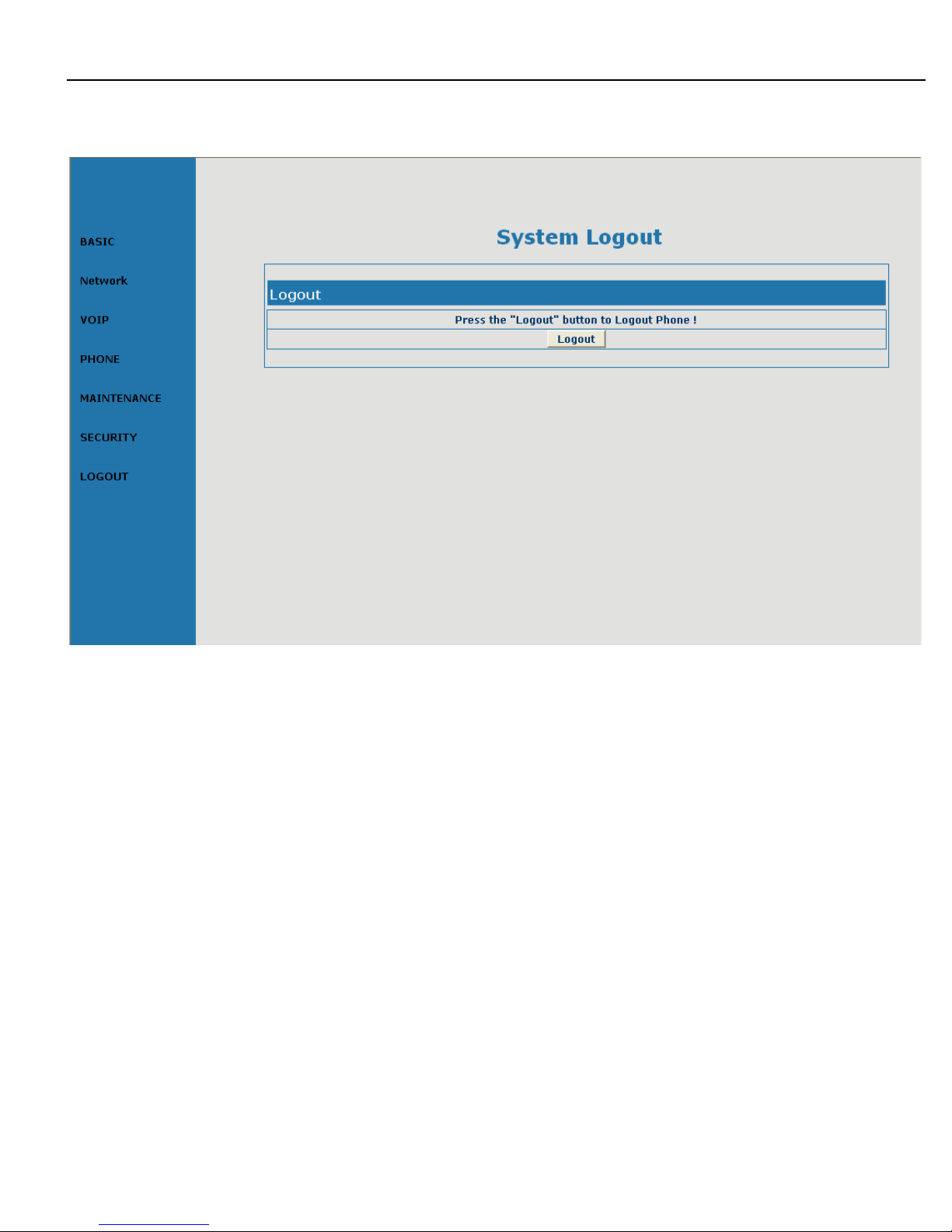
8.8
8.8
8.8
Logout
Logout
Logout
configuration
configuration
configuration
 Loading...