

Page 1
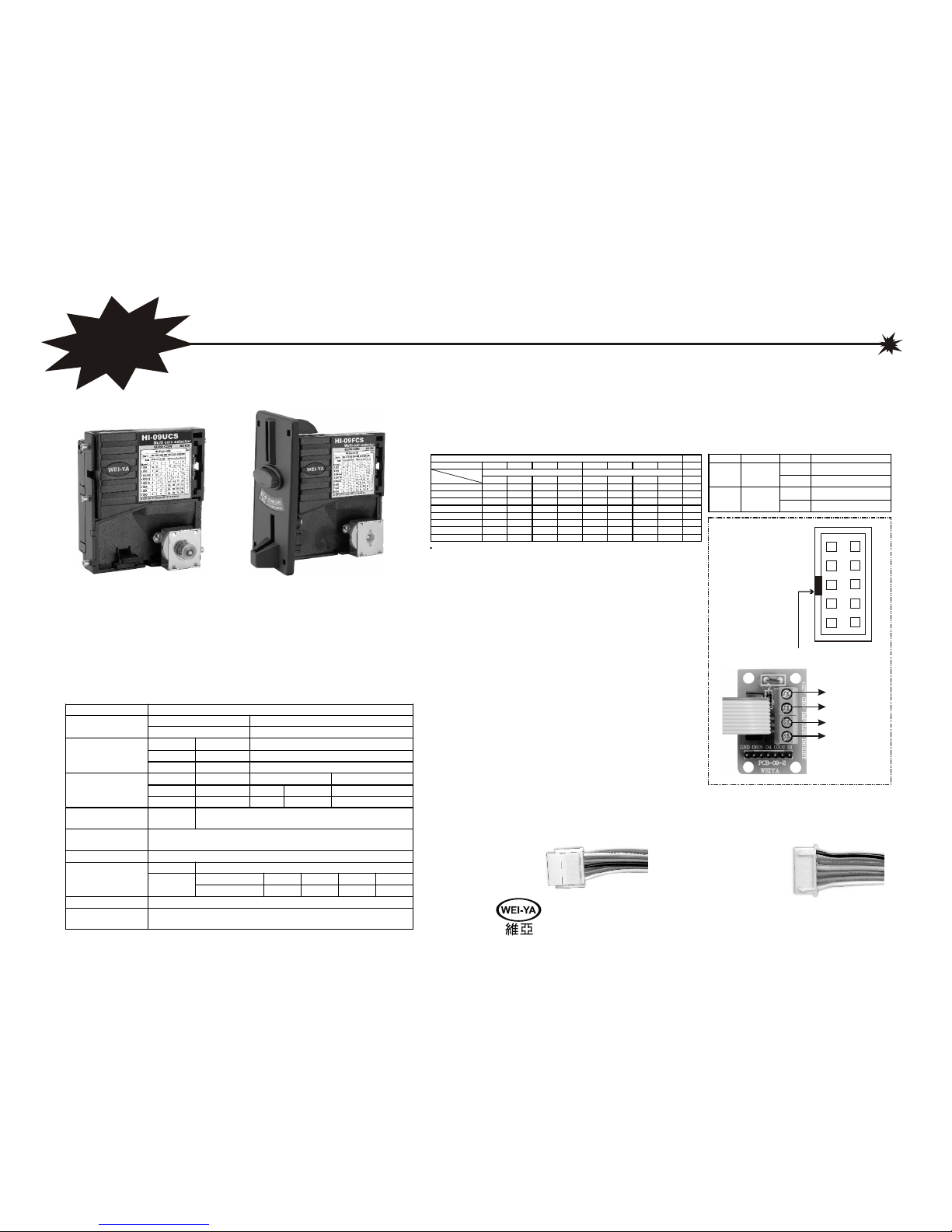
Parameter Specifications
Input DC 10~15V, 300mA max standby 50mA.Power
Consumption 5.0 Watts max standby 0.6 watts.
Impulse Output Multi pulse (normal “High” level)
Inhibit Input High enable( +3v~+15v)
Signals
Out1~6 Output 1 pulse/coin
Con2 Input/output 4 pin male Extend connect port
Con3 Input/output 09FCS 5 pin male General I/O port
Connector
Con5 Input/output 09UCS 6 pin male General I/O port
User controls 5-ch
dip-switch
Sw1, sw2, sw3 for channel or impulse ratio select.
Sw4, sw5 for mode and other function select.
Overall Dimension
(HXWXD)
HI-09UCS: 102x99x55 mm
HI-09FCS: 124.5x120.5x64.5 mm
Speed of acceptable Max. 3 coins/second.
Diameter 18mm~30mm
Position 1.8 2.2 2.6 3
Coin size
(mm)
Thickness
Adjust
Thickness Range 1.2~2.0 1.2~2.4 1.2~2.8 1.2~3.0
Working temperature 5° ~50°
Weight HI-09UCS: 240g
HI-09FCS: 300g
HI-09UCS / HI-09FCS
NE
W
(Drop inserting type)
(Front inserting type)
Feature
*Support 8 channels (coins) self-programming without PC.
*With an inhibit wire for game board.
*With 6 ch. Parallel output for each channel (coin) control.
*Support one coin then multi pulse output (impulse out ratio).
*With narrow or wide impulse width select (100ms and 50ms).
*Adjustable 4 kinds of coin thickness.
Specifications:
Operation mode: Before switching on the dc power,
Set DIP 4,DIP 5 to the "OFF" position.
Impulse and channel ratio table (500)
Record mode: Before switching on the dc
power, set DIP 4, DIP 5 to the "ON"
position.
HUAI I ELECTRONICS CO.,LTD
1
3
5
7
9
2
4
6
8
10
1. GND
2. +12V
3. Output ch5
4. Output ch6
5. Impulse output
6. Inhibit control
7. Output ch1
8. Output ch2
9. Output ch3
10. Output ch4
Accessory
HI-09UCS or HI-09FCS X1
Control board (pcb-09-2) X1
10p Signal cable X1
User manual X1
Screw bag (HI-09FCS only) X1
5P (09F) or 6P (09U) Signal wire X 1
Installation
Case 1:
Using 10p signal cable connect HI-09UCS/HI-09FCS
to control board (pcb-09-2). And need 4 wires connect
control board (pcb-09-2) to game board.
The 4 wires define as below:
1. +12V: for dc power (12 volt).
2. GND: for dc power (ground).
3. IMPULSE: for credit signal (output signal).
4. INHIBIT: control by game board for enable
or disable coin selector (input).
Case 2:
Using 5P or 6P signal wire connect to HI-09UCS/HI-09FCS
another end connect to game board and meter.
+12V
GND
Impulse
Inhibit
DIP SW "X" means off , "O" means on
Please make sure direction
The 5P wire define as below (HI-09FCS only)
1. +12V
2. Counter (Meter)
3. GND
4. Impulse (Credit)
5. Inhibit
The 6P wire define as below (HI-09UCS only)
1. GND
2. +12V
3. +12V
4. Counter (Meter)
5. Impulse (Credit)
6. Inhibit
1
2
3
4
5
6
1
2
3
4
5
Multi coin mode Out
DIP3, DIP2, DIP1 XXX XXO XOX XOO OXX OXO OOX OOO
Impulse out Ratio Impulse out Ratio (bonus) Ratio
Channel
1 2 3 4 5 6 7 8
1 XXX 1/2 1/4 1 1 1/2 1/2 1/2 1/4 1
2 XXO 1 1/2 1 1 1 1 1 1/2 2
3 XOX 50C 1 1/2 2 2 1 3 2 1+1/2 3
4 XOO 1$ 2 1 4 2 2 5+1 4+1 2+1 4
5 OXX 2$ 4 2 8 4 4+1 10+2 5+1 4+2 5
6 OXO 5 2 8 4 NA NA 8+2 5+2 6
7 OOX 8 4 10 10 NA NA 10+2 NA 6
8 OOO 10 5 10 10 NA NA NA NA 6
(Coin)
DIP SW Function Select Action
X Record 50ms impulse
DIP Sw4
Coin signal
width
(impulse)
O Record 100ms impulse
O Normal
DIP Sw5 Blank
O->X->O Makes channel data Blank
V2.9 (500)
MULTI-COIN SELECTOR
FOR EURO COIN
Page 2
HI-09UCS / HI-09FCS TECHNICAL BOOKLET
2.6
2.23
1.8
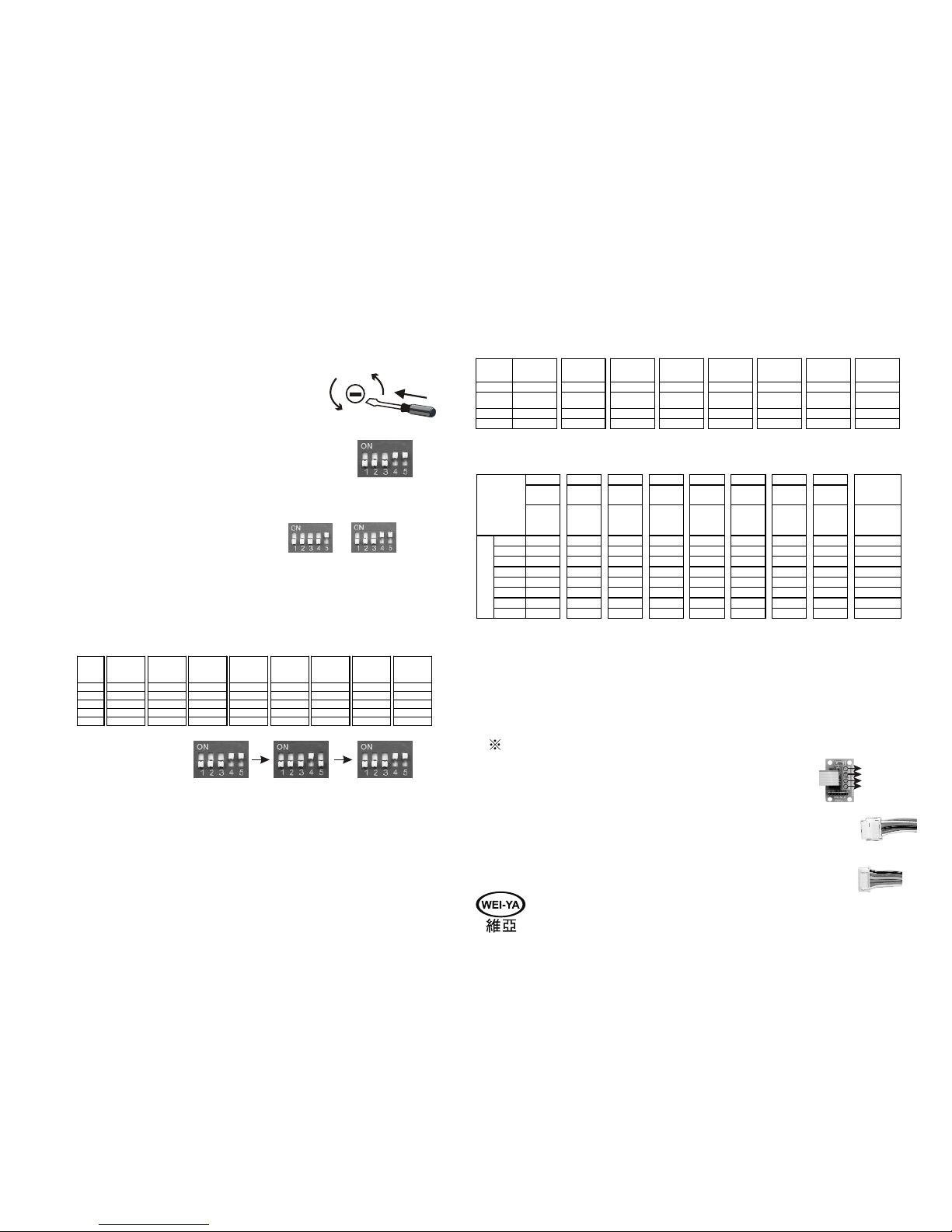
THICKNESS ADJUSTMENT
If you need to adjust the thickness of coins to be accepted,
just use a small slotted screwdriver, plug into the slot and
rotate to fit the thickness you want.
RECORD MODE
If you want to enter the record mode, set DIP4, DIP5 of the DIP
SWITCH to "ON" positions. Then turn on the power.
SELECT OUTPUT PULSE WIDTH
If you want to appoint the pulse width (50ms or 100ms, default setting is 100ms),
you must enter the "RECORD MODE" first. Then set DIP4 to the following position.
1.50ms: DIP4 to "OFF"
2.100ms DIP4 to "ON"
After appointing the pulse width. Enter the "MEMORIZE COINS" item to begin
memorizing the coins.
CLEAR RECORD FOR SINGLE CHANNEL
The multi coin selector has 8 channels to record. Its 8 channels represent it can
record 8 kinds of coins separately. If you want to clear a channel, please proceed
as follows:
Turn off the power for the next operation as soon as steps A,B,C,D is complete.
3.Insert one coin of the first kind, the value "1/2" will be memorized in the set. Then insert one
coin of the first kind again, the new value "1/2" will be added to the previous "1/2", hence the
set outputs "1" pulse. To this analogizes. Insert one coin of the 8th kind, the set outputs "10" pulses.
4.The pulses generated above-mentioned output via "IMPULSE" from the control board(pcb-09-2).
Besides, one coin being inserted will outputs "one" pulse via "output ch" corresponded
to its coin channel(see Impulse and channel ratio table). For example: Under "channel 5" with
"ratio list 3". Insert one coin will result in outputting 8 pulses via "IMPULSE" from the control
board, and outputting 1 pulse via "output ch5" simultaneously.
If the ratio table can't meet customer requirements, please contact the original factory.
MEMORIZE COINS
1.You must enter the "RECORD MODE" first. Then make sure which channel you
want to save by setting DIP1, DIP2, DIP3 to the appropriate positions. Then insert
10 coins of the same currency and makings. The coin selector magnet will operate
three times to indicate a correct operation. Then be sure to turn the power off for
the next operation.
2.If another different coins is necessary to memorize, please repeat the operation
above- mentioned again.
3.If some channels of the set were memorized some time ago, please clear the records
for all channels first.
HUAI I ELECTRONICS CO.,LTD
RATIO LIST CHOICES
1.Under "OPERATION MODE", the switch DIP3, DIP2, DIP1 positions are assigned to 8 ratio lists.
2.Under "RECORD MODE", the switch DIP3, DIP2, DIP1 positions are assigned to 8 coin channels.
OPERATION MODE
1.Set DIP4, DIP5 to the "OFF" position when the power is off.
2.Turn on the power, and set the DIP3, DIP2, DIP1 positions to
correspond the ratio list you need.
3.Now you can start using the multi coin selector.
THREE OUTPUT INTERFACE
(1) 10p signal cable + control board for HI-09FCS/HI-09UCS
(2) 5p signal wire use for HI-09FCS connecting to game board and meter.
(3) 6p signal wire use for HI-09UCS connecting to game board and meter.
Steps
Channel 1
(Coin 1)
Channel 2
(Coin 2)
Channel 3
(Coin 3)
Channel 4
(Coin 4)
Channel 5
(Coin 5)
Channel 6
(Coin 6)
Channel 7
(Coin 7)
Channel 8
(Coin 8)
A 00011 10011 01011 11011 00111 10111 01111 11111
B Switch on Switch on Switch on Switch on Switch on Switch on Switch on Switch on
C 00010 10010 01010 11010 00110 10110 01110 11110
D 00011 10011 01011 11011 00111 10111 01111 11111
OK OK OK OK OK OK OK OK
List 1 List 2 List 3 List 4 List 5 List 6 List 7 List 8
00000 10000 01000 11000 00100 10100 01100 11100
Other
Output
Terminal Operation
Mode
Pulse
Output
Count
Pulse
Output
Count
Pulse
Output
Count
Pulse
Output
Count
Pulse
Output
Count
Pulse
Output
Count
Pulse
Output
Count
Pulse
Output
Count
1 Pulse
Output
Coin 1 1/2 1/4 1 1 1/2 1/2 1/2 1/4 Output ch1
Coin 2 1 1/2 1 1 1 1 1 1/2 Output ch2
Coin 3 1 1/2 2 2 1 3 2 2/3 Output ch3
Coin 4 2 1 4 2 2 6 5 3 Output ch4
Coin 5 4 2 8 4 5 12 6 6 Output ch5
Coin 6 5 2 8 4 NA NA 10 7 Output ch6
Coin 7 8 4 10 10 NA NA 12 NA Output ch6
8ki nd s ofcoins
simultaneously
Coin 8 10 5 10 10 NA NA NA NA Output ch6
Steps
Channel 1 Channel 2 Channel 3 Channel 4 Channel 5 Channel 6 Channel 7 Channel 8
A 00011 10011 01011 11011 00111 10111 01111 11111
B
Coin 1
Insert 10 coins
Coin 2
Insert 10 coins
Coin 3
Insert 10 coins
Coin 4
Insert 10 coins
Coin 5
Insert 10 coins
Coin 6
Insert 10 coins
Coin 7
Insert 10 coins
Coin 8
Insert 10 coins
C 3 clicks 3 clicks 3 clicks 3 clicks 3 clicks 3 clicks 3 clicks 3 clicks
D Switch off Switch off Switch off Switch off Switch off Switch off Switch off Switch off
(ON) 1
(OFF) 0
1. +12V
2. Counter (Meter)
3. GND
4. Impulse (Credit)
5. Inhibit (Enable)
1
2
3
4
5
1. GND
2. +12V
3. +12V
4. Counter (Meter)
5. Impulse (Credit)
6. Inhibit (Enable)
1
2
3
4
5
6
(1)
(2)
(3)
+12V
GND
Impulse
Inhibit
 Loading...