

Page 1

Programming and Troubleshooting Guide
1
Mastercode 2
2
Troubleshooting: Locked Turnbutton 6
3
Troubleshooting: Keypad 7
4
Troubleshooting: Battery 8
62816 / 01
5
Battery FAQ 9
USA: 1-800-677-5625
Canada: 1- 800- 501-9471
www.weiserlock.com
1 / 9
©2015 Spectrum Brands, Inc.
Page 2
62816 / 01
1
A
B
Mastercode
About the Mastercode
Using a Mastercode is an optional, added-security measure. It is not enabled by default. A Mastercode is
used to add and delete user codes, but it cannot unlock the door (unless the same code is programmed
as a user code, though this is not recommended). The Mastercode must be 4-8 digits.
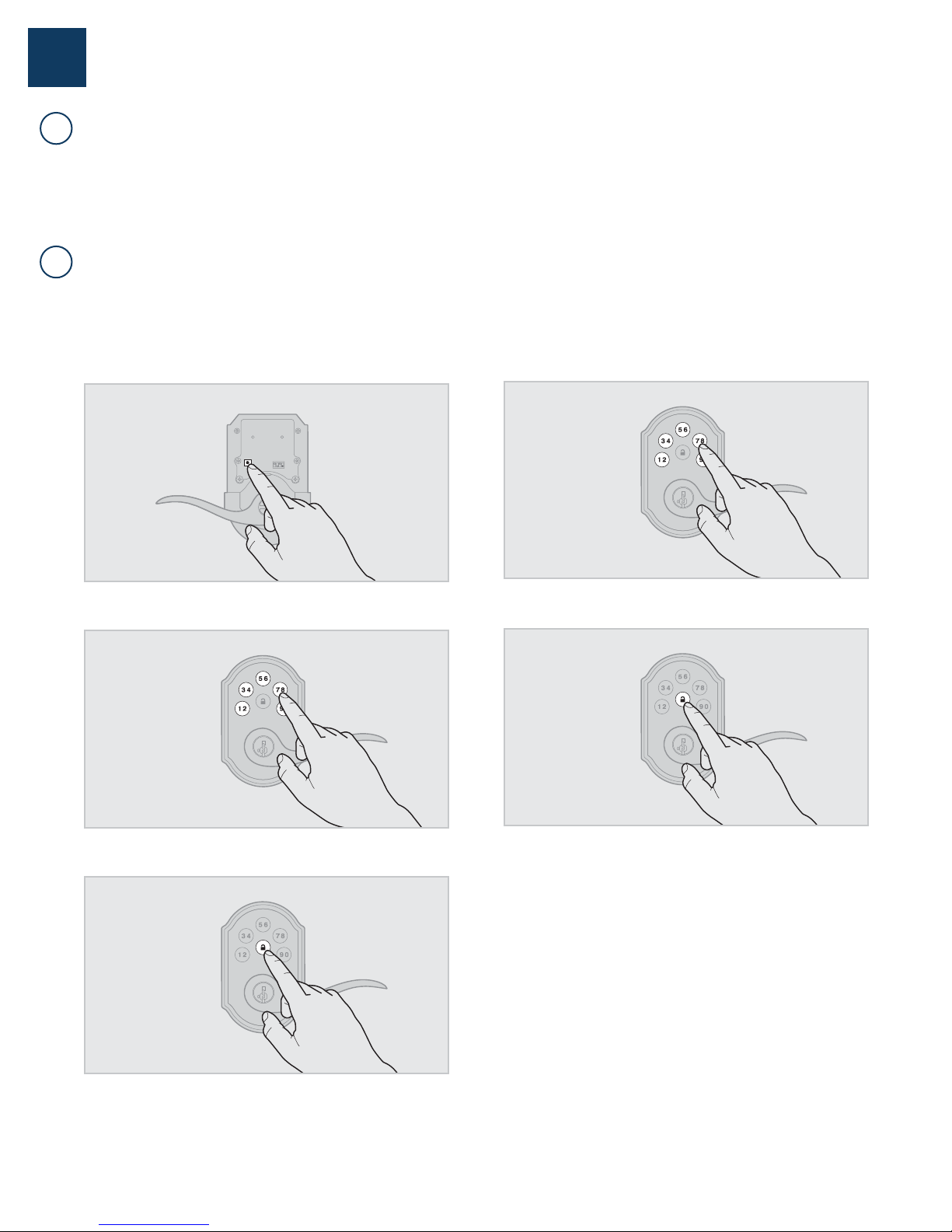
Enabling and Setting the Mastercode
Programming timeout: If no button is pressed for ve seconds, the system will time out
and you will need to restart the procedure.
1. Keep door open. Press and HOLD the Program button until the keypad
ashes green (about 5 seconds).
4. Re-enter Mastercode.
2. Enter new Mastercode.
3. Press Lock button once.
5. Press Lock button once.
If programming is successful, the keypad will flash green once with
one beep.
If programming is unsuccessful, the keypad will ash red three times
with three beeps. Make sure the Mastercode has not already been
programmed. Attempt the procedure again, making sure to enter the
same new Mastercode in step 2 and 4.
6. Make sure switch #3 is on, and press the Program button once. If
you hear three beeps and see the keypad ash green three times, the
Mastercode is enabled.
USA: 1-800-677-5625
Canada: 1- 800- 501-9471
www.weiserlock.com
Note: The lock will time out after ve seconds.
2 / 9
©2015 Spectrum Brands, Inc.
Page 3
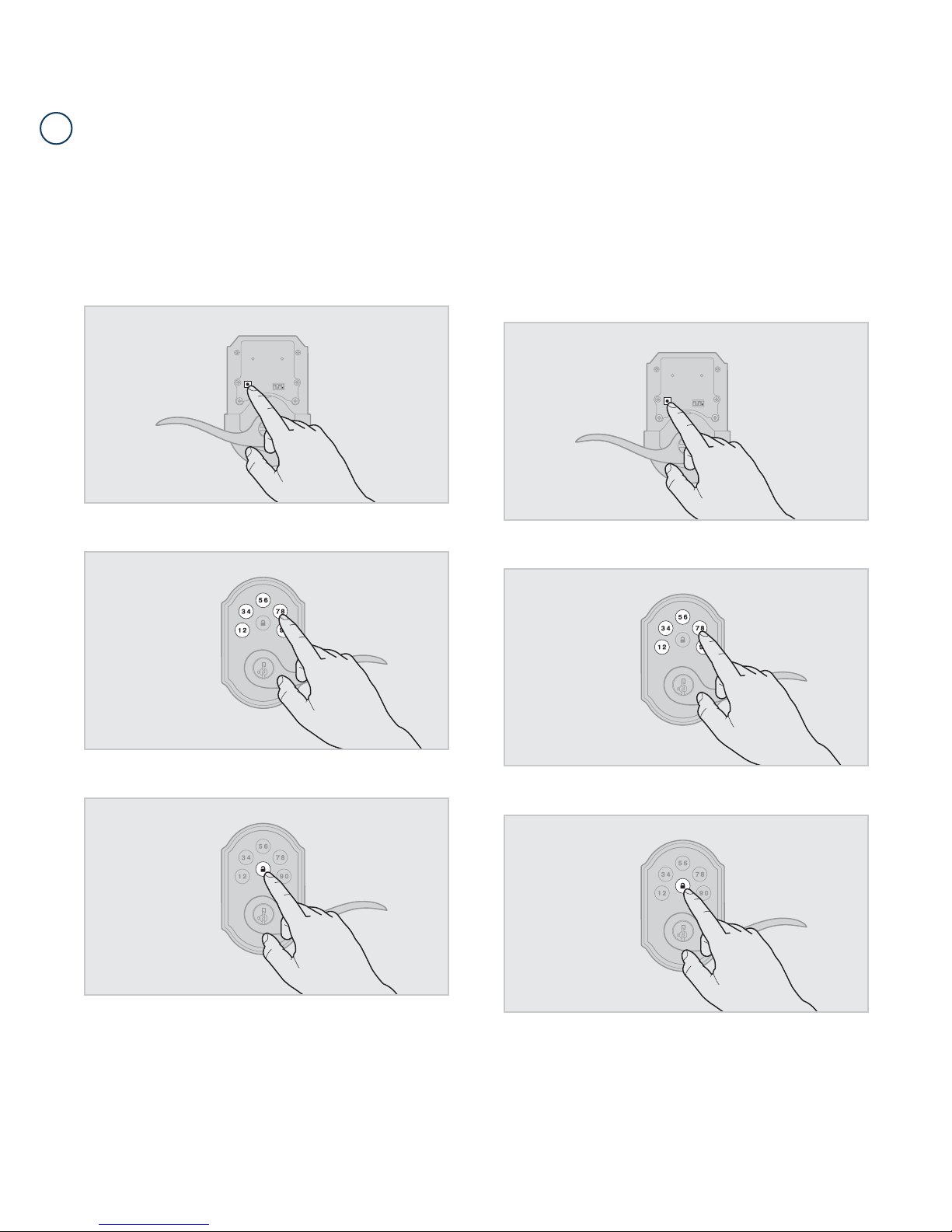
Adding User Codes with the Mastercode Enabled
C
The procedure for adding user codes is different when the Mastercode is enabled. For instuctions on how
to add user codes when the Mastercode is disabled, see the Installation and User Guide that came with
your lock.
62816 / 01
1. Keep door open. Press the Program button once. The keypad will ash
green and you will hear three beeps.
2. Enter Mastercode.
4. Press the Program button the number of times that corresponds to
the user code position being programmed.
Example: If programming the third code, press the button three times.
5. Enter new user code.
3. Press Lock button once.
USA: 1-800-677-5625
Canada: 1- 800- 501-9471
www.weiserlock.com
6. Press Lock button once.
3 / 9
Procedure continued on next page
©2015 Spectrum Brands, Inc.
Page 4

If programming is successful, the keypad will flash green once with
one beep.
If programming is unsuccessful, the keypad will ash red three times
with three beeps. Make sure the user code is not a duplicate and that it
is between 4 and 8 digits during your next attempt. Make sure to enter a
valid Mastercode in step 2.
7. While the door is open and locked, test the user code to make
sure it unlocks the door.
62816 / 01
USA: 1-800-677-5625
Canada: 1- 800- 501-9471
www.weiserlock.com
4 / 9
©2015 Spectrum Brands, Inc.
Page 5
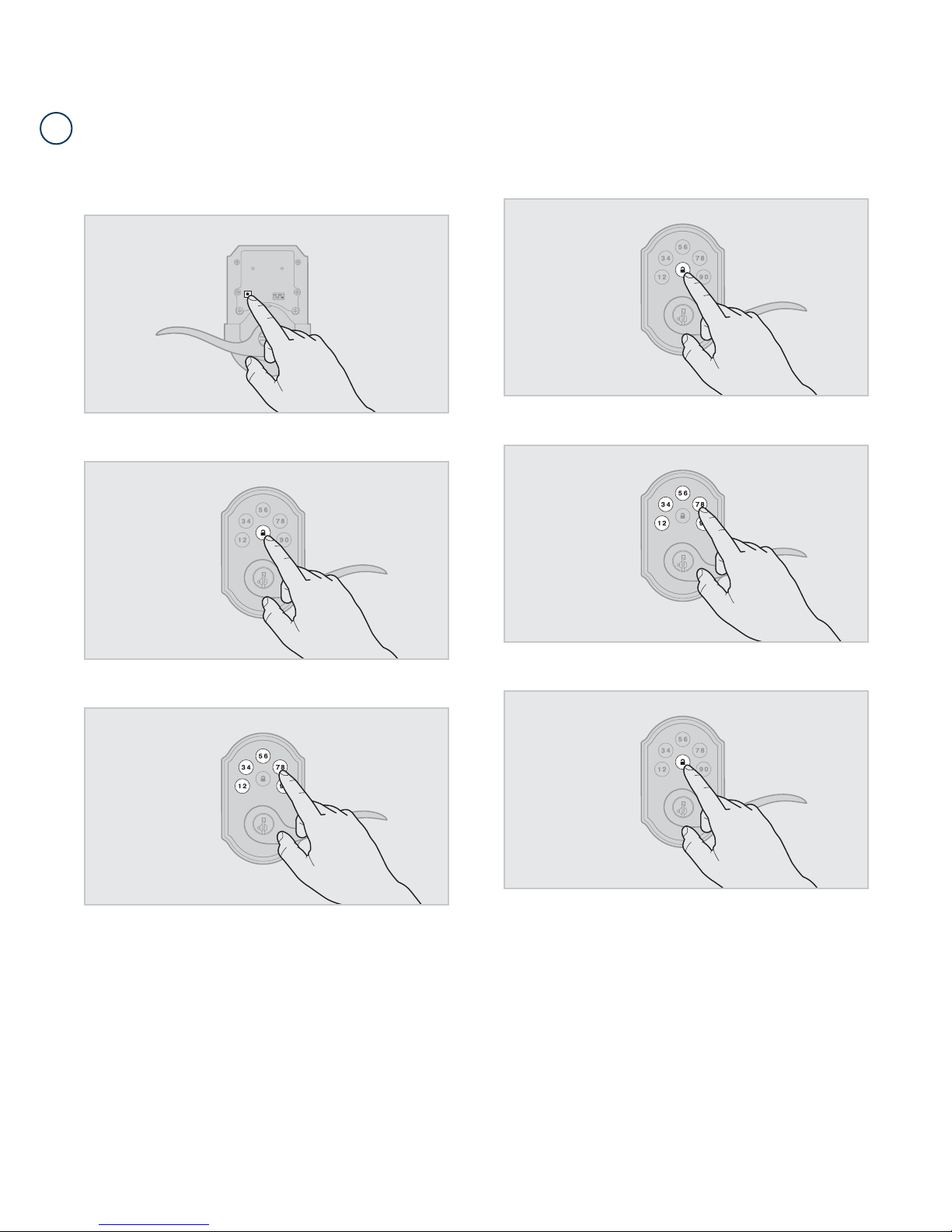
Disabling and Deleting the Mastercode
D
62816 / 01
1. Keep door open. Press and HOLD the Program button until the keypad
ashes green (about 5 seconds).
2. Press Lock button once.
4. Press Lock button once.
5. Re-enter Mastercode.
3. Enter Mastercode.
6. Press Lock button once.
If programming is successful, the keypad will flash green once with
one beep.
If programming is unsuccessful, the keypad will ash red three times with
three beeps. Make sure the Mastercode has been enabled before trying
to disable it. Attempt the procedure again, making sure to enter the same
Mastercode in steps 3 and 5.
7. Make sure switch #3 is on, and press the Program button once. If you
don’t immediately hear three beeps and see the keypad ash green
three times, the Mastercode is disabled.
Note: The lock will time out after ve seconds.
USA: 1-800-677-5625
Canada: 1- 800- 501-9471
www.weiserlock.com
5 / 9
©2015 Spectrum Brands, Inc.
Page 6

62816 / 01
2
A
BB
Troubleshooting: Locked Turnbutton
The turnbutton cannot rotate.
The lock beeps, the keypad fl ashes red, and the door cannot lock or unlock.
The set screw in the lever was not fully
tightened.
Fully tighten the pre-installed set screw at the bottom of the interior
lever.
USA: 1-800-677-5625
Canada: 1- 800- 501-9471
www.weiserlock.com
6 / 9
©2015 Spectrum Brands, Inc.
Page 7
62816 / 01
3
A
Troubleshooting: Keypad
The keypad is unresponsive.
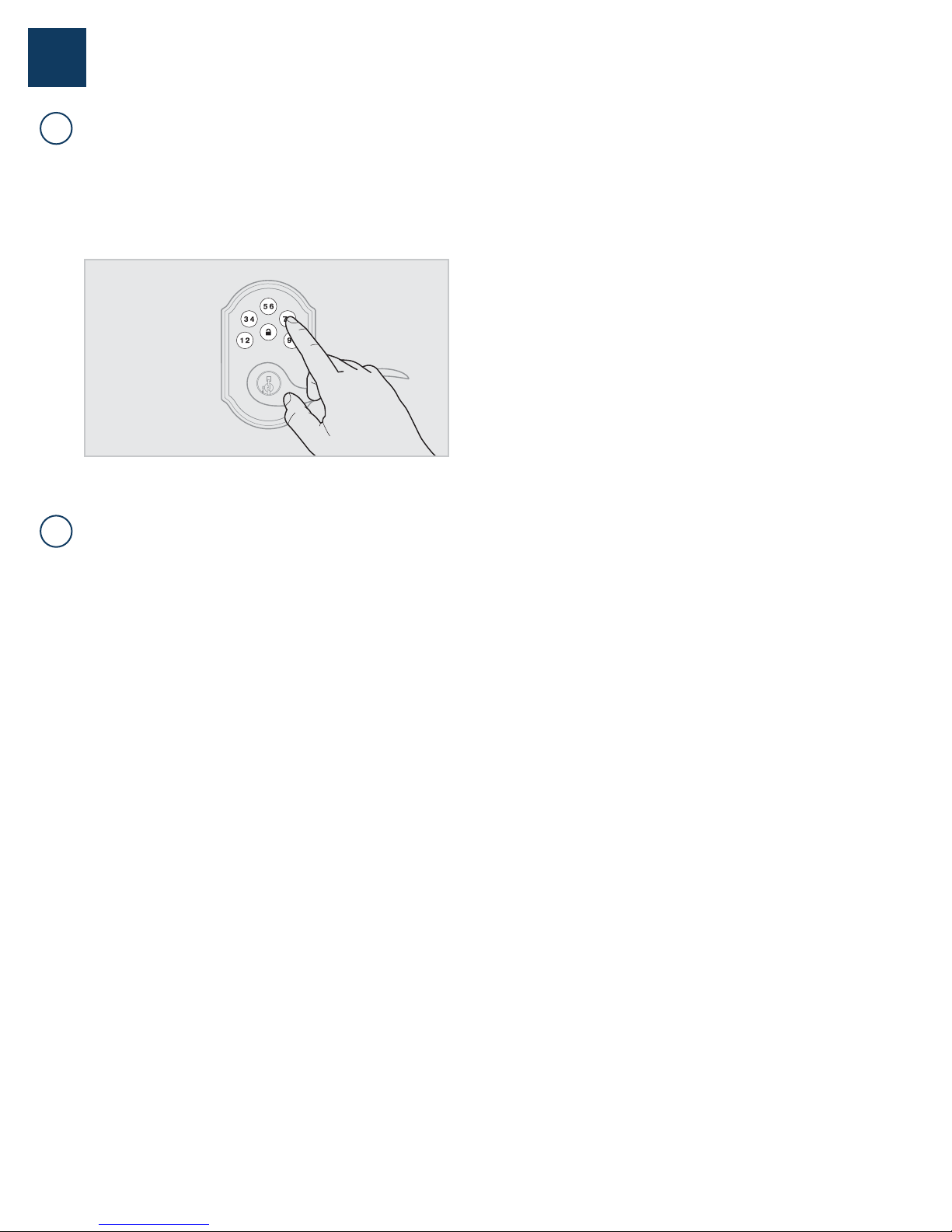
Keypad error test
Install a fresh set of batteries and turn switch #3 to the ON position. Test
each button on the keypad (one at a time) and listen for a beep on each
button press. If beeping is not heard on all buttons, contact Technical
Support for further troubleshooting.
Keypad lockout
If three incorrect codes were entered within one minute, the keypad will
lock for 60 seconds.
The Lock button does not lock the door.
B
No user codes are programmed.
If there are no codes in the lock, the lock button will not lock the door.
This is indicated by the keypad ashing red three times with three
beeps. Program at least one user code and test the Lock button again.
The battery is too low to lock the door.
This is indicated by the keypad ashing red three times with three beeps.
Remove the batteries and replace with a fresh set.
The set screw in the lever was not fully
tightened.
Fully tighten the pre-installed set screw at the bottom of the interior
lever.
USA: 1-800-677-5625
Canada: 1- 800- 501-9471
www.weiserlock.com
7 / 9
©2015 Spectrum Brands, Inc.
Page 8

62816 / 01
5
A
B
Troubleshooting: Battery
The batteries drain within one day.
The lock must be replaced. Contact Technical Support.
The batteries drain within one week.
Keypad error.
See “Keypad error test” on page 7.
USA: 1-800-677-5625
Canada: 1- 800- 501-9471
www.weiserlock.com
8 / 9
©2015 Spectrum Brands, Inc.
Page 9

62816 / 01
6
Battery FAQ
How long will the lock operate on a set of
batteries?
Based on 10 operations per day, a single, new set of Alkaline batteries
will operate the lock for over a year.
What type of batteries do you recommend?
For best results, use new non-rechargeable Alkaline batteries only.
I am planning to be away for several months.
Will my lock operate when I get back?
When the system is idling, it consumes minimum power (very close to
battery shelf life.) With alkaline batteries, the lock should be operable
after years of idle.
I replaced my batteries less than a year ago
and need to replace them again.
Check your door alignment. If the deadbolt makes several unsuccessful
attempts to lock or unlock the door, it may mean that the door is warped
and the latch does not line up correctly with the strike. Operating the
lock excessively reduces battery life. Avoid turning on the keypad light
unnecessarily.
What settings should I use to get the
maximum battery life out of my lock?
Set switches #1, #2, and #3 to the OFF position.
USA: 1-800-677-5625
Canada: 1- 800- 501-9471
www.weiserlock.com
9 / 9
©2015 Spectrum Brands, Inc.
 Loading...