

Page 1

Programming and Troubleshooting Guide
1
Mastercode 2
2
Troubleshooting: Installation 10
3
Troubleshooting: Door Jamming and Door Handing 11
4
Troubleshooting: Touchscreen 14
62812 / 01
5
Troubleshooting: Battery 15
6
Battery FAQ 15
USA: 1-800-677-5625
Canada: 1- 800- 501-9471
www.weiserlock.com
1 / 15
©2015 Spectrum Brands, Inc.
Page 2
62812 / 01
1
A
B
Mastercode
About the Mastercode
Using a Mastercode is an optional, added-security measure. It is not enabled by default. A Mastercode is
used to add and delete user codes, but it cannot unlock the door (unless the same code is programmed
as a user code, though this is not recommended). The Mastercode must be 4-8 digits.
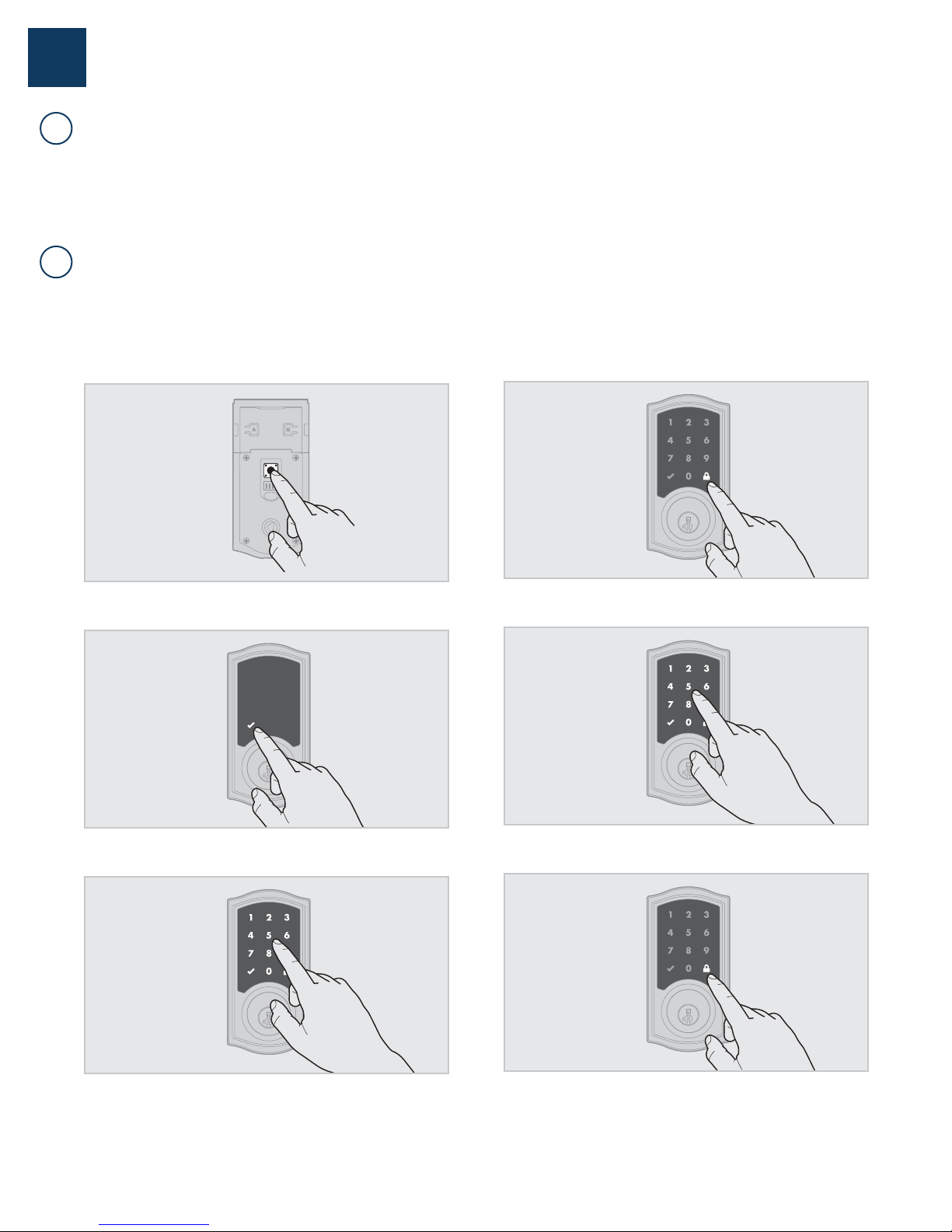
Enabling and Setting the Mastercode
Programming timeout: If the screen is not pressed for 20 seconds, the system will time out
(indicated by three beeps and the “X” pattern ashing three times), and you will need to restart the procedure.
1. Keep door open. Press and HOLD the Program button until the
Checkmark symbol illuminates (about 5 seconds).
4. Press Lock symbol once.
2. Press Checkmark symbol once.
3. Enter new Mastercode.
5. Re-enter Mastercode.
6. Press Lock symbol once.
USA: 1-800-677-5625
Canada: 1- 800- 501-9471
www.weiserlock.com
2 / 15
Procedure continued on next page
©2015 Spectrum Brands, Inc.
Page 3

If programming is successful, the Checkmark will illuminate and you
will hear one beep.
If programming is unsuccessful, the “X” pattern will ash three times,
and you will hear three beeps. Make sure the Mastercode has not already
been programmed. Attempt the procedure again, making sure to enter
the same new Mastercode in step 3 and 5.
7. Make sure switch #3 is on, and press the Program button once. If you
immediately hear ve beeps and see the Checkmark ash ve times,
the Mastercode is enabled.
62812 / 01
USA: 1-800-677-5625
Canada: 1- 800- 501-9471
www.weiserlock.com
3 / 15
©2015 Spectrum Brands, Inc.
Page 4
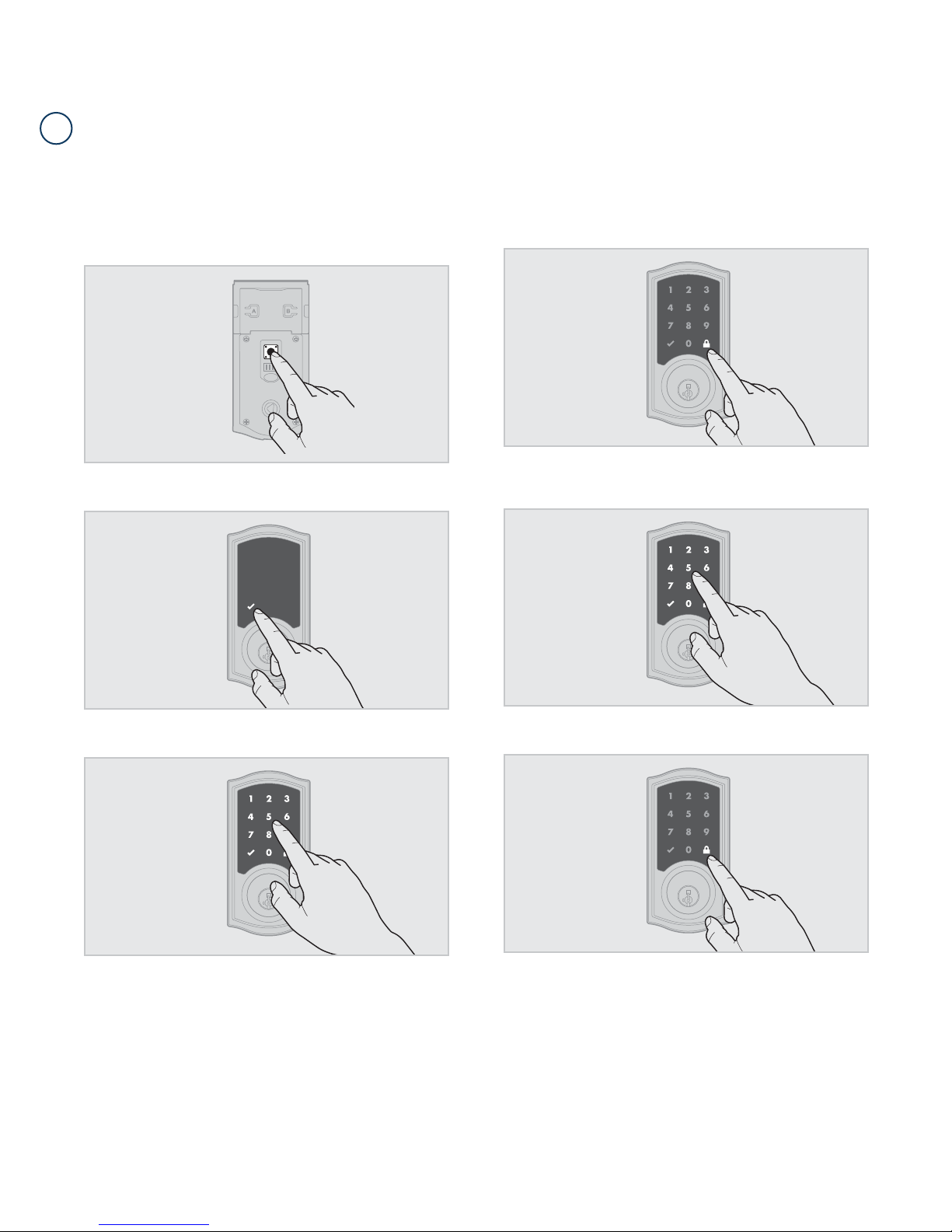
Adding User Codes with the Mastercode Enabled
C
The procedure for adding user codes is different when the Mastercode is enabled. For instuctions on how
to add user codes when the Mastercode is disabled, see the Installation and User Guide that came with
your lock.
62812 / 01
1. Keep door open. Press the Program button once. The Checkmark will
ash ve times and you will hear ve beeps.
2. Press Checkmark symbol once.
4. Press Lock symbol once.
5. Enter new user code.
3. Enter Mastercode.
USA: 1-800-677-5625
Canada: 1- 800- 501-9471
www.weiserlock.com
6. Press Lock symbol once.
If programming is successful, the Checkmark will illuminate and you
will hear one beep.
If programming is unsuccessful, the “X” pattern will ash three times with
three beeps. Make sure the user code is not a duplicate and that it is
between 4 and 8 digits during your next attempt. Make sure the lock has
room for an additional code. If all user codes are lled, delete a code to make
room for this one. Make sure to enter a valid Mastercode in step 3.
7. While the door is open and locked, test the user code to make
sure it unlocks the door.
4 / 15
©2015 Spectrum Brands, Inc.
Page 5
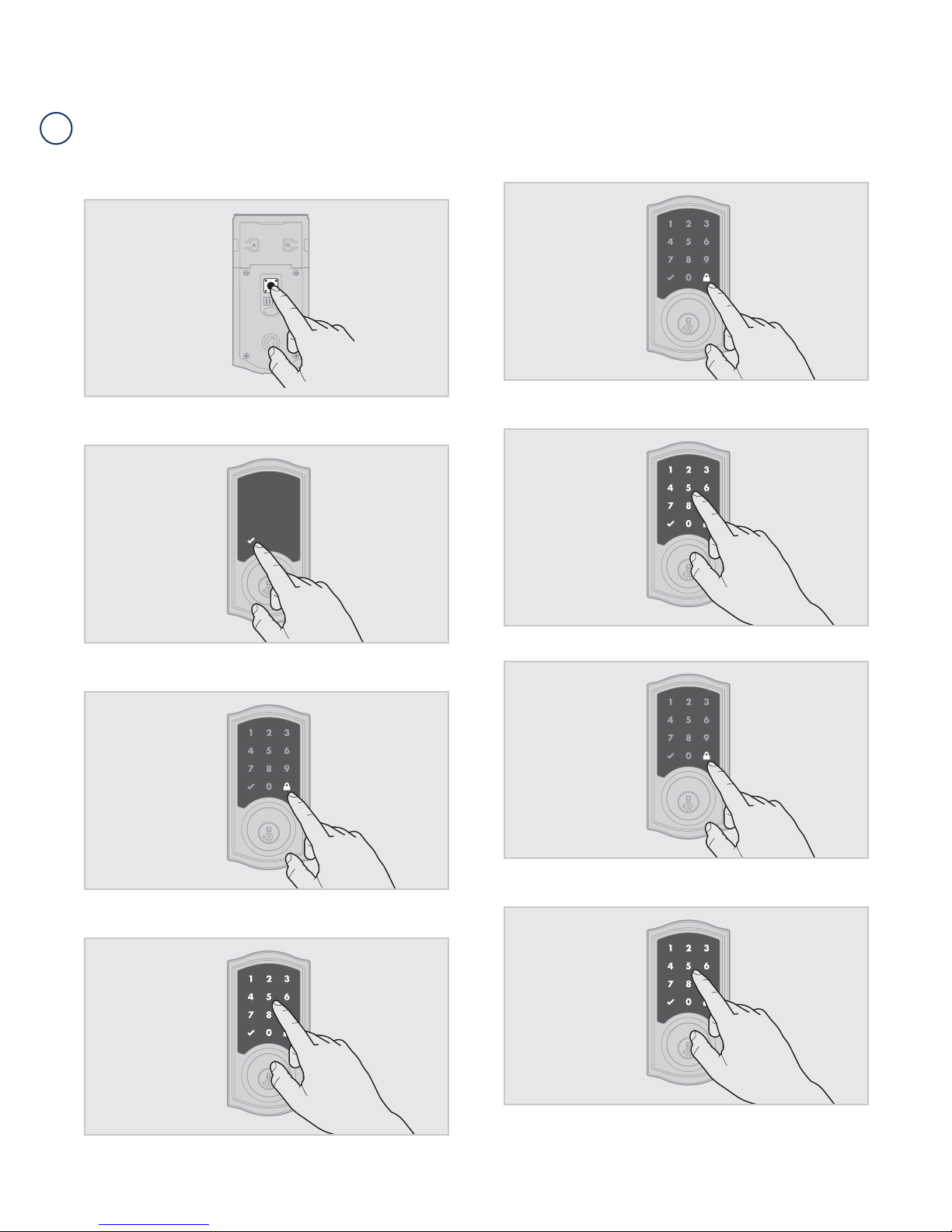
Deleting a Single User Code with the Mastercode Enabled
D
62812 / 01
1. Keep door open. Press the Program button once. The Checkmark will
ash ve times and you will hear ve beeps.
2. Press Checkmark symbol once.
5. Press Lock symbol once.
6. Enter user code to be deleted.
3. Press Lock symbol once.
4. Enter Mastercode.
7. Press Lock symbol once.
8. Re-enter user code to be deleted.
USA: 1-800-677-5625
Canada: 1- 800- 501-9471
www.weiserlock.com
5 / 15
Procedure continued on next page
©2015 Spectrum Brands, Inc.
Page 6
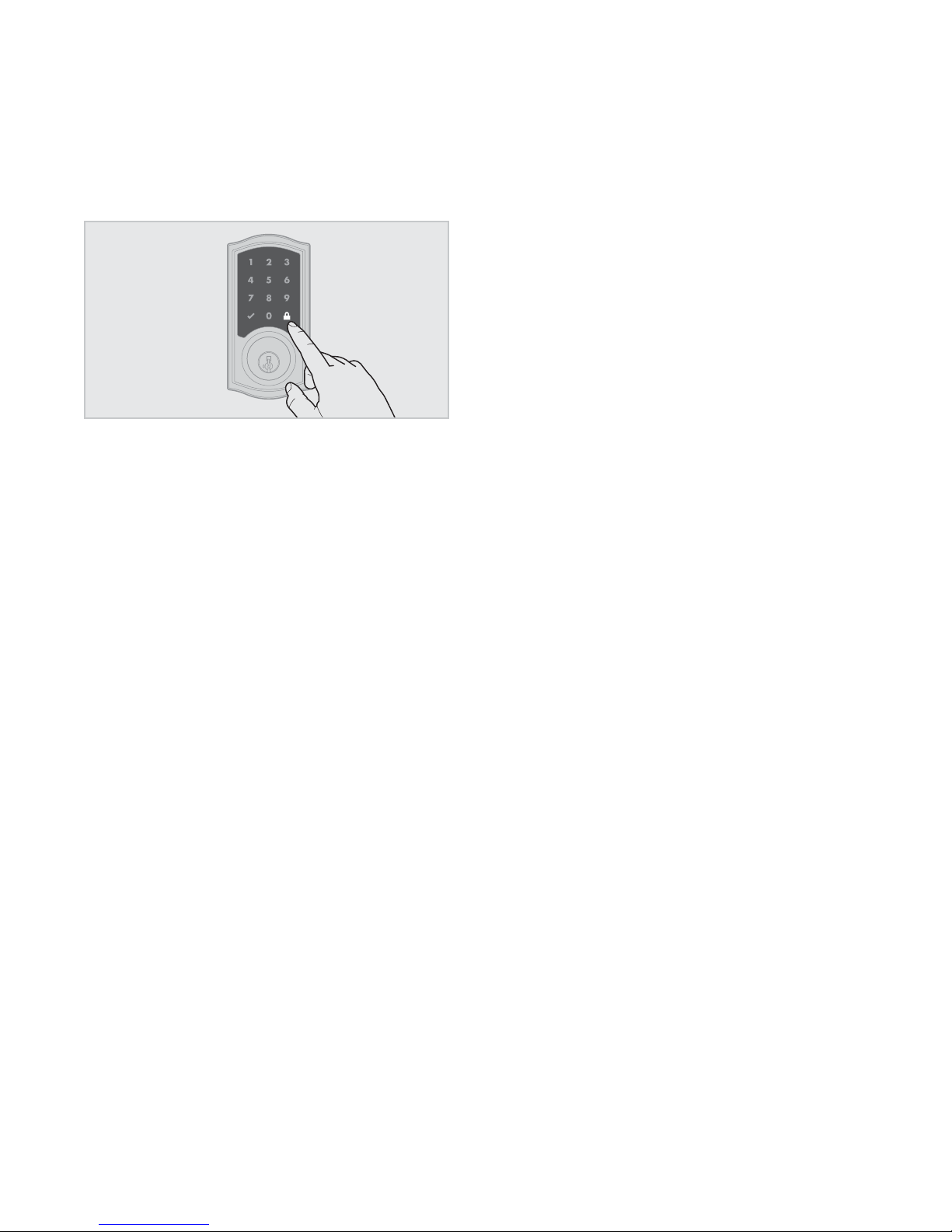
9. Press Lock symbol once.
If programming is successful, the Checkmark will illuminate and you
will hear one beep.
62812 / 01
If programming is unsuccessful, the “X” pattern will ash three times with
three beeps. Make sure to enter a valid Mastercode in step 4.
10. While the door is open and locked, test the user code to make
sure it no longer unlocks the door.
USA: 1-800-677-5625
Canada: 1- 800- 501-9471
www.weiserlock.com
6 / 15
©2015 Spectrum Brands, Inc.
Page 7
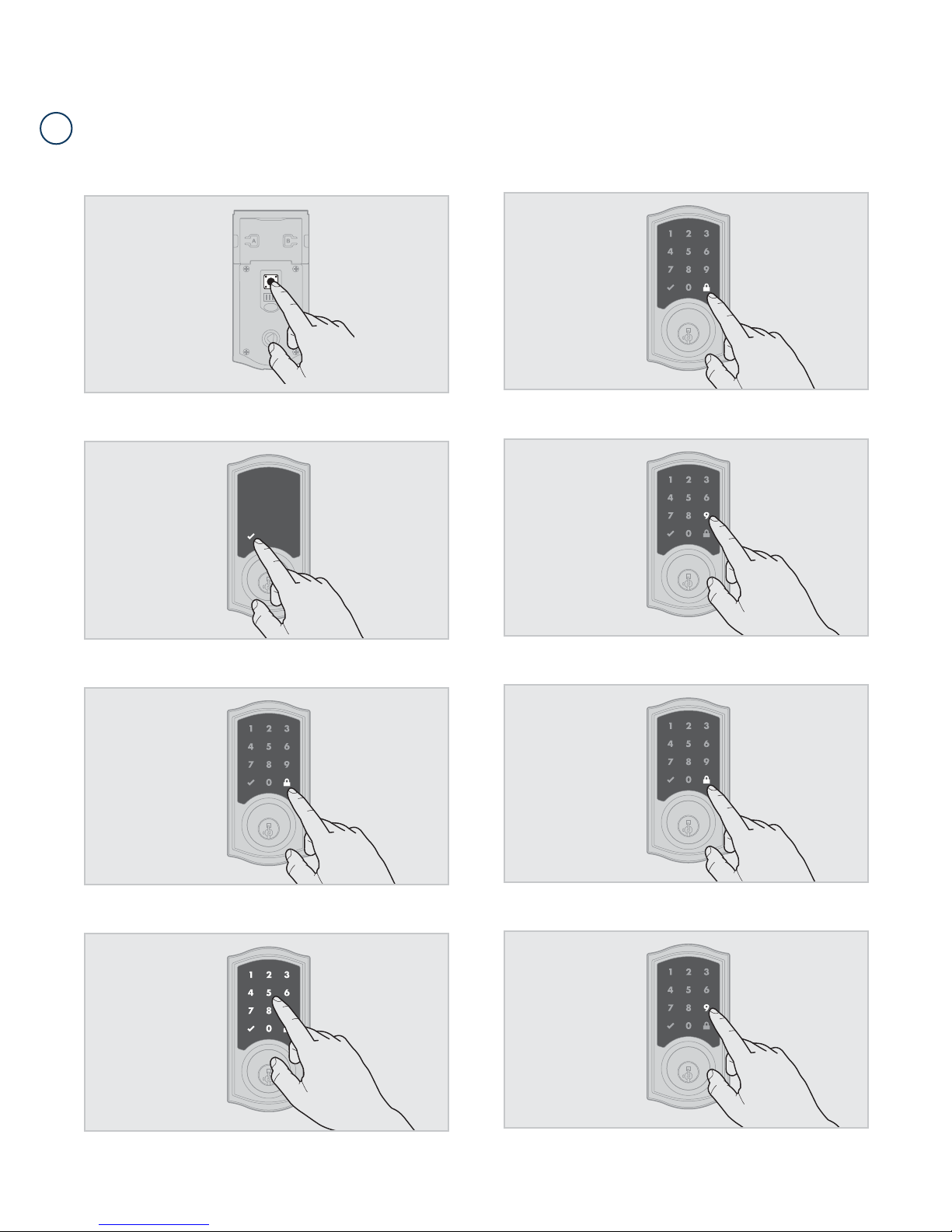
Deleting All User Codes with the Mastercode Enabled
E
62812 / 01
1. Keep door open. Press the Program button once. The Checkmark will
ash ve times and you will hear ve beeps.
2. Press Checkmark symbol once.
5. Press Lock symbol once.
6. Press “9” six times.
3. Press Lock symbol once.
4. Enter Mastercode.
7. Press Lock symbol once.
8. Press “9” six times.
USA: 1-800-677-5625
Canada: 1- 800- 501-9471
www.weiserlock.com
7 / 15
Procedure continued on next page
©2015 Spectrum Brands, Inc.
Page 8
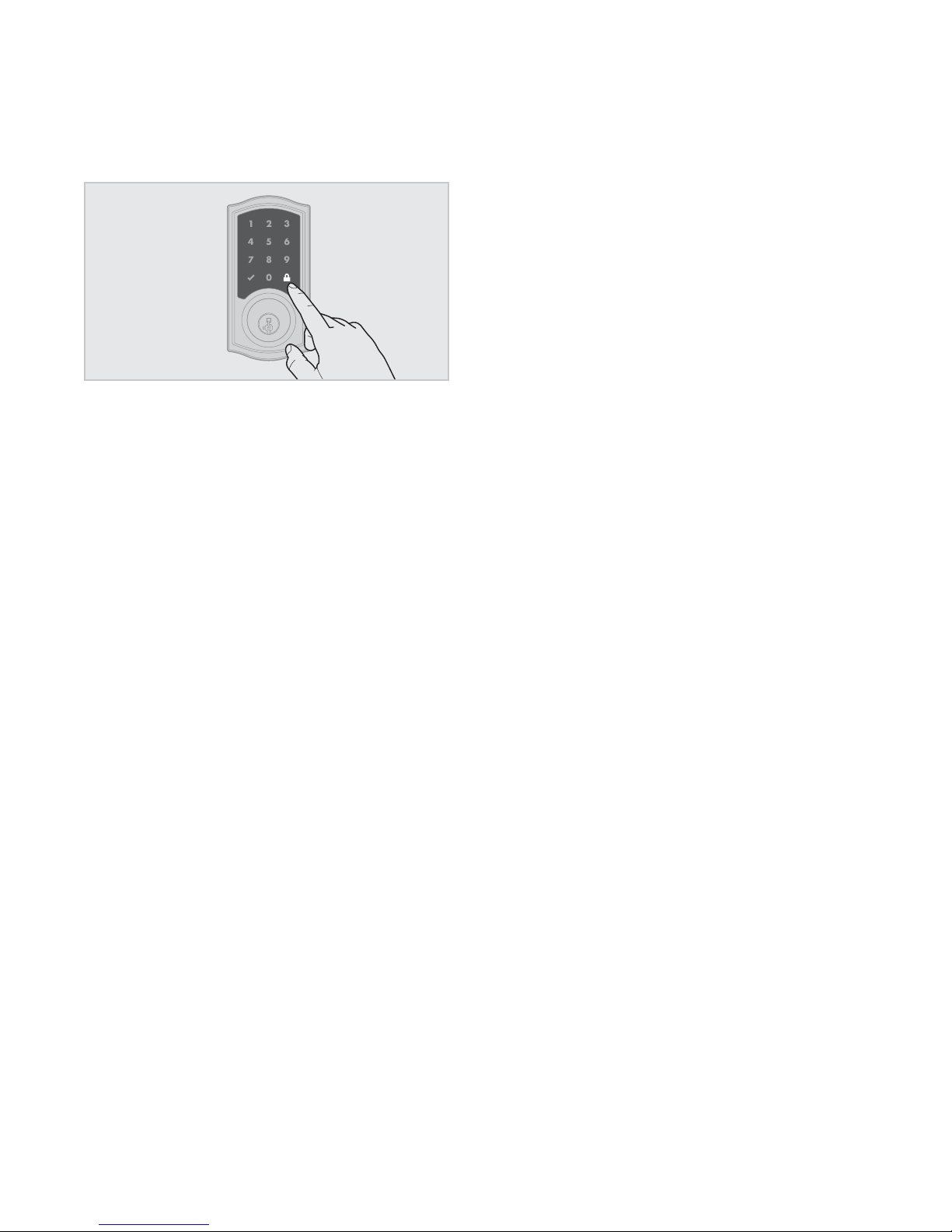
9. Press Lock symbol once.
If programming is successful, the Checkmark will illuminate and you
will hear one beep.
If programming is unsuccessful, the “X” pattern will ash three times with
three beeps. Make sure to enter a valid Mastercode in step 4 during your
next attempt.
62812 / 01
10. While the door is open and unlocked, press the Lock symbol. If
the latch bolt does not extend to lock, then all codes have been
successfully deleted.
USA: 1-800-677-5625
Canada: 1- 800- 501-9471
www.weiserlock.com
8 / 15
©2015 Spectrum Brands, Inc.
Page 9
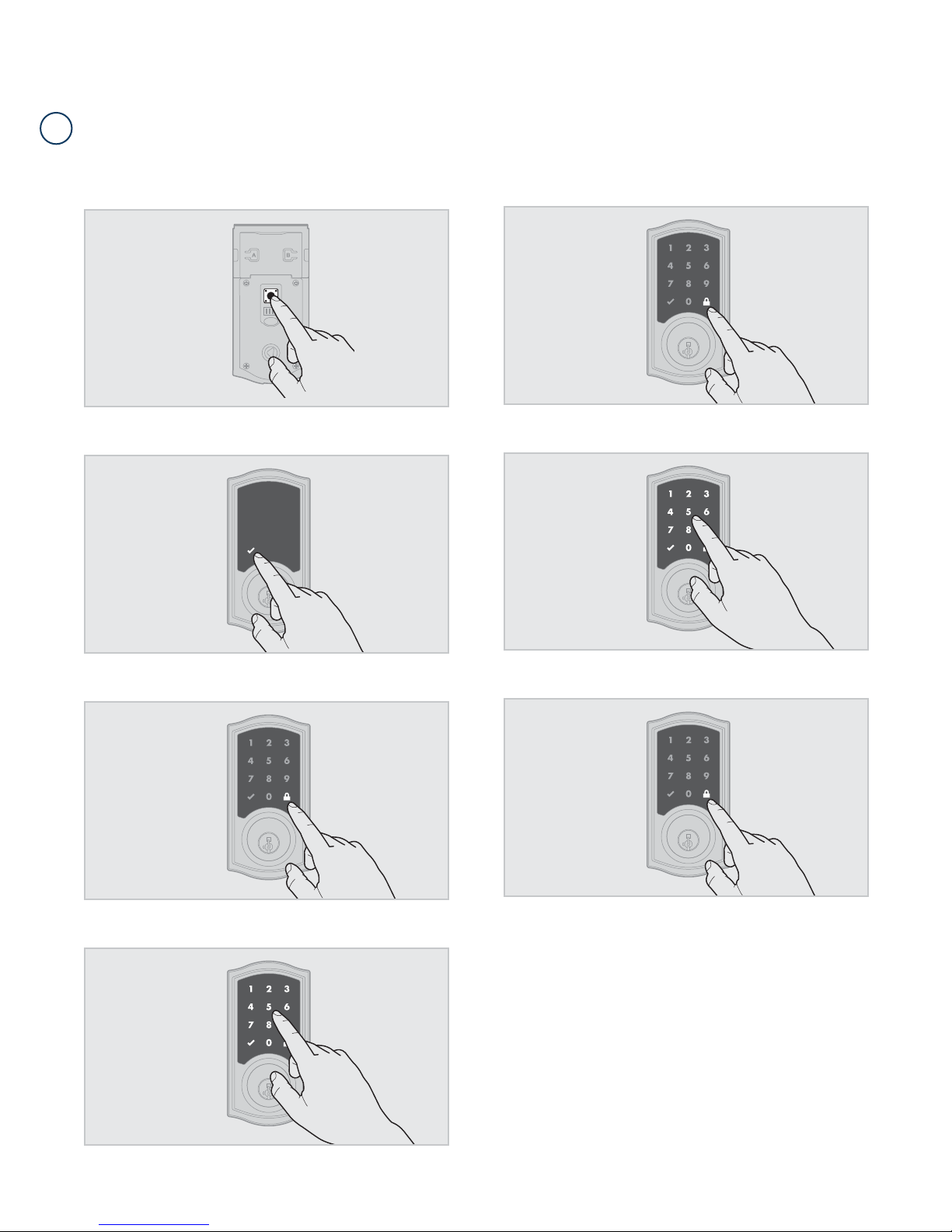
Disabling and Deleting the Mastercode
F
62812 / 01
1. Keep door open. Press and HOLD the Program button until the
Checkmark symbol illuminates (about 5 seconds).
2. Press Checkmark symbol once.
5. Press Lock symbol once.
6. Re-enter Mastercode.
3. Press Lock symbol once.
4. Enter Mastercode.
7. Press Lock symbol once.
If programming is successful, the Checkmark will illuminate and you
will hear one beep.
If programming is unsuccessful, the “X” pattern will ash three times, and
you will hear three beeps. Make sure the Mastercode has been enabled
before trying to disable it. Attempt the procedure again, making sure to
enter the same Mastercode in step 4 and 6.
8. Make sure switch #3 is on, and press the Program button once. If you
don’t immediately hear ve beeps and see the Checkmark ash ve
times, the Mastercode is disabled.
USA: 1-800-677-5625
Canada: 1- 800- 501-9471
www.weiserlock.com
9 / 15
©2015 Spectrum Brands, Inc.
Page 10
62812 / 01
2
A
B
C
Troubleshooting: Installation
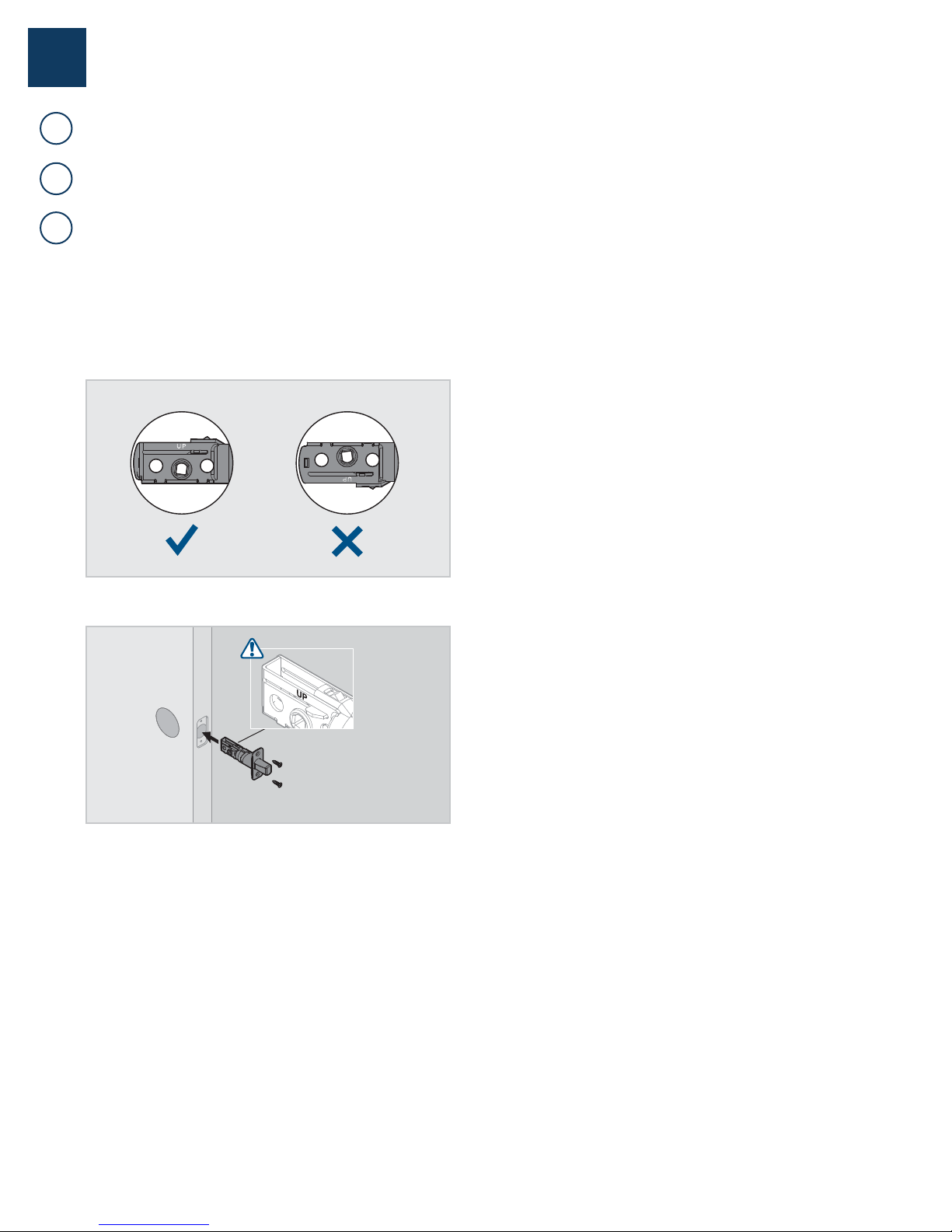
The interior mounting screws are di cult to tighten.
The interior and exterior assembly won’t mount parallel to the door edge.
The interior assembly does not fi t on the mounting plate.
If you encounter any of the problems above, the deadbolt latch may be
installed upside down. Remove the interior assembly, mounting plate,
and exterior assembly from the door, and look at the latch inside the
door hole.
If the word “UP” is upside down and at the bottom of the latch, the latch
is installed incorrectly.
Reinstall the latch, making sure the word “UP” faces upward.
USA: 1-800-677-5625
Canada: 1- 800- 501-9471
www.weiserlock.com
10 / 15
©2015 Spectrum Brands, Inc.
Page 11
62812 / 01
3
A
B
Troubleshooting: Door Jamming and Door Handing
The lock jams and the turnpiece does not rotate smoothly.
The lock beeps, the Checkmark and Lock symbols alternate fl ashing, and the
door cannot lock.
The door handing process was not executed
during installation.
Perform the manual door handing process in the Installation Guide.
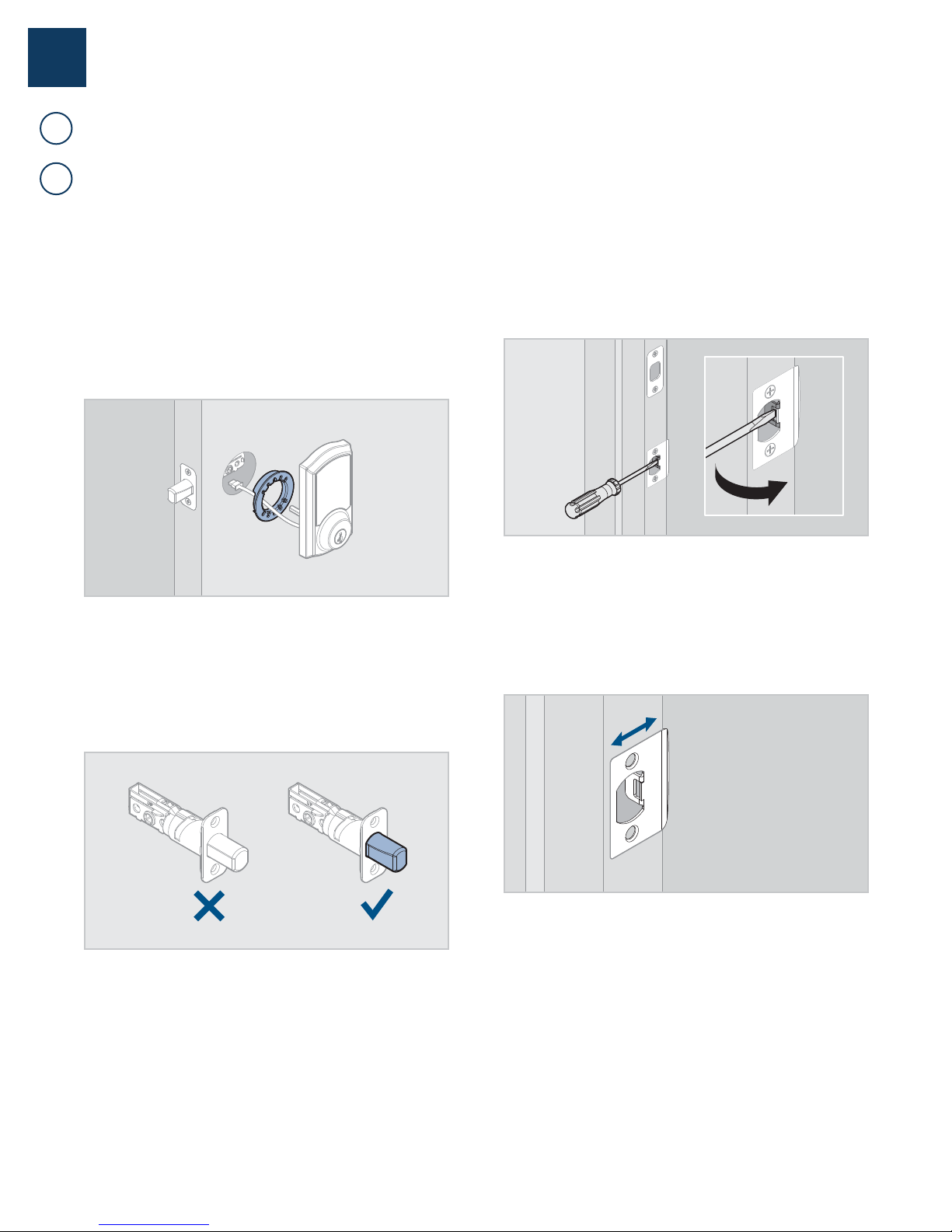
The hole in the door is misaligned.
Disassemble the lock, and reinstall it without the adapter ring on the
exterior side of the door.
The deadbolt latch and strike are misaligned,
causing the latch to bind.
Adjust the tab of the lower strike (for your knob or lever) to help align the
upper latch and strike so that the latch bolt enters the strike when the
door is locked.
The wrong deadbolt latch is installed.
SmartCode deadbolts require a tapered latch bolt for ease of operation.
If the latch being used is from an older lock, it will likely not have a
tapered latch bolt. Remove the lock from the door, including the old
latch. Replace with the new tapered latch that came with the lock and
reinstall the lock.
The lower latch and lower strike (for your knob
or lever) are misaligned, putting too much
load on the deadbolt latch.
As a test, rotate the turnpiece on the deadbolt so the latch is retracted
(unlocked), and close the door. If you have to push, pull or lift the door to
get it to close, adjust the position of the lower strike.
USA: 1-800-677-5625
Canada: 1- 800- 501-9471
www.weiserlock.com
11 / 15
©2015 Spectrum Brands, Inc.
Page 12
62812 / 01
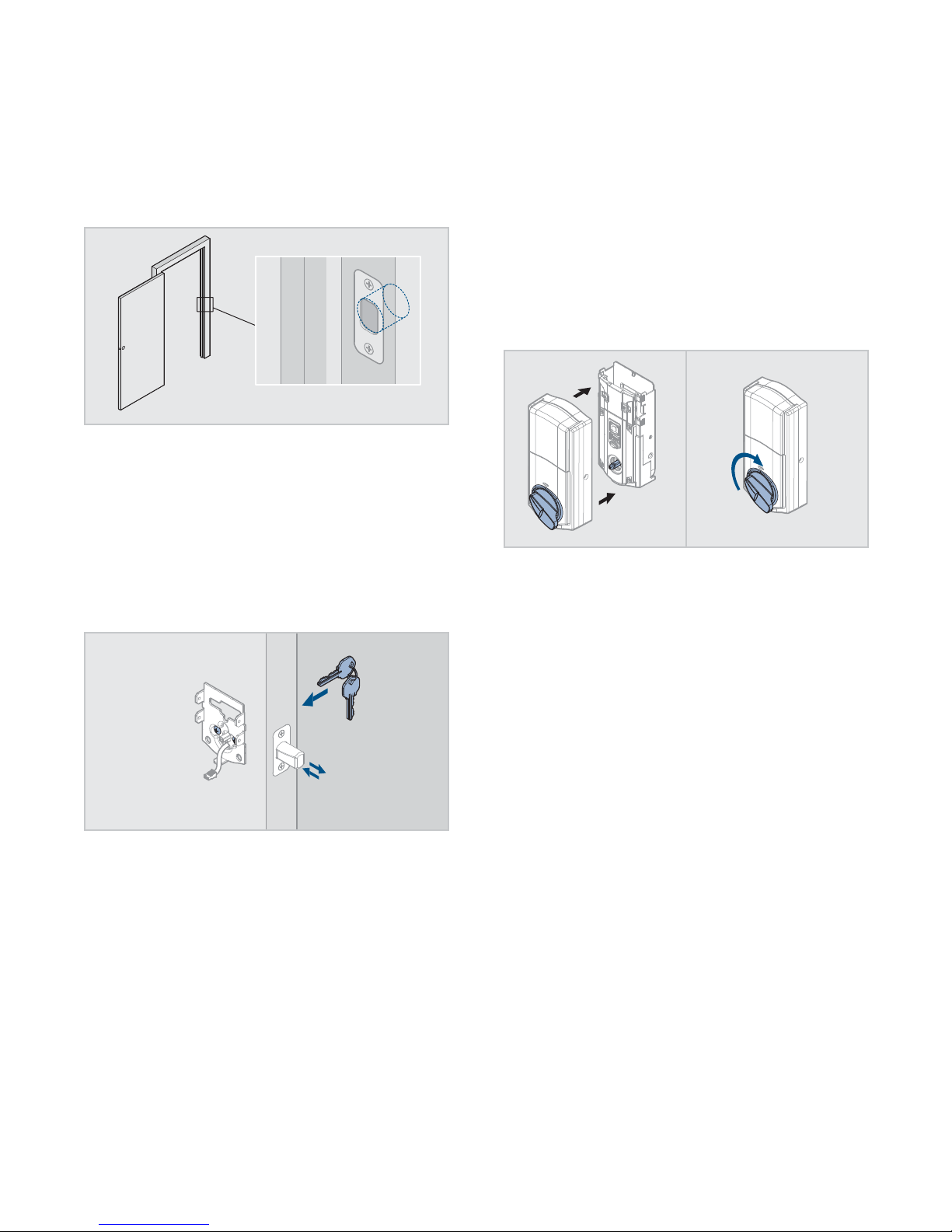
The hole in the door frame for the latch bolt is
not drilled deep enough.
Make sure the hole in the door frame is drilled at least 1” (25 mm) deep.
The mounting plate is placing tension on the
torque blade.
Attempt to lock and unlock the door with the key. If it is unable to rotate,
remove the interior assembly from the mounting plate. Test the key
again. If it is still unable to rotate, loosen the screws on the mounting
plate and reposition the plate so there is no tension on the cylinder
torque blade. Make sure the latch bolt can operate smoothly with the key
and reinstall the interior assembly.
The clutch is disengaged.
Remove the battery pack. Remove the interior assembly from the
door. Verify that the lock can be operated smoothly with the key while
the interior is removed. Attempt to rotate the turnpiece on the interior
assembly to the vertical position. If it cannot rotate to the vertical position,
the clutch has become disengaged.
Place the battery cover onto the interior assembly, making sure to align
the turnpiece with the shaft. Rotate the turnpiece 180° clockwise (you
will need to use force when rotating the turnpiece, and you will hear it
click). This will re-engage the clutch.
180°
Align the turnpiece with the torque blade and reinstall the interior
assembly on the door.
USA: 1-800-677-5625
Canada: 1- 800- 501-9471
www.weiserlock.com
12 / 15
©2015 Spectrum Brands, Inc.
Page 13

The door handing process does not happen
C
automatically when the batteries are installed.
62812 / 01
The handing process may have been executed
previously.
Follow the instructions inside the Installation and User Guide to perform
the manual door handing process
The touchscreen indicates a failure after the door handing process.
D
The deadbolt latch does not extend or retract on its own during
E
The battery level is too low.
This is indicated by the Checkmark and Lock symbols ashing
simultaneously ve times with ve beeps. Use a fresh set of batteries, and
perform the door handing process again.
the door handing process.
The hole in the door is misaligned.
Disassemble the lock, and reinstall it without the adapter ring on the
exterior side of the door.
The mounting plate is placing tension on the
torque blade.
See page 12.
The battery level is too low.
This is indicated by the Checkmark and Lock symbols ashing
simultaneously ve times with ve beeps. Use a fresh set of batteries,
and perform the manual door handing process.
The latch and strike are misaligned, causing
the latch to bind.
Perform the manual door handing process while the door is open. If it
is successful only when the door is open, the latch and strike are not
aligned as they should be. Ensure door preparation is in accordance with
the door drilling instructions, available online.
USA: 1-800-677-5625
Canada: 1- 800- 501-9471
www.weiserlock.com
13 / 15
©2015 Spectrum Brands, Inc.
Page 14

62812 / 01
4
A
B
Troubleshooting: Touchscreen
The touchscreen is unresponsive.
Screen activation
To activate the screen, use one of the three options below:
1. Touch screen with palm or back of hand until digits illuminate.
2. Touch lower left area of screen (where Checkmark is located) until
digits illuminate.
3. Touch screen with three or more ngers until digits illuminate.
The Lock symbol does not lock the door.
No user codes are programmed.
If there are no codes in the lock, the lock symbol will not lock the door.
This is indicated by the “X” pattern ashing three times with three
beeps. Program at least one user code and test the Lock symbol again.
One-second pause
The lock requires a one-second pause immediately after locking or
unlocking before the touchscreen will re-activate. Fully remove hand
from screen until the Checkmark or Lock symbol turns off, and then
activate the screen again.
Touchscreen lockout
If three incorrect codes were entered within one minute, the touchscreen
will lock for 60 seconds.
The mounting plate is placing tension on the
torque blade.
See page 12.
The door handing process was not executed.
Perform the manual door handing process, following the instructions
inside the Installation and User guide.
The battery is too low to lock the door.
This is indicated by the Checkmark and Lock symbols ashing
simultaneously ve times with ve beeps. Remove the batteries and
replace with a fresh set.
Only two digits illuminate on the touchscreen.
C
SecureScreen is enabled.
SecureScreen is an added-security feature that displays random digits
before you enter a user code to unlock the door. This feature ensures
that there are ngerprints on all digits so that codes cannot be identi ed
by examining the touchscreen for ngerprints.
If desired, this feature can be disabled by turning switch #4 to the off
position.
The clutch is disengaged.
See page 12.
USA: 1-800-677-5625
Canada: 1- 800- 501-9471
www.weiserlock.com
14 / 15
©2015 Spectrum Brands, Inc.
Page 15

62812 / 01
5
Troubleshooting: Battery
The batteries drain within one day.
The lock must be replaced. Contact Technical Support.
6
Battery FAQ
How long will the lock operate on a set of
batteries?
Based on 10 operations per day, a single, new set of Alkaline batteries
will operate the lock for over a year.
What type of batteries do you recommend?
For best results, use new non-rechargeable Alkaline batteries only.
I am planning to be away for several months.
Will my lock operate when I get back?
When the system is idling, it consumes minimum power (very close to
battery shelf life.) With alkaline batteries, the lock should be operable
after years of idle.
I replaced my batteries less than a year ago
and need to replace them again.
Check your door alignment. If the deadbolt makes several unsuccessful
attempts to lock or unlock the door, it may mean that the door is warped
and the latch does not line up correctly with the strike. Operating the
lock excessively reduces battery life. Avoid turning on the keypad light
unnecessarily.
What settings should I use to get the
maximum battery life out of my lock?
Set all switches to the OFF position.
USA: 1-800-677-5625
Canada: 1- 800- 501-9471
www.weiserlock.com
15 / 15
©2015 Spectrum Brands, Inc.
 Loading...