

Page 1
JoinWeGo.com
USER MANUAL
measure your heart rate
for a better, healthier you!
heart rate monitor
plus
Page 2

JoinWeGo.com
WEGO
™
PACE PLUS l User Manual
CONTENTS
Welcome to WeGo™ 1
Key Functions & Safety Information 2
General Operations 3-11
How to Wear 3
Optical HRM Mode 5
Chrono Mode, Alarm & Chime Mode 6
Set Mode & Time Mode 7
Unit & User Mode 8
HRM Mode & Contrast Mode 9
Chime & Alarm Mode 10
Help Functions 11
Regulatory & Safety Notices 12-13
Care & Maintenance 14
Trouble Shooting 15
Wa r r a nt y 16 -17
The WeGo
™
Line of Products 18
Page 3
1
WEGO™ PACE PLUS l User Manual
WELCOME TO WEGO
™
WeGo™ allows users to SEAMLESSLY TRACK their fitness progress and goals. Our line of activity trackers
and heart rate monitors are engineered for
QUALITY and VA L U E , using the LATEST TECHNOLOGY in
data tracking. WeGo’s line includes products for all individuals—regardless of their fitness level or activity type.
BE HEALTHIER
prevent injury
and overtraining
BE SMARTER
achieve the most
effective workout
BE HAPPIER
improve personal
fitness levels
Page 4
2
WEGO™ PACE PLUS l User Manual
KEY FUNCTIONS
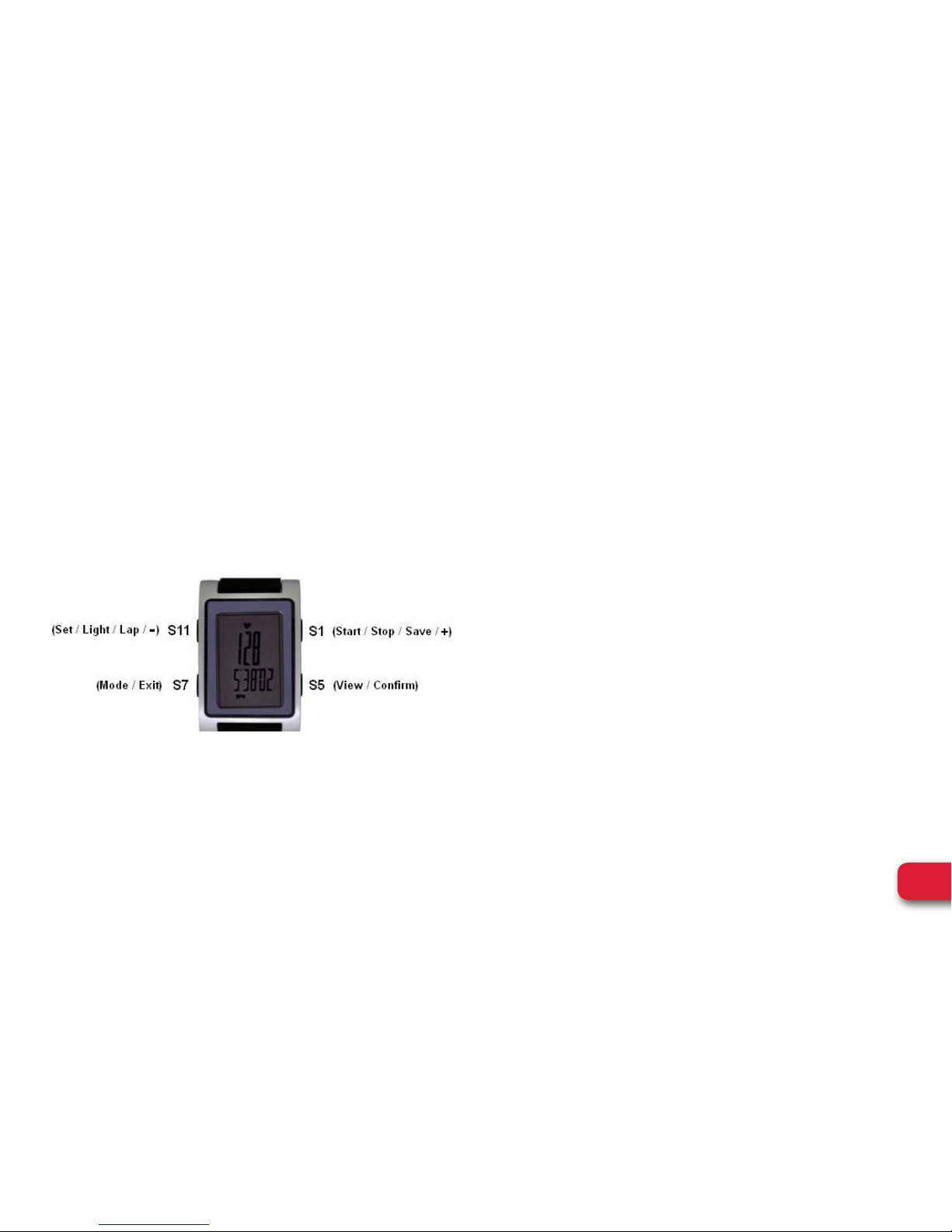
HRM OPTIC PULSE WATCH
This product uses an Electro-optical technology to
sense the heart beat. It has two LED beams and
electro-optical sensor to detect the volume of blood
under your skin. This watch is strapless (no HR belt).
Note that actual color of the watch and artwork may vary from
style to style.
Push Button location and main function:
IMPORTANT SAFETY INFORMATION
• Consult your doctor before beginning a new exercise
program.
• This watch provides accurate heart rate
measurements. However, this is not a medical device.
• This watch may affect pacemakers. If you have any
concerns, consult your doctor before using
this watch.
This watch is water resistant up to 1 ATM.
Battery Type: CR2430
Page 5
3
WEGO™ PACE PLUS l User Manual
GENERAL OPERATIONS
HOW TO WEAR PROPERLY:
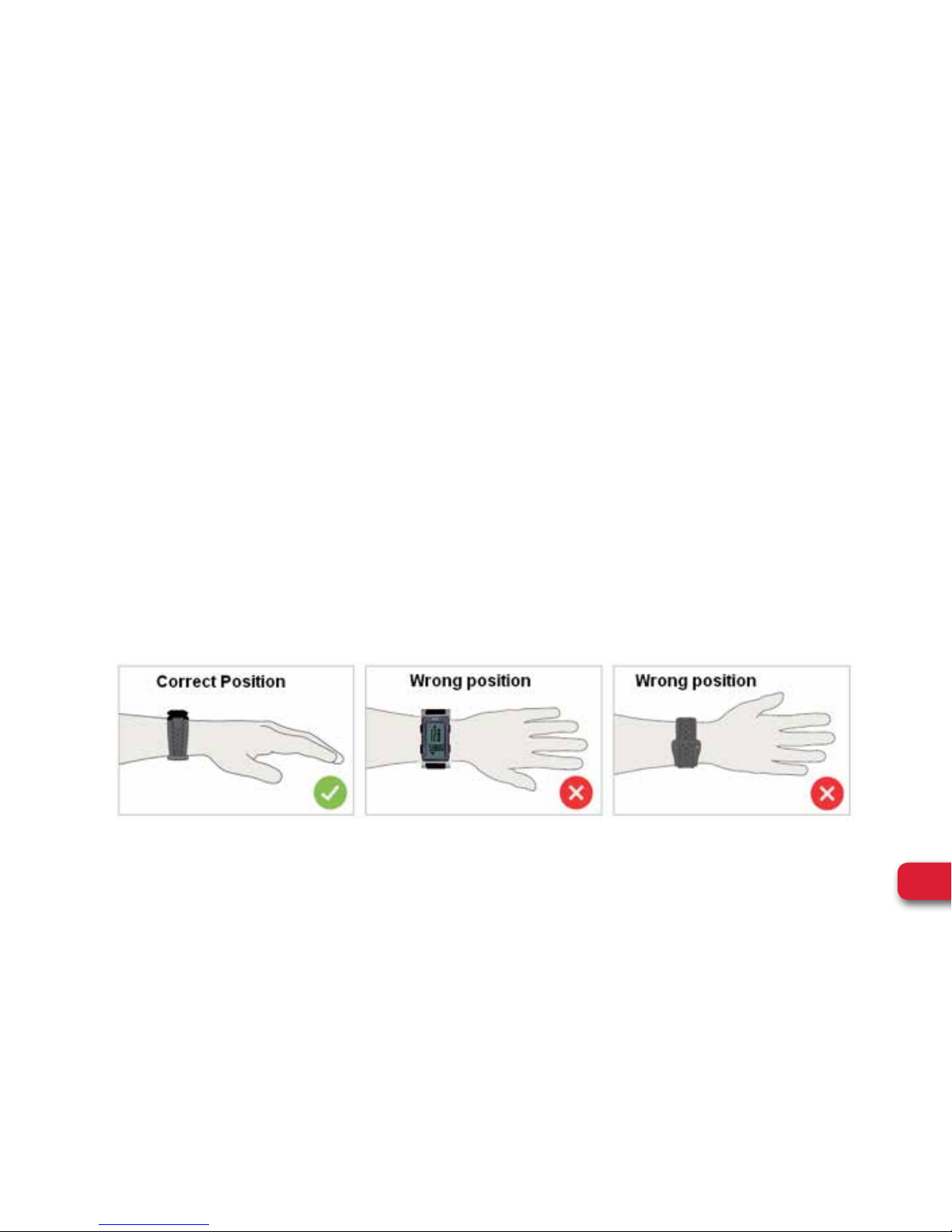
• Fasten the watch snugly so that the optical sensor
makes a tight contact with your skin. The tighter you
can wear the watch the better.
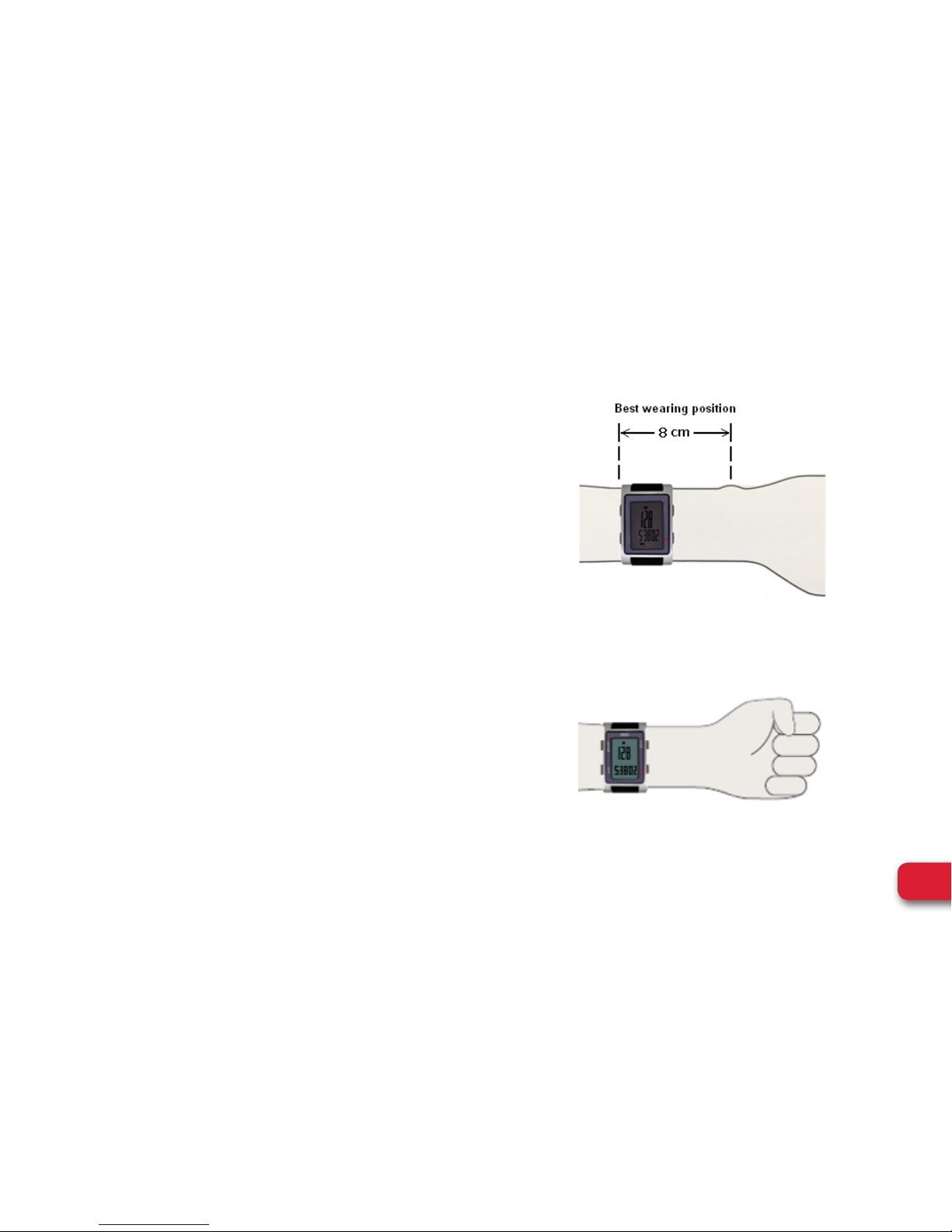
• Wear the watch not on your wrist bone but higher on
your forearm.
• If the Heart rate data displayed in the watch is not
stable or erratic, try to move the watch along your
forearm within the best wearing position as shown.
Important notes:
Before starting your exercise
• If you have a smaller wrist, wear the watch higher on
your forearm.
• For users with concave wrist, wear the watch higher
and on the underside of your forearm. This is because
bending of the wrist may affect the heart rate reading.
Page 6
4
WEGO™ PACE PLUS l User Manual
GENERAL OPERATIONS
HOW TO WEAR PROPERLY:
• We strongly recommend doing a warm up exercise
for a few minutes before you begin to track your
heart rate. This is for optimal heart rate reading
accuracy, especially if you have cold hands or poor
circulation,
• You may need to re-tighten the strap.
• After sweating, you have to tighten the watch again
for more accurate measurement.
• Minimize extreme wrist movement while the HR is
in use.
• When taking your heart rate readings, make sure
your hands are in horizontal position and parallel to
the ground.
Page 7
5
WEGO™ PACE PLUS l User Manual
GENERAL OPERATIONS
OPTICAL HRM MODE
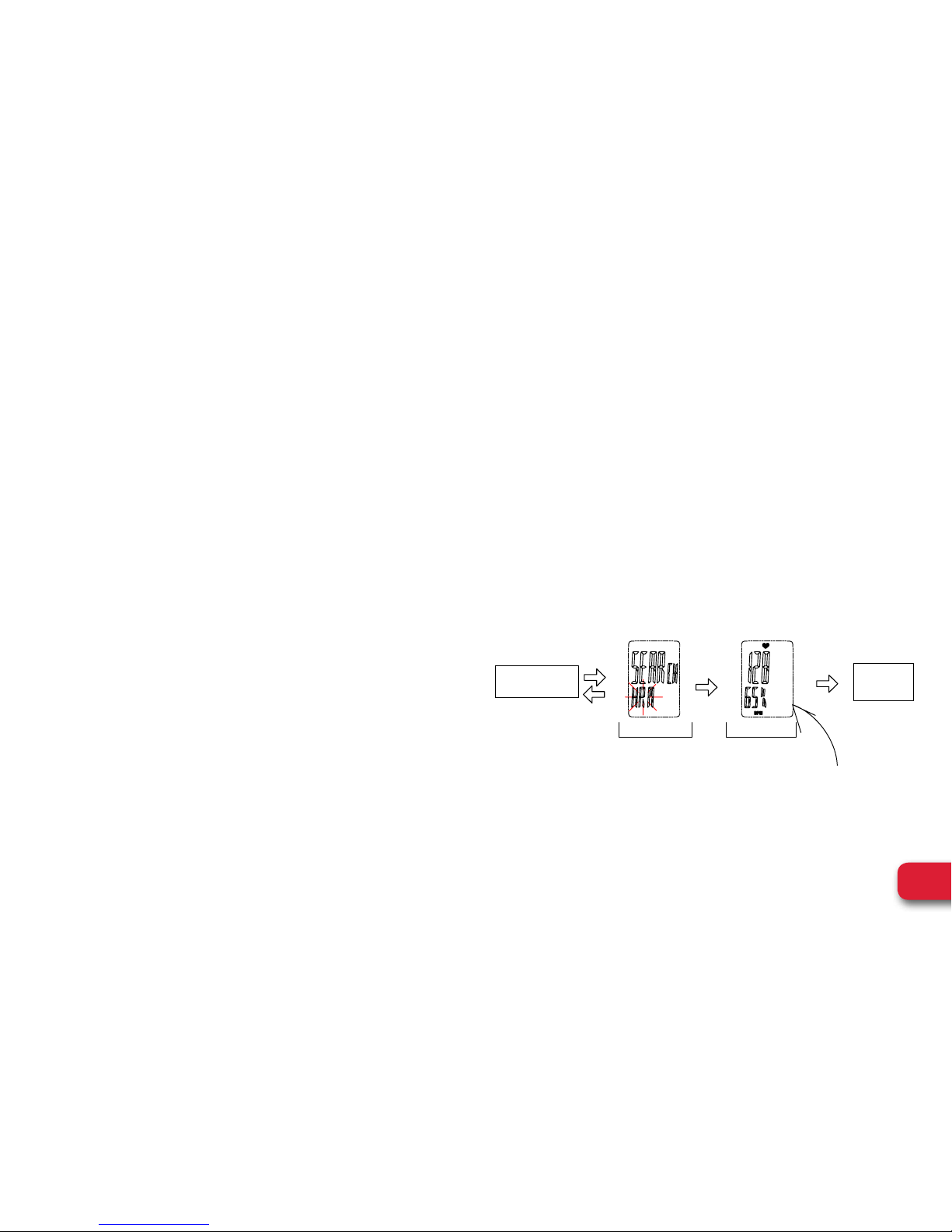
How to turn ON the Optical HRM:
• Press S5 while in TIME mode or CHRONO mode to
go to HRM mode. The watch will start searching for
your heart rate.
• The watch will display your Heart rate for 30 seconds.
The HR data is also locked for 30 seconds.
• During this time, S1 and S5 are locked and have
no function.
• During this period of 30 seconds, only S7 can exit
HRM mode.
• If you exit by pressing S7 within the 30 seconds
time frame, you cannot re-activate the HR mode
by pressing S5 again. You have to wait for the 30
seconds to lapse before you can re-activate the
HR mode.
• Without pressing any pushers, HRM mode will
automatically exit to previous mode after 30 seconds.
While running:
• If current HRM is below preset lower zone, down
arrow will blink to remind you to speed up, the
watch will alert you with a warning sound.
• If current HRM is above preset upper zone, up
arrow will blink to remind you to speed down, the
watch will alert you with a warning sound.
Please be sure to set your user info!
Press S5
Time mode
chrono mode
auto
Signal not yet received Signal received
%Max HR
Previous
view
OR After
2~3min
5~6 sec
auto
Page 8
6
WEGO™ PACE PLUS l User Manual
GENERAL OPERATIONS
CHRONO MODE
How to Start, take Lap, Stop and Reset:
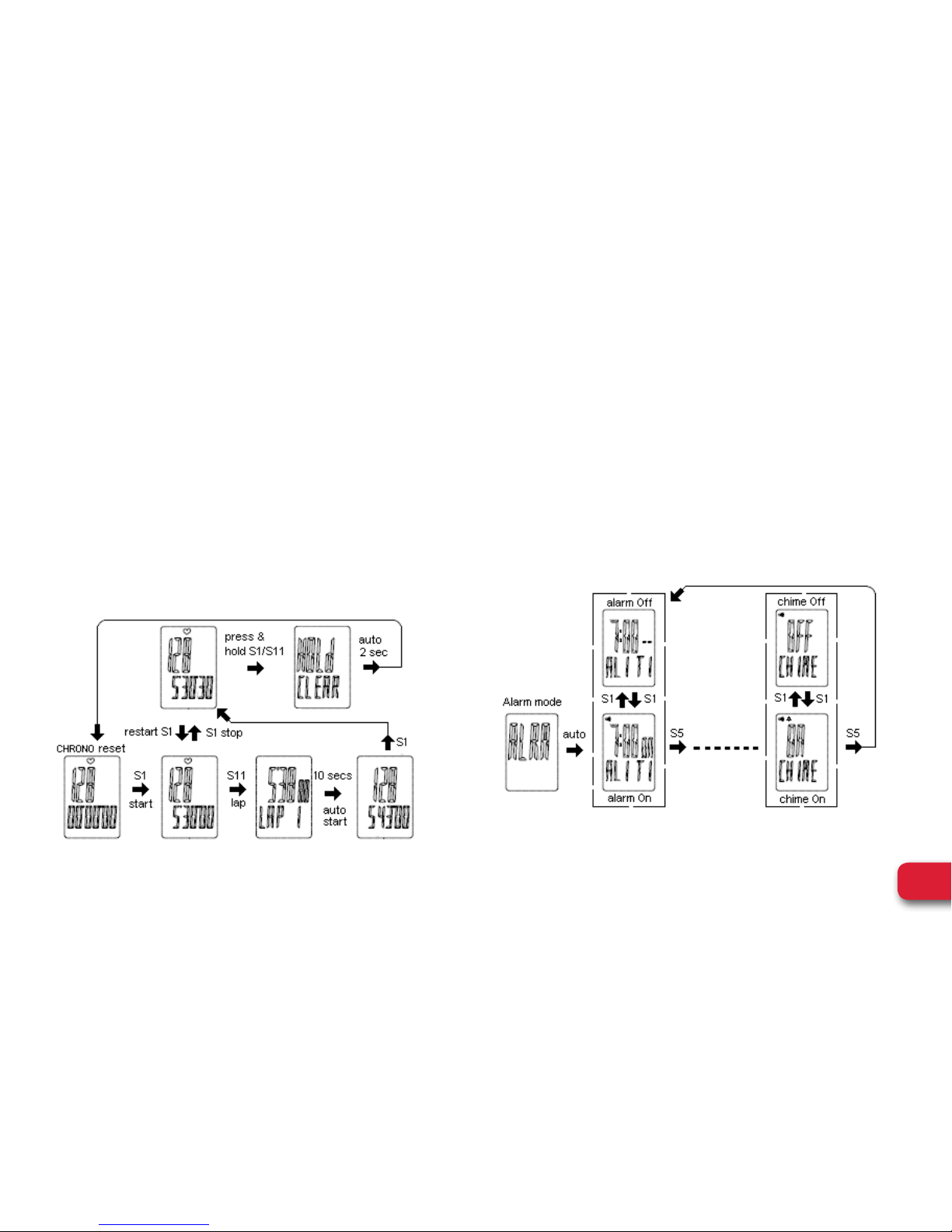
• Press S7 from TIME mode to go to CHRONO mode.
• Press S1 to start, stop, or re-start.
• Press S11 to take manual Lap. The display will freeze
for about 10 seconds to display the Lap number and
Lap time.
• Press & hold S1 or press & hold S11 to clear/reset.
ALARM AND CHIME MODE
How to set the Alarm and Chime in Alarm mode:
• Press S7 from TIME mode to go to ALARM mode.
• Press S5 to scroll Alarm 1 to 5 through Chime screen,
(The 5 alarms can be set individually in SET mode).
• Press S1 to On or Off the Alarm and Chime.
Page 9
7
WEGO™ PACE PLUS l User Manual
GENERAL OPERATIONS
SET MODE
How to set the various setting parameters in SET mode:
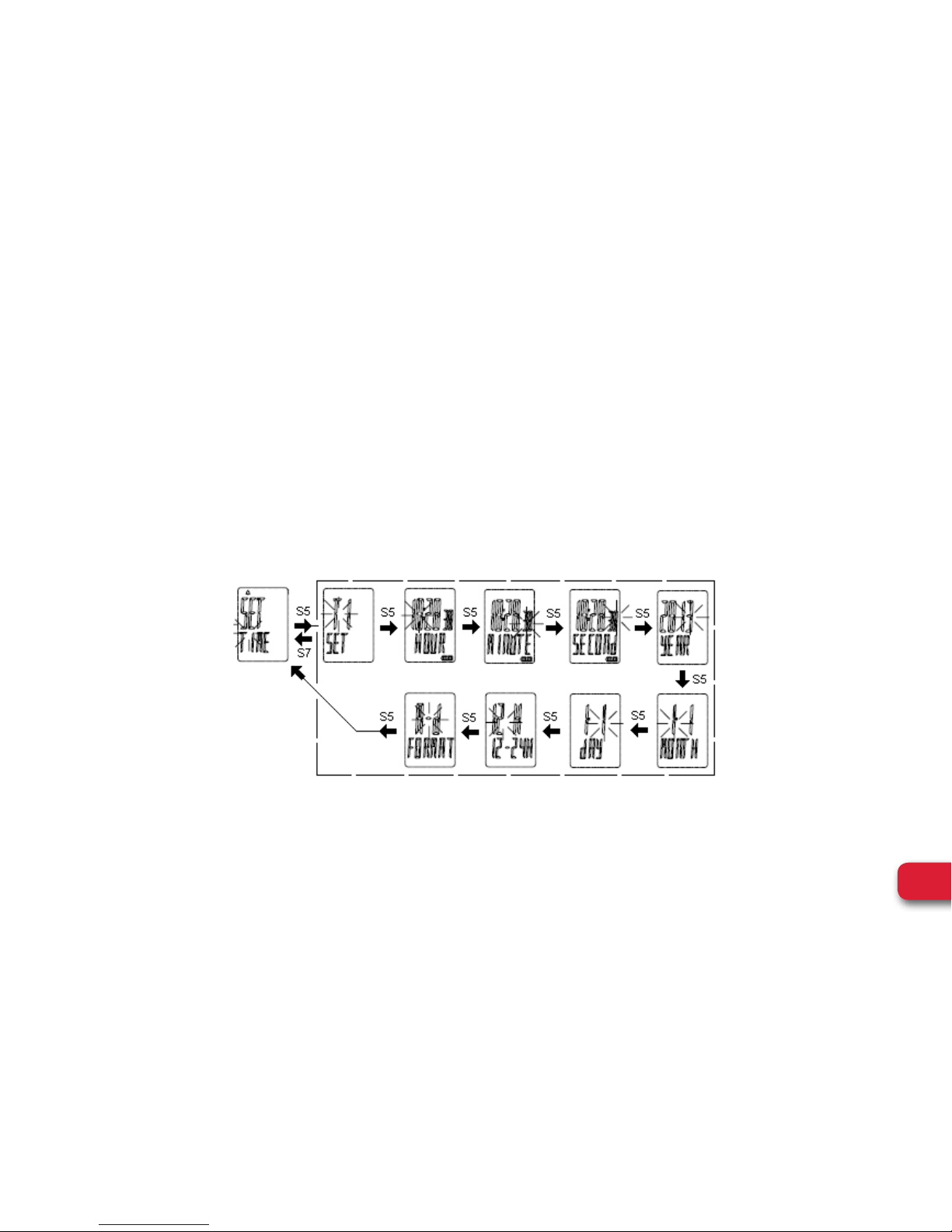
Press S7 from Time mode to go to SET mode and press
S1/S11 to set the following parameters: TIME, UNIT,
USER, HRM, CONTRAST, CHIME, and ALARM.
How to set the TIME:
• Press S5 while “TIME” is blinking. The watch will
display T1 or T2.
• Press S1/S11 to change the blinking digit.
• Press S5 to confirm.
• Press S7 to exit setting.
Note : In Time mode, press & hold S1 to change view from T1 to T2 and vice versa.
Page 10
8
WEGO™ PACE PLUS l User Manual
GENERAL OPERATIONS
SET MODE
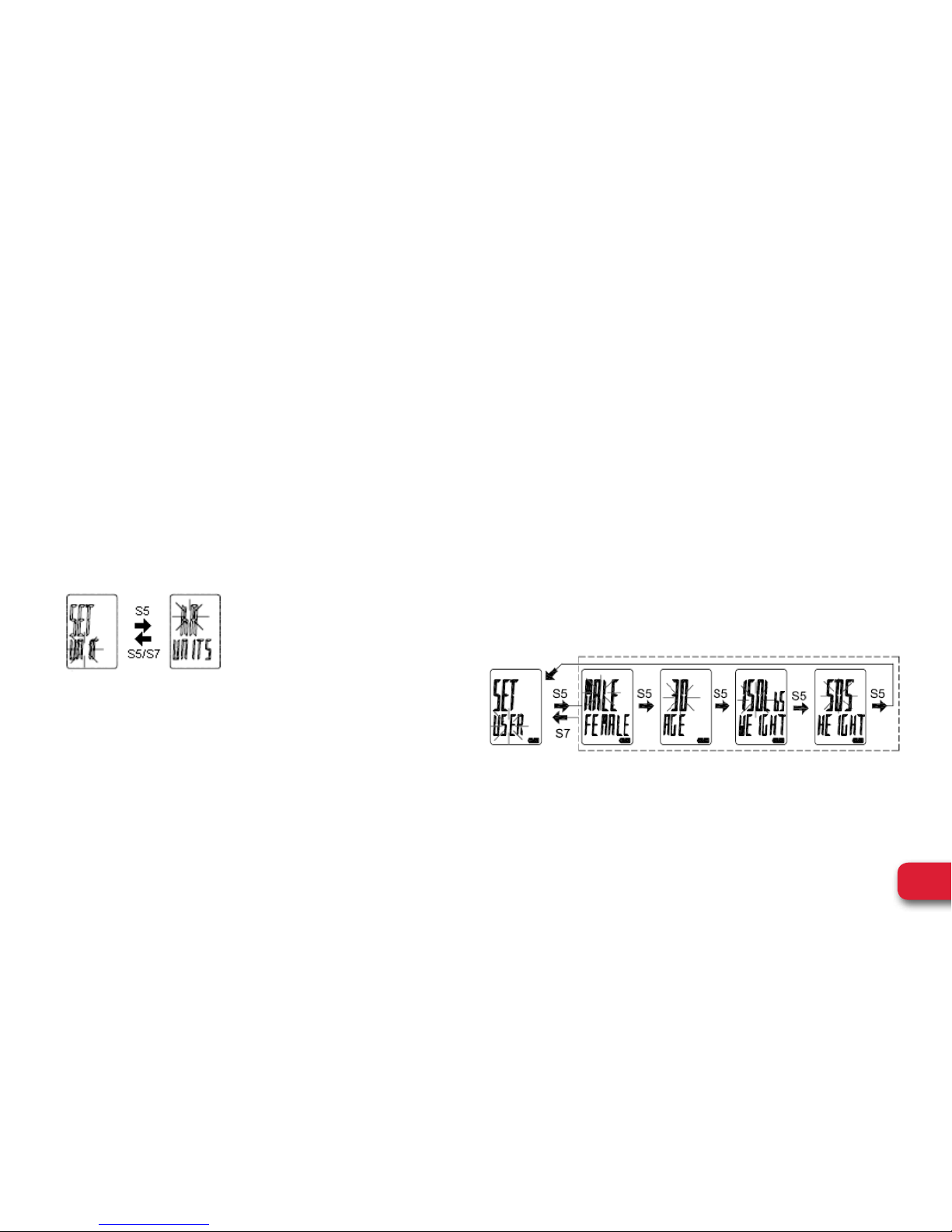
How to set the UNIT:
• Press S5 while “UNIT” is blinking.
• Press S1/S11 to change to KM or MI.
• Press S5/S7 to confirm.
• Press S7 to exit setting.
How to set the USER:
• Press S5 while “USER” is blinking. “MALE” will start
to blink.
• Press S1/S11 to change the blinking digit.
• Press S5 to confirm.
• Continue setting other parameters by pressing S5
• Press S1/S11 to change the blinking digit.
• Press S7 to exit to USER setting screen.
Page 11
9
WEGO™ PACE PLUS l User Manual
GENERAL OPERATIONS
SET MODE
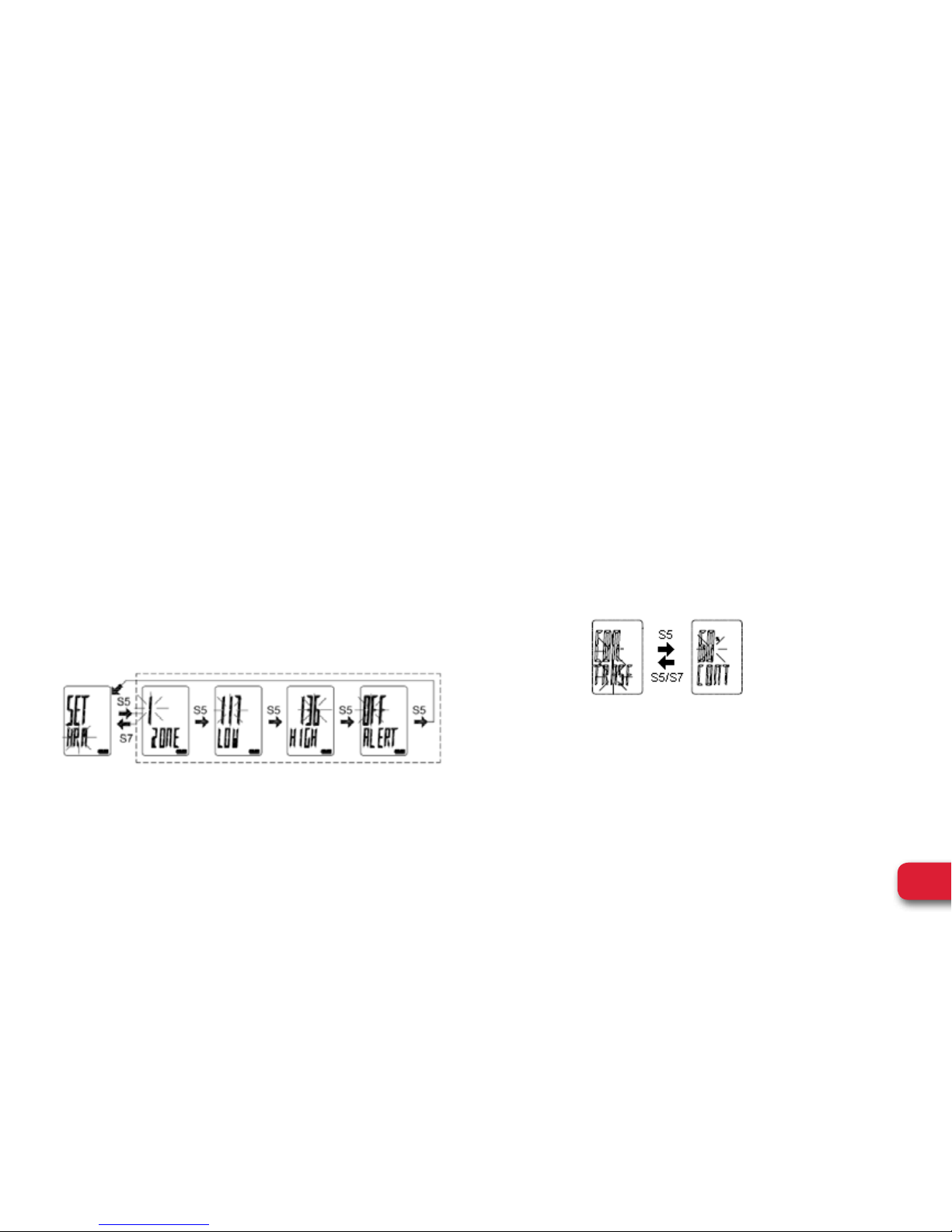
How to set the HRM:
• Press S5 while “HRM” is blinking. ZONE “1”will
start to blink.
• Press S1/S11 to change the blinking digit.
• Continue setting other parameters by pressing S5
• Press S1/S11 to change the blinking digit.
• Press S5 to confirm.
• Press S7 to exit setting.
Level 1: 60~70% Max HRM (default 117~136 bpm)
Level 2: 70~80% Max HRM (default 136~156 bpm)
Level 3: 80~90% Max HRM (default 156~175 bpm)
How to set the CONTRAST:
• Press S5 while “CONTRAST” is blinking.
Contrast percentage will start to blink.
• Press S1/S11 to change to your desired value
(contrast range is from 10 -100%).
• Press S5/S7 to confirm.
• Press S7 to exit setting.
Page 12
10
WEGO™ PACE PLUS l User Manual
GENERAL OPERATIONS
SET MODE
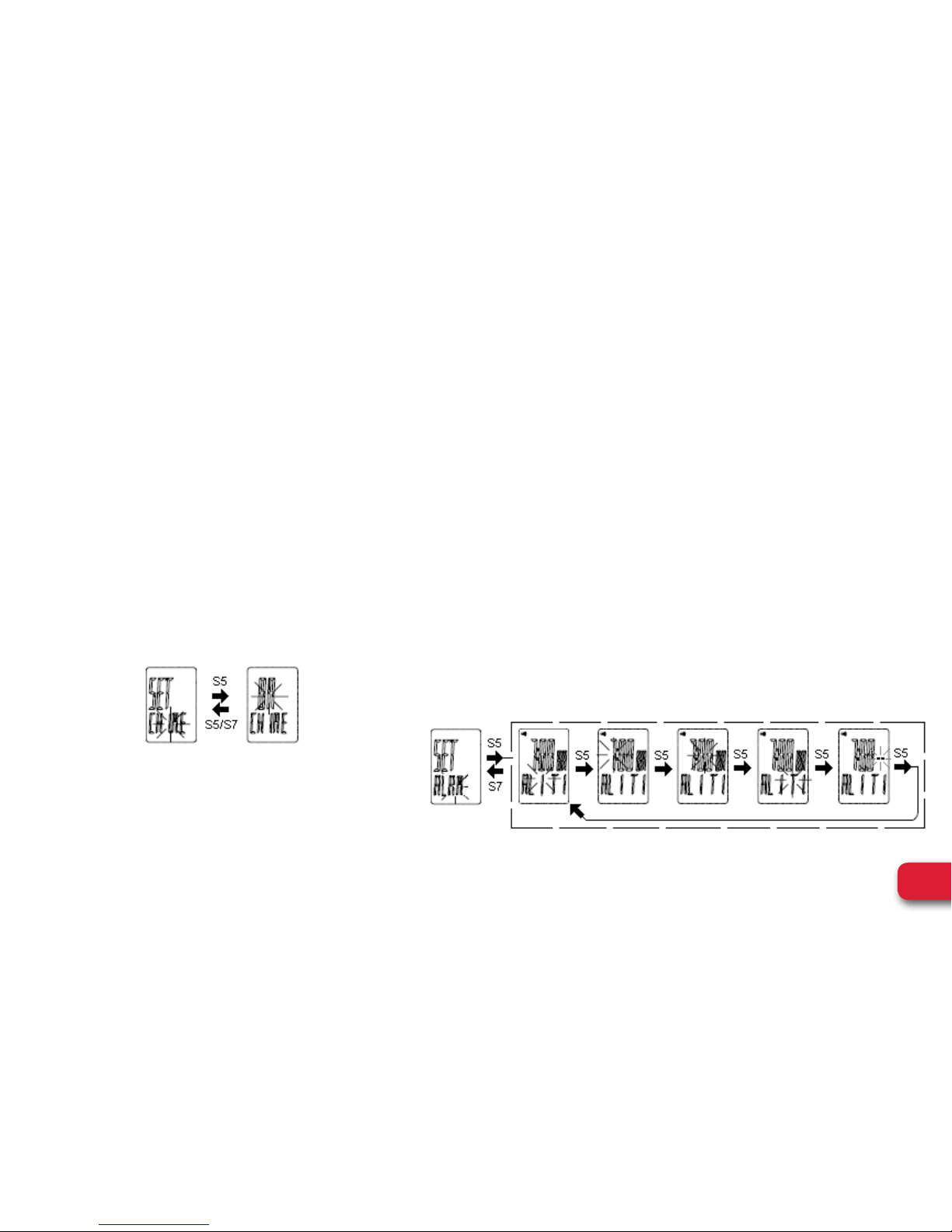
How to set the CHIME:
• Press S5 while “CHIME” is blinking. The watch will
display CHIME ON.
• Press S1/S11 to change to CHIME ON or OFF.
• Press S5/S7 to confirm.
• Press S7 to exit setting.
How to set the ALARM:
• Press S5 while “ALRM” is blinking. AL”1” digit will
start to blink.
• Press S1/S11 to toggle through Alarm 1 to alarm 2
(The 2 alarms can be set individually).
• Press S5 to set the selected Alarm number.
• Press S1/S11 to change the blinking digit.
• Press S5 to confirm.
• Continue setting other parameters by pressing S5.
• Press S1/S11 to change the blinking digit.
• Press S7 to exit to ALARM setting screen.
Page 13

11
WEGO™ PACE PLUS l User Manual
GENERAL OPERATIONS
HELP FUNCTIONS
• If the Heart rate data displayed in the watch is
not stable or erratic, try to move the watch along
your forearm within the best wearing position as
illustrated in page 3.
• Fasten the watch snugly so that the optical sensor
makes a tight contact with your skin. The tighter
you can wear the watch the better.
• Your skin should be free of SCARS or any other
object that will interfere with the sensor.
• The heart rate is taken directly through your skin to
the watch sensor, so it is very important that there are
no obstructions that will interfere with the detection of
the Heart rate.
• Try wearing the watch on your other wrist.
Page 14

12
WEGO™ PACE PLUS l User Manual
REGULATORY & SAFETY NOTICES
WARNING: Heart rate monitoring systems maybe
inaccurate. Over exercising may result in serious injury
or death. If you feel faint stop exercising immediately.
This is not a medical device. Should not be used to
diagnose or treat any medical condition. Consult your
doctor for prevention, diagnosis and treatment. See
the user guide for further guidance.
This is not a toy. Keep away from children.
BAT T E RY SAFE T Y IN F O R MATIO N
• Do not allow children to play with button cell
batteries, and keep button cell batteries out of your
child’s reach.
• Never put button cell batteries in your mouth for any
reason as they are easily swallowed accidentally.
• If a button cell battery is ingested, immediately seek
medical attention.
• Non-rechargeable batteries are not to be recharged
• Rechargeable batteries must be removed before
recharging
• Rechargeable batteries should only be recharged
under adult supervision
• Exhausted batteries are to be removed
• Do not mix old and new batteries
• If this product will not be used for an extended period
of time, remove the batteries from the product
• The supply terminals are not to be short-circuited
• Batteries are to be inserted with correct polarity
• Clean the battery contacts and also those of the
product prior to battery installation
• As always, dispose of batteries in an eco-friendly
manner
IM P O RTA N T
Do not press the Button under water.
Do not wear product while diving.
Page 15
13
WEGO™ PACE PLUS l User Manual
REGULATORY & SAFETY NOTICES
The WEEE symbol on the product or on its packaging
indicates that the product must not be disposed of
with normal household waste. Instead such marked
waste equipment must be disposed of by arranging to
return to a designated collection point for the recycling
of waste electrical and electronic equipment. By
separating and recycling this waste equipment at the
time of disposal will help to conserve natural resources
and ensure that the equipment is recycled in a manner
that protects human health and the environment.
Keep this manual and packaging for future reference
since it contains important information
Page 16

14
WEGO™ PACE PLUS l User Manual
BATTERY REPLACEMENT
Battery replacement will be required from time to
time, and should occur when:
1. The display fades in part or completely
2. The heart rate function will not activate
3. Backlight System does not operate
4. The battery icon is visible
To replace the battery of your WeGo
TM
Heart Rate
Watch, we recommend you take it to a watch repair
service center or certified jeweler. This will ensure
that the water resistance will be retained after
battery replacement.
• NEVER attempt to disassemble or service your unit.
• DO NOT expose the unit to extreme heat, shocks,
magnetic fields, electrical noise, strong vibration or
long-term exposure to direct sunlight.
• DO NOT drop or step on the watch.
• TO CLEAN THE UNIT: wipe with a lightly moistened
cloth. Apply mild soap to the area if there are
stubborn stains or marks. Do not expose the unit
to strong chemicals such as gasoline, cleaning
solvents, acetone, alcohol or insect repellents, as
they may damage the unit’s seal, case and/or finish.
• STORE the unit in a dry place when you are not
using it.
CARE & MAINTENANCE
Page 17

15
WEGO™ PACE PLUS l User Manual
POTENTIAL CAUSES FOR NO HEART RATE READING OR LONG RESPONSE TIME
CAUSE: Dry skin
SOLUTION: Apply conductive gel thoroughly to chest
area (for Chest-Strap measurement) or finger (for
Finger-Touch measurement). Tap water may help if
conductive gel is not available.
CAUSE: Chest strap is not contacting with skin
SOLUTION: Make sure the chest strap is firmly over
the chest and the Watch is securely on wrist.
CAUSE: Muscle tremors caused by pressing on sensors
too hard (finger touch)
SOLUTION: Decrease finger pressure on the Sensor Pads.
CAUSE: dead skin on wrist, finger or chest.
SOLUTION: Rub off excessive dead skin with a towel.
CAUSE: a thin layer of body grease insulates the ECG
signal preventing the chest strap or watch from detecting
ECG heart rate
SOLUTION: Wipe chest/wrist and the back of Chest Strap/
watch with a tissue or soft towel.
CAUSE: Hairy skin
SOLUTION: Apply conductive gel to chest area or wrist.
CAUSE: Low battery
SOLUTION: Replace the battery in watch/transmitter
and try again.
CAUSE: Electrical field interference from RF devices (cheststrap measurement) such as Overhead power lines, etc.
SOLUTION: Leave the area where RF source potentially exist.
TROUBLE SHOOTING
Page 18

16
WEGO™ PACE PLUS l User Manual
GUARANTEE CERTIFICATE – FOR PURCHASES MADE IN THE U.S.
If at any time within one (1) year from the purchase date of this product, it fails to perform properly because
of defects in material or manufacturing, return it prepaid to:
EB SPORT GROUP, 585 OAK RIDGE ROAD, HAZLETON, PA 18202
Complete this Guarantee Certificate and enclose it (or a copy of it) with the product. Please contact Customer
Service at 866-694-4575 or [email protected] for a return authorization number, prior to
sending in your product.
(PLEASE PRINT CLEARLY)
Name: Phone:
Address:
Store Purchased From:
Date of Purchase : Purchase Price:
State: Zip :
Problem With Product:
WARRANTY
Page 19

17
WEGO™ PACE PLUS l User Manual
REPLACEMENT
This product has been carefully designed, manufactured and packaged. If any parts are missing or damaged,
please contact us at the address above and we will replace the unit at no charge. (Guarantee does not cover
crystal or battery.)
FOR PURCHASES MADE IN THE UK
Should you experience problems with this item, please return it to the point of purchase. This will not affect
your statutory rights. Alternatively return it to the address shown below for a repair/replacement.
EB Brands UK, Berkeley Business Park, Wainwright Road, Worcester WR4 9FA
www.JoinWeGo.com
Distributed in the UK by EB Brands UK, Worcester WR4 9FA
WARRANTY
Page 20
18
WEGO™ PACE PLUS l User Manual
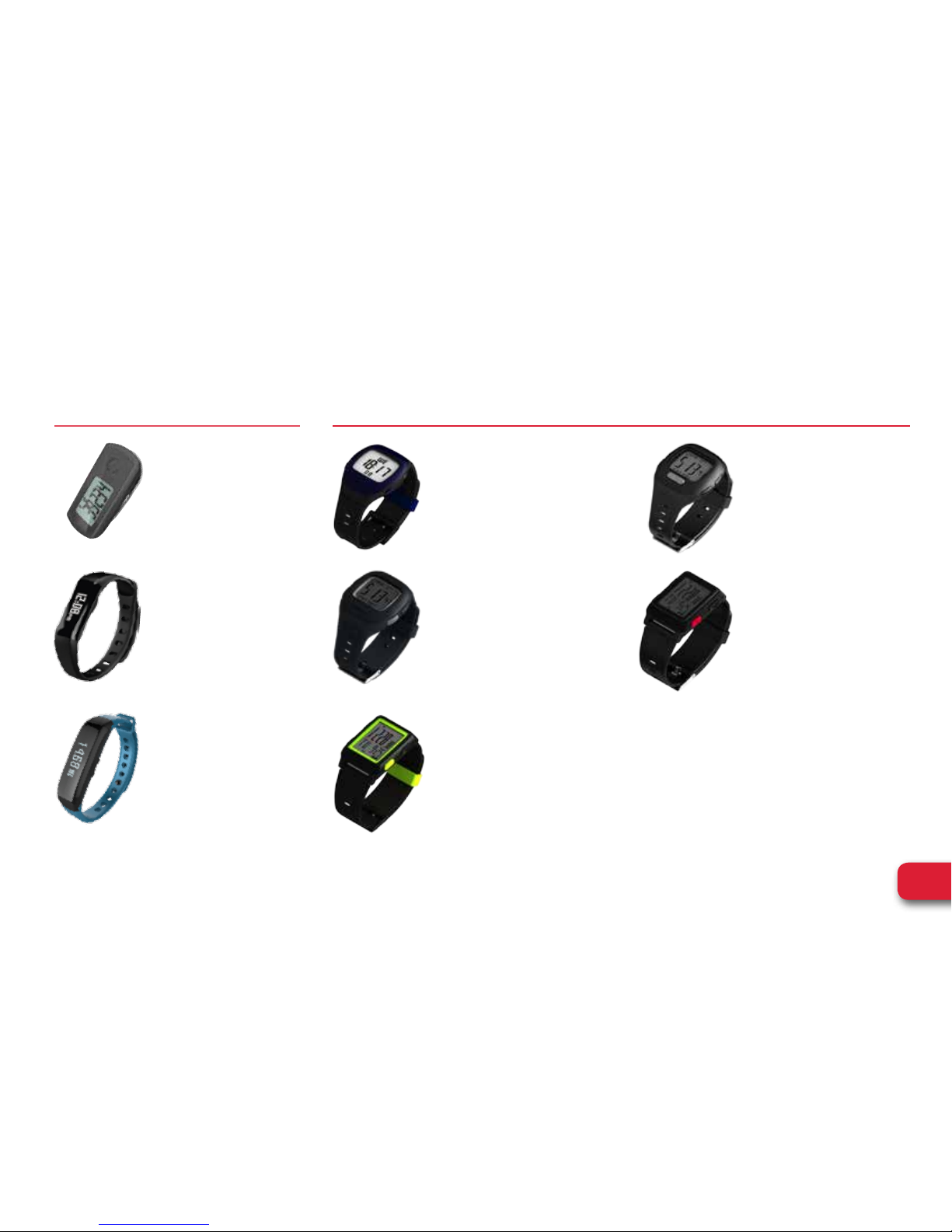
HEART RATE MONITORS
THE WEGO™ LINE OF PRODUCTS
ELITE
+
• Sleep Quality
• Goal Setting
• User Replaceable Battery
• Sync Wireslessly
HYBRID
+
• Sleep Quality
• Goal Setting
• Sync Wireslessly
• Water Resistant
• Replaceable Straps
• Silent Alarm Vibration
REL AY
• Caller ID/Text Notification
• Auto Sleep
• Sleep Quality
• Sync Wireslessly
• Water Resistant
• Replaceable Straps
• Silent Alarm Vibration
ACTIVITY TRACKERS
CARDIO/ENDURO 100
• 5.3k Chest Strap
• Time, Chronograph, He art Rate
• BPM, HR Zone/Alarm
• Date, Lap/ Split Time
• Water Resistant 50M
PULSE/ PAC E
• No Chest Strap Required
• Time, Alarm, Chronograph, HR
• HR Zone/Alarm, BPM and %
Max HR Display
• Date, Dual Time Zone,
Daily Alarms, Lap /Split Time
• Water Resistant 50M
PULSE/ PACE PLUS
• Optical Heart Rate Technolog y
• Time, Chronograph, HR
• Quick On-Demand HR Reading
• HR Zone, % Max HR
• Custom User Profile
• Water Resistant 1ATM
ENDURO 200
• 5.3k Chest Strap
• Time, Alarm, HR, Data Record
• HR Zone/Alarm, Avg/Max HR, BMI
• Run/Lap Memory, Calorie Burn,
Recovery HR Monitor/Timer
• Dual Time Zone, Daily Alarms,
Lap/ Split Time, Night Mode
• Water Resistant 50M
ENDURO 300
• Optical Heart Rate Technolog y
• Time, Alarm, Chronograph, HR
• HR Zone, % Max HR, Calorie Burn
• Custom User Profile
• USB Rechargeable Battery and
Charger Included
• Water Resistant 1ATM
WeGo™ is the fitness motivator that
makes it easy to track daily activities.
These easy to use activity trackers
and heart rate monitors can help
support a happy, healthy lifestyle.
Page 21

JoinWeGo.com
WEGO
™
PACE PLUS l User Manual
CAUTION: This is not a medical device. Should not be used to diagnose or treat any medical condition. Consult your doctor for prevention, diagnosis and
treatment. See the user guide for further guidance. This is not a toy. Keep away from children.
CALIFORNIA PROPOSITION 65 WARNING : This product may contain chemicals known to the State of California to cause cancer, birth defects and/or
reproductive harm.
WARNING: Heart rate monitoring systems may be inaccurate. Over exercising may result in serious injury or death. If you feel faint stop exercising immediately.
Made in China. WeGo™ is a trademark of EB Sport Group, Hazleton, PA 18202. Distributed in the United Kingdom by EB Brands (UK), Worcester WR4 9FA.
All Rights Reserved ©2015. Designed and engineered by EB Labs.
 Loading...