

Page 1
General Information
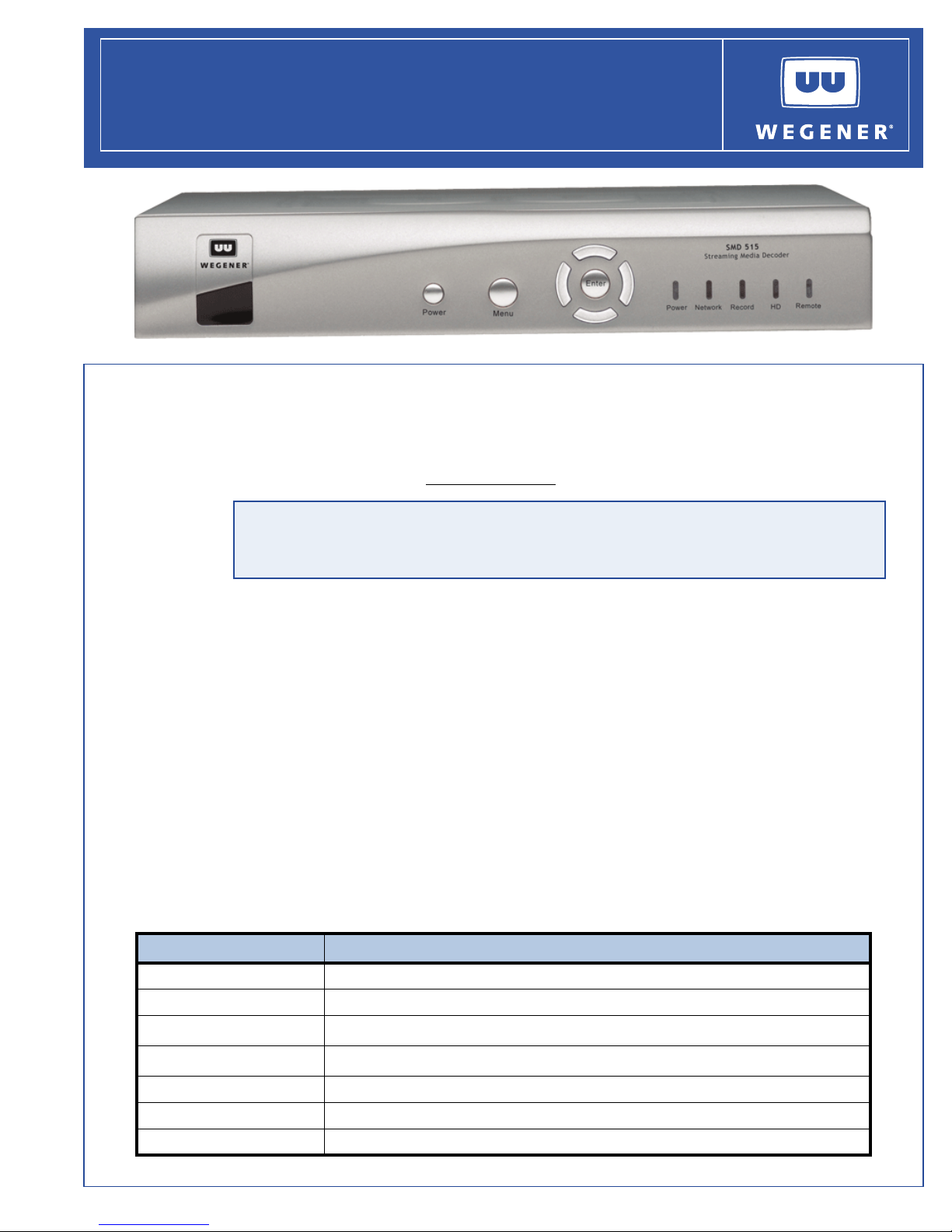
The WEGENER SMD 515 accelerates access to High Definition (HD) theater-quality video. The
SMD 515 supports MPEG-4 AVC (also known as ITU-T H.264) HD decoding. AVC HD can deliver
brilliant wide screen pictures with as little as 6Mbps of data. Additional information may be found
on the
This product incorporates copyright protection technology that is protected by U.S. patents and
other intellectual property rights. Use of this copyright protection technology must be
authorized by Macrovision, and is intended for home and other limited viewing uses only unless
otherwise authorized by Macrovision. Reverse engineering or disassembly is prohibited.
SMD 515
Streaming Media Decoder
Installation Quick Start Guide
WEGENER web site at www.wegener.com.
Unpacking and Inspection
The box containing the unit should include:
The SMD 515 Unit A UL Safety Sheet
This Quick Start Guide An AC Power cord
Component Video Cable Power Supply Module
Composite Video/Stereo Audio Cable IR remote control (optional)
Carefully unpack the unit and the ac power cord and inspect for obvious signs of physical damage
that might have occurred during shipment. Any damage claims must be reported to the carrier
immediately. Be sure to check the package contents carefully for important documents and
materials.
NOTE: Save the original packing materials and shipping containers in case the unit must be
returned for repair. Packing the unit in another container in such a way that the unit is
damaged will void the warranty.
Environmental Operating Conditions and Physical Specifications
The table below lists the SMD 515 environmental limits and physical specifications
Item/Limit Specification
Use Indoor
Altitude Up to 2000 meters
Temperature Range
Relative Humidity (max.)
o
C to 45o C
10
80% for temperatures up to 31
o
C decreasing linearly to 45o C
Weight 5 pounds or 2.25 kilograms with PVR option installed
Dimensions (H x W x D) 2.1" x 10.6" x 9.0" or 53.3 mm x 269.2 mm x 228.6 mm
Input Power Rating 12VDC 2.3A
www.wegener.com 800071-01C Printed in USA
Page 2
QUICK START GUIDE
Location and Mounting
The SMD 515 unit is set up for desktop operation. Maintain a clean, dry environment for the unit.
Desktop Installation
To s e t u p t h e SMD 515 unit in a desktop environment, place the unit on a flat surface sturdy enough
to support the unit's weight. Place it where it will not be subject to spills or impacts. Route cables to
the unit so that they will not be hit or pulled, causing damage to the connectors or to the unit itself.
Make sure that there is a sufficient flow of cool air so that the unit's operating ambient temperature
range is not exceeded.
NOTE: If degraded picture quality is observed while viewing copy-protected VOD movies, connect
the set-top box directly to the TV set. Do not connect through a VCR.
Circuit Protection and Grounding
When connecting the SMD 515 unit to the power supply, review the ratings of all equipment in the
circuit to ensure that the branch circuit, as well as the power source, will not be overloaded. Also
make sure that a protected power strip is used to attach the unit to the power supply.
WARNING: FCC-Mandated Suppression of Radio Frequency Emissions
This is a
Class A product. In a domestic environment this product may cause radio
interference for which the user may need to take mitigating action. If the Ethernet port
has a cable connected to it, that cable must be properly shielded and grounded to
minimize RF emissions that could interfere with nearby equipment.
Front and Rear Panel Views
Front Panel and Functions
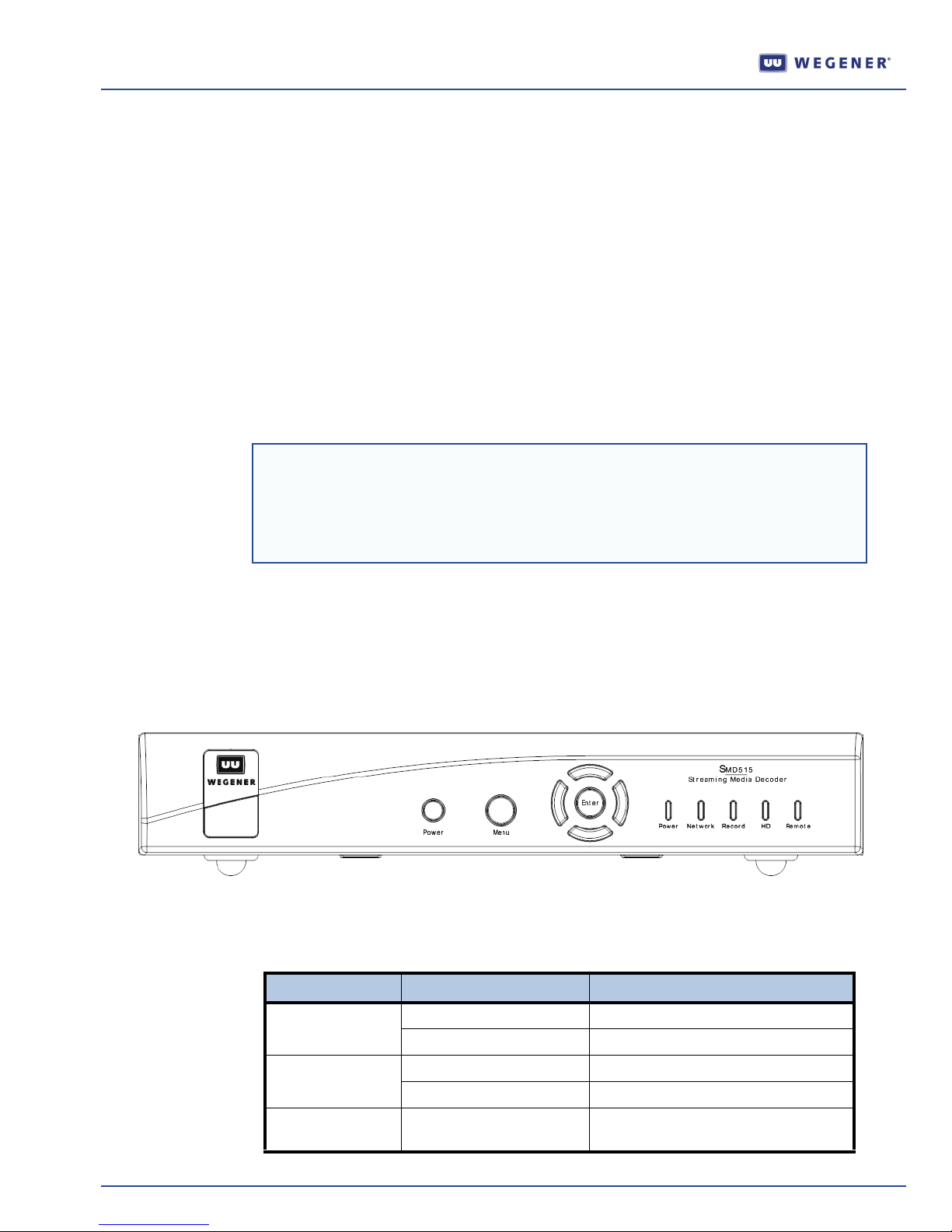
The front panel of the
Tab l e 1 shows the LED indicators and state.
SMD 515 is shown in Figure 1.
Figure 1: SMD 515 front panel
LED Indicator Color and State Description
Power Green - constant Decode mode (ON)
Network Green - flashing Ethernet connection is up
Record Red - constant Recording if equipped with PVR
2 800071-01C www.wegener.com
Table 1: SMD 515 LED indicators and state
none Standby mode (OFF)
Green - constant Decoding a multicast stream
(Personal Video Recorder)
Page 3
QUICK START GUIDE
CAUTION
RISK OF ELECTRIC SHOCK
DO NOT OPEN
DO NOT EXPOSE TO RAIN OR MOISTURE
DC IN
12V 2.3A
ANT IN
4 - CH - 3
TV OUT
HDMI
R - AUDIO - L VIDEO
Pr YPb
S - VIDEO S / PDIF S / PDIF USB
ETHERNET
are trademark s of Do lby La boratories .
Dolby and the double- D symbol
Dolby Laboratories.
Manufac tured under lice nse fro m
5,315,448; 6,381,747; and 6,516,132.
4,631,603; 4,819,098;4,907,093;
Macrov ision U.S . Patent Nos .
LED Indicator Color and State Description
HD Green - constant Playing a High Definition stream
Remote Green - flashing Processing remote control commands
Tab l e 2 shows the front panel buttons and functions.
Table 2: SMD 515 front panel buttons and functions
Button Function
Power Toggles between Decode (ON) and Standby (OFF) modes
Menu Launches system setup screen
Left Navigates the setup screen or selects the previous available audio
program in the current multicast stream
Right Navigates the setup screen or selects the next available audio program
in the current multicast stream
Up Selects the next higher number multicast channel
Down Selects the next lower number multicast channel
Enter (Select/OK) Makes a selection in the setup screen
Rear Panel and Connectors
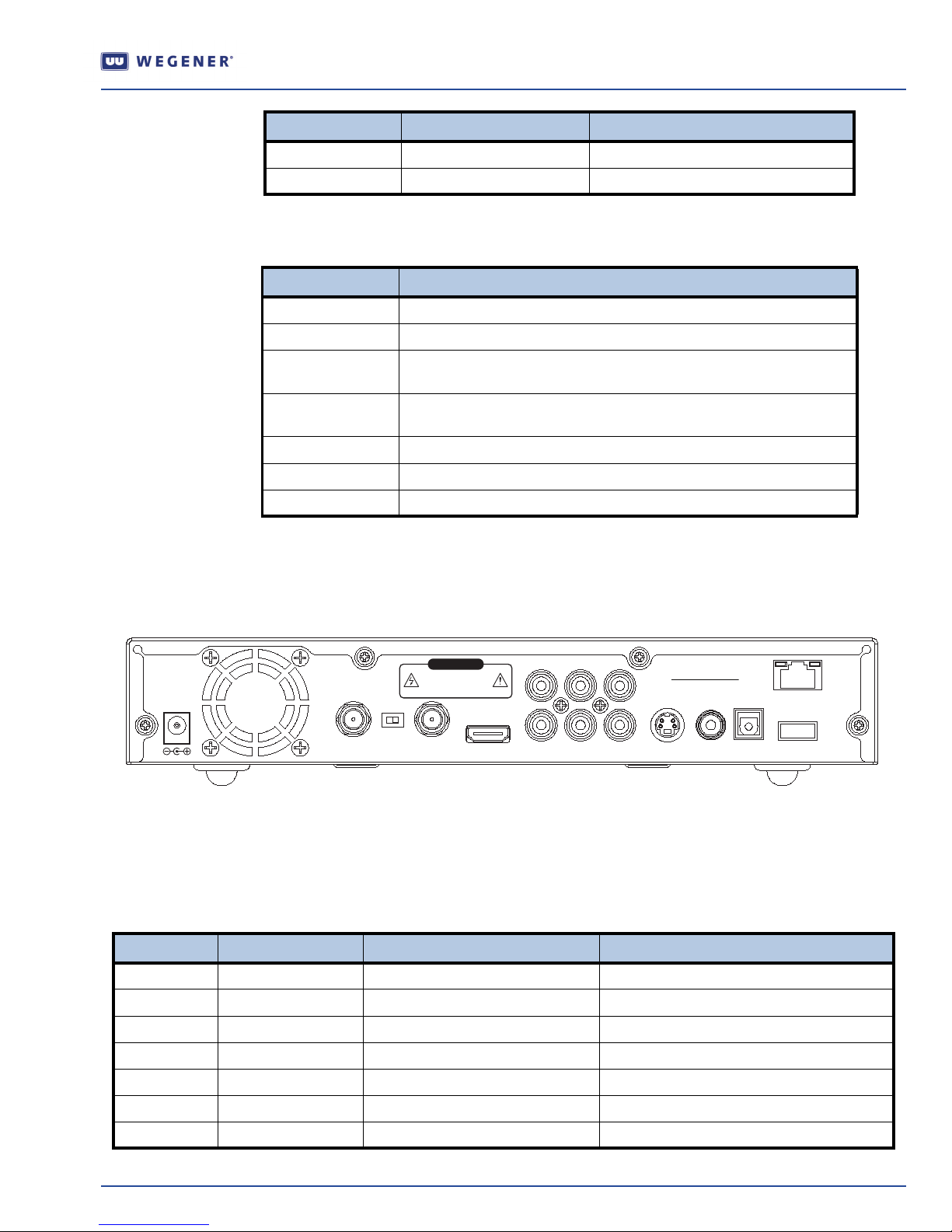
Figure 2 shows the rear panel of the SMD 515.
Figure 2: SMD 515 Rear Panel and Connectors
Connector/Pin-out Information
Tabl e 3 lists connector types, pin numbers, and signal descriptions for each of the SMD 515 rear
panel connectors.
Table 3:SMD 515 rear panel connector and switch descriptions
Name Ty pe Signal Name Signal Description
DC IN Male Power Jack Power +12 VDC @ 2.3A
TV Out Type F Channel 3 or 4 Output to TV Modulated NTSC
4 - CH - 3 Switch Select Channel 3 or 4 Output to TV Modulated NTSC
ANT IN Type F Input from TV Antenna Modulated NTSC
Pr RCA Phono Component Pr Component SD/HD Video
Pb RCA Phono Component Pb Component SD/HD Video
Y RCA Phono Component Y Component SD/HD Video
www.wegener.com 800071-01C 3
Page 4
QUICK START GUIDE
Name Ty pe Signal Name Signal Description
R - Audio RCA Phono Right Audio
L - Audio RCA Phono Left Audio Audio
Audio
Audio Formats supported:
16 bit PCM
MPEG1 Layer II
MPEG4 LC
Dolby Digital *
AAC
Video RCA Phono Composite Video Composite SD Video
S-VIDEO Mini DIN Y/C separated video Separated SD Video
S/PDIF RCA Phone S/PDIF Coax Digital Audio
S/PDIF Fiber S/PDIF Optical TosLink Digital Audio
Ethernet RJ-45 Ethernet 10/100 BaseT
USB USB USB USB
HDMI Type A receptacle High Definition Multimedia Interface Digital Video and Digital Audio
NOTE: * Dolby and the double-D symbol are trademarks of Dolby Laboratories.
Manufactured under license from Dolby Laboratories.
Operation
When the SMD 515 is connected to a video monitor, you can use the Setup Screens with the
optional IR remote control to setup the:
IP address
Audio/Visual options
Closed Captioning and player application
Use the optional IR remote control or the front panel’s Enter and arrow buttons to navigate and
select options for these
Setup Screens.
IP Address Setup
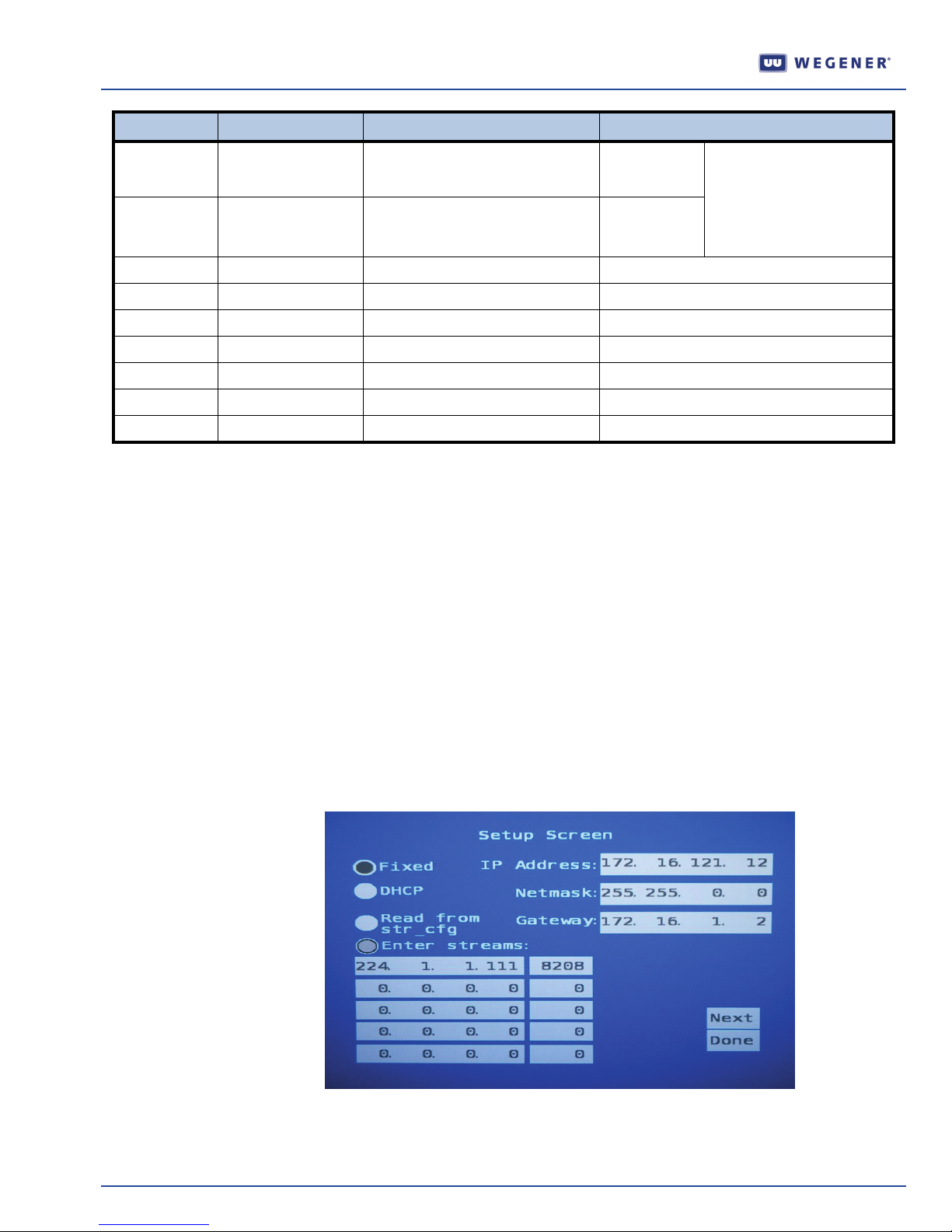
1) From the front panel or the optional IR remote control, press Menu to begin the setup. The
Setup Screen shown in Figure 3 displays on the video monitor.
Figure 3: SMD 515 Setup Screen
2) Navigate this setup screen to select:
a fixed static IP address or a temporary DHCP (Dynamic Host Configuration Protocol) address from
your network.
4 800071-01C www.wegener.com
Page 5
QUICK START GUIDE
the network’s Netmask and Gateway address (requires optional IR remote).
up to five multicast IP addresses / ports.
3)
Select Next to continue to the AV Se t up Scre e n or Done to complete the setup.
NOTE: Contact your system administrator regarding the preferred IP address setup and for any
addresses necessary to complete this setup.
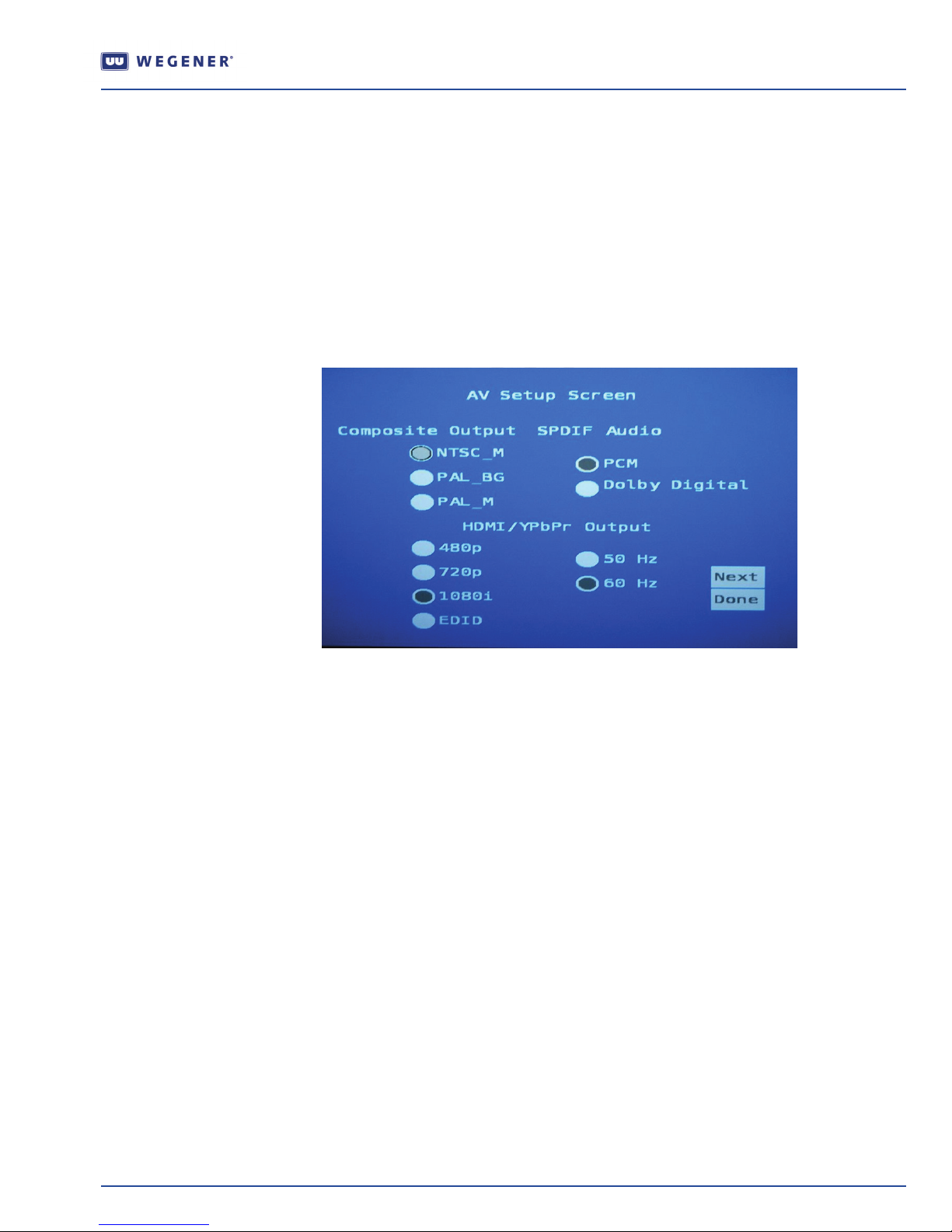
AV (Audio/Visual) Setup
1) From the initial Setup screen, select Next to navigate to the AV Setup Screen. The AV Setup
Screen
shown in Figure 4 displays on the video monitor.
Figure 4: SMD 515 AV Setup Screen
2) Navigate this setup screen to set the:
Composite output format.
S/PDIF digital audio output format.
format/resolution and vertical refresh rate of the HDMI and Component (YPbPr) outputs.
NOTE:
Selecting EDID causes the SMD 515 to use the preferred format in the EDID data from the
TV.
3) Select Next to continue to the Options Setup Screen or Done to complete the setup.
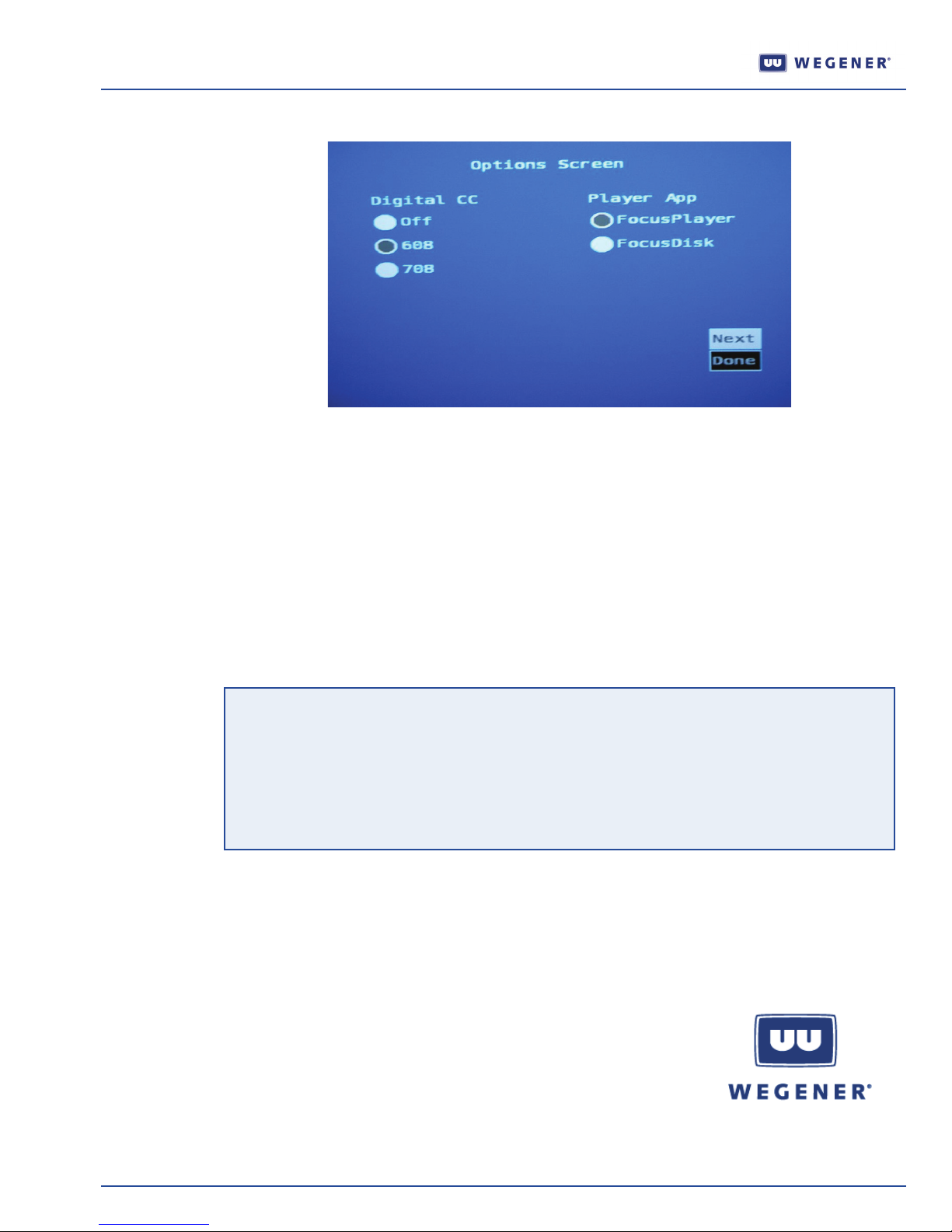
Options Setup
The
Options Screen allows you to set Closed Captioning and select a player application.
From the AV Setup Screen screen, select Next to navigate to the Options Screen. The Options
1)
Screen
shown in Figure 5 displays on the video monitor.
www.wegener.com 800071-01C 5
Page 6
QUICK START GUIDE
2) Navigate this setup screen to:
Enable or disable digital closed captioning. If selected, the EIA 608 or EIA 708 closed captions
Select a player application. The FocusDisk application tests the PVR functions and should not be
Figure 5: SMD 515 Options Screen
display as an overlay on the video.
used for prolonged periods of time.
3)
NOTE: This utility may be replaced by a user interface supplied by your system operator. Please
Warranty
The following warranty applies to all Wegener Communications products:
All Wegener Communications products are warranted against defective materials and
workmanship for a period of one year after shipment to customer. Wegener Communications'
obligation under this warranty is limited to repairing or, at Wegener Communications' option,
replacing parts, subassemblies, or entire assemblies. Wegener Communications shall not be
liable for any special, indirect, or consequential damages. This warranty does not cover parts or
equipment that have been subject to misuse, negligence, or accident by the customer during
use. All shipping costs for warranty repairs shall be prepaid by the customer. There are no other
warranties, express or implied, except as stated herein.
Technical Support
In the event that the unit fails to perform as described, contact Wegener Communications
Customer Service at:
Select Done to complete the setup.
contact your system operator for operation instructions.
Corporate Office: Service Department:
WEGENER WEGENER
11350 Technology Circle Customer Service
John's Creek 359 Curie Drive
Duluth, GA 30097 Alpharetta, GA 30005
6 800071-01C www.wegener.com
 Loading...