

Page 1

Nowbox-HD54 Set
Top Box User Manual
Page 2
NowBox-HD54 Mini user manual
Guangzhou WebViews Digital Technology Co., Ltd
Contact us:Rm.133,Tangyun Building of North Keyun Rd.,Tianhe District,Guangzhou,China/ +86
020-38666435/85523605
1.Product introduction
1.1 Brief introduction
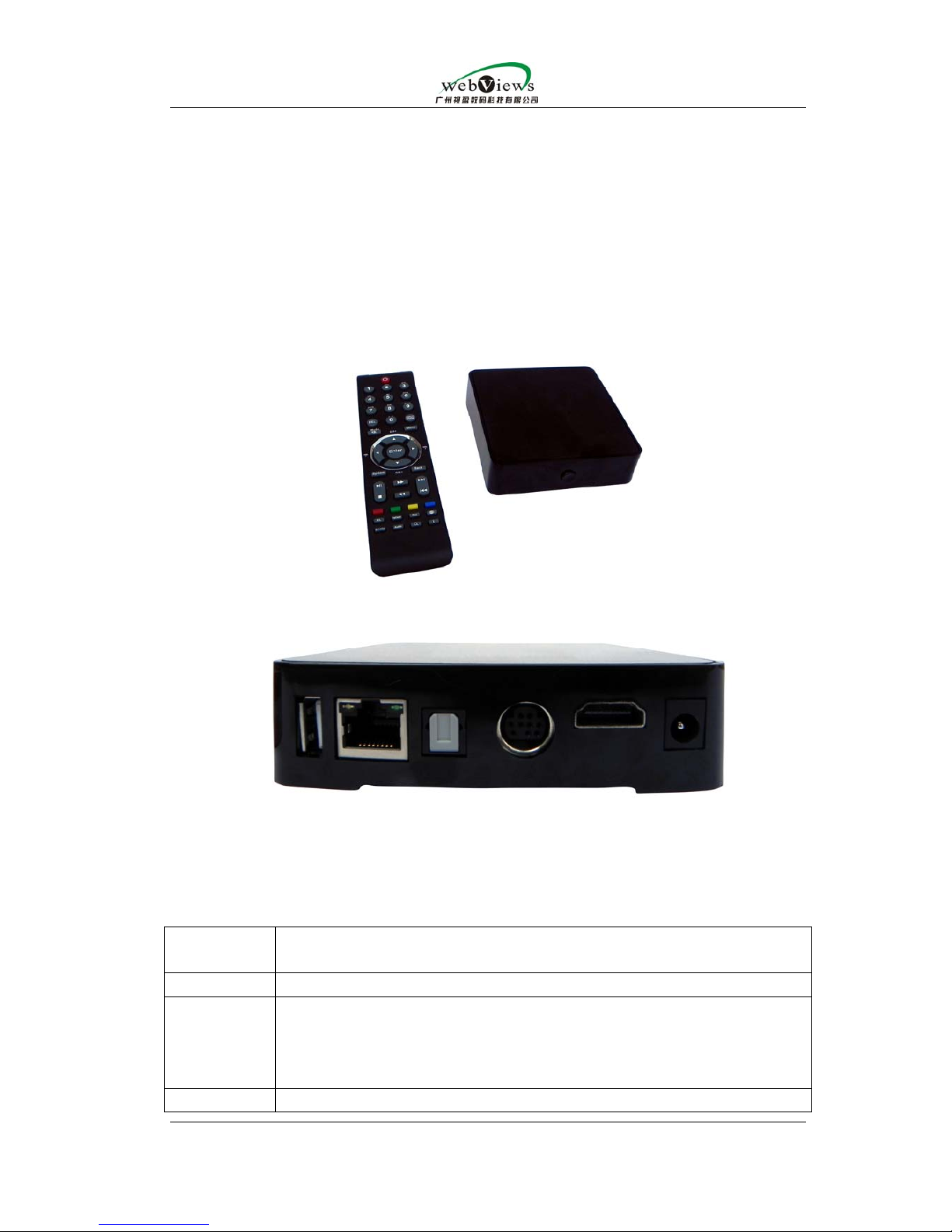
NOXBOX-HD54 is an easy-handling streaming media IPTV STB with high
definition and high stability.It supports multiple video encoding formats such as
MPEG-1,MPEG-2,MPEG-4,WMV9,H.264,VC-1 and etc.;supports many network
transmission protocols such as RTSP,UDP,MMS;supports Darwin Server, Media
Service, VLC and etc.Its applications include :
application
accasions
functions achieved
family surfing on the internet,receiving live streaming and VoD
hotel surfing on the internet,receiving live streaming and VoD, interactive
ordering ,real-time consumption checking, kara OK VoD ,hotel
introduction ,dishes introduction ,service quotation ,urgent notice
and etc..
market advertisement broadcasting, information publishment
Page 3

NowBox-HD54 Mini user manual
Guangzhou WebViews Digital Technology Co., Ltd
Contact us:Rm.133,Tangyun Building of North Keyun Rd.,Tianhe District,Guangzhou,China/ +86
020-38666435/85523605
,urgent notice ,Fire Guide and etc..
public
place
advertisement broadcasting ,information publishment ,urgent
notice ,safety bulletin and etc..
shool school meeting live streaming,courseware VoD ,urgent notice and
etc..
1.2 Features
z accelerator for independent video & audio hardware decompression.
z it supports hardware decoding for these video fomats : MPEG-4/2/1, WMV9,
DIVX,XVID,H.264, VC-1 and etc..
z it supports RTP/RTCP,RTSP,UDP,TCP,Multicast/Unicast and etc..
z the user-friendly design of remote control button lets user enjoy network
visual &acoustic entertainment to his heart’s content by simple operation.
z it supports many kinds of resolution output
z the remote control responding processing technology with zero delay makes
operation more convenient and more practical.
z its system can work stably for a long time :7X24 hours non-stop working
z it supports PPPoE dial-up.
z its current state is shown as OSD.
z its remote control has remote study function ;it is convenient for user to
compound common button functions of TV remote control into STB remote
control so that STB remote control can operate not only TV set ,but also STB .
z it has PPPoE automatic dialing function ,that is ,it can directly connect to ADSL
MODEM to link with the internet ;it can check automatically the state of internet
connection;and when the internet connection is cut off,it can itself try to redial
again and again until it finally connects with the networks
z it supports DHCP and can automatically catch IP .
1.3 Technical specifications:
video
video decoding formats supported: MPEG-2
MP@HL(1080P),WMV9/VC-1MP@HL(1080P),H.264/AVC
up to High Profile and Level 4(HiP@L4),1080P,MP4 Part2
ASP@L5, DivX/HD, XviD;
video standard: PAL/NTSC;
video resolution:1080P , 1080I , 720P , 480/576P ,
480/576I;
video size:4:3,16:9 automatic testing.
audio
audio mode:stereo ,left channel ,right channel;
audio formats supported:
MPEG-1 layers I,II,III(MP3)
MPEG-2layer2
Page 4

NowBox-HD54 Mini user manual
Guangzhou WebViews Digital Technology Co., Ltd
Contact us:Rm.133,Tangyun Building of North Keyun Rd.,Tianhe District,Guangzhou,China/ +86
020-38666435/85523605
MPEG-2and MPEG-4 AAC
Windows Media Audio(WMA,WMA Pro)
AC3 pass-through via S/PDIF(coax)
front panel
LED indicators showing the status of power and
network,power switch,an infrared(IR)receiver
back panel
video output ports :composite (RCA), HDMI,YUV
component;
audio output ports : left channel ,right channel and
stereo(RCA),digital audio S/PDIF;
1 USB2.0 port;
RJ-45 internet port ;
WIFI 802.11b/g antenna port;
12V power input port.
system hardware
equipments
CPU SMP8655 500MHz MPIS;
Flash memory: 128M;
RAM memory: 256M.
accessories
39-key IR remote control;
composite video&stereo audio cable;
power cord;
ethernet cable (1.5m);
user manual( electronic document ).
internet protocols
PPPoE dial up;
MMS protocol of WMS platform;
standard RTSP,HTTP,RTP,UDP protocols;
browser
supports DHTML,HTML4.01 CSS1.0+,JavaScript 1.5,
and SSL ;
has port for embedding middleware;
supports multiple language options.
physical
specifications
package dimension(mm): 260*220*55;
weight: 1.36kg;
operation temperature:0°C-40°C;
operation humidity:30%-90%;
power output :12V,1A;
power consumption:12W.
OS Linux
Page 5
NowBox-HD54 Mini user manual
Guangzhou WebViews Digital Technology Co., Ltd
Contact us:Rm.133,Tangyun Building of North Keyun Rd.,Tianhe District,Guangzhou,China/ +86
020-38666435/85523605
1.4 Contents packed
One set-top box
one12V/1A DC power plug
A group of video&audio cables(1.5 m)
RJ-45 ethernet cable (1.5 m)
Warranty card
HD54 user manual (electronic document)
1.5 Development support from IPTV operators
Provide the example programmes introduction at SERVER end ,which is for
integrating HD54 with the SERVER .For detail ,please contact the Technical
Department of Guangzhou Webviews Digital Technology Co., Ltd..
2.Hardware equipments installation and IR remote control introduction
2.1.Hardware cables installation
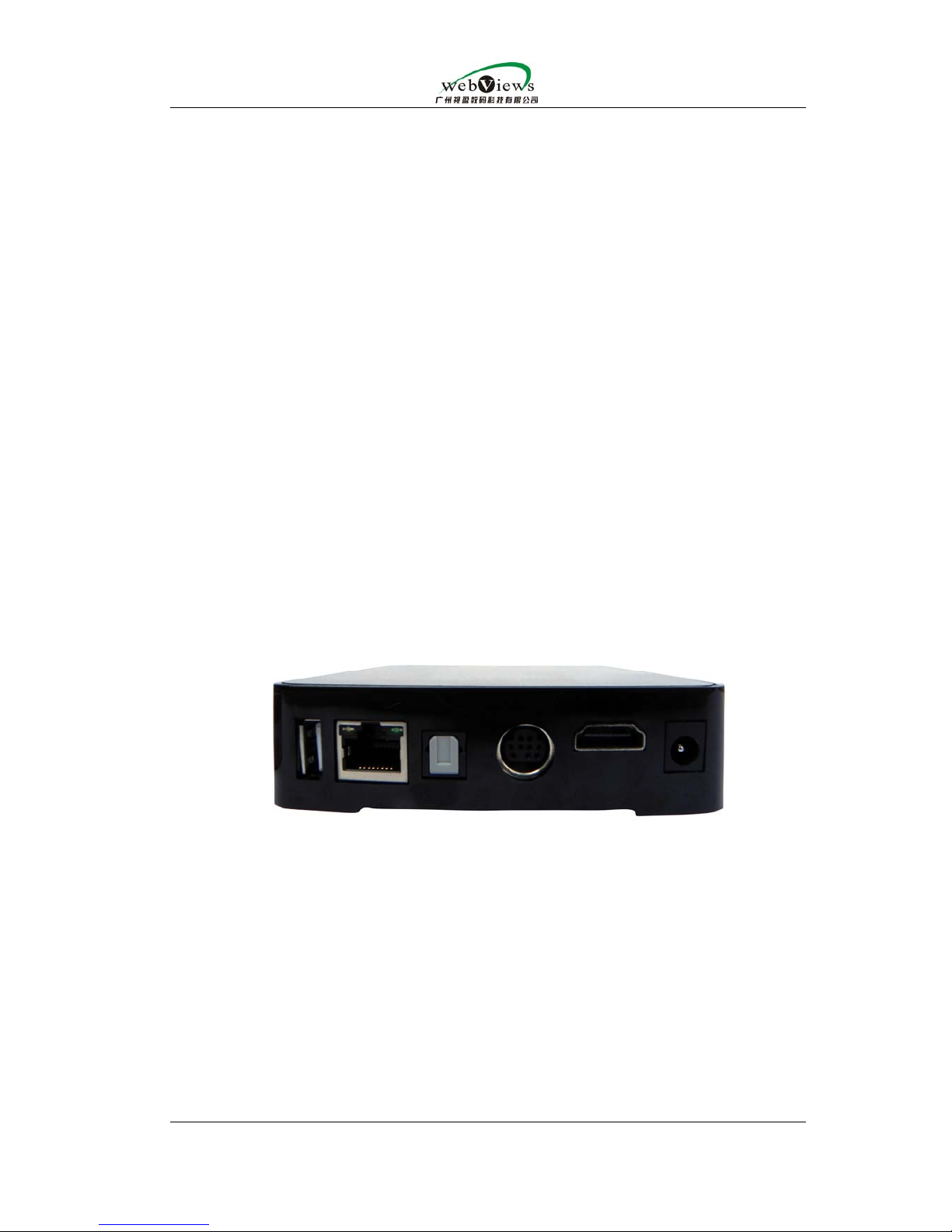
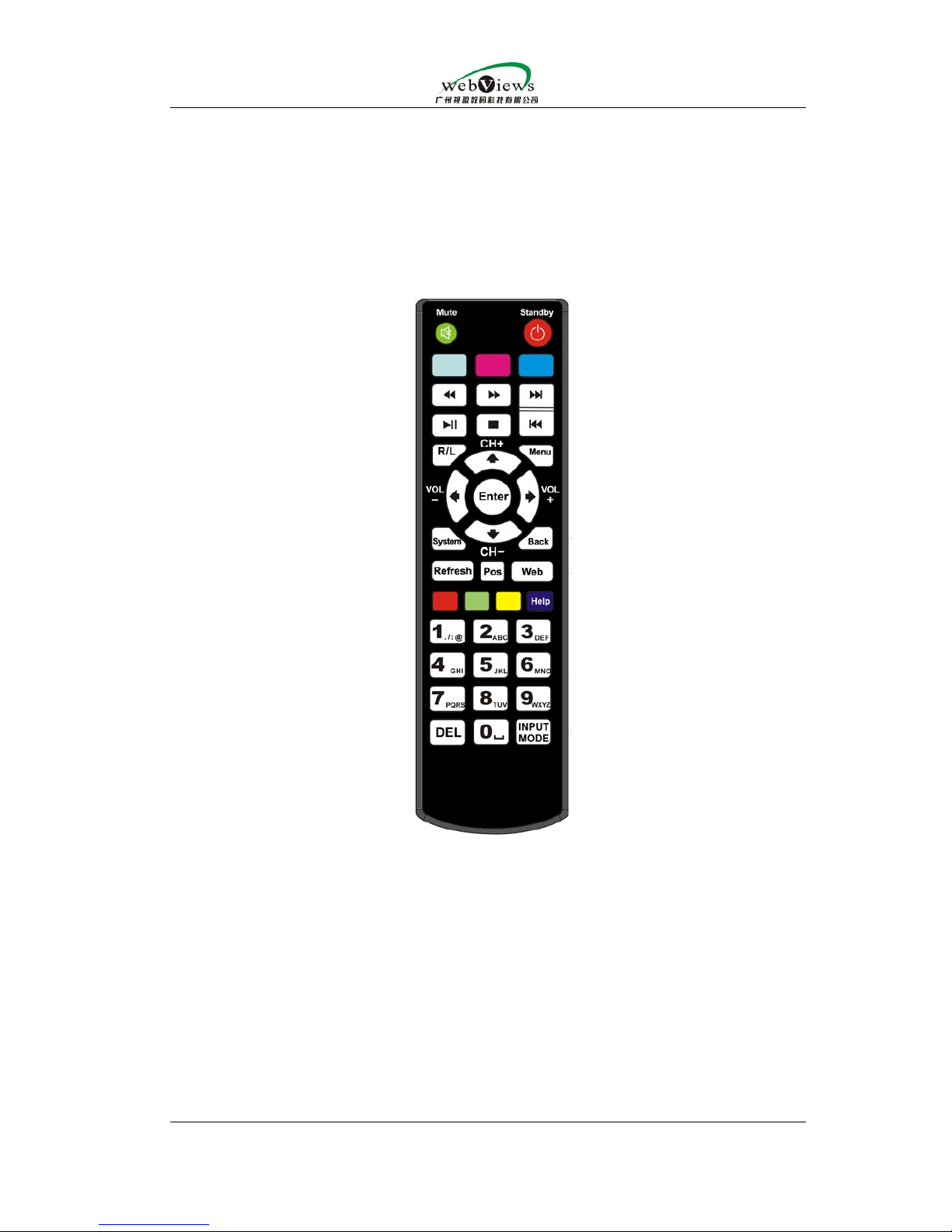
All port functions are as follows (illustrating from right to left in above
picture):
z DC 12V 1A, please insert the packed 12V DC power plug into the first right
port
z HDMI output port can directly connect with the LCD TV's HDMI input port.
z AV output port.When the system is set for AV output, insert the packed AV
cables into the corresponding colorful AV input ports of TV (cable color from
left to right :yellow,white,red)
z RJ-45 port for connecting with the packed ethernet cable;the other end of
ethernet cable can connnet to ADSL MODEM ,network switch or router and so
on.
z USB port for inserting USB hard disk ,U disk and etc.. When user wants to
Page 6
NowBox-HD54 Mini user manual
Guangzhou WebViews Digital Technology Co., Ltd
Contact us:Rm.133,Tangyun Building of North Keyun Rd.,Tianhe District,Guangzhou,China/ +86
020-38666435/85523605
update the system firmware ,he can first download the firmware file into U disk
and then insert U disk into USB port for updating
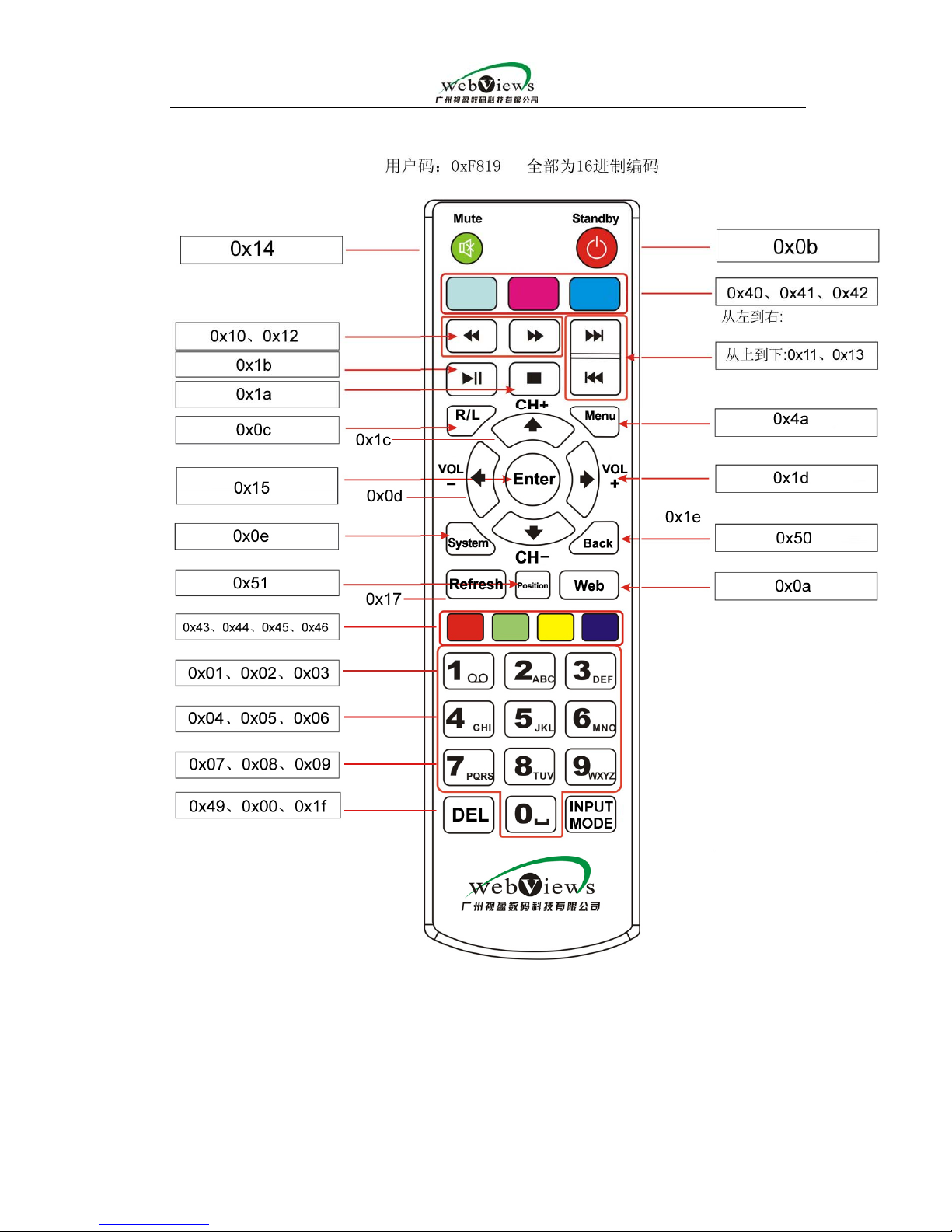
2.2.IR remote control introduction
Page 7
NowBox-HD54 Mini user manual
Guangzhou WebViews Digital Technology Co., Ltd
Contact us:Rm.133,Tangyun Building of North Keyun Rd.,Tianhe District,Guangzhou,China/ +86
020-38666435/85523605
Page 8
NowBox-HD54 Mini user manual
Guangzhou WebViews Digital Technology Co., Ltd
Contact us:Rm.133,Tangyun Building of North Keyun Rd.,Tianhe District,Guangzhou,China/ +86
020-38666435/85523605
serial
number
button button definition
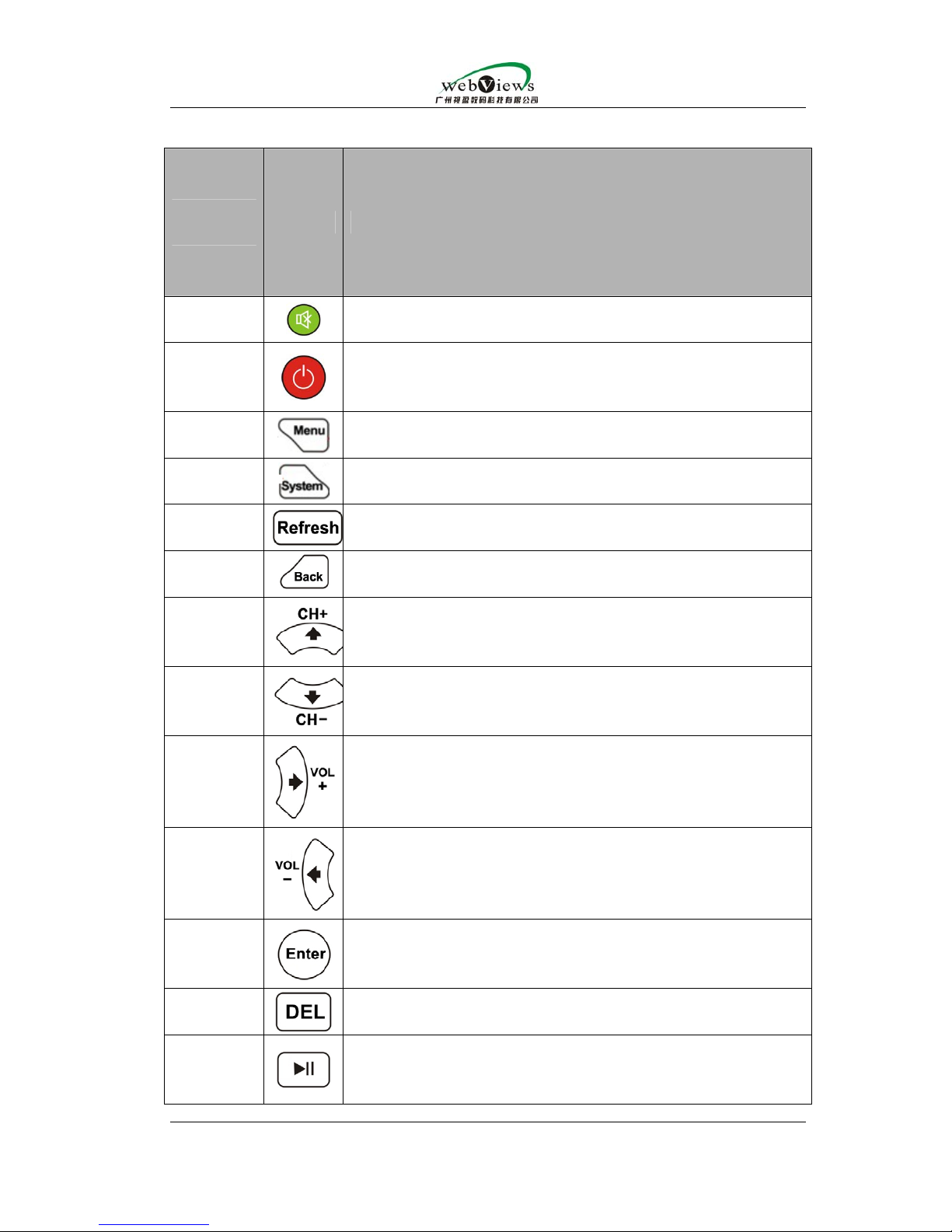
1
if you press this button ,the sound disappears;if you press
the button again ,sound appears again.
2
button for turning on and turning off STB .
3.
it can switch to EPG in the system setting .
5
you can enter into system setting by pressing this button.
6 you will refresh the current page by pressing this button
7
you will get back to previous –level menu by pressing this
button
8 if you press this button ,cursor will move upward the object
9
if you press this button ,cursor will move downward the
object.
10
if you press this button ,cursor will move rightward the
object and the sound volume will be turned up under
program playback state.
11
if you press this button ,cursor will move leftward the
object and the sound volume will be turned down under
program playback state.
12
you can press this button to confirm all kinds of operations.
13
you can get back to last operation /delete the input
contents by pressing this button.
14
play/pause button.If you press this button ,you can pause
the video which is playing;if you press this button
again ,video will continue to play.
Page 9
NowBox-HD54 Mini user manual
Guangzhou WebViews Digital Technology Co., Ltd
Contact us:Rm.133,Tangyun Building of North Keyun Rd.,Tianhe District,Guangzhou,China/ +86
020-38666435/85523605
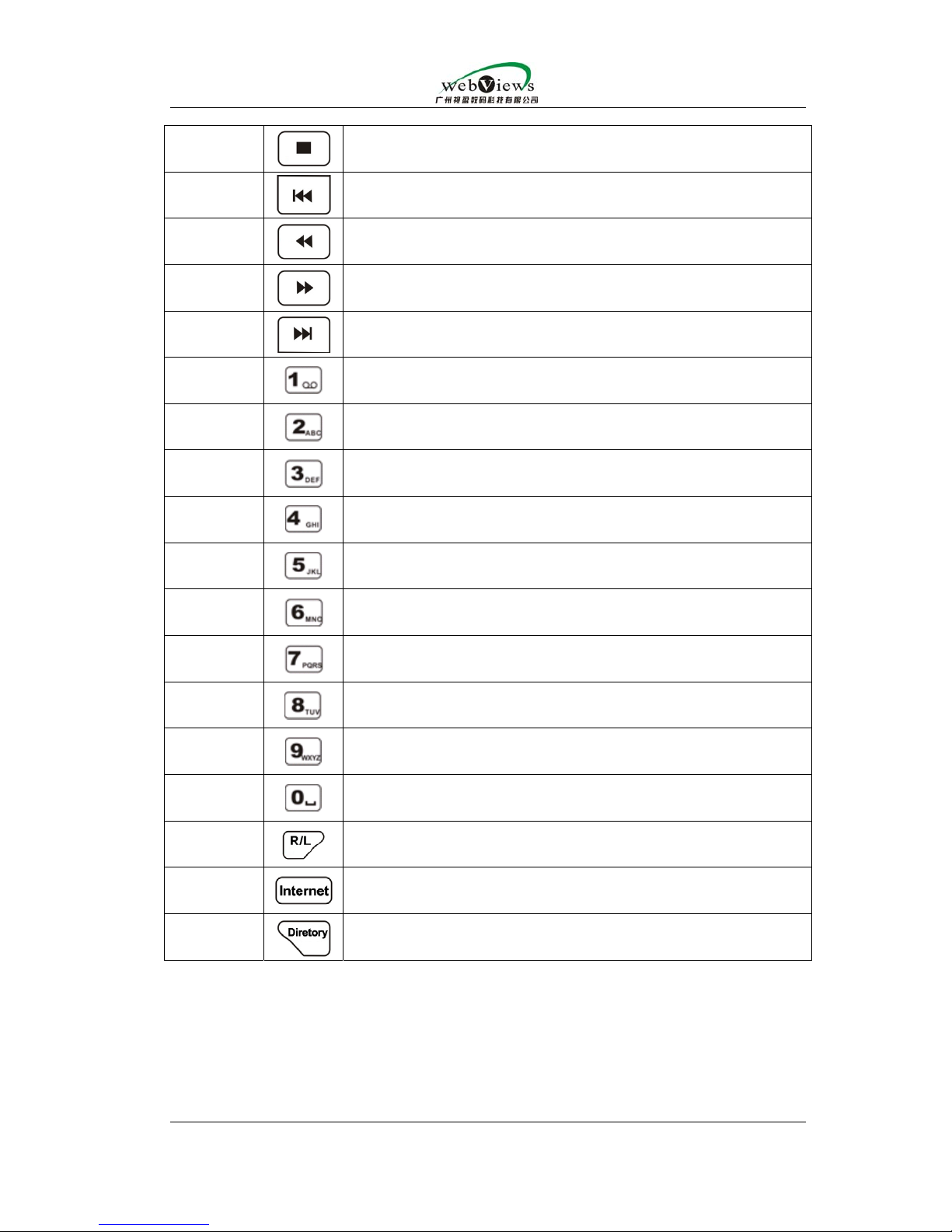
15
button for stopping
16
scroll bar will directly come back to the very beginning of
program to play,if you press this button.
17
jump backward
18
jump forward
19
scroll bar will directly jump to the end of program, if you
press this button.
20
number mode:1…. letter mode:/@....and etc.
21
number 2,letter a b c
22
number :3 letter :d e f
23
number :4 letter :ghi
24
number :5 letter : j k l
25
number :6 letter :m n o
26
number :7 letter : p q r s
27
number :8 letter : t u v
28
number :9 letter : w x y z
29
number :0 letter : space
30
switching among left channel,right channel,stereo and
mono channel .
31
if you press this button ,website input page will pop out.
32
you will enter EPG page by pressing this button.
Page 10
NowBox-HD54 Mini user manual
Guangzhou WebViews Digital Technology Co., Ltd
Contact us:Rm.133,Tangyun Building of North Keyun Rd.,Tianhe District,Guangzhou,China/ +86
020-38666435/85523605
3.Set top box setting
3.1.user login
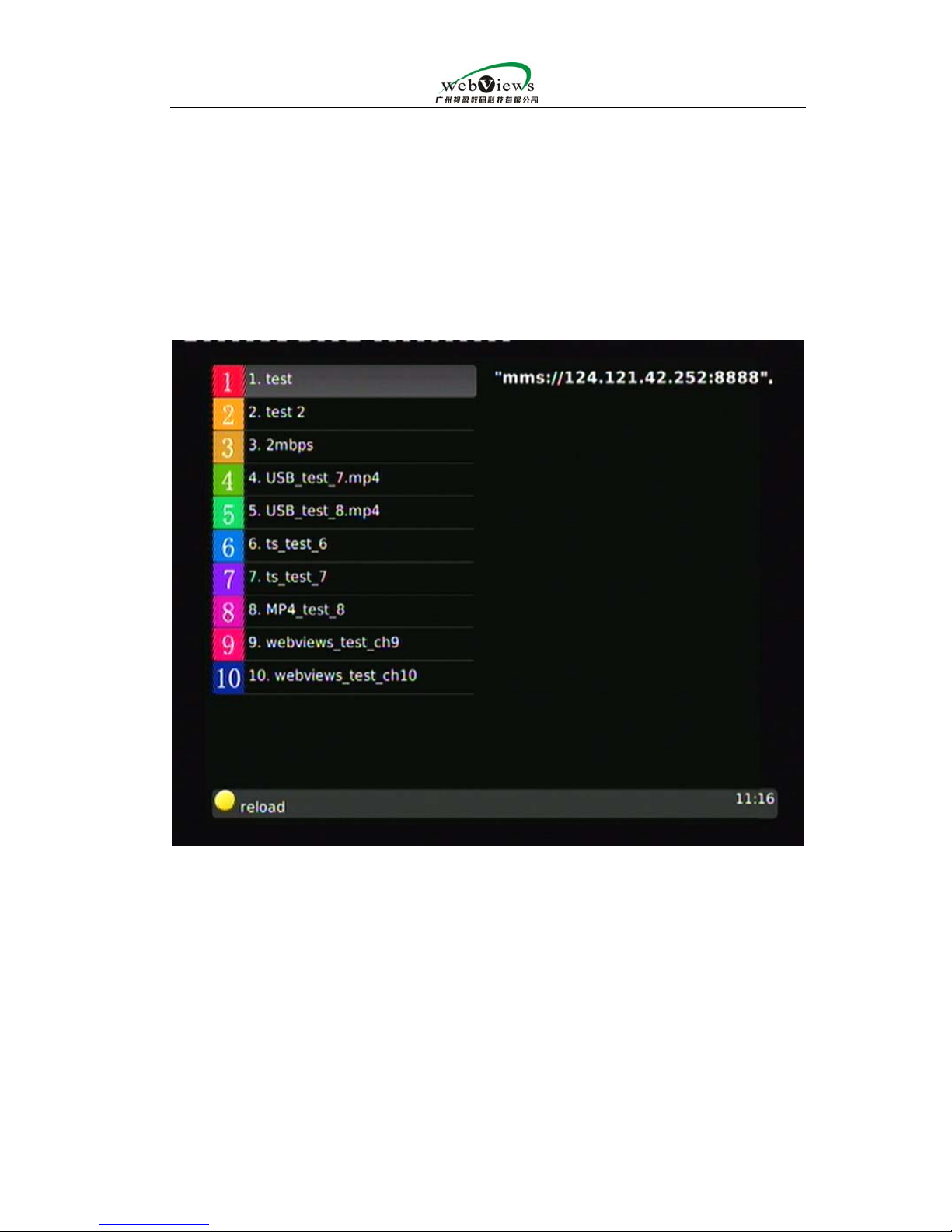
When user uses HD54 STB for the first time ,the following window will pop out
after STB is turned on.
This page is EPG play list based on webpage form. The HD54 operation
form is to use the webpage with specific standard ;you can define the button
functions of remote control by yourself ;the player itself depends on the
achievement of webpage code ,so not all JAVA-based webpages can be used.For
detail ,please refer to the example page provided by us.
Concrete EPG address can be set in system setting .
When testing ,you need to confirm the following two points:
1.you already have streaming media system which you will definitely use:in
this way ,what we need to do is to integrate our STB with this streaming media
system .Your technical testing colleague can provide us with the streaming
established by your own streaming media system so that we can change EPG
Page 11
NowBox-HD54 Mini user manual
Guangzhou WebViews Digital Technology Co., Ltd
Contact us:Rm.133,Tangyun Building of North Keyun Rd.,Tianhe District,Guangzhou,China/ +86
020-38666435/85523605
streaming address for testing .Your technical testing colleague can also establish
your own EPG system for tesing under our guidance.
2.you have no streaming system which you will definitely use:we can provide
you some server softwares which are specially for tesing or give you some advices
and then help you to establish a testing environment according to the concrete
situation.
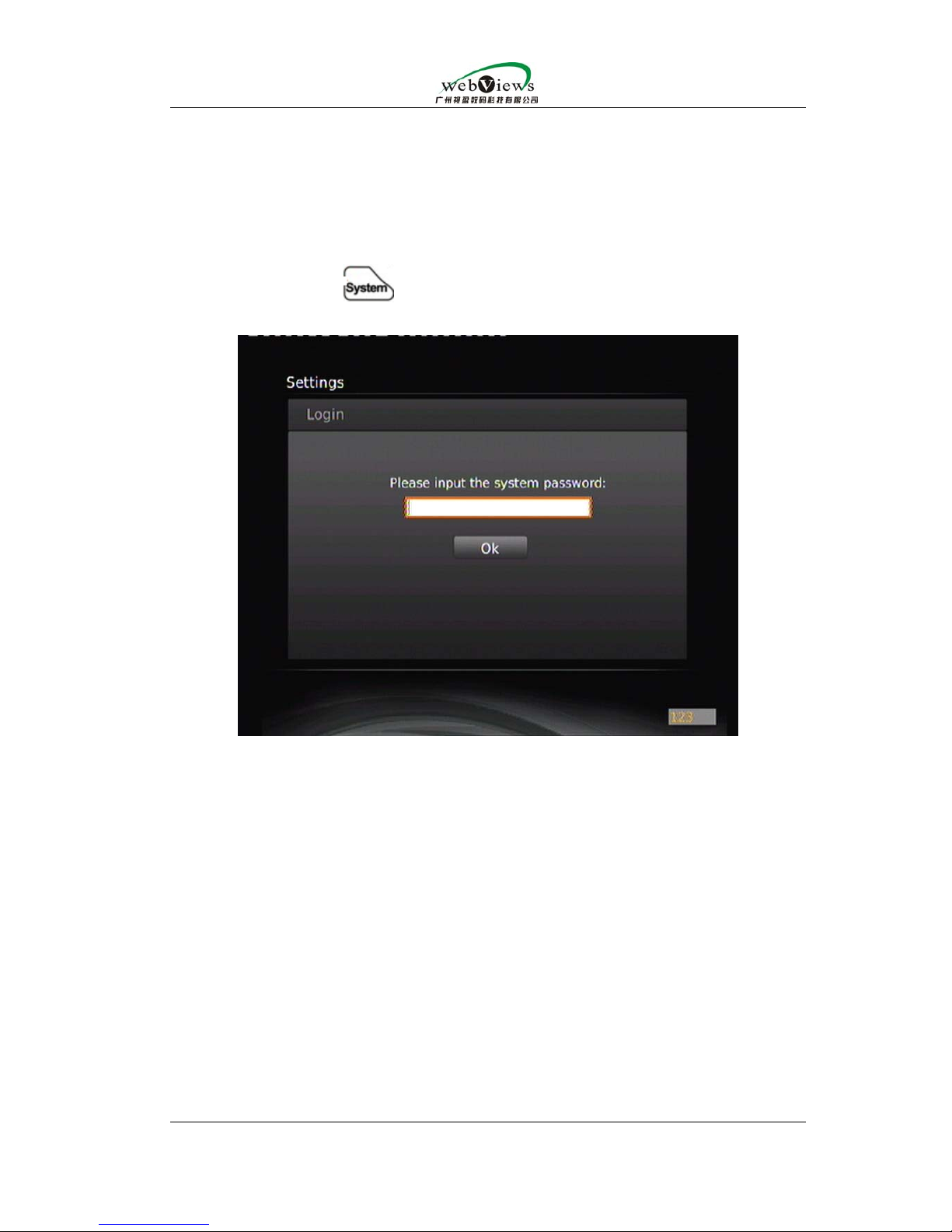
If you press the
button on remote control ,the following page will
appear:
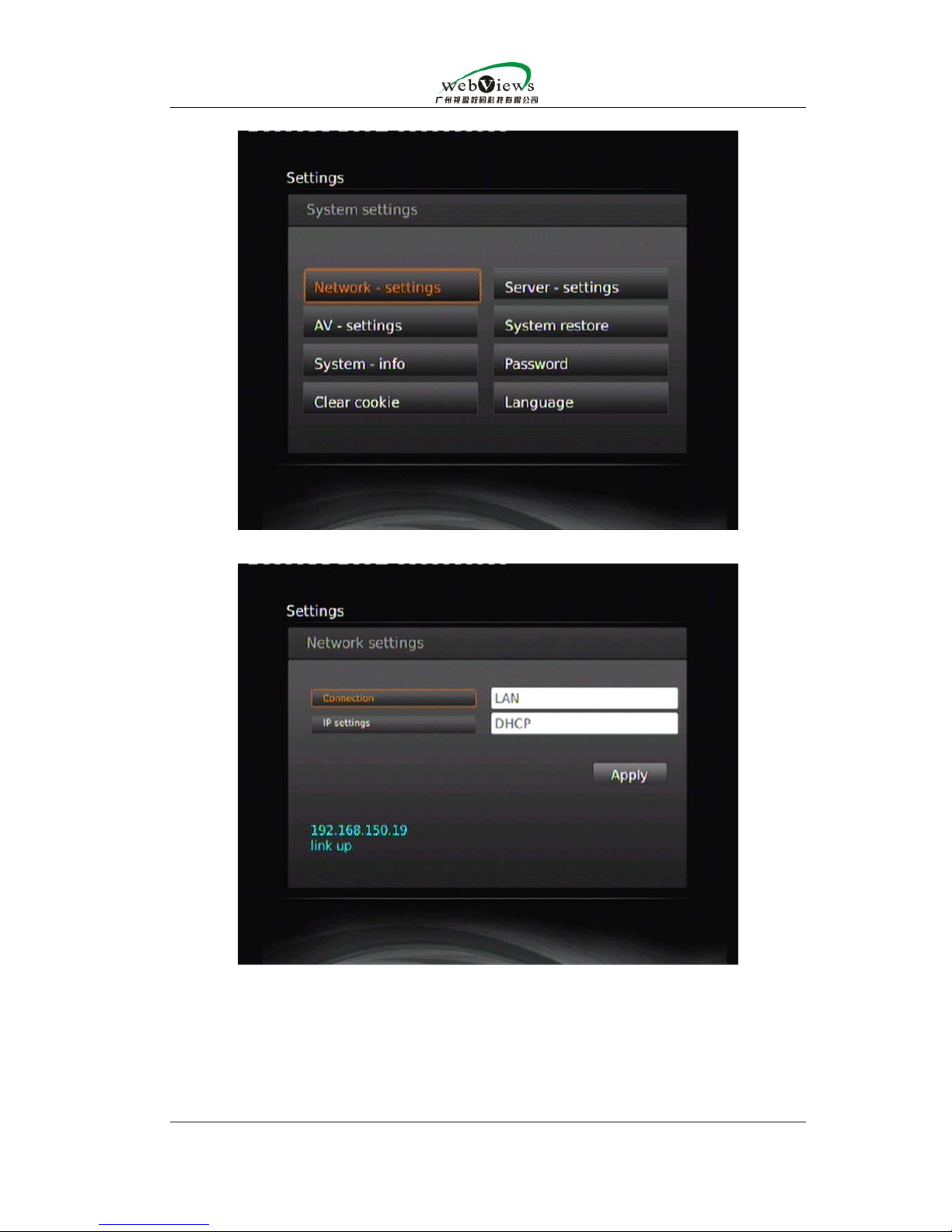
The following page will display after the password “123456” is input.
Page 12
NowBox-HD54 Mini user manual
Guangzhou WebViews Digital Technology Co., Ltd
Contact us:Rm.133,Tangyun Building of North Keyun Rd.,Tianhe District,Guangzhou,China/ +86
020-38666435/85523605
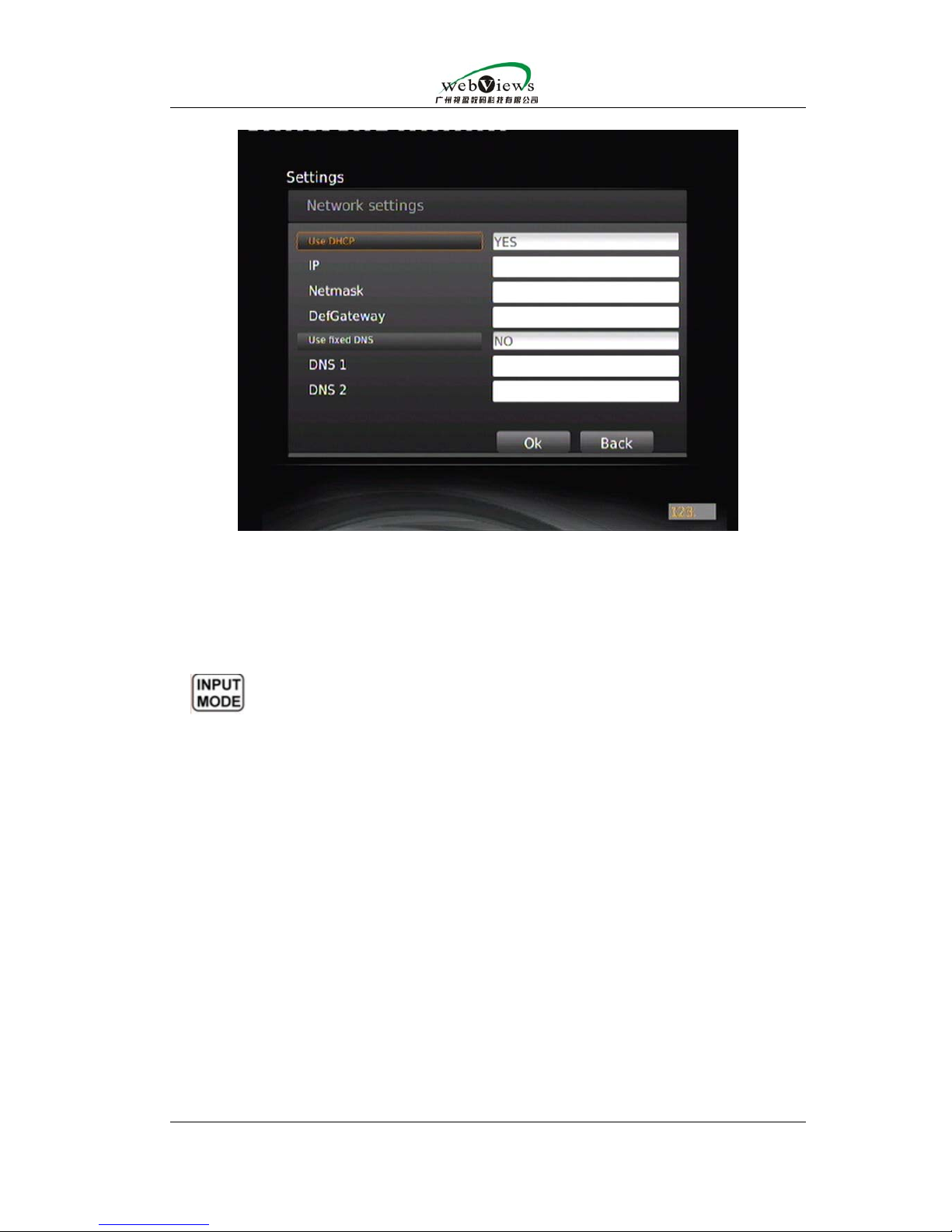
3.2.Network setting
Set network specifications;you can change the mode into LAN(common ethernet
cable connection),WIFI (wireless connection,only HD54 with WIFI version has such
connection),PPPoE(dial up mode,you need to integrate it with the wan port of
demodulator for surfing on the internet )
Page 13
NowBox-HD54 Mini user manual
Guangzhou WebViews Digital Technology Co., Ltd
Contact us:Rm.133,Tangyun Building of North Keyun Rd.,Tianhe District,Guangzhou,China/ +86
020-38666435/85523605
Network mode includes static IP and dynamic IP .To connect WIFI with
network ,you need to input the corresponding SSID account &password and work
mode ;to connect PPPoE with the network ,you need to input the account and
password provided by ISP.
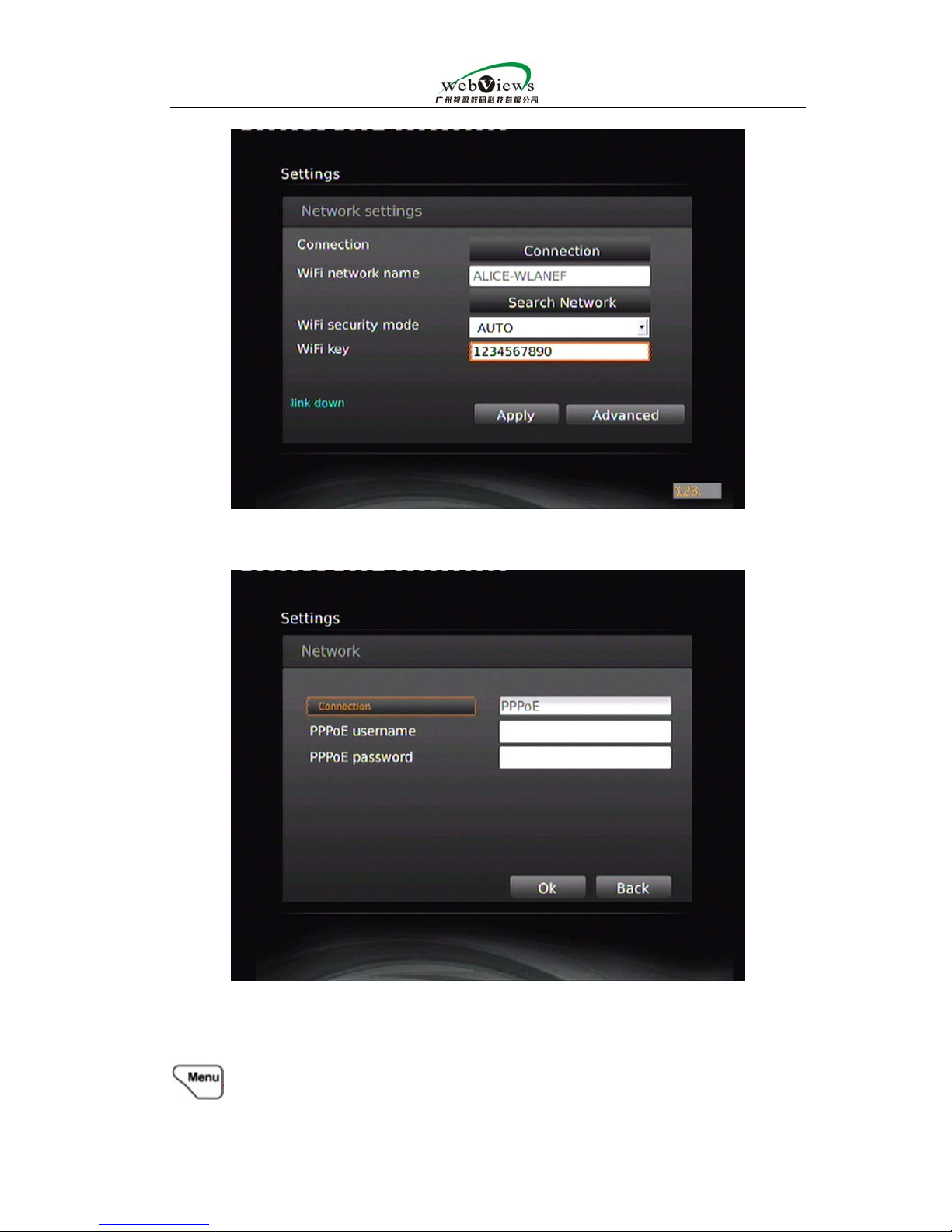
The following picture is WIFI setting page. You can search the nearby wireless
networks available by clicking “search network” item.Input mode can be switched
by
. For ALL mode ,you need to press the same button for several times to
switch between letter and digital number.
Page 14
NowBox-HD54 Mini user manual
Guangzhou WebViews Digital Technology Co., Ltd
Contact us:Rm.133,Tangyun Building of North Keyun Rd.,Tianhe District,Guangzhou,China/ +86
020-38666435/85523605
PPPoE setting page is as follows:
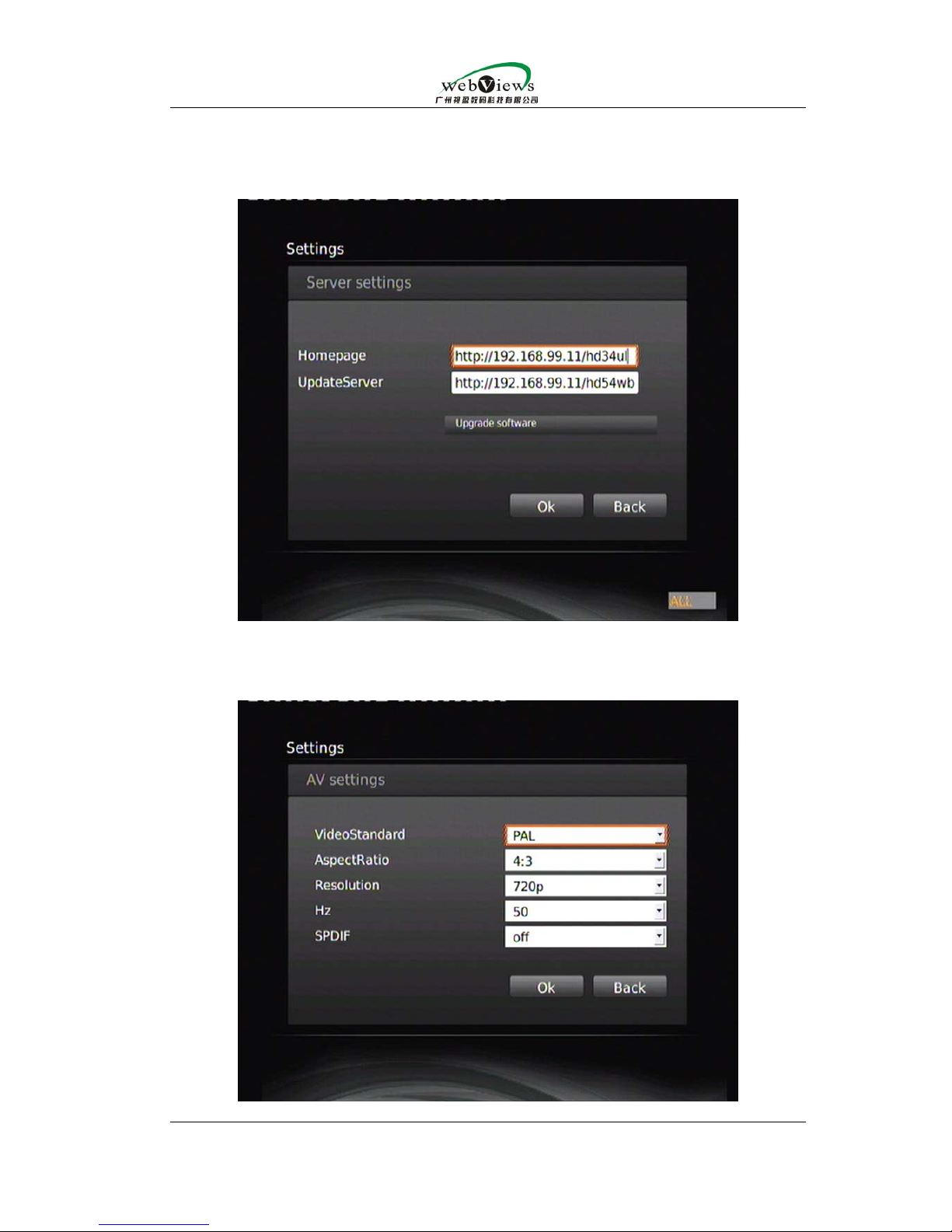
3.3.server setting
You can change EPG address and STB network updating address.
After finishing changing EPG address and confirming with it ,you can use
to jump back to EPG page.After completion of changing STB network
Page 15
NowBox-HD54 Mini user manual
Guangzhou WebViews Digital Technology Co., Ltd
Contact us:Rm.133,Tangyun Building of North Keyun Rd.,Tianhe District,Guangzhou,China/ +86
020-38666435/85523605
updating address ,you can choose “upgrade software” item to update
software ;during the updating ,please do not cut off the electricity or reboot ;after
updating is finished ,it will remind you to reboot.
3.4. AV setting:
Set input resolution,standard,aspect ratio and etc.
Page 16
NowBox-HD54 Mini user manual
Guangzhou WebViews Digital Technology Co., Ltd
Contact us:Rm.133,Tangyun Building of North Keyun Rd.,Tianhe District,Guangzhou,China/ +86
020-38666435/85523605
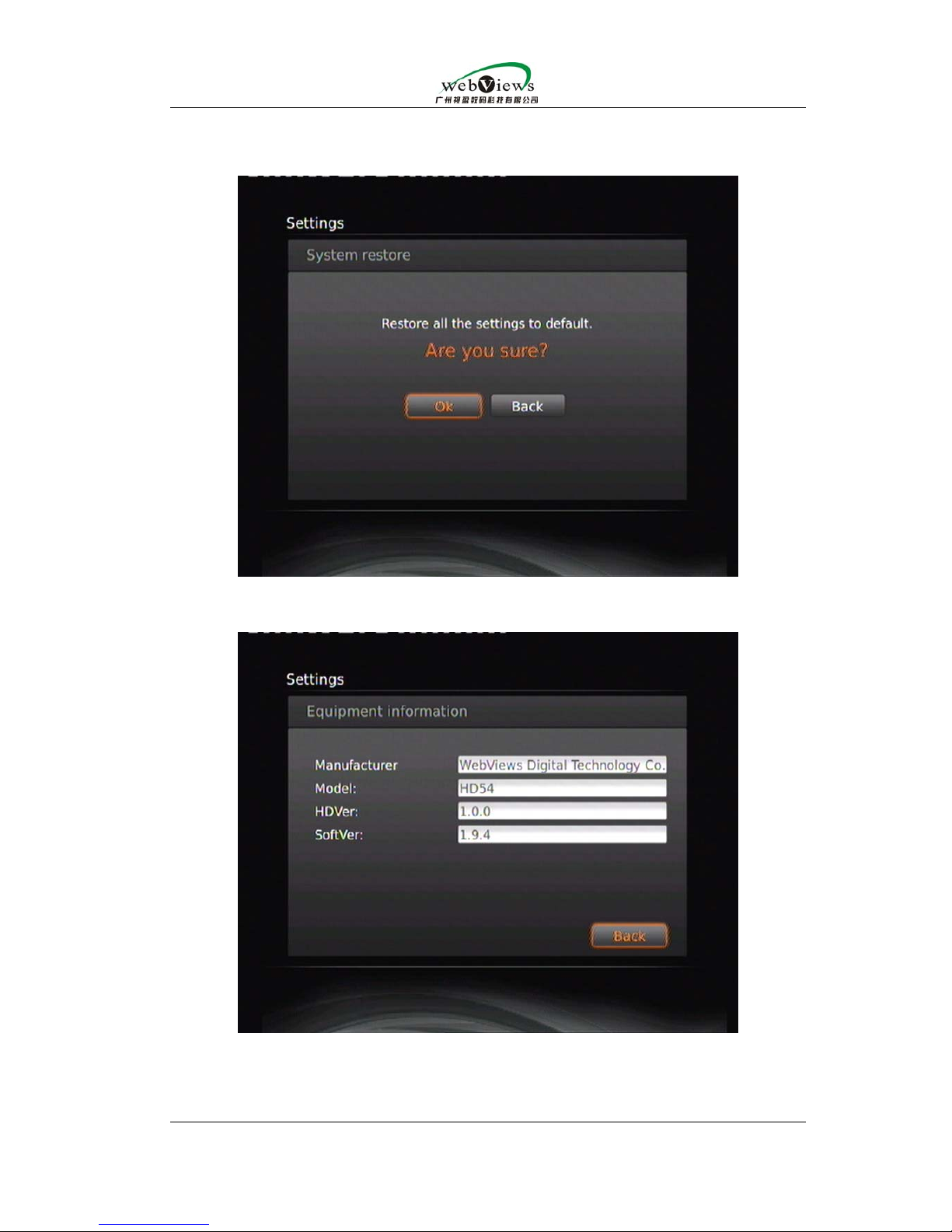
3.5.System restore
All configurations will be restored into default configurations.
3.6.System info
you can check the software version of STB and network state.
3.7.Password
Set the password of system setting
3.8.Clear cookie
Page 17

NowBox-HD54 Mini user manual
Guangzhou WebViews Digital Technology Co., Ltd
Contact us:Rm.133,Tangyun Building of North Keyun Rd.,Tianhe District,Guangzhou,China/ +86
020-38666435/85523605
Clear cookie
3.9.Language
Choose the language of system setting.
4.Server- end
So far the the streaming media servers HD54 can be integrated with are as
follows:
MMS of Windows Media Service 2003 WMV9 streaming.
http server ( such as nginx/iis ) ’s VOD live555 streaming by
H264/mpeg4/mpeg2 encoding and by TS or AVI encapsulation
RTSP,UDP,HTTP of VLC TS streaming
Webviews’ NowCaster PRO and NOW VOD
 Loading...