

Page 1
Need
help?
https://cellphonesignalbooster.us
Customer
Support
Mon. Fri.
Hours
: 7am
t
o 6
p
m MST
800-501-3153
Page 2
Need
help?
https://cellphonesignalbooster.us
Customer
Support
Mon. Fri.
Hours
: 7am
t
o 6
p
m MST
800-501-3153
Page 3
3
ENGLISH
Need help? www.weboost.com
Customer Support 866-294-1660
Mon.- Fri. Hours: 7 am to 6 pm MST
Before Getting Started
Before you install your Signal 3G booster
and start enjoying improved cellular
reception, please do the following:
1. Read through all the installation
steps. This will help you know what
to expect from start to nish.
2. Watch the YouTube video
demonstrating the Signal 3G
installation at: https://cellphonesignal
booster.us
3. Familiarize yourself with all materials
in your product package. This will
allow you to know which pieces are
referenced in the instructions.
Quick Installation
You can install your Signal 3G booster
using the following steps.
NOTE: Before completing your
installation, create a “soft” installation by
putting the components of your Signal 3G
booster in place and testing the operation
before mounting equipment.
Signal 3G
™
Optional Kits
Optional Accessories
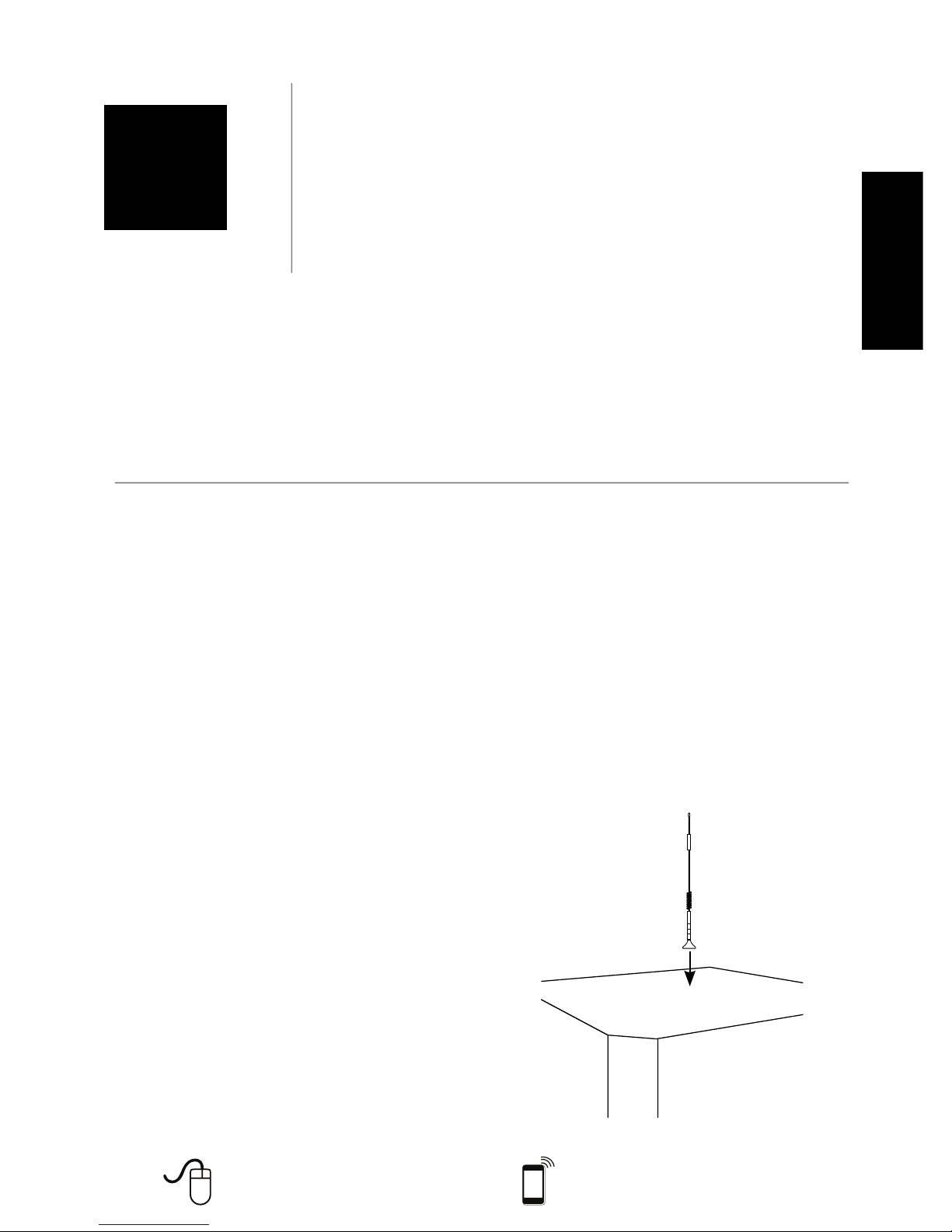
1. Install the Outside Antenna. Select a
location on top of the structure that
is:
• At least 12 inches from any other
antennas.
• Free of obstructions.
• At least 8 inches from any people.
The Outside Antenna must be
installed vertically on a metallic
surface.
470009
470109
Cable Ext.
951151
Power Suppy
859969
12’ Mag Antenna
311125
470209
Cable Ext.
951151
Power Suppy
859969
Mini Mag
301126
470309
Cable Ext.
951151
Power Suppy
859989
Mini Mag
301126
Moun ing Plate
901138
DC Power Suppy
859910
Need
help?
https://cellphonesignalbooster.us
Customer
Support
Mon. Fri.
Hours
: 7am
t
o 6
p
m MST
800-501-3153
Page 4
4
ENGLISH
Need help? www.weboost.com
Customer Support 866-294-1660
Mon.- Fri. Hours: 7 am to 6 pm MST
Installing the (Optional)
Mounting Plate
To purchase a mounting plate contact
weBoost Sales Team 800-501-3153.
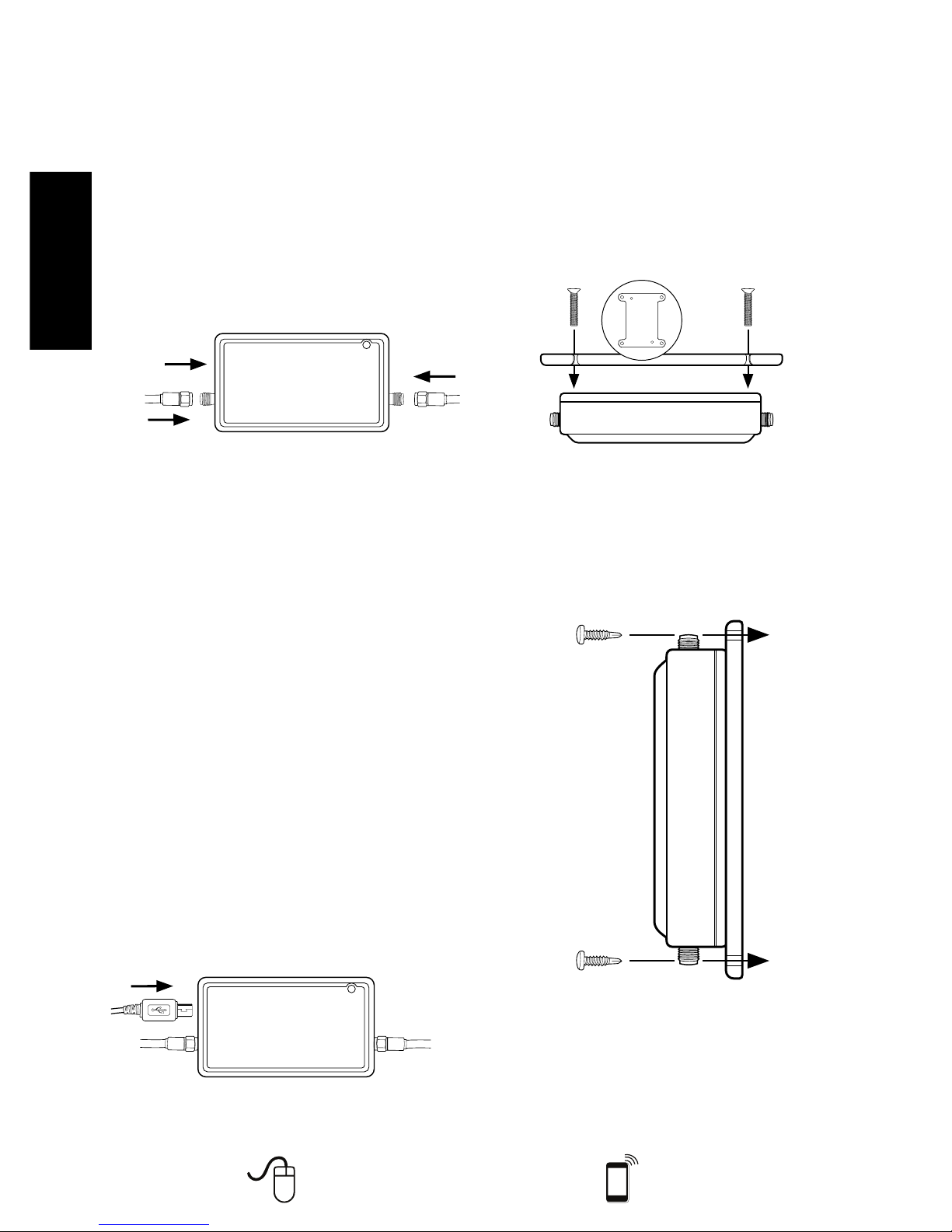
1. Remove two screws from back of
Signal Booster that correspond with
the mounting plate.
(PN #
901138)
2. Place Signal Booster on mounting
plate and reinstall the two screws
previously removed from back of
Signal Booster.
Caution: Do not remove “Void
Sticker.”
MOUNT
TO WALL
SURFACE
2. Select a location to install the Signal
Booster that is away from excessive
heat, direct sunlight, moisture and
that has proper ventilation. Do not
place the Signal Booster in an
air-tight enclosure.
3. Run the Outside Antenna cable to
the Signal Booster and attach it
to the connector labeled “Outside
Antenna.”
From Cellular
Device
Power
Adapter
From Outside
Antenna
4. An external adapter may be needed
to connect the cellular device to
the Signal Booster. The external
adapter plugs into the included
antenna extension cable and directly
into a socket on the cellular device.
Run the extension cable from the
external adapter and attach it to the
connector labeled “cell phone or
data card” on the Signal Booster.
Note: Be careful when plugging
the connector in so as not to bend
the center pins on the connectors.
Ensure all cables have a tight
connection.
5. Before powering up the Signal
Booster verify that connections
are tight. An AC surge protector is
recommended for all installations
(not included).
From Cellular
Device
Power Adapter
From Outside
Antenna
Need
help?
https://cellphonesignalbooster.us
Customer
Support
Mon. Fri.
Hours
: 7am
t
o 6
p
m MST
800-501-3153
Page 5
5
ENGLISH
Need help? www.weboost.com
Customer Support 866-294-1660
Mon.- Fri. Hours: 7 am to 6 pm MST
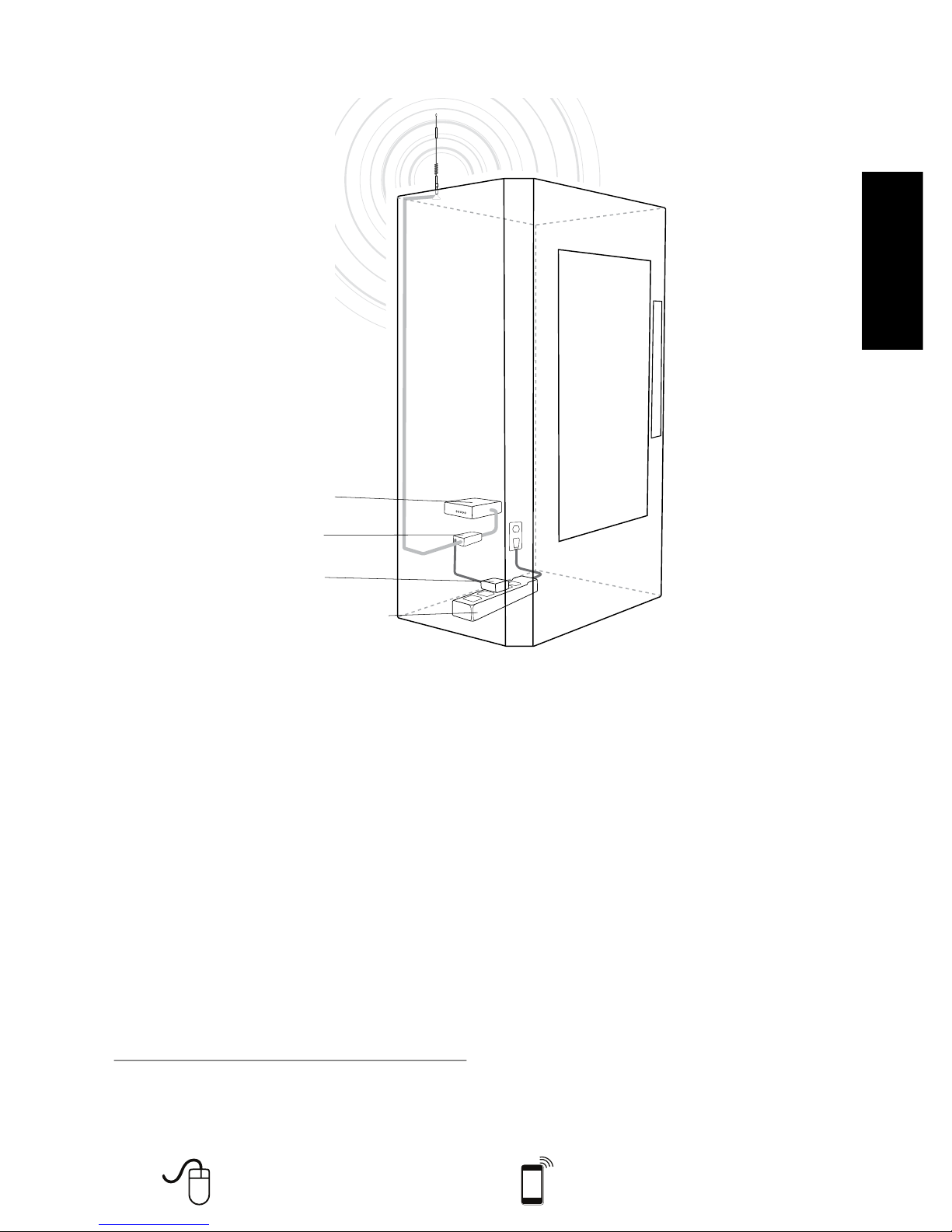
Power Strip Surge Protector
Power Supply
Signal 3G
Signal Booster
Cellular Modem
12” Magnet
Mount Antenna
Installation Diagram
(Figure 1)
Additional FAQ:
What hours can I contact customer support?
Customer Support can be reached from 7:00am to 6:00pm MST, by calling (800-501-3153),
or by email, at [email protected]
How does weather affect the performance of my Outside Antenna?
Water vapor (e.g. rain, fog, snow or other precipitation) creates an effective lter to cellular
signal. In times of heavy precipitation, you may see less performance.
What’s the difference between the 800 MHz and the 1900 MHz bands? How do I know
which MHz band my cell phone uses?
The Signal 3G booster works with all major North American cellular providers. Traditionally,
800/1900MHz are associated with voice and 3G data; while 700MHz and 1700/2100MHz are
associated with 4G data.
Carrier Frequency Use
We recommend visiting https://cellphonesignalbooster.us for more information regarding the frequency
band used by your cell service provider in a specific geographical location.
Need
help?
https://cellphonesignalbooster.us
Customer
Support
Mon. Fri.
Hours
: 7am
t
o 6
p
m MST
800-501-3153
Page 6
Need
help?
https://cellphonesignalbooster.us
Customer
Support
Mon. Fri.
Hours
: 7am
t
o 6
p
m MST
800-501-3153
Page 7
Need
help?
https://cellphonesignalbooster.us
Customer
Support
Mon. Fri.
Hours
: 7am
t
o 6
p
m MST
800-501-3153
Page 8
800-501-3153
 Loading...