

Page 1
A WILSON ELECTRONICS BRAND
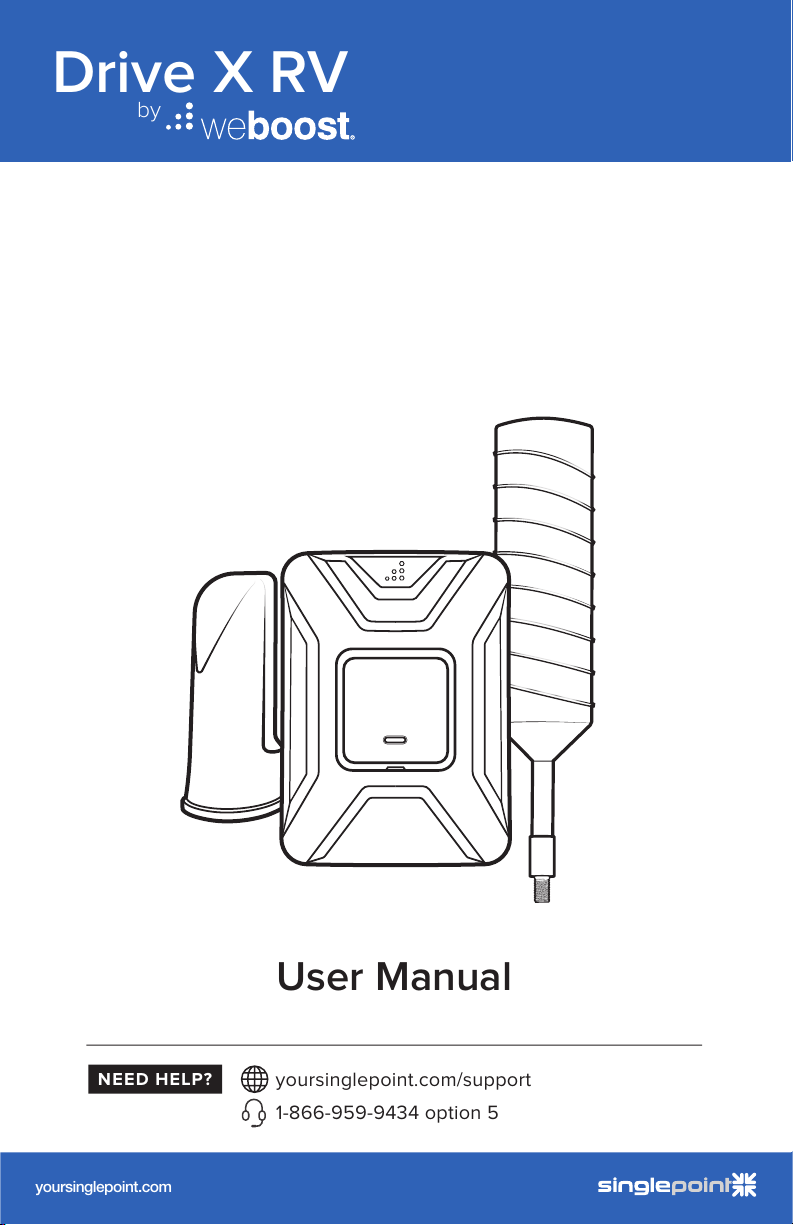
Drive X RV
by
User Manual
RV Cellular Signal Booster
DRIVE 4G-X RV
A WILS ON ELECTRONICS BRAND
NE ED HELP?
yoursinglepoint.com/support
1-866-959-9434 option 5
yoursinglepoint.com
by
AcmeIndustrial-Grade 4G LTE Router
MK2 Cellular Router
Built for Recreational Deployments
With a compact form factor, robust 802.11ac Wi-Fi, the WiFi In Motion™
MAX MK2 is ready to deliver fast, reliable Wi-Fi for your recreational needs.
Redundant SIM Slots for
Multiple Carriers
Redundant SIM slots with automatic
switching for reliable network. You can
set the WiFi In Motion
™
MAX MK2
to automatically switch SIM cards when
you’re in danger of exceeding a data ca p.
It also allows you to travel across borders
without changing SIM cards manually.
WaW Wi-Fi as WAN
Save on your data plan by using RV park
and other free Wi-Fi networks when
available. Now you can leverage quality
free Wi-Fi, if available, to deliver backhaul
to your own secure Wi-Fi network.
Stream and Update
The WiFi In Motion™ MAX MK2
provides robust backhaul, allowing
you to connect TV streaming services,
internet radios, voice over IP phones,
security cameras and more! Now you
can stream, update content and update
rmware on your onboard systems with
ease wherever you travel.
GPS Management
Lost your way? The WiFi In Motion™
MAX MK2 oers reliable GPS,
allowing you to track your location
using our interactive maps. Check
speed, cellular coverage, conditions
and routes real time. Play back your
route history in real time to share your
travels with friends and family.
In addition to rugged metal enclosure,
the WiFi In Motion
™
MAX MK2 has
certications on:
Shock and vibration resistance
(EN 61373:1999, IEC 61373:1999)
Railway applications (EN 50155)
Electromagnetic Compatibility (EN 61000)
eMark (ref: E13*10R00*10R05*13664*00)
User Manual
RV Cellular Signal Booster
DRIVE 4G-X RV
A WILS ON ELECTRONICS BRAND
NE ED HELP?
yoursinglepoint.com/support
1-866-959-9434 option 5
yoursinglepoint.com
by
AcmeIndustrial-Grade 4G LTE Router
MK2 Cellular Router
Built for Recreational Deployments
With a compact form factor, robust 802.11ac Wi-Fi, the WiFi In Motion™
MAX MK2 is ready to deliver fast, reliable Wi-Fi for your recreational needs.
Redundant SIM Slots for
Multiple Carriers
Redundant SIM slots with automatic
switching for reliable network. You can
set the WiFi In Motion
™
MAX MK2
to automatically switch SIM cards when
you’re in danger of exceeding a data ca p.
It also allows you to travel across borders
without changing SIM cards manually.
WaW Wi-Fi as WAN
Save on your data plan by using RV park
and other free Wi-Fi networks when
available. Now you can leverage quality
free Wi-Fi, if available, to deliver backhaul
to your own secure Wi-Fi network.
Stream and Update
The WiFi In Motion™ MAX MK2
provides robust backhaul, allowing
you to connect TV streaming services,
internet radios, voice over IP phones,
security cameras and more! Now you
can stream, update content and update
rmware on your onboard systems with
ease wherever you travel.
GPS Management
Lost your way? The WiFi In Motion™
MAX MK2 oers reliable GPS,
allowing you to track your location
using our interactive maps. Check
speed, cellular coverage, conditions
and routes real time. Play back your
route history in real time to share your
travels with friends and family.
In addition to rugged metal enclosure,
the WiFi In Motion
™
MAX MK2 has
certications on:
Shock and vibration resistance
(EN 61373:1999, IEC 61373:1999)
Railway applications (EN 50155)
Electromagnetic Compatibility (EN 61000)
eMark (ref: E13*10R00*10R05*13664*00)
DRIVE X RV
RV Cell Signal Booster
NEED HELP?
User Manual
support.weboost.com 866.294.1660
Page 2
______
User Manual
RV Cellular Signal Booster
DRIVE 4G-X RV
A WILS ON ELECTRONICS BRAND
NE ED HELP?
yoursinglepoint.com/support
1-866-959-9434 option 5
yoursinglepoint.com
by
AcmeIndustrial-Grade 4G LTE Router
MK2 Cellular Router
Built for Recreational Deployments
With a compact form factor, robust 802.11ac Wi-Fi, the WiFi In Motion™
MAX MK2 is ready to deliver fast, reliable Wi-Fi for your recreational needs.
Redundant SIM Slots for
Multiple Carriers
Redundant SIM slots with automatic
switching for reliable network. You can
set the WiFi In Motion
™
MAX MK2
to automatically switch SIM cards when
you’re in danger of exceeding a data ca p.
It also allows you to travel across borders
without changing SIM cards manually.
WaW Wi-Fi as WAN
Save on your data plan by using RV park
and other free Wi-Fi networks when
available. Now you can leverage quality
free Wi-Fi, if available, to deliver backhaul
to your own secure Wi-Fi network.
Stream and Update
The WiFi In Motion™ MAX MK2
provides robust backhaul, allowing
you to connect TV streaming services,
internet radios, voice over IP phones,
security cameras and more! Now you
can stream, update content and update
rmware on your onboard systems with
ease wherever you travel.
GPS Management
Lost your way? The WiFi In Motion™
MAX MK2 oers reliable GPS,
allowing you to track your location
using our interactive maps. Check
speed, cellular coverage, conditions
and routes real time. Play back your
route history in real time to share your
travels with friends and family.
In addition to rugged metal enclosure,
the WiFi In Motion
™
MAX MK2 has
certications on:
Shock and vibration resistance
(EN 61373:1999, IEC 61373:1999)
Railway applications (EN 50155)
Electromagnetic Compatibility (EN 61000)
eMark (ref: E13*10R00*10R05*13664*00)
Index
Package Contents 1
STEP 1: Mount Outside Antenna & Route Cable 2
STEP 2: Connect Cable To Outside Antenna 4
STEP 3: Inside Antenna Location 5
STEP 4: Booster Location & Connect Cables 6
STEP 5 & 6: Power Up The Booster 9
Using The Optional Cable Entry Accessories
Light Patterns
Troubleshooting
Safety Guidelines
Specifications
13
14
16
17
10
Warranty
Back Page
Page 3

DRIVE X RV CELL PHONE SIGNAL BOOSTER
1
________
Package
Contents
Drive X
Booster & Bracket
Outside Antenna
Ladder Mount
AC/DC Wall Power
Supply
DC/DC Hardwire
Power Supply
Installation
Accessories
Inside
Antenna
Outside Antenna &
25 ft. RG-6 Cable
Mast Extension,
Side-Exit Adapter
& Spring
User Manual
RV Cellular Signal Booster
DRIVE 4G-X RV
A WILS ON ELECTRONICS BRAND
NE ED HELP?
yoursinglepoint.com/support
1-866-959-9434 option 5
yoursinglepoint.com
by
AcmeIndustrial-Grade 4G LTE Router
MK2 Cellular Router
Built for Recreational Deployments
With a compact form factor, robust 802.11ac Wi-Fi, the WiFi In Motion™
MAX MK2 is ready to deliver fast, reliable Wi-Fi for your recreational needs.
Redundant SIM Slots for
Multiple Carriers
Redundant SIM slots with automatic
switching for reliable network. You can
set the WiFi In Motion
™
MAX MK2
to automatically switch SIM cards when
you’re in danger of exceeding a data ca p.
It also allows you to travel across borders
without changing SIM cards manually.
WaW Wi-Fi as WAN
Save on your data plan by using RV park
and other free Wi-Fi networks when
available. Now you can leverage quality
free Wi-Fi, if available, to deliver backhaul
to your own secure Wi-Fi network.
Stream and Update
The WiFi In Motion™ MAX MK2
provides robust backhaul, allowing
you to connect TV streaming services,
internet radios, voice over IP phones,
security cameras and more! Now you
can stream, update content and update
rmware on your onboard systems with
ease wherever you travel.
GPS Management
Lost your way? The WiFi In Motion™
MAX MK2 oers reliable GPS,
allowing you to track your location
using our interactive maps. Check
speed, cellular coverage, conditions
and routes real time. Play back your
route history in real time to share your
travels with friends and family.
In addition to rugged metal enclosure,
the WiFi In Motion
™
MAX MK2 has
certications on:
Shock and vibration resistance
(EN 61373:1999, IEC 61373:1999)
Railway applications (EN 50155)
Electromagnetic Compatibility (EN 61000)
eMark (ref: E13*10R00*10R05*13664*00)
Page 4
______
User Manual
RV Cellular Signal Booster
DRIVE 4G-X RV
A WILS ON ELECTRONICS BRAND
NE ED HELP?
yoursinglepoint.com/support
1-866-959-9434 option 5
yoursinglepoint.com
by
AcmeIndustrial-Grade 4G LTE Router
MK2 Cellular Router
Built for Recreational Deployments
With a compact form factor, robust 802.11ac Wi-Fi, the WiFi In Motion™
MAX MK2 is ready to deliver fast, reliable Wi-Fi for your recreational needs.
Redundant SIM Slots for
Multiple Carriers
Redundant SIM slots with automatic
switching for reliable network. You can
set the WiFi In Motion
™
MAX MK2
to automatically switch SIM cards when
you’re in danger of exceeding a data ca p.
It also allows you to travel across borders
without changing SIM cards manually.
WaW Wi-Fi as WAN
Save on your data plan by using RV park
and other free Wi-Fi networks when
available. Now you can leverage quality
free Wi-Fi, if available, to deliver backhaul
to your own secure Wi-Fi network.
Stream and Update
The WiFi In Motion™ MAX MK2
provides robust backhaul, allowing
you to connect TV streaming services,
internet radios, voice over IP phones,
security cameras and more! Now you
can stream, update content and update
rmware on your onboard systems with
ease wherever you travel.
GPS Management
Lost your way? The WiFi In Motion™
MAX MK2 oers reliable GPS,
allowing you to track your location
using our interactive maps. Check
speed, cellular coverage, conditions
and routes real time. Play back your
route history in real time to share your
travels with friends and family.
In addition to rugged metal enclosure,
the WiFi In Motion
™
MAX MK2 has
certications on:
Shock and vibration resistance
(EN 61373:1999, IEC 61373:1999)
Railway applications (EN 50155)
Electromagnetic Compatibility (EN 61000)
eMark (ref: E13*10R00*10R05*13664*00)
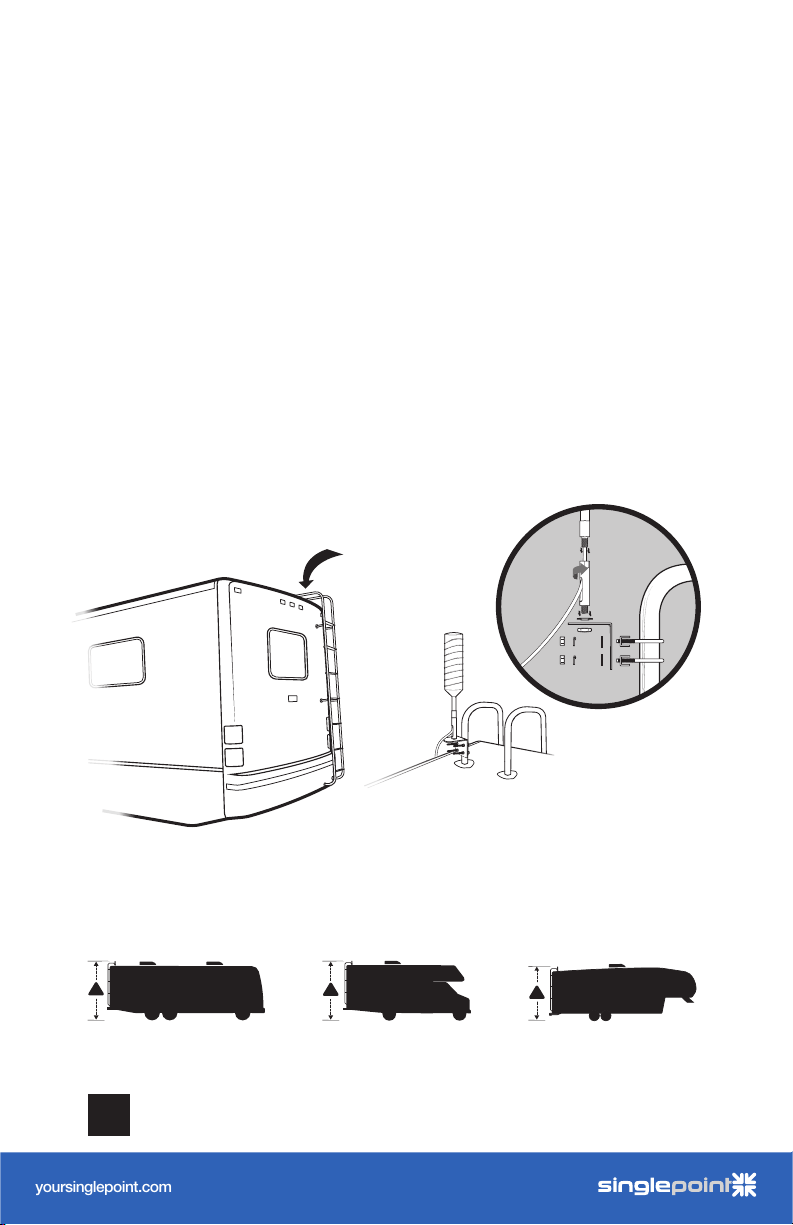
Step 1: Mount Outside
Antenna & Route Cable
Determine where you want the Outside Antenna on your RV.
Mount Outside Antenna to a ladder or pole so that the entire
Outside Antenna is above the roof line of the RV and clear of
other metal obstructions.
NOTE: This must be in a location within reach of the booster with the
25’ coax cable (installed in Step 4). The system performs best with maximum
vertical and horizontal separation.
NOTE: Keep in mind to stay below the maximum height limit allowed by law,
which varies from state to state (generally 14’ in western states and 13’6” in
eastern states).
common outside
antenna location
!
2
!
CELL PHONE SIGNAL BOOSTER DRIVE X RV
!
Page 5
______
User Manual
RV Cellular Signal Booster
DRIVE 4G-X RV
A WILS ON ELECTRONICS BRAND
NE ED HELP?
yoursinglepoint.com/support
1-866-959-9434 option 5
yoursinglepoint.com
by
AcmeIndustrial-Grade 4G LTE Router
MK2 Cellular Router
Built for Recreational Deployments
With a compact form factor, robust 802.11ac Wi-Fi, the WiFi In Motion™
MAX MK2 is ready to deliver fast, reliable Wi-Fi for your recreational needs.
Redundant SIM Slots for
Multiple Carriers
Redundant SIM slots with automatic
switching for reliable network. You can
set the WiFi In Motion
™
MAX MK2
to automatically switch SIM cards when
you’re in danger of exceeding a data ca p.
It also allows you to travel across borders
without changing SIM cards manually.
WaW Wi-Fi as WAN
Save on your data plan by using RV park
and other free Wi-Fi networks when
available. Now you can leverage quality
free Wi-Fi, if available, to deliver backhaul
to your own secure Wi-Fi network.
Stream and Update
The WiFi In Motion™ MAX MK2
provides robust backhaul, allowing
you to connect TV streaming services,
internet radios, voice over IP phones,
security cameras and more! Now you
can stream, update content and update
rmware on your onboard systems with
ease wherever you travel.
GPS Management
Lost your way? The WiFi In Motion™
MAX MK2 oers reliable GPS,
allowing you to track your location
using our interactive maps. Check
speed, cellular coverage, conditions
and routes real time. Play back your
route history in real time to share your
travels with friends and family.
In addition to rugged metal enclosure,
the WiFi In Motion
™
MAX MK2 has
certications on:
Shock and vibration resistance
(EN 61373:1999, IEC 61373:1999)
Railway applications (EN 50155)
Electromagnetic Compatibility (EN 61000)
eMark (ref: E13*10R00*10R05*13664*00)
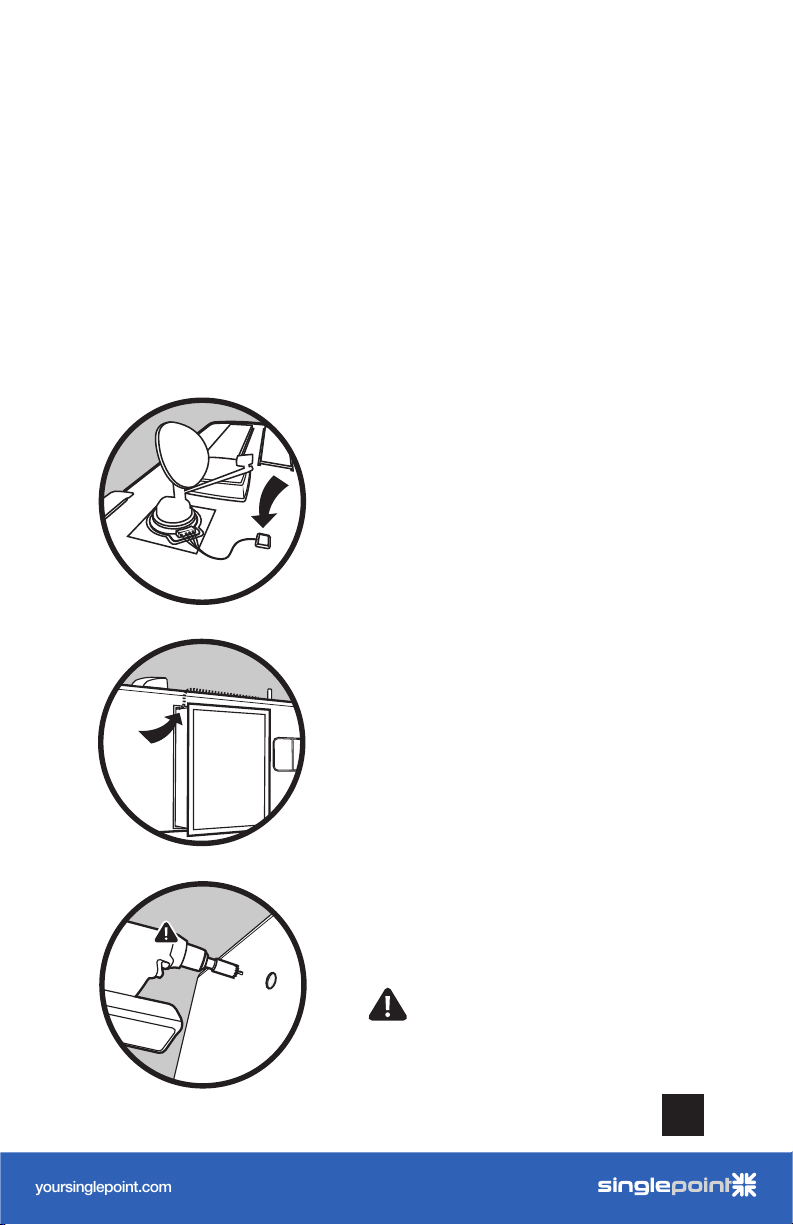
(STEP 1: MOUNT OUTSIDE ANTENNA & ROUTE CABLE cont.)
Determine where you want the cable to enter the RV.
NOTE: With this option, we recommend doing a ‘soft install’ before drilling
the hole. Set up the system by routing the cable through an open door or
window, completing the setup instructions, verifying the system works as
desired, and then drilling the hole.
Option A: Using existing
cable entry point.
Option B: Through the slider on
your RV (using the slider gasket as
a seal).
DRIVE X RV CELL PHONE SIGNAL BOOSTER
Option C: Drill a hole with the
included hole saw bit.
WARNING: Be sure to stay clear of
any power, pipes, etc. that may be
damaged.
3
Page 6
______
User Manual
RV Cellular Signal Booster
DRIVE 4G-X RV
A WILS ON ELECTRONICS BRAND
NE ED HELP?
yoursinglepoint.com/support
1-866-959-9434 option 5
yoursinglepoint.com
by
AcmeIndustrial-Grade 4G LTE Router
MK2 Cellular Router
Built for Recreational Deployments
With a compact form factor, robust 802.11ac Wi-Fi, the WiFi In Motion™
MAX MK2 is ready to deliver fast, reliable Wi-Fi for your recreational needs.
Redundant SIM Slots for
Multiple Carriers
Redundant SIM slots with automatic
switching for reliable network. You can
set the WiFi In Motion
™
MAX MK2
to automatically switch SIM cards when
you’re in danger of exceeding a data ca p.
It also allows you to travel across borders
without changing SIM cards manually.
WaW Wi-Fi as WAN
Save on your data plan by using RV park
and other free Wi-Fi networks when
available. Now you can leverage quality
free Wi-Fi, if available, to deliver backhaul
to your own secure Wi-Fi network.
Stream and Update
The WiFi In Motion™ MAX MK2
provides robust backhaul, allowing
you to connect TV streaming services,
internet radios, voice over IP phones,
security cameras and more! Now you
can stream, update content and update
rmware on your onboard systems with
ease wherever you travel.
GPS Management
Lost your way? The WiFi In Motion™
MAX MK2 oers reliable GPS,
allowing you to track your location
using our interactive maps. Check
speed, cellular coverage, conditions
and routes real time. Play back your
route history in real time to share your
travels with friends and family.
In addition to rugged metal enclosure,
the WiFi In Motion
™
MAX MK2 has
certications on:
Shock and vibration resistance
(EN 61373:1999, IEC 61373:1999)
Railway applications (EN 50155)
Electromagnetic Compatibility (EN 61000)
eMark (ref: E13*10R00*10R05*13664*00)
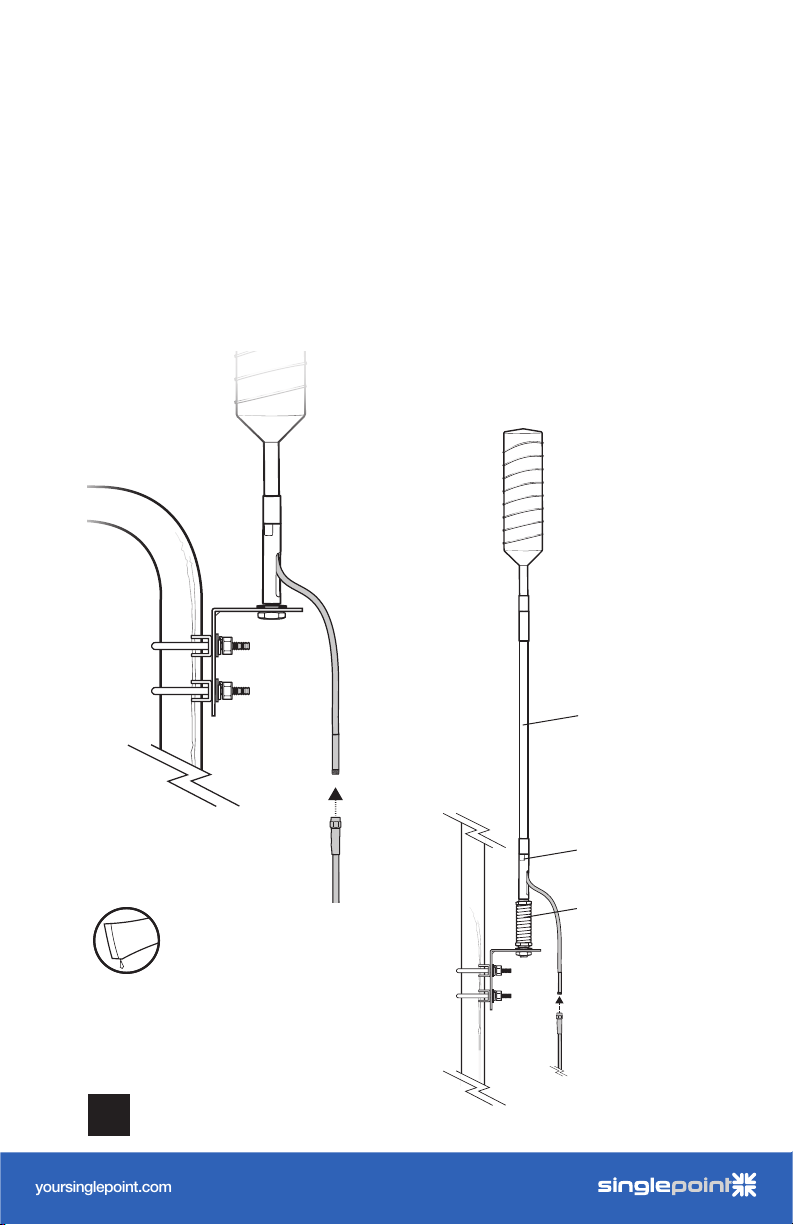
Step 2: Connect Cable To
Outside Antenna
Determine where you want the cable to enter the RV, then
connect the RG-6 cable to the Outside Antenna.
NOTE: If installing with Spring, the Side
Exit Adapter must be used.
4
Add thread lock on all threads
Thread Lock
with tube provided
CELL PHONE SIGNAL BOOSTER DRIVE X RV
Mast
Extension
Side Exit
Adapter
Spring
Page 7
______
User Manual
RV Cellular Signal Booster
DRIVE 4G-X RV
A WILS ON ELECTRONICS BRAND
NE ED HELP?
yoursinglepoint.com/support
1-866-959-9434 option 5
yoursinglepoint.com
by
AcmeIndustrial-Grade 4G LTE Router
MK2 Cellular Router
Built for Recreational Deployments
With a compact form factor, robust 802.11ac Wi-Fi, the WiFi In Motion™
MAX MK2 is ready to deliver fast, reliable Wi-Fi for your recreational needs.
Redundant SIM Slots for
Multiple Carriers
Redundant SIM slots with automatic
switching for reliable network. You can
set the WiFi In Motion
™
MAX MK2
to automatically switch SIM cards when
you’re in danger of exceeding a data ca p.
It also allows you to travel across borders
without changing SIM cards manually.
WaW Wi-Fi as WAN
Save on your data plan by using RV park
and other free Wi-Fi networks when
available. Now you can leverage quality
free Wi-Fi, if available, to deliver backhaul
to your own secure Wi-Fi network.
Stream and Update
The WiFi In Motion™ MAX MK2
provides robust backhaul, allowing
you to connect TV streaming services,
internet radios, voice over IP phones,
security cameras and more! Now you
can stream, update content and update
rmware on your onboard systems with
ease wherever you travel.
GPS Management
Lost your way? The WiFi In Motion™
MAX MK2 oers reliable GPS,
allowing you to track your location
using our interactive maps. Check
speed, cellular coverage, conditions
and routes real time. Play back your
route history in real time to share your
travels with friends and family.
In addition to rugged metal enclosure,
the WiFi In Motion
™
MAX MK2 has
certications on:
Shock and vibration resistance
(EN 61373:1999, IEC 61373:1999)
Railway applications (EN 50155)
Electromagnetic Compatibility (EN 61000)
eMark (ref: E13*10R00*10R05*13664*00)
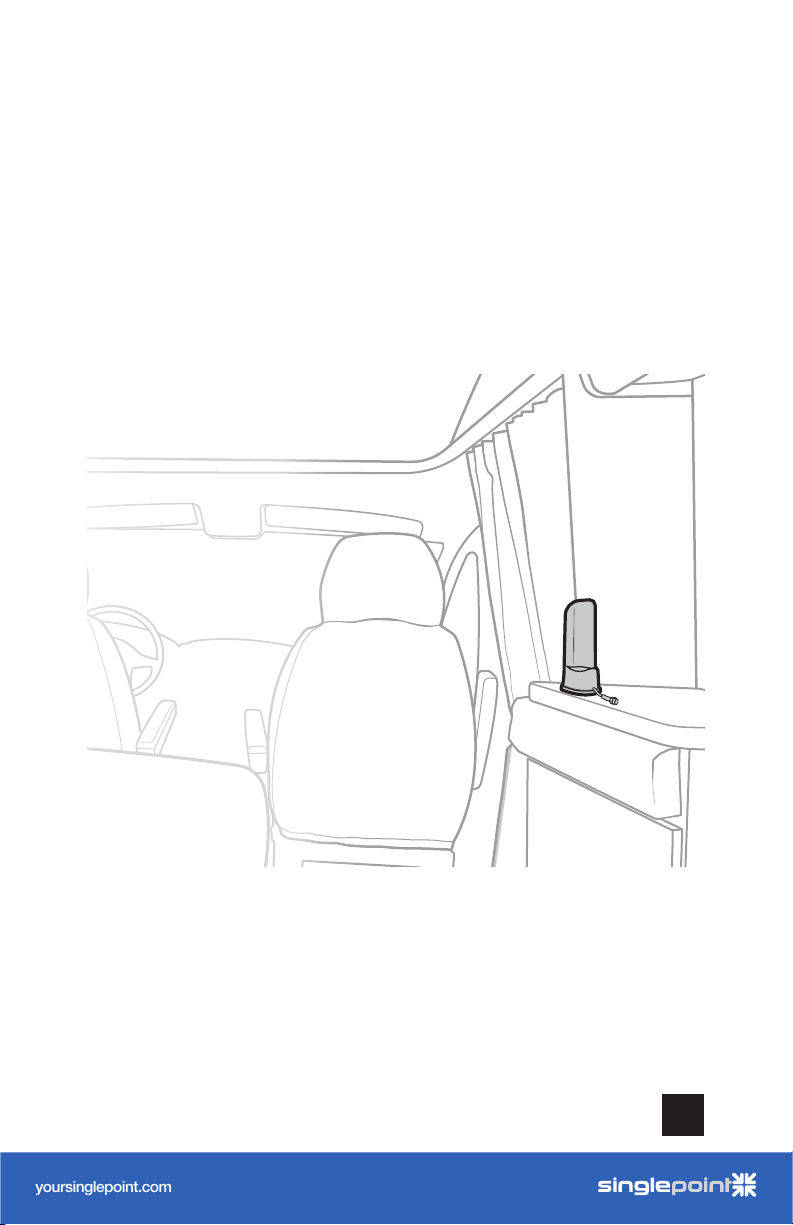
Step 3: Inside Antenna
Location
Place Inside Antenna where stronger signal is desired.
DRIVE X RV CELL PHONE SIGNAL BOOSTER
5
Page 8
______
User Manual
RV Cellular Signal Booster
DRIVE 4G-X RV
A WILS ON ELECTRONICS BRAND
NE ED HELP?
yoursinglepoint.com/support
1-866-959-9434 option 5
yoursinglepoint.com
by
AcmeIndustrial-Grade 4G LTE Router
MK2 Cellular Router
Built for Recreational Deployments
With a compact form factor, robust 802.11ac Wi-Fi, the WiFi In Motion™
MAX MK2 is ready to deliver fast, reliable Wi-Fi for your recreational needs.
Redundant SIM Slots for
Multiple Carriers
Redundant SIM slots with automatic
switching for reliable network. You can
set the WiFi In Motion
™
MAX MK2
to automatically switch SIM cards when
you’re in danger of exceeding a data ca p.
It also allows you to travel across borders
without changing SIM cards manually.
WaW Wi-Fi as WAN
Save on your data plan by using RV park
and other free Wi-Fi networks when
available. Now you can leverage quality
free Wi-Fi, if available, to deliver backhaul
to your own secure Wi-Fi network.
Stream and Update
The WiFi In Motion™ MAX MK2
provides robust backhaul, allowing
you to connect TV streaming services,
internet radios, voice over IP phones,
security cameras and more! Now you
can stream, update content and update
rmware on your onboard systems with
ease wherever you travel.
GPS Management
Lost your way? The WiFi In Motion™
MAX MK2 oers reliable GPS,
allowing you to track your location
using our interactive maps. Check
speed, cellular coverage, conditions
and routes real time. Play back your
route history in real time to share your
travels with friends and family.
In addition to rugged metal enclosure,
the WiFi In Motion
™
MAX MK2 has
certications on:
Shock and vibration resistance
(EN 61373:1999, IEC 61373:1999)
Railway applications (EN 50155)
Electromagnetic Compatibility (EN 61000)
eMark (ref: E13*10R00*10R05*13664*00)
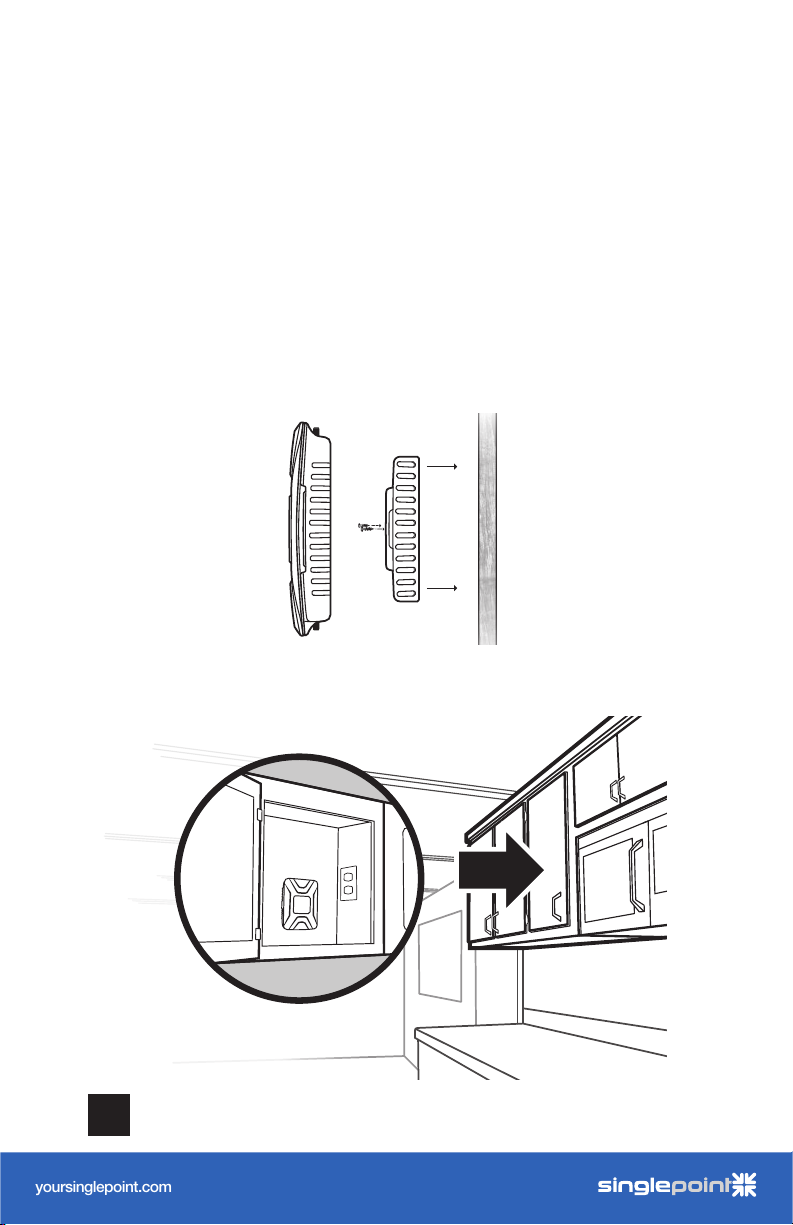
Step 4: Booster Location &
Connect Cables
Find a location to place the booster, then mount by
removing the bracket from back side of booster and fasten
to desired surface. Snap booster back into bracket.
NOTE: We recommend mounting in a cabinet near a power source. Be sure it’s in a
location that cables from both Inside and Outside Antennas can reach.
6
common booster
location
CELL PHONE SIGNAL BOOSTER DRIVE X RV
Page 9
______
User Manual
RV Cellular Signal Booster
DRIVE 4G-X RV
A WILS ON ELECTRONICS BRAND
NE ED HELP?
yoursinglepoint.com/support
1-866-959-9434 option 5
yoursinglepoint.com
by
AcmeIndustrial-Grade 4G LTE Router
MK2 Cellular Router
Built for Recreational Deployments
With a compact form factor, robust 802.11ac Wi-Fi, the WiFi In Motion™
MAX MK2 is ready to deliver fast, reliable Wi-Fi for your recreational needs.
Redundant SIM Slots for
Multiple Carriers
Redundant SIM slots with automatic
switching for reliable network. You can
set the WiFi In Motion
™
MAX MK2
to automatically switch SIM cards when
you’re in danger of exceeding a data ca p.
It also allows you to travel across borders
without changing SIM cards manually.
WaW Wi-Fi as WAN
Save on your data plan by using RV park
and other free Wi-Fi networks when
available. Now you can leverage quality
free Wi-Fi, if available, to deliver backhaul
to your own secure Wi-Fi network.
Stream and Update
The WiFi In Motion™ MAX MK2
provides robust backhaul, allowing
you to connect TV streaming services,
internet radios, voice over IP phones,
security cameras and more! Now you
can stream, update content and update
rmware on your onboard systems with
ease wherever you travel.
GPS Management
Lost your way? The WiFi In Motion™
MAX MK2 oers reliable GPS,
allowing you to track your location
using our interactive maps. Check
speed, cellular coverage, conditions
and routes real time. Play back your
route history in real time to share your
travels with friends and family.
In addition to rugged metal enclosure,
the WiFi In Motion
™
MAX MK2 has
certications on:
Shock and vibration resistance
(EN 61373:1999, IEC 61373:1999)
Railway applications (EN 50155)
Electromagnetic Compatibility (EN 61000)
eMark (ref: E13*10R00*10R05*13664*00)
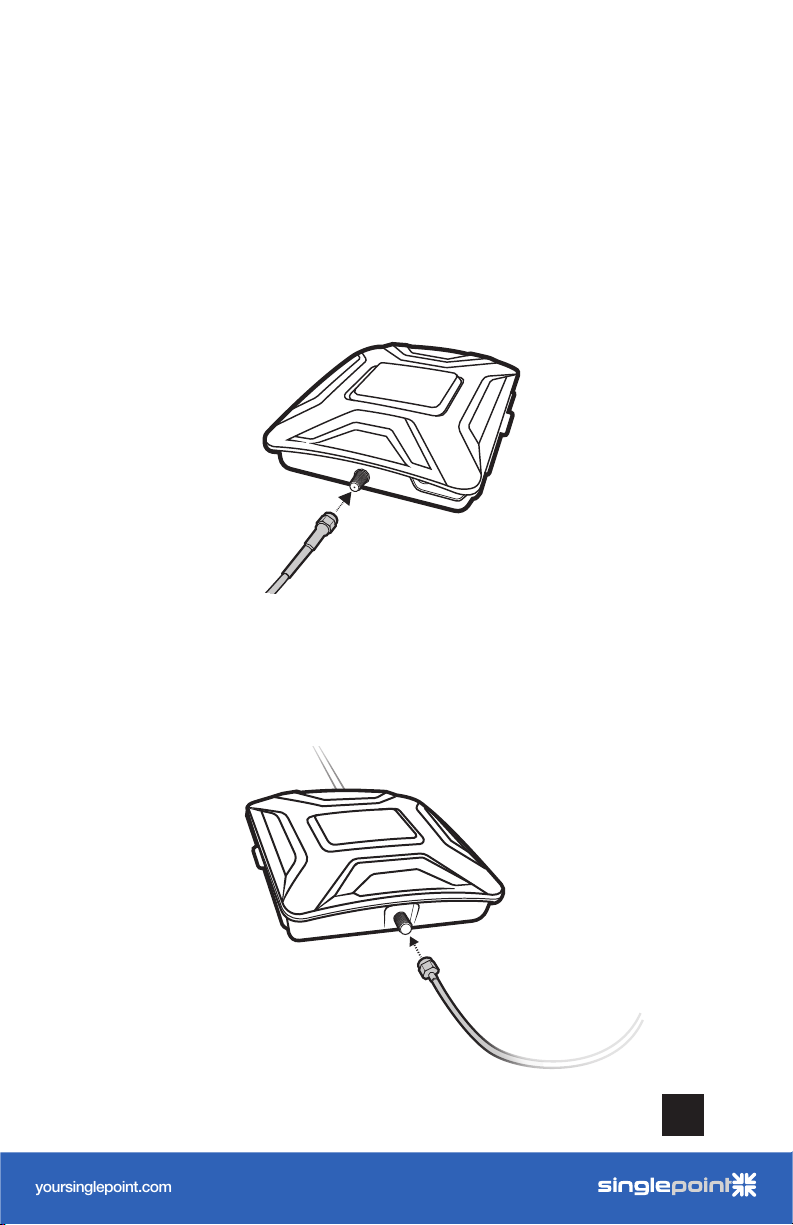
(STEP 4: BOOSTER LOCATION & CONNECT CABLES cont.)
Fasten the end with smaller SMA connection to the ‘Outside
Antenna’ port on the booster.
be sure to
finger tighten only
from Outside Antenna
Connect the 13’ RG-58 cable to the ‘Inside Antenna’ port on
the booster. Route the cable to the Inside Antenna.
DRIVE X RV CELL PHONE SIGNAL BOOSTER
route to Inside Antenna
be sure to
finger tighten only
7
Page 10
______
User Manual
RV Cellular Signal Booster
DRIVE 4G-X RV
A WILS ON ELECTRONICS BRAND
NE ED HELP?
yoursinglepoint.com/support
1-866-959-9434 option 5
yoursinglepoint.com
by
AcmeIndustrial-Grade 4G LTE Router
MK2 Cellular Router
Built for Recreational Deployments
With a compact form factor, robust 802.11ac Wi-Fi, the WiFi In Motion™
MAX MK2 is ready to deliver fast, reliable Wi-Fi for your recreational needs.
Redundant SIM Slots for
Multiple Carriers
Redundant SIM slots with automatic
switching for reliable network. You can
set the WiFi In Motion
™
MAX MK2
to automatically switch SIM cards when
you’re in danger of exceeding a data ca p.
It also allows you to travel across borders
without changing SIM cards manually.
WaW Wi-Fi as WAN
Save on your data plan by using RV park
and other free Wi-Fi networks when
available. Now you can leverage quality
free Wi-Fi, if available, to deliver backhaul
to your own secure Wi-Fi network.
Stream and Update
The WiFi In Motion™ MAX MK2
provides robust backhaul, allowing
you to connect TV streaming services,
internet radios, voice over IP phones,
security cameras and more! Now you
can stream, update content and update
rmware on your onboard systems with
ease wherever you travel.
GPS Management
Lost your way? The WiFi In Motion™
MAX MK2 oers reliable GPS,
allowing you to track your location
using our interactive maps. Check
speed, cellular coverage, conditions
and routes real time. Play back your
route history in real time to share your
travels with friends and family.
In addition to rugged metal enclosure,
the WiFi In Motion
™
MAX MK2 has
certications on:
Shock and vibration resistance
(EN 61373:1999, IEC 61373:1999)
Railway applications (EN 50155)
Electromagnetic Compatibility (EN 61000)
eMark (ref: E13*10R00*10R05*13664*00)
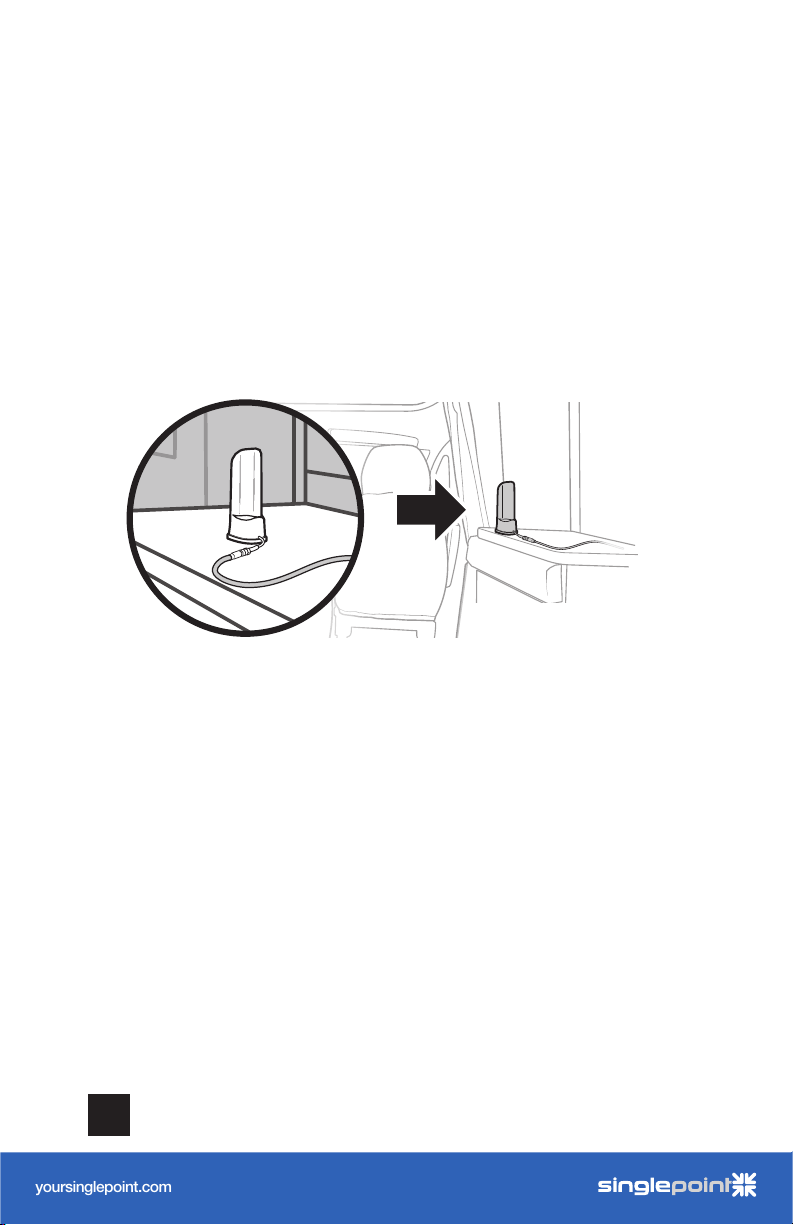
(STEP 4: BOOSTER LOCATION & CONNECT CABLES cont.)
Connect the 13’ RG-58 cable to the ‘Inside Antenna’ port
on the booster. Route the cable and connect to the Inside
Antenna.
Inside
Antenna
best when used within
4-10 feet of cellular device
(including our WiFi In Motion router)
8
CELL PHONE SIGNAL BOOSTER DRIVE X RV
Page 11
User Manual
RV Cellular Signal Booster
DRIVE 4G-X RV
A WILS ON ELECTRONICS BRAND
NE ED HELP?
yoursinglepoint.com/support
1-866-959-9434 option 5
yoursinglepoint.com
by
AcmeIndustrial-Grade 4G LTE Router
MK2 Cellular Router
Built for Recreational Deployments
With a compact form factor, robust 802.11ac Wi-Fi, the WiFi In Motion™
MAX MK2 is ready to deliver fast, reliable Wi-Fi for your recreational needs.
Redundant SIM Slots for
Multiple Carriers
Redundant SIM slots with automatic
switching for reliable network. You can
set the WiFi In Motion
™
MAX MK2
to automatically switch SIM cards when
you’re in danger of exceeding a data ca p.
It also allows you to travel across borders
without changing SIM cards manually.
WaW Wi-Fi as WAN
Save on your data plan by using RV park
and other free Wi-Fi networks when
available. Now you can leverage quality
free Wi-Fi, if available, to deliver backhaul
to your own secure Wi-Fi network.
Stream and Update
The WiFi In Motion™ MAX MK2
provides robust backhaul, allowing
you to connect TV streaming services,
internet radios, voice over IP phones,
security cameras and more! Now you
can stream, update content and update
rmware on your onboard systems with
ease wherever you travel.
GPS Management
Lost your way? The WiFi In Motion™
MAX MK2 oers reliable GPS,
allowing you to track your location
using our interactive maps. Check
speed, cellular coverage, conditions
and routes real time. Play back your
route history in real time to share your
travels with friends and family.
In addition to rugged metal enclosure,
the WiFi In Motion
™
MAX MK2 has
certications on:
Shock and vibration resistance
(EN 61373:1999, IEC 61373:1999)
Railway applications (EN 50155)
Electromagnetic Compatibility (EN 61000)
eMark (ref: E13*10R00*10R05*13664*00)
______
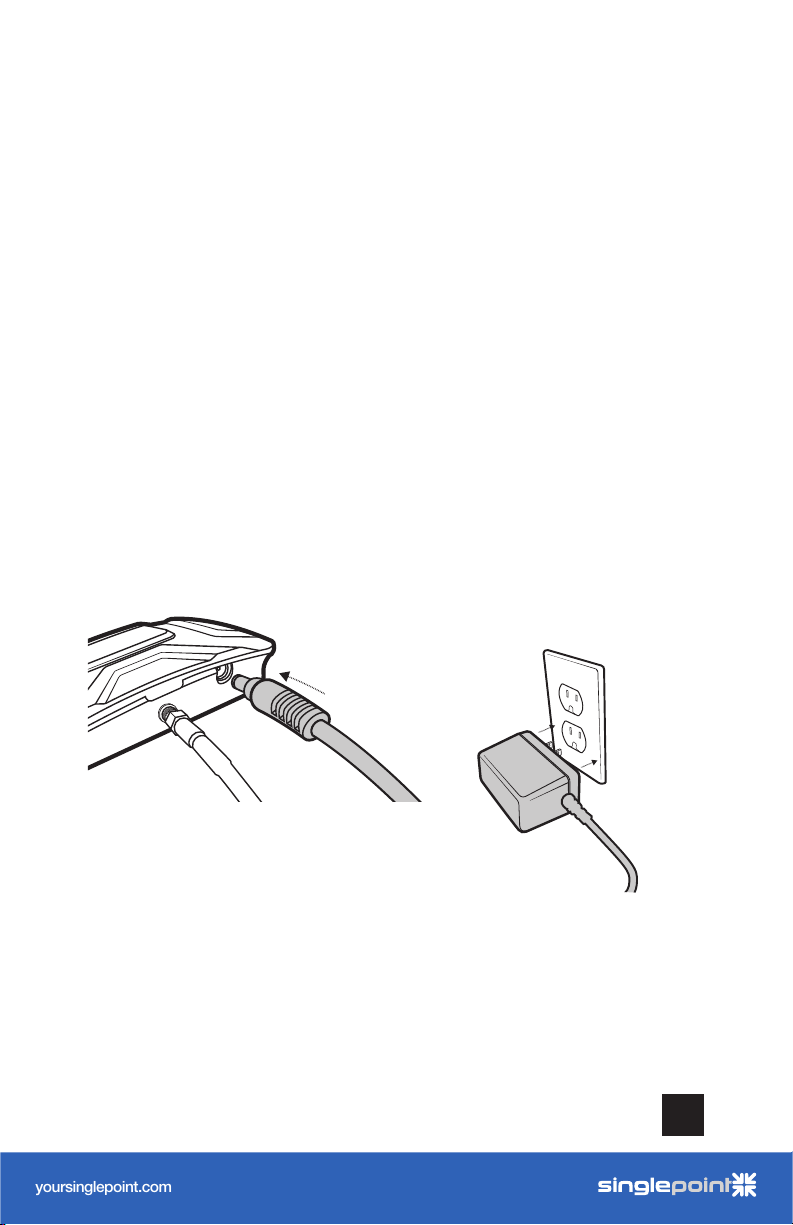
Steps 5 & 6: Power Up The
Booster
Connect power cable to booster, then into 110V Wall plug
and enjoy!
NOTE: A fused 12V hardwire power supply is also included.
DRIVE X RV CELL PHONE SIGNAL BOOSTER
9
Page 12
______
User Manual
RV Cellular Signal Booster
DRIVE 4G-X RV
A WILS ON ELECTRONICS BRAND
NE ED HELP?
yoursinglepoint.com/support
1-866-959-9434 option 5
yoursinglepoint.com
by
AcmeIndustrial-Grade 4G LTE Router
MK2 Cellular Router
Built for Recreational Deployments
With a compact form factor, robust 802.11ac Wi-Fi, the WiFi In Motion™
MAX MK2 is ready to deliver fast, reliable Wi-Fi for your recreational needs.
Redundant SIM Slots for
Multiple Carriers
Redundant SIM slots with automatic
switching for reliable network. You can
set the WiFi In Motion
™
MAX MK2
to automatically switch SIM cards when
you’re in danger of exceeding a data ca p.
It also allows you to travel across borders
without changing SIM cards manually.
WaW Wi-Fi as WAN
Save on your data plan by using RV park
and other free Wi-Fi networks when
available. Now you can leverage quality
free Wi-Fi, if available, to deliver backhaul
to your own secure Wi-Fi network.
Stream and Update
The WiFi In Motion™ MAX MK2
provides robust backhaul, allowing
you to connect TV streaming services,
internet radios, voice over IP phones,
security cameras and more! Now you
can stream, update content and update
rmware on your onboard systems with
ease wherever you travel.
GPS Management
Lost your way? The WiFi In Motion™
MAX MK2 oers reliable GPS,
allowing you to track your location
using our interactive maps. Check
speed, cellular coverage, conditions
and routes real time. Play back your
route history in real time to share your
travels with friends and family.
In addition to rugged metal enclosure,
the WiFi In Motion
™
MAX MK2 has
certications on:
Shock and vibration resistance
(EN 61373:1999, IEC 61373:1999)
Railway applications (EN 50155)
Electromagnetic Compatibility (EN 61000)
eMark (ref: E13*10R00*10R05*13664*00)
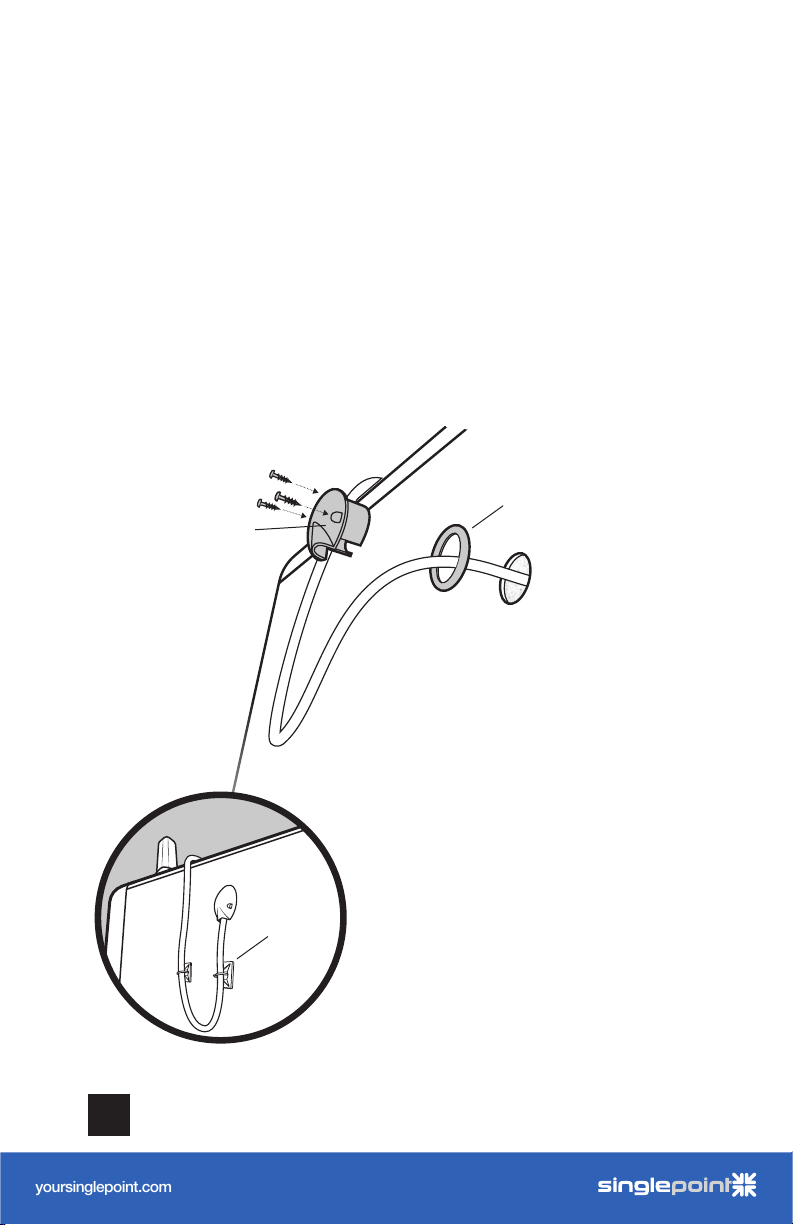
Using The Optional Cable
Entry Accessories
Skip if you used Option A or B in STEP 1. Pull the RG-6 cable
through the rubber gasket, then place the Cable Entry Cover
into the entry hole (as shown below) and fasten cover to side of
RV. Use the cable mounts and ties to secure to the RV.
10
gasket
Cable Entry
Cover
NOTE: We recommend putting a loop
going up to the cable entry hole to
prevent moisture from entering the RV.
cable
mounts
CELL PHONE SIGNAL BOOSTER DRIVE X RV
We strongly recommend using an RTV
sealant from the inside to prevent
moisture, insects, and other undesired
things from entering the RV.
Page 13

______
User Manual
RV Cellular Signal Booster
DRIVE 4G-X RV
A WILS ON ELECTRONICS BRAND
NE ED HELP?
yoursinglepoint.com/support
1-866-959-9434 option 5
yoursinglepoint.com
by
AcmeIndustrial-Grade 4G LTE Router
MK2 Cellular Router
Built for Recreational Deployments
With a compact form factor, robust 802.11ac Wi-Fi, the WiFi In Motion™
MAX MK2 is ready to deliver fast, reliable Wi-Fi for your recreational needs.
Redundant SIM Slots for
Multiple Carriers
Redundant SIM slots with automatic
switching for reliable network. You can
set the WiFi In Motion
™
MAX MK2
to automatically switch SIM cards when
you’re in danger of exceeding a data ca p.
It also allows you to travel across borders
without changing SIM cards manually.
WaW Wi-Fi as WAN
Save on your data plan by using RV park
and other free Wi-Fi networks when
available. Now you can leverage quality
free Wi-Fi, if available, to deliver backhaul
to your own secure Wi-Fi network.
Stream and Update
The WiFi In Motion™ MAX MK2
provides robust backhaul, allowing
you to connect TV streaming services,
internet radios, voice over IP phones,
security cameras and more! Now you
can stream, update content and update
rmware on your onboard systems with
ease wherever you travel.
GPS Management
Lost your way? The WiFi In Motion™
MAX MK2 oers reliable GPS,
allowing you to track your location
using our interactive maps. Check
speed, cellular coverage, conditions
and routes real time. Play back your
route history in real time to share your
travels with friends and family.
In addition to rugged metal enclosure,
the WiFi In Motion
™
MAX MK2 has
certications on:
Shock and vibration resistance
(EN 61373:1999, IEC 61373:1999)
Railway applications (EN 50155)
Electromagnetic Compatibility (EN 61000)
eMark (ref: E13*10R00*10R05*13664*00)
Measuring Booster
Performance
Using signal bars and data speed testing, determine the signal
strength inside your RV. Note it here:
iPhone®
iOS 11 - current
Android™
iPhone is a registered trademark of Apple Inc. Android is a trademark of Google Inc.
All Other Phones & Alternate Methods
• https://www.weboost.com/test-mode-instructions/
All Phones:
• Keep track of the network (3G or 4G) phone is connected to.
• Any signal readings you take are valid for that phone’s carrier. To get readings
iOS 11 no longer displays the decibel (dBm) reading in ‘Field
Test Mode’. Tip: Using the bar indicator on your cell phone can
assist you in finding the strongest signal direction as well as
placing calls in dierent locations. For changes/updates on
this issue, periodically go to weboost.com/signalstrength.
Settings > About Phone > Status or Network > Signal Strength
or Network Type and Strength (exact options/wording
depends on phone model).
from other carriers, you’ll need phones from each carrier.
DRIVE X RV CELL PHONE SIGNAL BOOSTER
11
Page 14
EXCELLENT GOOD FAIR POOR DEAD ZONE
3G/1x
4G/LTE
-70dBm
-90dBm
-71 to -85dBm
-91 to -105dBm
-86 to -100dBm
-106 to -110dBm
-101 to -109dBm
-111 to -119dBm
-110dBm
-120dBm
SIGNAL
STRENGTH
______
User Manual
RV Cellular Signal Booster
DRIVE 4G-X RV
A WILS ON ELECTRONICS BRAND
NE ED HELP?
yoursinglepoint.com/support
1-866-959-9434 option 5
yoursinglepoint.com
by
AcmeIndustrial-Grade 4G LTE Router
MK2 Cellular Router
Built for Recreational Deployments
With a compact form factor, robust 802.11ac Wi-Fi, the WiFi In Motion™
MAX MK2 is ready to deliver fast, reliable Wi-Fi for your recreational needs.
Redundant SIM Slots for
Multiple Carriers
Redundant SIM slots with automatic
switching for reliable network. You can
set the WiFi In Motion
™
MAX MK2
to automatically switch SIM cards when
you’re in danger of exceeding a data ca p.
It also allows you to travel across borders
without changing SIM cards manually.
WaW Wi-Fi as WAN
Save on your data plan by using RV park
and other free Wi-Fi networks when
available. Now you can leverage quality
free Wi-Fi, if available, to deliver backhaul
to your own secure Wi-Fi network.
Stream and Update
The WiFi In Motion™ MAX MK2
provides robust backhaul, allowing
you to connect TV streaming services,
internet radios, voice over IP phones,
security cameras and more! Now you
can stream, update content and update
rmware on your onboard systems with
ease wherever you travel.
GPS Management
Lost your way? The WiFi In Motion™
MAX MK2 oers reliable GPS,
allowing you to track your location
using our interactive maps. Check
speed, cellular coverage, conditions
and routes real time. Play back your
route history in real time to share your
travels with friends and family.
In addition to rugged metal enclosure,
the WiFi In Motion
™
MAX MK2 has
certications on:
Shock and vibration resistance
(EN 61373:1999, IEC 61373:1999)
Railway applications (EN 50155)
Electromagnetic Compatibility (EN 61000)
eMark (ref: E13*10R00*10R05*13664*00)
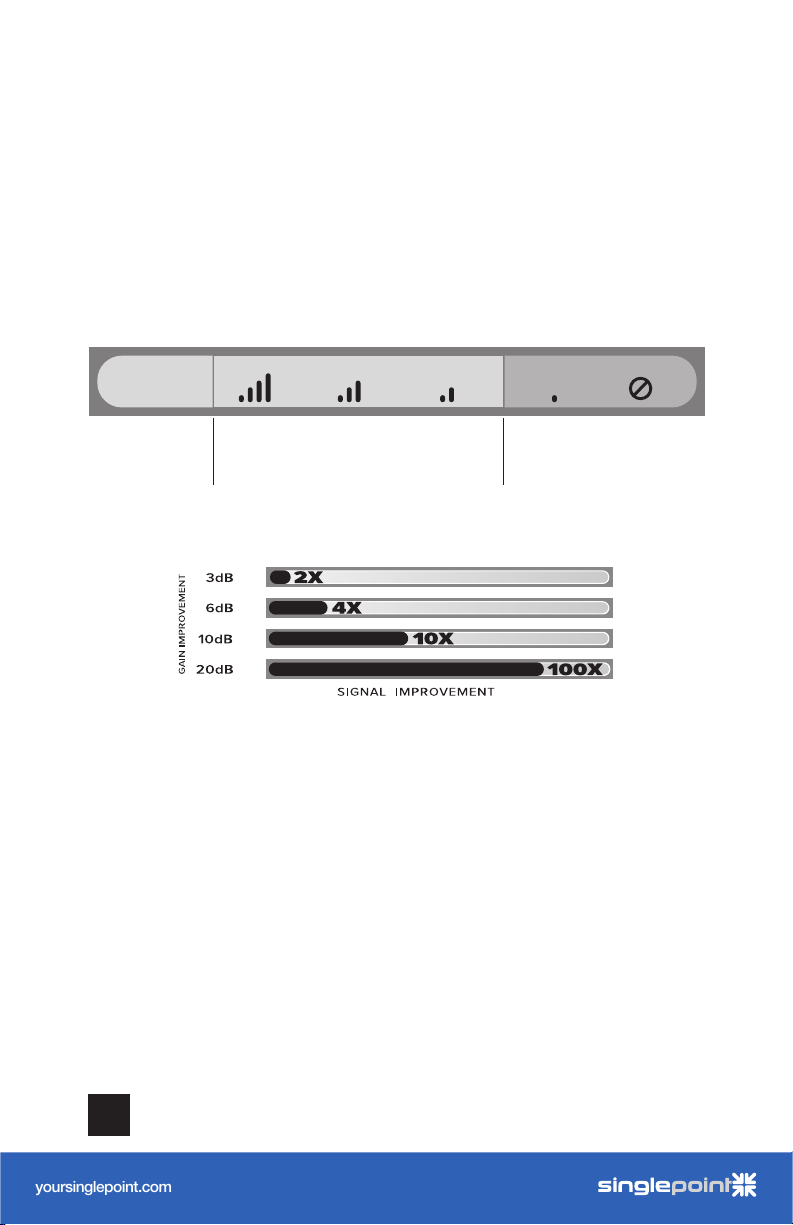
(MEASURING BOOSTER PERFORMANCE cont.)
Compare Results
Having an accurate measurement of signal strength in decibels (dBm) is crucial when
installing your system. Decibels accurately measure the signal strength you are receiving.
EXCELLENT GOOD FAIR POOR DEAD ZONE
SIGNAL
STRENGTH
3G/1x
4G/LTE
-70dBm
-90dBm
-71 to -85dBm
-91 to -105dBm
-86 to -100dBm
-106 to -110dBm
-101 to -109dBm
-111 to -119dBm
Did you know a signal increase of just 3dB is 2 times the power and signal amplification!
-110dBm
-120dBm
12
CELL PHONE SIGNAL BOOSTER DRIVE X RV
Page 15
User Manual
RV Cellular Signal Booster
DRIVE 4G-X RV
A WILS ON ELECTRONICS BRAND
NE ED HELP?
yoursinglepoint.com/support
1-866-959-9434 option 5
yoursinglepoint.com
by
AcmeIndustrial-Grade 4G LTE Router
MK2 Cellular Router
Built for Recreational Deployments
With a compact form factor, robust 802.11ac Wi-Fi, the WiFi In Motion™
MAX MK2 is ready to deliver fast, reliable Wi-Fi for your recreational needs.
Redundant SIM Slots for
Multiple Carriers
Redundant SIM slots with automatic
switching for reliable network. You can
set the WiFi In Motion
™
MAX MK2
to automatically switch SIM cards when
you’re in danger of exceeding a data ca p.
It also allows you to travel across borders
without changing SIM cards manually.
WaW Wi-Fi as WAN
Save on your data plan by using RV park
and other free Wi-Fi networks when
available. Now you can leverage quality
free Wi-Fi, if available, to deliver backhaul
to your own secure Wi-Fi network.
Stream and Update
The WiFi In Motion™ MAX MK2
provides robust backhaul, allowing
you to connect TV streaming services,
internet radios, voice over IP phones,
security cameras and more! Now you
can stream, update content and update
rmware on your onboard systems with
ease wherever you travel.
GPS Management
Lost your way? The WiFi In Motion™
MAX MK2 oers reliable GPS,
allowing you to track your location
using our interactive maps. Check
speed, cellular coverage, conditions
and routes real time. Play back your
route history in real time to share your
travels with friends and family.
In addition to rugged metal enclosure,
the WiFi In Motion
™
MAX MK2 has
certications on:
Shock and vibration resistance
(EN 61373:1999, IEC 61373:1999)
Railway applications (EN 50155)
Electromagnetic Compatibility (EN 61000)
eMark (ref: E13*10R00*10R05*13664*00)
______
Light Patterns
Solid Green
This indicates that your booster is functioning properly and there are no issues with
installation.
Blinking Red, Then Solid Green
This indicates that one or more of the booster bands has reduced power due
to a feedback loop condition called oscillation. This is a built in safety feature
to prevent harmful interference with a nearby cell tower. If you are already
experiencing the desired signal boost, then no further adjustments are necessary.
If you are not experiencing the desired boost in coverage then refer to the
Troubleshooting section.
Solid Red
This is due to a feedback loop condition called oscillation. This is a built in safety
feature that causes a band to shut o to prevent harmful interference with a nearby
cell tower. Refer to Troubleshooting section below.
If the Drive X Signal Booster’s light is o, verify your power supply has power.
NOTE: The Signal Booster can be reset by disconnecting and reconnecting
the power supply.
After troubleshooting you must initiate a new power cycle by disconnecting and
then reconnecting power to the Booster.
NEED HE LP ?
DRIVE X RV CELL PHONE SIGNAL BOOSTER
yoursinglepoint.com/support 1-866-959-9434 option 5
13
Page 16
______
User Manual
RV Cellular Signal Booster
DRIVE 4G-X RV
A WILS ON ELECTRONICS BRAND
NE ED HELP?
yoursinglepoint.com/support
1-866-959-9434 option 5
yoursinglepoint.com
by
AcmeIndustrial-Grade 4G LTE Router
MK2 Cellular Router
Built for Recreational Deployments
With a compact form factor, robust 802.11ac Wi-Fi, the WiFi In Motion™
MAX MK2 is ready to deliver fast, reliable Wi-Fi for your recreational needs.
Redundant SIM Slots for
Multiple Carriers
Redundant SIM slots with automatic
switching for reliable network. You can
set the WiFi In Motion
™
MAX MK2
to automatically switch SIM cards when
you’re in danger of exceeding a data ca p.
It also allows you to travel across borders
without changing SIM cards manually.
WaW Wi-Fi as WAN
Save on your data plan by using RV park
and other free Wi-Fi networks when
available. Now you can leverage quality
free Wi-Fi, if available, to deliver backhaul
to your own secure Wi-Fi network.
Stream and Update
The WiFi In Motion™ MAX MK2
provides robust backhaul, allowing
you to connect TV streaming services,
internet radios, voice over IP phones,
security cameras and more! Now you
can stream, update content and update
rmware on your onboard systems with
ease wherever you travel.
GPS Management
Lost your way? The WiFi In Motion™
MAX MK2 oers reliable GPS,
allowing you to track your location
using our interactive maps. Check
speed, cellular coverage, conditions
and routes real time. Play back your
route history in real time to share your
travels with friends and family.
In addition to rugged metal enclosure,
the WiFi In Motion
™
MAX MK2 has
certications on:
Shock and vibration resistance
(EN 61373:1999, IEC 61373:1999)
Railway applications (EN 50155)
Electromagnetic Compatibility (EN 61000)
eMark (ref: E13*10R00*10R05*13664*00)
RV Cellular Signal Booster
DRIVE 4G-X RV
A WILS ON ELECTRONICS BRAND
by
AcmeIndustrial-Grade 4G LTE Router
MK2 Cellular Router
Built for Recreational Deployments
With a compact form factor, robust 802.11ac Wi-Fi, the WiFi In Motion™
MAX MK2 is ready to deliver fast, reliable Wi-Fi for your recreational needs.
Redundant SIM Slots for
Multiple Carriers
Redundant SIM slots with automatic
WaW Wi-Fi as WAN
Save on your data plan by using RV park
and other free Wi-Fi networks when
Stream and Update
The WiFi In Motion™ MAX MK2
provides robust backhaul, allowing
Troubleshooting
FIXING BLINKING OR SOLID RED ISSUES
This section is only applicable if the booster is red or blinking red and you are not
experiencing the desired signal boost.
Unplug the Booster’s power supply.
1
Relocate the inside and outside antenna further from each other. The objective
2
is to increase the separation distance between them, so that they will not
create this feedback condition discussed before.
Plug power supply back in.
3
Monitor the indicator light on your booster. If, after a few seconds of ‘power
4
on’, a solid or blinking red light appears, repeat steps 1 through 3. Increase the
separation distance until the condition is corrected and/or desired coverage
area is achieved. Note: Horizontal separation of the two antennas typically
requires a shorter separation distance than perpendicular separation.
5
our weBoost Customer Support team for assistance (866.294.1660).
FREQUENTLY ASKED QUESTIONS
How can I contact customer support?
Customer Support can be reached monday thru friday by calling 866.294.1660, or
through our support site at support.weboost.com.
Why do I need to create distance between the booster and the antenna?
Antennas connected to a booster create spheres of signal. When these spheres
overlap, a condition called oscillation occurs. Oscillation can be thought of as noise,
which causes the booster to shut down to prevent damage. The best way to keep
these spheres of signal from overlapping is to maximize separation between the
Booster and Antenna.
NEED H ELP?
14
yoursinglepoint.com/support 1-866-959-9434 option 5
CELL PHONE SIGNAL BOOSTER DRIVE X RV
Page 17

______
User Manual
RV Cellular Signal Booster
DRIVE 4G-X RV
A WILS ON ELECTRONICS BRAND
NE ED HELP?
yoursinglepoint.com/support
1-866-959-9434 option 5
yoursinglepoint.com
by
AcmeIndustrial-Grade 4G LTE Router
MK2 Cellular Router
Built for Recreational Deployments
With a compact form factor, robust 802.11ac Wi-Fi, the WiFi In Motion™
MAX MK2 is ready to deliver fast, reliable Wi-Fi for your recreational needs.
Redundant SIM Slots for
Multiple Carriers
Redundant SIM slots with automatic
switching for reliable network. You can
set the WiFi In Motion
™
MAX MK2
to automatically switch SIM cards when
you’re in danger of exceeding a data ca p.
It also allows you to travel across borders
without changing SIM cards manually.
WaW Wi-Fi as WAN
Save on your data plan by using RV park
and other free Wi-Fi networks when
available. Now you can leverage quality
free Wi-Fi, if available, to deliver backhaul
to your own secure Wi-Fi network.
Stream and Update
The WiFi In Motion™ MAX MK2
provides robust backhaul, allowing
you to connect TV streaming services,
internet radios, voice over IP phones,
security cameras and more! Now you
can stream, update content and update
rmware on your onboard systems with
ease wherever you travel.
GPS Management
Lost your way? The WiFi In Motion™
MAX MK2 oers reliable GPS,
allowing you to track your location
using our interactive maps. Check
speed, cellular coverage, conditions
and routes real time. Play back your
route history in real time to share your
travels with friends and family.
In addition to rugged metal enclosure,
the WiFi In Motion
™
MAX MK2 has
certications on:
Shock and vibration resistance
(EN 61373:1999, IEC 61373:1999)
Railway applications (EN 50155)
Electromagnetic Compatibility (EN 61000)
eMark (ref: E13*10R00*10R05*13664*00)
Safety Guidelines
Use only the power supply provided in this package. Use of a non-weBoost product may damage
your equipment.
The Signal Booster unit is designed for use in an indoor, temperature-controlled environment
(less than 150 degrees Fahrenheit). It is not intended for use in attics or similar locations subject to
temperatures in excess of that range.
The desktop antenna must have at least 3’ of separation distance from all active users. All inside
panel and dome antennas must have at least 6’ of separation distance from all active users, and low
profile antennas must have at least 1.5’ separation distance from all active users.
Connecting the Signal Booster directly to the cell phone with use of an adapter will damage the
cell phone.
RF Safety Warning: Any antenna used with this device must be located at least 8 inches from all
persons.
AWS Warning: The Outside Antenna must be installed no higher than 32 feet 9 inches (10 meters)
above ground.
This is a CONSUMER device.
BEFORE USE, you MUST REGISTER THIS DEVICE with your wireless provider and have your
provider’s consent. Most wireless providers consent to the use of signal boosters. Some providers
may not consent to the use of this device on their network. If you are unsure, contact your provider.
You MUST operate this device with approved antennas and cables as specified by the
manufacturer
You MUST cease operating this device immediately if requested by the FCC or licensed wireless
service provider.
WARNING. E911 location information may not be provided or may be inaccurate for calls served by
using this device.
FOR MORE INFORMATION ON REGISTERING YOUR SIGNAL BOOSTER WITH YOUR
WIRELESS PROVIDER, PLEASE SEE BELOW:
Sprint: http://www.sprint.com/legal/fcc_boosters.html
T-Mobile/MetroPCS: https://support.t-mobile.com/docs/DOC-9827
Verizon Wireless: http://www.verizonwireless.com/wcms/consumer/register-signal-booster.html
AT&T: https://securec45.securewebsession.com/attsignalbooster.com/
U.S. Cellular: http://www.uscellular.com/uscellular/support/fcc-booster-registration.jsp
16
. Antennas MUST be installed at least 20 cm (8 inches) from any person.
CELL PHONE SIGNAL BOOSTER DRIVE X RV
Page 18
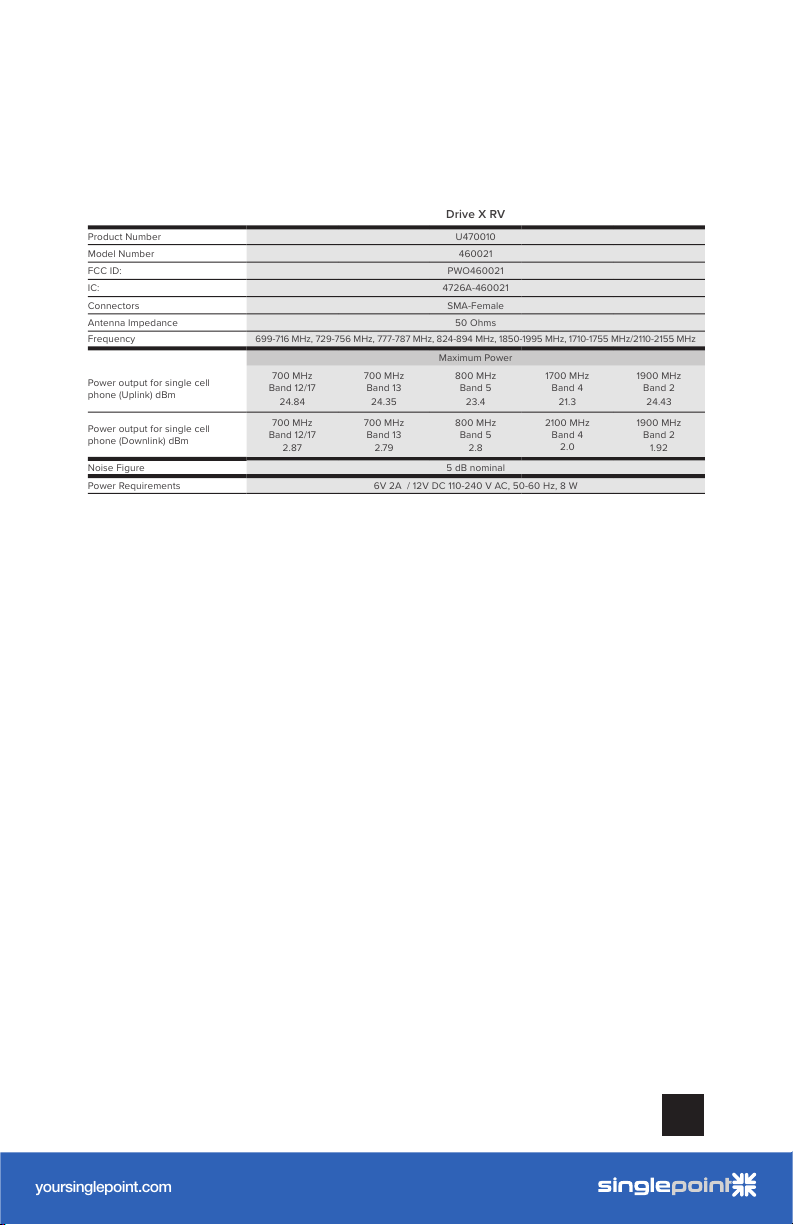
Drive X RV
Product Number U470010
Model Number 460021
FCC ID: PWO460021
IC: 4726A-460021
Connectors SMA-Female
Antenna Impedance 50 Ohms
Frequency
699-716 MHz, 729-756 MHz, 777-787 MHz, 824-894 MHz, 1850-1995 MHz, 1710-1755 MHz/2110-2155 MHz
Maximum Power
Power output for single cell
phone (Uplink) dBm
700 MHz
Band 12/17
24.84
700 MHz
Band 13
24.35
800 MHz
Band 5
23.4
1700 MHz
Band 4
21.3
1900 MHz
Band 2
24.43
Power output for single cell
phone (Downlink) dBm
700 MHz
Band 12/17
2.87
700 MHz
Band 13
2.79
800 MHz
Band 5
2.8
2100 MHz
Band 4
2.0
1900 MHz
Band 2
1.92
Noise Figure
5 dB nominal
Power Requirements 6V 2A / 12V DC 110-240 V AC, 50-60 Hz, 8 W
______
User Manual
RV Cellular Signal Booster
DRIVE 4G-X RV
A WILS ON ELECTRONICS BRAND
NE ED HELP?
yoursinglepoint.com/support
1-866-959-9434 option 5
yoursinglepoint.com
by
AcmeIndustrial-Grade 4G LTE Router
MK2 Cellular Router
Built for Recreational Deployments
With a compact form factor, robust 802.11ac Wi-Fi, the WiFi In Motion™
MAX MK2 is ready to deliver fast, reliable Wi-Fi for your recreational needs.
Redundant SIM Slots for
Multiple Carriers
Redundant SIM slots with automatic
switching for reliable network. You can
set the WiFi In Motion
™
MAX MK2
to automatically switch SIM cards when
you’re in danger of exceeding a data ca p.
It also allows you to travel across borders
without changing SIM cards manually.
WaW Wi-Fi as WAN
Save on your data plan by using RV park
and other free Wi-Fi networks when
available. Now you can leverage quality
free Wi-Fi, if available, to deliver backhaul
to your own secure Wi-Fi network.
Stream and Update
The WiFi In Motion™ MAX MK2
provides robust backhaul, allowing
you to connect TV streaming services,
internet radios, voice over IP phones,
security cameras and more! Now you
can stream, update content and update
rmware on your onboard systems with
ease wherever you travel.
GPS Management
Lost your way? The WiFi In Motion™
MAX MK2 oers reliable GPS,
allowing you to track your location
using our interactive maps. Check
speed, cellular coverage, conditions
and routes real time. Play back your
route history in real time to share your
travels with friends and family.
In addition to rugged metal enclosure,
the WiFi In Motion
™
MAX MK2 has
certications on:
Shock and vibration resistance
(EN 61373:1999, IEC 61373:1999)
Railway applications (EN 50155)
Electromagnetic Compatibility (EN 61000)
eMark (ref: E13*10R00*10R05*13664*00)
Specifications
Each Signal Booster is individually tested and factory set to ensure FCC compliance. The Signal Booster cannot be adjusted without
factory reprogramming or disabling the hardware. The Signal Booster will amplify, but not alter incoming and outgoing signals in order
to increase coverage of authorized frequency bands only. If the Signal Booster is not in use for five minutes, it will reduce gain until a
signal is detected. If a detected signal is too high in a frequency band, or if the Signal Booster detects an oscillation, the Signal Booster
will automatically turn the power o on that band. For a detected oscillation the Signal Booster will automatically resume norma l
operation after a minimum of 1 minute. After 5 (five) such automatic restarts, any problematic bands are permanently shut o until the
Signal Booster has been manually restarted by momentarily removing power from the Signal Booster. Noise power, gain, and linearity
are maintained by the Signal Booster’s microprocessor.
This device complies with Part 15 of FCC rules. Operation is subject to two conditions: (1) This device may not cause harmful
interference, and (2) this device must accept any interference received, including interference that may cause undesired operation.
Changes or modifications not expressly approved by weBoost could void the authority to operate this equipment.
This device contains licence-exempt transmitter(s)/receiver(s) that comply with Innovation, Science and Economic Development
Canada’s licence-exempt RSS(s). Operation is subject to the following two conditions: (1) This device may not cause interference, and
(2) This device must accept any interference, including interference that may cause undesired operation of the device.
Changes or modifications not expressly approved by weBoost could void the authority to operate this equipment.
DRIVE X RV CELL PHONE SIGNAL BOOSTER
17
Page 19
2 YEAR WARRANTY
weBoost Signal Boosters are warranted for two (2) years against defects in
workmanship and/or materials. Warranty cases may be resolved by returning the
product directly to the reseller with a dated proof of purchase.
Signal Boosters may also be returned directly to the manufacturer at the
consumer’s expense, with a dated proof of purchase and a Returned Material
Authorization (RMA) number supplied by we
oost. weBoost shall, at its option,
either repair or replace the product.
This warranty does not apply to any Signal Boosters determined by weBoost
to have been subjected to misuse, abuse, neglect, or mishandling that alters or
damages physical or electronic properties.
Replacement products may include refurbished weBoost products that have been
recertified to conform with product spec ifications.
RMA numbers may be obtained by contacting Customer Support
DISCLAIMER: The information provided by weBoost is believed to be complete
and accurate. However, no responsibility is assumed by weBoost for any business
or personal losses arising from its use, or for any infringements of patents or other
rights of third parties that may result from its use.
weBoost Signal Boosters are warranted for two (2) years against defects in
workmanship and/or materials. Warranty cases may be resolved by returning the
product directly to the reseller with a dated proof of purchase.
Signal Boosters may also be returned directly to the manufacturer at the
consumer’s expense, with a dated proof of purchase and a Returned Material
Authorization (RMA) number supplied by we
either repair or replace the product.
This warranty does not apply to any Signal Boosters determined by weBoost
to have been subjected to misuse, abuse, neglect, or mishandling that alters or
damages physical or electronic properties.
Replacement products may include refurbished weBoost products that have been
recertified to conform with product spec ifications.
RMA numbers may be obtained by contacting Customer Support
DISCLAIMER: The information provided by weBoost is believed to be complete
and accurate. However, no responsibility is assumed by weBoost for any business
or personal losses arising from its use, or for any infringements of patents or other
rights of third parties that may result from its use.
oost. weBoost shall, at its option,
3301 East Deseret Drive, St. George, UT
866.294.1660
Copyright © 2019 weBoost. All rights reserved.
weBoost products covered by U.S. patent(s) and pending application(s)
For patents go to: web oost.com/us/pa tents
NOT AFFILIATED WITH WI LSON ANTENNA
www.weboost.com support.weboost.com
SinglePoint Communications, Inc.
7325 NE Imbrie Dr #349 Hillsboro OR 97124
866.959.9434 | www.yoursinglepoint.com
© 2018 SinglePoint Communications. All Rights Reserved.
Trademarks are the property of their respective owners.
Specifications subject to change without notice. E&OE
GDE000155_Rev01_07.11.19
 Loading...