

Page 1

Webee-Centralite-3323
GETTING STARTED WITH MICRO OPEN/CLOSED SENSOR
1
2
GETTING STARTED WITH
MICRO OPEN/CLOSED SENSOR
This document is the property of Webee L.L.C.. The data contained here, in whole or in part, may not be duplicated, used or
disclosed outside the recipient for any purpose. This restriction does not limit the recipient's right to use information contained
in the data if it is obtained from another source without restriction.
Page 2

Webee-Centralite-3323
GETTING STARTED WITH MICRO OPEN/CLOSED SENSOR
2
2
Getting started
Page 0
INDEX
Section 1: Mounting your Micro Open/Closed Sensor
Instructions / Dimensions.....................................................03
Section 2: Connecting to Smartee
Adding Micro Open/Closed to Zigbee Network......................................04
Section 3: Specs
Removing Micro Open/Closed from Zigbee Network.............................04
Section 4: Security Instructions
Security Guidelines.............................................................06
Electrical Specifications......................................................05
RF characteristics...............................................................05
© 2016 Webee LLC, All rights reserved. Webee and the Webee logo are trademarks or registered trademarks of Webee LLC.
Page 3
Webee-Centralite-3323
GETTING STARTED WITH MICRO OPEN/CLOSED SENSOR
3
2
MOUNTING YOUR MICRO OPEN/CLOSED SENSOR
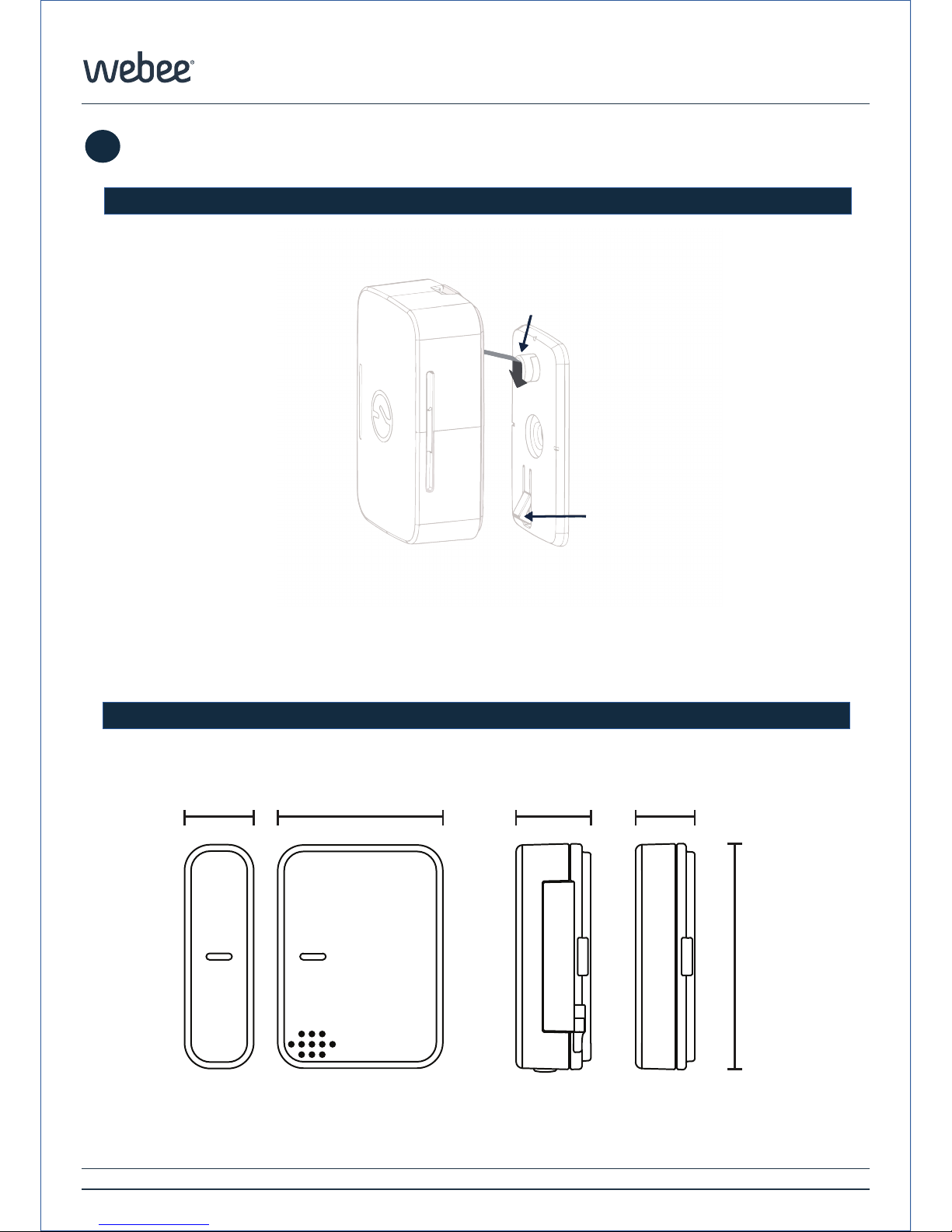
1- Adjust the wall bracket to the surface of your choice, then slide the sensor down on to
the mounting fastener on the wall plate until the Snap Lock is secured.
Getting started
1
1
Page 0
Mounting Fastener
Snap Lock
Instructions
Dimensions
.58”
(15mm)
.46”
(12mm)
.55”
(14mm)
1.31”
(33mm)
FRONT VIEW
SENSOR
SIDE VIEW
MAGNET
1.75”
(44mm)
© 2016 Webee LLC, All rights reserved. Webee and the Webee logo are trademarks or registered trademarks of Webee LLC.
Page 4

Webee-Centralite-3323
GETTING STARTED WITH MICRO OPEN/CLOSED SENSOR
4
2
CONNECTING TO SMARTEE
Getting started
1
2
Page 0
To join the Micro Open/Closed Sensor to the Smartee, make sure you pull the small
plastic tab located at the bottom of the sensor and immediately click on "Add Device" on
your Webee App. The sensor will automatically join the network.
If the sensor does not automatically join the network, remove cover, and remove the
battery. While holding down the reset button, reinsert the battery to factory reset the
device.
If the after following these steps the Micro Open/Closed sensor will not join the Smartee
Zigbee network, do as follows:
•Make sure the Micro Open/Closed sensor batteries are charged.
•Ensure it is within RF range of a Smartee (30-90ft indoor)
Once the Micro Open/Closed sensor is added to your Smartee, you will be able to start
controlling it trough your Webee Apps.
If it becomes necessary to remove the Micro Open/Closed sensor from a Zigbee
network then you must factory reset the Open/Closed sensor. To do it:
A. Remove cover from sensor and remove the battery.
D. Press and hold the reset button while reinserting the battery.
Adding to Zigbee Network
Removing from Zigbee Network
© 2016 Webee LLC, All rights reserved. Webee and the Webee logo are trademarks or registered trademarks of Webee LLC.
Page 5
Webee-Centralite-3323
GETTING STARTED WITH MICRO OPEN/CLOSED SENSOR
5
2
1
323
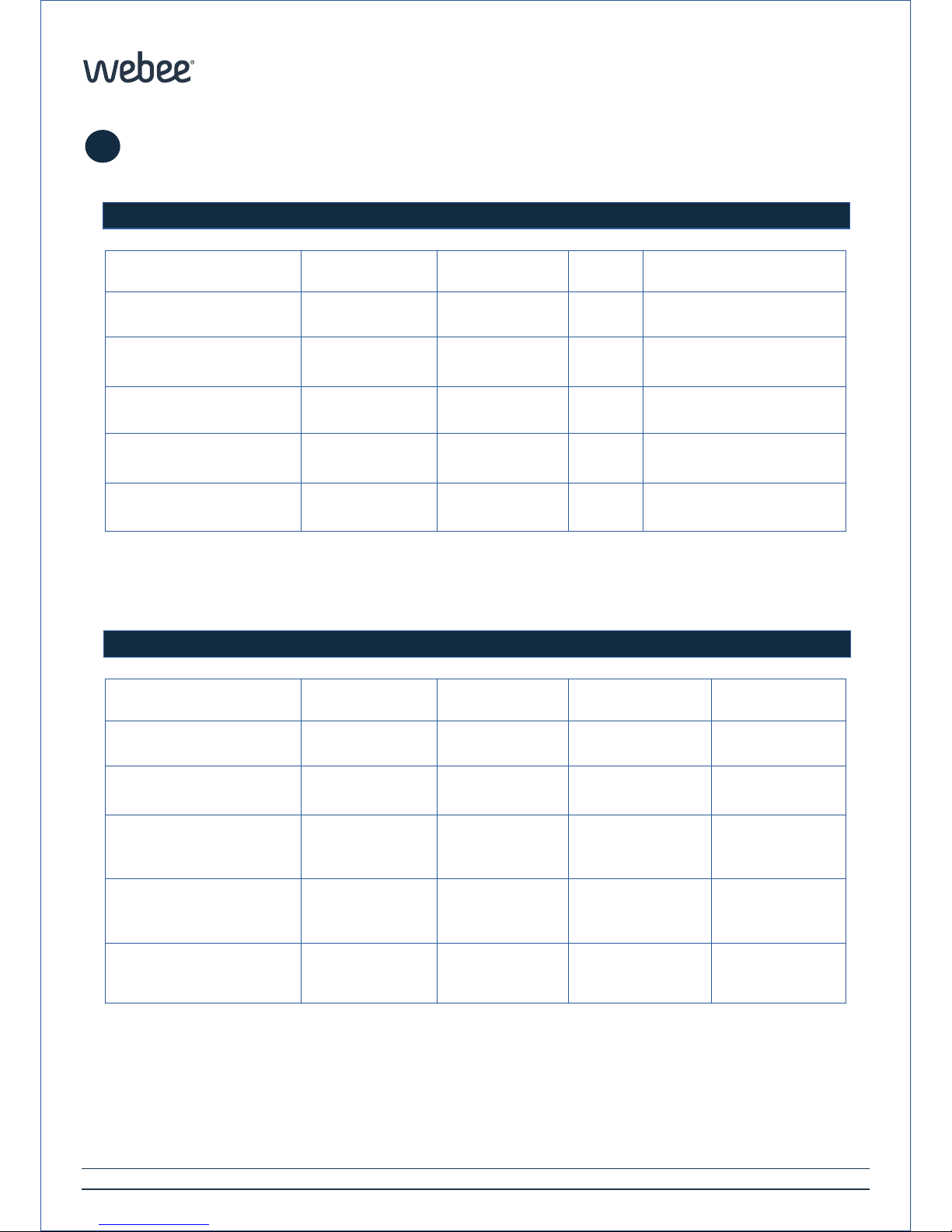
Description
Min
Typ
Max
Unit
Rated
--3
V
Battery
-
CR-2450 (1x)
2
Years
Operating temperature
0º-40º
ºC
Storage temperature
-20º
-
50º
ºC
Operating Humidity
0-90%
RH (non-condensing)
Electrical specifications
Description
Min
Typ
Max
Unit
RF Channels
--16
-
TX Strength
--+8
dBm
Range
-
-
30+ ft. (40+ m)
L.O.S.
ft.
Temp Accuracy:
±0.4 °C (max),
–10 to 85 °C
°C
Protocol
Zigbee HA 1.2
Wireless RF Characteristics
Getting started
5
Page 0
© 2016 Webee LLC, All rights reserved. Webee and the Webee logo are trademarks or registered trademarks of Webee LLC.
Page 6
Webee-Centralite-3323
GETTING STARTED WITH MICRO OPEN/CLOSED SENSOR
6
2
SAFETY INSTRUCTIONS
Getting started
1
3
Page 0
Safety Guidelines
-Clean only with a dry cloth.
-Do not install near any heat source such as radiators, stoves or
other appliances (including amplifiers that produce heat.
-Only use attachments and accessories specified by the manufacturer.
-Follow all guidelines carefully, if you have any questions contact us at
[email protected].
Warning:
No user-serviceable parts inside. Refer all servicing
to qualified service personnel.
Warning:
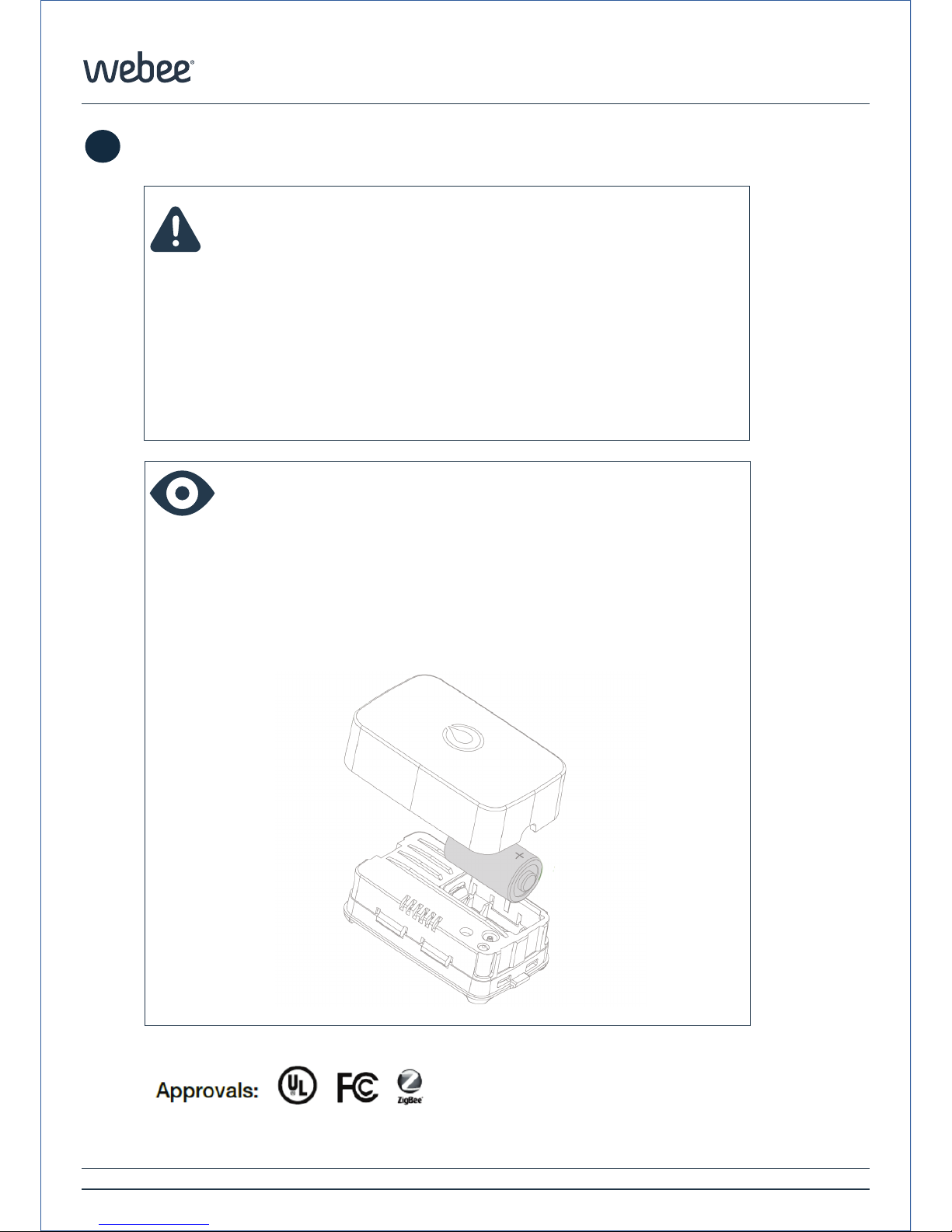
Lift the top of your Micro Open/Closed sensor to
change it’s battery. It use Battery. CR-2450 (1x)
Risk of explosion if another type of battery is used.
© 2016 Webee LLC, All rights reserved. Webee and the Webee logo are trademarks or registered trademarks of Webee LLC.
Page 7

Webee-Centralite-3323
GETTING STARTED WITH MICRO OPEN/CLOSED SENSOR
7
2
V1.0 REV. June, 2016
© 2016 Webee LLC, All rights reserved. Webee and the Webee logo are trademarks or registered trademarks of Webee LLC.
 Loading...