

Page 1
SA I N T WAY
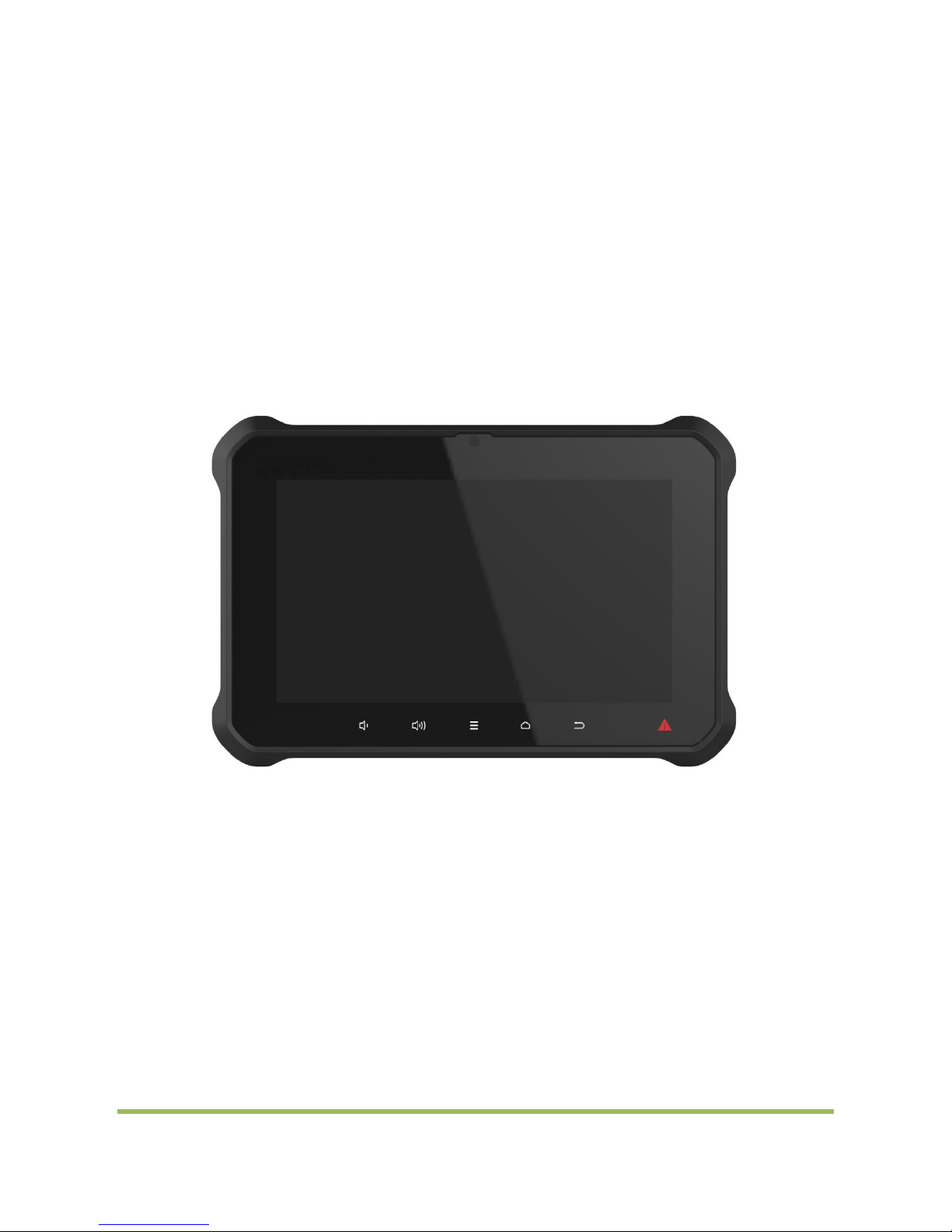
S8 User Instruction
Ver:00 1
WAY S I O N
1 / 13
Page 2

SA I N T WAY
Content
◆ Product Description ――――――――――――――――――――――――― 3
◆ Product Specifications ―――――――――――――――――――――――― 4
◆ Product Appearance ――――――――――――――――――――――――― 5
◆ User Instruction for each function (Android 5.1.1)―――――――――――― 8
◆ Starting Up Interface ――――――――――――――――――――――――――7
◆ USB Flash Disk Usage ―――――――――――――――――――――――――― 7
◆ Audio Play ―――――――――――――――――――――――――――――― 8
◆ Video Play ―――――――――――――――――――――――――――――― 9
◆ Ethernet Port Usage ―――――――――――――――――――――――――――9
◆ Touch Screen Calibration ―――――――――――――――――――――――― 10
◆ WIFI――――――――――――――――――――――――――――――――― 10
WAY S I O N
2 / 13
Page 3
SA I N T WAY
一、Product Descriptions:
Android 5.1 operating systems for this device;
WIFI, Ethernet port high speed internet surfing;
Built-in Bluetooth module, longer transfer distance and stronger signal;
8-inch TFT LED backlight 16:9 1024x600 display;
touch control;
Both USB Host functions;
earphone jack, built-in 2W left and right channel speakers, with microphone;
二、Product specification
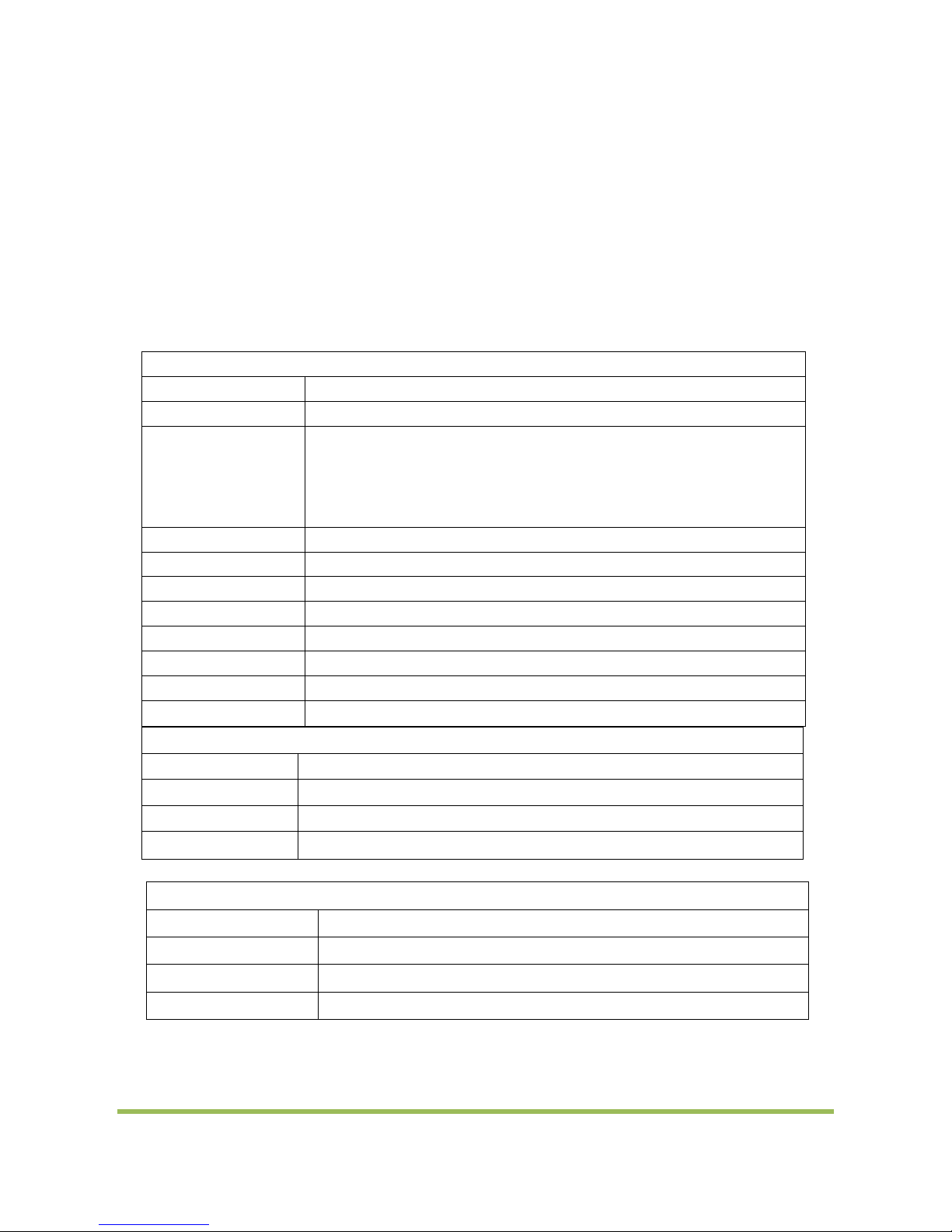
System Specs
CPU
ROCKCHIP RK3288 Quad-core ARM Cortex-A17 MPCore processor
Memory
DDR3 2GB
eMMC
8GB
Operating system
Android 5.1
Basic Specs
LCD
8’’TFT LED Backlight Resolution: 1024×600 Brightness: 500cd/m2
Touch panel
8-inch
Interfaces
USB Host USB OTG
Earphone jack Microphone Built-in c
Ethernet port DC IN
Keys
Power
Start up mode
auto power on
Audio output
Stereo speakers, 4-ohm 2W x 2
Power consumption
≤8W
WIFI module
802.11 b/g/n
Bluetooth module
Bluetooth V4.0 (BLE) support
Dimension
200L×135W×37(mm)
Weight
0.9Kg
Environment Specs
Working temperature
0℃ to +45℃(battery) -10℃ to +60℃(no battery)
Storage temperature
-5℃ to +50℃(battery) -20℃ to +70℃(no battery)
Working humidity
0% to 95%RH
Storage humidity
0% to 95%RH
WAY S I O N
3 / 13
Page 4
SA I N T WAY
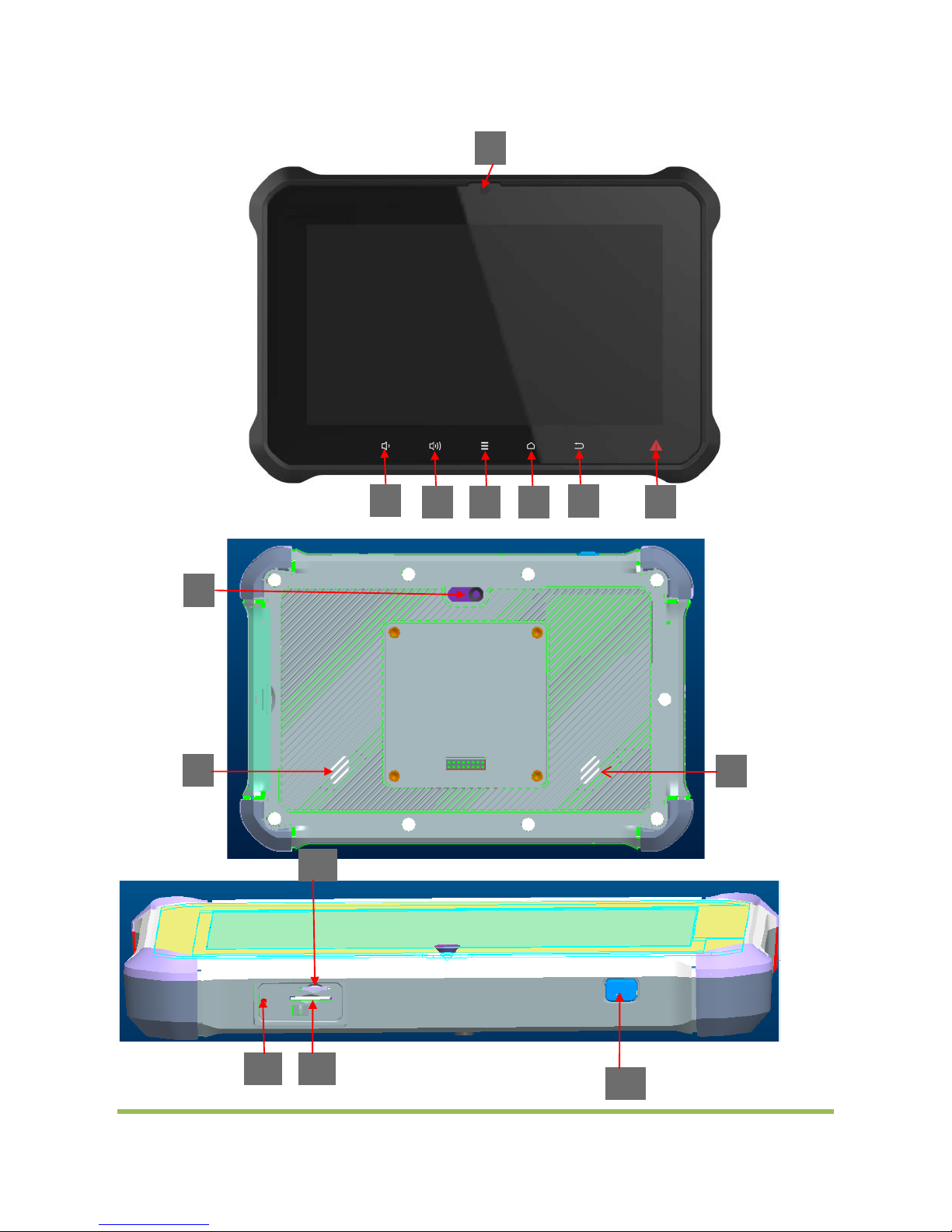
三、Product Appearance
Main device:
8
1 9 10
13
11
12
9
2
3
4
5 6 7
WAY S I O N
4 / 13
Page 5
SA I N T WAY
1、Camera
2、VOL-
3、VOL+
4、MENU
5、HOME
6、BACK
7、PANIC
8、LED/CAMERA
9、SPEAKER
10、RESET
11、TF CARD
12、SIM CARD
13、POWER
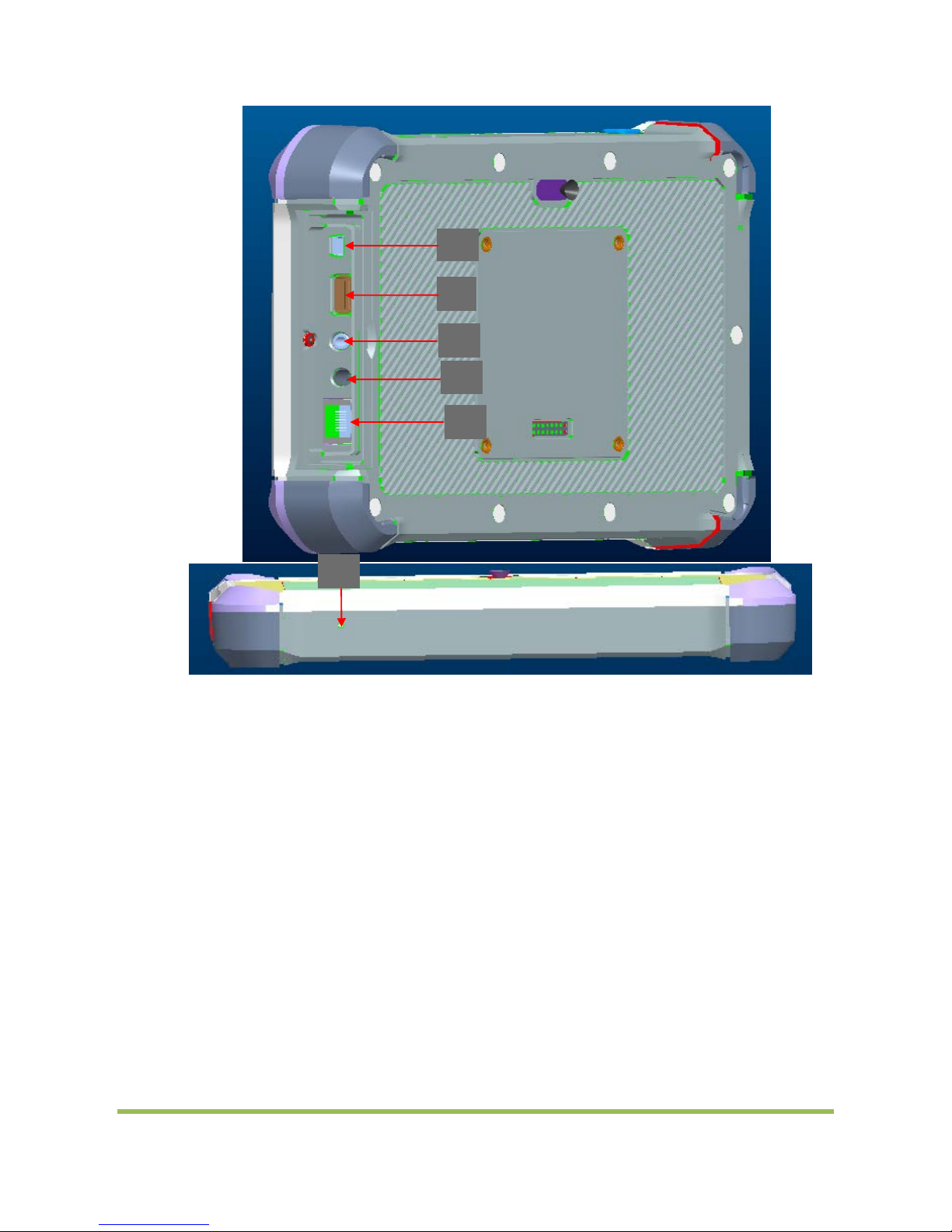
14、USB OTG
15、USB HOST
16、EARPHONE JACK
17、DC IN
18、ETHERNET
19、MIC
14
16
15
17
18
19
WAY S I O N
5 / 13
Page 6
SA I N T WAY
四、
Usage for Android 5.1.1 version:
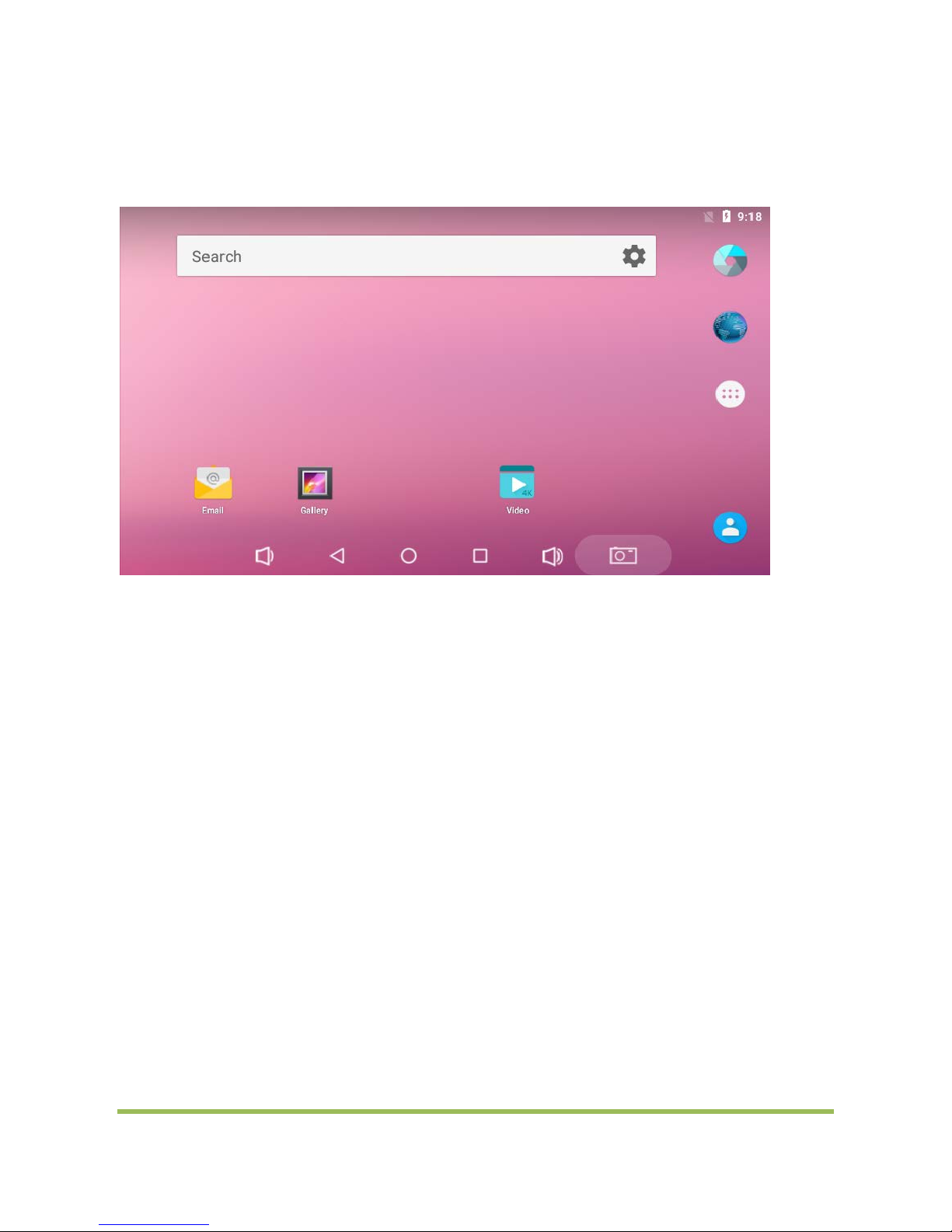
1、Starting up interface
Below interface will appear when Power Input:
Usage of USB flash disk under Android 5.1.1 is similar to under standard Android OS
2、USB Flash Disk Usage
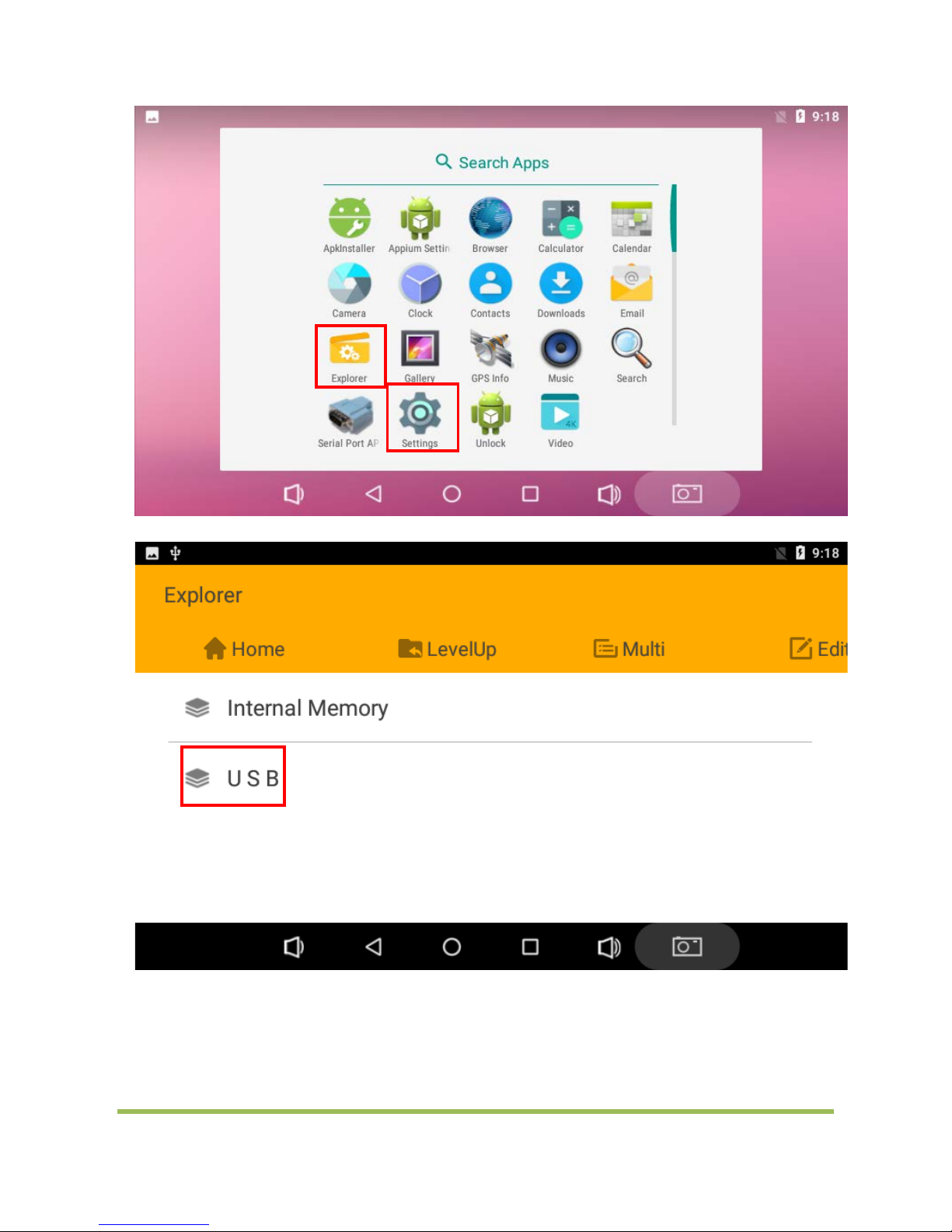
After Android 7.1.1 OS starts up, plug USB flash disk into USB Host connector
The indicator of USB flash disk flicker, wait for few seconds, the system will load the disk automatically
At this time, click "Explorer" icon, you will see a folder "USB" which is USB Flash Disk. click "USB" to read and write data
USB flash disk can also be recognized before the system starts up
WAY S I O N
6 / 13
Page 7
SA I N T WAY
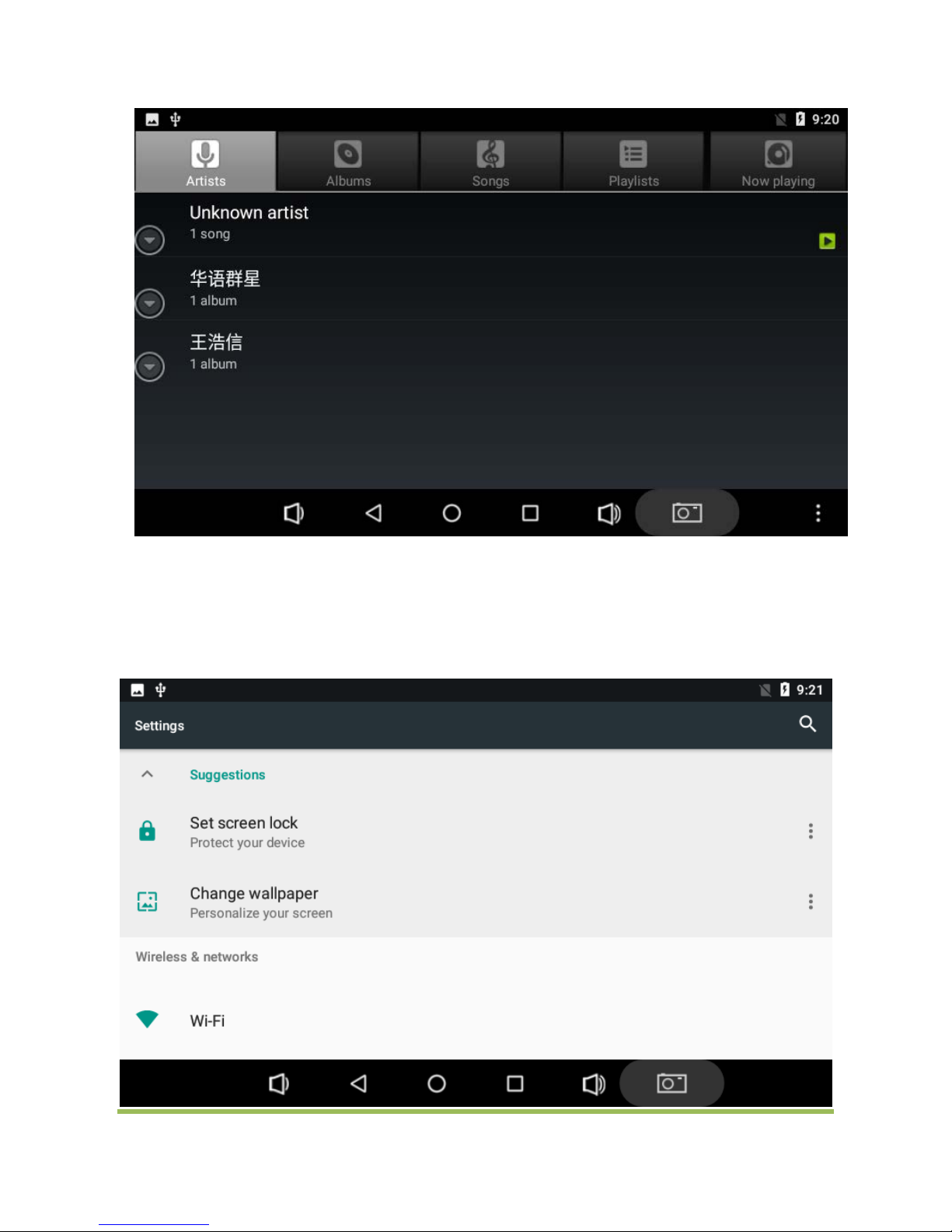
3、Audio Play:
Insert the earphone into the earphone jack
Put a music in MP3 format in USB disk and insert the USB Disk into USB HOST slot
Then play this MP3 music in Android, you will hear this music from earphone
WAY S I O N
7 / 13
Page 8
SA I N T WAY
4、Video Play
Play the video file, the method is same as playing MP3 file
Click”V ideo”
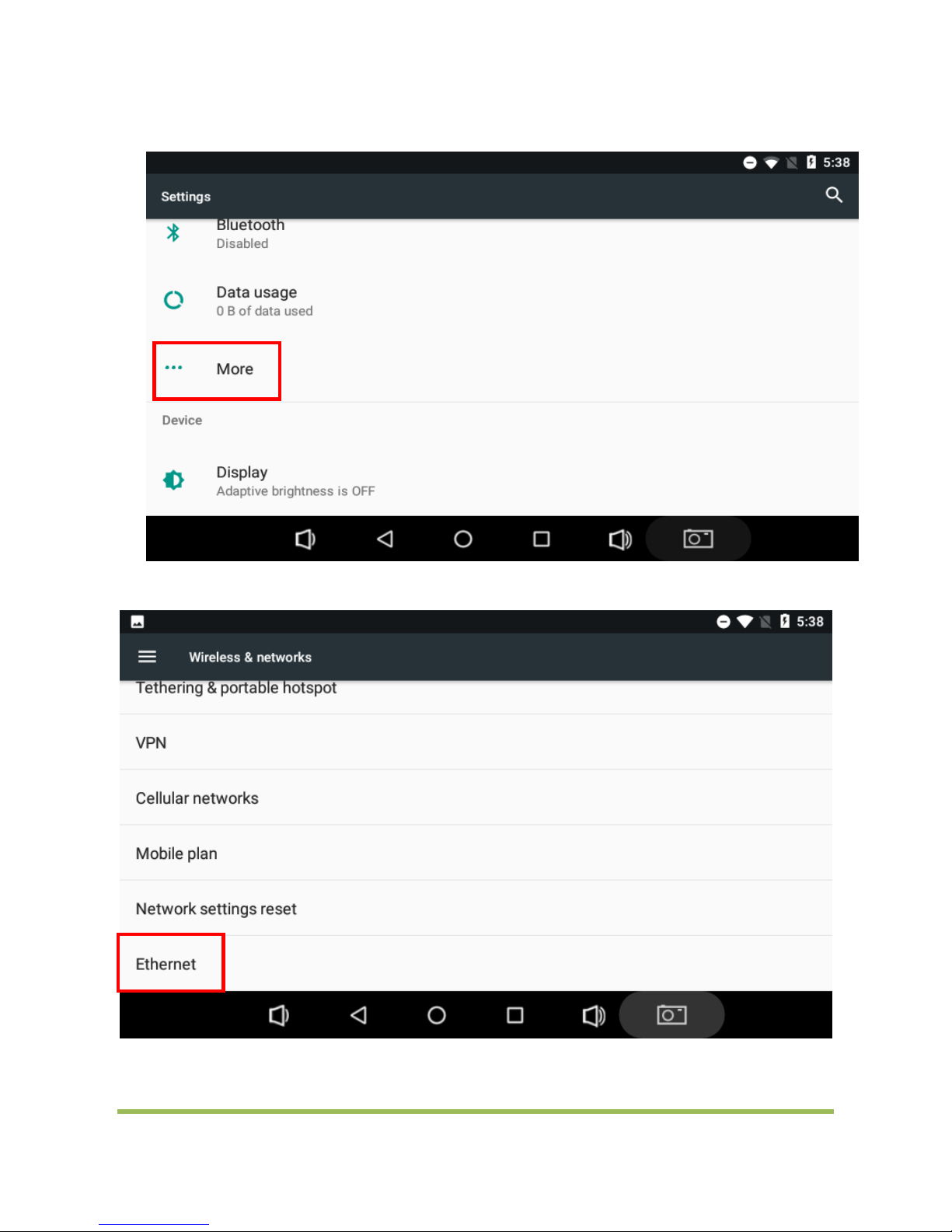
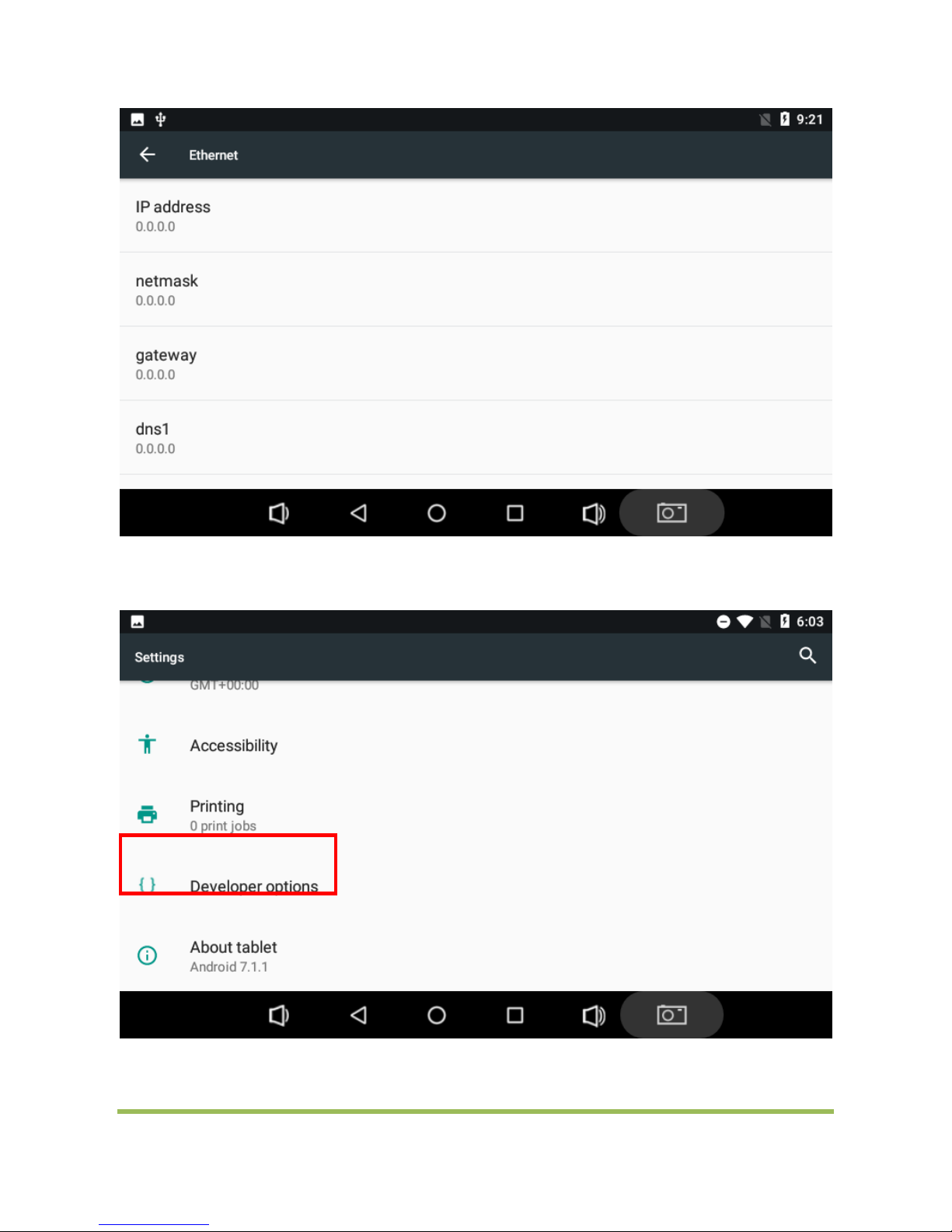
5、Ethernet Port Usage
Connect network cable coming M7R-E.
click "Settings"
WAY S I O N
8 / 13
Page 9
SA I N T WAY
click”More”
click”Ethernet”
Setting static ip
WAY S I O N
9 / 13
Page 10
SA I N T WAY
6、Touch screen calibration:
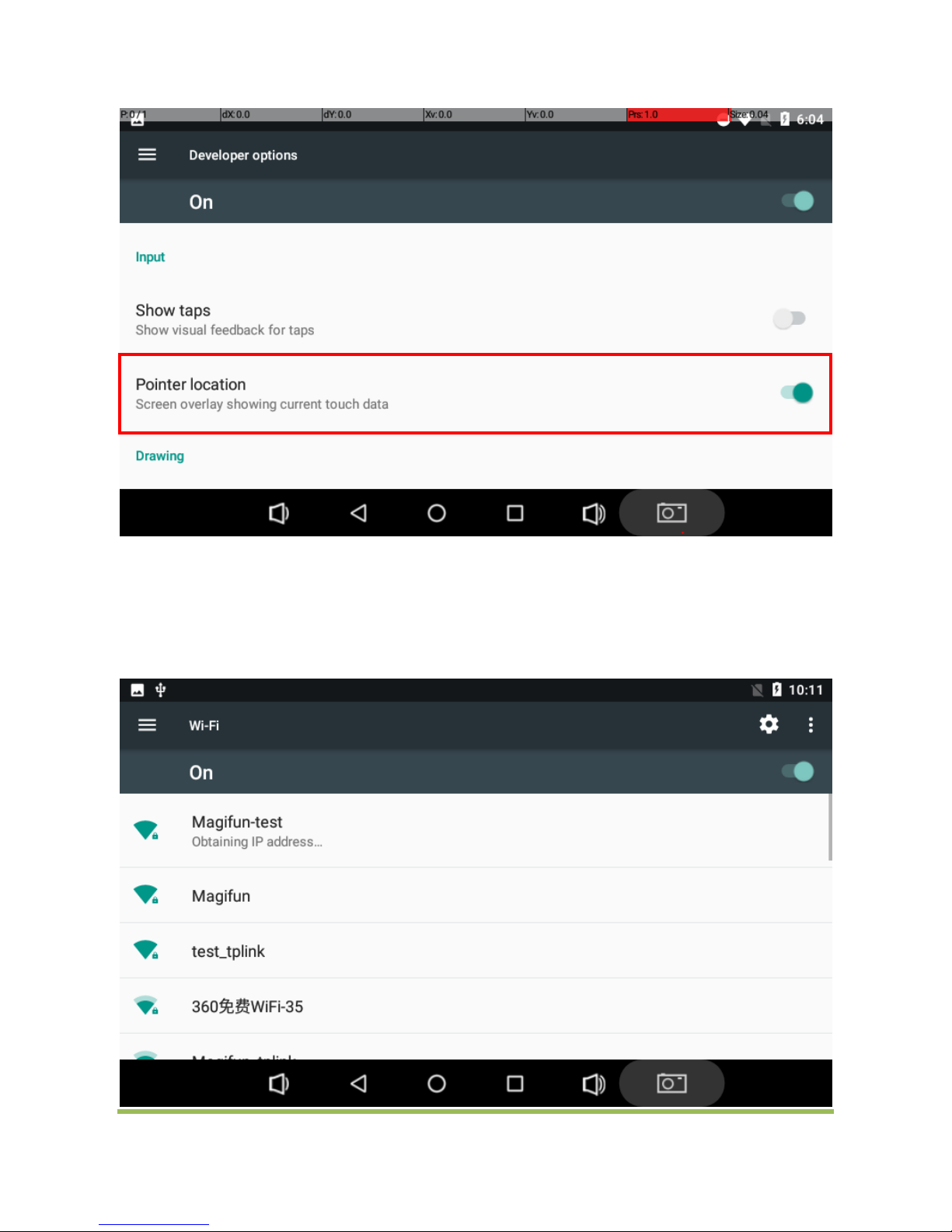
click "settings" click "Developer options" open"Show touches"and”Pointer location”
WAY S I O N
10 / 13
Page 11
SA I N T WAY
Click right top OK
7、WIFI usage:
Click “Setting”
Click”WIFI”
Click”ON”
Click”SSID”,input password
WAY S I O N
11 / 13
Page 12

SA I N T WAY
FCC STATEMENT
1. This device complies with Part 15 of the FCC Rules. Operation is subject to the following two conditions:
(1) This device may not cause harmful interference.
(2) This device must accept any interference received, including interference that may cause undesired operation.
2. Changes or modifications not expressly approved by the party responsible for compliance could void the user's
authority to operate the equipment.
NOTE: This equipment has been tested and found to comply with the limits for a Class B digital device, pursuant to
Part 15 of the FCC Rules. These limits are designed to provide reasonable protection against harmful interference
in a residential installation.
This equipment generates uses and can radiate radio frequency energy and, if not installed and used in accordance
with the instructions, may cause harmful interference to radio communications. However, there is no guarantee that
interference will not occur in a particular installation. If this equipment does cause harmful interference to radio or
television reception, which can be determined by turning the equipment off and on, the user is encouraged to try to
correct the interference by one or more of the following measures:
Reorient or relocate the receiving antenna.
Increase the separation between the equipment and receiver.
Connect the equipment into an outlet on a circuit different from that to which the receiver is connected.
Consult the dealer or an experienced radio/TV technician for help.
FCC Radiation Exposure Statement
This device was tested for typical body ‐
worn operation
To maintain compliance with FCC RF exposure requirements, use accessories thatmaintain a 5mm separation
distance between the user's body and the back of thehandset. The use of belt clips, holsters and similar accessories
should not containmetallic components in its assembly. The use of accessories that do not satisfy these
requirements may not comply with FCC RF exposure requirements, and should be avoided.
RF Exposure Information(SAR)
The SAR limit of USA (FCC) is 1.6 W/kg averaged over one gram of tissue.
Device types AVR1-WT Android device (FCC ID:2ACHTWSP02) hasalso been tested against this SAR limit.The
highest SAR value reported under this standard during product .certification for use when properly worn on the bod
y is 1.321W/kg.
1、 IC NOTICE TO CANADIAN USERS
2、
This device complies with Industry Canada license ‐ex em p t R S
to the following two conditions: (1) This device may not cause interference, and (2) This device must
accept any interference, including interference that may cause undesired operation of the device. This
device complies
3、 with RSS ‐247 of Indu
cause harmful interference. This Class B digital apparatus complies with Canadian ICES ‐003 (Cet
appareil numérique de la Classe B conforme à la norme NMB ‐003 du Canada).
4、 Le présent appareil est conforme aux CNR d'Industrie Canada applicables aux appareils radio
exempts de licence. L'exploitation est autorisée aux deux conditions suivantes : (1) l'appareil ne doit pas
produire de brouillage, et (2) l'utilisateur de l'appareil doit accepter tout brouillage radioélectrique subi,
même si le brouillage est susceptible d'en compromettre le fonctionnement.
WAY S I O N
12 / 13
Page 13
SA I N T WAY
SIMPLIFIED EU DECLARATION OF CONFORMITY
Hereby, Waysion Technology (Xiamen) Co., Ltd declares that the radio equipment type S8 is in compliance
with Directive 2014/53/EU. The full text of the EU declaration of conformity is available at the following internet
address:
http: www.waysion.com
Wireless Communication
WLAN IEEE802.11a/b/g/n, Wifi 2.4G; max. power 19.20dBm
WPAN Bluetooth 2.4G classic: max. power -2.20 dBm
Bluetooth 2.4G BLE: max. power 5.12 dBm
The SAR limit of Europe is 2.0 W/kg. Device types S8 has also been tested against this SAR limit. The highest SAR
value reported under this standard during product certification for use at the body is 0.355W/kg .This device was
tested for typical body-worn operations with the back of the handset kept 0.5cm from the body. To maintain
compliance with RF exposure requirements, use accessories that maintain a 0.5cm separation distance between
the user's body and the back of the handset. The use of belt clips,
WAY S I O N
13 / 13
 Loading...