

Page 1

Instructions for Using the Wayne Saccadic Fixator
Page 2

Wayne EngineeringTM, a subsidiary of Eyecarrot Innovations Corp. in Canada, is the leading provider of high-performance
instruments for testing and enhancing visual and motor skills. Learn more at www.wayneengineering.com and www.eyecarrot.com.
Table of Contents
Parameters and Selections ........................................................................................................................ 3
Basic Programs ............................................................................................................................................ 8
Additional Sports Programs ..................................................................................................................... 22
New Peripheral Programs ........................................................................................................................ 33
Modifying and Restoring Pre-set Programs ........................................................................................... 38
Using Accessories...................................................................................................................................... 41
2
Page 3
Wayne EngineeringTM, a subsidiary of Eyecarrot Innovations Corp. in Canada, is the leading provider of high-performance
instruments for testing and enhancing visual and motor skills. Learn more at www.wayneengineering.com and www.eyecarrot.com.
Parameters and Selections
Activity (1)
Time (2)
Speed (3)
Pattern (4)
Lights (5)
Timeout (6)
Flash (7)
Dual (0)
Ctr (0)
Sound(0)
#
Parameter
Value
1
Activity
1. Self pacing: user controls speed of lights
2. Self pacing with center fixation
3. Self pacing through all 9 sequence patterns
4. Automatic pacing: depress button for sound and count
5. Automatic pacing: sound with each light
6. Automatic pacing through all 9 sequence patterns
7. Speed adjusts automatically to match user's speed
8. Wayne Anticipator Speed-Trac
9. Visual memory
10. Speed ball anticipation/reaction time
11. Eye/hand reaction time: start/stop
12. Eye/hand response to an auditory stimulus
13. Eye/hand release/response reaction time ("reaction plus")
14. Sports testing/training: Gardner product
To change a parameter on either the Saccadic Fixator or the Sports Vision Trainer, do the
following:
1. Press ENTER.
2. Press the key for the parameter (1-9). The parameter number will be displayed in the leftmost
position and the current value of the parameter will be displayed in the rightmost three positions.
3. Enter the value for the parameter. If you make a mistake, repeatedly press the 0 key until the
rightmost three positions display a single "0", then enter the value.
4. Press ENTER.
The Wayne Sports Vision Trainer (WSVT) have a number of new features that are not available
on the Wayne Saccadic Fixator. All the listed programs have been preset for correct
operation. Changes can be made as follows:
Enter the selected listed program PRESS “enter" Now press #0, AND:
1. Press #66 (0-66) and press ENTER Sets 66 lights mode. (Right and left side of unit.
2. Press #33 (0-33)and press ENTER Sets 33 lights mode (Right sides)
3. Press #21 (0-21)press ENTER uses the 9 oclock light on the right side of the board for central
fixation light use in peripheral awareness modes for the full board.
4. Press #20 (0-20)press ENTER uses the normal center fixation lights in the right and left sides of
the unit.
5. Press #11 (0-11) press ENTER, Auditory Que for ctr light.
6. Press #12 (0-12) press ENTER No auditory Que
Quick Reference
3
Page 4
Wayne EngineeringTM, a subsidiary of Eyecarrot Innovations Corp. in Canada, is the leading provider of high-performance
instruments for testing and enhancing visual and motor skills. Learn more at www.wayneengineering.com and www.eyecarrot.com.
15. Activity counting
16. Synchronized rhythm
17. Peripheral awareness training (only on newer models)
18. Peripheral awareness testing (only on newer models)
2
Time
The pre-set elapsed time limit for each activity and for a given pattern. Time is
in seconds and can be pre-set from 1 to 999 seconds. Enter 0 for continuous
(unlimited) time.
3
Speed
The pre-selected speed of the lights can be set from 1 to 999 lights/minute.
4
Light pattern
1. Lights rotate clockwise
2. Lights rotate counterclockwise
3. Lights jump to a random position each time
4. Lights move in a horizontal line left-to-right, returning rapidly to the left
5. Lights move in a vertical line top-to-bottom, returning rapidly to the top
6. Lights move down at a diagonal forming a criss-cross, returning rapidly to
the top each time
7. Lights start out in the center and radiate up on each diagonal, rotating
clockwise each time
8. Only outer circle lights are active. As one light appears its diagonally-
opposite light follows. The two lights continue to rotate clockwise.
9. Outer circle lights alternate from right to left to right, zig-zagging top to
bottom and then returning again.
5
Active lights
1. All 33 lights are active (for activities #15 and #16, one light is used)
2. Only the 16 outer circle lights are active (for activities #15 and #16, two
lights are used)
3. Every other light in the outer circle is active
4. Four lights in the quad positions of the outer circle are active
5. Only the eight lights in the inner circle are active
6
Time-out
Response-time limit in units of 1/10 second. No point will be scored if trainee
exceeds this time to respond. Zero means no time-out. Note: This parameter
is used for other purposes in some activities; see the individual listings.
7
Speed flash
Strobe or flash time in milliseconds. If this is set to a value other than zero,
then lights will illuminate briefly rather than steadily.
8
Store program
Number of the memory location to store the current values of parameters 1
through 7 in. Warning! Selecting this will replace any previous program stored
in the selected location.
9
Retrieve
program
Number of the memory location to retrieve a program from. If you select this,
the retrieved program will replace the current values of parameters 1 through
7.
4
Page 5

Wayne EngineeringTM, a subsidiary of Eyecarrot Innovations Corp. in Canada, is the leading provider of high-performance
instruments for testing and enhancing visual and motor skills. Learn more at www.wayneengineering.com and www.eyecarrot.com.
0
Wayne Sports
Vision Trainer
Selects activity on right and left,right sides of unit. Selects center Fixation light
position, Selects sound for peripheral training activities.'''
Description of Activities
1. Self pacing
A button lights up; depress that button, and another button will light up, an auditory tone is
produced, and a point is recorded on the display. Remember: the pattern of lights that appears
depends upon the pattern selected (parameter #4).
2. Self pacing with center fixation
Identical to above, except that the center light must first be depressed before each outer light in
order to score a point.
3. Self pacing through all nine sequence patterns
The lights on the Saccadic Fixator will sequence through all nine patterns and directions. The
selected time duration (parameter #2) applies to each pattern.
4. Automatic mode
The lights will appear automatically in the selected pattern. The speed of the lights is preselected in lights/minute (parameter #3). The elapsed time may be pre-selected in seconds
(parameter #2). The light must be depressed before it moves to a new location to score a point.
5. Automatic pacing
Same as above except that an auditory tone is produced as each light is illuminated, rather than
when the button is depressed. Push button to score.
6. Automatic mode through all nine sequence patterns
Similar to #3 except that lights are now automatic. Select elapsed time and speed of lights.
7. Automatic mode: speed of lights adjusts to the user's speed
The speed of the lights will automatically speed-up or slow-down to match trainee's ability.
Select time, starting speed and pattern.
8. Wayne anticipator Speed-Trac
This activity is used in conjunction with the optional Speed-Trac. All the programs and activities
can be done directly on the Saccadic Fixator and the Wayne Sports Vision Trainer (WSVT). A
moving light on the Speed-Trac simulates a thrown ball. Goal is to anticipate when the light
("ball") reaches a pre-determined position. "Pitch" the "ball" by pressing the reset/start button
on the Saccadic; the first light will begin flashing and, after a random time delay, the lights will
begin sequencing across the Speed-Trac. The "ball" is stopped by again pressing the reset/start
button. The following parameters can be adjusted:
Speed of the "ball" can be preset to an exact speed by setting parameter #3 to the desired speed
in miles per hour (range 1-125). A random speed for each "pitch" can also be selected by setting
parameter #3 to zero and parameter #2 to the minimum desired speed; the random speed will
range between this value and this value plus 15 MPH (e.g. 3-0 and 2-15 gives a random speed
between 15 and 30 MPH). Note that unlike most other activities, the speed setting here is not in
lights/minute.
5
Page 6

Wayne EngineeringTM, a subsidiary of Eyecarrot Innovations Corp. in Canada, is the leading provider of high-performance
instruments for testing and enhancing visual and motor skills. Learn more at www.wayneengineering.com and www.eyecarrot.com.
Starting of the "ball" can be immediate (set parameter #6 to zero) or randomly delayed (set
parameter #6 to the minimum delay time in tenths of a second; the Saccadic Fixator will add a
random delay between 0 and 3 seconds to this value).
The display will show the early or late reaction time in milliseconds; A minus sign(-) indicates an
early reaction (trainee "swung too soon").
9. Visual memory
This activity is similar to the game "Simon." It starts with a single light flashing "on" for a
moment. When this button is pressed an auditory tone is heard and a point is scored. A moment
later the same light flashes "on" and a second light follows. To score, press the first and then the
second button/light (lights will not be illuminated at this point). A third light is then added to this
series, and so on. The rate at which the sequence is presented is determined by the speed
setting (parameter #3). The total elapsed time, the speed, the light pattern, and the number of
lights can be pre-set. The sequence series can automatically repeat itself for review. Set the
time-out (parameter #6) to the desired time. Remember that time out is in 1/10 seconds; for a
10 second review set time-out as follows: 6-100.
10. Sports vision anticipation speed ball reaction time
This is similar to activity #8 except that the front panel lights are used instead of the Speed-Trac
and the speed units are different. Speed of the lights can be preset to a random speed (set
parameter #3 to zero), or to an exact speed (set parameter #3 to the number of 1/100 second
units per light; e.g. if "10" is entered, the speed will be 10 lights per second). Parameter #2 is not
used here; the random speed ranges between 3/100 second and 10/100 second. The lights can
be preset either to rotate in a spiral, or to move horizontally. The display will show the actual
response time in hundredths of a second. A minus sign(-) indicates the button was pressed
before the last light in the pattern flashed "on."
11. Reaction time, eye-hand
This activity precisely measures the time it takes trainee to depress two buttons in sequence
from opposite ends of the Fixator. Use the buttons at the twelve o' clock and the 6 o' clock
position, or the buttons at the nine o'clock and the three o'clock. When the nine o'clock button is
depressed, immediately depress the three o'clock button. Reaction time is measured in
hundredths of a second on the display.
12. Reaction time, response to an auditory stimulus
This activity precisely measures the time required to respond to an auditory signal. The same
opposite buttons used in the reaction time eye-hand activity are used for this activity. Sequence
for this activity is top-bottom or left-right. Trainee depresses the first button and must wait for
the auditory signal. At that instant, the second button must be depressed. Display will indicate in
hundredths of a second the time it took to respond to the auditory signal.
13. Sports vision release/locate reaction time ("reaction plus")
In this mode a button is depressed and held for a visual or auditory signal. The instant the signal
is received, the button is released, and an illuminated signal light/button on the face of the
Saccadic is depressed. Two reaction times will be recorded:
1. The time it takes to release the button.
2. The time it takes to locate the signal light and depress it.
6
Page 7

Wayne EngineeringTM, a subsidiary of Eyecarrot Innovations Corp. in Canada, is the leading provider of high-performance
instruments for testing and enhancing visual and motor skills. Learn more at www.wayneengineering.com and www.eyecarrot.com.
The readout will alternately display the two reaction times, each second. The top cursor
indicates the release time; the bottom cursor indicates the response time.
14. Sports vision testing and training, Gardner product
This is a variation of activity #7 (automatic mode with speed adjustment) used for a standardized
test developed by Dr. Jack Gardner for measuring eye/hand coordination which takes both
proaction and reaction times into account for accurate and repeatable rapid testing. The lights
start moving automatically at the preset speed (parameter #3). For each correct respoonse, the
speed increases. At the end of the preset time (parameter #2), the display shows the product of
the number of correct responses and the final speed in lights/minute. For Dr. Gardner's
standardized test the light pattern should be random, the initial speed should be 60 lights per
minute, and the elapsed time limit should be 30 seconds. Factory program #21 uses these
settings. The final speed may be viewed by pressing "enter" followed by "3". If you do this, you
must then either re-enter the preset starting speed before pressing "enter" again, or press
"enter" and then reload the program from memory (e.g. 9-21). Otherwise the next session will
start at the final speed from the previous one.
15. Activity counting
This activity counts the number of times a button is pressed. If parameter #5 is set to 1, each
press of the button in the three o'clock position will generate a tone and increase the count. If
parameter #5 is set to 2 for "bilateral counting," the three o'clock button must be pressed
followed by the nine o'clock button, with the count occurring on the nine o'clock button.
16. Synchronized rhythm
Similar to activity #15, but the button(s) involved flash on and off at a speed determined by
parameter #3. Pressing the light when "on" results in a count and tone; trainee must release
button and wait for light to flash off and then on again before pressing it again.
17. Peripheral awareness training
Similar to activity #1 (self pacing), but the center light flashes on and off at a rate set by
parameter #3 (lights/minute). The trainee must press the outer light while the center light is "on"
in order to score a point and advance to the next light. The Wayne Sports trainer programs are
preset to use the #9 light of the right side as the center fixation light for the right and left sides of
the unit., To use only one side of the unit, press "0" and press "20" now press ENTER. To add
sound to the fixation light (Auditory Cuing) Press "0" and press "11", now press ENTER. To select
only the right side of the unit press "0" press "33" now press ENTER.
18. Peripheral awareness testing
Like activity #17, but pressing the outer light while the center light is off will advance to the next
light without scoring a point (trainee doesn't get a second chance).
7
Page 8
Wayne EngineeringTM, a subsidiary of Eyecarrot Innovations Corp. in Canada, is the leading provider of high-performance
instruments for testing and enhancing visual and motor skills. Learn more at www.wayneengineering.com and www.eyecarrot.com.
Basic Programs
Activity (1)
Time (2)
Speed (3)
Pattern (4)
Lights (5)
Timeout (6)
Flash (7)
Dual (0)
Ctr (0)
Sound(0)
1
30 3 1 0 0 66
Activity (1)
Time (2)
Speed (3)
Pattern (4)
Lights (5)
Timeout (6)
Flash (7)
Dual (0)
2
60 3 1 0 0 66
Activity (1)
Time (2)
Speed (3)
Pattern (4)
Lights (5)
Timeout (6)
Flash (7)
Dual(0)
1
60 3 1 0 0 66
Instructions for Retrieving These Programs
1. Depress the "ENTER" key.
2. Depress the "9" key. A "9" will appear in the leftmost position of the display.
3. Enter the number of the selected program (shown before each program's title). The number will
be shown in the right three positions of the display.
o If you make a mistake, repeatedly depress the "0" key until the display shows only a "9" in
the leftmost position and a "0" in the rightmost position. Then re-enter the program
number.
4. Depress the "ENTER" key. The program will now be retrieved.
5. Make any desired adjustments to the settings.
6. Depress the start/stop reset button to begin running the program.
If you are using a Wayne Sports Vision Trainer (WSVT),the majority of programs listed below will
offer activities on both right and left side of the "WSVT". To use only one side of the unit, first,
select the program and press ENTER. Now press #0 and #33, again, press ENTER. If you wish to
return to both sides of the unit, press #0 and #66 and press ENTER. You can repeat this process
to use only the right side or both sides of the Wayne Sports Vision Trainer (WSVT).
1. Self Pacing Timed For 30 Seconds
Lights move in a random pattern. Depress button for sound and scored point. (32 lights) Use this
program in conjunction with program #11 for Dr. Arnold Sherman's pro-action/re-action ratio
tests.
2. Self Pacing With Central Fixation Timed For 60 Seconds
Center light must first be depressed before a random light appears. Depress button for sound
and scored point. (32 lights)
3. Self Pacing Timed For 60 Seconds
Lights move in a random pattern. Depress button for sound and scored point. (32 lights)
8
Page 9
Wayne EngineeringTM, a subsidiary of Eyecarrot Innovations Corp. in Canada, is the leading provider of high-performance
instruments for testing and enhancing visual and motor skills. Learn more at www.wayneengineering.com and www.eyecarrot.com.
4. Self Pacing Timed For 30 Seconds
Activity (1)
Time (2)
Speed (3)
Pattern (4)
Lights (5)
Timeout (6)
Flash (7)
Dual(0)
1
30 4 1 0 0 66
Activity (1)
Time (2)
Speed (3)
Pattern (4)
Lights (5)
Timeout (6)
Flash (7)
!Dual(0)
1
15 3 5 0 0 66
Activity (1)
Time (2)
Speed (3)
Pattern (4)
Lights (5)
Timeout (6)
Flash (7)
Dual(0)
1
60 7 1 0 0 66
Activity (1)
Time (2)
Speed (3)
Pattern (4)
Lights (5)
Timeout (6)
Flash (7)
Dual(0)
3
15 1 1 10 0 66
Activity (1)
Time (2)
Speed (3)
Pattern (4)
Lights (5)
Timeout (6)
Flash (7)
Dual(0)
1
30 3 1 10 0 66
Lights move in horizontal direction. Depress button for sound and scored point. (7 horizontal
lights)For program information, click on "Parameters and Selections" on our
website MANUALs page.
5. Self Pacing Timed For 15 Seconds
Lights move to random positions. Depress button for sound and scored point. (8 center lights)
Inner circle of lights.
6. Self Pacing Timed For 60 Seconds
Lights move from center outward direction. Depress button for sound and scored point (32 outer
lights).
7. Self Pacing Through 9 Sequenced Patterns
Each pattern timed for 15 seconds. Depress button for sound and accumulated total score. (36
lights) - with a 1 second time-out.
8. Self-Pacing With Time-Out
Elapsed time 30 seconds. Time-out set to 1 second. To score, the button must be depressed
before 1 second elapses.
9
Page 10
Wayne EngineeringTM, a subsidiary of Eyecarrot Innovations Corp. in Canada, is the leading provider of high-performance
instruments for testing and enhancing visual and motor skills. Learn more at www.wayneengineering.com and www.eyecarrot.com.
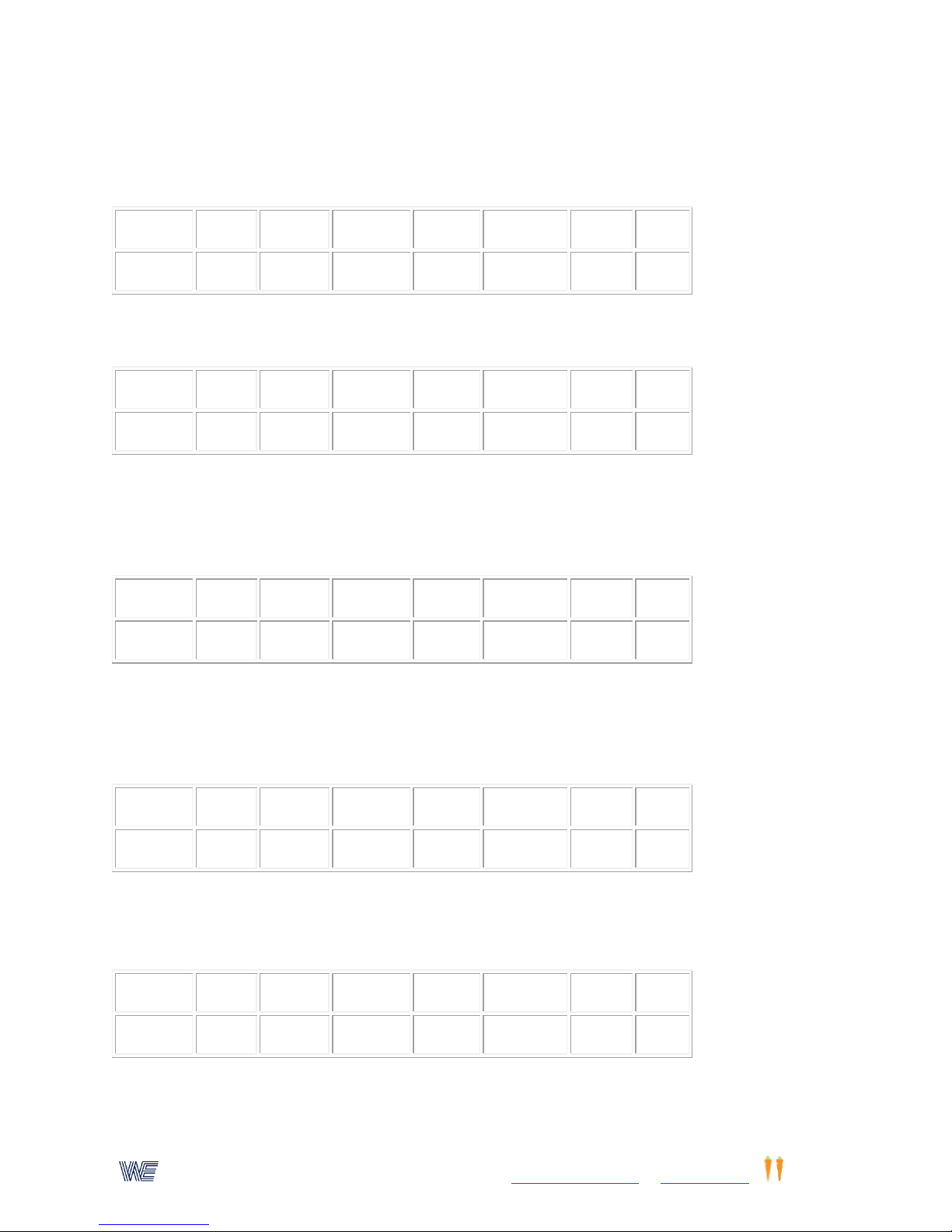
Activity (1)
Time (2)
Speed (3)
Pattern (4)
Lights (5)
Timeout (6)
Flash (7)
Dual(0)
4
30
40 3 1 8 0
66
Activity (1)
Time (2)
Speed (3)
Pattern (4)
Lights (5)
Timeout (6)
Flash (7)
Dual(0)
4
30
50 3 1 0 0
66
Activity (1)
Time (2)
Speed (3)
Pattern (4)
Lights (5)
Timeout (6)
Flash (7)
Dual(0)
4
30
60 3 1 0 0
66
Activity (1)
Time (2)
Speed (3)
Pattern (4)
Lights (5)
Timeout (6)
Flash (7)
Dual(0)
4
60
120 2 1 0 0
33
Activity (1)
Time (2)
Speed (3)
Pattern (4)
Lights (5)
Timeout (6)
Flash (7)
Dual(0)
5
120
100 2 2 0 100
66
9. Automatic Mode With Time-Out
Elapsed time 30 seconds, 40 lights per minute. Time-out 0.8 seconds. Lights move at random.
For program information, click on "Parameters and Selections" on our website MANUALs page.
10. Automatic Pacing Timed For 30 Seconds
Lights move automatically at a speed of 50 lights per minute to a new random position. A sound
and a point is scored when the correct button is depressed.
11. Automatic Pacing Timed For 30 Seconds
Lights move automatically at a speed of 60 lights per minute to a new random position. A sound
and a point is scored when the correct button is depressed. Use this program in conjunction with
program #1 for Dr. Arnold Sherman's pro-action/re-action ratio tests.
12. Automatic Pacing Timed For 60 Seconds
Lights move automatically at a speed of 120 lights per minute in a counter-clockwise spiral. A
sound and a point is scored when the correct button is depressed. All 32 lights. (Right side of
WSVT unit)
13. Automatic Pacing Timed For 120 Seconds
Lights move automatically at a speed op 100 lights per minute radiating out from the center light
like the spokes of a wheel. Lights will flash "on" for only 100 Milisecond. with an auditory sound.
10
Page 11
Wayne EngineeringTM, a subsidiary of Eyecarrot Innovations Corp. in Canada, is the leading provider of high-performance
instruments for testing and enhancing visual and motor skills. Learn more at www.wayneengineering.com and www.eyecarrot.com.
Activity (1)
Time (2)
Speed (3)
Pattern (4)
Lights (5)
Timeout (6)
Flash (7)
Dual(0)
7
60
variable
2 1 0 0 66
Activity (1)
Time (2)
Speed (3)
Pattern (4)
Lights (5)
Timeout (6)
Flash (7)
Dual(0)
9 0 60 3 1
50 0 66
Activity (1)
Time (2)
Speed (3)
Pattern (4)
Lights (5)
Timeout (6)
Flash (7)
Dual(0)
9 0 450 3 1
50 0 66
Activity (1)
Time (2)
Speed (3)
Pattern (4)
Lights (5)
Timeout (6)
Flash (7)
Dual(0)
10 0 4 1 0 0
66
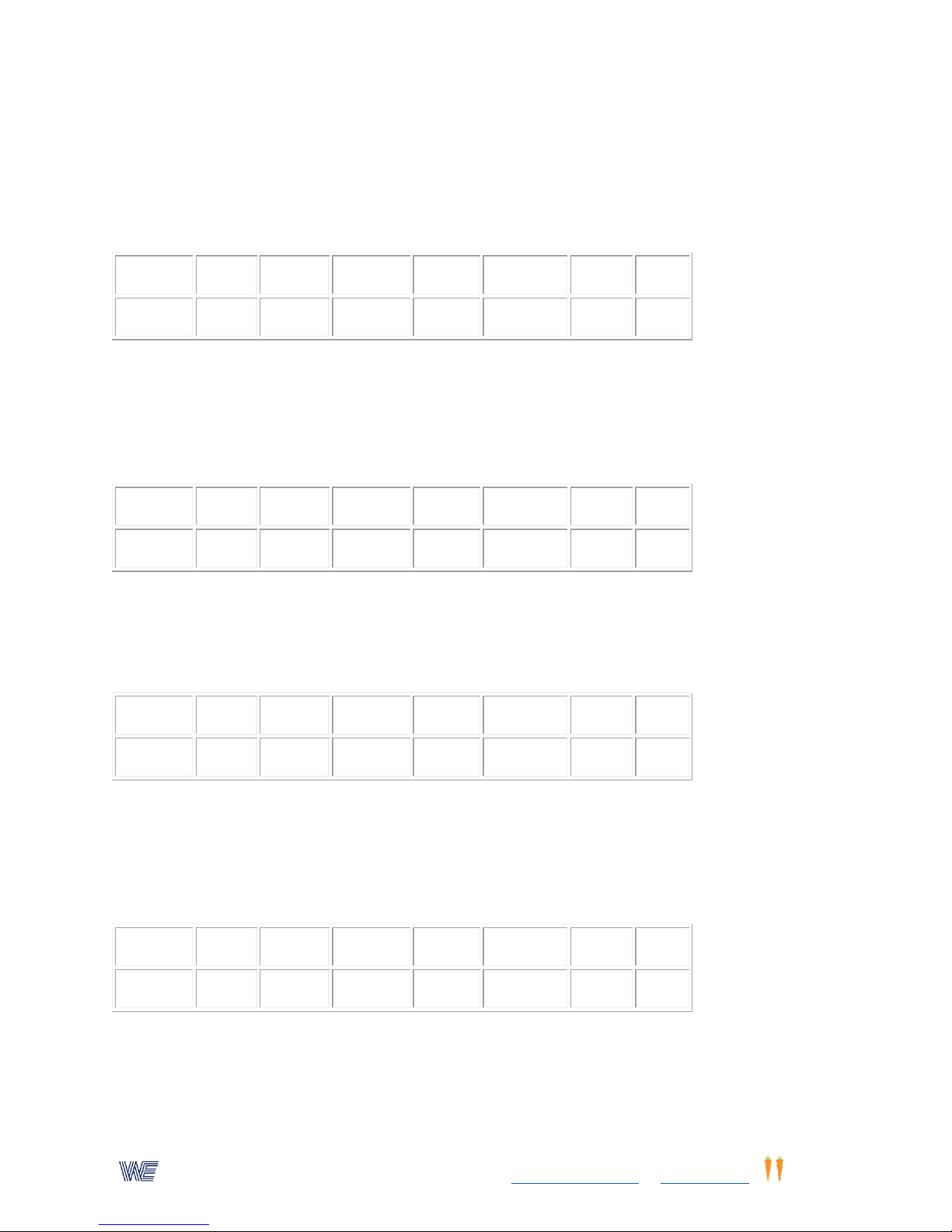
14. Automatic Pacing Speed Tracking
Lights rotate counterclockwise starting at a speed of 20 lights per minute. The speed
automatically increases when each light is correctly followed. If the correct buttons are not
depressed, the speed of the lights automatically reduces to match the trainee. For program
information, click on "Parameters and Selections"on our website MANUALS page.
15. Visual Memory (Similar to the game Simon)
Slow pace light flashes "on" for 1 second followed a second later by next light in series sequence.
User must press the first light wait for the second light, now press the first light and the second
light, etc. A beep indicates correct sequence. If the series is broken, the correct sequences will
be repeated after 5 seconds.
16. Visual Memory(Advanced)
Fast pace light flashes on for 1/10 second followed 1/10 second later by next light in series
sequence. Read description of activity on our website. "Wayne Saccadic Fixator & Wayne Sports
Vision Trainer Parameters and Selections".
17. Sports Vision Speed Ball
Horizontal patterns. Depress the start/reset button under the display, or use the balance board
in the integration mode or use a remote hand switch (read description of speed ball activity)
(variable speeds with no delay time). Press button to start, press button again at the 11th light.
For program information, click on "Parameters and Selections" on our website MANUALS page.
18. Reaction Time--Eye Hand Activity
(See description of this activity on our website)Press light in the 9 O'clock position, and then
immediately press the light in the "3" O'clock position. Display records the reaction time. .
11
Page 12
Wayne EngineeringTM, a subsidiary of Eyecarrot Innovations Corp. in Canada, is the leading provider of high-performance
instruments for testing and enhancing visual and motor skills. Learn more at www.wayneengineering.com and www.eyecarrot.com.
Activity (1)
Time (2)
Speed (3)
Pattern (4)
Lights (5)
Timeout (6)
Flash (7)
Dual(0)
11 4 1 0 0
66
Activity (1)
Time (2)
Speed (3)
Pattern (4)
Lights (5)
Timeout (6)
Flash (7)
Dual(0)
12 4 1 0 0
66
Activity (1)
Time (2)
Speed (3)
Pattern (4)
Lights (5)
Timeout (6)
Flash (7)
Dual(0)
6
10
500 1 0 0
66
Activity (1)
Time (2)
Speed (3)
Pattern (4)
Lights (5)
Timeout (6)
Flash (7)
Dual(0)
14
30
60 3 1 0 0
66
Activity (1)
Time (2)
Speed (3)
Pattern (4)
Lights (5)
Timeout (6)
Flash (7)
Dual(0)
1
110 3 2 15
25
66
Activity (1)
Time (2)
Speed (3)
Pattern (4)
Lights (5)
Timeout (6)
Flash (7)
Dual(0)
4
100
45 3 5 0 0
66
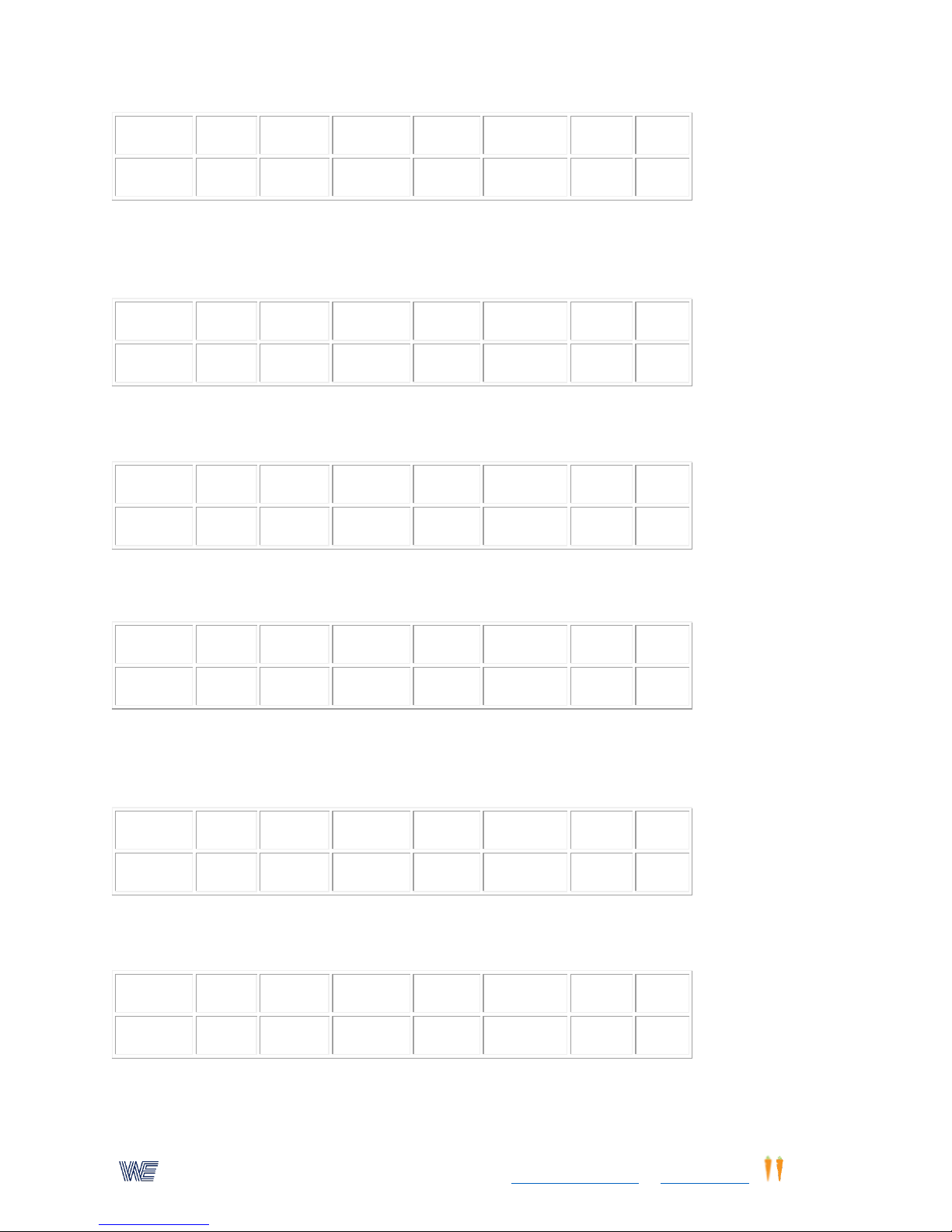
19. Reaction Time--Response To An Auditory and Visual Stimulus
(See description of this program on our website,"Wayne Saccadic Fixator & Wayne Sports Vision
Trainer Parameters and Selections".)
20. Demonstration of all programmable patterns Automatic pacing. Each pattern timed for 10
seconds/500 lights per minute.
21. Dr.Jack Gardner's E/H Athletic Test
Combines the pro-action and reaction measurements. A repeatable sports vision test.For a
description of this activity Vision Trainer Parameters and Selections" on our website.
22. Self Pacing with time out and momentary lights flashed "on".
Timed for 110 seconds outer circle of random lights that flash "on" for 25 milliseconds,with a 1.5
second time out.
23. Automatic Pacing
Timed for 100 seconds - random-inner circle of 8 lights.
12
Page 13
Wayne EngineeringTM, a subsidiary of Eyecarrot Innovations Corp. in Canada, is the leading provider of high-performance
instruments for testing and enhancing visual and motor skills. Learn more at www.wayneengineering.com and www.eyecarrot.com.
Activity (1)
Time (2)
Speed (3)
Pattern (4)
Lights (5)
Timeout (6)
Flash (7)
Dual(0)
4
100
40 9 1
10 0 66
Activity (1)
Time (2)
Speed (3)
Pattern (4)
Lights (5)
Timeout (6)
Flash (7)
Dual(0)
6 5 999 1 1 0 0
66
Activity (1)
Time (2)
Speed (3)
Pattern (4)
Lights (5)
Timeout (6)
Flash (7)
Dual(0)
1
60 3 4 0 0 66
Activity (1)
Time (2)
Speed (3)
Pattern (4)
Lights (5)
Timeout (6)
Flash (7)
Dual(0)
1
30 3 4 0 66
Activity (1)
Time (2)
Speed (3)
Pattern (4)
Lights (5)
Timeout (6)
Flash (7)
Dual(0)
8 0 20 1
25 0 66
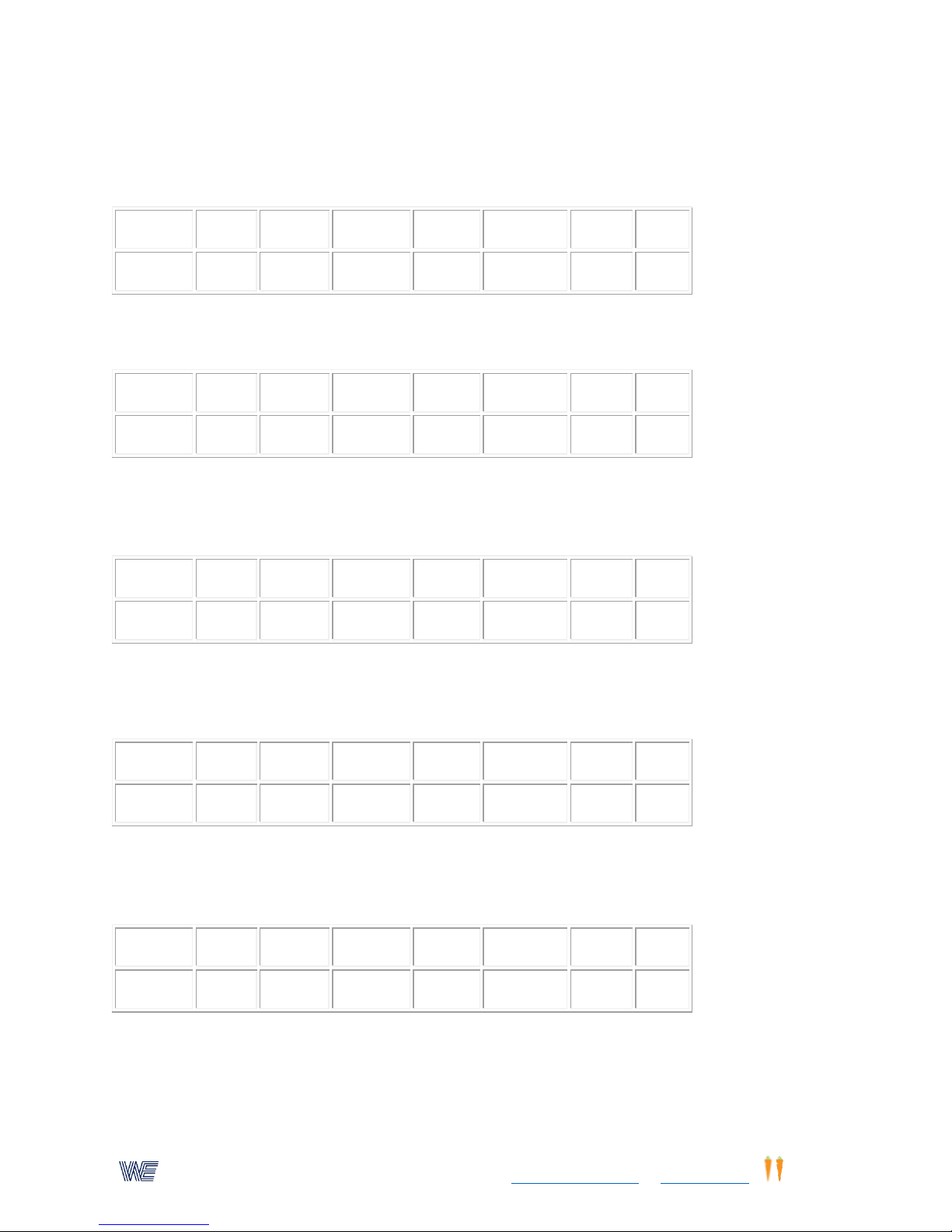
24. Automatic Pacing
Timed for 100 seconds. Lights zig zag from left to right moving down at 40 lights/minute - 1
second time-out.
25. Demonstration Of All 9 Patterns 7 Directions
High speed each pattern - automatic pacing 5 seconds at 999 lights/minute.
26. Balance Board
The four quad position lights on each side of the WSVTT r signals the direction that the trainee
must tilt "off "balance to score a point. Elapsed time: 60 seconds.
27. Balance Board
The four quad position lights on each side of the WSVTT signals the direction that the trainee
must tilt "off" balance to score a point. Elapsed time: 30 seconds
28. Anticipator Speedball Trac
Effective speed 20 mph, pitch delay 2.5 to 5.5 seconds, used with accessory speed track. Press
stop button after 33 lights.
29. Anticipator Speedball Trac
Variable speed 10-25mph, pitch delay 1 to 4 seconds, used with the accessory speed track. Press
stop button after 33 lights.
13
Page 14
Wayne EngineeringTM, a subsidiary of Eyecarrot Innovations Corp. in Canada, is the leading provider of high-performance
instruments for testing and enhancing visual and motor skills. Learn more at www.wayneengineering.com and www.eyecarrot.com.
Activity (1)
Time (2)
Speed (3)
Pattern (4)
Lights (5)
Timeout (6)
Flash (7)
Dual(0)
8
10 0 1 10 0 66
Activity (1)
Time (2)
Speed (3)
Pattern (4)
Lights (5)
Timeout (6)
Flash (7)
Dual(0)
10 1 5 1 2
10 0 66
Activity (1)
Time (2)
Speed (3)
Pattern (4)
Lights (5)
Timeout (6)
Flash (7)
Dual(0)
10 0 0 1 1
20 0
Activity (1)
Time (2)
Speed (3)
Pattern (4)
Lights (5)
Timeout (6)
Flash (7)
1 0 3 4 0 0
Activity (1)
Time (2)
Speed (3)
Pattern (4)
Lights (5)
Timeout (6)
Flash (7)
Dual(0)
1 0 3 3 0 0
33
Activity (1)
Time (2)
Speed (3)
Pattern (4)
Lights (5)
Timeout (6)
Flash (7)
Dual(0)
30. Speed Ball
Only outer 16 lights rotate clockwise at a constant 5 lights/second speed. The lights start rotating
after a time delay of 1 to 3 seconds. Depress the reset button or stop button when the 24th light
is lit. Press stop button after 34 lights. Minus (-) early stop. For program information, click on
"Parameters and Selections" on our website MANUALS page.
31. Speed Ball
32 lights spiral clockwise at a random variable speed. The lights start after a time delay of 2-4
seconds. Depress the reset button when the 24th light is lit. Minus (-) early stop.
32. Stik-Ups
Using 4 stik-ups plugged into the control center module. Set left toggle switches to "STICK-UPS"
33. Stik-Ups
Using 8 stik-ups plugged into the control center module. Set left toggle switch to "STICK-UPS
34. Eye Hand Reaction Time
Press the button in the "twelve o'clock" position, and immediately depress the button in the "six
o'clock" position. Detail information on our website:
14
Page 15
Wayne EngineeringTM, a subsidiary of Eyecarrot Innovations Corp. in Canada, is the leading provider of high-performance
instruments for testing and enhancing visual and motor skills. Learn more at www.wayneengineering.com and www.eyecarrot.com.
11 0 1 1 0
66
Activity (1)
Time (2)
Speed (3)
Pattern (4)
Lights (5)
Timeout (6)
Flash (7)
Dual(0)
1
60 3 2 0 0 66
Activity (1)
Time (2)
Speed (3)
Pattern (4)
Lights (5)
Timeout (6)
Flash (7)
Dual(0)
10 0 0 4 1 1 0
66
Activity (1)
Time (2)
Speed (3)
Pattern (4)
Lights (5)
Timeout (6)
Flash (7)
Dual(0)
10 0 6 4 1 1 0
66
35. Use this location to store your own created programs.
36. Accommodative Rock
This activity is timed for 60 seconds. If a different time is desired, enter the time in seconds in
the key board as follows:
1. Press "Enter"
2. Press 2 (Time Parameter)
3. Press keys for time in seconds
4. Press "Enter"
37. Speed Ball
The lights move horizontally at a random speed. Starting time is delayed approximately 0 to 3
seconds. The button must be pressed when the light is at the center, of the right panel. This is
the 11th light. A negative number is the the time in seconds, early. A positive number is the time
in seconds ,late. Detail information on our website: For program information, click on
"Parameters and Selections"on our website MANUALs page.
38. Speed Ball
The lights move horizontally at a fixed speed of 6/100 seconds per light. Starting time is delayed
approximately 0 to 4 seconds. Button must be pressed when the light is at the center of the right
panel. This is the 11th light.
39. Speed Ball
The lights move in a clockwise spiral at a variable speed. Starting time is not delayed. The button
must be pressed when the 24th light is lit. For program information, click on "Parameters and
Selections" on our website MANUALs page.
15
Page 16
Wayne EngineeringTM, a subsidiary of Eyecarrot Innovations Corp. in Canada, is the leading provider of high-performance
instruments for testing and enhancing visual and motor skills. Learn more at www.wayneengineering.com and www.eyecarrot.com.
Activity (1)
Time (2)
Speed (3)
Pattern (4)
Lights (5)
Timeout (6)
Flash (7)
Dual(0)
10 0 0 1 1 0 0
66
Activity (1)
Time (2)
Speed (3)
Pattern (4)
Lights (5)
Timeout (6)
Flash (7)
Dual(0)
13 0 3 1 0 0
66
Activity (1)
Time (2)
Speed (3)
Pattern (4)
Lights (5)
Timeout (6)
Flash (7)
Dual(0
)
13 1 1 0 0
66
"
Activity (1)
Time (2)
Speed (3)
Pattern (4)
Lights (5)
Timeout (6)
Flash (7)
Dual(0)
13 9 1 0 0
66
40. Sports Vision Release/Locate Reaction Time
The start/reset button can be located on the WSVTT, or on the remote control, Accommodative
Rock panel, or using the balance board in the integration mode. The location of the signal light
can be pre-set for random, or any pre-designated location 2-0 would be random, and 2-X is for
any predetermined location (the X is the number of the light counting clockwise from the top
light. To pre-determine the location of the "X" light, start at the top light and count the lights
clockwise in a spiral direction. The center light will be #33. Depress the start/reset button, hold
button depressed until a signal is heard, release the button and press the illuminated
light/button on the saccadic fixator. A light will appear in random positions.
41. Sports Vision Release/Locate Reaction Time
A light will always appear in the 12 o'clock position. Detail information on our website: For
program information, click on "Parameters and Selections" on our website MANUALS page.
42. Sports Vision Release/Locate Reaction Time
A light will always appear in the 6 o'clock position. For program information, click on "Parameters
and Selections" on our website MANUALS page.
It is not necessary to use to use the start/reset button on the WSVTT to control all the above
activities. The remote Accommodative Rock board reset switch can be used. The balance board
in integration mode may be used. In addition many special external switches can be plugged
directly into the saccadic fixator.
16
Page 17
Wayne EngineeringTM, a subsidiary of Eyecarrot Innovations Corp. in Canada, is the leading provider of high-performance
instruments for testing and enhancing visual and motor skills. Learn more at www.wayneengineering.com and www.eyecarrot.com.
43. Balance Board - - Self-Pacing Quad Mode
Activity (1)
Time (2)
Speed (3)
Pattern (4)
Lights (5)
Timeout (6)
Flash (7)
Dual(0)
1
60 3 4 0 0 33
Activity (1)
Time (2)
Speed (3)
Pattern (4)
Lights (5)
Timeout (6)
Flash (7)
Dual(0)
5
120
96 1 2 0 0
66
Activity (1)
Time (2)
Speed (3)
Pattern (4)
Lights (5)
Timeout (6)
Flash (7)
Dual(0)
4
100
900 2 2 0 0
33
Activity (1)
Time (2)
Speed (3)
Pattern (4)
Lights (5)
Timeout (6)
Flash (7)
Dual(0)
5
120
60 3 4 0 0
66|
Plug the balance board connector into either the WSVTT connector, or the connector on the
right-hand side of the control center module (CCM). Set the control center module switch to
"BALANCE" setting. The time is pre-set to 60 seconds but can be re-set to any time frame.
Trainee must shift his body balance following the direction of the lights.
44. Balance Board--Activity Stops When "Off" Balance
Must use a control center module unit (CCM). Set the CCM to "INTEGRATION" The outer 16
lights will rotate clockwise at a speed of 96 lights per minute (1 rev/sec.) Elapsed time is pre-set
to 120 seconds. Trainee must attempt to maintain balance. Each time trainee is "off" balance,
the lights will stop rotating. To start lights rotating again, press the start/reset button or tilt the
balance board back to balance position.
45. Balance Board--Records Each Time Trainee Is Off Balance
If CCM is used set toggle switch to BALANCE. Time has been pre-set to 100 seconds. Speed has
been pre-set to 900 lights/minute. The outer 16 lights will rotate clockwise. Each time trainee is
not balanced, a beep tone is produced, and a point is recorded on the display.
46. Balance Board--Automatic Mode
Trainee must respond to the 4 quad lights on the WSVTT. These lights will automatically move to
random positions, at a pre-set speed. To score a point, trainee must tilt board in the direction of
the illuminated lights. If the CCM is used, set the switch to BALANCE Time has been pre-set at
120 seconds. The speed of the lights has been pre-set at 90 light/minute.
47. Balance Board--Automatic Mode
Same as #43, but with a 2 second time-out. If individual does not shift to correct position within
two seconds, a time-out signal is heard and no point is scored.
17
Page 18
Wayne EngineeringTM, a subsidiary of Eyecarrot Innovations Corp. in Canada, is the leading provider of high-performance
instruments for testing and enhancing visual and motor skills. Learn more at www.wayneengineering.com and www.eyecarrot.com.
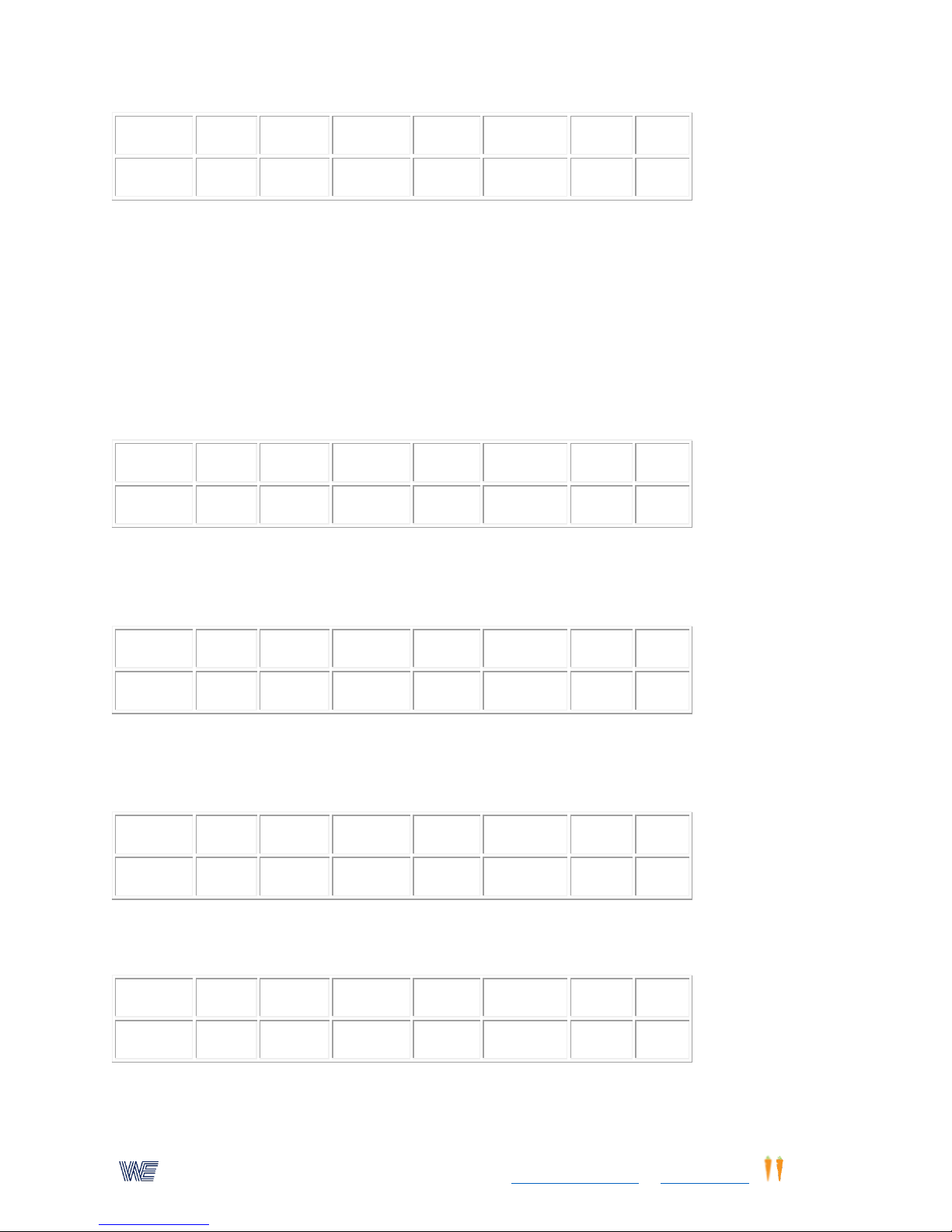
Activity (1)
Time (2)
Speed (3)
Pattern (4)
Lights (5)
Timeout (6)
Flash (7)
Dual(0)
1
60 3 4 20 0 33|
Balance board - integration
Activity (1)
Time (2)
Speed (3)
Pattern (4)
Lights (5)
Timeout (6)
Flash (7)
Dual(0)
10 0 1 2 1 0
33|
Activity (1)
Time (2)
Speed (3)
Pattern (4)
Lights (5)
Timeout (6)
Flash (7)
Dual(0)
8
10 1 10 0 33
Activity (1)
Time (2)
Speed (3)
Pattern (4)
Lights (5)
Timeout (6)
Flash (7)
Dual(0)
8
25 1 20 0 33
Activity (1)
Time (2)
Speed (3)
Pattern (4)
Lights (5)
Timeout (6)
Flash (7)
Dual(0)
2
60
200 3 2
10
100
66
All activities using the Wayne Sports Vision Trainer/ TesterFixator can be integrated with the
balance board through the control center module; ie, trainee must maintain balance while
performing any activity, otherwise the activity is terminated, and the final score is presented on
the display. By returning to balance twice, the counter display will automatically reset, and will
again be ready to start the activity. Set the ccm switch to positions Balance or Integration,
depending upon the activity.
48. Speed Ball
Outer 16 lights - variable speed-- 0-3 second time delay. React on the 24th light position.
49. Anticipator Speed-Ball Trac Random Variable Speed
10 to 25 mph - time delay 1 to 4 seconds. *** This program is to be used with the Wayne
Anticipator Speed-ball Trac.***
50. Anticipator Speed Ball Trac Random Variable Speed
25 to 40 mph - time delay 2 to 5 seconds. *** This program is to be used with the Wayne
Anticipator Speed-ball Trac.***
51. Central Fixation. Center light must be pressed and peripheral light is "on" for 100 Millisecond.
Peripheral light must be pressed with-in one second for a point to score.
18
Page 19
Wayne EngineeringTM, a subsidiary of Eyecarrot Innovations Corp. in Canada, is the leading provider of high-performance
instruments for testing and enhancing visual and motor skills. Learn more at www.wayneengineering.com and www.eyecarrot.com.
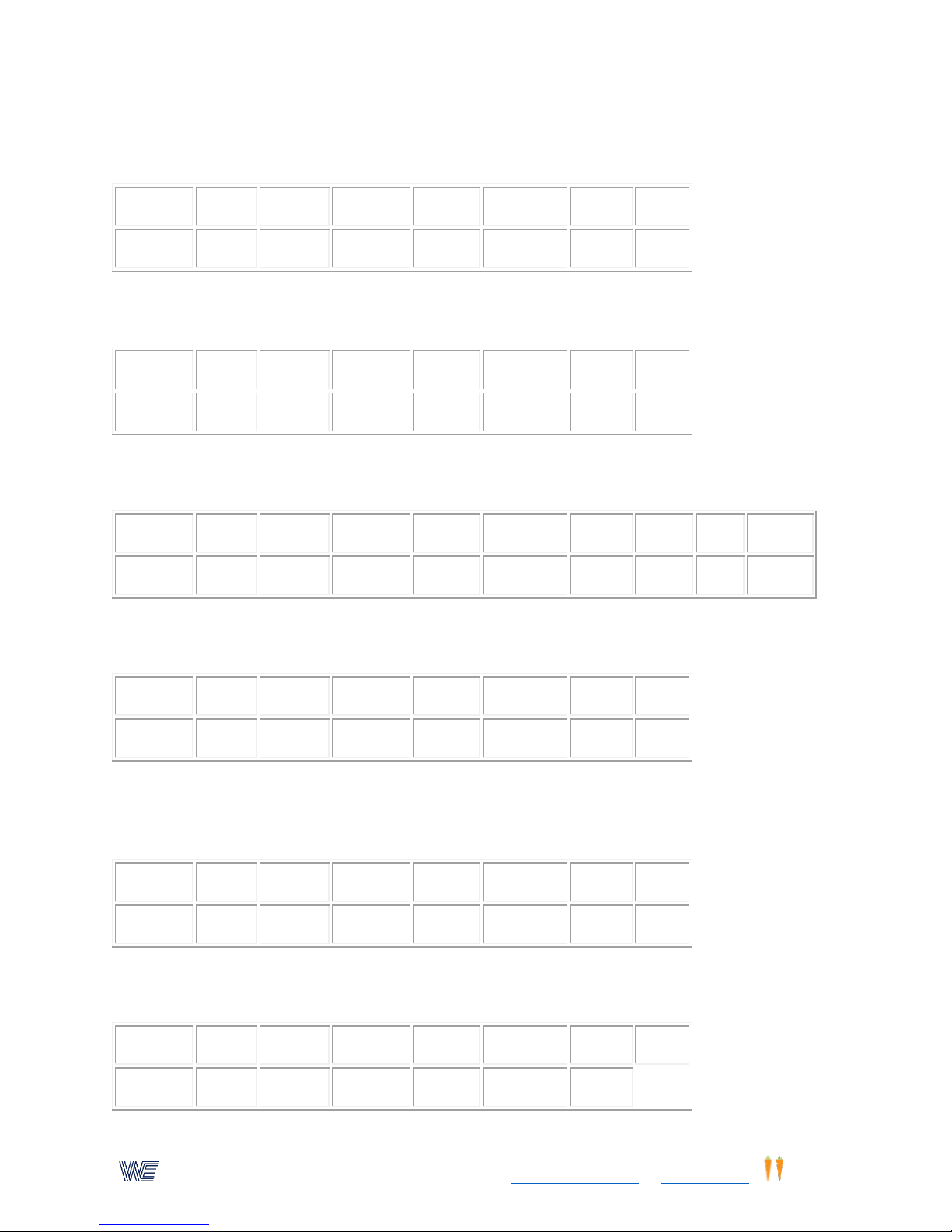
Activity (1)
Time (2)
Speed (3)
Pattern (4)
Lights (5)
Timeout (6)
Flash (7)
Dual(0)
17
120
585 3 1 0 0
66
Activity (1)
Time (2)
Speed (3)
Pattern (4)
Lights (5)
Timeout (6)
Flash (7)
Dual(0)
17
630 3 1 0 0 66
Activity (1)
Time (2)
Speed (3)
Pattern (4)
Lights (5)
Timeout (6)
Flash (7)
Dual (0)
Ctr (0)
Sound(0)
18
90
80 3 2 0 0
66
21
Activity (1)
Time (2)
Speed (3)
Pattern (4)
Lights (5)
Timeout (6)
Flash (7)
Dual(0)
14
100
40 3 2 0 0
66
Activity (1)
Time (2)
Speed (3)
Pattern (4)
Lights (5)
Timeout (6)
Flash (7)
Dual(0)
7
60
70 3 1
10 0 66
Activity (1)
Time (2)
Speed (3)
Pattern (4)
Lights (5)
Timeout (6)
Flash (7)
Dual(0)
18
50
600 9 1 0 0
52. Peripheral lights with random central light cueing. Timed for 120 seconds, Random lights will
not move until pressed light is synchronized with cue light.
53. Self pacing, All lights, 33 for WCSF, and 66 for WSVT units. Timed 120 minutes, center cue
light random Lights will not move, no score recorded unless synchronized with center cue light.
54. (WSVT )This is a Peripheral activity, timed for 90 seconds. Lights move randomly. Center
Fixation with auditory cue. Point scored only when light is "on"
55. Dr.Garner's program timed for 100 seconds, starting light speed, 40 lights/minute,only outer
circle of lights are active.
56. Speed of lights automatically adjusts to trainees speed. Lights start at 70 lights/min. A timeout of one second is introduced. For program information, click on "Selections and Parameters"
on our website MANUALs page.
57. Peripheral, Outer lights alternate from right to left, zig-zagging top to bottom and returning
again. Timed 50 seconds. WSVT only right side of unit.
19
Page 20
Wayne EngineeringTM, a subsidiary of Eyecarrot Innovations Corp. in Canada, is the leading provider of high-performance
instruments for testing and enhancing visual and motor skills. Learn more at www.wayneengineering.com and www.eyecarrot.com.
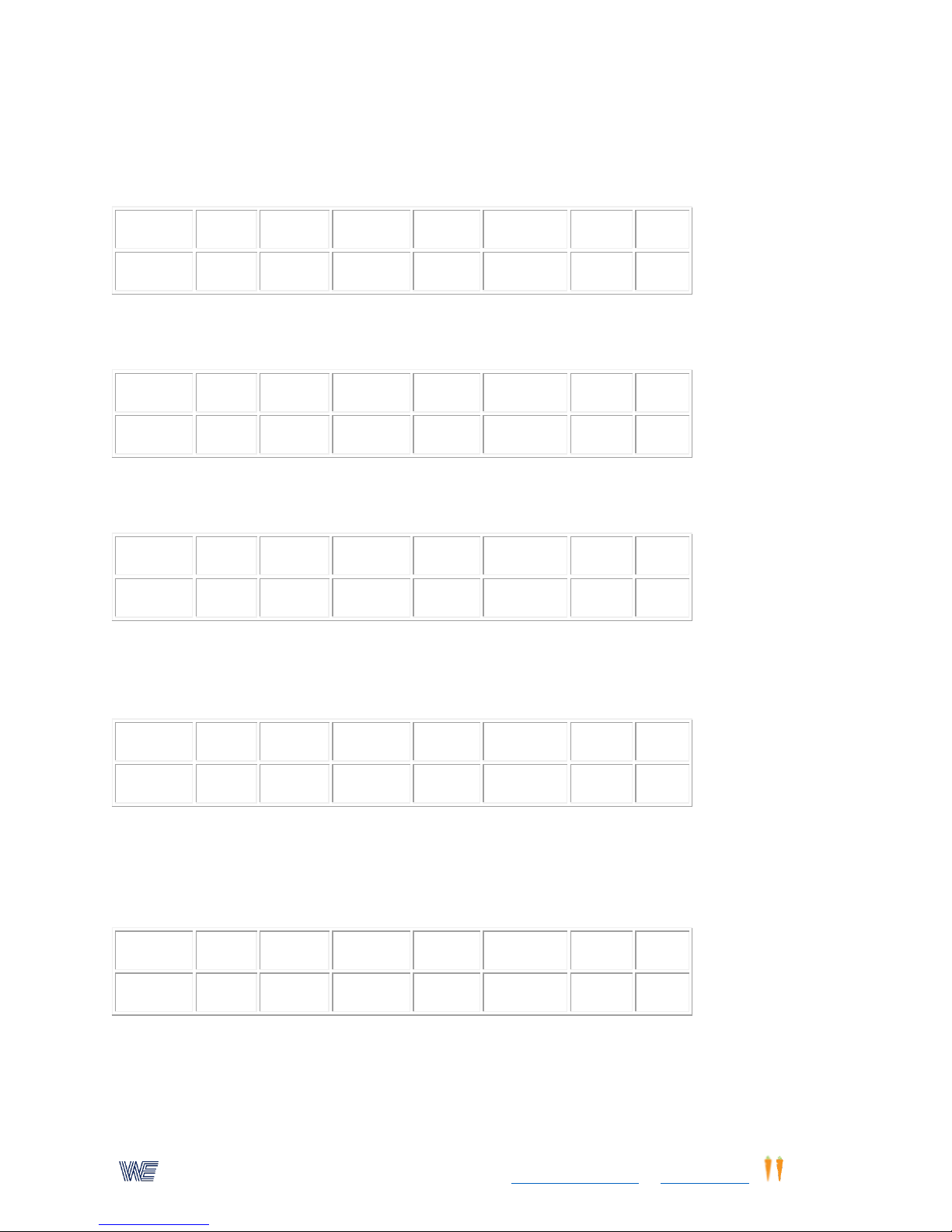
Activity (1)
Time (2)
Speed (3)
Pattern (4)
Lights (5)
Timeout (6)
Flash (7)
Dual(0)
18
100
530 3 4 0 0
33
Activity (1)
Time (2)
Speed (3)
Pattern (4)
Lights (5)
Timeout (6)
Flash (7)
Dual(0)
Activity (1)
Time (2)
Speed (3)
Pattern (4)
Lights (5)
Timeout (6)
Flash (7)
Dual(0)
Activity (1)
Time (2)
Speed (3)
Pattern (4)
Lights (5)
Timeout (6)
Flash (7)
Dual(0)
1
100 3 1 20
200
66
Activity (1)
Time (2)
Speed (3)
Pattern (4)
Lights (5)
Timeout (6)
Flash (7)
Dual(0)
2
60 3 1 15
100
66
58. Balance Board, Right and left sides of the board (WSVT only) Timed for 100 seconds, lights
move to random position when pressed on que with center light. Center light flashes at a
random rate of 20-40 times/minute. Fixation light jumps from right to left side of unit.
59. Not Used
This memory location is available for storing user-created programs.
60. Not Used
This memory location is available for storing user-created programs.
61. Self Pacing With Tachistoscope Flash Option
Lights are preset to flash "on-off" for 200 milliseconds, with a repeat "on" light it if missed. No
point scored for this light. Activity timed for 100 seconds. Repeat 2.0 sec.
62. Peripheral Awareness Testing/Training With Tachistoscope Flash Option
Self pacing mode, center button must be depressed before outer lights will flash "on & off" for
preset time of 100 milliseconds. If outer light button is not depressed within 1.5 seconds, the
light will come "on" and stay "on" until depressed. No point will be scored for this light/button.
63. Visual Memory With Flash Option
"On-off" flash preset to 100 msec. Repeat pattern after 2 seconds' wait. Lights preset to
60/minute.
20
Page 21
Wayne EngineeringTM, a subsidiary of Eyecarrot Innovations Corp. in Canada, is the leading provider of high-performance
instruments for testing and enhancing visual and motor skills. Learn more at www.wayneengineering.com and www.eyecarrot.com.
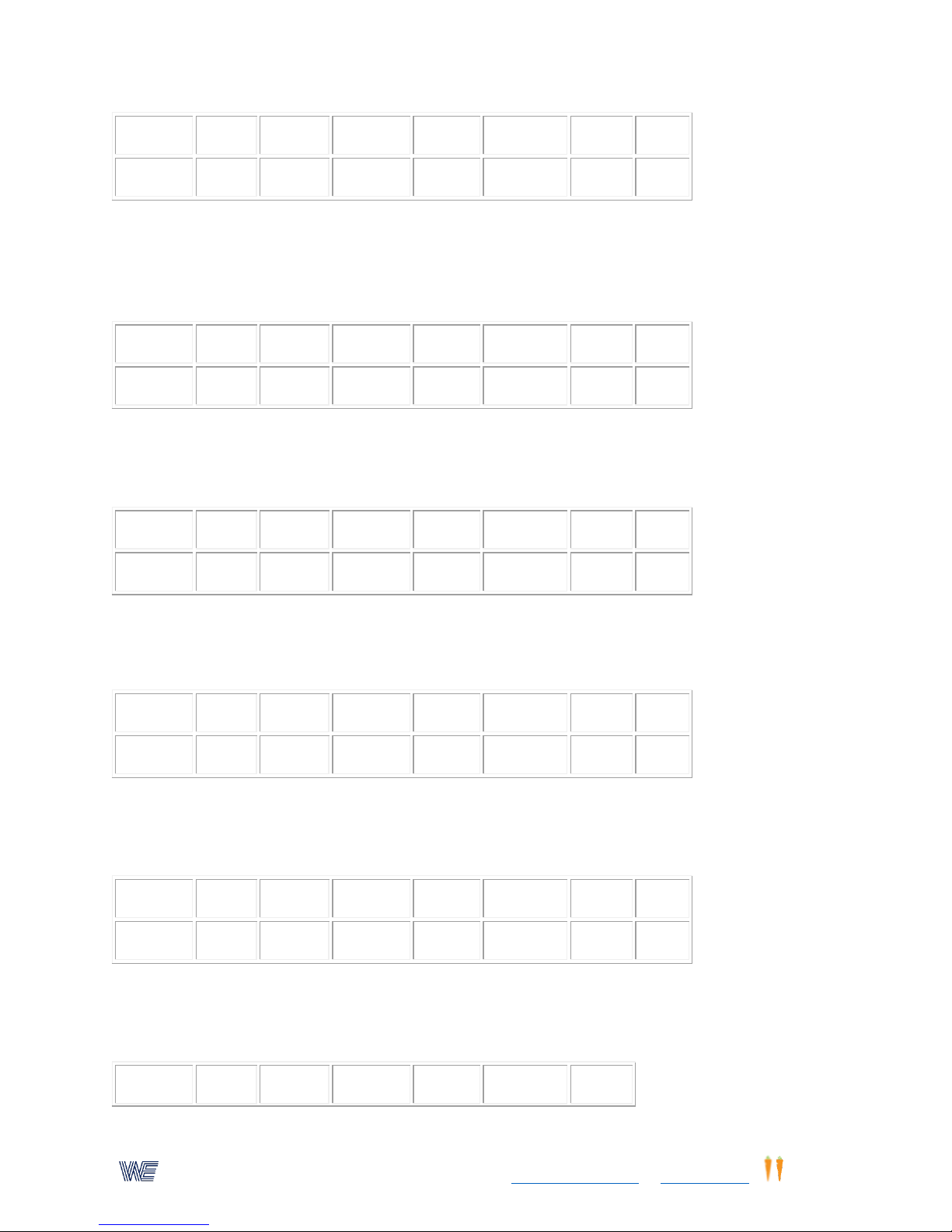
Activity (1)
Time (2)
Speed (3)
Pattern (4)
Lights (5)
Timeout (6)
Flash (7)
Dual(0)
9
60 3 1 20
100
66|
Activity (1)
Time (2)
Speed (3)
Pattern (4)
Lights (5)
Timeout (6)
Flash (7)
Dual(0)
15
60 1 0 66
Activity (1)
Time (2)
Speed (3)
Pattern (4)
Lights (5)
Timeout (6)
Flash (7)
Dual(0)
15
60 2 0 66
Activity (1)
Time (2)
Speed (3)
Pattern (4)
Lights (5)
Timeout (6)
Flash (7)
Dual(0)
11 4 1 0 0
66
Activity (1)
Time (2)
Speed (3)
Pattern (4)
Lights (5)
Timeout (6)
Flash (7)
Dual(0)
16
60
120 1 0
66
Activity (1)
Time (2)
Speed (3)
Pattern (4)
Lights (5)
Timeout (6)
Flash (7)
64. Activity Counting & Pacing--Single Switch
Timed for 60 seconds, single light in 3 o'clock position. Count single switch closures on the
saccadic fixator, or use floor/hand switches, or infra-red beam sensor with the . See for examples
of specific testing and training activities using switches.
65. Activity Counting & Pacing - Dual Switches
Timed for 60 seconds, dual switches, or lights. Light positions 3 & 9 o'clock. Use as above. For
program information, click on "Parameters and Selections"
66. Sports Reaction/Motion Measurements Programs 9-17,18
Connect external switches or sensors using the Interface Control Box.Remember to press and
hold button until an auditory beep is heard.Detail information on our website: For program
information, click on "Parameters and Selections" on our website MANUALS page.
67. Activity Single Switch Rhythm
Counts the number of times tht individual is in step with a flashing light. Preset to 120
flashes/minute, timed for 60 seconds.Detail information on our website:
68. Activity Dual Switch Rhythm
Timed for 30 sec. Preset to 100 lights/minute.Detail information on our website: For program
information, click on "Parameters and Selections" on our website MANUALS page.
21
Page 22
Wayne EngineeringTM, a subsidiary of Eyecarrot Innovations Corp. in Canada, is the leading provider of high-performance
instruments for testing and enhancing visual and motor skills. Learn more at www.wayneengineering.com and www.eyecarrot.com.
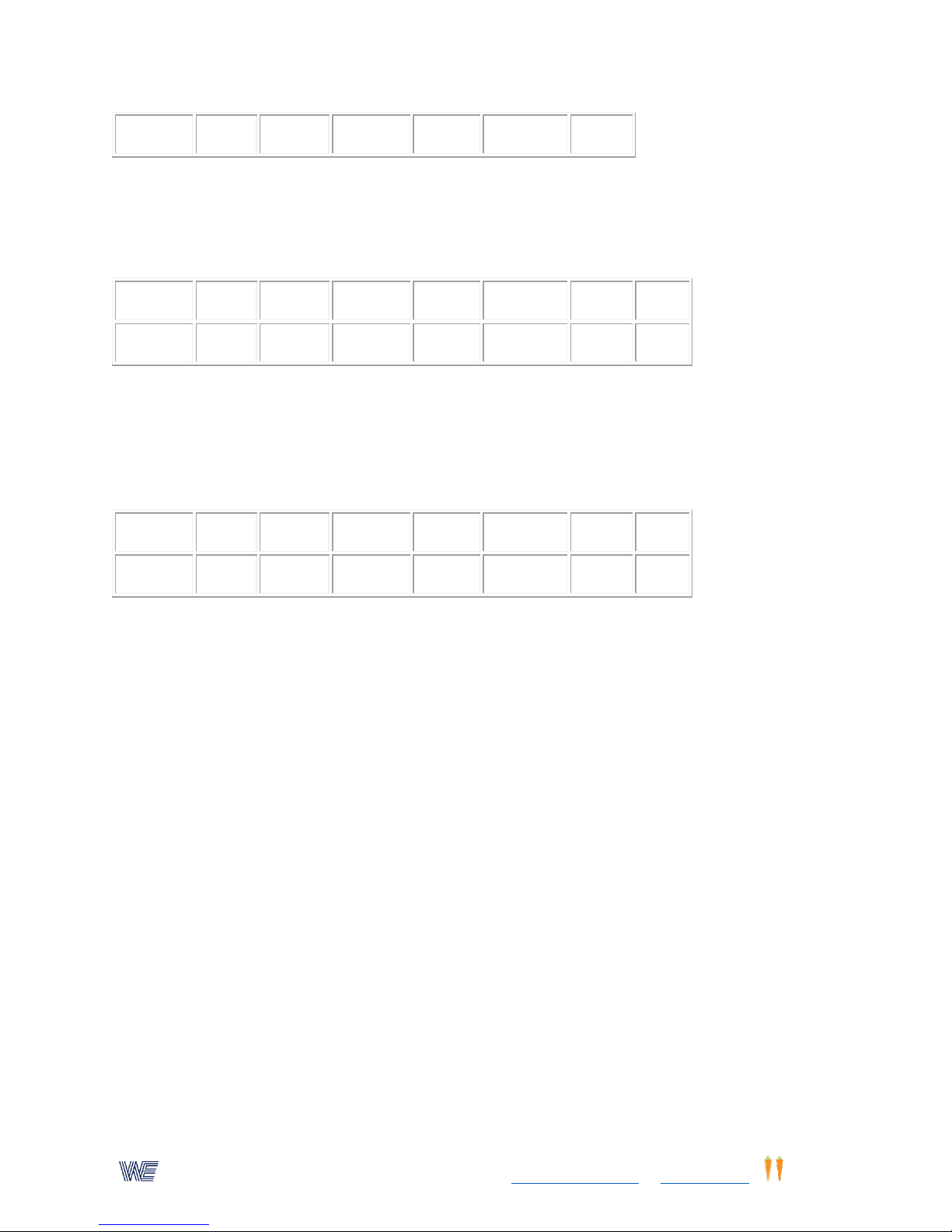
16
30
100 2
Activity (1)
Time (2)
Speed (3)
Pattern (4)
Lights (5)
Timeout (6)
Flash (7)
Dual(0)
14
30
40 3 1 0 20
66|
Activity (1)
Time (2)
Speed (3)
Pattern (4)
Lights (5)
Timeout (6)
Flash (7)
Dual(0)
13 5 3 1 0 0
66
69. Sports Screening - Gardner Product With Flash Option
Flash "on-off" lasts for 20 msec. Starting speed of lights is 40 lights/min. Elapsed time preset to
30 seconds. For program information, click on "Parameters and Selections"on our website
MANUALS page.
70. Sports Reaction/Plus Measurements, Prog. 9-40
Button/lights aways appear at the 3 o'clock location to permit the use of external switches such
as foot pads or the IR beam sensor. These must be used with the Interface Control Box.
Remember to press and hold button until an auditory beep is heard. For program information,
click on "Parameters and Selections" on our website MANUALS page.
Additional Sports Programs
Remember that all these programs can be modified to fit your specific needs; i.e. the elapsed
time setting, the speed of the lights, the pattern of the lights, the time-out, and the delay times.
Refer to for all the stored parameters in the computer.
Instructions For Retrieving These Programs
1. Depress the "enter" key.
2. Depress the "9" key. A "9" will appear in the leftmost position of the display.
3. Enter the number of the selected program (shown before each program's title). The number will
be shown in the right three positions of the display.
o If you make a mistake, repeatedly depress the "0" key until the display shows only a "9" in
the leftmost position and a "0" in the rightmost position. Then re-enter the program
number.
4. Depress the "enter" key. The program will now be retrieved.
5. Make any desired adjustments to the settings.
6. Depress the start/stop reset button to begin running the program.
7. ''' For the Sports Vision Trainer, The default (preset) settings, makes the right and left sides active.
To select only the right side, follow these instructions:
22
Page 23
Wayne EngineeringTM, a subsidiary of Eyecarrot Innovations Corp. in Canada, is the leading provider of high-performance
instruments for testing and enhancing visual and motor skills. Learn more at www.wayneengineering.com and www.eyecarrot.com.
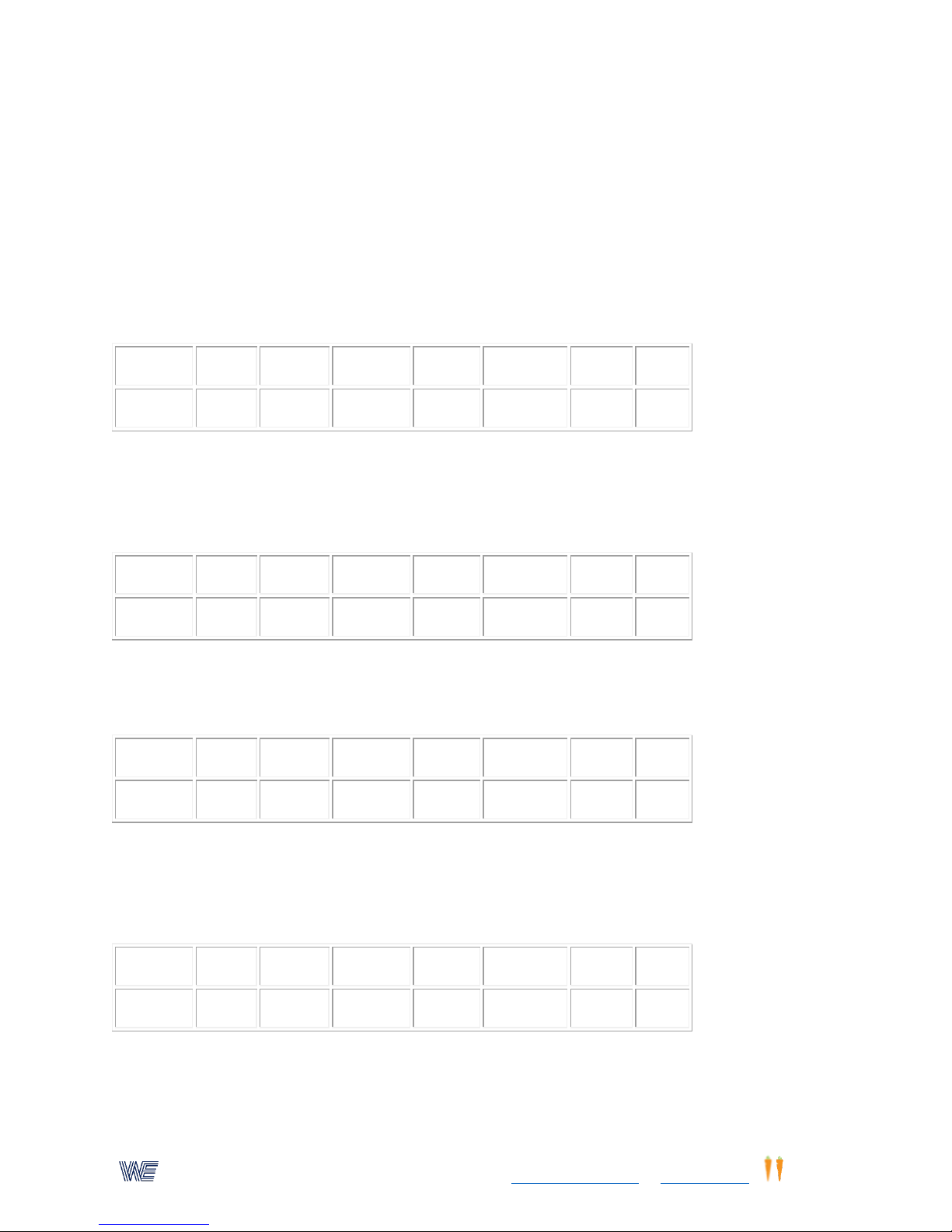
After the program has be selected (and enter pressed) Now press #0, it will appear on the left
Activity (1)
Time (2)
Speed (3)
Pattern (4)
Lights (5)
Timeout (6)
Flash (7)
Dual(0)
2
200 3 4 0 66
Activity (1)
Time (2)
Speed (3)
Pattern (4)
Lights (5)
Timeout (6)
Flash (7)
Dual(0)
4
60
85 3 4 0
66
Activity (1)
Time (2)
Speed (3)
Pattern (4)
Lights (5)
Timeout (6)
Flash (7)
Dual(0)
7
120
50 3 4 0 0
66
Activity (1)
Time (2)
Speed (3)
Pattern (4)
Lights (5)
Timeout (6)
Flash (7)
Dual(0)
1
60 3 4 6 0 66
side of the display. Press #33 and press enter again. To return to the active two sides press #0
and press #66. Press 'enter'. '''
71. Peripheral Awareness Training - Self Paced using the INTERFACE BOX.
Space the four light/switch targets to form a large triangle. The height of the triangle should be
3/4 of the width. A fifth light/switch target is used as a fixation target. The targets should be
plugged into their respective jack connectors. Trainee must fixate on the center target, depress
the target light, and then press the peripheral light. This is repeated for each of the target lights.
Timed for 200 seconds (the "center" light must be used).
72. Peripheral Awareness Testing/Training - Automatic
Same set-up as above, lights will now move automatically. Center button is the fixation point, but
is not pressed. Lights flash "on" for 700 milliseconds at random. Light will not be illuminated.
Timed for 60 sec.
73. Automatic - Speed Of The Lights Automatically Adjusts To Trainee's Ability.
Speed slowly increases after two correct responses and slowly decreases after each incorrect
response. Use 4 light/switch targets. Starting light speed is 50 lights/minute and increases to 999
lights/minute. Timed for 120 seconds.
74. High Speed Eye-hand Coordination - Self Pacing
Use 4 light/switch targets spaced no more then 48 inches apart. Lights must be depressed for a
response within 500 milliseconds. After 600 milliseconds a time out buzz is sounded; trainee
must again depress the light, but no score will be recorded. Timed 60 seconds.
23
Page 24
Wayne EngineeringTM, a subsidiary of Eyecarrot Innovations Corp. in Canada, is the leading provider of high-performance
instruments for testing and enhancing visual and motor skills. Learn more at www.wayneengineering.com and www.eyecarrot.com.
Activity (1)
Time (2)
Speed (3)
Pattern (4)
Lights (5)
Timeout (6)
Flash (7)
Dual(0)
5
120
60 3 4 0 0
66
Activity (1)
Time (2)
Speed (3)
Pattern (4)
Lights (5)
Timeout (6)
Flash (7)
Dual(0)
14
60
100 3 4 0 0
66
Activity (1)
Time (2)
Speed (3)
Pattern (4)
Lights (5)
Timeout (6)
Flash (7)
Dual(0)
1
100 3 4 0 0 66
Activity (1)
Time (2)
Speed (3)
Pattern (4)
Lights (5)
Timeout (6)
Flash (7)
Dual(0)
16
60
300 2 0 0
6
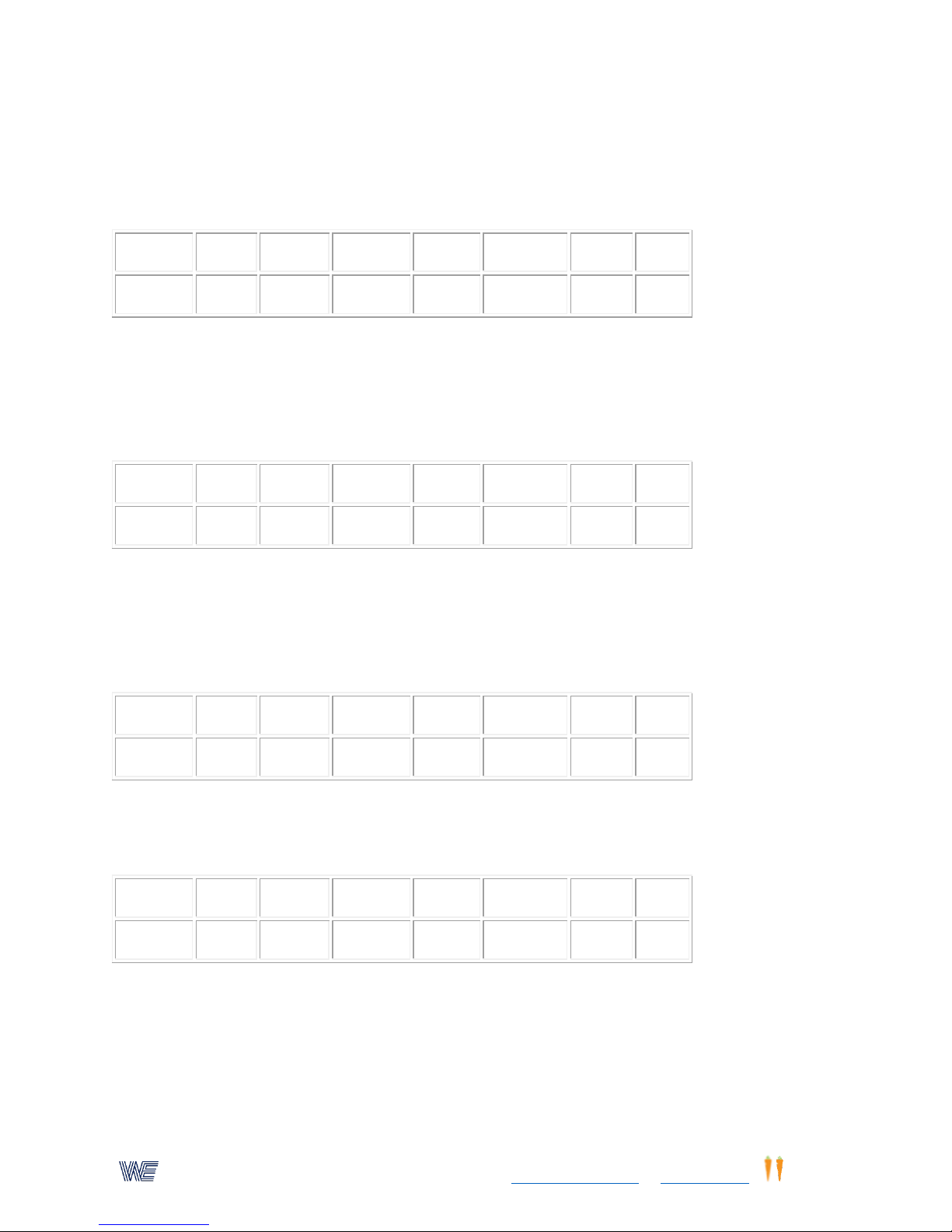
75. Eye Hand Coordination With Both A Visual And An Auditory Stimulus
Use 4 light/switch targets, spaced as desired. Lights are self paced; trainee must respond by
pushing the lights at the instant an auditory signal is heard. Sound will be produced and a point
will be scored. 120 seconds.- 60 lights/min.
76. Pro-Action/Reactiom Screening Test Using 4 Switch/ Light Targets.
Starting speed 40 lights/minute, timed for 60 sec. Speed of the lights increases slowly for each
correct response. Speed is reduced after each missed light. At the end of time, the display
records the product of the number of correct responses multiplied by the final speed of the
lights. Maximum score is 10,000
77. Eye/Hand/Body Spatial Integration - Self Pacing
Using the 4 light/switch boxes. Space the light/switch boxes at least 6 feet apart. Speed is
important. Trainee must depress each light as rapidly as possible. If the light is not depressed
within 1.0 seconds a timeout signal is produced. The light must still be depressed, but no point
will be scored. Timed 100 sec.
78. Synchronized Rhythm
Space two switch/lights 24 inches apart. The lights will alternate from right to left. Trainee must
depress the first light, and the next light, keeping up with the lights. A count is recorded on the
display for each right to left movement. Lights move at 250 lights/min timed for 60 seconds.
79. Balance Board Synchronized Rhythm
Identical to the above program. Space the two switch/lights four feet apart on the wall. Connect
the balance board to the rear of the tester. Trainee must shift in rhythm with the lights. Lights
move at 100 lights/min. Timed for 120 seconds
24
Page 25
Wayne EngineeringTM, a subsidiary of Eyecarrot Innovations Corp. in Canada, is the leading provider of high-performance
instruments for testing and enhancing visual and motor skills. Learn more at www.wayneengineering.com and www.eyecarrot.com.
Activity (1)
Time (2)
Speed (3)
Pattern (4)
Lights (5)
Timeout (6)
Flash (7)
Dual(0)
16
60
100 2 0 0
66
Activity (1)
Time (2)
Speed (3)
Pattern (4)
Lights (5)
Timeout (6)
Flash (7)
Dual(0)
13 5 3 1 0
Activity (1)
Time (2)
Speed (3)
Pattern (4)
Lights (5)
Timeout (6)
Flash (7)
Dual(0)
4
60
20 3 4 0 0
66
Activity (1)
Time (2)
Speed (3)
Pattern (4)
Lights (5)
Timeout (6)
Flash (7)
Dual(0)
15
30 1 0 0
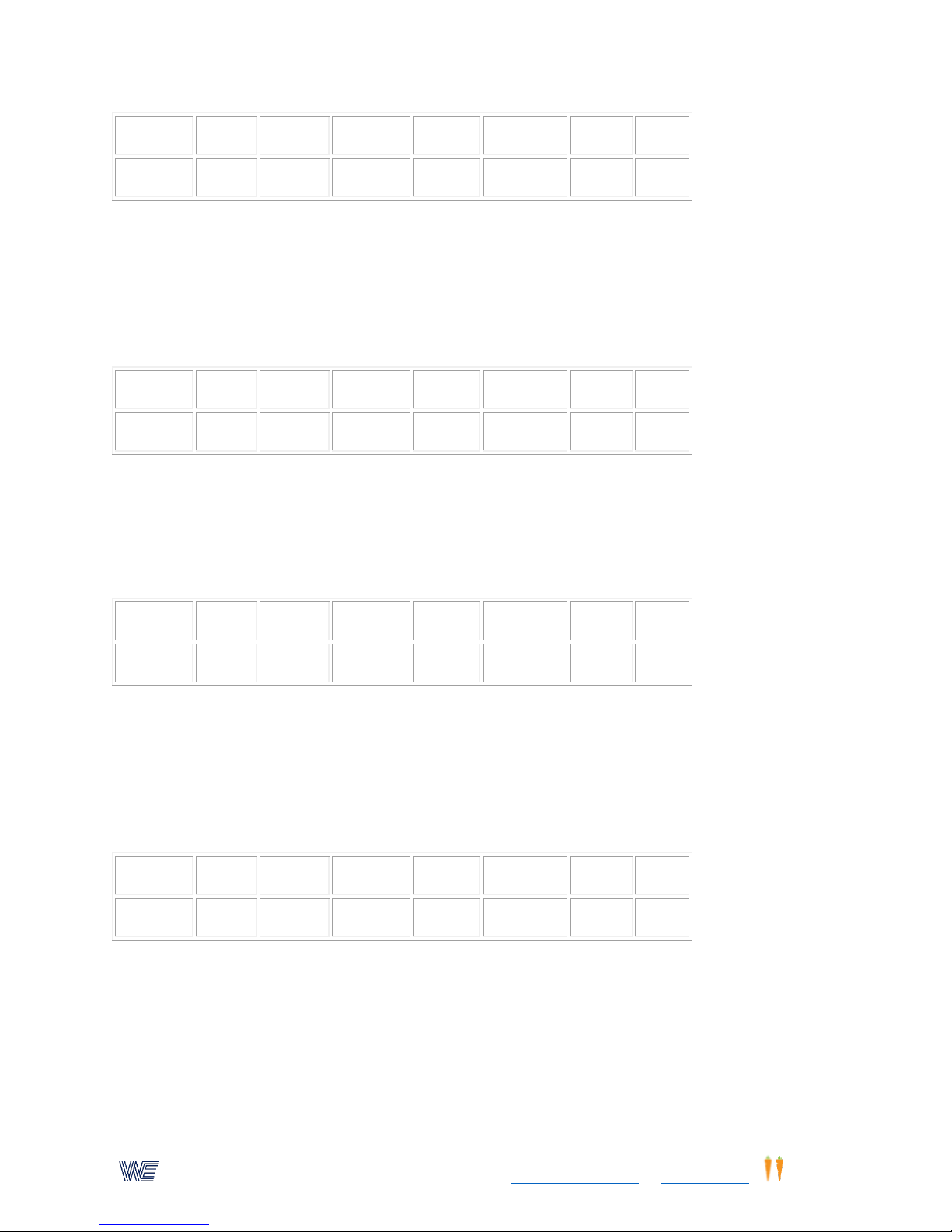
80. Ball Kick As A Response, Reaction Plus Response
Place the infra-red sensor on the ground so that the beam will be intercepted by the ball. Place
the ball 10 feet from the sensor beam. Athlete places the kicking foot onto the foot switch pad.
On signal the ball is kicked so that it rolls past the sensor beam. The display will record the time
that the foot is raised (reaction) and the time that elapsed until the ball passed thru the sensor
beam.(Display corner dot)
81. Volley Ball Or Tennis Practice
Spread a volley ball or tennis net across a wall at regulation height. Attach the 4 light/switch
targets over the top of the net. Spacing them equally from center to outer ends of the net. (Use
the extension cords. Not provided) Athlete must respond to each light by jumping up and hitting
the light when it is illuminated. 20 lights/minute timed for 60 seconds.
82. Basketball Jump
Jump repetition-counts the number of times that a trainee can jump to a certain height in 30
seconds. Mount the ir-sensor on an extended tri-pod. Attach a light string from the ceiling.
Attach a small target to the string at a selected height so that the target is intercepted by the
beam. Trainee must jump so that out stretch arm touches the target and intercepts the beam at
the set height.
83. Reaction Plus - Response, Body Motion
Mount the infra-red sensor horizontally 3 to 4 feet above the ground. Trainee stands on the foot
switch pad in a crouched position. On the auditory or visual signal, trainee sprints rapidly 10 feet
to intercept the ir sensor beam. The display will record the exact time it took the trainee to move
out of the crouched position and off the foot switch pad; and it will also record the elapsed time
it took to sprint the 10 feet through the ir-sensor beam.
25
Page 26
Wayne EngineeringTM, a subsidiary of Eyecarrot Innovations Corp. in Canada, is the leading provider of high-performance
instruments for testing and enhancing visual and motor skills. Learn more at www.wayneengineering.com and www.eyecarrot.com.
Activity (1)
Time (2)
Speed (3)
Pattern (4)
Lights (5)
Timeout (6)
Flash (7)
Dual(0)
13 5 3 1 0 0
Activity (1)
Time (2)
Speed (3)
Pattern (4)
Lights (5)
Timeout (6)
Flash (7)
Dual(0)
13 5 3 1 0 0
Activity (1)
Time (2)
Speed (3)
Pattern (4)
Lights (5)
Timeout (6)
Flash (7)
Dual(0)
1
60 3 4 10 0 66
Activity (1)
Time (2)
Speed (3)
Pattern (4)
Lights (5)
Timeout (6)
Flash (7)
Dual(0)
11 0 44 4 4 0 0
66
Activity (1)
Time (2)
Speed (3)
Pattern (4)
Lights (5)
Timeout (6)
Flash (7)
Dual(0)
84. Jump Hang Time
This activity measures how long an athlete can stay in the air after jumping. Athlete stands on a
switch pad, on signal, athlete must jump up with out stretched hand to intercept the ir beam,
and return to the ground onto the foot switch pad. The display will record the hang time. This
will be the time followed by a "dot". The second reading is the reaction time. Use the set-up
similar to program #83, except the beam should located high enough for the jump.
85. Electronic Balance Board With Time-Out.
Trainee must tilt the balance board in response to the illuminated light position. Trainee must tilt
to the light position within one second, otherwise, a time out signal is heard. To continue
activity, trainee must tilt to the correct light position, even though no score is recorded. Timed
for 60 secondsFigure 2
86. Eye Hand Reaction Time Measurement
Two switch lights are set on a table three feet apart. Trainee depresses the left switch light, and
then immediately depress the right button. The display will record the reaction time in
milliseconds. Figure 7
87. Reaction Time Using Joystick/Hand Switch Controller.
Connect the handswitch/joystick into the back connector. Joystick is moved to the left. Trainee
waits for the auditory signal, and immediately moves the joystick to the right. The display will
record the reaction time. This can be repeated as rapidly as possible. For a visual signal plug any
switch/light into the right jack connector.
26
Page 27
Wayne EngineeringTM, a subsidiary of Eyecarrot Innovations Corp. in Canada, is the leading provider of high-performance
instruments for testing and enhancing visual and motor skills. Learn more at www.wayneengineering.com and www.eyecarrot.com.
12 4 4 0 0
66
Activity (1)
Time (2)
Speed (3)
Pattern (4)
Lights (5)
Timeout (6)
Flash (7)
Dual(0)
11 4 1 0 0
66
Activity (1)
Time (2)
Speed (3)
Pattern (4)
Lights (5)
Timeout (6)
Flash (7)
Dual(0)
8 5 0
1 1 40 0 33
88. Measuring Athlete's Speed On An Ice Rink Or A Running Track, etc.
Two infra-red sensors, or one infra-red sensor and one foot switch can be used. Place the
sensors an "x" distant apart. When using the foot switch pad the athlete must stand on the first
switch pad, which is plugged into the left connector jack. The infra-red sensor beam is plugged
into the right connector jack.(use the short interface cable) On the ice rink, use the two IRsensors. Plug the first sensor into the left connector jack, and the second sensor into the right
connector jack. (note. If the intercepted beam must reach more then 5 feet, it will be necessary
that a reflector be used on the opposite side of the track). After the first sensor is activated, the
display will record the time that the second sensor is activated. To calculate the speed in
miles/hr, use the following formula: Speed in miles/hr = "x" distance(ft)/time(sec)*(0.6818). The
speed in miles/hr is the spacing between sensors, divided by the displayed time in seconds,
multiplied by the number 0.6818.
89. Additional Ideas For Using Speed-Trac Anticipator
Speed-Trac can be mounted on a wall using the mounting holes on one side. Align Speed-Trac
horizontally while marking the mounting holes with pencil. Hammer small headless nails in line
with the marks. The Speed-Trac can now be easily placed on the nails, and can be removed from
the wall when needed. Mount the "reset/start" button high on a wall. The height will require a
vertical jump with out-stretched hand. The athlete initiates the Speed-Trac by jumping and
striking the "reset/start" button. Immediately the athlete must step back a set distance so that
the complete Speed-Trac is visible. The green light on the trac will flash "on and off"; after a
short delay, the lights will speed across the Speed-Trac. The athlete must now run up to the wall
and jump up to strike the reset/start target button. The goal, is to anticipate when the lights will
reach end of trac, and to stop the light before it returns to the opposite side of the trac. The
display will record the anticipation accuracy. Random speed 5-20 mph ; "pitch" delay 4-7
seconds
90. Visual Memory Using The 4 Light/Switch Boxes
One light will flash "on" signaling trainee to depress this light button. The same light will flash
once again followed immediately by a second light. Trainee must then depress both lights in the
sequence they occurred and then a third light will appear. Trainee must depress the first light,
the second light and the third light in sequence and continues with this sequencing. A point will
27
Page 28
Wayne EngineeringTM, a subsidiary of Eyecarrot Innovations Corp. in Canada, is the leading provider of high-performance
instruments for testing and enhancing visual and motor skills. Learn more at www.wayneengineering.com and www.eyecarrot.com.
be recorded for each correct sequence. 500 lights/minute. If trainee does not follow sequence of
Activity (1)
Time (2)
Speed (3)
Pattern (4)
Lights (5)
Timeout (6)
Flash (7)
Dual(0)
9 0 300 3 4
30 0 66
Activity (1)
Time (2)
Speed (3)
Pattern (4)
Lights (5)
Timeout (6)
Flash (7)
Dual(0)
1
30 3 4 0 0 66
Activity (1)
Time (2)
Speed (3)
Pattern (4)
Lights (5)
Timeout (6)
Flash (7)
Dual(0)
4
30 3 4 0 0 66
Activity (1)
Time (2)
Speed (3)
Pattern (4)
Lights (5)
Timeout (6)
Flash (7)
Dual(0)
14
60
100 3 4 0 0
66
Activity (1)
Time (2)
Speed (3)
Pattern (4)
Lights (5)
Timeout (6)
Flash (7)
Dual(0)
lights correctly within three seconds, the lights will automatically appear in the correct sequence
illuminating all the lights including the last light in the sequence. Trainee can continue only when
he correctly repeats the sequence. Figure 2
91. Arnold Sherman Sports Ratio - Proaction Phase
Set up the 4 light/switches on a wall. Self pacing timed for 30 seconds.
92. Arnold Sherman Sports Ratio - Reaction Phase
Perform this activity immediately after program 91. Automatic pacing timed for 30 seconds. To
obtain the Sherman sports ratio, divide the reaction score by the proaction score. Remember
that the original normalized data was obtained using the Wayne Saccadic Fixator with 33 lights.
93. Gardner Product Screening Test Using 4 Lights.
Starting speed 100 lights/minute, timed for 60 sec. After each correct response, the light speed
increases slightly. After each missed light, the light speed will decrease slowly. The final displayed
score will be the product of the final speed of the lights multiplied by the number of correct
responses. Maximum score 10,000. Program must be reselected after each test, otherwise the
final speed of the light will be the new starting light speed. Figure 2
94. Rapid Eye/Hand Response Using The Joystick.
Connect the hand switch joystick to the back connectors. Set-up the switch/lights four in a
triangle. The lights will switch "on" at random automatically at 100 lights per minute. Trainee
must move joystick in the direction of the lights. Timed for 100 seconds.
28
Page 29
Wayne EngineeringTM, a subsidiary of Eyecarrot Innovations Corp. in Canada, is the leading provider of high-performance
instruments for testing and enhancing visual and motor skills. Learn more at www.wayneengineering.com and www.eyecarrot.com.
1
100 3 4 0 0 66
Activity (1)
Time (2)
Speed (3)
Pattern (4)
Lights (5)
Timeout (6)
Flash (7)
Dual(0)
9 0 30 3 4
50 0 66
Activity (1)
Time (2)
Speed (3)
Pattern (4)
Lights (5)
Timeout (6)
Flash (7)
Dual(0)
1
120 3 4 20 0 66
Activity (1)
Time (2)
Speed (3)
Pattern (4)
Lights (5)
Timeout (6)
Flash (7)
Dual(0)
18
100
80 3 4 0 o
66
Activity (1)
Time (2)
Speed (3)
Pattern (4)
Lights (5)
Timeout (6)
Flash (7)
Dual(0)
12 4 4 0 0
66
95. Visual Memory With Balance Board And Four Light/Switches
Trainee must repeat a light sequence by tilting the electronic balance board in the direction of
the lights (similar to the game "simon"). Not timed.
96. Eye/Hand Coordination Using The Joystick
Connect the hand switch/joystick to the back connector. Set up the lights as in figure 2. The
lights are self controlled (move only when button is depressed). Lights will flash on for 1000
milliseconds, but the joystick must be moved in the direction of the lights within 500
milliseconds to score a point. If not, a time out signal is produced. The joystick must still be
moved in the direction of the light, but no point will be scored. Timed for 120 seconds.
97. Peripheral Awareness - On The Balance Board
Five switch/lights are used connected to their respective jacks-front, back, right, left and center.
Four switch/lights are mounted on the wall in the form of a triangle. The fifth switch/light in the
center of the triangle and will act as the fixation point. Trainee is instructed to fixate on the
central target while responding to the peripheral lights by tilting the balance board in the
direction indicated. Lights flash "on" for 400 milliseconds. Timed for 100 seconds. (Note that the
center light will not illuminate)
98. Complete Body Reaction Using The Balance Board
Plug the balance board into the back connector. Shift the balance to the left. Wait for the signal,
and immediately respond by shifting the balance to the right. Display records the reaction time.
Repeat using only sound, or connect a switch/light for visual signal.
29
Page 30
Wayne EngineeringTM, a subsidiary of Eyecarrot Innovations Corp. in Canada, is the leading provider of high-performance
instruments for testing and enhancing visual and motor skills. Learn more at www.wayneengineering.com and www.eyecarrot.com.
Activity (1)
Time (2)
Speed (3)
Pattern (4)
Lights (5)
Timeout (6)
Flash (7)
Dual(0)
11 4 1 0 0
66
Activity (1)
Time (2)
Speed (3)
Pattern (4)
Lights (5)
Timeout (6)
Flash (7)
Dual(0)
8
25 1 20 66
Activity (1)
Time (2)
Speed (3)
Pattern (4)
Lights (5)
Timeout (6)
Flash (7)
Dual(0)
8
20 1 25
99. Eye Hand Reaction Time Measurement
Two switch lights are set on a table three feet apart. Trainee depresses the left switch light, and
then immediately depress the right button. The display will record the reaction time in
milliseconds.
100. Simulating A Pitched Ball To Be Hit By A Bat, Racket Or Hand
This uses the Speed-Trac anticipator and the Infra-Red Sensor. Random variable speed 25 to 40
mph. "Pitch" delay 1 to 4 seconds. It is recommended that the Speed-Trac be placed on a table
at least 30 inches above the floor. The Speed-Trac can also be hung horizontally oh the wall using
the punched small holes. Adjust the sensitivity of the infra-red sensor beam according to the
instructions in the manual. Test the sensor by swinging the bat (racket or hand) no closer than 12
inches and no further than five feet from the top of the sensor (if a reflector is used, the
response range can be over 20 feet). An auditory tone is produced when the sensor has been
correctly adjusted. Connect the Speed-Trac to the computer connection on the rear of the unit.
The infra-red sensor is plugged into the connector on the Speed-Trac. Refer to detailed
instruction manual. To reset the Speed-Trac, swing through the beam in a reverse direction. The
yellow light at the opposite end of the trac (simulating the pitcher's mound) will start flashing
"on & off". Swing the bat (racket or hand) the instant the lights speed (ball) toward you. The
moving light will freeze at the instant the bat (racket or hand) interupts the sensor beam. The
last light on the trac should freeze if the bat (racket or hand) connected at the proper time. If the
light freezes before reaching the front light, then the anticipation and the swing were too early.
This "early" anticipation and the time will be recorded on the display. If the beam is intercepted
after the "ball" passes over the plate the light will freeze in the top area of the trac. The display
will record a "late" anticipation. (Note: if the red led is illuminated on the center of the trac, it
would indicate that the ball is off the scale, and the time is meaningless.)
101. Anticipator Speed-Trac Constant Speed
Effective speed 20 mph. "Pitch" delay 2.5 to 5.5 sec.
30
Page 31
Wayne EngineeringTM, a subsidiary of Eyecarrot Innovations Corp. in Canada, is the leading provider of high-performance
instruments for testing and enhancing visual and motor skills. Learn more at www.wayneengineering.com and www.eyecarrot.com.
Activity (1)
Time (2)
Speed (3)
Pattern (4)
Lights (5)
Timeout (6)
Flash (7)
Dual(0)
8 5 1
10
Activity (1)
Time (2)
Speed (3)
Pattern (4)
Lights (5)
Timeout (6)
Flash (7)
Dual(0)
15
100 1 1 2 0 0 66
Activity (1)
Time (2)
Speed (3)
Pattern (4)
Lights (5)
Timeout (6)
Flash (7)
Dual(0)
15
120 1 0 0
Activity (1)
Time (2)
Speed (3)
Pattern (4)
Lights (5)
Timeout (6)
Flash (7)
Dual(0)
15
100 1 1 2 0 0 66
102. Anticipator Speed-Trac Slow Speed
Effective variable speed 5 to 20 mph. "Pitch" delay 1 to 4 seconds.
103. Jogging Rate - Use 2 Foot Switch Pads
Plugged into the left and right jack connectors. Place the two foot switch pads horizontal so that
they are in line with each other, and one can jog on them. A jog point will be recorded each time
the right and the left foot touch the foot pads. Timed for 100 sec.Figure 9
Variations of above program
Eye hand rhythm - use 2 light switch/targets
Body balance rhythm - use the balance board
104. Basketball Dribble Control
Records the number of times that the basketball bounces off the foot switch pad. Timed for 120
seconds. Plug one foot switch pad into the "right" jack connector. The infra-red sensor beam can
also be used; place the beam horizontal, and place a paper target on the floor at least 3 feet
away from and in line with the beam. (The beam is only one inch in diameter.)
105. Balance Board Rock
Rock from right to left as rapidly as possible. The display will record the total count in 100
seconds.
106. Responding To A Visual And/Or Auditory Signal
Set up as above. Trainee moves joy stick to the left. The stick is rapidly moved to the right on
signal. This will occur after a short time delay. An auditory tone and/or visual signal.
31
Page 32
Wayne EngineeringTM, a subsidiary of Eyecarrot Innovations Corp. in Canada, is the leading provider of high-performance
instruments for testing and enhancing visual and motor skills. Learn more at www.wayneengineering.com and www.eyecarrot.com.
Activity (1)
Time (2)
Speed (3)
Pattern (4)
Lights (5)
Timeout (6)
Flash (7)
Dual(0)
12
120 4 4 0 0 66
Activity (1)
Time (2)
Speed (3)
Pattern (4)
Lights (5)
Timeout (6)
Flash (7)
Dual(0)
1
60 3 4 0 0 66
Activity (1)
Time (2)
Speed (3)
Pattern (4)
Lights (5)
Timeout (6)
Flash (7)
Dual(0)
13 5 4 0 0
Activity (1)
Time (2)
Speed (3)
Pattern (4)
Lights (5)
Timeout (6)
Flash (7)
Dual(0)
12 0 4 1 0 0
66
107. Modified Spatial Integration & Orientation
Use a balance board, but reverse the position of the board so that the back is now the front.
Timed 60 sec.
108. Reaction Plus - Broad Jump
Two foot switch pads are used. The foot switch pads should be spaced apart a broad jump
distance. The trainee is instructed to crouch, and place one foot on the pad marked "set/reset".
On signal quickly jump to the second switch pad marked "right". The display will record 2
alternating readings. The reading with a period in the right hand corner of the display is the
response time (time in the air jumping to the second switch pad) the second reading is the actual
time in milliseconds trainee required to leave the crouch position and rise off the switch pad.
Note - if trainee's foot is not initially on the first switch pad a buzzing will signal this error. Many
other test and activities can be designed using this reaction plus response program. I.e., use 2
light switches, use the ir sensor, etc. Stand on the foot switch pads and run or kick through the ir
sensor beam, stand in front of the beam and on signal move to another sensor. Stand on a foot
switch, and jump up to a basket, etc.
109. Measuring One's Reaction To A Visual And/Or Auditory Signal.
Use two light/switch boxes. Connect one to the right jack connector. The other light/switch is
connected to the left jack. Trainee holds the right switch/light with finger on the button. The left
switch/light is held by the trainer, when the trainer press the button the timer is armed, and a
few seconds later the auditory signal is produced. Trainee must respond by rapidly depressing
the button. The display will record the reaction time to a visual or auditory stimulus.
32
Page 33
Wayne EngineeringTM, a subsidiary of Eyecarrot Innovations Corp. in Canada, is the leading provider of high-performance
instruments for testing and enhancing visual and motor skills. Learn more at www.wayneengineering.com and www.eyecarrot.com.
Activity (1)
Time (2)
Speed (3)
Pattern (4)
Lights (5)
Timeout (6)
Flash (7)
Dual(0)
1
120 3 4 0 0 66
Activity (1)
Time (2)
Speed (3)
Pattern (4)
Lights (5)
Timeout (6)
Flash (7)
Dual(0)
5
120
100 3 4 0 0
66
110. Alternating Joystick And Balance Board Response For Eye Hand And Body Integration
The hand switch with built-in joy stick and the balance board are used together. Trainee is
instructed to use the joy stick for right and left movements, and to use the balance board for all
front and back movements. Timed for 120 seconds. Lights are self pacing. 2
112. Eye Hand Coordination With Both A Visual And An Auditory Stimulus
Use 4 light/switch targets, spaced as desired. Lights are automatic, and a tone will be produced
for each light. Trainee must respond by pushing the lights at the instant an auditory signal is
heard. No additional sound will be produced but a point will be scored. Timed for 120 Seconds 100 lights/min.
New Peripheral Programs
Center Cueing Light
On recent models of the Wayne Saccadic Fixator, and all models of the Sports vision Trainer, the
center light can be programmed to flash "on & off" at a selected steady rate, or random rate.
This can be incorporated into all the self-pacing programs to force central fixation, develop eyehand visual integration, test and enhance peripheral awareness; test and develop sequencing;
test and develop balance integration using the balance board and/or the joy-stick hand
controller.
In all self-pacing programs, the illuminated light must be pressed only when the center cueing
light is "on". This produces a sound and scores a point. If the light is pressed when the center
cueing light is "off" no sound or point is scored, depending upon the program. The illuminated
light remains lit until it is correctly pressed, or it may move another location. It is possible to
program the self-pacing mode so that the outer lights flash on momentarily, instead of
remaining "on" until pressed. A time-out can also be added; this sets the maximum time that
trainee has to press a light before a time-out signal sounds, and no point will be scored.
The Wayne Sports Vision Trainer allows user to fixate on either the center light of the right side,
or fixate on a center light between the right and left sides. An auditory cue tone can also be
synchronized with the central fixation light. This is only available on the Wayne Sports Vision
Trainer
33
Page 34
Wayne EngineeringTM, a subsidiary of Eyecarrot Innovations Corp. in Canada, is the leading provider of high-performance
instruments for testing and enhancing visual and motor skills. Learn more at www.wayneengineering.com and www.eyecarrot.com.
Activity (1)
Time (2)
Speed (3)
Pattern (4)
Lights (5)
Timeout (6)
Flash (7)
Dual(0)
Center (0)
18
100 - 3 1 10 0 66
21
Activity (1)
Time (2)
Speed (3)
Pattern (4)
Lights (5)
Timeout (6)
Flash (7)
Dual(0)
Center (0)
18
120
100 3 1 0 0
66
21
Instructions For Retrieving These Programs
1. Depress the "enter" key.
2. Depress the "9" key. A "9" will appear in the leftmost position of the display.
3. Enter the number of the selected program (shown before each program's title). The number will
be shown in the right three positions of the display.
o If you make a mistake, repeatedly depress the "0" key until the display shows only a "9" in
the leftmost position and a "0" in the rightmost position. Then re-enter the program
number.
4. Depress the "enter" key. The program will now be retrieved.
5. Make any desired adjustments to the settings.
6. Depress the start/stop reset button to begin running the program.
If you are using Wayne Sports Vision Trainer, peripheral vision training will utilize the right and
left sides of the unit. To select only the right side, After selecting and entering the program, Press
"0" and press "33" Now press ENTER.
121. Self Pacing - Light Does Not Wait
Center light flashes "on/off' at a random rate of 70 lights/minute. The outer lights will appear at
random. The illuminated light must be pressed only when the center light is "on". This will
produce a beep and record a point on the display. If the light is pressed when the center light is
"off" no sound is produced, no score is recorded and the light moves to a new location. A time
out of one second means that the light must be pressed with-in one second, when the center
light is "on". If not, no point will be scored when pressed. Total time, 100 seconds.
122. Center Light Flashes "On/Off" At A Constant Rate Of 100 lights/Minute
The outer lights will appear at random. The illuminated light must be pressed only when the
center light is "on." This will produce a beep and record a point on the display. If the light is
pressed when the center light is "off" the light will move to a new location. No beep or score will
be recorded. Total time 120 seconds.
123. Slow Eye Hand Integration With Lights Moving In A Circle Random Cue
The lights rotate clockwise. When pressed, a point is scored only when the center cue light is
"on." If the light is pressed when the center cue light is "Off" the light will jump to the next
34
Page 35
Wayne EngineeringTM, a subsidiary of Eyecarrot Innovations Corp. in Canada, is the leading provider of high-performance
instruments for testing and enhancing visual and motor skills. Learn more at www.wayneengineering.com and www.eyecarrot.com.
position, but no point will be scored The center cue light will flash "on/off" 30 to 90 times per
Activity (1)
Time (2)
Speed (3)
Pattern (4)
Lights (5)
Timeout (6)
Flash (7)
Dual(0)
Center (0)
18
60
550 8 1 0 0
66
21
Activity (1)
Time (2)
Speed (3)
Pattern (4)
Lights (5)
Timeout (6)
Flash (7)
Dual(0)
Center (0)
18
60
550 8 1 0 0
66
21
Activity (1)
Time (2)
Speed (3)
Pattern (4)
Lights (5)
Timeout (6)
Flash (7)
Dual(0)
Center (0)
18
150
150 3 4
10
700
66
21
Activity (1)
Time (2)
Speed (3)
Pattern (4)
Lights (5)
Timeout (6)
Flash (7)
Dual(0)
Center (0)
Sound(0)
18
100
150 3 4
10
200
66
21
11
minute. Elapsed time is 60 seconds.
124. Lights Jump Diagonally Across The Board, Random Cue light Rate.
A point is scored only when the center cue light is "on." If the light is pressed when the center
cue light is "off" the light will remain "on", but no point will be scored. The center cue light will
flash "on/off" at a random rate centering at 50 lights/ minute and ranging from approximately 25
to 75 lights/minute. Elapsed time is 60 seconds.
125. Eye/Hand Integration Using The Remote Joystick
A light flashes "on" at one of four locations for only 0.7 seconds. To score a point, user must
move the joystick to the position of the light only when the center cue light is "on." If the center
cue light is "off" no point will be scored, but the light will move to a new position. A total of 1
second is allowed for each move, if not, a time-out signal is heard, that same light position is now
illuminated, and user must move the joystick to that position to continue (no point is scored).
Total elapsed time is 150 seconds. The center cue light flashes "on-off" 150 times/minute.
Remember that all the programs using the balance board or the Joystick can also be done
directly on the main board by pressing the lights.
126. Action All Over The Board -Flash- Time-out
A light flashes "on" at one of 32 locations for 100 seconds. To score a point, user must press the
location of the light only when the center cue light is "on." If the center cue light is "off" no point
will be scored, but the light will move to a new position. Only 1 second is allowed for pressing
the light/button, if not pressed in time, a time-out signal is heard, that same light position is now
fully illuminated, and user must press the light to continue (no point is scored). Total elapsed
time is 100 seconds. The center cue light flashes "on-off" with sound at 150 times/minute.
35
Page 36
Wayne EngineeringTM, a subsidiary of Eyecarrot Innovations Corp. in Canada, is the leading provider of high-performance
instruments for testing and enhancing visual and motor skills. Learn more at www.wayneengineering.com and www.eyecarrot.com.
Activity (1)
Time (2)
Speed (3)
Pattern (4)
Lights (5)
Timeout (6)
Flash (7)
Dual(0)
Center (0)
Sound(0)
18
90
60 3 2
20
750
66
21
11
Activity (1)
Time (2)
Speed (3)
Pattern (4)
Lights (5)
Timeout (6)
Flash (7)
Dual(0)
Center (0)
18
120
100 3 2
25
500
66
21
Activity (1)
Time (2)
Speed (3)
Pattern (4)
Lights (5)
Timeout (6)
Flash (7)
17
120
60 3 4 0 0
127. Peripheral Awareness: Center Cue Light "On-Off" At A Constant Rate (WSVT center Que light
and sound)
The center que light will flash 60 lights/minute. The first outer light flashes "on" for 1/3 second
(0.33 sec). The outer light must be pressed while the center cue light is "On" to score a point. If
the light is pressed when the center cue light is "off" the light will move to a new location on the
outer ring. No point will be scored. If the light is not pressed within 2 seconds (time-out) that
same light position is now fully illuminated, and user must press the light to continue, NO point is
scored. Total elapsed lime is 90 seconds.
128. Self Pacing with time out and Flash
Light flashes "on," light Waits, timed-out For 2.5 sec. The center cue light flashes "on-off" at a
constant rate of 100 lights/minute The first outer light flashes "on" for a half second, then goes
"off". This light must be pressed while the center cue light is "On" to score a point. If the light is
pressed when the center cue light is "off" no point will be scored, and the light will not move
until it is synchronized with the center light,. If the first light is not pressed within 2.5 seconds
(time out) that same light will appear "on", and when pressed will move to another position. No
point will be scored. A point is scored only when the outer light location is pressed while the
center fixation light is "on." This must be done within the 2.5 seconds of time-out. Total elapsed
time is 120 seconds.
129. Balance Board, Test/Training (Slow Action)
Light appears at one of four locations (top, right, bottom, or left). To score a point, user must tilt
the board to the position of the light only when the center cue light is "on." If the center cue
light is "off" no point will be scored, and the light will not move to a new location. The center cue
light will flash "on and off" 60 times/minute. Elapsed time 120 seconds.
36
Page 37
Wayne EngineeringTM, a subsidiary of Eyecarrot Innovations Corp. in Canada, is the leading provider of high-performance
instruments for testing and enhancing visual and motor skills. Learn more at www.wayneengineering.com and www.eyecarrot.com.
Activity (1)
Time (2)
Speed (3)
Pattern (4)
Lights (5)
Timeout (6)
Flash (7)
17
60
100 3 4
20
0
Activity (1)
Time (2)
Speed (3)
Pattern (4)
Lights (5)
Timeout (6)
Flash (7)
17
100
120 3 4
25
250
Activity (1)
Time (2)
Speed (3)
Pattern (4)
Lights (5)
Timeout (6)
Flash (7)
17
120
120 3 4
15
500
130. Balance Board Activity, Testing/Training (Medium Difficulty) With Time-Out. Balance board
activity will appear only on the right side of WSVT. For activity on both sides: After selecting and
entering the program, Press "0" and press "33" Now press ENTER.'''
Light appears at one of four locations. To score a point user must tilt the board to the position of
the light only when the center cue light is "on". If the center cue light is "off" no point will be
scored, the light will not move to a new position but the board must be tilted to it within the
allowed 2 seconds. If not, a time-out signal is heard, that same light position is illuminated, and
user must tilt to that position to continue (no point is scored). Total elapsed time is 60 seconds.
The center cue light flashes "on-off" 100 times/minute.
131. Balance Board Activity, Testing/Training (Fast Action) With Flash And Time-Out
A light appears at one of four locations for only 1/4 second. To score a point, user must tilt the
board to the position of the light only when the center cue light is "on". If the center cue light is
"off" no point will be scored. This must be done within the allowed 2.5 seconds, if not, a time-out
signal is heard, that same light position is illuminated, and user must tilt to that position to
continue (no point is scored). The center cue light flashes "on- off" 120 times/minute. Total time,
100 seconds
132. Balance Board Activity, Testing/Training (Fast Action) With Flash And Time-Out
A light appears at one of four locations for only 0.5 seconds. To score a point, user must tilt the
board to the position of the light only when the Center cue light is "on." If the center cue light is
"off" no point will be scored, and the light will move to a new position. This must be done within
the allowed 2.0 seconds, if not. a time-out signal is heard. That same light position is now fully
illuminated, and user must tilt to that position to continue (no point is scored). The center cue
light flashes "on-off" 120 times/minute. Total time, 120 seconds.
37
Page 38
Wayne EngineeringTM, a subsidiary of Eyecarrot Innovations Corp. in Canada, is the leading provider of high-performance
instruments for testing and enhancing visual and motor skills. Learn more at www.wayneengineering.com and www.eyecarrot.com.
Modifying and Restoring Pre-set Programs
Activity (1)
Time (2)
Speed (3)
Pattern (4)
Lights (5)
Timeout (6)
Flash (7)
Dual (0)
Ctr (0)
Sound(0)
Modifying A Program
Select the basic program you wish to modify:
1. Depress the "enter" key.
2. Depress the "9" key.
3. Enter the number for the selected program.
4. Depress the "enter" key.
It can now be modified as follows:
Change the activity
Depress key #1 and enter the new number (under activity) from Parameters and Selections.
Press "enter".
Change the time:
Depress key #2 and enter the new time (in seconds). Press "enter".
Change lights speed:
Depress key #3 and enter the new light speed in lights/minute . Press "enter".
Change "time-out":
Depress key #6 and enter new "time-out" in 1/10 seconds units (i.e., "8" is 0.8 sec., "20" is 2.0
seconds). Press "enter".
Change "flash" time (light flashes "on-off")
Depress the #7 key and enter the "flash" time in milliseconds. Press "enter". If 25 was entered,
the light flashes "on" for 25 milliseconds and then turns off.
After the modifications are made, you may press the reset button to test out your new program.
Do not switch off the main power; if you do, the modified program returns to its original
program. The modified program must now be stored into memory.
If you are using a Wayne Sports Vision Trainer you can modify the preset programs as follows:
Select the listed program, press ENTER, Now press "0",AND
1. Press 66 (0-66) and press ENTER Sets 66 lights mode. (Right and left side of unit.
2. Press 33 (0-33)and press ENTER Sets 33 lights mode (Right sides)
3. Press 21 (0-21)press ENTER uses the 9 oclock light on the right side of the board for central
fixation light use in peripheral awareness modes for the full board.
4. Press 20 (0-20)press ENTER uses the normal center fixation lights in the right and left sides of the
unit.
5. Press 11 (0-11) press ENTER, Auditory Que for peripheral programs.
6. Press 12 (0-12) press ENTER No auditory Que for peripheral programs.
38
Page 39
Wayne EngineeringTM, a subsidiary of Eyecarrot Innovations Corp. in Canada, is the leading provider of high-performance
instruments for testing and enhancing visual and motor skills. Learn more at www.wayneengineering.com and www.eyecarrot.com.
'''If you wish to keep this modified program, it must be stored in memory. '''
Activity (1)
Time (2)
Speed (3)
Pattern (4)
Lights (5)
Timeout (6)
Flash (7)
Dual (0)
Ctr (0)
Sound(0)
How To Store Any New Or Modified Program Into Memory
After the new or modified program has been set-up and tested, depress the START/STOP button
twice; this will set the display to "0".
Depress the #8 key pad button, and enter a second number. If you are modifying an existing
program, you can enter that original program's number. If you wish to keep the original program
and want to store the new modified program, then select any number less than 169 that is not
being used by another program. This new number will be the location for your new program.
Press "enter" after you enter this second number. This will store the program into memory.
To retrieve this program you press #9 and its number, and then press "enter".
Note: The reset button was pressed twice to remove any scores on the display before placing the
program into memory. '''If you want to also store the final scores with the program, do not press
the reset button. '''
Restoring Altered Or Missing Programs
Sometimes a power glitch can cause a program to change or become unavailable. You can
correct the program by re-entering the parameters shown in the program listing, following the
instructions in Parameters and Selections. Perhaps the following will clarify the instructions:
In your manual, look at program #1 and note the columns on the right hand side of the page.
These are the program parameters: Activity, Time, Speed, Patterns, Lights, and Time-Out.
Enter program #1 (press 9, 1, and Enter).
We will now check to be sure the correct parameters which were entered at the factory for
program #1 are still present and have not been adversely effected by a glitch due to any
electronic disturbance.
Press Enter. Press #1. On the left side of the display a 1 should appear. On the right side of the
display there should also be 1. Refer to chart on page 3 of your manual for the first program
listed. If number on the right is not a 1, press 1. Now you should see 1 on the right side. If an
error is made depress #0 twice and repeat entry.
Press Enter. You have selected Activity #1.
39
Page 40

Wayne EngineeringTM, a subsidiary of Eyecarrot Innovations Corp. in Canada, is the leading provider of high-performance
instruments for testing and enhancing visual and motor skills. Learn more at www.wayneengineering.com and www.eyecarrot.com.
Now press 2 (page 3) to select elapsed Time. 2 should appear on left of display and 30 should be
on the right side of the display (for 30 seconds elapsed time). If not, enter 30 or 60 depending
upon your preferred elapsed time. A 2 should be on the left and number 30 or 60 should be on
the right. If so, press Enter.
Skip Speed 3 since this is not applicable to program 1.
Press #4 (Pattern selection). 4 should appear on the left and number 3 should appear on the
right of the display. If it does not, press 3. Now press Enter.
Press 5 for number of active lights. 5 should be on left and 1 on the right. If there is no 1 on the
right, press #1 and 1 will appear. Press Enter.
Time Out. Press 6. Display should read 6 on left and 0 on right. If it does not, press 0. Press Enter.
Flash time. Press 7. Display should read 7 on the left and 0 on the right; if not, press 0. Press
Enter. For programs that show a 7th column (after program 50) press the number shown, and
press enter.
You have now corrected the program parameters. Do not turn off the Saccadic Fixator at this
point; if you accidentally do so the program will have to be repeated.
All changes described above must be stored before turning off the unit, as follows:
How To Store Any New Or Modified Program Into Memory
After the new or modified program has been set-up and tested, depress the START/STOP button
twice; this will set the display to "0".
Depress the #8 key pad button, and enter a second number. If you are modifying an existing
program, you can enter that original program's number. If you wish to keep the original program
and want to store the new modified program, then select any number less than 169 that is not
being used by another program. This new number will be the location for your new program.
Press "enter" after you enter this second number. This will store the program into memory.
As an example, you want to store corrected program 9-1 into memory. Press green Start/Stop
button 2 times. (This is done to wipe out any previous score which may be on the display;
otherwise, the previous score will also be recorded.) Press #8 and #1 (8 tells computer you are
storing this program in memory location #l). The display should show an 8 on the left and 1 on
the right.
Press Enter. You have corrected Program 9-1 which should be permanently stored in the
memory (unless another glitch comes along).
40
Page 41

Wayne EngineeringTM, a subsidiary of Eyecarrot Innovations Corp. in Canada, is the leading provider of high-performance
instruments for testing and enhancing visual and motor skills. Learn more at www.wayneengineering.com and www.eyecarrot.com.
You may modify or correct any pre-selected program and store it in any of the 169 memory slots
Problem: display does not change
Select the program (9 plus the program number) and press Enter. Then press the activity number
(first number). If there is no change on the display (the activity number does not appear), ignore
it and continue. Enter the corrected second number according to the manual.
Example: To program 2-60 (set time to 60 seconds), press key #2. If there is no change or the 2
does not appear on the display, ignore and continue to enter the correct number such as 60.
press Enter. To view, press key #2; the correction will appear. Press Enter and proceed to the
next parameter number.
Using Accessories
Note: All references to the Wayne Saccadic Fixator applies to the Wayne Sports Vision Trainer
(WSVT). The Wayne Membrane Saccadic Fixator and the WSVT systems were developed for
improving eye-hand coordination; testing and training saccadic eye movement; enhancing
anticipation and reaction time; developing visual memory and response to an auditory and visual
signal; improving near/far accommodation; and integrating spatial awareness.
In addition to the Fixator and the WSVT itself, the components of the system include:
The Hand Controller Joystick (supplied with the Fixator).
The Accommodative Rock Control Panel (ARC) for training and testing near/far accommodation.
The Electronic Balance Board for developing balance and "off" balance training which can also be
integrated with all the other activities.
Visual Stick-ups which are light-activated extensions of the lights on the face of the Saccadic
Fixator, allowing all activities to be performed in real space.
The Control Center Module which provides outlets for connecting the ARC, Balance Board, and
Visual Stick-ups to the Saccadic Fixator and provides for balance board integration and offbalance counting.
The Wayne Speed-Trac which simulates the pitching of a ball for testing and training anticipation
and reaction time.
Reaction sensor switches for measuring reaction time, release time, and activity rates. These
sensors include the Infra-Red Sensor Beam, Extension Touch Sensitive Fixation Boxes, and Foot
Switch Pads. They are connected to the Saccadic Fixator using the Interface Control Box.
The Hand Controller Joystick
The Hand Controller Joystick is designed to be used in conjunction with the Wayne Membrane
Saccadic Fixator. The controller permits and expansion of activities, and provides a dual control
of the Fixator by both the user and the technician.
The joystick can be plugged directly into the Wayne Computerized Saccadic Fixator or into the
Control Center Module. All activities that require depressing the start/stop/reset button can now
be controlled remotely by using the trigger grip on the joystick.
41
Page 42
Wayne EngineeringTM, a subsidiary of Eyecarrot Innovations Corp. in Canada, is the leading provider of high-performance
instruments for testing and enhancing visual and motor skills. Learn more at www.wayneengineering.com and www.eyecarrot.com.
In addition to the remote reset switch, the controller has a built-in 4-position joystick. Moving
9-18, 9-19, 9-34
Reaction time measurement
9-26, 9-27
Accommodative Rock board
9-32
Visual Stick-ups
9-41
Release/reaction time (move joystick to the forward position)
9-46
Automatic mode, 4 lights
9-47
Automatic mode with 2-second time out
the joystick to and of the 4 quadrant positions (forward, right, back, left) will act the same as
depressing the corresponding quadrant position light on the face of the Saccadic Fixator. For
example, if the top outer light (twelve o'clock position) on the Saccadic Fixator is illuminated,
moving the joystick forward has the same effect as depressing the light/button.
The controller trigger can be used to start/stop/reset all of the pre-set programs stored in the
Saccadic Fixator, as well as any programs of your own creation. The controller joystick can be
used with the following pre-set programs:
All Balance Board programs can also be used; trainee moves the joystick to the correct position
to score.
Custom programs
In addition to the listed programs, it is possible to set up your own special programs that will
permit the use of the controller joystick. Some ideas are:
Self-pacing, timed for 30 second, 4 lights, random pattern. Move joystick to correct quad position
for sound and scored point.
Automatic pacing, 60 lights/minute, timed for 60 seconds, 4 lights, random pattern.
Visual memory, fast pace: lights flash on for 1/10 second followed 1/10 second later by next light.
Move joystick to light position in a series sequence, always starting from the first light. Set 4
lights, random pattern.
Sports vision--release/locate reaction time ("Reaction Plus"): similar to program 9-40. Lights will
appear only in quad positions. Move joystick to these positions for reaction time measurements.
Accommodative Rock Control Panel (ARC)
The ARC is a hand-held panel with 16 membrane key switches and a pushbutton that acts as an
extension of the Saccadic Fixator's start/stop/reset button. Each membrane key is labelled with a
letter and corresponds to one of the 16 lights on the Saccadic Fixator's outer circle; pressing a
key has the same effect as pressing the corresponding switch/light.
The ARC may be plugged directly into the Saccadic Fixator or into the Control Center Module
(required if Visual Stick-ups are being used or balance board integration is desired). The ARC is
42
Page 43
Wayne EngineeringTM, a subsidiary of Eyecarrot Innovations Corp. in Canada, is the leading provider of high-performance
instruments for testing and enhancing visual and motor skills. Learn more at www.wayneengineering.com and www.eyecarrot.com.
supplied with 16 stick-on letters which should be placed on the face of the Saccadic Fixator or on
Letter
R L O W C A E N T K H F S U B
G
Light
1 2 3 4 5 6 7 8 9
10
11
12
13
14
15
16
(12:00)
(3:00)
(6:00)
(9:00)
the Stick-ups. When placing letters on the Fixator, make sure that they do not obscure the lights;
it's best to place them just inside the outer circle of lights. The letters correspond to the lights
(numbered 1-16, starting at the top position) as follows:
The primary purpose of the ARC is to test and train rapid near/far accommodation; the trainee
stands or sits at a distance from the Fixator, fixates on one of the lights (far point) and then shifts
fixation to the ARC (near point) and presses the appropriate letter key. Program 9-36 is
specifically intended for testing accommodation; it presents a self-paced sequence of random
lights for 60 seconds. For training, set the elapsed time limit to zero (2-0). Lenses and prism
flippers can be used to augment this training.
The ARC may also be used with any program that uses only lights on the outer circle (set
parameter 5 to 2, 3, or 4 for 16, 8, or 4 lights respectively; 5-2,4-3,or 5-4, see Parameters and
Selections). For example, using the ARC with any of the visual memory programs will test and
train the ability to memorize letter sequences.
To test or train accommodation at varying distances, use the ARC in conjunction with 4, 8, or 16
Visual Stick-ups placed at different distances in front of the trainee.
Electronic Balance Board
Saccadic Programs in your manual for Balance Board: 9- 43 to 47
The Electronic Balance Board has 4 tilt-sensitive switches which detect imbalance in the four
cardinal positions (forward, backward, left, and right). The board can be plugged directly into the
Saccadic Fixator or into the Control Center Module (required for Balance mode, Balance Board
Integration and for use with the Visual Stick-ups).
Operating modes
The board can be used in three, modes: Balance mode, Quad mode and Integration mode.
In Balance mode the Saccadic will generate an auditory signal and count each time the user
activates a tilt switch by going "off" balance. The board is in Balance mode when the toggle
switch is in the "BALANCE" position.
In Balance mode the individual develops balance on the board. Each time the individual goes
"off" balance a tone is heard and the Saccadic records a count.
43
Page 44

Wayne EngineeringTM, a subsidiary of Eyecarrot Innovations Corp. in Canada, is the leading provider of high-performance
instruments for testing and enhancing visual and motor skills. Learn more at www.wayneengineering.com and www.eyecarrot.com.
In Quad mode the four tilt switches act as extensions of the four quad position lights/switches on
the face of the Saccadic Fixator; the user must shift his balance in the direction indicated by the
Fixator in order to score a point. The board is in Quad mode when plugged directly into the
Fixator or when the toggle switch on the Control Center Module (CCM) is in position "BALANCE".
Remember, good balance also requires the ability to move from an unbalance state to a balance
state with minimum effort.
Integration mode allows all activities on the Saccadic be performed only while the user maintains
balance. When the user goes off balance, his score is frozen and all activities stop. To reset the
system after the body goes off balance, any of the following can be done:
Depress the start/stop/reset green light button on the face of the Saccadic Fixator.
Activate the reset control on the Hand Controller Joystick or the Accommodative Rock Panel if
either accessory is plugged into the Control Center Module.
Shift body weight back to balance, then immediately off balance and then immediately back again
to the balance position. In the INTEGRATION mode, the Balance board in effect works as a simple
switch that can start or stop the
Saccadic Fixator. The BALANCE BOARD can be used to control all of the SPEED-TRAC programs,
Testing and training activities
It is suggested that the individual first learn to balance properly on the balance board. After good
balance is attained, progress to the next activity--the quadrant shift.
For all activities, the user steps upon the balance board with two feet straddling the center of
the board and separated so that each foot is approximately 3-4 inches from the edge. User
should shift his feet slightly so that he is centered properly. By shifting his body (using a slight
sway), he should keep the board in proper balance so that none of the edges of the balance
beard makes contact with the floor.
To test and train balance, Set the right toggle switch on the Control Center Module to
"BALANCE". Select Saccadic program, 9-45. This activity last for 120 seconds. Each time user is
"off" balance a series of beeps will be heard, and counted. The goal is for the user to maintain
balance and keep the count displayed by the fixator as low as possible.
To train and test directed quadrant shifting, set the CCM toggle switch to BALANCE for Quad
mode. Select the following Saccadic programs" 9-26 (60 seconds) or 9-27(30 seconds) on the
Fixator. The goal is for the user to make as many corrects shifts as possible in the time allowed.
This will be easiest with the small post.
Once the user has mastered static balance and quadrant shifting, consider using Integration
mode to test and develop his ability to maintain balance while performing other visual/motor
activities. Refer to your Saccadic manual for Balance Board programs.
44
Page 45

Wayne EngineeringTM, a subsidiary of Eyecarrot Innovations Corp. in Canada, is the leading provider of high-performance
instruments for testing and enhancing visual and motor skills. Learn more at www.wayneengineering.com and www.eyecarrot.com.
Visual Stick-ups
Visual Stick-ups are extensions of the lights/buttons on the Saccadic Fixator. All activities using
the outer 16 lights of the Saccadic Fixator can now be performed in space using the Stick-ups. A
pulsed flashlight or pulse flash gun can be used to "press" or activate the spatial Stick-up lights.
Stick-ups must be used with the Control Center Module in groups of 4, 8 or 16 and the Saccadic
Fixator program must be set accordingly:
The four lights are used either in the quad position or in the four balance board locations: top,
right, bottom, and left. Use program 9-32.
The eight lights are used with every-other outer 16 lights. starting with #1 (twelve o'clock
position). Use program 9-33.
The 16 lights are all the lights in the outer 16 light ring. Use program 9-32 and then set parameter
5 to 2.
Installation
1. Select Stick-up placement. Stick-ups can be placed on the wall, floor, ceiling, Follow the directions
on each unit for proper positing. When selecting placement position, remember the following:
1. The target light on Stick-up is sensitive to bright light.
DO NOT place a Stick-up facing bright outside light, i.e., window or outside door. Bright
sunlight can impede operation of Stick-up.
DO NOT place a Stick-up directly facing an incandescent bulb.
2. Stick-up can be placed at a reasonable distance under or near fluorescent light.
3. When conditions prevent control of bright light shining from above or from the side, then
a light shield-hood should be placed around the Stick-up to block the illumination.
2. Plug the cord of each Stick-up into the numbered jack on the front panel of the Control Center
Module. The numbers correspond to the position of the lights on the face of the SACCADIC
FIXATOR, starting with the top light and going clockwise. Jacks 1, 5, 9 and 13 have an asterisk (*);
these represent lights for the quad positions used with the Electronic Balance Board, i.e. forward,
right, back, and left.
Adjusting the Stick-ups for maximum sensitivity and room lighting
The sensitivity control on each Stick-up determines how much light is needed to "press" it.
Turning the knob clockwise increases the sensitivity. After installing the Stick-ups, it will be
necessary to calibrate them for ambient room lighting level. This procedure is best done with an
assistant.
1. Rotate the sensitivity control on each Stick-up fully counterclockwise for minimum sensitivity.
2. Make sure the Control Center module is plugged into the Saccadic Fixator. Set the left toggle
switch on the Control Center Module to position "STIK-UPS". The right Toggle switch can be in
any position.
3. Select the appropriate Saccadic Fixator program for the number of Stick-ups and start it by
depress the Start/Stop/Reset button.
4. Target light on one Stick-up should glow.
5. Stand at selected distance from Stick-up with flashlight in hand.
45
Page 46

Wayne EngineeringTM, a subsidiary of Eyecarrot Innovations Corp. in Canada, is the leading provider of high-performance
instruments for testing and enhancing visual and motor skills. Learn more at www.wayneengineering.com and www.eyecarrot.com.
6. Shine flashlight beam on the Stick-up target light while assistant adjusts the Sensitivity Control of
the Stick-up. To do this, slowly rotate knob clockwise until the target light moves to another Stickup.
7. Repeat above step #6 for next glowing Stick-up target light. Continue until all Stick-ups have been
individually adjusted.
8. If an illuminated target light does not change to another position when the flashlight beam shines
on it, another adjustment of the sensitivity may be necessary. Should that happen just increase
the sensitivity of the Stick-up by slowly turning the knob clockwise.
9. Be sure to take note of which Stick-up target light was calibrated. Since Stick-up lights appear at
random, some Stick-up lights may appear several times before all the lights appear once. Be
aware of which Stick-up lights have been calibrated. After a couple of rounds, if one Stick-up light
never comes on, check for interfering illumination. If none is present, then remove that Stick-up
plug from its jack and re-insert into another jack.
Suggested exercises
All the activities of the Saccadic Fixator can now be performed in space and with anaglyph
glasses, plus/minus lenses, and while balancing on a balance board, walking beam or a
trampoline. Visual Stick-up can be used with the Accommodative Rock Panel for near-point/farpoint accommodative rock, and with the Wayne Electronic Balance Board.
Activities using Stick-ups and flashlight
1. To improve tracking skills, arrange Stick-ups in a line at eye level. Have the user stand up to 15 ft.
away facing the Stick-ups. As each target light comes on, user shines the flashlight on it. This will
cause the target light to jump to another Stick-up. Repeat the process. The display on the
Saccadic Fixator will record the number of correct responses in the pre-set time interval (adjust
parameter 2 to the desired time limit after selecting the appropriate program).
2. To increase flexibility, vary distance between user and Stick-up. Repeat procedure #1. Encourage
the user to track target lights by ocular movement only. To keep user's head from turning, place a
book on top of his head.
3. To improve peripheral awareness, randomly place Stick-ups in an area up to 20 ft. in diameter.
Have user stand in center of arrangement and locate the proper target light with a flashlight. As
accuracy and speed improve, move user successively closer to the Stick-up and repeat process.
4. Place Stick-ups on the back of chairs and on the wall for near/far accommodation.
5. Use anaglyph glasses for monocular training.
Activities using Stick-ups with Accommodative Rock Control Panel
Target lights in space can contain the far point target patterns when the Accommodative Rock
Control Panel (ARC) is used. With the ARC, the user can make quick judgements in terms of
space, improve accommodation and fixation. This develops acuity and ocular-motor skills.
1. Place matching letters on the Stick-up to match the letter on the ARC. When a letter is lit on the
Stick-up, press the corresponding letter on the ARC. This will cause the light to randomly jump to
the next target position.
2. Alternate accommodative-rock using flashlight. When a Stick-up target light is "on" user touches
the matching letter on the ARC. The light will jump to another target position and user then
shines the flashlight on this new target position. The next target light position is matched with the
near-point letter on the ARC. Continue this alternation until the pre-set time has elapsed.
46
Page 47

Wayne EngineeringTM, a subsidiary of Eyecarrot Innovations Corp. in Canada, is the leading provider of high-performance
instruments for testing and enhancing visual and motor skills. Learn more at www.wayneengineering.com and www.eyecarrot.com.
Activities using Stick-ups with Electronic Balance Board
Use only four Stick-ups. These should be plugged into the jacks marked with and asterick (*): #lforward, #5-right, #9-back, #13-left. Label these Stick-ups as shown and place Stick-ups so that
they are positioned as follows:
Forward
Left Right
Back
To develop spatial awareness and visual integration, user must shift his/her body position in the
direction indicated by the Stick-up target lights. Display will record the correct number of shifts
in a given time.
Tactile finger control of Stick-ups
When the Stick-up are properly adjusted, touching the target light with the finger or with a white
surface has the same effect as shining a flashlight on the target light.
Touch the target light with your finger. The light should change to another Stick-up and a tone
will be heard. If this does not happen, then the Stick-up sensitivity should be increased. To do
this, place your finger on the illuminated target light and rotate the sensitivity control very
slightly clockwise until the light switches to another target position. Remember that if the
sensitivity is turned too high, the room light will adversely affect that Stick-up.
Activities using Stick-ups in automatic mode
Lights move automatically at the selected speed. Correct response produces an auditory tone
and is recorded on the display. Set the left toggle switch on the Control Center Module to
position "STIK-UP"and set parameter 1 on the Saccadic Fixator to 4.
Control Center Module
The Control Center Module allows all the above-described equipment to be connected to the
Saccadic Fixator. The module includes 16 phono jacks for plugging in up to 16 Visual Stick-ups, a
connector for connecting the Accommodative Rock Control Panel or Hand Controller Joystick,
and a connector for connecting the Electronic Balance Board or the Speed-Trac. Two toggle
switches allows the selection of any of the above.
The Control Center Module can be placed on a desk, on the floor or mounted on a wall.
Wherever possible, we recommend mounting on the wall approximately four feet off the floor.
This will permit easy handling.
47
Page 48
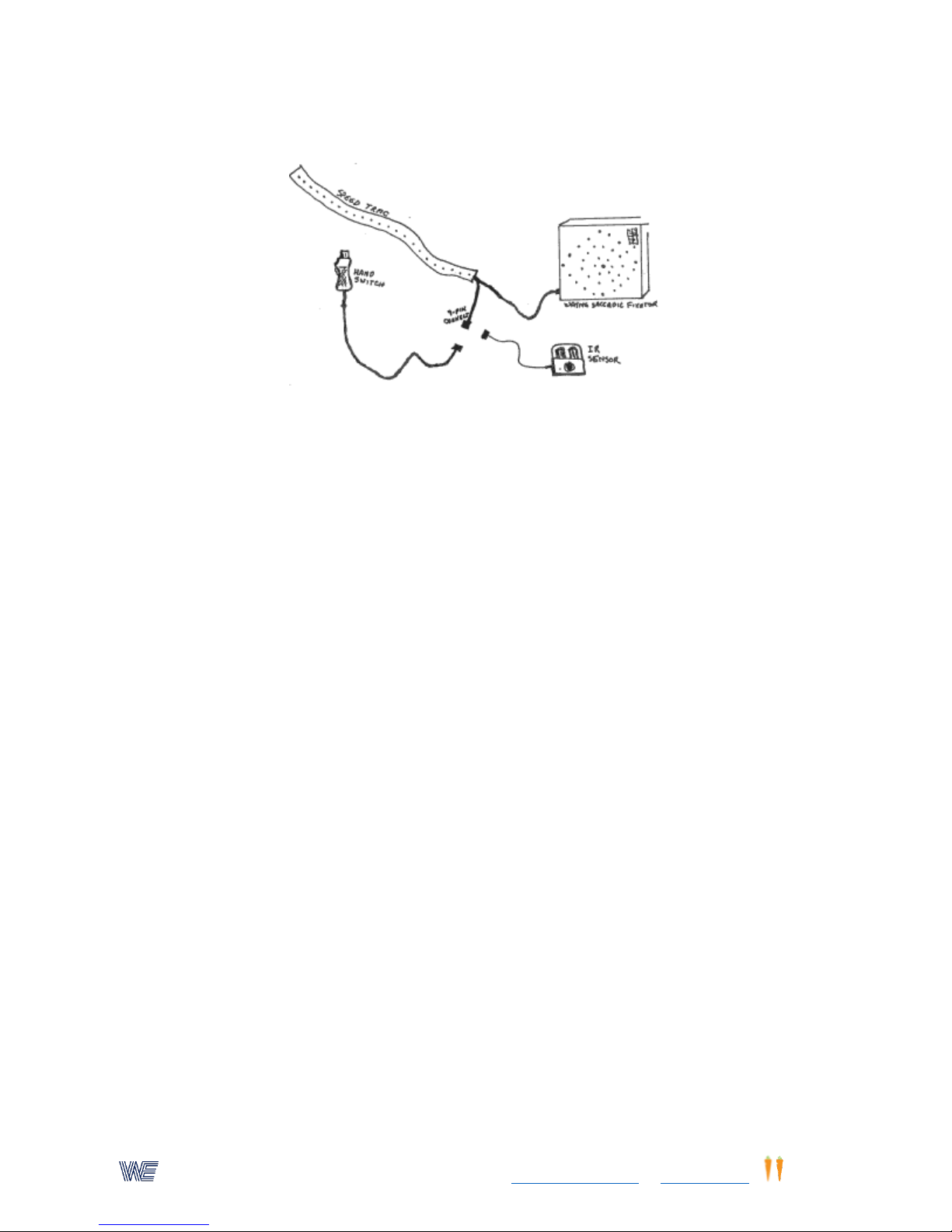
Wayne EngineeringTM, a subsidiary of Eyecarrot Innovations Corp. in Canada, is the leading provider of high-performance
instruments for testing and enhancing visual and motor skills. Learn more at www.wayneengineering.com and www.eyecarrot.com.
Wayne Speed-Trac
The Wayne Speed-Trac consists of a 15-foot flexible track housing a total of 32 LED lamps. The track can
be rolled out on the floor or placed on a series of tables. The Speed-Trac plugs directly into the Saccadic
Fixator. A nine-pin jack attached to a short cable connects the Speed-Trac to the supplied hand switch
(similar to the Hand Controller Joystick but with a different connector) or the Infra-Red Sensor Beam. The
track can be rolled into a one-foot diameter spiral for convenience in handling and storage.
The trainee ("batter") is positioned so that light #32 lines up with him/her and is called "home
plate." Light #1 is 20 feet from "home plate" and is called the "pitcher's mound." When the start
button on the Saccadic Fixator is depressed, light #1 (pitcher's mound) will flash on and off
approximately 180 times per minute. After a short time delay, the lights will suddenly appear to
move toward "home plate" at a pre-set speed calibrated in miles per hour. The "batter" must
respond by stopping the moving lights at the same instant that they pass over the "home plate"
(light position #32).
The trainee stops the lights by either squeezing the trigger on the hand switch or (recommended
to make the procedure more realistic) swinging a bat, racquet, or hand to interrupt the Infra-red
Sensor Beam. The location of the stopped light indicates the exact instant that the "batter"
reacted. The Saccadic Fixator then displays the early or late reaction time in thousandths of a
second (milliseconds).
The Speed-Trac may be used with programs 9-28, 9-29, 9-49, 9-50, 9-100, 9-101, and 9-102.
Interface Control Box And Reaction Sensors
The Interface Control Box plugs directly into the Saccadic Fixator and provides 5 phono jacks into
which various accessory switches can be plugged. Four of the jacks allow switches to be used in
place of the quad position (top, right, bottom, left) switch/lights on the Fixator; the fifth jack
allows a switch to be used in place of the start/stop/reset button. The Interface Control Box is
the modern replacement for the Reaction Measurement Sensor Interface which was supplied
with older Fixators.
48
Page 49
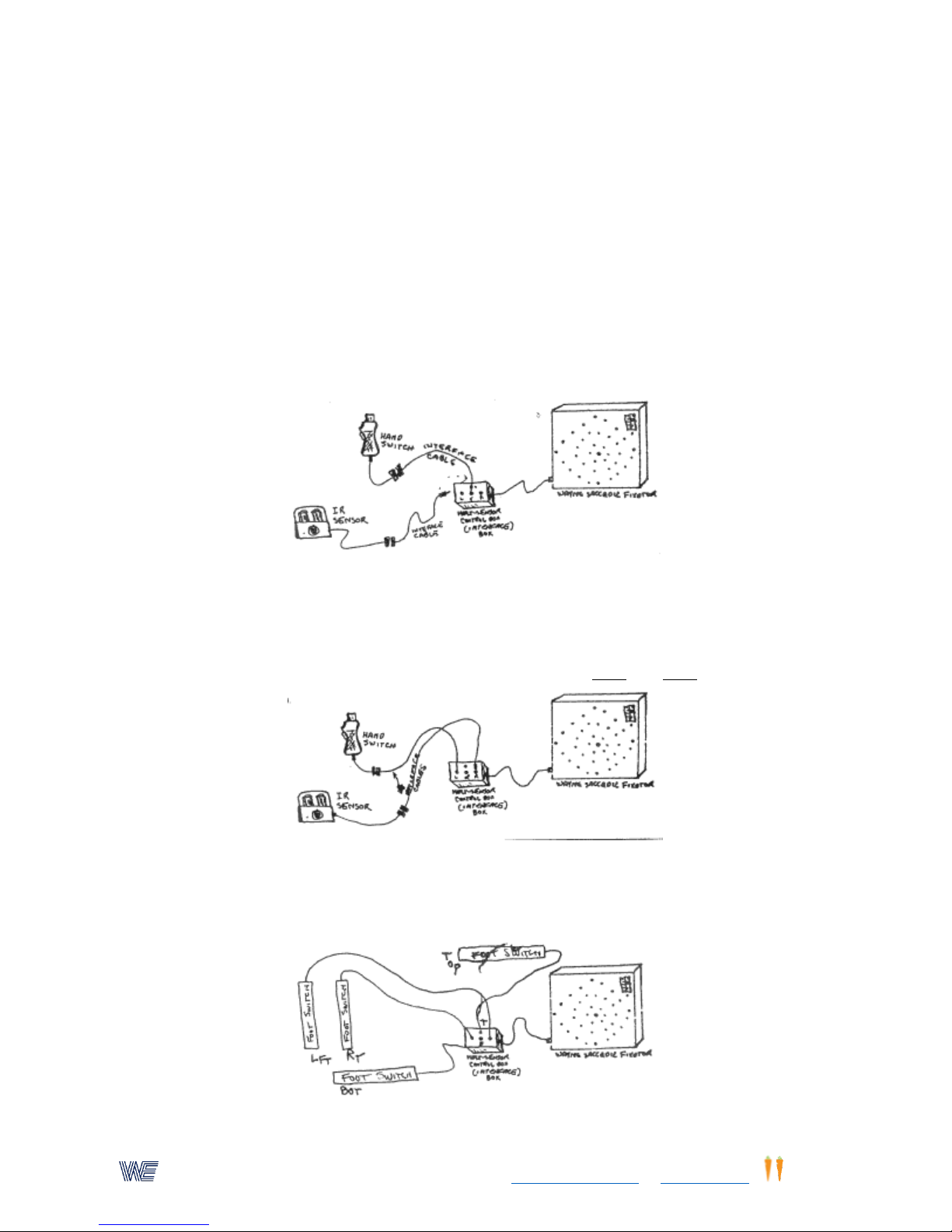
Wayne EngineeringTM, a subsidiary of Eyecarrot Innovations Corp. in Canada, is the leading provider of high-performance
instruments for testing and enhancing visual and motor skills. Learn more at www.wayneengineering.com and www.eyecarrot.com.
The Interface Control Box works with any switch or sensor that provides a simple contact closure
and connects via a 3.5mm two-conductor phono plug. Wayne Engineering products that can be
used for this purpose include the Foot Switch Pads, Extension Touch-sensitive Fixation Boxes, the
hand switch supplied with the Speed-Trac, and the Infra-Red sensor beam. Please contact us if
you have questions about the compatibility of any other switch or sensor. Note that the Visual
Stick-ups cannot be used as sensors for the current model of the Interface Control Box.
The primary use of external switches and sensors is reaction time measurement. Many
applications for external switches are described in Whole-body Reaction Measurement, Wayne
Footspeed, and the program listings for the Saccadic Fixator. Here are some additional ideas for
using switch accessories:
Remote control of the start/stop switch
Plug a remote switch into the center jack of the interface. To connect the Infra-red Sensor Beam
or the hand switch, use the interface cable.
Reaction time measurements with programs 9-18 and 9-19
Plug two remote switches into the left and right jacks of the interface. You may use this
arrangement for any activity that uses only the 3 o'clock and 9 o'clock lights/switches.
Foot pacing and prompting
49
Page 50
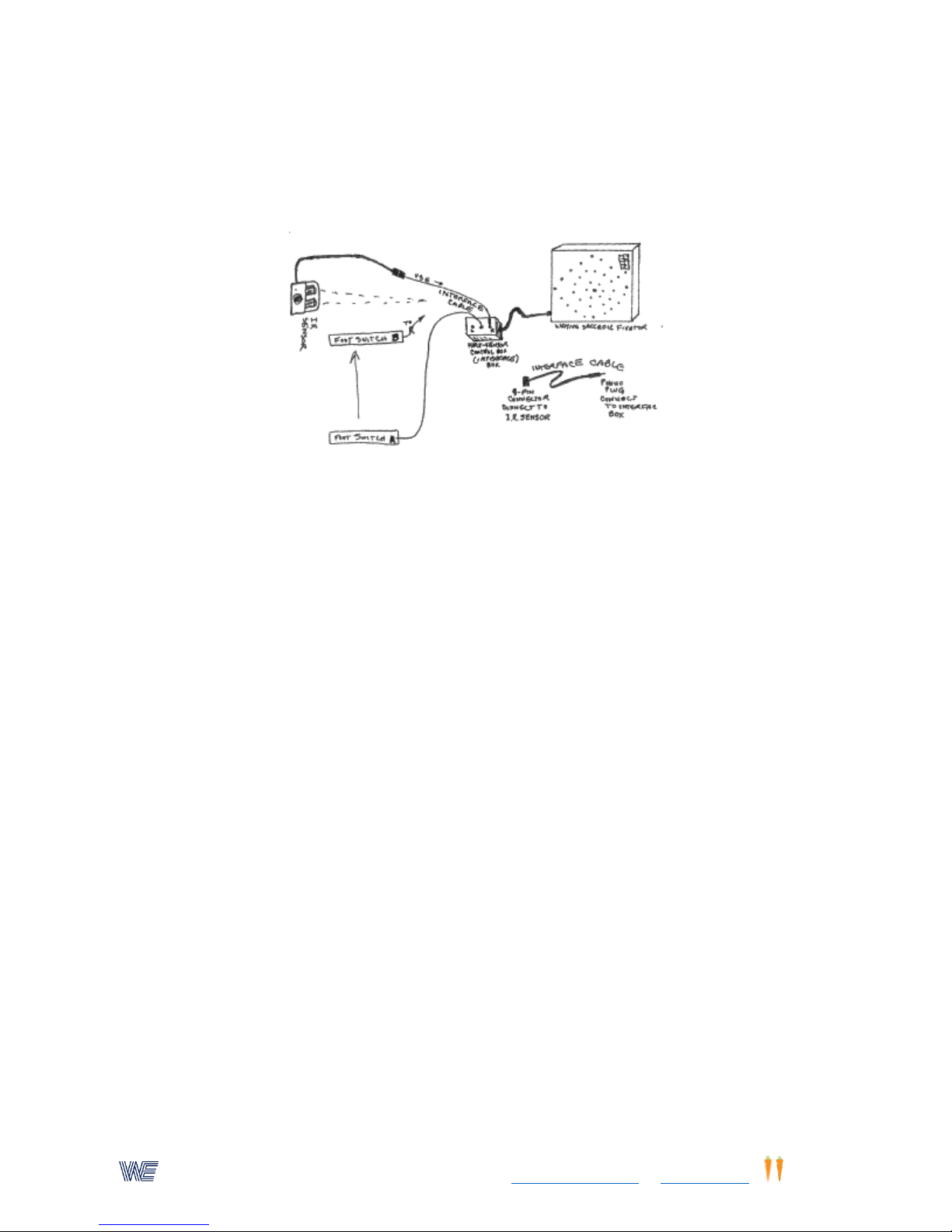
Wayne EngineeringTM, a subsidiary of Eyecarrot Innovations Corp. in Canada, is the leading provider of high-performance
instruments for testing and enhancing visual and motor skills. Learn more at www.wayneengineering.com and www.eyecarrot.com.
Plug four foot switches into the top, right, bottom, and left jacks of the interface. Place the foot
switches in the corresponding positions around the trainee. Use program 9-65 to count jogging
pacing, or programs 9-43 and 9-46 to prompt the user to run in random directions.
Reaction Plus response with feet
Plug one foot switch into the center jack of the interface and another foot switch, placed ahead
of the first one, into the right jack. Set the Fixator to program 9-70. Trainee stands on the first
foot switch, waits for an auditory signal, and then jumps to the second switch.
A variation is to use the Infra-red Sensor Beam, projecting horizontally, in place of the second
footswitch and have the trainee sprint and interrupt the beam upon receiving the auditory
signal.
50
 Loading...