

Page 1
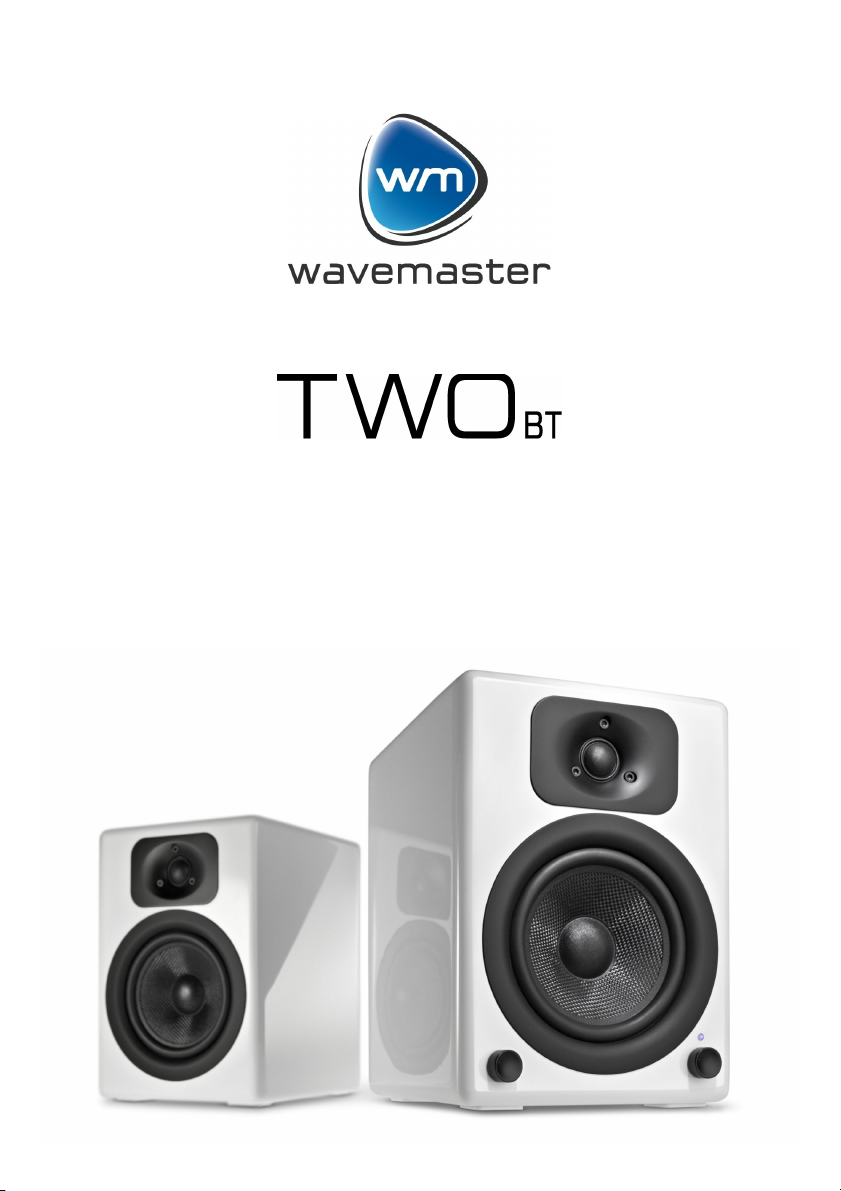
2 Channel 2-Way Stereo Sound System
Bedienungsanleitung..........................................3
User Manual......................................................10
Mode d'emploi...................................................17
Page 2

2
Page 3

Deutsch
Bedienungsanleitung
Sehr geehrter Anwender,
wir freuen uns, dass Sie das TWO BT Lautsprecher-System von wavemaster gewählt haben und
gratulieren Ihnen zu dieser Entscheidung.
Sie haben mit dem wavemaster TWO BT ein gleichermaßen anspruchsvolles wie attraktives
Audioprodukt erworben. Wir sind überzeugt, dass Ihnen unser Produkt viele Jahre nützliche
Dienste erweisen und vor allem eine Menge Freude bereiten wird.
... Ihr wavemaster Team!
Nach dem Auspacken
sollten Sie zunächst den Packungsinhalt auf Vollständigkeit überprüfen. Neben dieser Anleitung
sollten vorhanden sein:
2 Lautsprecherboxen
1 Lautsprecherkabel mit abisolierten Enden
1 Audio Verbindungskabel 3.5 mm Stereo Klinkenstecker -> 3.5 mm Stereo Klinkenstecker
Aufstellungs-, Pflege- und Sicherheitshinweise
• Verbinden Sie den Audio Anschluss Ihres Sound Systems mit dem Line-Out, dem nicht
verstärkten, Ausgang Ihrer Soundquelle. Ein verstärktes Tonsignal ( z.B. Speaker-Out) könnte
Ihr SoundSystem überlasten oder beschädigen.
• Um Ihr SoundSystem mit der Netzspannung zu verbinden, beachten Sie bitte, dass sich in der
Nähe des SoundSystems eine Steckdose befindet.
• Sollte Ihr SoundSystem längere Zeit nicht benutzt werden, stellen Sie sicher, dass die
Stromversorgung unterbrochen wird.
• Benutzen Sie keinen Alkohol, Benzin, Verdünner oder Säuren, um das Gehäuse zu reinigen.
• Stellen Sie Ihr SoundSystem nicht in der Nähe von Klimaanlagen, Heizungen oder
Funkanlagen auf.
• Vermeiden Sie besondere Belastungen wie z. B. besondere Kälte oder Hitze, starke
Trockenheit oder Feuchtigkeit, mechanische Vibrationen oder Schläge.
• Öffnen Sie nicht das Gehäuse, sondern wenden Sie sich an qualifiziertes Servicepersonal.
• Für das Servicepersonal: Öffnen Sie nie das Gehäuse, wenn das Gerät mit dem
Netzspannungsanschluss 110-240 V~ verbunden ist.
• Achtung!! Durch den ON / STANDBY-Schalter erfolgt keine Trennung der Netzspannung!
• Eine vorsätzliche Schädigung des Gerätes unterliegt nicht den Garantieleistungen.
• Bitte wenden Sie sich im Servicefall an Ihren Fachhändler.
3
Page 4
Deutsch
Aufbau & Bedienung
Der Aufbau und die Bedienung des wavemaster TWO BT sind sehr einfach.
Bitte beachten Sie, alle Anschlüsse nur im ausgeschalteten Zustand (POWER OFF)
durchzuführen.
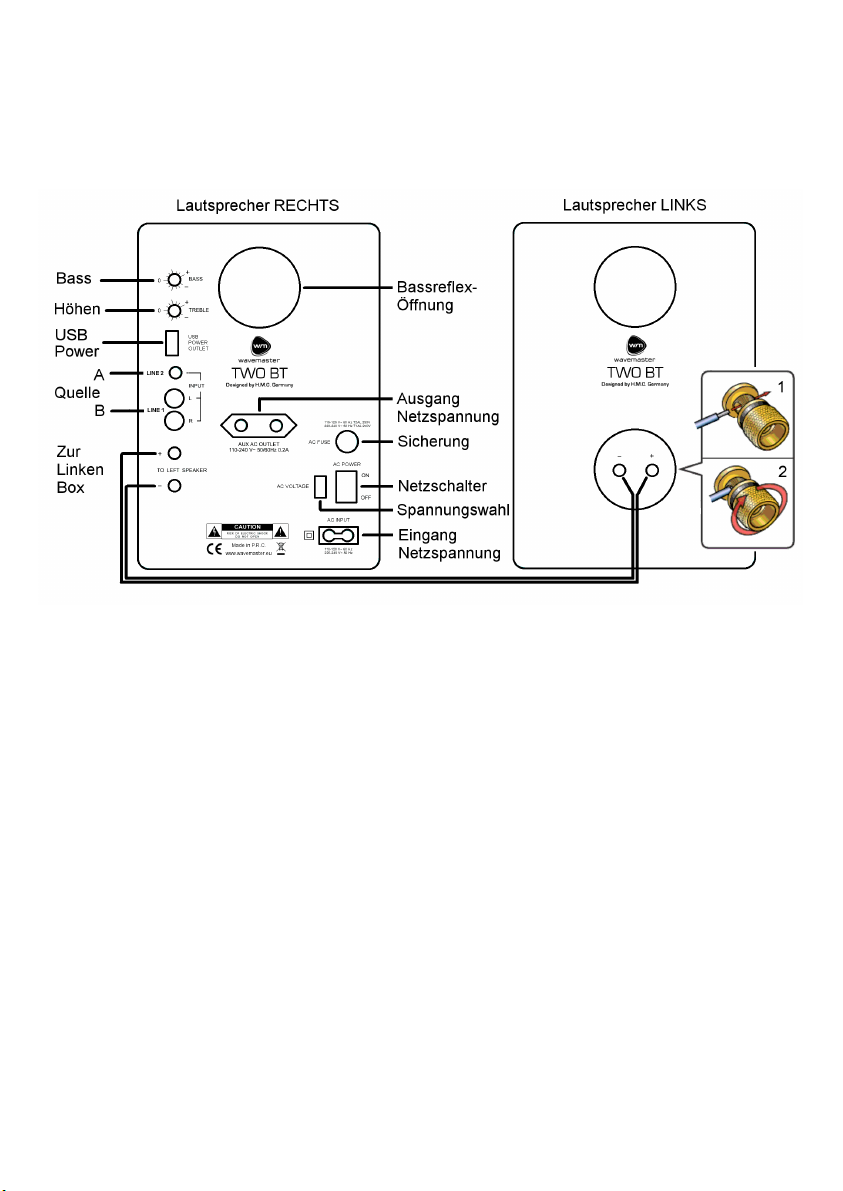
• Stellen Sie die Lautsprecher an den gewünschten Platz und beginnen Sie mit der Verkabelung.
• Zuerst verbinden Sie die linke Box mit der rechten Box mittels Lautsprecherkabel. Die
vergoldeten Schraubanschlüsse können durch drehen gelöst werden. Die abisolierten
Kabelenden werden so in die Querlöcher eingesteckt, daß rot mit rot und schwarz mit schwarz
bei beiden Boxen verbunden werden. Drehen Sie die Schraubkappen mit der Hand fest, so daß
die Kabelenden guten Kontakt bekommen und die Verbindung des Ausgangs der rechten
(aktiven) Box zum Eingang der linken (passiven) Box hergestellt wird.
Bitte achten Sie darauf, Kurzschlüsse zwischen roten (+) und schwarzen (-) Anschlüssen
unbedingt zu vermeiden, um Fehlfunktion und Defekte auszuschließen!
• Verbinden Sie nun die Buchse LINE1 oder LINE2 auf der Rückseite des TWO BT mit
beiliegendem Kabel mit einer entsprechenden Soundquelle.
Die Cinch-Buchsen LINE1 L/R sind für Geräte mit einem höheren Line-Signalpegel wie z.B. PC
oder stationäre HiFi-Komponenten vorbereitet.
Die Klinken-Buchse LINE2 ist für Geräte mit niedrigerem Line-Signalpegel wie z.B. portable
MP3-Player, Smartphones o.ä. vorbereitet.
• Mit dem links an der Frontseite des TWO BT angebrachten Quellenwahlschalter (Drehschalter)
können Sie zwischen den Eingängen LINE1 (L1), LINE2 (L2) und Bluetooth (BT) wählen.
• Prüfen Sie vor der Inbetriebnahme unbedingt die Höhe der Netzspannung. Die bei Ihnen
gültige Netzspannung (230V oder 115V) können sie am Spannungswahlschalter des TWO BT
(neben dem POWER Netzschalter) einstellen und den aktuell eingestellten Wert dort jederzeit
ablesen. Achtung, eine falsch eingestellte Netzspannung kann zu einem Defekt des Geräts
führen. Die gültige Netzspannung ist entsprechend einzustellen, um Defekte zu vermeiden!
4
Page 5
Deutsch
• Schließen Sie Ihr TWO BT Sound System an die Stromversorgung an.
• Schalten Sie die Netzspannung mit dem POWER-Schalter auf der Rückseite ein.
• EIN/STANDBY sowie LAUTSTÄRKE steuern Sie mit dem Einstellknopf auf der Frontseite der
rechten Box des TWO BT Sound Systems.
• Justieren Sie BASS und Höhen (TREBLE) bei Bedarf mit den Reglern auf der Geräterückseite.
Wenn Sie den Baßregler zu weit hochregeln wird die maximal erreichbare Lautstärke begrenzt,
da der Tieftöner so eher seine Hubgenze überschreitet. Bitte achten Sie darauf die Tieftöner
nicht zu überlasten (hörbare Verzerrungen treten auf) weil dies die Lebensdauer der Tieftöner
verringern kann!
• AUDIO SIGNAL SENSOR: wenn das Eingangssignal für mehr als 10 Minuten sehr gering
bleibt oder aussetzt, schaltet der AUDIO SIGNAL SENSOR automatisch auf STANDBY. Sobald
wieder ein Audiosignal vorliegt wird der AUDIO SIGNAL SENSOR wieder automatisch das
System einschalten!
Diese Technik ist besonders vorteilhaft beim Einsatz von kabellosen Quellen wie z.B. Airplay
(WLAN) oder Bluetooth Audio Systemen: Sie können das kabellose System nutzen und das
TWO BT Sound System aktiviert und deaktiviert sich automatisch, gemäß den zugespielten
Audiosignalen.
• Das TWO BT Sound System bietet USB powered- (500mA) und Netzspannungs- (AUX AC
OUTLET) Anschlüsse (0.2A) zur Energieversorgung verschiedenster Quellengeräte.
Zusammen mit dem AUDIO SIGNAL SENSOR wird so ein sehr komfortabler Betrieb und
perfekte Integration Ihres TWO BT Sound Systems mit Ihrer Wireless Home Installation erreicht!
Audio Konfigurationen
Die folgenden Konfigurationen zeigen typische Anschlußbeispiele für Ihr TWO BT Sound System.
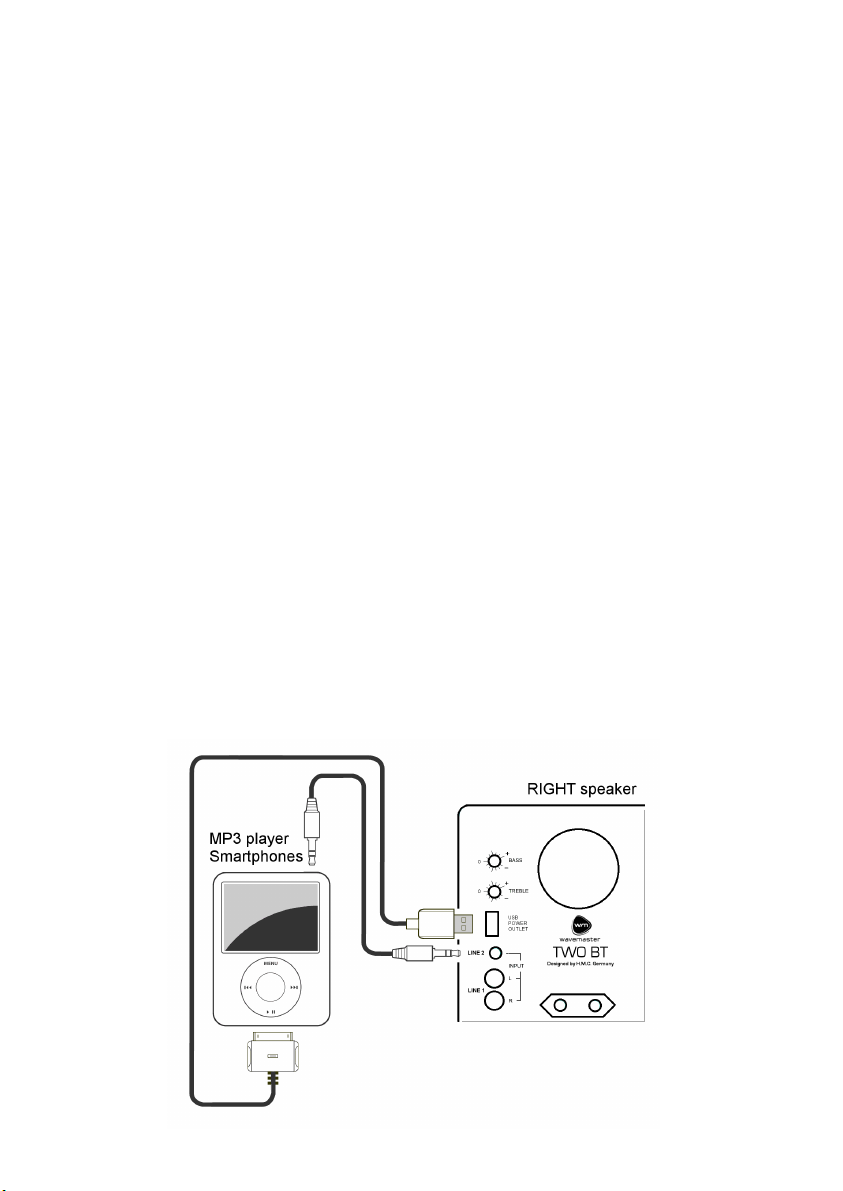
Verbindung mit einem MP3 Player (z.B. iPod)
1. Zur Aufladung des MP3 Players während der Wiedergabe verbinden sie das USB Kabel des
MP3 Players mit der USB POWER OUTPUT Buchse auf der TWO BT Rückseite. Falls das USBKabel des MP3 Players zu kurz ist, verwenden Sie ein handelsübliches USB Verlängerungskabel.
2. Verbinden Sie das Audiokabel vom MP3 Player Kopfhöreranschluß zum TWO BT LINE 2.
5
Page 6
Deutsch
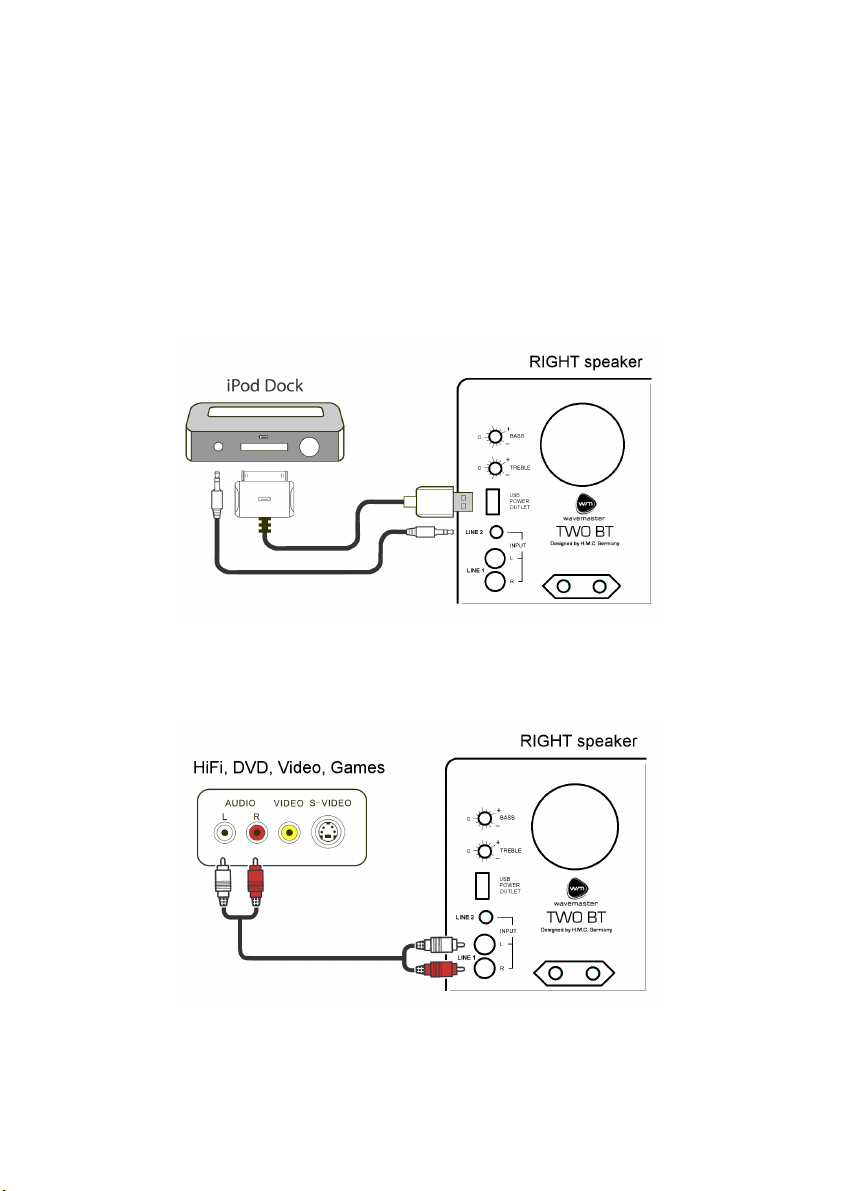
Verbindung zu einer MP3 Player Dockingstation (z.B. iPod Universal Dock)
1. Platzieren Sie die Dockingstation auf oder nahe bei dem rechten Lautsprecher. Es empfehlen
sich besonders die Dockingstationen mit Fernbedienung.
2. Verbinden Sie das USB-Kabel der Dockingstation mit der USB POWER OUTPUT Buchse auf
der TWO BT Rückseite.
3. Schließen Sie das Audiokabel von der Dockingstation (Audio Ausgang) am LINE 1 des TWO BT
Sound Systems an.
4. Schalten Sie den POWER Hauptschalter auf ON und drehen den Lautstärkeregler des TWO BT
Sound Systems in eine mittlere Position. Überprüfen Sie, daß nun die Dockingstation über die
USB POWER OUTPUT Buchse mit Energie versorgt wird (LED an Dockingstation leuchtet).
5. Stellen Sie den Player in die Dockingstation und justieren Sie die Lautstärke und Klangregler
nach Ihrem Bedarf.
Verbindung zu Audio-Geräten mit RCA Ausgangsbuchsen
1. Nutzen Sie zur Verbindung ein herkömmliches RCA-zu-RCA (Cinch-zu-Cinch) AudioKabel und
schließen dieses an den LINE 1 auf der Rückseite Ihres TWO BT an.
6
Page 7
Deutsch
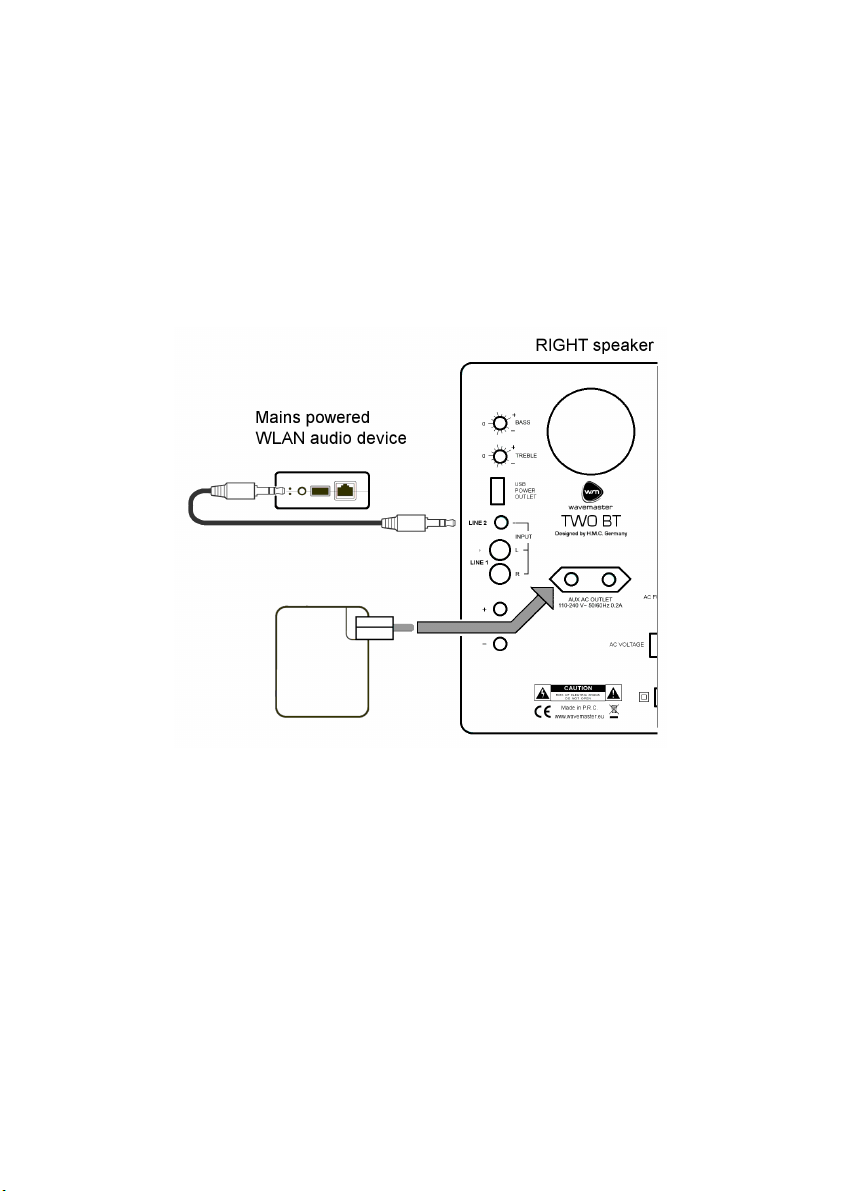
Verbindung mit WLAN Audio Geräten (z.B. Airport Express):
1. Verbinden Sie das Audiokabel mit dem Audio-Ausgang des WLAN-Geräts.
2. Verbinden Sie die RCA-Stecker des Audiokabels mit dem LINE 1 Ihres TWO BT Systems
3. Stecken Sie den Netzspannungsanschluß des WLAN Audio Geräts in die AUX AC OUTLET
Netzbuchse des TWO BT Systems.
4. Schalten Sie den POWER Hauptschalter auf ON und drehen den Lautstärkeregler des TWO BT
Sound Systems in eine mittlere Position. Überprüfen Sie, daß nun das WLAN Audio Gerät über
die AUX AC OUTLET Netzbuchse mit Energie versorgt wird (LED an WLAN-Gerät leuchtet).
5. Starten Sie die Wiedergabe z.B. mittels iTunes oder anderer geeigneter Software auf Ihrem
Computer oder Smartphone und stellen Sie Lautstärke und Klang nach Ihrem Wunsch ein.
7
Page 8

Deutsch
Bluetooth-Audio-Wiedergabe
Aktivieren Sie die Bluetooth (BT / ) Funktion Ihrer Audioquelle (z.B. Smartphone).
Schalten Sie TWO BT mit dem Lautstärkeregler (rechts) ein. Wählen Sie BT mit dem
Quellenwahlschalter (links).
1. TWO BT bestätigt die Aktivierung der Bluetooth-Funktion: die BT-Anzeige-LED blinkt schnell.
Ist Ihre zuvor verwendete BT-Quelle verfügbar, so wird TWO BT die BT-Verbindung sofort
erneut herstellen. Die BT-Anzeige-LED leuchtet nun konstant. Sie können die BT-Wiedergabe
über TWO BT jetzt verwenden.
2. Ist keine vorherige BT-Quelle empfangbar, wird TWO BT nach einigen Sekunden neue BTQuellen suchen; die BT-LED blinkt dabei langsam.
Rufen Sie nun die Bluetooth-Suchfunktion in Ihrer BT-Quelle (z.B. Smartphone) auf. Nach
einem Moment wird “wavemaster TWO BT“ in der BT-Geräteliste des Quellengerätes
erscheinen. Wählen Sie “wavemaster TWO BT“ zur Verbindung (Pairing) aus. Ihre BT-Quelle
wird sich nun mit TWO BT verbinden. Sobald das Pairing abgeschlossen ist, leuchtet die LED
zur Bestätigung stetig blau.
Im Falle einer Unterbrechung der BT-Verbindung, durch Störsignale oder zu große Distanz wird
die Wiedergabe gestoppt und die BT-Anzeige-LED blinkt. Sobald die BT-Quelle wieder
empfangbar ist, wird die Wiedergabe fortgesetzt und die LED leuchtet stetig.
Zur Abschaltung der Bluetooth-Funktion drehen Sie den Eingangswahlschalter des TWO BT auf
die Stellung L1 oder L2. Dadurch wird die eingebaute BT-Funktion vollständig deaktiviert.
AptX: wenn Sie eine AptX-fähige BT-Audioquelle verwenden, wird diese hochwertige Technik bei
beiden Geräten automatisch aktiviert,
Nach der Verbindung der Geräte erhalten Sie auf dem Quellengrät einen Hinweis, daß die AptXFunktion verwendet wird.
BT-Quellengeräte ohne AptX nutzen automatisch immer die normale BT-Audioverbindung.
8
Page 9

Deutsch
Technische Daten
• 2-Kanal 2-Wege Stereo Sound System
• 2 eingebaute Verstärkerkanäle; Ringkern-Transformator und separater Standby-Trafo
• BLUETOOTH Audio System für kabellose, digitale Signalübertragung (ab BT 2.1, AptX)
• 25mm Seidenkalotten Hochtöner, 13cm Kevlar-Konus Tieftöner
• Frontregler für LAUTSTÄRKE und manuelle EIN/STANDBY-Schaltung
• Line Eingänge mit Klinken- und RCA- (Cinch-) Buchsen
• EINGANGSWAHLSCHALTER für Line 1, Line 2 und Bluetooth
• BASS/HÖHEN Klangregler und Netz-Hauptschalter auf der Geräterückseite
• Netzspannungs-Ausgangsbuchse für netzbetriebene Geräte (z.B. WLAN Audio), max. 0,2A
• USB POWER OUTPUT für USB Quellen (z.B. MP3 Player), max 500mA
• AUDIO SIGNAL SENSOR für Auto-EIN und Auto-STANDBY abhängig vom Audiosignal
• Verbindung über Audiokabel oder Bluetooth-Audio-System
• Frequenzbereich: 45 - 22,000 Hz, S/N >95 dBA,
• Verstärker-Ausgangsleistung (RMS): 2x 30W
• Netzspannung: 230/115 Volt ~ umschaltbar, 50/60 Hz, Standby Power <0.5 W (230V)
• Abmessungen (BxHxT): je Box 180 x 256 x 205 mm
• Systemanforderungen: analoge Stereoquelle mit RCA- oder Klinken-Anschlüssen oder
Bluetooth-Audio-System
CE - Erklärung
Wir erklären hiermit, dass das wavemaster TWO BT Lautsprechersystem
mit den folgenden Normen bzw. normativen Dokumenten übereinstimmt:
EMC Direktive (2004/108/EC)
EMC: EN301 489-1 V1.9.2 & -17 V2.2.1, EN 55013: 2001 + A1: 2003 + A2: 2006,
EN 55020: 2007 + A11: 2011, EMF: EN 62479: 2010, RF: EN 300 328 V1.8.1
LVD Direktive (2006/95/EC)
LVD: EN60065: 2002 + A1: 2006 + A11: 2008 + A2: 2010 + A12: 2011, Erp: EU, EC 1275/2008
Dieser Erklärung liegen die Prüfberichte eines EMV - Labors zugrunde.
Alle Abbildungen und Texte wurden mit grösster Sorgfalt bearbeitet. wavemaster kann jedoch für
fehlerhafte Angaben und daraus resultierende Folgen keinerlei Haftung übernehmen.
Technische Änderungen vorbehalten.
Durch starke Funkwellen (z.B. durch Mobiltelefone) kann es im normalen Betrieb zu
hörbaren Störungen kommen. Für die Dauer der Störungen empfehlen wir, die Lautstärke
des Gerätes mittels Lautstärke-Knopf zu reduzieren.
Sollten Sie spezielle Fragen zum Produkt haben, die diese vorliegende Anleitung nicht
beantworten kann, haben sie die Möglichkeit, auf unserer Homepage nähere Informationen zu
erhalten. Vielen Dank
www.wavemaster.eu
Das Gerät darf nicht mit dem Siedlungsabfall (Hausmüll) entsorgt
werden. Dieses Gerät ist entsprechend der europäischen Richtlinie
2002/96/EG über Elektro- und Elektronik-Altgeräte (waste electrical
and electronic equipment - WEEE) gekennzeichnet. Die Richtlinie
gibt den Rahmen für eine EU-weit gültige Rücknahme und
Verwertung der Altgeräte vor. Für die Rückgabe Ihres Altgeräts
nutzen Sie bitte die Ihnen zur Verfügung stehenden Rückgabe- und
Sammelsysteme.
9
Page 10

English
User Manual
Dear User,
we are pleased that you have chosen the TWO BT loudspeaker system from wavemaster and
congratulate you on this choice.
With this wavemaster TWO BT you have acquired a modern piece of audio technology that is in
equal measure attractive and of high quality. We are sure that this product will provide useful
service and a lot of fun to you over the coming years.
... Your wavemaster Team!
After unpacking
After unpacking you should first check that the contents are complete. In addition to this
instruction manual there should be:
2 speaker boxes
1 Speaker cable with stripped ends
1 Audio connection cable 3.5 mm stereo mini phono plug -> 3.5 mm stereo mini phono plug
Advice on location, care and safety
• Connect the audio input to the line-out, non amplified output. Avoid connection to the speaker-
out jack of your sound source. The amplified signal from the speaker-out may cause
unnecessary distortion and may damage the speaker-circuit.
• To connect your sound-system with power supply system, please make sure to have a mains
socket close to your sound-system.
• If the sound-system is not in use for a longer period of time, be sure that your system is
disconnected from mains power.
• Do not use alcohol, benzene, thinner or acids to clean the cabinet.
• Do not place your sound-system near radiators, airconditioning or radio-controlled systems.
• Avoid leaving the sound-system in permanent strain such as direct sunlight, extreme moist or
dryness, exceptional cold or heat, mechanical vibrations or shock.
• Do not open the cabinet, contact qualified personnel only.
• For service staff: Never open cabinet, when speaker system is connected to 110-240 V
AC power supply system.
• CAUTION!! Power ON / STANDBY switch does not separate mains power!
• Deliberate harm to the equipment is not covered by the guarantee.
• Please contact your dealer in case of technical problems.
10
Page 11
English
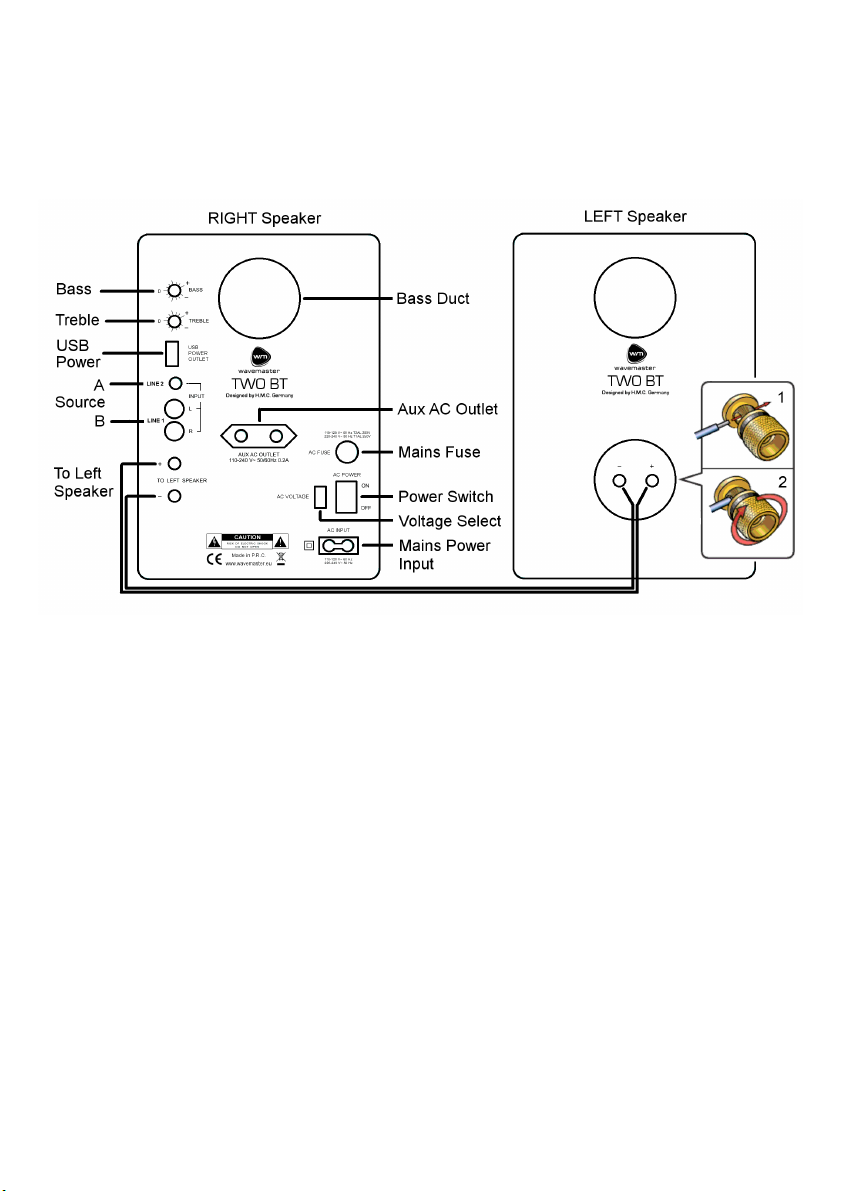
Assembly and operation
Assembly and operation of your TWO BT speaker system is very easy to do. General connections
are shown in the following drawing.
Please connect all components only when the mains power switch is switched OFF.
• Place the speakers at their target area and start connecting.
• First, connect the left speaker to the right speaker by the speaker cable. The gold-plated
binding posts can be turned and the stripped cable ends shall be fitted to connect red to red
and black to black. Turn the binding posts tight by hand, so that the cables can achieve a good
connection from the output of the right speaker (active) to the left speaker (passive).
Please care to avoid short circuits between red and black connectors, not to cause
malfunctions or defects!
• Next, connect the input sockets LINE1 or LINE2 on the back of the right TWO BT box via the
provided cable to an appropriate sound source.
The RCA (Cinch) sockets LINE1 L/R are prepared for audio sources with higher Line signal
level e.g. PC or stationary HiFi Components.
The 3.5mm phono socket LINE2 is prepared for audio sources with lower Line signal level e.g.
portable MP3-Players, Smartphones etc.
• Turning the source selector switch on the left on the front of your TWO BT, you can select
between LINE1 (L1), LINE2 (L2) and Bluetooth (BT).
• Before mains connections, check your mains power system to be appropriate to the TWO BT.
The mains voltage (230V or 115V) of your power system you can set by the VOLTAGE
SELECTOR of your TWO BT (beside the POWER switch) and you can verify the actual setting of
the mains voltage easily. Attention: if the mains voltage is set wrong, the device may become
defective! Always set the correct mains voltage to avoid defects!
• Connect the mains cable to toe mains input socket and the Euro plug connect to your mains
supply.
11
Page 12
English
• Switch on the main switch on the back.
• Switching ON/STANDBY as well as VOLUME control of your sound system can be done by the
front control knob of the right speaker box.
• Adjust the BASS and TREBLE level by the controls at the rear panel, if required.
If you emphasize the bass control too much, the maximum total volume will be limited since the
woofer may run at overstroke earlier. Please care not to overstroke the woofer too much
(audible distortions) since this can reduce the life-span of the woofers!
• AUDIO SIGNAL SENSING: if the input signal is very low or off for more than 10 minutes, the
audio signal sensing automatically switches to STANDBY. Once there is an audio signal, the
audio signal sensing automatically switches ON again!
This technology is beneficial with many sources, especially with any kind of wireless sources
such as Airplay (WLAN) or Bluetooth audio systems: you can operate the wireless audio source
and the speaker system activates or deactivates according to the provided audio signals.
Due to the various power supply provided by the TWO BT speaker system through the USB
power and mains power output sockets, the audio signal sensing enables very comfortable
operation and perfect integration of your TWO BT speaker system with your wireless home
installations!
Audio Configurations
The following configurations show the most typical examples of audio setups for your TWO BT
speaker system.
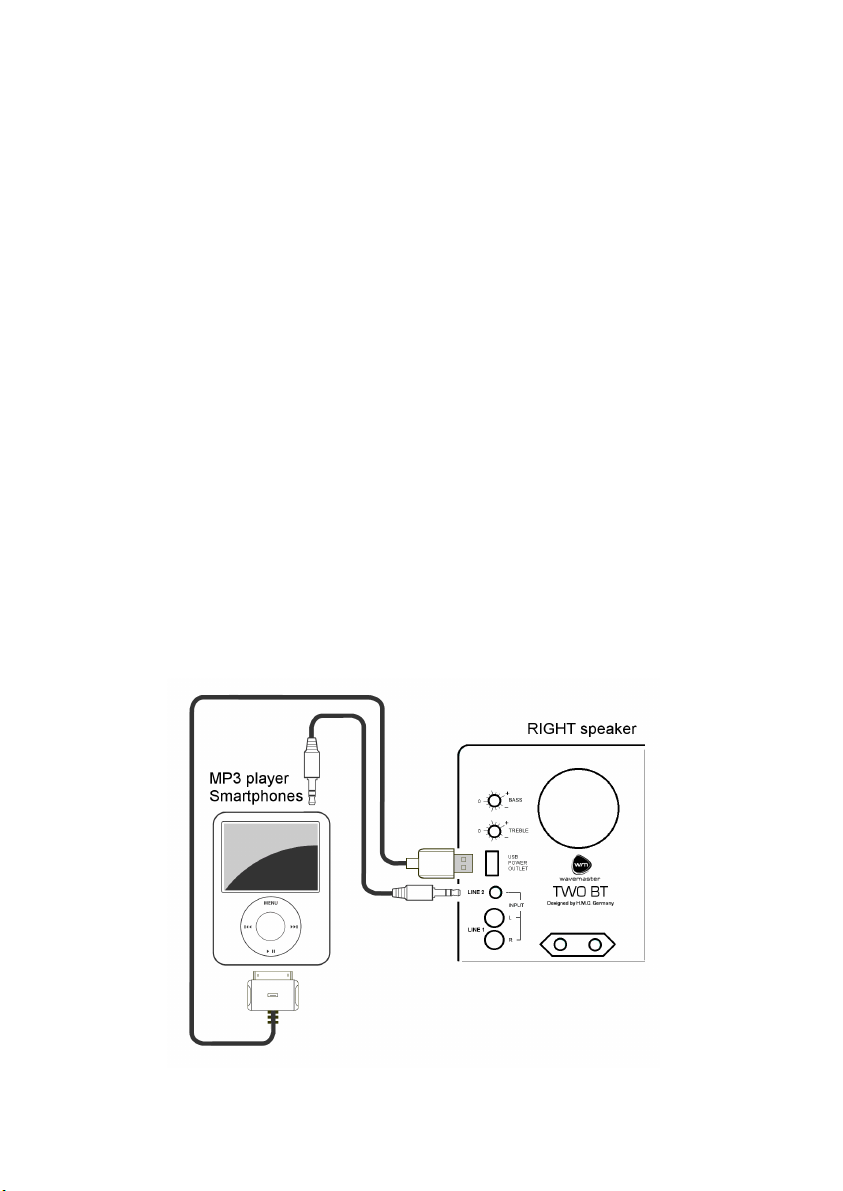
Connection to MP3 players (e.g. iPod):
1. For charging your MP3 player while playing, connect the USB cable from the MP3 player to
USB jack on the TWO BT backside. Use a standard USB extension cable, if extra cable length is
needed on a desktop, for example.
2. Connect the audio cable from MP3 player headphone jack to the TWO BT input LINE 2.
12
Page 13
English
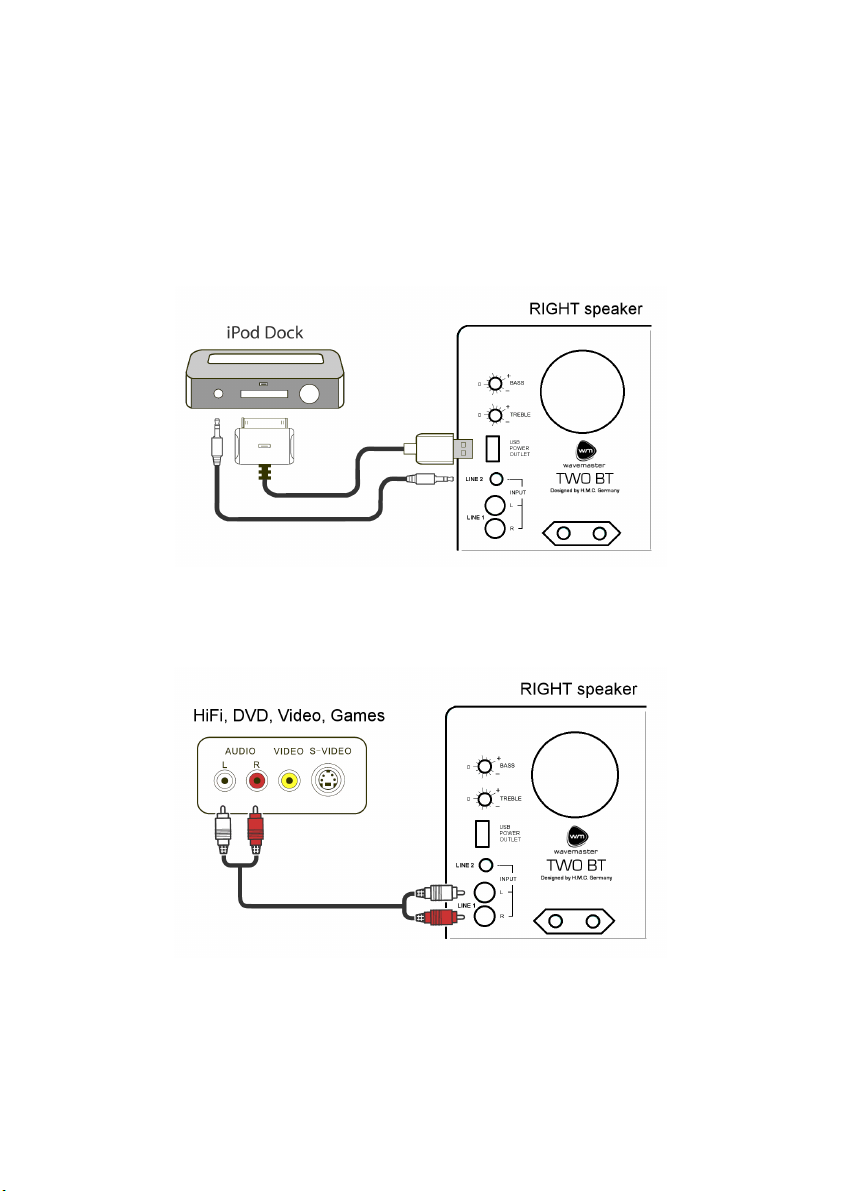
Connections with MP3 players docking stations (e.g. iPod Universal Dock):
1. Place the dock on top or close to of the right speaker. We highly recommend using a Dock with
remote control.
2. Connect the Apple 30-pin cable from the dock to USB jack on the speaker back.
3. Connect one of the included 3,5mm mini-jack audio cables from the dock to LINE 1 jack on the
back of TWO BT.
4. Turn rear panel POWER switch ON and verify that the blue LED lights up on the speaker front
panel.
5. Insert your iPod and set volume and source on the front panel and iPod as desired.
Connection of all products with RCA outputs:
1. Connect the source by a RCA-to-RCA audio cable to the RCA input LINE 1 at the TWO BT rear
panel.
13
Page 14
English
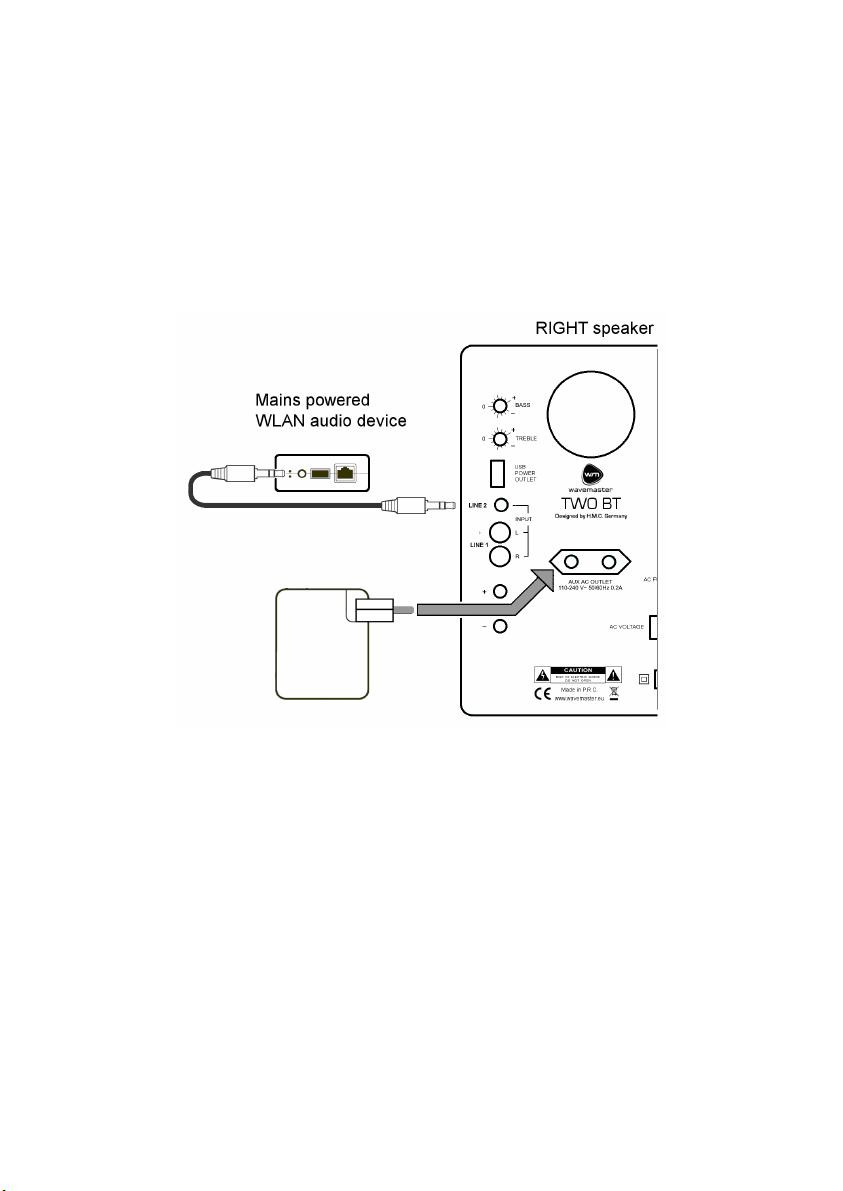
Connections with WLAN audio devices (e.g. Airport Express):
1. Plug mini phono plug of the audio cable into your Wlan audio device audio output.
2. Plug the other end of the audio cable into AUDIO INPUT jack at rear of the RIGHT speaker.
3. Plug WLAN device into the AUX OUTLET on the RIGHT speaker's rear panel.
4. Switch ON the POWER switch and turn up the volume control of your TWO BT Sound System to
a medium position.
5. Verify the WLAN audio device is powered with energy through the AUX AC OUTLET socket
(LED of the WLAN device lights up).
6. Start playback e.g. through iTunes or other suitable software on your computer and set volume
levels as desired.
14
Page 15

English
Bluetooth Audio Playback
Activate the Bluetooth (BT / ) function of your audio source (e.g. your smartphone).
Switch on TWO BT by using the volume knob (right knob). Select BT by turning the source selector
(left knob) to point to the BT position.
1. TWO BT confirms the activation of its Bluetooth function through quick flashing the BT control
LED.
In case an earlier connected BT source is available, TWO BT will instantly connect to that BT
source again. When connected, the BT control LED lights constantly. Now you can start BT
playback through TWO BT.
2. In case no prior connected source is available, after few seconds, TWO BT will search for new
BT sources. This action will be confirmed by slow flashing of the BT control LED.
Now start the Bluetooth search function of your BT souce (e.g. smartphone). After a moment,
you can find “wavemaster TWO BT“ in the BT devices list of your BT source. Select
“wavemaster TWO BT“ for pairing. Your BT source will now pair with TWO BT. Once the pairing
procedure is finished the TWO BT BT control LED lights constantly.
When the BT connection is interrupted through foreign signals interference or by too long
distance, playback will be stopped and the BT control LED shows flashing light. Once the BT
source can be received again, playback continues and the BT control LED lights constant again.
To switch off the Bluetooth function turn back the input selector knob of TWO BT to L1 or L2
position. This will completely deactivate the built-in BT function.
AptX: if your BT source device supports AptX, this sophisticated transmission technology will be
activated iin both devices automatically.
After both devices have achieved a stable BT connection, the activation of the AptX function will
be confirmed by the BT audio source device.
BT source devices without AptX automatically always use the normal BT audio connection.
15
Page 16

English
Specifications
• 2 channel 2-way stereo sound system
• 2 built-in amplifier channels, toroidal power transformer and separate standby transformer
• BLUETOOTH Audio System for wireless digital signal transmission (BT 2.1 or above, AptX)
• 25mm (1”) silk dome tweeters, 13cm (5") Kevlar cone woofers
• Front control for VOLUME level and ON/STANDBY manual switching
• Line input terminals by mini phono and RCA sockets
• INPUT SELECTOR for Line 1, Line 2 und Bluetooth
• BASS/TREBLE sound controls and mains power switch on the back
• AUDIO SIGNAL SENSING for auto-on and auto-standby depending from input signals
• Connections by audio cables or wireless by Bluetooth Audio System
• Mains output socket for mains-powered sources (e.g. a wlan audio receiver), max. 0.2A
• USB output socket for USB-powered sources (e.g. a MP3 player), max. 500mA
• Frequency range: 45 - 22,000 Hz, S/N >95 dBA,
• Amplifier output power (RMS): 2x 30W
• Mains tension: 230/115 Volts ~ selectable, 50/60 Hz, standby power <0.5 W (230V)
• Dimensions (WxHxD): each Box 180 x 256 x 205 mm
• System requirements: analogue stereo source with RCA or mini phono terminals or Bluetooth
Audio System
CE - Declaration of conformity
We herewith declare, that the wavemaster TWO BT active speaker system
complies with the following standards or normative documents:
EMC Directive (2004/108/EC)
EMC: EN301 489-1 V1.9.2 & -17 V2.2.1, EN 55013: 2001 + A1: 2003 + A2: 2006,
EN 55020: 2007 + A11: 2011, EMF: EN 62479: 2010, RF: EN 300 328 V1.8.1
LVD Directive (2006/95/EC)
LVD: EN60065: 2002 + A1: 2006 + A11: 2008 + A2: 2010 + A12: 2011, Erp: EU, EC 1275/2008
This statement is based on the test reports of an EMC laboratory.
All texts and illustrations were produced with greatest care. wavemaster cannot however accept
any legal or other responsibility for any remaining incorrect information and its consequences.
Subject to change without further notice.
In case there is audible noise, possibly caused by strong radio waves (e.g. by mobile
phones) we recommend to turn down the volume control of the unit.
If you have special questions to the product and cannot find a solution in this introduction, you can
look for more informations at our homepage. Thank you!
www.wavemaster.eu
The device may not be disposed of with household rubbish. This
appliance is labelled in accordance with European Directive
2002/96/EG concerning used electrical and electronic appliances
(waste electrical and electronic equipment - WEEE).
The guideline determines the framework for the return and recycling
of used appliances as applicable throughout the EU. To return your
used device, please use the return and collection systems available
to you.
16
Page 17

Francais
Mode d'emploi
Cher utilisateur,
Vous avez opté pour le kit stéréo TWO BT de wavemaster. Nous vous félicitons et sommes
heureux de vous compter parmi nos clients.
Lorsque vous avez fait l’acquisition du kit stéréo TWO BT, vous avez fait le choix d’un matériel
audio de haute technologie à la fois séduisant et de haute qualité. Nous sommes persuadés que
ce produit saura se montrer utile et vous procurera du plaisir dans les années à venir.
L’équipe wavemaster
Après avoir déballé le produit
Assurez-vous que la boîte contient l’intégralité des accessoires. En plus de ce manuel, vous
devriez trouver:
2 haut-parleurs
1 câble de haut-parleurs avec extrémité dénudée
1 câble prise 3,5mm -> prise 3,5mm
Consignes d’utilisation et de sécurité
• Raccorder la prise audio à la sortie non amplifiée. Veillez à ne pas la raccorder à la sortie
speaker de votre source audio. Le signal amplifié émis par la sortie speaker risque de causer
des distorsions indésirables et d’endommager les circuits de votre kit stéréo.
• Afin d’alimenter votre kit stéréo, assurez-vous de l’installer près d’une prise électrique.
• Si vous n’utilisez pas votre kit stéréo pendant une période de temps prolongée, veillez à le
débrancher de l’alimentation.
• Veillez à ne pas utiliser d’alcool, de benzène, de dissolvant ou d’acide pour nettoyer les haut-
parleurs.
• Veillez à ne pas installer votre kit stéréo près d’un radiateur, d’un climatiseur ou d’un appareil
radio commandé.
• Veillez à ne pas exposer le kit stéréo directement aux rayons du soleil, à une humidité extrême
ou un environnement trop sec, à des vibrations mécaniques ou à des chocs.
• N’ouvrez pas les haut-parleurs, contactez le personnel qualifié.
• A l’attention du personnel: N’ouvrez pas les haut-parleurs lorsque le système est
branché à l’alimentation 110-240 V AC.
• ATTENTION!! L’interrupteur ON/STANDBY (veille) ne déconnecte pas l’appareil de
l’alimentation!
• La garantie ne couvre pas les dommages occasionnés volontairement au système.
• En cas de problème technique, contactez votre revendeur.
17
Page 18
Francais
Assemblage et fonctionnement
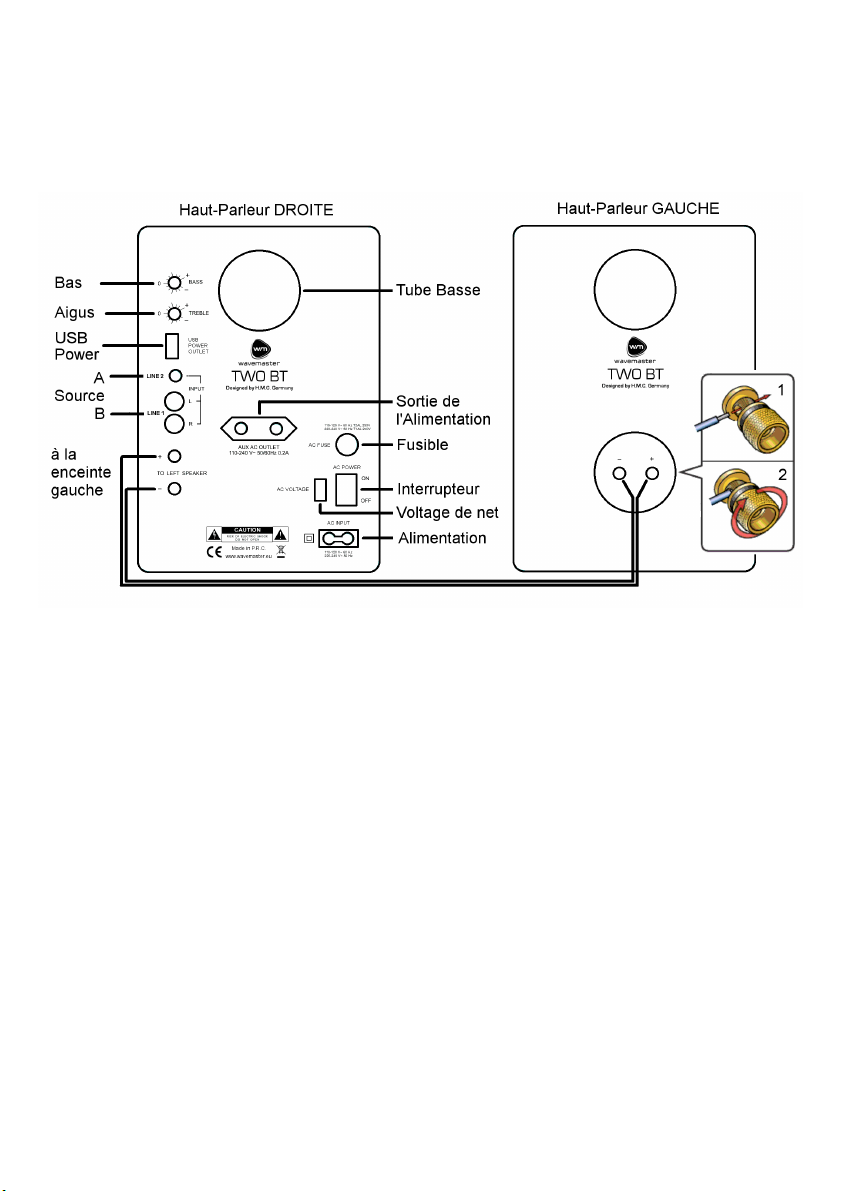
L’assemblage et le fonctionnement du kit stéréo TWO BT est extrêmement simple. Veuillez trouver
les connexions disponibles sur les dessins suivants.
Ne branchez les composants que lorsque l’interrupteur est en position OFF.
• Installez les haut-parleurs à l’endroit où vous les voulez et commencez les branchements.
• Tout d’abord, connectez les deux haut-parleurs avec le câble adéquat. Dévissez les attaches
dorées et insérez les extrémités dénudées des câbles, rouge sur rouge, noir sur noir. Revissez
les attaches fermement à la main afin que les câbles soient bien connectés de la sortie du
haut-parleur droit (actif) à celle du haut-parleur gauche (passif).
Veillez à ne pas créer de court circuits entre les connexions rouges et noires afin
d’éviter les défaillances et les pannes.
• Ensuite, branchez la source appropriée au connecteur LINE1 ou LINE2 à l’arrière du haut-
parleur droit du TWO BT avec le câble fourni.
Le connecteur RCA (Cinch) LINE1 L/R est prêt pour les sources audio avec un niveau de
signal élevé comme les PC ou équipements HiFi.
Le connecteur jack stéréo 3,5mm LINE2 est prêt pour les sources audio avec un niveau de
signal faible comme les smartphones, lecteurs MP3…
• Utilisez le sélecteur de sources présent à l’avant du TWO BT pour choisir la source à diffuser
entre LINE1 (L1), LINE2 (L2) ou via Bluetooth (BT).
• Avant d’effectuer les branchements sur l’alimentation, vérifiez que votre alimentation est
compatible avec TWO BT. La tension du système (230V ou 115V) peut être réglée grâce à
l’interrupteur (situé à côté de l’interrupteur de mise en marche). Vous pourrez vérifier facilement
le réglage. Attention : si le réglage n’est pas conforme, l’appareil peut être endommagé et ne
plus fonctionner. Veillez à utiliser les bons réglages pour éviter les pannes.
18
Page 19
Francais
• Branchez les câbles d’alimentations dans les sorties prévues à cet effet sur votre système et à
votre source d’alimentation.
• Activez l’interrupteur principal à l’arrière (POWER).
• Vous pourrez allumer et mettre en veille les haut-parleurs ainsi que régler le volume sonore
grâce au bouton de réglage situé sur la façade du boîtier du haut-parleur droit.
• Réglez les BASSES et les AIGUS grâce aux boutons situés à l’arrière. Si vous réglez les
basses trop fortes, le volume maximal sera diminué car il se peut que le woofer fonctionne en
surrégime. Evitez de faire fonctionner votre woofer en surrégime (statut détectable grâce aux
distorsions audibles du woofer) car cela diminuera sa durée de vie.
• Système de DETECTION DE SIGNAL AUDIO : Si le signal d’entrée est très faible ou inexistant
pendant plus de 10 minutes, le système de détection de signal audio basculera
automatiquement le système en veille. Dès qu’un signal audio est capté, le système de
détection de signal audio allumera de nouveau les haut-parleurs.
Cette technologie est utile avec beaucoup de sources différentes, particulièrement avec les
sources sans fil comme Airplay (WLAN) ou les systèmes audio Bluetooth ; utilisez les sources
audio sans fil et les haut-parleurs s’activeront ou se désactiveront en fonction du signal audio.
Grâce aux différentes sorties d’alimentations fournies par le kit stéréo TWO BT comme la sortie
USB ou les prises d’alimentations standard, le système de détection audio permet une
utilisation confortable et une parfaite intégration de votre kit stéréo TWO BT avec vos
installations sans fil à la maison !
Configuration Audio
Vous trouverez ci-dessous les configurations audio les plus fréquentes pour votre kit stéréo TWO
BT
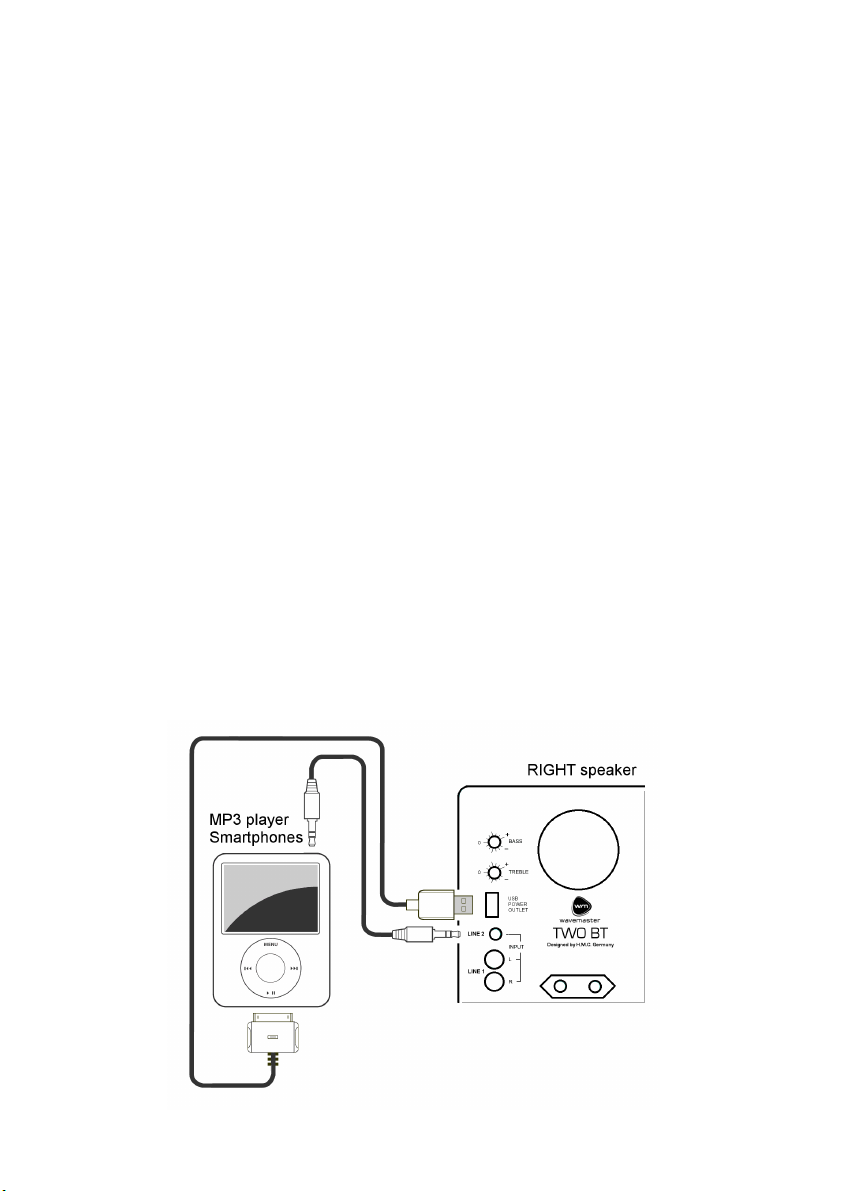
Branchement sur un lecteur MP3 (p.ex. iPod) :
1. Pour charger votre lecteur MP3 lorsqu’il est en fonctionnement, branchez le câble USB du
lecteur MP3 sur la prise USB à l’arrière du haut-parleur de droite du kit stéréo TWO BT. Vous
pouvez si nécessaire utiliser une rallonge de câble USB standard.
2. Branchez le câble audio du lecteur MP3 à la prise B du haut-parleur de doite du kit stéréo TWO
BT.
19
Page 20
Francais
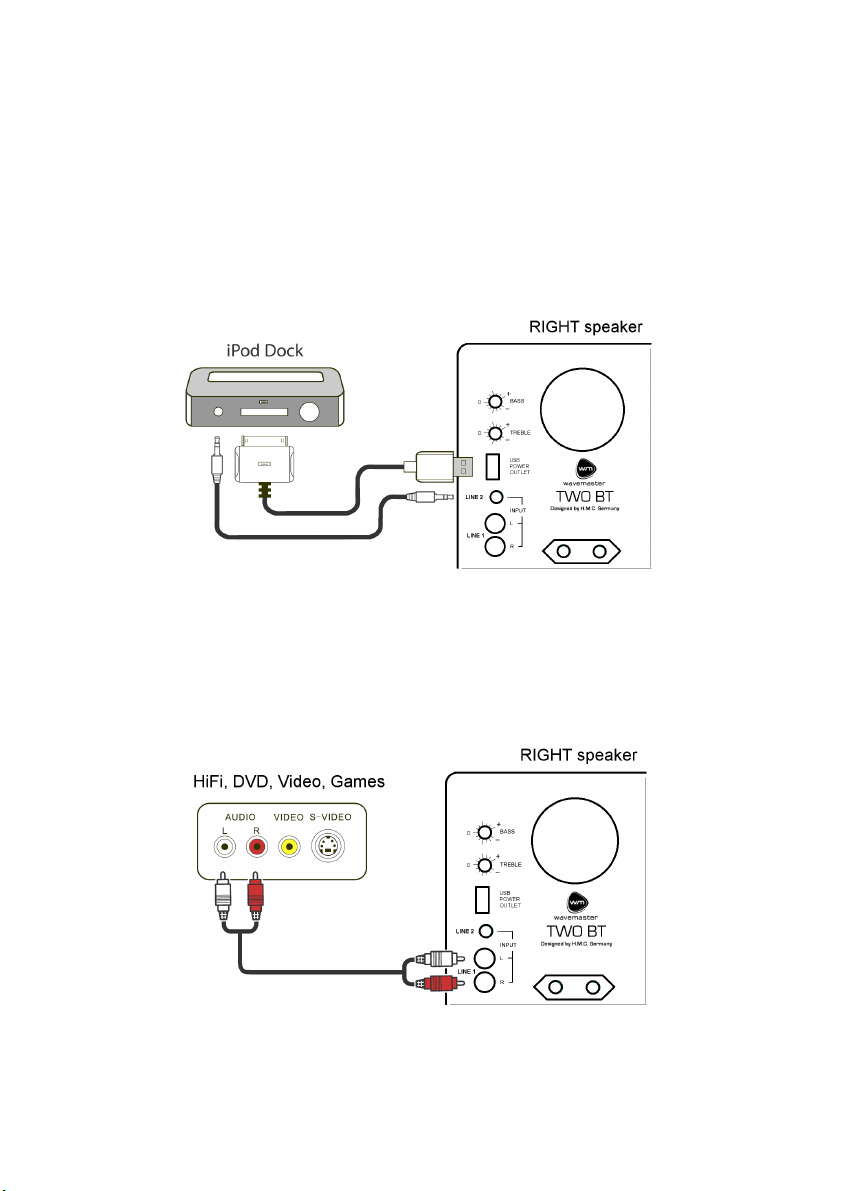
Branchements sur une station d’accueil d’un lecteur MP3 (p. ex.iPod Universal Dock)
1. Placez la station d’accueil au-dessus ou près du haut-parleur de droite. Nous vous conseillons
fortement d’utiliser une station d’accueil avec télécommande.
2. Branchez le câble Apple 30-pin de la station d’accueil à la prise USB du haut-parleur prévue à
a cet effet.
3. Branchez l’un des câbles audio 3,5mm fourni sur la station d’accueil sur la prise LINE 1 du
haut-parleur.
4. Mettez l’interrupteur sur ON et assurez-vous que la LED bleue est allumé sur la façade.
5. Insérez votre iPod, choisez la source et réglez le volume sonore sur la façade ou sur votre
iPod.
Branchez les appareils avec sortie RCA:
1. Branchez la source grâce à un câble audio RCA-RCA à l’entrée RCA LINE 1 à l’arrière du haut-
parleur droit.
20
Page 21
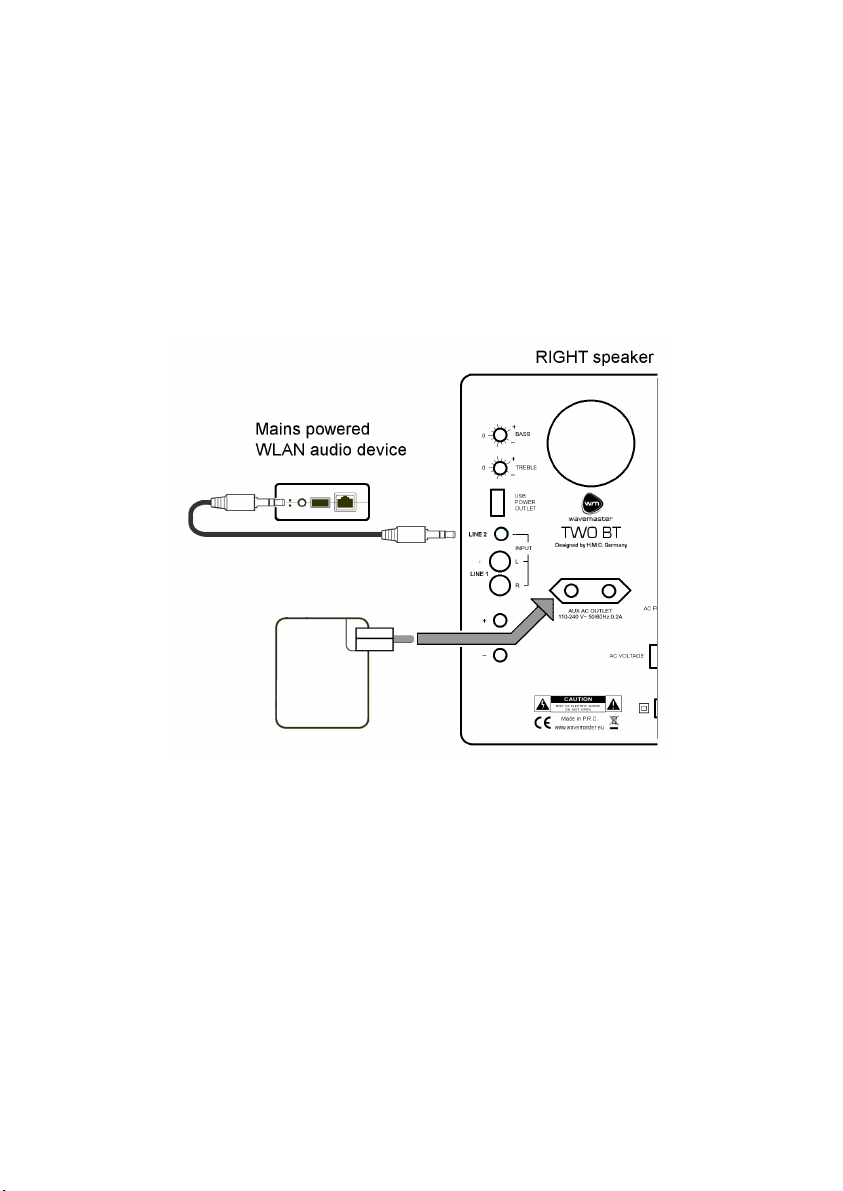
Francais
Branchement sur les appareils audio WLAN (p. ex. Airport Express):
1. Branchez la prise jack 3,5mm du câble audio sur la sortie audio de votre appareil audio WLAN.
2. Branchez l’autre extrémité du câble audio sur la prise d’entrée audio à l’arrière du haut-parleur
droit
3. Branchez l’appareil WLAN sur la sortie d’alimentation à l’arrière du haut-parleur droit.
4. Activez l’interrupteur et réglez le volume de votre kit stéréo sur une position intermédiaire.
5. Vérifiez que l’appareil audio WLAN est alimenté grâce à la sortie d’alimentation (la LED de
votre appareil WLAN devrait s’allumer).
6. Profitez de votre musique grâce à iTunes ou un autre logiciel approprié et réglez le volume à
votre convenance.
21
Page 22

Francais
Utilisation avec des sources connectées via Bluetooth
Activez le Bluetooth (BT / ) sur votre périphérique (ex. votre smartphone).
Mettez en marche votre TWO BT en tournant le bouton de volume puis sélectionnez la source BT
via le bouton de sélection de la source.
TWO BT confirme l’activation de son module Bluetooth par le clignotement d’une LED.
1. Si une source Bluetooth précédemment connectée est disponible, votre TWO BT s’y connectera
automatiquement. Une fois connecté, la LED éclaire en permanence. Vous pouvez alors
écouter votre musique.
2. Si aucune source précédemment connectée n’est disponible votre TWO BT se mettra en
recherche de nouveaux périphériques Bluetooth à portée. Après quelques secondes vous
verrez apparaitre « wavemaster TWO BT » dans la liste des périphériques Bluetooth
disponibles. Cliquez dessus pour procéder à l’appairage. Une fois l’appairage terminé votre
TWO BT émettra, la LED éclairera en permanence.
Lorsque la connexion Bluetooth est interrompue par des interférences ou par un éloignement trop
important de la source, le streaming s’arrête et la LED de votre TWO BT se met à clignoter. Une
fois les interférences terminées ou la source de nouveau à portée, le streaming reprend et la LED
redevient fixe.
Pour arrêter le module Bluetooth de votre TWO BT, utilisez le bouton de sélection des sources et
positionnez-le sur L1 ou L2. Cela coupera intégralement la fonction Bluetooth du produit.
AptX: Si votre périphérique de source BT supporte AptX, cela sophistiquée technologie de
transmission est activé en les deux appareils automatiquement,
Après que les deux appareils ont réalisé une connexion stable de BT, le dispositif de source audio
BT confirme l'activation de la fonction AptX.
Dispositifs de source BT sans AptX automatiquement toujours utilisent la connexion audio
normale de BT.
22
Page 23

Francais
Spécifications
• Kit audio stéréo 2 voies
• 2 amplificateurs intégrés, transformateur toroïdal et transformateur dédié au mode veille
• Module BLUETOOTH intégré pour streaming audio (Compatible BT 2.1 et supérieur, AptX)
• Haut-parleur d’aigu en soie 25mm, woofer cône en kevlar de 13cm
• Réglage du VOLUME et INTERRUPTEUR de veille en façade
• Réglage des AIGUS/BASSES et interrupteur de mise en marche à l’arrière.
• Système de DETECTION DU SIGNAL AUDIO pour une mise en marche/veille automatique en
fonction du signal audio
• Prises jack 3,5mm et RCA
• SELECTEUR DES ENTREES pour Line 1, Line 2 et Bluetooth
• Sorties d’alimentation pour sources audio (p.ex. appareil audio WLAN), max. 0.2A
• Prise USB pour alimenter les appareils USB (p.ex. lecteur MP3), max. 500mA
• Connexion par les câbles audio ou par systéme Bluetooth audio
• Bande de fréquence : 45 - 22,000 Hz, S/N >95 dBA
• Puissance : 2 x 30W RMS
• Tension : 230/115 Volts ~ au choix, 50/60 Hz, consommation en veille <0.5 W (230V)
• Dimensions (LxHxl): 180 x 256 x 205 mm (pour chaque haut-parleur)
• Configuration requise: source stéréo analogue avec RCA ou prise jack 3,5mm ou périphérique
compatible Bluetooth.
Déclaration de la CE
Nous déclarons par ce présent document que le produit wavemaster TWO BT
Sound System correspond aux normes ou éléments normatifs suivants:
Directive de compatibilité électromagnétique (2004/108/EC)
EMC: EN301 489-1 V1.9.2 & -17 V2.2.1, EN 55013: 2001 + A1: 2003 + A2: 2006,
EN 55020: 2007 + A11: 2011, EMF: EN 62479: 2010, RF: EN 300 328 V1.8.1
LVD Directive (2006/95/EC)
LVD: EN60065: 2002 + A1: 2006 + A11: 2008 + A2: 2010 + A12: 2011, Erp: EU, EC 1275/2008
Cette déclaration se base sur les rapports d'examen
d'un laboratoire de compatibilité électromagnétique.
Toutes les figures et tous les textes ont été élaborés avec la plus grande minutie. Toutefois,
wavemaster ne pourra assumer aucune responsabilité pour des indications erronées, ni pour les
conséquences qui en résultent.
Sous réserve de modifications techniques.
Des ondes radio puissantes (provenant par exemple des téléphones portables) peuvent
provoquer des parasites audibles pendant le fonctionnement normal. Nous recommandons
de réduire le volume sonore de l’appareil avec le bouton de réglage du volume sonore
pendant tout le temps où les parasites persistent.
Si vous avez des questions concernant le produit et auxquelles cette présente notice ne peut
fournir aucune réponse, vous pouvez obtenir des informations plus détaillées en nous rendant
visite sur notre page d'accueil. Merci beaucoup. www.wavemaster.eu
Il est interdit d’éliminer l’appareil avec les déchets urbains (déchets
ménagers). Cet appareil est marqué selon la directive européenne
2002/96/CE relative aux appareils électriques et électroniques
usagés (waste electrical and electronic equipment – WEEE). La
directive définit le cadre pour une reprise et une récupération des
appareils usagés applicables dans les pays de la CE. Pour
renvoyer votre ancien appareil, utilisez les systèmes de renvoi et de
collecte qui vous sont proposés.
23
Page 24

Specifications
• 2 channel 2-way stereo sound system
• 2 built-in amplifier channels, toroidal power transformer and separate standby transformer
• BLUETOOTH Audio System for wireless digital signal transmission (BT 2.1 or above, AptX)
• 25mm (1”) silk dome tweeters, 13cm (5") Kevlar cone woofers
• Front control for VOLUME level and ON/STANDBY manual switching
• Line input terminals by mini phono and RCA sockets
• INPUT SELECTOR for Line 1, Line 2 und Bluetooth
• BASS/TREBLE sound controls and mains power switch on the back
• AUDIO SIGNAL SENSING for auto-on and auto-standby depending from input signals
• Connections by audio cables or wireless by Bluetooth Audio System
• Mains output socket for mains-powered sources (e.g. a wlan audio receiver), max. 0.2A
• USB output socket for USB-powered sources (e.g. a MP3 player), max. 500mA
• Frequency range: 45 - 22,000 Hz, S/N >95 dBA,
• Amplifier output power (RMS): 2x 30W
• Mains tension: 230/115 Volts ~ selectable, 50/60 Hz, standby power <0.5 W (230V)
• Dimensions (WxHxD): each Box 180 x 256 x 205 mm
• System requirements: analogue stereo source with RCA or mini phono terminals or Bluetooth
Audio System
CE - Declaration of conformity
We herewith declare, that the wavemaster TWO BT active speaker system
complies with the following standards or normative documents:
EMC Directive (2004/108/EC)
EMC: EN301 489-1 V1.9.2 & -17 V2.2.1, EN 55013: 2001 + A1: 2003 + A2: 2006,
EN 55020: 2007 + A11: 2011, EMF: EN 62479: 2010, RF: EN 300 328 V1.8.1
LVD Directive (2006/95/EC)
LVD: EN60065: 2002 + A1: 2006 + A11: 2008 + A2: 2010 + A12: 2011, Erp: EU, EC 1275/2008
This statement is based on the test reports of an EMC laboratory.
All texts and illustrations were produced with greatest care. wavemaster cannot however accept
any legal or other responsibility for any remaining incorrect information and its consequences.
Subject to change without further notice.
In case there is audible noise, possibly caused by strong radio waves (e.g. by mobile
phones) we recommend to turn down the volume control of the unit.
If you have special questions to the product and cannot find a solution in this introduction, you can
look for more informations at our homepage. Thank you!
www.wavemaster.eu
The device may not be disposed of with household rubbish. This
appliance is labelled in accordance with European Directive
2002/96/EG concerning used electrical and electronic appliances
(waste electrical and electronic equipment - WEEE).
The guideline determines the framework for the return and recycling
of used appliances as applicable throughout the EU. To return your
used device, please use the return and collection systems available
to you.
24
 Loading...