

Page 1
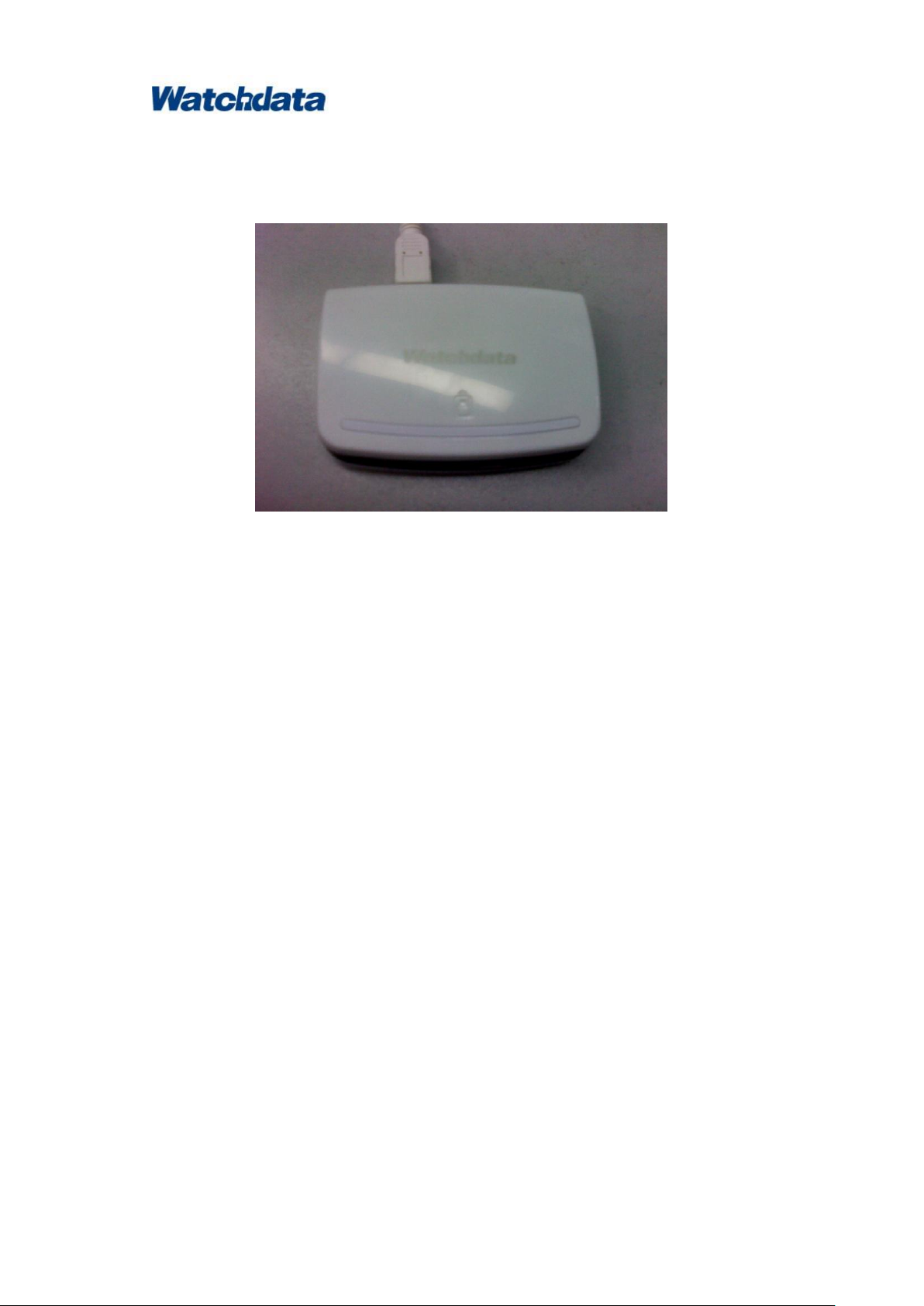
W1981-PLUS Contact Smart Card Reader User Manual
Watchdata Technologies Pte Ltd
Admirax 8 Admiralty Street #02‐07/08,
Singapore 757438
www.watchdata.com
parameter
specifications
contact card types
Support T0, T1 protocol, I2C memory card, SLE4418,
SLE4428, SLE4432, SLE4442,
AT88SC1608, AT45D041, B-CAS card in Japan.
Support 3V/5V card
1. Introduction
1.1. W1981-PLUS Contact Smart Card Reader
Support ISO 7816 T=0/T=1 Contact Smart Card
Compatible with Microsoft USB-CCID driver
compliant with PBOC2.0 Level1 and EMV2000 Level1 standard
Full-speed USB Communications
Support Hot-swappable
Supports Windows2000/XP/2003/Vista/Win7 environment.
IC card reader Technical Specification
Implemented as an USB full speed device with bulk transfer endpoint
support pc smart card industry standard-pc/sc 1.1
support microsoft smart card for windows
certificated by emv 4.0 specification
support the universal serial bus specification,version 1.1
based on iso7816 implementation
1.2. Specifications
Page 2

W1981-PLUS Contact Smart Card Reader User Manual
Watchdata Technologies Pte Ltd
Admirax 8 Admiralty Street #02‐07/08,
Singapore 757438
www.watchdata.com
USB interface rate
Up to 12Mbps
contact card slot rate
Default rate 9600bps,support PPS
(9600 – 224K)
Operating System
2000/2003/XP/Vista/win 7
working Current
≤300mA
Supply Voltage
DC5V (from USB)
Dimensions(H×W×D)
55*65*13(mm)
Working Temperature
0℃ ~ 50℃
Working Humidity
20% ~ 90%
MTBF
5000H
2. Driver Installation
2.1 Installation Sequence
Identification of W1981-PLUS Can be finished automatically by the PC that installed with
Vista or win 7 operating system..
In the PC with 2000/2003/XP operating system,There need CCID driver to install. You can
download the driver from www.watchdata.com.
There are two ways to install the CCID driver, one is run “setup.exe”, the other is through
Found New Hardware Wizard running by the PC automatically when the device was plugged in .
Method I:
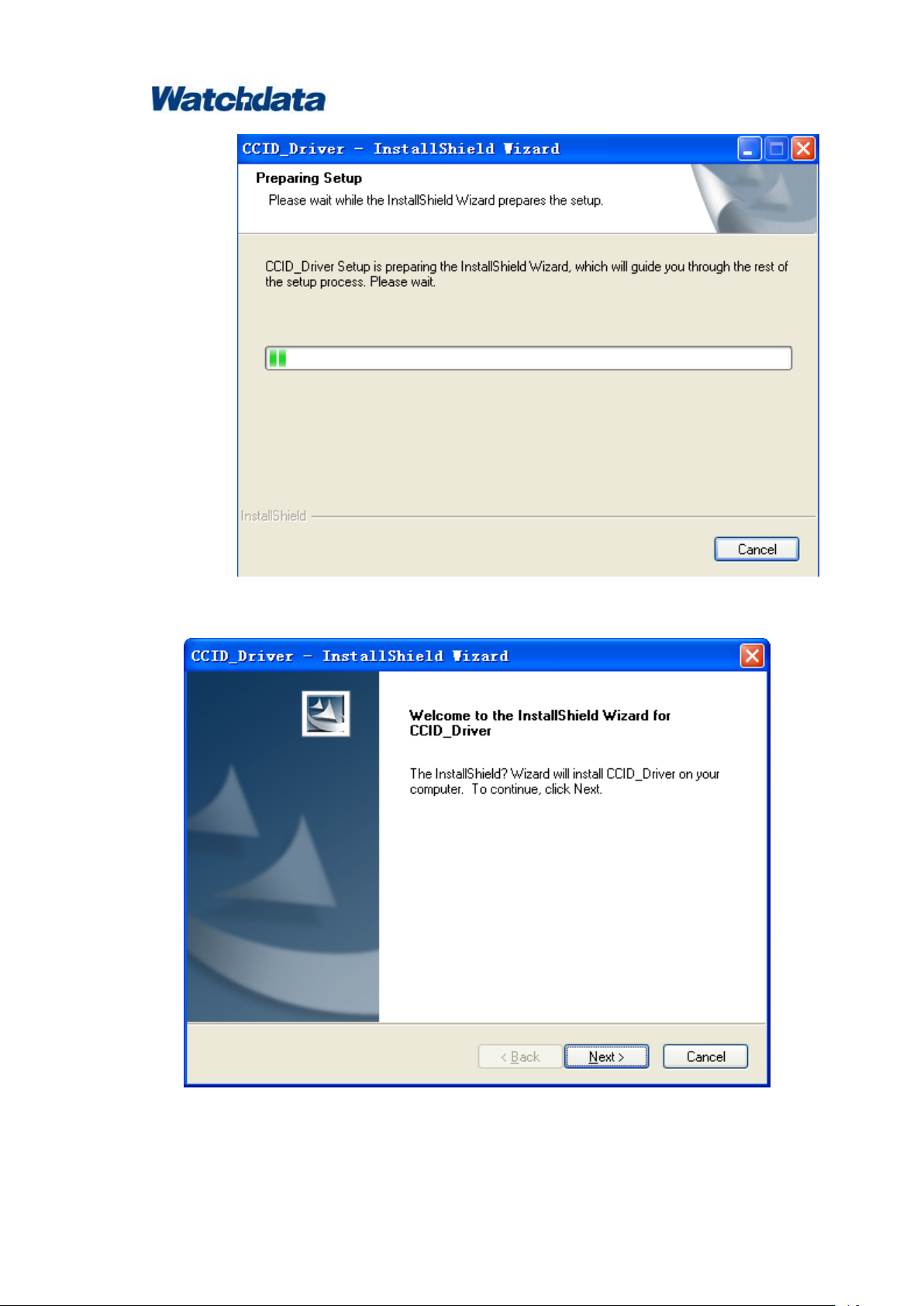
1) run the setup.exe in the folder of CCID_DRIVER SETUP,and waiting
Page 3
W1981-PLUS Contact Smart Card Reader User Manual
Watchdata Technologies Pte Ltd
Admirax 8 Admiralty Street #02‐07/08,
Singapore 757438
www.watchdata.com
2) click the “Next>” button
3) click the “finish” button
Page 4

W1981-PLUS Contact Smart Card Reader User Manual
Watchdata Technologies Pte Ltd
Admirax 8 Admiralty Street #02‐07/08,
Singapore 757438
www.watchdata.com
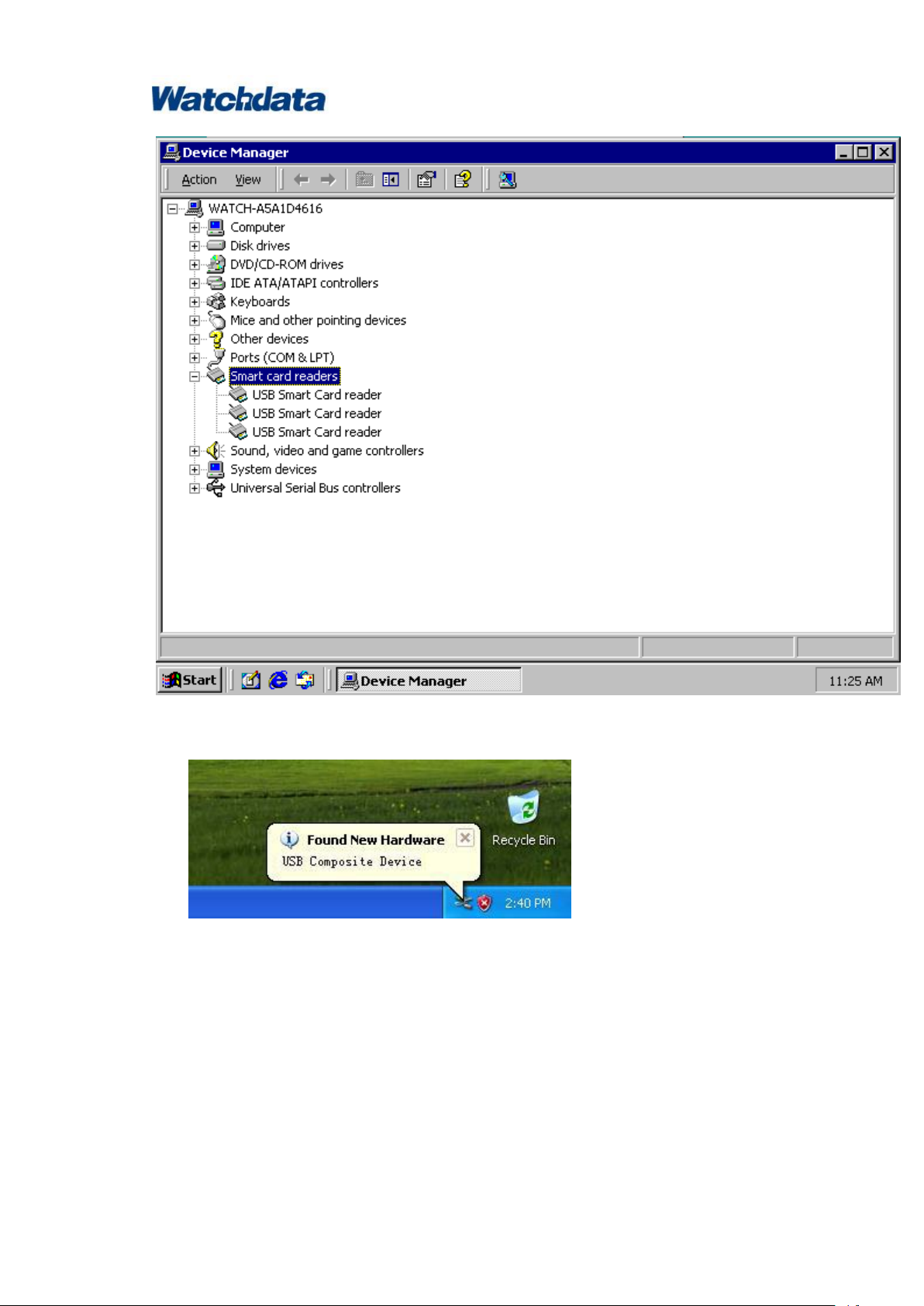
After correct installation, you will find the “ USB Smart Card Reader” in the explorer .
Page 5
W1981-PLUS Contact Smart Card Reader User Manual
Watchdata Technologies Pte Ltd
Admirax 8 Admiralty Street #02‐07/08,
Singapore 757438
www.watchdata.com
Method Ⅱ:
1) plug the reader in PC:
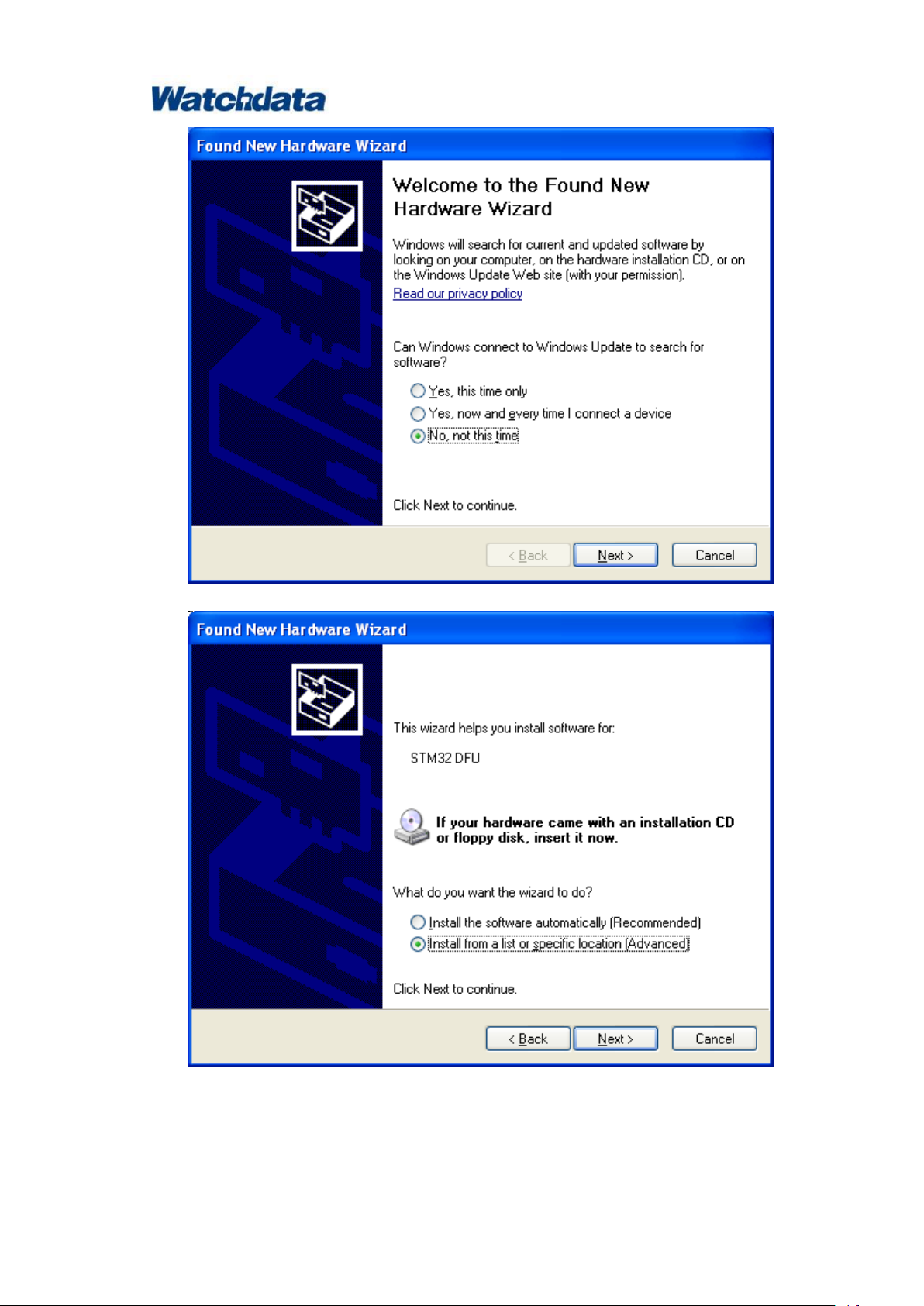
2) select the option as the followed picture shows, then click the “next” button
Page 6
W1981-PLUS Contact Smart Card Reader User Manual
Watchdata Technologies Pte Ltd
Admirax 8 Admiralty Street #02‐07/08,
Singapore 757438
www.watchdata.com
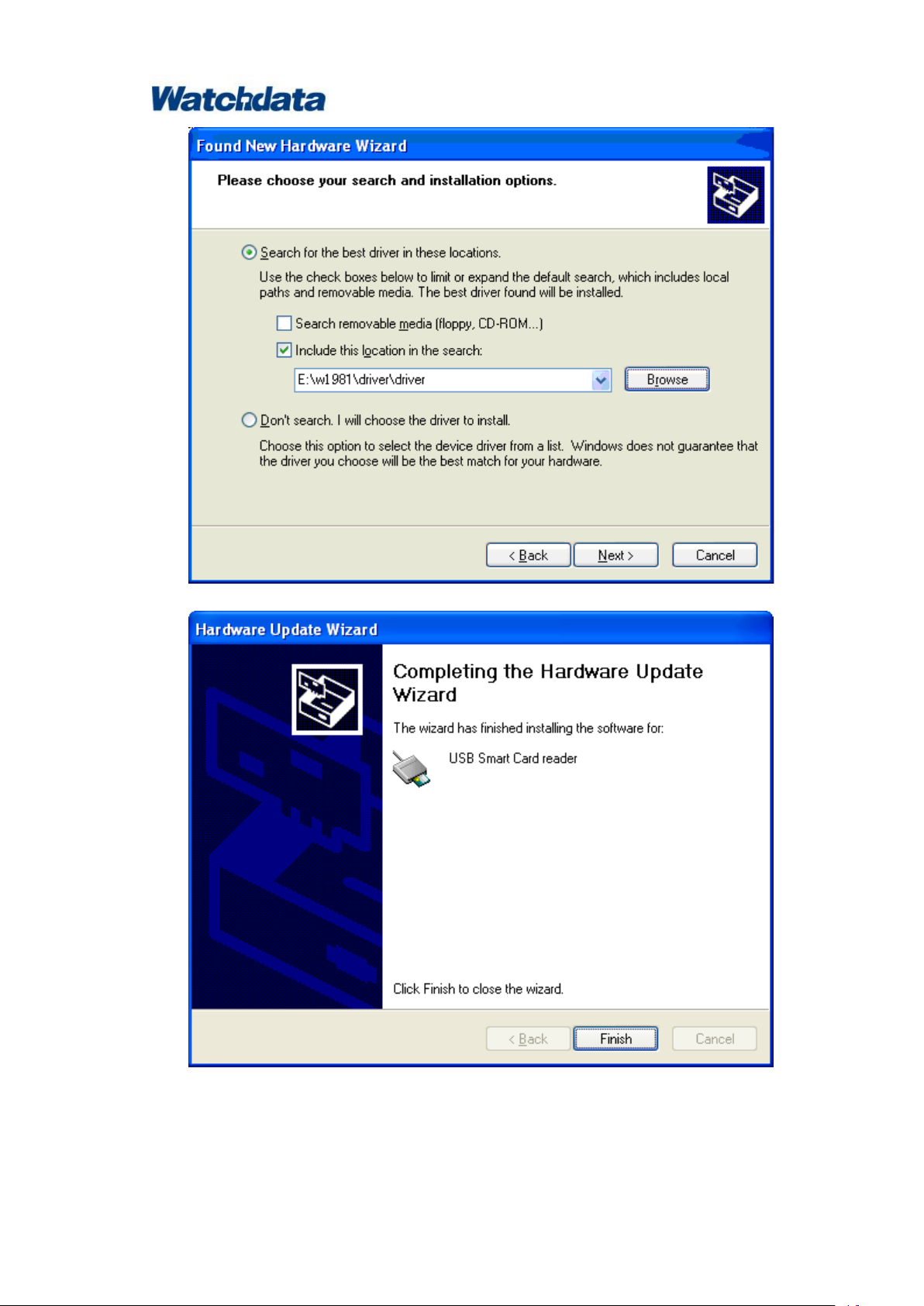
3) select the option as the followed picture shows, then click the “next” button
4) select the option as the followed picture shows, click the “Browse” button, select the
folder that the driver saved in , then click the “Next” button
Page 7
W1981-PLUS Contact Smart Card Reader User Manual
Watchdata Technologies Pte Ltd
Admirax 8 Admiralty Street #02‐07/08,
Singapore 757438
www.watchdata.com
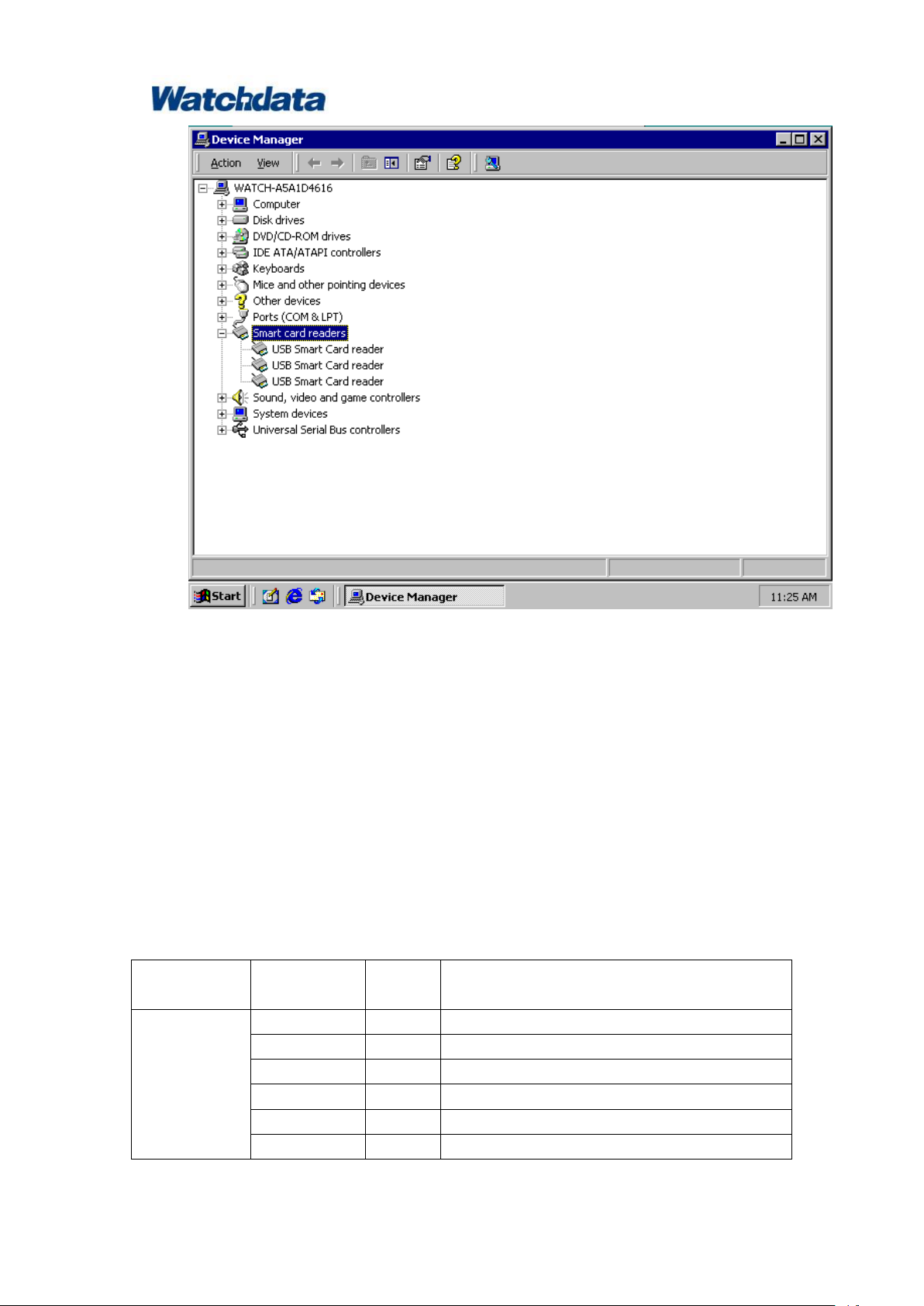
5) click the “Finish” button, finish the installation.
6) After correct installation, you will find the“ USB Smart Card Reader”in the explorer
Page 8
W1981-PLUS Contact Smart Card Reader User Manual
Watchdata Technologies Pte Ltd
Admirax 8 Admiralty Street #02‐07/08,
Singapore 757438
www.watchdata.com
Information
field
Identifier
Length
Description
The head of
APDU ommand
Type
1
CCID Command
Length
4
Length of Abdata
Slot 1 Code of slot
Bseq
1
Code of result
bBwi
1
Time of block waiting
Level Param
2
Communication level parameter
3. Communication Protocol
Communication protocol between the pc and the reader is compliant with the CCID protocol.
There are some examples that can make the users understood how to send the APDU command
to the card through the reader .
Note: All the numbers in the commands are hexadecimal.
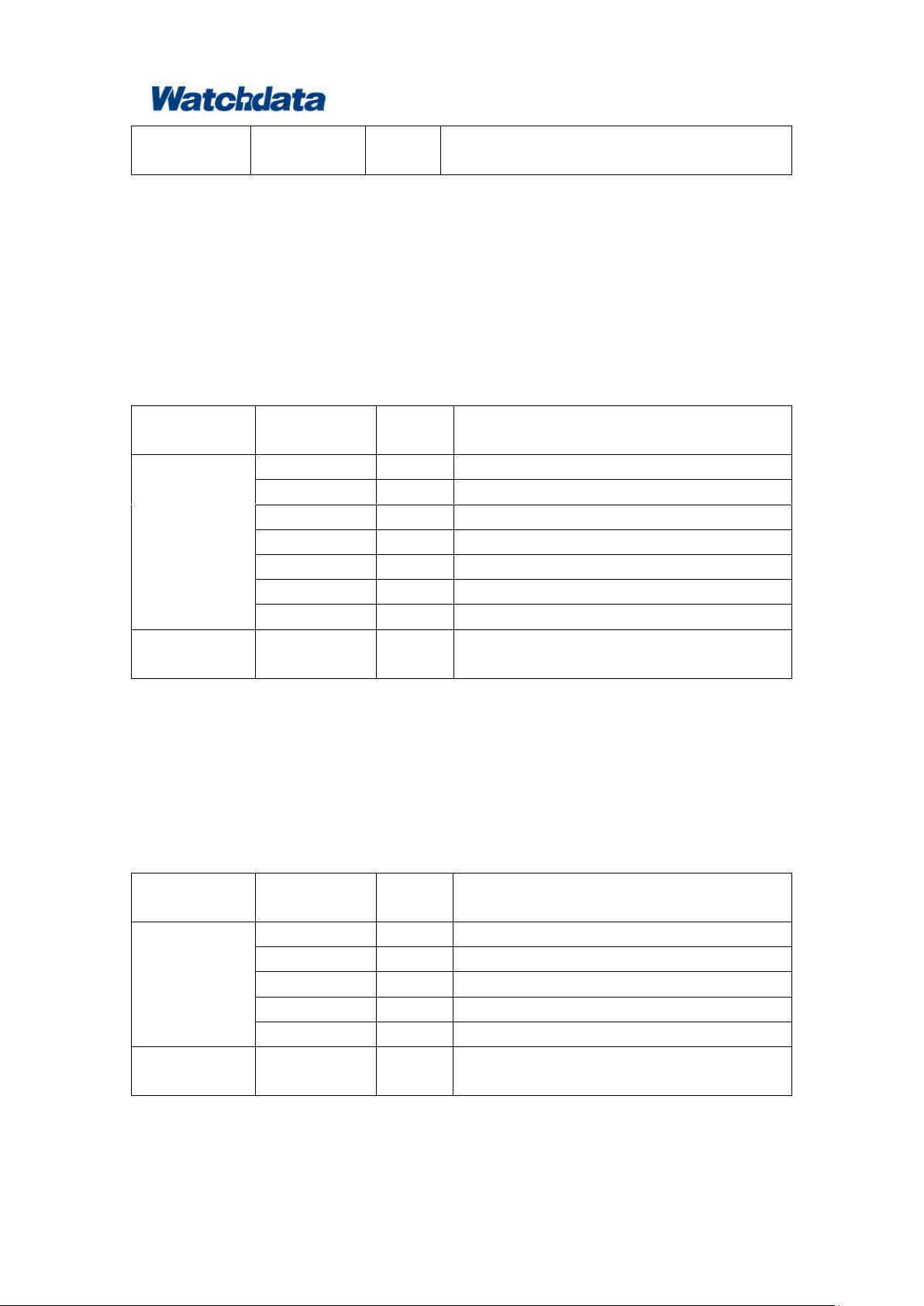
3.1 APDU command format from the PC to the reader
Page 9
W1981-PLUS Contact Smart Card Reader User Manual
Watchdata Technologies Pte Ltd
Admirax 8 Admiralty Street #02‐07/08,
Singapore 757438
www.watchdata.com
APDU
command
Abdata
1
Send data to Reader
Information
field
Identifier
Length
Description
The head of
APDU ommand
Type
1
CCID command
Length
4
Length of Abdata
Slot 1 Code of slot
Bseq
1
Code of result
Bstatus
1
State of slot
bError
1
Error message of slot
Bchain Param
1
Return parameter
APDU
command
Abdata
1
Return data from Reader
information
field
Identifier
Length
Description
The head of
APDU ommand
Type
1
CCID command
Length
4
Length,default=00000000h
Slot 1 Code of slot
Bseq
1
Code of result
Power Select
1
Voltage support
APDU
command
AbRFU
2
RFU
Example 1: Get random Command
6f 05000000 00 f1 00 0000 0084000008
↓ ↓ ↓ ↓ ↓ ↓ ↓
Type Length Slot Bseq bBwi Level Abdata
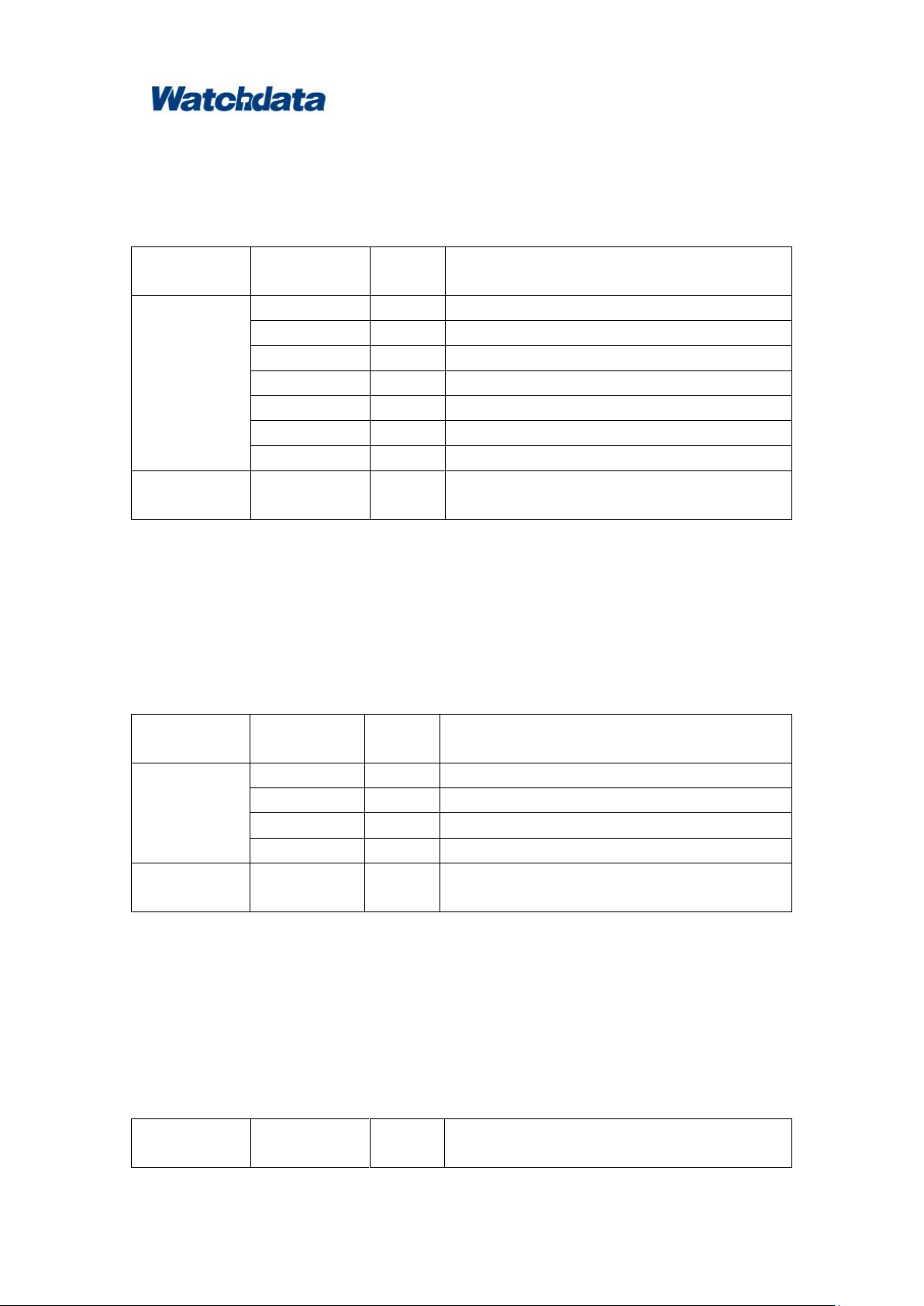
3.2 APDU Response format from the reader to PC
Click the ‘close’ button at upper right corner to exit WatchSAFE ND 3.4 User Interface.
Example 1: Returm Message:
80 0a000000 00 1b 00 00 00 c3f5bae6e9487cd99000
↓ ↓ ↓ ↓ ↓ ↓ ↓ ↓
Type Len Slot Bseq Bstatus bError BchainParam Abdata
3.3 Power on Command of the reader
Example 1:Power on command
62 00000000 00 02 01 0000
↓ ↓ ↓ ↓ ↓ ↓
Page 10
W1981-PLUS Contact Smart Card Reader User Manual
Watchdata Technologies Pte Ltd
Admirax 8 Admiralty Street #02‐07/08,
Singapore 757438
www.watchdata.com
information
field
Identifier
Length
Description
The head of
APDU ommand
Type
1
CCID command
Length
4
Length of Abdata
Slot 1 Code of slot
Bseq
1
Code of result
Bstatus
1
State of slot
bError
1
Error message of slot
BchainParam
1
Return parameter
APDU
command
Abdata
1
Return data from Reader
information
field
Identifier
Length
Description
The head of
APDU ommand
Type
1
CCID command
Length
4
Length,default=00000000h
Slot 1 Code of slot
Bseq
1
Code of result
APDU
command
AbRFU
2
RFU
information
field
Identifier
Length
Description
Type Length Slot Bseq Power Select AbRFU
3.4 Response of Power on Command
Example 1:Return Message after power on
80 11000000 00 02 01 00 00 3b6d000057443778878693011edf010a1a
↓ ↓ ↓ ↓ ↓ ↓ ↓ ↓
Type Len Slot Bseq Bstatus bError BchainParam Abdata
3.5 Power off command of the reader
Example 1:Power off command
63 00000000 00 01 000000
↓ ↓ ↓ ↓ ↓
Type Length Slot Bseq AbRFU
3.6 Response of Power off command
Page 11

W1981-PLUS Contact Smart Card Reader User Manual
Watchdata Technologies Pte Ltd
Admirax 8 Admiralty Street #02‐07/08,
Singapore 757438
www.watchdata.com
The head of
APDU ommand
Type
1
CCID command
Length
4
Length of Abdata
Slot 1 Code of slot
Bseq
1
Code of result
Bstatus
1
State of slot
bError
1
Error message of slot
BClockstatus
1
Clock state
Example 1: Return Message after power off
81 00000000 00 01 01 00 00
↓ ↓ ↓ ↓ ↓ ↓ ↓
Type Len Slot Bseq Bstatus bError BClockstatus
4. Benefits
Simple: Plug and play simplicity for users
Interactive: LED light displays power and communication status
Conveniently: small and portable, easy to use
Application Rich: Ideal for expanding online services and offering simple and secure access
to partners, customers and mobile workers from any location
5. Typical Applications
Online Banking
E‐government
Traffic
Customs
Customized applications
6. Compliance Statement
15.19(a)(3)
This device complies with Part 15 of the FCC Rules. Operation is subject to the following two
conditions:
(1) this device may not cause harmful interference, and
(2) this device must accept any interference received, including interference that may cause undesired
operation.
15.21
Caution: The user is cautioned that changes or modifications not expressly approved by the party
responsible for compliance could void the user's authority to operate the equipment.
Page 12

W1981-PLUS Contact Smart Card Reader User Manual
Watchdata Technologies Pte Ltd
Admirax 8 Admiralty Street #02‐07/08,
Singapore 757438
www.watchdata.com
15.105(b)
For a Class B digital device or peripheral, the instructions furnished the user shall include the following
or similar statement, placed in a prominent location in the text of the manual:
Note: This equipment has been tested and found to comply with the limits for a Class B digital device,
pursuant to part 15 of the FCC Rules. These limits are designed to provide reasonable protection
against harmful interference in a residential installation. This equipment generates, uses and can
radiate radio frequency energy and, if not installed and used in accordance with the instructions, may
cause harmful interference to radio communications. However, there is no guarantee that interference
will not occur in a particular installation. If this equipment does cause harmful interference to radio or
television reception, which can be determined by turning the equipment off and on, the user is
encouraged to try to correct the interference by one or more of the following measures:
-Reorient or relocate the receiving antenna.
-Increase the separation between the equipment and receiver.
-Connect the equipment into an outlet on a circuit different from that to which the receiver is
connected.
-Consult the dealer or an experienced radio/TV technician for help.
The product is in conformity with the essential requirements and other relevant requirements of
the EMC Directive (2004/104/EC). The product is in conformity with the following standards
and/or other normative documents: EN 55022:2010, EN 55024:2010.
 Loading...