

Page 1

WPD-220 VF Pole Display
User’s Manual
Page 2

© Copyright Wasp Technologies®2002.
All rights reserved.
Version 1.0
No part of this publication may be reproduced or transmitted in any form or by
any means without the written permission of Wasp Technologies®.The
information contained in this document is subject to change without notice.
Wasp is a trademark of Wasp Technologies®. All other trademarks or registered
trademarks are the property of their respective owners.
Page 3

Table of Contents
Introduction ..........................................................................................................1
General Specifications..........................................................................................2
Interface Specifications ........................................................................................3
System Command Details ................................................................................4-6
Command........................................................................................................7-20
Character Set ....................................................................................................21
Dimensions ........................................................................................................23
Installation Guide................................................................................................24
Page 4

1
WPD-220 VF User’s Manual
Introduction
INTRODUCTION
Thank you for choosing the WPD-220VF Pole Display. The WPD-220VF
provides both reliability and performance in a professional looking design.In this
guide, you will find connection and configuration information to help you connect
the display to your computer.
The WPD-220VF pole display uses a vacuum fluorescent display (VFD) tube
presenting bright and easy to read characters. Because of the VFD technology
the display is viewable from a wide angle. Users will appreciate not having to
remain in a fixed viewing position to see the display; they will be free to move
forward in line and still keep the display readable.The WPD-220VF pole display
has 2 pole sections giving you the choice of 4 different display heights. The
display can be rotated up to 270°.The head of the display can be tilted up to
35°.The combination of these features gives you flexibility to tailor the display
position to your unique application.
The WPD-220VF pole display uses an easy to connect RS-232C serial por t
connection with a wide range of available communication speeds from 300 to
38,400bps.
Page 5
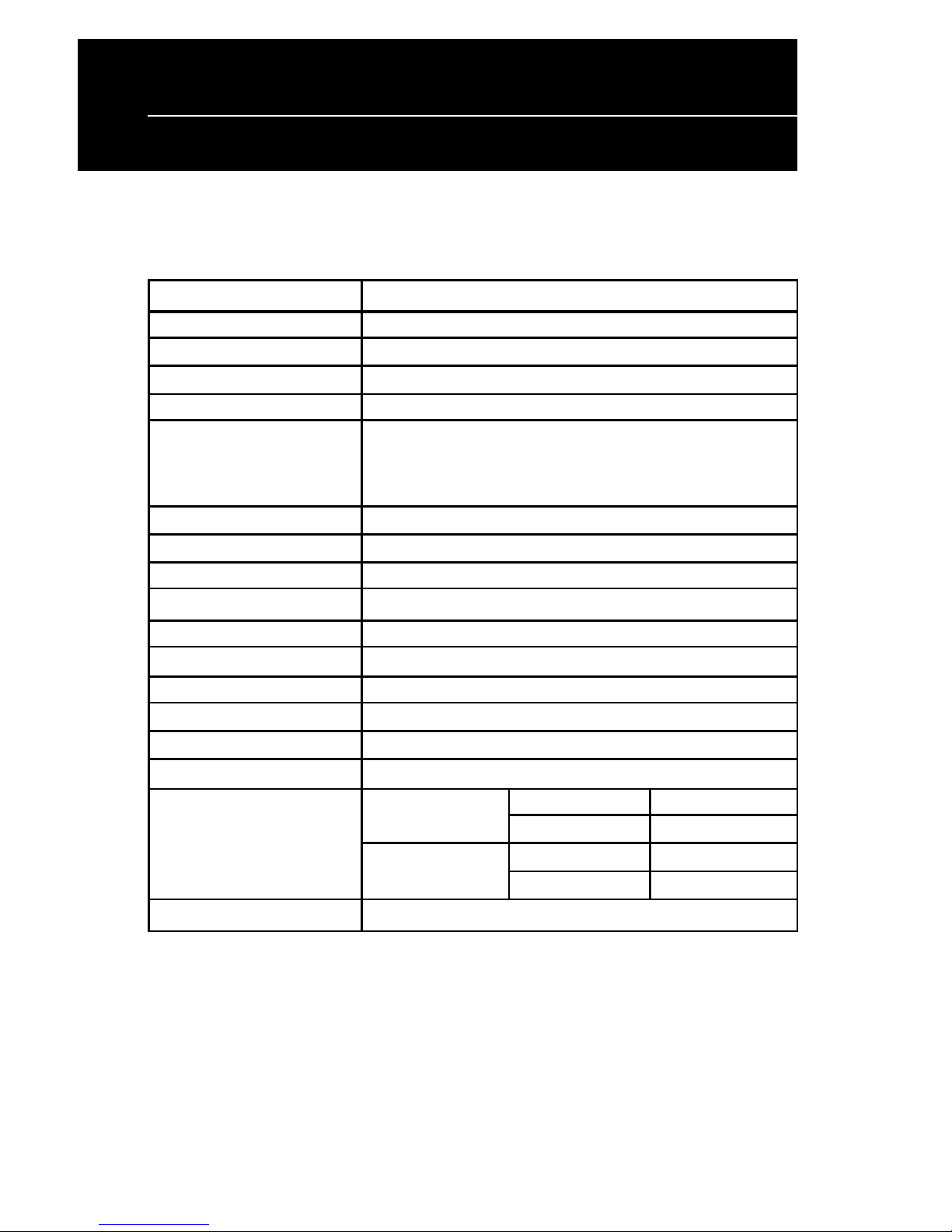
SPECIFICATIONS
ITEM WPD-220VF
Display method Vacuum fluorescent display
Display color Blue green
Number of characters 40 characters(20 columns x 2 lines)
Brightness 700 cd/m2
Character type 96 alphanumeric
13 kinds of international character set
and 1 user-defined set
Character font 5 x 7dot matrix
Character size 3.5mm x 5.0mm
Character pitch 2mm
Power supply 5VDC or 12VDC or 24VDC
Power consumption 5W
MTBF(power on time) 25000hours
Dimensions 170(W) x 70(H) x 45(D)mm
Viewing angle ± 30 degrees
Rotation angle Maximum 270 degrees
Weight 0.9Kg
Environmental Operating Temperature 5-45°C
Conditions Humidity Less then 95%
Storage Temperature -5-55°C
Humidity Less then 95%
Safety FCC class B CE
2
WPD-220 VF User’s Manual
Specifications
Page 6
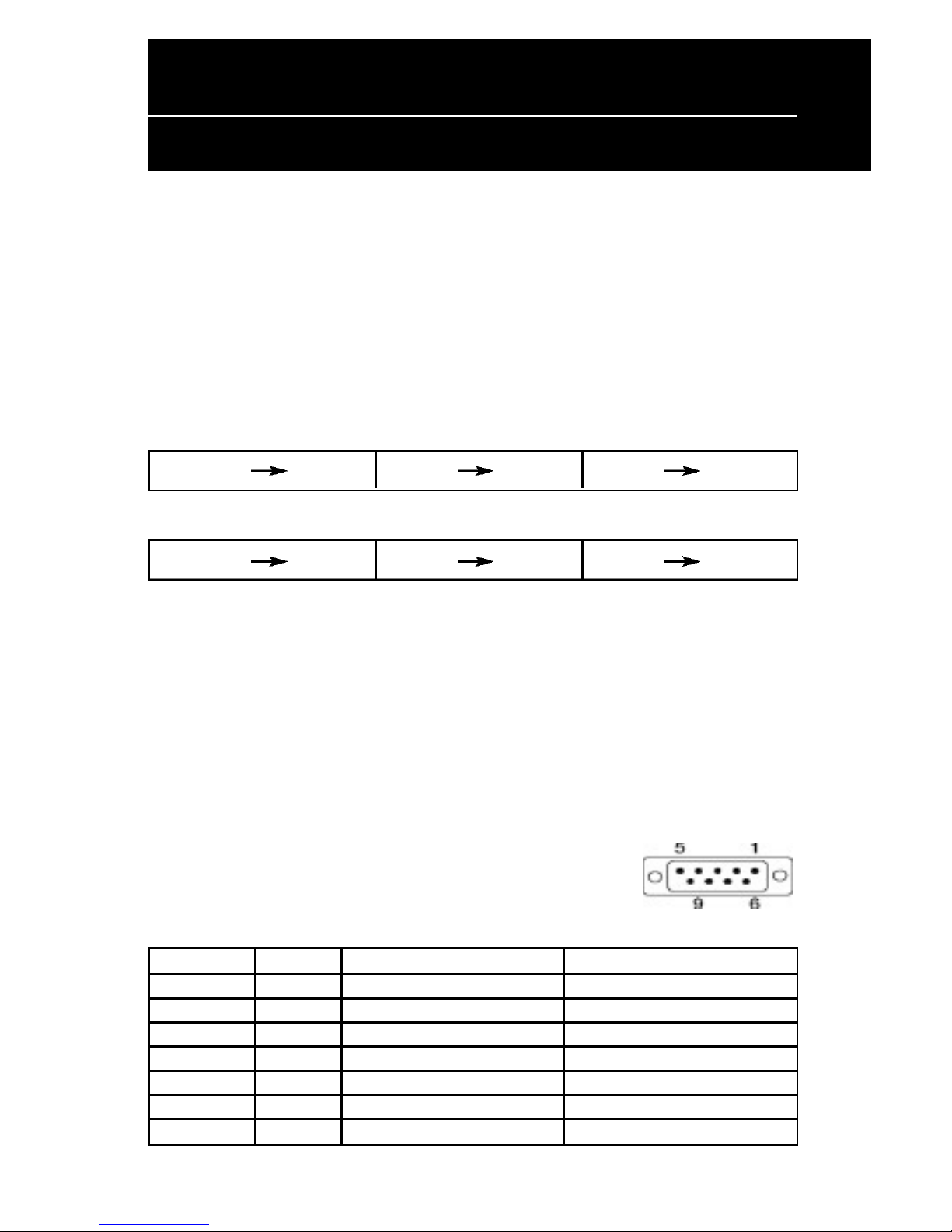
Serial port (RS232C)
Serial port (RS232C) communication
(a) This interface specification is based on EIA RS232C baud rate 300 to 38400
BPS, 8 data bits, none parity, 1 or more stop bits
(b) Serial port (RS232C) communication data link
Data link flow chart:
PC/HOST display display printer printer PC/HOST
Control for RTS and DTR :
PC/HOST display display printer printer PC/HOST
(c) The device will activate DTR or RTS signal to PC/host in the following two
conditions:
1. Printer will activate DTR or RTS signal.
2.The pass through buffer is full ( 200 bytes ) .
* If PC/host keeps transmitting the data to printer when CD3220 activate
DTR or RTS, the data will be lost.
Serial port interface to the space-saving base portion
(c) RS232C interface to PC/HOST cable, PC/HOST side
connector pin assignment
Connector type: D-sub 9 pin (Male)
Pin No. Signal Direction Function description
2 TXD From printer to PC/Host Printer status data
3 RXD Input Receive data
4 DSR From PC/HOST to printer Host ready signal
5 GND Signal ground
6 DTR Output Display/printer ready signal
7 RTS Output Display/printer ready signal
8 CTS From PC/HOST to printer Host ready signal
3
WPD-220 VF User’s Manual
Interface Specifications
Page 7

4
WPD-220 VF User’s Manual
System Command Details
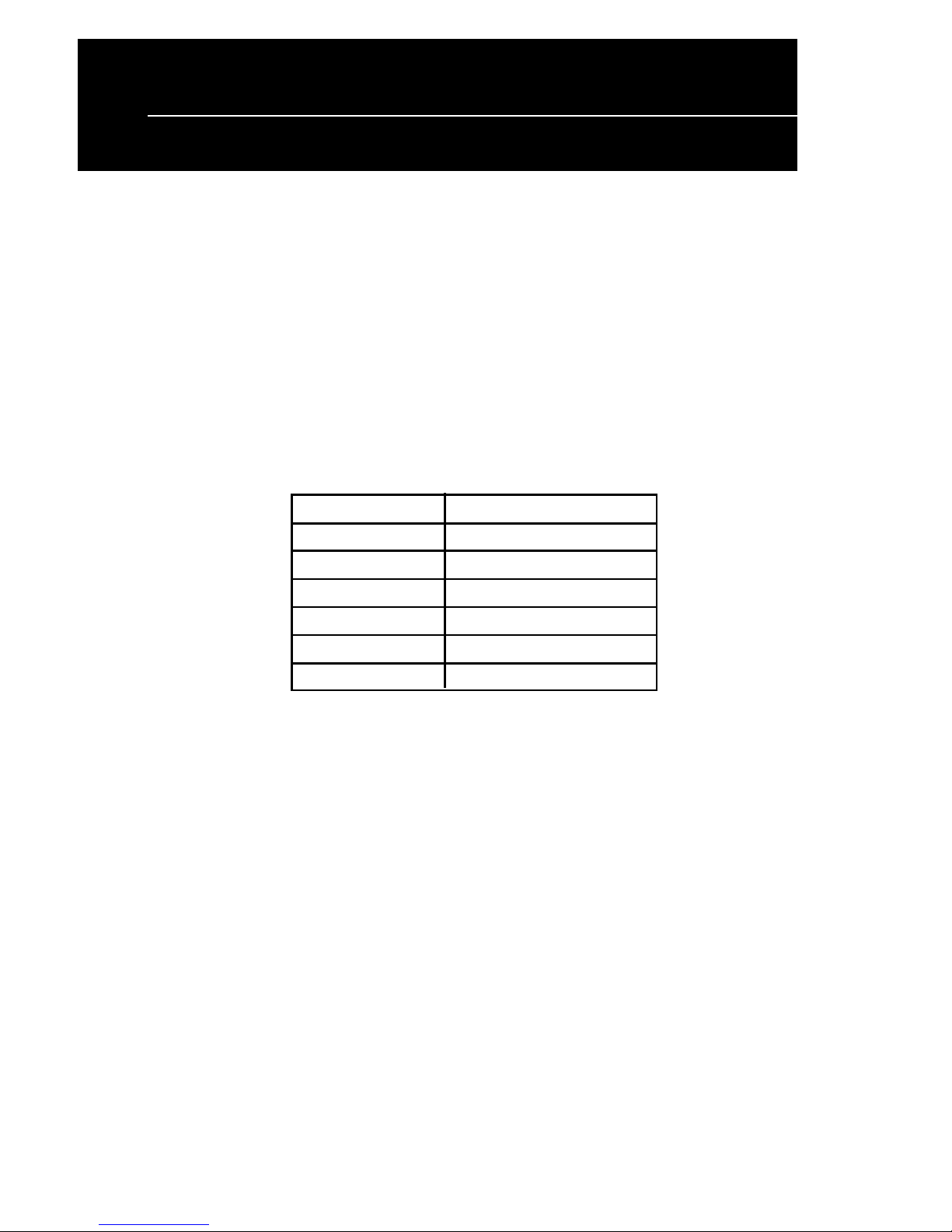
Baud rate
STX 05 B n ETX /Set baud rate and keep it with EEPROM/
ASCII Format STX 05 B n ETX
Dec. Format [02][05][66] n [03]
Hex.Format [02h][05h] [42h] n [03h] 30h<n<37h
Description Change the display communication baud rate.The
baud rate setting can be selected from 300 to 38400.
The setting function will be saved to EEPROM.
N Baud rate
30h 9600
31h 4800
32h 2400
33h 1200
34h 600
35h 300
36h 38400
37h 19200
Reset EEPROM
STX 05 07 n ETX Reset EEPROM
ASCII Format STX 05 07 n ETX
Dec. Format [02][05][07][n][03]
Hex. Format [02h][05h][07h][n][03h]
Description This command will reset the content of EEPROM
(eg. demo scroll data, user-define character, baud
rate setting.)
n=31h clear all EEPROM contents
n=32h clear upper line data message
n=33h clear lower line data message
Page 8

5
Loading the Ribbon
WPD-220 VF User’s Manual
System Command Details
Save data for demo display
STX 05 L n m ETX Save demo message to EEPROM
ASCII Format STX 05 L n m ETX
Dec. Format [02][05][76] n m [03]
Hex. Format [02h][05h][4Ch] n m [03h]
Description Save demo message for upper line and bottom line
n = 31h save data message for upper line
n = 32h save data message for lower line
m = data message; the maximum data
character is under 200
Run Demo message
STX 05 D 08 ETX Run demo message
ASCII Format STX 05 D 08 ETX
Dec. Format [02][05][68][08][03]
Hex. Format [02h][05h][44h][08][03h]
Description Run demo message for the display
Page 9
6
WPD-220 VF User’s Manual
System Command Details
Set Communication Option
STX 05 P n ETX Set the communication parity
ASCII Format STX 05 P n ETX
Dec. Format [02][05][80] n [03]
Hex. Format 02h][05h][50h] n [03h] 31h<n<36h
Description Change the display communication parity.
Set 7 or 8 data bit and the parity set for
even, odd, or non-parity.
n Parity
31h N-8-1
32h N-7-1
33h E-8-1
34h E-7-1
35h O-8-1
36h O-7-1
Page 10
7
WPD-220 VF User’s Manual
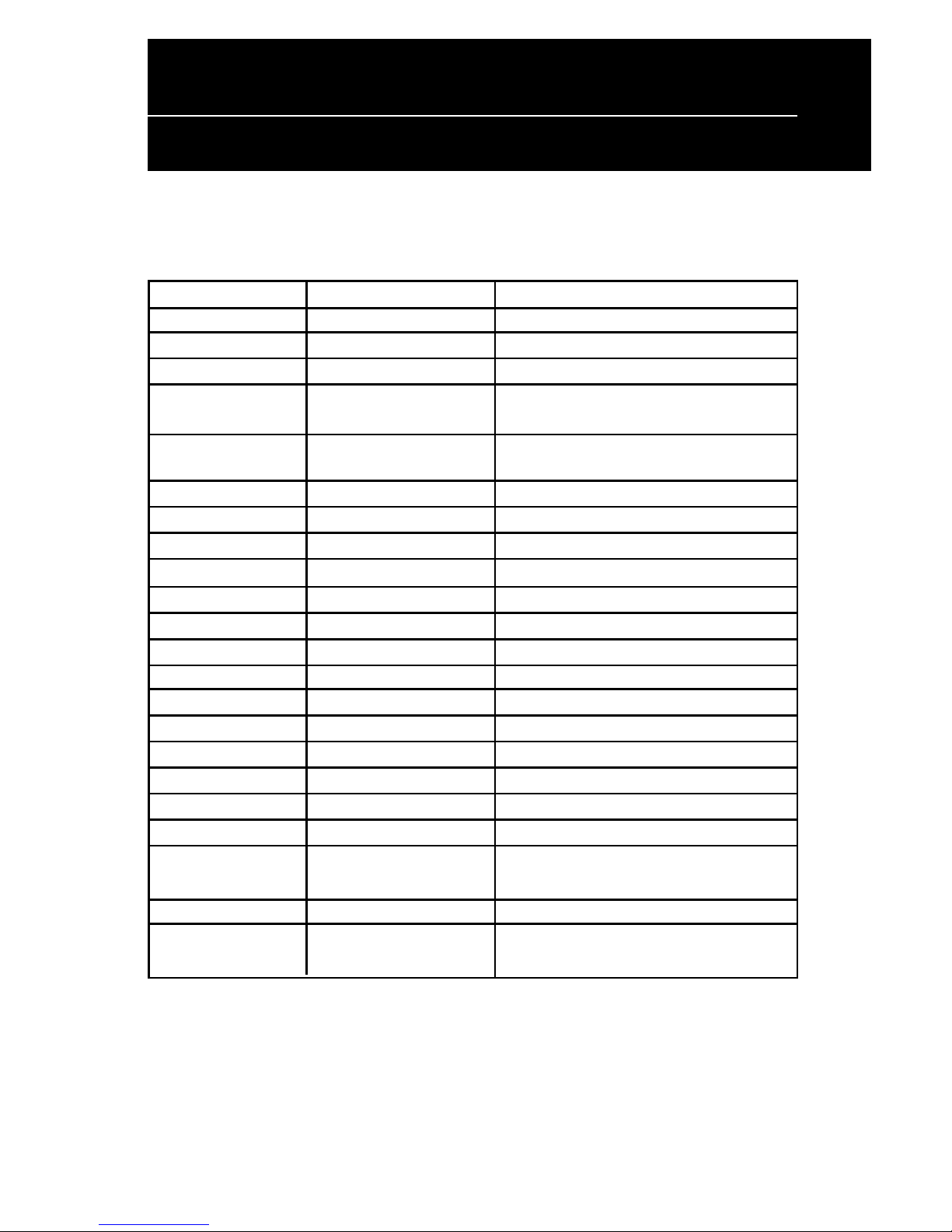
Command
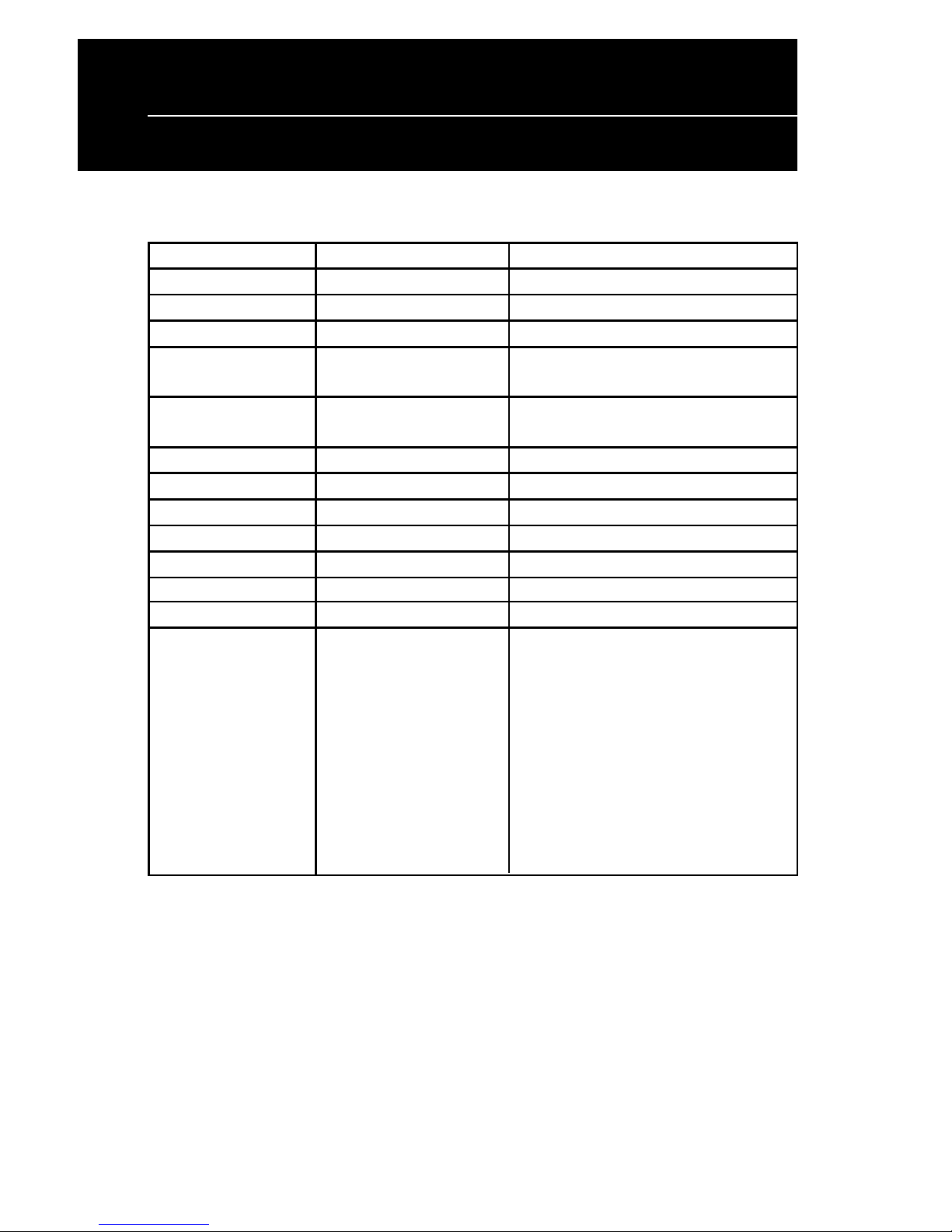
Command List
STANDARD MODE
Command Code description (hex) Function description
ESC DC1 1B 11 overwrite mode
ESC DC2 1B 12 vertical scroll mode
ESC DC3 1B 13 horizontal scroll mode
ESC Q A ..........CR 1B 51 41 [n ]x20 0D set the string display mode, write string to
upper line
ESC Q B ..........CR 1B 51 42 [n ]x20 0D set the string display mode, write string to
lower line
ESC Q D ..........CR 1B 51 44 [n ]x20 0D upper line message scroll continuously
ESC [ D 1B 5B 44 move cursor left
BS 08 move cursor left
ESC [ C 1B 5B 43 move cursor right
HT 09 move cursor right
ESC [ A 1B 5B 41 move cursor up
ESC [ B 1B 5B 42 move cursor down
LF 0A move cursor down
ESC [ H 1B 5B 48 move cursor to home position
HOM 0B move cursor to home position
ESC [ L 1B 5B 4C move cursor to left-most position
CR 0D move cursor to left-most position
ESC [ R 1B 5B 52 move cursor to right-most position
ESC [ K 1B 5B 4B move cursor to bottom position
ESC [ x y 1B 6C x y move cursor to specified position
1≤x≤20,y=1,2
ESC @ 1B 40 initialize display
ESC W s x1 x2 y 1B 57 1 x1 x2 y reset window range at horizontal scroll mode
1≤x1≤x2≤20 y=1,2
Page 11
8
WPD-220 VF User’s Manual
Command (cont.)
STANDARD MODE (cont.)
Command Code description (hex) Function description
CLR 0C clear display screen, and clear string mode
CAN 18 clear cursor line, and clear string mode
ESC * n 1B 2An 1≤=n≤=4 brightness adjustment
ESC & s n m [a(p1..pa)]x 1B 26 1 n m [a(p1..pa)]x define download characters.
(m-n+!) (m-n+1) 20h≤n≤=m≤=FFh
a=1-5 , p1..p5 =row1..row5
ESC ? 1B 3F delete download characters.
ESC % 1B 25 select/cancel download character set.
ESC _ n 1B 5F n n=0,1 set cursor ON/OFF
ESC f n 1B 66 n select international fonts
ESC c n 1B 63 n select fonts, ASCII code or JIS code
ESC s 1 1B 73 01 store user-define character into EEPROM
ESC d 1 1B 64 01 restore user-define character from EEPROM
ESC = n 1B 3D n
n=1; enable printer, select peripheral device, display or printer:
disable display display for customer side or display for
n=2; disable printer, operator side
enable display
n=3; enable printer,
enable display
n=4; message for customer
side (for CD7220D only)
n=5; message for operator
side (for CD7220D only)
default n=2
REMARKS:
* While using command "ESC QA" or "ESC QB", these two commands can be used with terminal printer: TP2688 or
TP3688
* While using command "ESC QA" or "ESC QB", other commands can not be used except when using command "CLR" or
"CAN" to change operating mode.
* When using command "ESC QD", the upper line message will scroll continuously until a new command is received.
It will then clear the upper line and move the cursor to the upper left-end position.
Page 12
9
WPD-220 VF User’s Manual
Command (cont.)
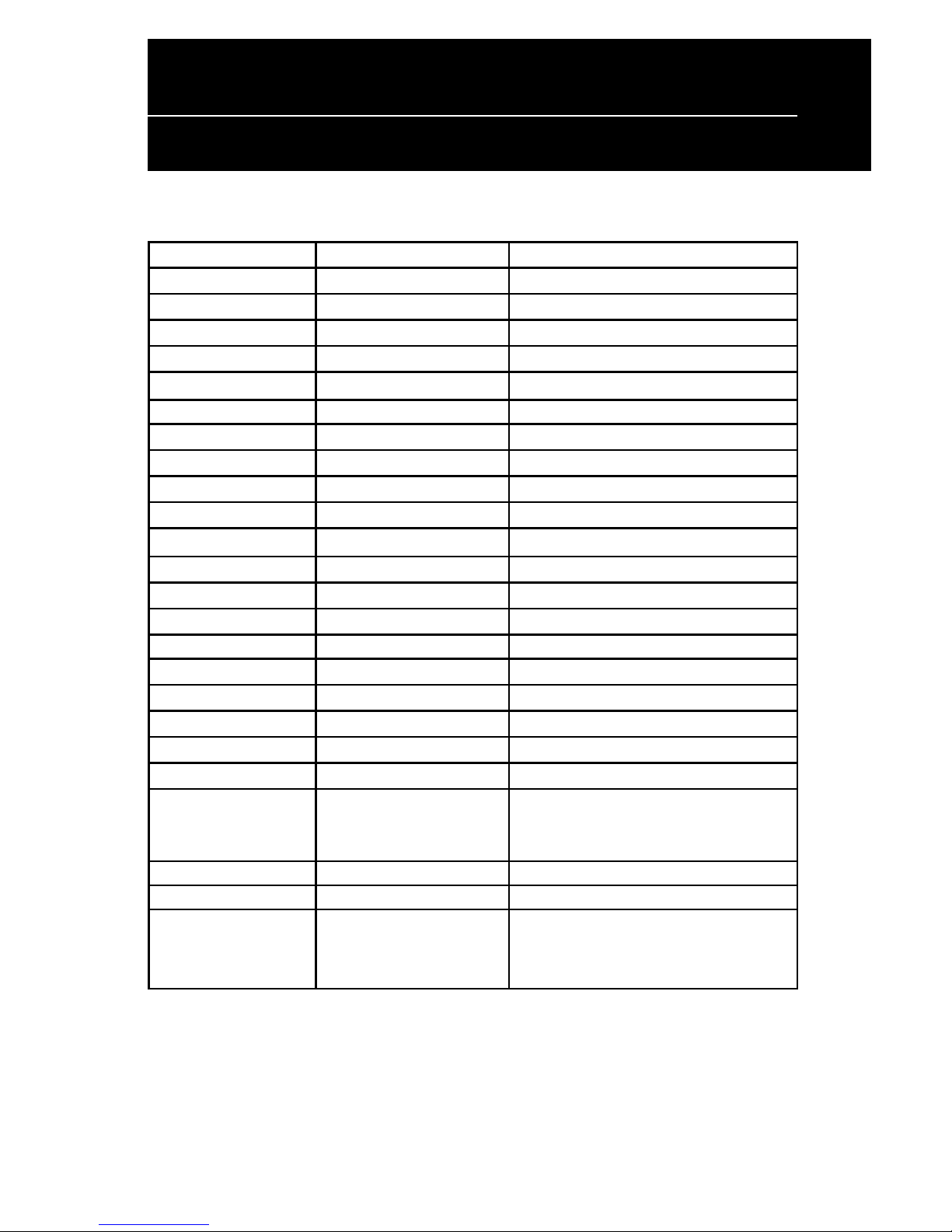
EPSON ESC/POS command list
Command Code description(hex) Function description
HT 09 move cursor right
BS 08 move cursor left
US LF 1F 0A move cursor up
LF 0A move cursor down
US CR 1F 0D move cursor to right-end position
CR 0D move cursor to left-end position
HOM 0B move cursor to home position
US B 1F 42 move cursor to bottom position
US $ x y 1F 24 x y 1≤x≤20,y=1,2 move cursor to specified position
CLR 0C clear display screen
CAN 18 clear cursor line
US X n 1F 58 n 1≤n≤4 brightness adjustment
US E n 1F 45 n 0≤n≤255 blink display screen
ESC @ 1B 40 initialize display
ESC t n 1B 74 n 1≤n≤15 select character code table
ESC R n 1B 52 n 1≤n≤15 select international character set
US r n 1F 72 n n=0,1 select/cancel reverse character
US MD1 1F 01 specify overwrite mode
US MD2 1F 02 specify vertical scroll mode
US MD3 1F 03 specify horizontal scroll mode
ESC & s n m 1B 26 1 n m [a(p1..pa)]x m-n define download characters
[a(p1..pa)]x m-n 20h≤n≤m≤FFh; a=1-5,
p1..p5=row1..row5
ESC ? 1B 3F delete download characters
ESC % 1B 25 select/cancel download character set
ESC W n s x1 y1 1B 57 n s x1 y1 x2 y2 reset window range
x2 y2 n=1-4,s=0,1,1≤x1≤x2≤20;
1≤y1vy2≤2
Page 13

10
WPD-220 VF User’s Manual
Command (cont.)
EPSON ESC/POS command list
Command Code description(hex) Function description
ESC = n 1B 3D n (default n=2) select peripheral device
n=1; enable printer,
disable display
n=2; disable printer,
enable display
n=3; enable printer,
enable display
For CD7220D only:
n=4; message for customer side
n=5; message for operator side
US : 1F 3A set starting/ending position to define macro
US ^ n m 1F 5E n m, 0≤(n, m)≤255 execute and quit macro
US @ 1F 40 execute self-test
ESC s 1 1F 73 01 store defined download character to
EEPROM
ESC d 1 1F 64 01
restore user-defined character from EEPROM
ESC T h m 1B 54 h m ,0≤h≤23 0≤m<59 display time
US . n 1F 2E n , n = a displayable
character code specify period
US , n 1F 2C n , n = a displayable
character code specify comma
US ; n 1F 3B n , n = a displayable
character code specify semicolon (period + comma)
US # n m 1F23 n m , n= 0 or 1 , 0≤m≤20 turn annunciator ON/OFF
Page 14

11
WPD-220 VF User’s Manual
Command (cont.)
Standard Command Details
ESC DC1 /Overwrite mode/
ASCII Format ESC DC1
Dec. Format [027][017]
Hex.Format [1Bh][11h]
Description Change the display mode to the overwrite mode. In this
mode, the cursor will move rightward and begin from the
upper left-end position. When the cursor reaches the end
of the upper line, the cursor will move down to the bottom
left-end position to continue. When the cursor reaches
the end of the bottom line, it will move up to the upper
left-end position and overwrite the previous characters.
ESC DC2 /Vertical scroll mode/
ASCII Format ESC DC2
Dec. Format [027][018]
Hex. Format [1Bh][12h]
Description Change the display mode to the vertical scroll mode.
In this mode, the cursor will move rightward. The cursor
will begin from the upper left-end position until it reaches
the end of the upper line.The cursor will then move down
to the bottom left-end position to continue until it reaches
the end of the bottom line. The bottom line will scroll up
to replace the upper line. The bottom line will be cleared,
and the cursor will continue to the first position of the
bottom line.
Page 15

12
WPD-220 VF User’s Manual
Command (cont.)
ESC DC3 /Horizontal scroll mode/
ASCII Format ESC DC3
Dec. Format [027][019]
Hex. Format [1Bh][13h]
Description Change the display mode to the horizontal mode. In this
mode, the extent of the cursor activity is bound by a
predefined range, limited to the upper line. (Please refer
to Set or cancel window command), where the default
window is the whole upper line. Once the cursor activity
reaches the end of the range, the characters that come
afterward will push displayed characters forward from
behind.
ESC Q A d1d2d3d4d5d6.......dn CR
ESC Q B d1d2d3d4d5d6.......dn CR /Set the string display mode, and write
string to display/
ASCII Format ESC Q A d1d2d3d4d5d6...dn CR
ESC Q B d1d2d3d4d5d6...dn CR
Dec. Format [027][081][065] d1d2d3..dn [013]
[027][081][066] d1d2d3..dn [013]
Hex.Format [1Bh][51h][41h] d1d2d3..dn [0Dh]
[1Bh][51H][42h] d1d2d3..dn [0Dh] {20h<dn<ffh}
Description Set the string display mode, write to upper or lower line
d1 d2 d3 . . . dn {1<n<20}
"A" stands for the upper line, "B" stands for the lower line.
The string display mode will be cancelled and will return
to the last mode after it receive CLR or CAN.
ESC Q D d1d2d3d4d5d6.......dn CR / Upper line message scroll
continuously
ASCII Format ESC Q D d1d2d3d4d5d6...dn CR
Dec. Format [027][081][068] d1d2d3..dn [013]
Hex. Format [1Bh][51h][44h] d1d2d3..dn [0Dh] {20h<dn<ffh}
Description
The message (previously defined) will scroll continuously
in the horizontal direction until a new command is received.
Page 16

13
WPD-220 VF User’s Manual
Command (cont.)
ESC [ D /Move cursor left/
BS /Move cursor left/
ASCII Format ESC [ D
Dec. Format [027][091][068]
Hex.Format [1Bh][5Bh][44h]
ASCII Format BS
Dec. Format [008]
Hex.Format [08h]
Description If the current cursor is at the left-end position, this
command will operate differently depending on the
display mode.
1.Overwrite mode:When the cursor reaches the
left-end of the lower line, it will continue to the right-end
of the upper line, overwriting previous characters.
When it reaches the left end of the upper line, it will
continue to the right-end of the lower line.
2.Vertical scroll mode:When the cursor reaches the
left-end of the lower line, the lower line will scroll up
and replace the previous upper line.The lower line
will be cleared and the cursor will continue to the right
end of the lower line.
3.Horizontal scroll mode:The cursor will remain
stationary.
ESC [ C /Move cursor right/
HT /Move cursor right/
ASCII Format ESC [ C
Dec. Format [027][091][067]
Hex.Format [1Bh][5Bh][43h]
ASCII Format HT
Dec. Format [009]
Hex. Format [09h]
Description Move the cursor to the right.When the cursor reaches the
right-end, this command will operate differently depending
on the display mode.
Page 17

14
WPD-220 VF User’s Manual
Command (cont.)
1.Overwrite mode:When the cursor reaches the rightend of the lower line, it will continue to the left-end of
the upper line, overwriting previous characters. When it
reaches the right-end of the upper line, it will continue
to the right-end of the lower line.
2.Vertical scroll mode:When the cursor reaches the rightend of the lower line, the lower line will scroll up to
replace the upper line, the lower line is cleared and
ready to continue characters thereafter.
3.Horizontal scroll mode:The cursor will remain
stationary.
ESC [ A /Move cursor up/
ASCII Format ESC [ A
Dec. Format [027][091][065]
Hex.Format [1Bh][5Bh][41h]
Description Move the cursor up one line. When the cursor is on the
upper line, this command will operate differently
depending on the display mode.
1.Overwrite mode:The cursor is moved to the same
column on the lower line.
2.Vertical scroll mode:The characters displayed on the
upper line are scrolled to the lower line, and the upper
line is cleared.The cursor will remain at the same
position.
3.Horizontal scroll mode:The cursor will remain
stationary.
ESC [ B /Move cursor down/
L F /Move cursor down/
ASCII Format ESC [ B
Dec. Format [027][091][066]
Hex. Format [1Bh][5Bh][42h]
ASCII Format LF
Dec. Format [010]
Page 18

15
WPD-220 VF User’s Manual
Command (cont.)
Hex. Format [0Ah]
Description Move the cursor down one line.When the cursor reaches
the lower line, this command will operate differently
depending on the display mode.
1.Overwrite mode:The cursor is moved to the same
column on the upper line.
2.Vertical scroll mode:The characters displayed on the
lower line are scrolled to the upper line and the lower
line is cleared.The cursor will remain at the same
position.
3.Horizontal scroll mode:The cursor will remain
stationary.
ESC [ H /Move cursor to home position/
HOM /Move cursor to home position/
ASCII Format ESC [ H
Dec. Format [027][091][072]
Hex. Format [1Bh][5Bh][48h]
ASCII Format HOM
Dec. Format [011]
Hex. Format [0Bh]
Description The cursor will move to the left-end position of the
upper line.
ESC [ L /Move cursor to left-most position/
CR /Move cursor to left-most position/
ASCII Format ESC [ L
Dec. Format [027][091][076]
Hex. Format [1Bh][5Bh][4Ch]
ASCII Format CR
Dec Format [013]
Hex. Format [0Dh]
Description The cursor will be moved to the left-end position of the
current line.
Page 19

16
WPD-220 VF User’s Manual
Command (cont.)
ESC [ R /Move cursor to right-most position/
ASCII Format ESC [ R
Dec. Format [027][091][082]
Hex. Format [1Bh][5Bh][52h]
Description The cursor will be moved to the right-end position of the
current line.
ESC [ K /Move cursor to bottom position/
ASCII Format ESC [ K
Dec. Format [027][091][075]
Hex.Format [1Bh][5Bh][4Bh]
Description The cursor will be moved to the right-end position on the
lower line.
ESC [ x y /Move cursor to specified position/
ASCII Format ESC [ x y
Dec. Format [027][108] x y { 1<x<20 , 1<y<2 }
Hex. Format [1Bh][6Ch][x][y]
Description The cursor will be moved to the x column on the y line.
ESC @ /Initialize display/
ASCII Format ESC @
Dec. Format [027][064]
Hex.Format [1Bh][40h]
Description The data in the input buffer will be cleared and reset
from default.
ESC W s x1x2 y /Reset the window/
ASCII Format ESC W s x1 x2 y
Dec. Format [027][087][000]
[027][087][001] x1 x2 y { 1<=x1<=x2<=20 , 1<=y<=2 }
Hex.Format [1Bh][57h][000]
[1Bh][57H][01h][x1][x2][y]
Description Reset the window on the display. When s = 0, window is
Page 20

17
WPD-220 VF User’s Manual
Command (cont.)
cancelled (values: x1, x2, and y are not required.)
When s = 1 the window will be reset (values: x1, x2, and
y are required.) The x1 and x2 set the position of the left
column and right column, respectively, of the window.
The y sets the upper line or the lower line of the window.
This function is valid within the horizontal mode.
CLR /Clear display screen, and clear string mode/
ASCII Format CLR
Dec. Format [012]
Hex.Format [0Ch]
Description All the display characters will be cleared, and the string
mode will be cancelled.
CAN /Clear current line, and cancel string mode/
ASCII Format CAN
Dec. Format [024]
Hex. Format [18h]
Description The current line is cleared, and the string mode is
cancelled.
ESC * n /Brightness adjustment /
ASCII Format ESC * n
Dec. Format [027][042] n {3<=n<=4}
Hex.Format [1Bh][2Ah][n]
Description Adjust the brightness of the vacuum fluorescent display.
When n = 3 ,brightness = 70 %
When n = 4 ,brightness =100 %
Page 21

18
WPD-220 VF User’s Manual
Command (cont.)
ESC _ n /Set cursor ON or OFF /
ASCII Format ESC _ n
Dec. Format [027][095] n {0≤=n≤=1}
Hex. Format [1Bh][5Fh][n]
Description: Set cursor ON or OFF
When n = 0, cursor is OFF
When n = 1, cursor is ON
ESC f n /Select international font/
ASCII Format ESC f n
Dec. Format [027][102] n
Hex. Format [1Bh][66h][n]
n International font set n International font set
ESC = n /Select peripheral device, Display or Printer/
ASCII Format ESC = n
Dec. Format [027][061] n {n=1,2,3}
Hex. Format [1Bh][3Dh][n]
Description Select peripheral device
When n = 01h, enable printer, disable display
When n = 02h, disable printer, enable display
When n = 03h, enable printer, enable display
For CD7220D only:
When n = 04h, display message for customer side
When n = 05h, display message for operator side
ESC & s n m /Set user-defined characters/
[a(p1...pa)]
x(m-n+1) n
ASCII Format ESC & s n m [a(p1...pa)] x (m-n+1) s=1
Dec. Format [027][038][001] n m [a(p1...pa)] x (m-n+1)
20h≤n≤m≤FFh
Hex. Format [1Bh][26h][01h][n][m][a(p1...pa)] x (m-n+1) 0≤a≤5
0≤p1...pa≤255
Page 22

19
WPD-220 VF User’s Manual
Command (cont.)
Description The n defines the beginning character code, and m
defines the ending character code. When only one
character is defined, use n = m
The "a" denotes the number of dots in the horizontal
direction.When a <5, the dot pattern for "a" on the right
side of the user-defined characters are padded with
spaces p1... pa, the dot data is to defined the characters.
This indicates the dot pattern for "a" in the horizontal
direction from the left side.
ESC % n /Reset user defined character set/
ASCII Format ESC % n
Dec. Format [027][037] n {n=0 or 1 }
Hex. Format [1Bh][25h][n]
Description When n=1, user-defined characters are selected.When
the user-defined characters are not defined by the ESC &
command, the internal character set will be displayed.
When n=0, user-defined characters are cancelled and the
international character set is selected.
ESC ? n /Cancel user defined characters/
ASCII Format ESC ? n
Dec. Format [027][063] n {20h<=n<=FFh or 1 }
Hex. Format [1Bh][3Fh][n]
Description User-defined characters are cancelled.
This command cancels the defined characters specified
by n. If specified code is transmitted after the pattern is
cancelled, the international character will be displayed.
ESC s 1 /Store the user defined character into EEPROM.
(EEPROM type only )/
ASCII Format ESC s 1
Dec. Format [027][115] [001]
Hex. Format [1Bh][73h][01h]
Page 23

20
WPD-220 VF User’s Manual
Command (cont.)
Description This command is successful when the display is selected
under command ESC=03h, If EEPROM is not supported,
this command is ignored.
ESC d 1 /Restore the user defined character from EEPROM.
(EEPROM type only)/
ASCII Format ESC d 1
Dec. Format [027][100] [001]
Hex. Format [1Bh][64h][01h]
Description WPD-220VF will restore user-defined characters from
EEPROM, and the user-defined characters will be
selected. If EEPROM is not supported, this command is
ignored.
Page 24

21
WPD-220 VF User’s Manual
Character Set
(1) Control code set
HEX CODE HEX CODE
00H NULL 10H DLE
01H MD1 11H DC1
02H MD2 12H DC2
03H MD3 13H DC3
04H MD4 14H DC4
05H MD5 15H
06H MD6 16H
07H MD7 17H
08H BS,MD8 18H CAN
09H HT 19H
0AH LF 1AH
0BH HOM 1BH ESC
0CH CLR 1CH
0DH CR 1DH
0EH SLE1 1EH SF1
0FH RS,SLE2 1FH US,SF2
Page 25

22
WPD-220 VF User’s Manual
Character Set (cont.)
(2) U.S.A font set
0 1 2 3 4 5 6 7 8 9 A B C D E F
..... ..O.. .O.O. .O.O. ..O.. OO... .OO.. .OO.. ...O. .O... ..... ..... ..... ..... ..... .....
..... ..O.. .O.O. .O.O. .OOOO OO..O O..O. ..O.. ..O.. ..O.. ..O.. ..O.. ..... ..... ..... ....O
..... ..O.. .O.O. OOOOO O.O.. ...O. O.O.. .O... .O... ...O. O.O.O ..O.. ..... ..... ..... ...O.
..... ..O.. ..... .O.O. .OOO. ..O.. .O... ..... .O... ...O. .OOO. OOOOO ..... OOOOO ..... ..O..
..... ..... ..... OOOOO ..O.O .O... O.O.O ..... .O... ...O. O.O.O ..O.. .OO.. ..... ..... .O...
..... ..... ..... .O.O. OOOO. O..OO O..O. ..... ..O.. ..O.. ..O.. ..O.. ..O.. ..... .OO.. O....
..... ..O.. ..... .O.O. ..O.. ...OO .OO.O ..... ...O. .O... ..... ..... .O... ..... .OO.. .....
.OOO. ..O.. .OOO. OOOOO ...O. OOOOO ..OO. OOOOO .OOO. .OOO. ..... ..... ...O. ..... .O... .OOO.
O...O .OO.. O...O ...O. ..OO. O.... .O... ....O O...O O...O .OO.. .OO.. ..O.. ..... ..O.. O...O
O..OO ..O.. ....O ..O.. .O.O. OOOO. O.... ...O. O...O O...O .OO.. .OO.. .O... OOOOO ...O. ....O
O.O.O ..O.. ...O. ...O. O..O. ....O OOOO. ..O.. .OOO. .OOOO ..... ..... O.... ..... ....O ...O.
OO..O ..O.. ..O.. ....O OOOOO ....O O...O .O... O...O ....O .OO.. .OO.. .O... OOOOO ...O. ..O..
O...O ..O.. .O... O...O ...O. O...O O...O .O... O...O ...O. .OO.. ..O.. ..O.. ..... ..O.. .....
.OOO. .OOO. OOOOO .OOO. ...O. .OOO. .OOO. .O... .OOO. .OO.. ..... .O... ...O. ..... .O... ..O..
.OOO. .OOO. OOOO. .OOO. OOO.. OOOOOOOOOO .OOO. O...O .OOO. ..OOO O...O O.... O...O O...O .OOO.
O...O O...O O...O O...O O..O. O.... O.... O...O O...O ..O.. ...O. O..O. O.... OO.OO O...O O...O
....O O...O O...O O.... O...O O.... O.... O.... O...O ..O.. ...O. O.O.. O.... O.O.O OO..O O...O
.OO.O O...O OOOO. O.... O...O OOOO. OOOO. O.OOO OOOOO ..O.. ...O. OO... O.... O.O.O O.O.O O...O
O.O.O OOOOO O...O O.... O...O O.... O.... O...O O...O ..O.. ...O. O.O.. O.... O...O O..OO O...O
O.O.O O...O O...O O...O O..O. O.... O.... O...O O...O ..O.. O..O. O..O. O.... O...O O...O O...O
.OOO. O...O OOOO. .OOO. OOO.. OOOOO O.... .OOOO O...O .OOO. .OO.. O...O OOOOO O...O O...O .OOO.
OOOO. .OOO. OOOO. .OOOO OOOOO O...O O...O O...O O...O O...O OOOOO .OOO. ..... .OOO. ..O.. .....
O...O O...O O...O O.... ..O.. O...O O...O O...O O...O O...O ....O .O... O.... ...O. .O.O. .....
O...O O...O O...O O.... ..O.. O...O O...O O...O .O.O. .O.O. ...O. .O... .O... ...O. O...O .....
OOOO. O...O OOOO. .OOO. ..O.. O...O O...O O.O.O ..O.. ..O.. ..O.. .O... ..O.. ...O. ..... .....
O.... O.O.O O.O.. ....O ..O.. O...O O...O O.O.O .O.O. ..O.. .O... .O... ...O. ...O. ..... .....
O.... O..O. O..O. ....O ..O.. O...O .O.O. O.O.O O...O ..O.. O.... .O... ....O ...O. ..... .....
O.... .OO.O O...O OOOO. ..O.. .OOO. ..O.. .O.O. O...O ..O.. OOOOO .OOO. ..... .OOO. ..... OOOOO
.O... ..... O.... ..... ....O ..... ...O. ..... O.... ..... ...O. O.... .OO.. ..... ..... .....
..O.. ..... O.... ..... ....O ..... ..O.O ..... O.... ..O.. ..... O.... ..O.. ..... ..... .....
...O. .OOO. O.... .OOOO ....O .OOO. ..O.. .OOOO O.... ..... ...O. O..O. ..O.. OO.OO O.OO. .OOO.
..... ....O OOOO. O.... .OOOO O...O .OOO. O...O OOOO. ..O.. ...O. O.O.. ..O.. O.O.O OO..O O...O
..... .OOOO O...O O.... O...O OOOOO ..O.. .OOOO O...O ..O.. ...O. OO... ..O.. O.O.O O...O O...O
..... O...O O...O O.... O...O O.... ..O.. ....O O...O ..O.. O..O. O.O.. ..O.. O.O.O O...O O...O
..... .OOOO OOOO. .OOOO .OOOO .OOOO ..O.. OOOO. O...O ..O.. .OO.. O..O. .OOO. O...O O...O .OOO.
..... ..... ..... ..... ..O.. ..... ..... ..... ..... ..... ..... ..OO. ..O.. .OO.. .OO.O .....
..... ..... ..... ..... ..O.. ..... ..... ..... ..... ..... ..... .O... ..O.. ...O. O.OO. .....
OOOO. .OOOO O.OO. .OOOO OOOOO O...O O...O O...O O...O O...O OOOOO .O... ..O.. ...O. ..... .....
O...O O...O OO..O O.... ..O.. O...O O...O O...O .O.O. .O.O. ...O. O.... ..... ....O ..... .....
OOOO. .OOOO O.... .OOO. ..O.. O...O O...O O.O.O ..O.. ..O.. ..O.. .O... ..O.. ...O. ..... .....
O.... ....O O.... ....O ..O.O O...O .O.O. O.O.O .O.O. ..O.. .O... .O... ..O.. ...O. ..... .....
O.... ....O O.... OOOO. ...O. .OOO. ..O.. .O.O. O...O .O... OOOOO ..OO. ..O.. .OO.. ..... .....
20th
30th
40th
50th
60th
70th
Page 26
23
WPD-220 VF User’s Manual
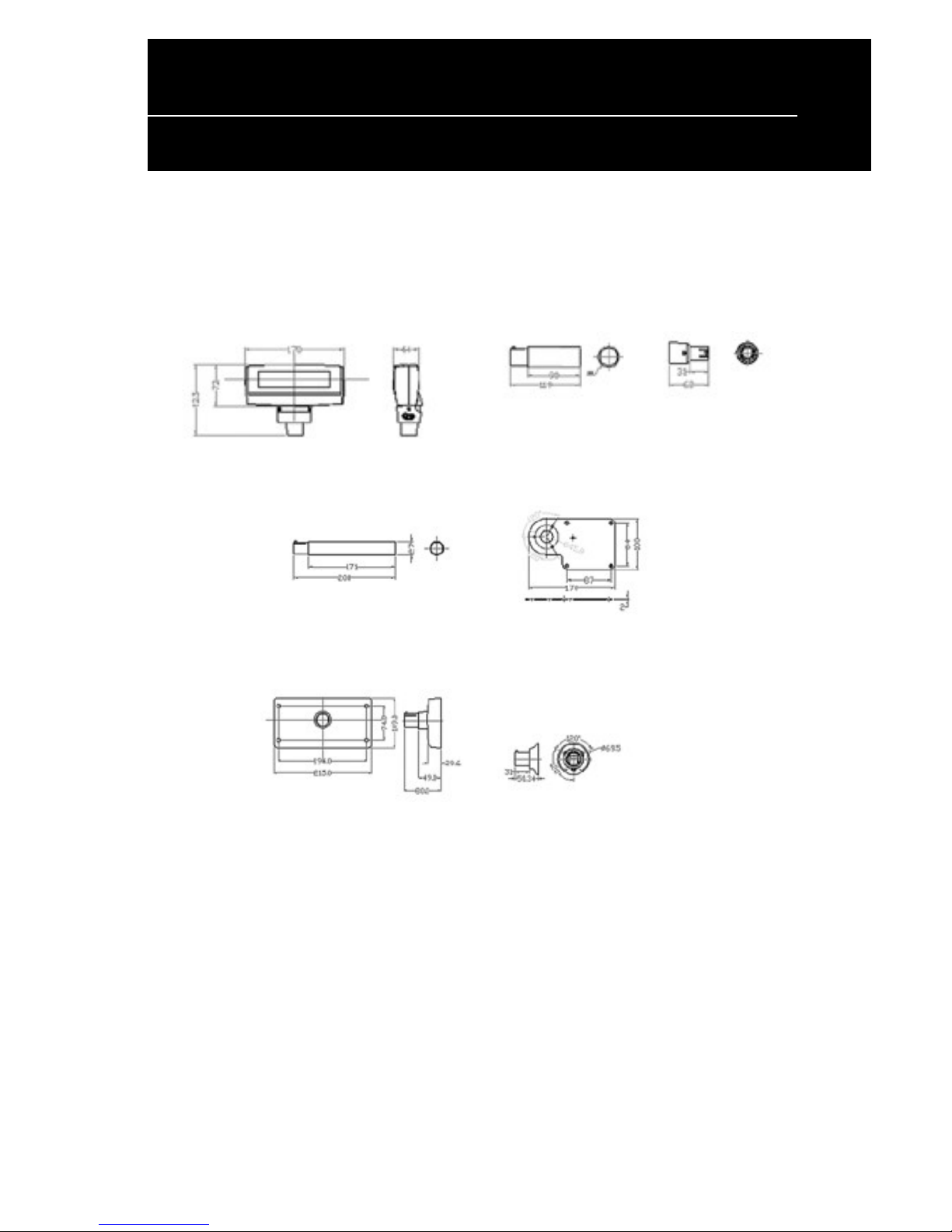
Dimensions
1.WPD-220VF 2. Short Pole 3.WPD-220VF
Converter
4. Long Pole 5. Metal Plate
6. Rectangle Base 7. Circular Base
Page 27
24
WPD-220 VF User’s Manual
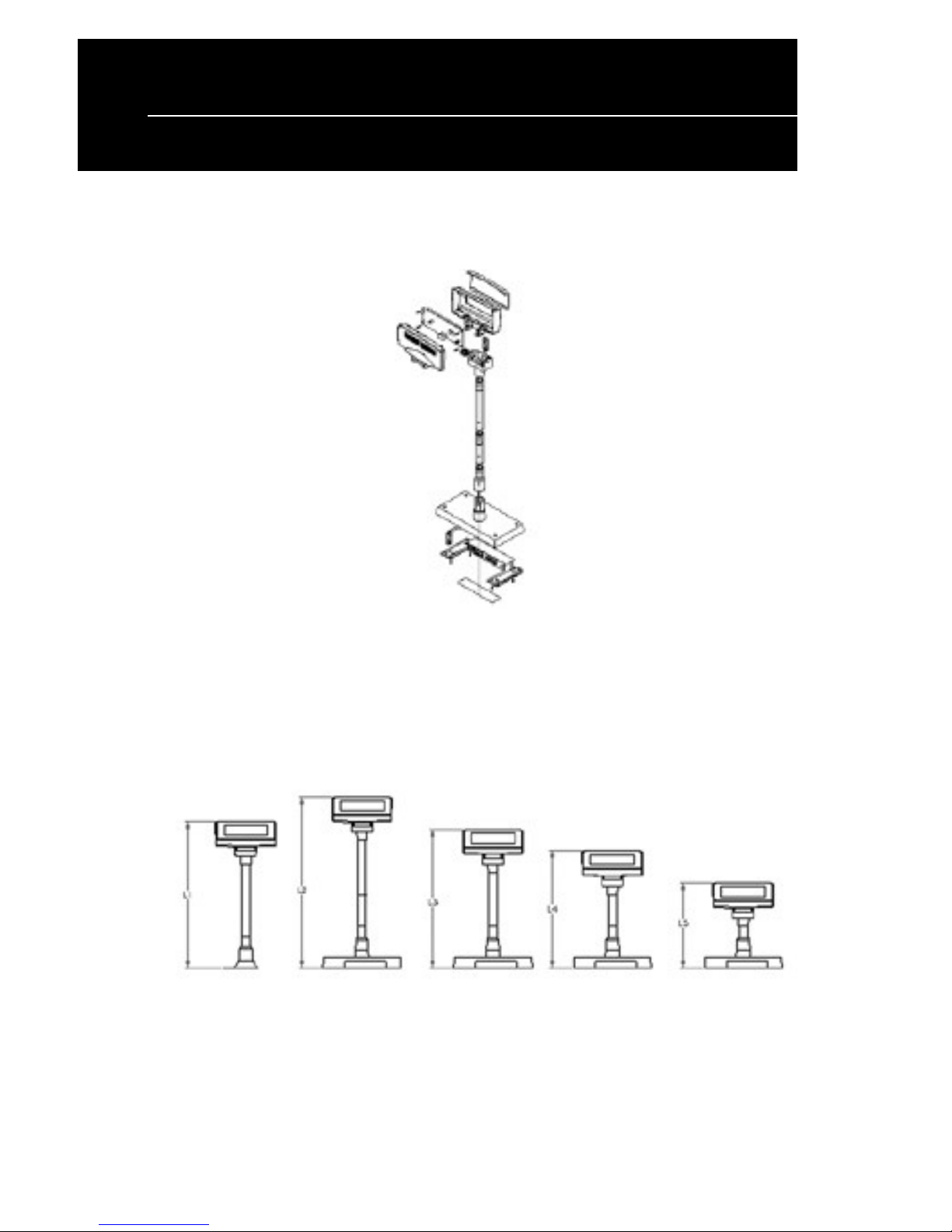
Installation Guide
L1 L2 L3 L4 L5
19.69" 20.87" 17.32" 11.77" 8.23"
 Loading...